The Thing That Breaks and Takes Everything With It
Try memorising 142.250.80.46. Now do it for every site you use: your bank, your email, Netflix, GitHub, that recipe blog you found at one in the morning.
Nobody does that. You type a name, and something translates it into an address. That something is DNS, and it is so deeply assumed that most engineers never think about it until the day it stops.
When it stops, everything stops. In October 2021 Meta was unreachable for about six hours. Not just Facebook: Instagram, WhatsApp, Messenger, all of it, for billions of people.
You will often read that this was a DNS misconfiguration. It was not, and the real story is more useful. A command issued during routine maintenance took down the connections between Meta's data centres. Their DNS servers are built to notice when they have lost data centre connectivity and, when they do, to stop advertising themselves to the internet. That is a deliberate and correct safety behaviour: a server that cannot reach anything behind it should not keep claiming it can serve. So the DNS servers withdrew their own routes, exactly as designed, and the effect was that Meta's authoritative name servers vanished from the internet entirely.
Nothing in DNS malfunctioned. DNS was the symptom everybody saw, three steps downstream of the cause.
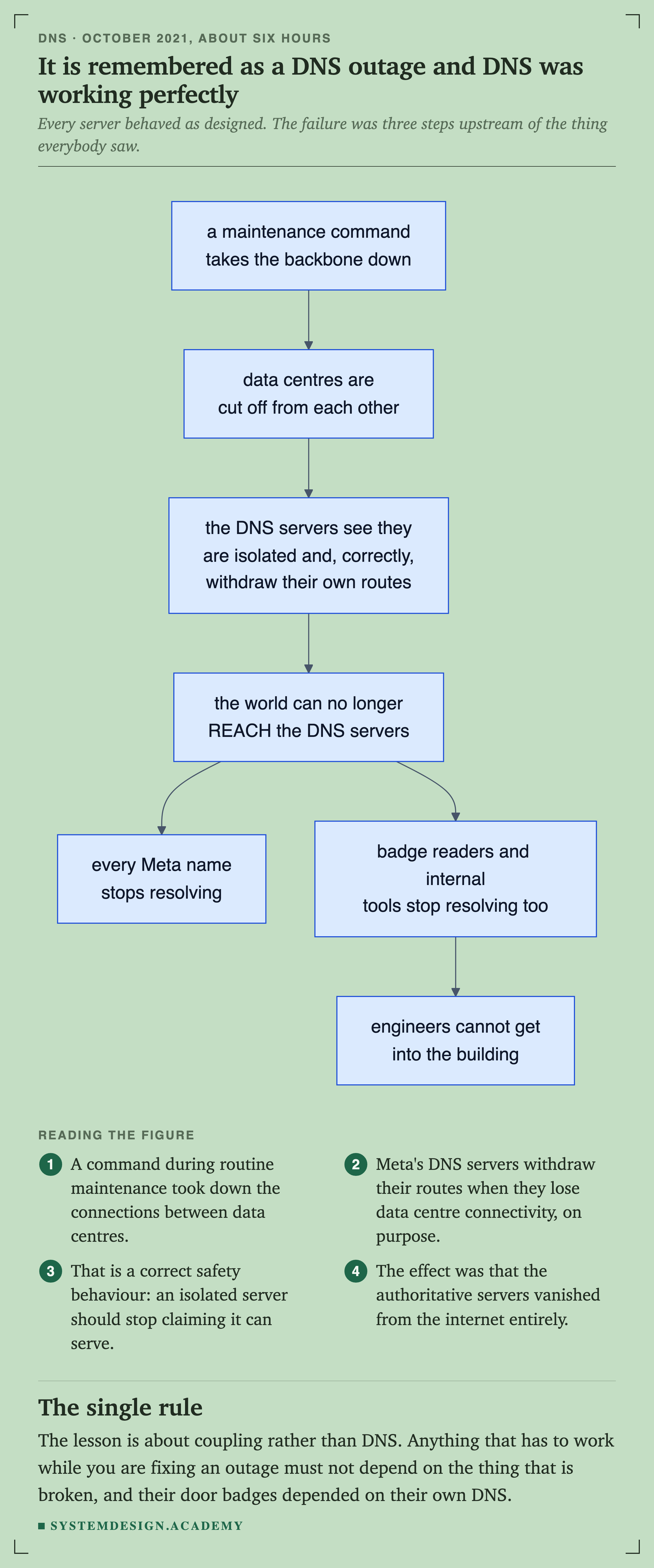
Every box in this chain behaved as designed. The withdrawal in the middle is a safety feature, not a bug: a name server that has lost contact with everything behind it should stop telling the world it can serve.
Read the two branches at the bottom together, because that is where the real lesson is. Anything that has to keep working while you fix an outage must not depend on the thing that is broken, and their door badges depended on their own DNS.
There is a detail from that day worth carrying with you for the rest of your career: the engineers could not get into the buildings, because the badge readers needed name resolution too.
This lesson is longer than most because DNS is one of the few systems you will interact with every single day of your working life, and knowing it properly pays for itself many times over.
What DNS Actually Does
DNS answers one question: what address does this name point to?
When you type github.com, your computer cannot do anything with that string. Network protocols need IP addresses. DNS is the system that turns one into the other.
The comparison to a phone book is the usual one and it is slightly wrong, because a phone book is a single document that somebody prints. DNS is nothing of the sort. There is no list of every domain anywhere in the world, and there never has been.
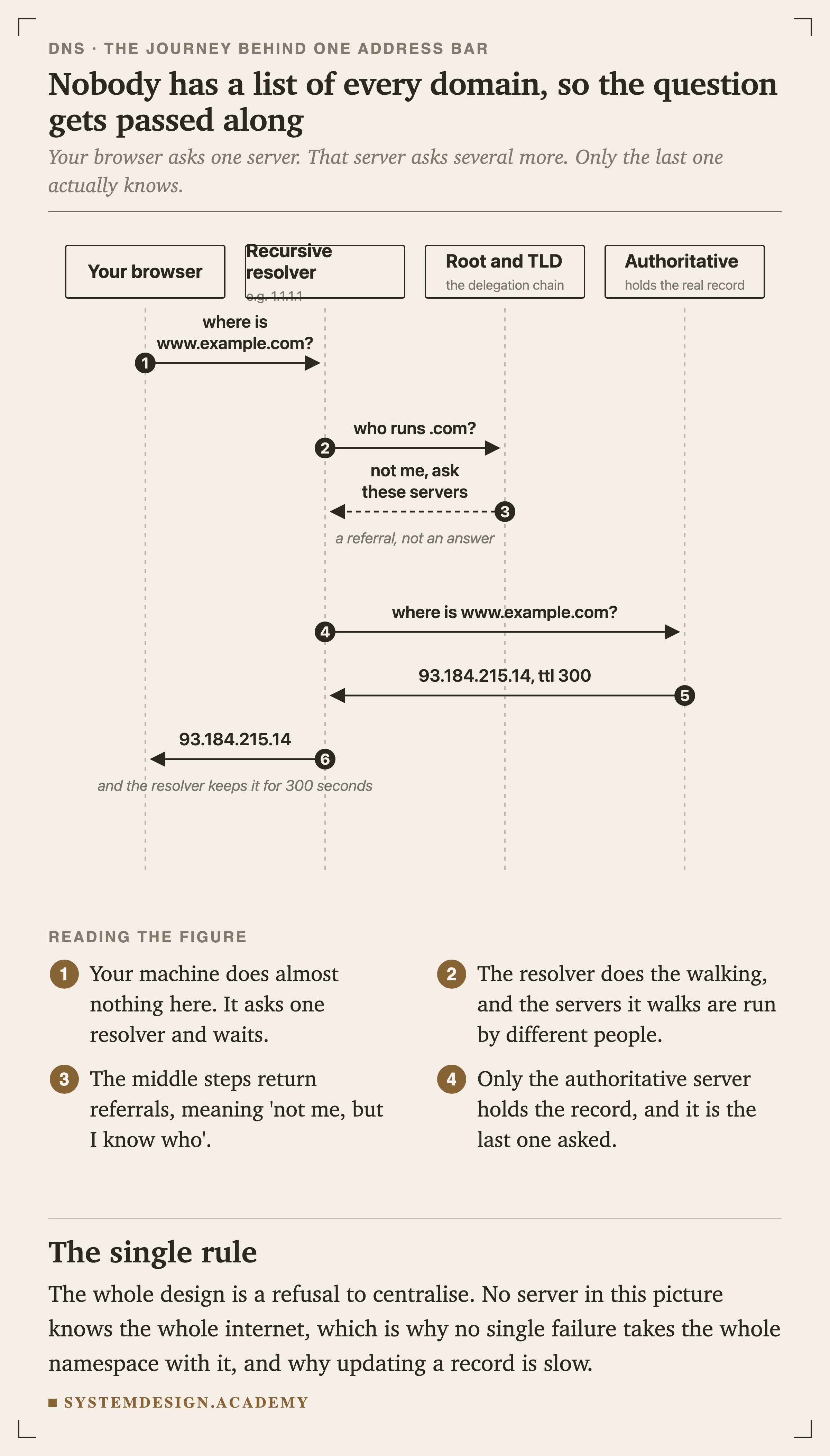
Your machine does almost nothing. It asks one server, the recursive resolver, and waits.
That resolver does the walking, and the servers it walks are operated by completely different organisations. The middle steps return referrals, meaning "not me, but I know who to ask". Only the last server in the chain actually holds the record.
Three properties follow from that picture and they explain almost everything else in this lesson.
DNS is hierarchical and delegated. No server knows the whole namespace, and none needs to.
DNS is cached at every layer. That is what makes it fast, and it is what makes changes slow.
It is a small key-value store attached to a name, and the address is only one of the things in it.
A Domain Name Is a Path, Read Backwards
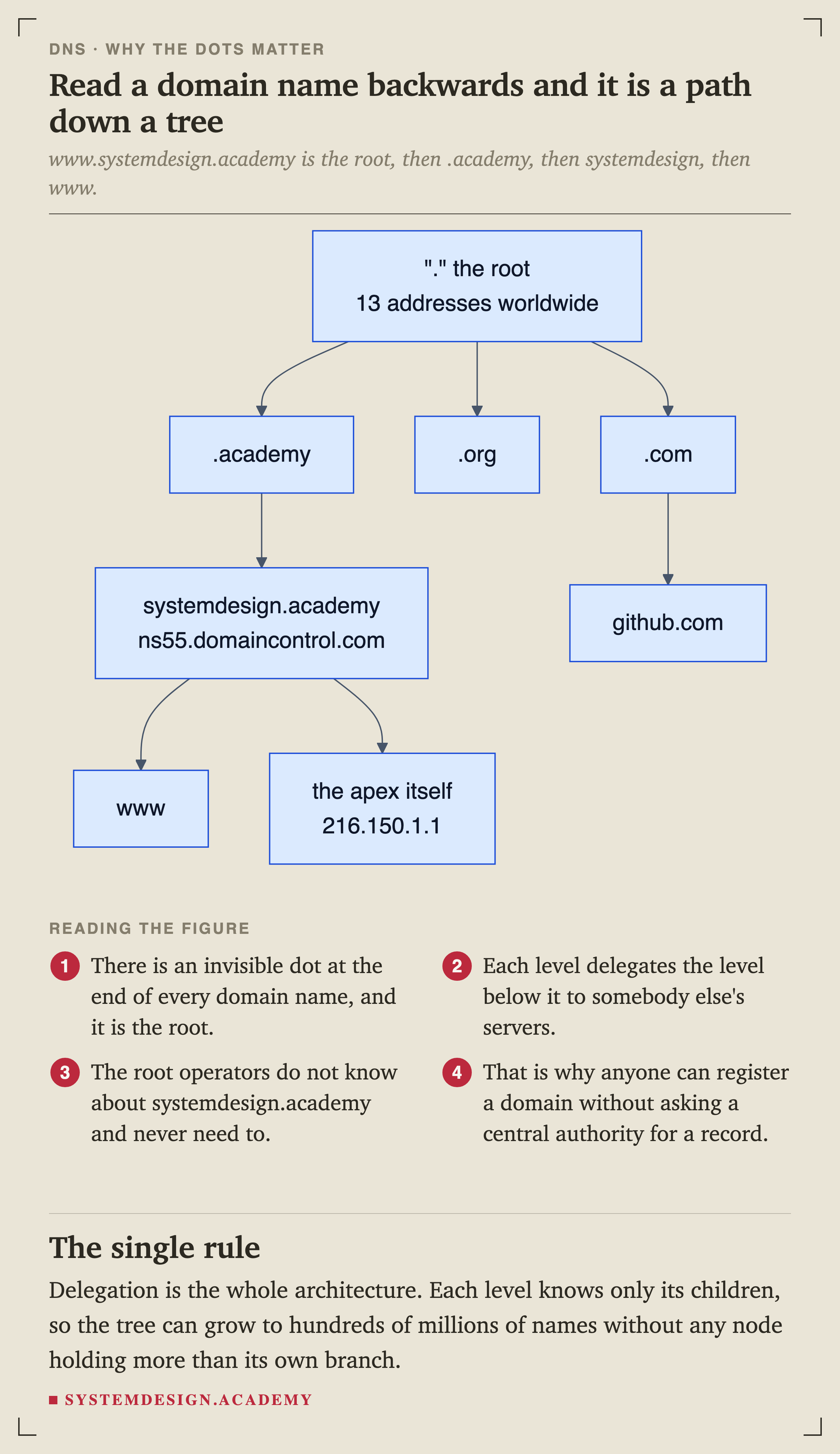
There is an invisible dot at the end of every domain name and it is the root. www.systemdesign.academy is really www.systemdesign.academy., read right to left.
Each level delegates the level below it to somebody else's servers. The root operators have never heard of systemdesign.academy and never need to: they only know who runs .academy.
Delegation is the entire architecture, and it is why anybody can register a domain without a central authority adding a record for them. The registry for .academy adds a delegation, and everything below that name becomes somebody else's problem, permanently.
It is also why DNS survives. There is no single database to corrupt, no single operator to take offline, and no single point where a mistake breaks the whole namespace.
What a Zone Actually Contains
A DNS record is four things: a name, a type, a value, and a . That is the entire data model.
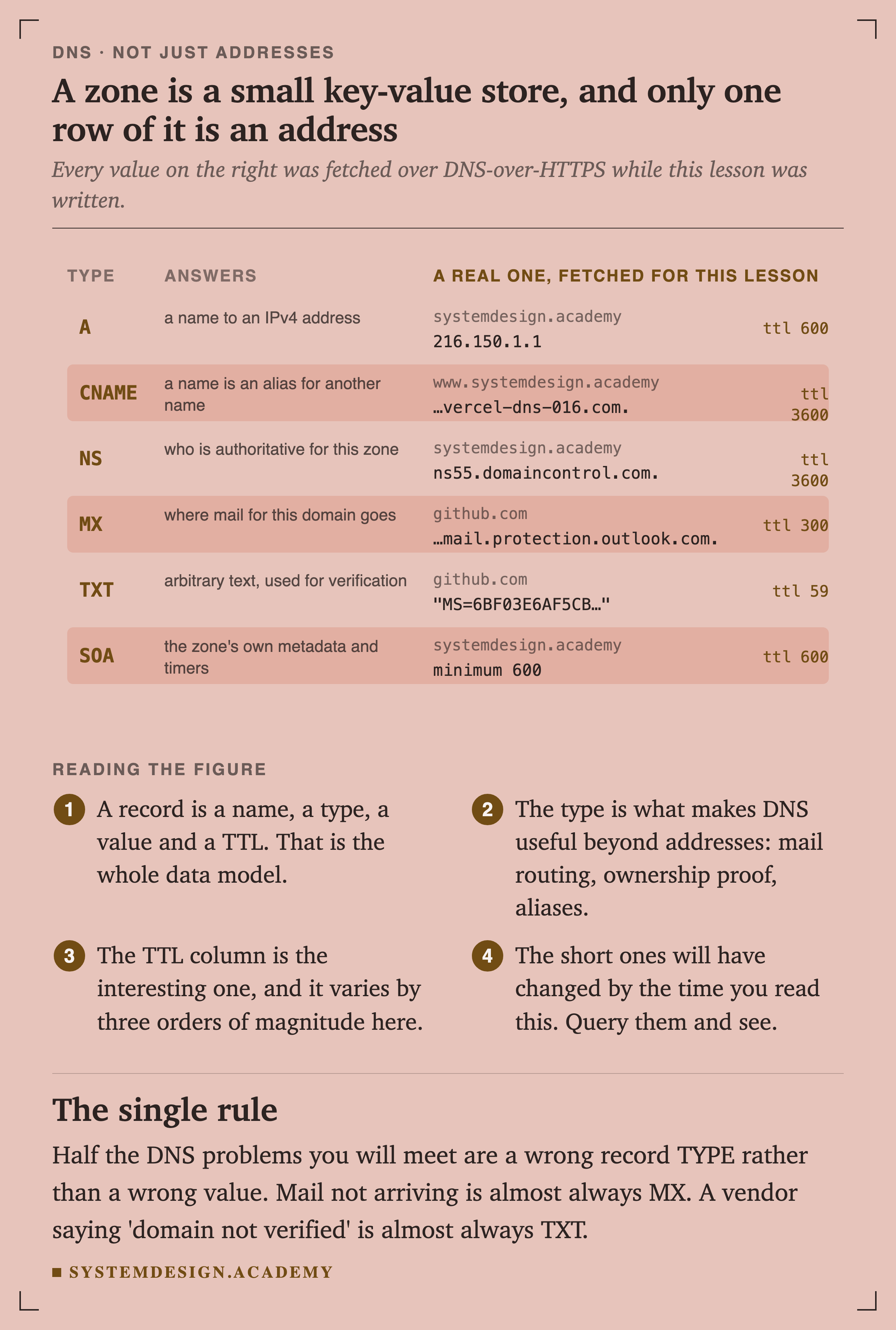
Every value in the right-hand column was fetched over DNS-over- while this lesson was being written, from this course's own domain and from github.com. None of it is invented.
The TTL column is the one worth studying. It varies from 59 seconds to an hour on these six records alone, and the short ones will already have moved by the time you read this. Query them and see.
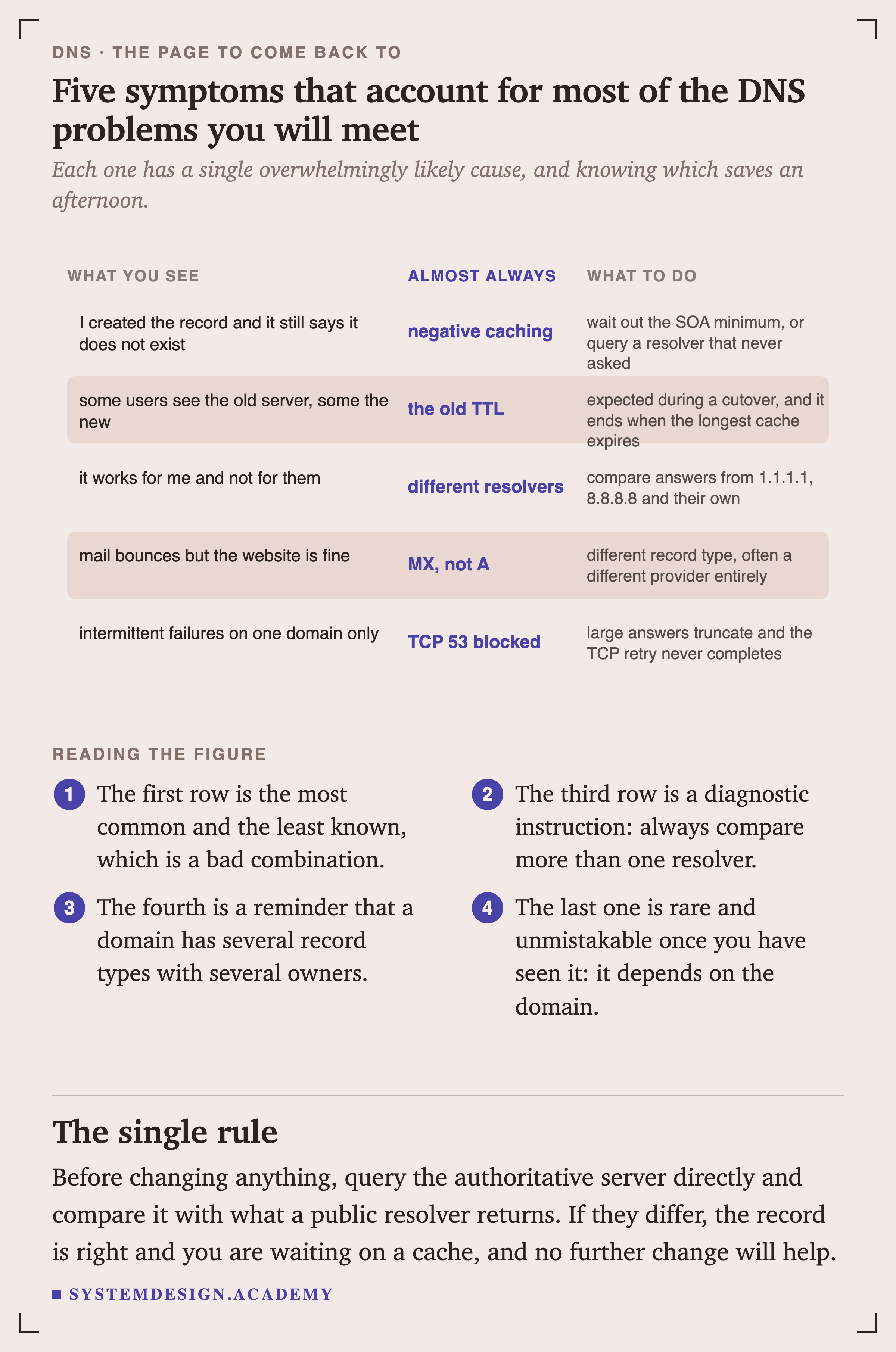
Roughly half the DNS problems you meet in practice are a wrong record type, not a wrong value. Mail not arriving is almost always MX. A vendor telling you the domain is not verified is almost always TXT. The website being fine while mail is broken is not a contradiction, it is two different record types often served by two different providers.
One correction to advice you will still see repeated: dig example.com ANY no longer returns everything. Since RFC 8482 most providers, Cloudflare included, deliberately refuse ANY queries because they were an amplification vector for attacks. Query the types you want, one at a time.
Why It Feels Instant
If every lookup walked the whole chain, every first request to every domain would cost a few hundred milliseconds before anything else could start. It does not, because the answer is cached at every layer between you and the authoritative server.
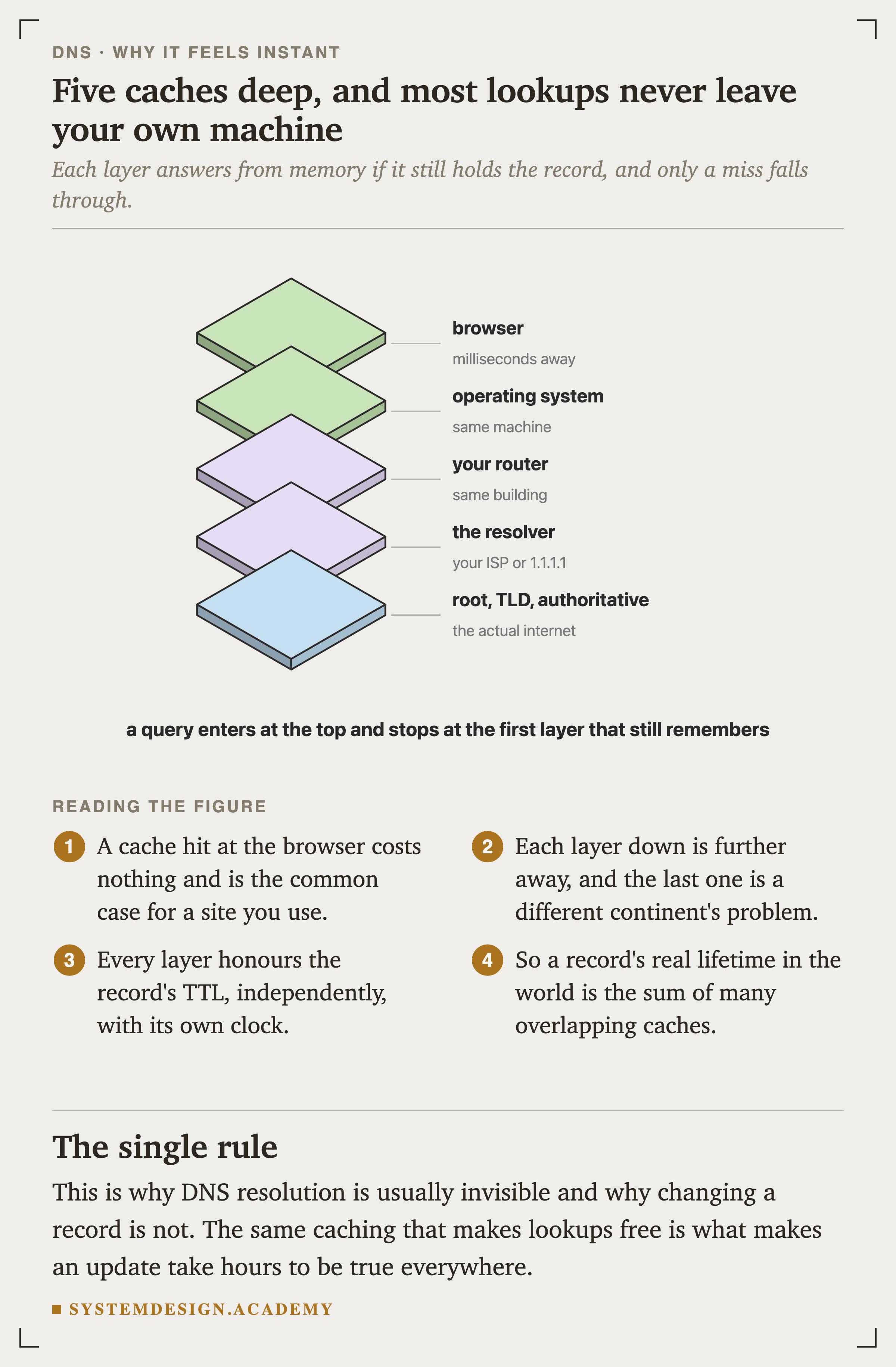
A hit at the browser layer costs nothing at all, and for a site you use regularly that is the normal case.
Every layer down is further away, and the bottom one is somebody else's continent. Each layer honours the independently, on its own clock, which is why a record's real lifetime in the world is longer than its TTL.
On Windows you can list your machine's cache with ipconfig /displaydns. On macOS there is no supported way to print it. sudo dscacheutil -flushcache is the command you will see quoted for this and it clears the cache rather than showing it, which is worth knowing before you run it while debugging.
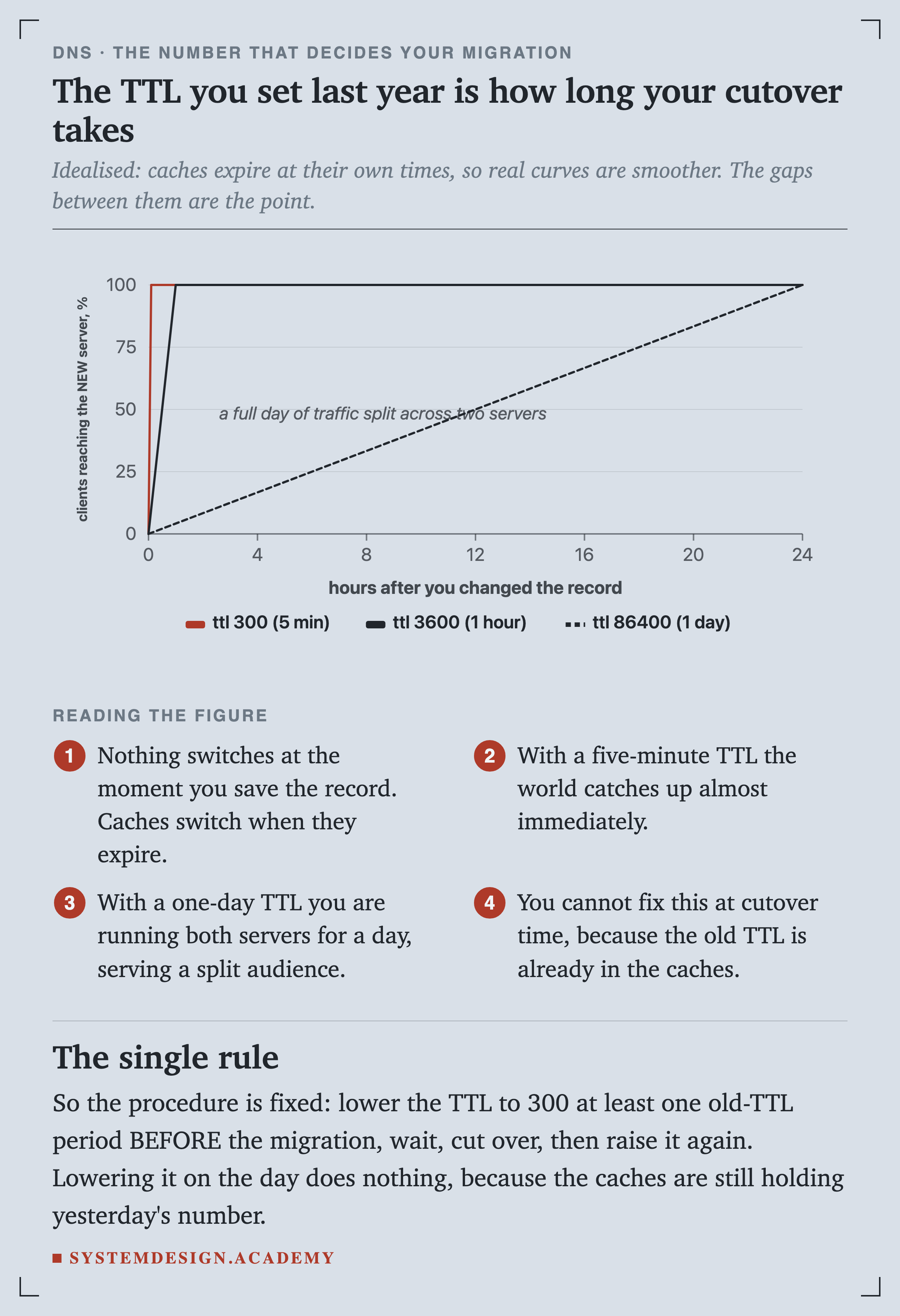
The TTL is the only lever you have
The Rules That Catch Everyone Once
Three things about DNS surprise almost every engineer the first time, and all three cost an afternoon when they do.
You cannot alias your bare domain
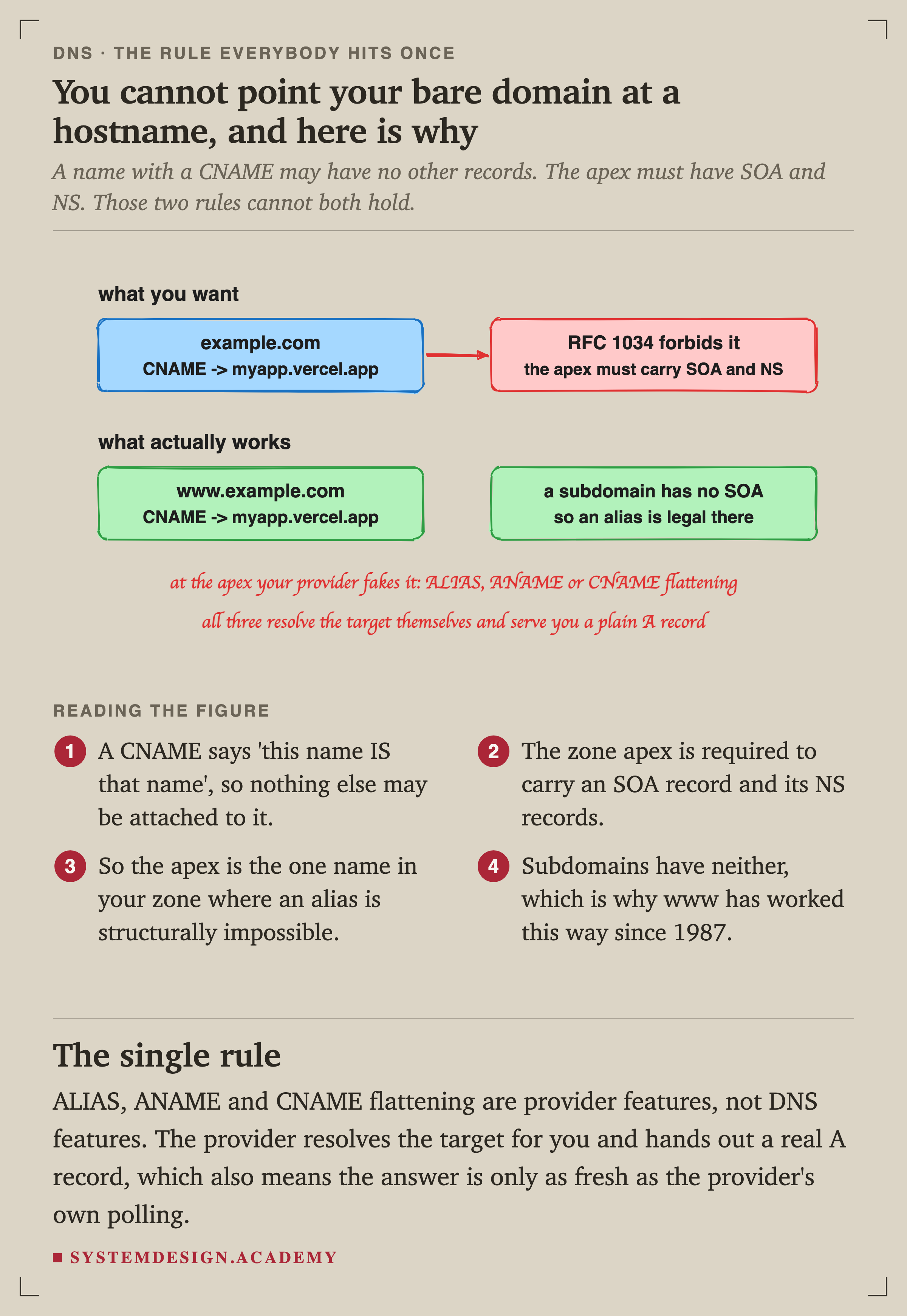
A CNAME says "this name IS that name", so the standard forbids attaching anything else to it. The zone apex is required to carry an SOA record and its NS records. Those two rules cannot both be satisfied at once.
Subdomains have neither requirement, which is why www has worked this way since 1987 and your bare domain has not.
ALIAS, ANAME and CNAME flattening are provider features rather than DNS features. The provider resolves the target on your behalf and hands out an ordinary A record, which also means the answer is only as fresh as the provider's own polling of the target.
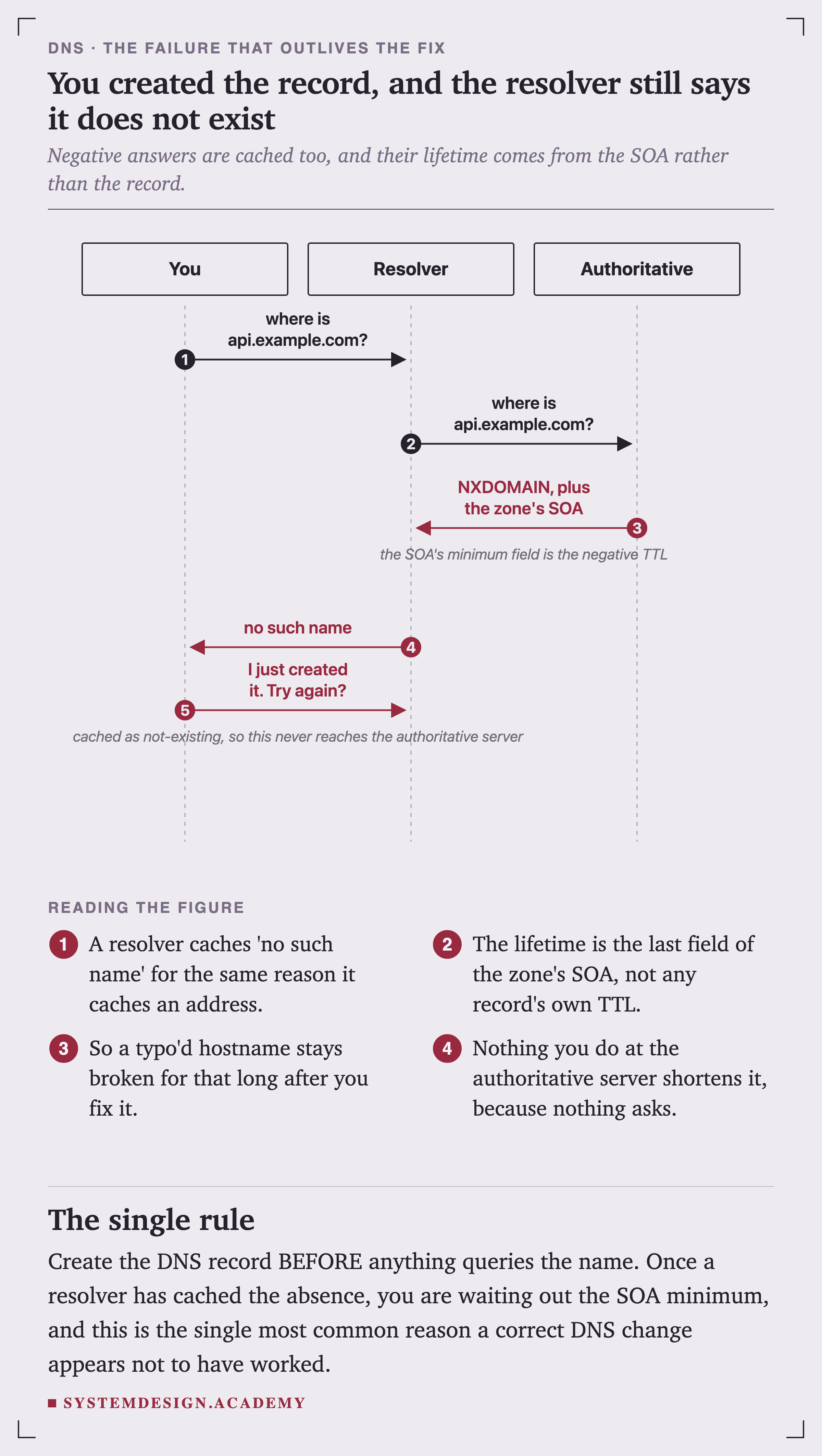
A "does not exist" is cached too
Your Queries Are Not Private, and Not Even Trustworthy
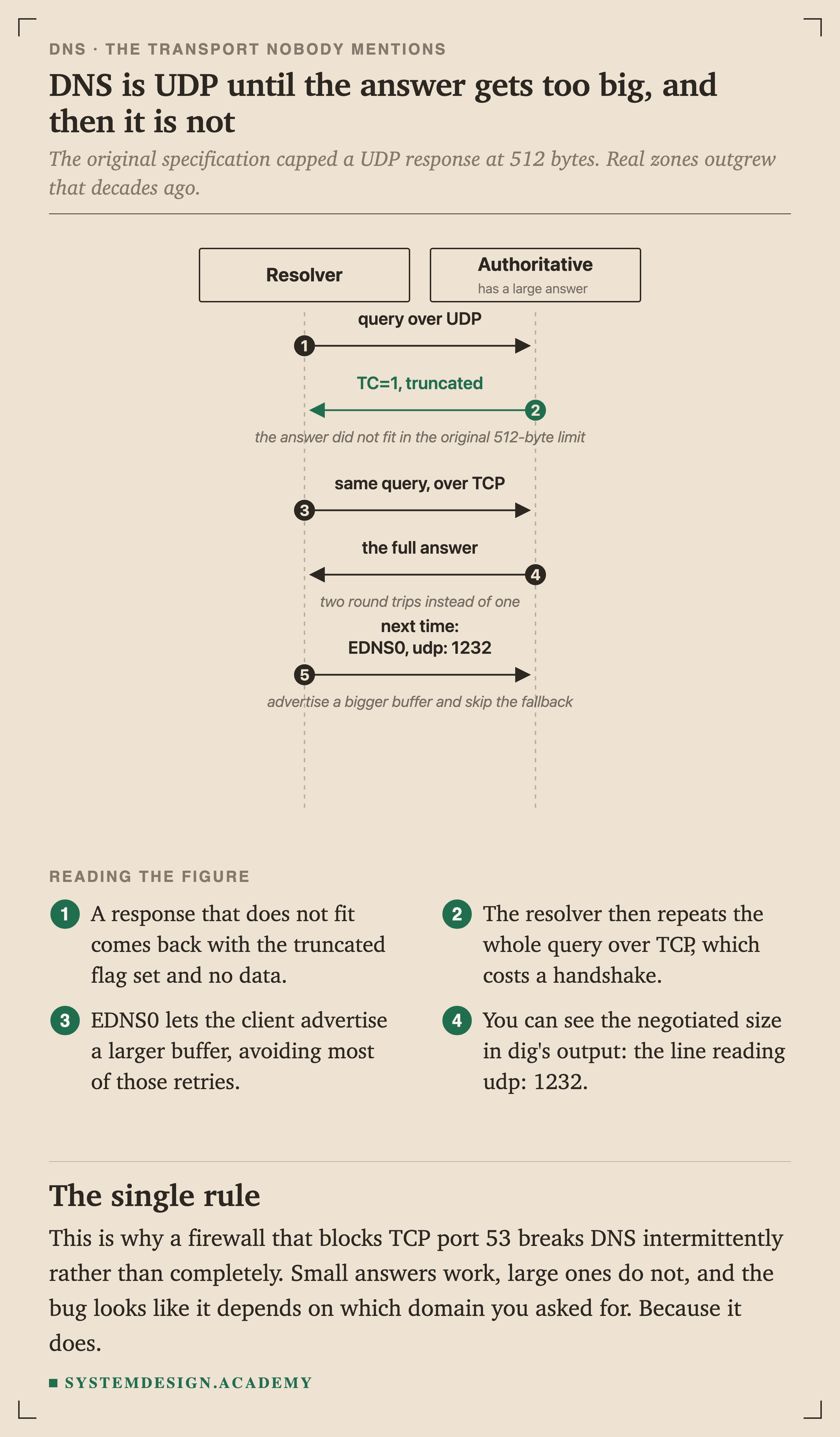
A classic DNS query is unencrypted UDP, sent in the clear, to a server that never proves it is the server you asked.
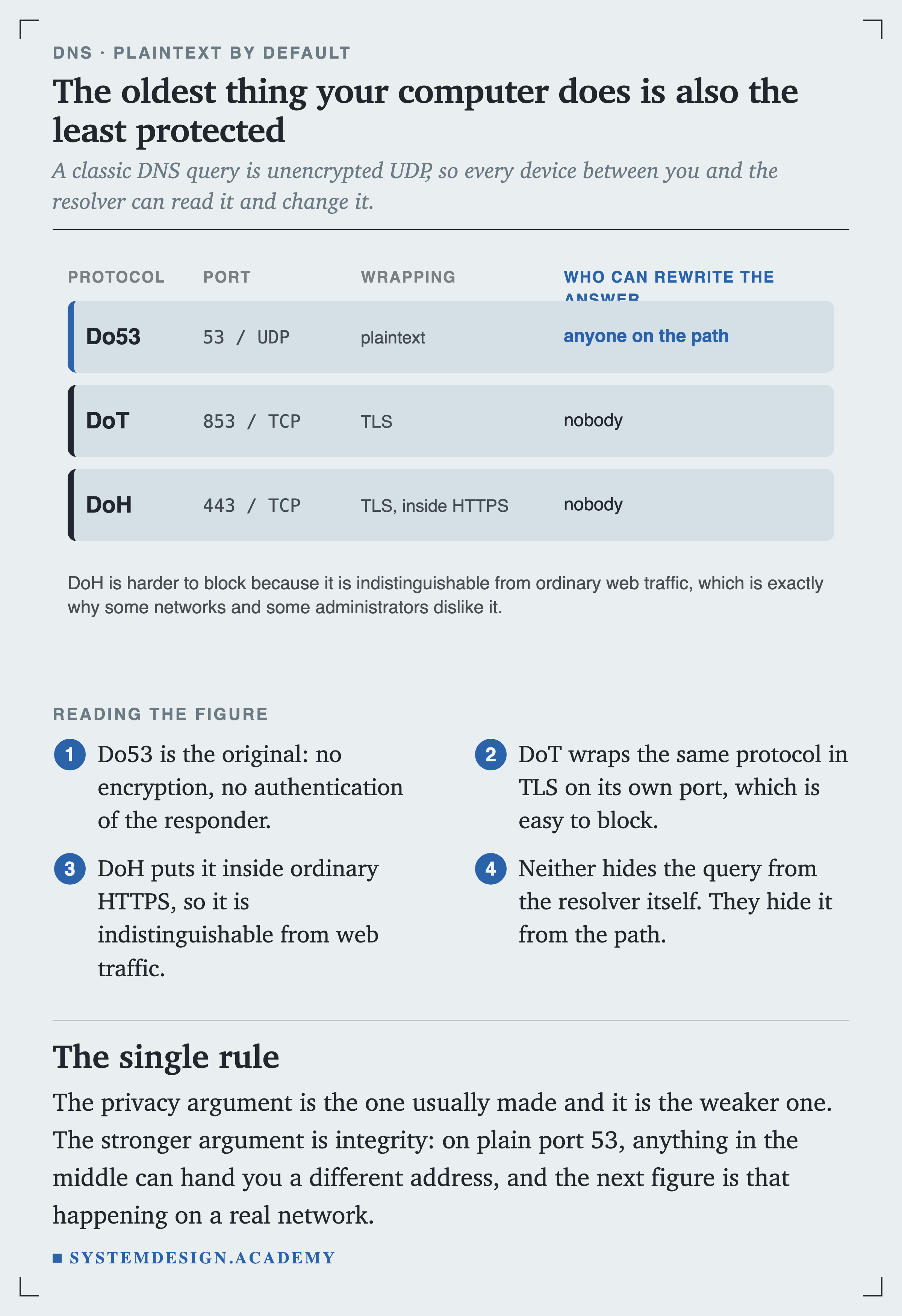
DoT wraps the same protocol in TLS on its own port, which is straightforward for a network to block. DoH puts it inside ordinary , so it looks like any other web request.
Neither hides your query from the resolver you chose. They hide it from everything between you and that resolver.
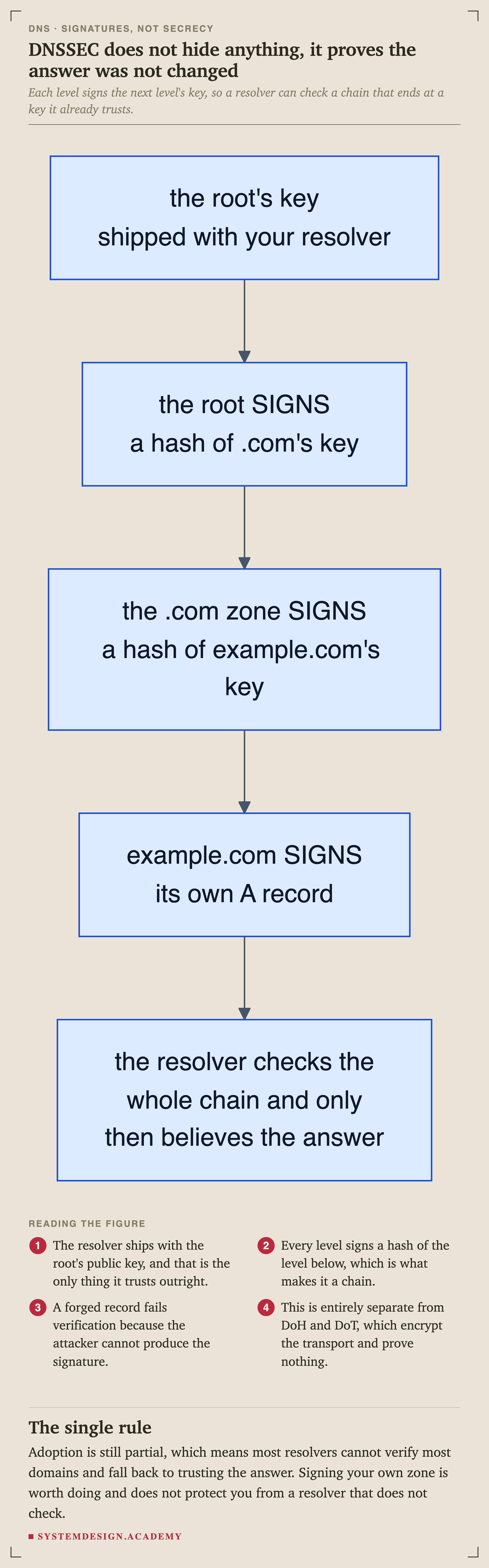
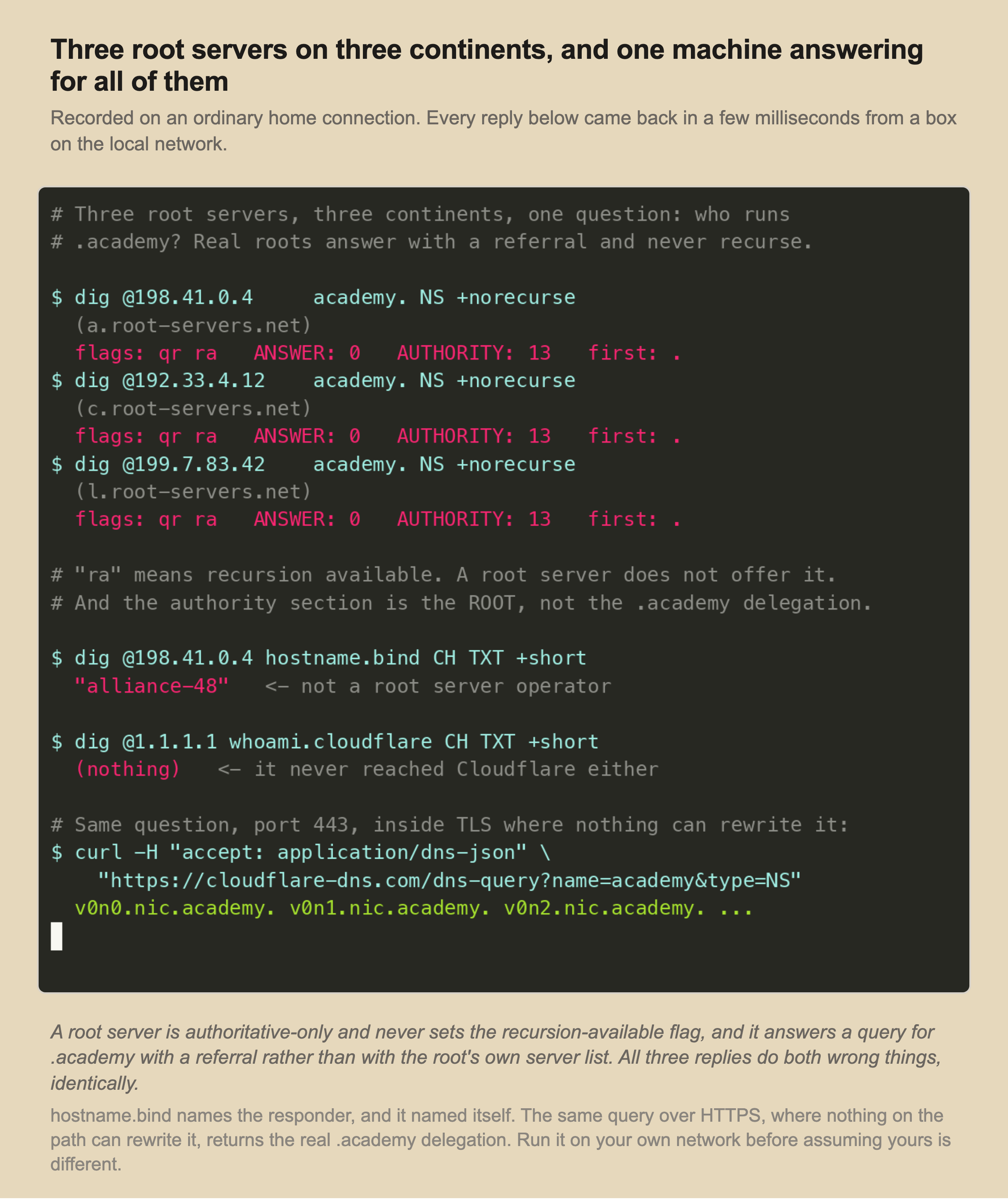
The privacy argument is the one usually made for encrypted DNS, and it is the weaker one. The stronger argument is integrity, and it is easy to demonstrate rather than assert.
One Real Domain, End to End
Everything above becomes concrete very quickly if you resolve a real name and look at what comes back.
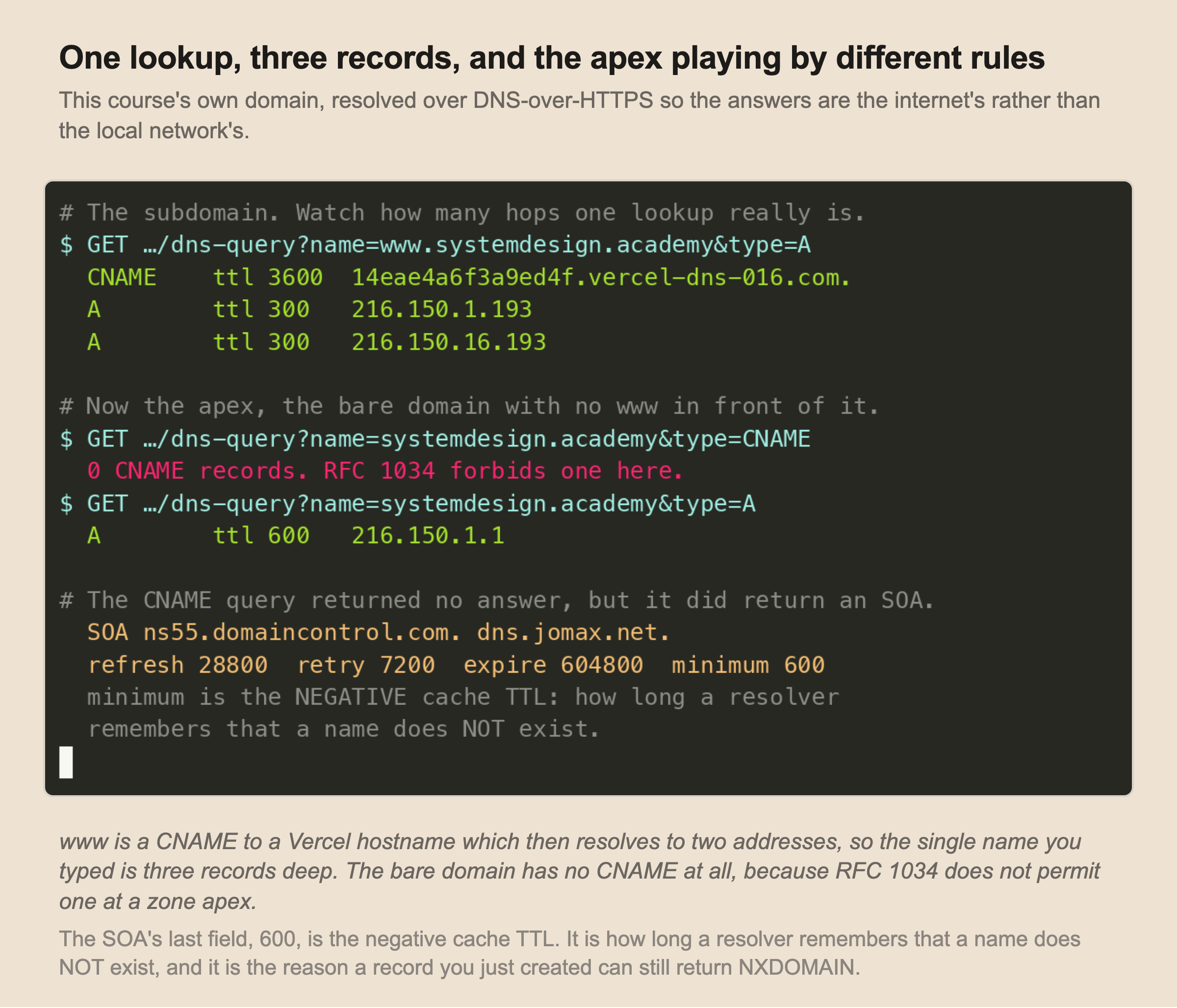
The name you typed is three records deep: www is a CNAME to a Vercel hostname, and that hostname resolves to two addresses. Every one of those is a separate cache entry with its own , and they are different: 3600 on the alias and 300 on the addresses.
The bare domain has no CNAME at all, exactly as the apex rule requires, and carries a plain A record instead.
The SOA in that capture is worth reading field by field, because the last one is the negative cache TTL from the previous slide. Six hundred seconds. That is how long a resolver here will remember that a name under this domain does not exist.
Notice also that these queries went over rather than through dig. That is not a stylistic choice. Given what the previous capture showed about this network, a dig here would have been reporting the middlebox's opinion.
DNS as Infrastructure, Not Just Lookup
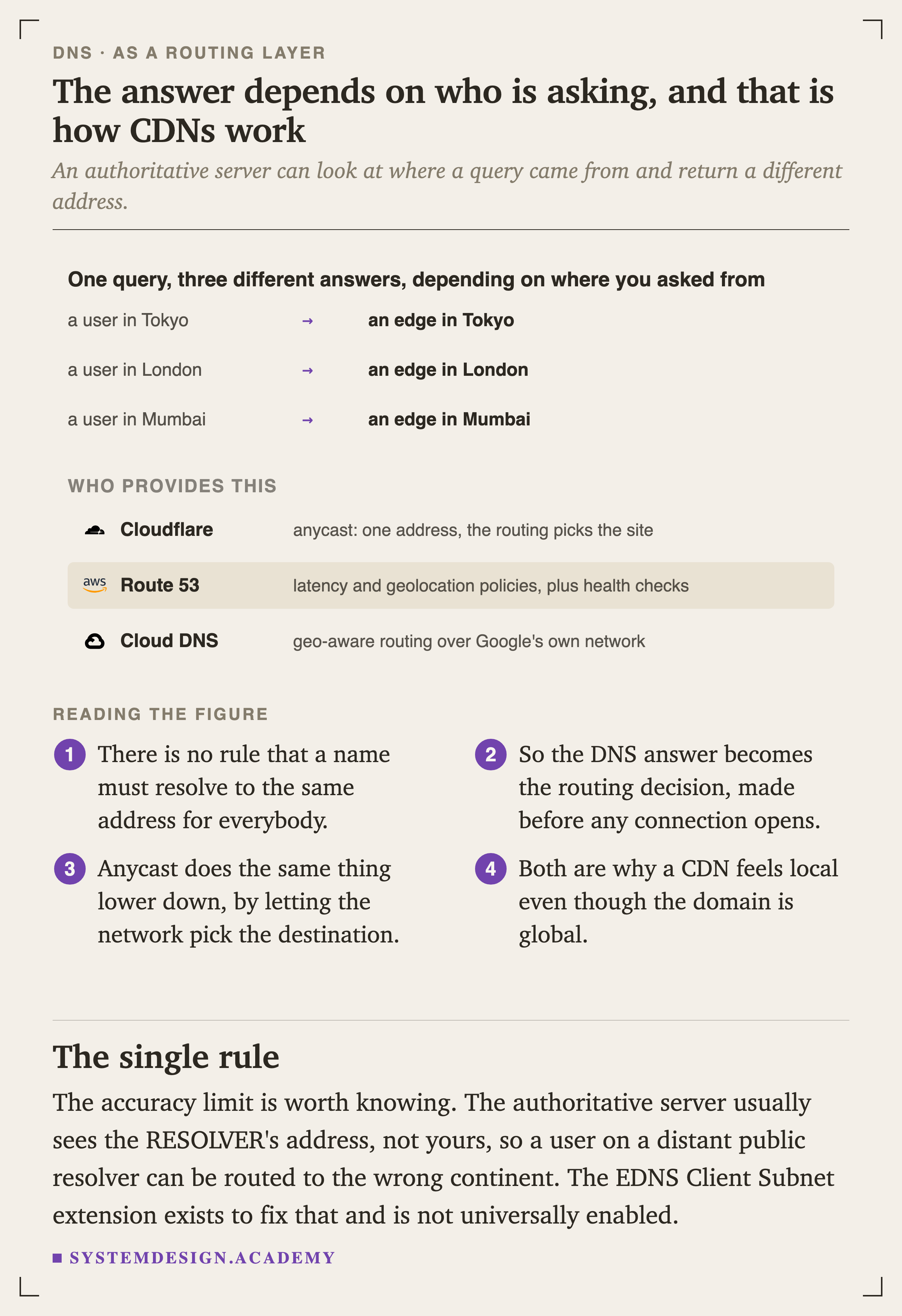
Once you stop thinking of DNS as a phone book, it becomes something more interesting: the first routing decision in every connection, made before a single packet reaches your servers.
Thirteen addresses, far more than thirteen servers
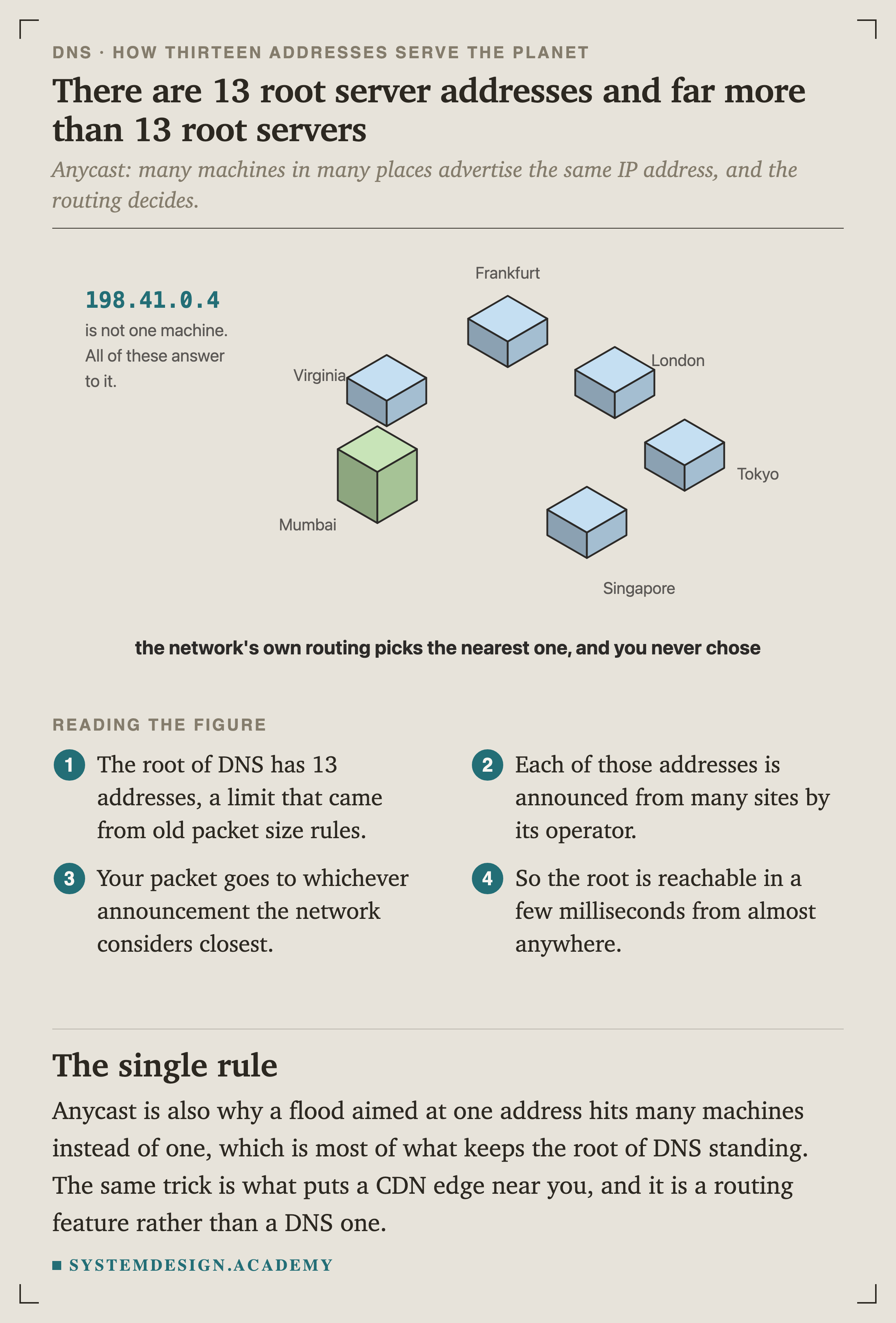
The root of DNS has thirteen addresses, a number that came from old packet size limits rather than from thirteen machines existing. Each of those addresses is announced from many sites around the world by its operator.
Your packet goes to whichever announcement the network considers closest, and you never made that choice.
This is anycast, and it is a routing feature rather than a DNS one. It is also most of what keeps the root of DNS standing under attack: a flood aimed at one address arrives at many machines instead of one.
The same name, a different answer
Where DNS Stops Being the Answer
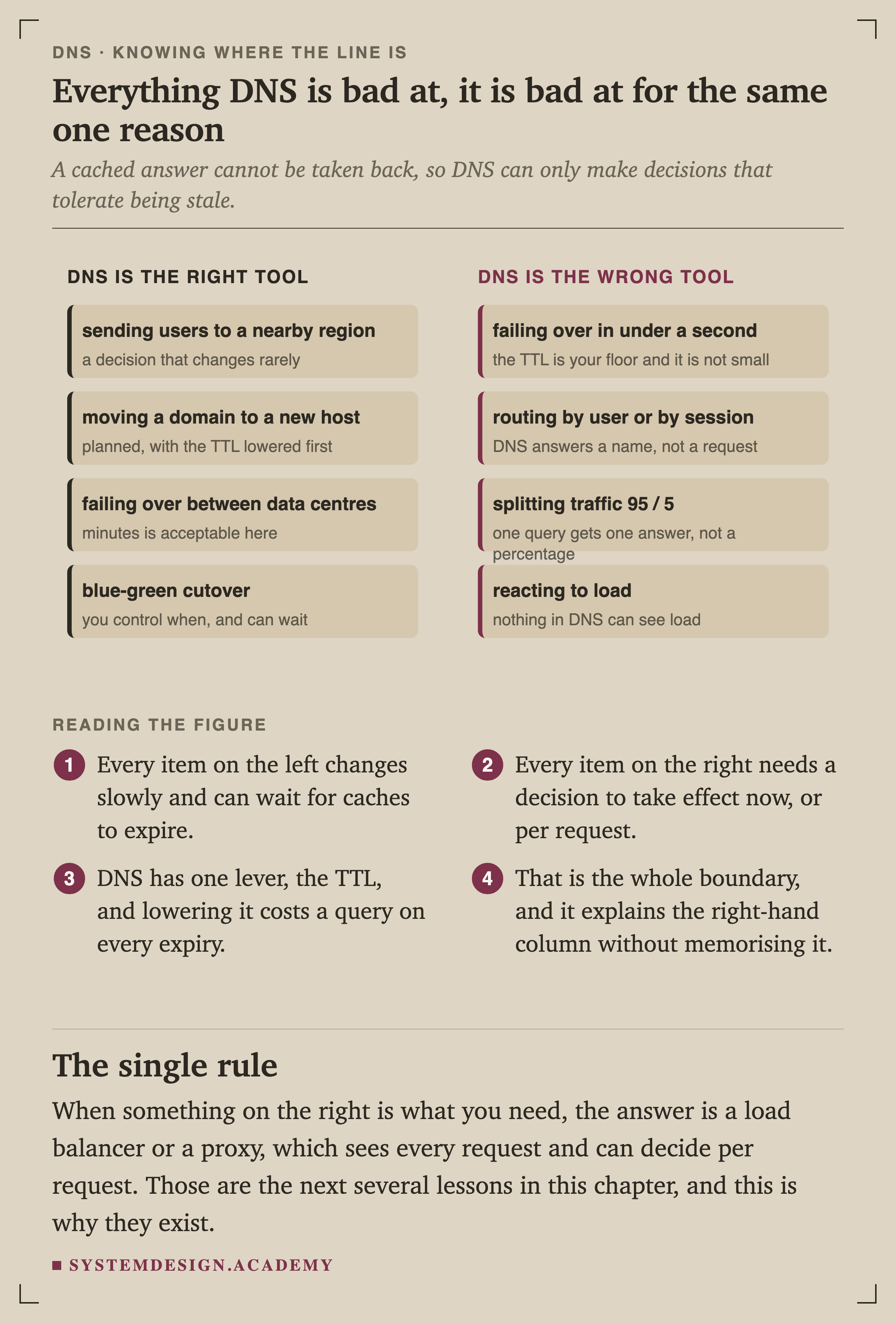
Every item on the left changes slowly and can wait for caches to expire. Every item on the right needs a decision to take effect now, or to differ per request.
DNS has exactly one lever, the , and a cached answer cannot be taken back.
You do not have to memorise those two lists. Derive them from one sentence: DNS can only make decisions that tolerate being stale.
When you need something from the right-hand column, the answer is a or a proxy, which sees every individual request and can decide per request. Those are the next several lessons in this chapter, and this is precisely why they exist.
The other failure mode
The Two Procedures Worth Memorising
Changing where a domain points
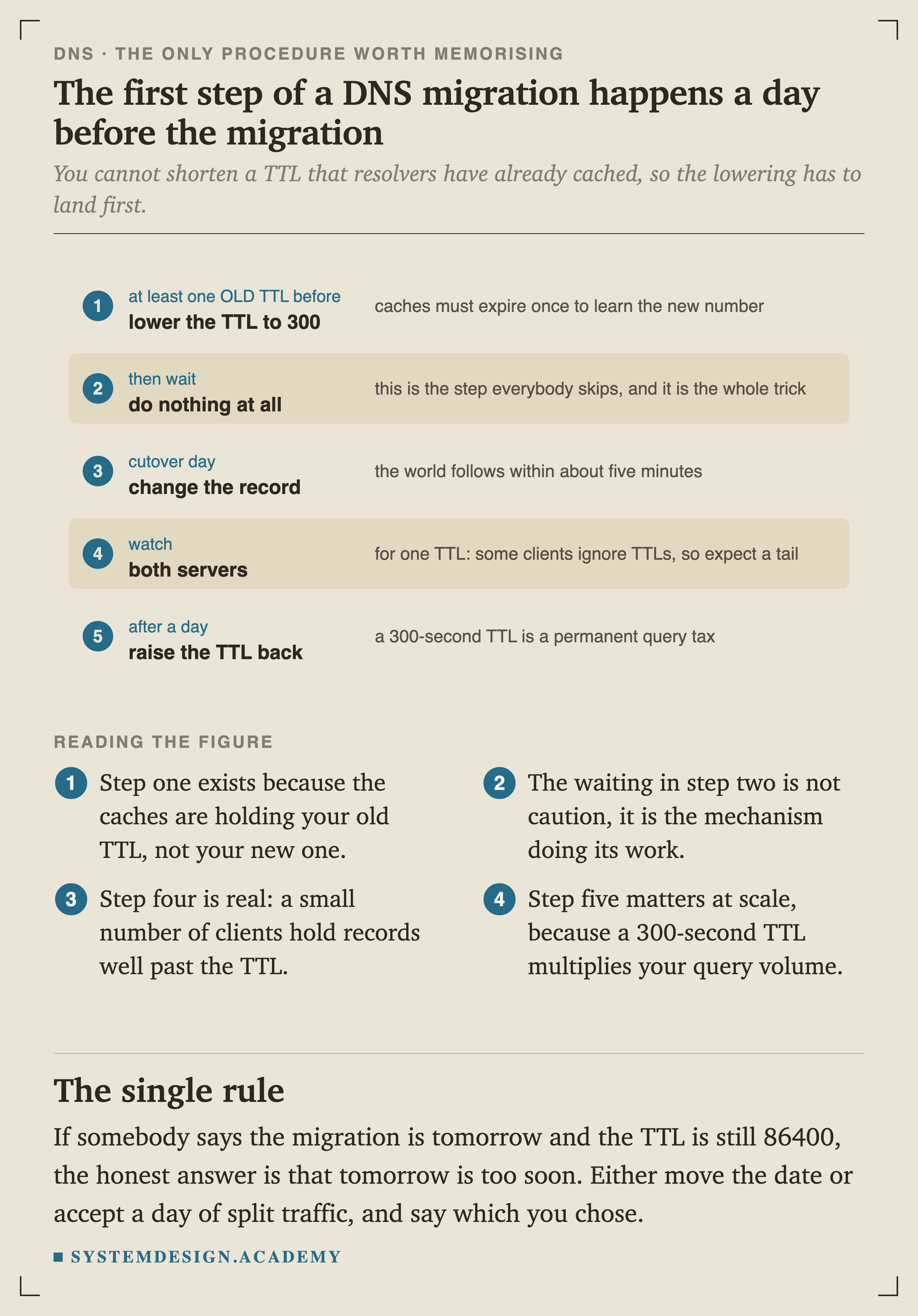
Step one exists because resolvers are holding your old rather than your new one. Step two is not caution, it is the mechanism doing its work.
Step four is real: a small number of clients hold records well past their stated TTL, so plan for a tail rather than a clean switch.
If somebody tells you the migration is tomorrow and the TTL is still 86400, the honest answer is that tomorrow is too soon. Either move the date or accept a day of split traffic, and say out loud which one you chose.
Working out what broke
What DNS Costs You on Every First Visit
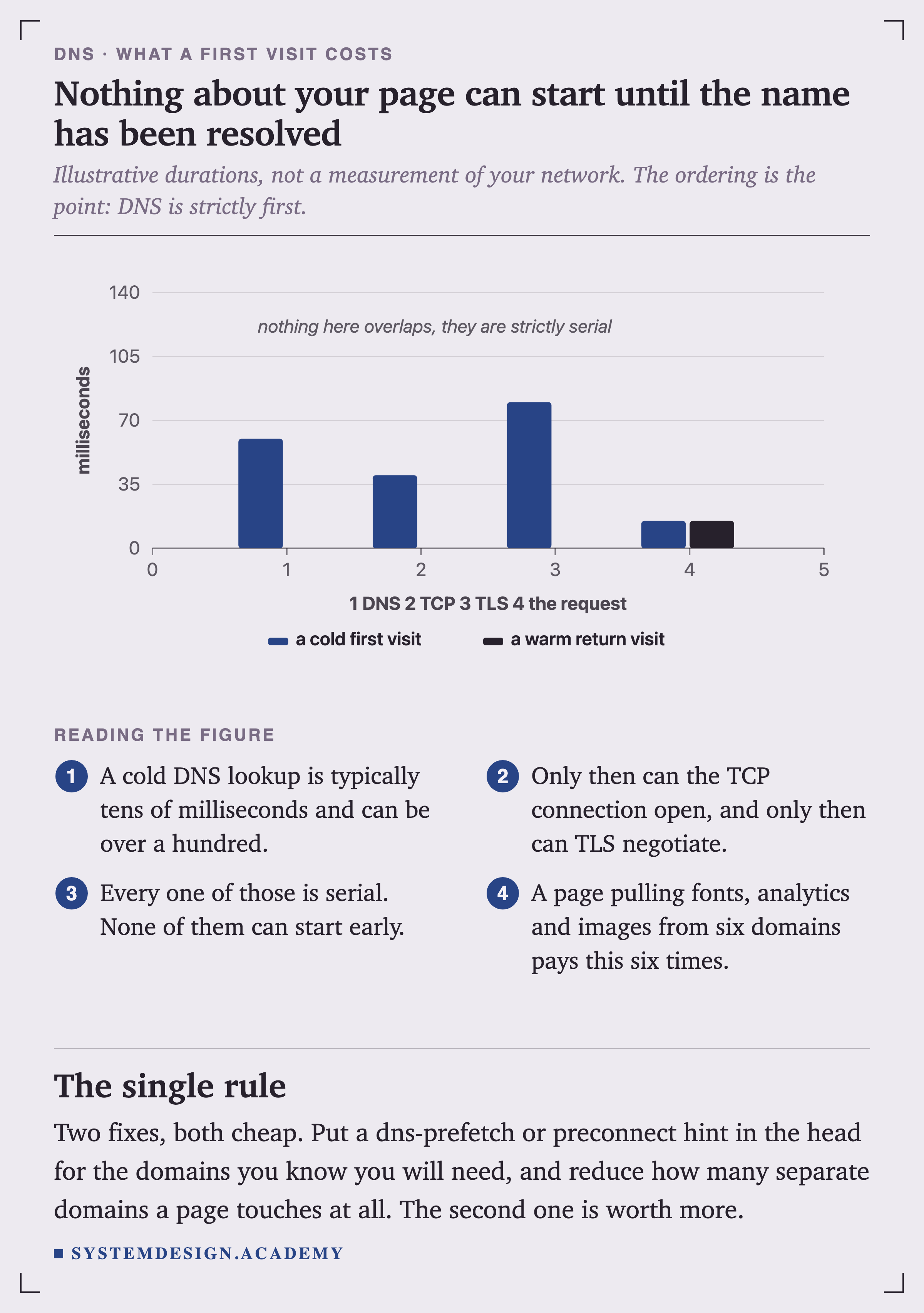
Illustrative durations rather than a measurement of your network, but the ordering is exact. A cold DNS lookup has to complete before can open, and TCP has to complete before TLS can negotiate.
None of these can start early, and a page pulling fonts, analytics and images from six different domains pays this cost six times.
There are two fixes and they are not equal. A dns-prefetch or preconnect hint in your page head resolves a domain before the browser needs it, which helps. Reducing how many separate domains your page touches at all helps considerably more, and also fixes several other problems at the same time.
Which resolver
For years most people used whatever their ISP handed them, which was often slow and often logging. Cloudflare's 1.1.1.1 and Google's 8.8.8.8 are the two well-known public alternatives, both consistently faster than a typical ISP resolver in published measurements. Treat any specific millisecond figure you read about them with suspicion, including in their own marketing: resolver depends heavily on where you are and how your traffic is routed, and the honest way to know is to measure from where your users actually are.
Quick Check
Knowledge Check
6 questions - Score 80% to pass
Your browser needs to visit github.com for the first time. What does DNS do?
You create a new A record for api.example.com. A colleague had already tried the name five minutes earlier and got an error. They still get 'does not exist' twenty minutes later, even though the record is definitely there. What is happening?
You want your bare domain example.com to point at myapp.vercel.app. Your DNS provider rejects the CNAME. Why?
In the 2021 Meta outage, what actually failed?
You need to fail over to a standby region within two seconds of a health check failing. Is DNS the right mechanism?
You run 'dig @198.41.0.4 example.com' and the reply has the 'ra' flag set. Why is that suspicious?