Three Clerks, Three Notebooks
Let me go back to the library from the last lesson. The visitor counted the card catalogue, not the shelf, and always got a true number. Now picture three libraries. Each one has a shelf of the same newspapers, and each one keeps its catalogue in a different way.

The first clerk keeps a diary. Every time a bundle is added or taken away, she writes one new page. Every so often she writes a summary page that says "here is everything on the shelf right now", so nobody has to read the diary from page one.
The second clerk keeps a card at the front desk. The card names the newest index booklet. The booklet lists a few drawer lists, and each drawer list names the bundles in it, with a note about what is inside each one.
The third clerk keeps a board on the wall. Every job gets a card, stamped "asked", then "working", then "done". Only jobs stamped "done" count.
In this lesson, the diary is Delta Lake, the front-desk card and its booklets are Apache Iceberg, and the board is Apache Hudi. All three make the same promise. So what does each one actually write down?
Where This Lesson Starts
This is lesson 2 of the data engineering chapter. In lesson 1, lakehouse architecture, I showed why a table cannot be just a folder of Parquet files. A reader that lists the folder saw half-written tables. A reader that followed a small log next to the files never did. That lesson explains what a log is, what a commit is, and why one new log file makes a change happen all at once. I will not explain those again here.
Lesson 1 used one kind of log, Delta Lake's, and looked only at whether readers saw whole versions. This lesson asks a different question, and measures it. Delta Lake, Apache Iceberg and Hudi: what is actually in the metadata?
I wrote the same taxi trips into all three formats. Then I opened every metadata file each one created, file by file, and wrote down what it records. I went back to old versions in each format. I asked each one to plan a small query and counted the files it opened. Then I made a lot of tiny commits to see what piles up, and cleaned them up.
Before any of that, I need two plain words. What is metadata, and what is a table format?
Two Words First: Metadata and Table Format
Look at a single Parquet file of taxi trips. The trips themselves are the data. But the file also needs a few facts about itself: how many rows it holds, which columns, the smallest and largest pickup time. Facts like that, which describe the data rather than being the data, are called metadata, data about the data.
In lesson 1, the log was metadata. It said which files make up the table. The data files did not change at all when the log changed.
Now imagine three teams who each need such a log. Each team must decide: what goes in one entry, what file format the entries use, how a reader finds the newest one, and when old entries can go. A written set of those rules is called a table format, the rules for a table's metadata. Delta Lake, Apache Iceberg and Apache Hudi are three table formats.
All three keep the actual rows in ordinary Parquet files. So the differences in this lesson are not about the rows. They are only about the metadata beside them. To compare them fairly, I need one table, written the same way into all three. How did I set that up?
The Test: The Same Trips in All Three
I used the same real data as lesson 1: New York City yellow taxi trips from the city's Taxi and Limousine Commission. This time I used three months. January 2025 has 3,475,226 trips, February 3,577,543 and March 4,145,257. Together that is 3,475,226 + 3,577,543 + 4,145,257 = 11,198,026 trips.
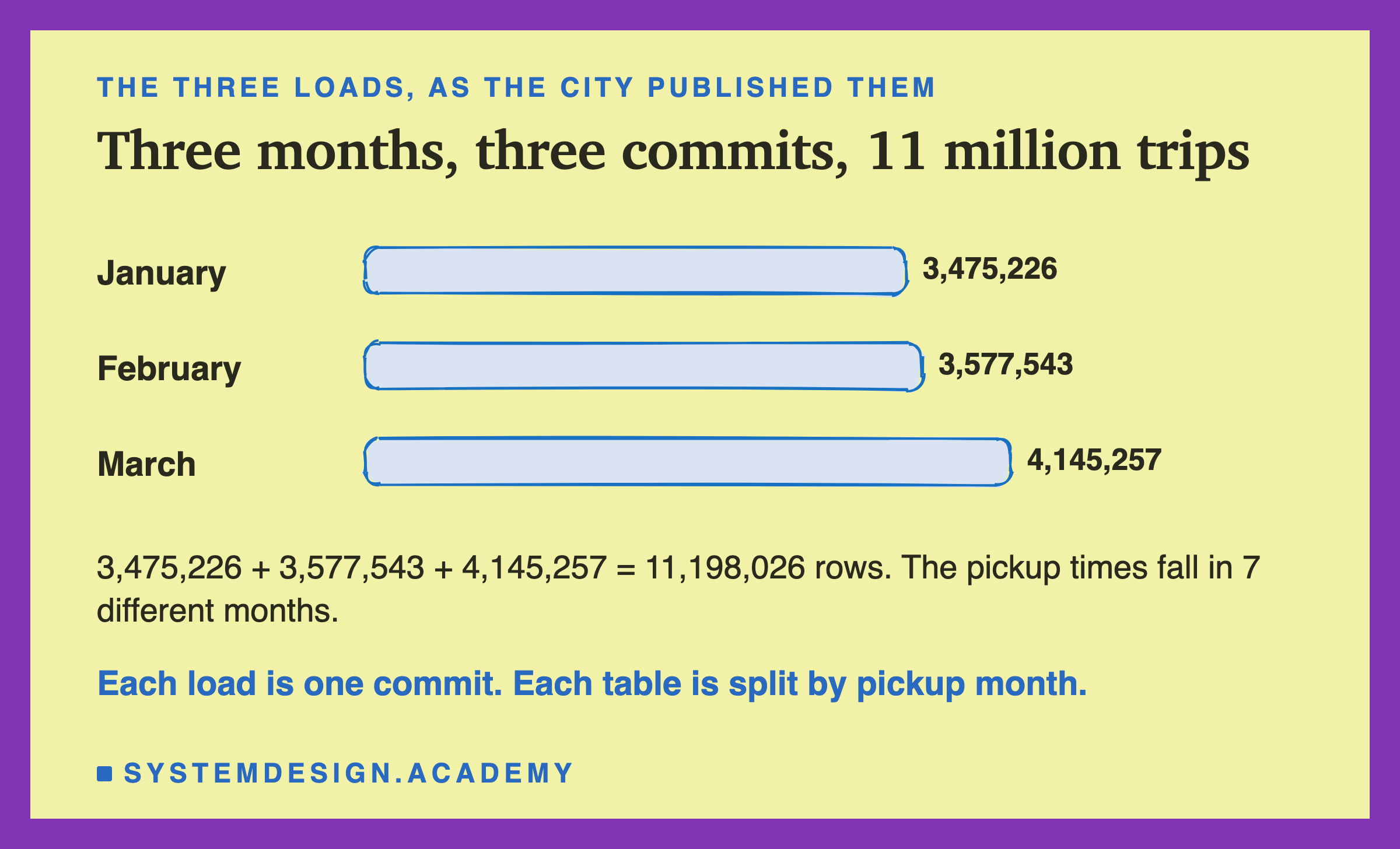
Each month went in as one commit, so each table has three versions. I also split each table by the month of the pickup time. Splitting a table into folders by a column's value, so a query can skip whole folders, is called a partition. A question about February then only needs the February folder.
One surprise came from the data itself. The three files are meant to hold three months, but their pickup times fall in 7 different months. January's file has 21 trips picked up on 31 December 2024. March's file has one trip from 5 December 2007 and one from 1 January 2009, clearly wrong clocks. I kept them, because real tables have rows like that, and they matter later.
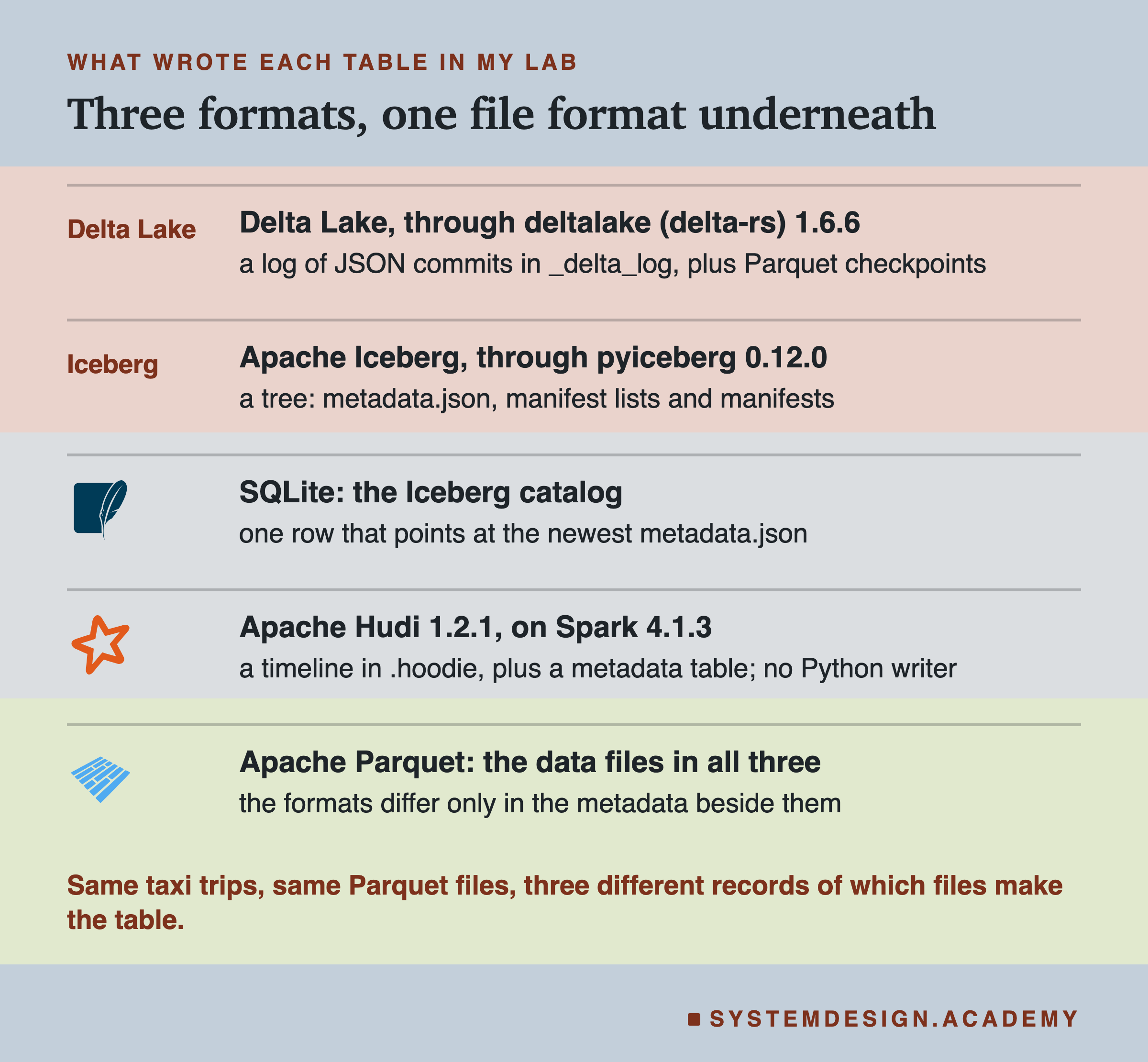
Delta and Iceberg ran in Python, with the libraries above.
Hudi has no Python writer. Its Python package, hudi-rs, reads tables but cannot write them yet; a pull request that "Adds native write support" is still open. So I wrote the Hudi table with Apache Spark, an engine that runs data jobs across many cores or machines. Spark needs Hudi's Spark bundle, the single Java file that adds Hudi to Spark; I used the one from Hudi 1.2.1. That bundle exists for Spark 4.0 and 4.1, not 4.2, so the Hudi lab has its own Python environment with Spark 4.1.3. Let me start with the format lesson 1 already used. What did Delta write?
Delta: A Folder of Commits
After the three commits, the Delta table folder held 11 Parquet data files and 3 log files. The log files sit in a folder called _delta_log, one JSON file per version: 00000000000000000000.json for version 0, then 1, then 2.
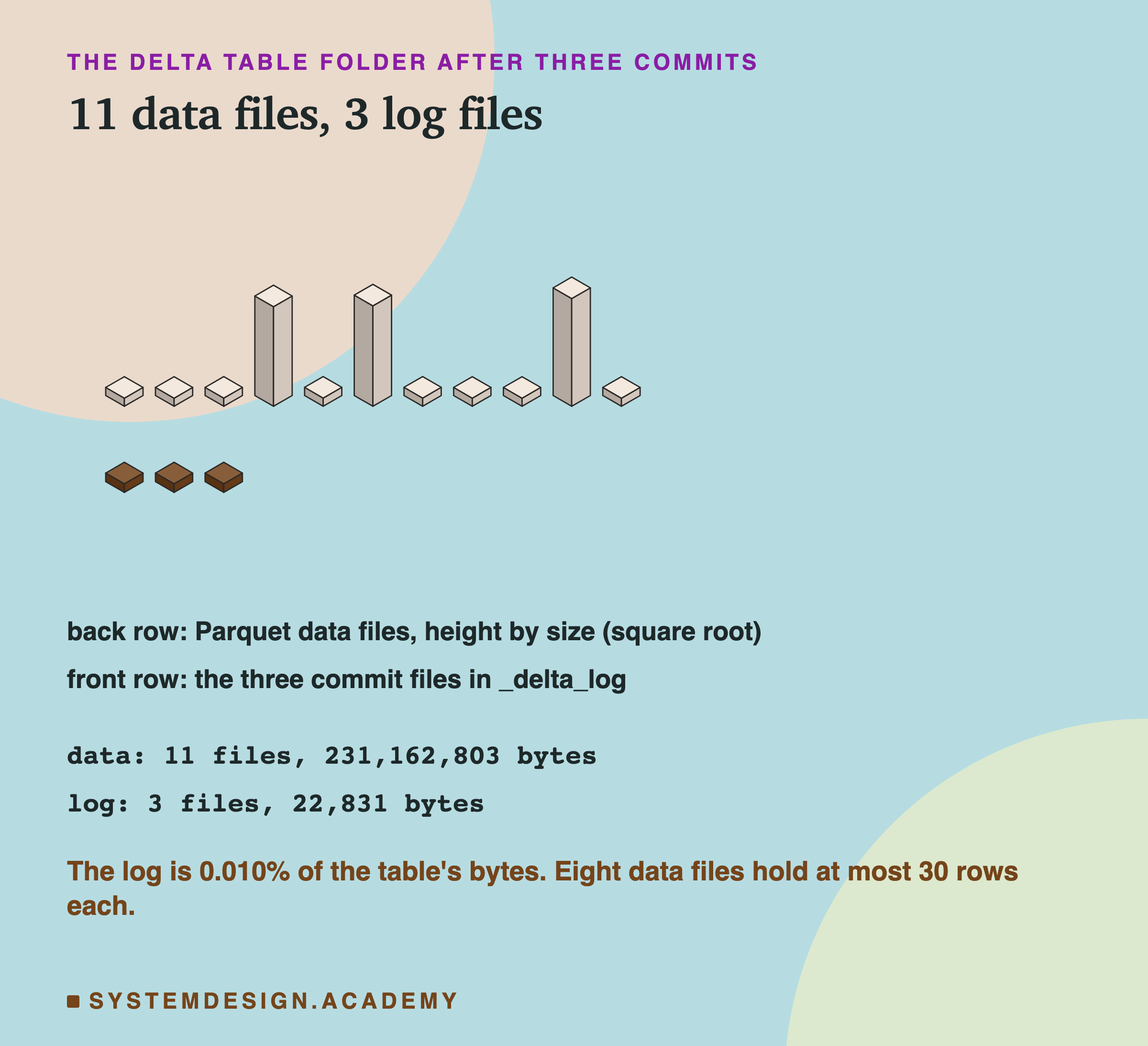
The log is tiny next to the data. The 3 JSON files take 22,831 bytes, and the data files take 231,162,803 bytes. So 22,831 ÷ 231,162,803 is about 0.010% of the table.
Three of the 11 data files are big, one per month. The other eight hold the stray rows. For example, the January load wrote a file into the 2024-12 partition with 21 rows, and a file into the 2025-02 partition with 1 row. Every partition a load touches gets its own file, however small.
Each commit file holds one action per line, as lesson 1 showed. Version 0 has 6 lines. A protocol line says which reader and writer versions are needed. Then come a metaData line, 3 add lines, one per file, and a commitInfo line. The metaData line holds the schema, the list of 21 columns and their types, and partitionColumns, which here is ["pickup_month"].
That list has 21 columns, not 20. Why one more than the taxi file?
Inside One Add: What Delta Knows About a File
The extra column is mine. Delta partitions by columns in the table's schema, so the month had to be a column. The protocol does allow a column computed from another by a expression, called a generated column. I did not use one; I computed mine by hand. So before writing, I added a column pickup_month holding text like "2025-02", made from the pickup time. Delta then keeps its value in the folder name and in each add line. I checked one data file: it holds the 20 taxi columns, and no pickup_month.
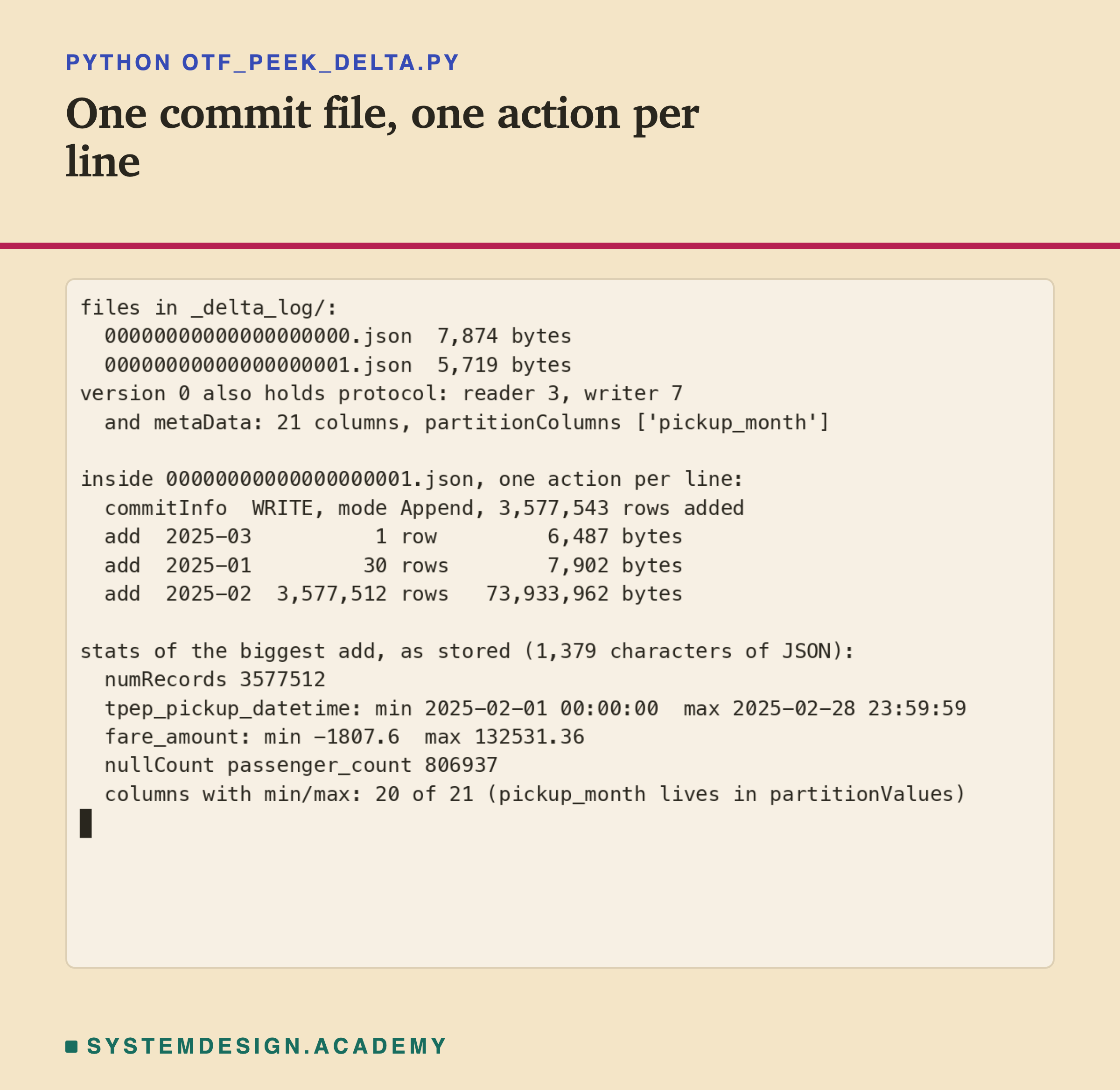
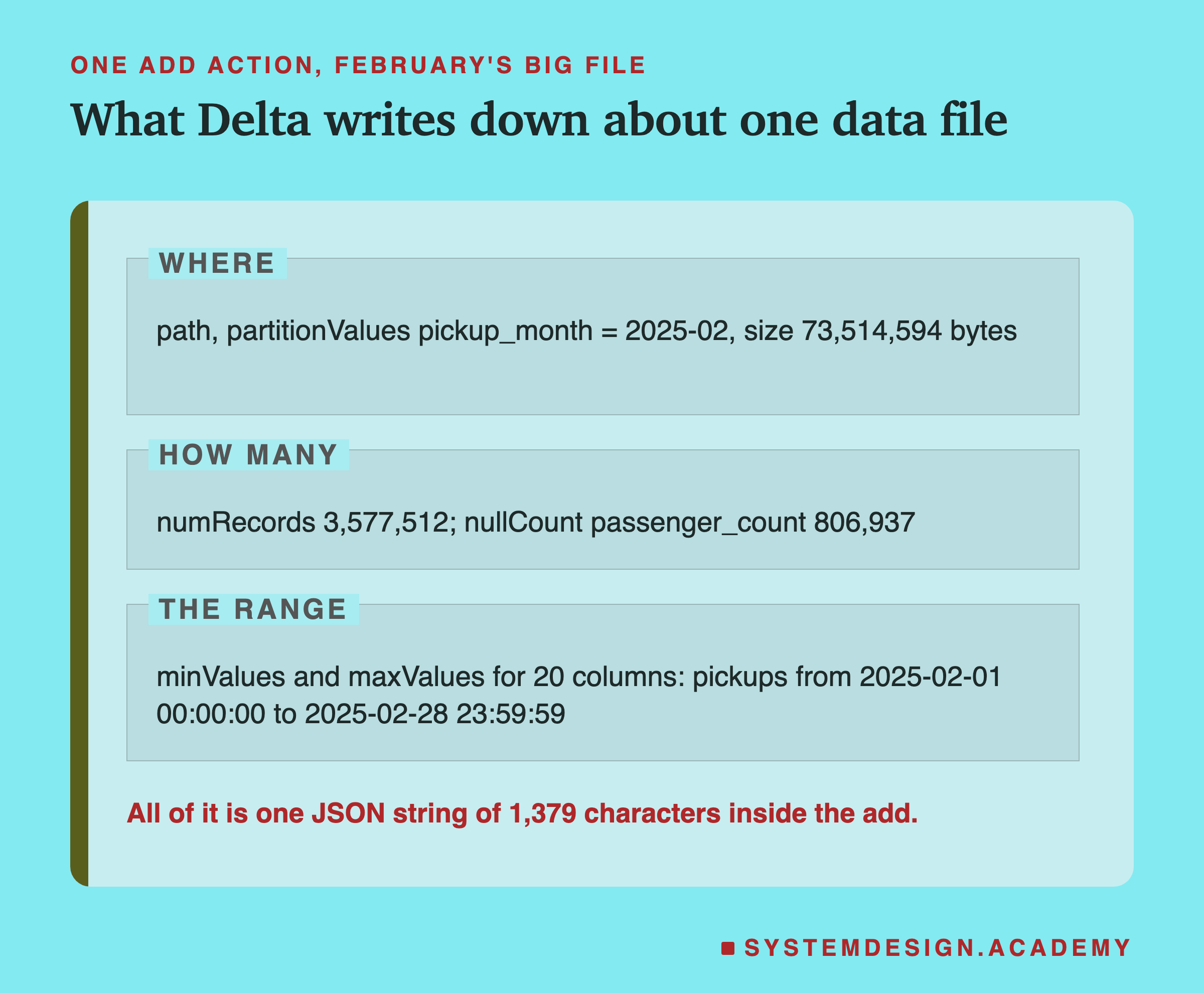
The recording above is a short script, otf_peek_delta.py, that writes January and February and prints the log. The peek is a separate two-month run, so its byte sizes differ from the lab's: 73,933,962 bytes for February's big file here, 73,514,594 in the lab. The row counts do not change.
Look at the biggest add. Besides the file's path and size, it carries a few numbers that sum up the file. These are called statistics, short summaries of each column in one file. Among the statistics the Delta protocol defines are four. numRecords is the row count. minValues and maxValues are the smallest and largest value per column, and is how many values are empty.
Delta's Checkpoint: The Summary Page
A reader of the newest version has to replay the log: read every commit in order, keep each add, and drop any file a later remove cancels. The protocol puts it this way. "A given snapshot of the table can be computed by replaying the events committed to the table in ascending order by commit version." With 3 commits that is cheap. With 3,000 it is not.
So Delta can write a summary of the replay into one file. The protocol defines it: "A checkpoint contains the complete replay of all actions, up to and including the checkpointed table version". It is a Parquet file in the same _delta_log folder. That summary file is called a checkpoint, the whole table state at one version, saved once.
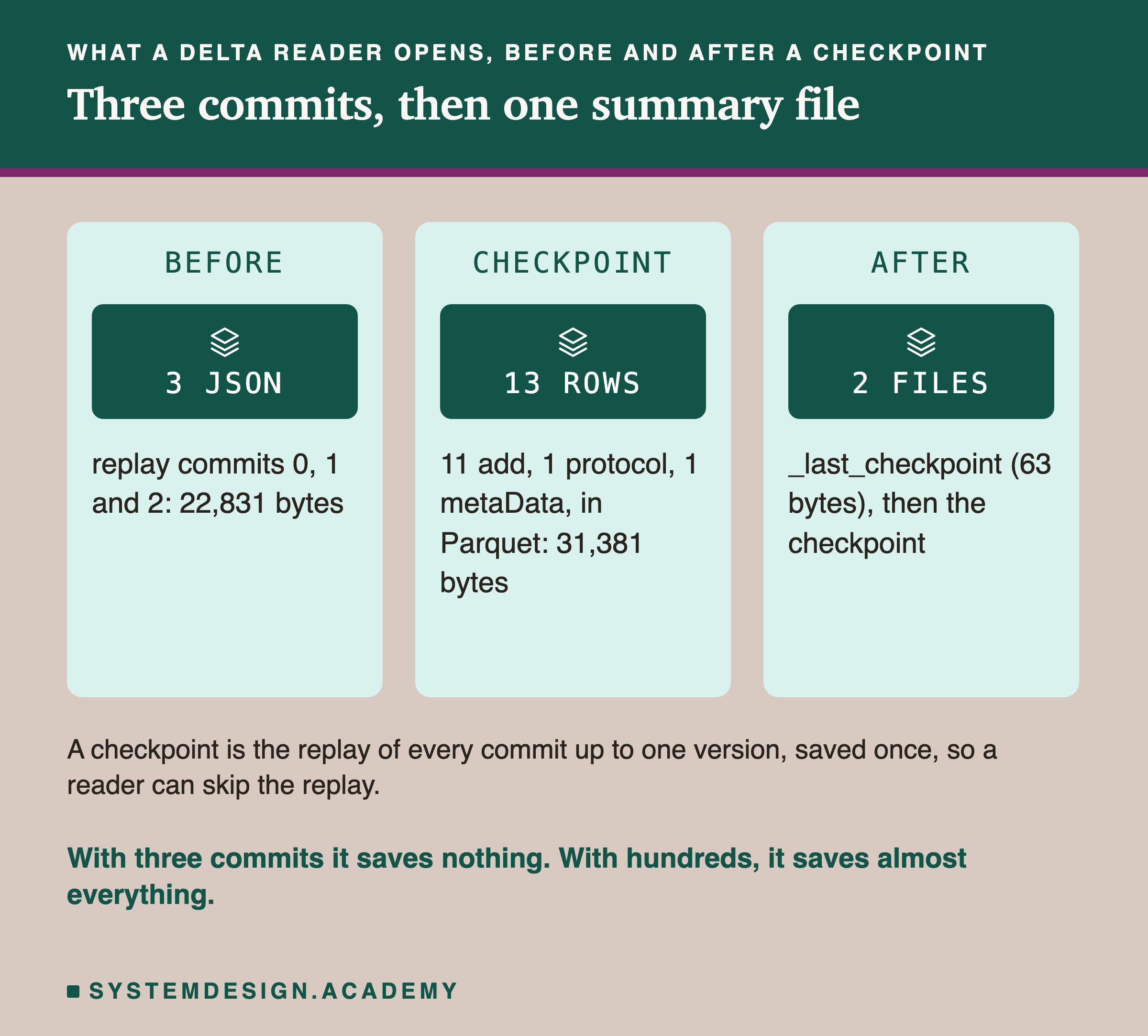
I made one by hand at version 2 and opened it. It has 13 rows: 11 add rows, one per data file, plus 1 protocol row and 1 metaData row, so 11 + 1 + 1 = 13. It also has columns for remove and other actions, all empty here. Next to it sits a tiny file called _last_checkpoint, 63 bytes. It says which version the newest checkpoint is for, so a reader need not list the whole folder.
A reader of version 2 now opens 2 files: _last_checkpoint, then the checkpoint. Here the checkpoint, 31,381 bytes, is bigger than the 3 JSON files it replaces. With three commits it saves nothing. The point shows up later, after 120 commits.
Iceberg: A Tree That Starts at the Catalog
Iceberg does not keep a list of commits that a reader replays. It keeps a tree, and every commit writes a new top of the tree.
Each time the table changes, Iceberg writes a new file that describes the whole table. It holds the schema, the partition rules, and a list of every snapshot it still keeps. The Iceberg spec says: "Table metadata is stored as JSON. Each table metadata change creates a new table metadata file that is committed by an atomic operation." One complete state of the table, as of one commit, is called a snapshot. Each snapshot gets a long number as its id.
But a reader needs to know which of those JSON files is the newest. Iceberg does not answer that with a file name. It keeps one pointer in a separate small service. That service is called the catalog, the place that names each table's newest metadata file. In my lab the catalog is one row in a SQLite database file. In production it can be a database, a Hive metastore, or a REST service.
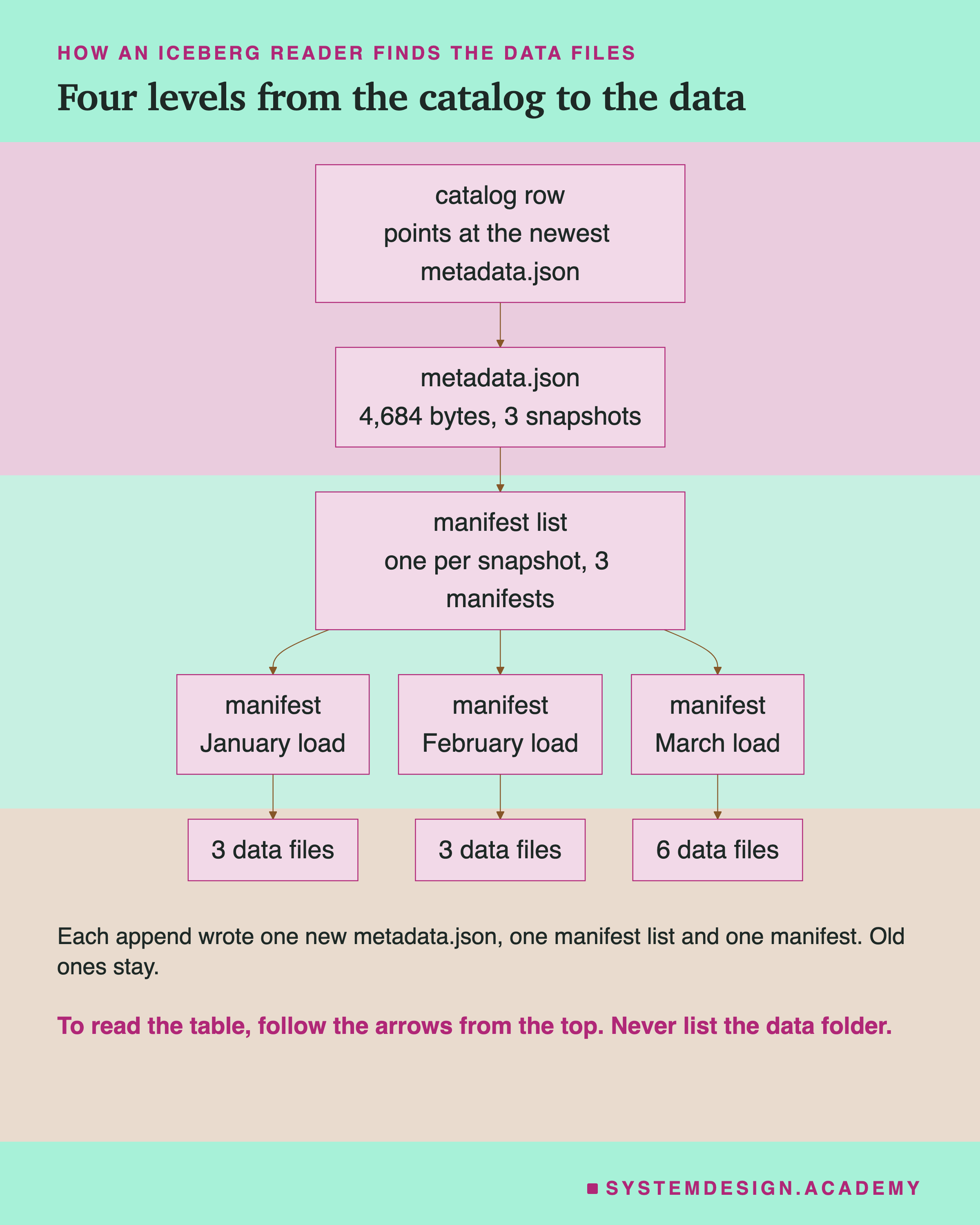
The spec describes a commit as a swap: a writer "commits by swapping the table’s metadata file pointer from the base version to the new version." That swap is the moment a change becomes real, like the one new log file in Delta.
After my three commits, the Iceberg folder held 12 data files and 10 metadata files. There were 4 metadata.json files, one for the empty table and one per append. There were also 3 manifest lists and 3 manifests. Two of those words are new. What are they?
Manifests and Manifest Lists
Below metadata.json, Iceberg keeps two more levels, both in Avro, a compact binary file format.
The bottom level lists data files. The spec defines it. "A manifest is an immutable Avro file that lists data files or delete files, along with each file's partition data tuple, metrics, and tracking information." So a manifest is a list of data files, with statistics for each one. Each of my appends wrote one manifest naming the files that append added.
The level above lists manifests. In the spec's words: "The manifests that make up a snapshot are stored in a manifest list file." There is one per snapshot. A manifest list is a list of manifests, with a short summary of each one, so a reader can skip a whole manifest.
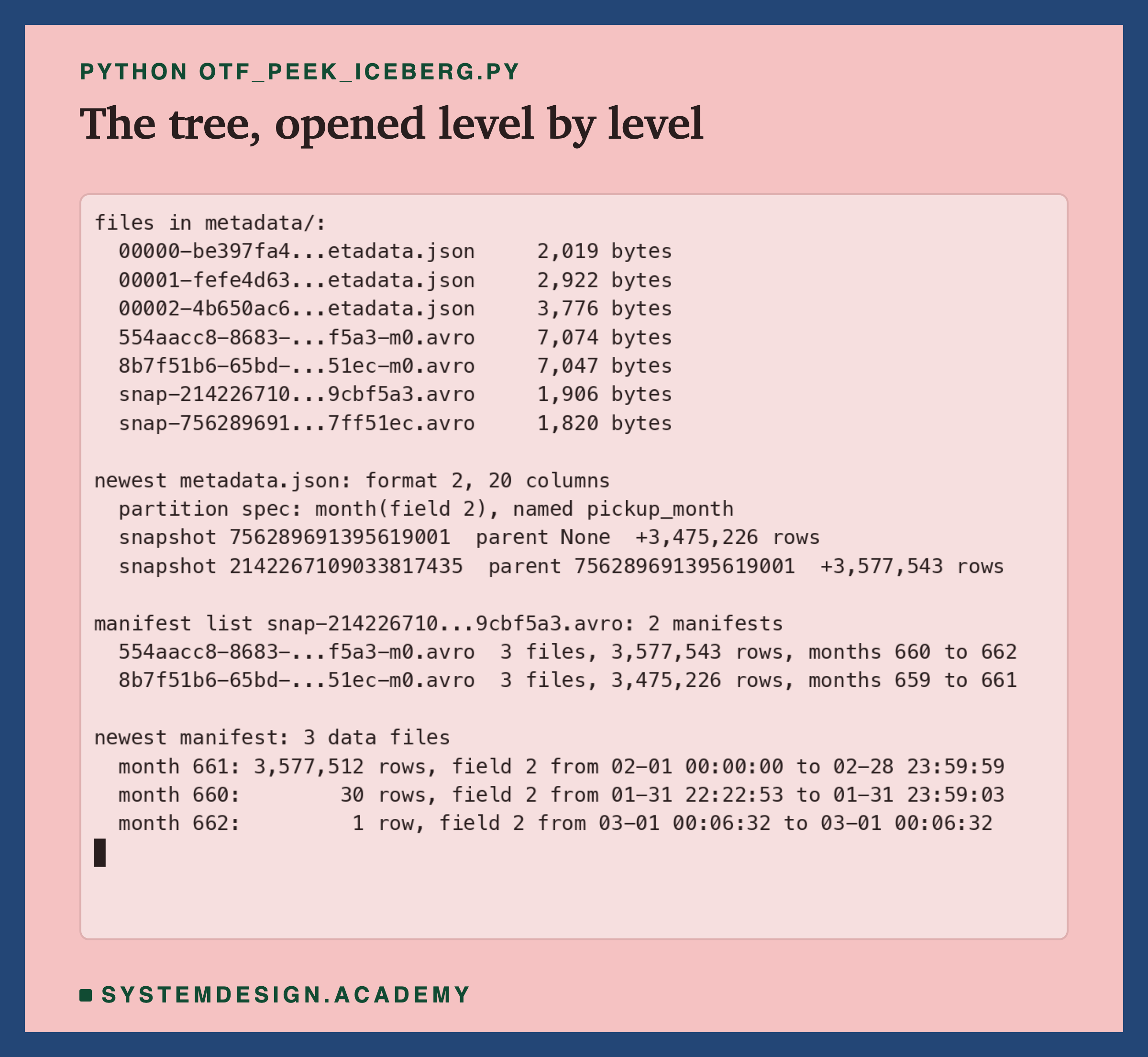
The recording opens one table level by level. The manifest list gives each manifest its row count, its file count, and the smallest and largest partition value inside it. The manifest gives each data file its row count, size, value counts, null counts, and the lowest and highest value of each column.
Those lowest and highest values are not stored as text. They are raw bytes, in a fixed layout the spec defines for each type. For a timestamp it is the number of microseconds since 1970, as 8 bytes. My peek script decodes them by hand, and they match Delta's minValues and maxValues for the same rows exactly.
One file showed a gap. March's big load was split into 2 files, and the second one, 551,804 rows, has bounds for only 15 of 20 columns. In those rows, five columns are always empty: , for example, has 551,804 nulls out of 551,804. A column with no values has no smallest or largest value, so only its null count is stored. But what are the "months 660 to 662" in the recording?
Hidden Partitioning: 2025-01 Is the Number 660
For Delta, I had to add a pickup_month text column. For Iceberg, I did not. I told the table, once, "split by the month of tpep_pickup_datetime", and it worked out the month itself for every row.
A rule that turns a column's value into a partition value is called a transform. Iceberg's spec lists them, among them identity, bucket, truncate, year, month, day and hour. The month transform gives "months from 1970-01-01". Using a transform on a real column, so the table has no extra column for it, is called hidden partitioning.
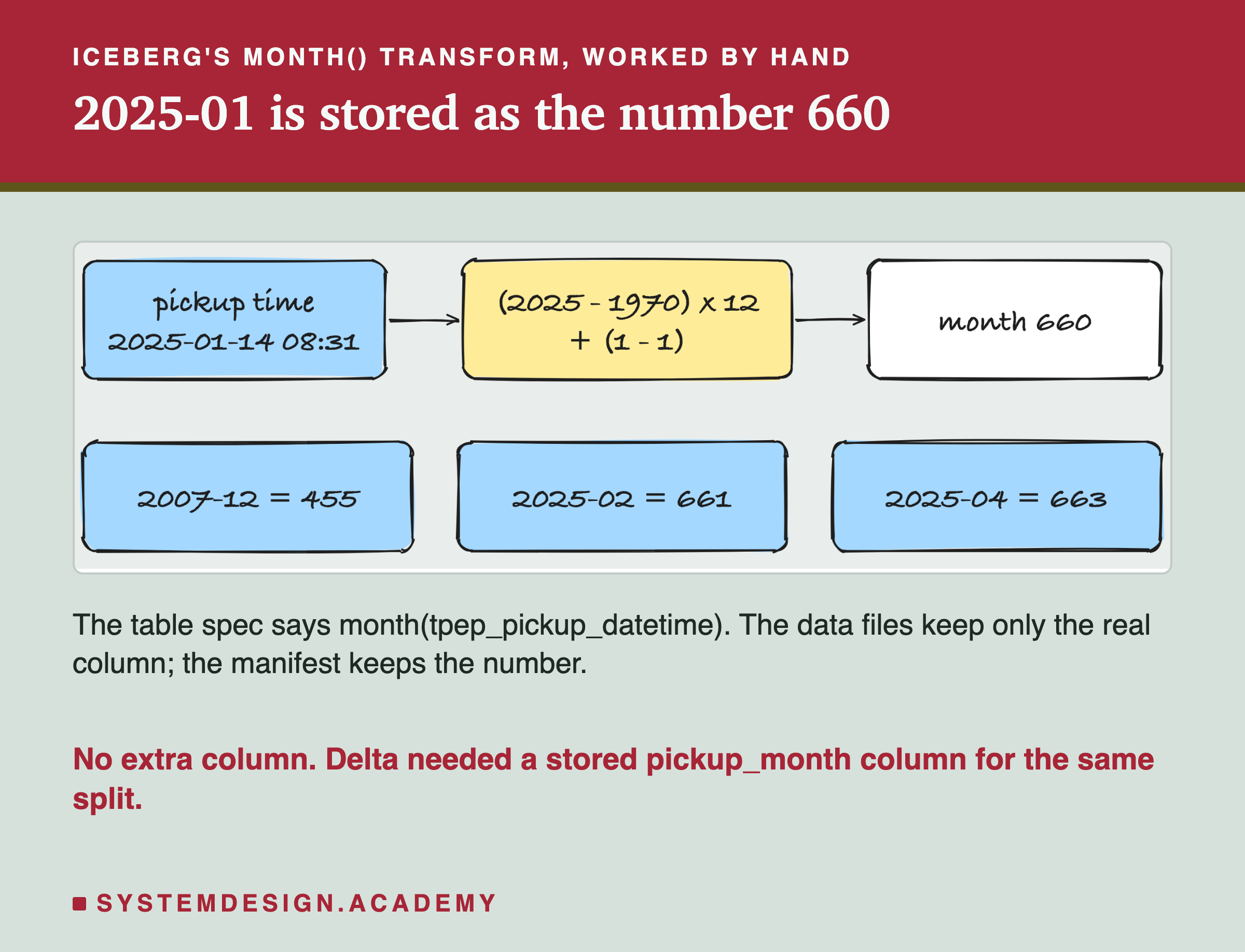
So January 2025 is stored as (2025 − 1970) × 12 + (1 − 1) = 55 × 12 = 660. February is 661, March 662. The wrong-clock trip from December 2007 is (2007 − 1970) × 12 + 11 = 455.
The Iceberg documentation names the benefit: "Iceberg doesn't require user-maintained partition columns". This matters for queries, and I will show it with numbers in the planning test. In my Delta table, nothing links pickup_month to the pickup time. A query has to name pickup_month itself to use the partition. Delta on Spark can derive that filter when the partition column is a generated column; I did not test that.
So far: Delta writes one JSON commit per version, with statistics in each add, and checkpoints to shorten the replay. Iceberg writes a new metadata.json per commit, found through a catalog. Below it sit a manifest list and manifests, with binary statistics and partition numbers from a transform. What does the third format keep?
Hudi: A Timeline of Stamped Jobs
Hudi keeps its metadata in a folder called .hoodie inside the table. Its documentation says: "All metadata including timeline, metadata table are stored in a special .hoodie directory under the base path."
The heart of it is a record of every action ever taken on the table. Hudi's docs describe it as "a log of all actions performed on the table at different instants (points in time)". That record is called the timeline. One action at one moment on it is called an instant, named by the time it was requested.
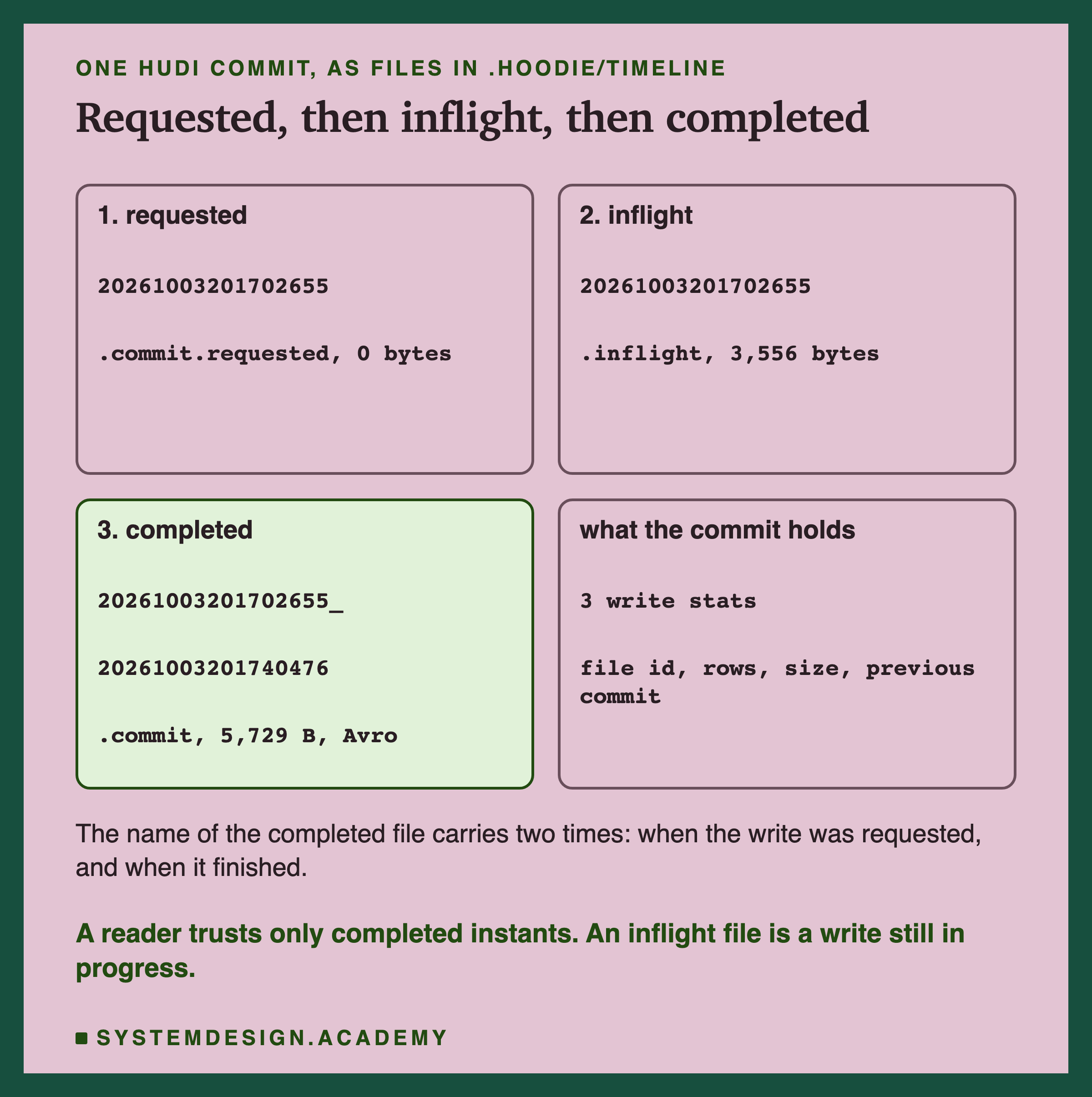
Each instant moves through three states, and each state leaves a file. First requested: the job is planned. Then inflight: the job is writing. Then completed: a file whose name holds two times, when the job was requested and when it finished. A reader counts only completed instants. Those three stamps are the board on the wall from the first slide.
My three loads made 3 instants, so 9 timeline files. The completed commit file is Avro in Hudi 1.x. Inside, I found a list called partitionToWriteStats: for each file the commit wrote, its file id, the rows written, the size, and the previous commit of that file. February's commit holds 3 such entries, one per partition it wrote: 2025-01, 2025-02 and 2025-03. Their inserts add up to 3,577,543, exactly February's trips.
The timeline lists files, like Delta's log. But Hudi keeps a second record next to it. What else is in .hoodie?
Hudi's File Groups, and Five Extra Columns
Hudi groups data files in a way the other two do not. Every data file belongs to a group with a fixed id, and a new write to that group makes a new version of the file. The docs say: "Within each partition, files are organized into file groups, uniquely identified by a file ID (uuid)." And: "Each file group contains several file slices." A file group is one file id, and a file slice is one version of it.
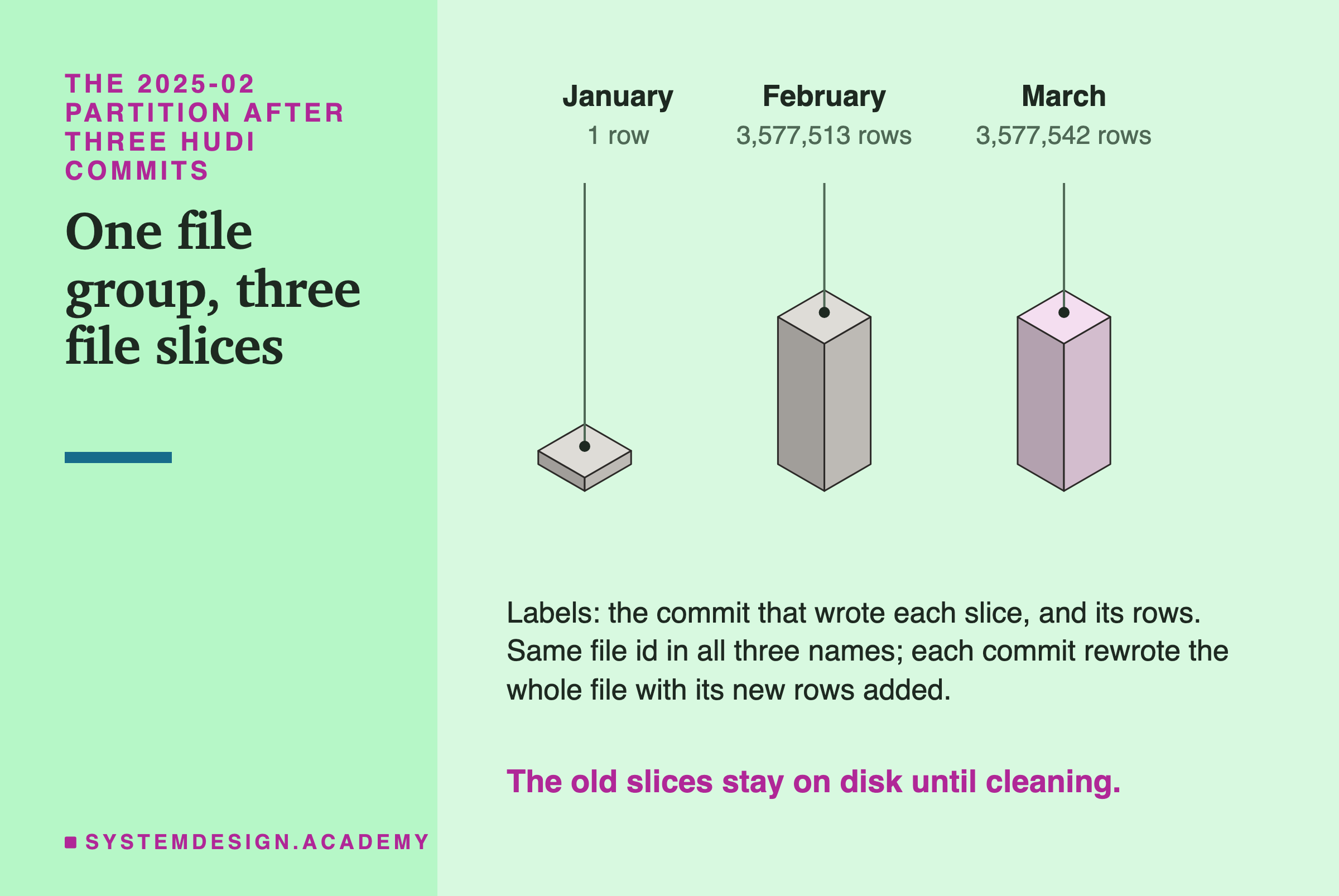
Here is what that did to my table. January's load left a 1-row file in the 2025-02 partition, like it did in the other formats. When February arrived, Hudi did not start a new file beside it. It wrote February's rows into that same file group, as a new slice of 3,577,513 rows: the old 1 row plus February's 3,577,512.
Then March's load brought 29 more trips picked up in February, and Hudi wrote a third slice: 3,577,513 + 29 = 3,577,542 rows. Writing a whole new copy of a file to change it is the idea behind Copy On Write, the Hudi table type I used, named for exactly that.
Like Delta, my Hudi table split by a stored pickup_month column, which I named in Hudi's partitionpath.field setting. Hudi also adds five columns to every row: _hoodie_commit_time, _hoodie_commit_seqno, _hoodie_record_key, _hoodie_partition_path and _hoodie_file_name. So my data files have 20 + 1 + 5 = 26 columns. The record key is a unique id Hudi gives each row; since I set none, Hudi made them, such as . It matters because Hudi is built to update single records by key.
Same Data, Very Different Amounts of Metadata
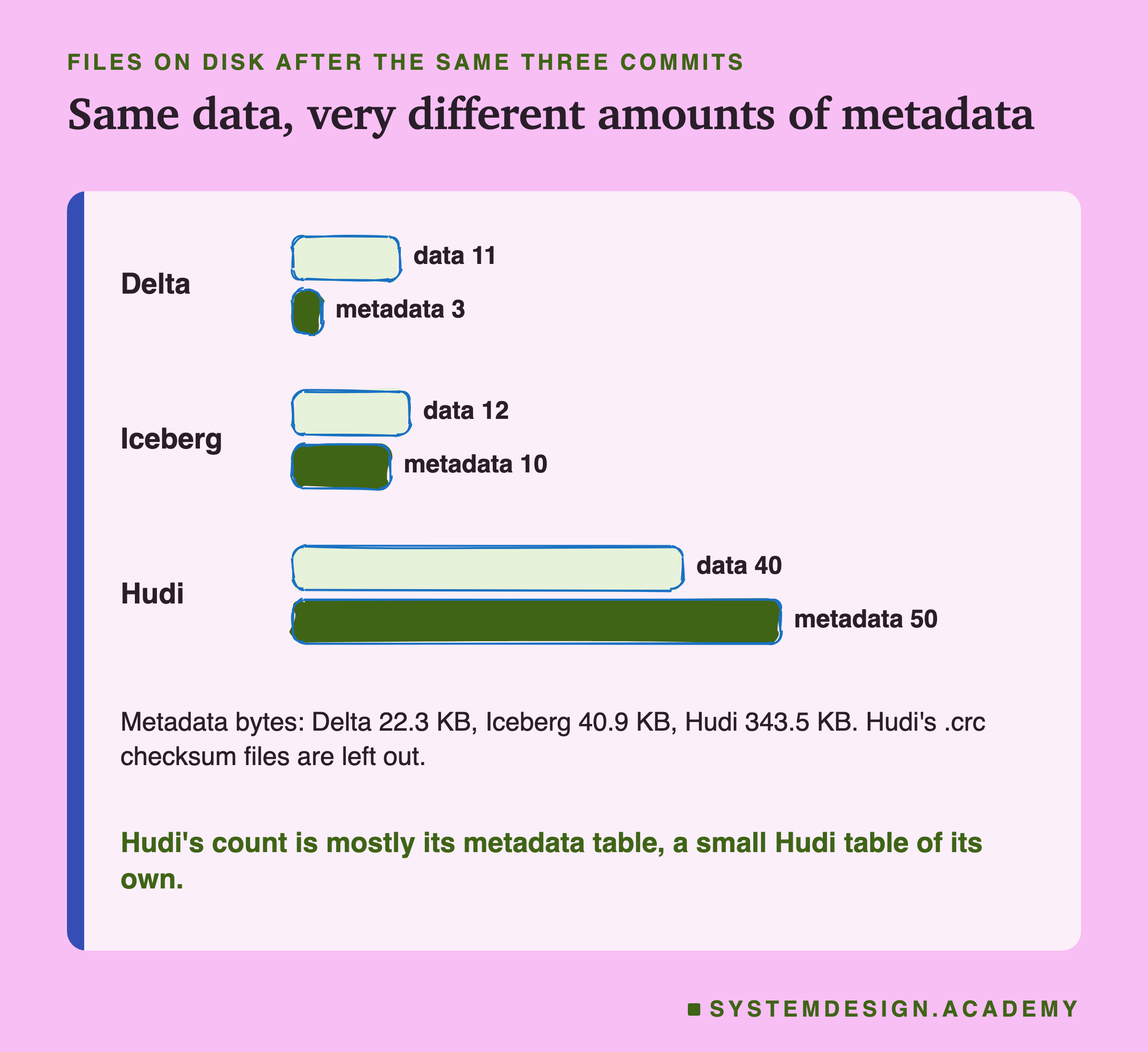
Here are the counts after the same three commits, from my lab.
Next to its timeline, Hudi keeps a metadata table, a small Hudi table holding facts about the main table. Mine had three parts: files, column_stats and partition_stats. Hudi's docs say it is "a single internal Hudi Merge-On-Read table".
Delta wrote 3 metadata files, one per commit. Iceberg wrote 10: 4 + 3 + 3. Hudi wrote 50 that I counted: 9 in the timeline, 39 in the metadata table and 2 others, such as hoodie.properties. It also wrote 97 small .crc checksum files, which I left out of every count.
The data files differ too. Hudi wrote 40.
January's commit alone wrote 29 files in its main partition, 31 in all. The reason is file sizing. On its first commit Hudi has no history, so it guesses 1,024 bytes per row. With a 120 MB file limit, that is 125,829,120 ÷ 1,024 = 122,880 rows per file. Then 3,475,204 ÷ 122,880 = 28.3, so 29 files: 28 of about 122,000 rows and one of 34,853. From the second commit on, Hudi uses the real row size from earlier commits, about 30 bytes, which is why February fit in one file.
4 of the 40 are old slices, so the newest version reads 36. Delta wrote 11 and Iceberg 12, because pyiceberg cut March into two files.
The data bytes also differ, for a reason that has nothing to do with the formats. I opened one data file from each table and read its compression setting. Delta's files use Snappy, Iceberg's use ZSTD and Hudi's use GZIP: three ways to squeeze the same columns. So I compare file counts here, never data sizes.
More metadata is not worse on its own. Hudi's metadata table exists so that readers do not have to list folders and open file footers. The question is what a reader gets back for it. First: can each format really give back an old version?
Going Back to an Old Version
Reading a table as it was at an earlier version is called time travel. All three formats keep old versions until a cleanup removes them. So I asked each one for its first and second version, and counted the rows by reading the data.
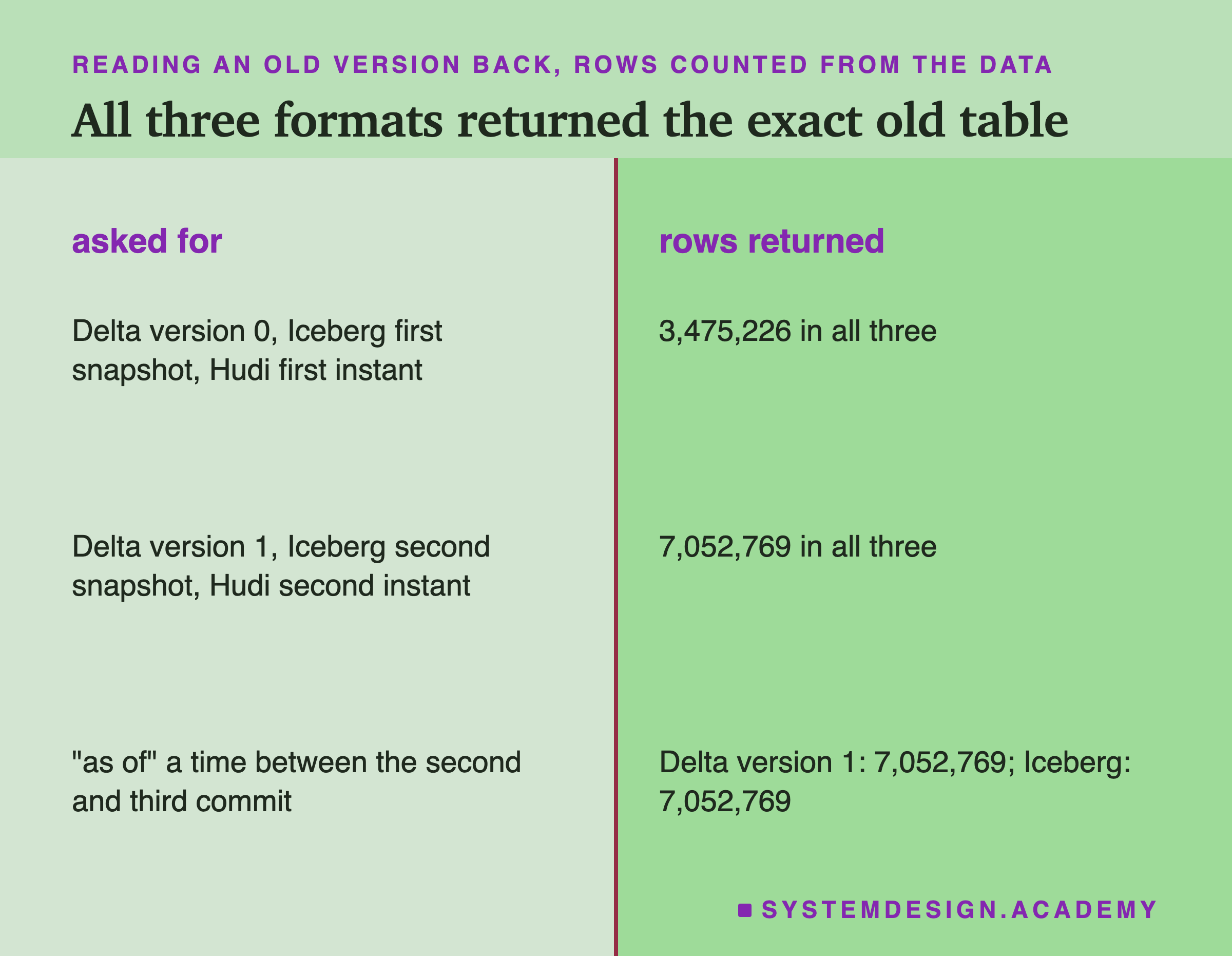
The first version returned 3,475,226 rows in all three, exactly January. The second returned 3,475,226 + 3,577,543 = 7,052,769, exactly January plus February. In Iceberg, adding up the record_count of every file in the manifests gave the same totals without reading any data.
Each format asks for the old version differently. Delta asks for a version number, 0, 1, 2. Iceberg asks for a snapshot id, a long number such as 5163474267681831818. Hudi asks for an instant time, such as 20261003201629215.
I also asked "as of" a clock time between the second and third commits. My first run got this wrong, and I want to say how. I passed a time with no time zone. My own code turned it into milliseconds for Iceberg as local Indian time, but deltalake read the same time as UTC, five and a half hours later. So Delta returned version 2, 11,198,026 rows, while Iceberg returned 7,052,769. With a time zone attached, both returned 7,052,769. If you time travel by clock time, always pass the time zone.
Old versions are one use of the metadata. The other is planning a query. How many files did each format read for one day?
Planning One Query: Trips on 14 February
I asked one question of the three-month table: trips picked up on 14 February 2025. There were 158,575 such trips among 11,198,026. Before reading data, a reader decides which files could hold matching rows. Skipping files using the metadata alone is called data skipping.
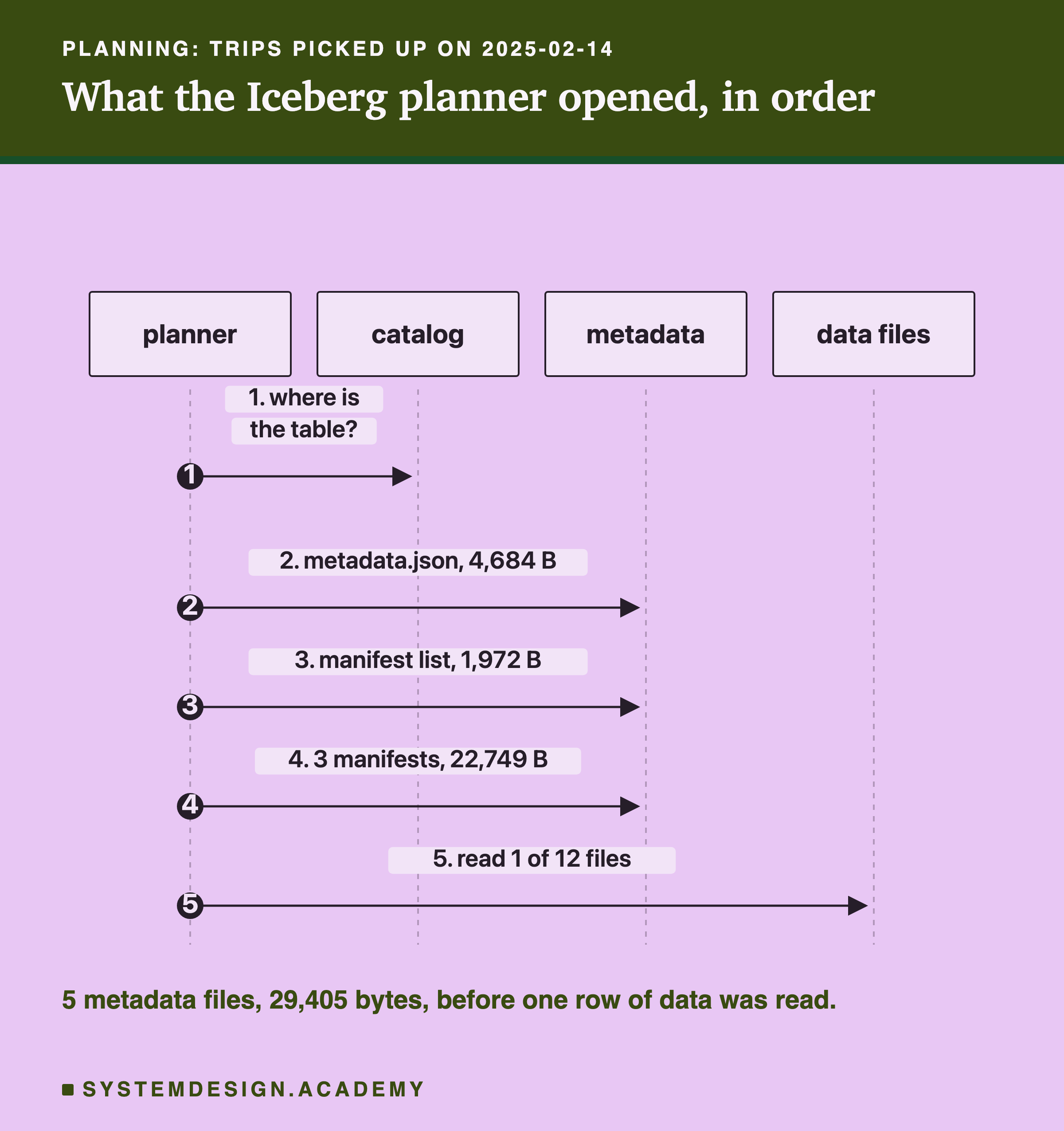
In Iceberg, I asked pyiceberg to plan the scan and recorded every file it opened, with a small wrapper around its file reader. It opened 5 metadata files, 29,405 bytes. It turned my filter on the pickup time into "month 661" by itself, because of hidden partitioning. Then it kept 1 data file out of 12: February's big file, whose bounds cover 1 to 28 February.
But look at step 4. The manifest list could not skip any of the 3 manifests. January's manifest covers months 659 to 661, because January's load held one trip from February. March's covers 455 to 663: March's load held 29 trips from February, and the 2007 trip stretched it further. Every range included February, so every manifest had to be opened. A handful of stray rows is enough to stretch a range.
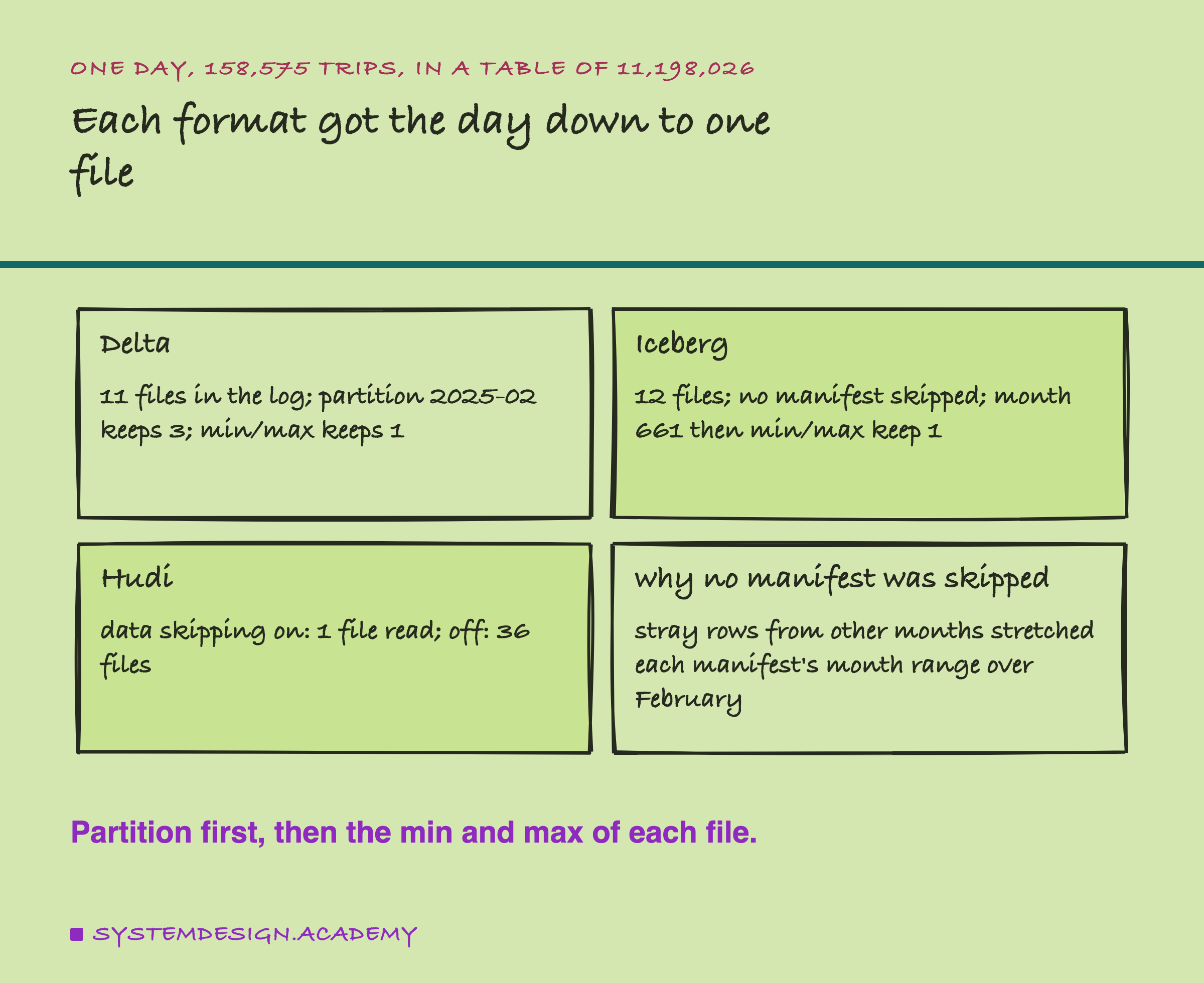
deltalake does not report which files it skipped, so for Delta I did the planner's arithmetic myself, from the log. A filter on pickup_month keeps the 3 files in that partition. The min and max pickup times then keep 1. Without a filter on pickup_month, the min and max alone also keep only 1 of 11 here. That works because each big file covers one clean month.
For Hudi, I ran the query in Spark and read the file scan's own counters. With data skipping on, using the metadata table's column statistics, Spark read 1 file. With it off, it read 36 files and 11,198,026 rows to find the same 158,575.
Many Small Commits: What Piles Up
Real pipelines often commit every few minutes, each time with a little data. Lots of tiny files, each with its own metadata to open, is called the small files problem. To see it, I wrote January again into fresh tables, but as 120 commits of 28,960 or 28,961 rows each: 3,475,226 ÷ 120 = 28,960.2.
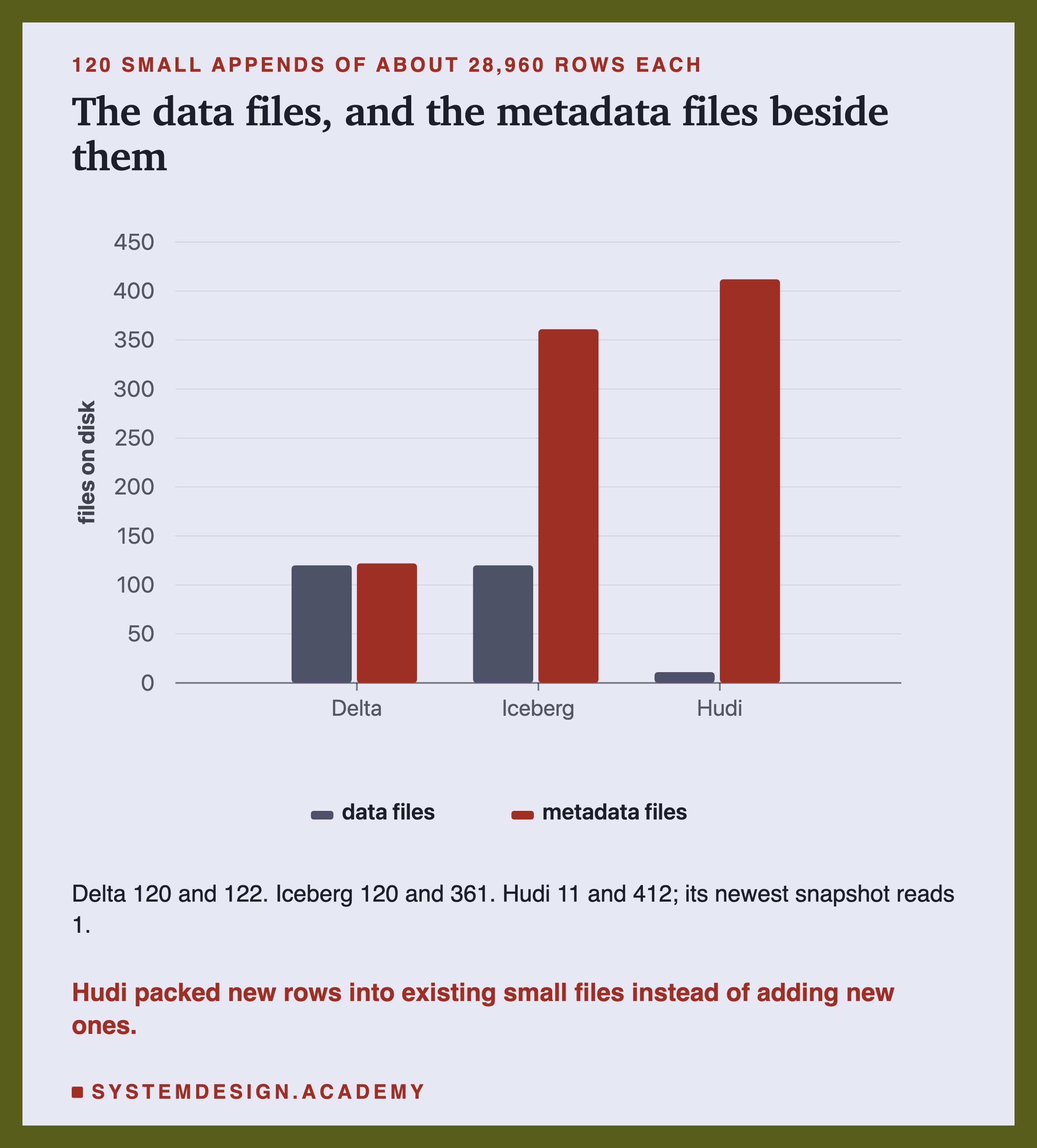
Delta ended with 120 data files and 120 JSON commits. At the 100th commit, version 99, deltalake wrote a checkpoint by itself. So the log held 120 + 1 + 1 = 122 files with _last_checkpoint.
Iceberg ended with 120 data files and 361 metadata files. That is 121 metadata.json files, counting the one for the empty table, 120 manifest lists and 120 manifests: 121 + 120 + 120 = 361. Each metadata.json lists every snapshot so far, so it grew from 1,932 bytes to 99,505 bytes. pyiceberg writes a new manifest for every append on purpose. Its docs say it "defaults to the fast append to minimize the amount of data written". They also name the downside: "it creates more metadata than a merge commit". Iceberg's Java library, used by Spark, merges manifests by default once there are 100.
Hudi did something the other two did not. It ended with 1 file group, and its newest version reads 1 data file. Its file sizing page explains why: "During an insert and upsert operation, we opportunistically expand existing small files on storage, instead of writing new files". Every commit wrote a new, bigger slice of the same file. Hudi's cleaner removed old slices as it went: 11 slices were on disk at the end, the newest plus 10 older ones.
The cost is that each small commit rewrote the whole file so far. So the last few commits each wrote a file of about 70 MB to add 28,960 rows. Its metadata grew too: 412 files, 142 in the timeline folder and 268 in the metadata table.
So the data files piled up in Delta and Iceberg, not in Hudi. But what does a reader have to open now?
What a Reader Must Open After 120 Commits
Here is the number that matters most for speed: how many metadata files a reader opens before it reads any data.
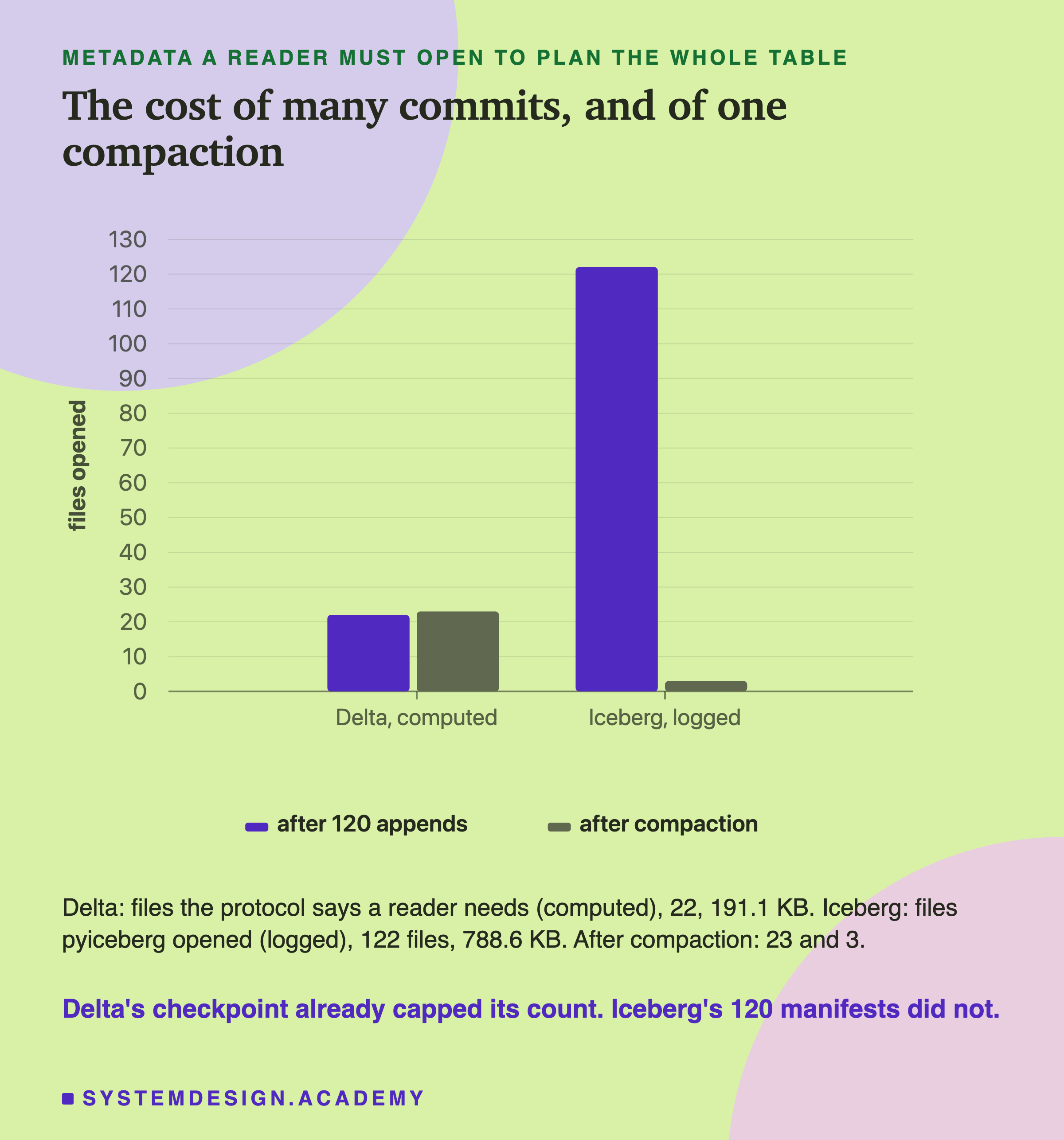
Iceberg's planner, logged as before, opened 122 files: 1 metadata.json + 1 manifest list + 120 manifests = 122, together 807,509 bytes.
For Delta, the protocol says what the newest version needs: _last_checkpoint, the checkpoint at version 99, and every commit after it, versions 100 to 119. That is 2 + 20 = 22 files, 195,724 bytes. The checkpoint replaced the first 100 commits. Both numbers come from library defaults. Spark's Delta library would have checkpointed every 10 commits, and Iceberg's Java library merges manifests once there are 100.
I did not want to take that on trust, because deltalake does not say which files it opens. So I tested it on a copy of the table. Can a reader really ignore the commits a checkpoint covers?
Proving the Checkpoint Replaces the Old Commits
On a copy of the 120-commit Delta table, I deleted the JSON files for versions 0 to 99, the 100 commits the checkpoint covers. Then I read the newest version.
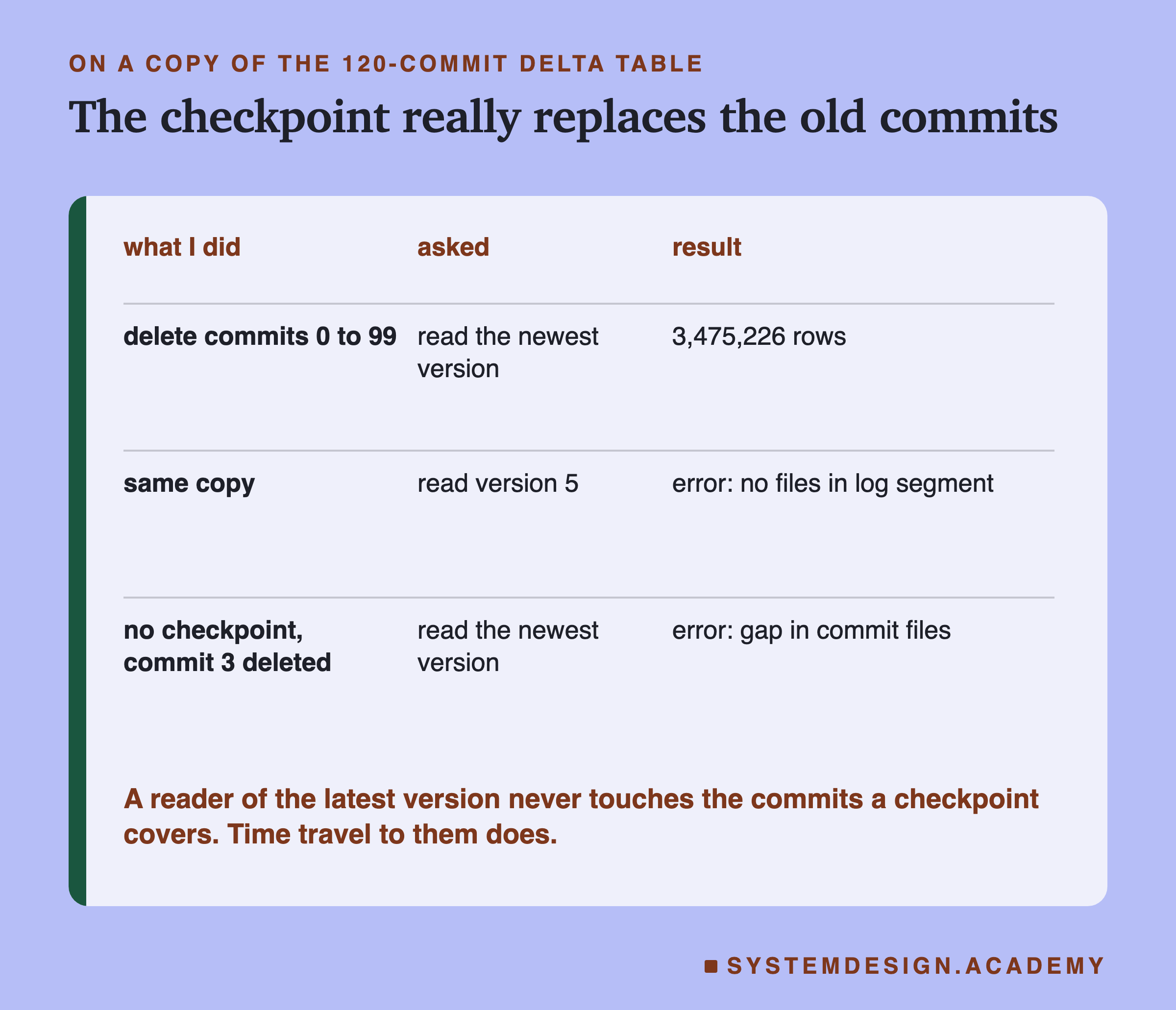
It returned 3,475,226 rows, the full table. So a reader of the newest version really does start at the checkpoint. On the same copy, asking for version 5 failed with "No files in log segment": time travel to version 5 needs the commits I deleted.
Then I tried the opposite, on a second copy. I deleted the checkpoint and _last_checkpoint, and removed just one early commit, version 3. Reading the newest version failed with "Expected contiguous commit files, but found gap". Without a checkpoint, every single commit is needed.
This also explains a Delta setting. Delta Lake's docs say log entries are cleaned up "after checkpoints are written", older than delta.logRetentionDuration, 30 days by default. That works because the checkpoint carries the state. It also means time travel never reaches back further than about 30 days, and once vacuum runs with its default, only 7.
So far: after 120 small commits, Delta's checkpoint kept a reader's work to 22 files, Iceberg's planner opened 122, and Hudi kept one file group by rewriting it. The data files are still small in Delta and Iceberg. How do you fix that?
Compaction: Fewer, Bigger Files
Rewriting many small files into a few big ones, without changing the rows, is called compaction. Delta Lake's docs describe it as "coalescing small files into larger ones".
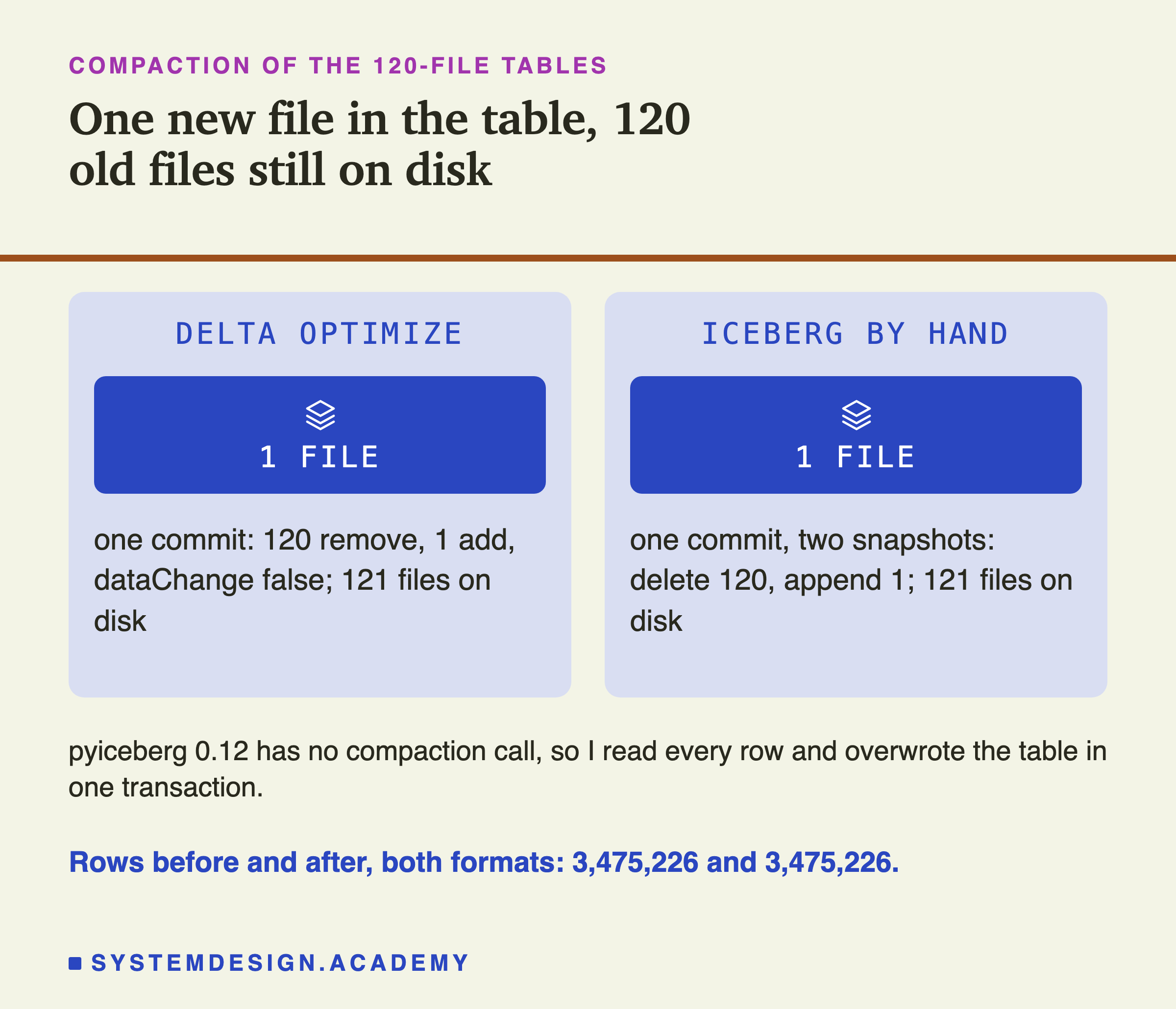
In Delta, I called deltalake's optimize.compact(). It wrote 1 new file and one commit, version 120, with 120 remove lines and 1 add line. Every one of them says dataChange: false, which tells readers the rows did not change, only their files. The commit's operation is named OPTIMIZE.
In Iceberg, pyiceberg 0.12 has no compaction call. Its docs say "Compaction is planned", and the issue asking for it is still open. Iceberg's own docs point to Spark's rewriteDataFiles for this. So I did it by hand: I read all rows and overwrote the table, inside one transaction. That made one new metadata.json, so one commit, but two snapshots: a delete of 120 files, then an append of 1. The table history now holds a snapshot with 0 rows between them. A normal reader never sees it, because the commit is one swap. A time-travel query by snapshot id could.
After compaction, the planners had much less to do. Iceberg's opened 3 files, 108,558 bytes, down from 122. Most of those bytes are metadata.json, still 100,812 bytes because it lists all 122 snapshots. Delta's needed 23, one more than before, because compaction is itself a commit.
Cleanup: The End of Time Travel
Each format has a cleanup step that deletes what no kept version needs. Lesson 1 introduced Delta's, called vacuum.
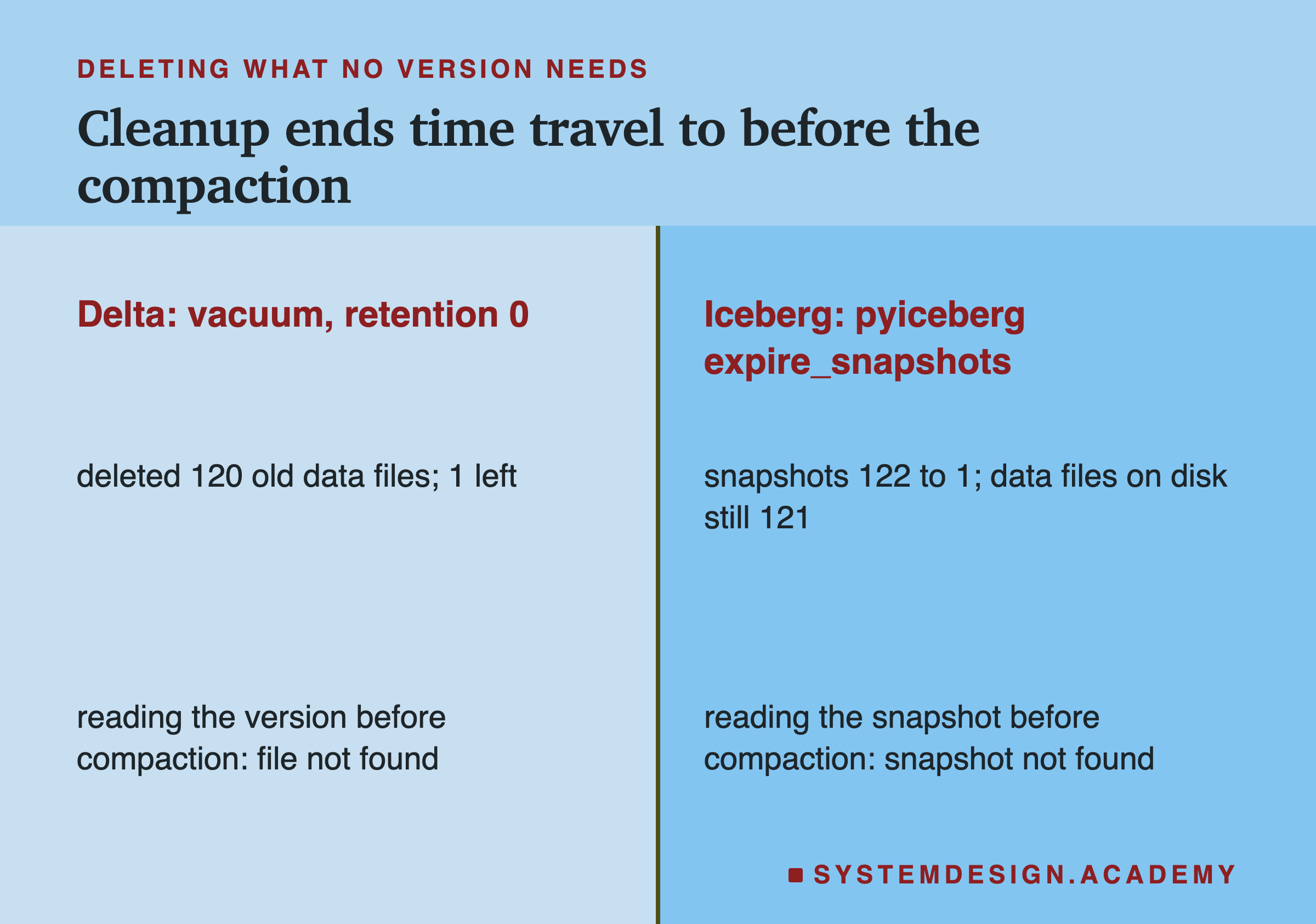
On Delta, I ran vacuum with a waiting period of 0 hours, which I had to force. That is only safe in a lab; the default is 7 days, so that slow readers can finish. It deleted the 120 old data files. Then reading version 119, the last version before compaction, failed with "not found": the log still named the files, but they were gone.
On Iceberg, I ran pyiceberg's expire_snapshots, for every snapshot older than now. The snapshots went from 122 to 1. Reading the old snapshot then failed with "Snapshot not found". But all 121 data files were still on disk: the 120 old ones and the new one. Iceberg's docs say "Regularly expiring snapshots is recommended to delete data files that are no longer needed". In my run, pyiceberg 0.12 removed the snapshots from the metadata but deleted no files, so the old files became files no snapshot names. I did not test Spark's procedure for this.
Hudi runs its cleaner by itself, keeping the last 10 commits by default (hoodie.clean.commits.retained). In the small-files table, the cleaner had already run: 11 slices of the one file group were on disk at the end, the newest and 10 older ones.
The lesson for all three is the same. Time travel is only as long as the files are kept. How do I know these numbers are right?
How the Labs Were Built, and the Report
There are two lab files. scripts/labs/de-sd/open_table_formats.py does Delta and Iceberg. scripts/labs/de-sd/otf_hudi.py does Hudi in its own environment. I wrote each design, with my guesses, into the file's docstring before it first ran. Versions: deltalake 1.6.6, pyiceberg 0.12.0 with pyiceberg-core 0.10.1, fastavro 1.12.2, pyarrow 25.0.1 and Python 3.14.7. Hudi used pyspark 4.1.3 with the bundle hudi-spark4.1-bundle_2.13:1.2.1 on Java 17.
Three things changed after a first run, and each is written into the docstrings. The time-zone mistake from the time travel slide. A small API fix in the Delta part, which changed no number. And in Hudi, I first counted planned files with Spark's inputFiles(). It listed all 36 files whether data skipping was on or off, because it lists the whole table, so it could not show skipping at all. The lab now reads the scan's own counters after the query runs.
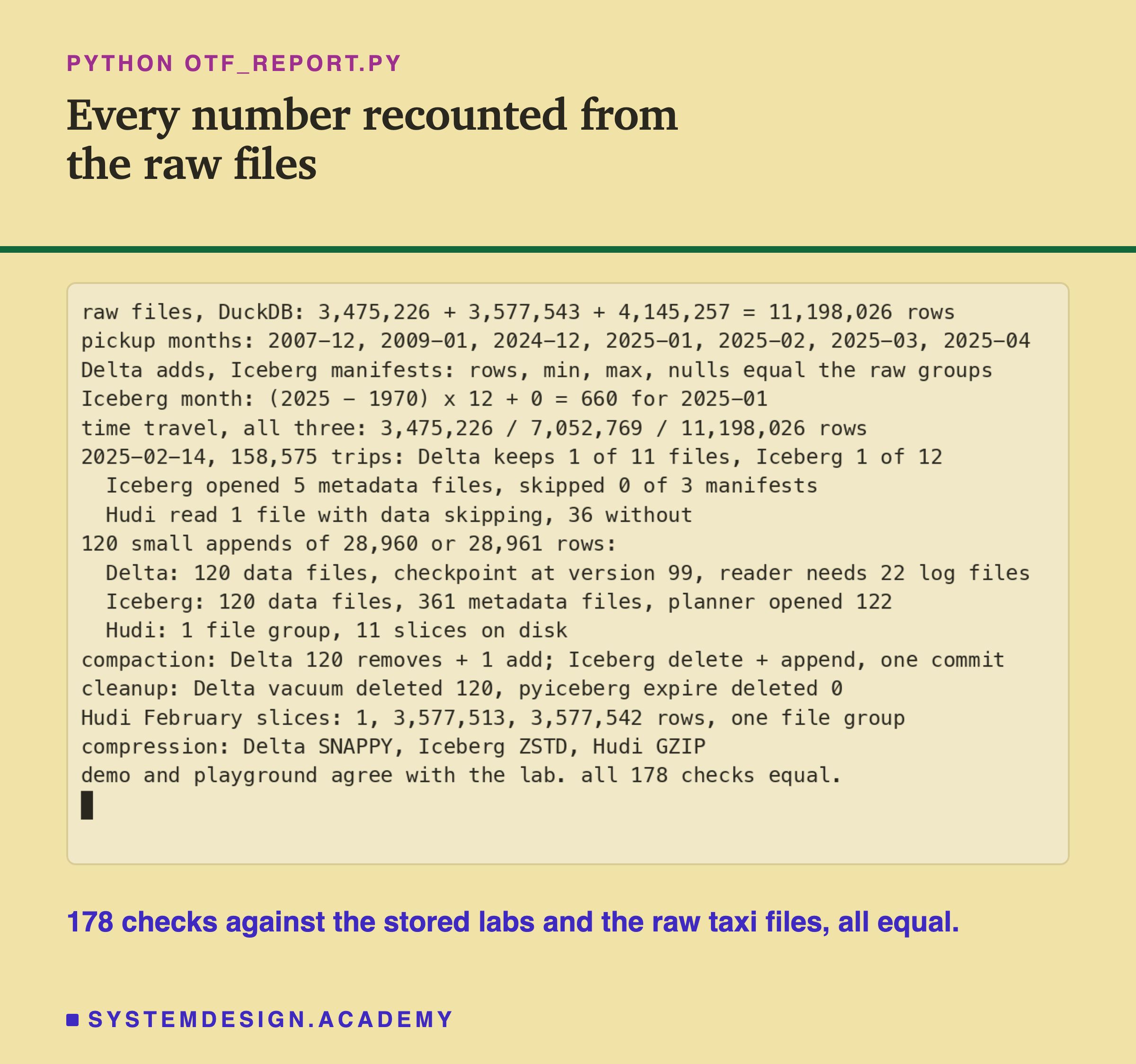
The report script, otf_report.py, does not reuse the labs' code. It counts the raw monthly files again with DuckDB, grouped by pickup month. Then it checks that every Delta add and every Iceberg manifest entry matches those groups: rows, smallest and largest pickup time, and nulls. It redoes the month arithmetic, the planning arithmetic and the file counts, and checks the Hudi numbers against the raw totals. I also planted a wrong number in the stored results once to see it fail, and it stopped with a mismatch.
My Guesses Before the Run, Checked
Before each lab first ran, I wrote down what I expected. Here they are against the results.
-
"Iceberg writes 3 metadata files per append, so more metadata files than Delta." Right: 10 against 3 after three commits.
-
"Both return January's exact row count for the first version." Right, and Hudi did too: 3,475,226 in all three.
-
"Both formats plan 1 data file out of the table's files for the one-day query." Right on the files, 1 of 11 and 1 of 12. I did not expect the manifest list to skip nothing, because of a few stray rows.
-
"About 120 JSON files plus a checkpoint at version 100; about 360 Iceberg metadata files; a planner opens about 120 manifests." Right: a checkpoint at version 99, which is the 100th commit; 361 files; 122 opened.
-
"After cleanup, time travel to before the compaction fails in both." Right. But I assumed Iceberg's cleanup would delete the old files. In pyiceberg 0.12 it deleted none.
-
Hudi: "few file groups and many file versions on disk until cleaning, not 120 data files." Right: 1 file group, 11 slices on disk.
-
Hudi: "with data skipping on, Spark plans only the files whose pickup range covers the day." Right in the end, 1 file against 36. My first way of measuring it could not show it at all.
Seven guesses, all right on the main point, and two details I did not see coming. Now you can run the core of it yourself.
Try It Yourself
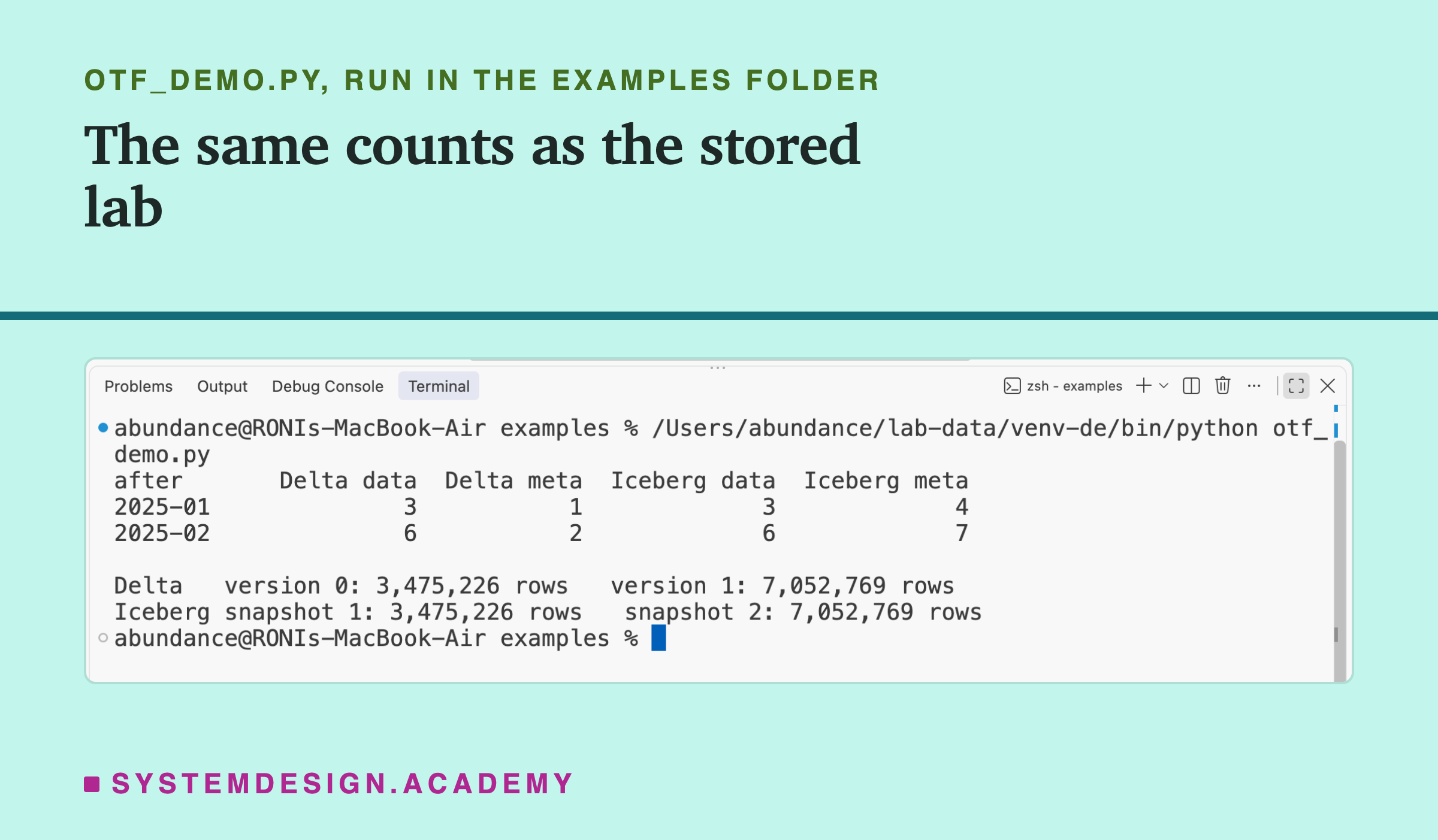
The full labs make about 250 commits and take a while. I wrote a small demo that does one slice: January and February into Delta and Iceberg, with the file counts and time travel.
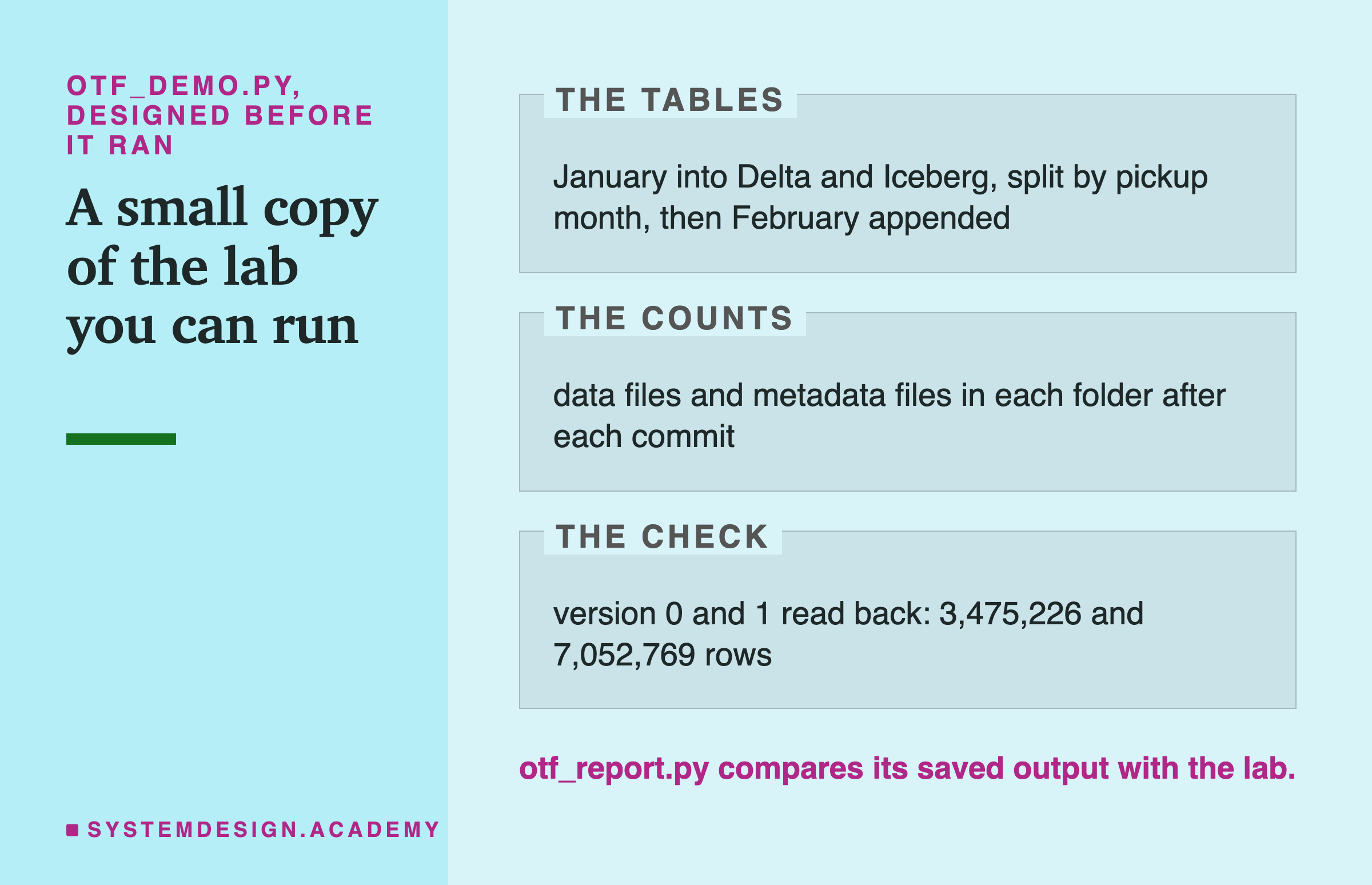
I wrote the demo's design into its docstring after the labs had run and before the demo first ran. It builds both tables in its own short way, so it is also a second check of the lab's first two commits.
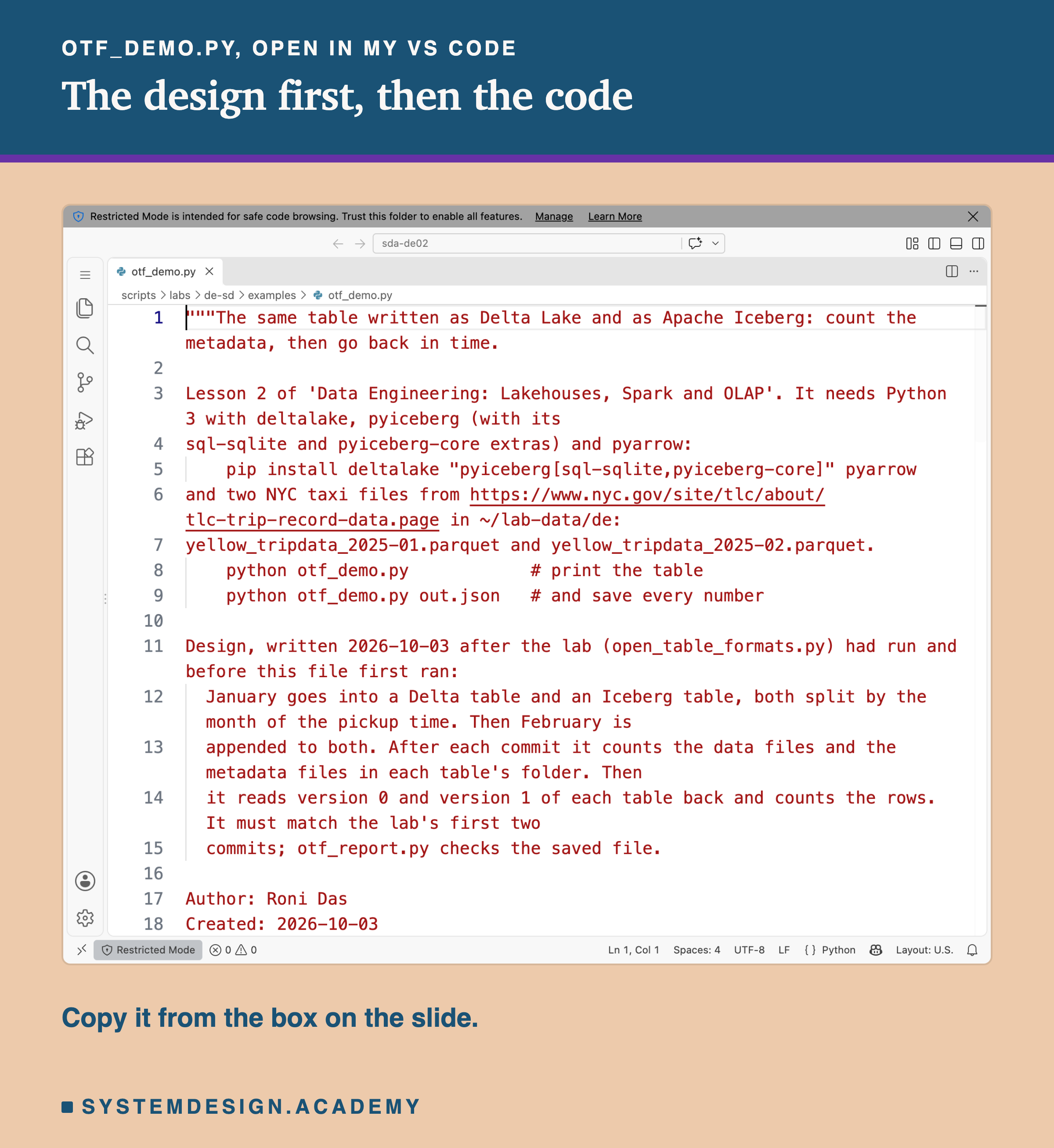
Before you run this lab. You need Python 3 with three libraries: pip install deltalake "pyiceberg[sql-sqlite,pyiceberg-core]" pyarrow. Download two monthly files of Yellow Taxi trip records, January and February 2025, from the NYC TLC trip record page. Put them in a folder called lab-data/de in your home folder. Together they are about 120 MB. The demo needs no GPU, no Java and no Spark. I ran it on a Mac with the versions above. These libraries run on Windows and Linux too, but I have not checked the numbers there.
"""The same table written as Delta Lake and as Apache Iceberg: count the metadata, then go back in time.

Lesson 2 of 'Data Engineering: Lakehouses, Spark and OLAP'. It needs Python 3 with deltalake, pyiceberg (with its
sql-sqlite and pyiceberg-core extras) and pyarrow:
    pip install deltalake "pyiceberg[sql-sqlite,pyiceberg-core]" pyarrow
and two NYC taxi files from https://www.nyc.gov/site/tlc/about/tlc-trip-record-data.page in ~/lab-data/de:
yellow_tripdata_2025-01.parquet and yellow_tripdata_2025-02.parquet.
    python otf_demo.py            # print the table
    python otf_demo.py out.json   # and save every number

Design, written 2026-10-03 after the lab (open_table_formats.py) had run and before this file first ran:
  January goes into a Delta table and an Iceberg table, both split by the month of the pickup time. Then February is
  appended to both. After each commit it counts the data files and the metadata files in each table's folder. Then
  it reads version 0 and version 1 of each table back and counts the rows. It must match the lab's first two
  commits; otf_report.py checks the saved file.

Author: Roni Das
Created: 2026-10-03
"""
import json
import shutil
import sys
from pathlib import Path

import pyarrow.compute as pc
import pyarrow.parquet as pq
from deltalake import DeltaTable, write_deltalake
from pyiceberg.catalog.sql import SqlCatalog
from pyiceberg.transforms import MonthTransform

DATA = Path.home() / "lab-data/de"
WORK = DATA / "demo-otf"
if WORK.exists():
    shutil.rmtree(WORK)
WORK.mkdir()


def count(folder, meta):
    files = [p for p in folder.rglob("*") if p.is_file()]
    m = [p for p in files if meta in p.parts]
    return len(files) - len(m), len(m)


delta = WORK / "delta"
cat = SqlCatalog("demo", uri=f"sqlite:///{WORK}/catalog.db", warehouse=f"file://{WORK}/iceberg")
cat.create_namespace("nyc")
jan = pq.read_table(DATA / "yellow_tripdata_2025-01.parquet")
tx = cat.create_table_transaction("nyc.trips", schema=jan.schema)
with tx.update_spec() as u:
    u.add_field("tpep_pickup_datetime", MonthTransform(), "pickup_month")
ice = tx.commit_transaction()
ice_dir = Path(ice.location().replace("file://", ""))

out = {"commits": []}
print(f"{'after':10s} {'Delta data':>11s} {'Delta meta':>11s} {'Iceberg data':>13s} {'Iceberg meta':>13s}")
for i, m in enumerate(["01", "02"]):
    t = pq.read_table(DATA / f"yellow_tripdata_2025-{m}.parquet")
    write_deltalake(str(delta), t.append_column("pickup_month", pc.strftime(t["tpep_pickup_datetime"], format="%Y-%m")),
                    partition_by=["pickup_month"], mode="append" if i else "error")
    ice.append(t)
    d, i_ = count(delta, "_delta_log"), count(ice_dir, "metadata")
    out["commits"].append({"delta_data": d[0], "delta_meta": d[1], "iceberg_data": i_[0], "iceberg_meta": i_[1]})
    print(f"{'2025-' + m:10s} {d[0]:>11} {d[1]:>11} {i_[0]:>13} {i_[1]:>13}")

ice = cat.load_table("nyc.trips")
out["delta_rows"] = [DeltaTable(str(delta), version=v).to_pyarrow_dataset().count_rows() for v in (0, 1)]
out["iceberg_rows"] = [sum(b.num_rows for b in ice.scan(snapshot_id=s.snapshot_id, selected_fields=("VendorID",))
                           .to_arrow_batch_reader()) for s in ice.snapshots()]
print(f"\nDelta   version 0: {out['delta_rows'][0]:,} rows   version 1: {out['delta_rows'][1]:,} rows")
print(f"Iceberg snapshot 1: {out['iceberg_rows'][0]:,} rows   snapshot 2: {out['iceberg_rows'][1]:,} rows")
shutil.rmtree(WORK)
if len(sys.argv) > 1:
    Path(sys.argv[1]).write_text(json.dumps(out))
Plan a Query Yourself
This box holds the real statistics of every data file in the lab's three-month tables: each file's partition, its smallest and largest pickup day, and its row count. It needs nothing but Python, so it runs in your browser. It does not read any real files. It does the planner's arithmetic the way each format would.
Press Run. With DAY = "2025-02-14", Delta keeps 3 files by partition and 1 by min and max. Iceberg's manifest list keeps all 3 manifests, because the stray rows stretched their ranges, and then keeps 1 file. Now try DAY = "2024-12-31". Only the January load wrote that partition, so the manifest list can skip a manifest this time. It skips only 1 of 3: March's still covers months 455 to 663. Try DAY = "2025-03-20": Delta reads 1 March file, but Iceberg reads 2, because pyiceberg cut March into two files and both cover that day. Try a day that is in no file at all, too.
The report script writes this box from the stored lab results. It checks the box against the lab for 14 February, and against the stored manifests and log for 20 March and 31 December.
The Lab's Code, Piece by Piece
The Delta and Iceberg lab is one file, scripts/labs/de-sd/open_table_formats.py. Here is what each part does.
inventory walks a table folder and sorts every file into data or metadata, with sizes. catalog makes a local Iceberg catalog in a SQLite file, and points it at CountingIO in otf_io.py, a thin wrapper that writes down every file pyiceberg opens. iceberg_table creates a table and its month partition in one transaction, so there is a single creation file.
delta_inventory opens every _delta_log JSON, line by line, and every checkpoint with pyarrow. iceberg_inventory opens every metadata.json, and reads every manifest list and manifest raw with fastavro, not through pyiceberg. decode turns Iceberg's binary bounds back into times and numbers, following the spec's byte layout.
ice_plan loads the table, plans a scan, and returns the planned files and every file opened. delta_reader_set applies the protocol's rule for what a reader of the newest version needs. runs the three commits, the inventory, time travel, the one-day plan, then the 120 small commits, the checkpoint proof, compaction and cleanup, and saves .
How to Look After a Table's Metadata
So far: the three formats write very different metadata, and all three give back exact old versions. Many small commits pile up files that compaction and cleanup must remove. These are the steps I would take on a real lakehouse, in order.
-
Count the metadata files now and then. List
_delta_log, Iceberg'smetadatafolder, or.hoodie. A count that grows by thousands a week tells you planning is getting slower before any dashboard does. -
Make commits bigger where you can. 120 small commits made 120 data files in Delta and Iceberg. One commit of the same rows makes one.
-
Compact on a schedule. Delta's
OPTIMIZE, Iceberg'srewriteDataFilesin Spark, Hudi's clustering. In my lab, compaction took Iceberg's planner from 122 files to 3. -
Keep the planner's own reads short. Let Delta write checkpoints. In Iceberg, merge or rewrite manifests; pyiceberg will not merge them unless you turn on
commit.manifest-merge.enabled. -
Clean up on purpose, and check what was deleted. Vacuum or expire snapshots only after the slowest reader is done. Then count the data files: in my run, pyiceberg expired snapshots without deleting a single file.
-
Three rows with wrong dates stopped Iceberg's manifest list from skipping anything. Clean or quarantine rows with impossible dates before they land in a partitioned table.
When Each Format Fits
My lab measured what each format writes. It did not measure speed, so read this as what the metadata suggests, not a ranking.
Delta Lake fits when you want the simplest metadata to reason about. It is one folder of commits, statistics in plain JSON, and checkpoints that cap a reader's work. In my lab it needed a stored partition column, and a query has to name that column to use it. Delta on Spark can derive that filter when the partition column is a generated column; I did not test that.
Apache Iceberg fits when many different engines and teams share tables through a catalog, and when you want partitions that follow a column without an extra column. Hidden partitioning turned my pickup-time filter into a month by itself. Watch the manifest count if your writer does fast appends, as pyiceberg does.
Apache Hudi fits when records change by key, because every row carries a record key and the table is built around rewriting file groups. It also packed my 120 small commits into one file group without any extra job. The price is more machinery: a JVM engine such as Spark or Flink to write, and from Python that means Spark; and a metadata table to run.
You may not have to choose only one. Apache XTable "reads the existing metadata of your table and writes out metadata for one or more other table formats". Delta's UniForm "allows you to read Delta tables with Iceberg and Hudi clients". I did not test either.
None of the three is a data catalog in the sense of telling people what tables mean. Iceberg's catalog only says where the newest metadata is. Lesson 4 of this chapter covers catalogs.
What This Lab Cannot Tell You
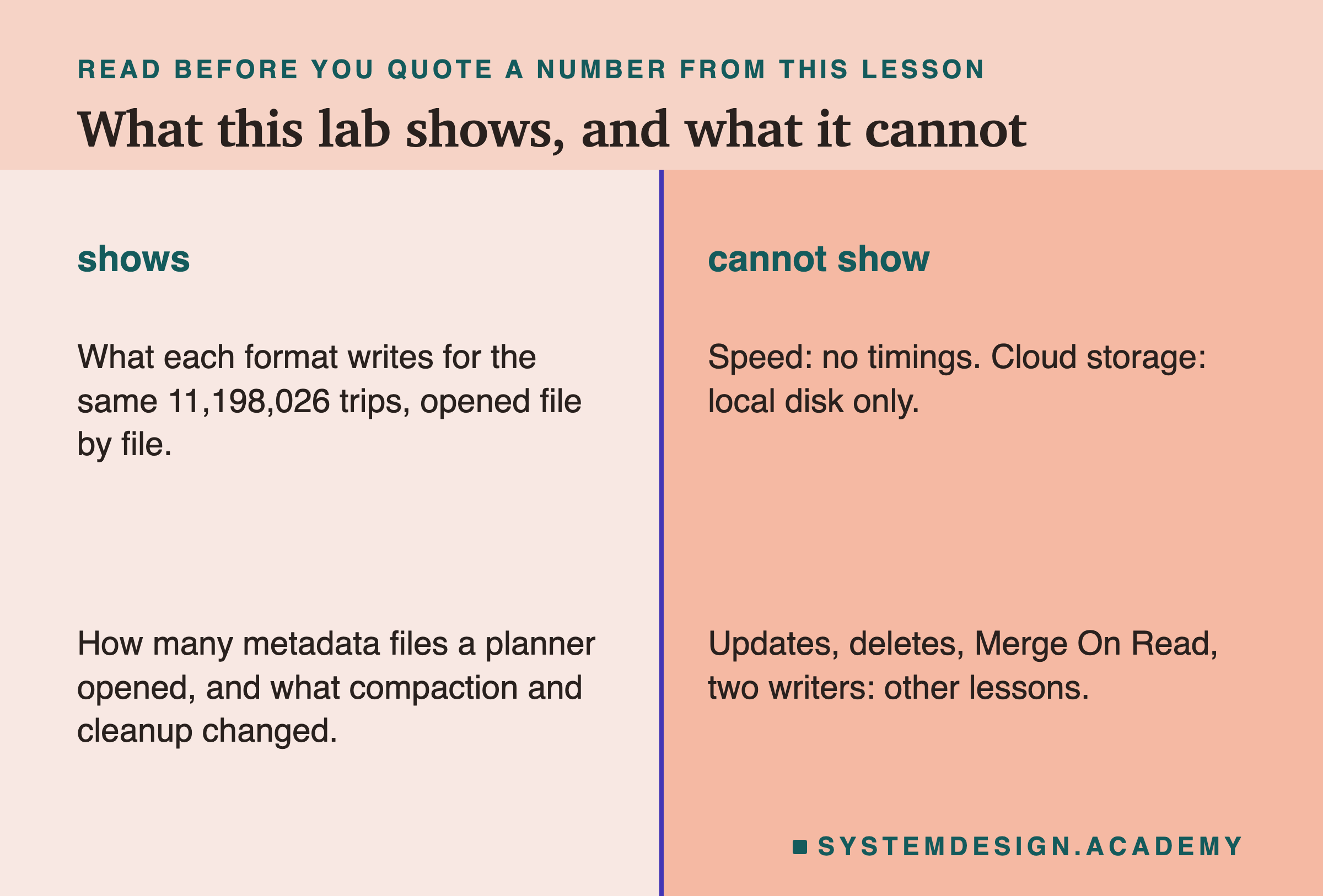
One library per format. I tested Delta through deltalake, Iceberg through pyiceberg and Hudi through its Spark bundle. Other libraries choose differently: Spark's Delta library checkpoints every 10 commits, not 100, and Iceberg's Java library merges manifests by default. My counts describe these libraries, not the formats in general.
Inserts only. Every write here added rows. I did not update or delete any row. So I did not see Delta's deletion vectors, Iceberg's delete files, or Hudi's Merge On Read table type, where changes go to log files beside the data.
Delta's skipping was my arithmetic. For Delta, I counted the files a planner should keep from the statistics in the log. I did not see deltalake make that choice. For Iceberg and Hudi, the counts come from the libraries themselves.
No speed, one machine. The labs ran on my laptop's own disk while it was busy, so I report counts, not times. Cloud storage adds a cost per file opened, which makes metadata counts matter more, but I did not measure it.
One run. The file counts were the same in a test run and the final run, but the byte sizes moved a little from run to run.
What to Do on Monday
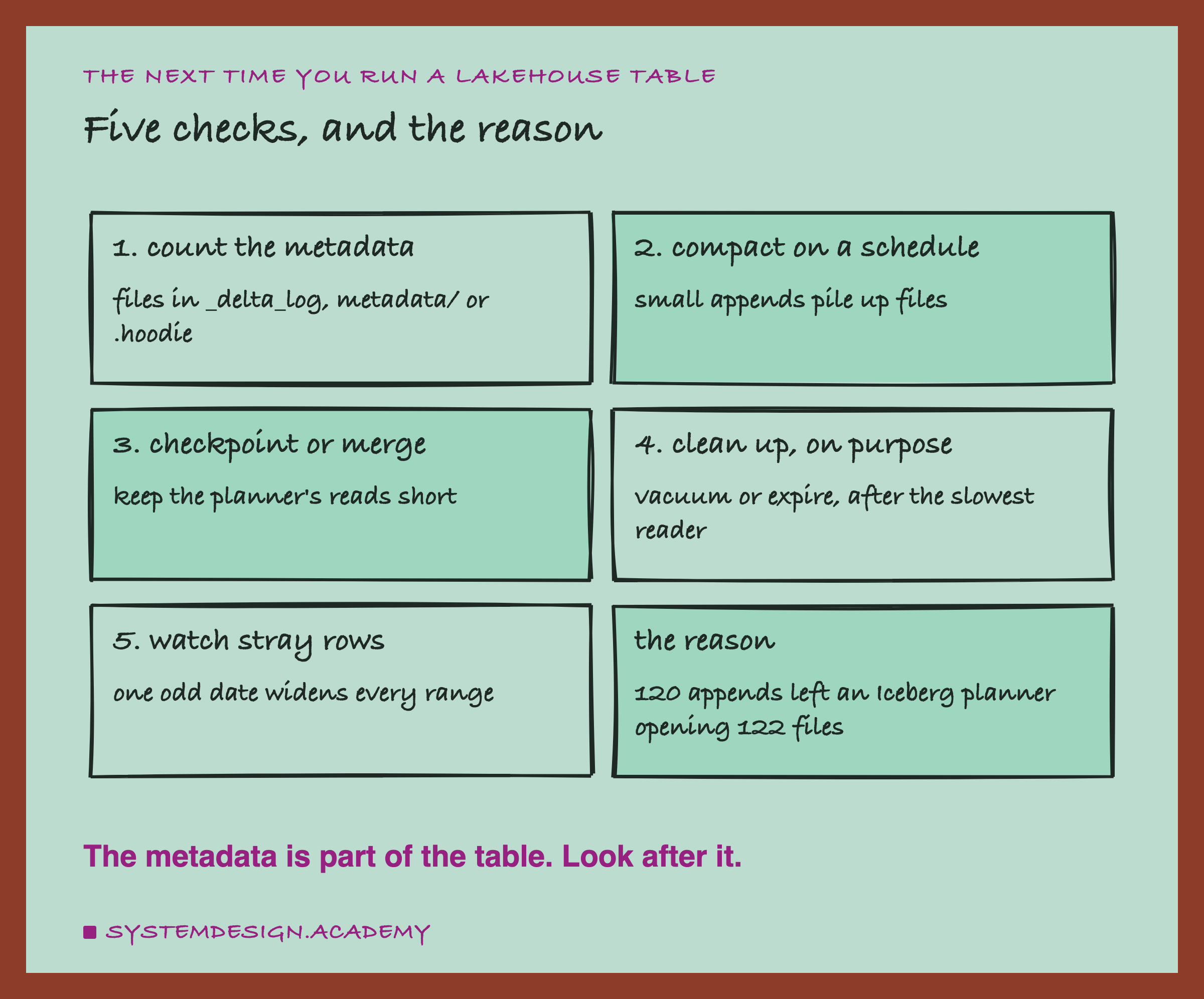
If you take one thing to work on Monday, make it this. Pick your busiest lakehouse table and count its metadata files. For Delta, count the JSON files in _delta_log after the newest checkpoint. For Iceberg, count the manifests in the current snapshot. For Hudi, look at the file groups and the number of slices per group.
Then compare that count with how often the table is compacted. If commits arrive every few minutes and compaction never runs, the count only goes up, and every query pays for it before reading a single row.
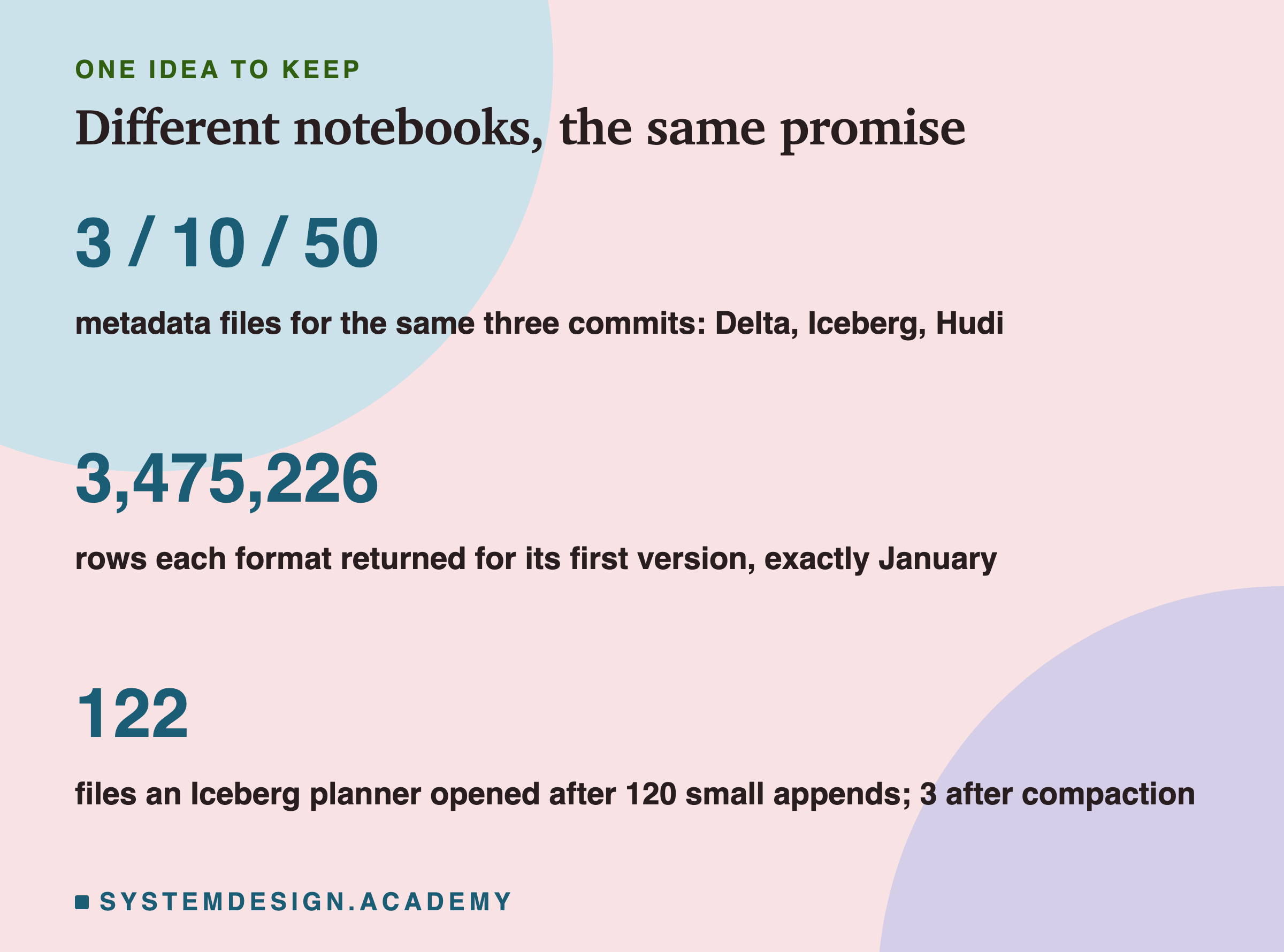
The one idea to keep: Delta, Iceberg and Hudi all keep the rows in the same Parquet files. What differs is the notebook beside them: a diary of commits, a tree of manifests, or a timeline of instants. That notebook needs care too.
Knowledge Check
Knowledge Check
4 questions - Score 80% to pass
In this lab, how did the Iceberg table split trips by month without a pickup_month column?
On a copy of the 120-commit Delta table, commits 0 to 99 were deleted. Why could a reader still read the newest version?
After 120 small appends, why did the Iceberg planner open 122 files?
What did pyiceberg 0.12's expire_snapshots do to the old data files in this lab?