Guess the Next Word
When you type on a phone, the keyboard suggests the next word. Type "See you" and it offers "soon", "tomorrow" or "later". It does not know what you mean. It has seen a lot of text and knows which words usually come next.
A language model, the kind behind ChatGPT and every chatbot, works the same way, only much better. In this chapter I run one on my own laptop with Ollama, a free program that downloads models and runs them on your own computer. The previous chapter showed how it reads: text is split into tokens, and tokens become numbers. This chapter is about what it does with them. This first lesson answers the most basic question: what comes out of the model?
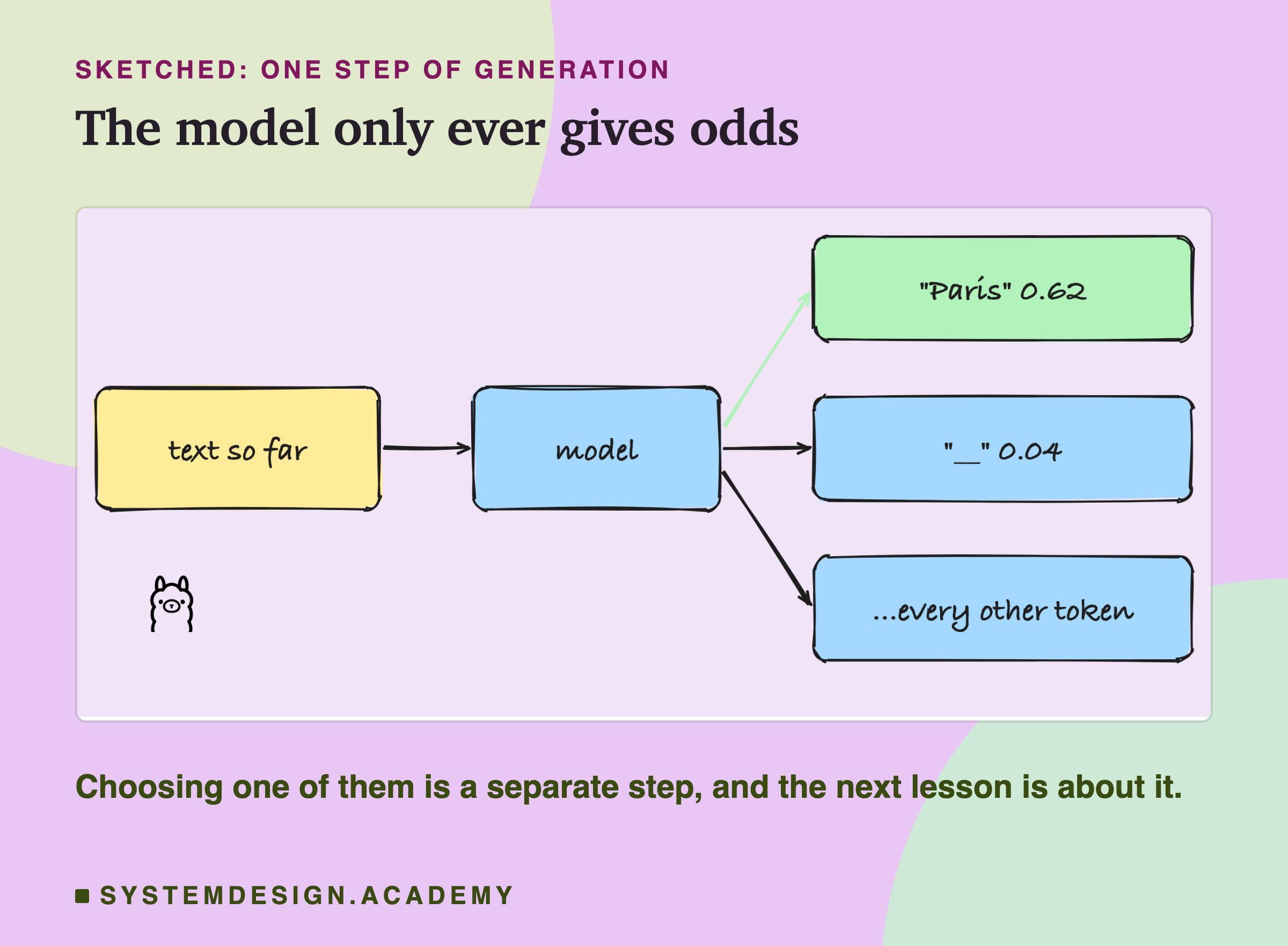
The answer is surprising the first time you see it. The model never produces a sentence, and it never produces an answer. It produces a list of numbers, one for every possible next piece of text, and each number says how likely that piece is. Everything you see in a chat window is built from those lists, one small piece at a time. Once you have seen the lists with your own eyes, many later topics become easy to follow: why the same question can get two different answers, why a model can sound sure and still be wrong, and why a chat app and a raw model reply so differently to the same words.
Why an Engineer Needs to See the Odds
Most people only ever see the finished text. That is enough to use a chatbot, but not enough to build with one. Here are three everyday problems that only make sense once you know what the model really outputs. They are general points, not measurements; the lab below then shows each of them on real numbers.
"It gave a different answer this time." The model gives odds, and a separate step picks one token. If that step picks at random, following the odds, two runs can go different ways. The next lesson measures this. In this lesson I switch the randomness off, with temperature 0, so that you can see the odds themselves.
"It sounded so sure, but it was wrong." The odds say how likely a token is to come next in text like the text the model has read. They do not say whether the token is true. A model can give high odds to a common wrong continuation. You will see a small example with "A triangle has three".
"It answers differently in the app than through the API." Many tools add hidden text around your message before the model reads it. The model then predicts a different next token, because it is continuing different text. The lab measures this on the same five words.
In all three cases, the fix starts with the same habit: look at what the model actually received and what odds it gave, not only at the final text.
The Words You Need First
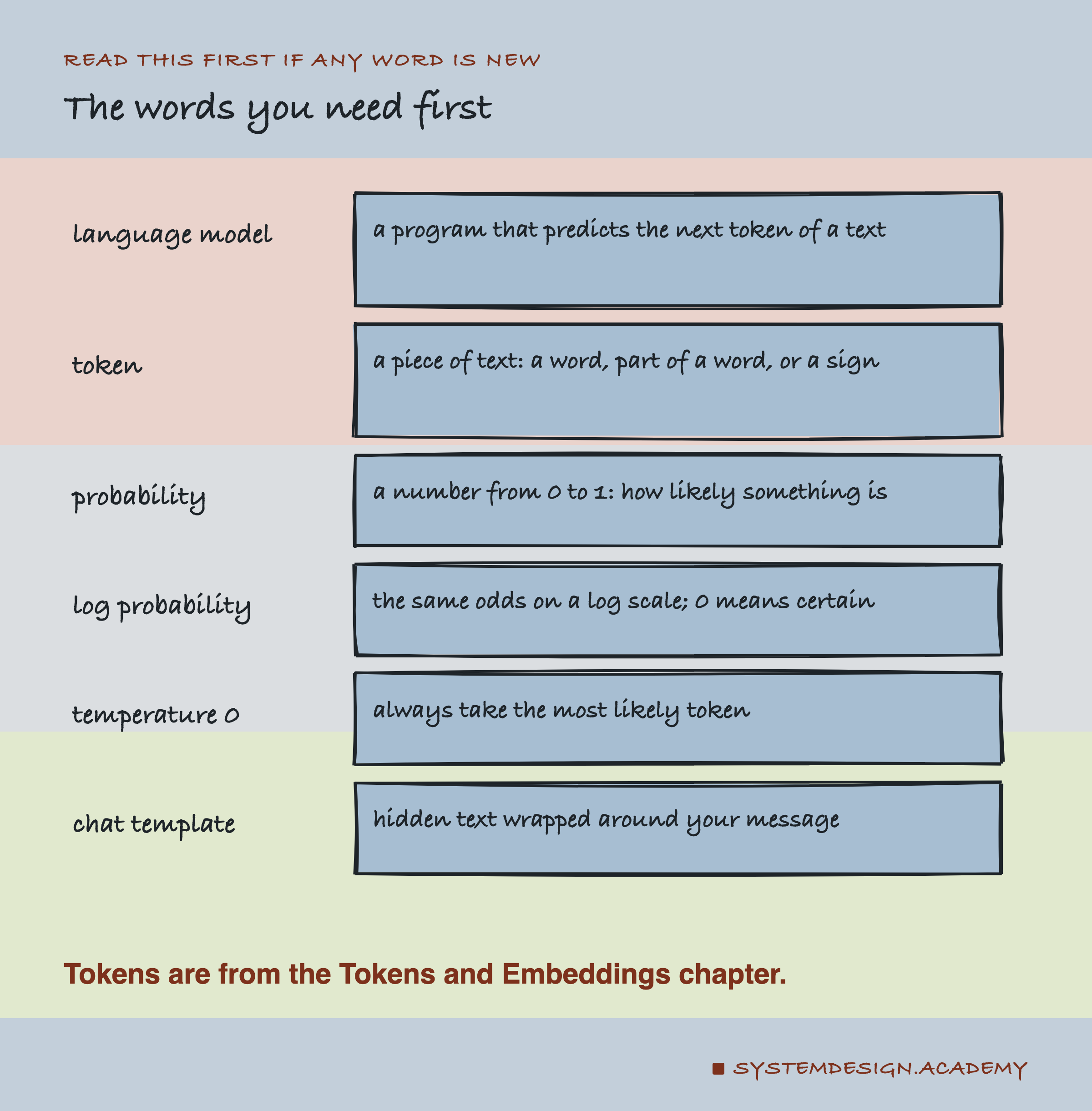
Language model. A program that, given some text, predicts the next token.
Token. A piece of text: a word, part of a word, or a sign. Many tokens start with a space; this lesson shows that space as ␣.
Probability, or odds. A number from 0 to 1 saying how likely something is. 0.62 means 62 times in 100. This lesson uses "odds" as a plain word for the same thing. At each step, the probabilities of all possible next tokens add up to exactly 1.
Log probability. Another way to write the same odds, used by the software because very small odds are easier to store this way. 0 means certain, and the more negative, the less likely. Python's math.exp turns it back into a probability.
Temperature 0. A setting that makes the model always take its most likely token. The next lesson is about this setting.
Chat template. Hidden text that a chat app wraps around your message before the model sees it.
Median. The middle value when you sort a list. With 12 values, it is the average of the 6th and 7th.
Try It: Ask a Model for the Odds
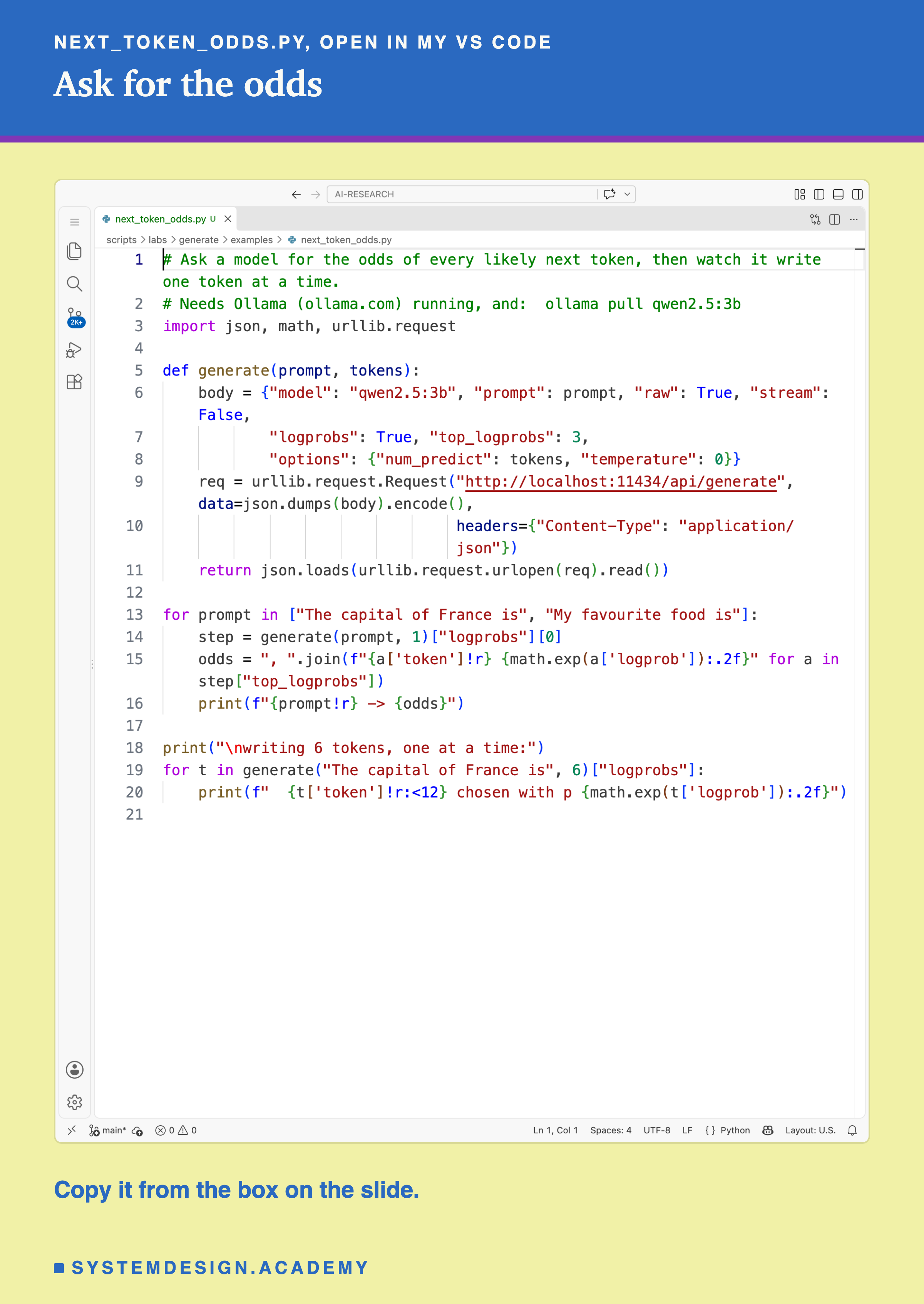
Ollama can send back not just the text a model writes, but the odds it gave each token. This file asks for them. Here it is, open in my VS Code.
And this is what it printed:
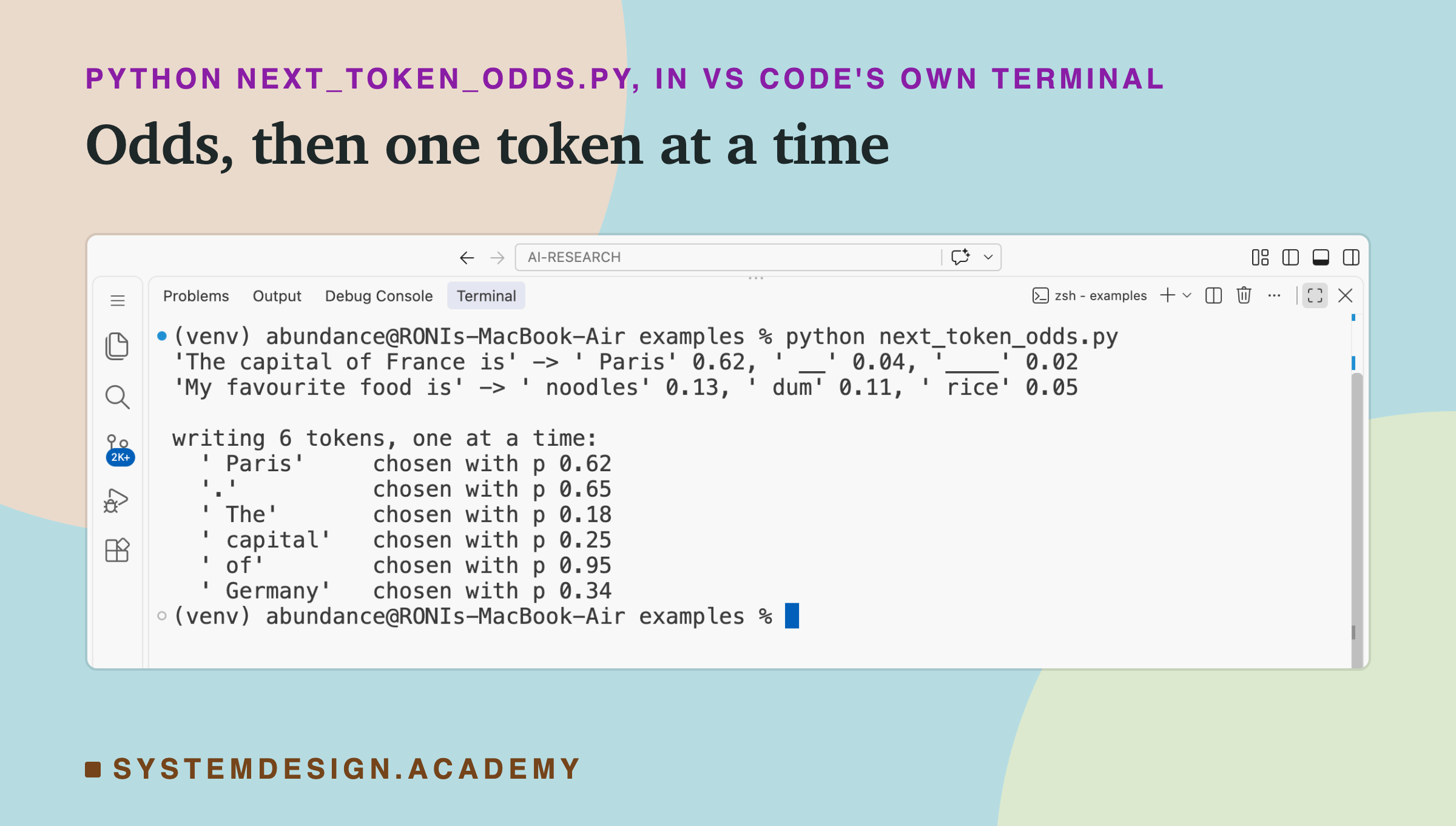
Three things are worth noticing already.
- For "The capital of France is", one token stands out: "␣Paris", at 0.62.
- For "My favourite food is", nothing stands out. The top choice, "␣noodles", has only 0.13. ("␣dum" is the start of a longer word, probably dumplings.)
- When asked to write six tokens, the model wrote "Paris. The capital of Germany", one token at a time, each with its own odds.
To run it: install Ollama from ollama.com, open it and leave it running. Run ollama pull qwen2.5:3b in a terminal (about 1.9 GB), save the file below as next_token_odds.py, and run python3 next_token_odds.py (on Windows: python next_token_odds.py). If you see "Connection refused", open the Ollama app first.
The Output Is a List of Odds
Here are the five most likely next tokens for the two prompts, from the full test below.
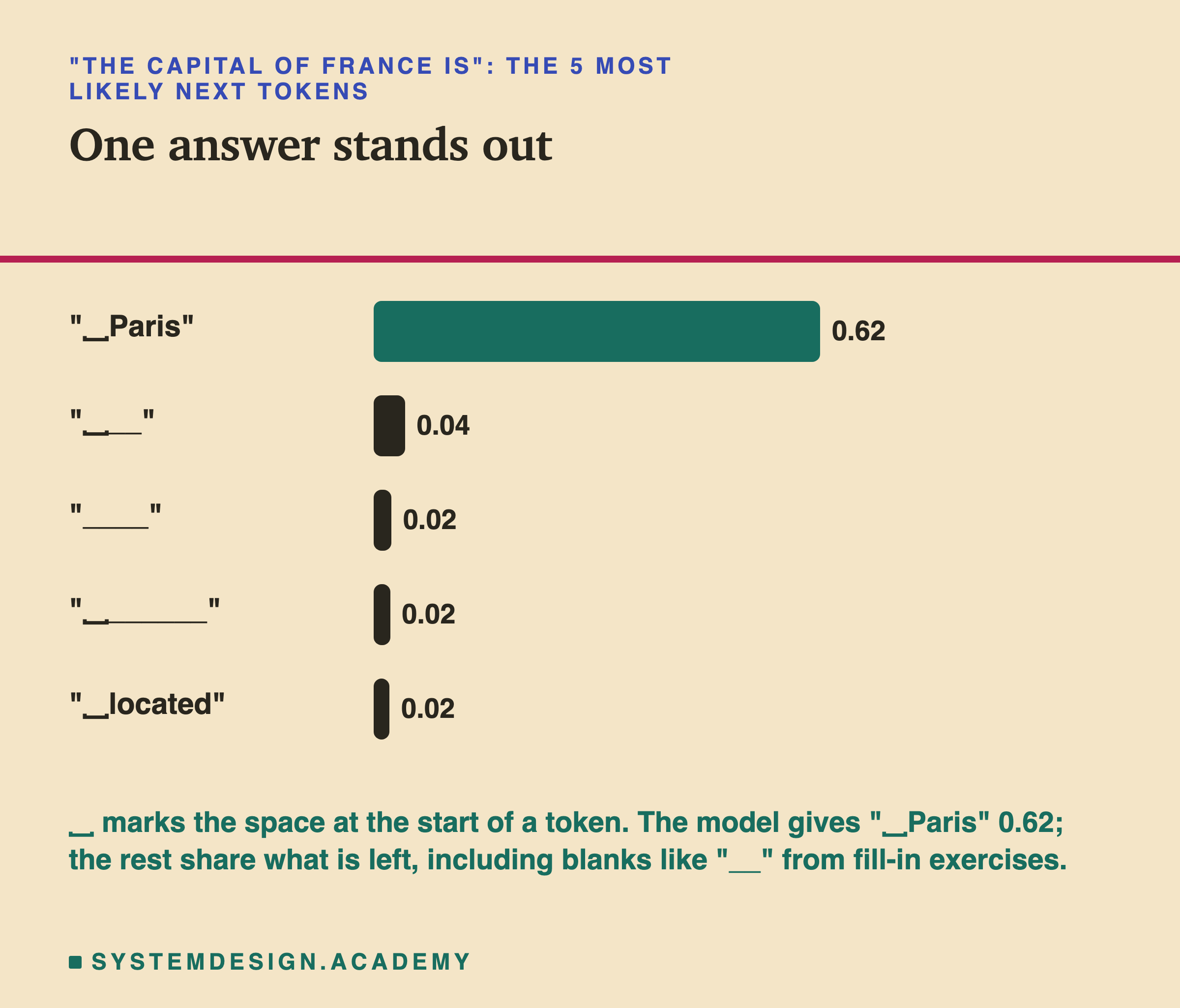
After "The capital of France is", the model puts 0.62 on "␣Paris". Part of the remaining odds goes to blanks like "__": the model has read many worksheets that leave a blank after "is".
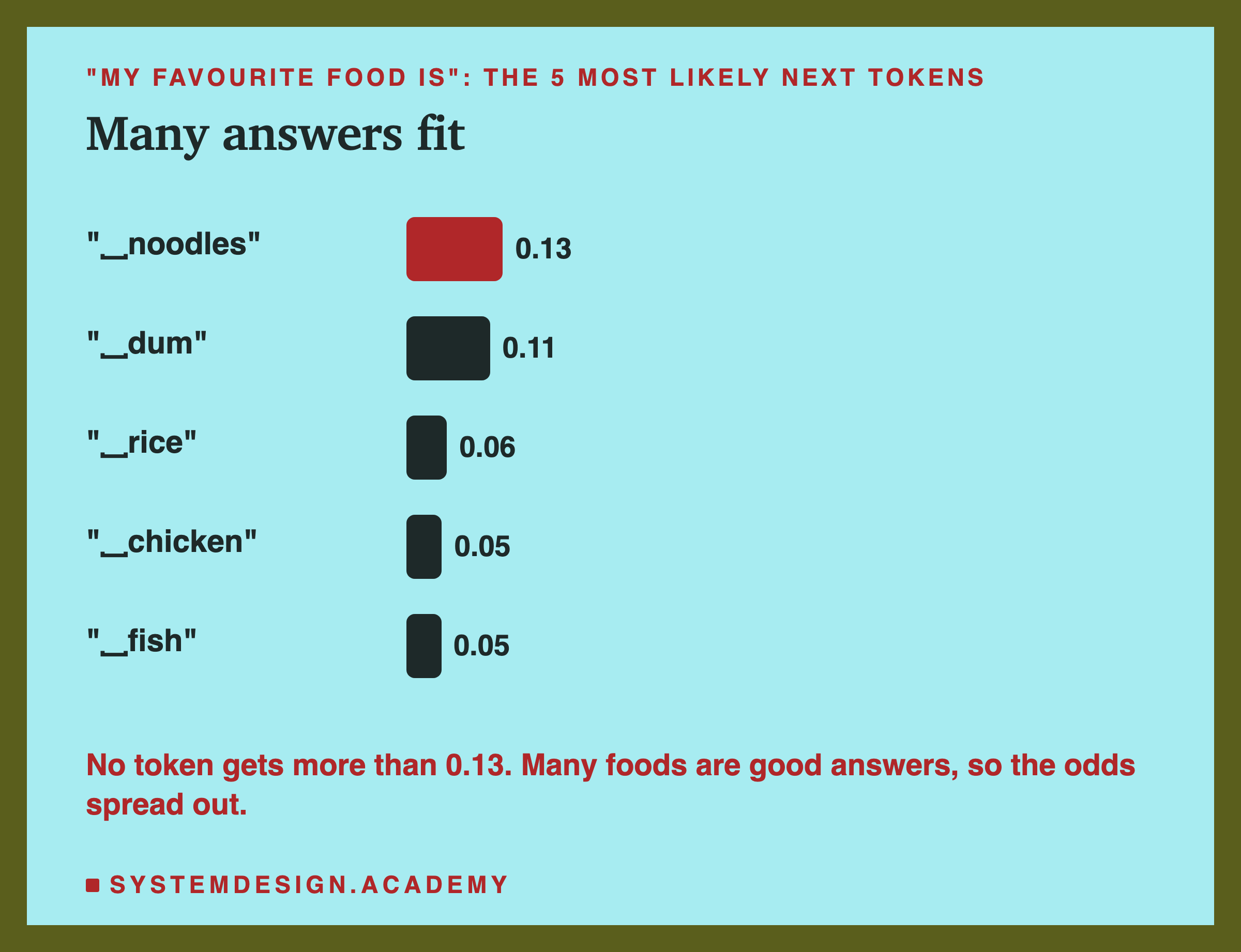
After "My favourite food is", the odds spread out. Many foods are equally good answers, so no single token gets much. (This chart says "␣rice" 0.06 and the screenshot said 0.05: the two runs were separate, and the odds can differ very slightly between runs, here 0.056 against about 0.054.)
This is the whole output of a language model at one step: a probability for every token it knows. For qwen2.5:3b the list has 151,936 slots. Nearly all of them hold a real token; a few at the end are unused padding. The probabilities add up to 1. Ollama sends back only the top few you ask for.
Writing Is the Same Step, Again and Again
A model never writes a whole sentence at once. It repeats one small loop:
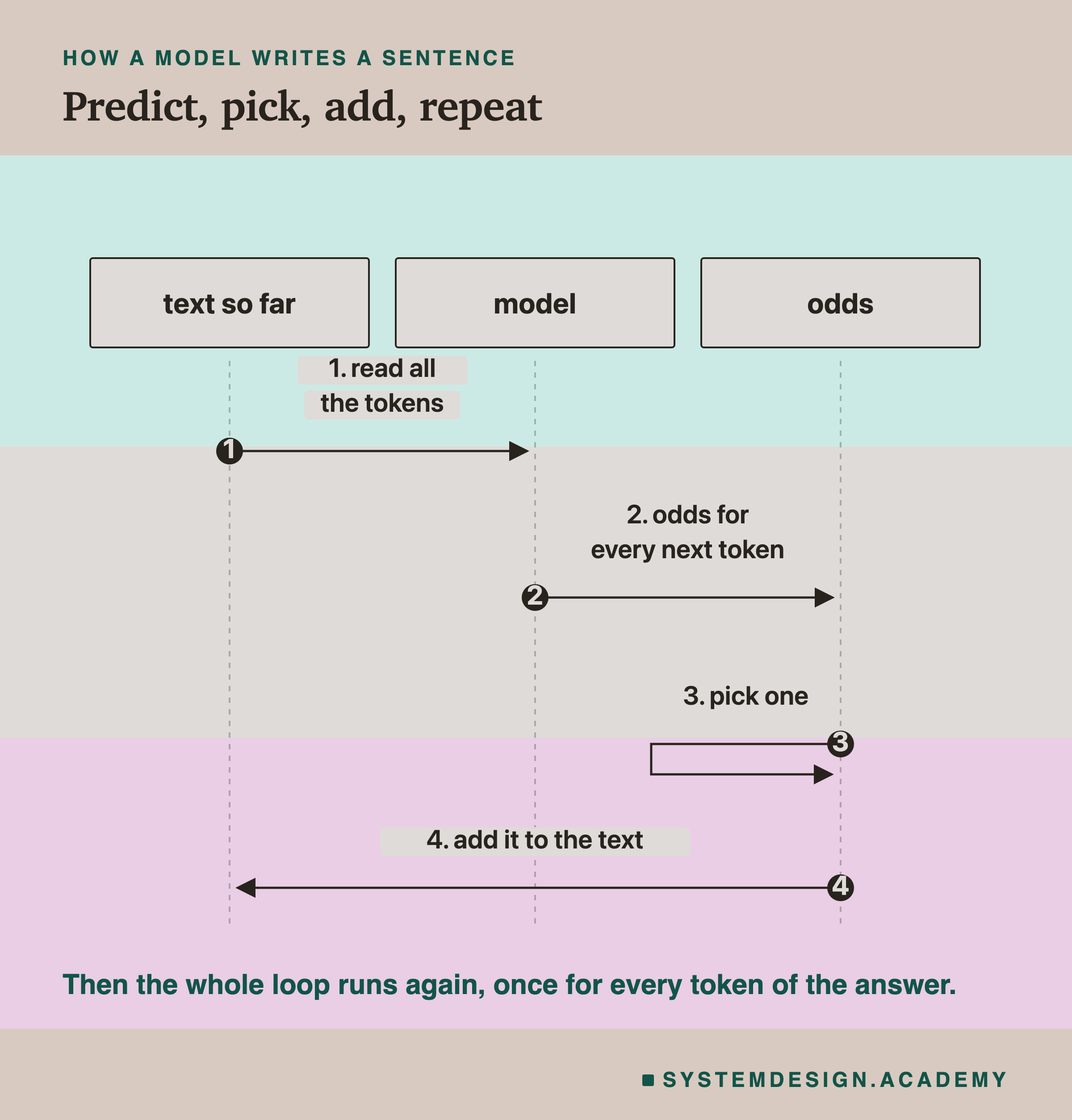
- Read all the text so far.
- Give odds for every possible next token.
- Pick one.
- Add it to the text, and go back to step 1.
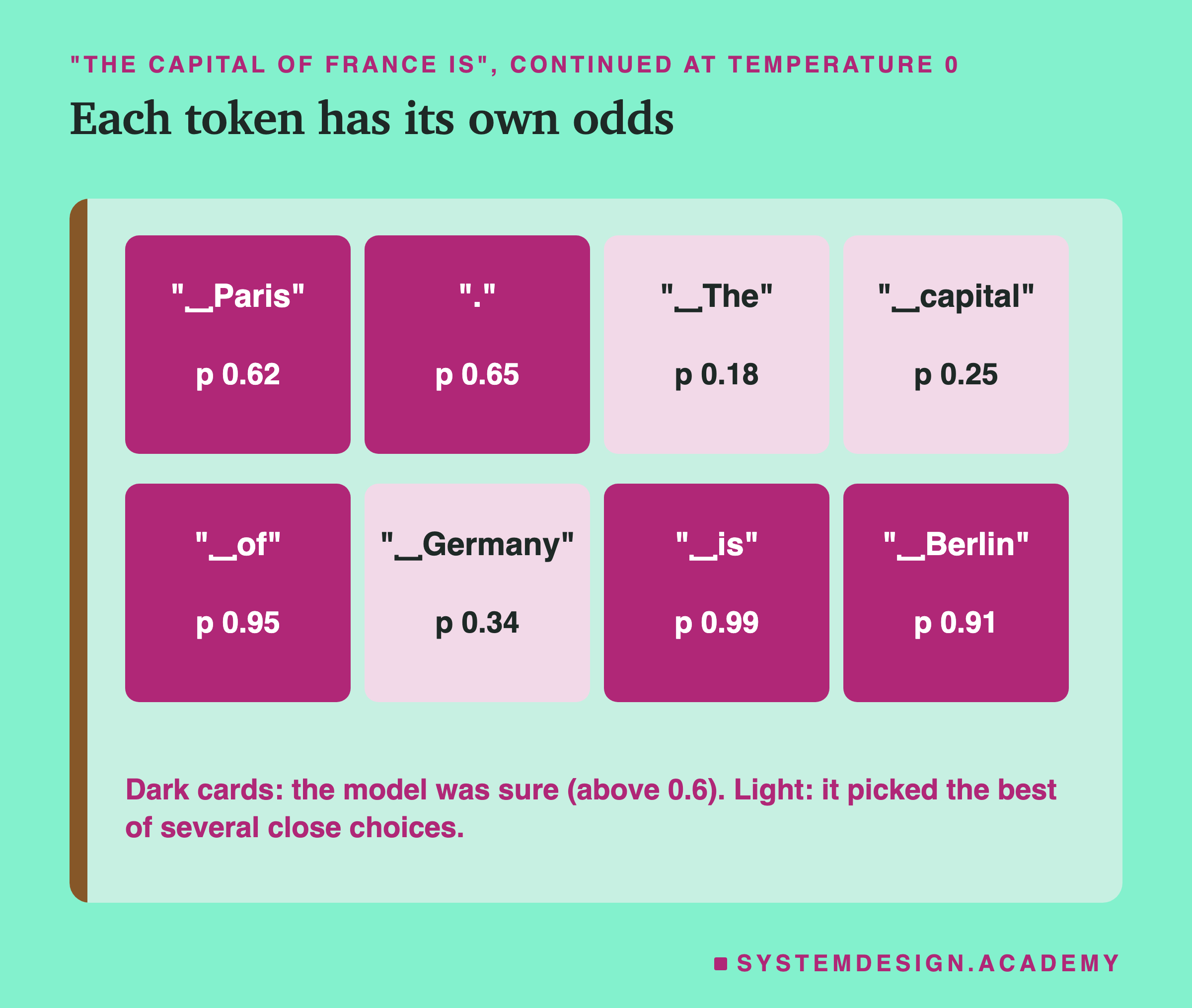
Look at the odds as it wrote "Paris. The capital of Germany is Berlin". Some tokens were nearly certain: "␣is" at 0.99, "␣Berlin" at 0.91 once Germany was chosen. For other tokens, two or three choices had similar odds: "␣The" at only 0.18, "␣Germany" at 0.34 with "␣Spain" next at 0.19. The model did not plan to talk about Germany. It picked the likeliest token at each step, and the sentence followed.
Look closely at the third token. "␣The" had 0.18, and the next choice, "␣Paris", had 0.16. The two were almost level. At temperature 0 the model must take the top one, so it took "␣The" and went on to write about another capital. If "␣Paris" had won that close race, the whole rest of the sentence would have been different. This is the most important idea in this lesson for what comes next: every token is chosen from a list of odds, and one close choice early on can change everything after it.
Notice also that the loop reads all the text so far at every step, including the tokens the model has just written. The model has no separate memory of what it "meant" to say. Its own last token is simply more text to continue.
The Numbers, Worked by Hand
From log probability to probability. Ollama sent "␣Paris" with a log probability of about −0.475. The probability is e to the power −0.475, where e is about 2.718. math.exp(-0.475) gives about 0.622, the 0.62 you saw. For the blank "␣__", the log probability was about −3.137, and math.exp(-3.137) is about 0.0434. The log probability is the natural logarithm of the probability, so the two always convert back and forth exactly.
The chance of a whole sentence. When the model writes several tokens, the chance of that exact sequence is the product of the chances of each token, each one given the text before it. For the 8 tokens of "␣Paris. The capital of Germany is Berlin", the chosen tokens had these probabilities: 0.6219, 0.6507, 0.1773, 0.2487, 0.9469, 0.3430, 0.9867 and 0.9089. Multiply them all together and you get about 0.0052, roughly 5 chances in 1,000. The model was fairly sure of most single steps, and still this exact sentence was far from certain, because every step multiplies in a little doubt.
This is also why software works with log probabilities. Multiplying many small numbers gives a number so small that a computer can lose it. Adding their logarithms gives the same information safely. The logs of those 8 probabilities are about −0.475, −0.430, −1.730, −1.392, −0.055, −1.070, −0.013 and −0.096. They add up to about −5.26, and math.exp(-5.26) is about 0.0052 again.
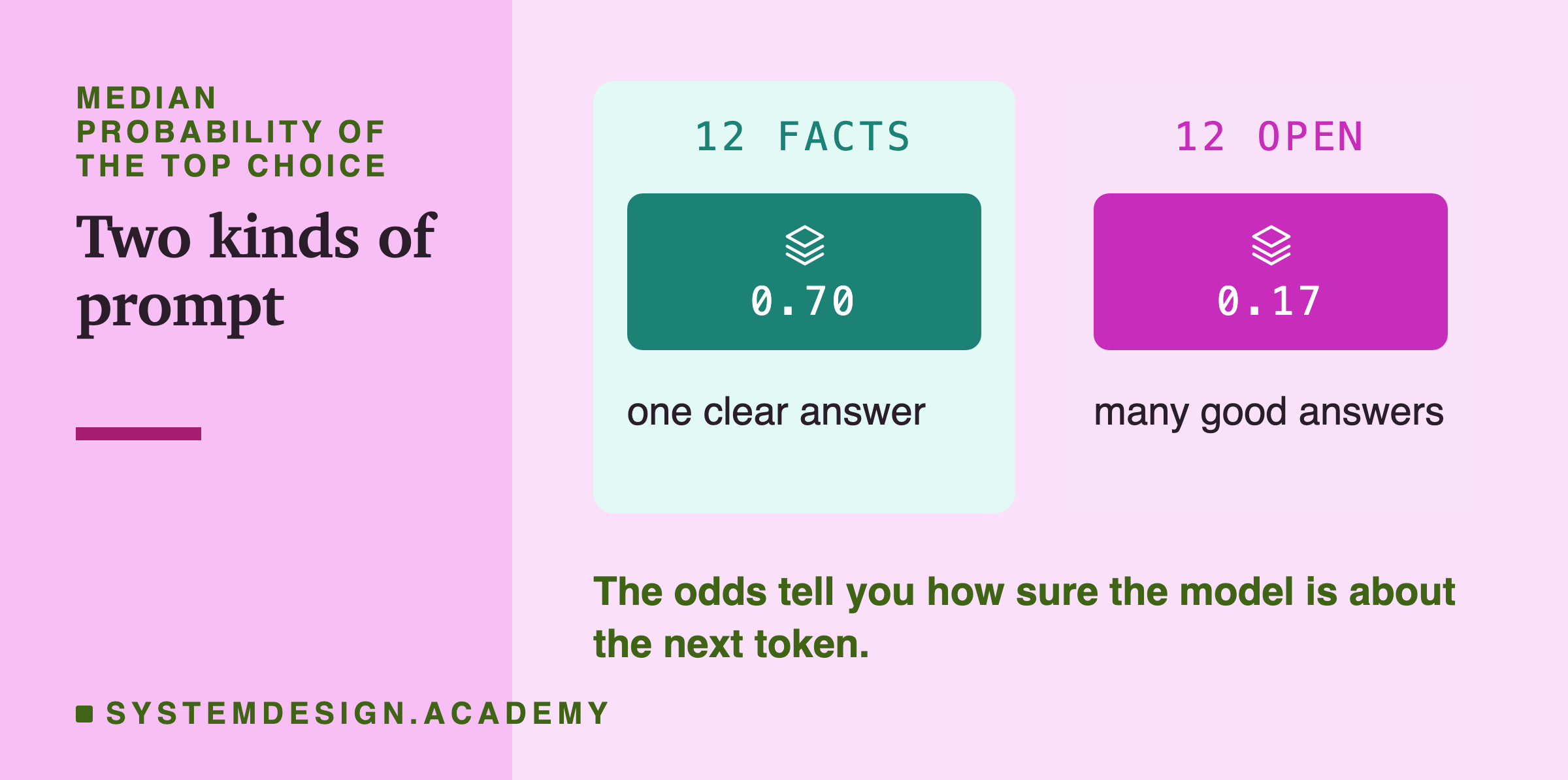
A median, by hand. Sort the 12 facts' top-choice probabilities from low to high: 0.264, 0.402, 0.457, 0.622, 0.637, 0.675, 0.716, 0.723, 0.784, 0.855, 0.980, 0.995. The 6th is 0.675 and the 7th is 0.716. Their average is (0.675 + 0.716) ÷ 2, about 0.696, which the report rounds to 0.70. For the 12 open prompts the 6th and 7th values are 0.168 and 0.170, so the median is about 0.169, reported as 0.17.
How much the top 10 cover. For "The capital of France is", the ten probabilities in the playground add up to about 0.825. So all the other slots, more than 151,000 of them, all together, got the remaining 1 − 0.825 = 0.175. No single one of them is likely, but together they are not small.
The Test
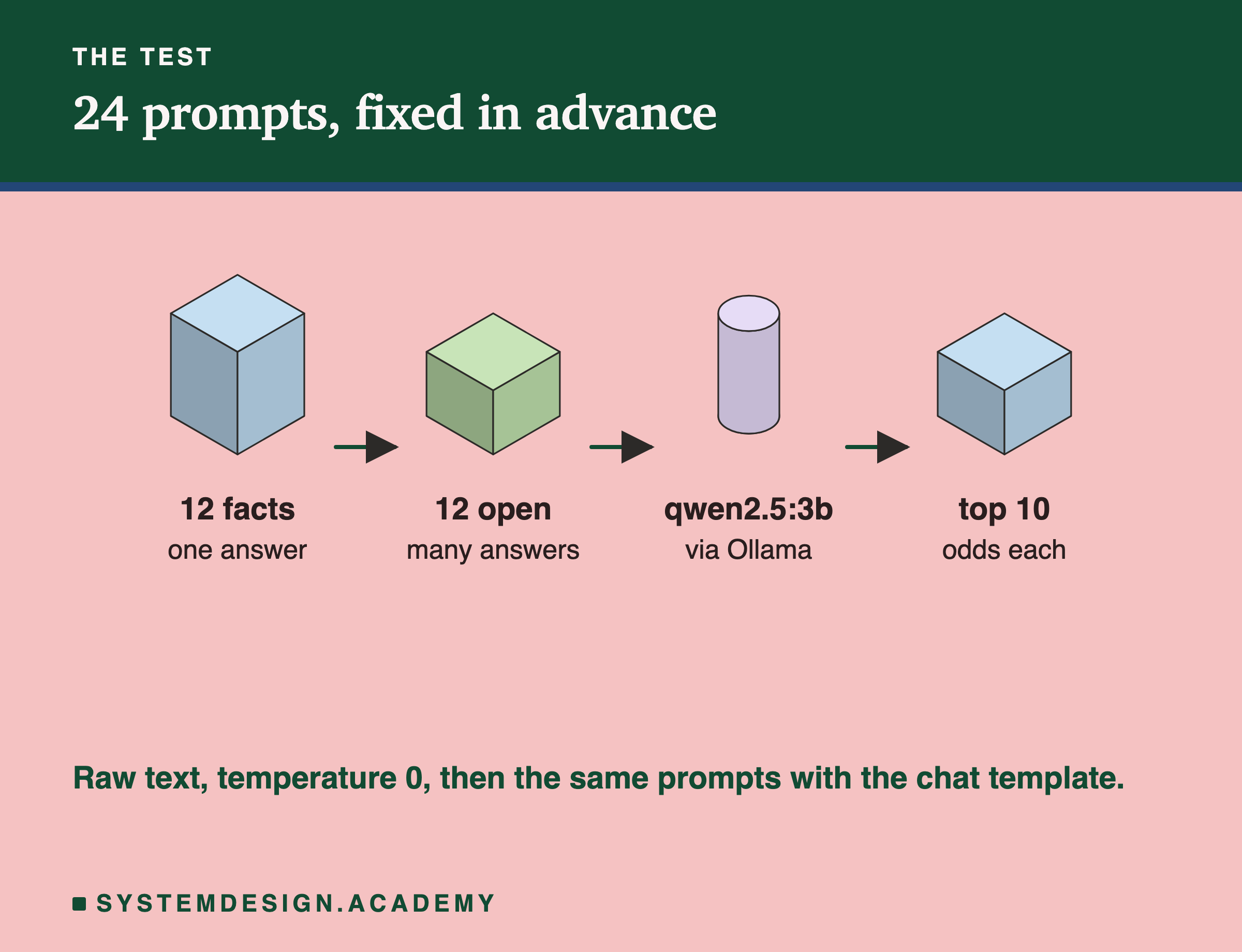
- 24 prompts, written before any run. 12 facts with one clear answer, such as "The chemical symbol for gold is". 12 open prompts with many good answers, such as "Yesterday I went to the".
- Model: qwen2.5:3b, a small model with 3 billion numbers inside it, through Ollama.
- Measured: the 10 most likely next tokens and their probabilities, first on the raw text and then with the chat template.
Why two groups of prompts? If a model's odds mean anything, they should look different when there is one right continuation and when there are many good ones. The facts and the open prompts are a simple way to test that. I wrote all 24 before running anything, so I could not pick prompts that happened to give a neat result.
Every run used temperature 0 and a fixed seed, so running the lab again on the same computer and Ollama version gives the same numbers.
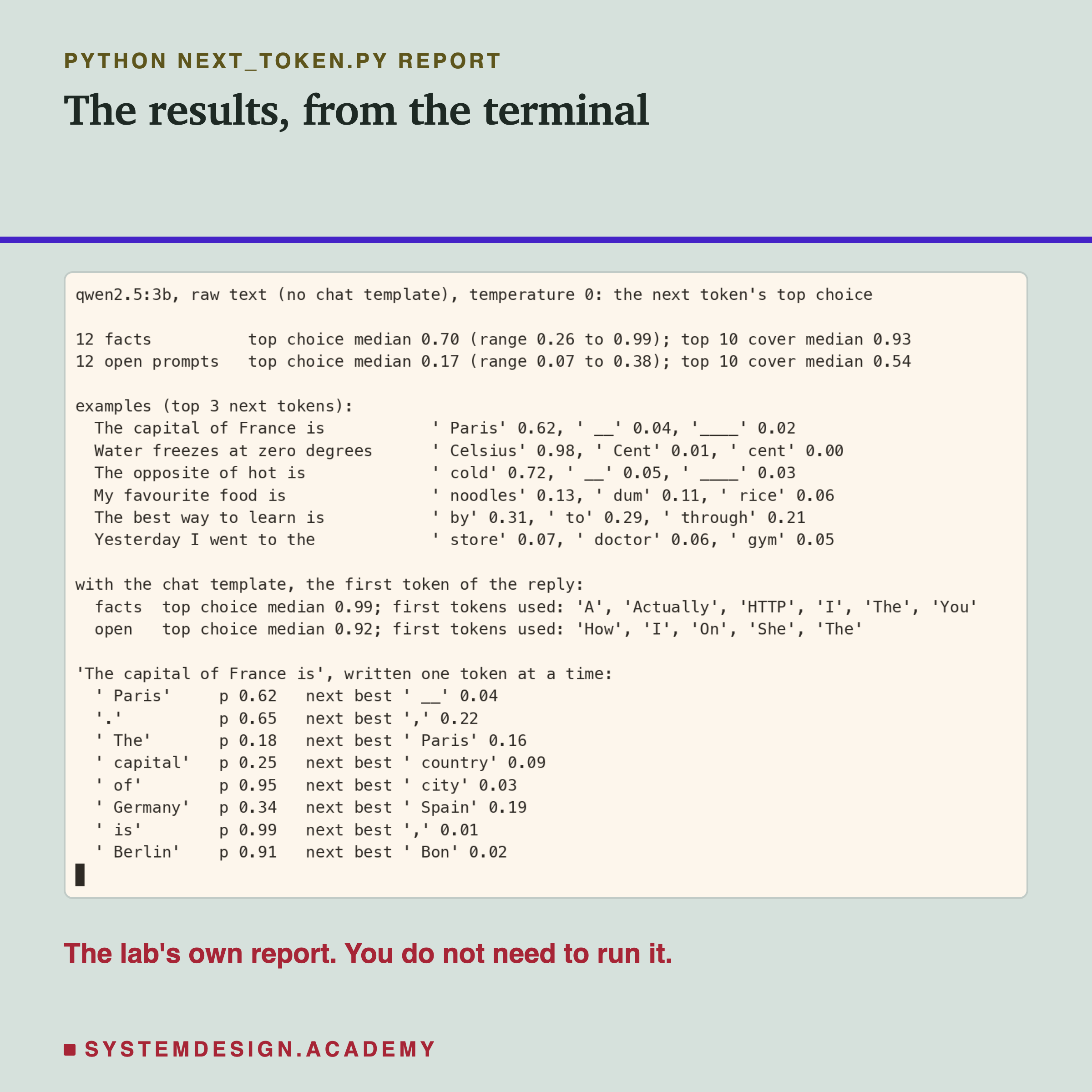
Here is the lab's report, from the terminal.
Facts Are Sure, Open Prompts Are Not
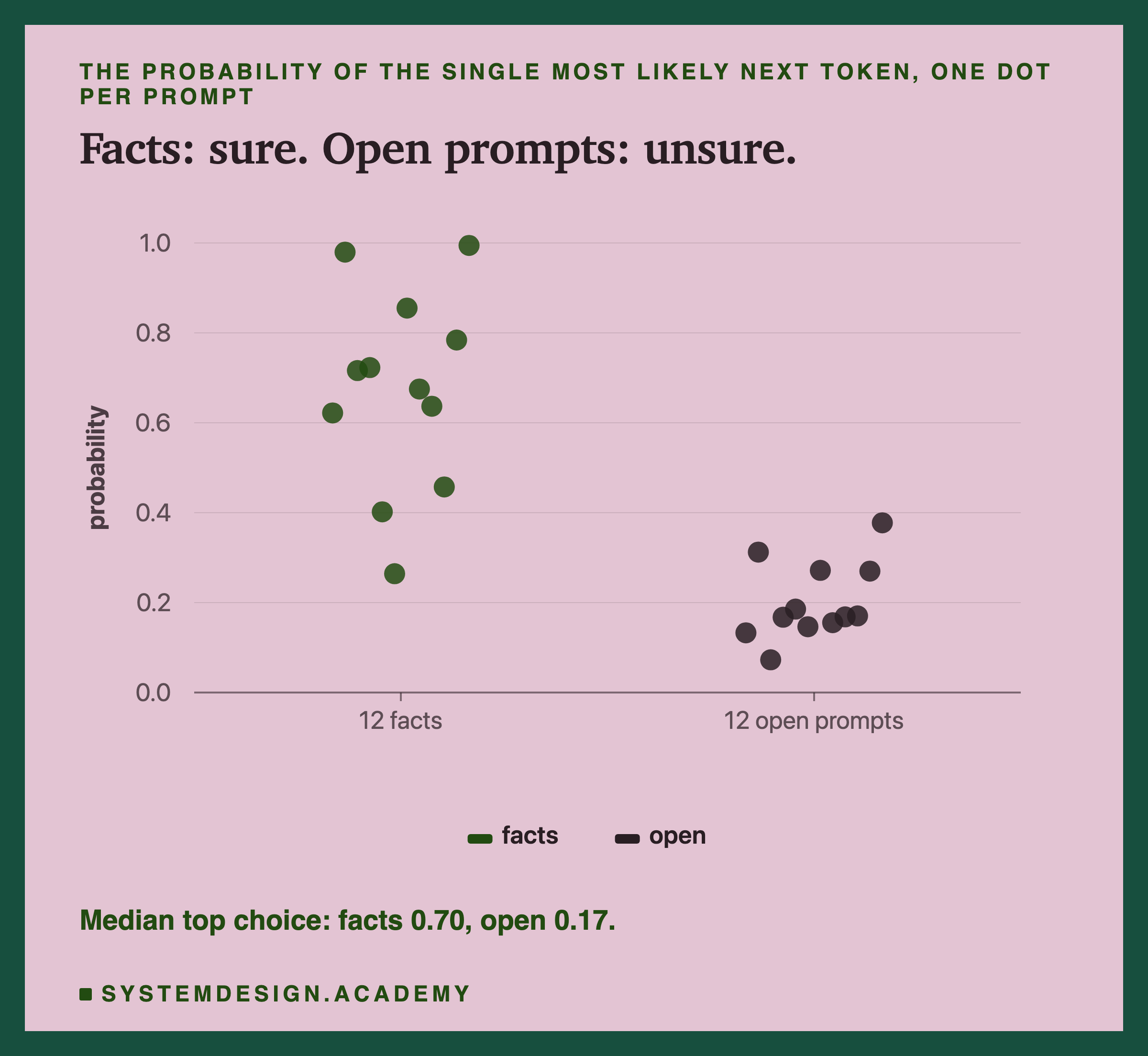
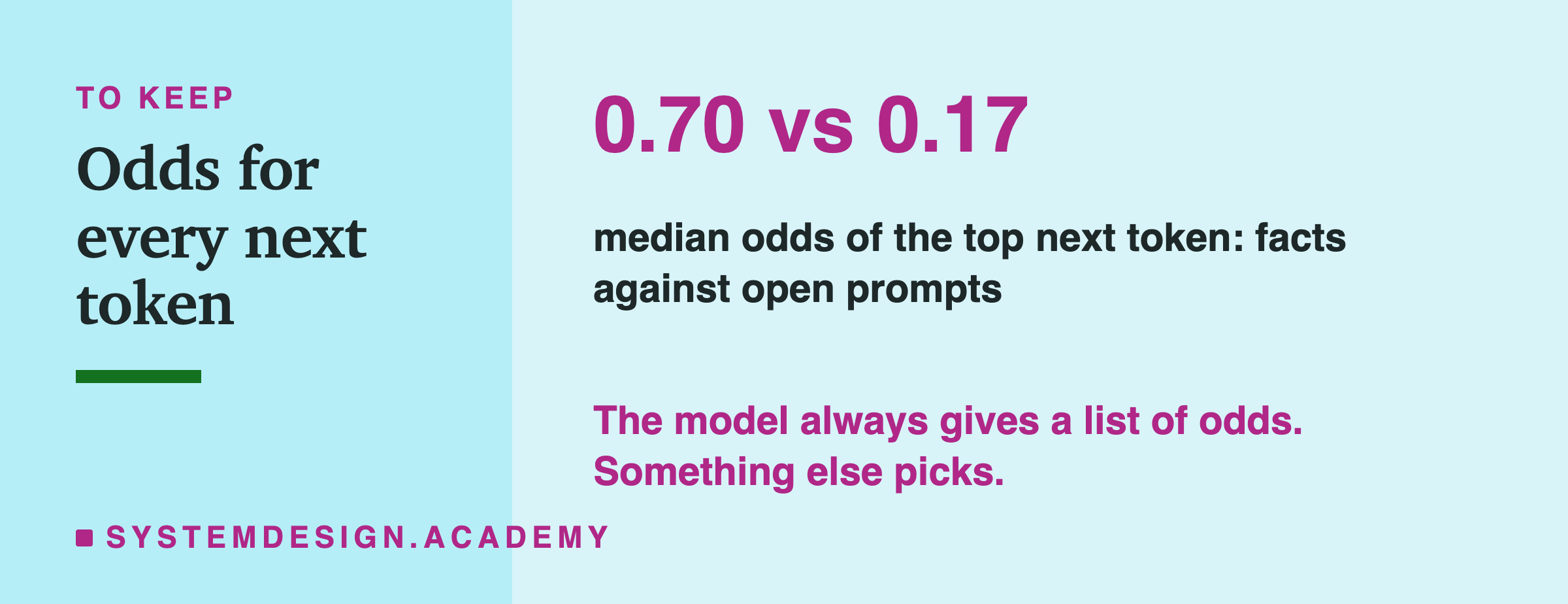
For the 12 facts, the top next token had a median probability of 0.70. For the 12 open prompts, only 0.17, and none got above 0.38.
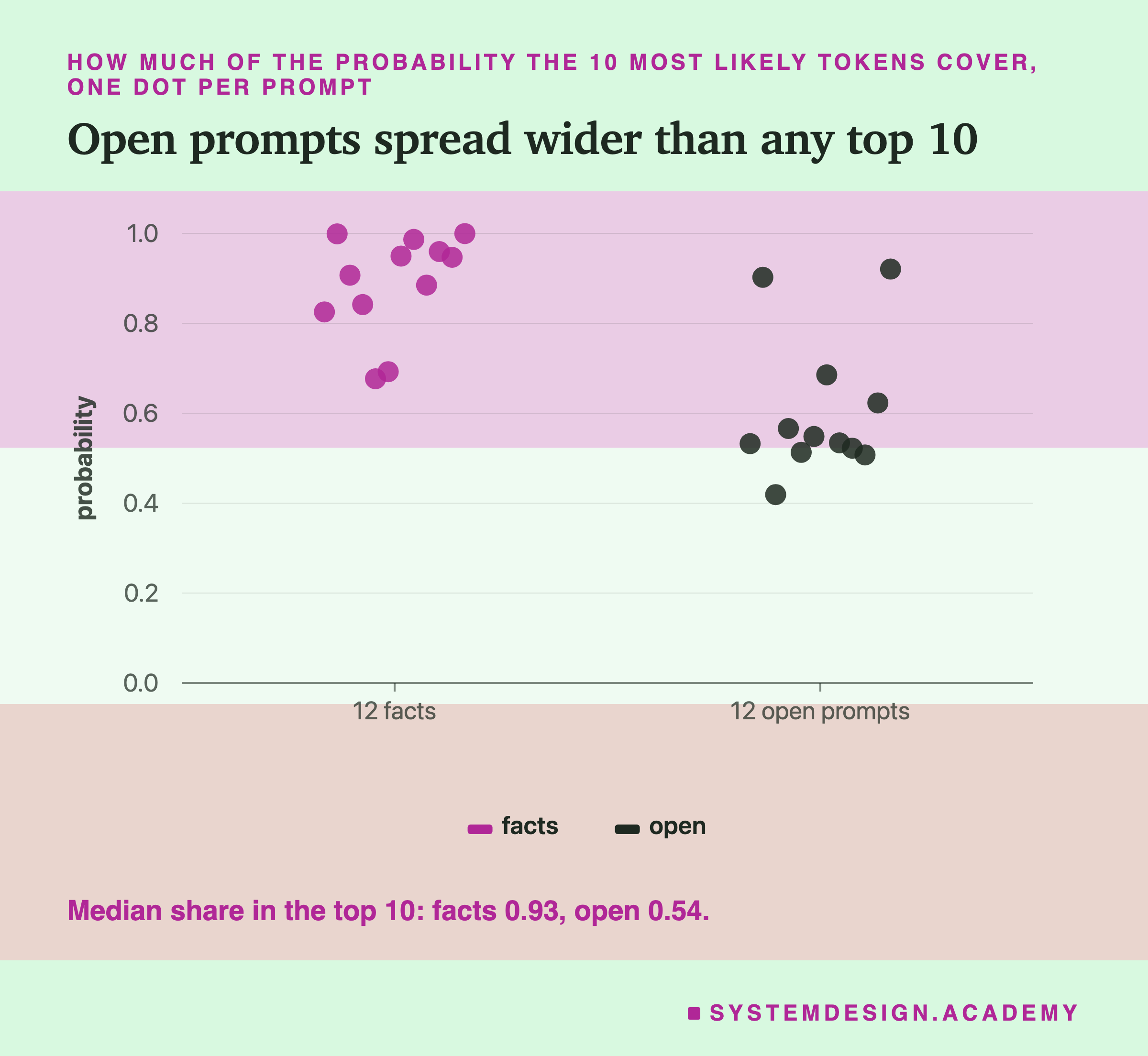
All the odds for one step add up to 1. For facts, the 10 top tokens shared a median of 0.93 of that. For open prompts, only 0.54: nearly half was spread across thousands of other tokens.
Two of the facts are worth a closer look. "A triangle has three" gave "␣different" as its top token at 0.46, not "␣sides". " status code 404 means" gave "␣that" at 0.26. The model does not answer your question. It only continues your text, in the likeliest way, and "A triangle has three different..." is a perfectly likely sentence.
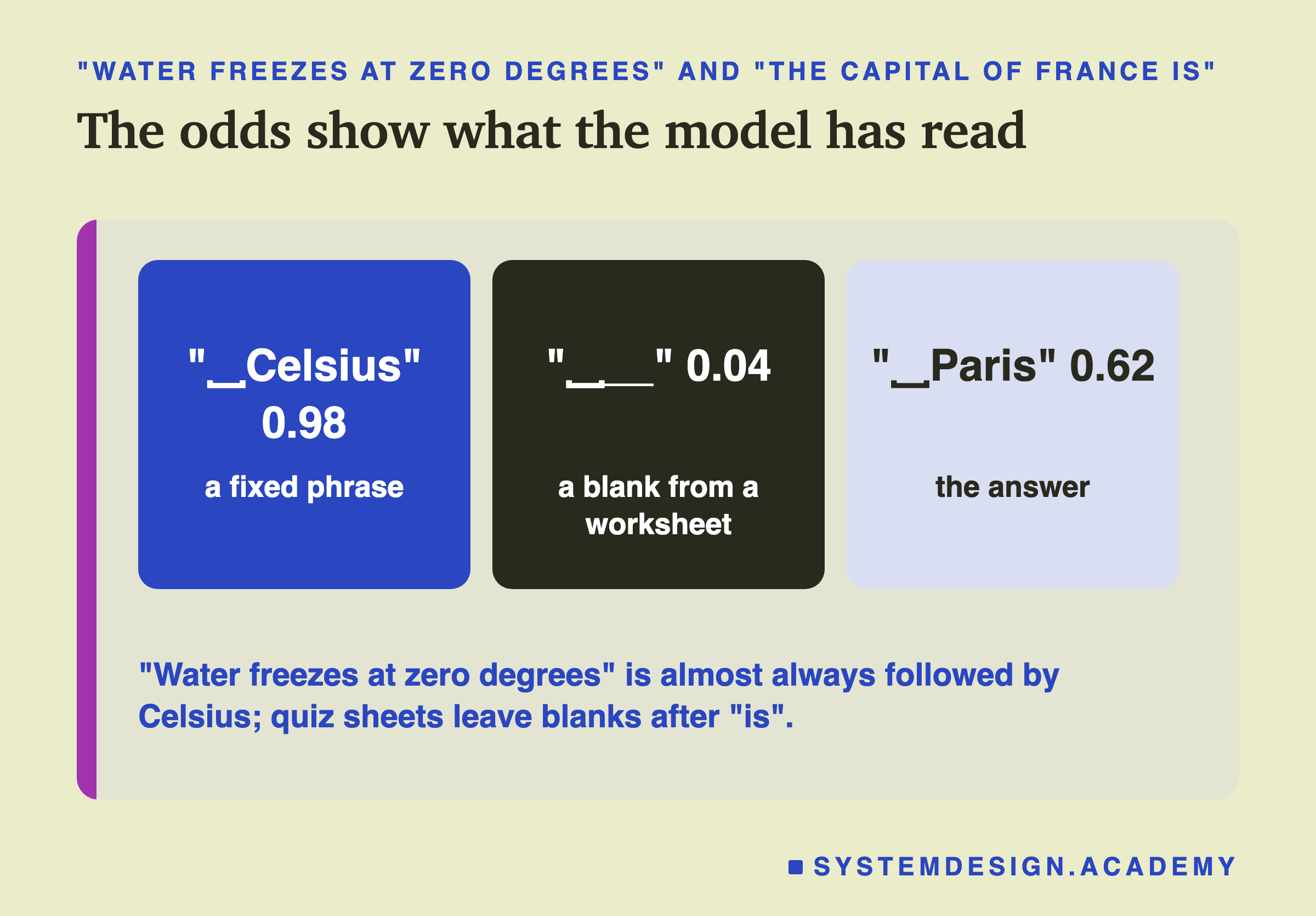
The odds show what the model has read. "Water freezes at zero degrees" is followed by "Celsius" almost every time it appears, so the model gives it 0.98.
The Hidden Chat Template
When you type into a chatbot, the model does not see only your words. The app wraps them in a chat template: hidden text that marks where your message starts and where the model's reply, often called the assistant's reply, should begin. For qwen2.5 in Ollama, it also adds a short default instruction about who the assistant is. That is why the model read 34 tokens for a 5-token sentence.
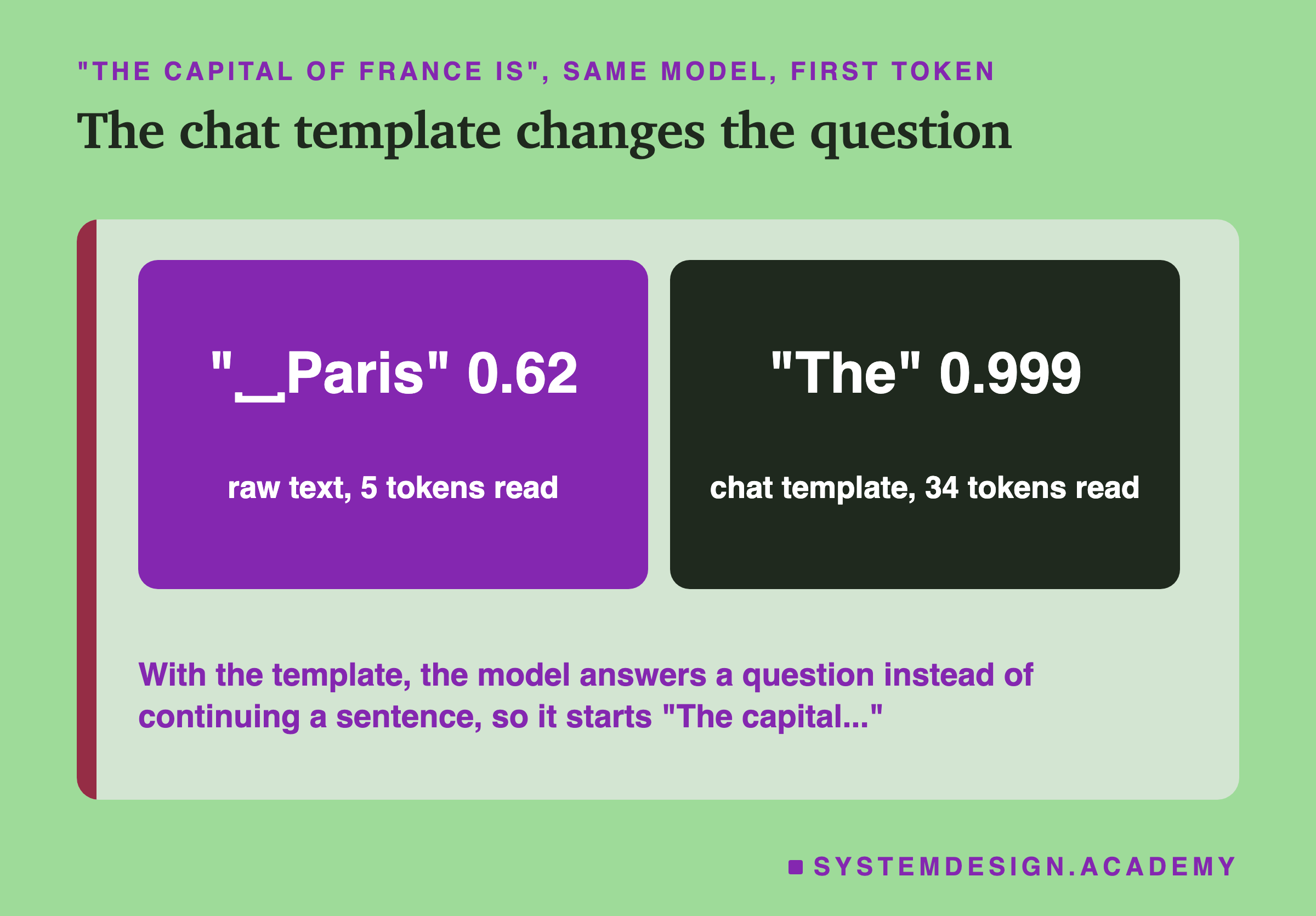
With the same five words:
- Raw, the model read 5 tokens and continued the sentence: "␣Paris" at 0.62.
- With the chat template, it read 34 tokens, most of them hidden, and started a reply: "The" at 0.999, going on "The capital of France is Paris."
The chat template turned "continue this text" into "answer this message". Across the 24 prompts, the first word of the reply had a median probability of 0.99 for facts and 0.92 for open prompts, but the range was wide, from 0.37 to 1.00. Replies often start with a common word such as "The" or "I". Note that this compares a different thing from the raw test: the first word of a reply, not the next word of a sentence.
Two more prompts from the data show how much the template changes. For "Water freezes at zero degrees", the raw model continued with "␣Celsius" at 0.98. With the template, the first token of the reply was "Actually" at 0.54, with "That" at 0.24 and "No" at 0.20 next: the model now treated the five words as a claim to comment on, not a sentence to finish. For "Python lists are written with square", the raw model gave "␣brackets" at 0.99; with the template, the reply began "You" at 0.55 or "Yes" at 0.37. The same words, two different tasks.
Reading the Numbers Ollama Sends
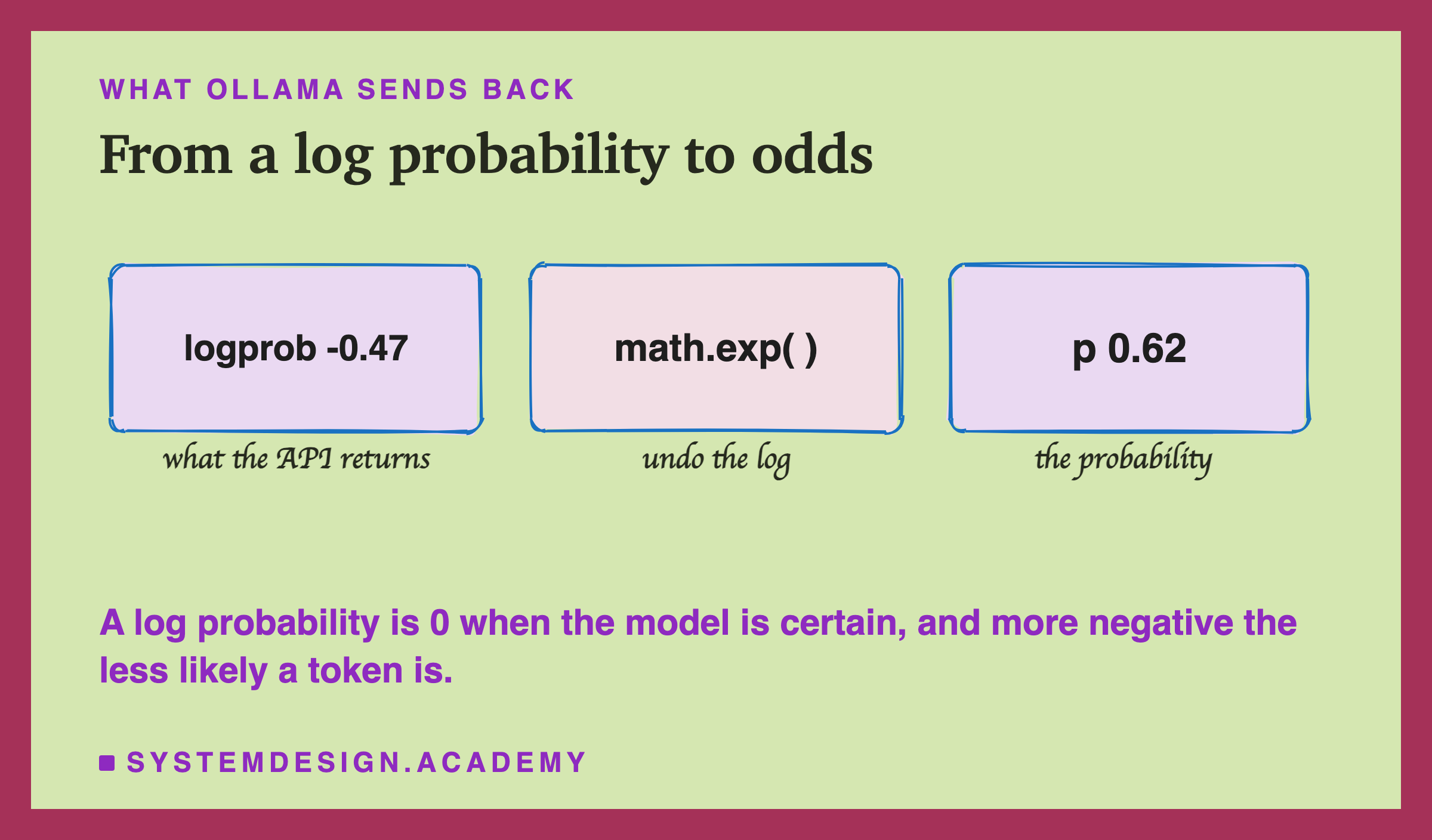
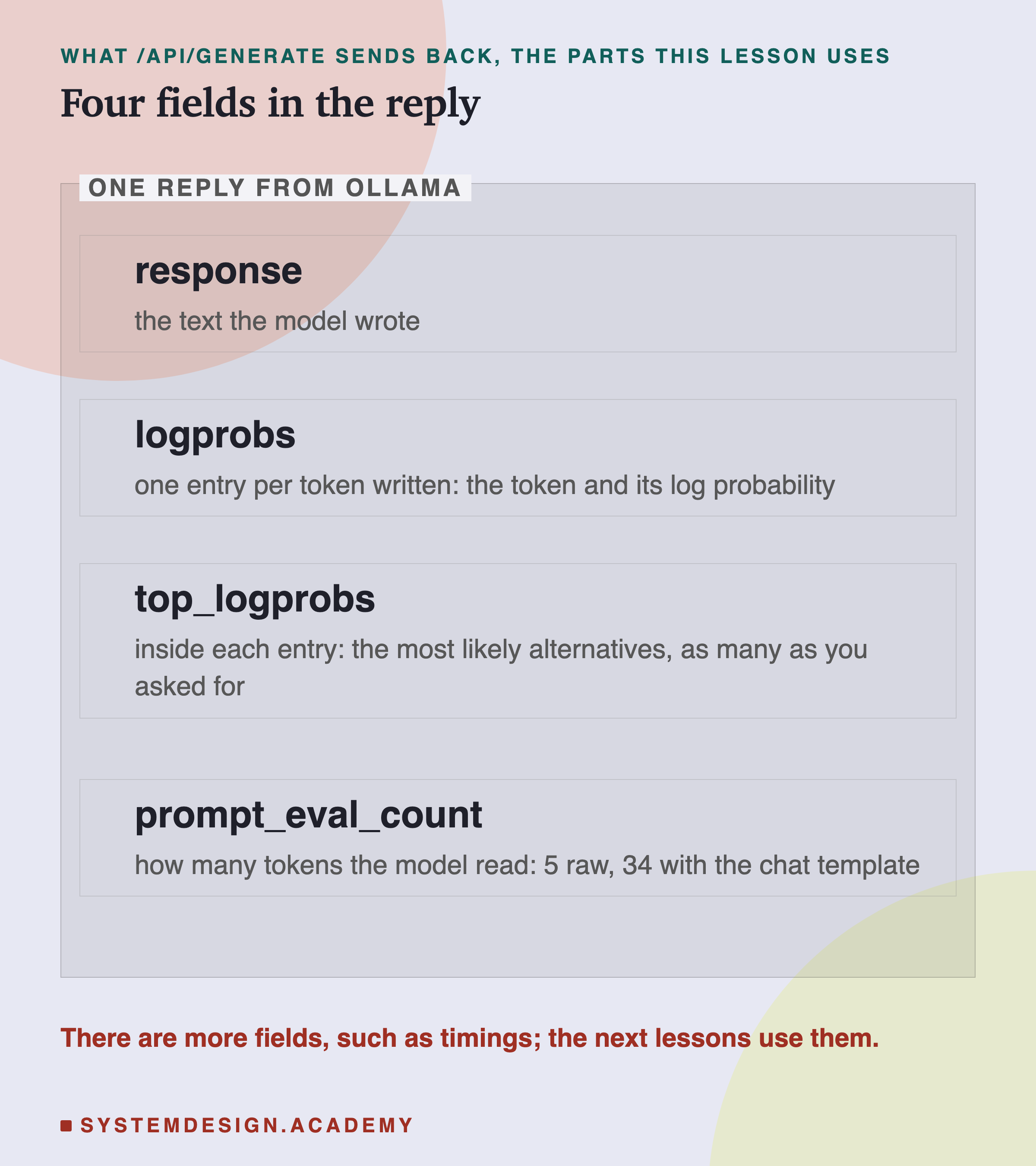
Ollama returns each token's log probability, not the probability itself. To turn one into the other, use math.exp, as the example file does. A log probability of 0 means certain; about -0.475 (shown rounded as -0.47 above) means 0.62; -3 means about 0.05.
A log probability is never above 0, because a probability is never above 1, and the logarithm of 1 is 0. The scale is not even: going from 0 to -1 takes the probability from 1 down to about 0.37, while going from -3 to -4 only takes it from about 0.05 to about 0.018. So a small change near 0 is a big change in confidence, and a small change far below 0 hardly matters. When you read logs by eye, it helps to remember a few points: -0.1 is about 0.9, -0.7 is about 0.5, -2.3 is about 0.1, and -4.6 is about 0.01.
The panel above lists the fields you will use most. response is the text the model wrote, all tokens joined. logprobs has one entry per token written, in order, so you can line up each token with its odds. prompt_eval_count tells you how many tokens the model read, which is the quickest way to notice a hidden chat template: 5 tokens for five words, or 34.
Sort Them Yourself
This box holds the real top-10 odds for all 24 prompts. It calls the model "sure" when its top choice is at least 0.5. Press Run. Then change SURE to 0.3 or 0.8 and see how many prompts are at or above that number.
At 0.5, 9 of the 24 are "sure", and all 9 are facts. None of the open prompts reaches 0.5.
Using the Odds
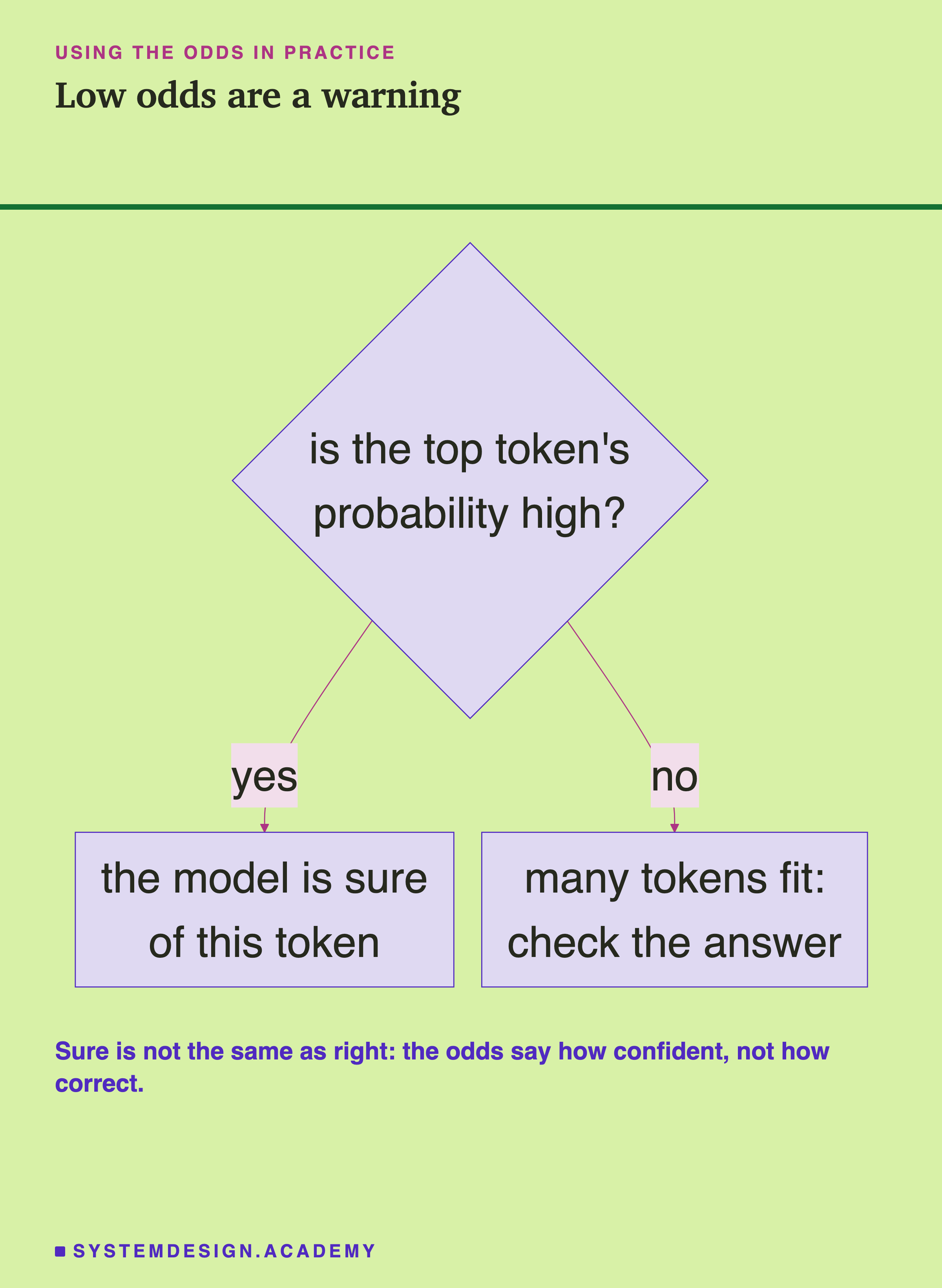
- Low odds on an important token are a warning. If a model writes a number, a name or a date with low odds, other answers were nearly as likely.
- High odds are not proof. A model can be very sure of a wrong token. The odds measure how confident it is, not whether it is right.
- Know whether a chat template is on. Most chat apps and APIs add one. It changes what the model predicts.
A practical use of the first point: when a model fills in a field, such as a date, an amount or a category, you can ask for the log probability of the tokens it wrote and flag answers where a key token had low odds. A person can then check just those. This lesson did not test how well such a check works; it only shows that the odds are there to read. The lab also showed why the second point matters: "A triangle has three" gave "␣different" more odds than "␣sides". High odds mean "this is a common way for the text to go on", nothing more.
When not to rely on the odds. Do not treat them as the chance that an answer is true. Do not compare odds between two different models, or between raw text and chat mode, as if they were on one scale; this lesson showed the same words giving 0.62 in one mode and 0.999 in the other. And do not read too much into one token: a long answer is many choices, and the chance of the whole is the product of all of them.
Common Mistakes
Thinking the model answers questions. A raw model continues text. "A triangle has three" was continued with "␣different" before "␣sides". To get answers, you either use the chat template or write your prompt so that the answer is the likely next text.
Reading a high probability as "correct". The odds say how common a continuation is in text like the model's training text. A common mistake can have high odds.
Forgetting the space. Many tokens start with a space. "␣Paris" and "Paris" are different tokens with different odds. When you search a reply for a token, print it with !r, as the example file does, so the space is visible.
Reading log probabilities as percentages. -0.47 does not mean 47%. Use math.exp first.
Comparing raw and chat numbers. The same five words gave "␣Paris" at 0.62 raw and "The" at 0.999 with the template. These are answers to two different questions and cannot be compared.
Ignoring the rest of the list. The top token is only part of the story. For "Monday, Tuesday," the top token was "␣Wednesday" at 0.68, but "␣and" had 0.24. That second choice tells you how close the model was to writing something else.
What This Lesson Measured, and What It Did Not
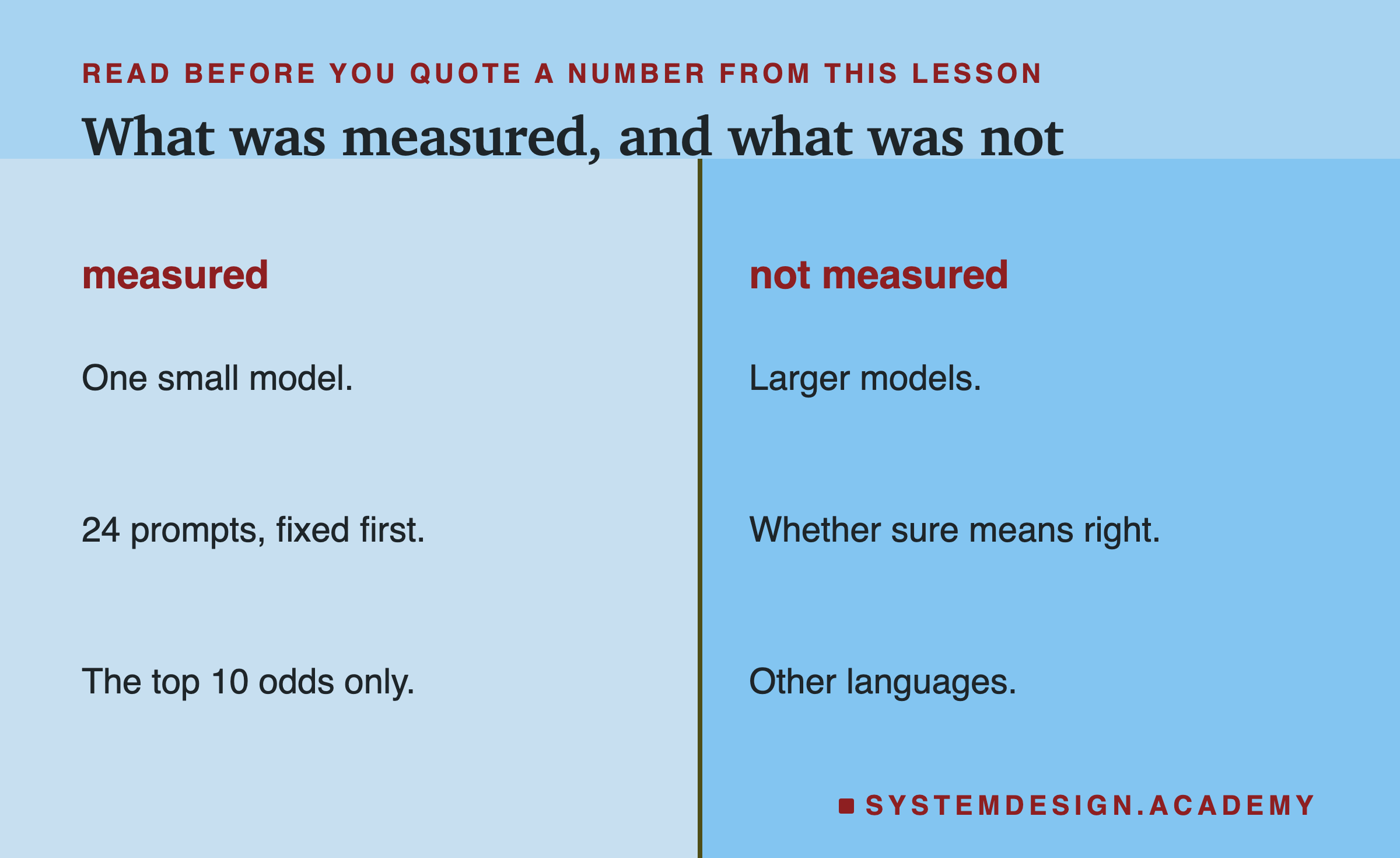
Measured: one small model, qwen2.5:3b; 24 prompts written before the run; the top 10 odds for the next token, with and without the chat template.
Not measured: larger models; whether a sure token is also a correct one; and prompts in other languages. The chat test used Ollama's default template for this one model.
Keep the size of the test in mind. 12 prompts per group is enough to show a clear gap, 0.70 against 0.17, but not enough to give a precise number for facts or open prompts in general. A different set of prompts would give different medians. The raw model is also a small one, with 3 billion numbers; a larger model may be more or less sure on the same prompts. And the test only looked at the first next token, plus one sentence written out; it says nothing about how the odds behave deep inside a long answer.
What to Do Next
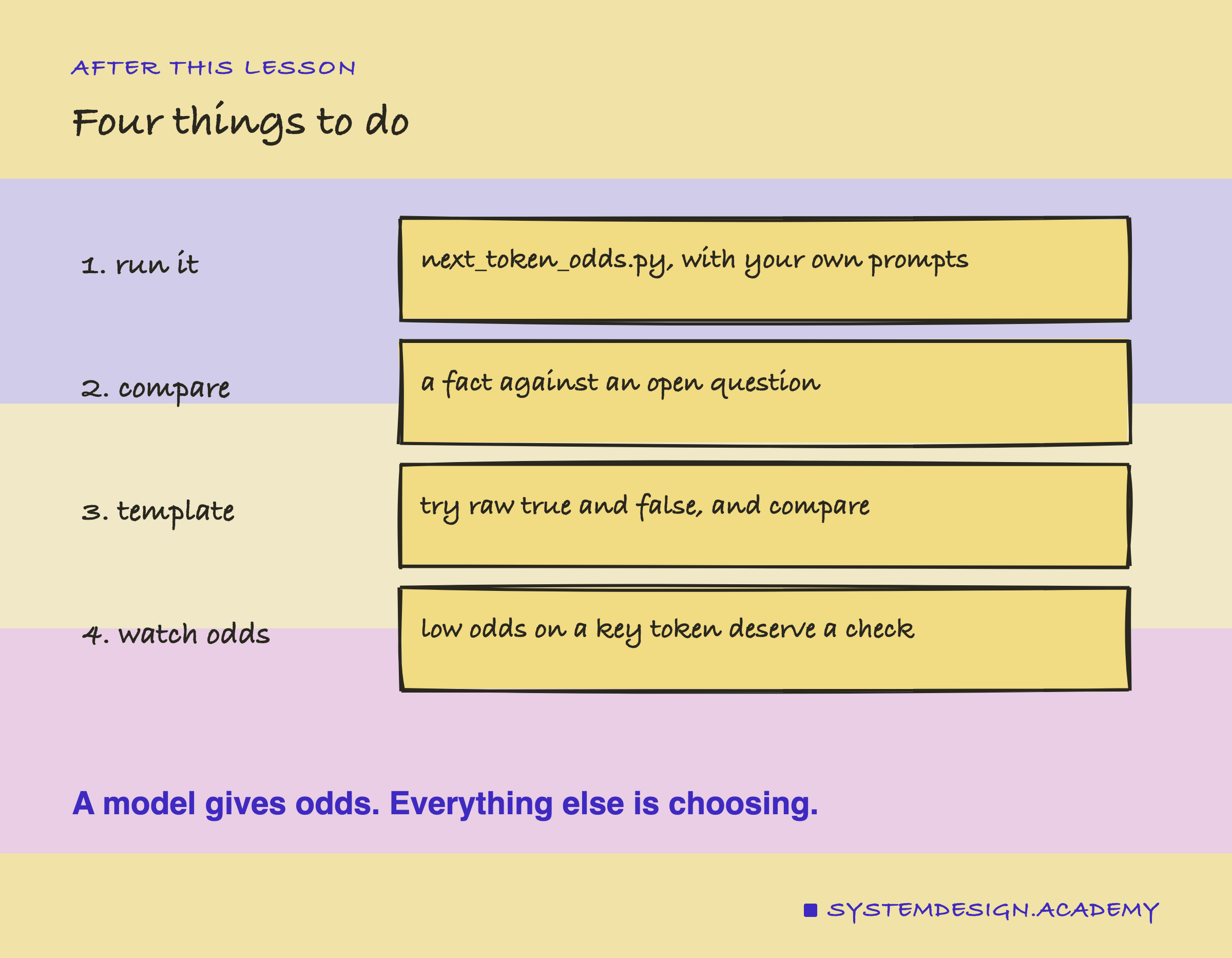
- Run
next_token_odds.pywith prompts of your own. - Compare a fact with an open question.
- Switch
"raw"betweenTrueandFalseand watch the first token change. - Watch the odds on the tokens that matter.
For step 2, try a pair that shows the gap clearly, such as "The capital of Japan is" and "My favourite city is". For step 3, run the same prompt with "raw": True and with "raw": False, and print prompt_eval_count for both; the difference is the hidden template. If a result surprises you, do not trust it yet: run it again, then change one word at a time, and see which word moves the odds.
The model only ever gives odds. The next lesson is about the part that picks: temperature and sampling.
Knowledge Check
Knowledge Check
5 questions - Score 80% to pass
What does a language model produce at each step?
For 12 facts the top next token had a median probability of 0.70; for 12 open prompts, 0.17. Why?
"A triangle has three" gave "different" as the top next token, not "sides". What does that show?
The same five words gave "Paris" at 0.62 in raw mode and "The" at 0.999 with the chat template. Why?
Ollama returned a log probability of 0 for a token. What does that mean?