The Alarm That Rings at Toast and Sleeps Through a Leak
Let me start in a kitchen.
A smoke alarm on the ceiling knows one thing: the smell of smoke. When toast burns, it screams, even though burnt toast will not hurt anyone. And if a gas leak creeps in with a smell the alarm was never built to notice, it stays quiet. The alarm is useful, but it is not the same as knowing whether the kitchen is safe. It only knows a short list of smells.
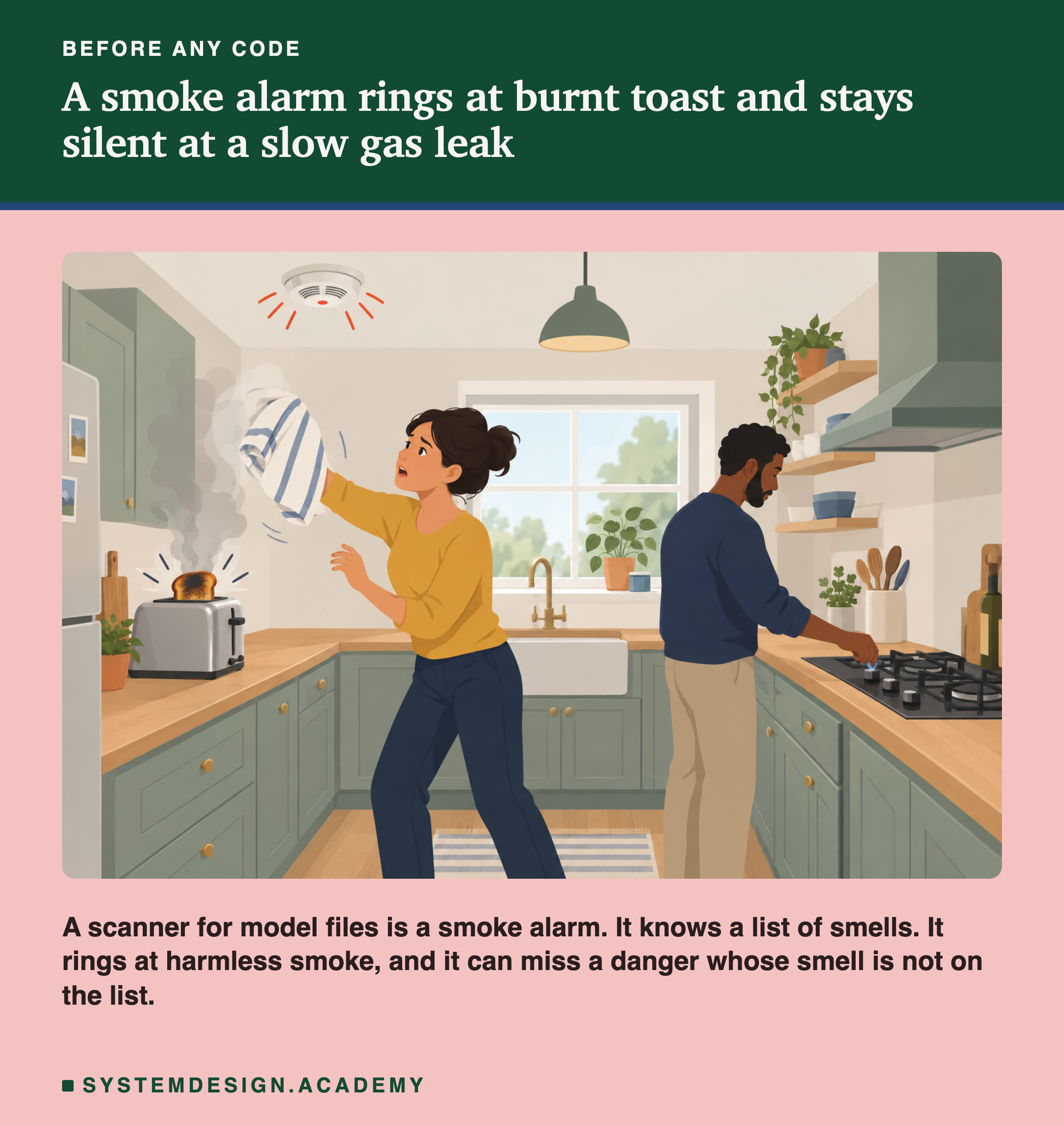
A saved machine learning model is a file, and people send these files around. A tool that checks a model file for danger is exactly like that smoke alarm. It reads the file and matches it against a list of known-bad names. It can ring at something harmless, and it can miss a danger it has no name for.
In this lesson I open a real saved model and look at what is actually inside it. Then I show, with a file I built to be completely harmless, that loading a model file does not only read numbers: it runs code. And I run two real checking tools over both files to see exactly what they catch and what they miss. Every number here comes from a lab you can run yourself.
Where This Lesson Starts
This lesson uses one model, and it is the model you already met. If the shop, the customers or the question are new to you, please read what a feature is first. That lesson built six features from each customer's history. It trained a model to answer one question: at the start of a month, will this customer buy something in the next 30 days? The model scored an average precision of 0.5450 on the test months, and I use that exact model here.
There is also a plain-English survey of this topic, model packaging and containerization. It explains in words why a bare saved file is not a finished, shippable thing, and why teams wrap models in containers. This lesson does not repeat that. It takes one sentence from the survey: that loading a pickle executes arbitrary code by design. Then it measures that sentence. What is really in the file? What names will it run? What can a scanner see, and what can it not?
So this is the narrow question for today. You trained a model. You call one function to save it. What did that function actually write to disk, and what happens the moment someone loads it back?
The Words You Need First
Please read this slide slowly if any word is new. Every slide after it uses these words.
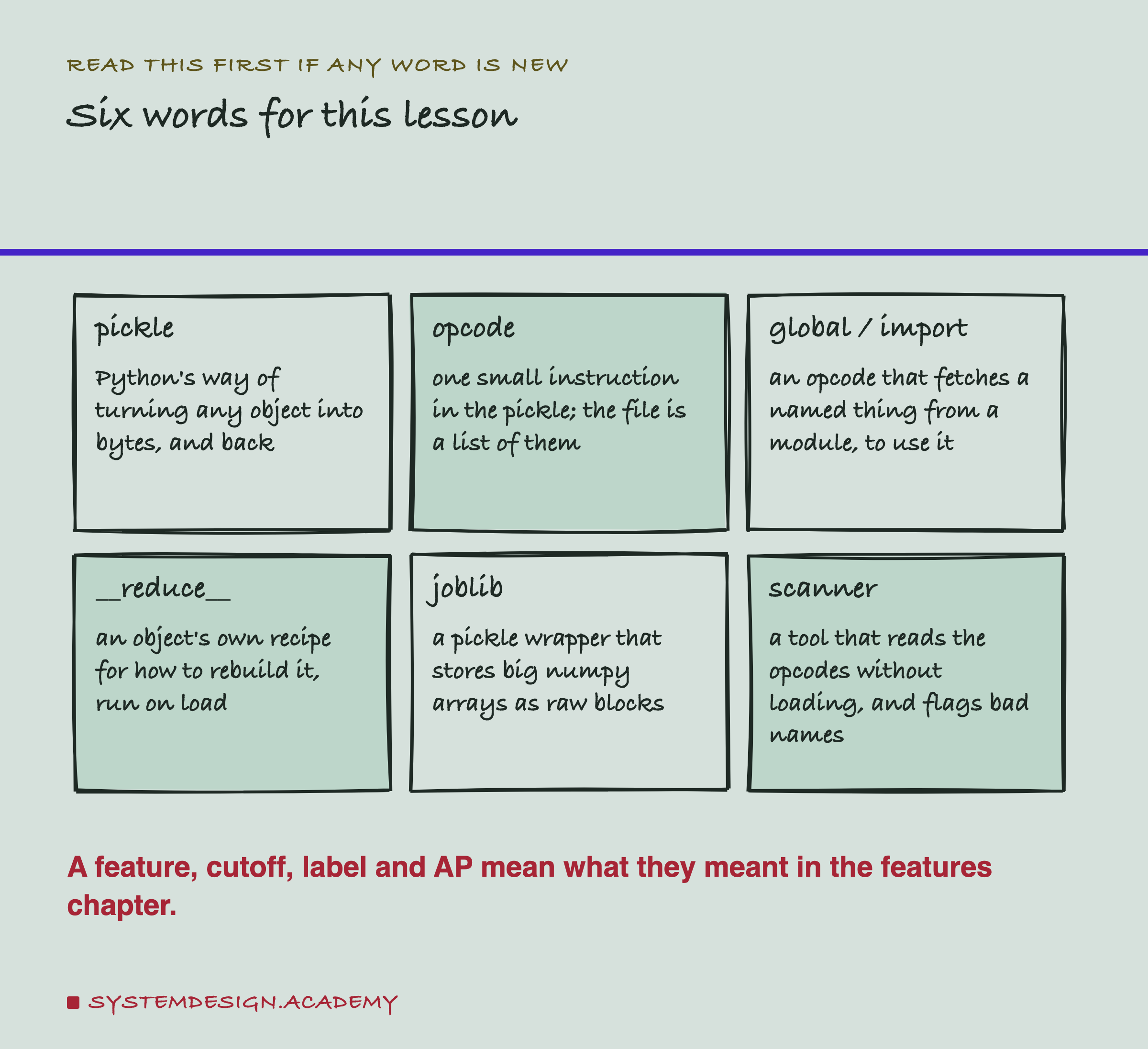
A pickle is Python's built-in way of turning almost any object into a string of bytes you can save, and turning those bytes back into the object later. The verb is "to pickle" (save) and "to unpickle" (load).
A pickle file is not one blob. It is a list of tiny instructions called opcodes. Each opcode does one small thing: push a number onto a pile, remember a value, or fetch a named thing. When you load the file, Python runs these opcodes in order, like a short program.
A global, or import, is the opcode that fetches a named thing from a module, for example the class numpy.ndarray. A __reduce__ method is an object's own recipe that says how to rebuild it; the load step follows that recipe. joblib is a small library that saves the same way as pickle but stores big numpy arrays as raw blocks, which is handy for models. A scanner is a tool that reads the opcodes without running them and warns about dangerous names.
A feature, a cutoff, a label and average precision (AP) mean what they meant in the features chapter.
Loading Is Not Just Reading
Here is the idea the whole lesson turns on. We tend to think "saving a model" and "loading a model" are like saving and opening a photo: pure data in, pure data out. For a pickle, that is not true.
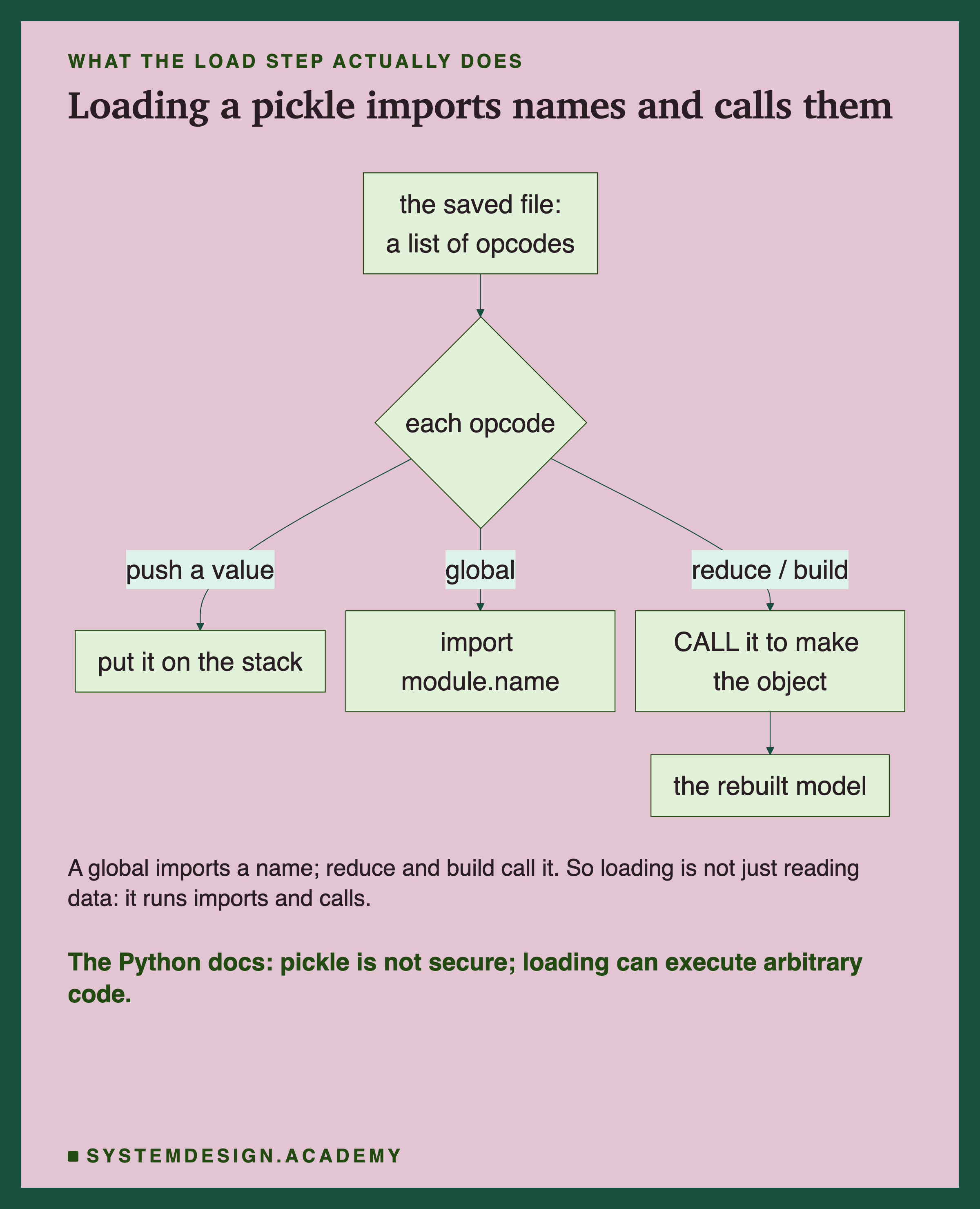
When Python loads a pickle, it walks the opcodes one by one. Most of them just move numbers around. But two kinds do more. A global opcode imports a name, the same as writing an import line in your own code. And a reduce opcode calls something, the same as writing a function call. So loading a file reaches out, imports whatever the file names, and calls whatever the file says to call. The Python documentation puts it plainly: the pickle module "is not secure", and "it is possible to construct malicious pickle data which will execute arbitrary code during unpickling".
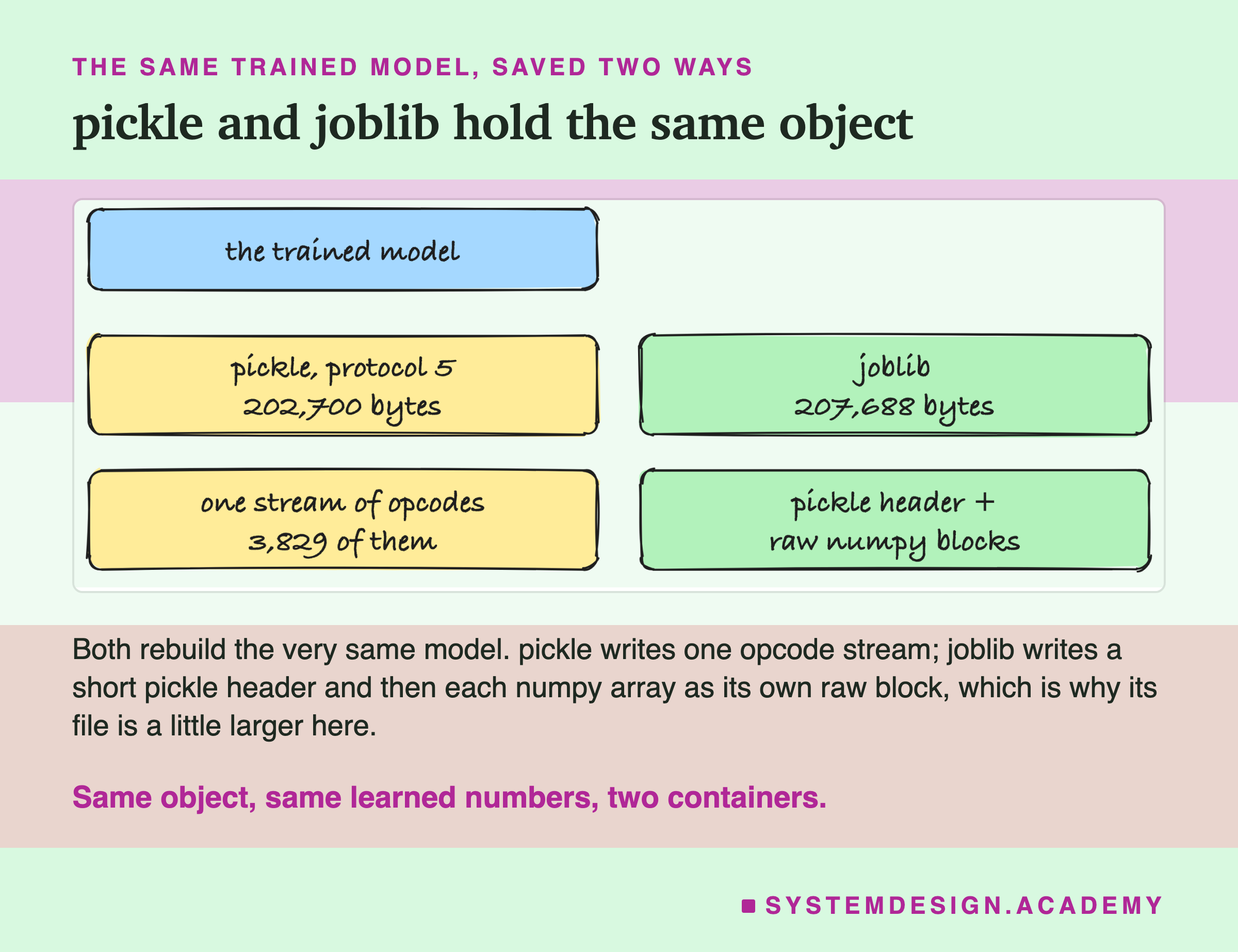
I saved the one trained model two ways. With pickle, at protocol 5, it became a 202,700-byte file of 3,829 opcodes. With joblib, it became a 207,688-byte file: a short pickle header followed by each numpy array as its own raw block. Both rebuild the exact same model. joblib is a touch larger here because it wraps each array separately. That pays off for very large arrays, but it costs a little on a small one like this.
What I Measured
I wrote the lab's plan into the top of scripts/labs/packaging/model_file.py before it first ran, so the design could not quietly follow the results.
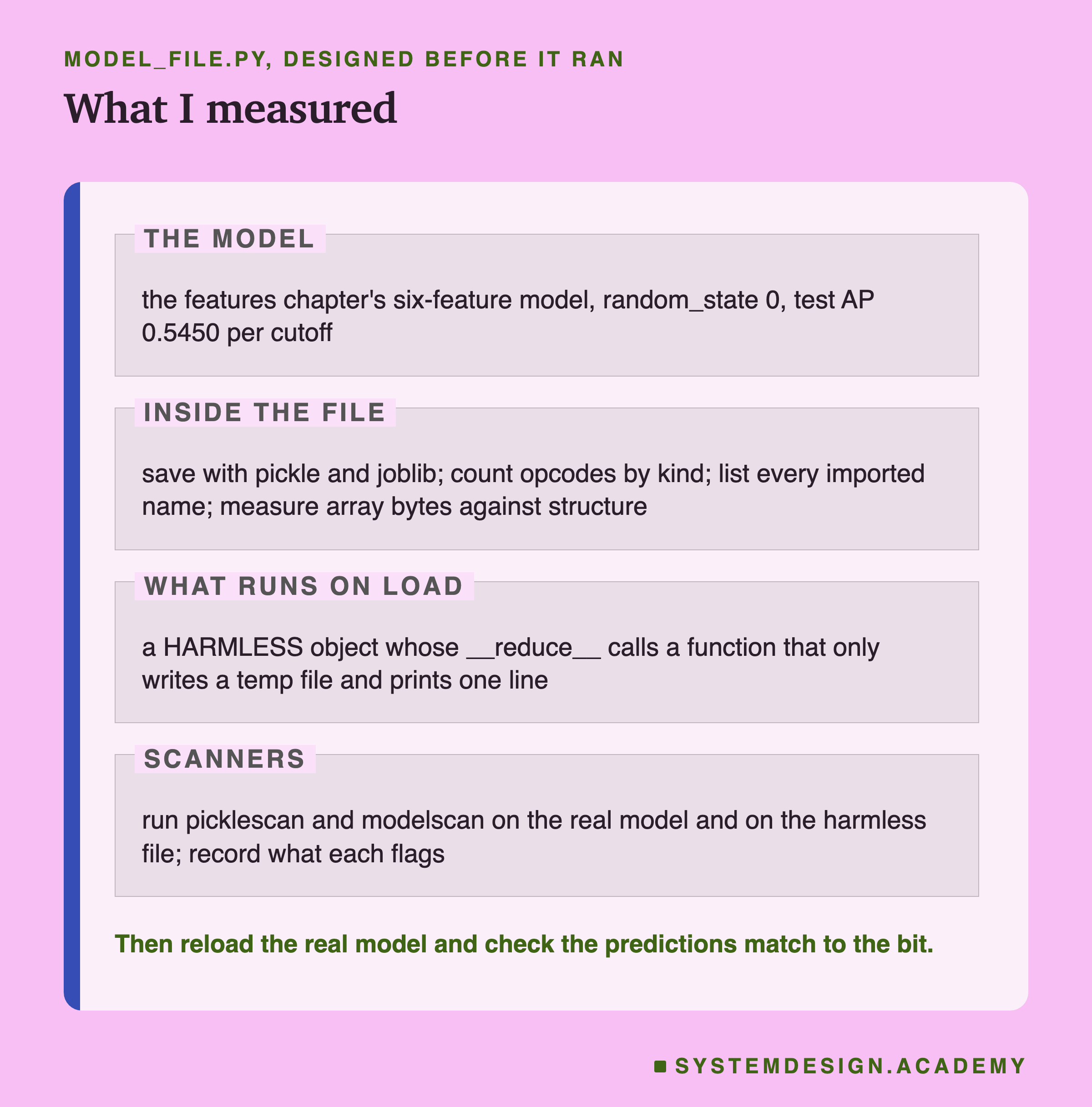
The model is the chapter's own. It imports lesson 1's feature code instead of copying it. It trains scikit-learn's HistGradientBoostingClassifier with the default settings and random_state 0. Then it checks that the model reproduces a test AP of 0.5450 before doing anything else. If that number ever drifts, the lab stops.
Inside the file, the lab counts the opcodes and groups them by what they do. It lists every name the file will import. And it measures how many bytes are raw numpy arrays, against how many are the structure around them.
What runs on load is shown with a file I built to be harmless, described two slides on. The scanners are two real security tools, run on both files. Finally the lab loads the real model back and checks that its predictions match the model still in memory, number for number.
The Load Path Imports and Calls on Its Own
Before the measurements, let me make the load path concrete, step by step, because this is the part most people have never looked at.
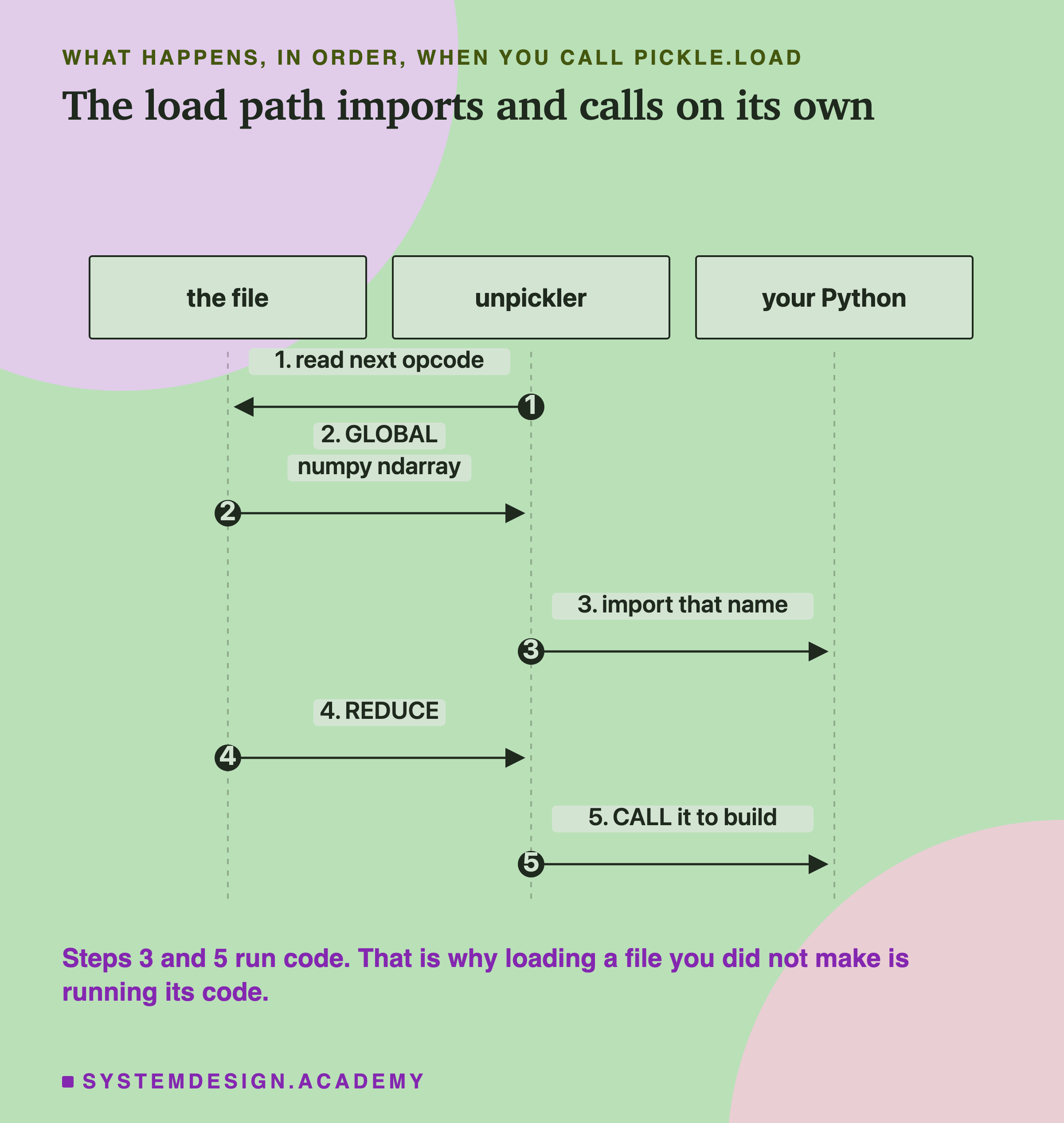
The unpickler reads one opcode, acts on it, and moves to the next. When it hits a global, it imports the name the file asked for. When it hits a reduce, it calls the thing on top of its stack with the arguments the file supplied. Steps three and five there are not reading data. They are importing a module and calling a function, chosen by the file, not by you.
For a model you trained and saved yourself, this is completely fine. The names are all parts of numpy and scikit-learn, and calling them is how the model gets rebuilt. The danger only appears when the file came from somewhere you do not trust, because then the names and the calls were chosen by someone else. That is why the same documentation says never to unpickle data from an untrusted source.
The Lab's Report, Running
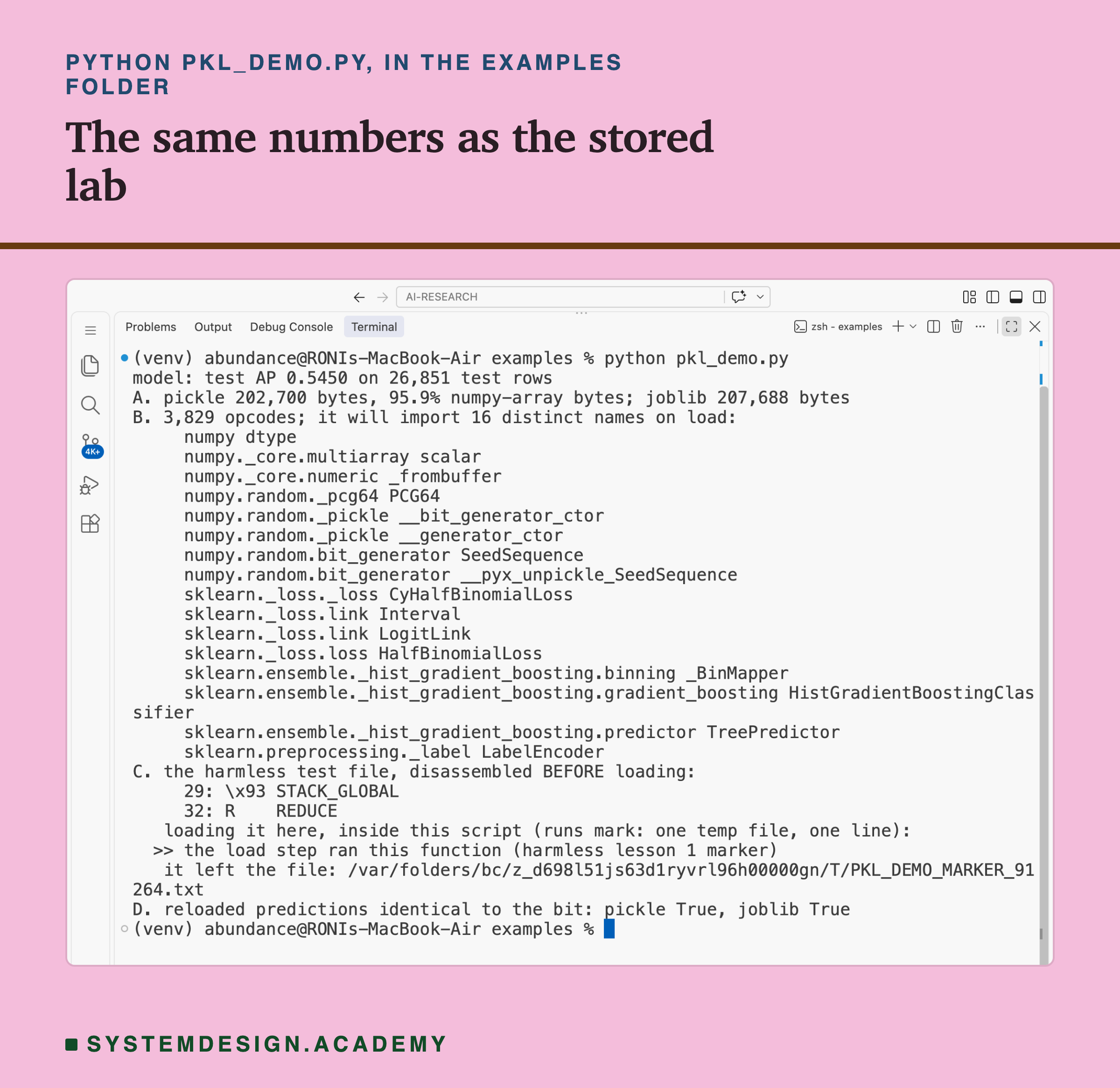
This is a real recording of the report script, pkl_report.py. It does not trust the saved numbers. It retrains the model from the raw invoice lines, saves it again, walks the pickle with its own opcode counter, and checks the lesson's main numbers one by one.
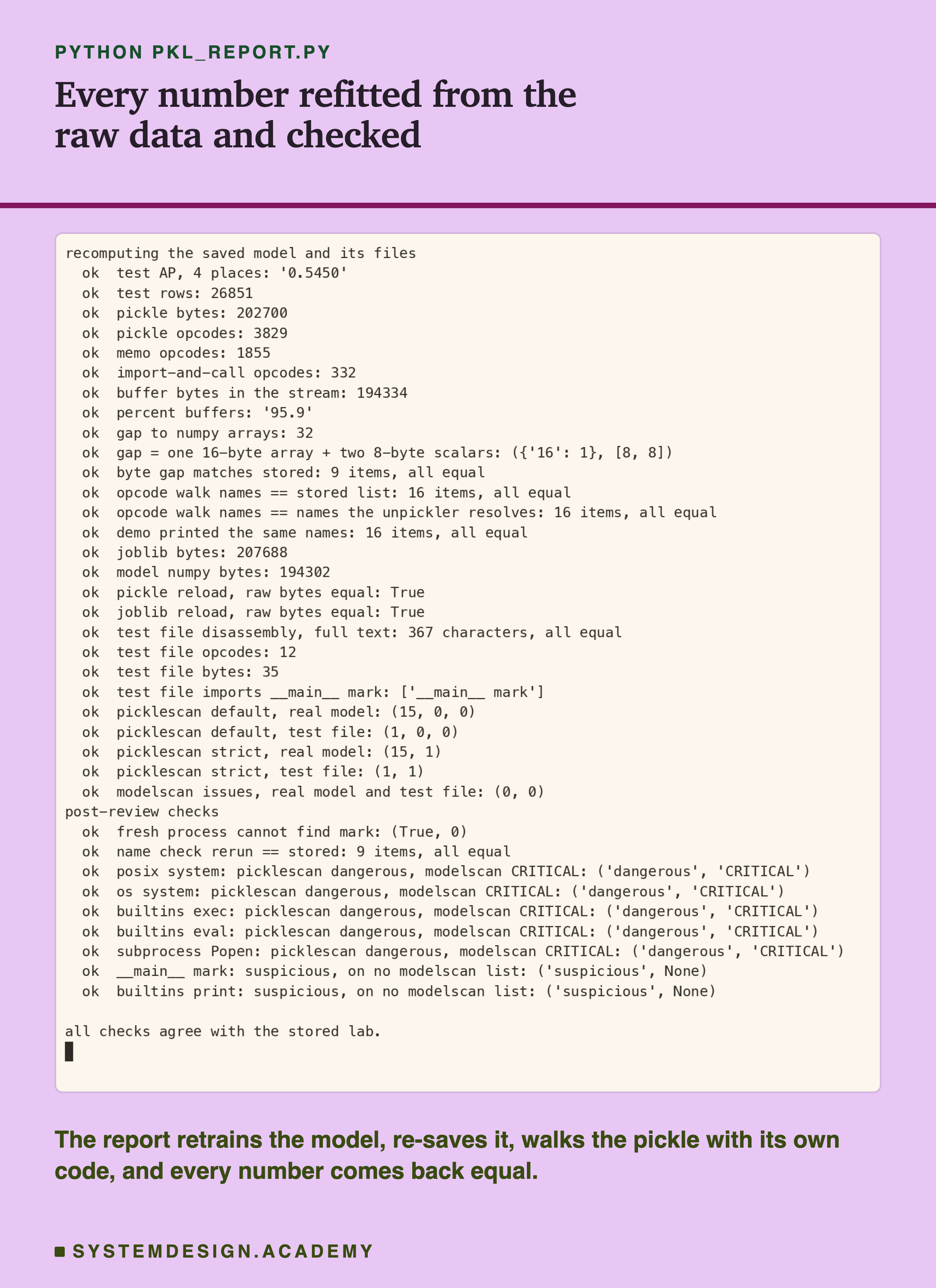
The report rebuilds the six features from the 809,561 raw invoice lines, saves the model with pickle and joblib, and counts the opcodes itself. It then loads the real model back and checks every outcome against the stored run. The checks under "post-review" were added after an independent review, which the scanner slides describe. If one number disagrees, the report stops with an error.
I ran this on a laptop whose load was not quiet, so the lab reports no timings at all. How long a file takes to load is a real question. But it is the next lesson's question, measured on a quiet machine. Here I only report what does not depend on the clock.
A Model File Is Mostly a Block of Numbers
Now the first measurement: what the bytes actually are.
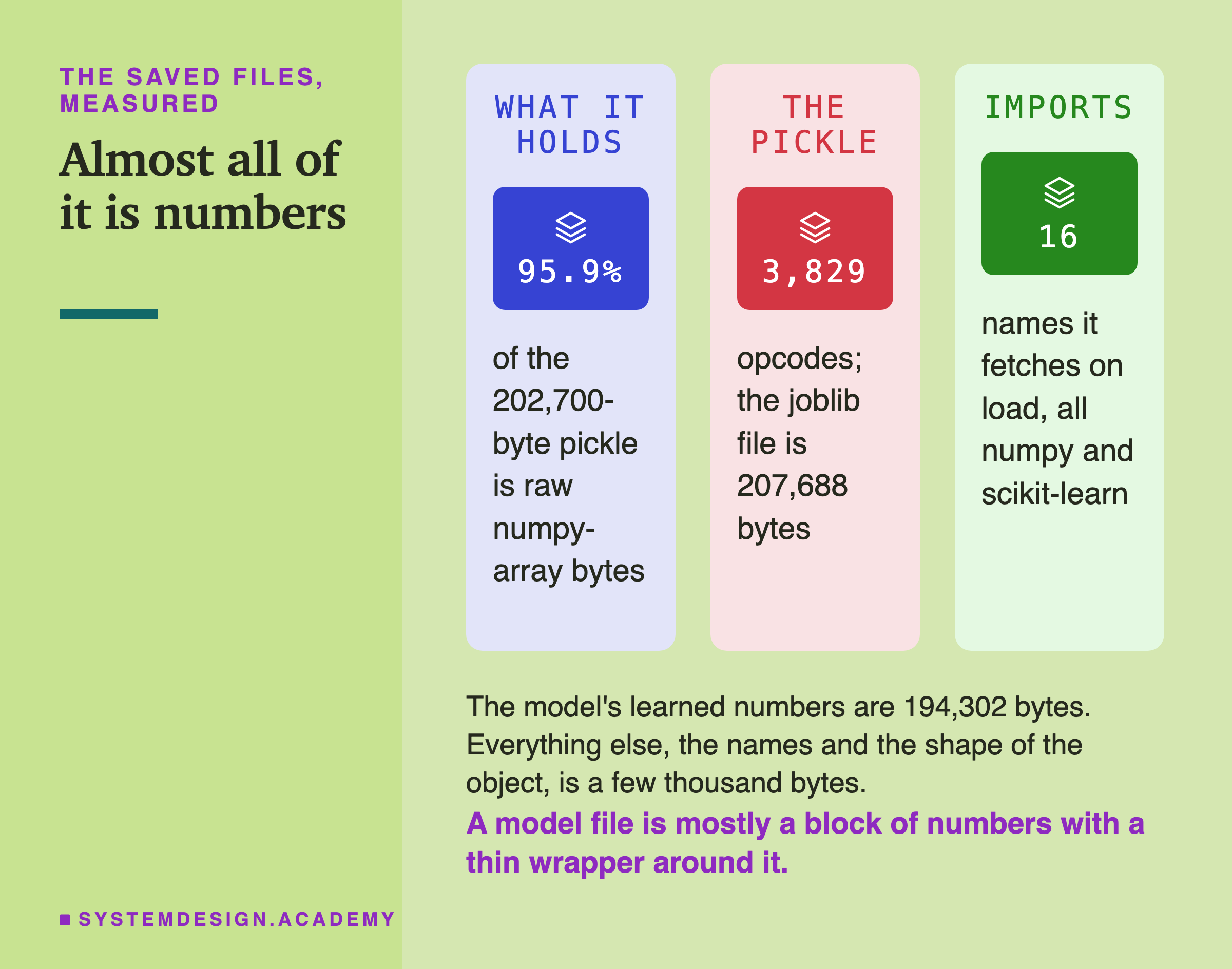
The model's learned numbers, the thresholds and leaf values of its trees, live in numpy arrays. Those arrays add up to 194,302 bytes. The whole pickle is 202,700 bytes. So almost everything in the file is the numbers the model learned. Only a few thousand bytes are the wrapper that names the classes and records the shape of the object.
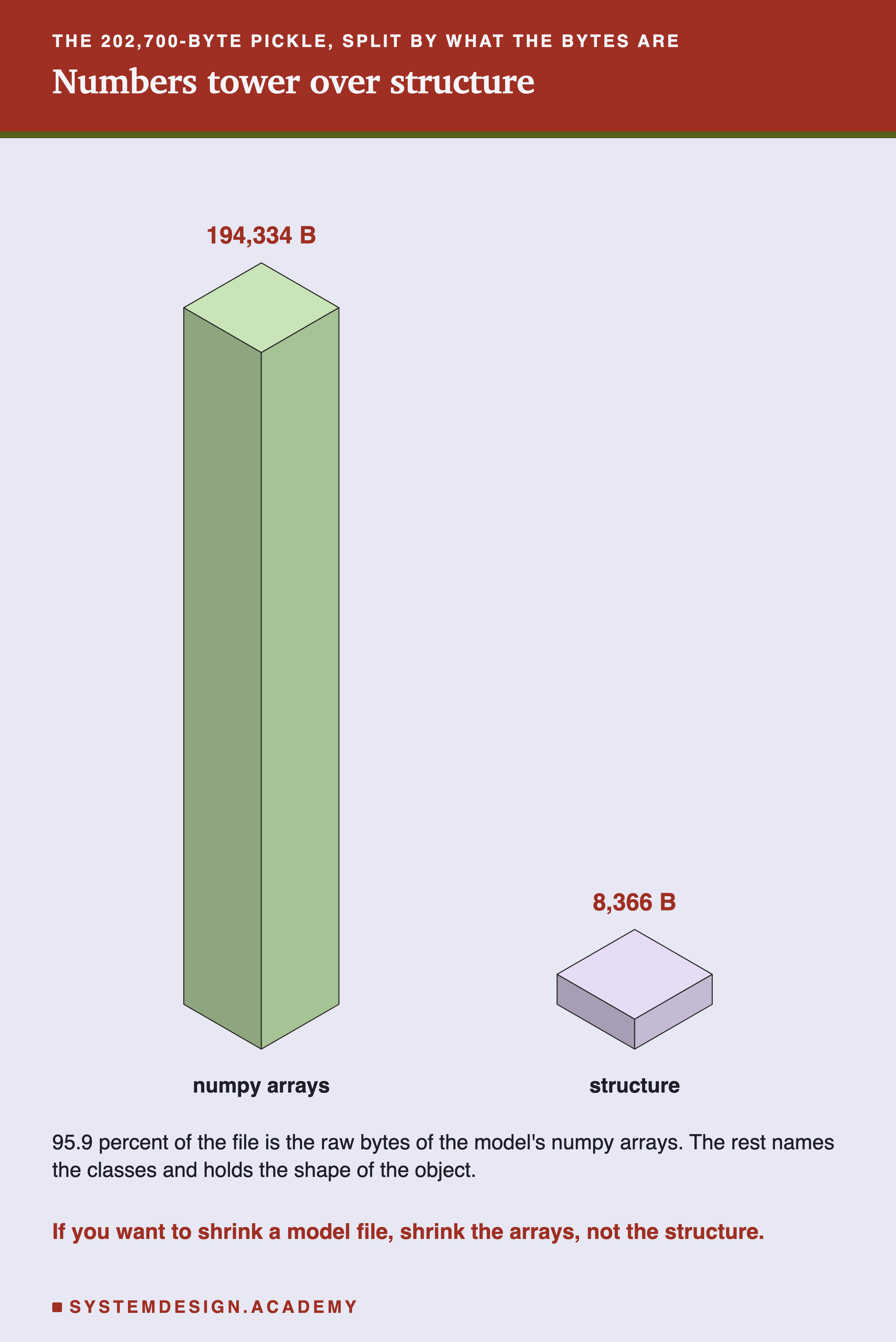
The two blocks show the same split. The buffer bytes measured inside the pickle are 194,334, and the structure is 8,366. I measured the 32-byte difference between 194,302 and 194,334 too. It is one 16-byte array that my array count does not reach, plus two numpy scalars of 8 bytes each, stored as short byte strings. The lesson here is practical. If you ever need a model file to be smaller, shrink the numbers, through a smaller model or a different format. The wrapper is not the part to shrink.
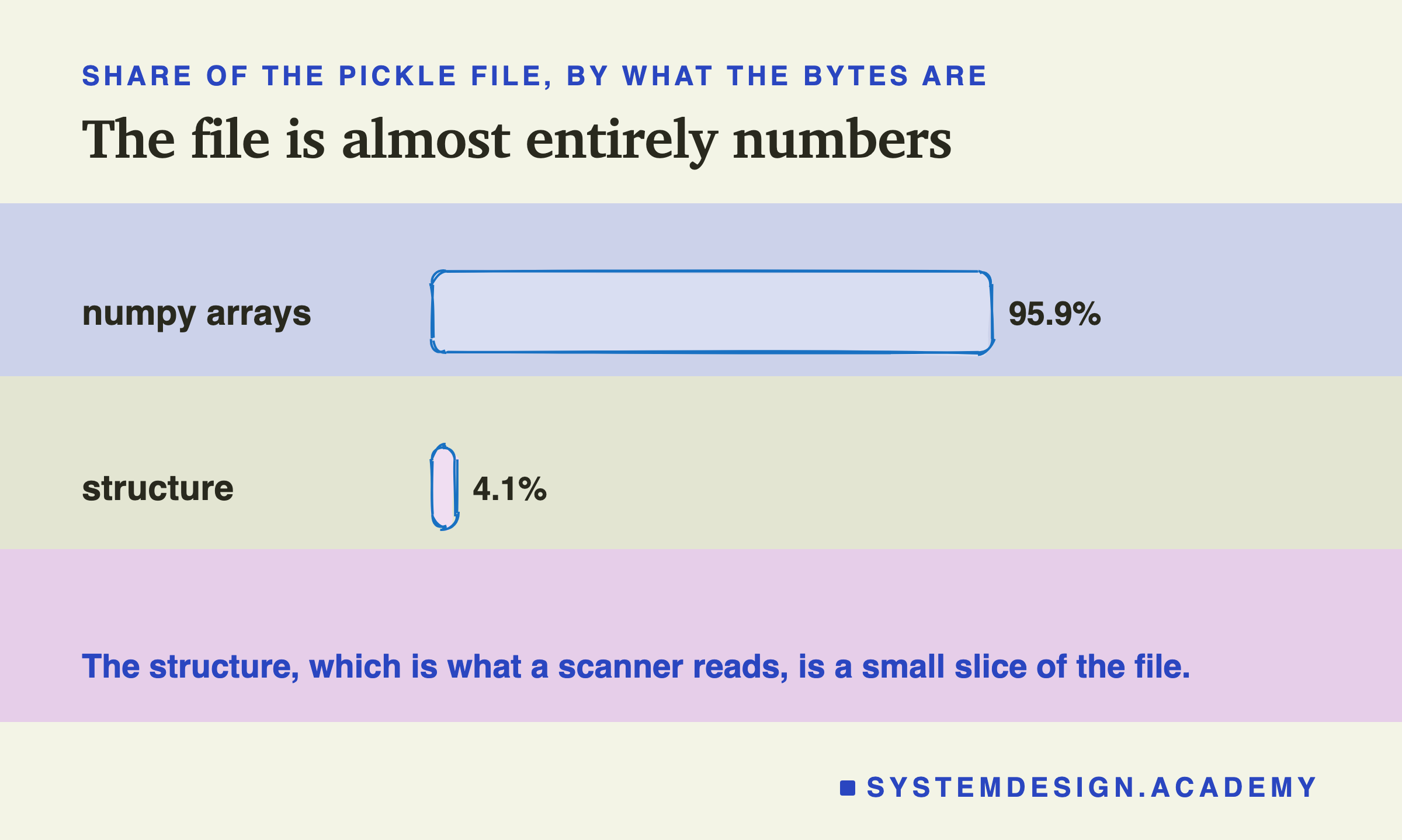
Said as shares, 95.9 percent of the file is numbers and 4.1 percent is structure. Keep that 4.1 percent in mind, because that small slice, the structure, is the only part a scanner reads. The big block of numbers is not where danger could hide; the thin wrapper is.
Most Opcodes Move Data; a Few Hundred Call Code
The pickle is 3,829 opcodes. Grouping them by what they do tells you where the risk is and is not.
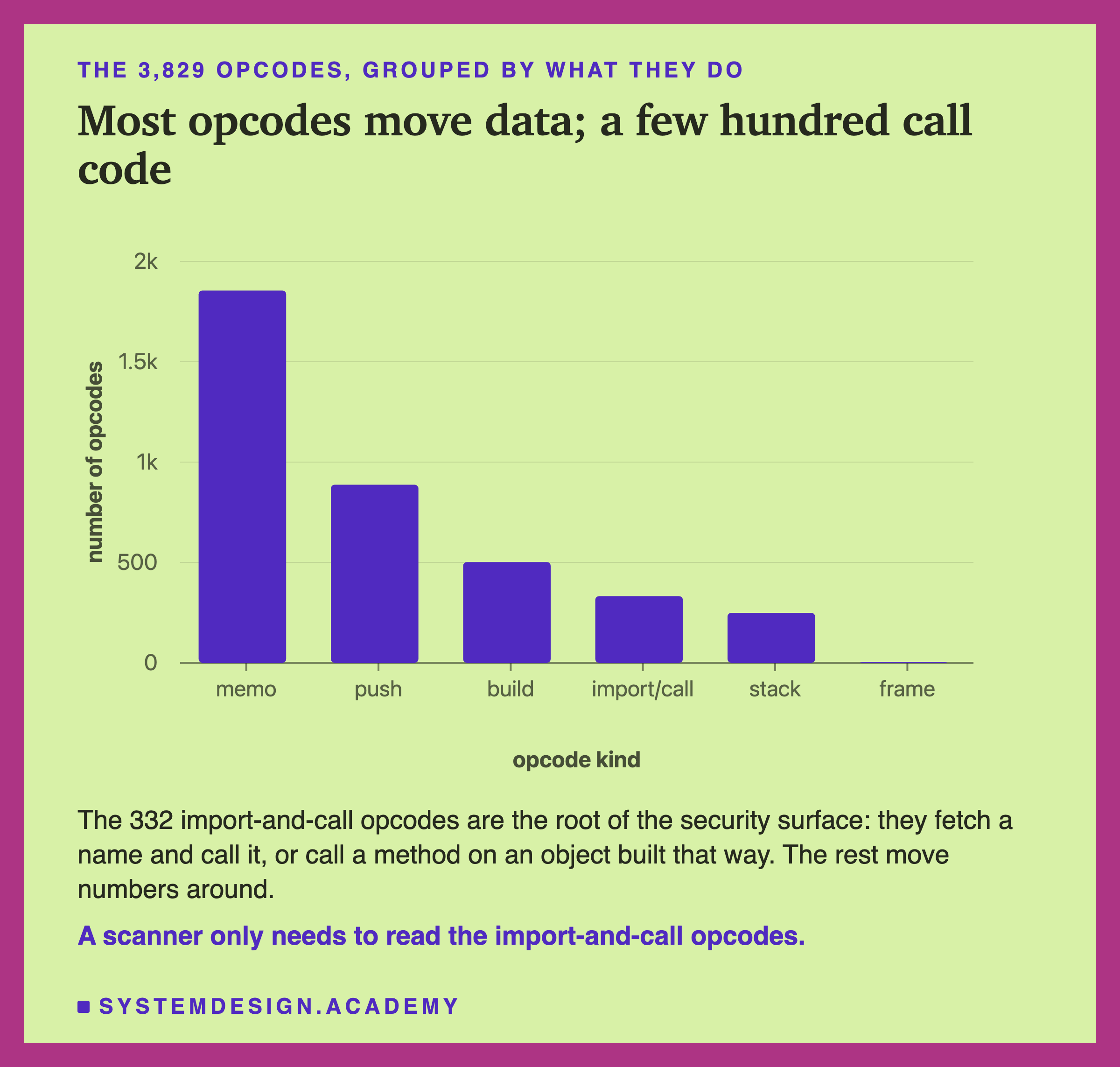
Most opcodes are housekeeping. The "memo" opcodes, 1,855 of them, let the file reuse a value it has already built instead of writing it twice. The "push" opcodes put a number or a short string on the stack. "Build" opcodes assemble a list or a dictionary. None of those reach outside the file.
The 332 import-and-call opcodes are where code can run. They fetch a name and call it, or call a method on an object built that way. A few others, such as SETITEMS, can also call a method on such an object. So the names those opcodes fetch are the root of the file's security surface. A scanner does not need to understand the model. It reads the opcodes and looks at the names they fetch. The rest is numbers being moved into place.
Every Name the File Will Fetch
Because loading imports names, I can list exactly which names this file will fetch, without loading it. The tool for that is pickletools, part of the standard library. The documentation describes it as a set of functions for analyzing pickled data. It also says that, run from the command line, it does not execute pickle bytecode. I read the names two ways and got the same 16 both times. The first way walks the opcodes without loading. The second loads my own file with a small recorder that notes each name the real unpickler resolves.
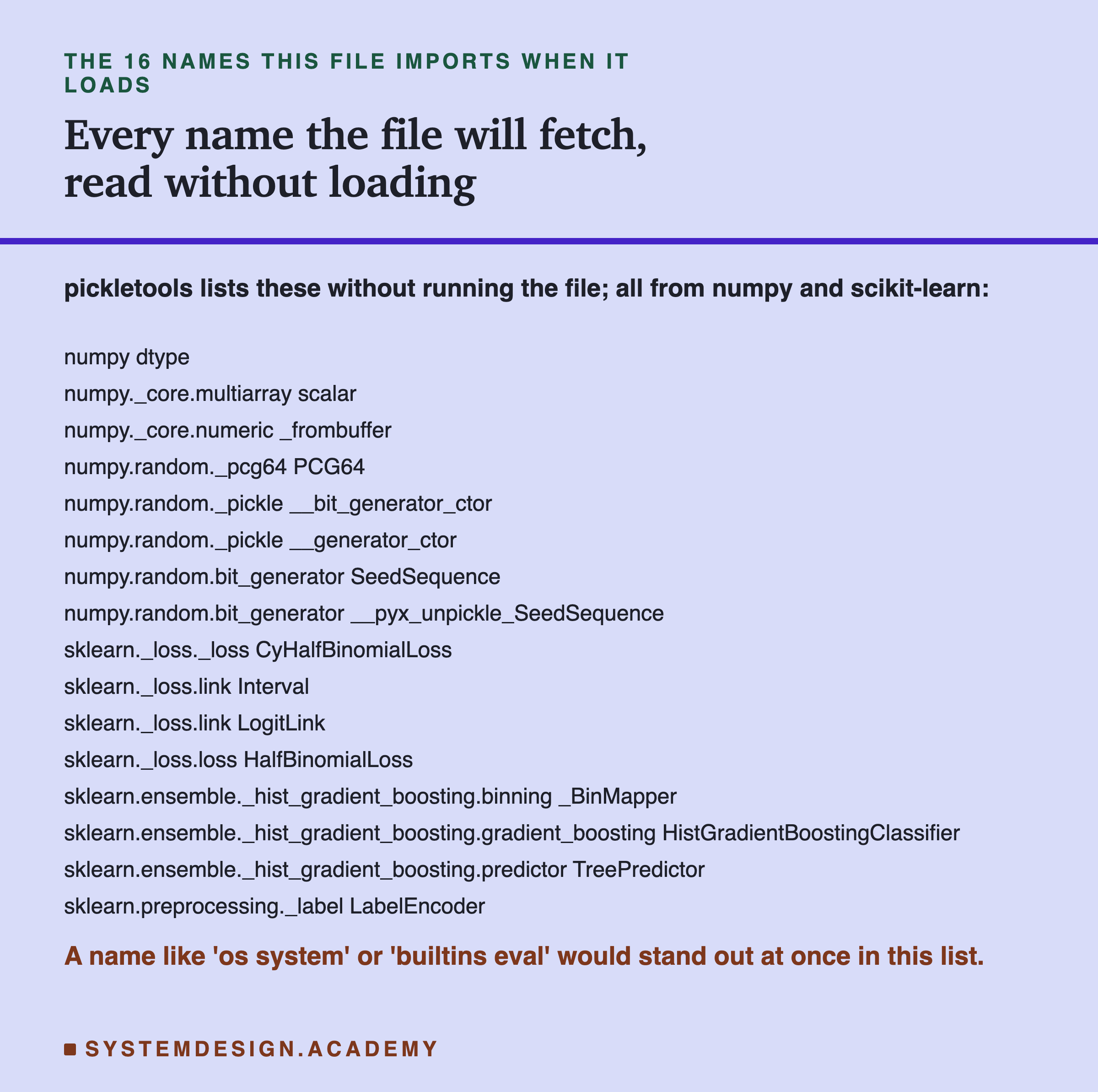
There are 16 distinct names. Eight are from numpy, mostly about rebuilding arrays and the random-state object the model carries. Eight are from scikit-learn: the loss function, the object that sorts feature values into bins, the tree predictor, the classifier class itself, and the label encoder. Every one of them is a normal part of the libraries that trained the model.
This is the honest way to judge an unknown file. You read its import list first. If this list held os system or builtins eval, it would jump out immediately. Those are names that let a file run shell commands, or run any code at all. They would stand out against a list of plain numpy and scikit-learn parts. You never have to load the file to see them, which matters, because loading is the dangerous step.
Loading Can Run Code, Shown Safely
Now I prove the claim directly. I built a tiny object whose __reduce__ recipe tells the load step to call a function. I want to be very clear: this file is harmless by design. The function it calls, named mark, does exactly two things and nothing else. It writes one short text file into the computer's temporary folder, and it prints one line. It opens no network connection, reads no files, and deletes nothing.
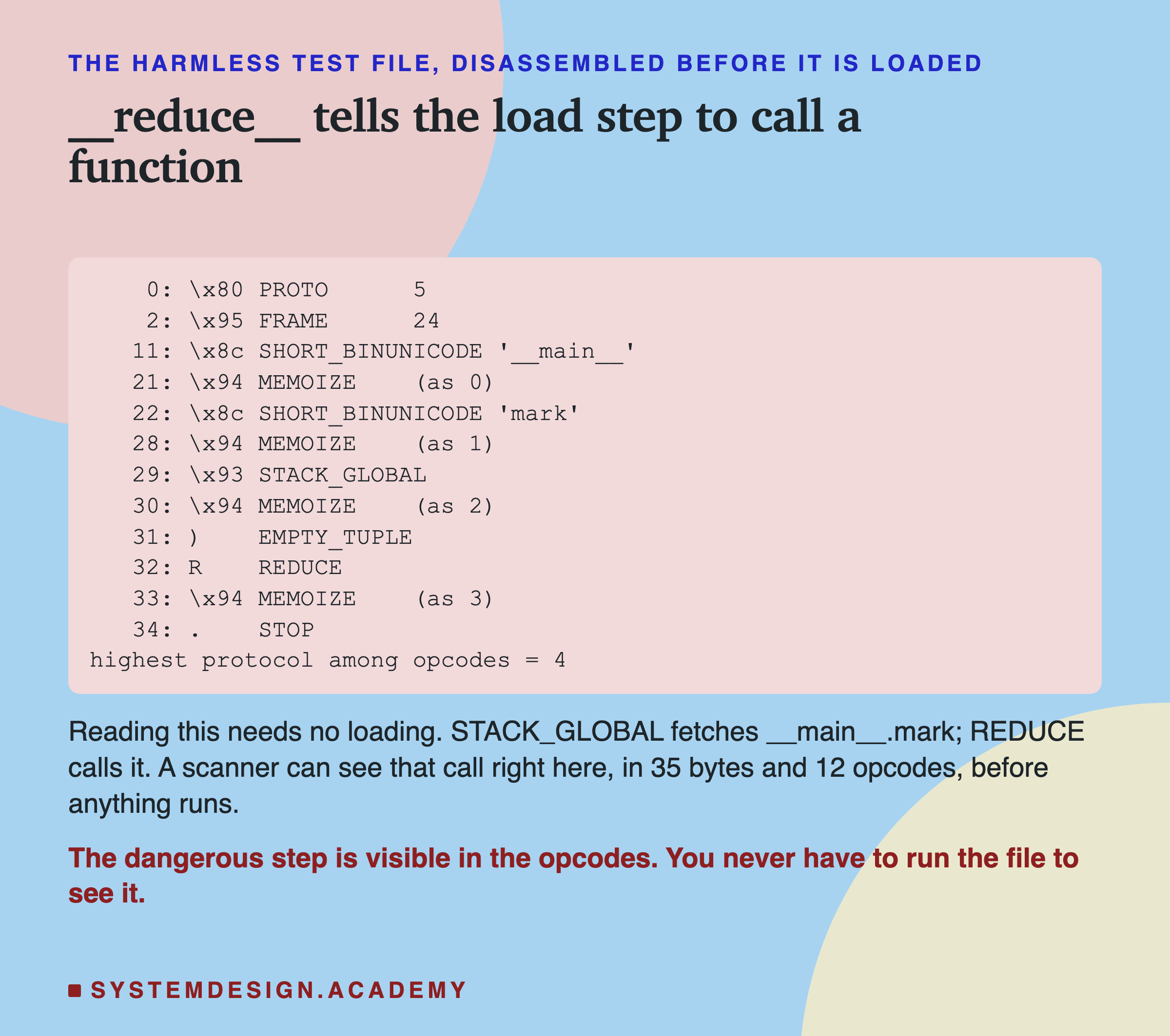
Here is the whole file, disassembled with pickletools, before anything runs. It is only 35 bytes and 12 opcodes. You can read the plan right off it: it fetches the name mark, then REDUCE calls it. A scanner, or a careful person, can see that call without ever loading the file.
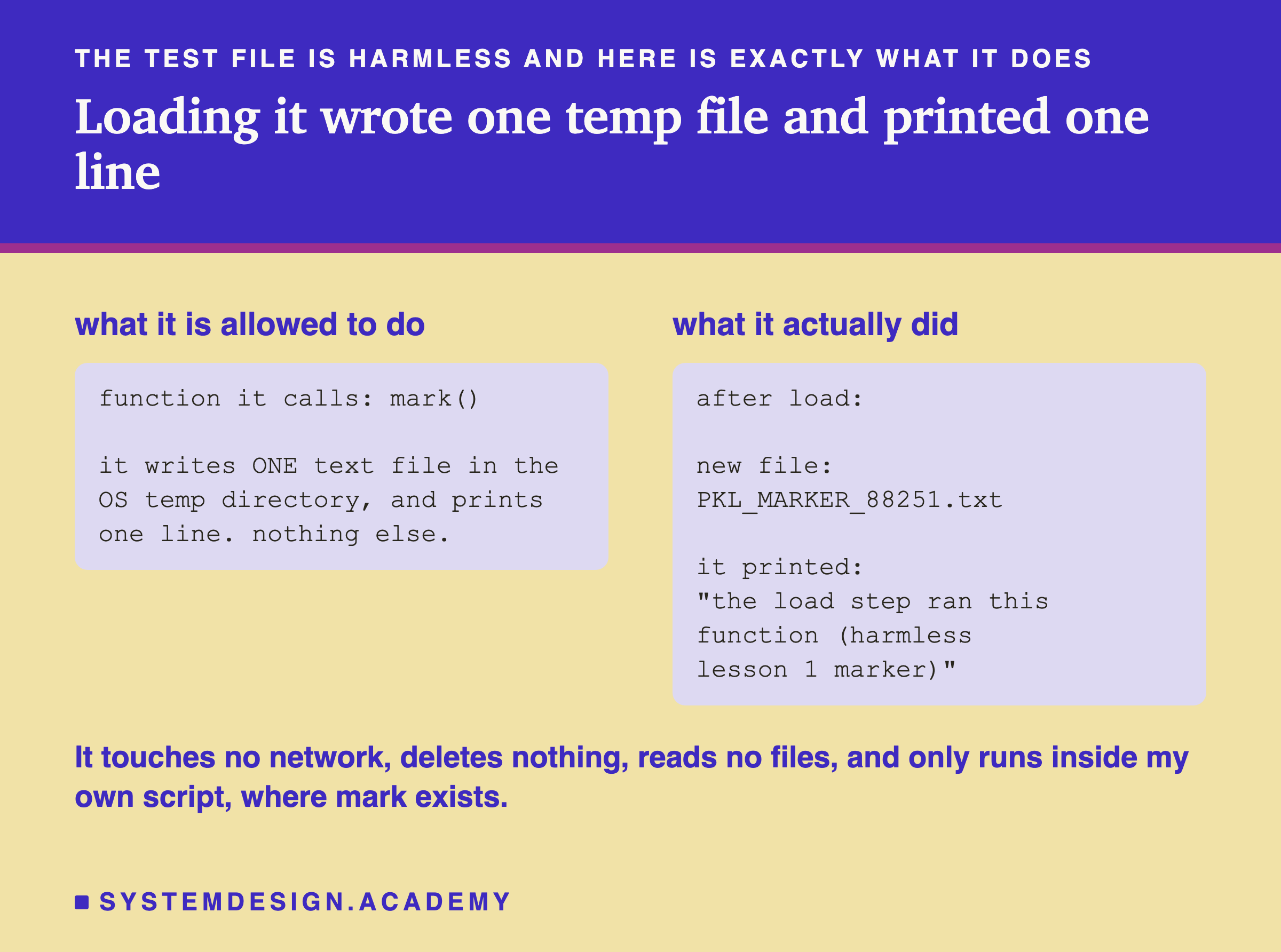
Then I loaded it, inside my own script. The load step ran mark, exactly as the opcodes said: a new file appeared in the temporary folder, and the line printed, with no error and no warning.
There is a limit here that the review pointed out, and I checked it. The test file only runs inside my own script, because mark only exists there. After the review, I loaded the same 35 bytes in a fresh Python process. It stopped with an AttributeError, "Can't get attribute 'mark'", and ran nothing; no marker file appeared.
What Two Real Scanners Do
Reading opcodes by hand does not scale, so people use scanners. I ran two well-known ones. I checked each tool's own documentation and source, quoted in results/pkl-factcheck.json, so I describe what they actually do, not what I assume.
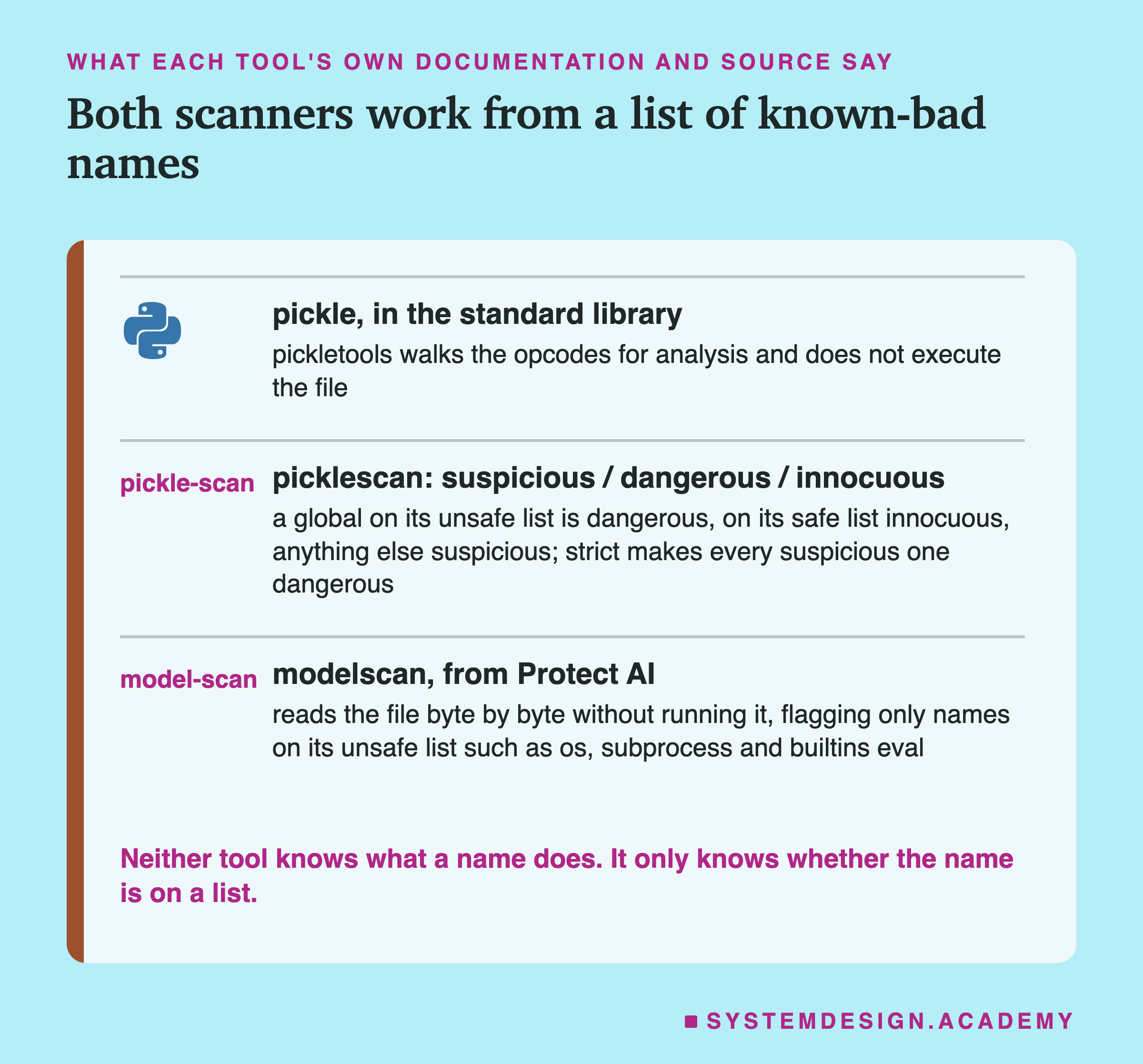
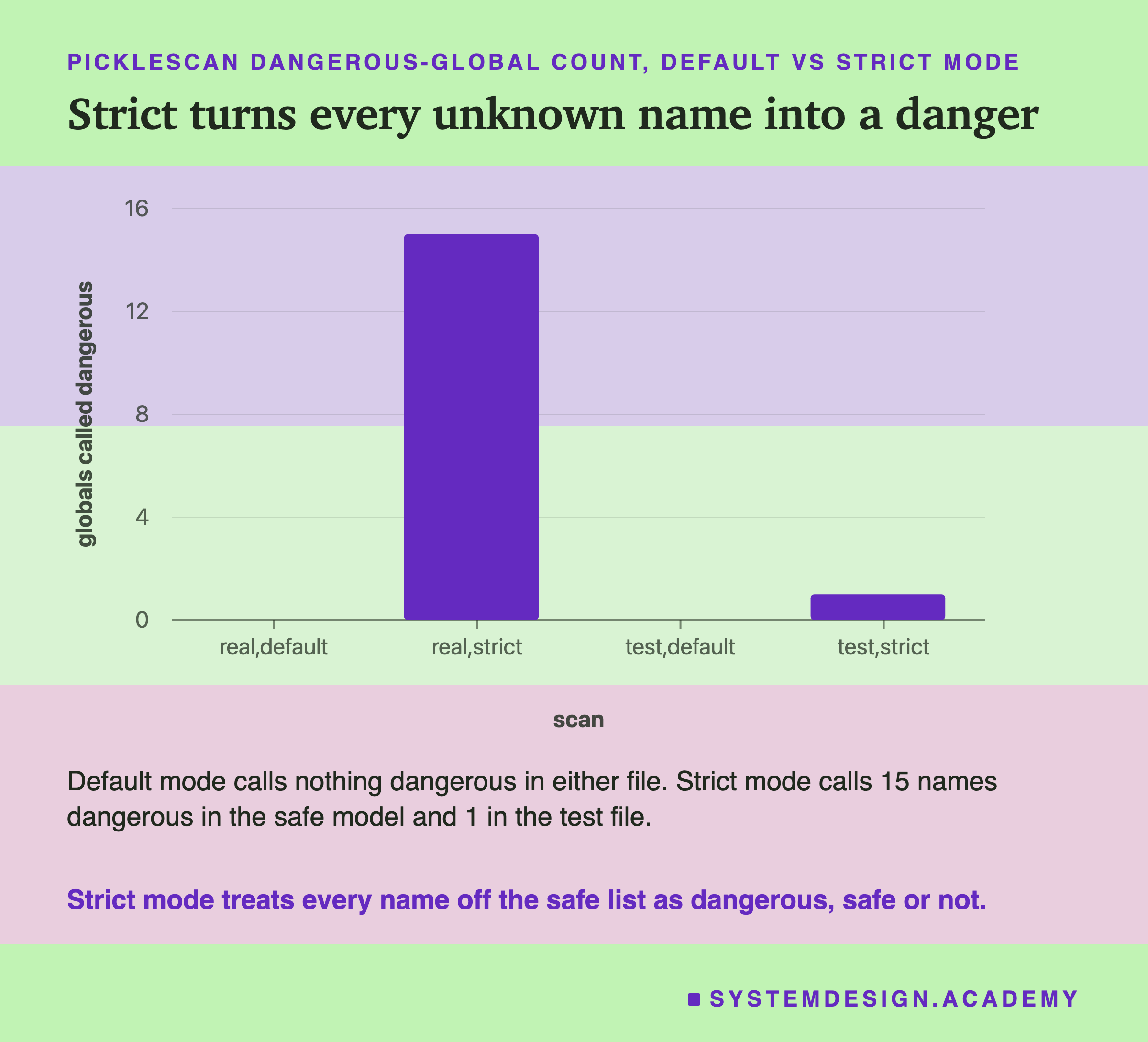
picklescan reads the globals and sorts each into three buckets. If a name is on its built-in list of unsafe names, it is dangerous. If it is on its list of known-safe names, it is innocuous. Anything on neither list is called suspicious. There is a strict mode that turns every suspicious name into a dangerous one.
modelscan, from a company called Protect AI, works the same way at heart: its documentation says it "reads the content of the file one byte at a time ... looking for code signatures that are unsafe", and its default list of unsafe names is short and specific, things like os, subprocess, socket and builtins eval. The key fact about both tools is the one the smoke alarm taught us: neither knows what a name does. Each only knows whether the name is on a list.
The Scanners on a Safe Model and a Harmless File
Here is what they reported. I ran them in a separate environment, a fresh virtual environment with Python 3.12, picklescan 1.0.5 and modelscan 0.8.8, and recorded the full output.
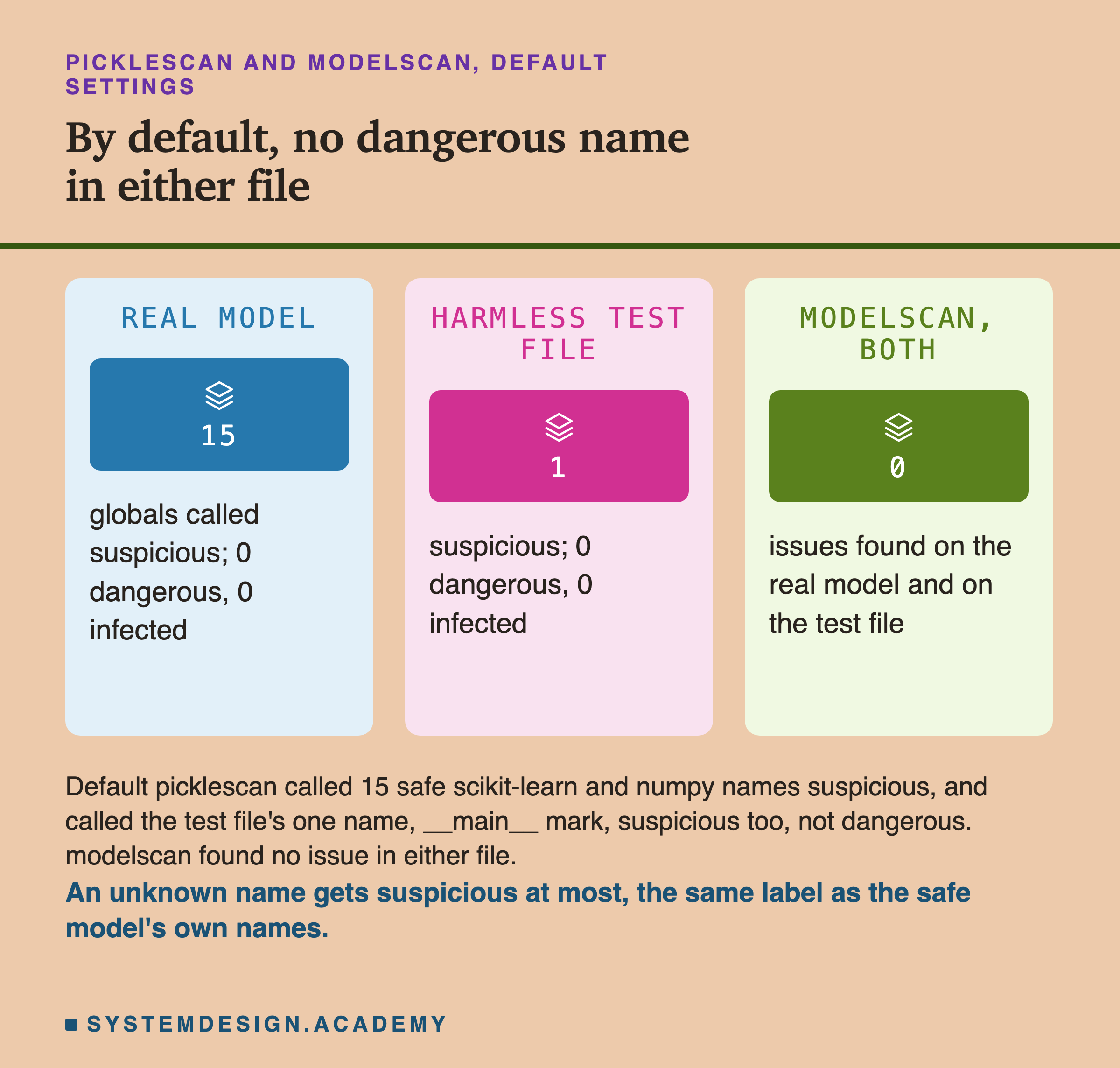
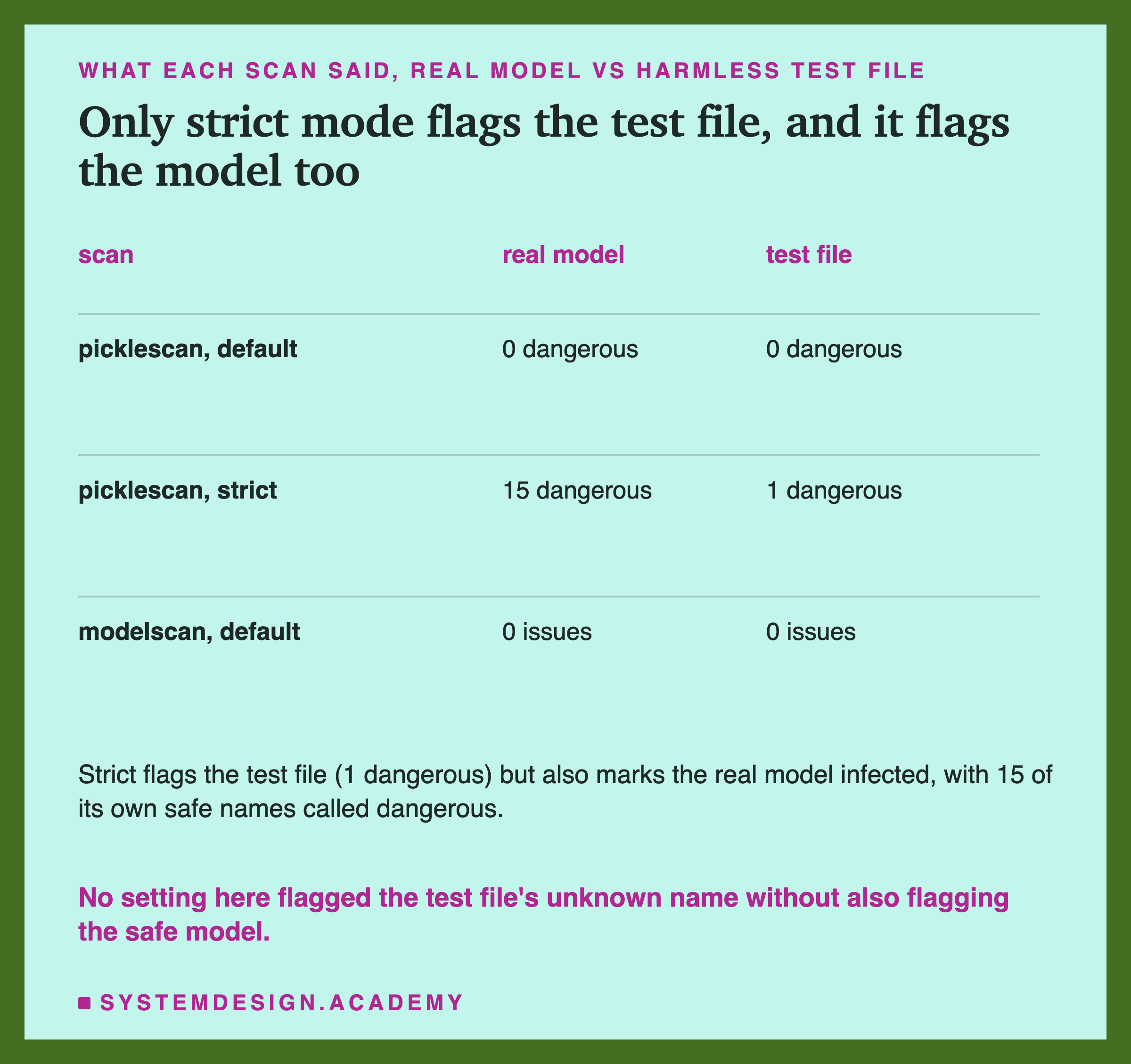
On the real, safe model, picklescan called 15 of its names suspicious, and none dangerous. Those 15 are ordinary scikit-learn and numpy parts that are not on its safe list. On the harmless test file, it called the one name, __main__ mark, suspicious, and again found 0 dangerous names. modelscan found no issue in either file, because mark is on none of its lists. So an unknown name gets "suspicious" at most, which is the same label the safe model's own names get.
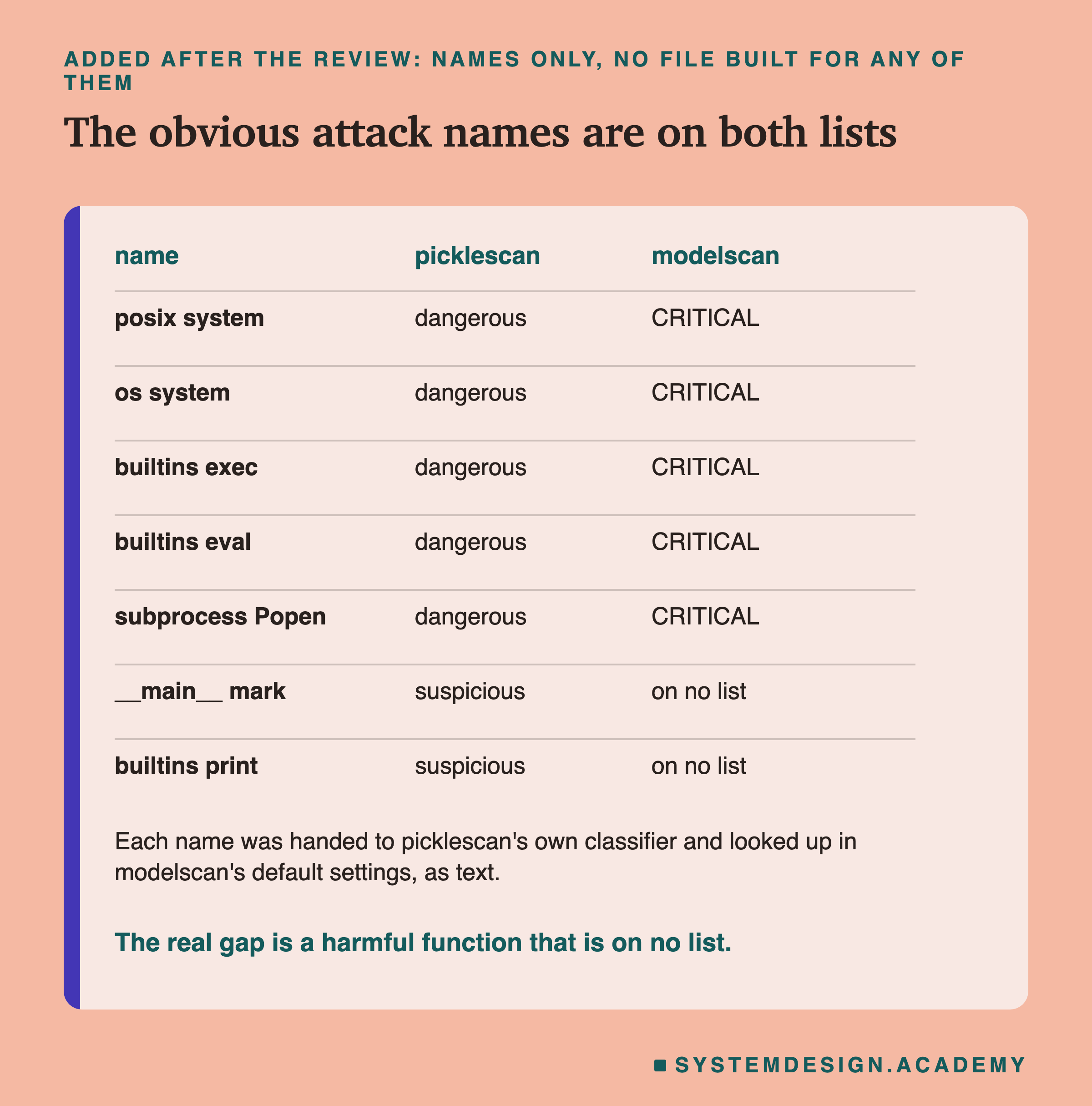
That does not mean these scanners would miss a real attack, and the review was right to say so. A working attack must call something that already exists on the victim's machine, and the obvious choices are on both lists. After the review I checked this without building any harmful file. I handed name strings only to picklescan's own classifier, and looked the same names up in modelscan's default settings. posix system, os system, builtins exec, builtins eval and subprocess Popen all came back dangerous in picklescan, which marks the file infected, and CRITICAL in modelscan. The real gap is a harmful function that is on no list.
A Correct Load Is Exact
One more check, to be fair to the file format: does saving and loading change the model at all?
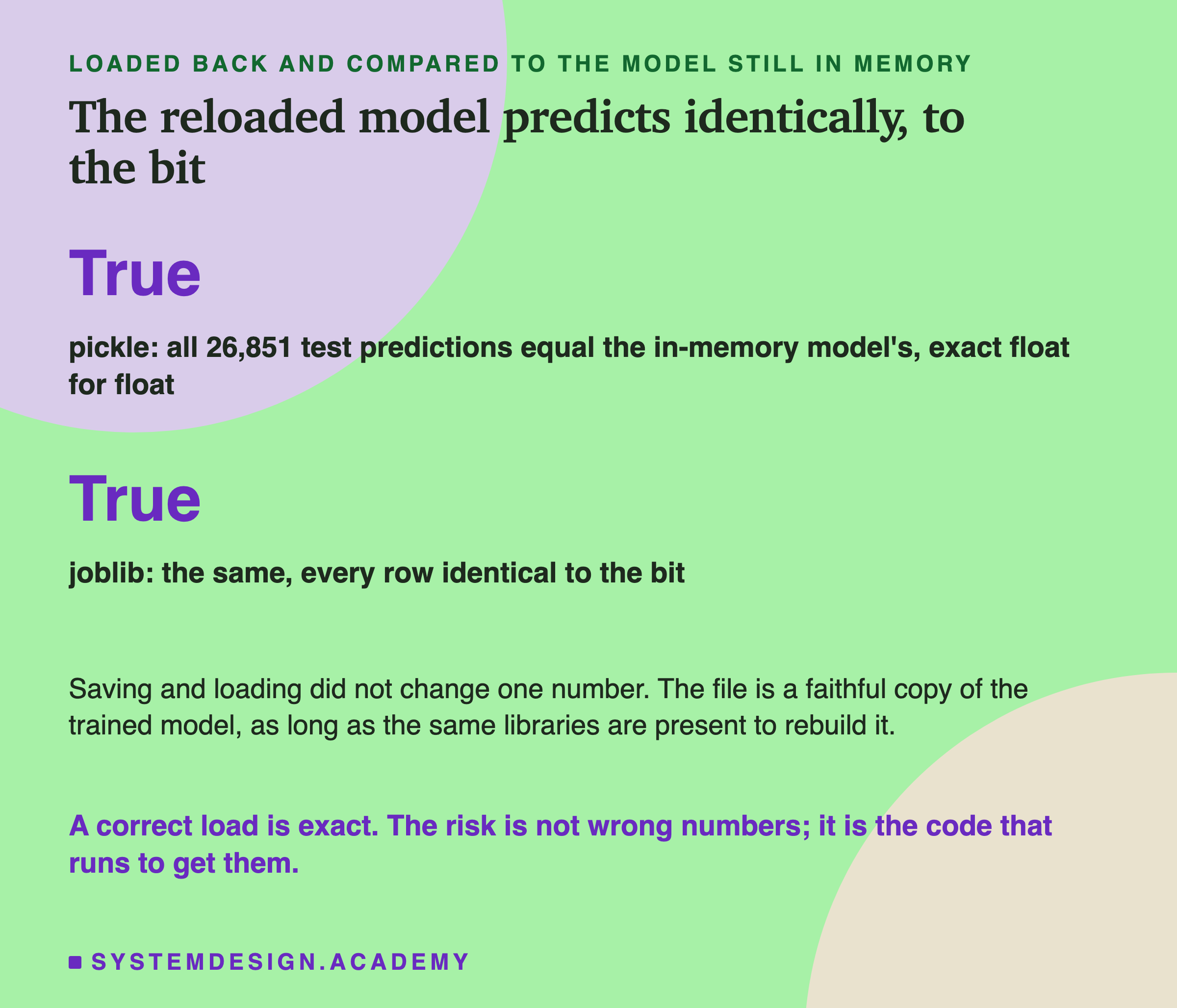
I loaded the model back from both the pickle and the joblib file. Then I compared its predictions on all 26,851 test rows with the model still held in memory, as raw bytes. Every prediction matched, not roughly but to the bit, for both files. So the file is a faithful copy. Saving and loading did not nudge one number.
So the risk is not in the numbers. The danger of a pickle is not that it quietly corrupts your model's numbers; a correct load is exact. The danger is the code that runs to produce those numbers, when the file came from someone you do not trust. The numbers are safe to carry. It is the loading that is an action, not a read.
My Guess Before the Run, Checked
Before the lab first ran, I wrote down what I expected, in the lab's docstring, so it could be wrong. Here it is, word for word: "the great majority of the file is numpy array bytes, not structure; the import list is short and all from numpy and sklearn; picklescan and modelscan both flag the payload and neither flags the real model; the reloaded predictions match to the bit."
Three parts were right. Almost all of the file was numpy bytes, 95.9 percent. The import list was short, 16 names, all from numpy and scikit-learn. And the reload matched to the bit.
The scanner part was wrong. By default, neither scanner called the test file dangerous, and picklescan listed 15 of the real model's names as suspicious. I had pictured the scanners as judges of behaviour. They are lists of names, and my test file's name was on neither list. Two of my design notes were also wrong, and the lab's docstring now says so: joblib does not compress by default, and protocol 5 kept the arrays inside the stream.
Try It Yourself
The full lab runs the scanners in a separate environment. I also wrote a small demo that does the core of it in the main environment, in about a minute, and skips the scanners.
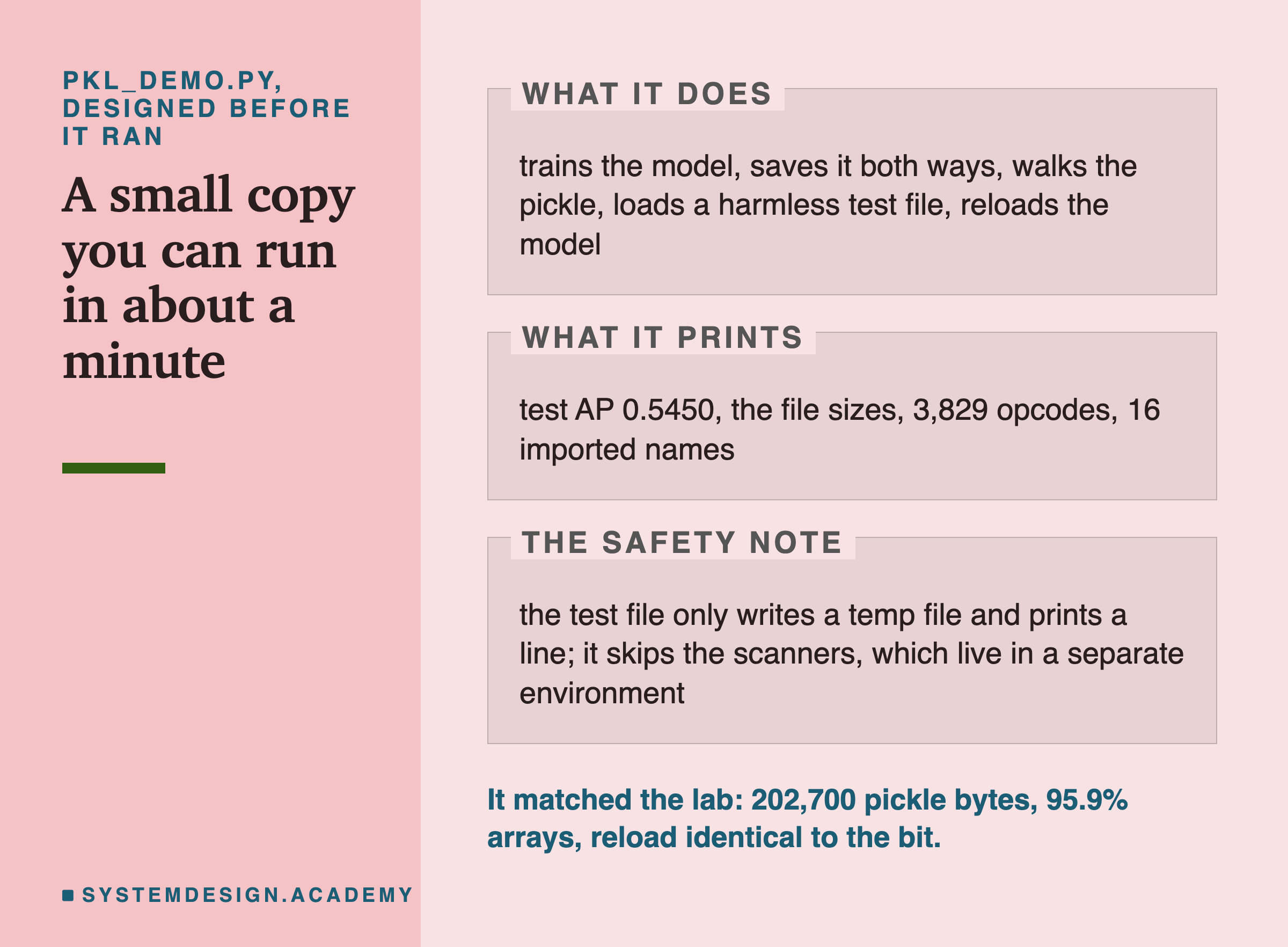
The demo builds the pickle, walks it, and loads the same kind of harmless test file inside the demo script, so you can watch loading run a function on your own machine, safely. It prints the same headline numbers as the lab, and I checked that they agree.
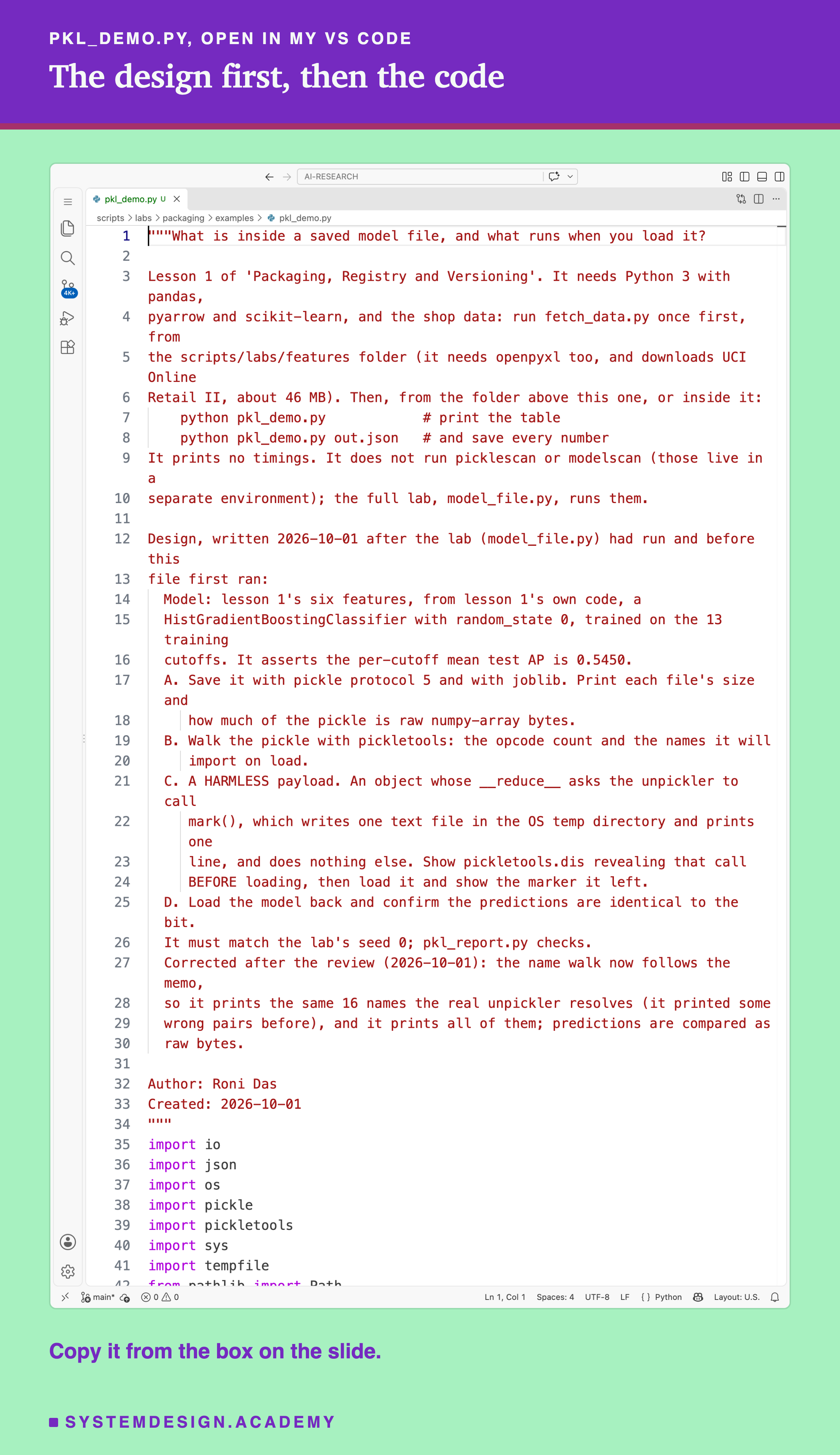
Before you run this lab. You need Python 3 with pandas, pyarrow, scikit-learn and joblib. First run python fetch_data.py from the scripts/labs/features folder; it downloads the shop data once, about 46 MB, and writes one cleaned file. The demo imports lesson 1's feature code and task.py from that same folder. It needs no GPU, and I ran it with scikit-learn 1.9.1 on a Mac; these libraries run on Windows and Linux too, but I have not checked the exact numbers there.
"""What is inside a saved model file, and what runs when you load it?

Lesson 1 of 'Packaging, Registry and Versioning'. It needs Python 3 with pandas,
pyarrow and scikit-learn, and the shop data: run fetch_data.py once first, from
the scripts/labs/features folder (it needs openpyxl too, and downloads UCI Online
Retail II, about 46 MB). Then, from the folder above this one, or inside it:
    python pkl_demo.py            # print the table
    python pkl_demo.py out.json   # and save every number
It prints no timings. It does not run picklescan or modelscan (those live in a
separate environment); the full lab, model_file.py, runs them.

Design, written 2026-10-01 after the lab (model_file.py) had run and before this
file first ran:
  Model: lesson 1's six features, from lesson 1's own code, a
  HistGradientBoostingClassifier with random_state 0, trained on the 13 training
  cutoffs. It asserts the per-cutoff mean test AP is 0.5450.
  A. Save it with pickle protocol 5 and with joblib. Print each file's size and
     how much of the pickle is raw numpy-array bytes.
  B. Walk the pickle with pickletools: the opcode count and the names it will
     import on load.
  C. A HARMLESS payload. An object whose __reduce__ asks the unpickler to call
     mark(), which writes one text file in the OS temp directory and prints one
     line, and does nothing else. Show pickletools.dis revealing that call
     BEFORE loading, then load it and show the marker it left.
  D. Load the model back and confirm the predictions are identical to the bit.
  It must match the lab's seed 0; pkl_report.py checks.
  Corrected after the review (2026-10-01): the name walk now follows the memo,
  so it prints the same 16 names the real unpickler resolves (it printed some
  wrong pairs before), and it prints all of them; predictions are compared as
  raw bytes.

Author: Roni Das
Created: 2026-10-01
"""
import io
import json
import os
import pickle
import pickletools
import sys
import tempfile
from pathlib import Path

import joblib
import numpy as np
from sklearn.metrics import average_precision_score

sys.path.insert(0, str(Path(__file__).resolve().parents[2] / "features"))
import task  # noqa: E402
from what_a_feature_is import HAND_COLS, hgb, joined  # noqa: E402

MARKER_LINE = "the load step ran this function (harmless lesson 1 marker)"


def mark():
    """HARMLESS. Write one short text file in the OS temp dir and print one line. Nothing else."""
    path = Path(tempfile.gettempdir()) / f"PKL_DEMO_MARKER_{os.getpid()}.txt"
    path.write_text(MARKER_LINE + "\n")
    print(f"  >> {MARKER_LINE}")
    return str(path)


class HarmlessPayload:
    """When unpickled, asks the unpickler to call mark(). Harmless by construction (see mark)."""

    def __reduce__(self):
        return (mark, ())


def numpy_bytes(obj, seen=None):
    if seen is None:
        seen = set()
    if id(obj) in seen:
        return 0
    seen.add(id(obj))
    if isinstance(obj, np.ndarray):
        return int(obj.nbytes)
    total = 0
    if isinstance(obj, dict):
        for v in obj.values():
            total += numpy_bytes(v, seen)
    elif isinstance(obj, (list, tuple, set)):
        for v in obj:
            total += numpy_bytes(v, seen)
    else:
        st = getattr(obj, "__dict__", None)
        if st:
            total += numpy_bytes(st, seen)
    return total


def walk(data):
    """Opcode count, imported names and in-stream buffer bytes, read WITHOUT loading the file.

    A STACK_GLOBAL takes the two strings just below it. A string used before is fetched from the memo
    (BINGET) instead of written again, so the walk keeps the memo: MEMOIZE stores the value just pushed.
    """
    total, names, array_bytes = 0, [], 0
    memo, nxt, recent, top = {}, 0, [], None
    for op, arg, _pos in pickletools.genops(data):
        total += 1
        n = op.name
        if n in ("SHORT_BINUNICODE", "BINUNICODE", "BINUNICODE8", "UNICODE"):
            top = str(arg)
            recent.append(top)
        elif n == "MEMOIZE":
            memo[nxt] = top
            nxt += 1
        elif n in ("BINPUT", "LONG_BINPUT", "PUT"):
            memo[int(arg)] = top
        elif n in ("BINGET", "LONG_BINGET", "GET"):
            top = memo.get(int(arg))
            recent.append(top)
        elif n == "STACK_GLOBAL":
            names.append(f"{recent[-2]} {recent[-1]}")
            top = None
            recent.append(None)
        elif n == "GLOBAL":
            names.append(str(arg).replace("\n", " "))
            top = None
            recent.append(None)
        elif n not in ("FRAME", "PROTO", "STOP"):
            top = None
            recent.append(None)
        if n in ("BYTEARRAY8", "BINBYTES8", "BINBYTES", "SHORT_BINBYTES") and isinstance(arg, (bytes, bytearray)):
            array_bytes += len(arg)
    return total, names, array_bytes


ev = task.load_events()
lab_tr, _, lab_te = task.splits(ev)
tr = joined(ev, lab_tr, task.TRAIN_CUTOFFS)
te = joined(ev, lab_te, task.TEST_CUTOFFS)
model = hgb(0).fit(tr[HAND_COLS].to_numpy(float), tr["label"])
xte = te[HAND_COLS].to_numpy(float)
proba = model.predict_proba(xte)[:, 1]
aps = [average_precision_score(te["label"].to_numpy()[i], proba[i]) for i in te.groupby("cutoff").indices.values()]
ap = float(np.mean(aps))
assert round(ap, 4) == 0.5450, f"test AP {ap:.4f}, expected 0.5450"
print(f"model: test AP {ap:.4f} on {len(te):,} test rows")

pkl_bytes = pickle.dumps(model, protocol=5)
tmp_jl = Path(tempfile.gettempdir()) / f"pkl_demo_{os.getpid()}.joblib"
joblib.dump(model, tmp_jl)
jl_size = tmp_jl.stat().st_size
arr = numpy_bytes(model)
n_op, names, pkl_arr = walk(pkl_bytes)
print(f"A. pickle {len(pkl_bytes):,} bytes, {100 * pkl_arr / len(pkl_bytes):.1f}% numpy-array bytes; "
      f"joblib {jl_size:,} bytes")
print(f"B. {n_op:,} opcodes; it will import {len(set(names))} distinct names on load:")
for nm in sorted(set(names)):
    print(f"     {nm}")

payload_bytes = pickle.dumps(HarmlessPayload(), protocol=5)
buf = io.StringIO(); pickletools.dis(payload_bytes, buf)
print("C. the harmless test file, disassembled BEFORE loading:")
for line in buf.getvalue().splitlines():
    if any(k in line for k in ("STACK_GLOBAL", "REDUCE", "GLOBAL")):
        print("     " + line.strip())
print("   loading it here, inside this script (runs mark: one temp file, one line):")
left = pickle.loads(payload_bytes)
print(f"   it left the file: {left}")

m_pkl = pickle.loads(pkl_bytes)
m_jl = joblib.load(tmp_jl)
bit_pkl = proba.tobytes() == m_pkl.predict_proba(xte)[:, 1].tobytes()
bit_jl = proba.tobytes() == m_jl.predict_proba(xte)[:, 1].tobytes()
print(f"D. reloaded predictions identical to the bit: pickle {bit_pkl}, joblib {bit_jl}")
tmp_jl.unlink(missing_ok=True)

if len(sys.argv) > 1:
    json.dump({"test_ap": ap, "n_test": len(te), "pickle_bytes": len(pkl_bytes), "joblib_bytes": jl_size,
               "pickle_array_pct": round(100 * pkl_arr / len(pkl_bytes), 1), "opcodes": n_op,
               "distinct_imports": len(set(names)), "imports": sorted(set(names)), "reload_bit_identical": {"pickle": bit_pkl, "joblib": bit_jl}},
              open(sys.argv[1], "w"), indent=1)
    print(f"wrote {sys.argv[1]}")
See What a Scanner Sees
This box holds the names each file imports on load, the test file's full disassembly, and a short excerpt of picklescan's real lists with its real rule, applied name by name. It needs nothing but Python, so it runs in your browser. No model is trained here, and no pickle is loaded.
Press Run. It judges the harmless test file's one name. Then set FILE = "model" for the real model's 16 names, or FILE = "attack" for the name posix system on its own. That is a name only; no such file was built. Set STRICT = True to watch every unknown name turn dangerous, as picklescan's strict mode did in the lab.
On the default settings, the test file's one name and the model's safe names land in the same "suspicious" bucket, while a known-bad name like posix system is dangerous at once. The excerpt is short; picklescan's real lists are longer, but the rule is the same.
The Lab's Code, Piece by Piece
The lab is one file, scripts/labs/packaging/model_file.py. It imports lesson 1's feature code instead of copying it, so the model it saves is exactly the chapter's model.
train_model builds the six features, trains the classifier with random_state 0, and asserts the test AP is 0.5450 before going on. walk_pickle steps through the opcodes with pickletools.genops, counts them by kind, and adds up the bytes that are buffers in the stream.
stack_global_names reads every imported name from the opcodes without loading; it follows the memo, because a name used twice is fetched back rather than written again. true_imports gets the same list a second way, by loading the file with a small unpickler that records every name it resolves. That is safe only because the file is one I made myself, and the lab stops if the two lists differ.
mark is the harmless function the test file calls, and HarmlessPayload is the object whose __reduce__ points at it. run_scanner runs each real scanner as a separate program and captures its output. fresh_process_load and are the two post-review checks: the first loads the test file's bytes in a new process, and the second hands name strings to the scanners' own code. runs it all and writes the JSON. The report script, , recomputes it with its own code and stops if anything disagrees.
How to Handle a Model File Safely
These are the steps I take with any model file, especially one I did not make.
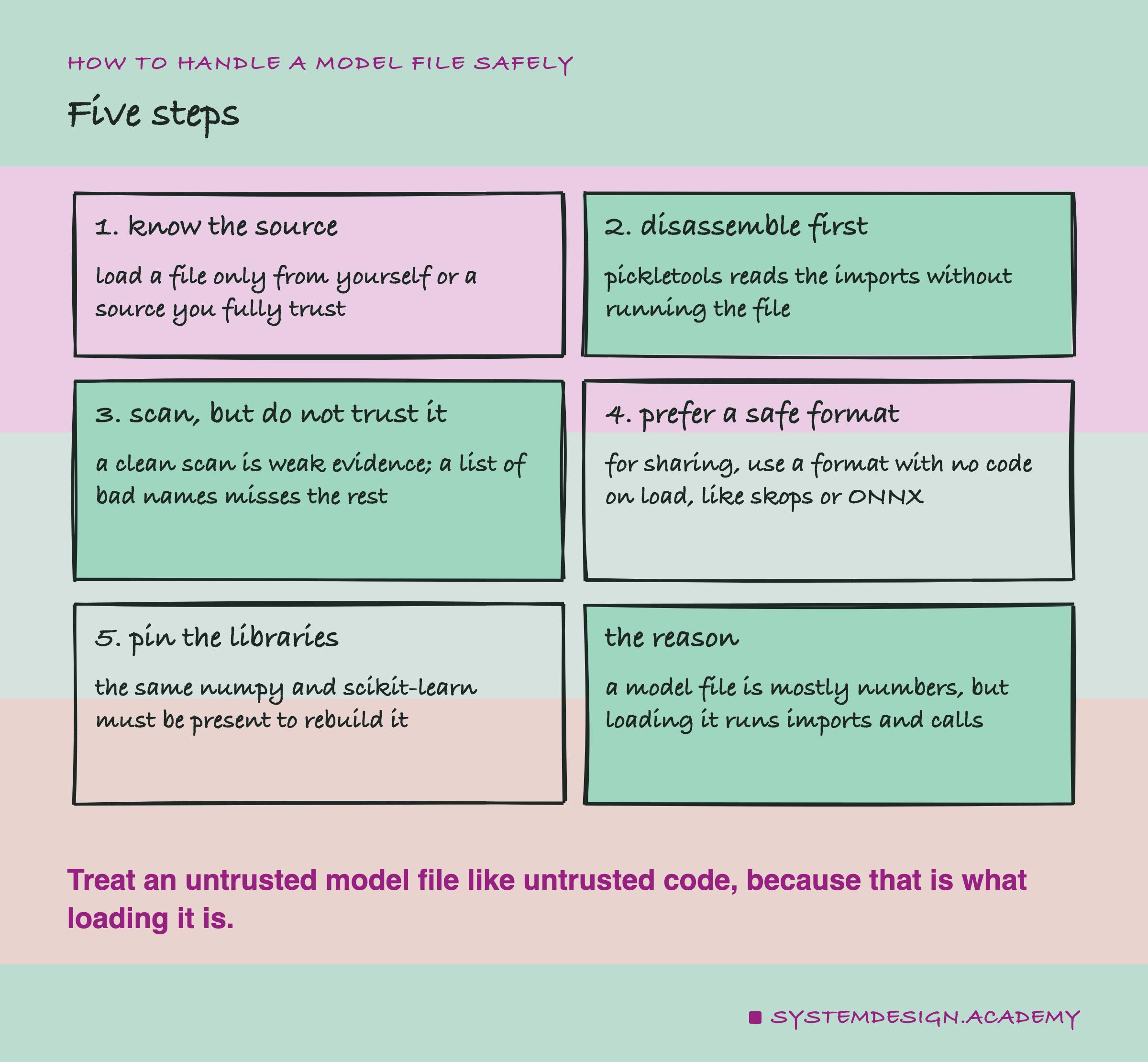
First, know the source. The simplest rule is the strongest: load a pickle or joblib file only if you made it or it came from someone you fully trust. joblib's own documentation says this outright, that loading such a file "is equivalent to running untrusted code".
Second, disassemble before you load, with pickletools, to read the import list safely. Third, run a scanner, but treat a clean result as weak evidence, because a name list only catches the names it knows. Fourth, prefer a format with no code on load when you share models across a trust boundary; joblib's docs point to skops for this, and the survey lesson covers ONNX. Fifth, pin the libraries: the file only rebuilds correctly when the same numpy and scikit-learn are present, which is the subject of the next lessons in this chapter.
When a Pickle Is Fine, and When It Is Not
A pickle or joblib file is perfectly fine inside one trusted pipeline, where the same team writes the file and loads it, on machines they control. The load is exact, as I measured, and the format is simple and fast. This is most day-to-day model saving, and there is nothing wrong with it.
It stops being fine the moment the file crosses a trust boundary. If you download a model from a stranger, receive one from a vendor, or let users upload model files, then loading is running their code on your machine. For that, use a format that carries no code on load. A scanner is a second line, not the wall itself.
A scanner is worth running, but not worth trusting alone. In this lab, the default scans found no dangerous name in the harmless test file, and the strict scan flagged a safe model. Checked by name, the obvious attack names are on both lists. Use a scan to catch known-bad names quickly, and keep the real guard: knowing where the file came from.
What This Lab Cannot Tell You
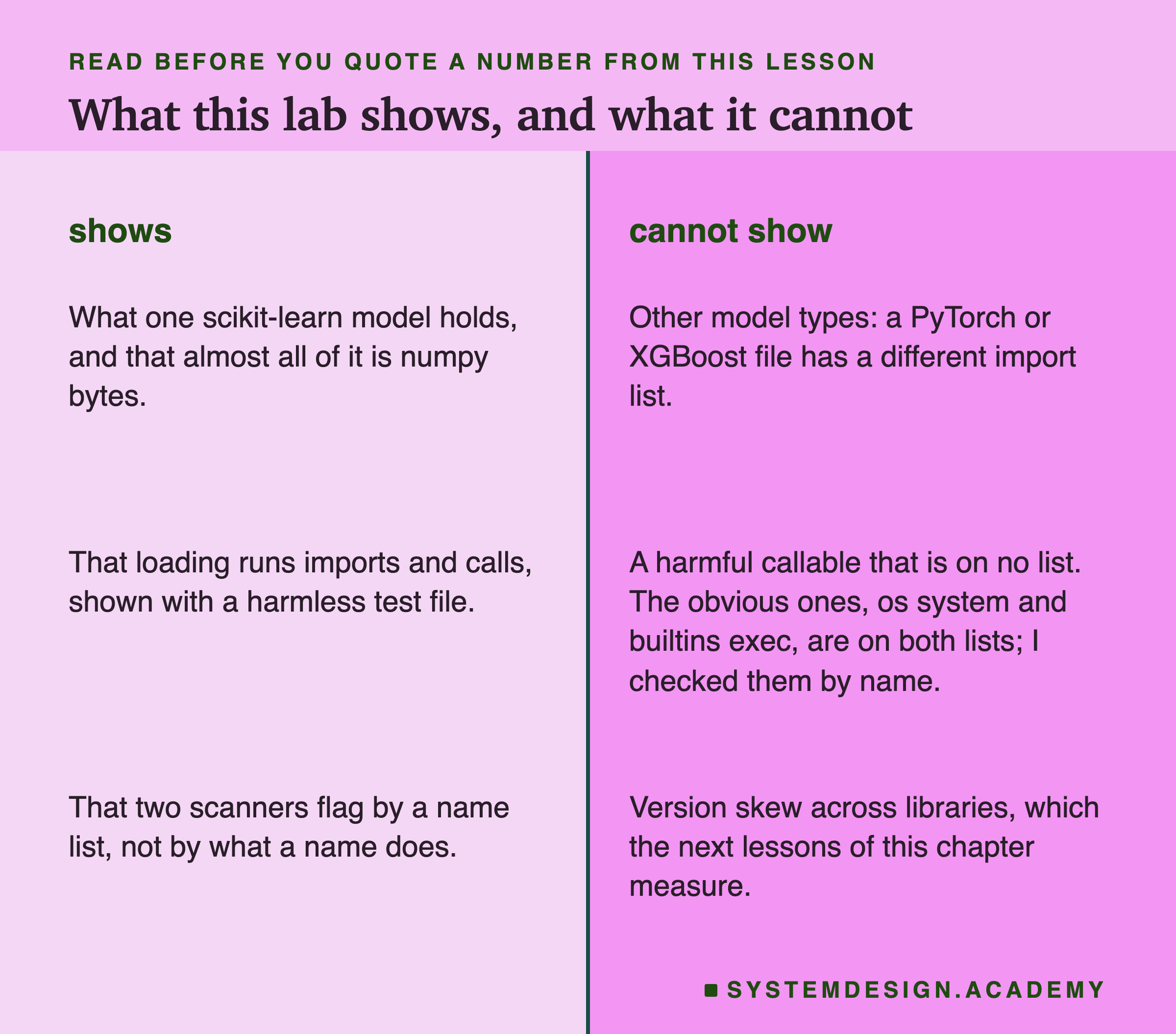
One model, one format family. These numbers are for a small scikit-learn tree model saved with pickle and joblib. A PyTorch or XGBoost file would hold a different import list and a different split of bytes, though the core fact, that loading runs code, is the same for any pickle.
One harmless test file, and names checked as text. I never built or ran anything harmful. For the obvious attacks, the scanners' own code answers the question: names like os system and builtins exec are flagged on both lists (picklescan dangerous, modelscan CRITICAL). What I cannot test is a harmful function that is on no list, which is exactly where a name list is blind.
No timings, and no version skew. The machine was not quiet, so I report no load times. And I loaded the model with the same libraries that saved it; what happens when the versions differ is the next lesson's measurement, not this one's.
What to Keep
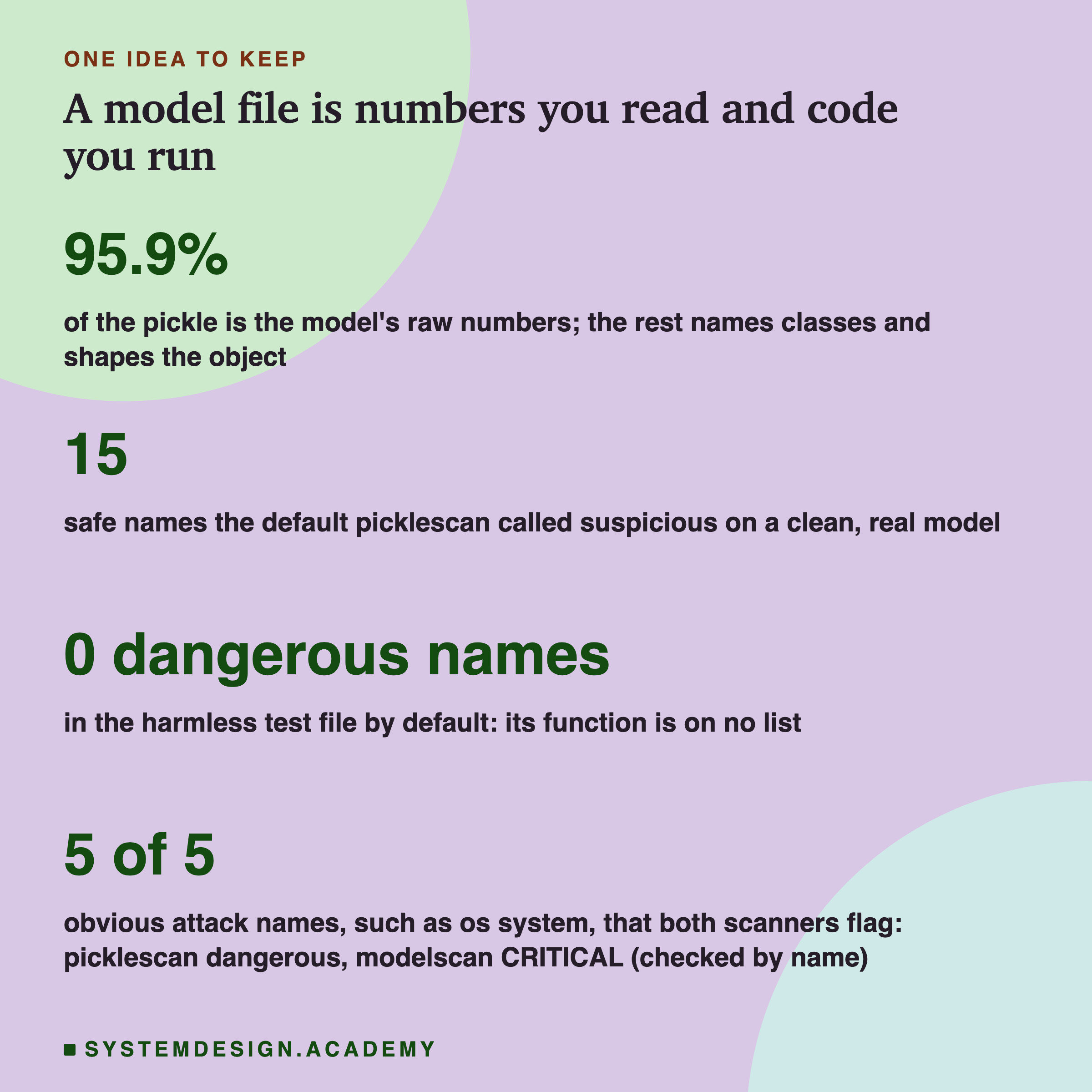
If you keep one picture from this lesson, make it this: a model file is two things at once. It is a big block of numbers, 95.9 percent of this file, which is just data and loads exactly. And it is a short list of names and calls, the other few percent, which run when you load it.
That second part is why a model file is not like a photo. Opening it is an action. A scanner can read those names for you, but it works from a list. In this lab, picklescan called 15 safe names suspicious and found 0 dangerous names in my harmless test file, whose function is on no list. The obvious attack names are on both lists, checked by name.
So the first question about any model file is not "did the scanner pass it", it is "do I trust where this came from". Save your own models however you like; the load is faithful. Treat a stranger's model file the way you would treat a stranger's code, because loading it is exactly that.
Knowledge Check
Knowledge Check
4 questions - Score 80% to pass
Measured on the saved model, what was most of the pickle file made of?
Why does loading a pickle count as running code, not just reading data?
On their default settings, what did the two scanners report on the real model and on the harmless file?
What is the fair lesson to draw about using a scanner before loading a model file?