The Handoff That Breaks Everything
A data scientist finishes a fraud model on a Friday. She sends the platform team a single file, model.pkl, and a message: "It's ready, just load it and serve it." On Monday the platform engineer loads that file on a server and it explodes with an error nobody understands. AttributeError. Something about a numpy version. The model that hit 96 percent accuracy on her laptop will not even open on the machine that is supposed to run it.
You have heard "works on my machine" from backend engineers. For machine learning it is worse, and it is worse for a specific reason. A normal web service is mostly code, and code is fairly forgiving about which exact library version runs it. A trained model is a frozen snapshot of numbers that was produced by an exact stack: this Python, this version of PyTorch, this numpy, this CUDA driver, on this operating system. Change any one of those and the model can refuse to load, or load and quietly return wrong answers, which is the more dangerous outcome because nothing throws an error.
Packaging is the discipline of making the model run the same way on every machine, forever, by shipping the machine along with the model.
This is the first real piece of the car we started building in Topic 1. Before you can serve a model, scale it, or monitor it, you have to be able to move it off the laptop without it falling apart. That is what this lesson is about. We will start from why the default handoff fails, build up to the container image and how it is layered, and finish with the tooling and pipeline that real teams use to ship models the way they ship any other service.
Why a Pickle File Is Not a Deployable Model
The default handoff in machine learning is a pickle: joblib.dump(model, "model.pkl") or torch.save. It feels like saving the model. It is not enough, and the reasons are concrete rather than academic.
A pickle does not store the model in some neutral, self-contained format. It stores the live Python object graph, which means it stores references to the exact classes and library versions that existed when you saved it. When you load it back, Python reconstructs those objects by importing the same classes. If the class moved, was renamed, or changed shape between library versions, the reconstruction fails outright or, worse, succeeds against a subtly different implementation. That is the AttributeError from the opening story, and it is not a rare edge case. It happens every time a training environment and a serving environment fall even one minor version apart.
The file also captures nothing about the environment that produced it. It says nothing about which Python interpreter, which numpy, or which CUDA driver was in play. The person receiving it has to reconstruct that context by guessing, and guessing wrong is the entire failure mode. And there is a third problem that is easy to forget: unpickling executes arbitrary code by design, because reconstructing an object can run its __reduce__ method. Loading a .pkl you did not create can run anything on your server, which is why the Python documentation says plainly never to unpickle data from an untrusted source.
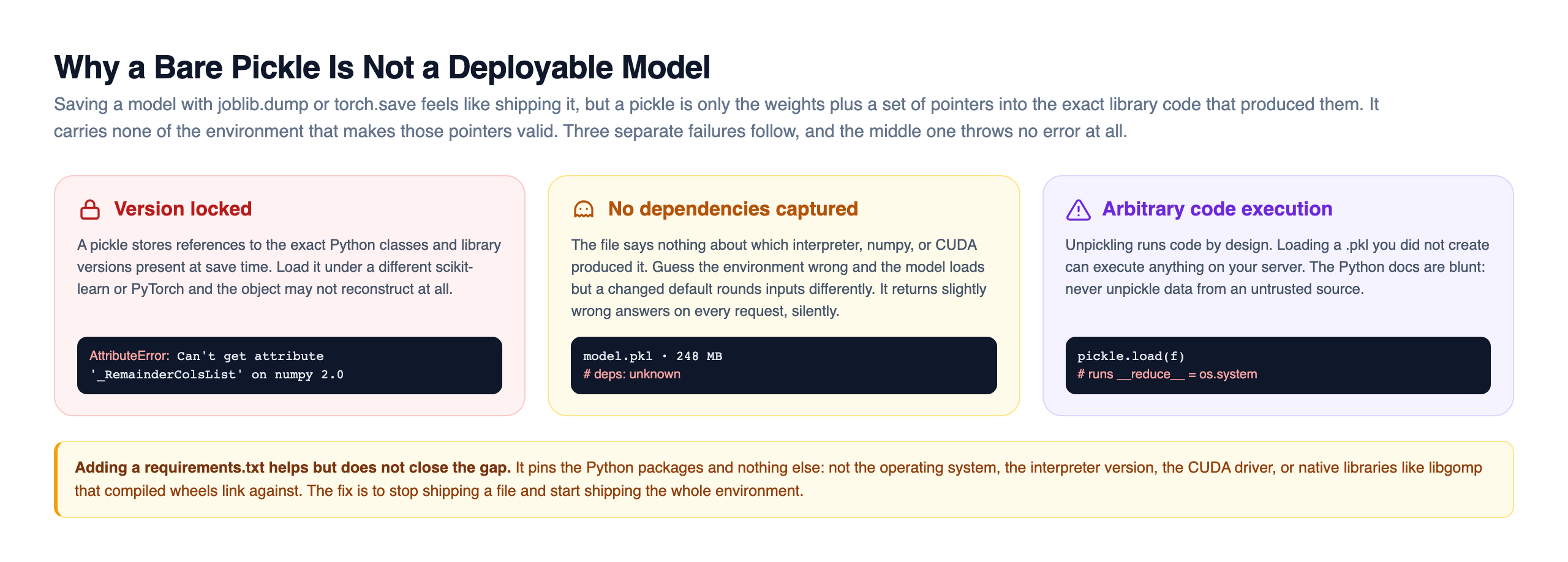
So people add a requirements.txt. That helps, but it only pins the Python packages. It does not pin the operating system, the Python interpreter version, the CUDA driver, or native libraries like libgomp that compiled wheels link against at runtime. The fix is to stop shipping a file and start shipping an environment. Everything else in this lesson follows from that single move.
What Packaging Actually Means: Model + Deps + Code, Sealed
Packaging a model correctly means putting three things into one sealed, immutable unit. The model artifact itself, the trained weights as model.pt, model.onnx, or model.pkl. The exact pinned dependencies, not torch but torch==2.3.1, not numpy but numpy==1.26.4, down to the patch version and read from a locked file. And the inference code, the code that loads the model, runs the same preprocessing used in training, calls predict, and returns a result over .
That third item trips up more teams than you would expect. If your preprocessing, the tokenizer, the scaler, the feature encoding, lives only in the training notebook and does not travel with the model, then the serving code will feed the model differently shaped inputs than training did. The model does not crash. It just returns worse answers, and you find out weeks later from a drop in a business metric. Shipping the preprocessing code inside the same unit as the weights is what prevents this quiet, expensive failure.
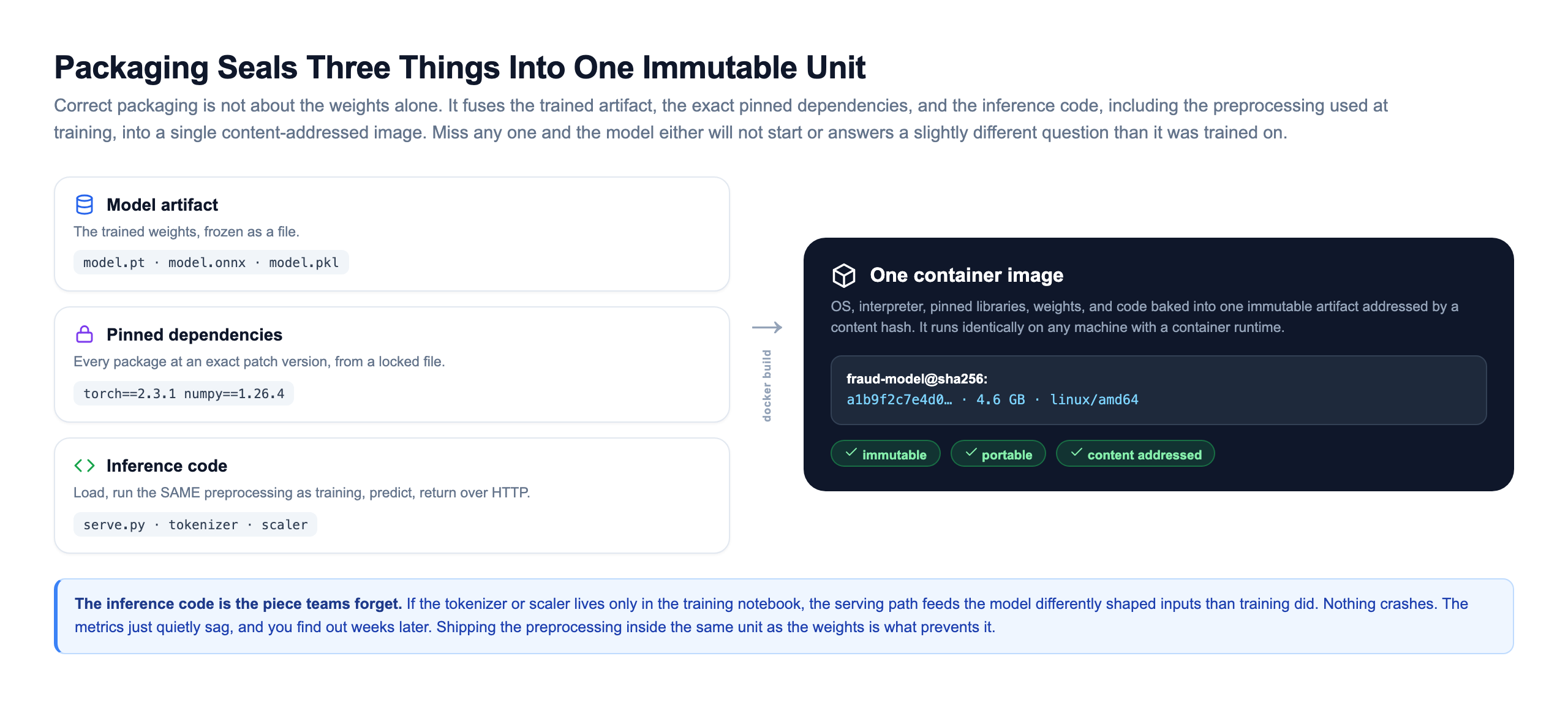
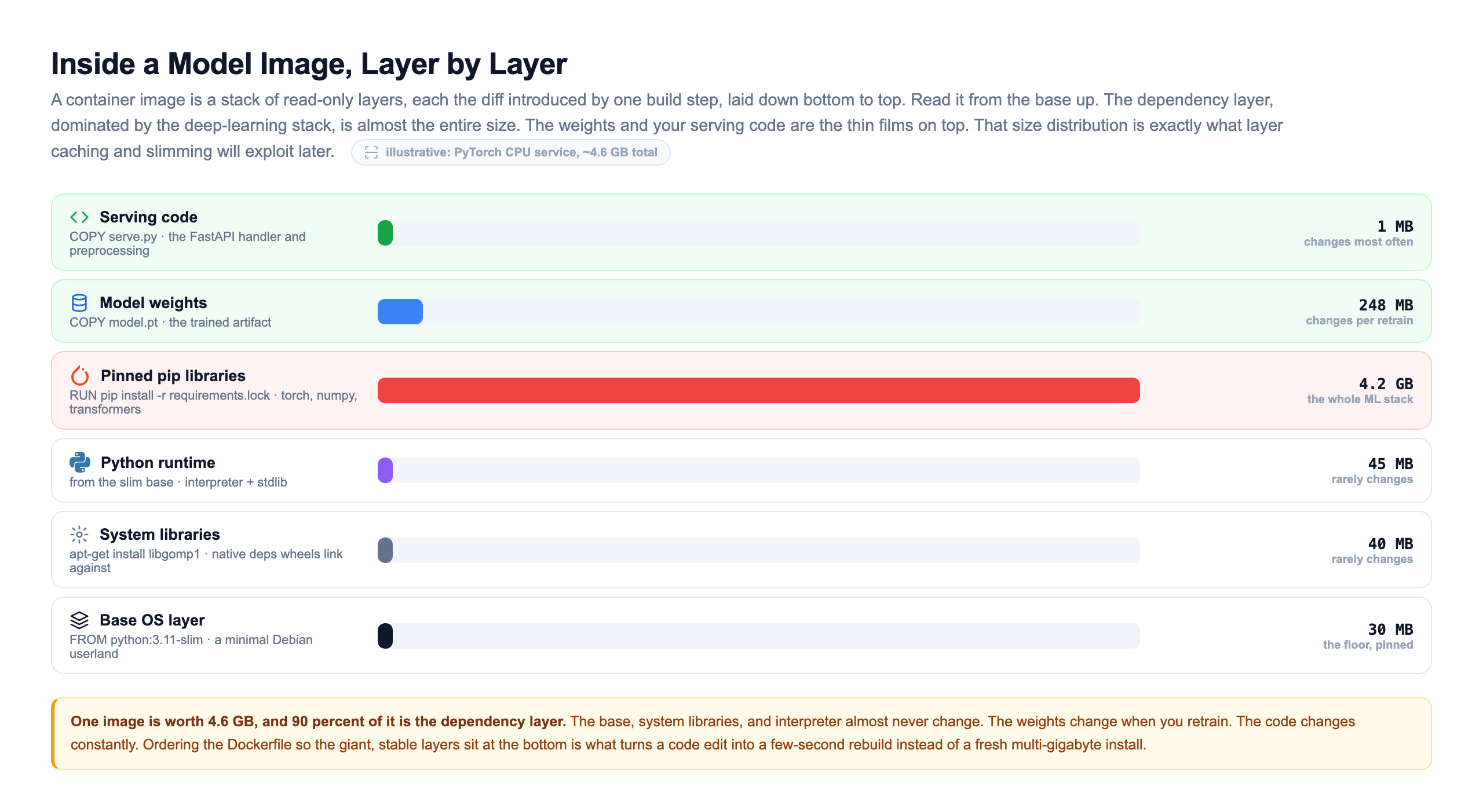
The technology that seals all three together is the container, and the standard is Docker. A container image bundles the OS, the interpreter, the pinned libraries, the weights, and the code into one immutable artifact addressed by a content hash. It is worth understanding what actually lives inside that image, because the internal structure is what makes the , slimming, and integrity tricks later in this lesson possible. An image is not a single opaque blob. It is a stack of read-only layers, each one the filesystem diff introduced by a single build step, laid down from the base up.
The Dockerfile: A Recipe For The Environment
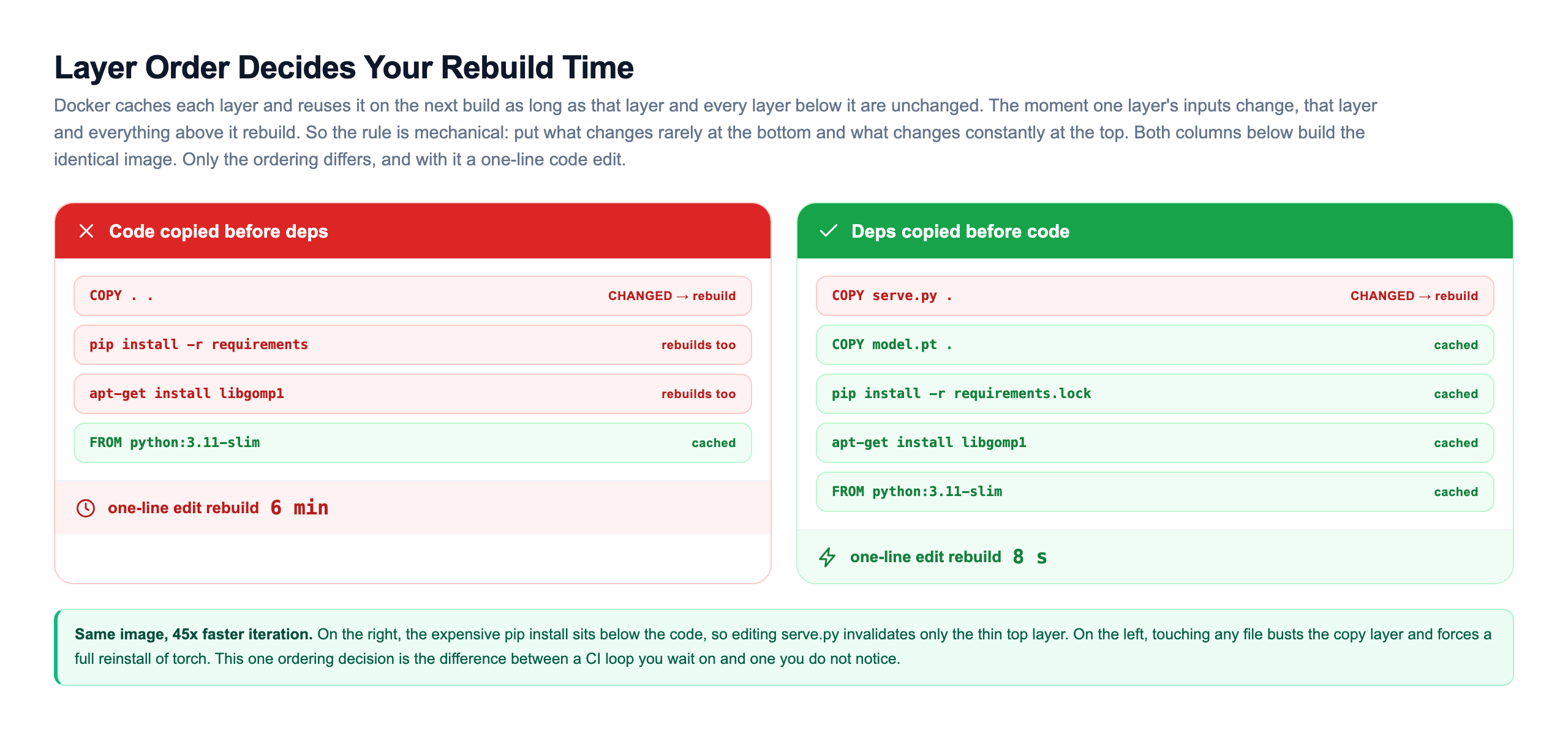
A Dockerfile is the recipe that builds the image. For a model service it is short and readable. The order of the lines matters far more than it looks, and the anatomy diagram above is why.
# Pin the base. Never python:latest, or the floor moves under you.
FROM python:3.11-slim

# System libraries some ML wheels link against at runtime.
RUN apt-get update && apt-get install -y --no-install-recommends \
    libgomp1 && rm -rf /var/lib/apt/lists/*

WORKDIR /app

# Install deps FIRST, from a fully pinned lockfile, and as its own layer.
# This layer is cached and reused on every build where deps did not change.
COPY requirements.lock .
RUN pip install --no-cache-dir -r requirements.lock

# Copy the model weights and the serving code LAST, because they
# change most often. Only these thin top layers rebuild on a code edit.
COPY model.pt .
COPY serve.py .

EXPOSE 8000
# One process, listening on a port, answering prediction requests.
CMD ["uvicorn", "serve:app", "--host", "0.0.0.0", "--port", "8000"]
Two habits in that file are worth burning into memory. First, requirements.lock is fully pinned, torch==2.3.1 rather than torch>=2.3, because a range means two builds a month apart can install different versions and produce two different environments from the same file. Second, dependencies are installed before the model and code are copied. builds the image as a stack of cached layers, and it reuses a cached layer only if that layer and every layer beneath it are unchanged. The moment one layer's inputs change, that layer and everything above it must rebuild.
That single rule is the whole reason for the ordering. Put the expensive, rarely changing dependency install near the bottom and a one-line code edit rebuilds only the thin top layers in seconds. Get the order backwards and every tiny edit reinstalls torch from scratch.
Train/Serve Parity Comes From The Lockfile
Here is the payoff that makes all this pinning worth the trouble. In Topic 1 we said the thing that makes MLOps hard is that the data moves on its own. There is a second, quieter source of wrong predictions that has nothing to do with drift: the training environment and the serving environment silently disagree.
Suppose you trained with numpy 1.26 and served with numpy 2.0. A default changed between those versions, so a preprocessing step rounds slightly differently. The model still loads. It still returns numbers. Those numbers are just a little wrong, on every single request, forever, and no alarm fires. This is called train/serve skew, and pinned dependencies are the cure. The workflow that guarantees parity is mechanical: after training, freeze the exact environment with pip freeze into a lockfile and record a content hash of the weights, then build the serving image from that same lockfile and verify the hash. Now the serving container installs byte-identical libraries to the ones that trained the model.
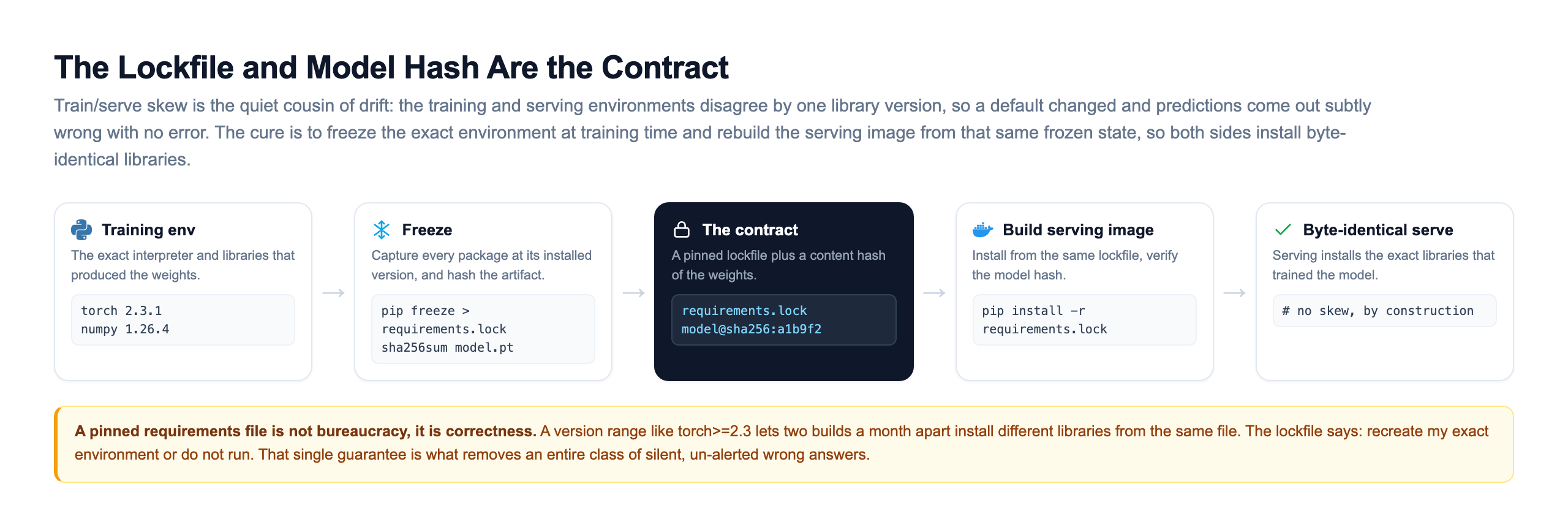
The lockfile is the contract between the person who trained the model and the machine that serves it. It says: recreate my exact environment, or do not run. You can turn that contract into a real gate with a few lines of code. The demo below pins the lockfile and the model hash at training time, then checks a serving build against them. When a dependency drifts, the mismatch is caught at build time instead of surfacing as silently wrong predictions weeks later.
A pinned requirements file is not bureaucracy, it is correctness. To see why the skew it prevents is so insidious, run the second demo. It uses a fixed set of weights and changes only a rounding default, exactly the kind of thing that shifts between two library versions. The same request scores differently in serving than it did in training, and nothing errors.
That is train/serve parity, and it is the reason a pinned requirements file is not overhead. It is the boundary that removes an entire class of silent, un-alerted wrong answers.
How You Freeze the Weights Changes the Blast Radius
Before the model even reaches a container, you make a choice that shapes everything downstream: what format to serialize the weights in. A native pickle keeps the whole Python object graph and all its fragility. An exchange format severs the tie to the training framework, and that single decision is what lets you drop several gigabytes of framework off the serving image.
The trade sits along three axes: how portable the artifact is, how safe it is to load, and how tightly it is locked to the framework that made it. A pickle or joblib file is portable only to an identical environment and executes code on load. TorchScript traces the model into a graph that any PyTorch runtime can run without the original Python class. ONNX goes furthest, producing a framework-neutral graph that runs on the small onnxruntime library with no code execution at all. TensorFlow's SavedModel plays the same role inside the TensorFlow ecosystem.
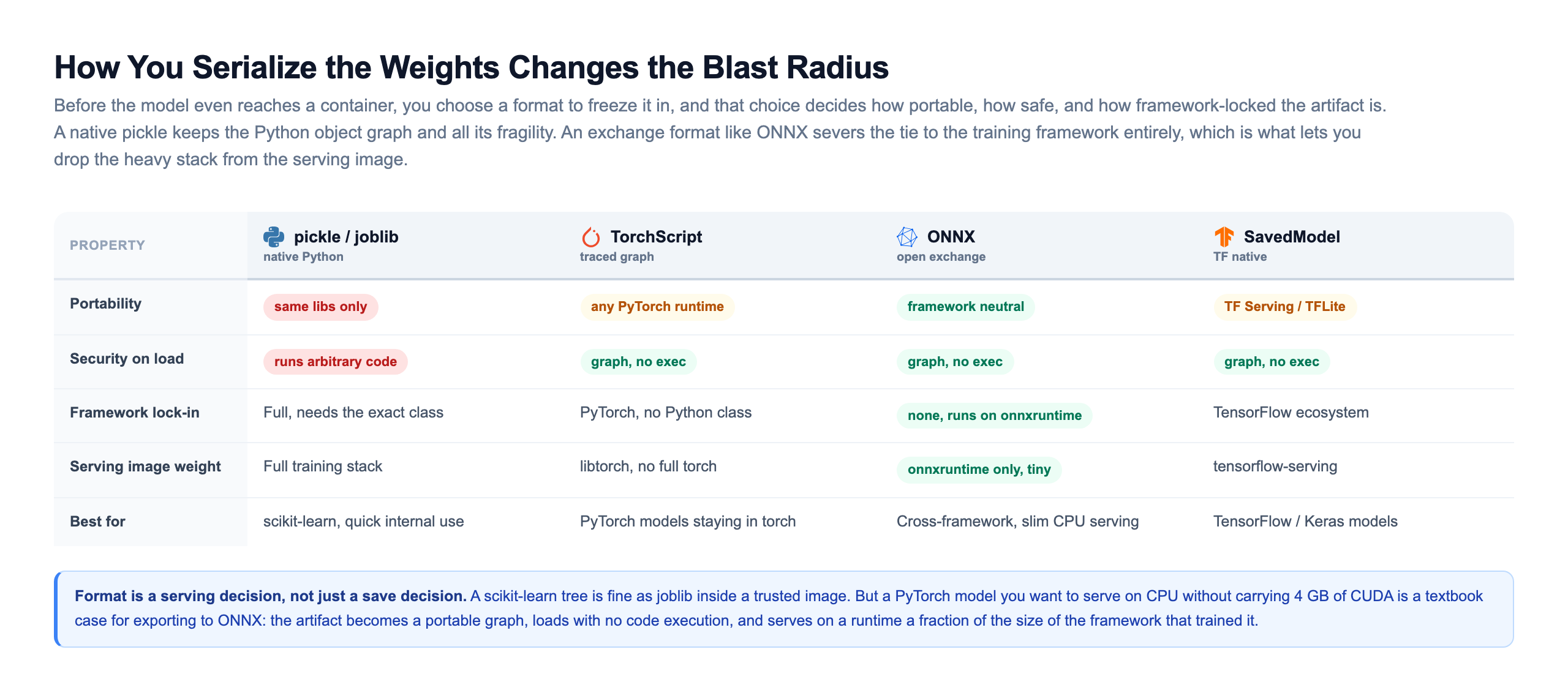
Format is a serving decision, not just a save decision. A scikit-learn tree is perfectly fine as joblib inside a trusted image where you control both ends. But a PyTorch model you want to serve on CPU without carrying 4 GB of CUDA is a textbook case for exporting to ONNX: the artifact becomes a portable graph, it loads with no arbitrary code execution, and it serves on a runtime a fraction of the size of the framework that trained it. The format you choose sets a ceiling on how small and how safe the final image can be.
Why ML Images Are Huge, And How To Slim Them
Open a naive deep learning image and it is often 5 to 10 GB. A plain backend image is 100 to 300 MB. The gap is almost entirely one thing: the GPU stack. CUDA plus cuDNN can be 2 to 4 GB, and a full PyTorch install adds a couple more. Size is not cosmetic. A fat image is slow to push, slow to pull onto a new node, and slow to autoscale, which directly hurts you during a traffic spike when new pods need to come up fast and each one is waiting on a multi-gigabyte pull.
There are four moves that shrink these images, and the important thing is that they stack. A slim base image drops build tools and documentation. Installing CPU-only torch removes the entire CUDA and cuDNN stack when you do not need a GPU at inference. A multi-stage build compiles everything in a fat builder stage and copies only the finished artifacts into a clean runtime stage, so the compilers and caches never ship. And exporting to ONNX lets you serve with onnxruntime and leave the training framework out entirely.
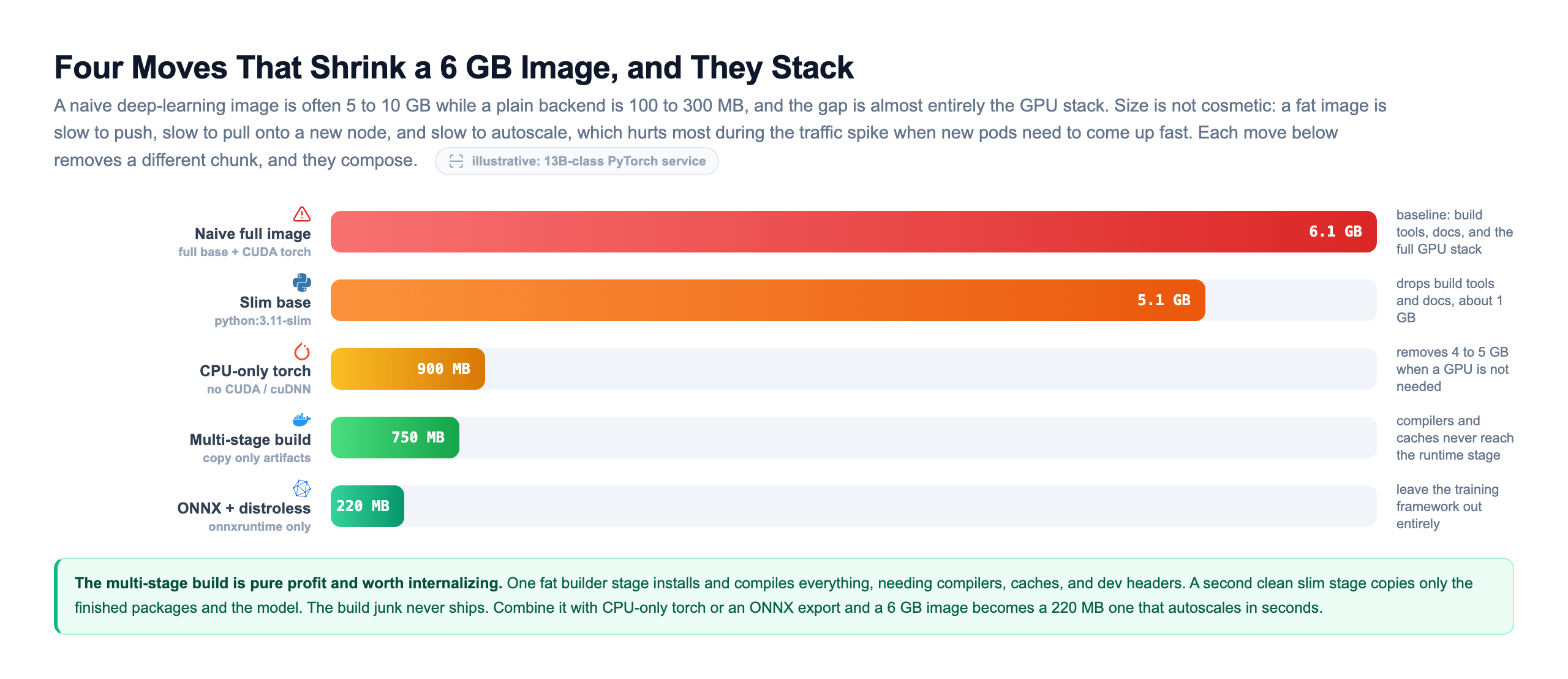
The multi-stage build is the one worth internalizing, because it is pure profit. You use one stage to install and compile everything, which needs compilers, caches, and dev headers, then you copy only the finished packages and the model into a second, clean slim stage. The compilers and build junk never reach the final image. Combine it with CPU-only torch or an ONNX export and a 6 GB image becomes a 220 MB one that pulls and autoscales in seconds. None of these moves touches the model's behavior. They only strip weight the serving path never needed.
How Real Teams Actually Build and Move Images
Understanding the Dockerfile is not the same as shipping models the way a platform team does. In a real organization nobody runs docker build on a laptop and pushes to production. A continuous integration pipeline builds the image from a pinned commit, scans it, and pushes it to a registry addressed by a content digest, so the exact bytes that were tested are the exact bytes that deploy. Every step is automated and gated, which is what makes the artifact trustworthy rather than merely functional.
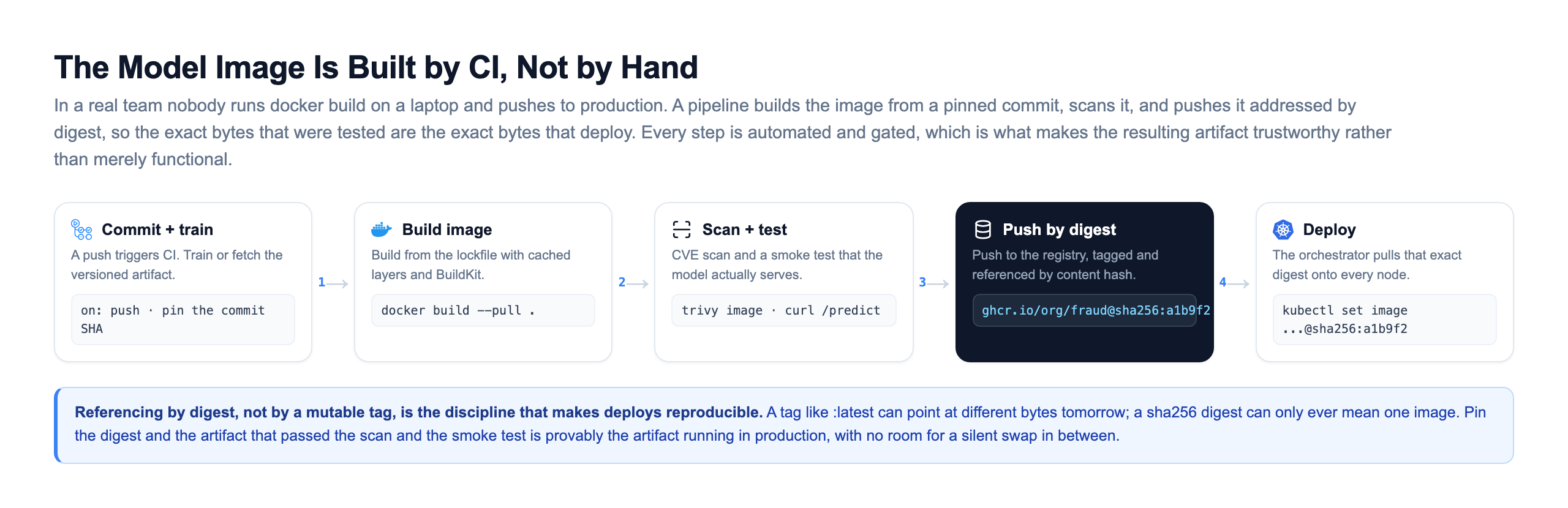
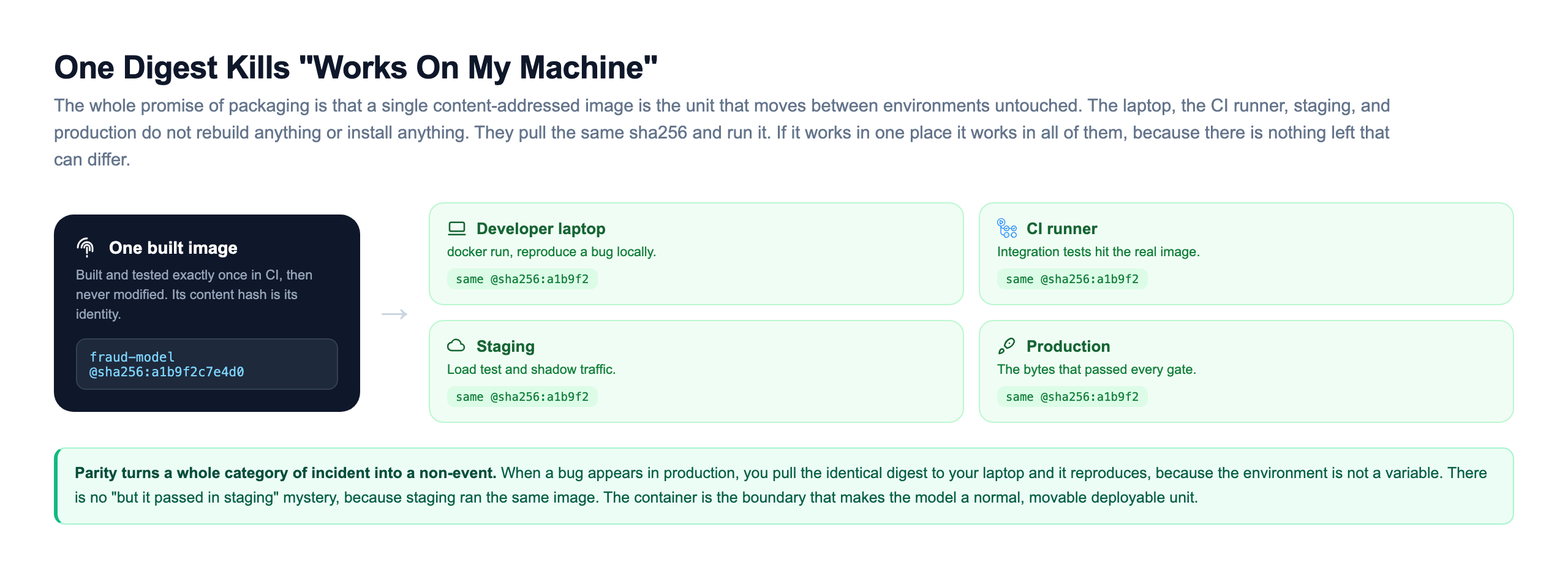
The crucial discipline is referencing the image by digest, not by a mutable tag. A tag like :latest can point at different bytes tomorrow, but a sha256 digest can only ever mean one exact image. Pin the digest and the artifact that passed the scan and the smoke test is provably the artifact running in production, with no room for a silent swap in between. A registry is the shared store that makes this decoupling possible: CI builds once and pushes, and every node that runs the model pulls the same digest and verifies it before running.
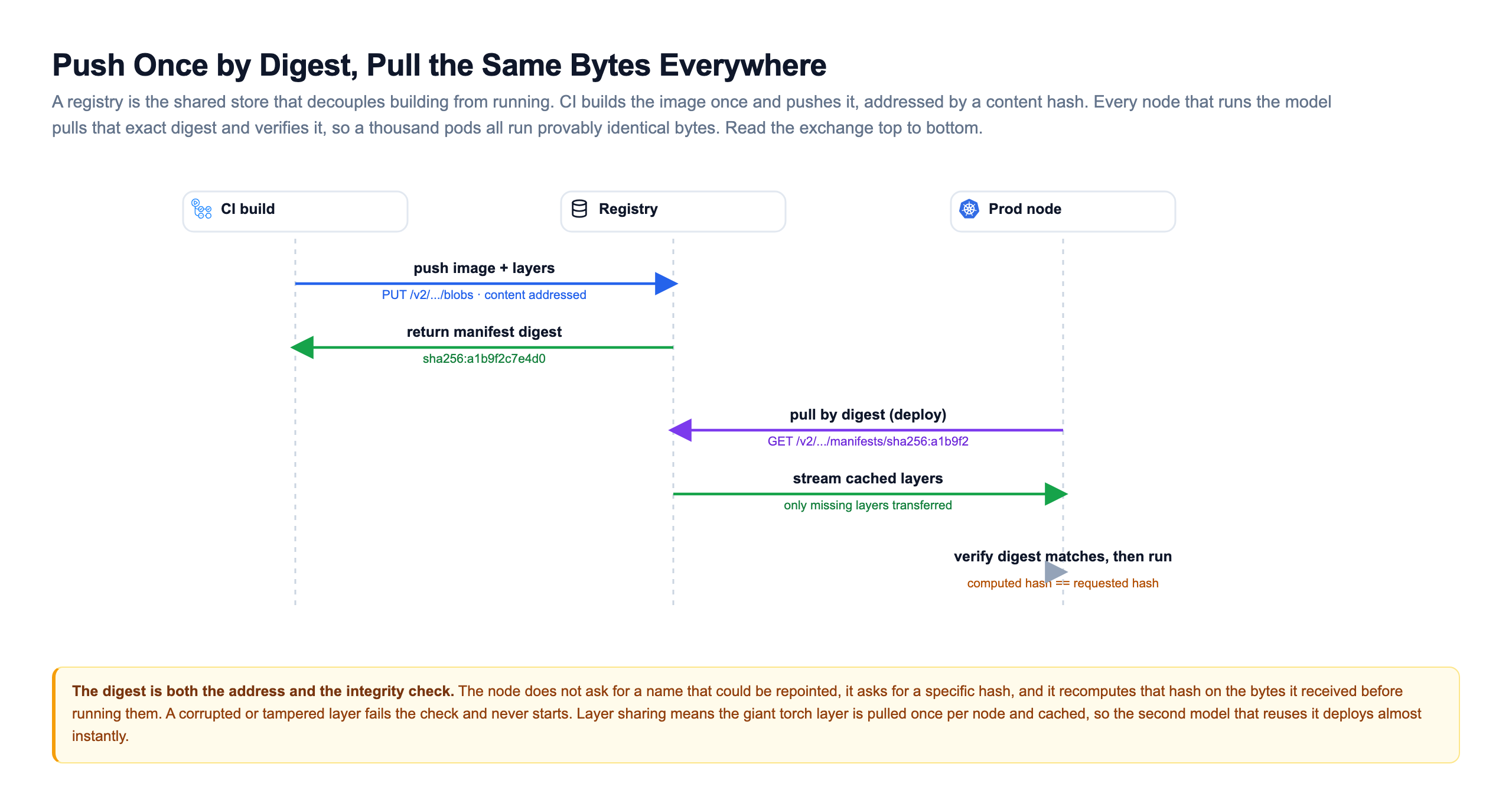
Notice that the digest is doing double duty. It is both the address the node asks for and the integrity check the node runs on the bytes it receives. A corrupted or tampered layer fails the recomputed hash and never starts. Layer sharing means the giant torch layer is pulled once per node and cached, so a second model that reuses the same base deploys almost instantly. And because the image is one content-addressed unit that moves untouched, the laptop, the CI runner, staging, and production all run identical bytes.
An Image Is An Operating System: Scan It
A model image is not just weights and Python. It is a full operating system plus a deep tree of packages, and any of them can carry a known vulnerability. Because the image is immutable and built in CI, this is actually a solvable problem: a scanner like Trivy or Grype can read the image's exact contents, compare every package against public CVE feeds, and fail the build when something crosses your severity threshold. The gate runs before the push, so a vulnerable image never reaches the registry in the first place.
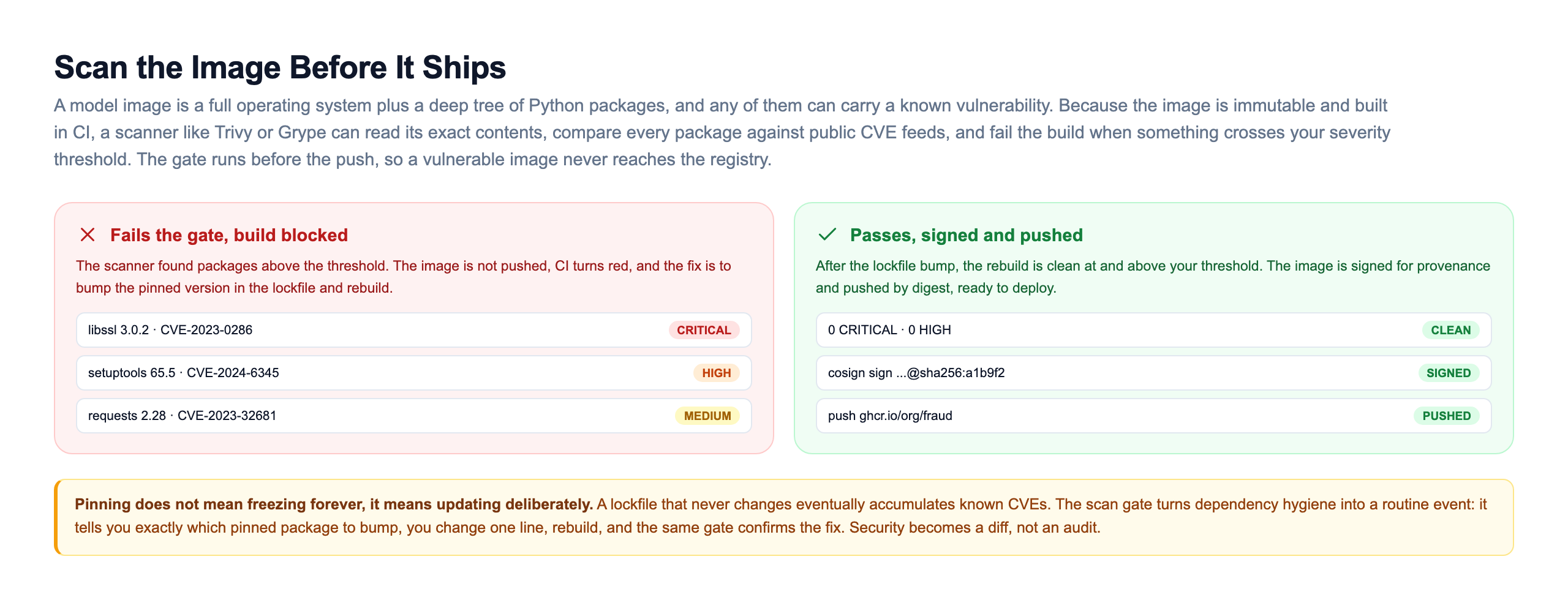
This reframes what pinning is for. Pinning does not mean freezing forever, it means updating deliberately. A lockfile that never changes will eventually accumulate known CVEs as the world discovers them. The scan gate turns dependency hygiene into a routine, low-drama event: it tells you exactly which pinned package to bump, you change one line, rebuild, and the same gate confirms the fix. Security becomes a diff you can review rather than an audit you dread. Combined with signing the image for provenance, the pipeline gives you a chain of custody from source commit to running container.
BentoML: Packaging Built For Models
Writing Dockerfiles by hand for every model is repetitive and easy to get subtly wrong, especially the layer ordering and dependency capture we just spent this lesson on. BentoML is an ML-native packaging tool that does this for you. The flow has four steps: save the model into a versioned store, define a Service that describes the API, run bentoml build to snapshot everything into a Bento, and let BentoML generate the image.
import bentoml
import numpy as np
from pydantic import BaseModel

# 1. After training, save the model into BentoML's versioned store.
#    BentoML records its version, framework, and input/output signature.
saved = bentoml.pytorch.save_model("fraud_model", trained_model)

class Transaction(BaseModel):
    amount: float
    features: list[float]

# 2. Define the Service: which model to load and what the API looks like.
@bentoml.service(
    resources={"cpu": "2"},
    traffic={"timeout": 10},
)
class FraudService:
    # BentoML loads this exact model version into the running container.
    model_ref = bentoml.models.get("fraud_model:latest")

    def __init__(self) -> None:
        self.model = bentoml.pytorch.load_model(self.model_ref)

    @bentoml.api
    def predict(self, txn: Transaction) -> dict:
        x = np.array([txn.features], dtype=np.float32)
        score = float(self.model(x).item())
        return {"fraud_score": score, "flagged": score > 0.8}
With that file written, two commands finish the job. bentoml build snapshots the model reference, the code, and the pinned dependencies into a Bento, a self-describing bundle. bentoml containerize fraud_service:latest reads that Bento and produces a standard OCI image, Dockerfile generated for you, with request batching, health checks, and OpenAPI docs already wired in.
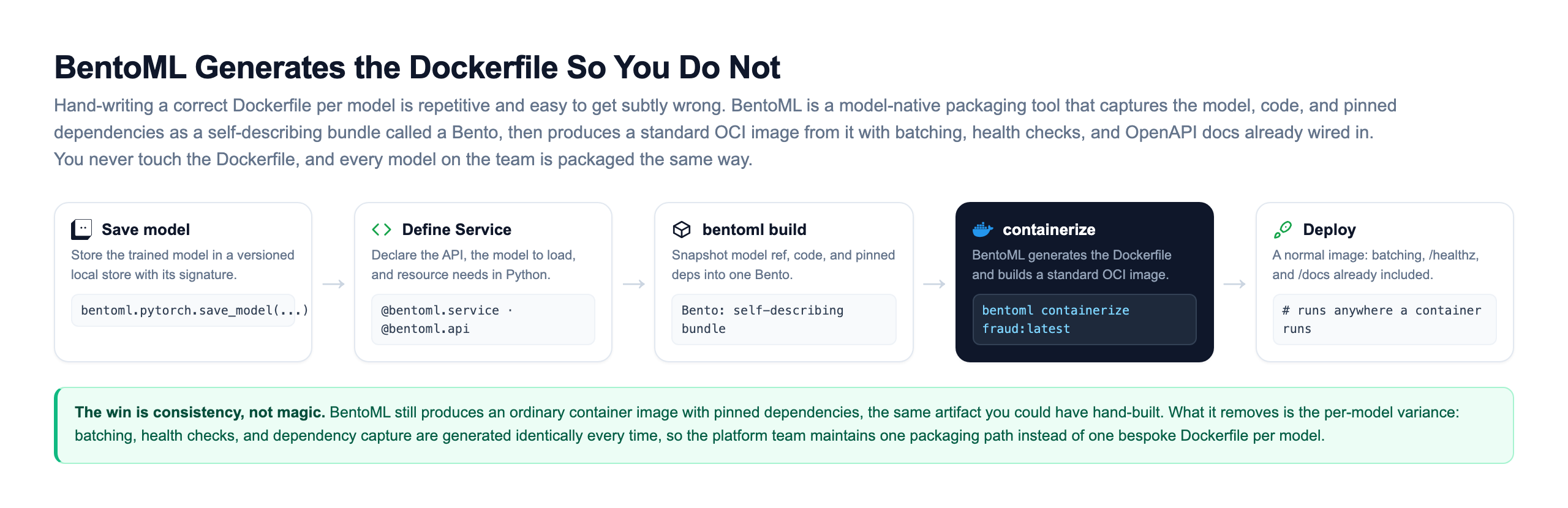
The win here is consistency, not magic. BentoML still produces an ordinary container image with pinned dependencies, the same artifact you could have hand-built. What it removes is the per-model variance. Batching, health checks, and dependency capture are generated identically every time, so the platform team maintains one packaging path instead of one bespoke Dockerfile per model, and every model on the team gets packaged the same predictable way.
When To Use Which: Match Packaging To The Model
These are not competing choices so much as increasing levels of rigor, and more rigor is not automatically better. Wrapping a 2 MB scikit-learn classifier in an 8 GB GPU image is waste on every axis: storage, pull time, cost, and startup . The right amount of packaging is a function of the model and the team, and you can usually decide it by walking a short set of questions from the top.
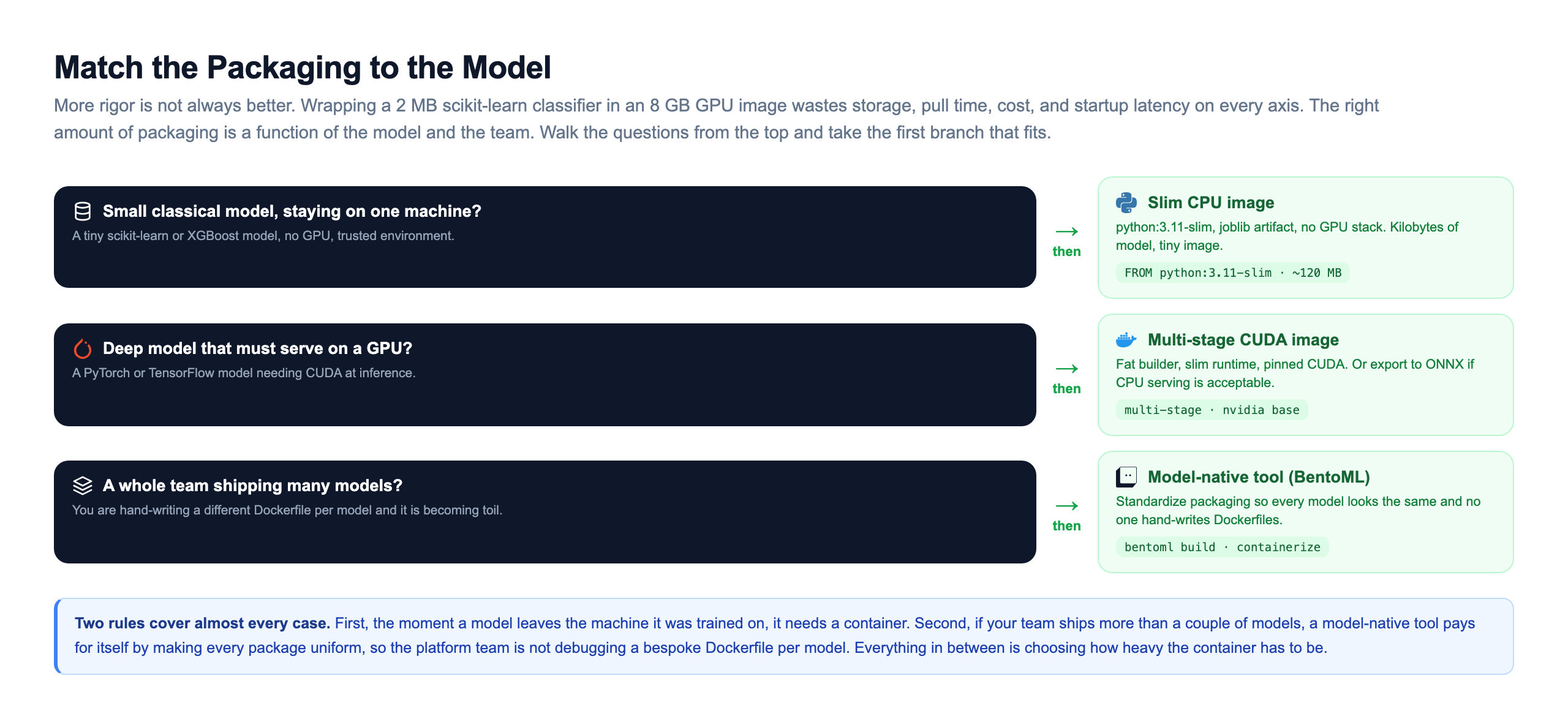
Two rules cover almost every case. First, the moment a model leaves the machine it was trained on, it needs a container. A bare pickle passed between two notebooks on the same machine is fine right up until it moves, shares, or ships, and then it is a liability. Second, if your team ships more than a couple of models, a model-native tool like BentoML pays for itself by making every package look the same, so the platform team is not debugging a different bespoke Dockerfile for every model. Everything in between those two rules is really a question of how heavy the container has to be, which the serialization format and the four slimming moves let you control.
How Real Teams Package Models
This is standard practice at every company running machine learning at scale, and the pattern is remarkably consistent.
Uber's Michelangelo standardized packaging so that hundreds of teams did not each invent their own way to containerize a model. A model trained on the platform came out the other side as a deployable, versioned artifact with its dependencies sealed in, ready to serve. Standardizing the package was a big part of what let so many teams ship without a platform engineer babysitting each one, which is exactly the per-model variance that a tool like BentoML removes for a smaller org.
Hugging Face distributes models with a config and tokenizer bundled alongside the weights precisely because weights alone are not runnable. The preprocessing, the tokenizer, has to travel with the model, or the same text turns into different token ids and the model sees inputs it was never trained on. That is the train/serve parity idea, shipped by default in the format itself.
DoorDash and Spotify both describe serving stacks where models are containerized and the exact dependency set is pinned per model, so a model that trained cleanly cannot fail at serve time because of a version mismatch. The container is the boundary that makes the model a normal deployable unit, indistinguishable from any other service to the infrastructure that runs it.
The through-line is the same everywhere. A model is not deployable until its environment is nailed down and sealed. Once you can put a model in a box that runs identically anywhere, addressed by a hash and verified on every pull, everything downstream in this track, serving it under load, scaling it, monitoring it, becomes possible. The box comes first.
Knowledge Check
Knowledge Check
4 questions - Score 80% to pass
Why is shipping a bare model.pkl file not enough to deploy a model?
In a Dockerfile for a model service, why do you install pinned dependencies BEFORE copying the model and inference code?
What is the main reason deep learning container images are often 5 to 10 GB, and one effective way to shrink them?
Why do teams deploy a model image by its sha256 digest rather than a mutable tag like :latest?