Database Partitioning
Dividing a large table into smaller, more manageable pieces while keeping them in the same database. Sharding is partitioning across servers.
What is Database Partitioning?
In short
Database partitioning is the practice of splitting one large table into smaller pieces called partitions so each piece is faster to query and easier to manage, while they all still live in the same database. When those pieces are spread across separate database servers instead, that specific form of partitioning is called sharding.
What partitioning actually means
A single table with 5 billion rows is slow and awkward. Every index is huge, a full scan reads everything, and routine work like deleting old data or rebuilding an index locks up the whole table. Partitioning solves this by cutting that one logical table into many physical pieces, each holding a subset of the rows. To your application it still looks like one table named orders, but underneath the database stores it as orders_2024_01, orders_2024_02, and so on.
The key idea is that you split rows along a column called the partition key. The database uses that key to decide which partition a row belongs to and, more importantly, which partitions a query needs to touch. A query for last week's orders only reads the recent partitions and skips the rest, an effect called partition pruning. That alone can turn a 30 second scan into a 200 millisecond one.
Partitioning is not the same as sharding, even though people use the words loosely. Partitioning keeps all the pieces inside one database instance on one machine. Sharding takes the same idea and puts each piece on a different server so you can scale write throughput and storage past what one machine can hold. Partitioning helps a single big database; sharding is how you escape a single big database.
How it works under the hood
There are three common strategies. Range partitioning groups rows by a continuous value, most often a date: January in one partition, February in the next. It is great for time-series data and makes dropping old data instant, because you just drop the whole partition instead of running a slow DELETE over millions of rows. Hash partitioning runs the key through a hash function and uses the result to spread rows evenly across a fixed number of partitions, which avoids hotspots when there is no natural range. List partitioning assigns specific values to specific partitions, for example one partition per country code or region.
Each partition is a real storage object with its own data files and its own indexes. A global query that does not filter on the partition key has to check every partition, which can be slower than a plain table, so the partition key has to match how you actually query. In Postgres you declare this with PARTITION BY RANGE on a parent table; in MySQL with PARTITION BY HASH; the planner then routes reads and writes automatically.
The choice of partition key is the decision that makes or breaks the design. Pick a key that your hot queries filter on so pruning kicks in. Avoid a key with skew, where one partition gets most of the rows or traffic, because that partition becomes a bottleneck and the others sit idle. Repartitioning later is expensive since it means rewriting and moving data, so the key is hard to change once the table is large.
When to use it and the trade-offs
Reach for partitioning when a single table grows past tens or hundreds of millions of rows, when most queries filter on one obvious column like a timestamp or tenant id, or when you need to expire old data cheaply by dropping whole partitions. Time-series tables, event logs, and per-customer data are the classic fits.
The cost is complexity and constraints. Unique constraints and primary keys usually have to include the partition key, which can force schema changes. Queries that ignore the partition key get slower, not faster, because they fan out to every partition. Cross-partition joins and aggregations cost more, and the number of partitions has a practical ceiling, since thousands of tiny partitions create their own planning overhead.
Do not partition prematurely. A table with a few million rows and a good index will outperform a badly partitioned one. Partitioning trades simplicity for scale, so it pays off only once the table is genuinely large or once data lifecycle management on one giant table has become painful.
A concrete example
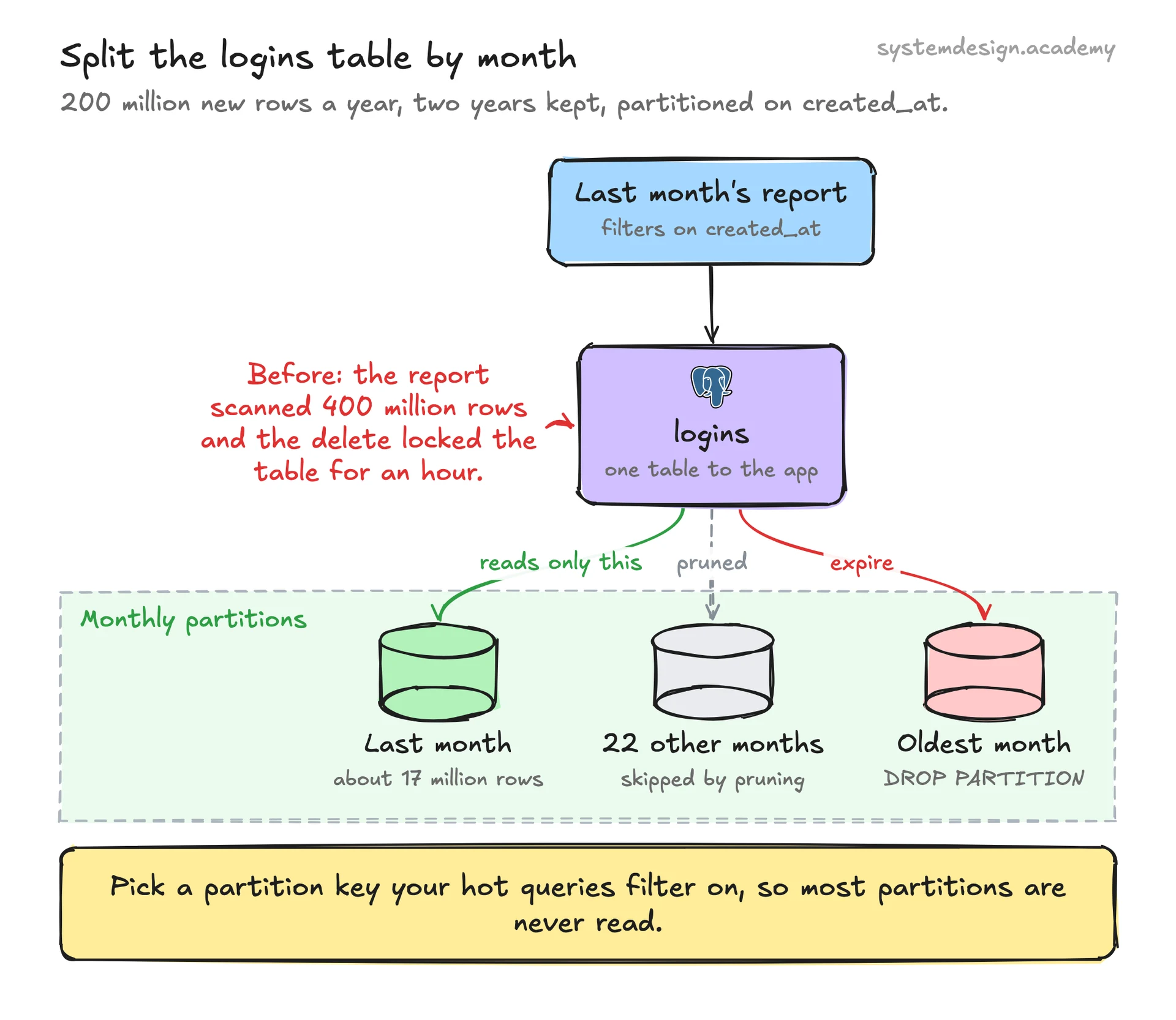
Picture a SaaS app storing a logins table that grows by 200 million rows a year, and the team keeps two years of history. As one table, the monthly report query scans 400 million rows and an analytics dashboard times out. Deleting the oldest month means a DELETE that locks the table for an hour.
Range partition the table by month on the created_at column. Now the report for last month reads exactly one partition of about 17 million rows, so it runs in well under a second through pruning. Expiring data is a single DROP PARTITION that finishes instantly with no row-by-row delete and no lock storm. New months are added by creating the next partition ahead of time.
If that company keeps growing until one server cannot hold the data or absorb the write rate, the next step is sharding: take the same partitioning logic and place each tenant's partitions on a different physical database, routed by tenant id. The mental model is identical, the difference is that the pieces now live on separate machines.
Where it is used in production
PostgreSQL
Native declarative partitioning with PARTITION BY RANGE, LIST, and HASH; the planner prunes partitions automatically based on the query filter.
MySQL
Supports RANGE, HASH, LIST, and KEY partitioning on InnoDB tables, commonly used to age out time-series data by dropping old partitions.
TimescaleDB
Builds on Postgres partitioning with hypertables that auto-create time-based chunks, so huge metrics tables stay fast without manual partition management.
Amazon DynamoDB
Transparently partitions every table by a hash of the partition key across storage nodes, which is why choosing a high-cardinality key matters to avoid hot partitions.
Frequently asked questions
- What is the difference between partitioning and sharding?
- Partitioning splits one table into smaller pieces that all live in the same database on one server. Sharding spreads those pieces across multiple separate database servers. Sharding is partitioning taken across machines, and you use it when one server can no longer hold the data or handle the write load.
- What is a partition key and why does it matter so much?
- The partition key is the column the database uses to decide which partition a row goes into. It matters because the query planner can only skip partitions when your query filters on that key. Pick a key your hot queries actually use, or partitioning will make those queries slower instead of faster.
- What are the main types of partitioning?
- Range partitioning groups rows by a continuous value like a date. Hash partitioning spreads rows evenly using a hash of the key to avoid hotspots. List partitioning assigns specific values, such as a country code, to specific partitions. Range is the most common because it makes expiring old time-series data trivial.
- Does partitioning always make queries faster?
- No. It speeds up queries that filter on the partition key, because the database reads only the relevant partitions and skips the rest. Queries that do not use the partition key have to check every partition and can be slower than they would be on a plain indexed table.
- When should I partition a table?
- When the table grows into the tens or hundreds of millions of rows, when most queries filter on one obvious column like a timestamp or tenant id, or when you need to drop large amounts of old data cheaply. Do not partition a small table; a good index will serve it better.
Learn Database Partitioning hands-on
This page explains the idea. The full lesson lets you step through the ring as servers join and leave, read the implementation, and check yourself with a quiz. It is one of 760+ lessons in the System Design Masterclass, from your first API call to distributed consensus. Eleven Foundation lessons are free, no signup. Lifetime access is ₹499 in India or $7.99 worldwide, one payment, no subscription.
See also
Related glossary terms you might want to look up next.
Sharding
Splitting a database into smaller pieces (shards) distributed across multiple servers. Each shard holds a subset of the data.
Replication
Keeping copies of the same data on multiple servers. Improves read performance and provides fault tolerance if one server goes down.
Index
A data structure that speeds up database lookups. Like the index at the back of a book that lets you jump to the right page instead of reading every page.
Read Replica
A copy of your database that handles read queries, reducing load on the primary database. Writes still go to the primary and replicate out.
Write-Ahead Log
A technique where changes are written to a log before being applied to the database. Ensures durability and crash recovery.
Consistent Hashing
A hashing technique where adding or removing servers only moves a small fraction of keys. Used by Amazon DynamoDB and Cassandra for data distribution.