HTTP/2
A major revision of HTTP that adds multiplexing (multiple requests over one connection), header compression, and server push. Much faster than HTTP/1.1 for modern web apps.
What is HTTP/2?
In short
HTTP/2 is the second major version of the HTTP protocol, finalized in 2015 as RFC 7540. It keeps the same methods, status codes, and semantics as HTTP/1.1 but changes how data moves on the wire: it sends requests and responses as binary frames, multiplexes many of them over a single TCP connection at once, compresses headers with HPACK, and lets the server push resources before the client asks. The result is far less latency for pages that load dozens of small files.
What HTTP/2 actually changes
HTTP/1.1 sends requests as plain text, one logical exchange per connection at a time. If a browser needs 80 files to render a page, it either waits for each one in turn or opens 6 parallel TCP connections per host and juggles them. Both are wasteful, and the in-order rule means one slow response blocks everything queued behind it. That blocking is called head-of-line blocking.
HTTP/2 keeps every familiar piece of HTTP intact. A GET is still a GET, a 404 is still a 404, cookies and caching headers work the same way. What changes is the transport layer underneath. Instead of text, HTTP/2 frames everything as binary, which is faster to parse and impossible to get ambiguous about where a message ends.
On top of those frames, HTTP/2 introduces streams. A single TCP connection carries many independent streams at once, each one a request and its response, identified by a stream ID. The browser can fire all 80 requests immediately over one connection and the server answers them as they finish, interleaved frame by frame.
How it works under the hood
Everything travels inside frames. Each frame has a 9-byte header giving its length, type, flags, and the stream it belongs to. Common types are HEADERS (carries the request or response metadata), DATA (carries the body), SETTINGS (connection-level config), and PUSH_PROMISE (server push). Because each frame is tagged with a stream ID, the receiver can pull pieces of many responses off one connection and reassemble each stream correctly.
Headers get compressed with HPACK. In HTTP/1.1 every request resent the same fat headers as plain text, often 500 to 800 bytes of cookies, user-agent, and accept lines on every single request. HPACK keeps a shared table of header fields on both ends, so after the first request a repeated header like the cookie can be sent as a one-byte index instead of hundreds of bytes. HPACK was also designed to resist the CRIME compression attack that broke earlier schemes.
Server push lets the server send a resource the client has not requested yet. When a browser asks for index.html, the server can push the CSS and JS it knows the page needs, saving a round trip. In practice push proved hard to use well because servers push things the browser already cached, so Chrome removed support for it in 2022 and most teams now use the cheaper preload hint instead.
Streams can carry priority weights and dependencies so the browser can tell the server that the CSS matters more than a footer image. Almost all HTTP/2 in the wild runs over TLS, since browsers only negotiate it over HTTPS using the ALPN extension during the handshake.
When to use it and the trade-offs
Turn HTTP/2 on for any public website or API served over HTTPS. It is supported by every modern browser, it is a drop-in upgrade at the server or CDN layer with no application code changes, and it almost always lowers page load time when a page pulls many small assets. Enabling it on Nginx or a CDN is usually a one-line config change.
The big catch is TCP-level head-of-line blocking. HTTP/2 removed blocking inside the protocol, but all those streams still ride one TCP connection. If a single TCP packet is lost, TCP stalls every stream until that packet is retransmitted, because TCP must deliver bytes in order. On a clean network this is invisible. On a lossy mobile connection it can make HTTP/2 slower than six separate HTTP/1.1 connections.
That weakness is exactly why HTTP/3 exists: it runs over QUIC on UDP, where each stream is independent so one lost packet only stalls its own stream. HTTP/2 also makes some old HTTP/1.1 tricks counterproductive. Domain sharding and concatenating files into giant bundles were workarounds for the connection limit, and under HTTP/2 they hurt by defeating multiplexing and caching.
A concrete example
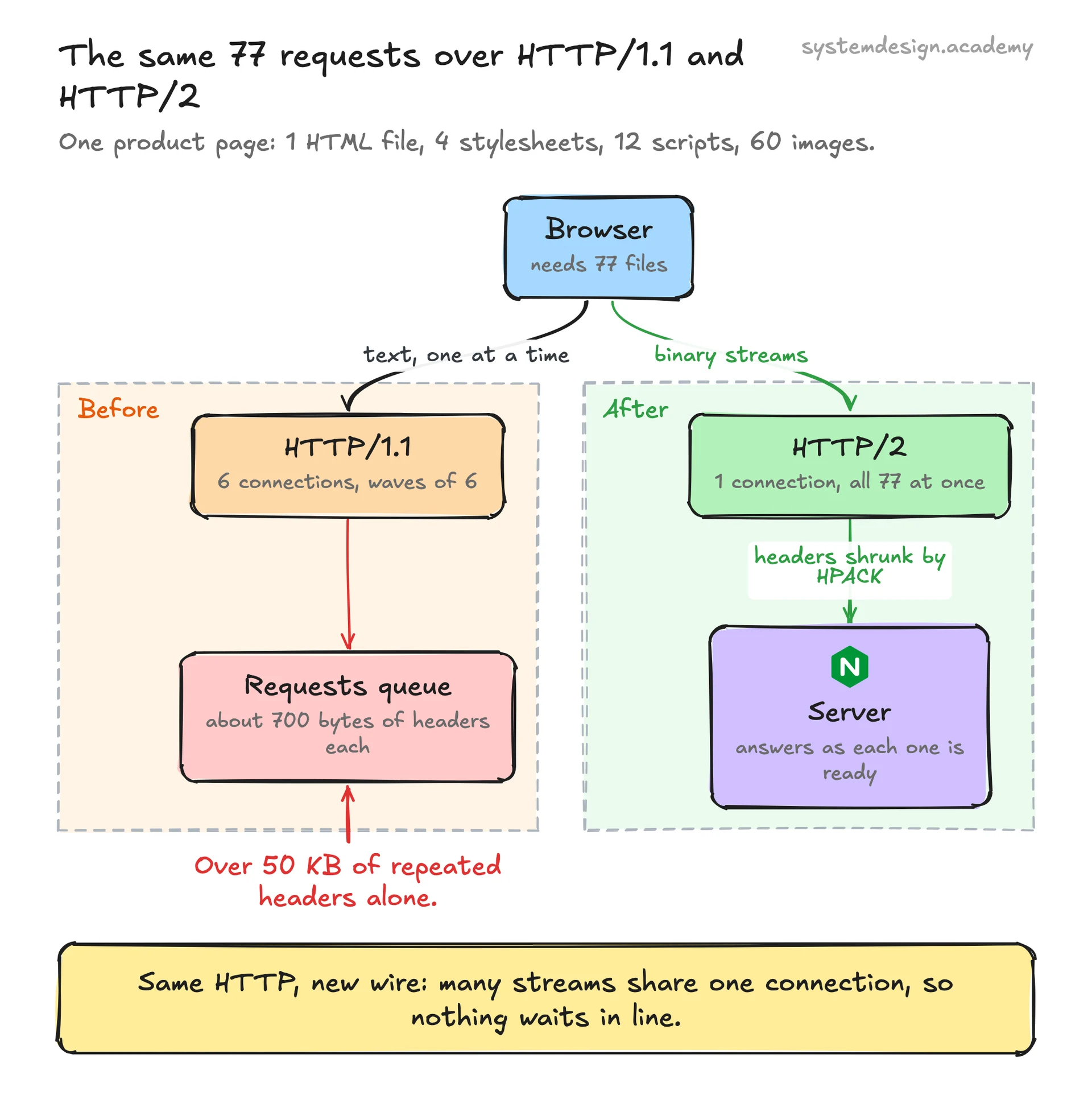
Picture a product page with one HTML file, 4 stylesheets, 12 scripts, and 60 images, 77 requests total. Over HTTP/1.1 the browser opens 6 connections per host and processes those 77 requests in waves of 6, and every request resends roughly 700 bytes of repeated headers. The page feels slow because requests queue behind each other and the header overhead alone is over 50 KB.
Over HTTP/2 the browser opens one connection, sends all 77 requests right away as interleaved streams, and HPACK shrinks the repeated headers to a handful of bytes each after the first request. The server streams responses back as they are ready, prioritizing the CSS the browser flagged as critical. On a typical broadband connection this commonly cuts page load time by 20 to 50 percent with no change to the website code itself.
Where it is used in production
Cloudflare
Serves HTTP/2 by default to every site behind its CDN and was an early driver of HPACK and HTTP/2 adoption across the web.
Nginx
Adds HTTP/2 with a single listen 443 ssl http2 directive, making it the most common way self-hosted sites turn it on.
Built SPDY, the experimental protocol that HTTP/2 was based on, and serves its products over HTTP/2 and HTTP/3.
gRPC
Runs entirely on HTTP/2, using its multiplexed binary streams to carry bidirectional streaming RPC calls between microservices.
Frequently asked questions
- Is HTTP/2 always faster than HTTP/1.1?
- Usually, but not always. On a clean, low-loss connection it wins easily thanks to multiplexing and header compression. On a lossy network, TCP head-of-line blocking can stall all of its streams when one packet is lost, and in that case it can be slower than several parallel HTTP/1.1 connections. That weakness is what HTTP/3 fixes by moving to QUIC over UDP.
- Do I need HTTPS to use HTTP/2?
- The spec allows HTTP/2 over plain TCP, but no major browser will use it without TLS. In practice you need HTTPS, because browsers only negotiate HTTP/2 through the ALPN extension during the TLS handshake. So for any real website, HTTP/2 means HTTP/2 over HTTPS.
- Should I still bundle and concatenate my JavaScript files?
- Less aggressively than under HTTP/1.1. Because HTTP/2 multiplexes many requests over one connection cheaply, the old reason to merge everything into one giant bundle is mostly gone, and small files cache and update independently. Some bundling still helps for compression and dependency order, but extreme concatenation and domain sharding now hurt by defeating multiplexing and caching.
- What happened to HTTP/2 server push?
- It looked promising but proved hard to use well, because servers often pushed resources the browser already had cached, wasting bandwidth. Chrome removed support for it in 2022 and most teams switched to the rel=preload resource hint, which tells the browser to fetch a critical file early without the server guessing. Server push is effectively deprecated.
- Is HTTP/2 the same as SPDY?
- No, but they are closely related. SPDY was Google's experimental protocol that introduced multiplexing and header compression. HTTP/2 was standardized from SPDY by the IETF in 2015 as RFC 7540, refined the design including replacing SPDY's compression with the attack-resistant HPACK, and SPDY was then retired.
Learn HTTP/2 hands-on
This page explains the idea. The full lesson lets you step through the ring as servers join and leave, read the implementation, and check yourself with a quiz. It is one of 760+ lessons in the System Design Masterclass, from your first API call to distributed consensus. Eleven Foundation lessons are free, no signup. Lifetime access is ₹499 in India or $7.99 worldwide, one payment, no subscription.
Related lessons
Lessons that touch on HTTP/2 as part of a larger topic.
HTTP/2 Multiplexing
Multiple requests over one connection, how HTTP/2 eliminated head-of-line blocking at the application layer
intermediate · api design protocols
gRPC
Google's high-performance RPC framework, binary protocols, HTTP/2 streaming, and auto-generated clients
intermediate · api design protocols
See also
Related glossary terms you might want to look up next.
HTTP
The protocol powering the web. A request-response model where clients ask for resources and servers respond. Stateless by design.
gRPC
A high-performance RPC framework by Google using Protocol Buffers and HTTP/2. Much faster than REST for service-to-service communication.
TCP
A reliable transport protocol that guarantees data arrives in order and without errors. It uses a three-way handshake to establish connections.
WebSocket
A protocol for full-duplex communication over a single TCP connection. Unlike HTTP, the server can push data to the client without being asked.
SSE
Server-Sent Events: a one-way channel where the server pushes updates to the client over HTTP. Simpler than WebSockets when you only need server-to-client streaming.
Rate Limiting
Controlling how many requests a client can make in a given time window. Protects your API from abuse and ensures fair usage.