One Board, Two People Changing It
Let me start with a team and a planning board.
The team keeps its plan on one big board on the wall. Every time the plan changes, someone writes a new sheet, gives it the next number, and pins it on top. The sheet with the highest number is the plan today.

Now two people want to change the plan on the same morning. Both look at sheet 4. Both go back to their desks and write their change. One adds a new task. The other moves a deadline. Both walk back to the board to pin up sheet 5.
The board has one rule: a number can be pinned only once. So whoever gets there first pins sheet 5. The second person arrives and finds sheet 5 already there. What should they do?
They could pin their sheet over it. Then the first change is lost, and nobody notices. They could give up. Or they could read sheet 5, check whether it touches the same thing as their own change, and then write sheet 6 on top of it.
In this lesson, the board is a table in a lakehouse. Each numbered sheet is one version of the table. The rule "a number can be pinned only once" is the rule that keeps the table safe. I will show you, with real numbers, who wins when two writers change one table at once, and exactly what the loser sees.
Where This Lesson Starts
This is lesson 3 of the data engineering chapter. In lesson 1, lakehouse architecture, I showed that a Delta Lake table keeps a small log next to its data files. A change becomes real in one step, when the writer adds one new log file, and that step is called a commit. Lesson 1 also showed the rule behind it: a writer may create log file number N only if nobody has created it yet, which is called put-if-absent. I will not explain those again here.
Lesson 1 had one writer and one reader. Lesson 2, open table formats, opened up the metadata of Delta Lake, Apache Iceberg and Apache Hudi, including partitions and compaction. This lesson adds a second writer. It asks one question, and measures it. Two writers update the same table at once: who wins, and what does the loser see?
The A in , atomic, was lesson 1's subject. This lesson is mostly about the I, isolation: what one change is allowed to see of another. The ACID properties lesson explains all four letters for a normal database. Later in this lesson I compare a lakehouse table with a real database, Postgres, on the same rows.
Before any test, there are two ways to let several people change one thing. What are they?
Two Ways to Share: Wait Your Turn, or Check at the End
The first way is to wait. Before you change something, you put your name on it. Anyone else who wants to change it must wait until you take your name off. A name on a thing like that is called a lock, a mark that says "busy, wait".
Most databases lock rows. While one transaction changes a row, a second transaction that wants the same row waits. It is safe, but someone has to keep track of every lock, and a waiting writer does nothing useful while it waits.
The second way is not to wait at all. Everyone reads the current version and does their work. Only at the very end, just before the change becomes real, does each writer check. It asks: "did anything change while I was working, and does it clash with what I did?" If nothing clashes, the change goes in. If something clashes, the writer gives up and tries again. That way of working is called optimistic concurrency control, which means work first, check for clashes at the end.
The name comes from the attitude. A lock assumes clashes are likely, so it prevents them. Optimistic control assumes clashes are rare, so it only detects them.
On the planning board, a lock would be a sign that says "Asha is editing, come back later". The optimistic way is what the team did: both wrote their sheets, and the pin rule caught the clash at the end. Which of the two ways does Delta Lake use?
How a Delta Writer Changes a Table
Delta Lake uses the second way. Its documentation says: "Delta Lake uses optimistic concurrency control to provide transactional guarantees between writes." It describes three stages: read, write, and "Validate and commit".
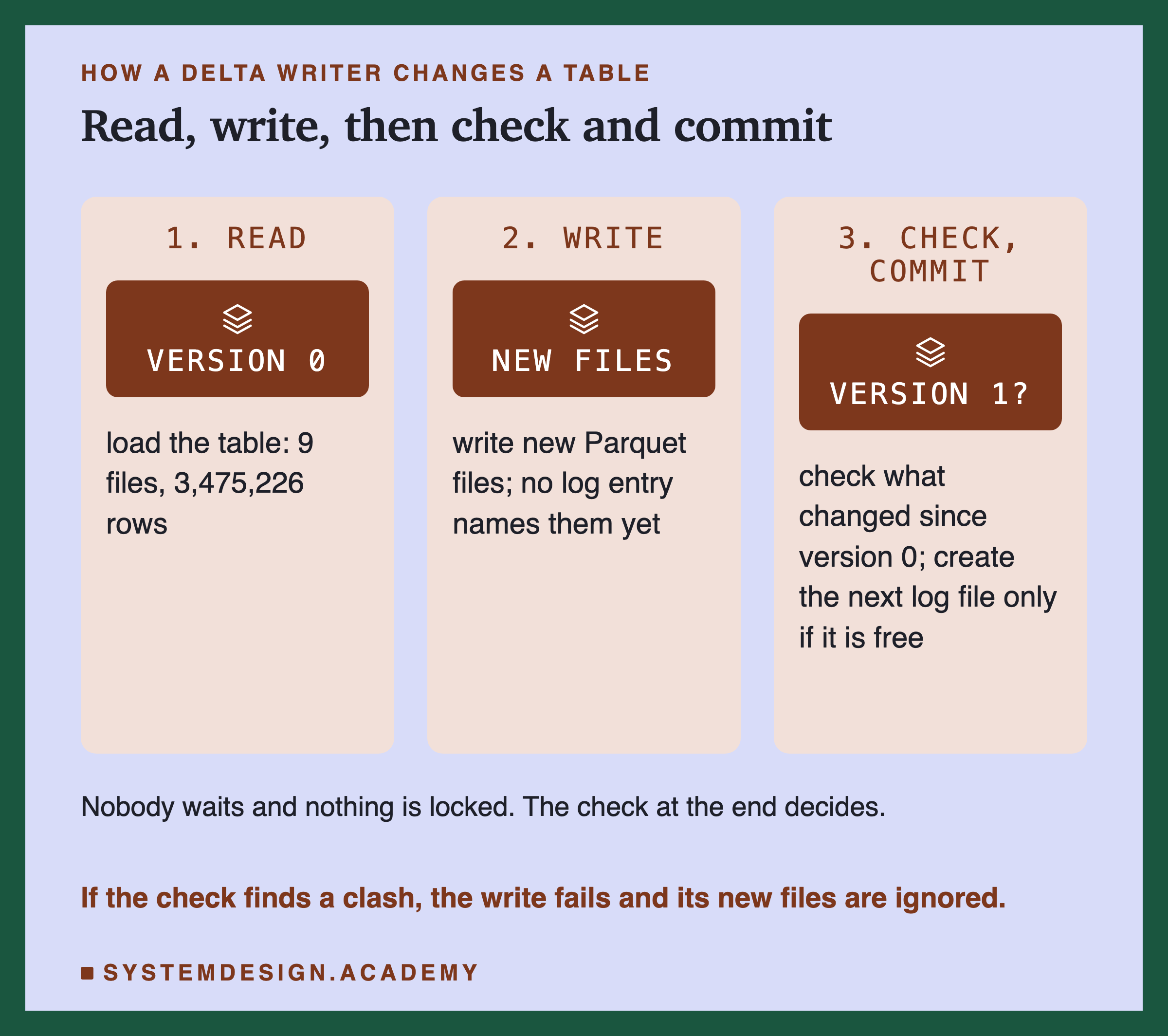
First, the writer reads the newest version of the table, version 0 in my lab. It now knows which data files make up the table. Second, it writes its new data files. Nobody can see them yet, because no log entry names them. Third, it checks whether any other writer committed a new version while it was working, and whether that version clashes with its own change. If there is no clash, it creates the next log file.
When a check finds that two changes cannot both be true, that is called a conflict, two changes that the table cannot accept together. The documentation says what happens then. In its words, "if there are conflicts, the write operation fails with a concurrent modification exception rather than corrupting the table as would happen with the write operation on a Parquet table."
The planning board maps onto these steps. Looking at sheet 4 is the read. Writing at your desk is the write. Walking to the board and checking the number is the check and commit. So how did I put two writers at the same table at the same moment?
The Test: Real Writers, Real Processes
I used the same real data as lesson 1: New York City yellow taxi trips from the city's Taxi and Limousine Commission. The table is January 2025, 3,475,226 trips. New rows come from February 2025, one day at a time: the 1st has 148,649 trips, the 2nd has 123,646, and the 14th has 158,575.
I added one column of my own, trip_id, the row's position in the January file. The taxi data has no id of its own, and without one I could not check afterwards whether any trip had been stored twice or changed twice. I wrote the table once with deltalake, the Python package of the delta-rs project. It came out as 9 data files.
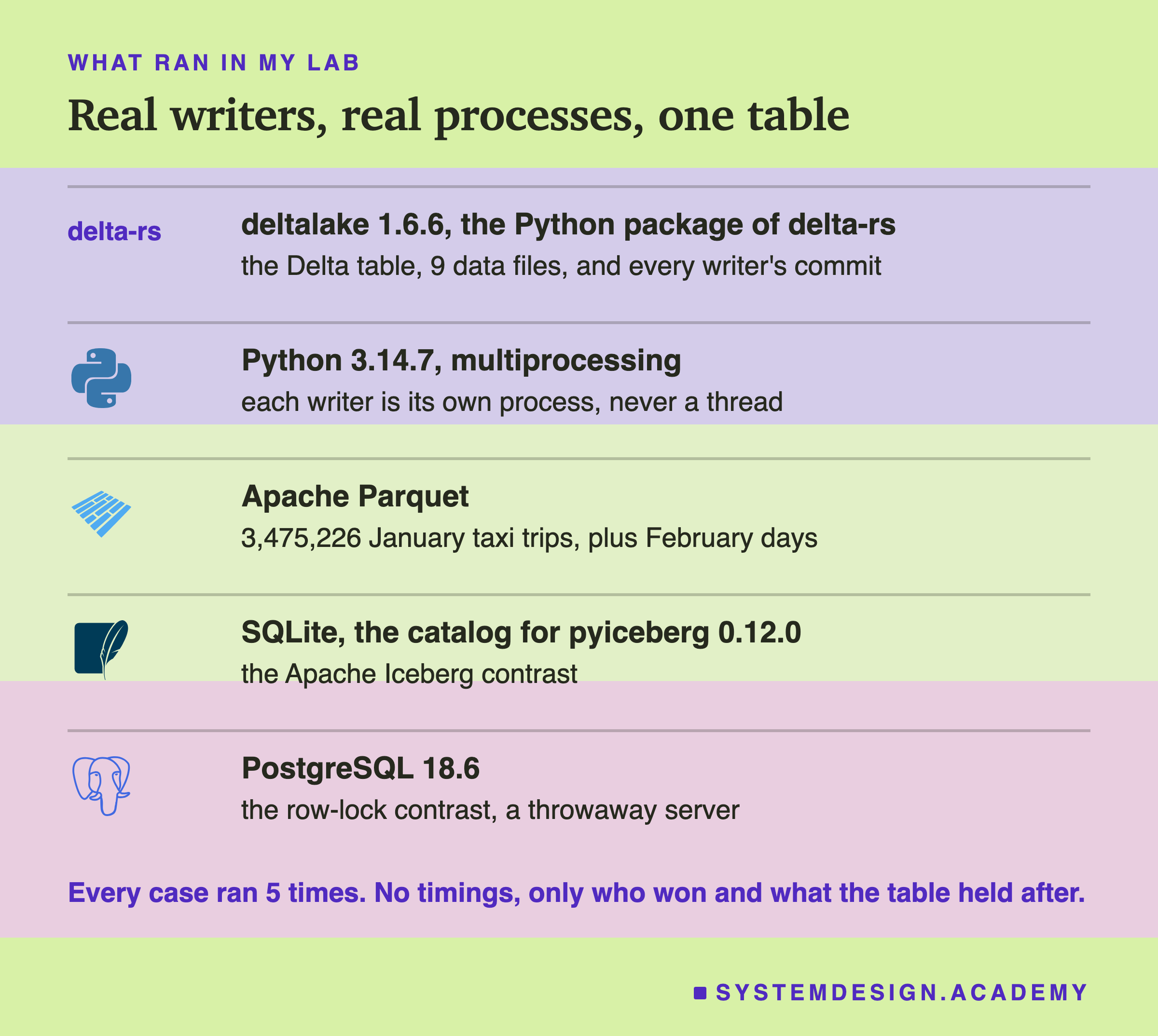
Each writer is a separate process, a running program with its own memory. Two threads inside one program can share things in ways two separate jobs on two machines never could. Separate processes are closer to the real case: two jobs that know nothing about each other.
Every run starts from a fresh copy of the table, at version 0. Both writers open the table, so both hold version 0. Then both wait at a starting line until the other is ready too, and both go at the same moment. A starting line like that, in code, is called a barrier.
The lab gives each case a short label, a letter and a number, such as A1 for the first case with two appends. The figures show these labels.
A race can come out differently each time, so I ran every case 5 times. I report who committed, the loser's exact error, and what the table held afterwards. I report no timings at all, because the laptop was busy.
So far: a lock makes the second writer wait, and optimistic control lets both work and checks at the end. Delta Lake uses the second way, and my test puts two real processes on one table at the same moment. Let me start with the simplest case. What happens when both writers only add rows?
Two Appends at Once: Both Commit
Adding new rows without changing or reading any old ones is called an append. In the first case, one writer appended the trips of 1 February and the other the trips of 2 February, at the same moment.
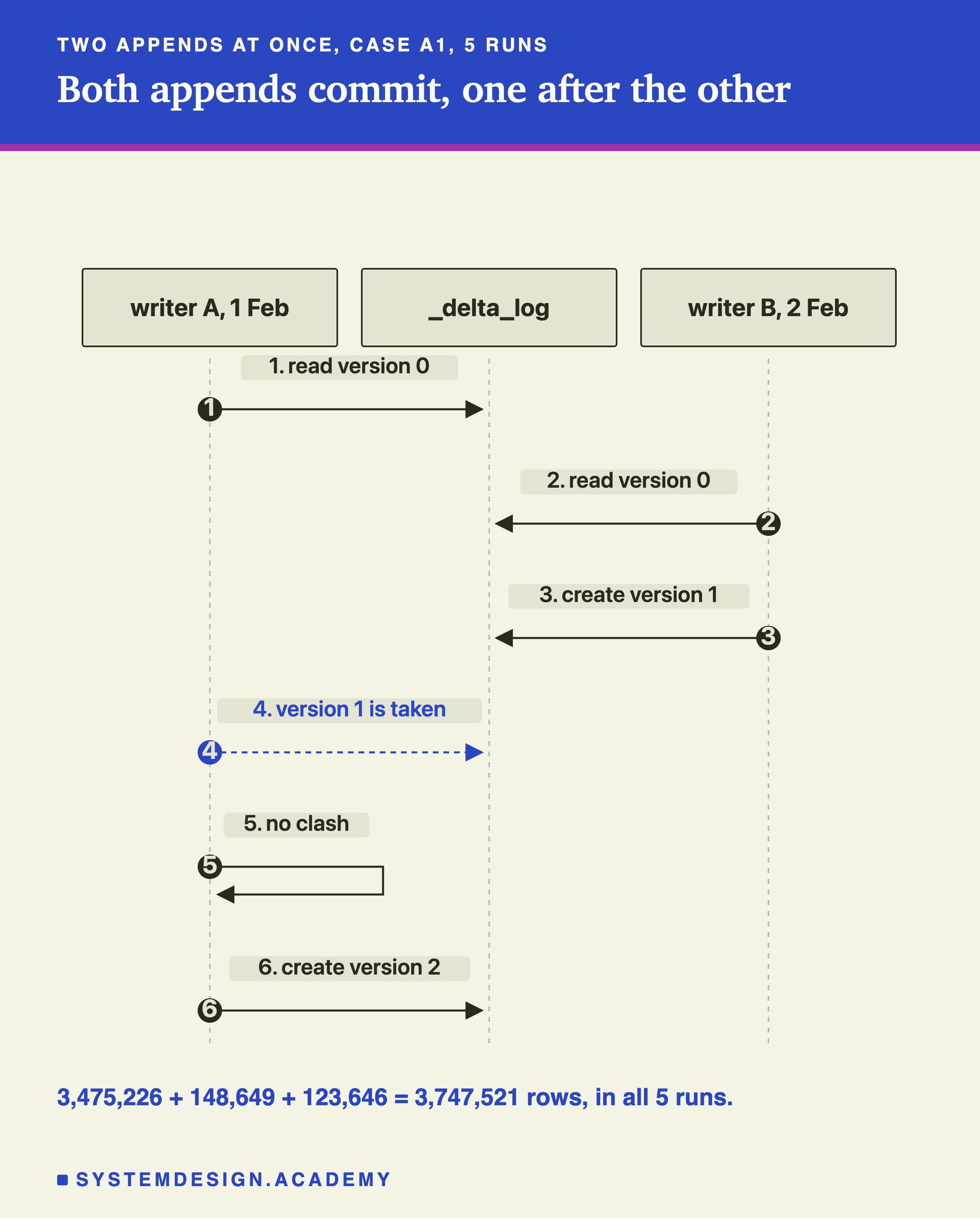
Both writers committed in all 5 runs. The table ended with 3,475,226 + 148,649 + 123,646 = 3,747,521 rows each time, and no trip twice. In every run, the 2 February writer committed first, as version 1, and the other became version 2. One likely reason, which I did not test: its batch is smaller, 123,646 rows against 148,649, so it finished writing first.
Look at step 4. Both writers wanted version 1, and only one could have it. The second writer did not overwrite it and did not give up. deltalake read the winner's log entry. The winner had removed no file, and the second append had read nothing, so no check found a clash. Then it committed the second append as version 2, by itself, inside the same write_deltalake call. My code never saw any of it.
That fits the documentation's own table of which operations can conflict. For two inserts, it says: "Cannot conflict."
The two appends never clashed on rows, because neither one read or changed the other's rows. But they did clash on the version number. How do I know deltalake really had to try a second time?
The Same Appends, With the Retry Turned Off
Trying a failed commit again is called a retry. deltalake retries by itself. Its source code sets the default number of retries to 15. The Python call lets you change it, with CommitProperties(max_commit_retries=...).
So I ran the same two appends again, 5 more times, with the retries set to 0.
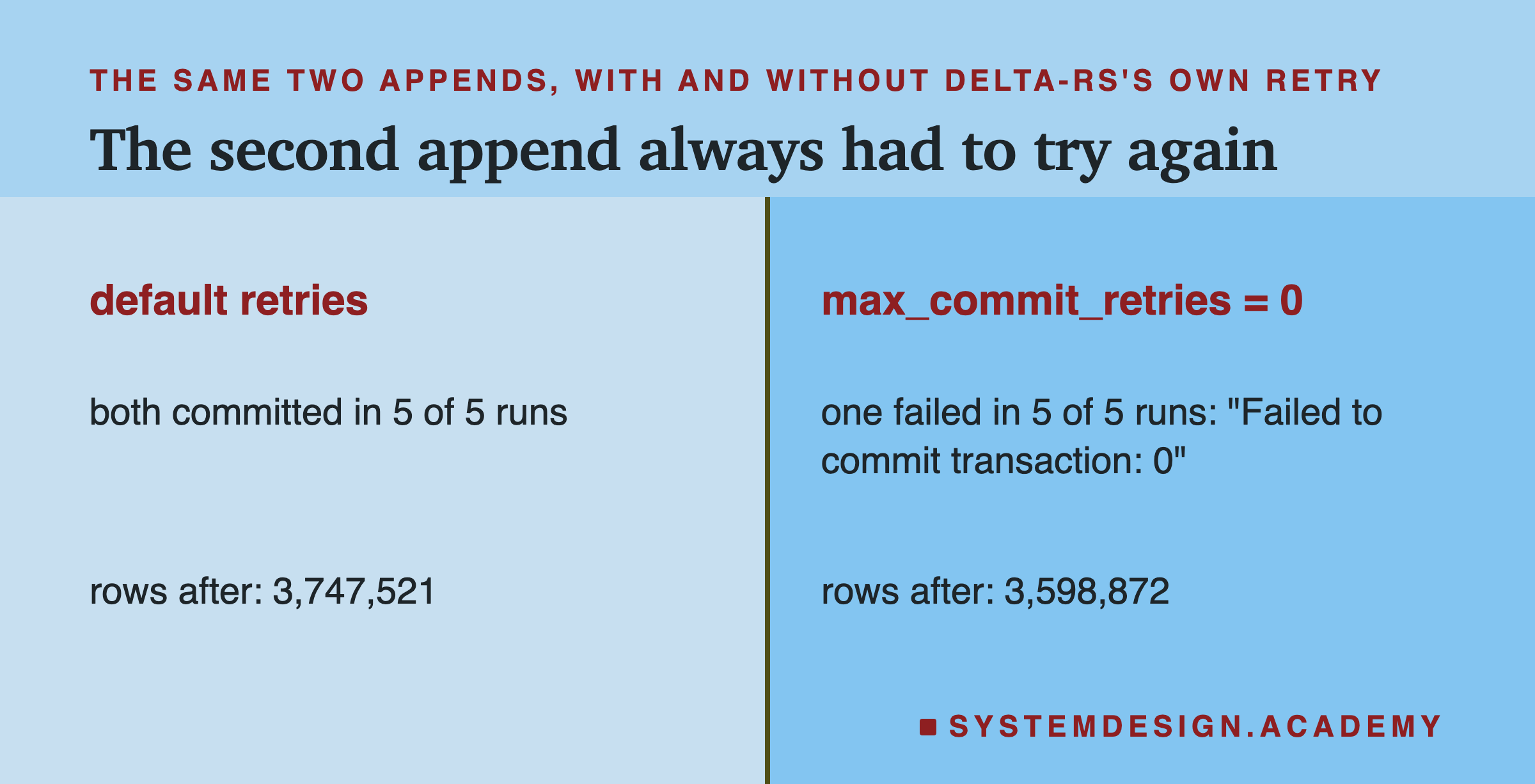
Now one writer failed in every run, with the short message "Failed to commit transaction: 0". The 0 is the number of retries it was allowed. The table kept only the winner's day: 3,475,226 + 123,646 = 3,598,872 rows.
So the two appends were never truly separate. Every run, the second writer found the version number taken. With retries on, deltalake checked for a conflict, found none, and moved its commit to the next number. With retries off, it failed at once.
This matters for your own code. Say you write an append job with the retries turned down. Then a second job running at the same time can make yours fail, even though the two jobs never touch the same rows. Appends were the easy case. What happens when both writers change existing rows?
Two Updates at Once: One Wins
In the next case, both writers ran an UPDATE on the January table. One added 1 dollar to tip_amount for every trip with VendorID = 1. The other did the same for every trip with VendorID = 2. The vendor ID says which company's meter recorded the trip. VendorID 1 has 753,671 January trips, and VendorID 2 has 2,719,860. Not a single row is in both sets.
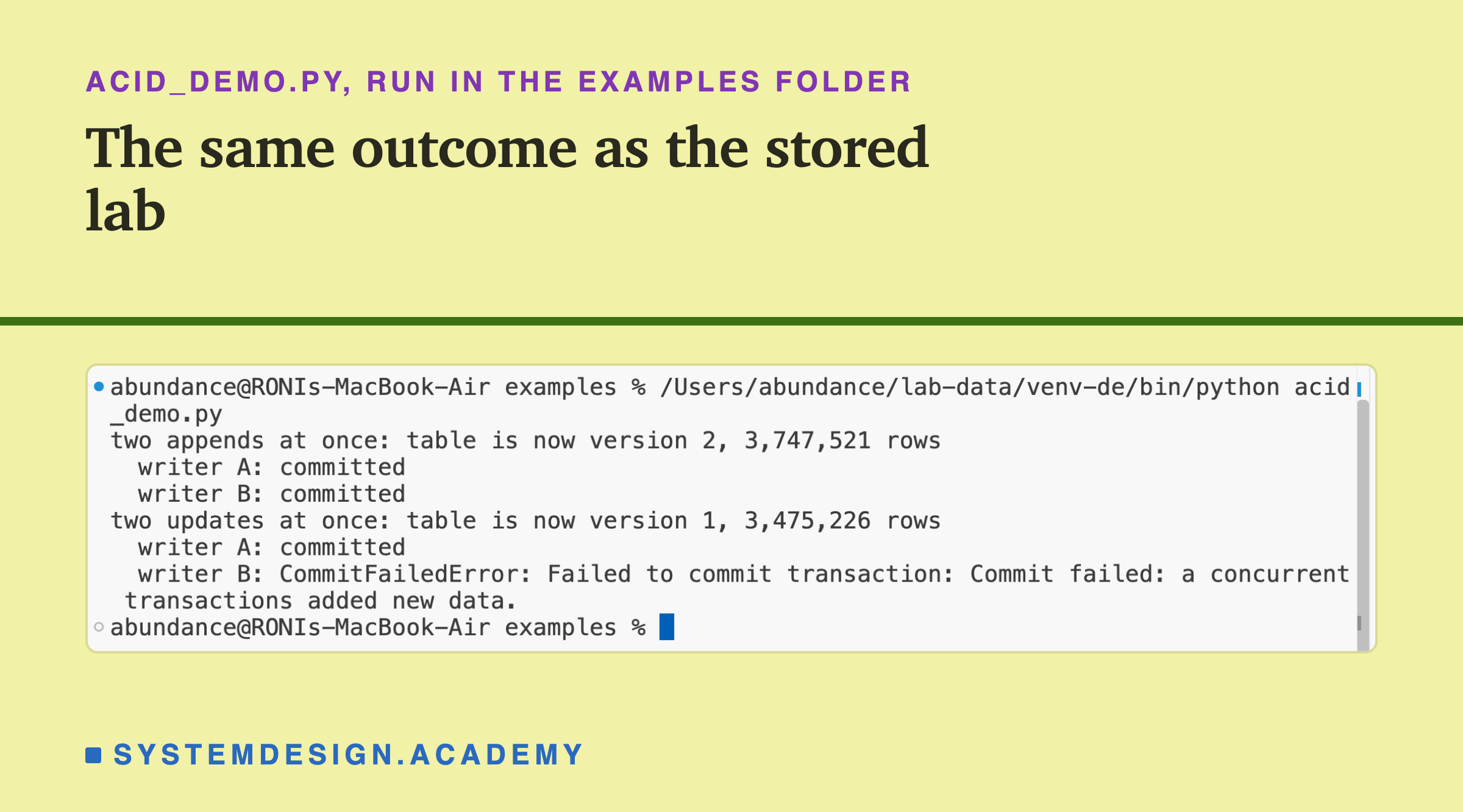
To show it once on screen, I wrote a short script, acid_peek.py, that runs this race once and prints what each writer got. Here is that run, recorded in a real terminal.
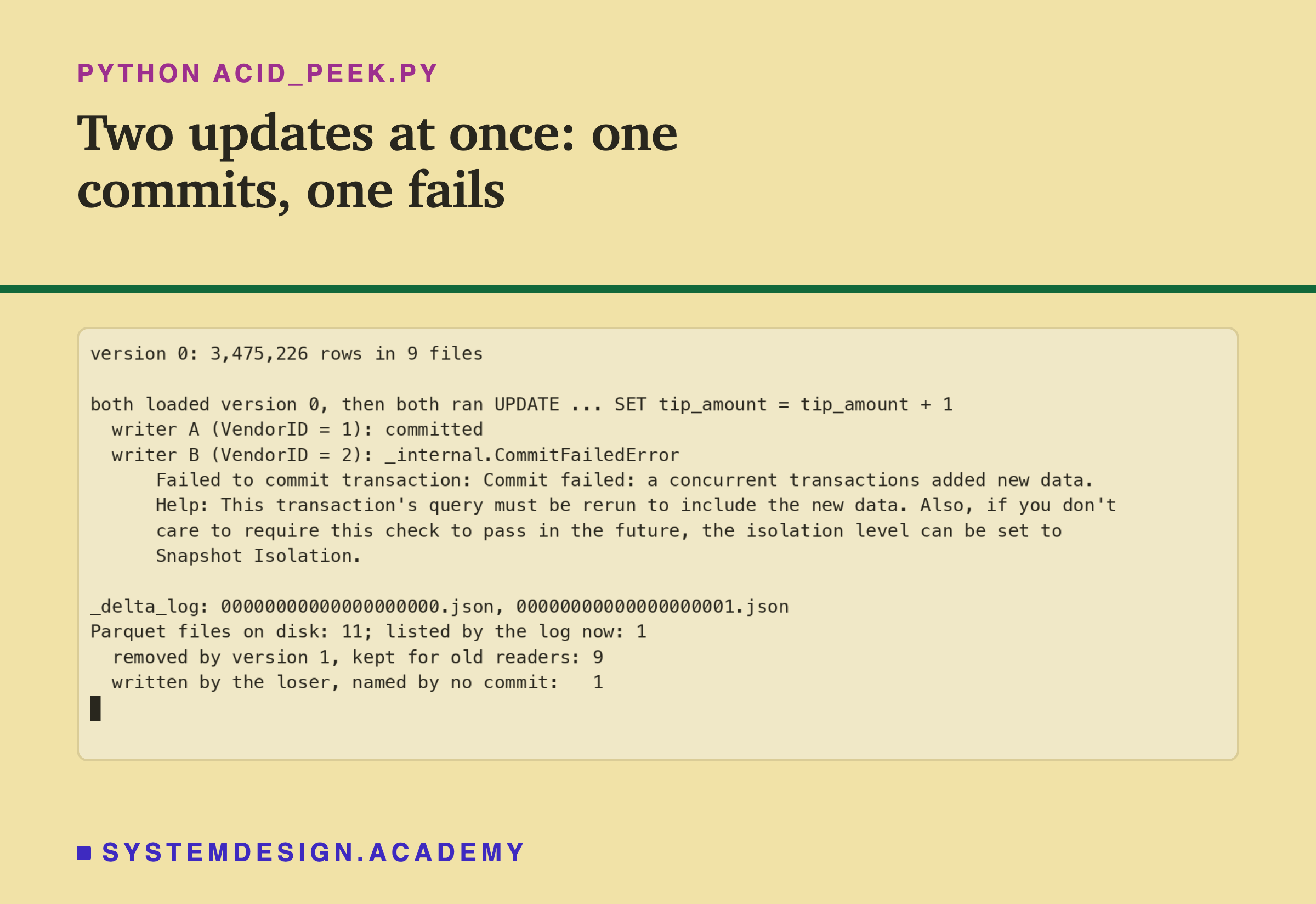
One writer committed and the other failed, even though their rows never overlap. The loser's error is CommitFailedError, from deltalake.exceptions (Python prints its home, an internal module called _internal). Its first line is "Failed to commit transaction: Commit failed: a concurrent transactions added new data." The grammar slip, "a concurrent transactions", is in delta-rs's own message.
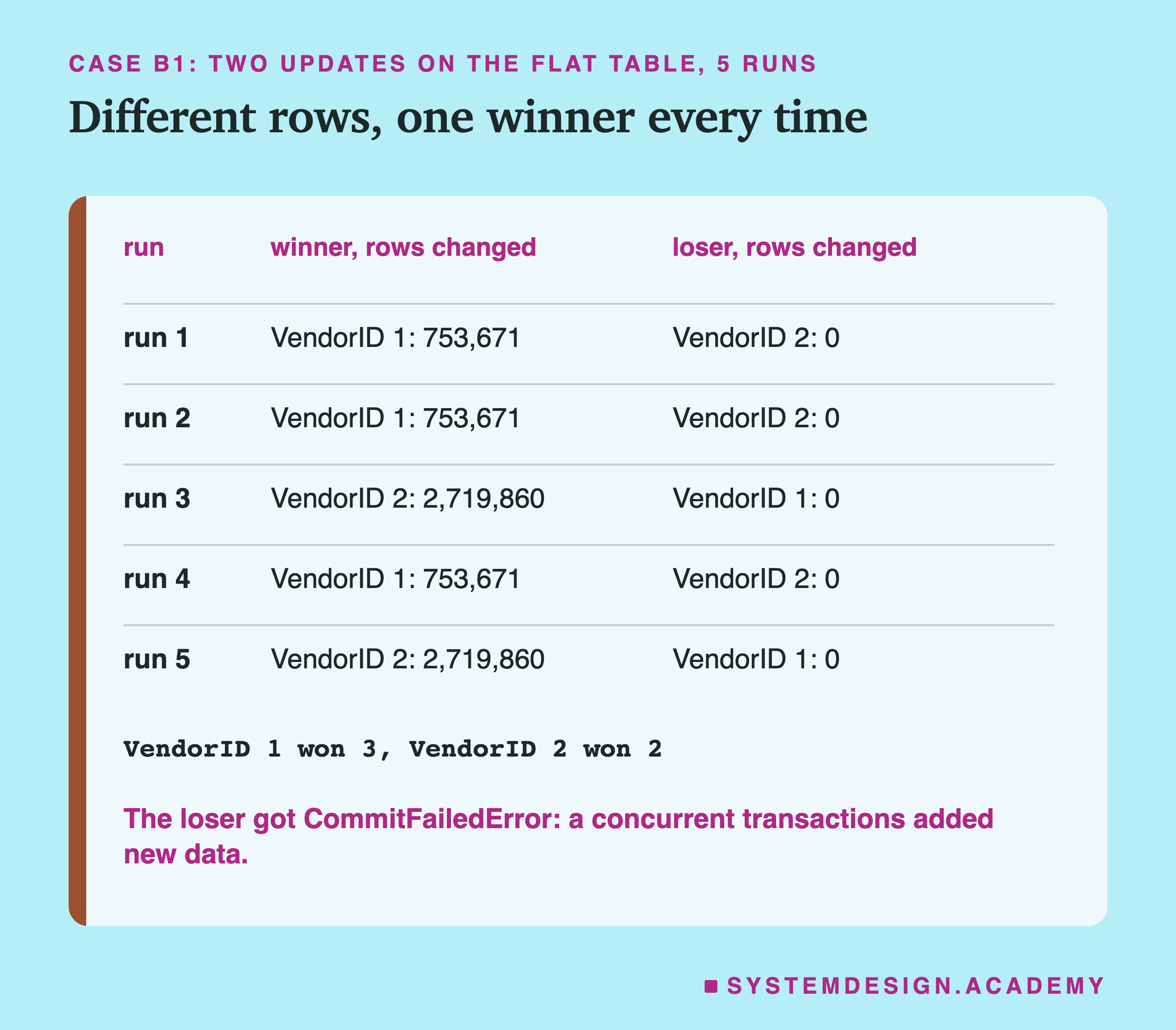
In the lab's 5 runs, the outcome was the same every time: exactly one update committed, and the other got that same error.
What the Loser Leaves Behind
Look at the last lines of the recording. After the race, the table folder held 11 Parquet files, but the log listed only 1.
The winner's UPDATE had rewritten all 9 January files into 1 new file, and its commit removed the 9 old ones from the table. Those 9 are still on disk, because readers that started on version 0 may still need them. That is the same rule lesson 1 showed for an overwrite.
The eleventh file is the loser's. It did its full write step: it read the rows, added 1 dollar to each tip, and saved a new Parquet file. Then its check failed, so no log entry ever named that file. To every reader, it does not exist.
The delta-rs documentation describes exactly this. A losing transaction "will write Parquet data files, but will not be recorded as a transaction". It adds: "The zombie Parquet files can be easily cleaned up via subsequent vacuum operations." Vacuum is the cleanup command from lesson 1, which deletes files no version needs.
So losing costs work, not correctness. The loser spent the time to rewrite its rows and the disk space to store them, and then threw it away. In a big table, one lost update can mean many gigabytes written for nothing. That is a reason to avoid clashes, not only to survive them.
So far: Delta Lake lets writers work at the same time and checks for clashes only at the commit. Two appends both committed, with deltalake retrying the second by itself. Two updates of different rows clashed in every run: one committed, the other got CommitFailedError and left an unused file behind. But why did two updates of different rows clash at all?
The Check at the End, Step by Step
When a writer finds its version number taken, delta-rs reads the winner's log entry and runs a list of checks against its own change. The part of the code that does this is called the conflict checker, the code that decides whether two commits clash.
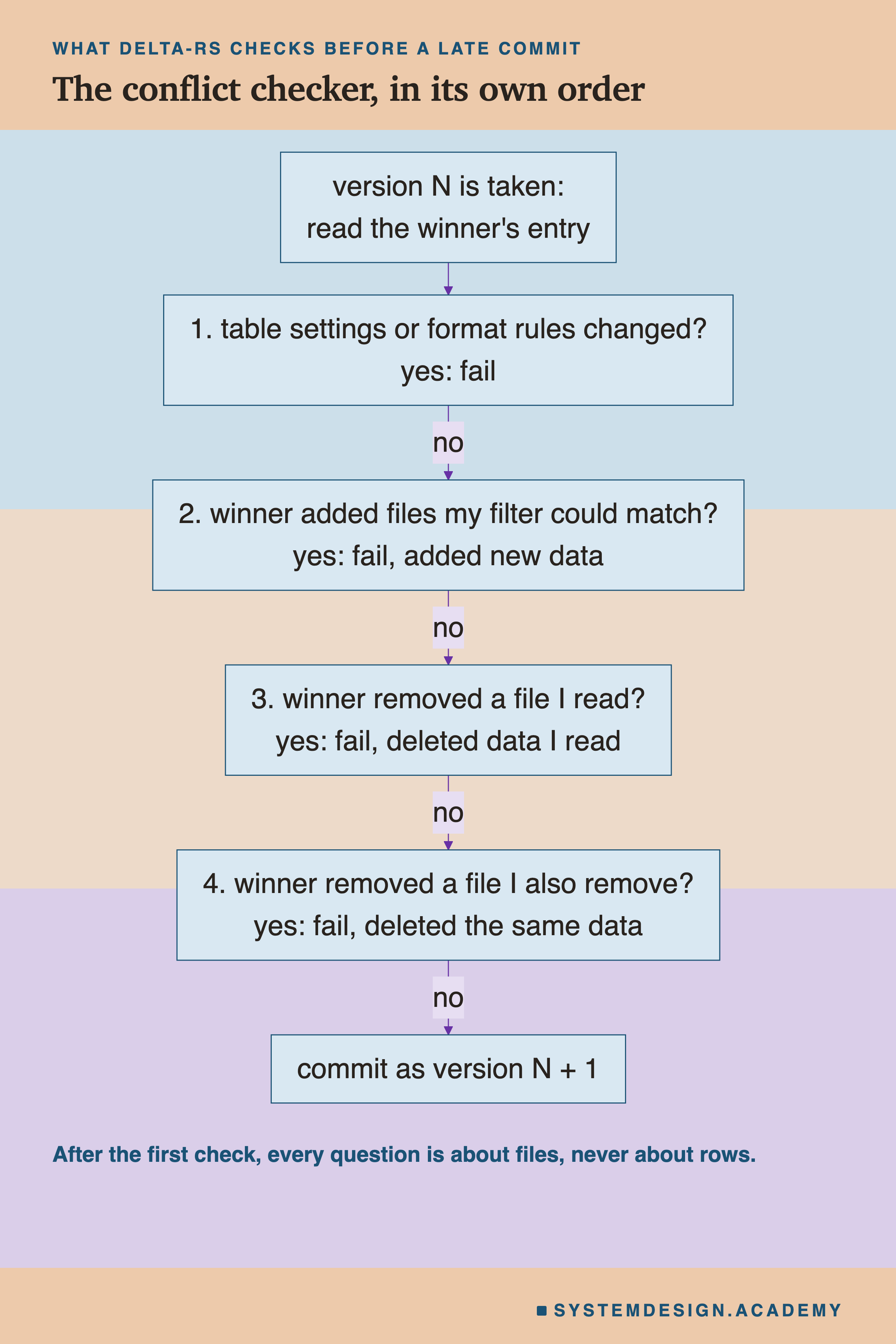
I read the checker in delta-rs's source code, for the exact version I ran, 1.6.6. Its first four checks run in this order. First, did the winner change the table's settings, its columns, or the format rules every reader and writer must follow? Then, did the winner add data files that my change should have read? Then, did the winner remove a file that I read? And last, did the winner remove a file that I am also removing?
Every one of these, after the first, asks about files. None asks about rows. The checker never opens the data. It compares the lists of files in two log entries, and, for check 2, the smallest and largest values the log records for each file.
Now the update race makes sense. The VendorID 1 writer read every file that might hold VendorID 1 trips. The winner, VendorID 2, rewrote files and added a new one. That new file held rows of every vendor, so it could hold rows the loser should have updated. Check 2 failed, and the error said "added new data".
The documentation says the same in one sentence: whether two operations conflict "depends on whether they operate on the same set of files." Which files did my two updates have in common?
Different Rows, the Same Files
To answer that, I opened each of the 9 data files and counted the trips of each vendor inside it.
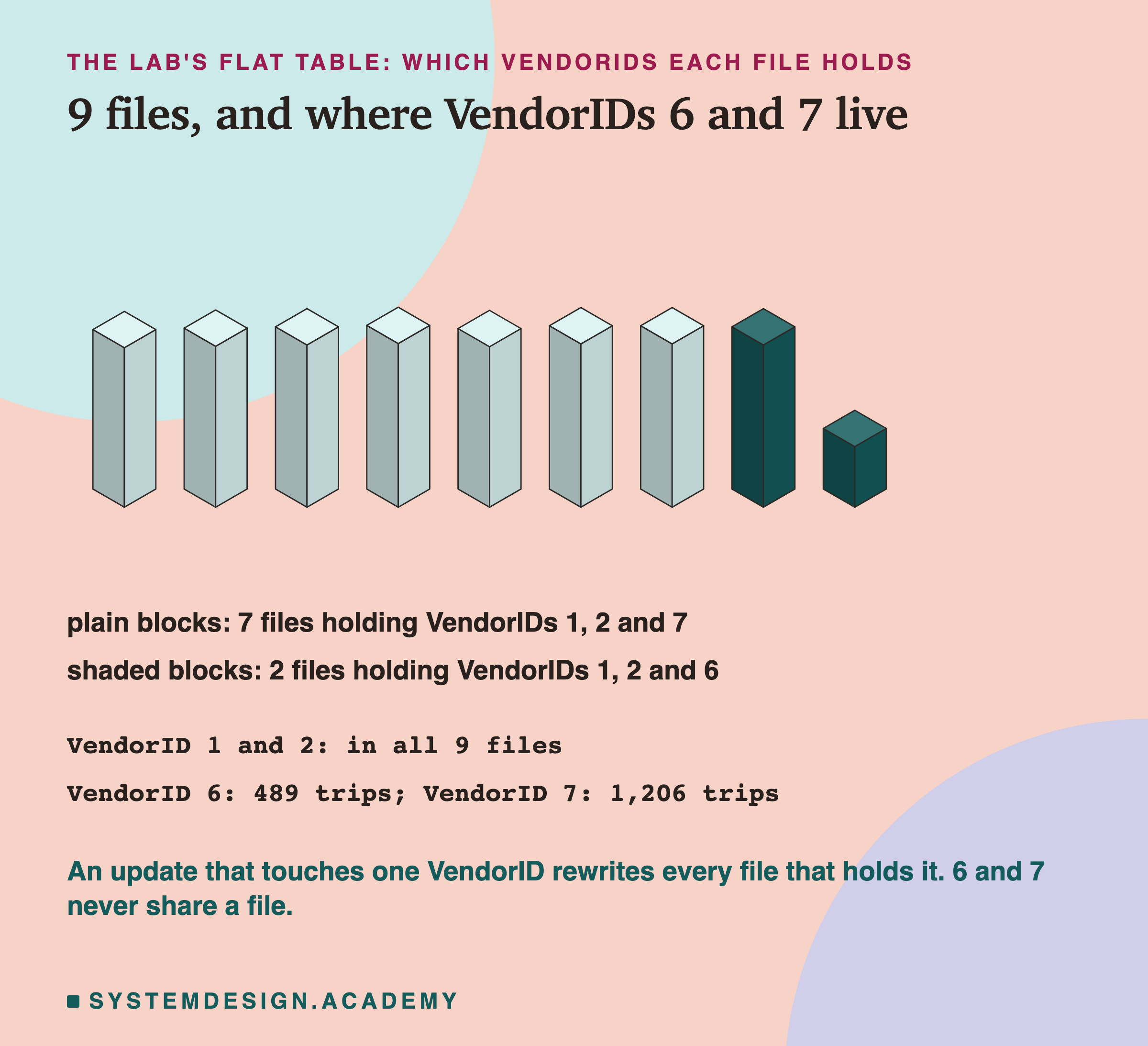
VendorIDs 1 and 2 are in all 9 files. The rows were never sorted by vendor, so every file holds a mix. An update of VendorID 1 must rewrite all 9 files, and so must an update of VendorID 2. Different rows, same files. That is why they clashed in every run.
The two small vendors are different. VendorID 6 has only 489 January trips, all in the last 2 files. VendorID 7 has 1,206 trips, all in the first 7. They never share a file. Keep that in mind, because it decides a result on a later slide.
The same thing happened with deletes. One writer deleted every trip with a fare below zero, 144,118 trips. The other deleted every trip with a distance of exactly zero, 90,893 trips. Only 14,451 trips match both.
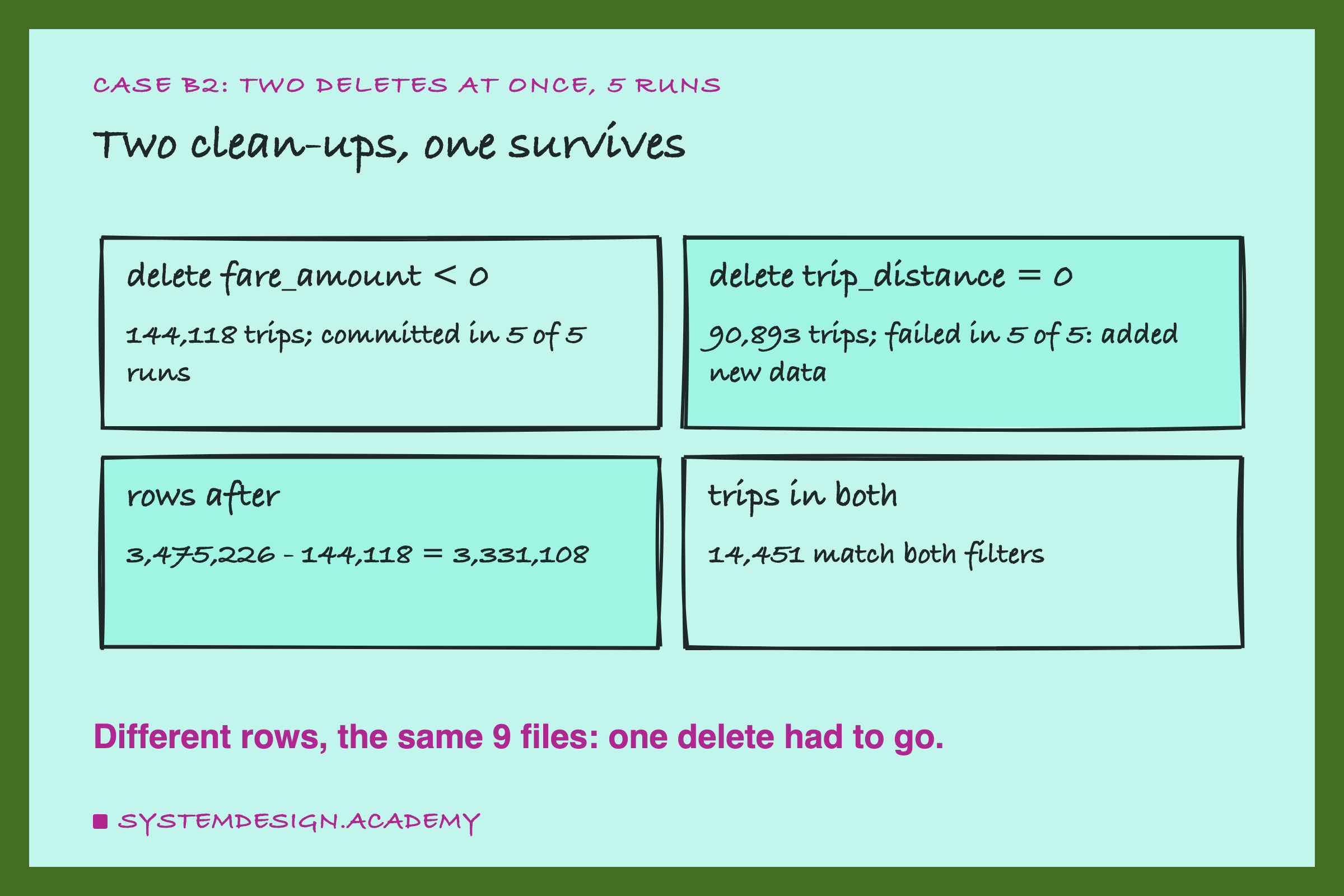
The fare delete committed in all 5 runs, and the distance delete failed in all 5, with the same "added new data" message. The table ended with 3,475,226 − 144,118 = 3,331,108 trips every time. Neither delete touched the other's rows, but both rewrote the same files. If clashes come from shared files, can you arrange the files so that two writers do not share any?
Split the Table, and Both Commit
You can, by splitting the table into folders by the value of a column. Every file inside a folder then holds rows with one value only. That is a partition, which lesson 2 showed with one folder per month.
I built a second copy of January, split by VendorID. It has 11 data files in 4 folders, one folder per vendor. Then I ran the exact same two updates on it, 5 times.
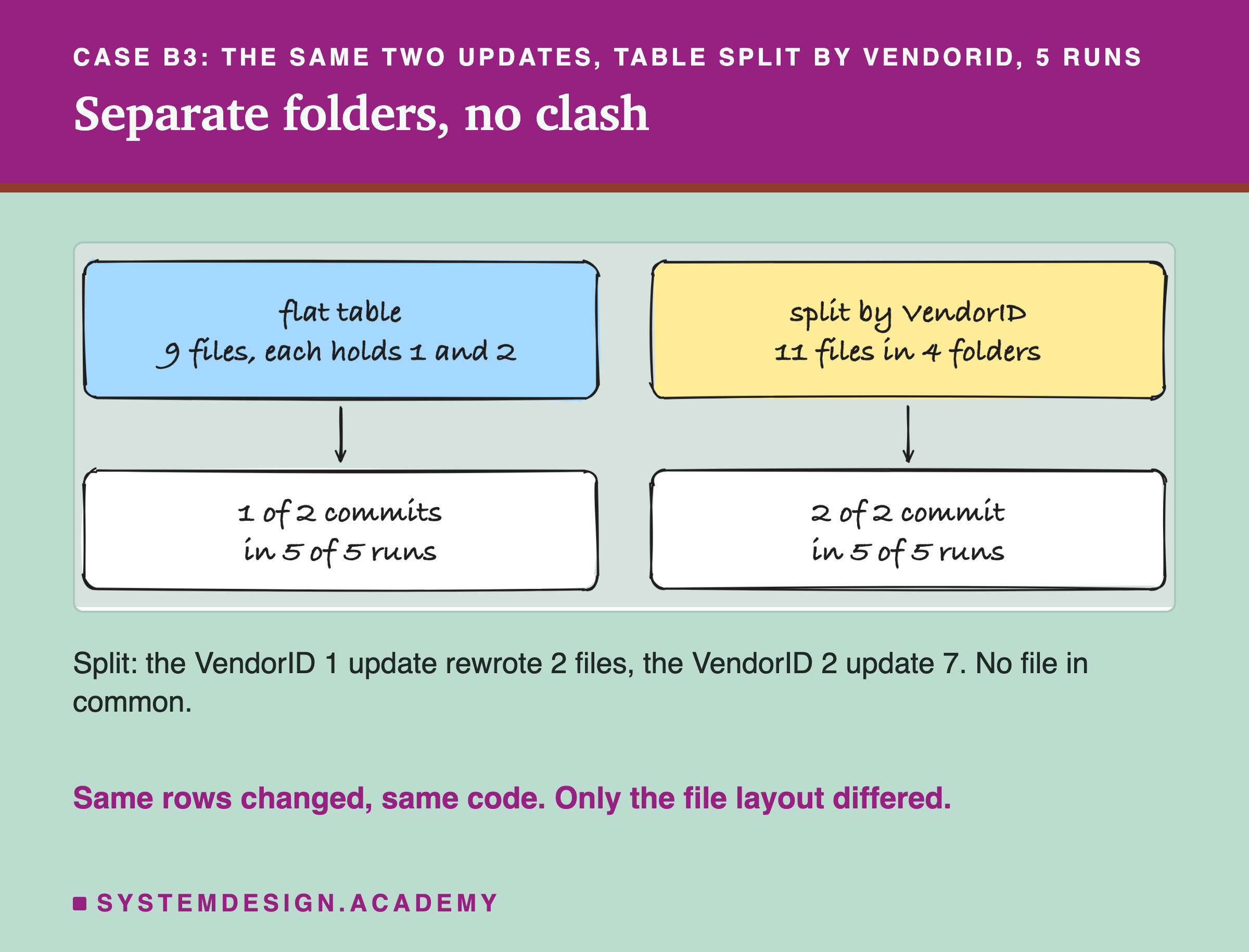
Both updates committed in all 5 runs. The VendorID 1 update rewrote the 2 files in its folder, and the VendorID 2 update rewrote the 7 files in its own. The second one to commit found the version number taken and ran the checks. The winner had touched no file of its own, so it committed as the next version.
After each run, every VendorID 1 trip was exactly 1 dollar higher, and so was every VendorID 2 trip. Both changes, in full, every time.
Delta Lake's documentation gives this advice. "You can make the two sets of files disjoint by partitioning the table by the same columns as those used in the conditions of the operations." It also warns that a column with very many values makes very many folders. A vendor column with 4 values is fine. A trip id would not be.
So far the clashes were between two changes of data. What about a job that does not change any data at all, but only rearranges the files?
An Update Racing a Compaction
Lesson 2 showed compaction, deltalake's optimize.compact(), which rewrites files without changing rows and marks its actions dataChange: false. Its commit is named OPTIMIZE.
Compaction touches every file in the table, so it is a likely clash with any update. I ran three versions, 5 times each: both at once, compaction committing first, and the update committing first.
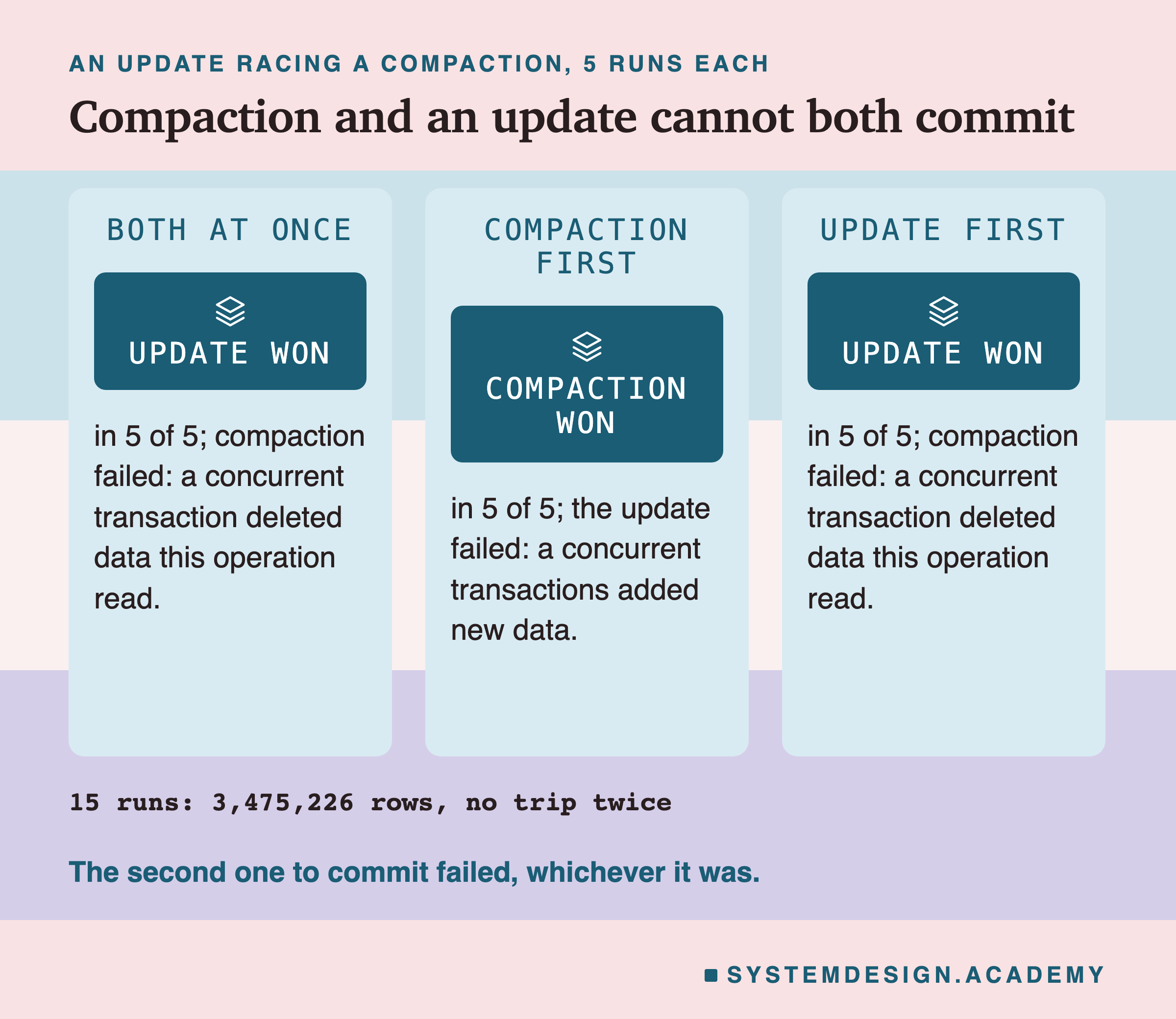
Whichever committed second failed, in every run. When both started at once, the update won all 5 times. When the compaction went first, the update failed with "added new data", because the compacted file held rows it should have updated. When the update went first, the compaction failed with "deleted data this operation read", because the update had removed files the compaction was rewriting.
The documentation's table says the same: compaction against UPDATE, DELETE or MERGE "Can conflict".
I also checked the worst case. Suppose a compaction committed first and an update then committed anyway. The table would hold the old rows inside the compacted file and the updated rows in the update's file: every trip twice. In all 15 runs, the table held exactly 3,475,226 trips, each one once.
There is one detail in delta-rs's source worth knowing. Its checker has this comment: "Only consider removals with data_change = true as conflicts." So a compaction's removals alone never fail another writer. In my runs, the update still failed when compaction went first, because check 2 caught the compacted file as new data. These two writers had to clash somewhere. Which checks run, and how strict they are, is set by something called the isolation level. What is that?
Isolation Levels in Plain Words
So far: a Delta writer works first and checks at the end. The check compares files, not rows, so changes that share files clash even when their rows do not. Splitting the table by the filter column removed the clash.
How strict that final check is can be set. A transaction may be allowed to ignore some of what others do at the same time. The rule for how much is called an isolation level, the strictness of the check between transactions. Stricter means more clashes caught and more writers sent back to retry. Looser means fewer retries, and some kinds of mistake let through.
The strictest level is called Serializable, which means the result is as if every transaction ran one at a time. In Delta's Spark code, its description says this level "will ensure serializability between all read and write operations." If any order of one-at-a-time runs could explain what you see, the table is serializable. The serializability lesson explains it for databases in general.
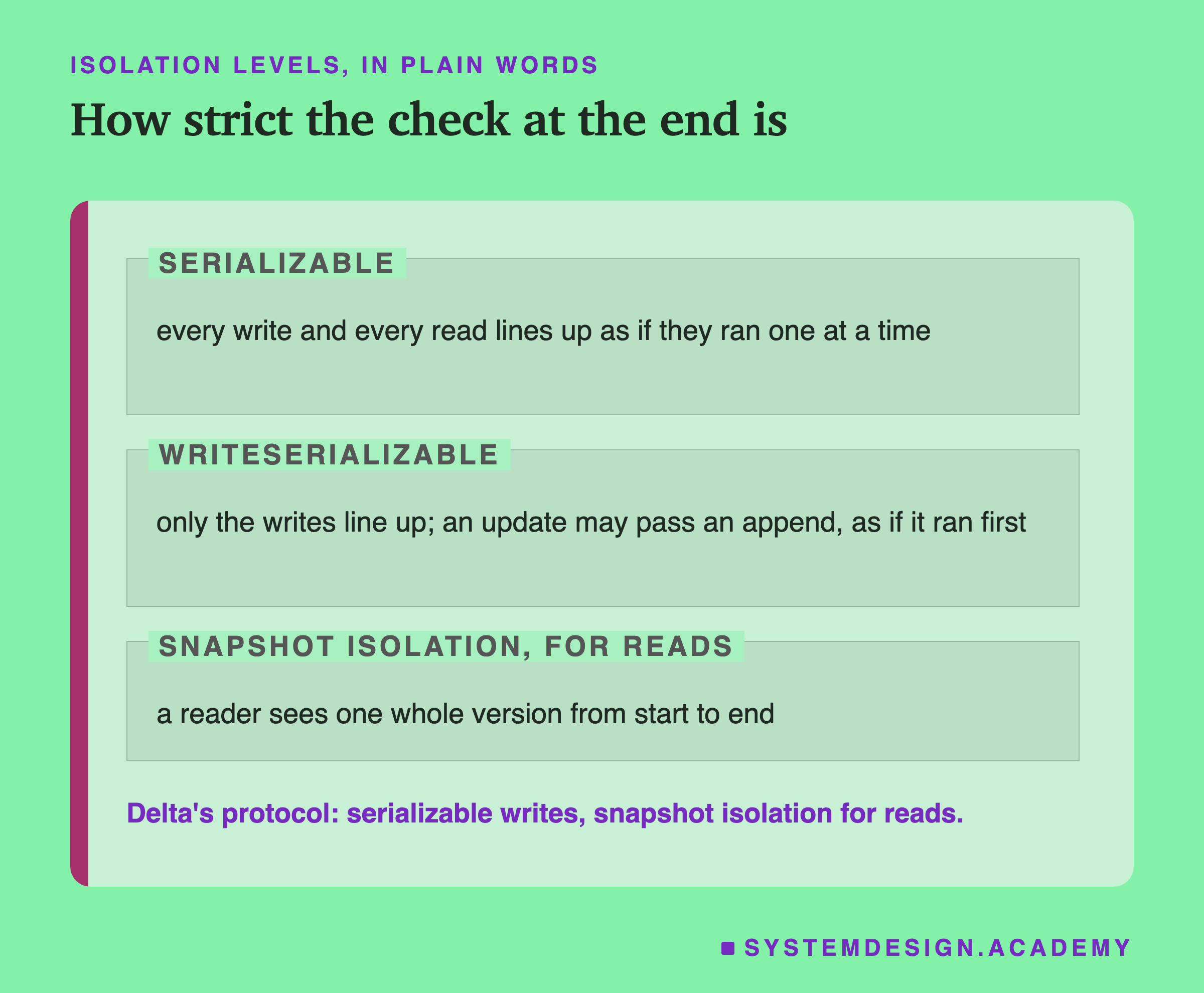
Delta's own rule book, its protocol, promises two things. For writers: "Serializable Writes - multiple writers can concurrently modify a Delta table while maintaining ACID semantics." For readers: "Snapshot Isolation for Reads - readers can read a consistent snapshot of a Delta table, even in the face of concurrent writes." I explain the second promise, and a looser level for writers, on the next slide.
On the planning board, Serializable is the strict rule. Before you pin sheet 6, check every sheet pinned since you started. Give up if any of them could have changed what you wrote. Is there a level between that and no check at all?
WriteSerializable, and Snapshot Isolation for Readers
There is. The level that makes only the writes line up one at a time, and not every read, is called WriteSerializable. In Delta's Spark code, a constant reads val DEFAULT = WriteSerializable, though the open-source table setting there defaults to Serializable. The same code describes one thing WriteSerializable allows that Serializable does not. It "allows an UPDATE operation to be committed even if there was a concurrent INSERT operation that has already added data that should have been read by the UPDATE."
In plain words: an update may commit after a new append, as if the update had run first. The appended rows simply do not get updated. For a job that fixes old rows, that is often fine. For a job that must update every row, including ones that arrived a second ago, it is not.
The reader's side is simpler. A reader that sees one whole version from its first read to its last, whatever writers do meanwhile, has snapshot isolation, a reader's frozen view of one version. Lesson 1 measured that: a Delta reader never saw a half-written table. delta-rs also has a looser level for writers by the same name, which skips check 2. It is the level the loser's Help line suggests. The snapshot isolation lesson explains how databases give the same promise.
So I ran a test: an append commits, then an update that read the old version tries to commit. Does the setting change who wins?
Six Settings, One That Let the Update Through
One more word decides whether WriteSerializable can help at all. An append that read nothing from the table first is called a blind append, an append that depends on nothing already there. The update may pass a blind append, because nothing in it depended on the update. In delta-rs, the checker trusts a commit to be blind only if its log entry says isBlindAppend: true. write_deltalake does not set it. I set it with CommitProperties(custom_metadata={"isBlindAppend": True}), and the checker trusts it. Marking an append blind that really read the table would let a wrong update through.
In each of these cases, one writer appended the trips of 1 February and committed. Then a second writer, which had read the table before the append, ran the VendorID 2 update. I changed two things: the table's isolation level setting, delta.isolationLevel, and whether the append's commit carried isBlindAppend: true. Each of the 6 cases ran 5 times.
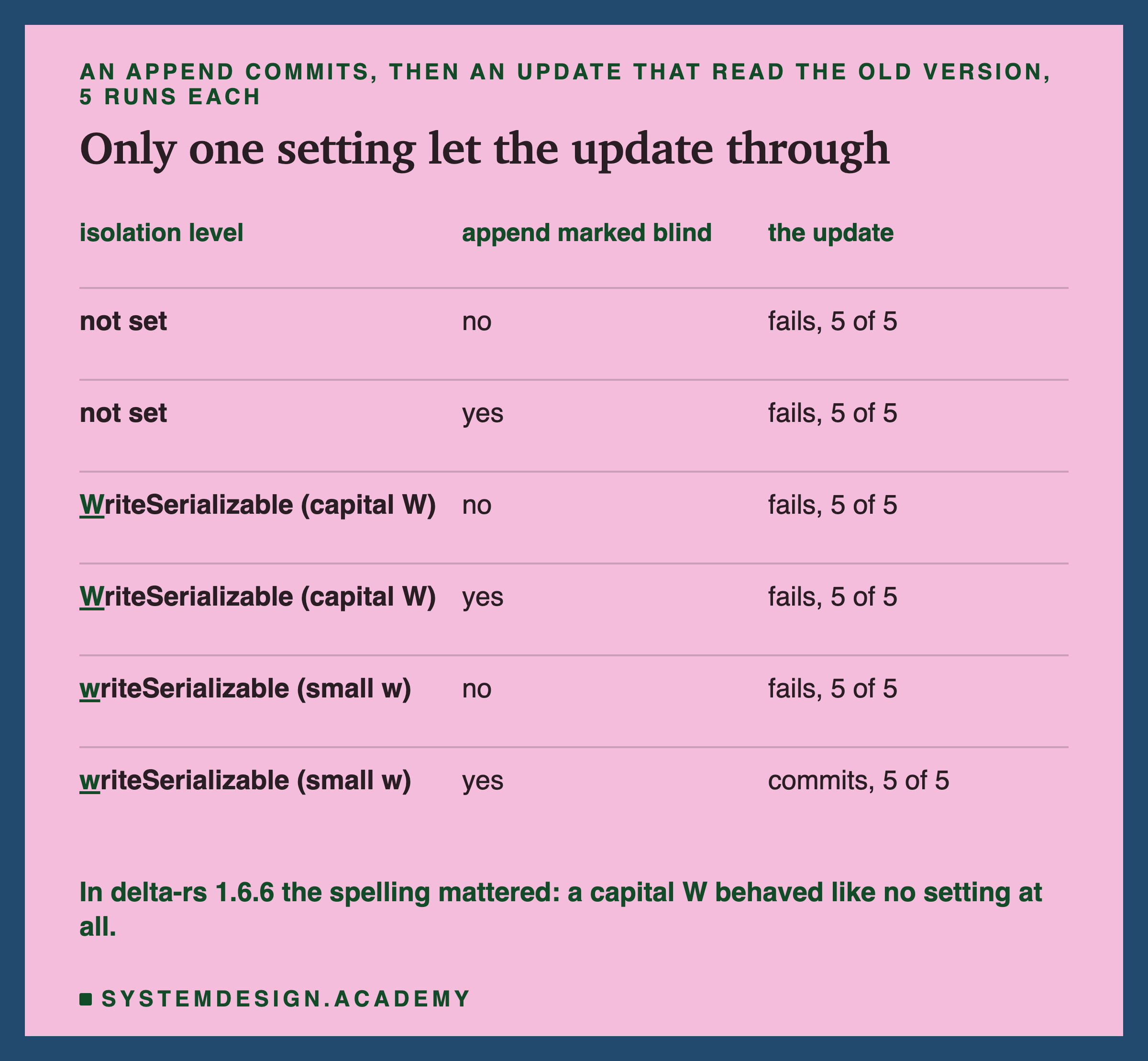
Only one combination let the update commit: the append marked blind, and the setting spelled writeSerializable, with a small w. With no setting, the update failed even after a blind append. That is what Serializable demands, and it is the default in the library delta-rs uses for table settings.
The spelling surprised me, and I want to be careful about it. I first wrote WriteSerializable, with a capital W, the way the name appears in Delta's Spark code. With that spelling, delta-rs 1.6.6 behaved exactly as if nothing were set, and printed no warning.
Retry: Four Writers, Each Until It Commits
A loser in optimistic control is expected to try again. The documentation for Postgres says the same of its own strict levels: "Applications using this level must be prepared to retry transactions due to serialization failures." The usual way is a loop. Try the change. If it fails with a conflict, open the newest version of the table and run the whole change again on it.
I ran four writers at once on the flat table, one per vendor: 1, 2, 6 and 7. Each one caught CommitFailedError, reopened the table and tried again, up to 10 times.
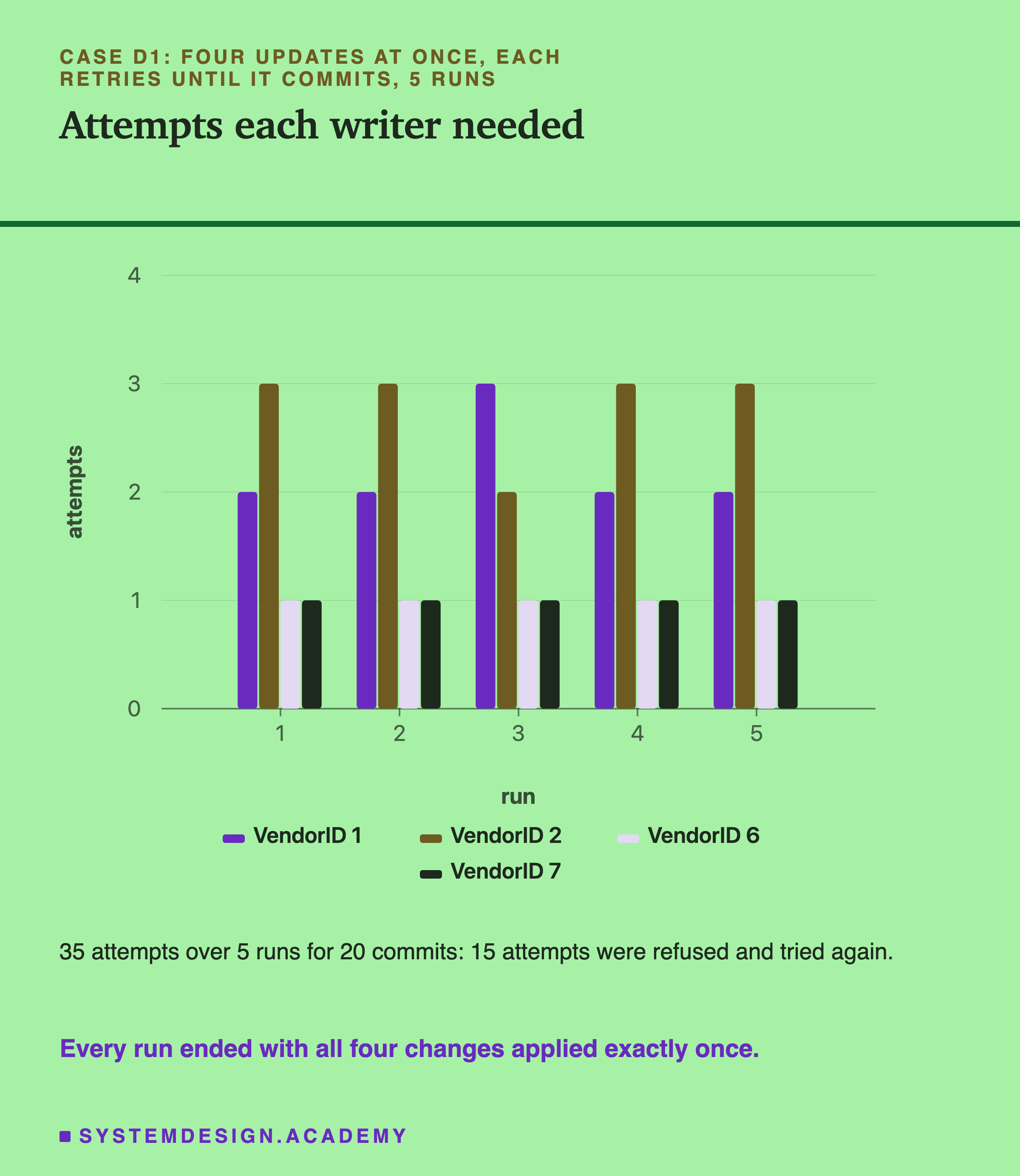
All 4 writers committed in every run. The 20 commits took 35 attempts: 15 were refused and tried again. The big vendors, 1 and 2, needed 2 and 3 attempts in every run. After each run, every trip of every vendor was exactly 1 dollar higher, once.
The small vendors are the interesting part. In every run, VendorID 6 committed first, and VendorID 7 committed second, both on their first attempt, although 7 also found its version number taken.
Here is why. VendorID 6 lives only in the last 2 files, and its update rewrote just those 2 into 1 new file. The log records that file's VendorIDs as running from 1 to 6, so check 2 knew it could hold no VendorID 7 trip. VendorID 7's update had read only the files whose range could include 7, the first 7, and the winner had removed none of them. So check 2 and check 3 both passed, and deltalake committed it at the next number by itself.
In the playground later in this lesson, you can run the same checks for any pair. It also shows something my lab never measured. If VendorID 7 had committed first, its new file would hold vendors 1 to 7, and VendorID 6 would have failed. Retries make every change land in the end. But can a retry ever let a wrong result in?
A Daily Job Started Twice
Here is a mistake that every check so far lets through. A daily job loads one day of trips. To be safe, its author made it check first: "if the table has no trips for 2025-02-14 yet, append them". One morning the scheduler starts the job twice, at almost the same moment.
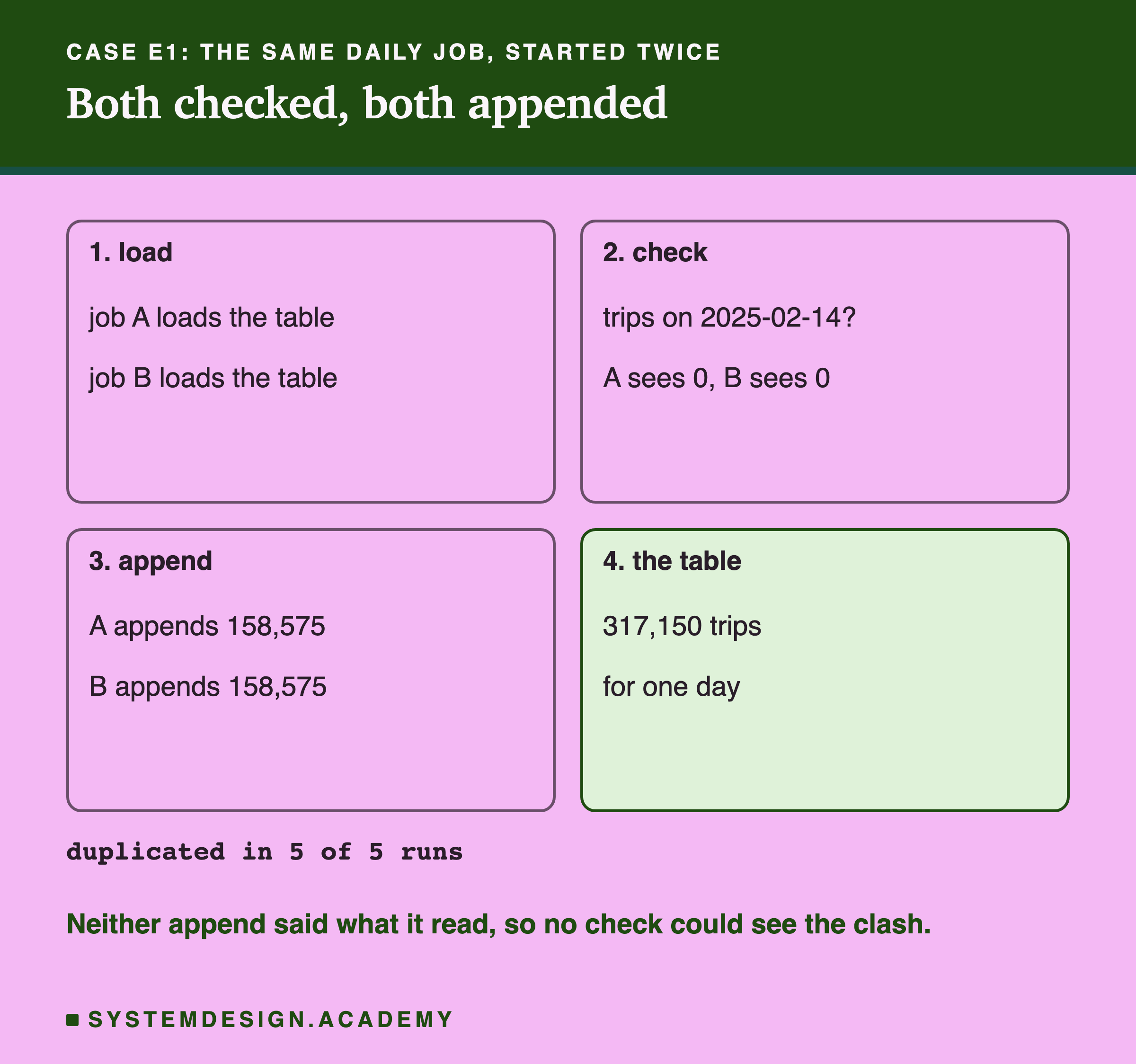
I ran it 5 times. In every run, both jobs saw 0 trips for that day, both appended, and both committed. The table ended with 317,150 trips for a day that has 158,575: every trip twice.
Nothing failed, because nothing clashed by the rules. Each job's check read the table in my own code, before the write. The append itself declared no condition and read no rows, so check 2 had nothing to test. The other job had removed no file, so check 3 passed too. Serializable only covers what the transaction itself read. My check ran outside it, so no isolation level could see it.
Two transactions each read the same data and each decide it is safe to write. Each writes something the other never sees, and together they break a rule neither broke alone. That is a form of write skew, two safe-looking writes that are wrong together. The snapshot isolation lesson explains it with the classic example of two doctors going off call.
The rule here, "one copy of each day", lived only in the job's head. The table knew nothing about it. How do you write the job so the table can catch the clash?
Overwrite the Day, and Let the Clash Show
The fix is to stop checking in your own code and let the write itself say what it depends on. In deltalake, write_deltalake can overwrite only the rows that match a condition, with mode="overwrite" and a predicate, a condition like a WHERE clause. My job now says: "replace every trip picked up on 2025-02-14 with these 158,575 trips". If there are none, it adds them. If there are some, it replaces them.
Such a write reads the rows that match its condition, and tells the conflict checker which rows it depends on. That is the difference. The second job's commit now has something to clash with: the first job added files that match its condition, so check 2 fails with "added new data". I wrapped it in the same retry loop as before.
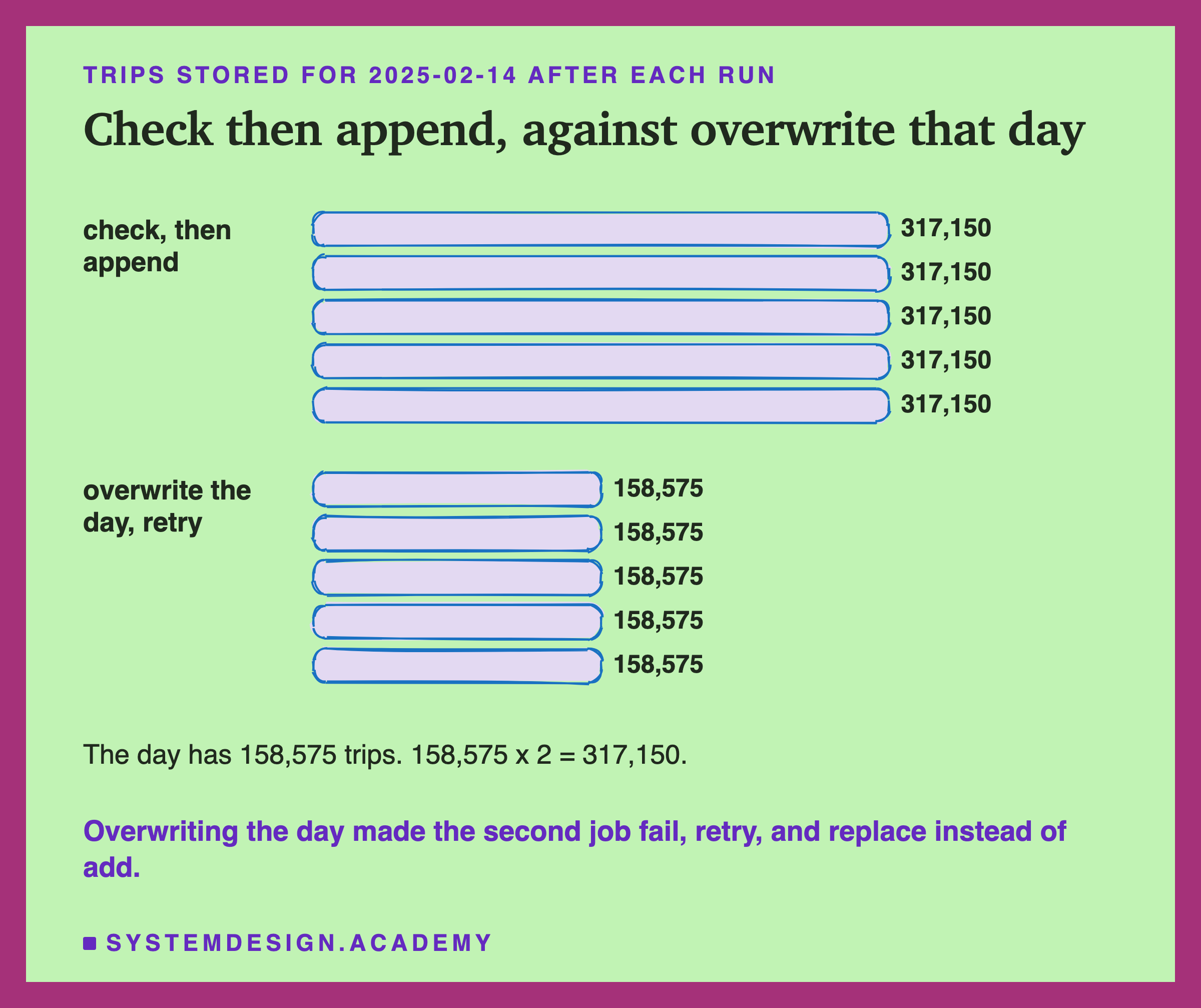
In all 5 runs, the table ended with exactly 158,575 trips for that day. In every run, one job committed on its first attempt and the other failed once, reopened the table, and committed on its second. Its commit removed the first job's file and added its own: 1 remove, 1 add. The total was 3,475,226 + 158,575 = 3,633,801 trips, each once.
Running the job twice now gives the same table as running it once. A job like that is safe to retry, which is exactly what a scheduler does when it is not sure the first try finished.
The rule I take from this: a check that lives only in your code is invisible to the table. Write the condition into the operation, or into a MERGE on a key, so the conflict checker can see it. A MERGE matches new rows to old ones by a key, updates the matches and adds the rest. And under all of this, one small rule makes the whole scheme work. Where does it come from?
The Pin Rule Under Everything
Every result in this lesson rests on the pin rule from the first slide: version N can be created only once. Lesson 1 called it put-if-absent and showed why a commit needs it. I will not repeat that here, but two facts from the sources are worth knowing.
Delta's protocol makes it a requirement for every writer: "Writers MUST never overwrite an existing log entry. When ever possible they should use atomic primitives of the underlying filesystem to ensure concurrent writers do not overwrite each other's entries." delta-rs keeps that promise in its default log store with a write that only creates a file: mode: object_store::PutMode::Create, // Creates if file doesn't exists yet.
On my laptop, the disk enforced it. On cloud storage, the storage service must offer the same promise, and lesson 1 quotes AWS on how Amazon S3 does it with a conditional write. I did not run this lab on S3, so every number here is from one local disk.
Without the pin rule, the appends race from earlier would have ended differently. Both writers would have written version 1, and the second file would have replaced the first. One day of trips would have vanished with no error at all. The conflict checker can only check a clash it is told about, and put-if-absent is what tells it.
So far: clashes are checked at the commit, file by file, and the loser gets CommitFailedError. Partitions avoid clashes, retry loops survive them, and writing the condition into the operation turns a silent duplicate into a visible clash. Is this how other formats behave too?
The Contrast: Apache Iceberg Does the Same Dance
Apache Iceberg also commits optimistically. Lesson 2 showed how. A commit swaps one pointer in a catalog to the new metadata file. The swap succeeds only if the pointer still points where the writer expected. I ran the appends race against Iceberg with pyiceberg 0.12.0 and a small SQLite catalog, 5 runs. To keep it short, the starting table held only the 125,359 January trips picked up on 15 January.
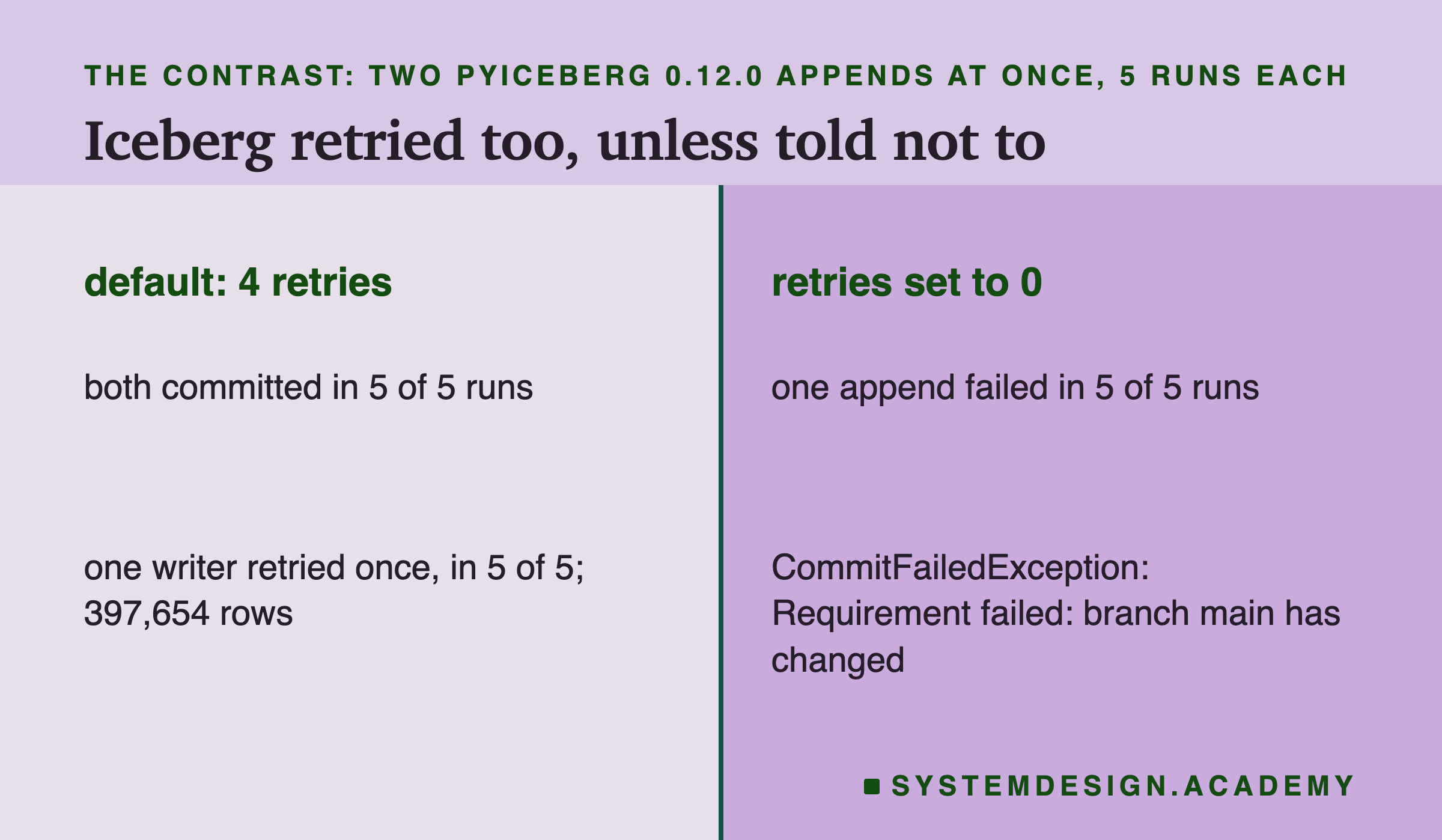
Both appends committed in all 5 runs, and the table held 125,359 + 148,649 + 123,646 = 397,654 rows. In every run, one writer logged a warning that its first commit failed and was retried. That is pyiceberg's own retry: its source sets COMMIT_NUM_RETRIES_DEFAULT = 4 and logs "Commit failed due to a concurrent update, retrying".
With the retries set to 0 through the table setting commit.retry.num-retries, one append failed in every run. The error was CommitFailedException. Its message begins "Requirement failed: branch main has changed: expected id". Then it gives the snapshot id it expected and the one it found; a snapshot id is Iceberg's number for one version.
The comparison is fair only in a narrow way. I ran appends only, on a smaller table, with a different library and a local SQLite catalog. It shows the same pattern, work first and check at the end with a retry, not that the two formats behave the same in every case. How does a real database handle the same two writers?
The Contrast: A Database Makes the Second Writer Wait
A database such as Postgres uses the first way from the start of this lesson: locks. When a transaction updates a row, it takes a row lock, a lock on that one row until the transaction ends. A second transaction that wants the same row waits.
I loaded the same January trips into a throwaway Postgres 18.6 server: trip_id, the vendor, and the tip. Writer A updated its rows and kept its transaction open. Writer B then started its own update. A third connection watched Postgres's list of sessions to see whether B was waiting on a lock. Then A committed. Each case ran 5 times.
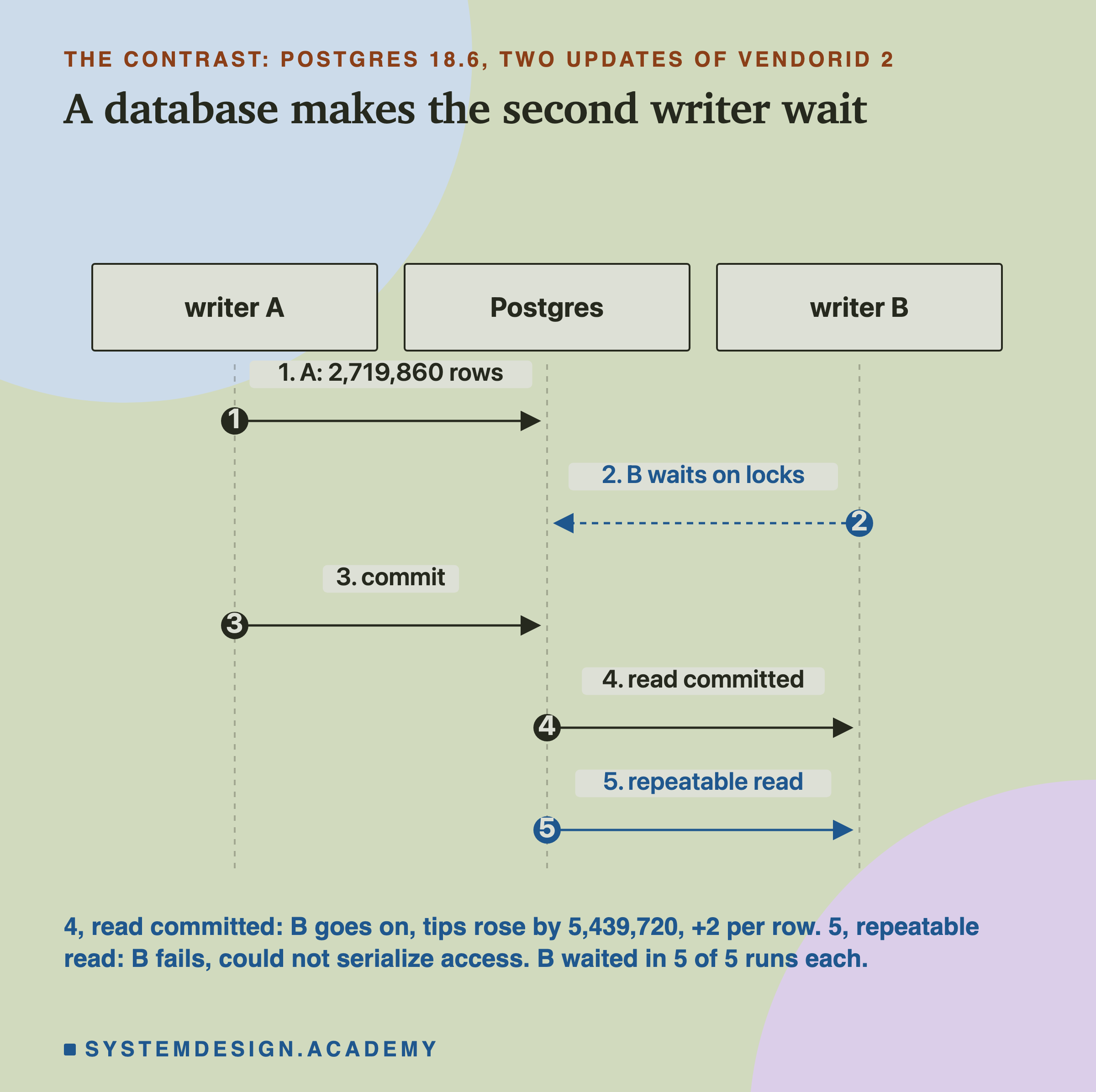
With different rows, VendorID 1 for A and VendorID 2 for B, B never waited, in 0 of 5 runs, and both updates committed. That is the case Delta failed every time, because its unit is the file. Postgres locks rows.
With the same rows, VendorID 2 for both, B waited in all 5 runs. Under Postgres's default level, read committed, where each statement sees what was committed when it started, B went on as soon as A committed. Both changes landed: the tips of the 2,719,860 trips rose by 5,439,720 dollars in total, which is 2 per trip. Postgres's documentation says the waiting writer "will wait for the first updating transaction to commit or roll back (if it is still in progress)."
Under the stricter level repeatable read, where the whole transaction sees one snapshot, B waited and then failed in all 5 runs. Its error was "could not serialize access due to concurrent update", the exact message the documentation gives. So a database waits where a lakehouse fails, and it clashes on rows where a lakehouse clashes on files. Both still need retry code at their strict levels. How do I know all these numbers are right?
How the Lab Was Built, and the Report
So far: Iceberg, like Delta, let both writers work and checked at the commit, with a retry built in. Postgres made the second writer wait on row locks instead, and clashed only on shared rows.
The lab is one file, scripts/labs/de-sd/acid_concurrency.py. I wrote its design, every case and my guesses, into its docstring, the note at the top of the file, before it first ran. It records the library versions it ran with: deltalake 1.6.6, pyarrow 25.0.1, pyiceberg 0.12.0 and psycopg 3.3.6, on Python 3.14.7, with Postgres 18.6.
Several things changed after the first runs, and each is written into the docstring. A first smoke run, one run per case, is not used for any number.
That smoke run showed that pyiceberg retries by itself, so I added the no-retry Iceberg case and counted its warnings. Postgres would not start until I set a locale variable. The full run then showed every isolation case failing, so I read delta-rs's checker, found the blind-append flag, and added four more cases. The spelling test came from a one-off probe that I did not save as a result. The two cases built from it were then run 5 times each, like every other case.
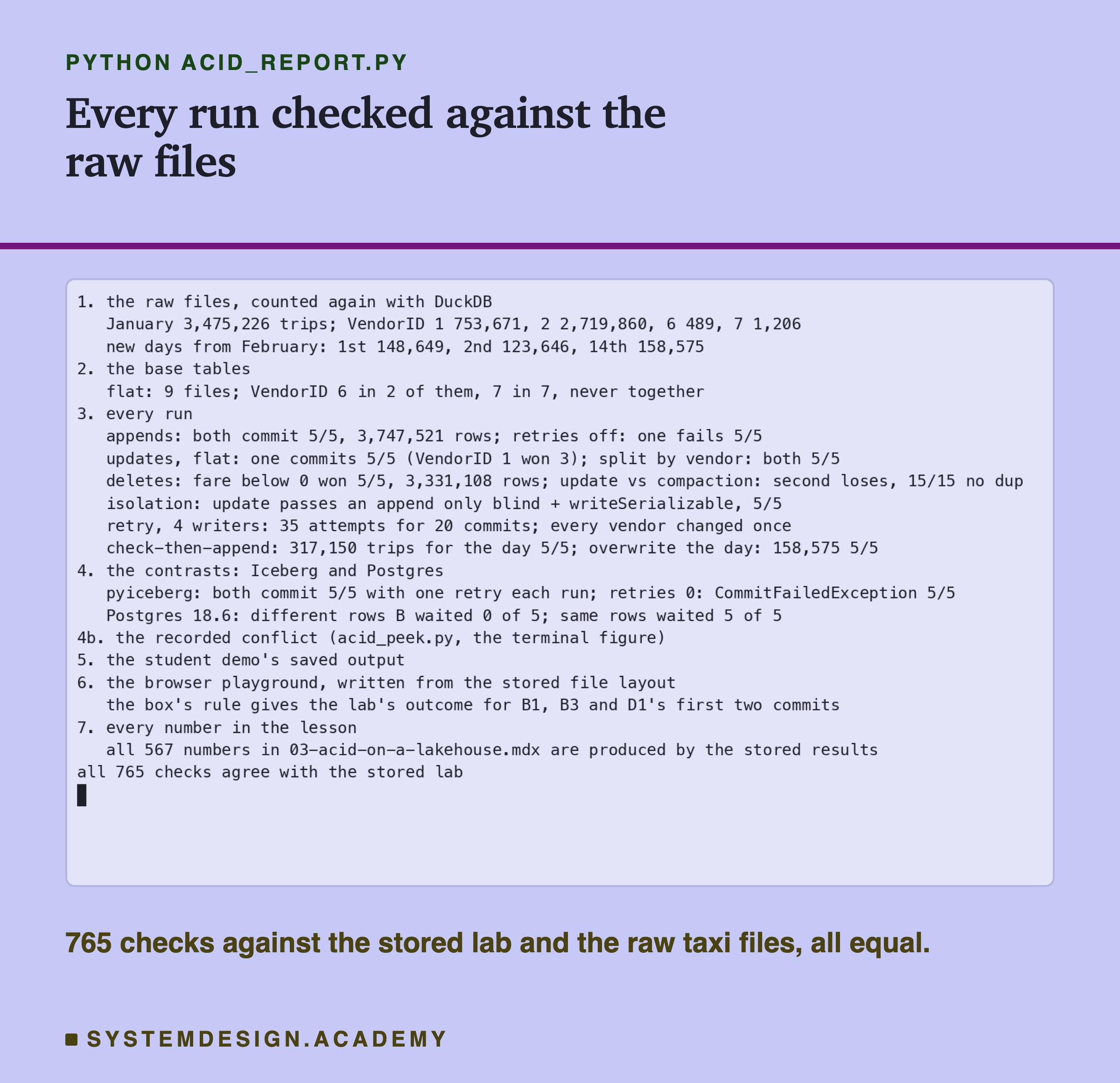
The report script, acid_report.py, does not reuse the lab's code. It counts the raw taxi files again with DuckDB. Then it checks every stored run against its own arithmetic: who committed, the loser's exact error, the tries, and the table afterwards. Last, it reads this lesson's text and checks that every number in it is one the stored results produce. I planted one wrong number in the stored results to see it fail. It stopped with a mismatch and exit code 1; that run is saved as .
My Guesses Before the Run, Checked
Before the first run, I wrote these guesses into the lab. They use the lab's labels. A is the appends, and B is two updates or two deletes. C is compaction, I is the isolation settings, and D is the retry loop. E is the daily job, F is Iceberg, and P is Postgres. Here they are against the results.
-
"A1: both appends succeed in every run; A2: one append fails in every run (the retry is what saves it)." Right on both.
-
"B1, B2: one writer wins, the other gets deltalake.exceptions.CommitFailedError; only the winner's change is in the table. B3: both succeed." Right on all three.
-
"C1-C3: the second committer fails whichever it is; no duplicate rows ever." Right.
-
"I2: I am not sure; Delta's docs say a blind append does not conflict at WriteSerializable, so maybe it succeeds." (The docs I meant were Databricks' docs.) It failed. That led to the blind-append flag, and then to the spelling. My later guess for the flagged case with the capital-W spelling, "I4 succeeds", was wrong too.
-
"D1: attempts 1, 2, 3, 4 in every run, every vendor changed exactly once." Half right. Every vendor changed exactly once. But the attempts were 1, 1, 2 and 3, because the two small vendors never shared a file.
-
"E1: duplicates in most runs. E2: exactly one copy of the day in every run." Right, and E1 was worse than I guessed: duplicates in all 5.
-
"F1: one Iceberg append fails. P1: B does not wait. P2: B waits, then both changes land (+2). P3: B waits, then fails with a serialization error." Wrong on Iceberg, because pyiceberg retries by default. Right on all three Postgres cases.
Seven guesses, four fully right, and three where the real tools taught me something. Now you can see the main result on your own machine.
Try It Yourself
The full lab runs 22 cases, 5 times each. I wrote a small demo that does the two simplest races: two appends at once, then two updates at once.
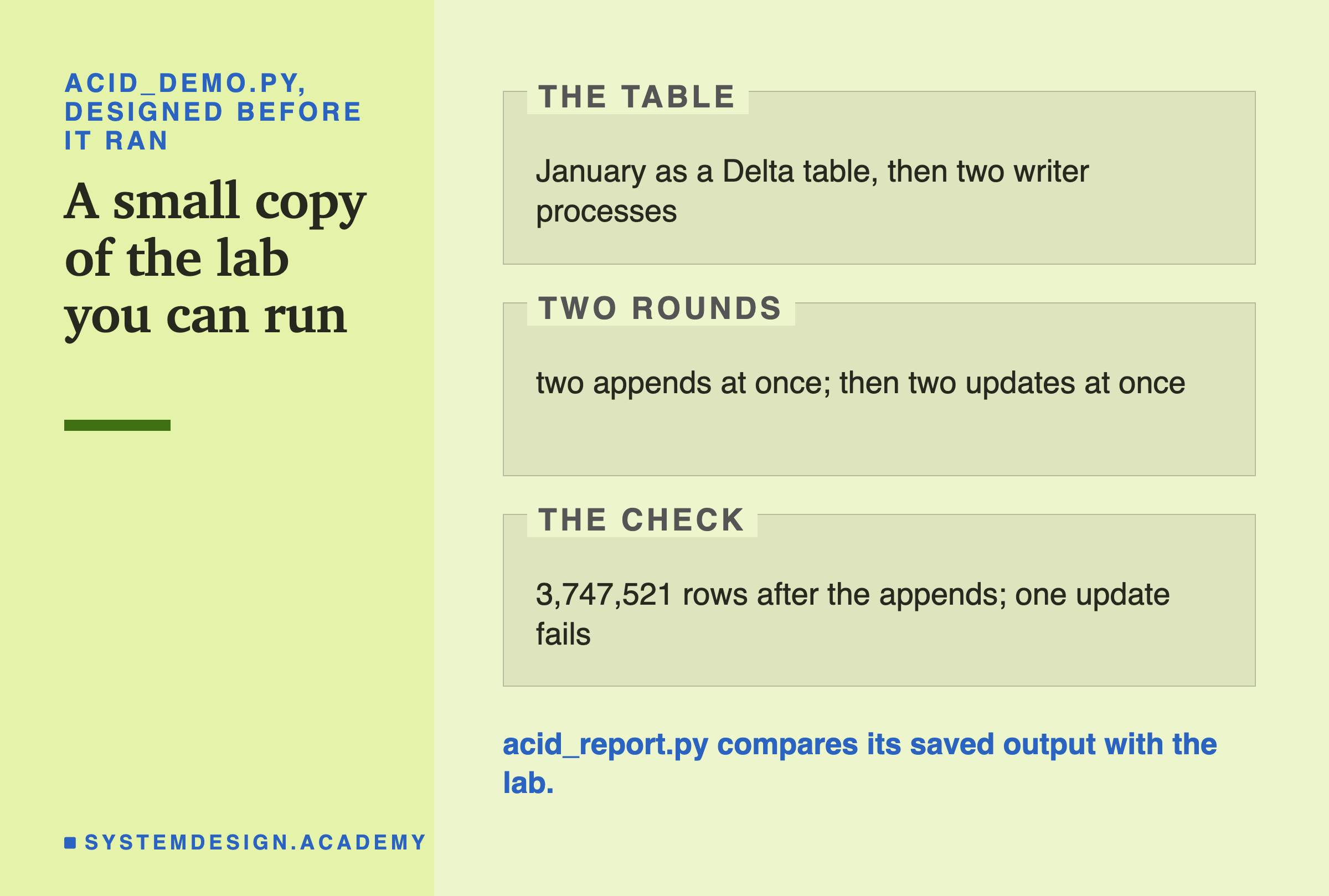
I wrote the demo's design into its docstring after the lab had run and before the demo first ran. It builds its table in its own short way, without the extra trip_id column, so it is also a second check of the lab's cases A1 and B1.
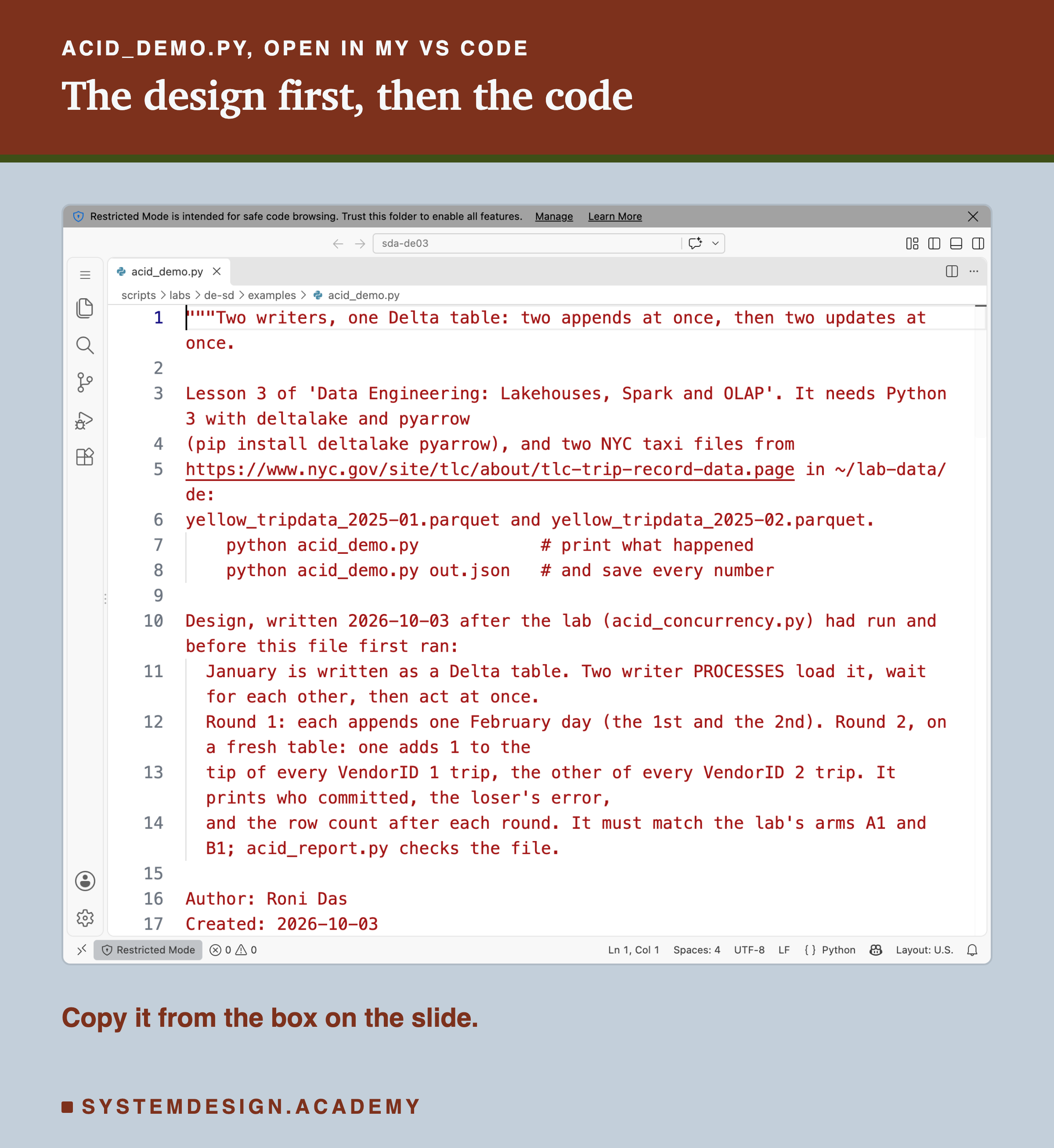
Before you run this lab. You need Python 3 with two libraries: pip install deltalake pyarrow. Download two monthly files of Yellow Taxi trip records, January and February 2025, from the NYC TLC trip record page. Put them in a folder called lab-data/de in your home folder. Together they are about 120 MB. The demo needs no GPU, no Java and no database server. I ran it on a Mac with the versions above. These libraries run on Windows and Linux too, but I have not checked the results there.
"""Two writers, one Delta table: two appends at once, then two updates at once.

Lesson 3 of 'Data Engineering: Lakehouses, Spark and OLAP'. It needs Python 3 with deltalake and pyarrow
(pip install deltalake pyarrow), and two NYC taxi files from
https://www.nyc.gov/site/tlc/about/tlc-trip-record-data.page in ~/lab-data/de:
yellow_tripdata_2025-01.parquet and yellow_tripdata_2025-02.parquet.
    python acid_demo.py            # print what happened
    python acid_demo.py out.json   # and save every number

Design, written 2026-10-03 after the lab (acid_concurrency.py) had run and before this file first ran:
  January is written as a Delta table. Two writer PROCESSES load it, wait for each other, then act at once.
  Round 1: each appends one February day (the 1st and the 2nd). Round 2, on a fresh table: one adds 1 to the
  tip of every VendorID 1 trip, the other of every VendorID 2 trip. It prints who committed, the loser's error,
  and the row count after each round. It must match the lab's arms A1 and B1; acid_report.py checks the file.

Author: Roni Das
Created: 2026-10-03
"""
import json
import multiprocessing as mp
import shutil
import sys
from pathlib import Path

import pyarrow.compute as pc
import pyarrow.parquet as pq
from deltalake import DeltaTable, write_deltalake

DATA = Path.home() / "lab-data/de"
WORK = DATA / "demo-acid"


def feb_day(day):
    t = pq.read_table(DATA / "yellow_tripdata_2025-02.parquet")
    return t.filter(pc.equal(pc.strftime(t["tpep_pickup_datetime"], format="%Y-%m-%d"), day))


def writer(name, job, arg, barrier, q):
    dt = DeltaTable(str(WORK))                  # both writers hold version 0
    batch = feb_day(arg) if job == "append" else None
    barrier.wait()                              # then both go at once
    try:
        if job == "append":
            write_deltalake(dt, batch, mode="append")
        else:
            dt.update(predicate=f"VendorID = {arg}", updates={"tip_amount": "tip_amount + 1"})
        q.put([name, "committed"])
    except Exception as e:  # noqa: BLE001 - the loser's error is the point
        q.put([name, f"{type(e).__name__}: {str(e).splitlines()[0]}"])


def round_(jobs):
    if WORK.exists():
        shutil.rmtree(WORK)
    write_deltalake(str(WORK), pq.read_table(DATA / "yellow_tripdata_2025-01.parquet"))
    ctx = mp.get_context("spawn")
    barrier, q = ctx.Barrier(2), ctx.Queue()
    ps = [ctx.Process(target=writer, args=(n, j, a, barrier, q)) for n, j, a in jobs]
    for p in ps:
        p.start()
    res = sorted(q.get() for _ in ps)
    for p in ps:
        p.join()
    dt = DeltaTable(str(WORK))
    return {"writers": res, "version": dt.version(), "rows": dt.to_pyarrow_dataset().count_rows()}


if __name__ == "__main__":
    out = {"appends": round_([("A", "append", "2025-02-01"), ("B", "append", "2025-02-02")]),
           "updates": round_([("A", "update", 1), ("B", "update", 2)])}
    shutil.rmtree(WORK)
    for title, r in (("two appends at once", out["appends"]), ("two updates at once", out["updates"])):
        print(f"{title}: table is now version {r['version']}, {r['rows']:,} rows")
        for name, result in r["writers"]:
            print(f"  writer {name}: {result}")
    if len(sys.argv) > 1:
        Path(sys.argv[1]).write_text(json.dumps(out))
Run the Conflict Check Yourself
This box holds the real file layout of the lab's table: for each of the 9 data files, how many trips of each vendor it holds. It needs nothing but Python, so it runs in your browser. It does not read any real files. It runs checks 2 and 3 of the conflict checker the way delta-rs does, for two updates, using each file's smallest and largest VendorID.
Press Run. With FIRST = 6 and SECOND = 7, the box says the second update commits too, as it did in every run of the lab. Now swap them, FIRST = 7 and SECOND = 6. The box says the second one fails, because VendorID 7's new file holds every vendor from 1 to 7. My lab never had VendorID 7 commit first, so that result is the rule's prediction, not a measurement. Then try FIRST = 1, SECOND = 2, with PARTITIONED = True.
The report script writes this box from the stored lab results, and checks that its rule gives the lab's outcome for every pair the lab ran.
The Lab's Code, Piece by Piece
The lab is one file, scripts/labs/de-sd/acid_concurrency.py. Here is what each part does.
jan_table reads January and adds the trip_id column. feb_day reads February and keeps one pickup day, with its own ids starting at 10,000,000. build_bases writes the two starting tables, flat and split by vendor, and records which vendors each flat file holds.
writer is one writer process. It opens the table, prepares its data, waits at the barrier, then runs its job: append, update, delete, compaction, the check-then-append job, or the overwrite-the-day job. With a retry loop, it catches CommitFailedError, reopens the table and tries again. It records every error's type and full message, and the number of tries. Every commit carries the writer's name in its log entry, so the log itself says who won.
delta_run copies a starting table, starts the writers, waits for all of them, and then reads the log and checks the table. check_table compares every trip's tip with the original by trip_id, and counts rows, distinct ids and trips per new day.
iceberg_run and are the two contrasts. The Postgres one starts a throwaway server in the lab's own folder and loads the trips. It runs writer A and writer B, and watches B's state from a third connection. runs all 22 cases, 5 times each, records the versions with , and saves .
How to Share a Lakehouse Table Between Writers
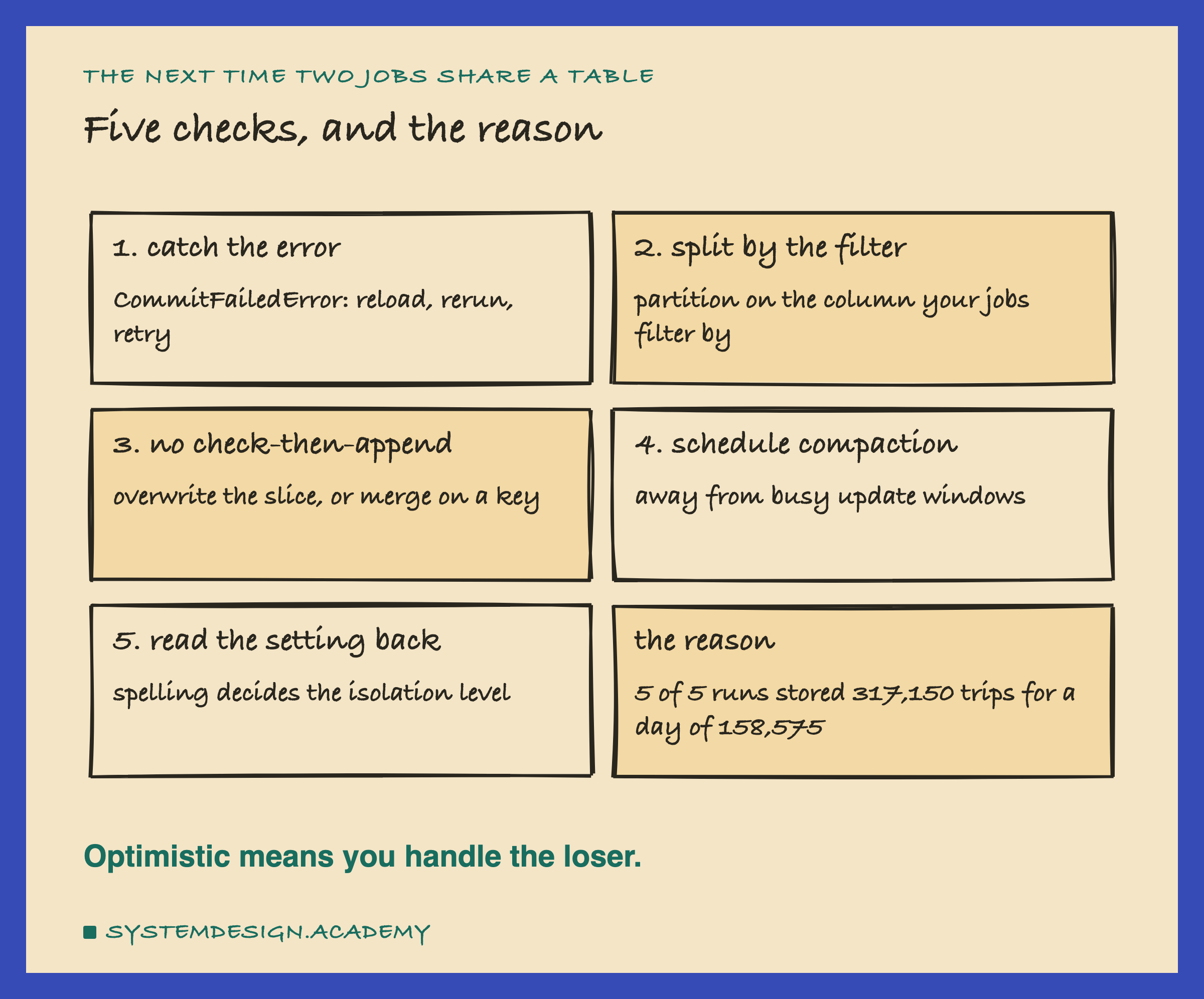
So far: the first writer to commit wins, and the loser gets an error, never a half change. Shared files cause clashes, partitions remove them, retries survive them, and a check in your own code can let duplicates in. These are the steps I would take on a real data platform, in order.
-
Catch the loser's error everywhere. Every job that updates, deletes or merges must catch
CommitFailedError, reopen the table, and run its whole change again. Never just retry the commit with the old data: the old data is what clashed. -
Keep the library's own retry on. Two appends always found their version number taken in my lab. With retries off, one failed in every run.
-
Partition by the column your jobs filter on. If daily jobs fix one day each, split by day. My two updates went from one failure per run to none, with the same code.
-
Never check in your code and then append. Write the condition into the operation: overwrite with a predicate, or MERGE on a key. Then the conflict checker can see the clash.
-
Run compaction when updates are quiet. Compaction and an update cannot both commit; one of them always loses. Schedule them apart.
-
Read your isolation setting back. If you set one, run the test from this lesson: an append, then an update. A setting the library cannot parse may do nothing at all, with no warning.
-
Clean up the losers' files. Vacuum removes the files of failed commits along with old versions.
When Optimistic Control Fits, and When It Does Not
Optimistic control fits when clashes are rare. That covers most lakehouse tables: many jobs append, a few jobs fix old data, and each job touches its own part of the table. Nobody waits, and a rare retry costs little.
It fits when writers run on many machines that cannot share a lock. Delta needs nothing between writers except storage that refuses to overwrite a file. There is no lock server to run or to fail.
It fits badly when many writers change the same files all the time. Each loser throws away its whole write and starts again. In my retry case, 20 changes took 35 attempts on a laptop. With dozens of writers on one hot table, most of the work can end up in the bin.
Use a database when many small changes hit the same rows all day, like account balances or seat bookings. Postgres locked single rows in my test and let different rows go through at once. A lakehouse table clashes on whole files.
Do not rely on the isolation level alone to protect a rule about your data. My check-then-append job broke the rule "one copy of each day" in every run, even under the strictest setting, because the check was outside the transaction. Only the way the job was written fixed it.
What This Lab Cannot Tell You
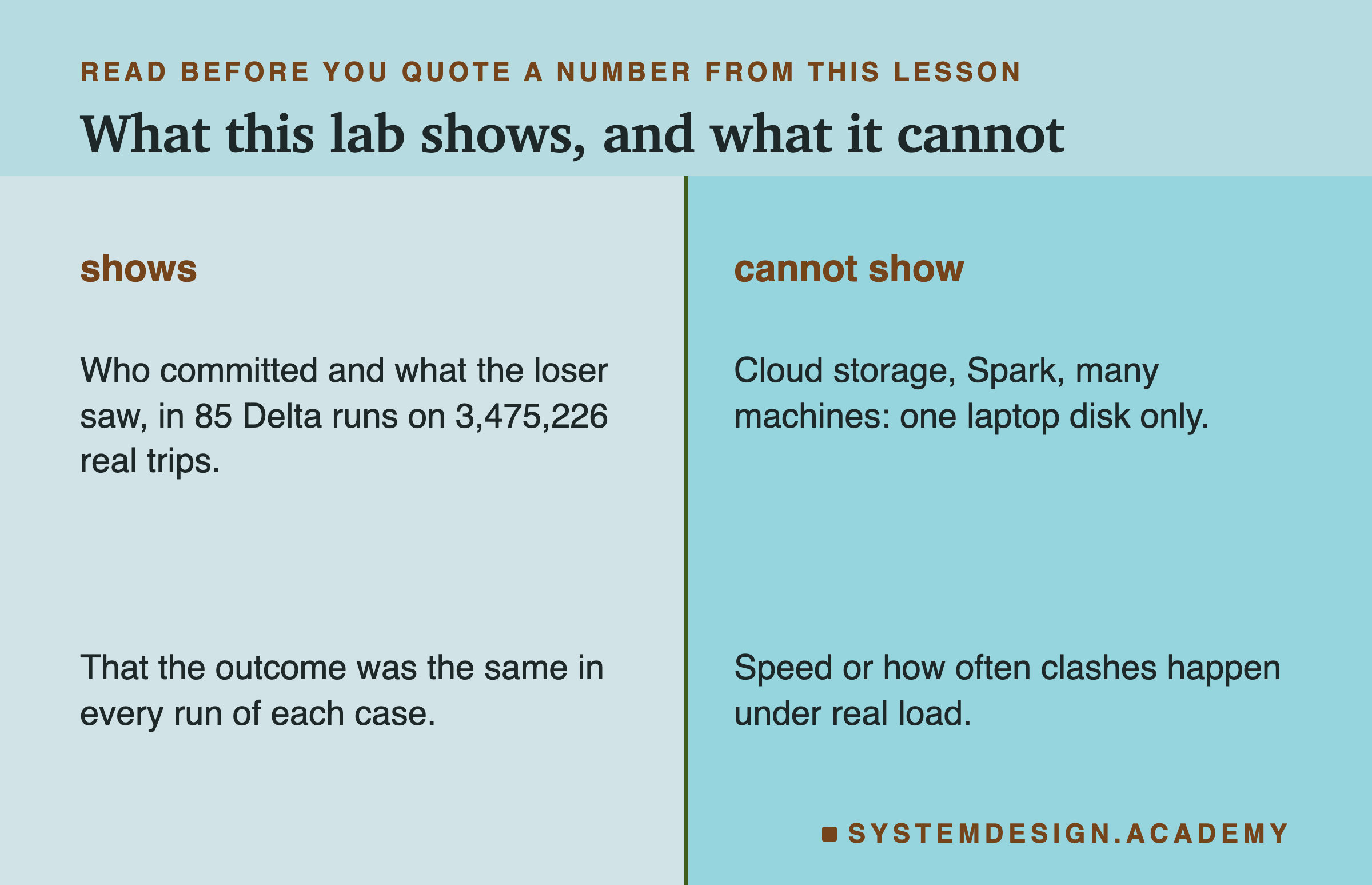
One library, one version. Everything about Delta here is deltalake 1.6.6. Delta's Spark library has its own conflict checker, its own default level and its own way of marking blind appends. The checks I describe are delta-rs's, read in its source, and other libraries may differ.
One disk. The lab ran on my laptop's own disk. On cloud storage, the commit depends on the storage service's own create-only write, which I did not test.
Two writers, mostly. Most cases had two writers and the retry case four. Many writers on one table make more conflicts and more retries, and I did not measure how many.
Five runs per case. Every case gave the same outcome in all 5 runs, but who won in the free races depended on timing. Read "5 of 5" as "every time I ran it", not as a rate.
The isolation spelling. The capital-W result is what delta-rs 1.6.6 did with that string. A later version may parse it differently or warn. Check your own version with the test, not with this lesson.
What to Do on Monday
If you take one thing to work on Monday, make it this. Find every job that writes to a shared lakehouse table, and ask two questions about each one. What happens when it loses a commit? And does it check the table in its own code before it appends?
A job with no answer to the first question will fail one day, when another job happens to run beside it. A job that says yes to the second can quietly store a day twice. Both are found by reading the job's code, before they show up in a report.
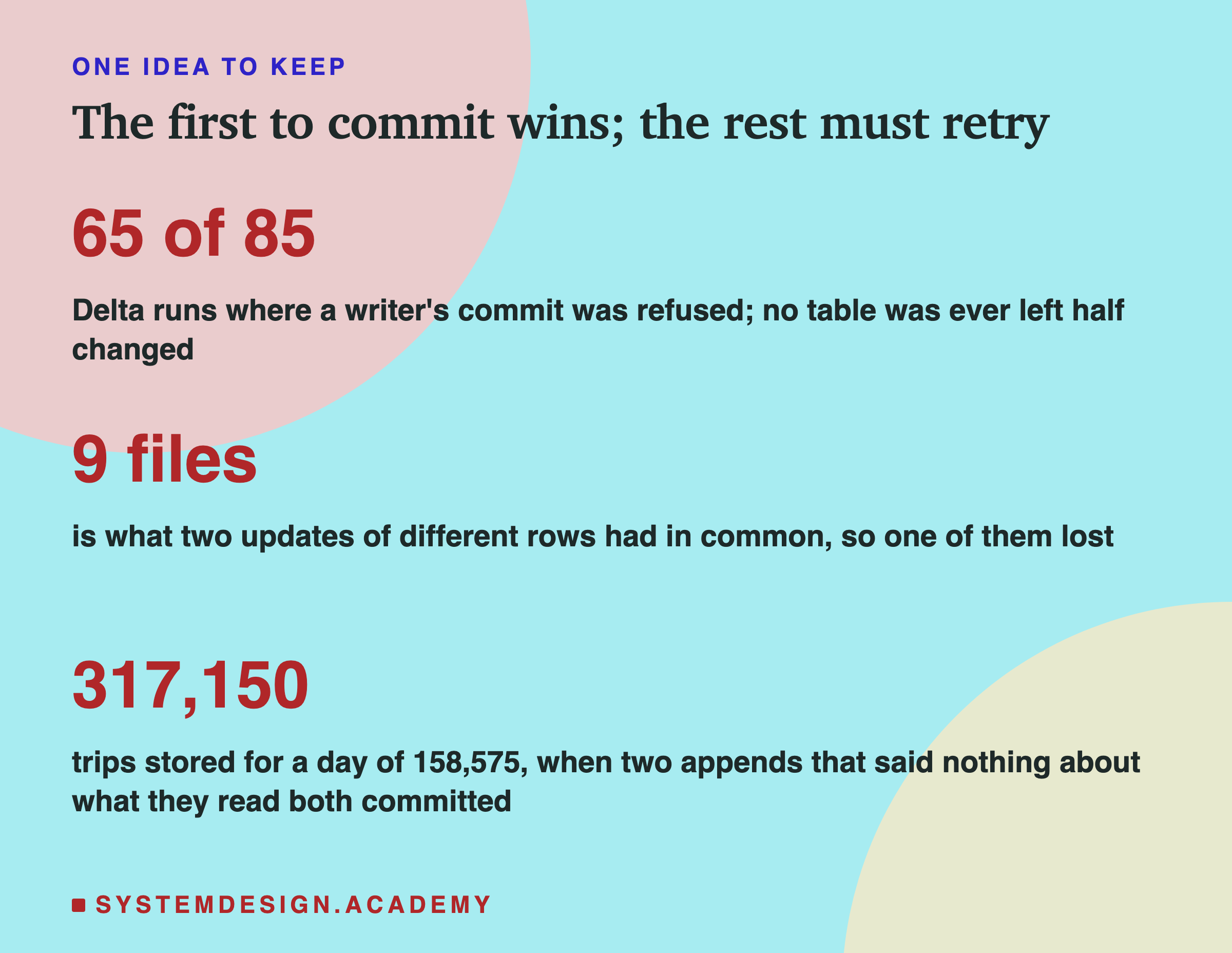
The one idea to keep: a lakehouse never locks. Every writer works on its own copy and races to pin the next version. The first one wins, and the rest must check, read the winner, and try again. The check sees files, not your intentions, so write your intentions into the operation.
Knowledge Check
Knowledge Check
4 questions - Score 80% to pass
Two writers updated different rows of the flat table, VendorID 1 and VendorID 2, at the same time. Why did one of them fail in every run?
What did the losing writer of an update race see, and what did it leave in the table?
A daily job checked whether 2025-02-14 was already loaded, then appended it. Started twice, it stored 317,150 trips for a day of 158,575. Why did no conflict stop it?
In delta-rs 1.6.6, when did an update commit after an append that it had not read?