The Chicken and Egg Problem at the Bottom of Every Network
Here is a problem with no obvious solution. A laptop joins a network. To send a message to anybody, it needs their address. To get an address of its own, it needs to ask a server. To ask the server, it needs the server's address.
It has none of these. It has not been told anything at all.
Broadcast is the answer, and it is the only answer: send a message addressed to everybody, on the assumption that whoever can help will notice. Every machine on the local network receives it, almost all of them ignore it, and one of them replies.
That sounds wasteful and it is. It is also the mechanism holding up the bottom of every network you have ever used, and it is worth understanding properly rather than as an analogy, because two of the failures it causes look identical and are not.
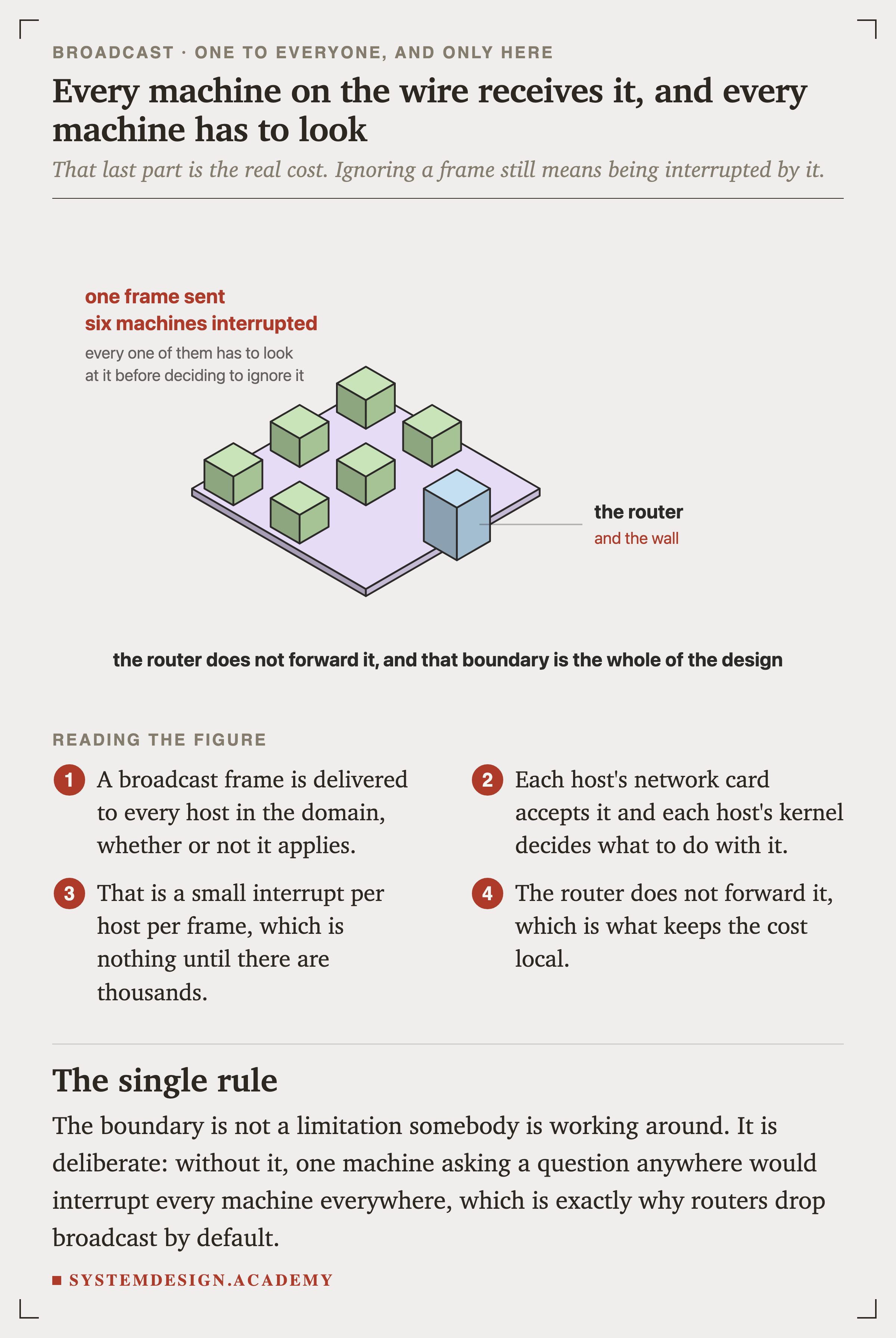
IsometricFigure 1. Every machine receives it, and every machine has to look
The cost of broadcast is not the . One small frame is nothing. The cost is that every machine's network card accepts it and every machine's kernel has to decide what to do with it.
That is a tiny interrupt per host per frame, which is nothing at all until there are several thousand hosts.
Where the Broadcast Address Comes From
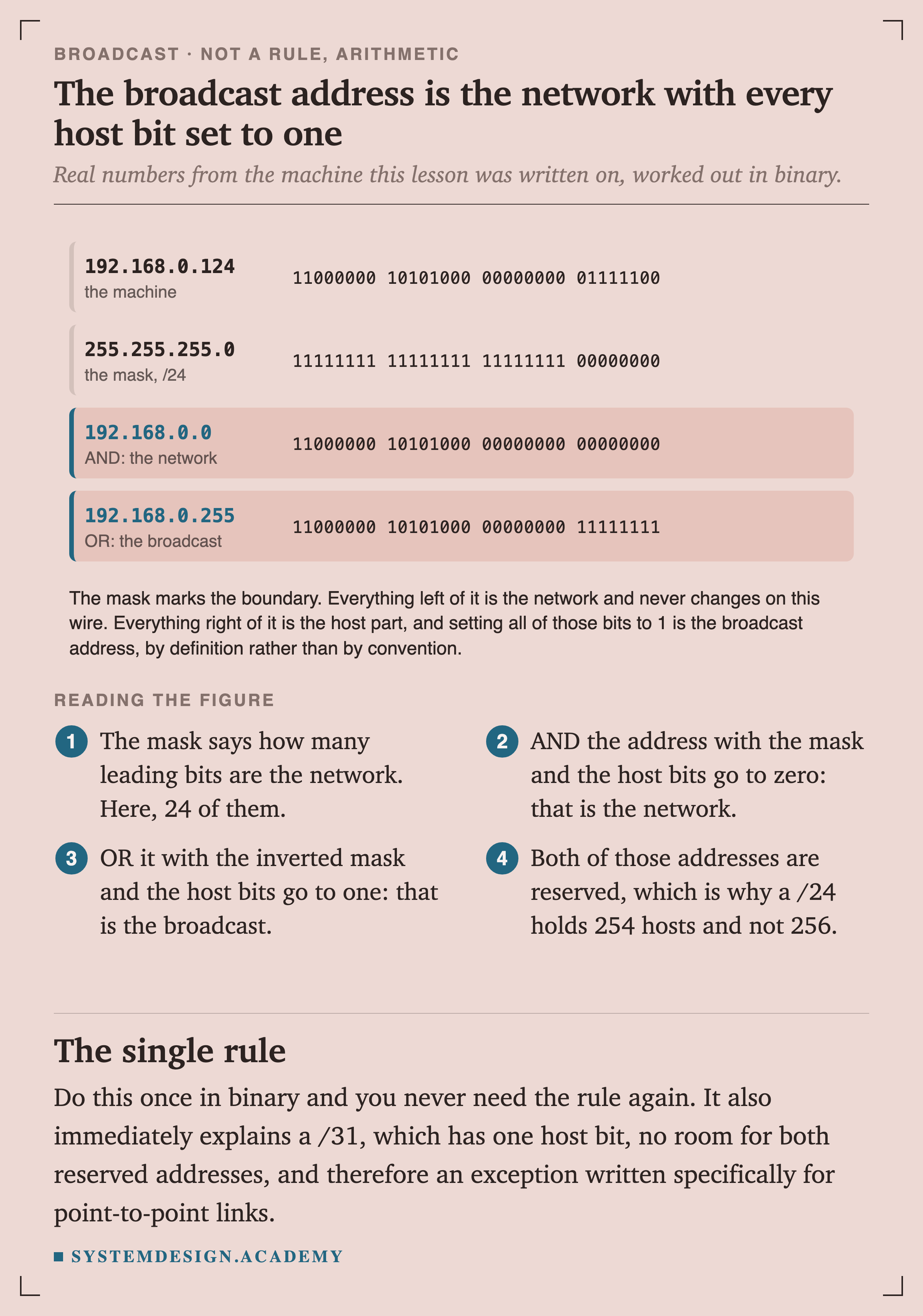
You will often see "the broadcast address is the last address in the subnet". That is true, and it is a rule to memorise rather than something to understand. It is actually arithmetic, and doing it once removes the need to remember it ever again.
FigureFigure 2. The broadcast address is the network with every host bit set to one
The mask says how many leading bits are the network part. AND the address with the mask and the host bits go to zero, which is the network itself. OR it with the inverted mask and the host bits go to one, which is the broadcast.
Both of those addresses are reserved, which is why a /24 holds 254 usable hosts rather than 256.
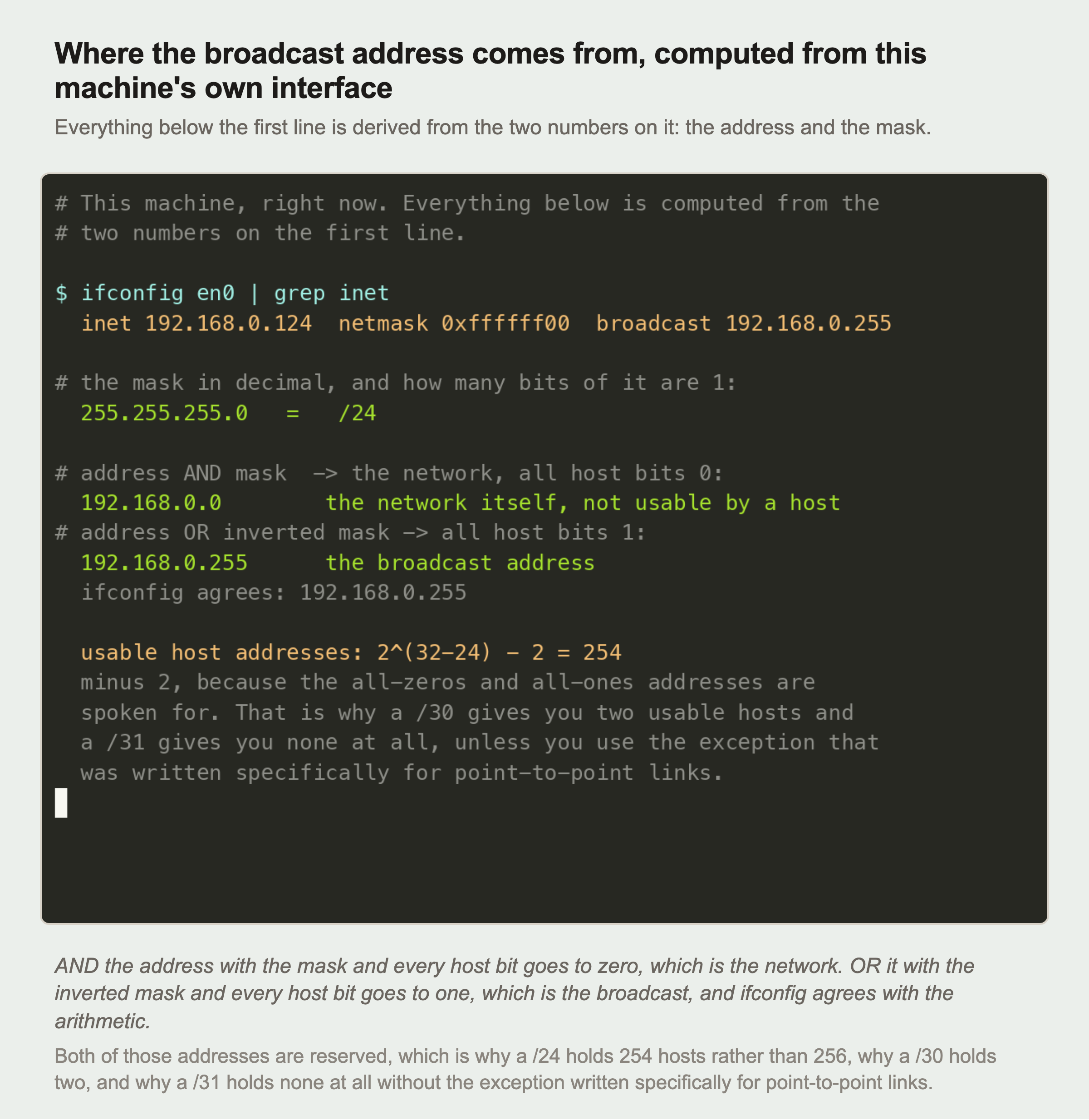
That arithmetic is not a claim. It can be checked on any machine in about twenty seconds.
RecordedFigure 3. Computed from a real interface, and ifconfig agrees
Everything below the first line is derived from the two numbers on it.
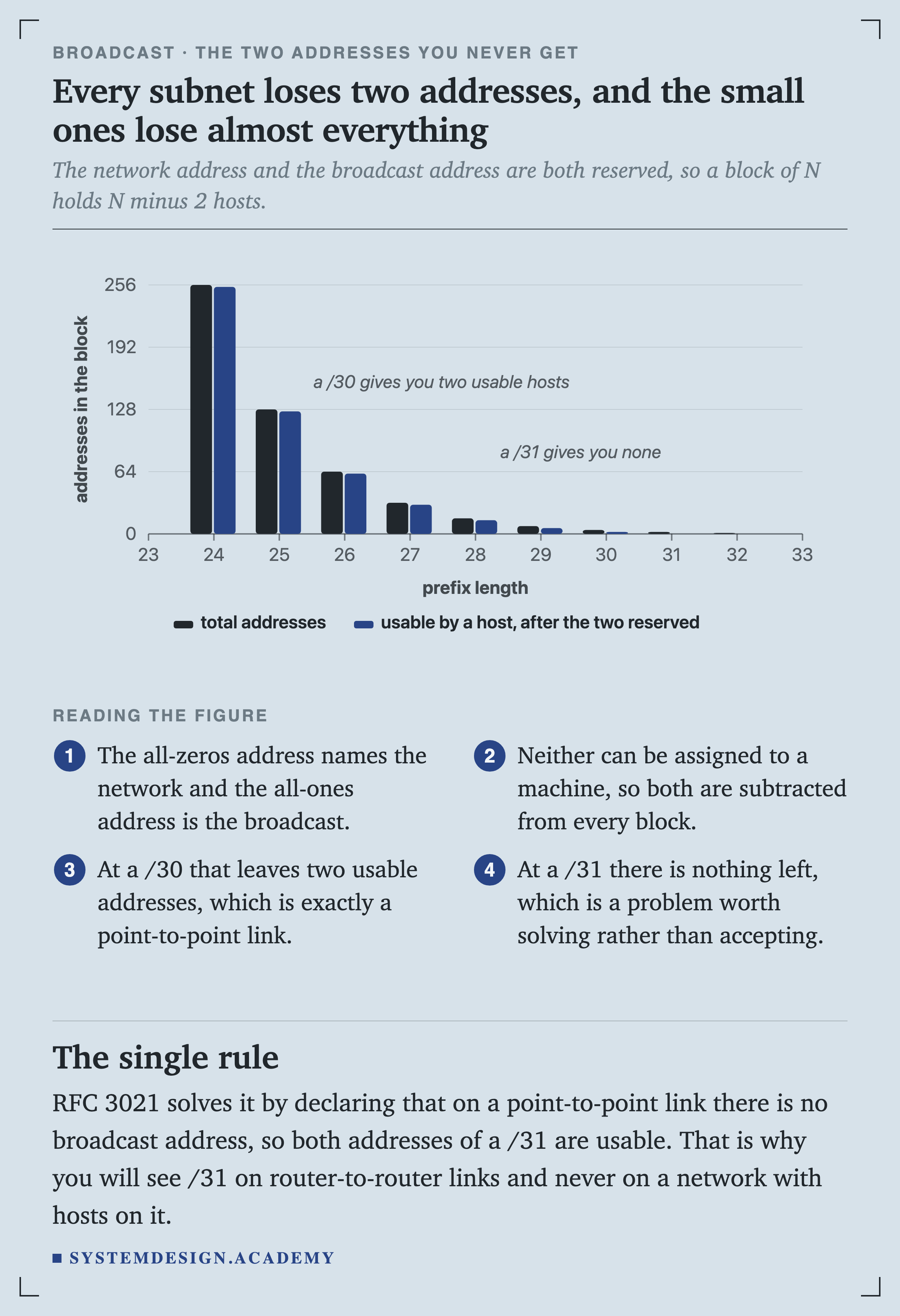
The last part is where this matters in practice. A /30 leaves two usable addresses, which is exactly a point-to-point link between two routers. A /31 leaves none at all.
ChartFigure 4. Every subnet loses two addresses, and the small ones lose almost everything
The two reserved addresses are a fixed cost regardless of how large the block is, which means they are invisible on a /16 and fatal on a /31.
RFC 3021 resolves the /31 case by declaring that a point-to-point link has no broadcast address at all, so both of its addresses become usable.
That is why you will see a /31 on router-to-router links and never on a network with hosts on it.
How a Machine Joins a Network
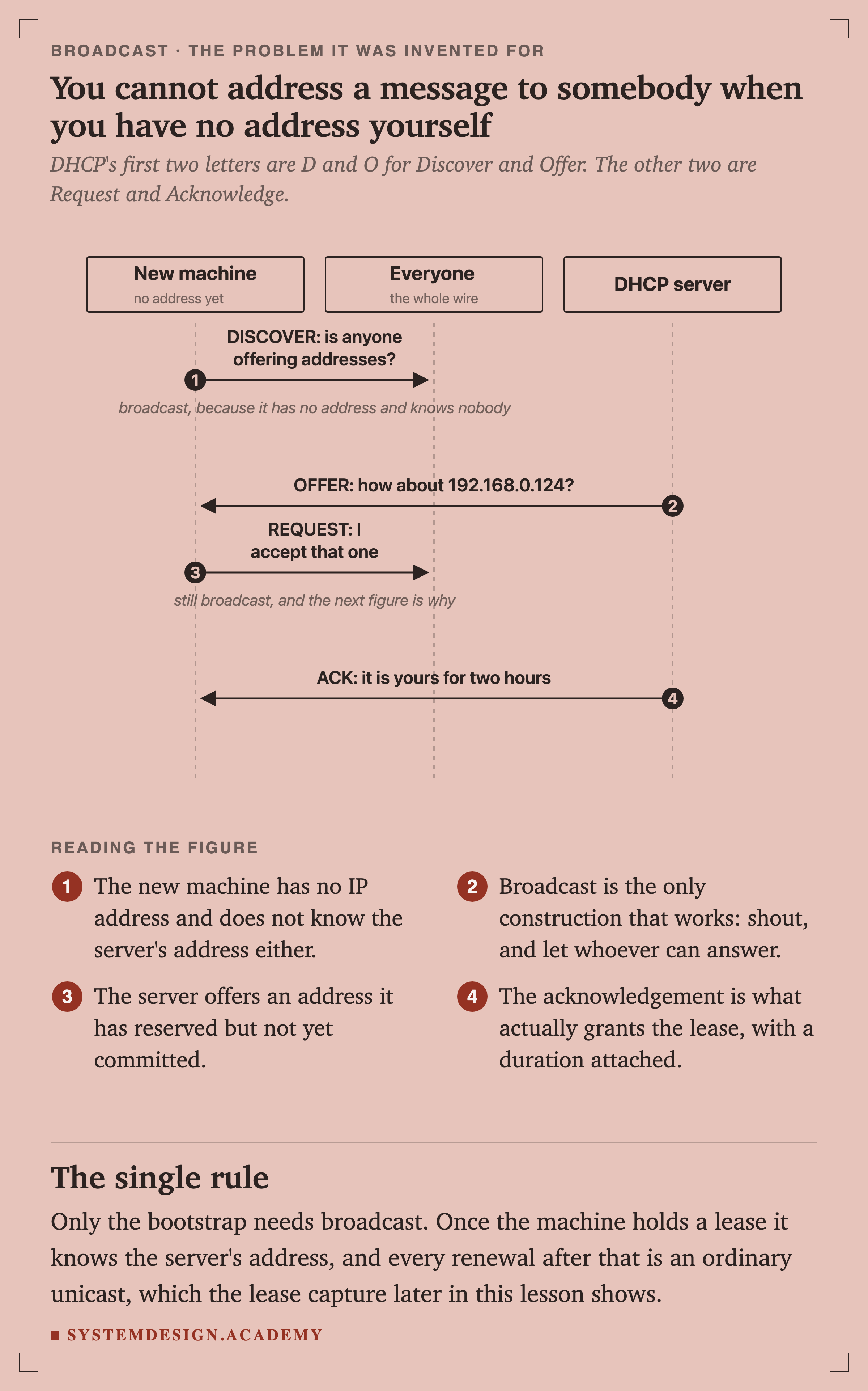
SequenceFigure 5. You cannot address a message to somebody when you have no address yourself
Discover, Offer, Request, Acknowledge. The first and third messages are broadcast, and the reason for the first is obvious.
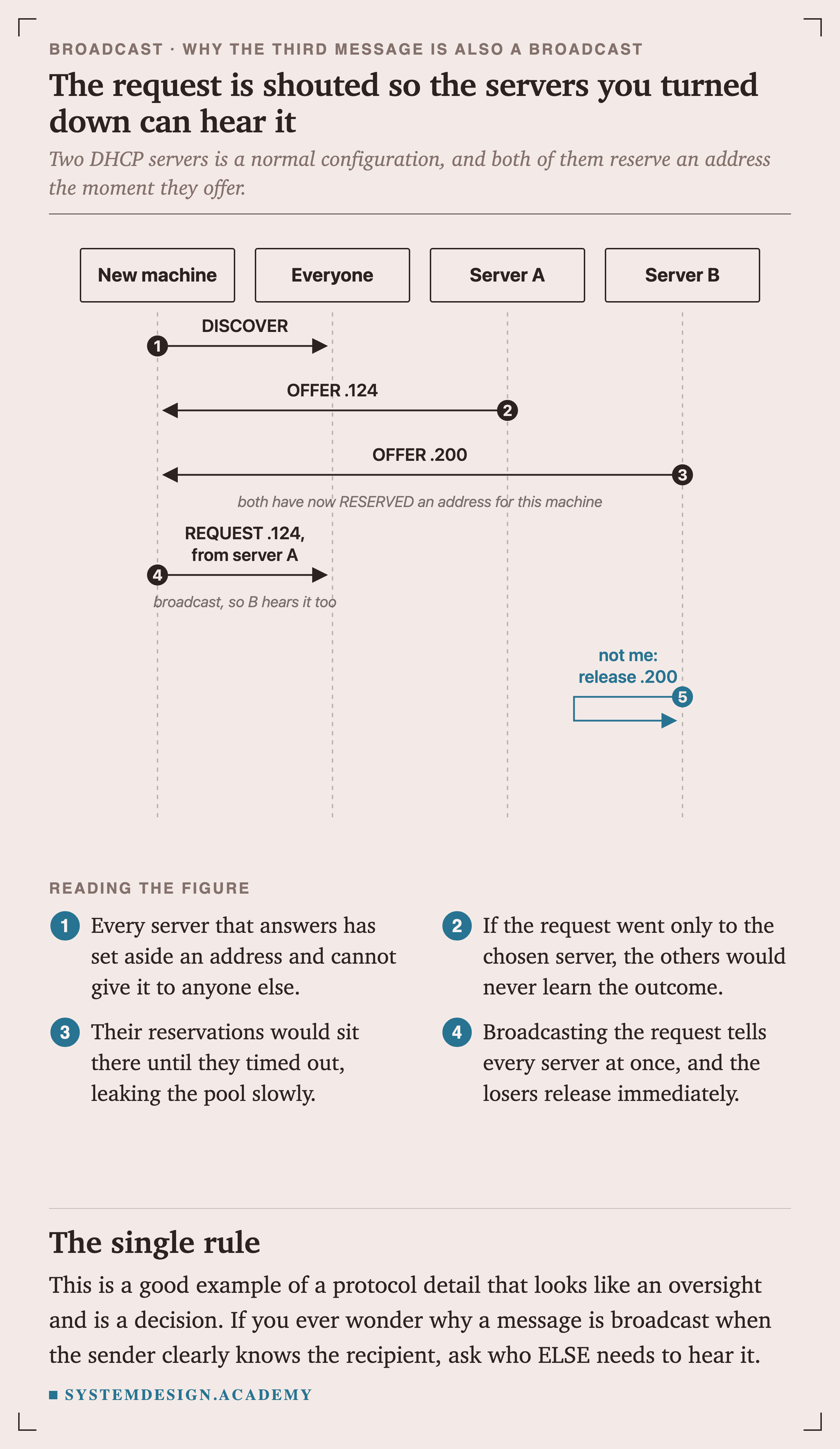
The reason for the third is not, and it is the more interesting one.
SequenceFigure 6. The request is shouted so the servers you turned down can hear it
Two DHCP servers on one network is a normal, deliberate configuration, and every server that answers has set aside an address it can no longer give to anybody else.
If the request went only to the chosen server, the other reservations would sit there until they timed out, leaking the pool a little at a time.
What Is Actually Shouting on a Quiet Network
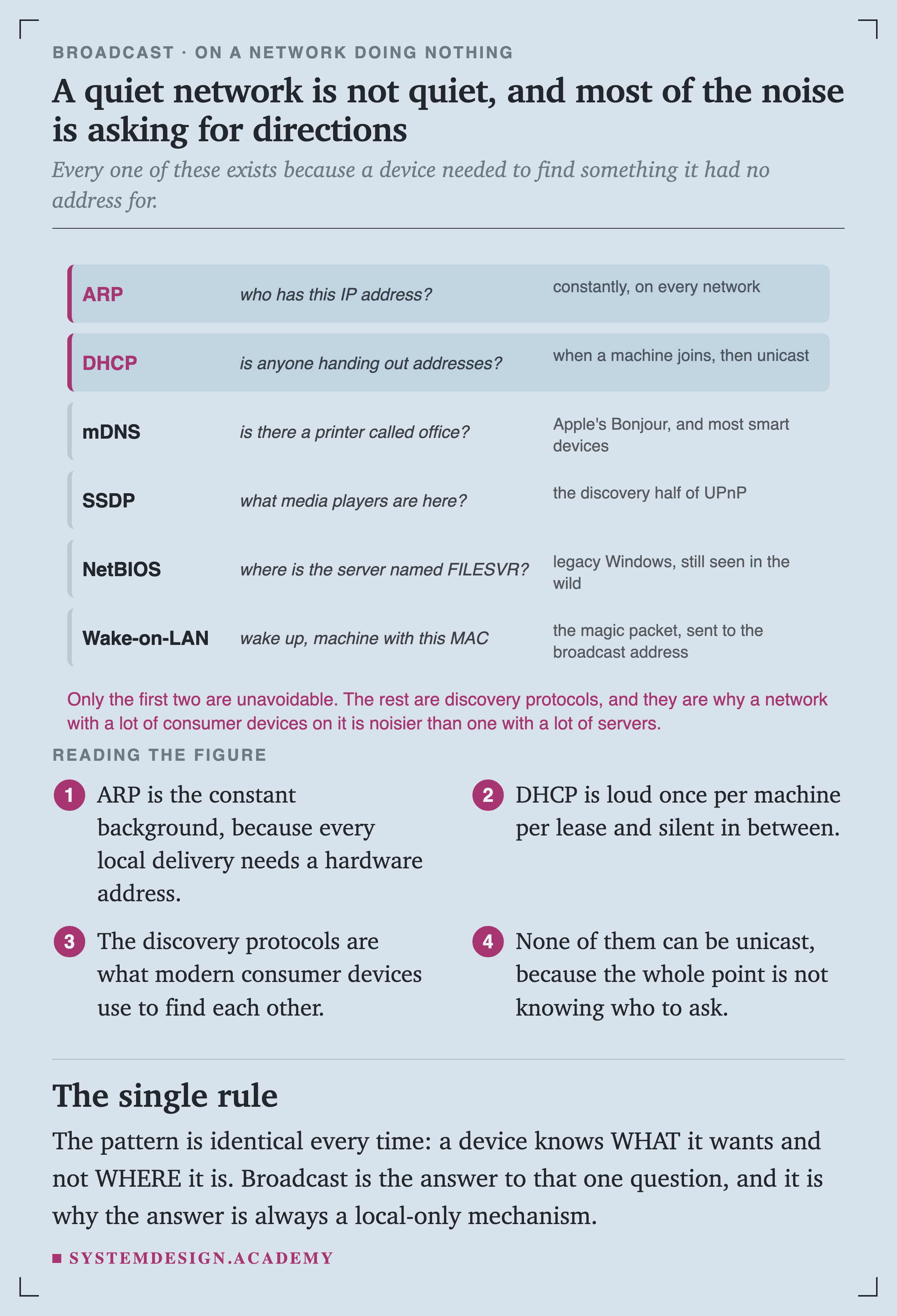
FigureFigure 8. A quiet network is not quiet, and most of the noise is asking for directions
Every one of these exists for the same reason: a device knows what it wants and not where it is.
None of them can be unicast, because the entire point is not knowing who to ask.
Notice the shape. Broadcast is the answer to exactly one question, and once a device has an answer it never needs to ask again until something changes.
The last hop of every unicast packet starts with a broadcast
The previous lesson covered ARP: before your machine can send anything to anybody on the local wire, it has to ask the whole network who owns that IP address. That question is a broadcast.
So the very first step of a unicast conversation is a broadcast, which is worth remembering when you read that broadcast is a legacy concept you will never touch.
Anyone can answer
Where It Stops, and Why That Matters
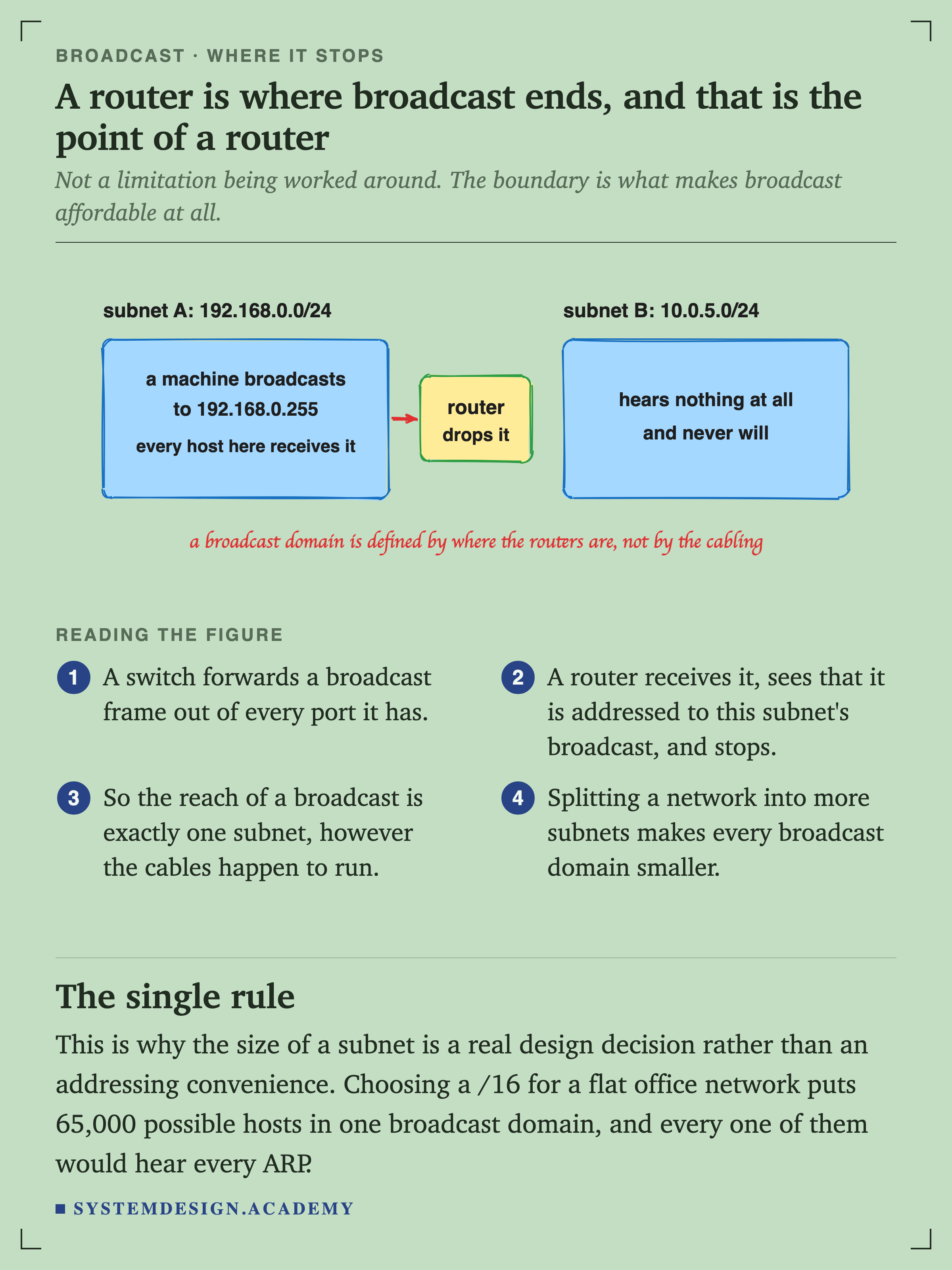
SketchFigure 10. A router is where broadcast ends, and that is the point of a router
A switch forwards a broadcast frame out of every port it has. A router receives it, sees that it is addressed to this subnet's broadcast address, and stops.
So the reach of a broadcast is exactly one subnet, regardless of how the cables happen to run.
That boundary makes the size of a subnet a real design decision rather than an addressing convenience. Choosing a /16 for a flat office network puts 65,000 possible hosts in one broadcast domain, and every one of them would hear every ARP request from every other.
And you can move the boundary without touching a cable
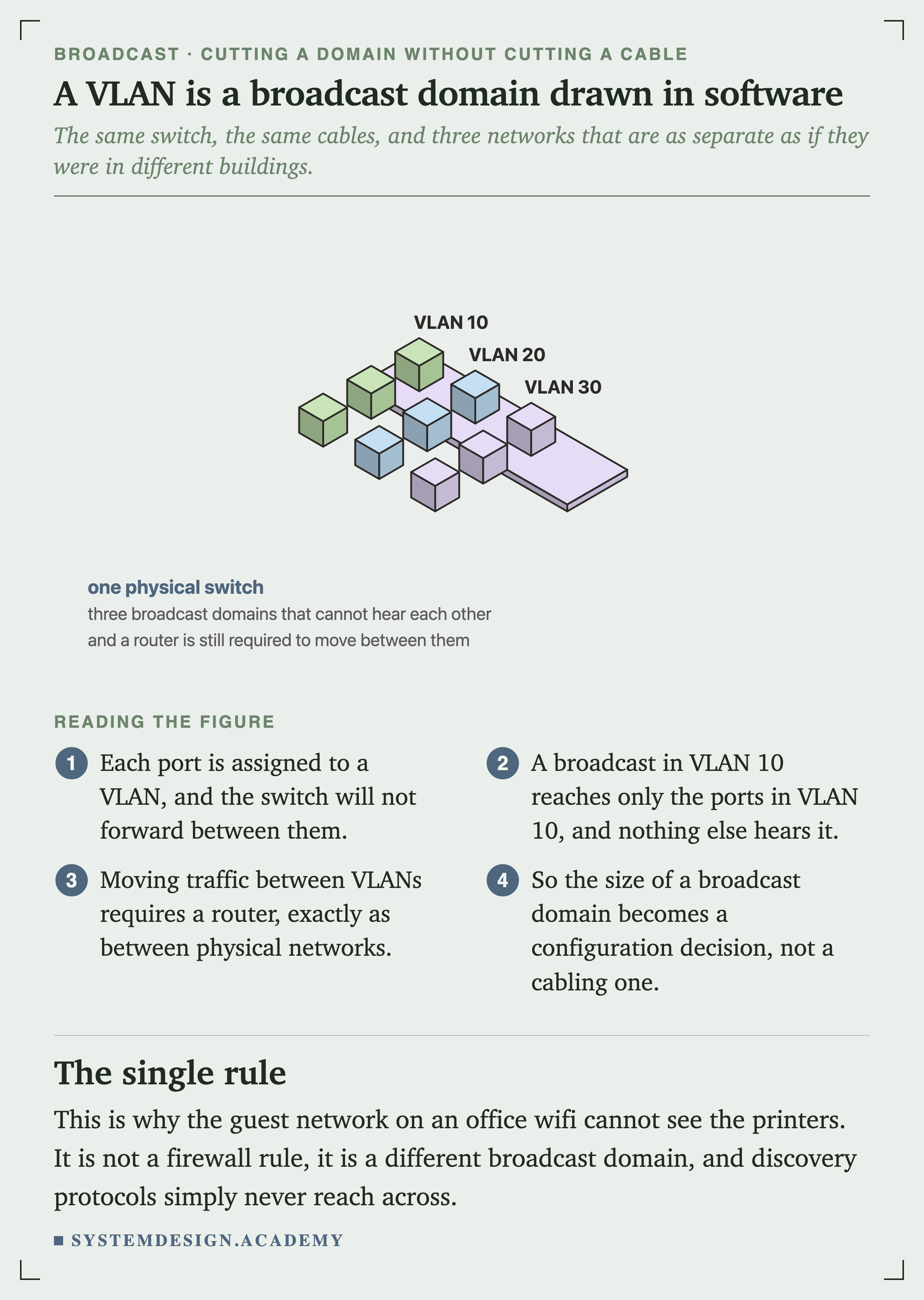
IsometricFigure 11. A VLAN is a broadcast domain drawn in software
Each port is assigned to a VLAN and the switch will not forward between them. A broadcast in VLAN 10 reaches only the ports in VLAN 10.
Two Failures That Are Not the Same Thing
This is the part most treatments get wrong, and the two failures have different causes, different symptoms and different fixes.
The gentle one: overhead
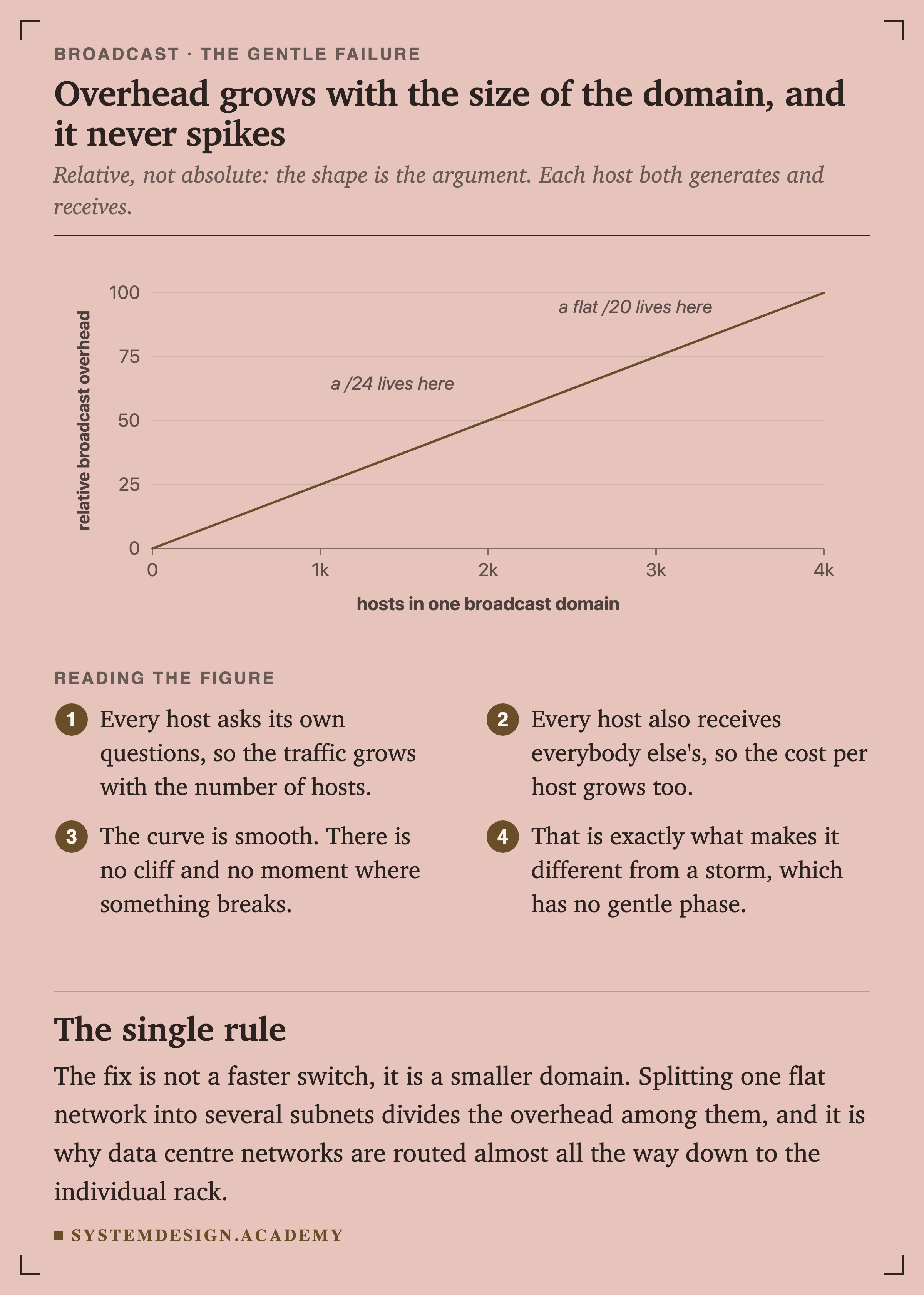
ChartFigure 13. Overhead grows with the size of the domain, and it never spikes
Every host asks its own questions, so the traffic grows with the number of hosts. Every host also receives everybody else's, so the cost per host grows too.
The curve is smooth. There is no cliff and no moment where something breaks.
That is a real cost on a large flat network and it degrades gently. The fix is not a faster switch, it is a smaller domain.
The catastrophic one: a storm
A broadcast storm is not "a lot of broadcast traffic". It is a specific failure with a specific cause, and calling ordinary overhead a storm sends you looking for the wrong thing.
Sketch
What Replaced It
IPv6 removed broadcast on purpose
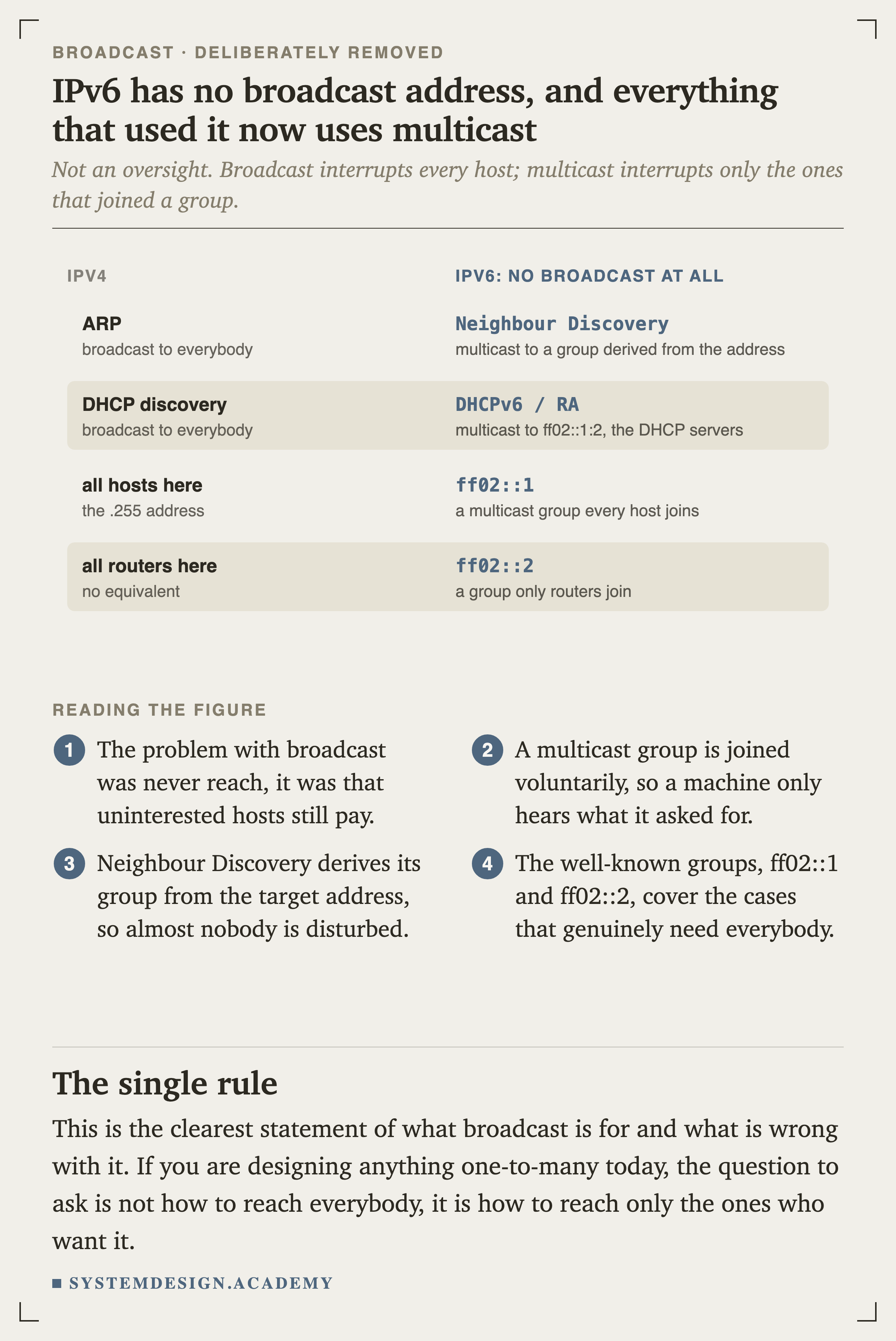
FigureFigure 17. IPv6 has no broadcast address, and everything that used it now uses multicast
The problem with broadcast was never its reach. It was that uninterested hosts still pay, and every one of them is interrupted.
A multicast group is joined voluntarily, so a machine only hears what it asked for. Neighbour Discovery derives its group from the target address, so almost nobody is disturbed by a lookup that does not concern them.
That is the clearest statement of what broadcast is for and what is wrong with it. If you are designing anything one-to-many today, the question is not how to reach everybody. It is how to reach only the ones who want it.
And IPv4 quietly did the same thing
Architecture
When Broadcast Is the Answer
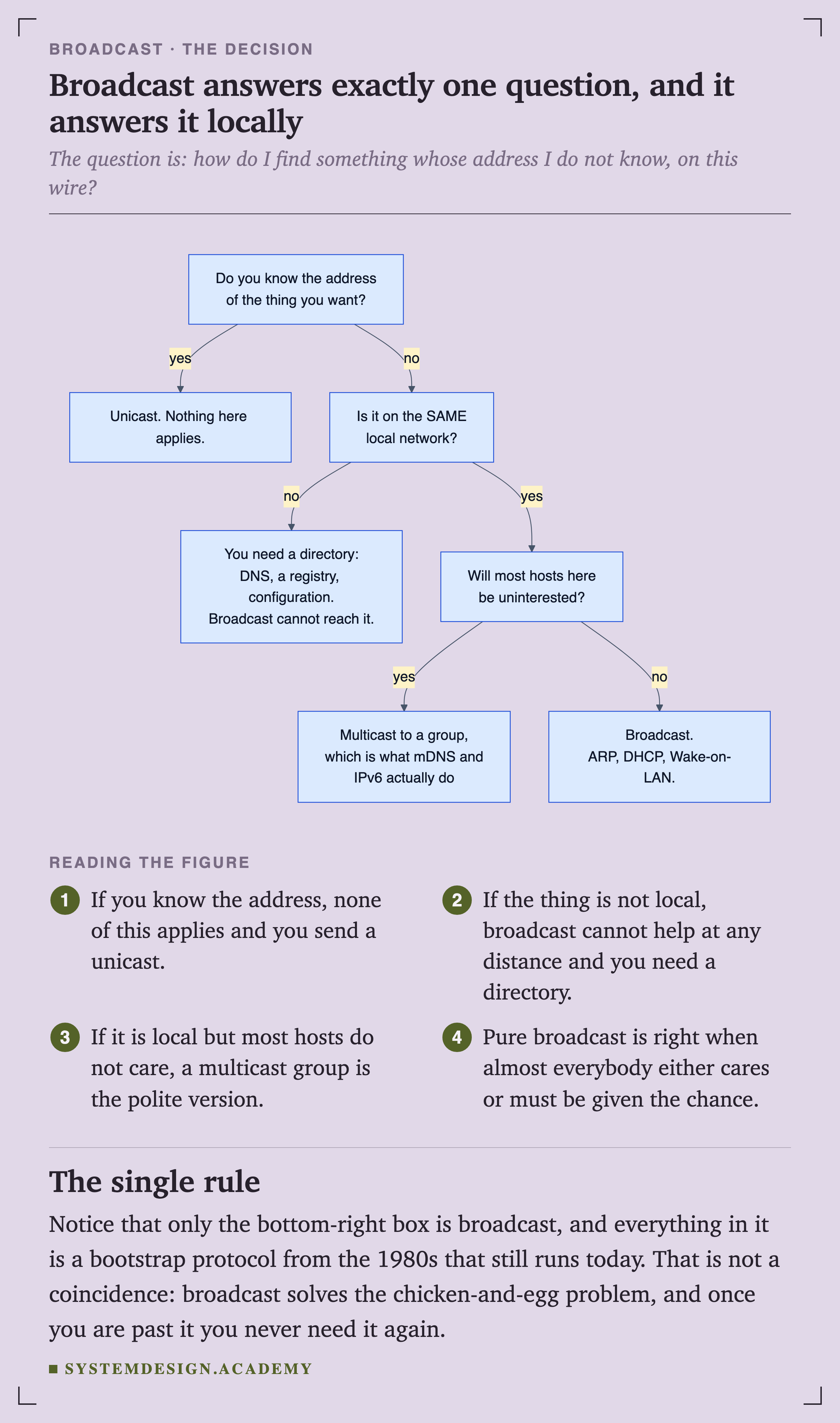
FlowchartFigure 21. Broadcast answers exactly one question, and it answers it locally
The question broadcast answers is: how do I find something whose address I do not know, on this wire?
Only the bottom-right box is broadcast, and everything in it is a bootstrap protocol from the 1980s that still runs today.
That is not a coincidence. Broadcast solves the chicken-and-egg problem, and once you are past it you never need it again.
Broadcast is right when: the address is genuinely unknown, the target is on this network, and either everybody cares or everybody must be given the chance to answer.
Broadcast is wrong when: the target is on another network at any distance, most hosts are uninterested and a multicast group would do, or you already know the address and are broadcasting out of habit.
And a warning about the words. If somebody says the network is having a broadcast storm, ask whether they mean a switching loop or ordinary overhead on a large flat network. Those are different problems. One is fixed by spanning tree or by finding the extra cable, and the other is fixed by making the subnets smaller.
Quick Check
Knowledge Check
6 questions - Score 80% to pass
Q1
A new laptop joins your office wifi with no IP address. How does it find the DHCP server?
Q2
In DHCP, the client already knows which server it wants by the time it sends REQUEST. Why is that message still a broadcast?
Q3
Your network is a flat /16 with about 3,000 machines and it feels sluggish. A colleague says you are having a broadcast storm. Are they right?
Q4
Why does a /31 subnet normally give you zero usable host addresses?
Q5
Your phone cannot find the Chromecast, even though both are on the office wifi. What should you check first?
Q6
Why did IPv6 remove broadcast entirely?
This is worth generalising. When you see a protocol broadcast a message to a recipient it clearly already knows, the question to ask is not why it does not use unicast. It is: who else needs to hear this?
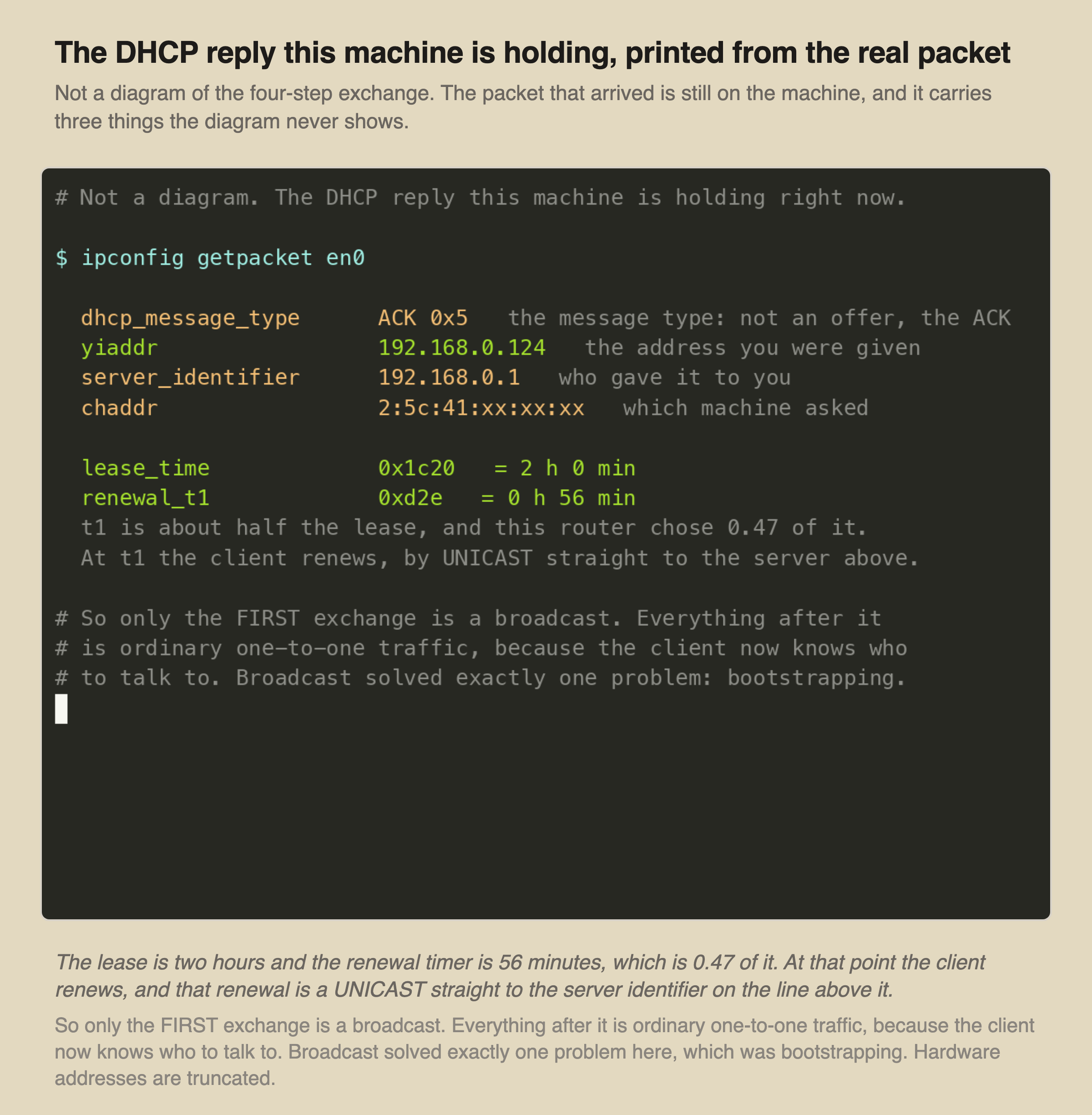
The packet that arrives at the end of that exchange is still on your machine, and it can be printed.
RecordedFigure 7. The lease this machine is actually holding
Three things here are absent from every four-arrow DHCP diagram: how long the lease lasts, when the client will try to renew it, and the fact that the renewal is a unicast.
Only the first exchange is a broadcast. Everything after it is ordinary one-to-one traffic, because by then the client knows who to talk to.
Broadcast solved exactly one problem here, and it was bootstrapping.
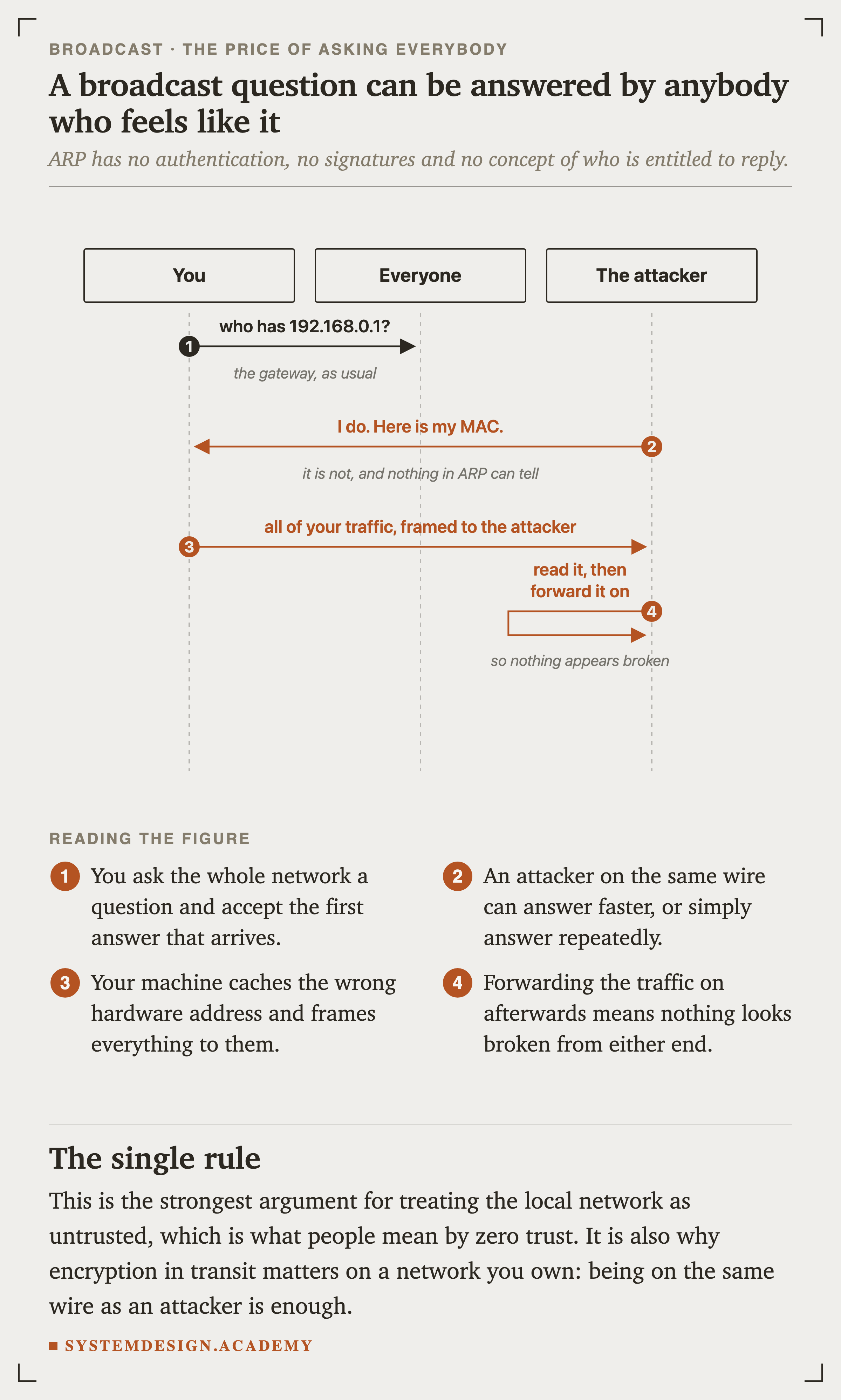
SequenceFigure 9. A broadcast question can be answered by anybody who feels like it
ARP has no authentication, no signatures and no concept of who is entitled to reply. You ask the network a question and accept the first answer that arrives.
Forwarding the traffic on afterwards means nothing looks broken from either end.
This is the strongest practical argument for treating the local network as untrusted, which is most of what people mean by zero trust. It is also why encryption in transit matters on a network you own outright: being on the same wire as an attacker is enough.
Moving traffic between VLANs requires a router, exactly as between physically separate networks.
This is why the guest network on an office wifi cannot see the printers. It is not a firewall rule and there is nothing to troubleshoot in the app: it is a different broadcast domain, so the discovery packet never arrives.
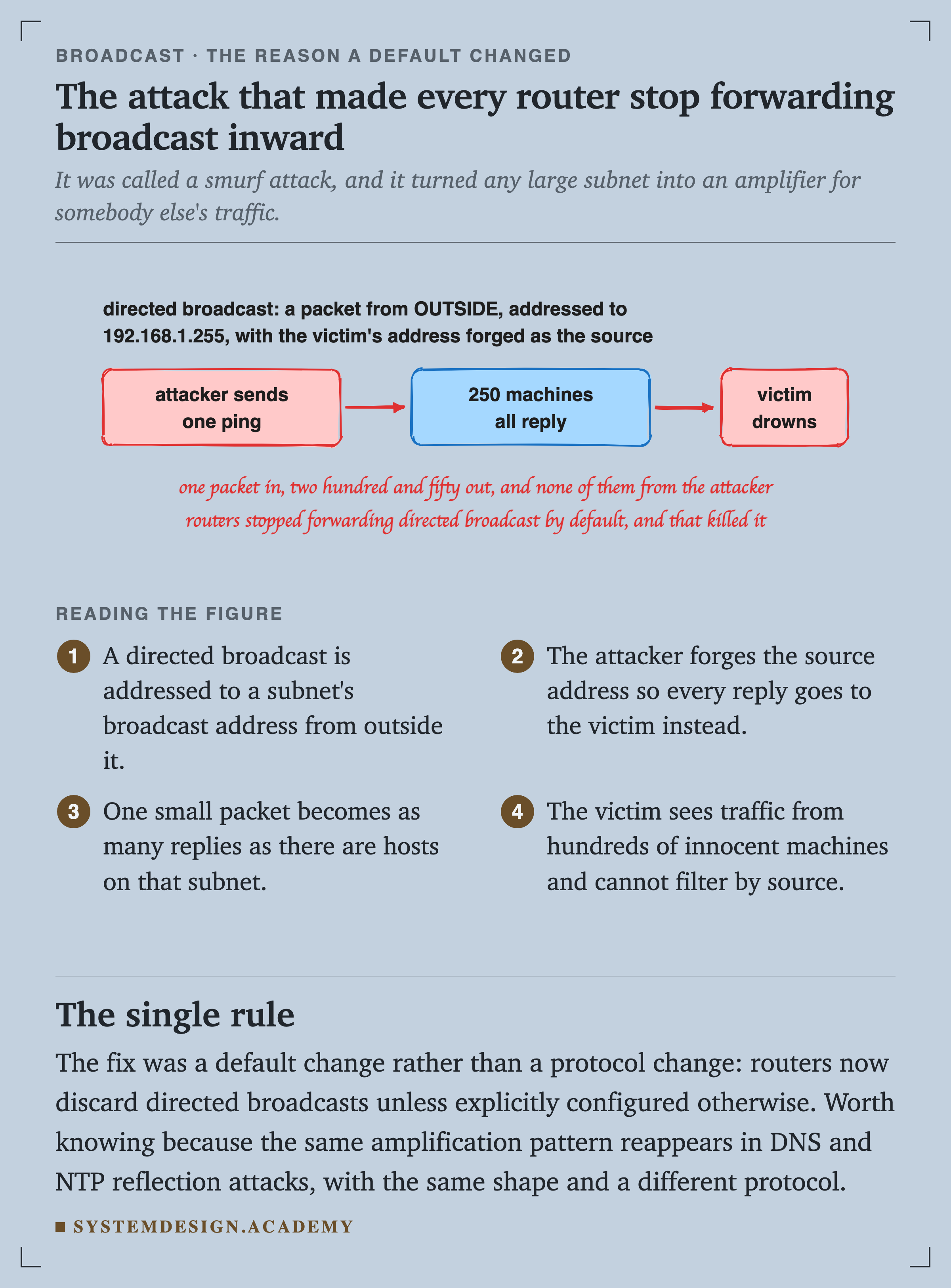
Shouting into somebody else's network
SketchFigure 12. The attack that made every router stop forwarding broadcast inward
A directed broadcast is a packet addressed to a subnet's broadcast address, sent from outside that subnet. The attacker forges the source so every reply goes to the victim instead.
The victim sees traffic from hundreds of innocent machines and cannot filter it by source, because none of the sources is lying.
The fix was a default change rather than a protocol change: routers now discard directed broadcasts unless somebody explicitly configures otherwise. Worth knowing because the same amplification pattern reappears in and NTP reflection attacks, with an identical shape and a different protocol.
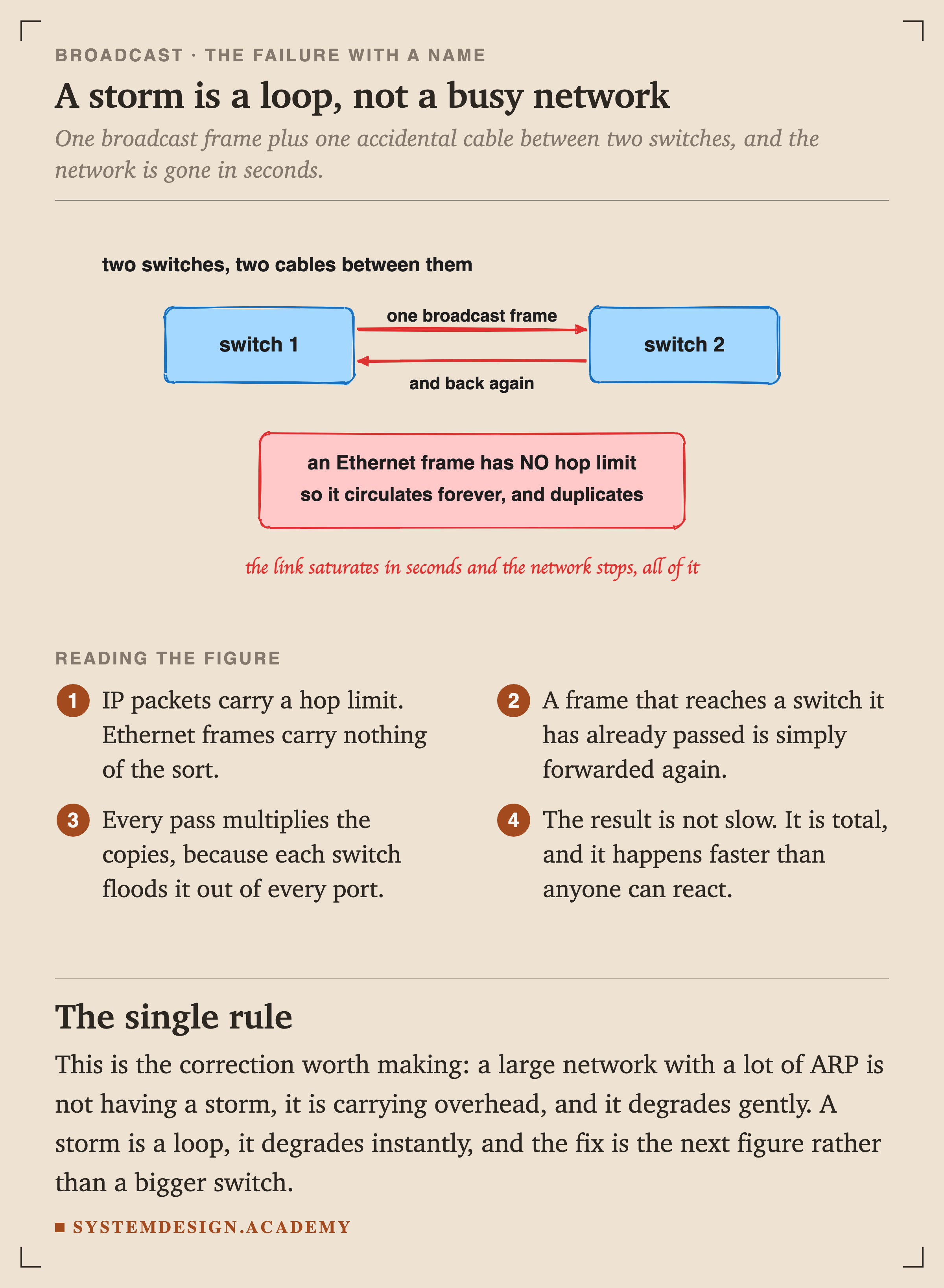
Figure 14. A storm is a loop, not a busy network
IP packets carry a hop limit. Ethernet frames carry nothing of the sort, so a frame that reaches a switch it has already passed is simply forwarded again.
Every pass multiplies the copies, because each switch floods it out of every port. The result is not slow, it is total, and it happens faster than anyone can react.
Two switches and one accidental extra cable is enough. That is why an entire protocol exists to prevent it.
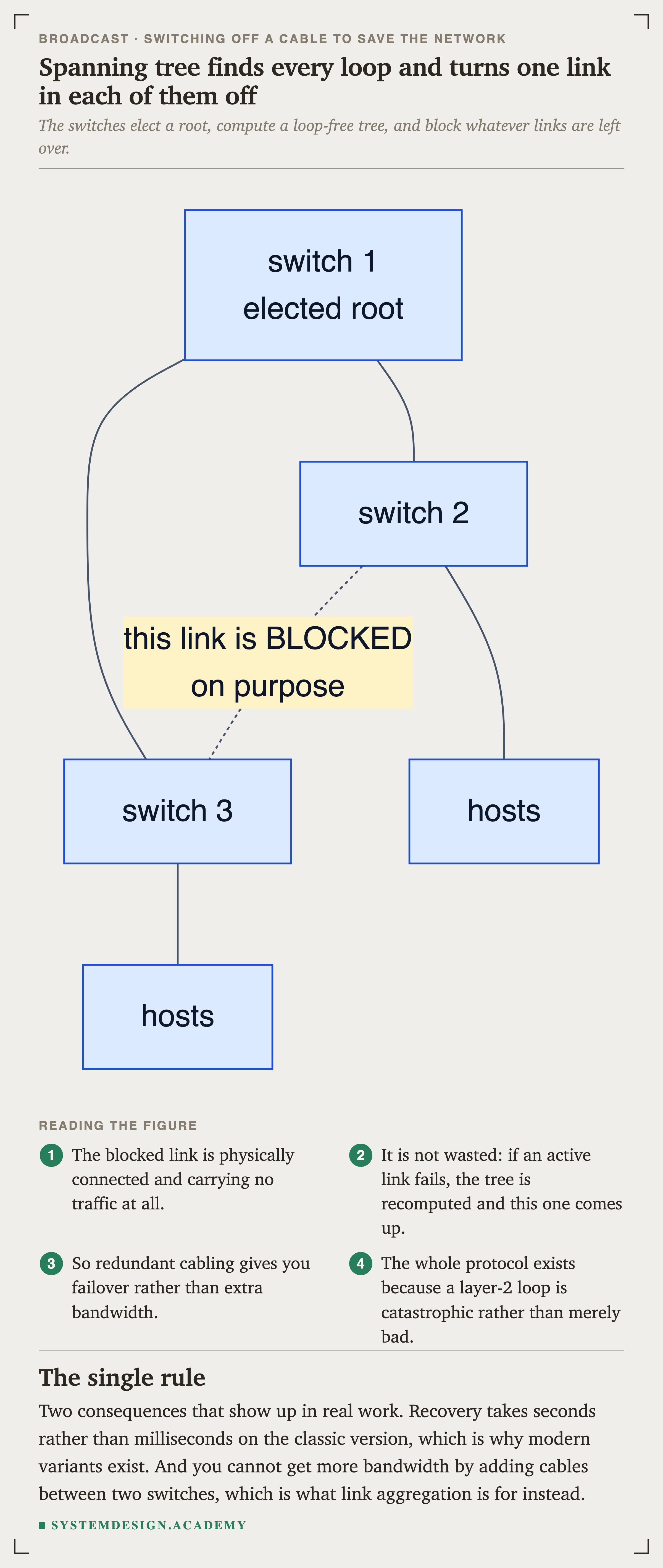
FlowchartFigure 15. Spanning tree finds every loop and turns one link in each of them off
The switches elect a root, compute a loop-free tree, and block whatever links are left over. The blocked link is physically connected and carrying nothing at all.
It is not wasted: if an active link fails, the tree is recomputed and the blocked one comes up.
Two consequences show up in real work. Recovery on the classic version takes seconds rather than milliseconds, which is why faster variants exist. And you cannot get more by adding a second cable between two switches, because one of them will be blocked. Link aggregation is the tool for that instead.
And one thing that looks like broadcast and is not
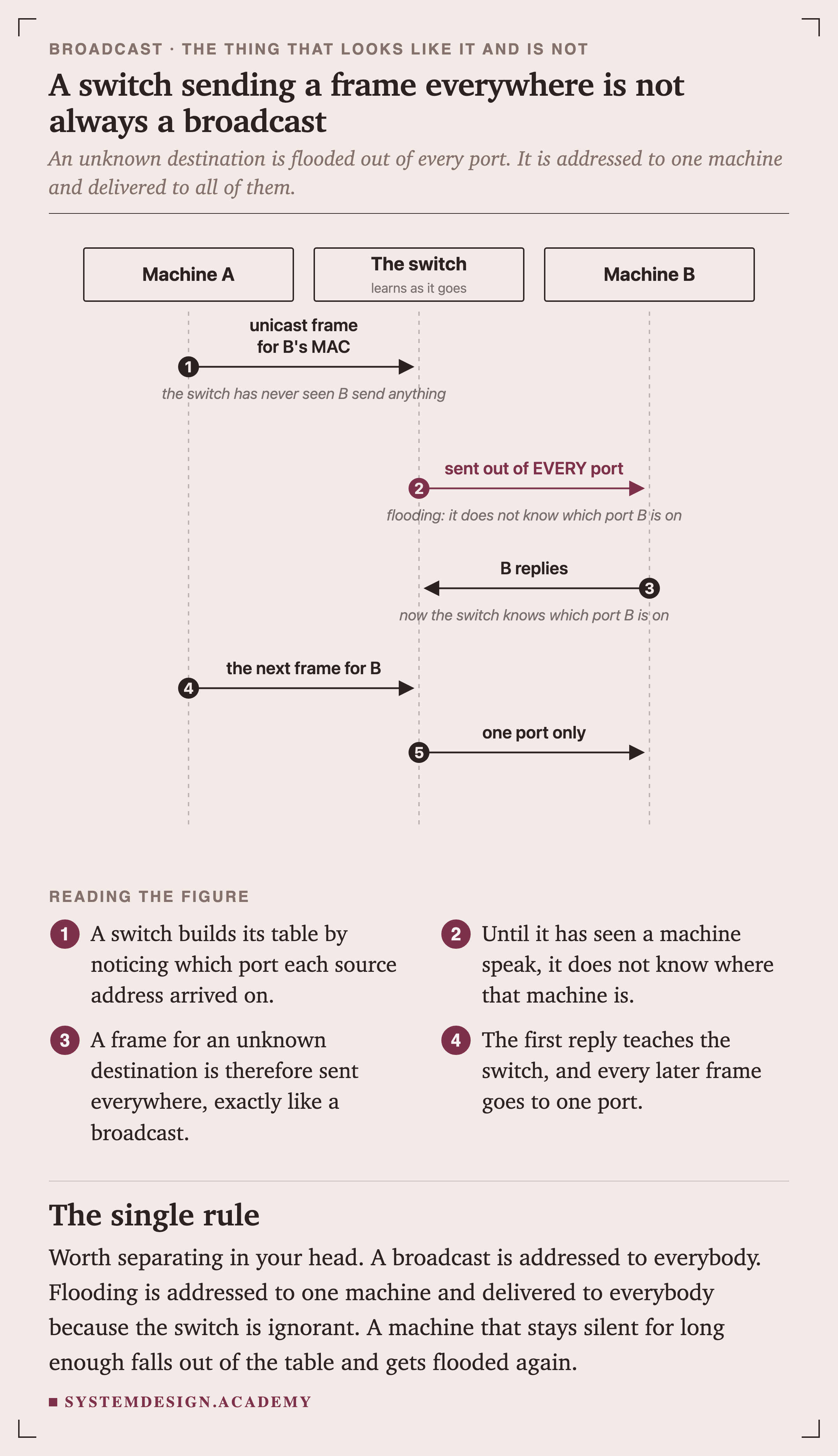
SequenceFigure 16. A switch sending a frame everywhere is not always a broadcast
A switch builds its table by noticing which port each source address arrives on. Until it has heard a machine speak, it does not know where that machine is.
A frame for an unknown destination is therefore sent out of every port, which looks exactly like a broadcast on the wire.
Worth separating clearly in your head. A broadcast is addressed to everybody. Flooding is addressed to one machine and delivered to everybody because the switch is ignorant. A machine that stays silent long enough falls out of the table and starts getting flooded again.
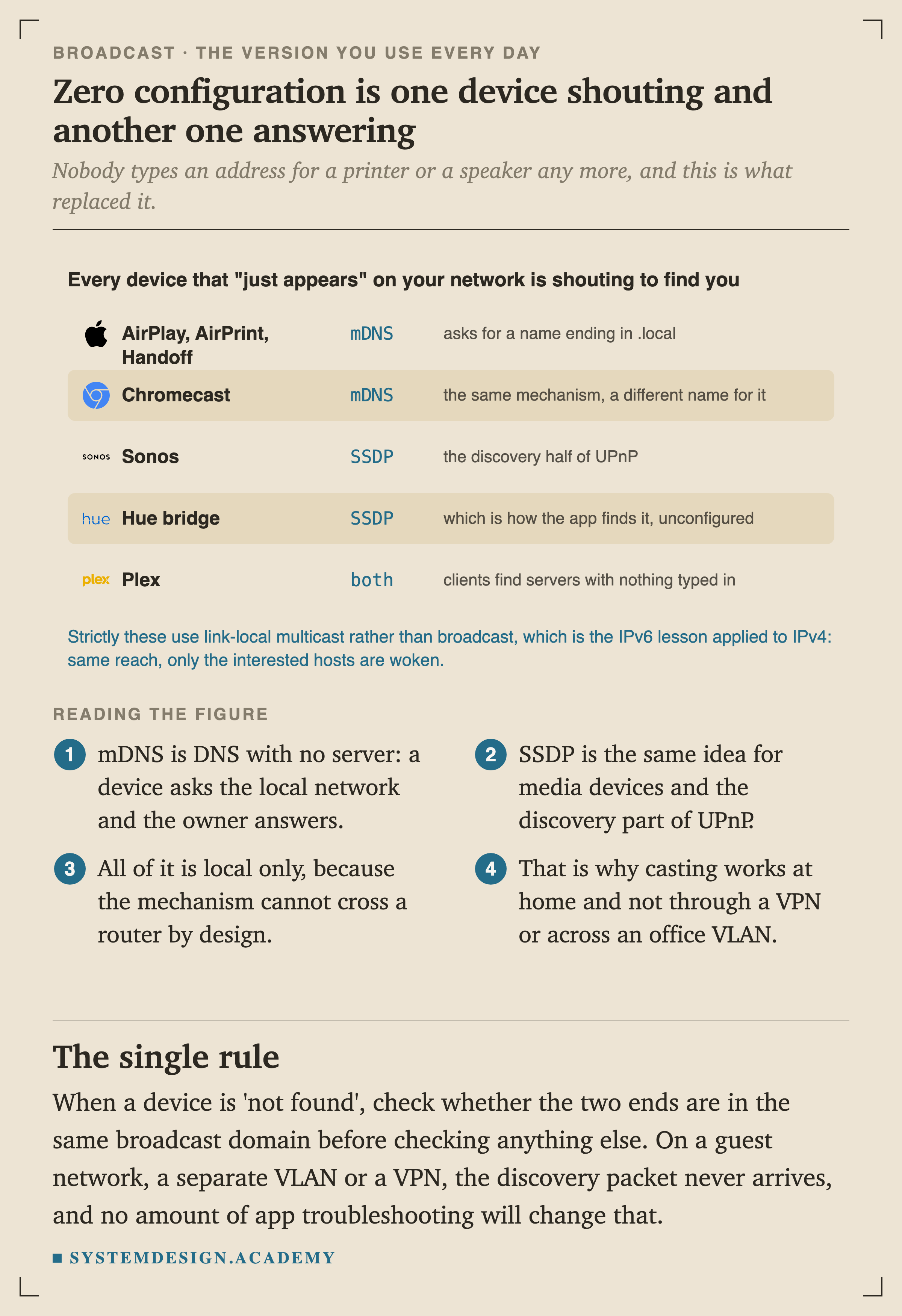
Figure 18. Zero configuration is one device shouting and another one answering
Nobody types an address for a printer or a speaker any more, and this is what replaced it. mDNS is with no server: a device asks the local network and the owner answers.
All of it is local only, because the mechanism cannot cross a router by design.
That last line is a diagnostic. When a device is "not found", check whether the two ends are in the same broadcast domain before checking anything else. On a guest network, a separate VLAN or a VPN, the discovery packet never arrives, and no amount of restarting the app will change that.
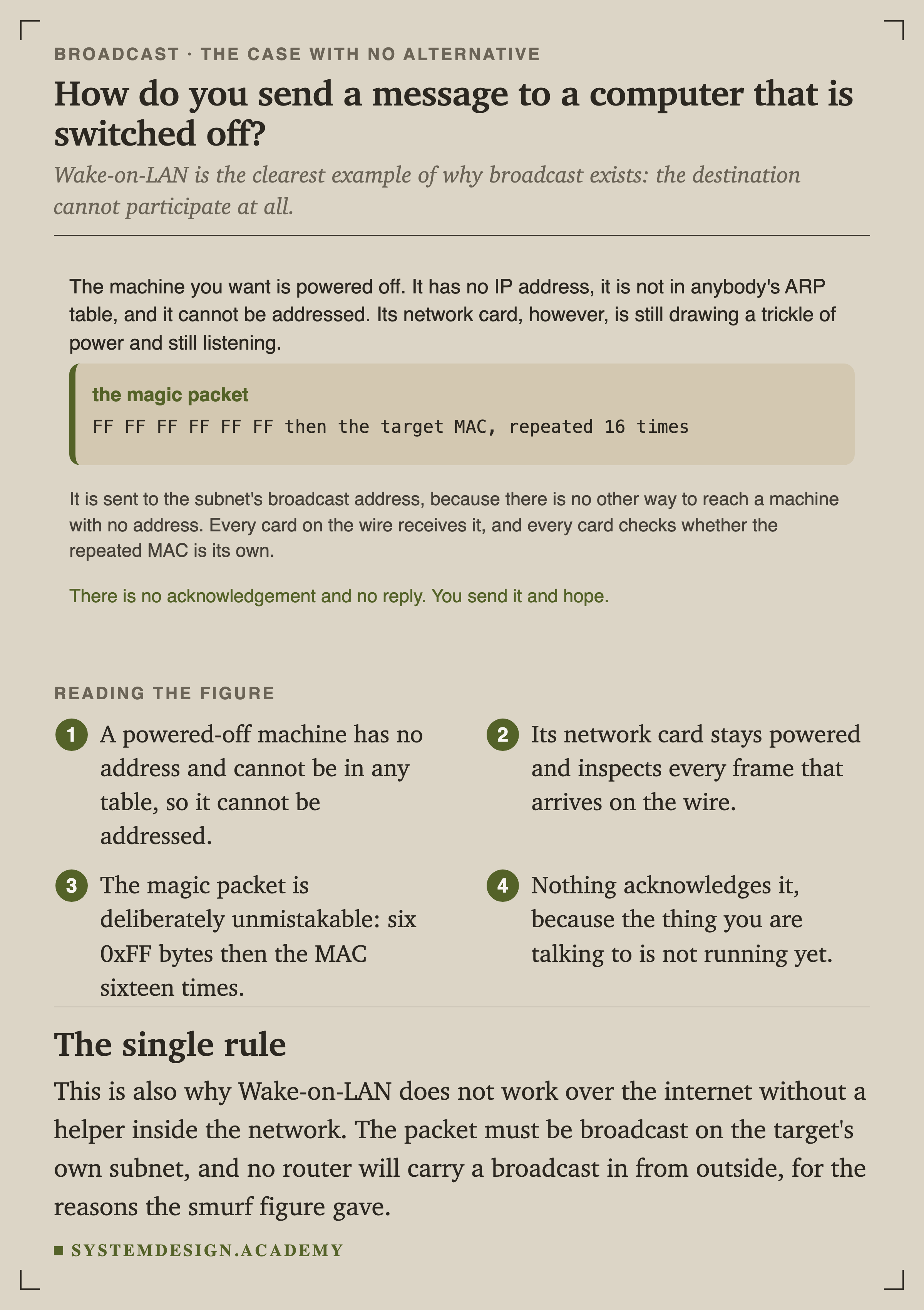
The case with no alternative at all
FigureFigure 19. How do you send a message to a computer that is switched off?
A powered-off machine has no address and cannot appear in any table, so it cannot be addressed by any normal means. Its network card stays powered and inspects every frame on the wire.
The magic packet is deliberately unmistakable, and nothing acknowledges it, because the thing you are talking to is not running yet.
This is also why Wake-on-LAN does not work from the internet without a helper inside the network. The packet has to be broadcast on the target's own subnet, and no router will carry a broadcast in from outside, for exactly the reason the smurf figure gave.
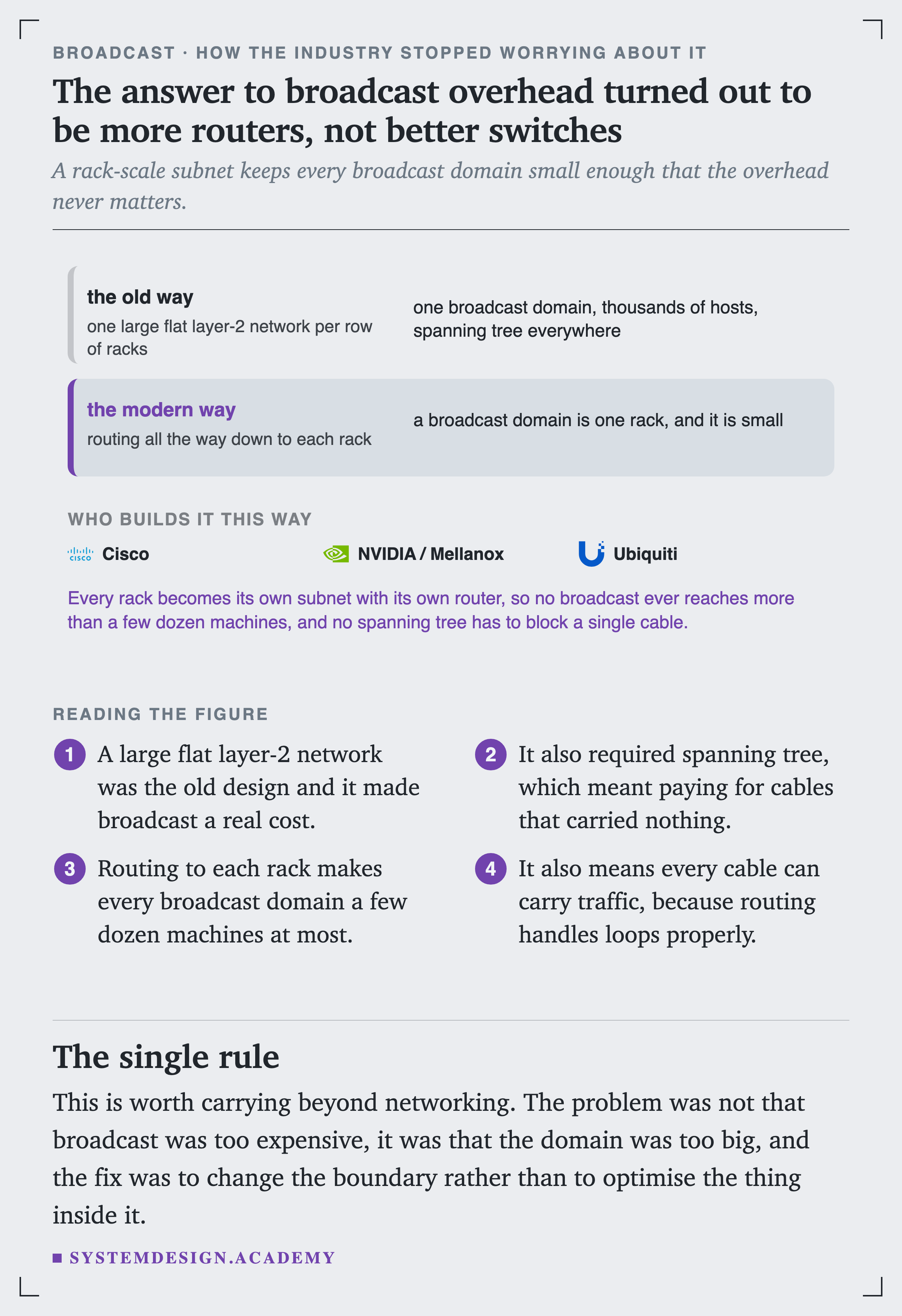
How the industry stopped worrying about it
ArchitectureFigure 20. The answer turned out to be more routers, not better switches
A large flat layer-2 network was the old design, and it made broadcast a real cost while also requiring spanning tree, which meant paying for cables that carried nothing.
Routing to each rack makes every broadcast domain a few dozen machines, and lets every cable carry traffic.
That is worth carrying well beyond networking. The problem was not that broadcast was too expensive. It was that the domain was too big, and the fix was to change the boundary rather than to optimise the thing inside it.