Load Balancing Proxies

Unicast Routing

0 of 11 complete

0%

Contents

Back|Load Balancing ProxiesUnicast Routing
1/11
30 min left
  1. Home
  2. System Design: Foundation
  3. Load Balancing & Proxies
  4. Unicast Routing
Prerequisites
DNS (Domain Name System)required
Related Topics
Ingress ControllersKubernetes & ContainersLatencyCore FundamentalsBandwidthCore FundamentalsConnection TimeoutCore FundamentalsRequest TimeoutCore Fundamentals
Previous lessonDNS (Domain Name System)Next lessonBroadcast
1 of 11

System Design

  • Foundation
  • Intermediate
  • Advanced
  • Capstone

AI Engineering

  • Foundation
  • Data, RAG and Agents
  • Evaluation, LLM Ops and Security

systemdesign.academy

  • Home
  • Glossary
  • Interview prep
  • Reviews
  • About
  • Privacy
  • Terms

The Default You Have Never Had to Think About

When you open a website, your computer sends a request to one specific server and gets a response from that one specific server. Not all servers. Not a group. One.

That is unicast, and it is so completely the default that most engineers never learn what actually happens between the two ends. This lesson is about that middle part, because it turns out to be four separate mechanisms stacked on each other, and three of them explain tools you already use.

It also matters as a baseline. The next four lessons are broadcast, multicast and anycast, and every one of them is defined by what it changes about this picture.
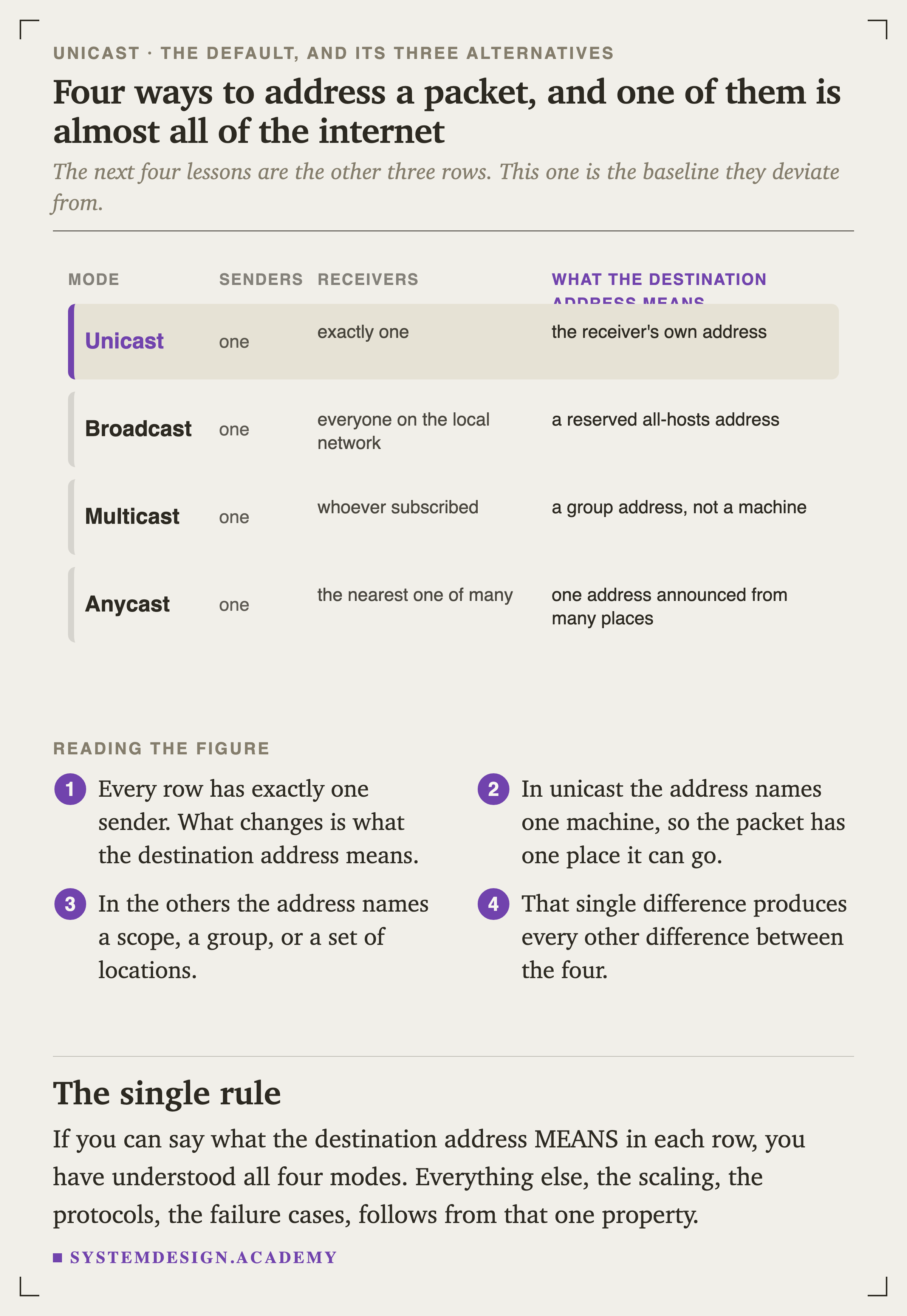
A table of four delivery modes. Unicast: one sender, exactly one receiver, and the destination address is the receiver's own address. Broadcast: one sender, everyone on the local network, and the address is a reserved all-hosts address. Multicast: one sender, whoever subscribed, and the address is a group rather than a machine. Anycast: one sender, the nearest one of many, and the address is one address announced from many places.
FigureFigure 1. Four ways to address a packet, and one of them is almost all of the internet

Every row has exactly one sender. That is not what distinguishes them.

What changes is what the destination address means. In unicast it names one machine. In the others it names a scope, a group, or a set of locations, and every other difference between the four follows from that.

What Is Actually in the Envelope

Before following a packet anywhere, it is worth knowing what a router looks at when it arrives. The answer is: almost nothing.
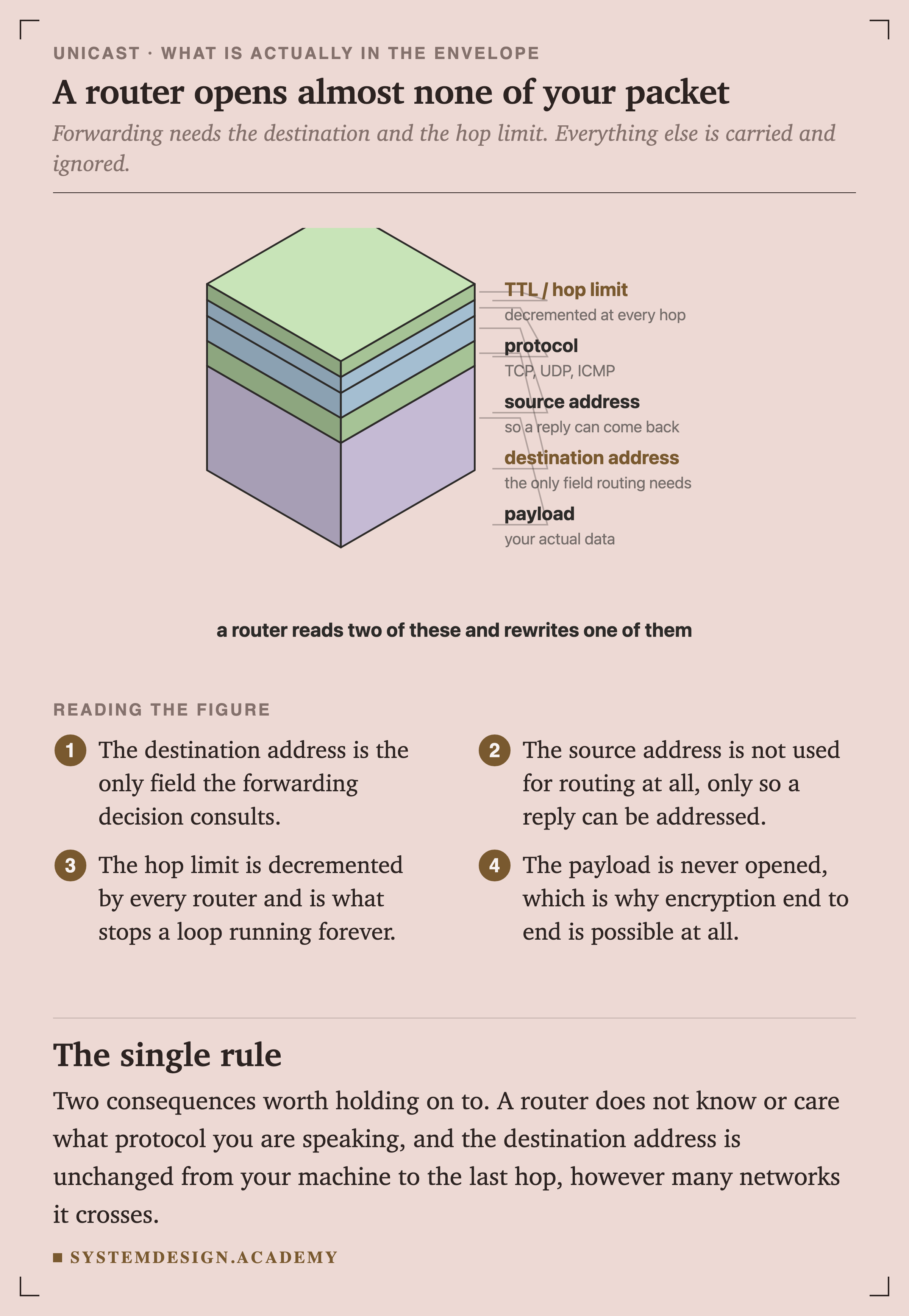
An isometric stack of slabs representing an IP packet's fields, drawn to relative size. From the bottom: TTL or hop limit, decremented at every hop; protocol, meaning TCP, UDP or ICMP; source address, so a reply can come back; destination address, the only field routing needs; and a large payload slab labelled your actual data. A line beneath reads that a router reads two of these and rewrites one of them.
IsometricFigure 2. A router opens almost none of your packet

The destination address is the only field the forwarding decision consults. The source address is not used for routing at all, only so that a reply can be addressed later.

The hop limit is decremented by every router and is the only thing counting the journey. The payload is never opened, which is what makes end-to-end encryption possible in the first place.

Two consequences worth carrying: a router does not know or care what protocol you are speaking, and the destination address on your packet is unchanged from your machine all the way to the last hop, however many networks it crosses.

The Decision Your Own Machine Makes

Routing sounds like something that happens elsewhere, to other people. Your laptop is doing it several times a second, using exactly the same rule every router on the path uses.
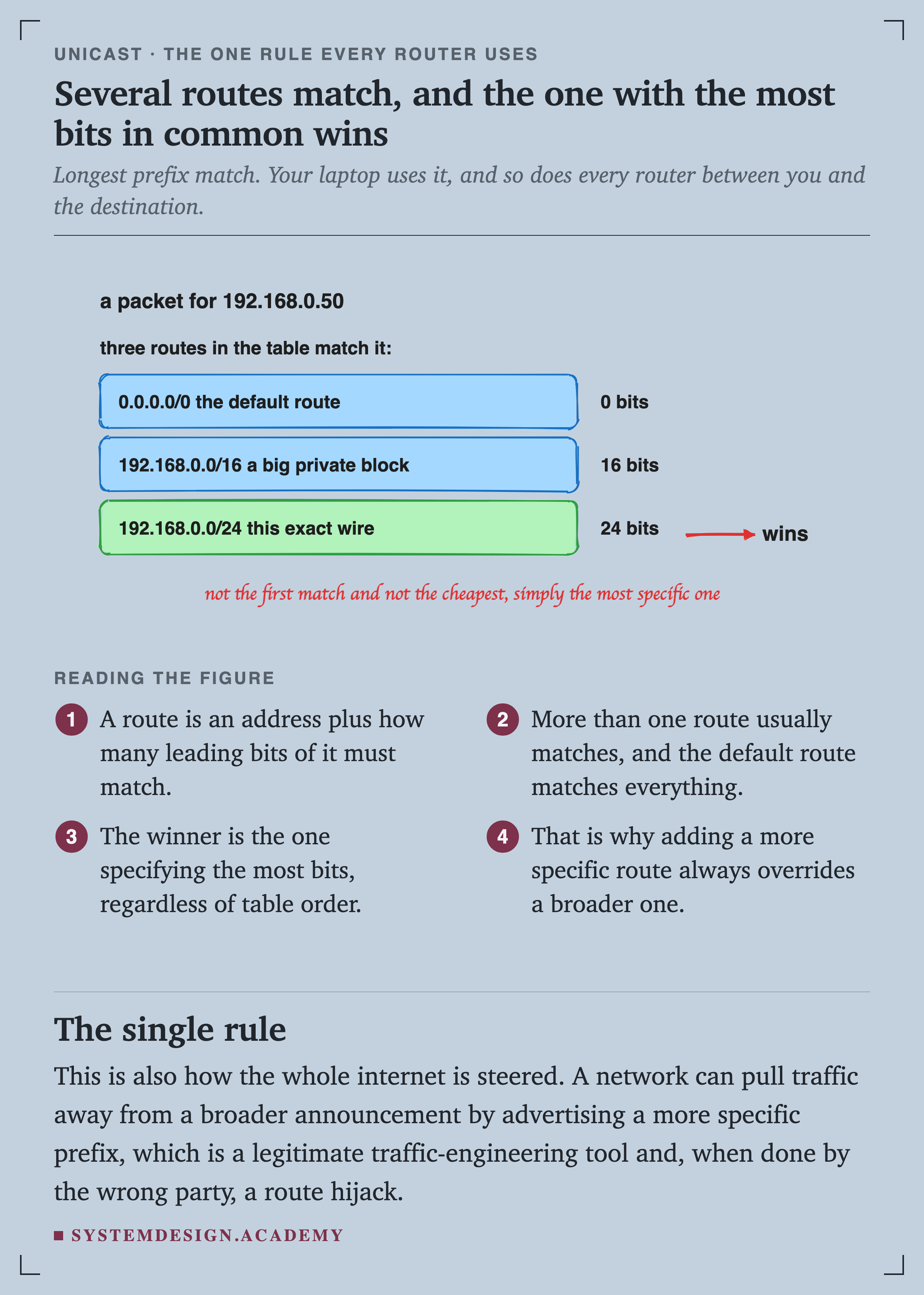
A hand-drawn diagram. A packet for 192.168.0.50, and three routes in the table that match it: 0.0.0.0/0 the default route with 0 bits, 192.168.0.0/16 a big private block with 16 bits, and 192.168.0.0/24 this exact wire with 24 bits. An arrow marks the 24-bit route as the winner. A handwritten note reads: not the first match and not the cheapest, simply the most specific one.
SketchFigure 3. Several routes match, and the one with the most bits in common wins

A route is an address plus how many of its leading bits must match. More than one route usually matches, and the default route matches everything by specifying zero bits.

The winner is whichever specifies the most bits, regardless of the order they appear in the table.

That rule is called longest prefix match, and it is worth watching happen.
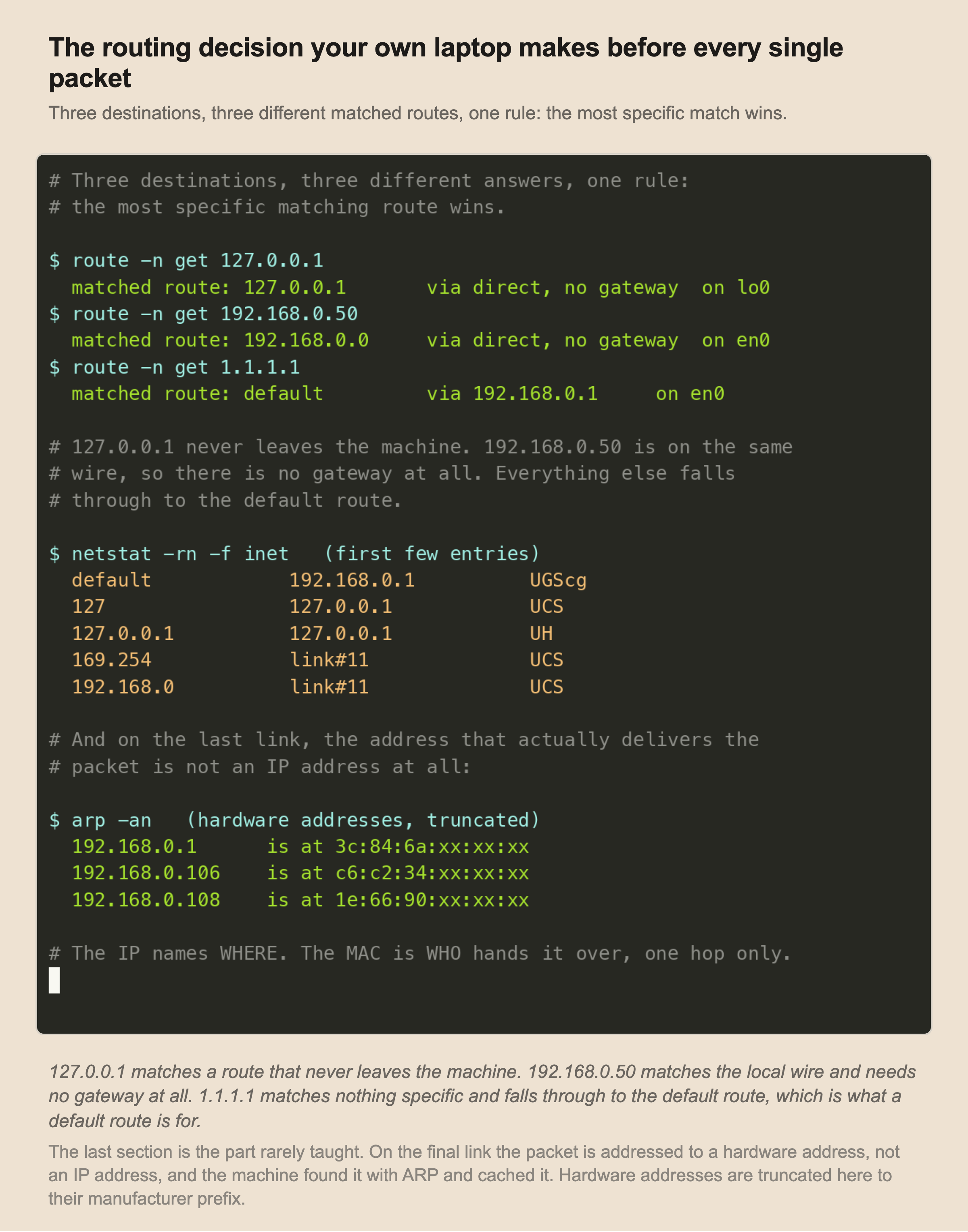
A recorded terminal session. Three route lookups on a real machine. 127.0.0.1 matches route 127.0.0.1 with no gateway on lo0. 192.168.0.50 matches route 192.168.0.0 with no gateway on en0. 1.1.1.1 matches the default route via gateway 192.168.0.1 on en0. Then the first five entries of the machine's routing table, and finally three entries from the ARP cache showing IP addresses mapped to hardware addresses with the last three octets masked.
RecordedFigure 4. Three destinations, three different answers, one rule

The Address That Actually Delivers

An IP address does not deliver anything. On a physical link, delivery is by hardware address, and your machine has to find out what that is before it can send a single byte.
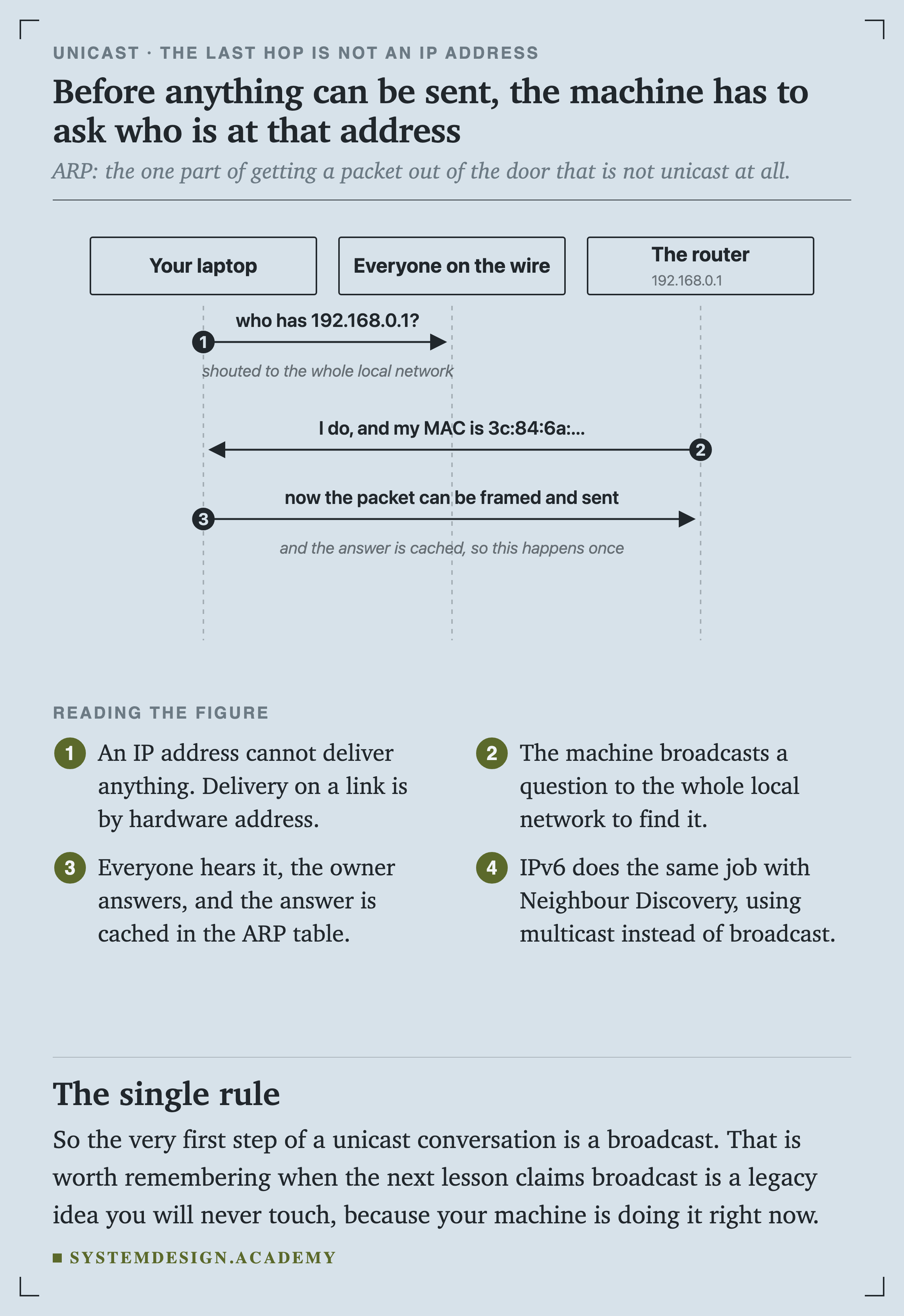
A sequence diagram with three lifelines: your laptop, everyone on the wire, and the router at 192.168.0.1. Your laptop asks who has 192.168.0.1, shouted to the whole local network. The router replies that it does, giving its MAC address. Then the packet can be framed and sent, and the answer is cached so this happens once.
SequenceFigure 5. Before anything can be sent, the machine asks who is at that address

The machine broadcasts a question to the entire local network. Everybody hears it, the owner answers, and the answer goes into the ARP cache so it does not have to be asked again.

IPv6 does the same job with Neighbour Discovery, using multicast rather than broadcast.

So the very first step of a unicast conversation is a broadcast. That is worth remembering when the next lesson describes broadcast as a legacy idea you will never touch, because your machine is doing it right now.
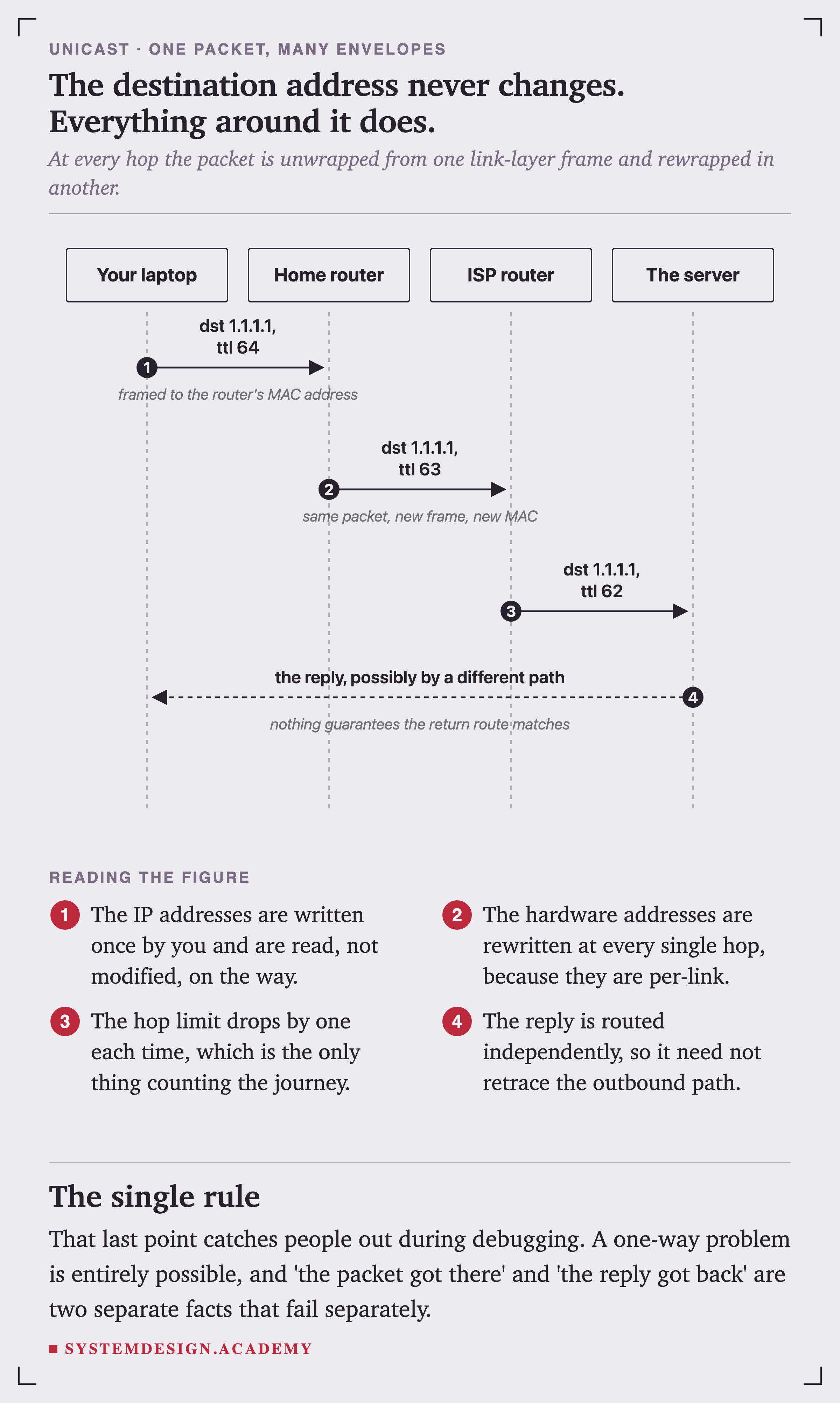
A sequence diagram with four lifelines: your laptop, the home router, an ISP router and the server. The packet leaves with destination 1.1.1.1 and TTL 64, framed to the router's MAC address. It arrives at the ISP router with TTL 63, noted as the same packet in a new frame with a new MAC. It reaches the server with TTL 62. The reply comes back possibly by a different path, noted as nothing guaranteeing the return route matches.
SequenceFigure 6. The destination address never changes. Everything around it does.

Watching It Actually Happen

The hop limit exists so a routing loop cannot circulate a packet forever. Somebody noticed it could also be used as a measuring instrument.
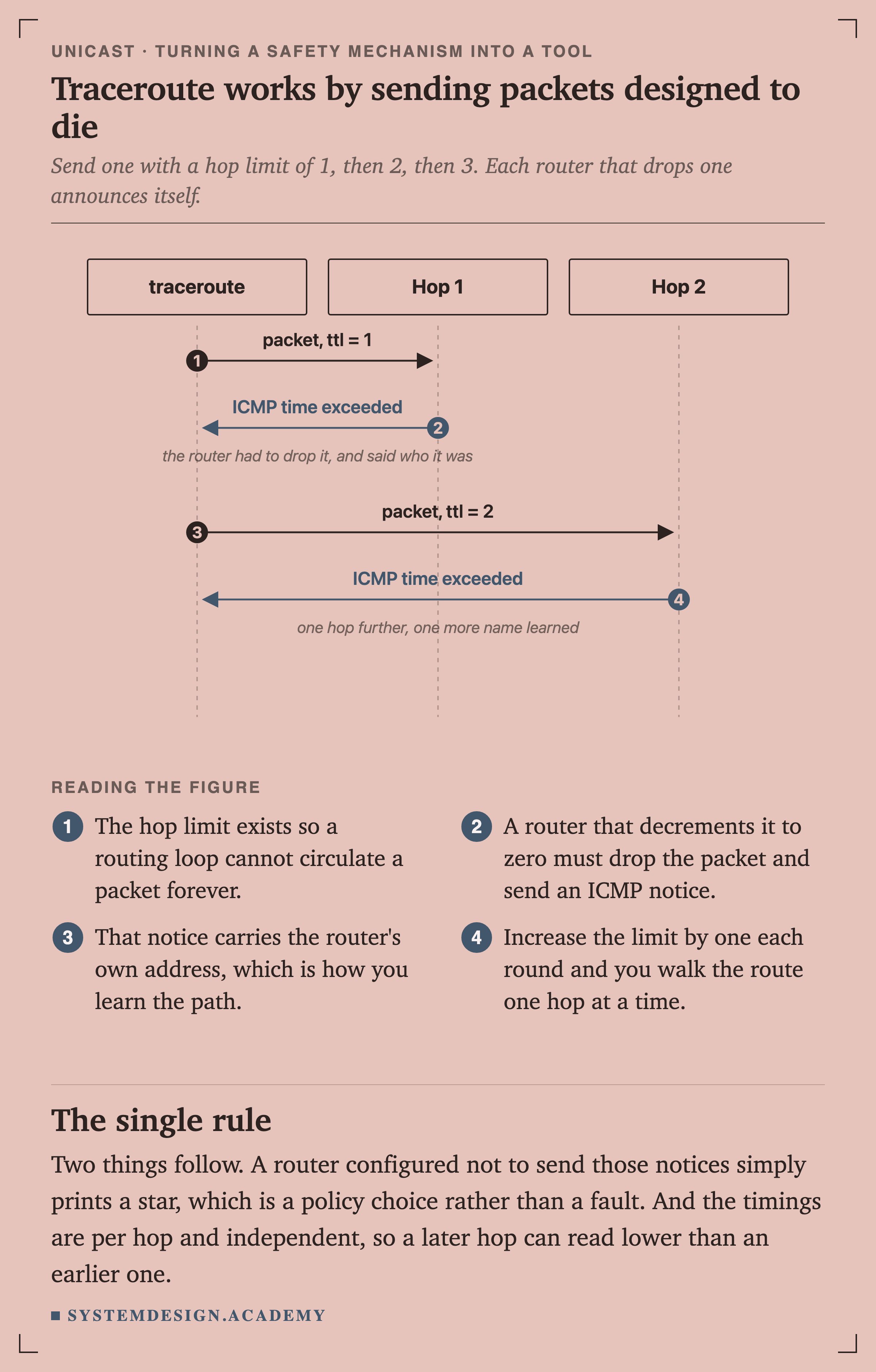
A sequence diagram with three lifelines: traceroute, hop 1 and hop 2. Traceroute sends a packet with TTL 1. Hop 1 replies with ICMP time exceeded, noted as the router having to drop it and saying who it was. Traceroute sends a packet with TTL 2, and hop 2 replies with ICMP time exceeded, noted as one hop further and one more name learned.
SequenceFigure 7. Traceroute works by sending packets designed to die

A router that decrements the hop limit to zero must drop the packet and send back an ICMP notice, and that notice carries the router's own address.

Increase the limit by one each round and you walk the route one hop at a time.
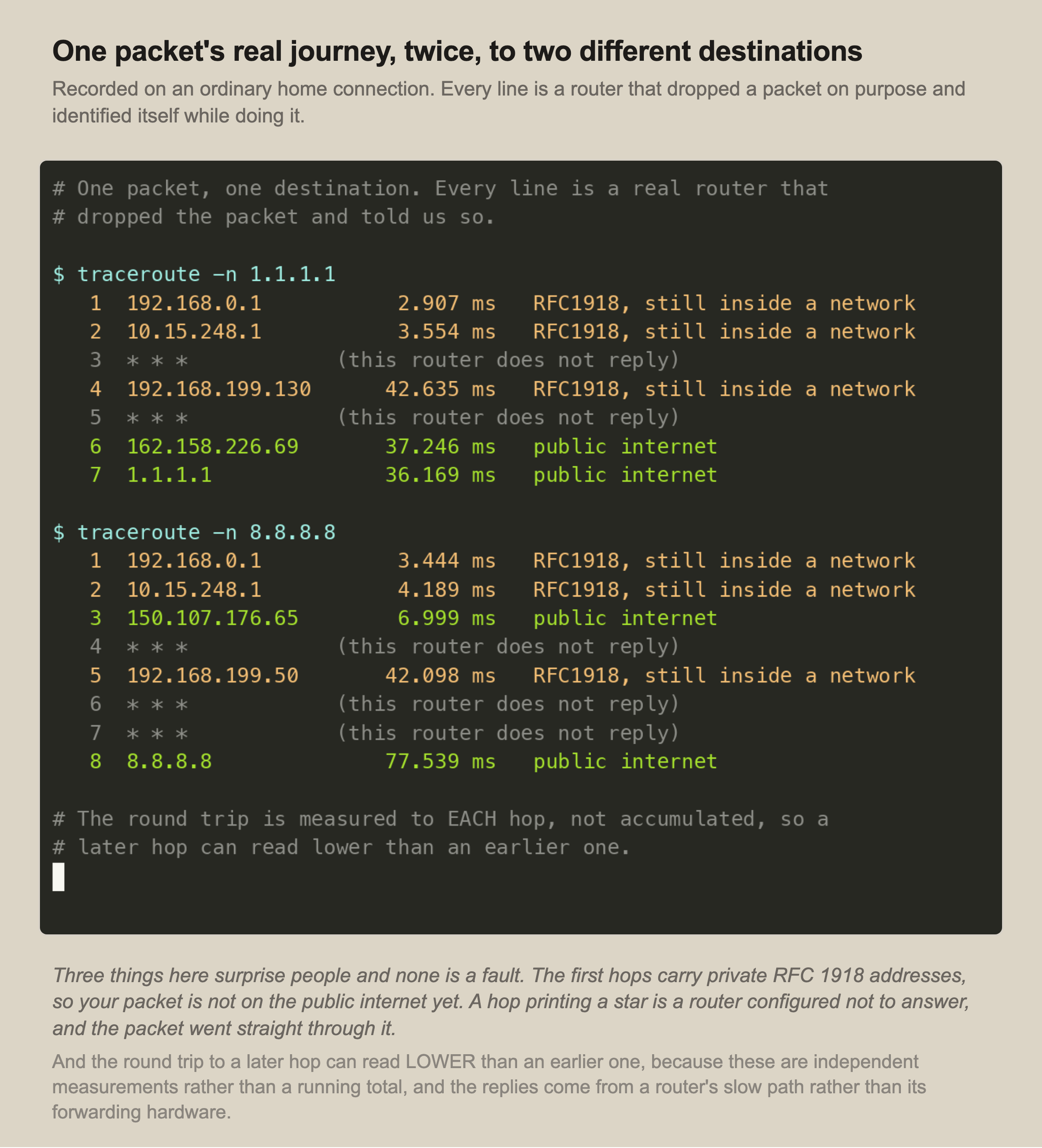
A recorded terminal session showing two traceroutes. To 1.1.1.1: hop 1 is 192.168.0.1 at 1.9 ms marked RFC1918, hop 2 is 10.15.248.1 at 3.6 ms also RFC1918, hop 3 does not reply, hop 4 is 192.168.199.130 at 43.8 ms still RFC1918, hop 5 does not reply, hop 6 is 162.158.226.69 at 39.3 ms on the public internet, and hop 7 is 1.1.1.1 at 35.3 ms. To 8.8.8.8 the path is eight hops with a similar shape. A note reads that the round trip is measured to each hop and not accumulated, so a later hop can read lower than an earlier one.
RecordedFigure 8. Two real paths, recorded on an ordinary home connection

Three things in that output surprise people, and none of them is a fault.

Nobody Owns the Path
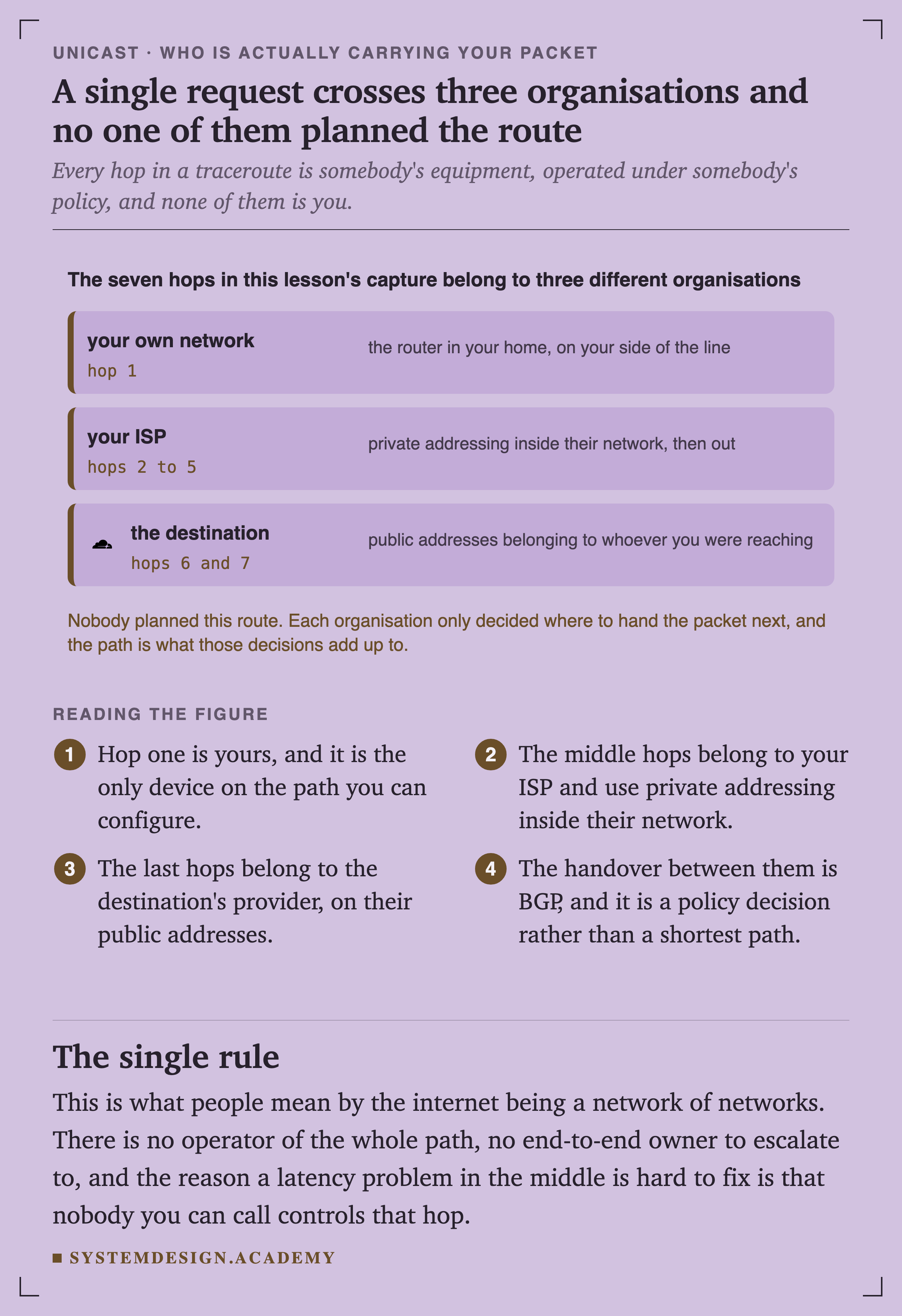
A figure headed that the seven hops in this lesson's capture belong to three different organisations. Your own network, hop 1, the router in your home on your side of the line. Your ISP, hops 2 to 5, private addressing inside their network then out. The destination, hops 6 and 7 with the Cloudflare logo, public addresses belonging to whoever you were reaching. A note reads that nobody planned this route: each organisation only decided where to hand the packet next.
ArchitectureFigure 10. A single request crosses three organisations and none of them planned the route

Hop one is yours, and it is the only device on the whole path you can configure. The middle hops belong to your ISP. The last ones belong to the destination's provider.

The handover between them is BGP, and it is a policy decision rather than a shortest path.

This is what people mean when they say the internet is a network of networks. There is no operator of the whole path and nobody to escalate an end-to-end problem to, which is why in the middle is genuinely hard to do anything about.

The path back is not the path out
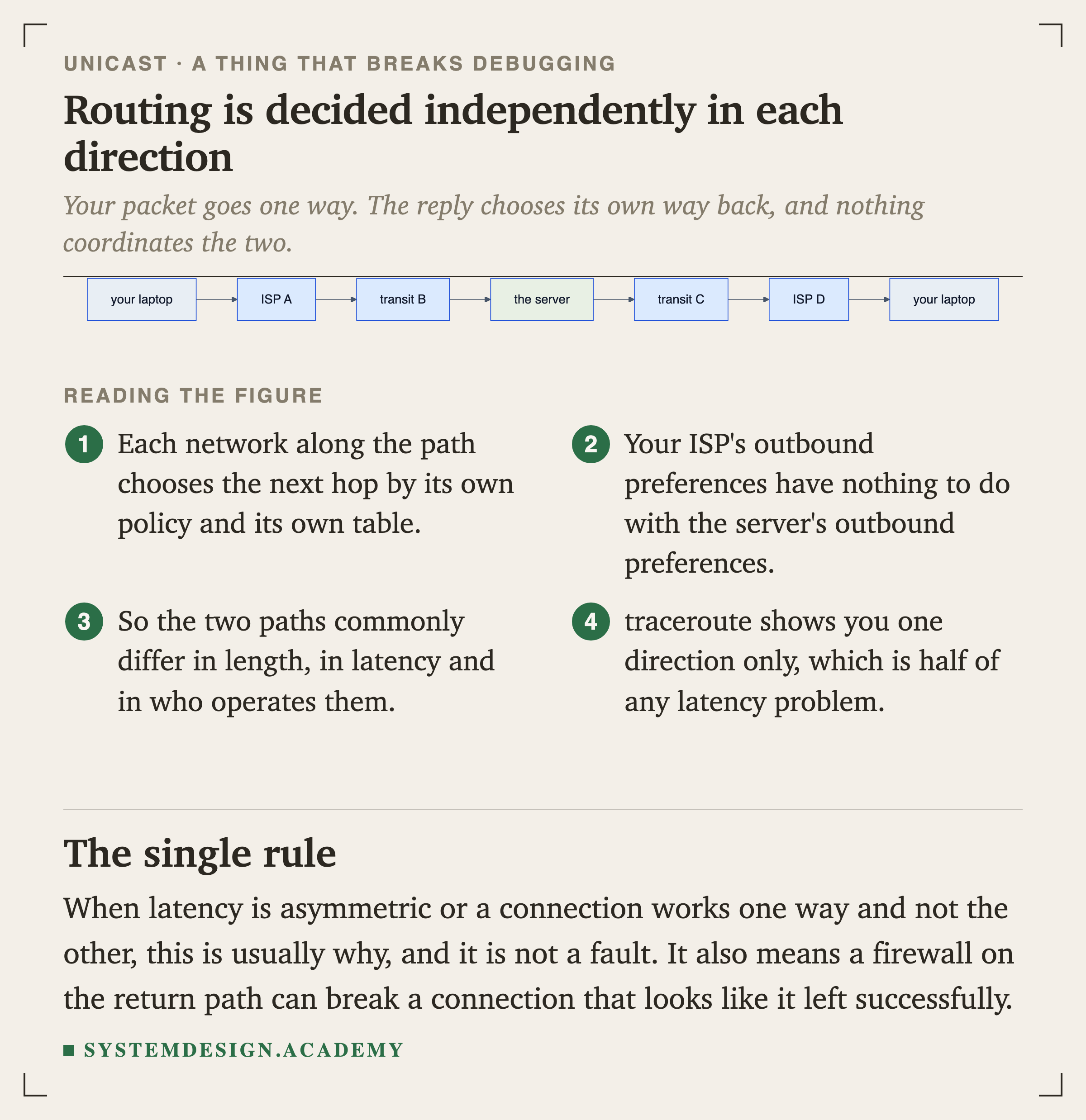
A graph showing two separate paths. Outbound: your laptop to ISP A to transit B to the server. Return: the server to transit C to ISP D back to your laptop.
FlowchartFigure 11. Routing is decided independently in each direction

Each network along the path picks its next hop by its own policy and its own table. Your ISP's outbound preferences have nothing to do with the server's outbound preferences.

Two Things That Are Not What They Look Like

Your address is probably not yours
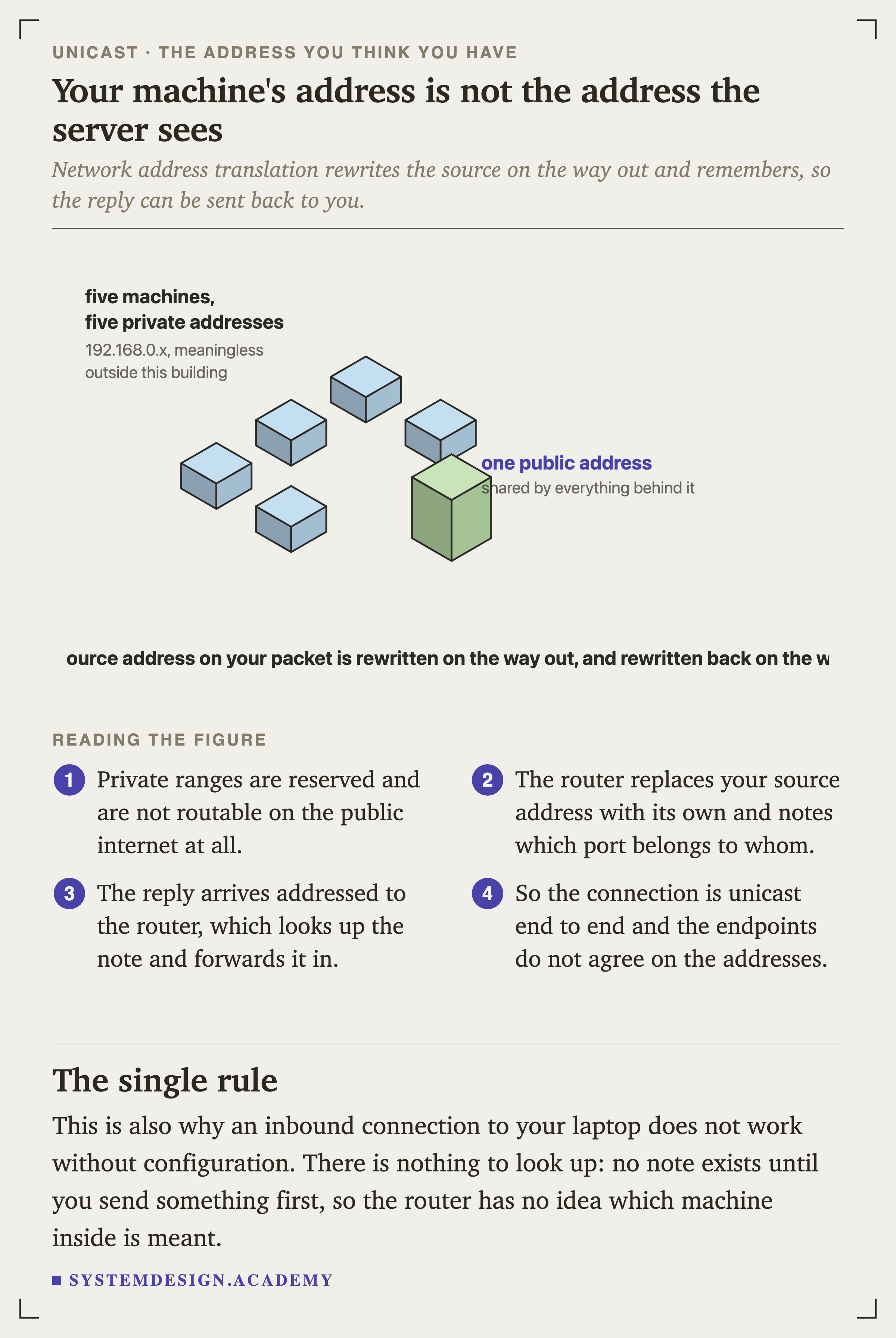
An isometric diagram showing five small blocks representing machines with private addresses on the left, and one taller block on the right representing a single public address. Labels read: five machines, five private addresses, 192.168.0.x, meaningless outside this building; and one public address, shared by everything behind it. A line beneath reads that the source address on your packet is rewritten on the way out and rewritten back on the way in.
IsometricFigure 14. Your machine's address is not the address the server sees

The router replaces your source address with its own and notes which port belongs to which machine. The reply arrives addressed to the router, which looks up the note and forwards it in.

So the connection is unicast end to end, and the two endpoints do not agree about what the addresses are.

This is also why an inbound connection to your laptop does not work without configuration. No note exists until you send something first, so the router has no idea which machine inside was meant.
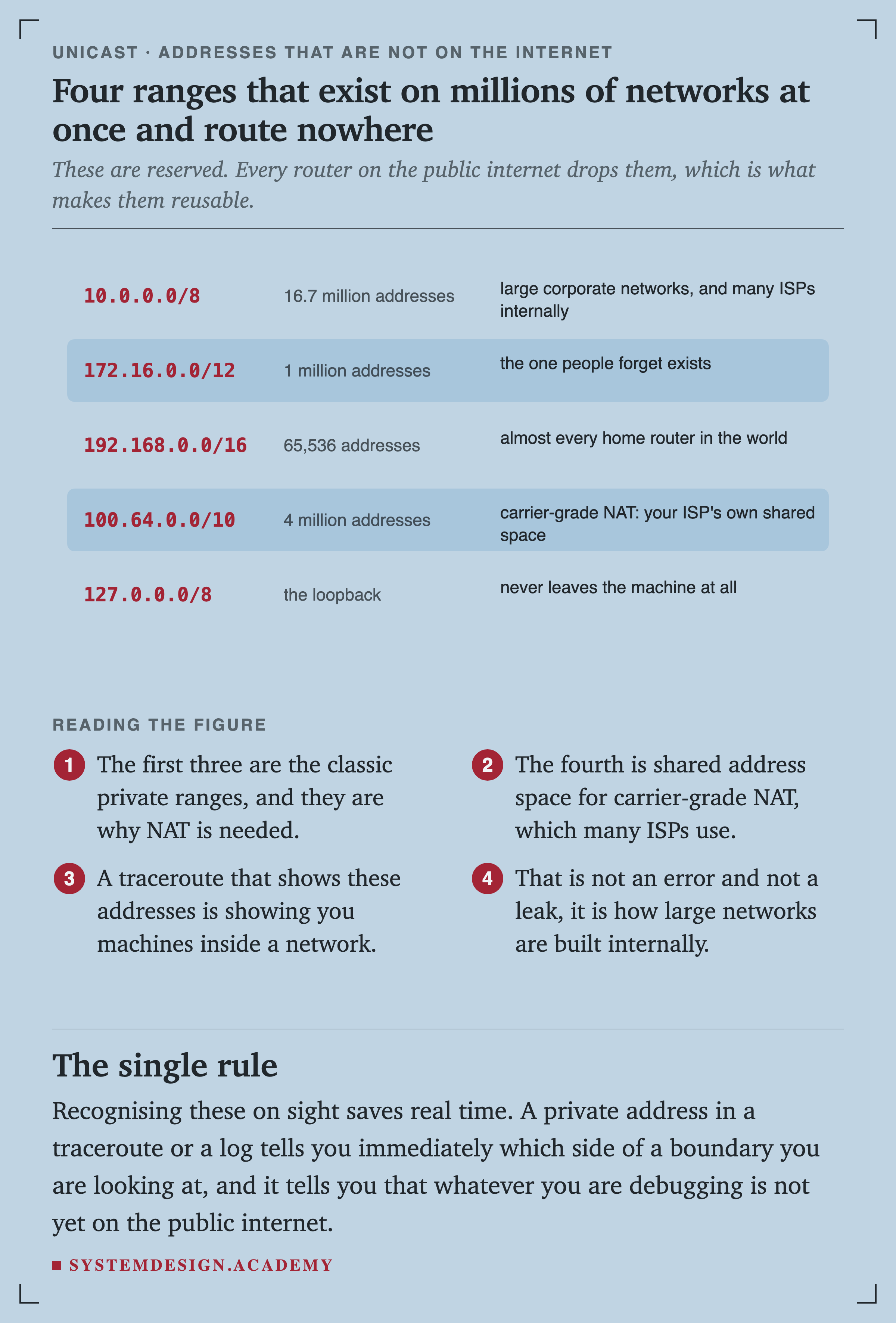
A table of five reserved address ranges. 10.0.0.0/8 with 16.7 million addresses, used by large corporate networks and many ISPs internally. 172.16.0.0/12 with 1 million addresses, described as the one people forget exists. 192.168.0.0/16 with 65,536 addresses, in almost every home router in the world. 100.64.0.0/10 with 4 million addresses, for carrier-grade NAT, the ISP's own shared space. 127.0.0.0/8, the loopback, which never leaves the machine.
FigureFigure 15. Four ranges that exist on millions of networks at once and route nowhere

The One Thing Unicast Cannot Do

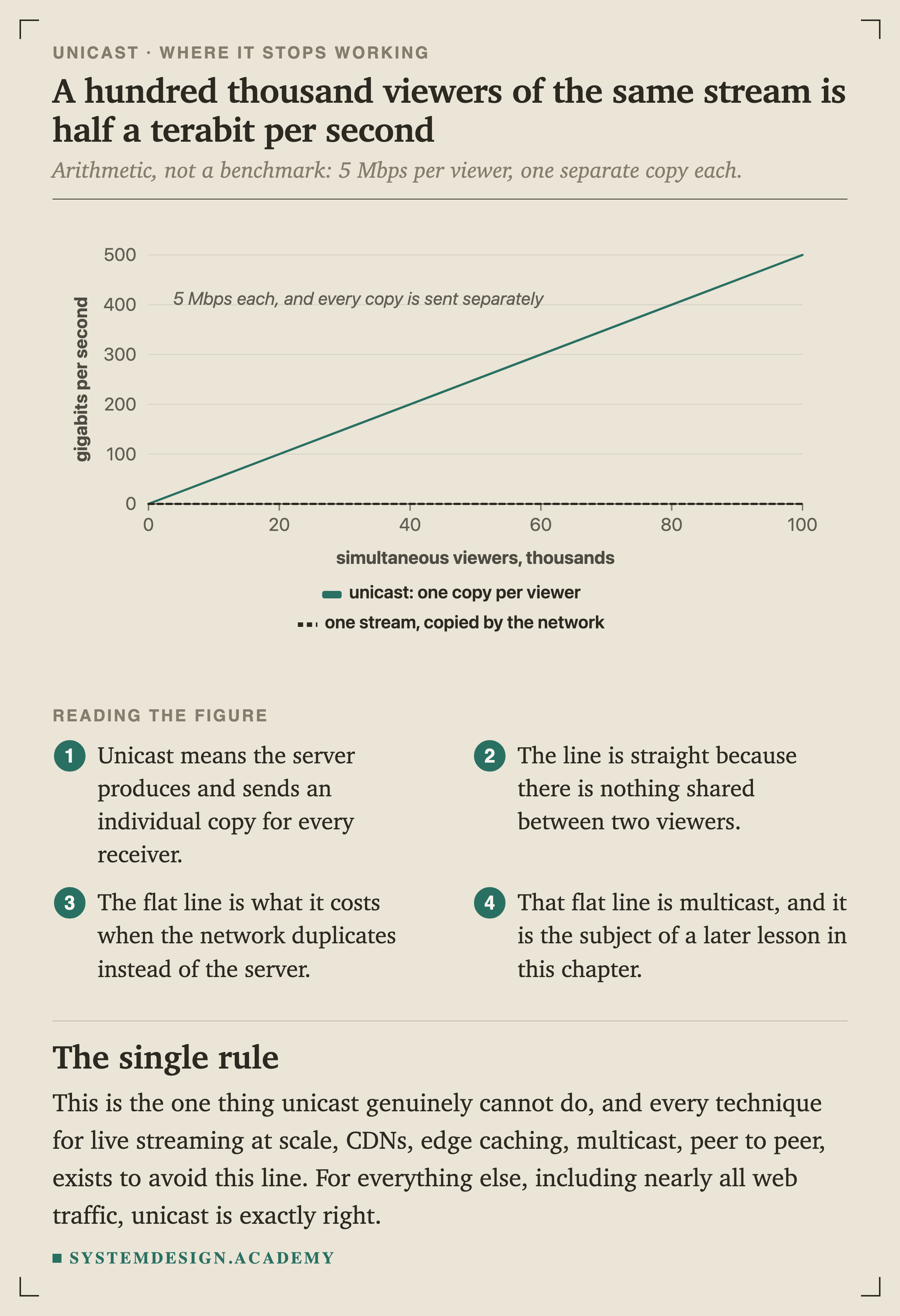
A line chart of gigabits per second leaving the server against simultaneous viewers in thousands. The unicast line rises straight to 500 gigabits at 100,000 viewers. A dashed line for one stream copied by the network stays flat at effectively zero. A note reads: 5 Mbps each, and every copy is sent separately.
ChartFigure 17. A hundred thousand viewers of the same stream is half a terabit per second

This is arithmetic rather than a benchmark. Unicast means the server produces and sends an individual copy for every single receiver, so the line is straight because nothing is shared between two viewers.

The flat line is what it costs when the network duplicates instead of the server, which is multicast, and it is a later lesson in this chapter.

Every technique for delivering the same content to a very large audience exists to avoid that line: CDNs, edge , multicast, peer to peer. For everything else, which is nearly all web traffic, unicast is exactly right.
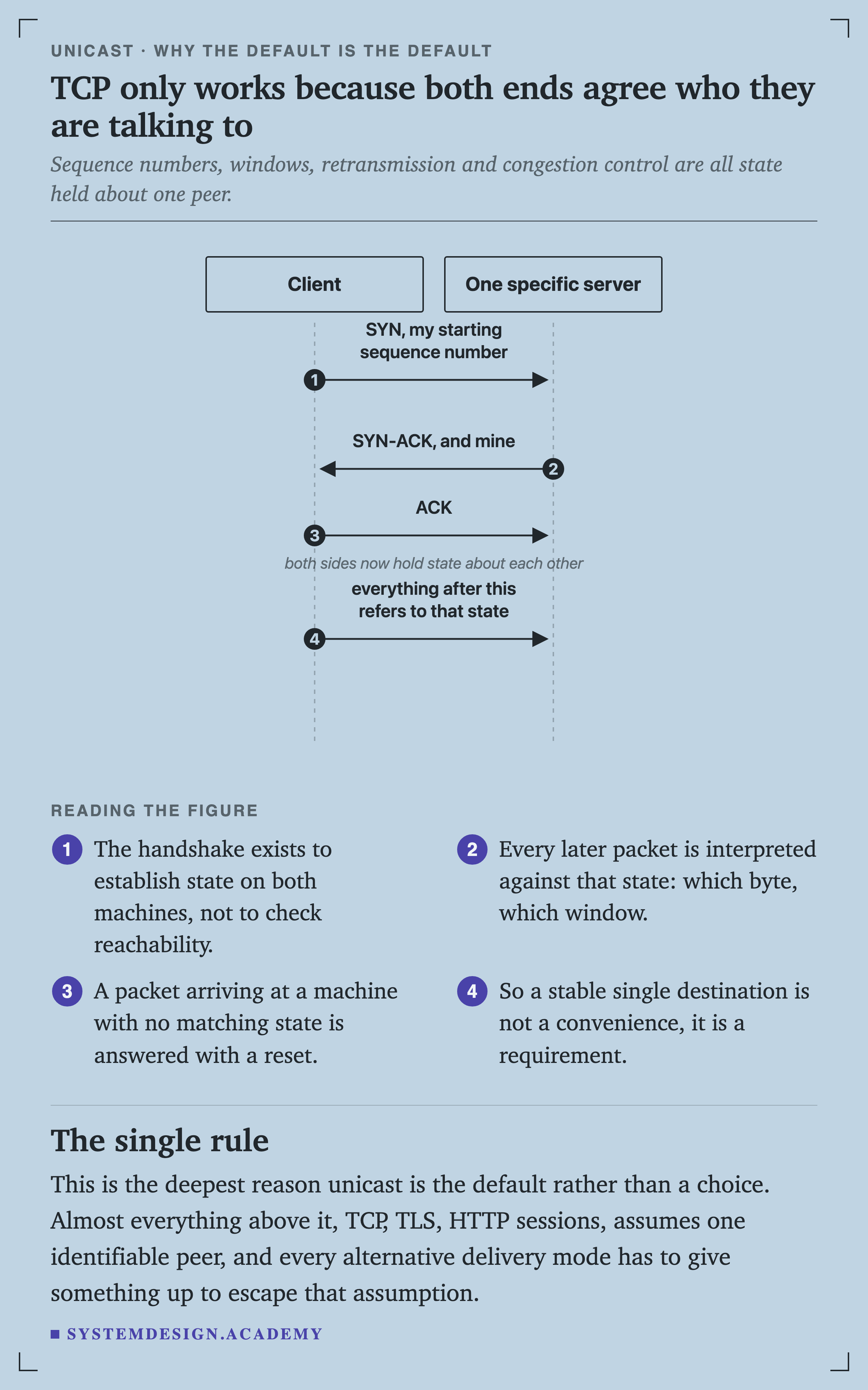
A sequence diagram with two lifelines: a client and one specific server. The client sends SYN with its starting sequence number, the server replies SYN-ACK with its own, the client sends ACK, noted as both sides now holding state about each other, and everything after that refers to that state.
SequenceFigure 18. TCP only works because both ends agree who they are talking to

The handshake exists to establish state on both machines, not to check reachability. Every later packet is interpreted against that state: which byte, which window, what to retransmit.

Unicast, Anycast, and Why a CDN Uses Both
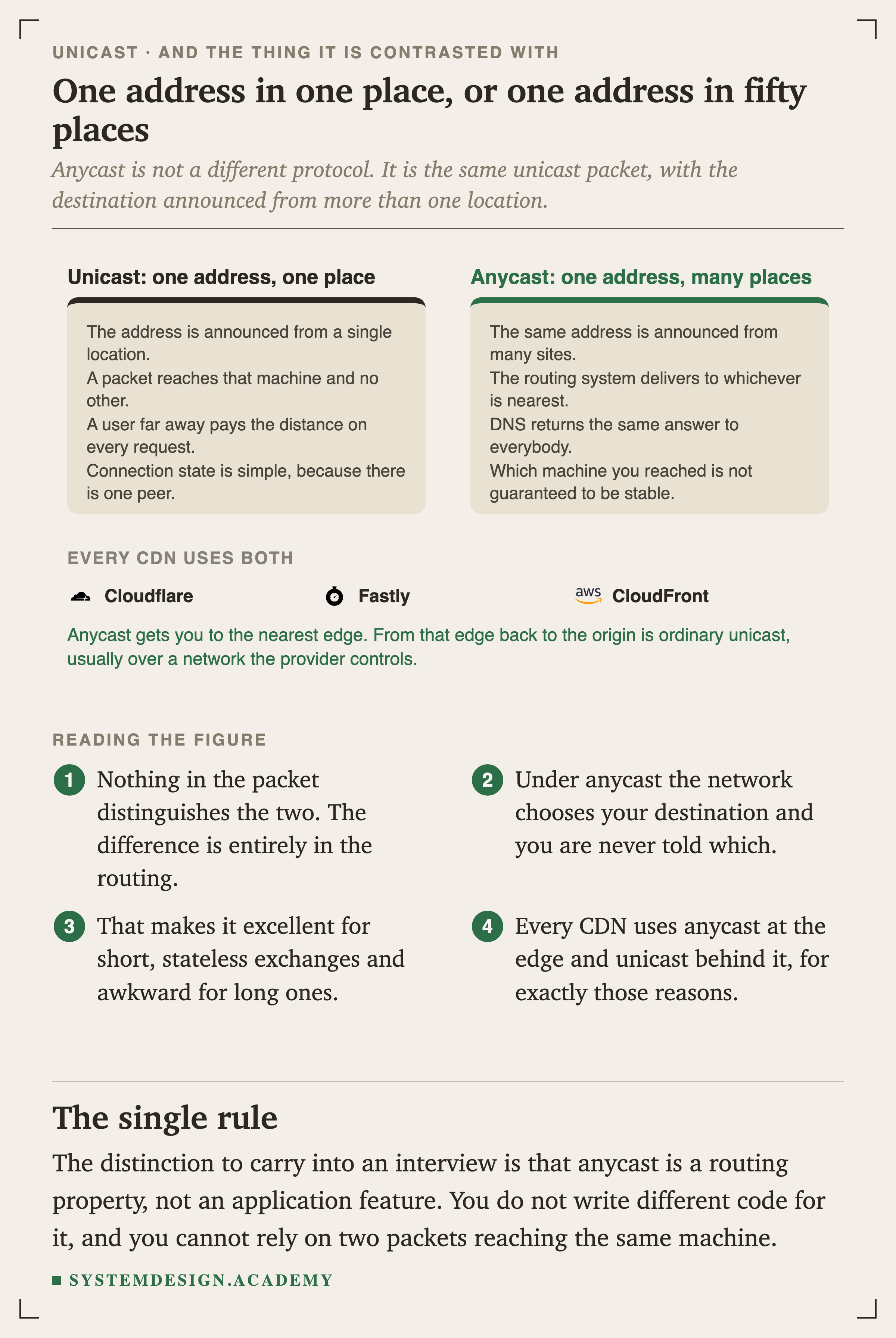
Two panels. Unicast, one address one place: announced from a single location, a packet reaches that machine and no other, a distant user pays the distance every request, and connection state is simple because there is one peer. Anycast, one address many places: the same address announced from many sites, the routing system delivers to whichever is nearest, DNS returns the same answer to everybody, and which machine you reached is not guaranteed to be stable. Below, three CDN logos: Cloudflare, Fastly and CloudFront, under a heading saying every CDN uses both.
ArchitectureFigure 19. One address in one place, or one address in fifty places

Nothing in the packet distinguishes the two. The difference is entirely in the routing: whether that destination address is announced from one location or from many.

Anycast gets you to the nearest edge. From that edge back to the origin is ordinary unicast, usually over a network the provider controls and tunes.

Two things make anycast subtle, and both are worth stating precisely because they are usually glossed over.

Nearest is measured in routing terms, not in kilometres. BGP prefers paths by policy and by AS hop count, not by , so a user can occasionally be sent to a distant site that is topologically near. This is real, and it is why large operators measure actual latency per prefix rather than trusting the routing to be optimal.

Nothing guarantees two packets land in the same place.
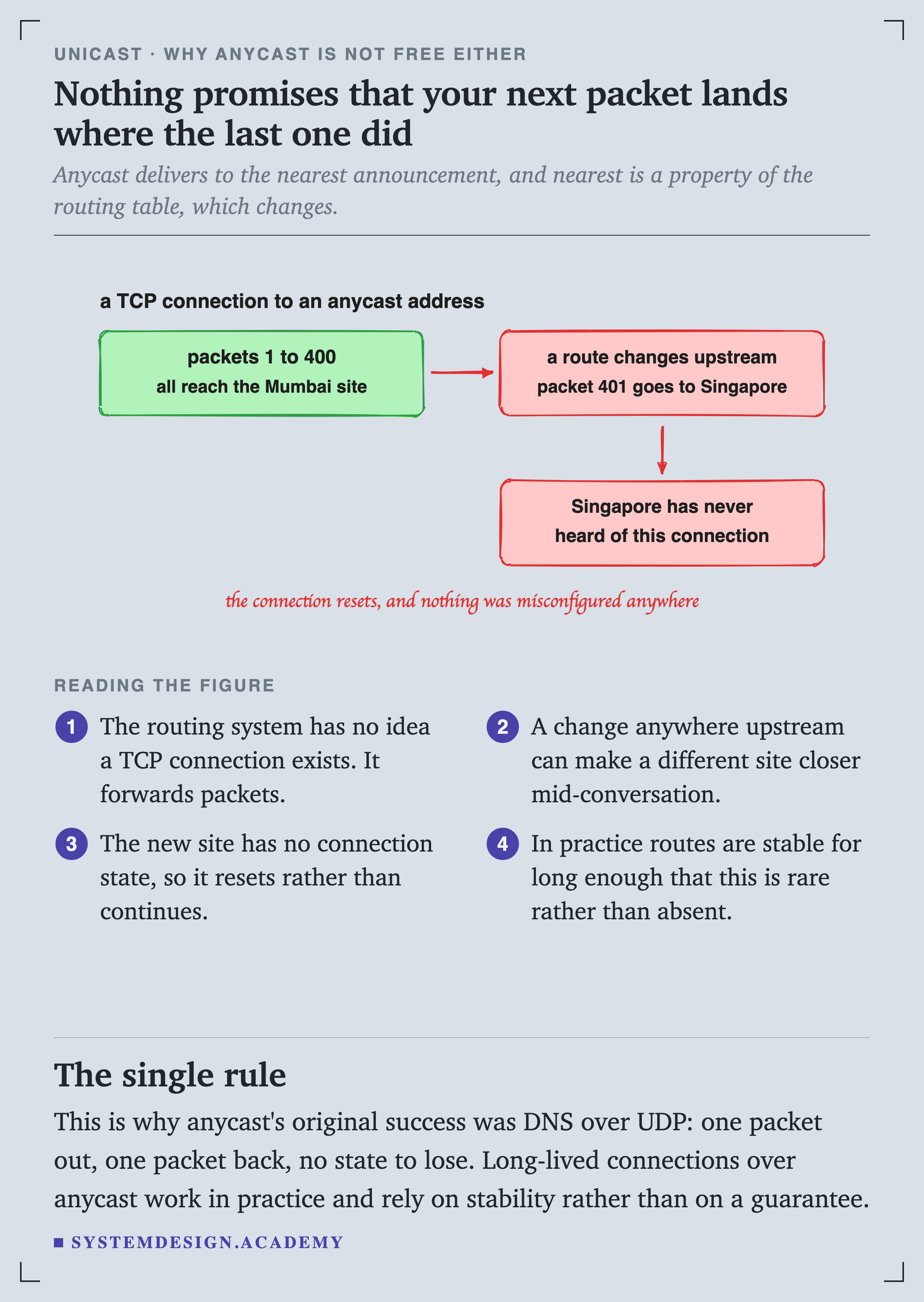
A hand-drawn diagram. A TCP connection to an anycast address: packets 1 to 400 all reach the Mumbai site. Then a route changes upstream and packet 401 goes to Singapore. Singapore has never heard of this connection. A handwritten note reads that the connection resets, and nothing was misconfigured anywhere.

When It Is Anything Other Than Unicast
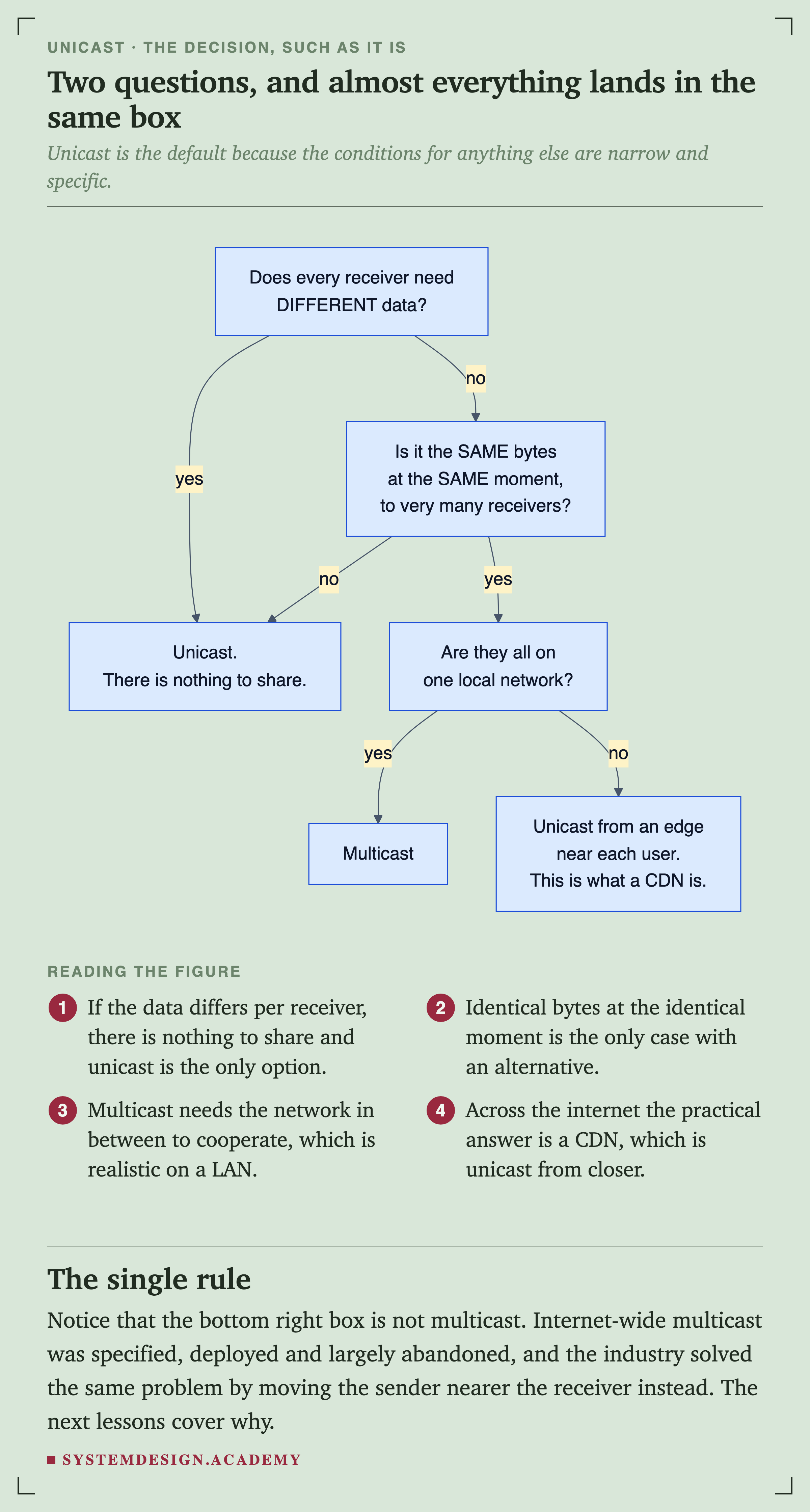
A decision flowchart. Does every receiver need different data? If yes, unicast, because there is nothing to share. If no, is it the same bytes at the same moment to very many receivers? If no, unicast again. If yes, are they all on one local network? If yes, multicast. If no, unicast from an edge near each user, which is what a CDN is.
FlowchartFigure 21. Two questions, and almost everything lands in the same box

If the data differs per receiver there is nothing to share, and unicast is the only option. Identical bytes at the identical moment is the only case with a real alternative.

Multicast needs the network in between to cooperate, which is realistic on a local network and not across the internet.

The bottom-right box is worth noticing, because it is not multicast. Internet-wide multicast was specified, deployed and largely abandoned, and the industry solved the same problem by moving the sender nearer to the receiver instead. The next lessons in this chapter cover why that happened.

Quick Check

Knowledge Check

6 questions - Score 80% to pass

Q1

What makes unicast different from the other three delivery modes?

Q2

Your traceroute shows hop 7 at 35 ms and hop 4 at 44 ms. What does that mean?

Q3

A packet for 192.168.0.50 matches three routes in the table: 0.0.0.0/0, 192.168.0.0/16 and 192.168.0.0/24. Which is used, and why?

Q4

A server streams 5 Mbps to 100,000 simultaneous viewers using pure unicast. What does the server need to push?

Q5

Small HTTP requests over your company VPN work fine, but any large upload hangs and eventually times out. What should you suspect first?

Q6

Why is anycast a natural fit for DNS over UDP and an awkward fit for a long-lived TCP connection?
127.0.0.1 matches a route that never leaves the machine. 192.168.0.50 matches the local wire and needs no gateway at all, because the destination is directly reachable. 1.1.1.1 matches nothing specific and falls through to the default route, which is precisely what a default route is for.

Run netstat -rn on your own machine and you will see the same three shapes.

The last section of that capture is the part almost nobody is taught, and it deserves its own explanation.

At every hop the packet is unwrapped from one link-layer frame and rewrapped in another with different hardware addresses, because hardware addresses only have meaning on one link.

The IP addresses are written once by you and only read after that. The hop limit drops by one each time.

The first hops carry private RFC 1918 addresses, so your packet is not on the public internet yet even though it has left your building. A hop that prints a star is a router configured not to send those ICMP notices, and the packet went straight through it. And the round trip to hop 7 reads lower than to hop 4.

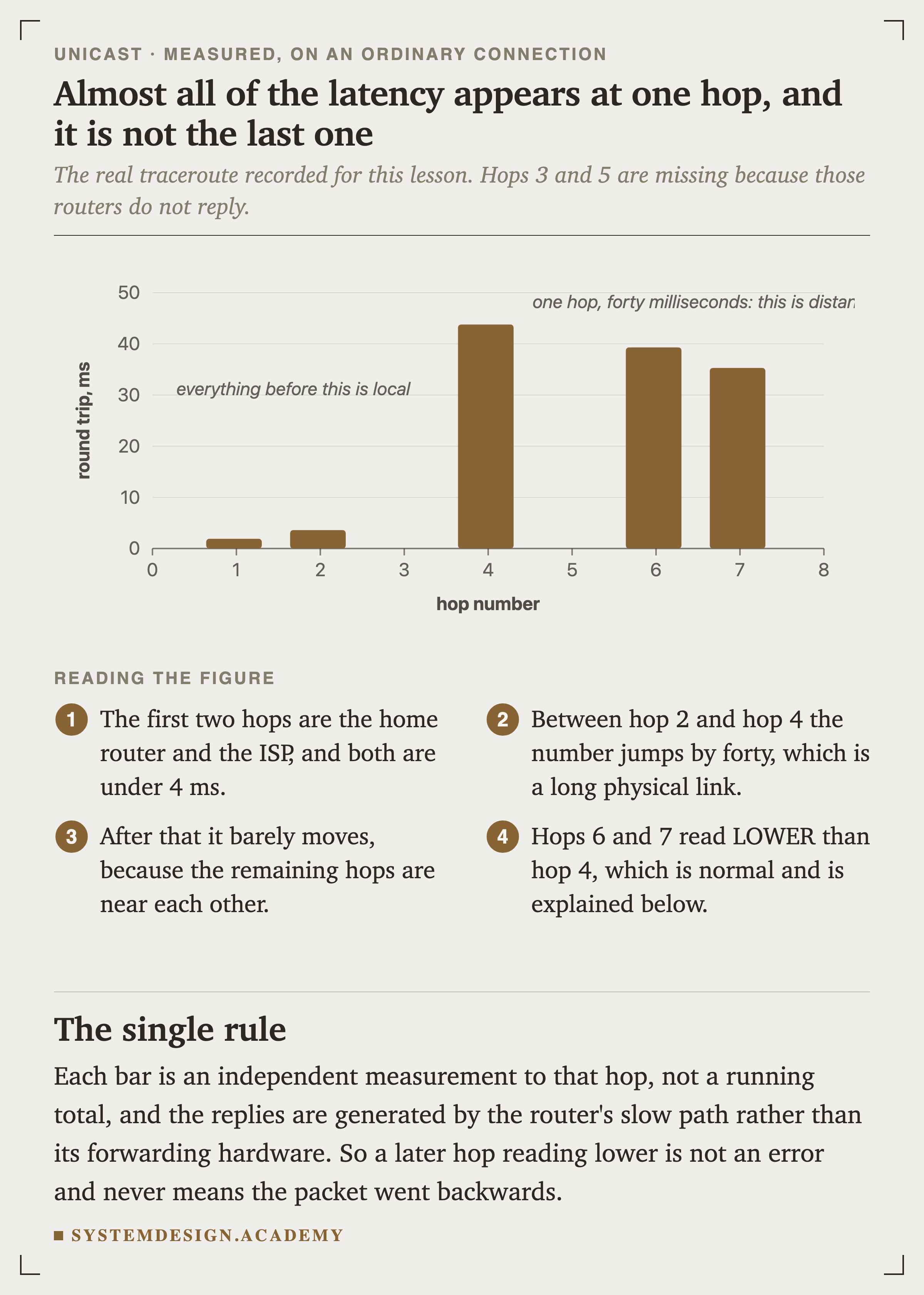
That last point is worth being precise about, because it looks like an error and is not. Each number is an independent measurement to that hop, not a running total. The replies are also generated by a router's general-purpose processor rather than its forwarding hardware, and that processor deprioritises them. A busy router can therefore look slow while forwarding your traffic perfectly.

A bar chart of round trip in milliseconds against hop number, plotting the measured traceroute to 1.1.1.1. Hop 1 is 1.9, hop 2 is 3.6, hop 4 jumps to 43.8, hop 6 is 39.3 and hop 7 is 35.3. Hops 3 and 5 are absent. Notes read that everything before hop 4 is local, and that one hop taking forty milliseconds is distance.
ChartFigure 9. Almost all of the latency appears at one hop, and it is not the last one

The first two hops are under four milliseconds. Between hop 2 and hop 4 the number jumps by forty, which is a long physical link being crossed.

After that it barely moves, because the remaining hops are near each other. Whatever that one link is, it is essentially the entire of the connection.

So the two paths commonly differ in length, in latency and in who operates them.

Two practical consequences. Traceroute shows you one direction only, so it is half of any latency investigation. And a firewall on the return path can break a connection that appears to have left successfully, which is a genuinely confusing failure to debug from the sending side.

Where the routes come from

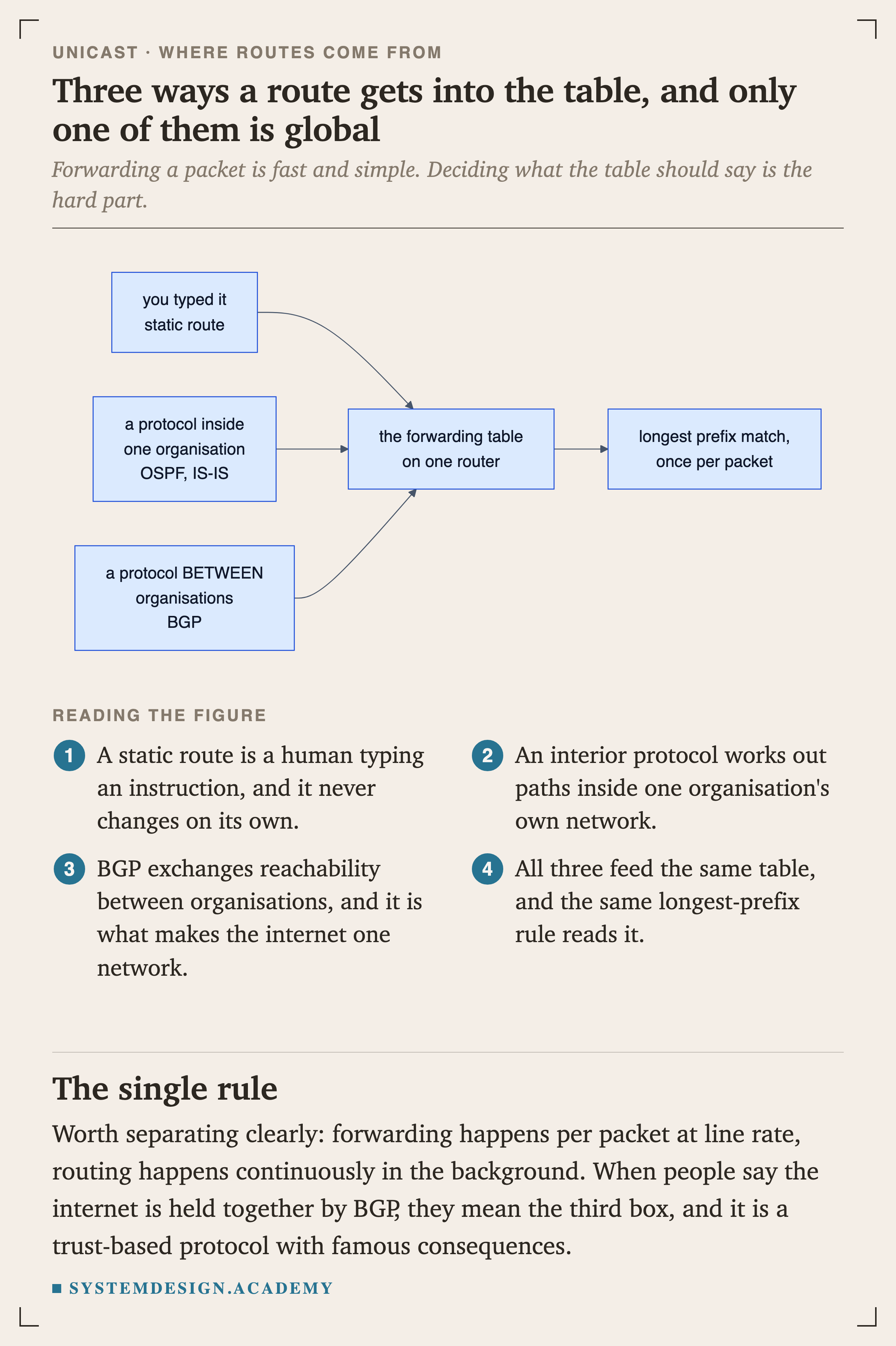
A diagram with three inputs feeding one box. A static route that you typed, an interior protocol inside one organisation such as OSPF or IS-IS, and a protocol between organisations, BGP, all feed the forwarding table on one router, which then does longest prefix match once per packet.
FlowchartFigure 12. Three ways a route gets into the table, and only one is global

Forwarding a packet is fast and simple. Deciding what the table should say is the hard part, and it happens continuously in the background.

BGP is the third box: it exchanges reachability between organisations and is what makes the internet a single network rather than many.

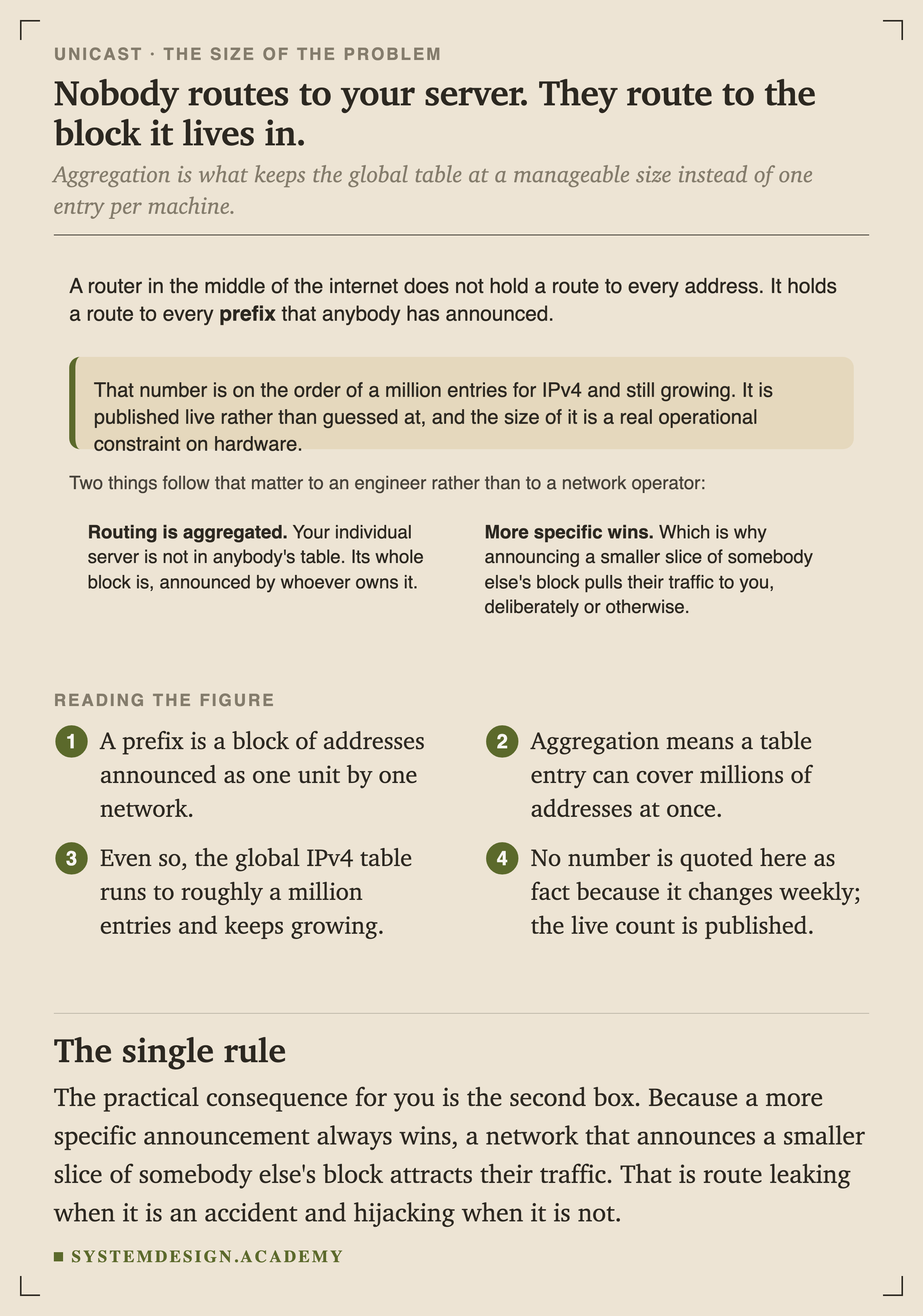
A figure explaining that a router in the middle of the internet does not hold a route to every address, but to every prefix that anybody has announced, on the order of a million entries for IPv4 and still growing. Two consequences follow: routing is aggregated, so your individual server is not in anybody's table, only the block it lives in; and more specific wins, which is why announcing a smaller slice of somebody else's block pulls their traffic to you.
FigureFigure 13. Nobody routes to your server. They route to the block it lives in.

Aggregation is what keeps the global table at a manageable size instead of one entry per machine.

No specific count is quoted here as fact, because it changes weekly and is published live rather than estimated.

The second box in that figure is the one worth remembering, because it is the mechanism behind route hijacking. A more specific announcement always wins, so a network announcing a smaller slice of somebody else's block will attract their traffic. That is a legitimate traffic-engineering tool between consenting parties, an accident when it is a misconfiguration, and an attack when it is not.

Every router on the public internet drops these, which is exactly what makes them reusable by everybody simultaneously.

Recognising them on sight is genuinely useful: a private address in a traceroute or a log tells you immediately which side of a boundary you are looking at.

Every link has a size limit, and they disagree

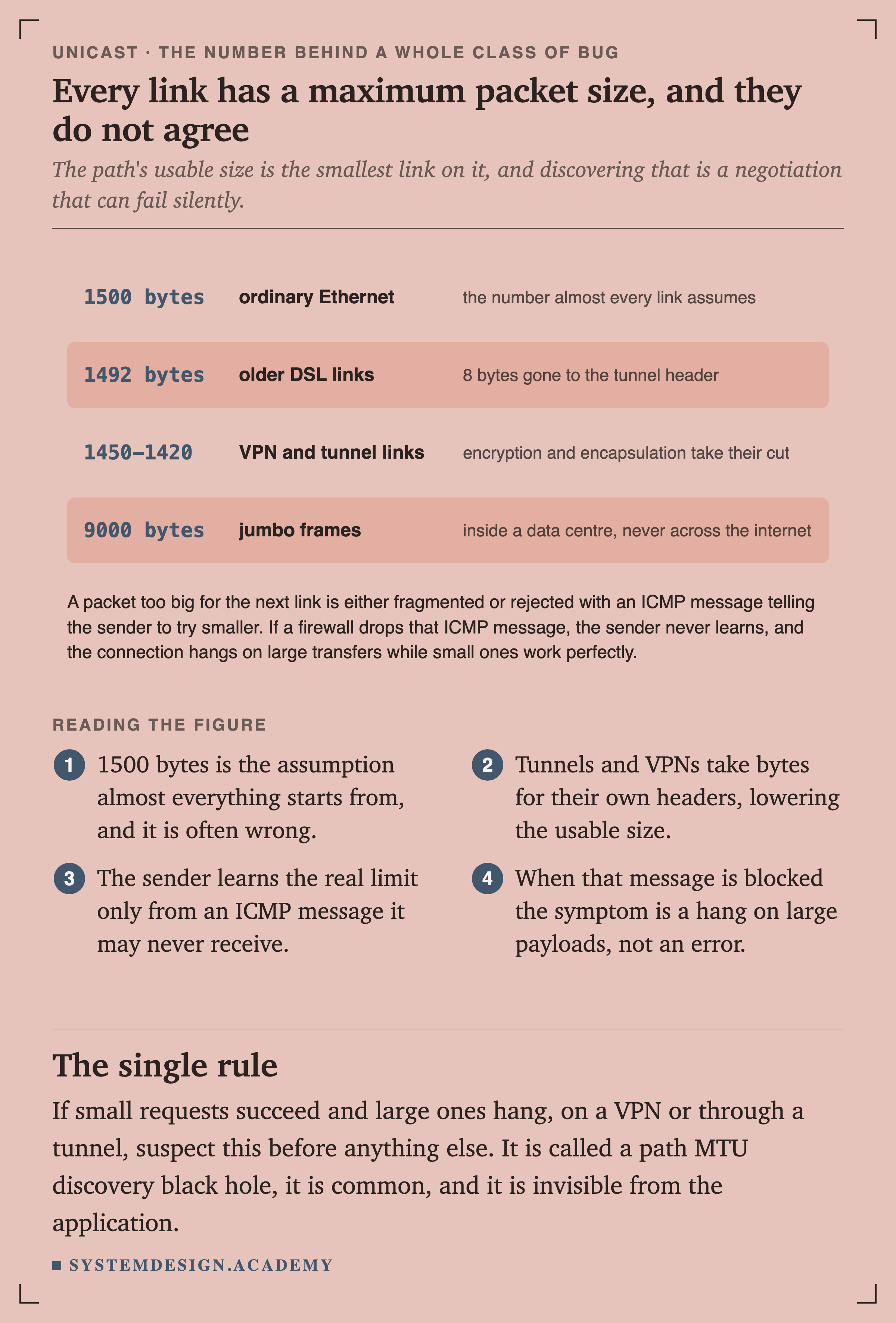
A table of maximum packet sizes. 1500 bytes for ordinary Ethernet, the number almost every link assumes. 1492 bytes for older DSL links, with 8 bytes gone to the tunnel header. 1450 to 1420 for VPN and tunnel links, where encryption and encapsulation take their cut. 9000 bytes for jumbo frames, inside a data centre and never across the internet. A note explains that a packet too big for the next link is either fragmented or rejected with an ICMP message telling the sender to try smaller, and that if a firewall drops that message the connection hangs on large transfers while small ones work.
FigureFigure 16. Every link has a maximum packet size, and they do not agree

The usable size for a path is the smallest link on it, and the sender learns that only from an ICMP message it may never receive.

When that message is blocked, the symptom is a hang on large payloads rather than an error.

If small requests succeed and large ones hang, especially over a VPN or a tunnel, suspect this before anything else. It is called a path MTU discovery black hole, it is common, and it is completely invisible from inside the application.

A packet arriving at a machine with no matching state is answered with a reset.

That is the deepest reason unicast is the default rather than a choice. Almost everything above it assumes one identifiable peer, and every alternative delivery mode has to give something up to escape that assumption.

SketchFigure 20. Nothing promises your next packet lands where the last one did

The routing system has no idea a connection exists. It forwards packets, and a change anywhere upstream can make a different site closer mid-conversation.

The new site holds no connection state, so it resets rather than continues.

That is why anycast's original success was over UDP: one packet out, one packet back, nothing to lose. Long-lived connections over anycast work well in practice, and they rely on route stability rather than on any guarantee.