The Two-Word Change That Took Down Support
A support team ships an AI assistant that drafts replies to customer tickets. It works well for months. One Friday afternoon a product manager decides the answers feel a little terse, so an engineer adds five words to the prompt: "be as detailed as possible." The pull request is tiny. Nobody thinks twice. It merges and deploys.
By Monday, reply quality has fallen off a cliff. The assistant now writes rambling three-paragraph essays that bury the actual answer, and half of them drop the required ticket-number format. Complaints pile up. The on-call engineer starts digging, and here is the part that hurts: nobody can say for certain what the prompt even said last Tuesday, or which change caused this, because the prompt is an f-string buried three functions deep in the codebase, edited by whoever happened to touch that file.
That is the whole problem in one story. A wording change reached production with no test, no record, and no fast way back, because the wording was never treated as a thing that ships. It was treated as a string.
A prompt is not a string. It is the most important piece of business logic in an LLM application, and most teams treat it like a throwaway literal.
The prompt decides what your model does. It carries the persona, the rules, the format, the safety constraints, and the examples that steer every single answer. Change one line and you change the behavior of the whole feature, often in ways a quick manual read will not catch. That is exactly the profile of code, and it deserves the same discipline you already give your code and your model weights: versions, review, testing before it ships, and a rollback button. This lesson is about giving prompts exactly that, and about the machinery that makes each of those guarantees cheap.
Prompts Are Artifacts, Not Literals
Think about how you already treat a trained model. You do not paste model weights into the middle of your app. You save each trained version to a , tag one as production, and the app looks it up by name. You version it, you know which one is live, and you can roll back to the previous one without retraining anything.
A prompt deserves the identical treatment. The idea is a prompt registry: a model registry, but for prompts. Every prompt is a named artifact with a stack of immutable versions. The app never carries the prompt text. It carries a name and a stage tag, something like a request for the version currently tagged production, and asks the registry for it at runtime. That one move, pulling the prompt out of the code and into a versioned catalog, is what makes everything else in this lesson possible.
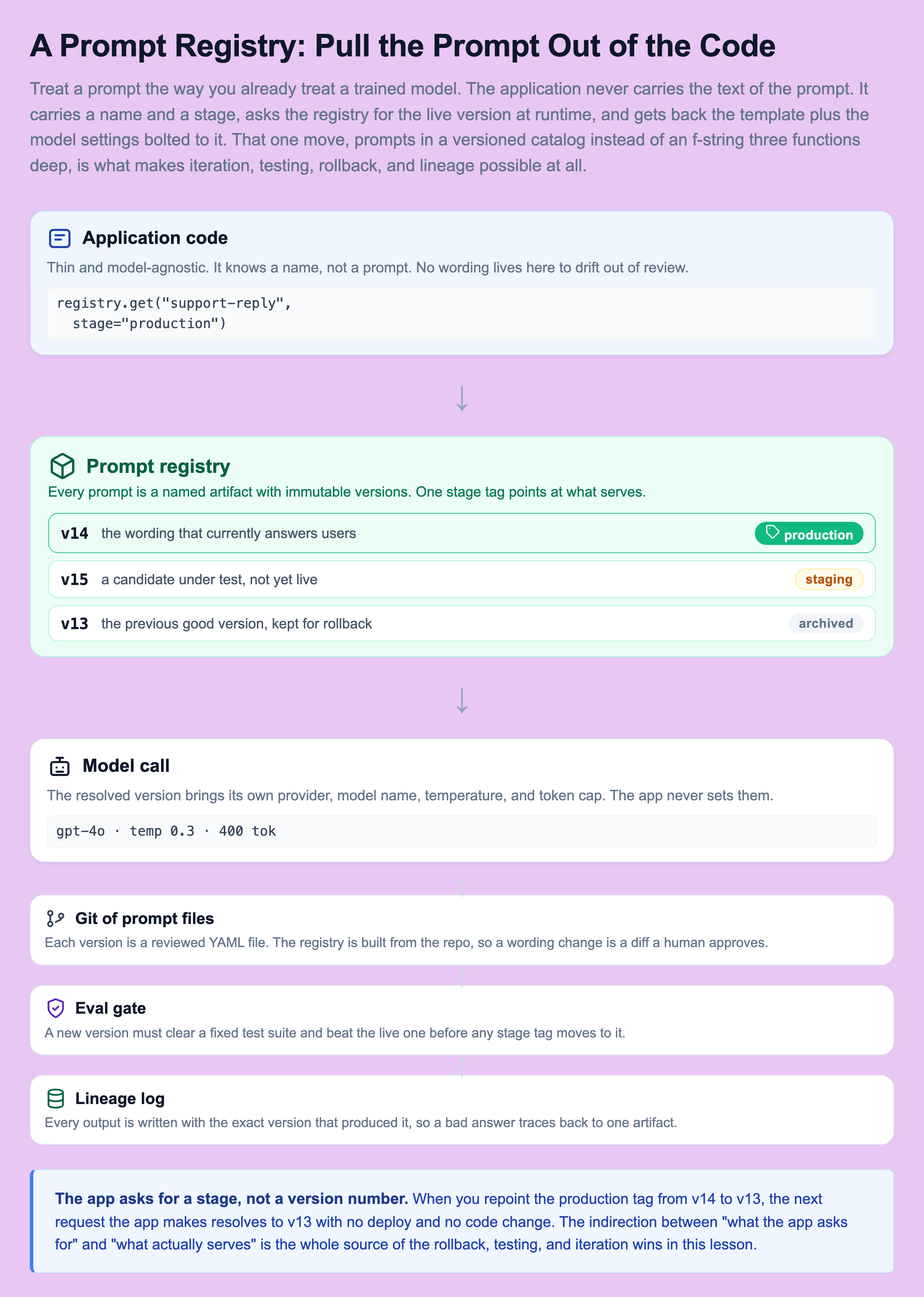
The important detail is the indirection. The application does not ask for v14. It asks for whatever version is currently tagged production. The registry resolves that tag to a concrete version at request time. That gap between what the app asks for and what actually serves is small, and it is the source of every win below. Once prompts live in a registry instead of the codebase, four things you could never do before become easy:
- Iterate without a deploy. Editing the wording is a registry change, not a code release. The people closest to the problem, often support or product, can propose a fix directly.
- Test before shipping. A new version can be run against an eval suite and a canary before real users see it, exactly the way a code change runs through CI.
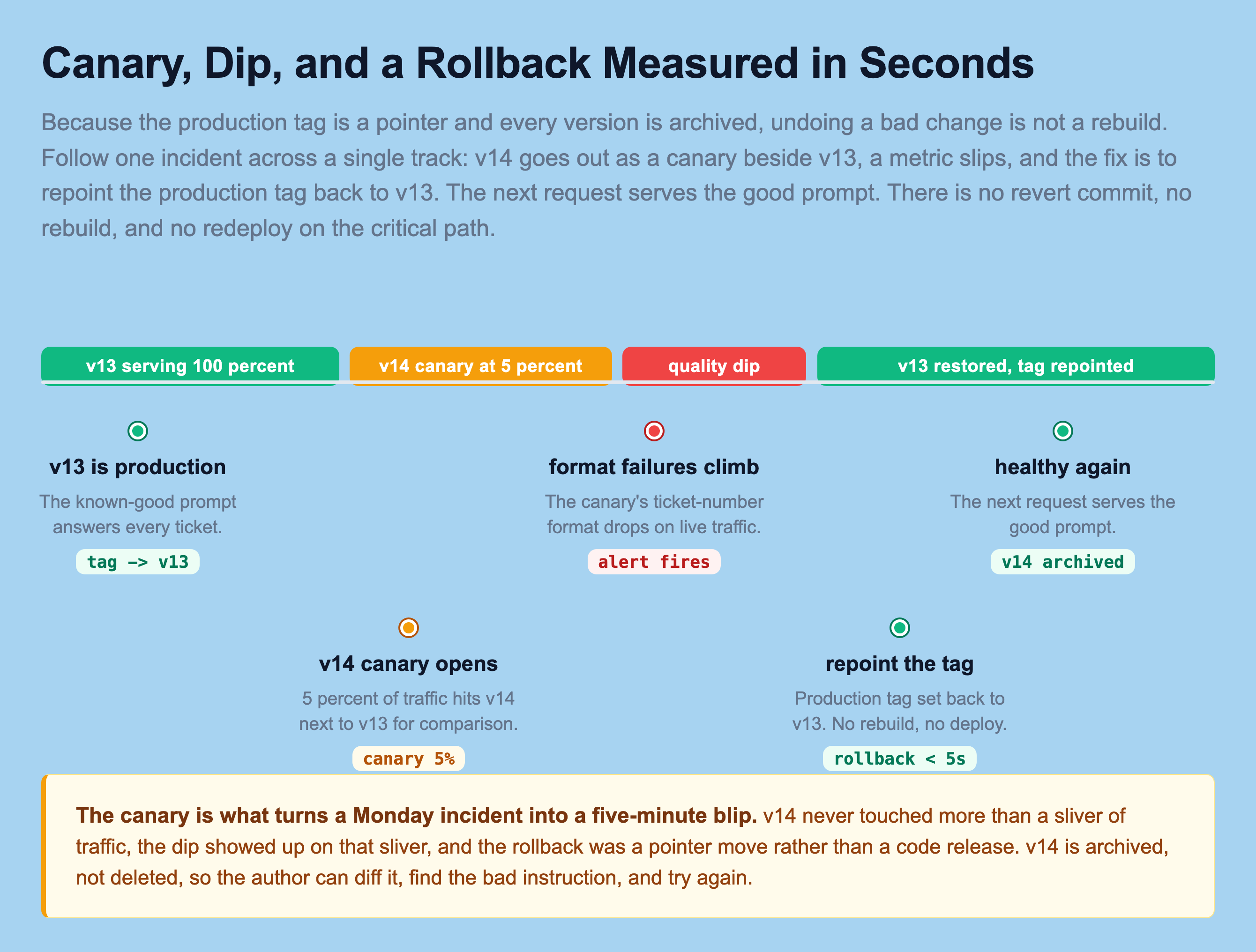
- Roll back in seconds. Repoint the production tag from v14 to v13 and the next request serves the good prompt. No revert commit, no rebuild.
- Debug from lineage. Every output is logged with the exact prompt version that produced it, so a bad answer traces back to one artifact instead of a guess.
None of these are exotic. They are the same guarantees you already expect from a mature deploy pipeline. The registry is just what brings them to the one artifact that was quietly exempt.
Prompts in Code vs a Prompt Registry
To see why this matters, compare the two worlds directly. On the left the prompt is a string your app happens to contain, compiled into a build, edited by whoever last touched the file. On the right it is a versioned artifact your app looks up behind a stage tag. Every operational property you care about gets better as you move across.
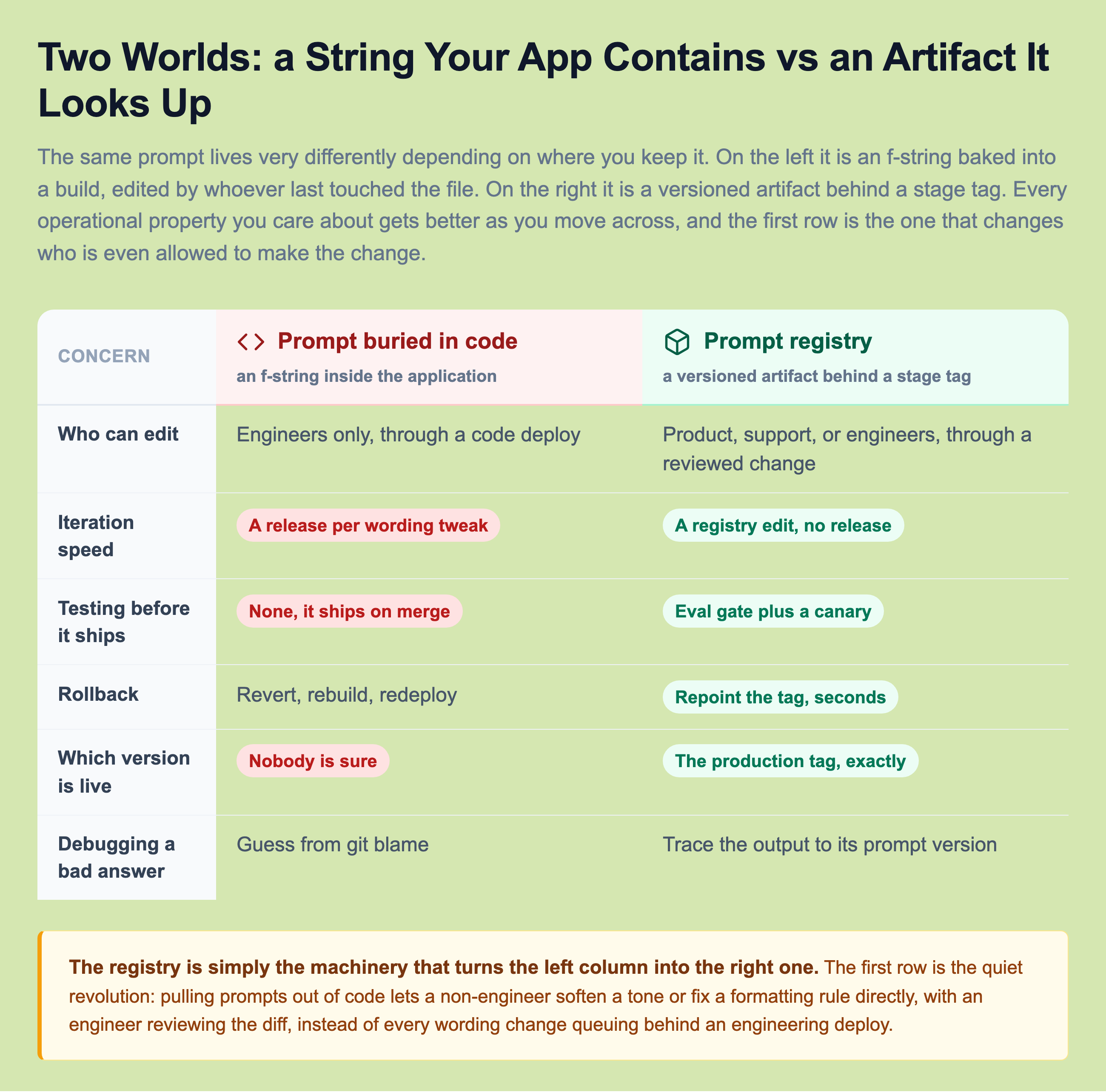
The registry is simply the machinery that turns the left column into the right one. Notice the first row especially. Separating prompts from code is what lets a non-engineer soften the tone or fix a formatting instruction directly, with an engineer reviewing the diff, instead of every wording change queuing behind an engineering deploy. That is not a small workflow nicety. In most teams the person who knows the reply is too terse is a support lead, not the engineer who owns the service. Keeping the prompt in code means their fix has to be translated into a ticket, scheduled, and shipped. Keeping it in a reviewed registry means they open the change and an engineer approves the diff, which is the difference between a fix that happens today and a fix that happens next sprint, if at all.
The last row matters just as much for a different reason. "Which prompt version is live right now" is a question you will ask under pressure, during an incident, when someone is watching a graph move the wrong way. In the code world the honest answer is a shrug and a git archaeology session. In the registry world it is a single lookup: the production tag points at exactly one version, and you know it in seconds.
A Versioned Prompt Template, Concretely
So what does a prompt version actually look like as a stored artifact? It is not just the text. It is the template with named variables, the model settings that go with it, and the metadata the registry needs to test and route it. All of that travels together as one immutable unit. Here is one prompt version as a config file the registry stores and versions in git.
# prompts/support-reply/v14.yaml
name: support-reply
version: 14
status: staging          # draft | staging | canary | production | archived
model:
  provider: openai
  name: gpt-4o
  temperature: 0.3
  max_tokens: 400
# Variables are rendered at request time. The app supplies these values,
# it does NOT supply the prompt text.
variables:
  - customer_name
  - ticket_body
  - product_area
template: |
  You are a support agent for Acme Cloud. Reply to the customer's ticket.

  Rules:
  - Keep the reply under 120 words.
  - Always start with the ticket number in the format [ACME-####].
  - Never promise a refund; direct billing questions to billing@acme.com.

  Customer: {{ customer_name }}
  Product area: {{ product_area }}
  Ticket:
  {{ ticket_body }}
eval_suite: support-reply-v1   # the fixed test set this version must pass
Read that file field by field, because every part of it is load-bearing.
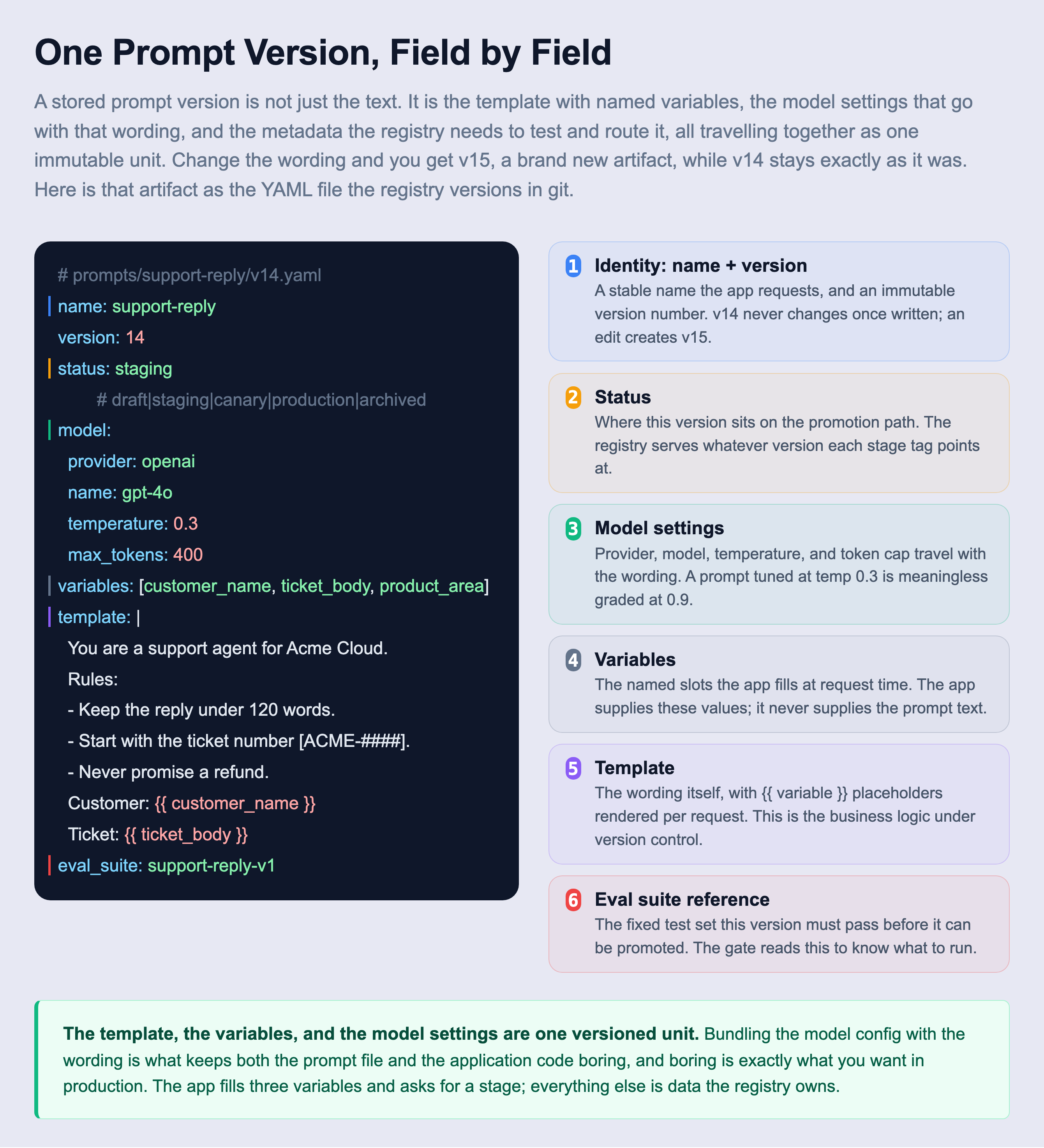
The field that teams forget most often is the model block, and it is the one that will burn you. The same wording at temperature 0.9 is a different prompt than at 0.3. A silent provider upgrade from one model snapshot to the next changes behavior underneath you. If the model and its parameters are not pinned inside the version, then two runs you believed were identical were not, and any comparison you draw between v13 and v14 is grading two things at once. Bundling the model config with the wording is what makes a version a fair unit of comparison.
The application code stays tiny and model-agnostic. It asks for the prompt by stage, fills in the variables, and sends the rendered string. It never sets a temperature and never knows which model answers.
from prompt_registry import registry  # your registry client

def draft_reply(ticket):
    # Pull the version tagged "production", whatever it currently is.
    prompt = registry.get("support-reply", stage="production")
    rendered = prompt.render(
        customer_name=ticket.customer_name,
        product_area=ticket.area,
        ticket_body=ticket.body,
    )
    return prompt.call(rendered)   # uses the model settings baked into the version
Rendering: Template Plus Variables Becomes One Prompt
The stored version holds a template full of placeholders, not a finished prompt. The finished prompt only exists for the instant a request is served. At request time the app hands the registry client the values for this specific ticket, the client fills every slot, and the result is the concrete string sent to the model. This split is worth drawing on its own, because it is what keeps the versioned wording and the per-request data cleanly apart.
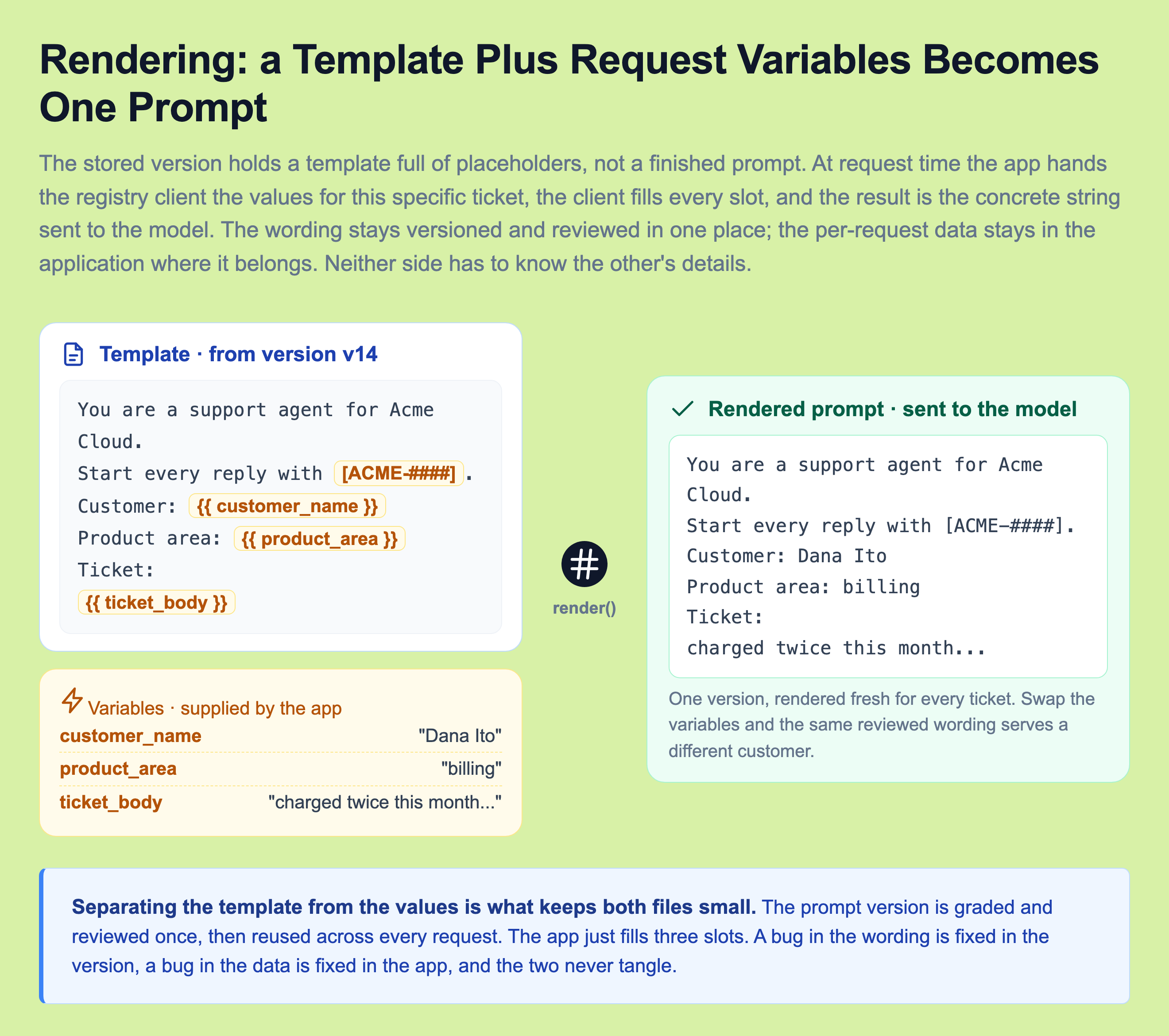
The payoff of this separation is that a bug has exactly one home. If the reply is worded wrong, the fix is in the version, and it ships through the registry with review and a gate. If the wrong customer name shows up, the fix is in the application code that populates the variables, and it ships through your normal code pipeline. The two never tangle, because the wording is graded and reviewed once and then reused across every request, while the values change on every call. One version serves millions of tickets, rendered fresh each time.
What Actually Travels Inside One Version
"Version the prompt" is too small an idea, and taking it literally is how teams end up with a versioned template string sitting next to unversioned model settings and an unversioned eval suite, which is barely better than where they started. The thing you freeze as an immutable artifact is everything that decides what the model does and how you grade it.
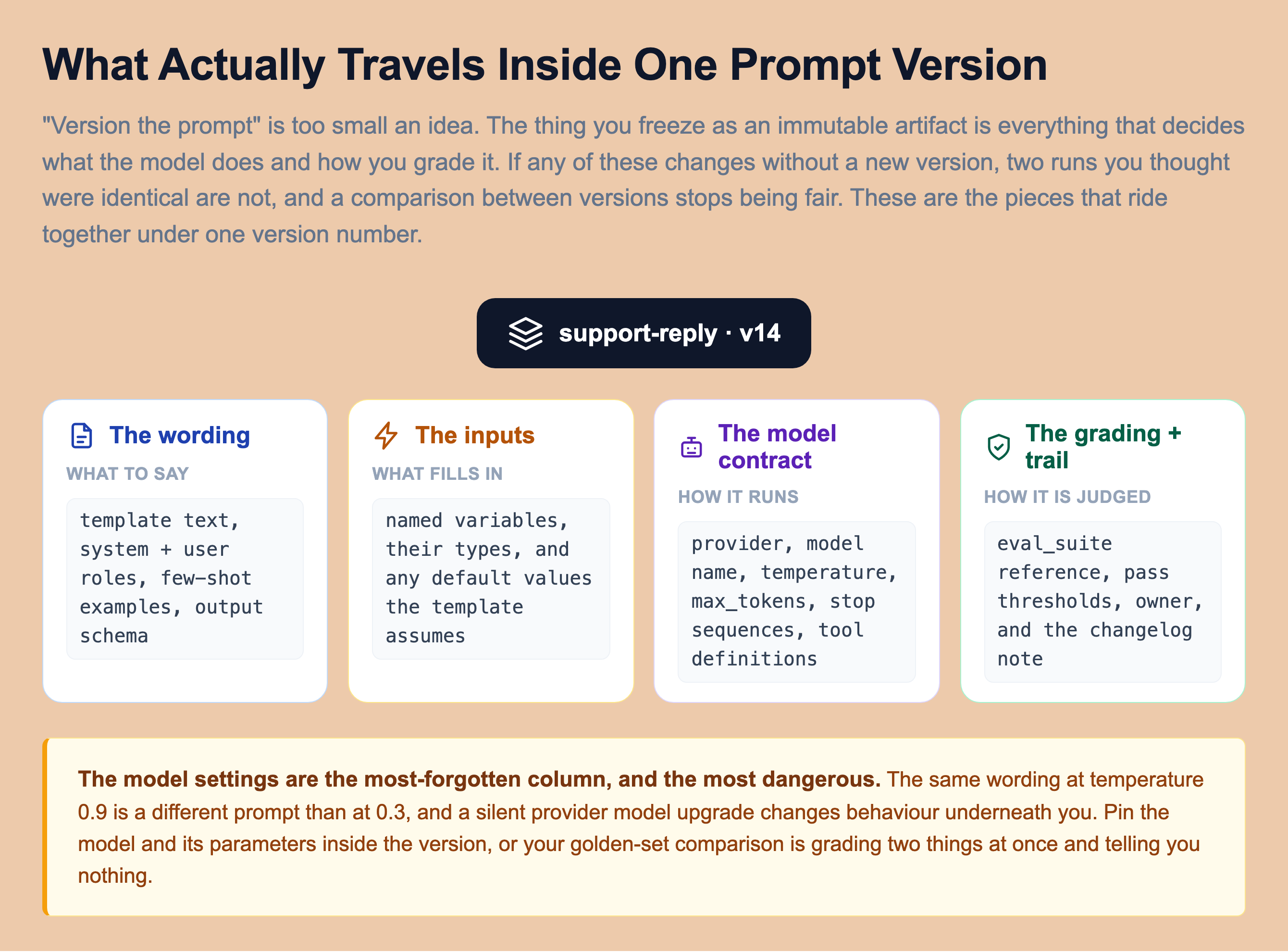
Group it into four families. The wording is the template text plus the system and user role split, any few-shot examples, and the output schema you expect back. The inputs are the named variables, their types, and any defaults the template assumes. The model contract is the provider, model name, temperature, token cap, stop sequences, and any tool definitions the prompt hands the model. The grading and trail is the eval suite the version must pass, the thresholds it must clear, the owner, and a short changelog note. If any one of these changes without a new version number, a comparison between two versions is no longer honest, because you are not holding the other factors fixed. The discipline is simple to state and easy to skip: one version number covers all four families, or your golden-set numbers are quietly lying to you.
Ship a Prompt Change Like a Deploy, Not a Whim
Here is the discipline that would have saved the support team. A new prompt version does not go straight to every user because it is "just text." It travels a promotion path, the same way a code deploy does, and it has to earn each step.
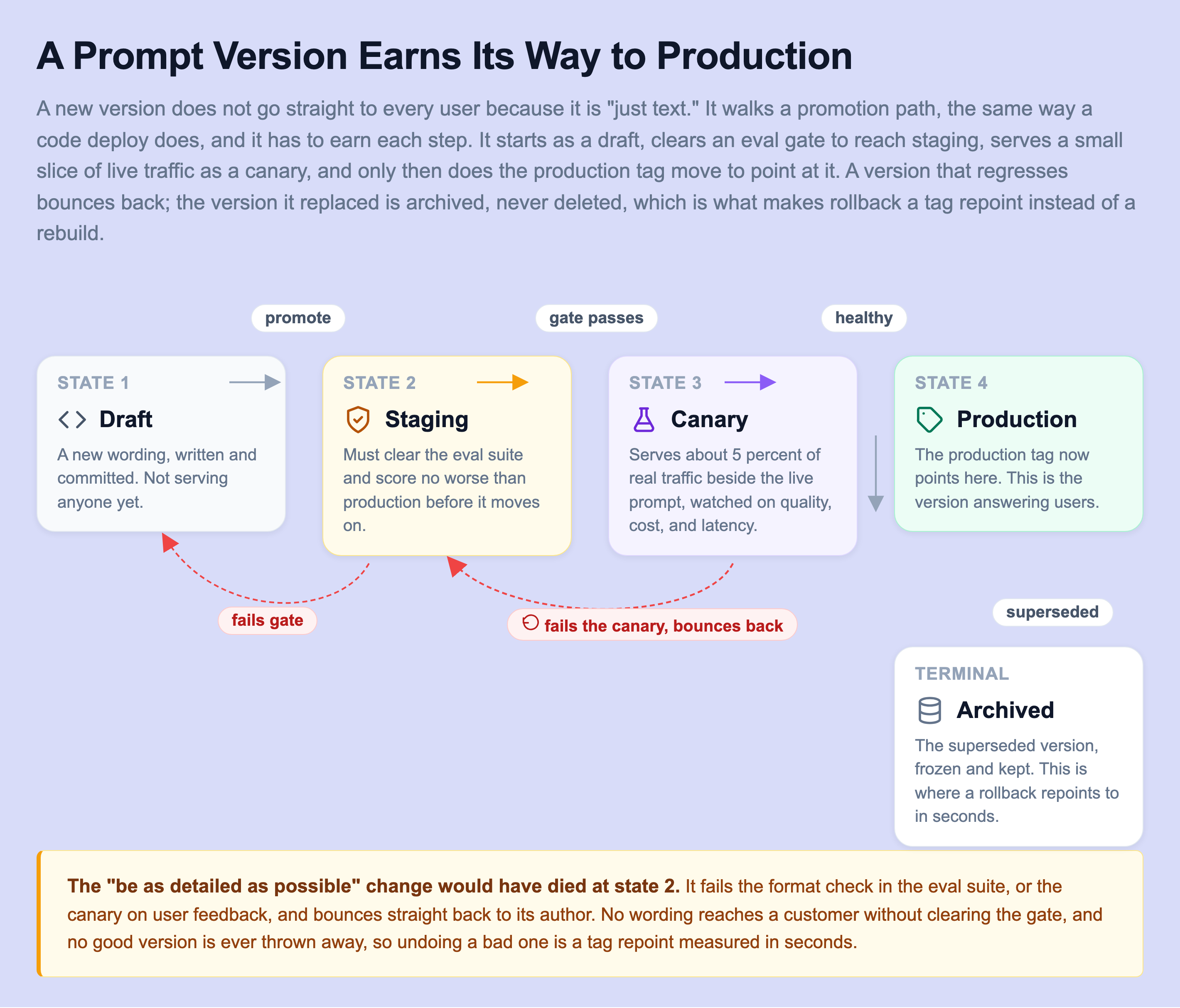
A version starts as a draft. It moves to staging, where it must clear an eval gate: a fixed set of test inputs with expected qualities, checking output format, factual accuracy on known cases, and safety, and it must not score worse than the version already in production. If it clears the gate, it becomes a canary serving a small slice of real traffic, say 5 percent, next to the live prompt. Only if the canary's quality, cost, and stay healthy does the production tag move to point at it. A version that regresses at any step bounces back to its author, and the version it replaces is archived rather than deleted, which is the detail that makes rollback trivial.
That gate is worth drawing on its own, because it is where "a two-word tweak" gets caught before it reaches a single customer. Treat a wording edit like code: it becomes a pull request, and CI runs the full eval suite against a fixed golden set automatically, exactly like a unit test.
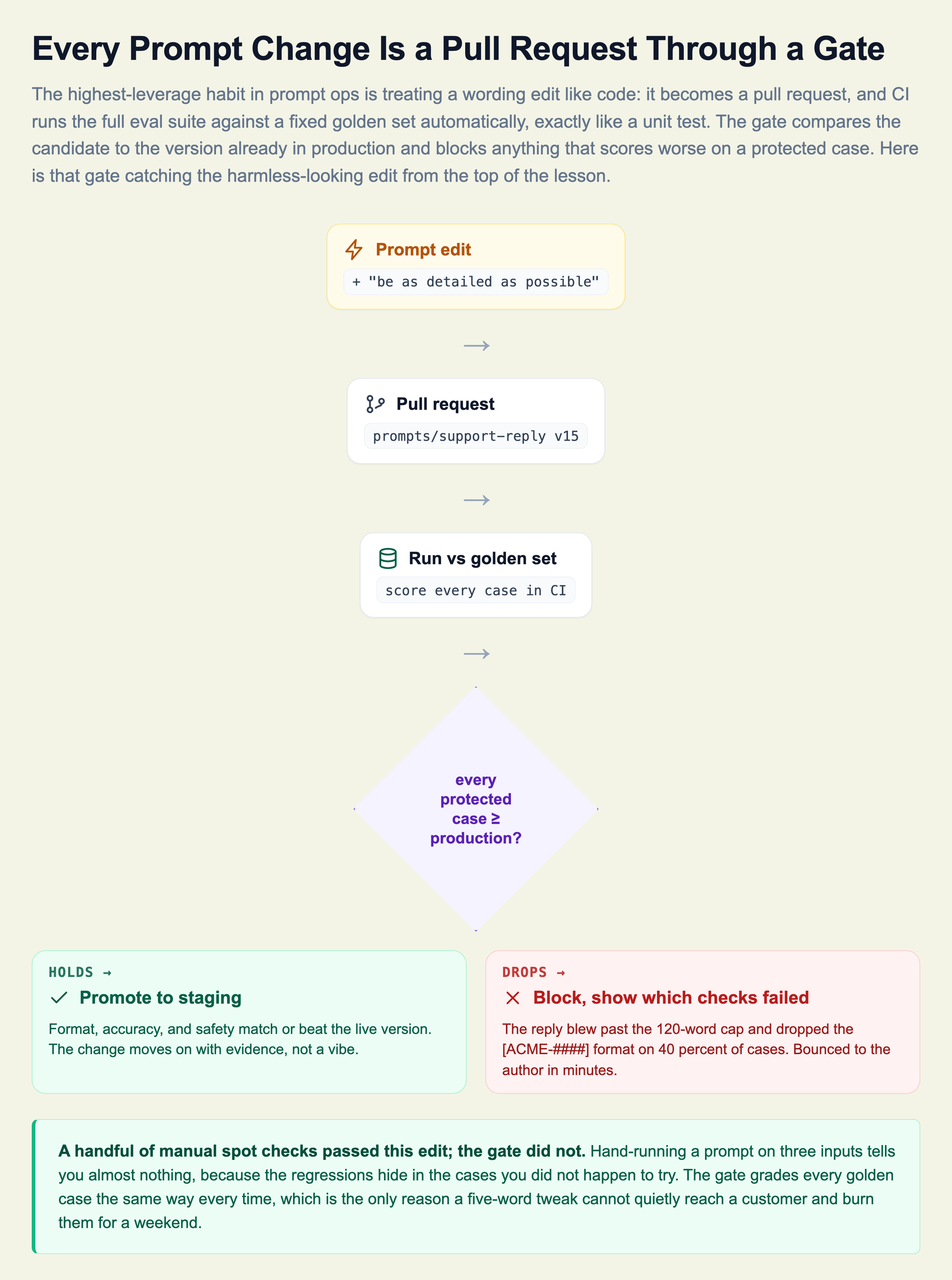
The "be as detailed as possible" change would have failed the eval suite on the format check, or failed the canary on user feedback, and bounced straight back to the author. No Monday incident. The reason the gate beats a manual review is not that humans are careless. It is that a handful of hand runs tells you almost nothing, because the regressions hide in the cases you did not happen to try. The gate grades every golden case the same way every time.
Prove It Helped, Not Just That It Is Safe
The eval gate answers one question: is this change safe to ship? It cannot answer a second, equally important one: did the change actually help real users? A golden set can be gamed, and a version can clear every offline check and still make the product worse in a way your fixed cases never captured. That answer only comes from live traffic, which is what an A/B experiment is for.
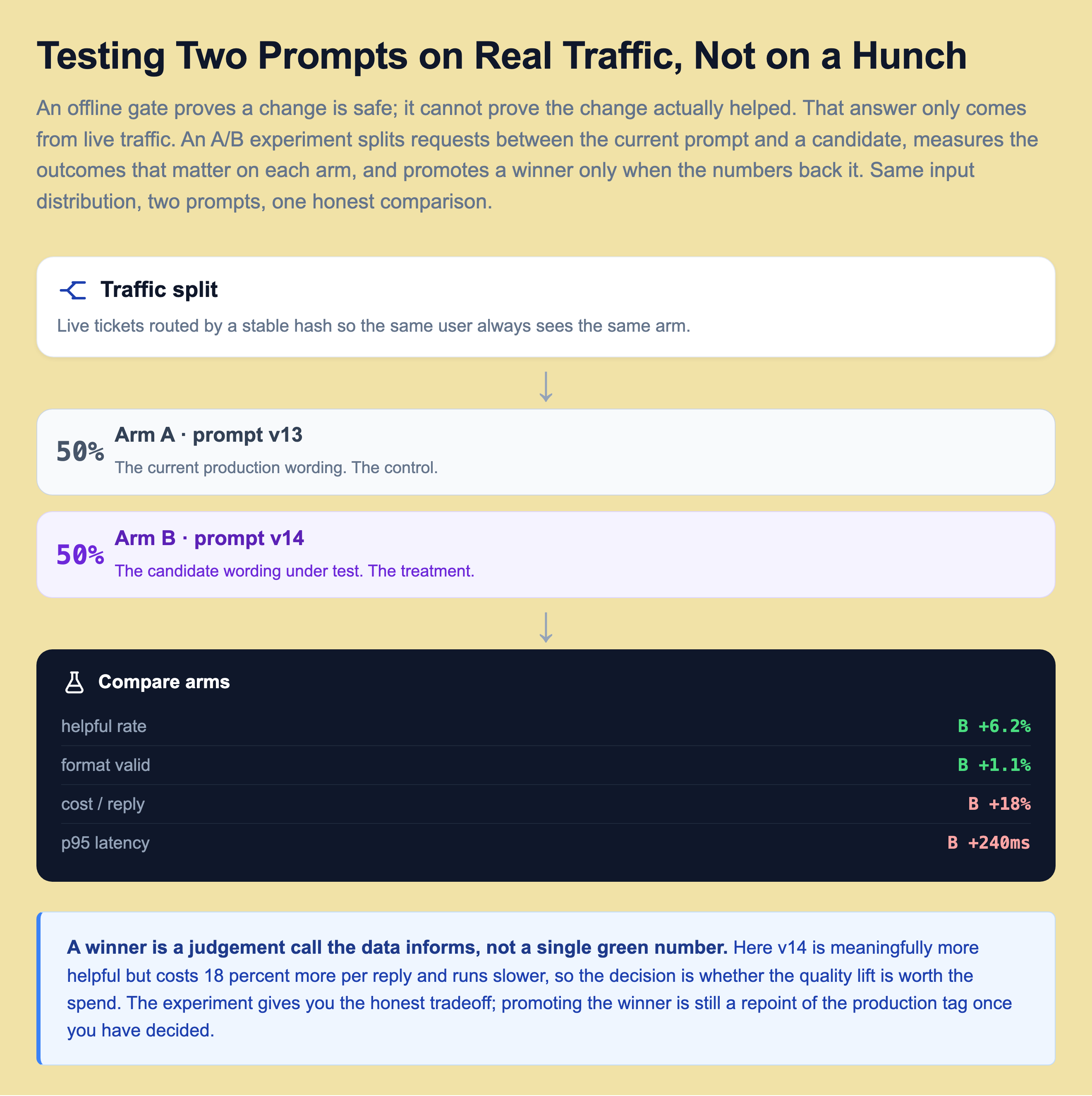
Split live requests between the current prompt and the candidate, route by a stable hash so the same user always sees the same arm, and measure the outcomes that actually matter: helpful rate, format validity, cost per reply, . The result is rarely a single green number. In the figure v14 is meaningfully more helpful but costs 18 percent more per reply and runs slower, so the decision is a judgement call the data informs rather than makes for you. The experiment gives you an honest tradeoff instead of a hunch, and if you decide the quality lift is worth the spend, promoting the winner is still just a repoint of the production tag. Offline proves safe, online proves helpful, and a serious system runs both with the ship boundary between them.
Lineage: Tie Every Answer to the Prompt That Made It
When a user reports a bad answer, the first question is always the same: which prompt produced it? If your prompts live in code and change without a trail, you cannot answer that, and debugging becomes archaeology.
The fix is lineage. For every request, you log one row: the request id, the prompt name and version, the rendered input, the model and its settings, and the output. Now a vague complaint becomes a mechanical investigation.
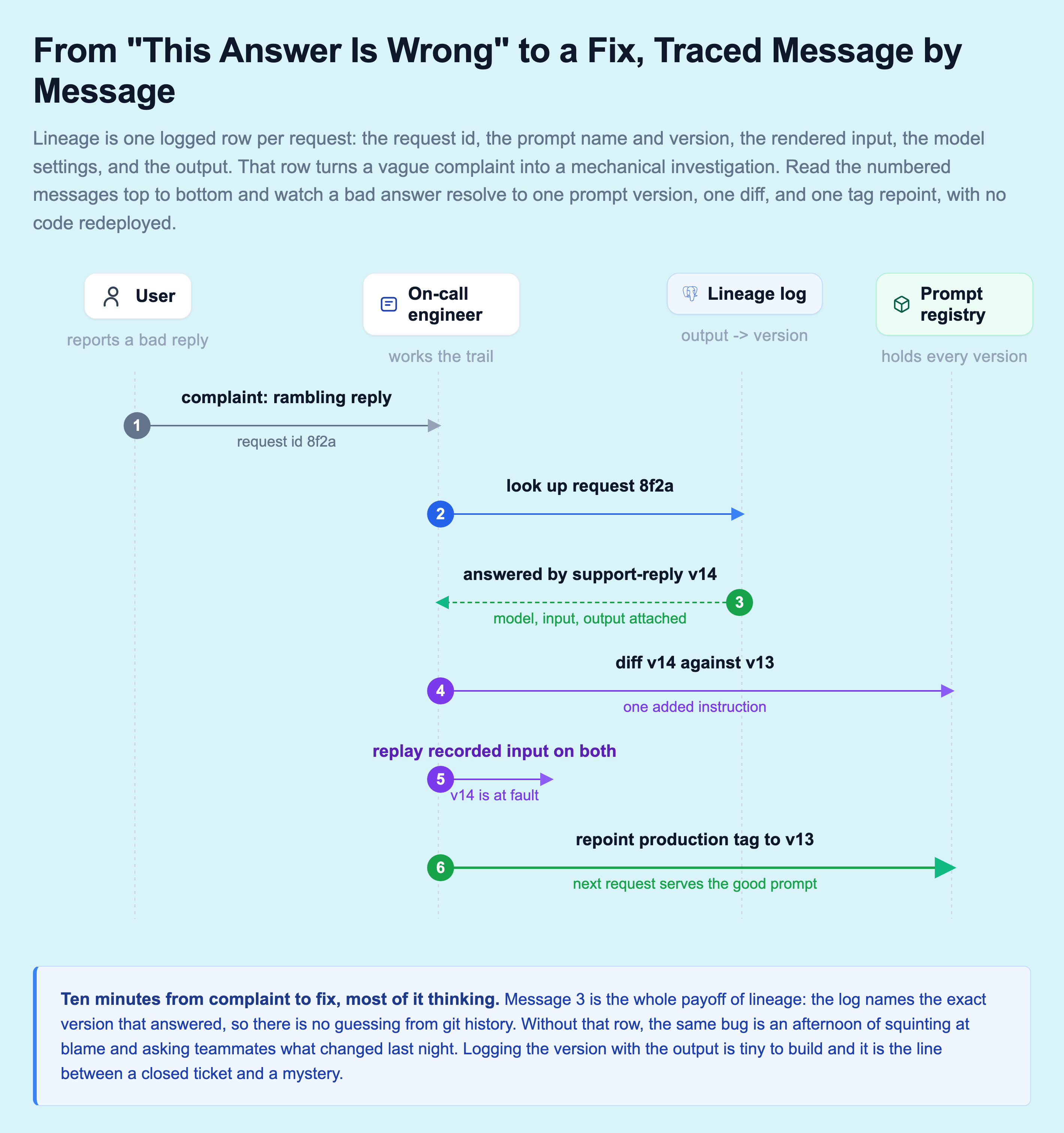
Walk the trail. A complaint arrives with request id 8f2a. You look it up and the lineage log says the answer came from support-reply v14. You diff v14 against v13 and find the one instruction someone added last night. You replay the recorded input against both versions to confirm v14 is the culprit, then repoint the production tag to v13. Ten minutes from complaint to fix, most of it thinking, and not one line of code redeployed.
The single message that makes all of this work is the log telling you the exact version that answered. Without it, you are back to guessing from git history and asking teammates what changed, which is an afternoon of work with no guarantee of an answer. Logging the prompt version alongside the output is a tiny thing to build, usually one extra column and one line at the call site, and it is the difference between a closed ticket and a mystery that never fully closes.
Prompt Caching: The Cheapest Win in LLM Ops
Every call to a model costs real money and real time. A GPT-4 class request runs from a few hundred milliseconds to a few seconds and costs anywhere from a fraction of a cent to a few cents, depending on how much text goes in and out. On repetitive traffic, classification, FAQ answers, the same question asked a hundred ways, you are paying that over and over for answers you already computed.
Prompt kills that waste. You hash the rendered prompt together with the model name and the prompt version, use that as a key, and store the completion in . Next time an identical request comes in, the answer returns in about two milliseconds for zero tokens.
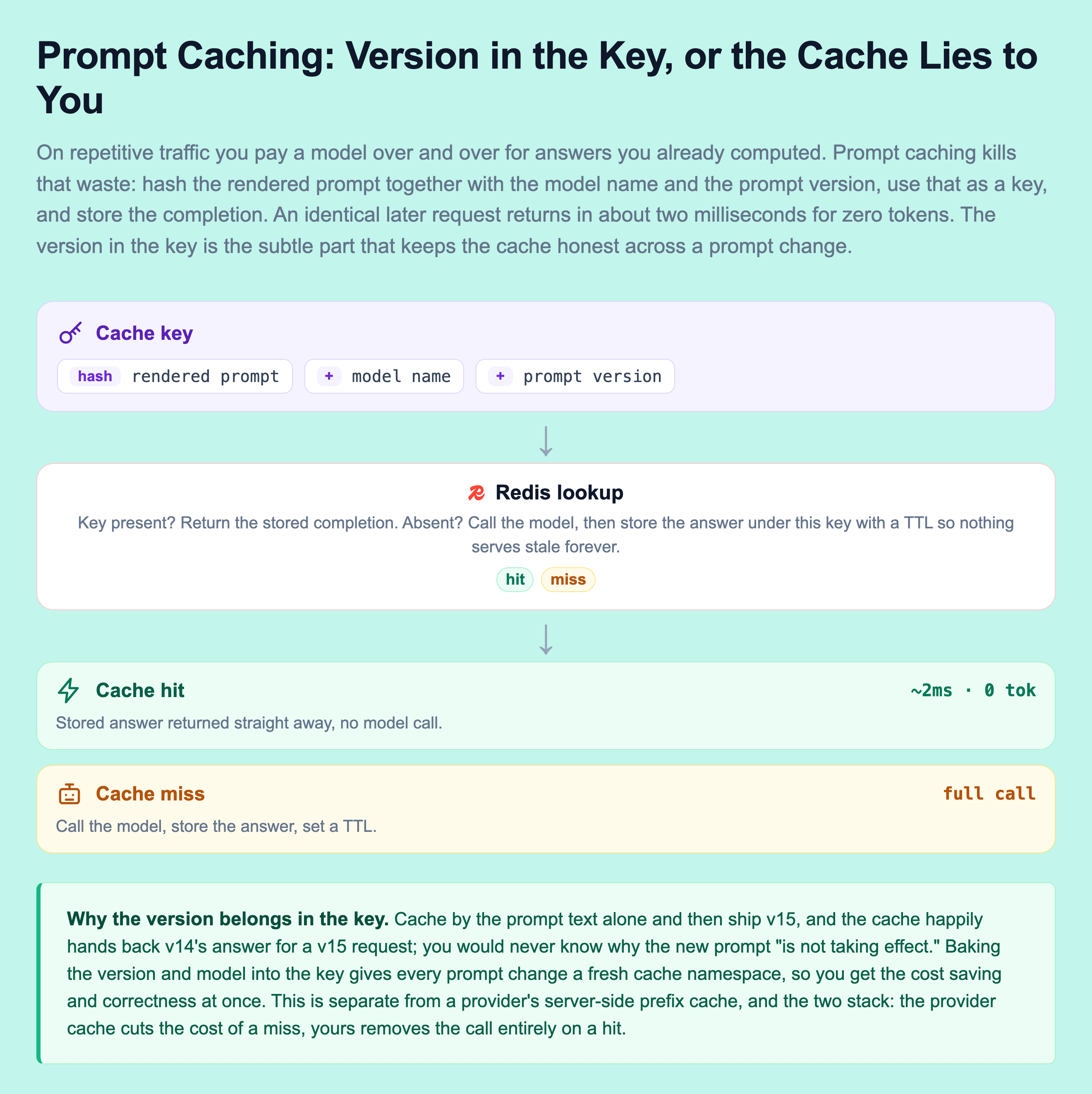
The reason the version belongs in the key is subtle and important. If you cache by the prompt text alone and then ship prompt v15, the cache would happily hand back v14's answer for a v15 request, and you would never know why the new prompt "isn't taking effect." Baking the version into the key means every prompt change automatically gets a fresh cache namespace. Correctness and cost savings, at the same time.
Two things to keep honest. Cache hit rates depend heavily on how repetitive your traffic is, from near zero on wide-open chat to 30 to 60 percent on narrow, repetitive tasks, so measure yours before you count the savings. And give cached entries a time-to-live so a cached answer cannot serve stale forever. This is separate from a provider's own server-side prompt caching, which discounts repeated prefix tokens. The two stack: the provider cache cuts the cost of a miss, your cache eliminates the call entirely on a hit.
Here is a tiny, dependency-free version of the whole idea, so you can watch a registry resolve a stage, render a template, and short-circuit a repeat request through the cache. Run it and change the ticket text to see the hit turn into a miss.
One Prompt, Many Models
The moment you run more than one model, and most serious teams do, for cost, for fallback when a provider is slow or down, prompt management gets a new job. The same logical prompt has to work across GPT-4, Claude, and maybe a small open model on vLLM, without the app knowing or caring which one answers today.
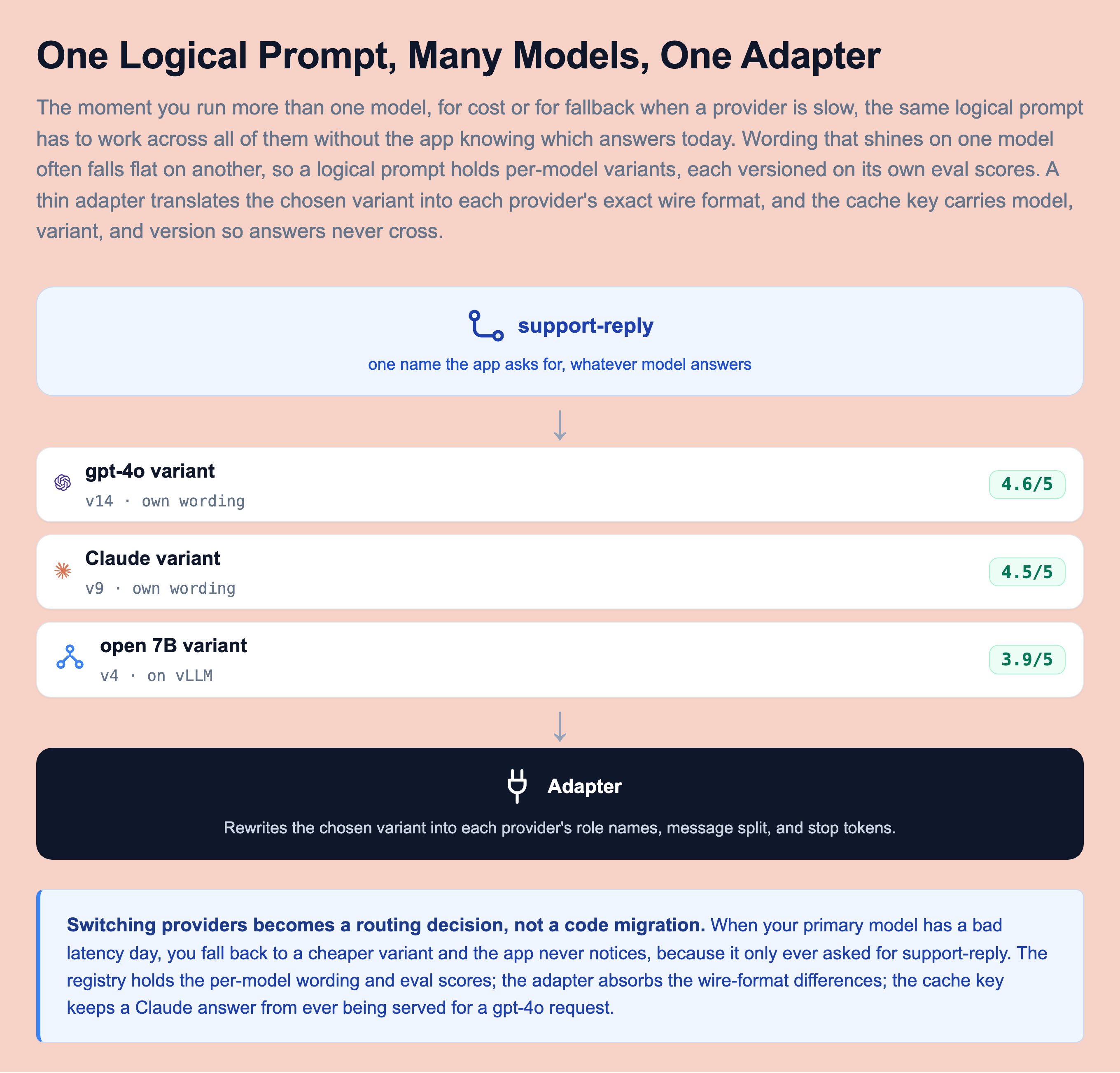
This is where the registry earns its keep again. The wording that shines on GPT-4 often falls flat on Claude or a 7B open model, so one logical prompt holds per-model variants, each versioned on its own eval scores. A thin adapter layer translates the chosen variant into each provider's exact wire format, since providers disagree on how system and user messages split, on role names, and on stop tokens. And the cache key carries the model, variant, and version together, so a Claude answer is never served for a GPT-4 request.
Do this and switching providers becomes a routing decision, not a code migration. When your primary model has a bad day, you fall back to a cheaper one and the app never notices, because it only ever asked for support-reply. The registry holds the per-model wording and the eval scores, the adapter absorbs the wire-format differences, and the cache key keeps the answers from ever crossing.
How Teams Actually Run This
None of this is hypothetical. As LLM features moved from demos to real products, teams converged on the same practices, and tooling grew up around them.
The pattern shows up everywhere prompts drive real decisions. GitHub, building Copilot, treats its prompts as versioned assets with heavy offline evaluation before any change reaches developers, because a bad prompt degrades suggestions for millions of users at once. Teams at companies like Notion and Intercom that shipped AI writing and support features moved prompts out of application code and behind evaluation gates for the same reason the support team in our story needed to: a wording change is a production change.
On the tooling side, purpose-built prompt registries and eval platforms, LangSmith, Humanloop, PromptLayer, and the prompt features inside MLflow, all sell the same core idea this lesson describes: prompts as versioned artifacts, an eval gate before promotion, lineage from output back to prompt, and a rollback that is a tag repoint instead of a redeploy. You do not need to buy one to get the benefit. A git repo of prompt files, a Postgres table for lineage, a cache, and a promotion script give you most of it, and the concepts transfer cleanly if you later adopt a managed platform.
The takeaway is the one from the very first slide. Treat the prompt like the production code it is, and the two-word Friday change becomes a caught regression on a canary instead of a Monday incident with no paper trail. Everything in this lesson, the registry, the versioned artifact, the promotion path, the gate, lineage, , and cross-model variants, is in service of that one shift in how you think about a prompt.
Knowledge Check
Knowledge Check
4 questions - Score 80% to pass
What is the core idea behind a prompt registry?
Why should a new prompt version go through an eval gate and a canary before reaching all users?
Besides the template text, what must a prompt version pin to keep comparisons between versions fair?
Why is the prompt version included in the prompt cache key?