Packing the Same Dolls Three Ways
Let me start with a set of wooden nesting dolls.
Say I want to send them to a friend in another city. I can put them in a loose box with a lot of air around them. I can squeeze the air out, so the parcel is small, but my friend has to unpack it more carefully. Or I can use a sealed box with a printed list of everything inside. My friend must read the list and sign it before the box will open.
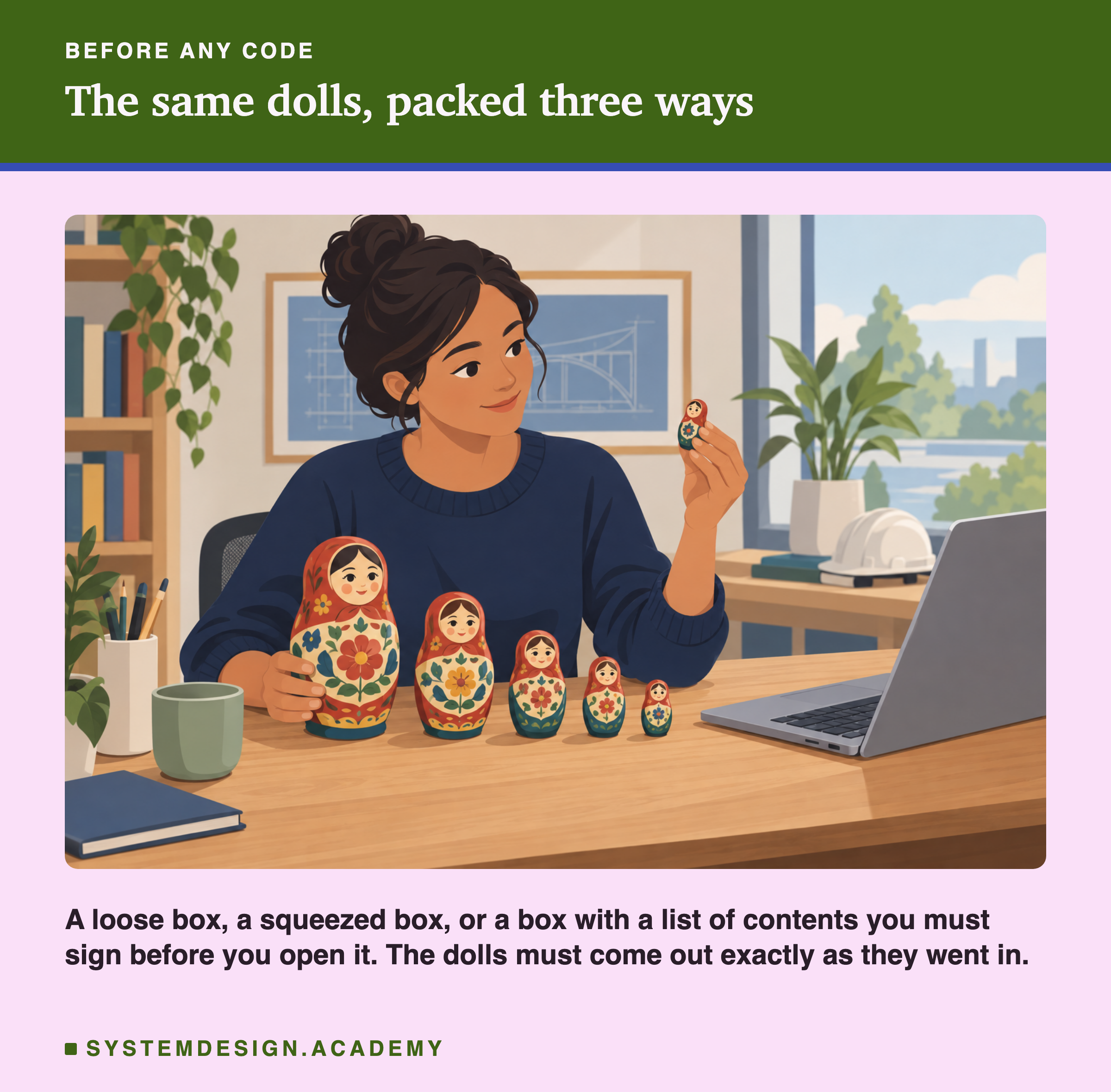
Three things matter. How big is the parcel? Do the dolls arrive exactly as they left, with nothing chipped or swapped? And what does my friend have to trust before opening it?
A trained model has exactly these three questions when you save it to a file. In this lesson I save one real model in eleven different ways and measure all three. I do not guess, and I do not repeat what tool websites say without checking it.
Where This Lesson Starts
This lesson uses the model from the features chapter. If it is new to you, please read what a feature is first. That lesson built six features for each customer of a real online shop: recency, frequency, money, return share, tenure and products. The question is always the same: at the start of a month, will this customer buy something in the next 30 days? The model is a gradient boosted tree model from scikit-learn, and it scored a test AP of 0.5450. Every lab in this chapter starts by training that model again and checking that it scores 0.5450 exactly.
Two other lessons sit close to this one. Model packaging and containerization gives the big picture: why a model file alone is not enough to ship. I do not repeat it. The first lesson of this chapter opens a pickle file and shows that loading one can run code. Here I only use that fact. I do not prove it again.
This lesson asks one narrower question. Which format should you save a model in, and what does each one cost you?
The Words You Need First
Please read this slide slowly if any word is new. Every slide after it uses these words.
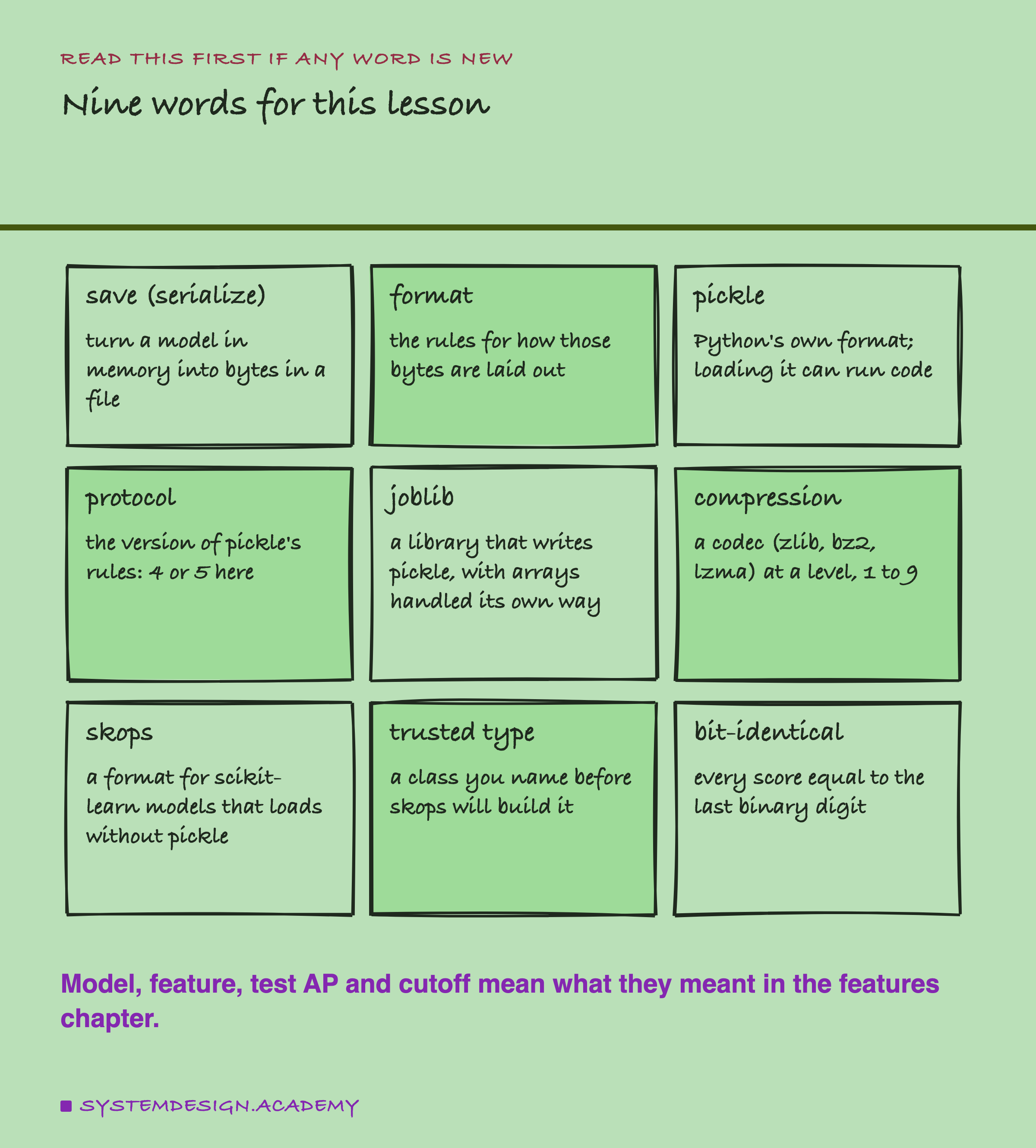
To save a model, also called to serialize it, means to turn the model in your computer's memory into a row of bytes. Those bytes can then sit in a file. To load it means the opposite: read the bytes and build the model again in memory. A format is the set of rules for how those bytes are laid out, like the difference between a loose box and a vacuum bag.
Pickle is the format built into Python. A protocol is a version of pickle's rules; I test versions 4 and 5.
Joblib is a small library that writes pickle too, but stores large number arrays in its own way and can compress the file. Compression makes a file smaller by writing repeated patterns only once, like folding clothes tightly. A codec is one method of compression, such as zlib, bz2 or lzma, and the level, from 1 to 9, says how hard it tries. Skops is a newer format for scikit-learn models that does not use pickle at all. A trusted type is a kind of Python object that you name yourself before skops agrees to build it.
Finally, bit-identical means two numbers are equal down to the last binary digit, not just close.
One Chapter Model and Three Extra Models
If I measured only one model, I could not tell whether a size result is about the format or about that model. So I trained three extra models as well. They are not the chapter's model. They are here only so that the file sizes cover a wide range.
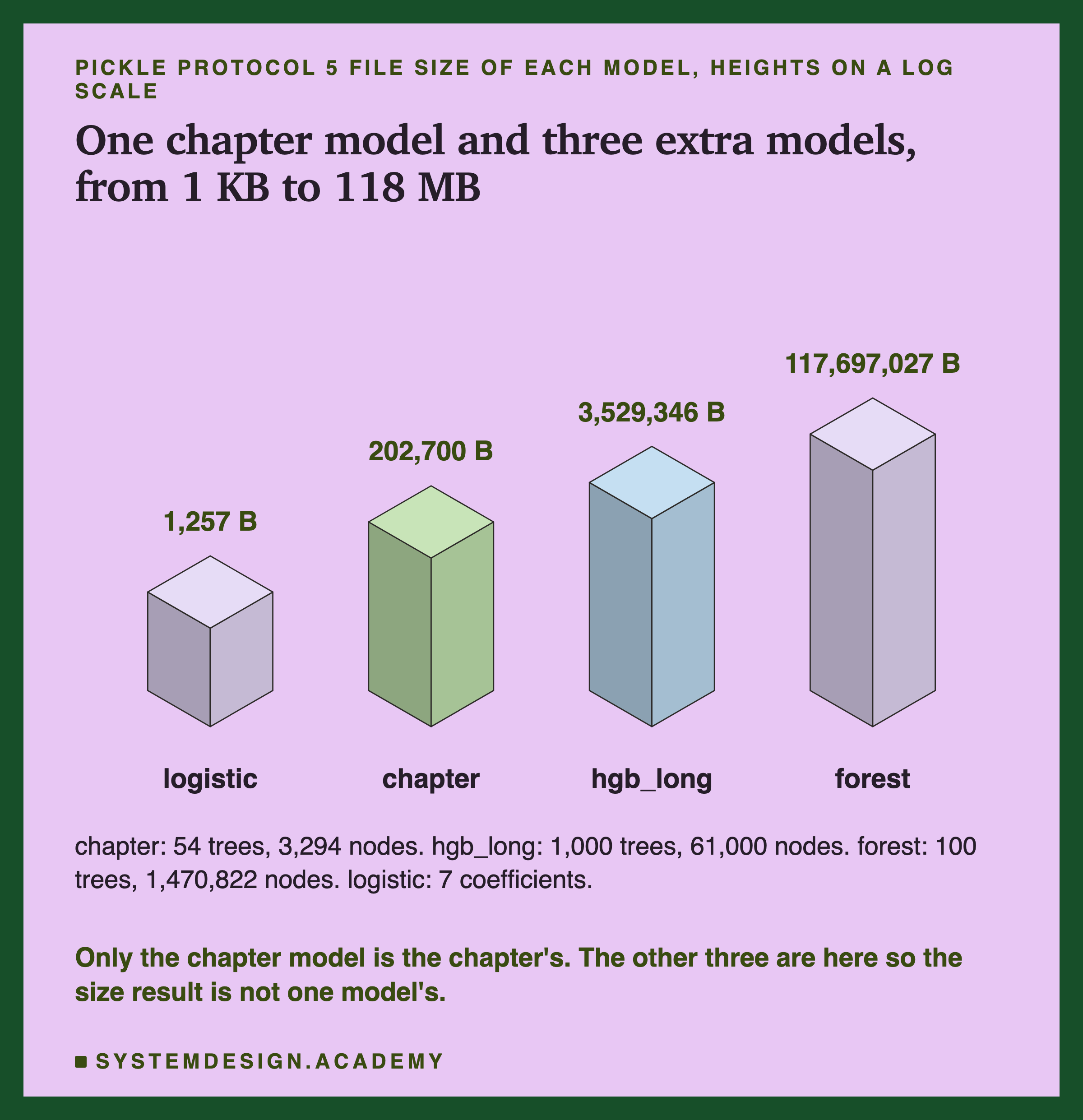
The chapter model is the one from the features chapter. It is a boosted tree model: many small decision trees, each one correcting the last. It stopped early by itself after 54 trees, with 3,294 tree nodes in total. A node is one question or one answer in a tree. Each node takes 56 bytes in memory, so the node table alone is 184,464 bytes. Its pickle file is 202,700 bytes, so almost all of the file is that table.
hgb_long is the same kind of model, but I forced it to build 1,000 trees and not stop early. forest is a random forest of 100 deep trees, with 1,470,822 nodes. logistic is a straight-line model with just 7 coefficients, the numbers it multiplies the features by, plus a constant.
The extra models score worse than the chapter model on the test months: 0.4846, 0.4947 and 0.5349 against 0.5450. That does not matter here. I never compare their scores with each other. I only ask whether each one comes back from its file unchanged.
What Each Tool Says About Itself
Before measuring, I read what each tool's own documentation says. I downloaded each source file at the exact version I used and checked every quote word for word. They are all in results/fmt-factcheck.json, with the commit of each source.
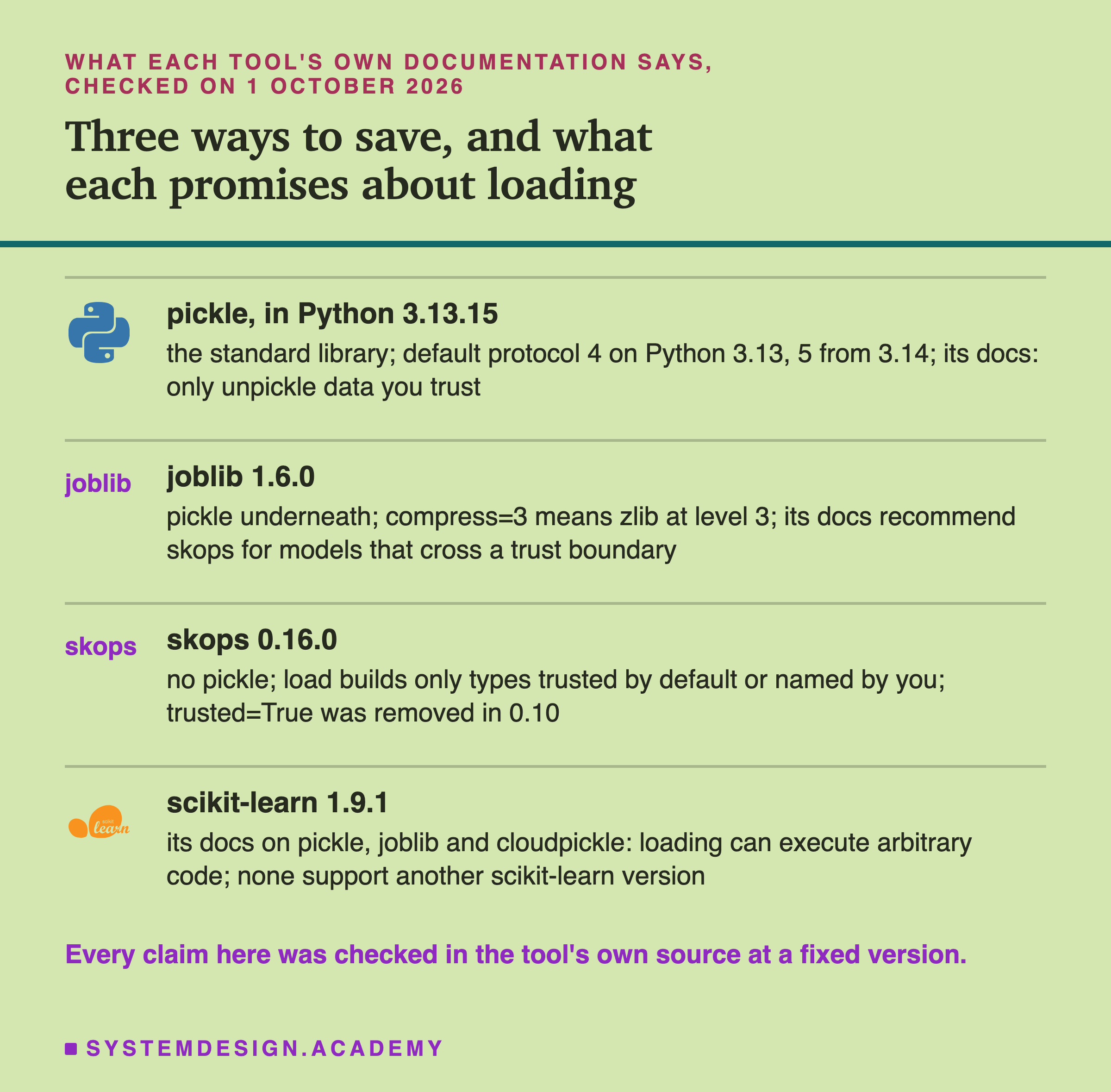
Pickle. Python's documentation says: "The pickle module is not secure. Only unpickle data you trust." On Python 3.13, which I used, the default protocol is 4. From Python 3.14 the default is 5. So the same line of code, pickle.dump(model, f), writes a different protocol depending on which Python runs it.
Joblib. Its documentation says that joblib.dump and joblib.load "are built on Python's pickle protocol, which can execute arbitrary Python code during deserialization." It says plainly that it is not meant for sharing models with strangers. It recommends skops for that: "If you need to distribute or receive serialized models across a trust boundary ... use a format that was designed for safe loading. We recommend skops.io". A trust boundary is the line between files you made and files someone else made.
Skops. Its documentation describes its own limits honestly: "As with any deserialization format, you should only load skops files from sources you trust." It says that, unlike pickle, skops functions "have a more limited scope, while preventing users from running arbitrary code or loading unknown and malicious objects." It also says that it does "not audit these libraries for security issues" for models from other libraries. So skops promises less than "safe". It promises a smaller door, with a person standing at it.
How the Lab Was Built
I wrote the lab's design into the docstring of scripts/labs/packaging/saving_formats.py before it first ran. Before writing it, I had run skops once on a tiny toy model with 500 random rows, only to learn how its functions work. I had not saved this chapter's model in any format, and I knew no file sizes.
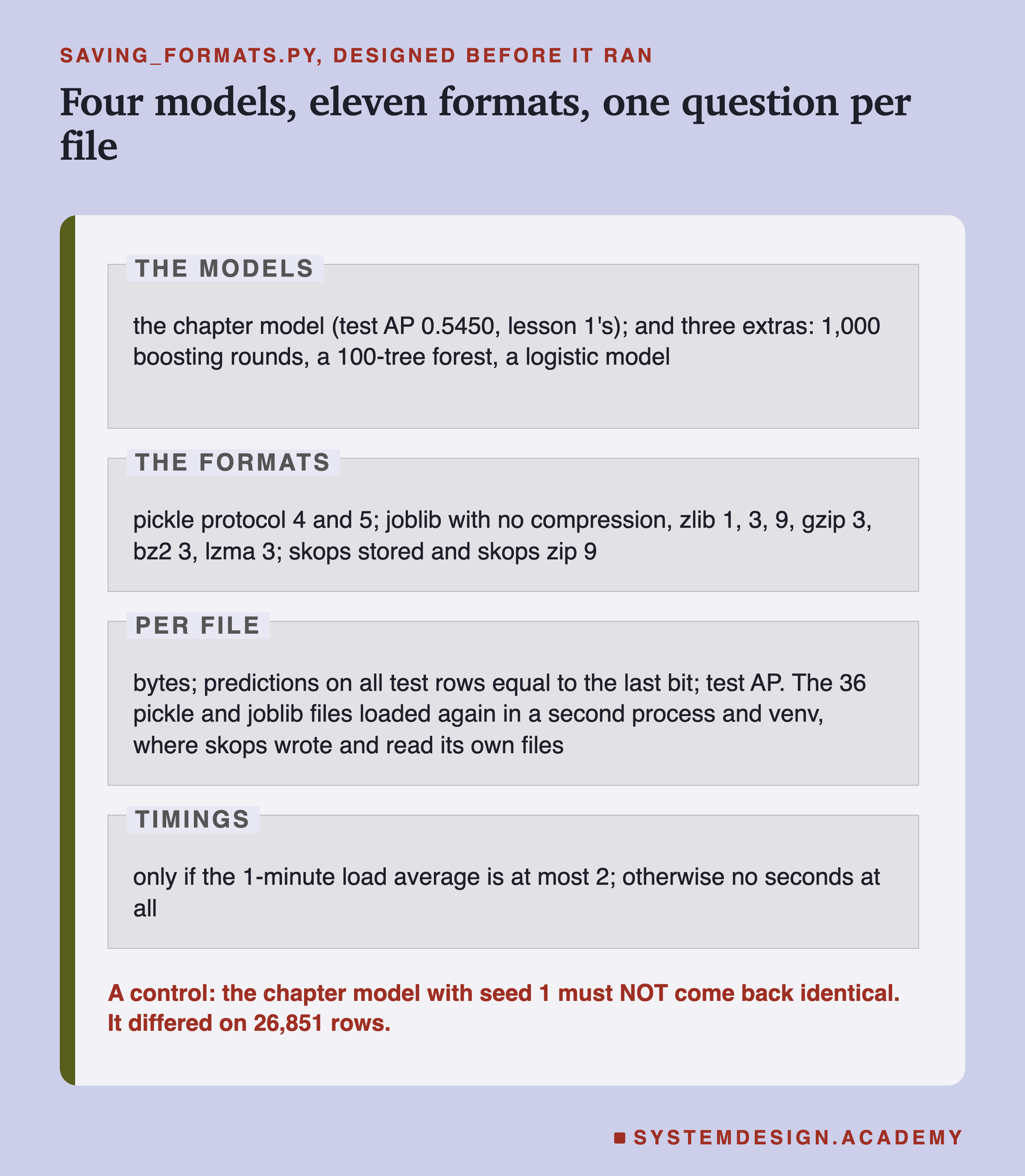
Each model, each format. The lab saves every model in eleven formats, loads each file back, and asks it for its predicted probabilities on all 26,851 test rows. Then it compares them with the predictions of the model still in memory, using np.array_equal. That function says yes only if every number is equal to the last bit. It also computes test AP from the loaded model's scores, in the chapter's usual way: one AP per test month, then the plain mean of the five.
A second environment. skops is not installed in my main Python. So the lab makes a separate virtual environment, or venv: a folder with its own Python and its own packages. It is called venv-pkg-fmt, and it has the same scikit-learn 1.9.1, numpy 2.5.3, pandas and joblib versions as the main one, plus skops 0.16.0. The lab records its full pip freeze, the list of every installed package and version: 15 packages. Only the format differs.
That second environment also loads the 36 pickle and joblib files again, in a separate process. The skops files are written and read inside that same second process, so they never go through a second reload.
How skops Loads a File
Before the results, here is how a skops load works, step by step, on the chapter model.
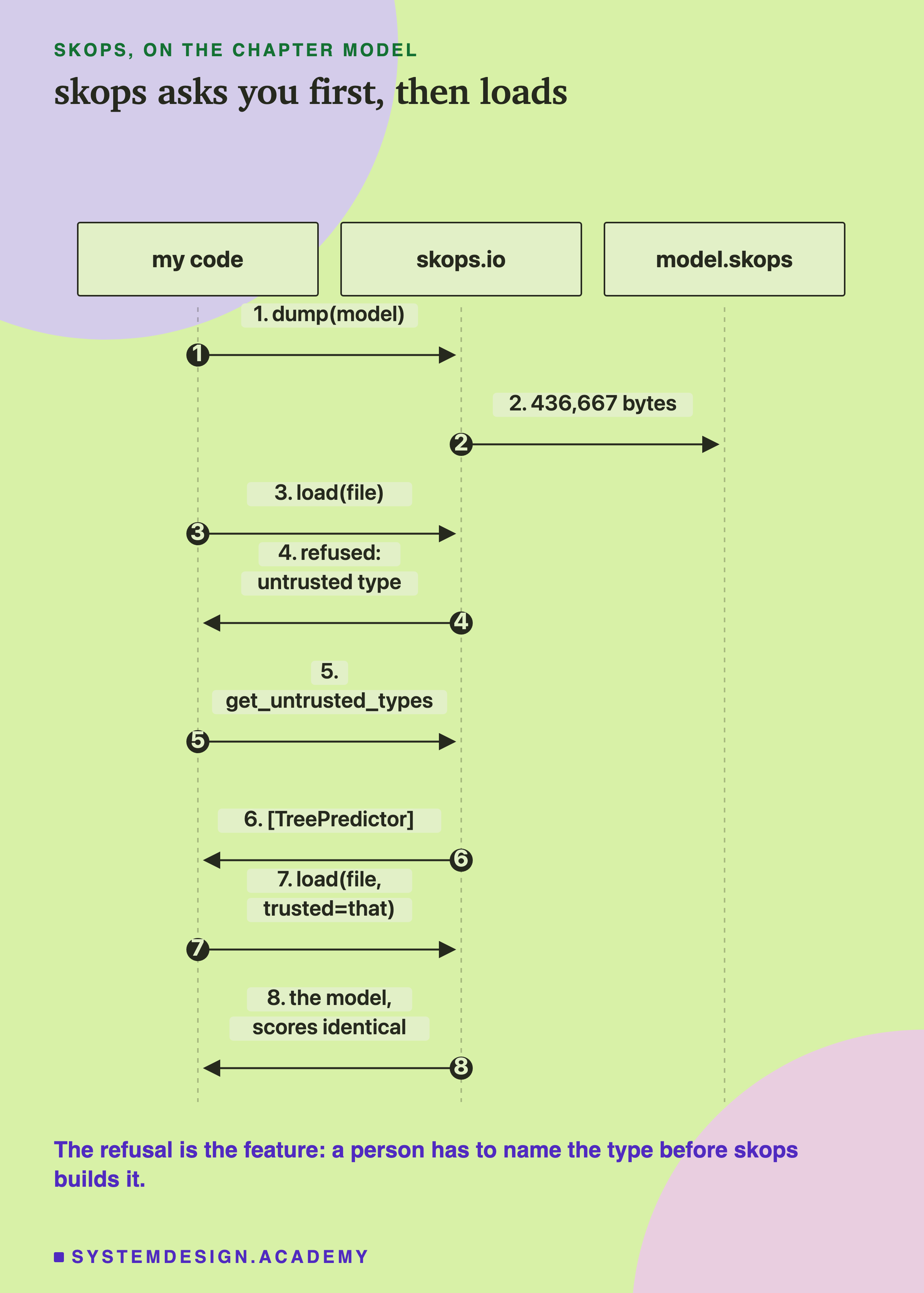
A pickle file holds instructions, and loading it follows them, whatever they say. A skops file holds a description instead: a list of objects, their types and their numbers. When you call skops.io.load, it reads that description first. For each object, it checks whether the type is on its own list of types it trusts by default. If any type is not on that list, and you did not name it, it stops before building anything.
So the first load of the chapter model's file was refused. Then I called skops.io.get_untrusted_types, which reads the file and lists the types skops does not trust by default. For this model, the list had one entry: TreePredictor, the scikit-learn class that holds one boosted tree. I passed that list as trusted=, and the load went through. I could do that with a clear conscience only because I made the file myself.
This is the "box with a list you must sign" from the first slide. Nothing stops you from signing without reading. But you have to sign.
The Lab's Report, Running
This is a real recording of the report script, fmt_report.py, in its full mode, on the laptop where the lab ran.
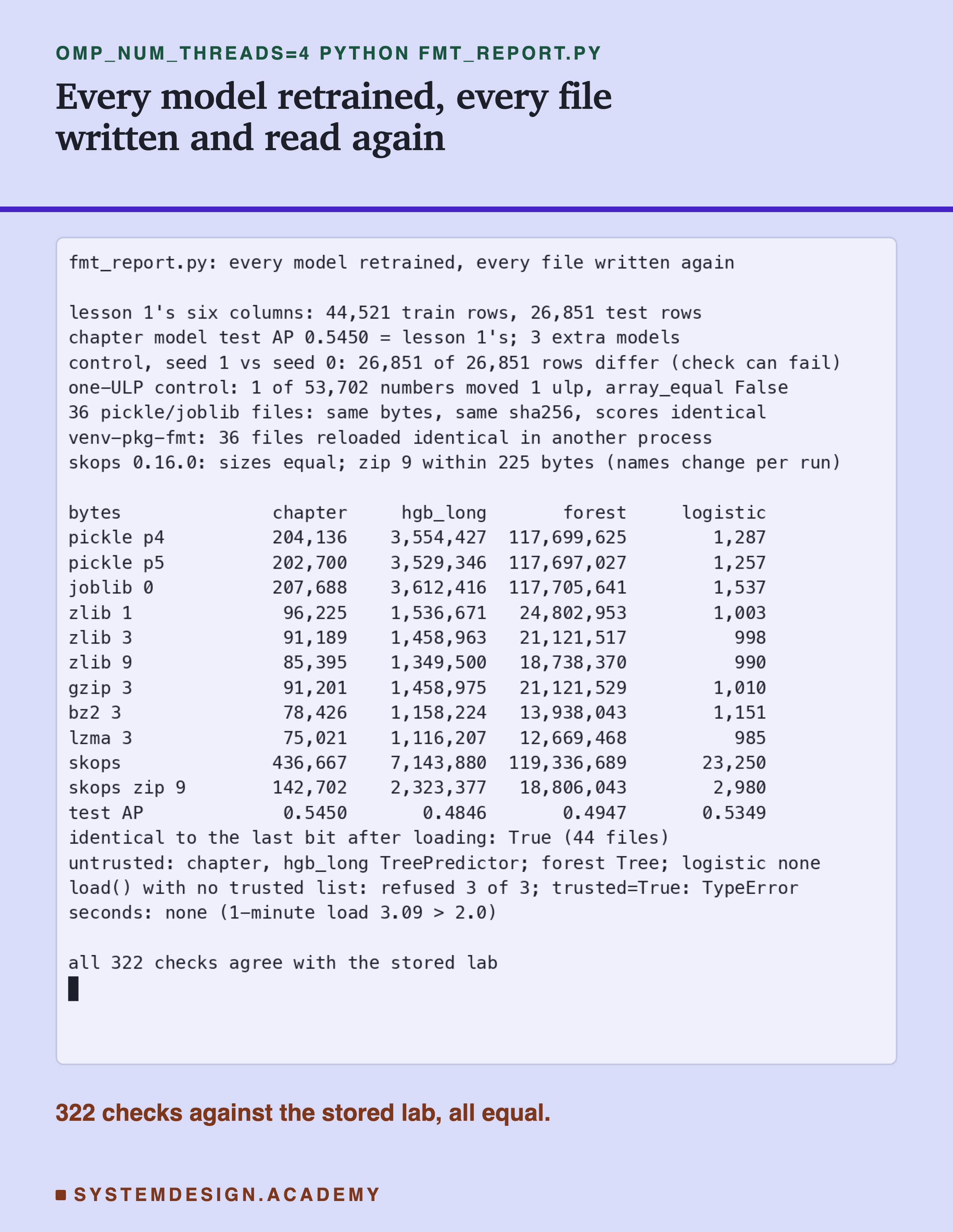
The report does not trust the lab. It trains all four models again and computes test AP with its own loop. It writes every pickle and joblib file again with its own calls, and requires the same size and the same sha256, a fingerprint of the file's exact bytes. It loads every file and checks every prediction. Then it runs the second environment again and checks every skops size, every untrusted-type list and every refusal.
Two things did not come back exactly, and the report says so instead of hiding them. Both were found after the results, and later slides explain them. First, a compressed skops file moves by a few tens of bytes between runs. Second, the report must run with OMP_NUM_THREADS=4, the same thread setting as the lab, or some file bytes change. Neither one changes a single prediction.
The Headline: The Bytes Moved, the Scores Did Not
Here is the main result for the chapter model.
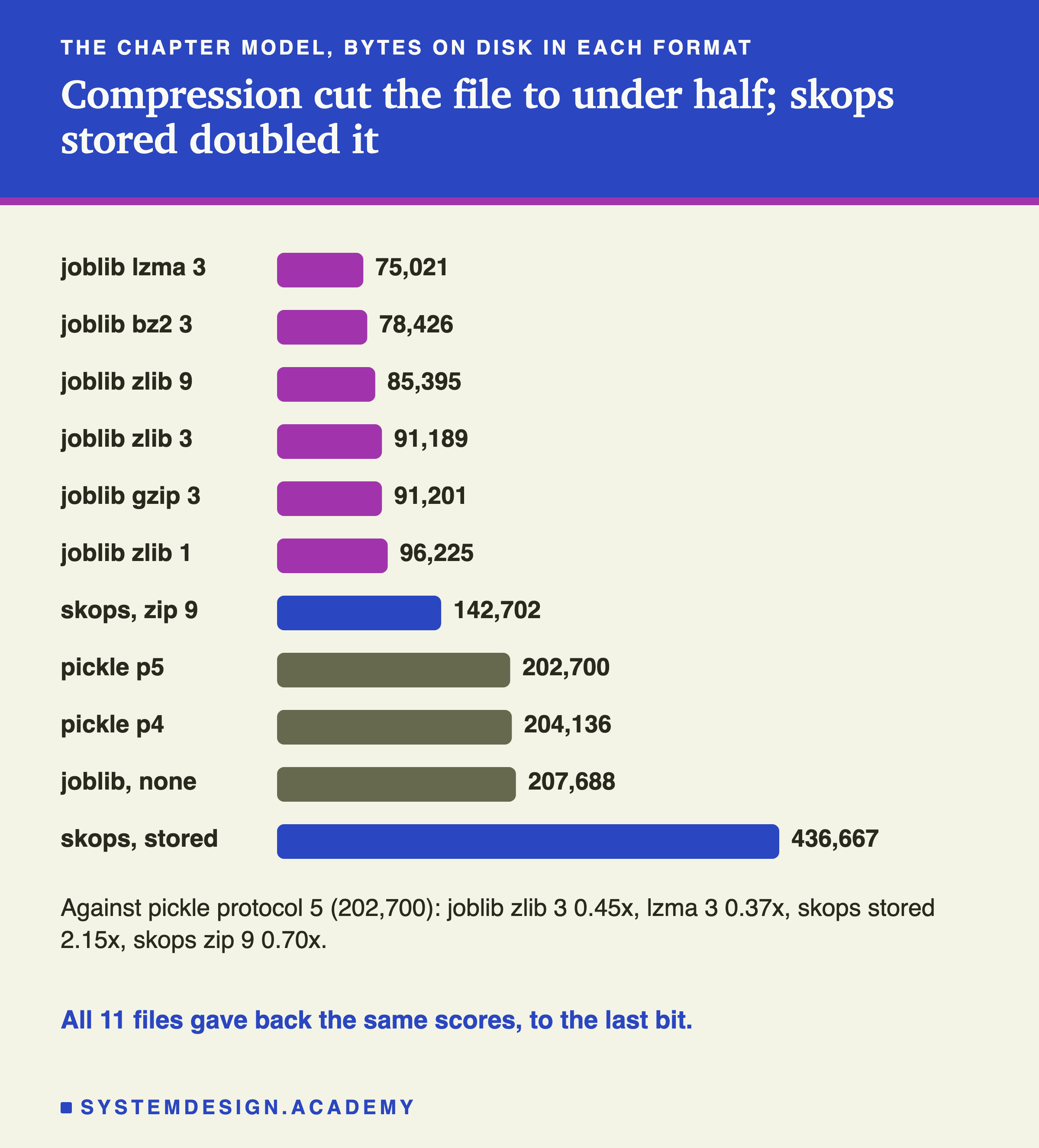
Every one of the 44 files, four models in eleven formats, gave back the same predictions as the model in memory, to the last bit. Test AP after loading was exactly the AP before saving, every time. In the second environment, all 36 pickle and joblib files loaded again in a separate process and gave identical predictions too. The 8 skops files were checked in that second process, where they were written.
The size is where the formats differ, and they differ a lot. Pickle protocol 5 wrote the chapter model in 202,700 bytes. Protocol 4 was 204,136. Joblib without compression was a little bigger, 207,688.
Compression cut the file to well under half. Joblib with compress=3, which means zlib at level 3, wrote 91,189 bytes, 0.45 times the pickle. Level 9 squeezed it to 85,395. The smallest was lzma at level 3: 75,021 bytes, 0.37 times. gzip at level 3 was 91,201 bytes, only 12 bytes more than zlib 3. Both use the same compression inside; gzip wraps it in a longer header and trailer, 18 bytes against zlib's 6.
The surprise was skops. Stored without compression, its default, the file was 436,667 bytes: 2.15 times the pickle. With zip compression at level 9, it shrank to 142,702, 0.70 times the pickle, but still larger than every compressed joblib file.
So for this model, the format choice never changed a prediction. It changed the file size by a factor of almost six, from 75,021 to 436,667 bytes.
Across Four Models, the Pattern Held, With One Twist
Was this only about the chapter model? Here is the same comparison for the three tree models, as a share of each model's own pickle file.
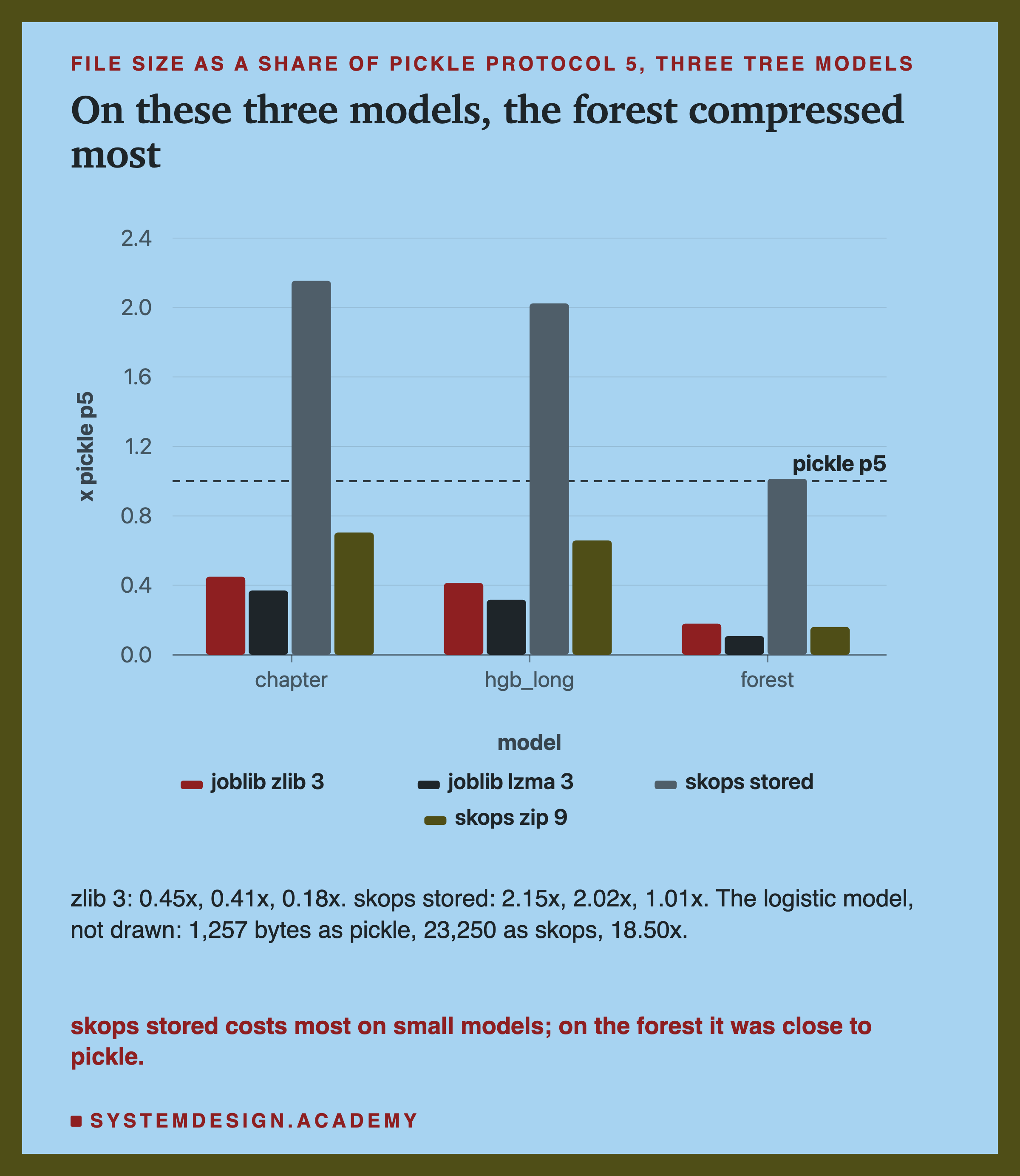
Compression helped every tree model, and it helped the big forest most. zlib 3 brought the chapter model to 0.45 of its pickle, hgb_long to 0.41, and the forest to 0.18: from 117,697,027 bytes down to 21,121,517. lzma 3 went further, to 12,669,468 bytes, 0.11 of the pickle.
Here is one possible reason the forest compresses so well, which I did not test. A deep forest has huge numbers of leaf nodes, and those nodes repeat many of the same values. Repeated values are exactly what compression likes.
skops stored went the other way. It doubled the two boosted models, but on the forest it was only 1.01 times the pickle. On the tiny logistic model it was 18.50 times: 23,250 bytes against 1,257. So skops seems to add a cost per object that matters little for a big model and a lot for a small one. The next slides measure where those bytes go.
Joblib without compression was never smaller than pickle protocol 5. It was 2.5 percent bigger for the chapter model, 4,988 bytes, and 22 percent bigger for the logistic model, 280 bytes. For the forest the gap was 8,614 bytes out of 117 million.
What Bit-Identical Means Here
"The same predictions" is easy to say and easy to get slightly wrong. So here is exactly what the lab checked.
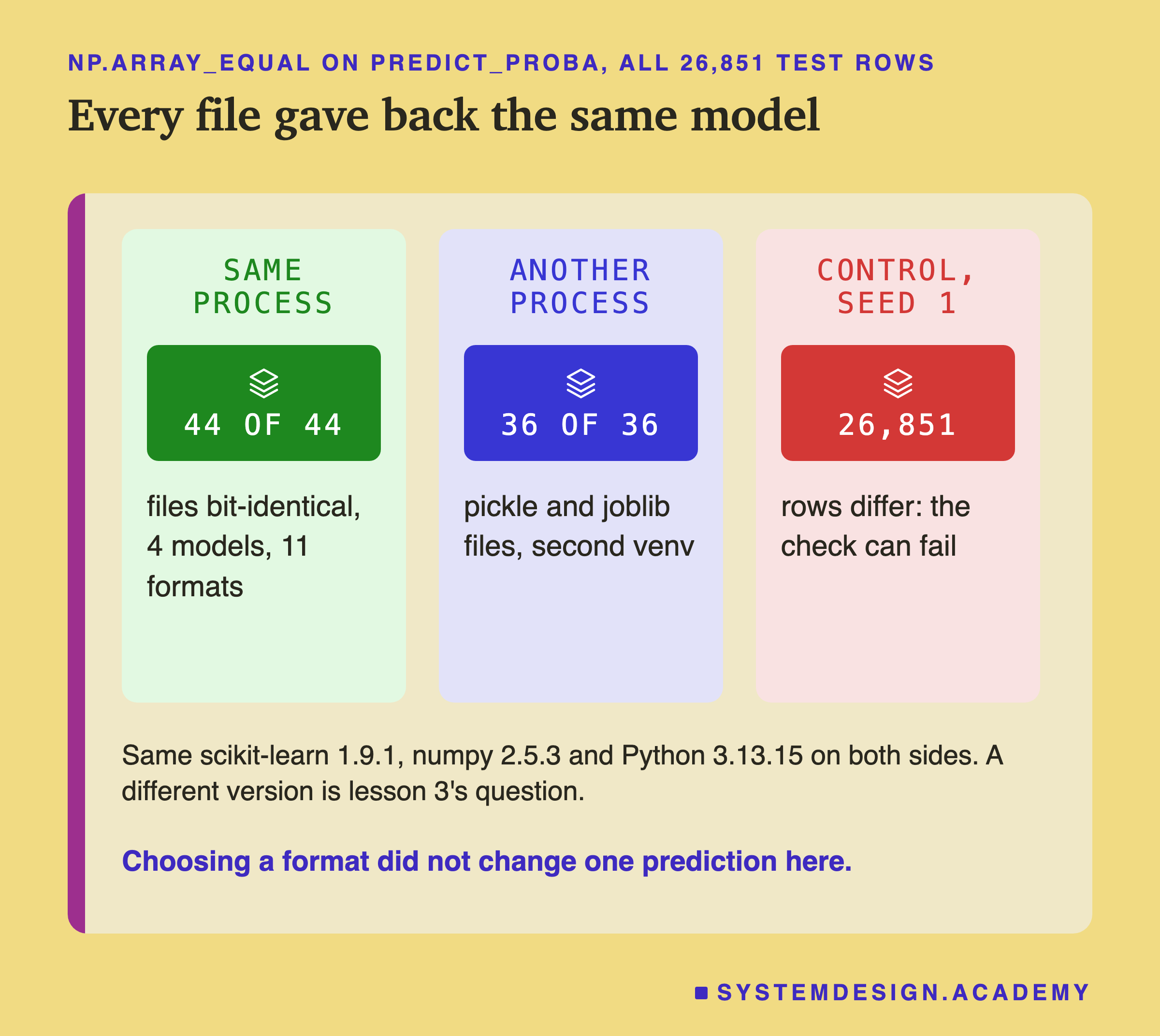
For each file, the lab asked the loaded model for both columns of predict_proba on all 26,851 test rows. The two columns are the chance of "no purchase" and the chance of "purchase". Then np.array_equal compared all 53,702 numbers with the in-memory model's numbers. Any difference at all, even in the 17th digit, would make it say no. It never did.
After an independent review, I added one more control to the report to prove that claim. It takes the in-memory predictions and moves a single number, customer 12346's score, to the next possible floating-point value: from 0.10317002256025683 to 0.10317002256025684. That is a change of one ULP, one unit in the last place. One of 53,702 numbers differs, and np.array_equal says not equal.
Here is one real customer, to make it concrete.
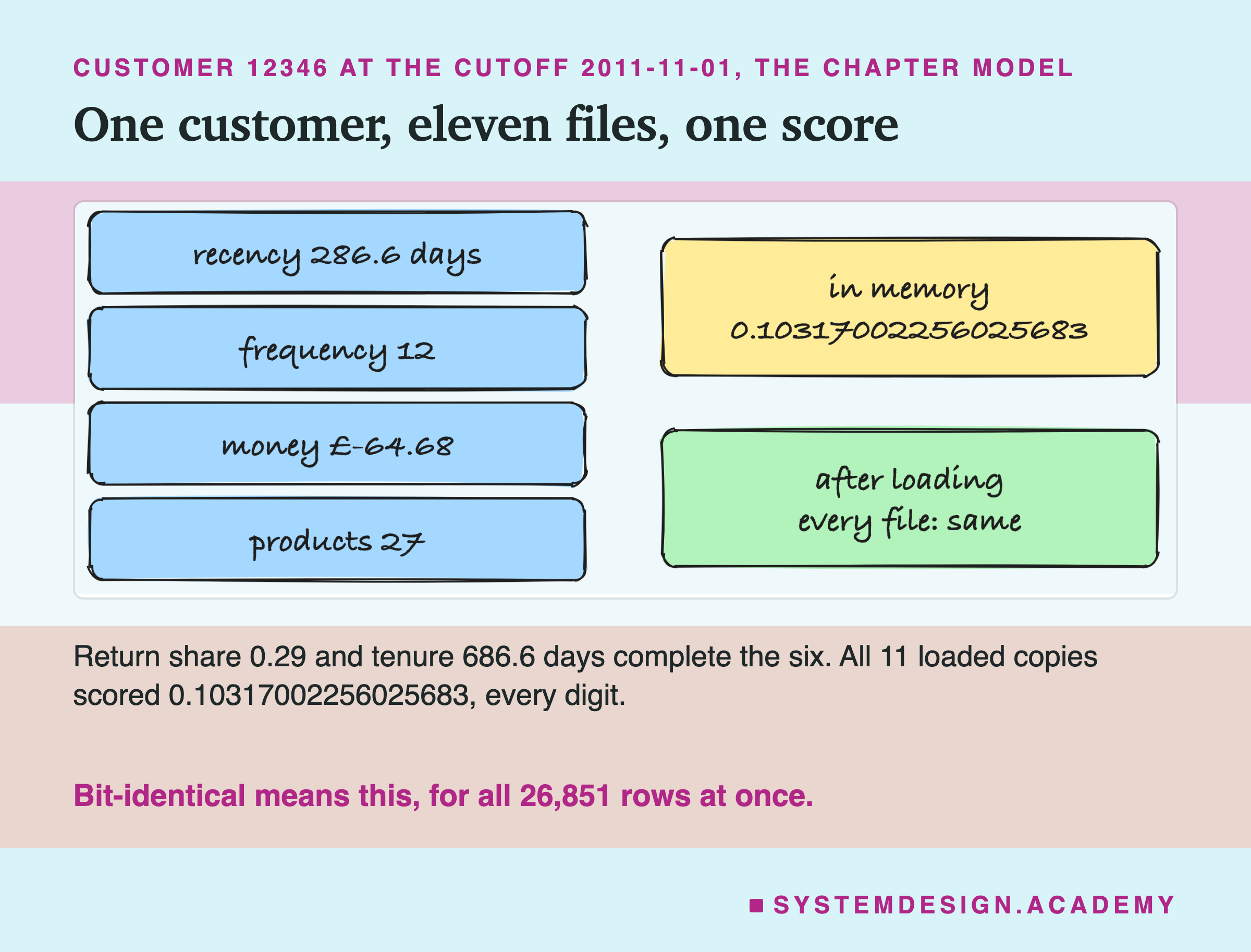
Customer 12346 appears in every lesson of the features chapter. On 1 November 2011, the model in memory gave them a chance of buying of 0.10317002256025683. Every one of the eleven loaded copies gave exactly that number, all 17 digits.
Why should this be true? Every format here is lossless: it stores each number's exact bytes, with nothing rounded. Compression is lossless too; it makes the file smaller without changing what comes out. So the result is what I expected. The value of the check is that it would have caught a format, or a setting, that was not lossless. Lesson 9 of this chapter measures a conversion to another format, ONNX, where that question is open again.
Pickle Protocol 4 or 5
Pickle has had several versions of its rules over the years. Two matter today.
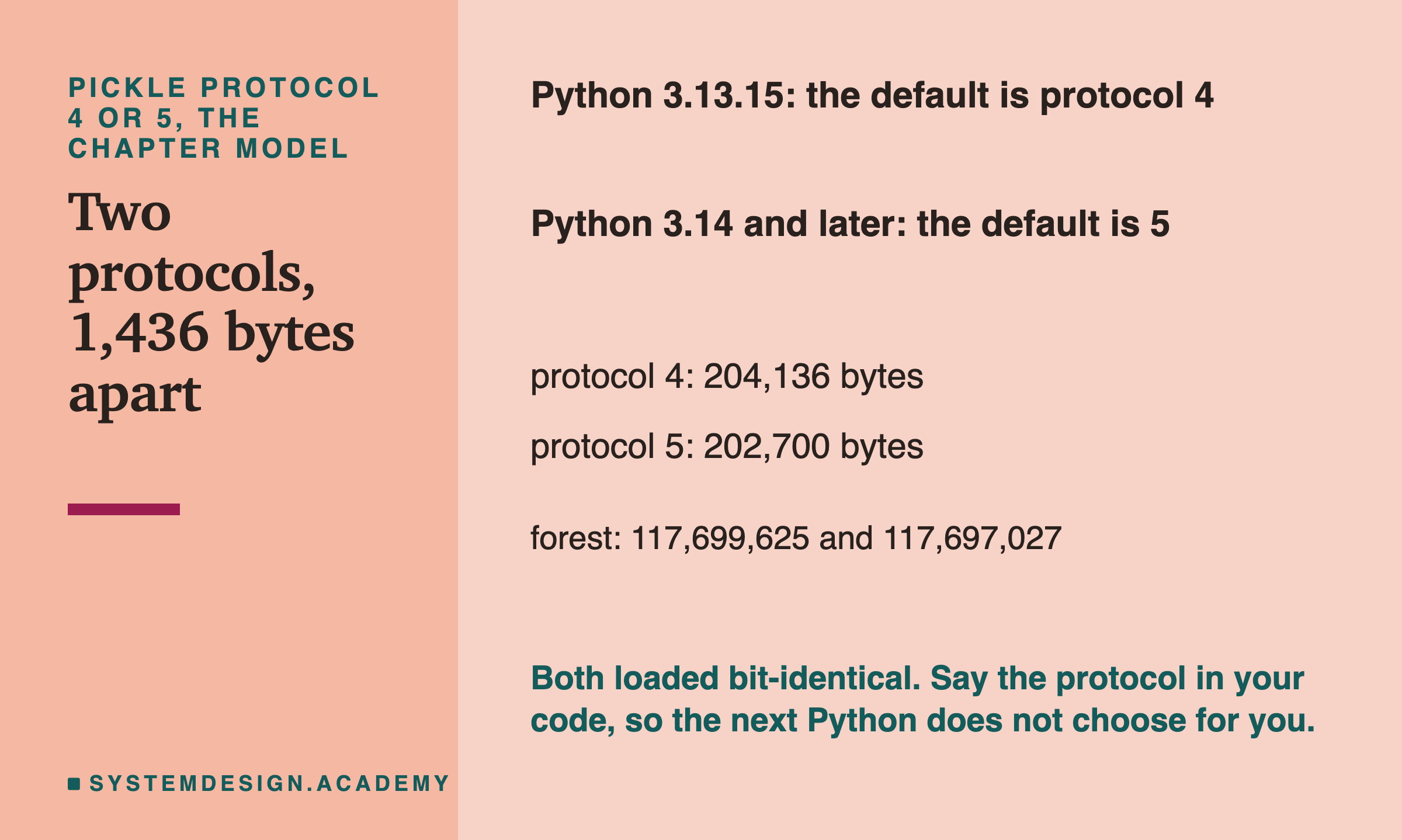
Protocol 5 was added in Python 3.8 and handles large blocks of data a little better. scikit-learn's documentation recommends it. In its words, protocol=5 "is recommended to reduce memory usage and make it faster to store and load any large NumPy array".
Here the difference in size was small: 1,436 bytes for the chapter model, and 2,598 bytes for the forest. Both protocols loaded bit-identical.
The practical point is the default. On Python 3.13, the default protocol is 4. On Python 3.14 it is 5. Joblib uses Python's default too, unless you pass protocol=. So a team that upgrades Python changes the bytes of its model files without changing one line of its own code. Nothing breaks, because Python can read both, but the file is not the same file. I think it is cleaner to write the protocol in the code yourself.
What skops Refused, and What It Accepted
Now the trust question, which is the reason skops exists.
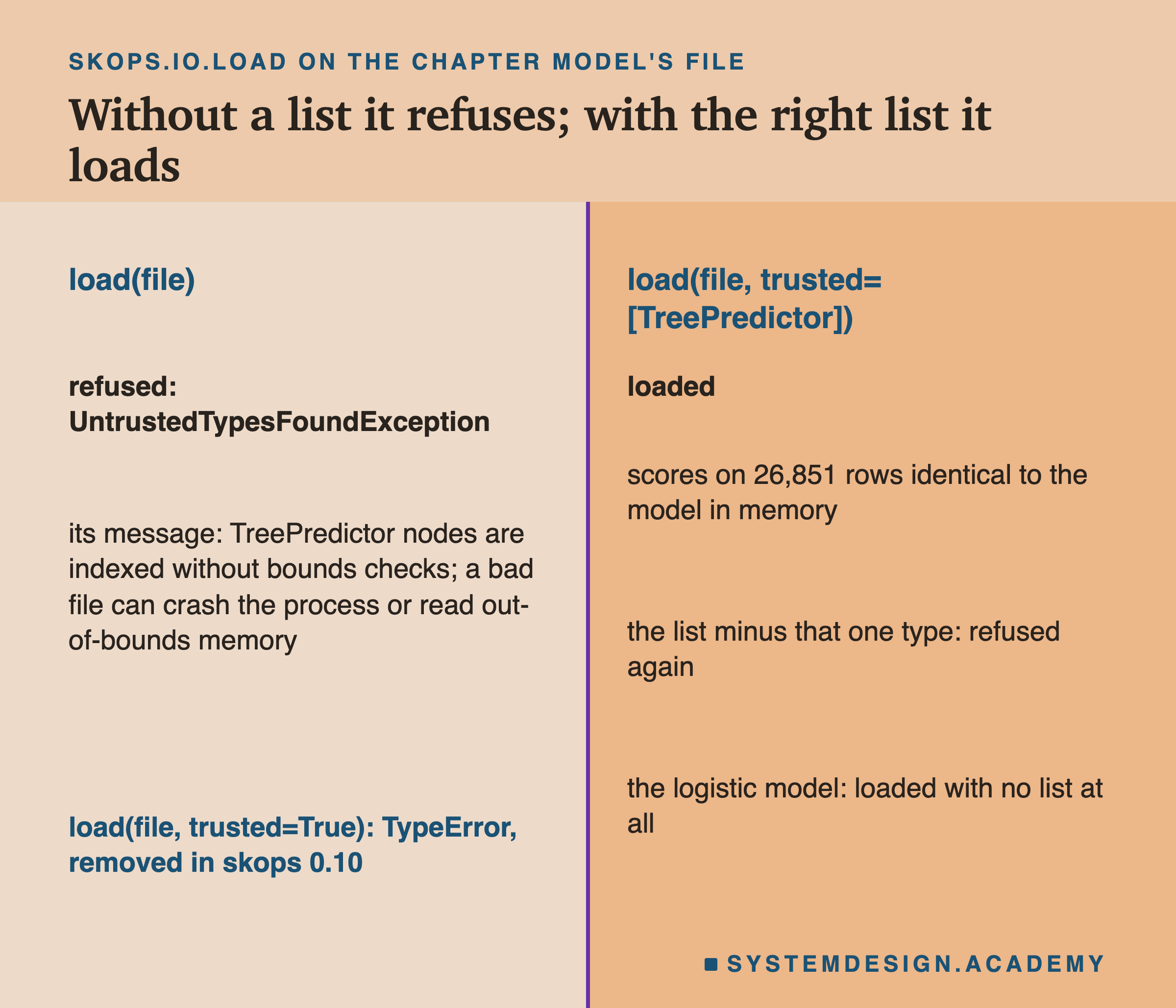
skops.io.get_untrusted_types listed exactly one type for each tree model. For the two boosted models it was sklearn.ensemble._hist_gradient_boosting.predictor.TreePredictor. For the forest it was sklearn.tree._tree.Tree. For the logistic model, the list was empty, and it loaded with no list at all.
Loading a tree model with no list failed with an error called UntrustedTypesFoundException. The error message itself explains why the type is not trusted by default. In its own words, the tree "stores raw node indices ... that scikit-learn indexes into without bounds checking." It goes on: "calling .predict() on it can then crash the process (segfault) or read out-of-bounds memory." A segfault is a crash where a program touches memory it should not.
So skops is not saying "trees are dangerous". It is saying "I cannot check this part of the file for you, so you must decide whether you trust whoever made it".
I tried two shortcuts. Passing the list with that one type removed failed again. Older versions accepted trusted=True. Here it raised a TypeError that names the reason: "Before version 0.10 trusted could be a boolean, but this is no longer supported, due to a reported CVE-2024-37065." A CVE is a public record of a known security problem. This one was a report that a crafted skops file could run code on the machine that loads it. Its public record at cveawg.mitre.org lists every skops version from 0.6 onward as affected, and names no fixed version.
Why the skops File Was Twice the Size
I asked this question after seeing the results, and the lab labels it as an addition. Why was the chapter model's skops file 2.15 times its pickle?
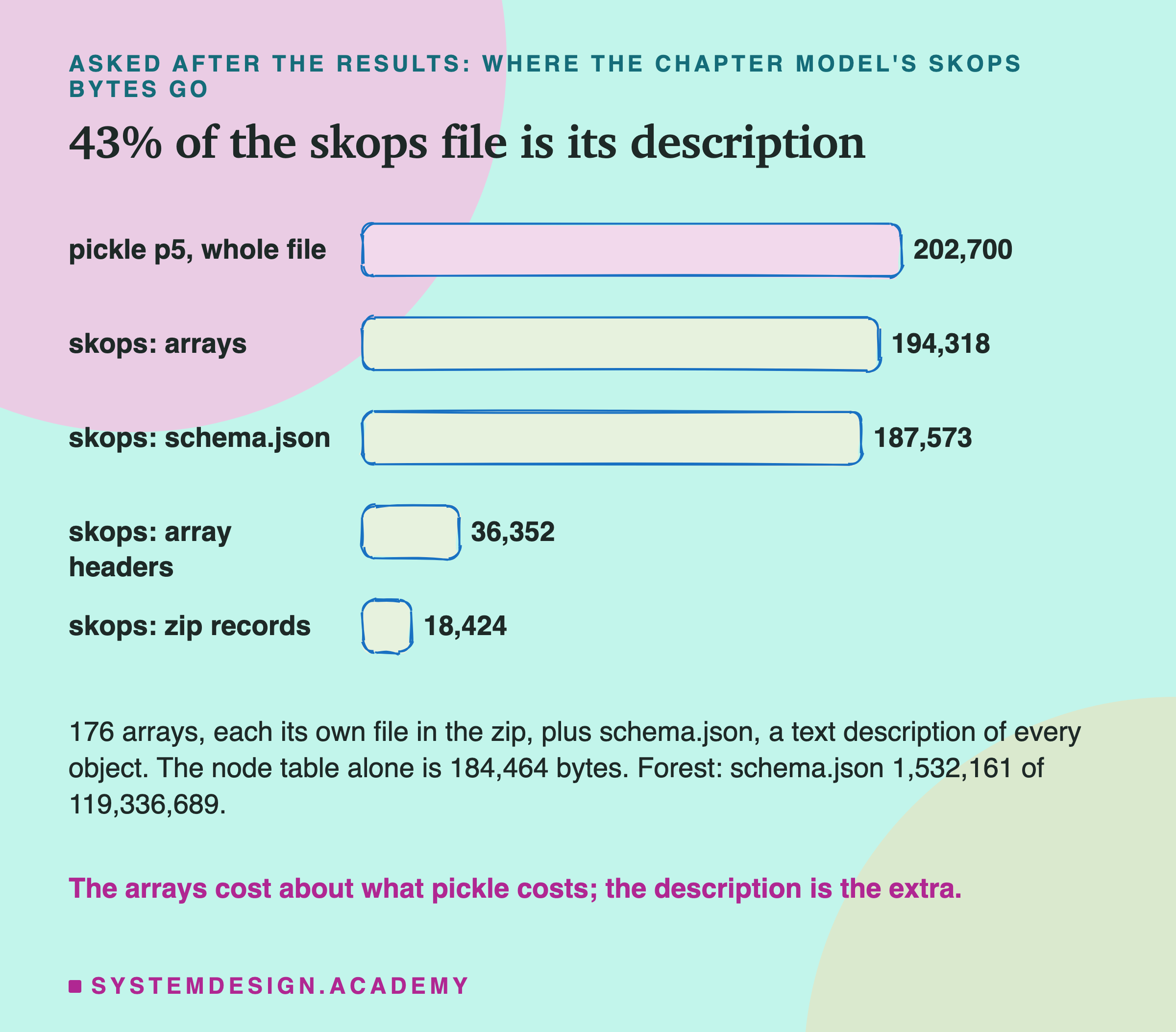
A skops file is a zip file, the same kind you open on any computer. Inside, the chapter model's file held 177 members: 176 small array files and one schema.json. A schema here is a text description of every object in the model, its type and how the pieces connect. That description is what skops reads before it decides to load.
The arrays themselves took 194,318 bytes, close to the whole pickle, 202,700. Each array file also has a short header, 36,352 bytes in total, and the zip adds 18,424 bytes of its own records. The schema took 187,573 bytes, 43 percent of the file.
So the extra size is the price of the description. Pickle stores instructions in a compact binary form. skops writes out a readable account of every object, so it can check it before building anything. For the forest, the schema was 1,532,161 bytes of 119,336,689, about 1 percent. So skops cost almost nothing extra there. With zip compression, skops came to 0.70 of the pickle. One likely reason, which I did not measure member by member: text like the schema compresses well.
Why There Are No Load Times Here
I planned to measure how long each format takes to save and to load. I did not report any, and here is why.
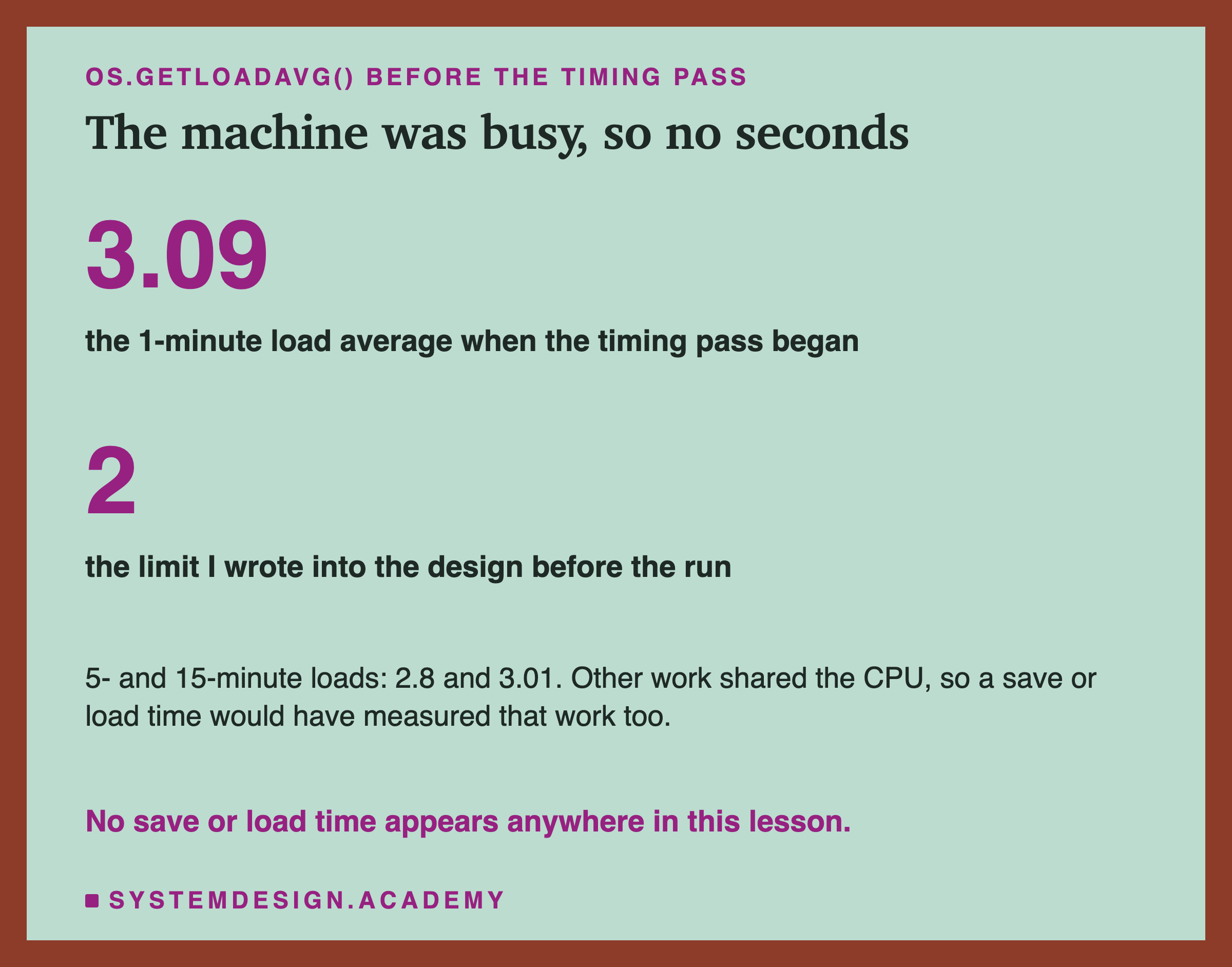
The load average is a number your computer keeps: roughly, how many programs were waiting for the processor over the last minute. When it is high, your program shares the processor with others, and any time you measure includes their work.
Before the timing pass, the lab read the load average. It was 3.09 over one minute, 2.8 over five and 3.01 over fifteen. My rule, written before the run, said: above 2, measure no seconds. So the lab measured none, and stored the reason instead. The second environment applied the same rule and also measured none.
That is a real gap in this lesson. Joblib's own documentation says that compression can "significantly slow down loading", and scikit-learn's says skops is "Not as fast as pickle based formats". I could not check either claim here. If load time matters to you, measure it on a quiet machine with your own model.
One Byte That Came From the Thread Count
When I ran the student demo, which I describe on the next slide, one number did not match the lab. I looked into it after the results, and I label it as an addition.
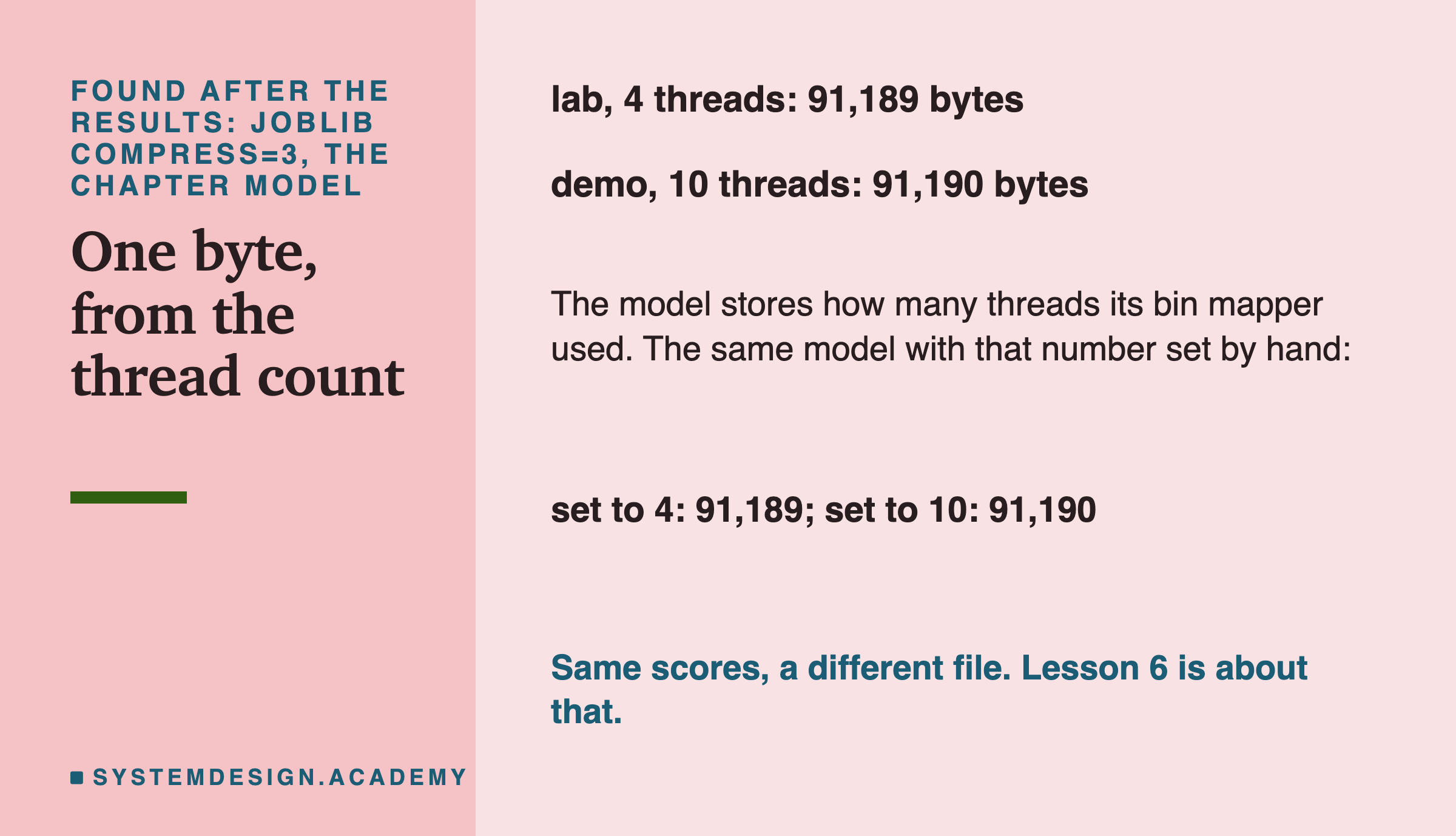
The demo's compress=3 file was 91,190 bytes. The lab's was 91,189. Same model, same scores, one byte apart.
The cause: I ran the lab with OMP_NUM_THREADS=4, a setting that limits how many processor threads the libraries use. The demo ran without it, so it used all 10. The boosted tree model has a part called a bin mapper, which sorts each feature's values into buckets before training. It stores the thread count it used inside the model. So the file records "4" in one case and "10" in the other. Uncompressed, both numbers take the same space, so the pickle sizes matched. Compressed, they took one byte more.
The report reproduces the demo's sizes for all four formats this way. It takes the lab's model, sets that stored number to 10 by hand, saves it again, and gets the demo's 91,190 bytes for compress=3. Set back to 4, it gets 91,189. It compares sizes, not the files' full bytes.
A related thing: skops names each array file in its zip with a number that changes every run. So a zipped skops file moved by tens to a few hundred bytes from run to run. It moved 78 bytes at most in one recorded run of the report and 225 in another. Both runs are stored in results/fmt-report-skops-drift-runs.json. The report allows up to 2 bytes per zip member. I chose that limit after seeing the results, so it is a guard against a large change, not a measured bound.
Neither of these changes a prediction. But both mean the same model can give a different file. Lesson 6 of this chapter asks exactly that question.
My Guesses Before the Run, Checked
I wrote six guesses into the lab before it ran. Here they are against the results.
-
"every format gives bit-identical predictions for every model." Right: 44 of 44.
-
"pickle_p4, pickle_p5 and joblib_0 are within 1% of each other in size for every model." Wrong. Protocols 4 and 5 were within 1 percent for the three tree models, but 2.4 percent apart for the logistic one. And joblib with no compression was 2.5 percent bigger than protocol 5 for the chapter model, and 22 percent bigger for the logistic model.
-
"zlib level 3 shrinks the chapter model to between 25% and 50% of pickle_p5; lzma3 is the smallest file." Right: 45 percent, and lzma 3 was the smallest for all four models.
-
"skops (stored) is larger than pickle_p5 for the chapter model, by 10% to 50%; skops_deflate9 is smaller than pickle_p5." Wrong on the first part. It was 115 percent larger, more than double. Right on the second: 0.70 of the pickle.
-
"for this chapter model get_untrusted_types lists exactly one type, TreePredictor (as on the toy), and the logistic pipeline lists none." Right. I had seen this on the toy model, so it was not a hard guess.
-
"the forest is by far the largest file, between 20 MB and 200 MB uncompressed." Right: 117,697,027 bytes, about 118 MB.
Try It Yourself
The full lab trains four models and needs a second environment for skops. I wrote a small demo that does the core of it: the chapter model, saved four ways with pickle and joblib only.
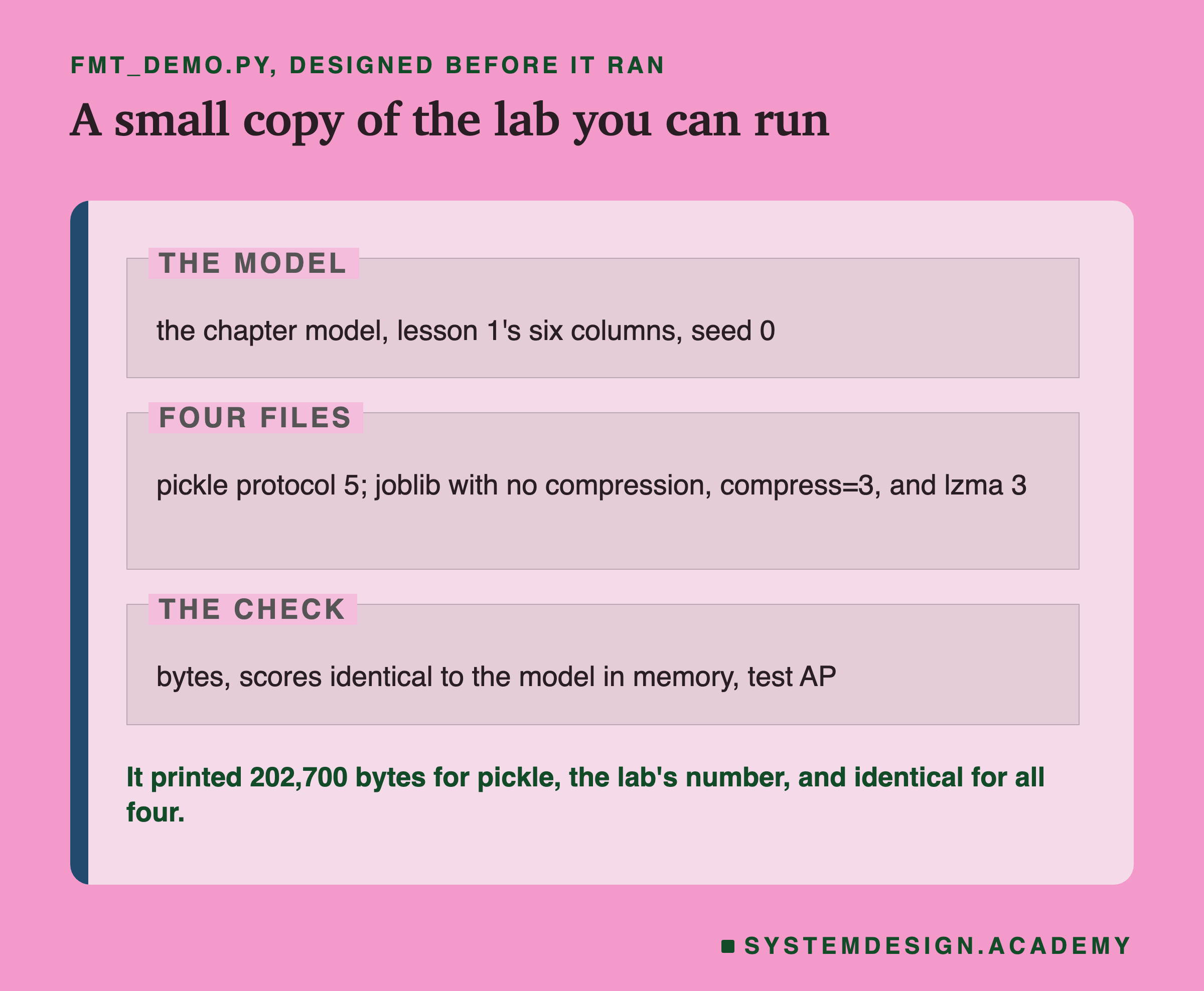
I wrote the demo's design into its docstring after the lab had run and before the demo first ran. skops is left out on purpose, because it is not in the main environment. If you want to try skops, pip install skops into a separate venv with the same scikit-learn version, and follow the steps on the skops slide.
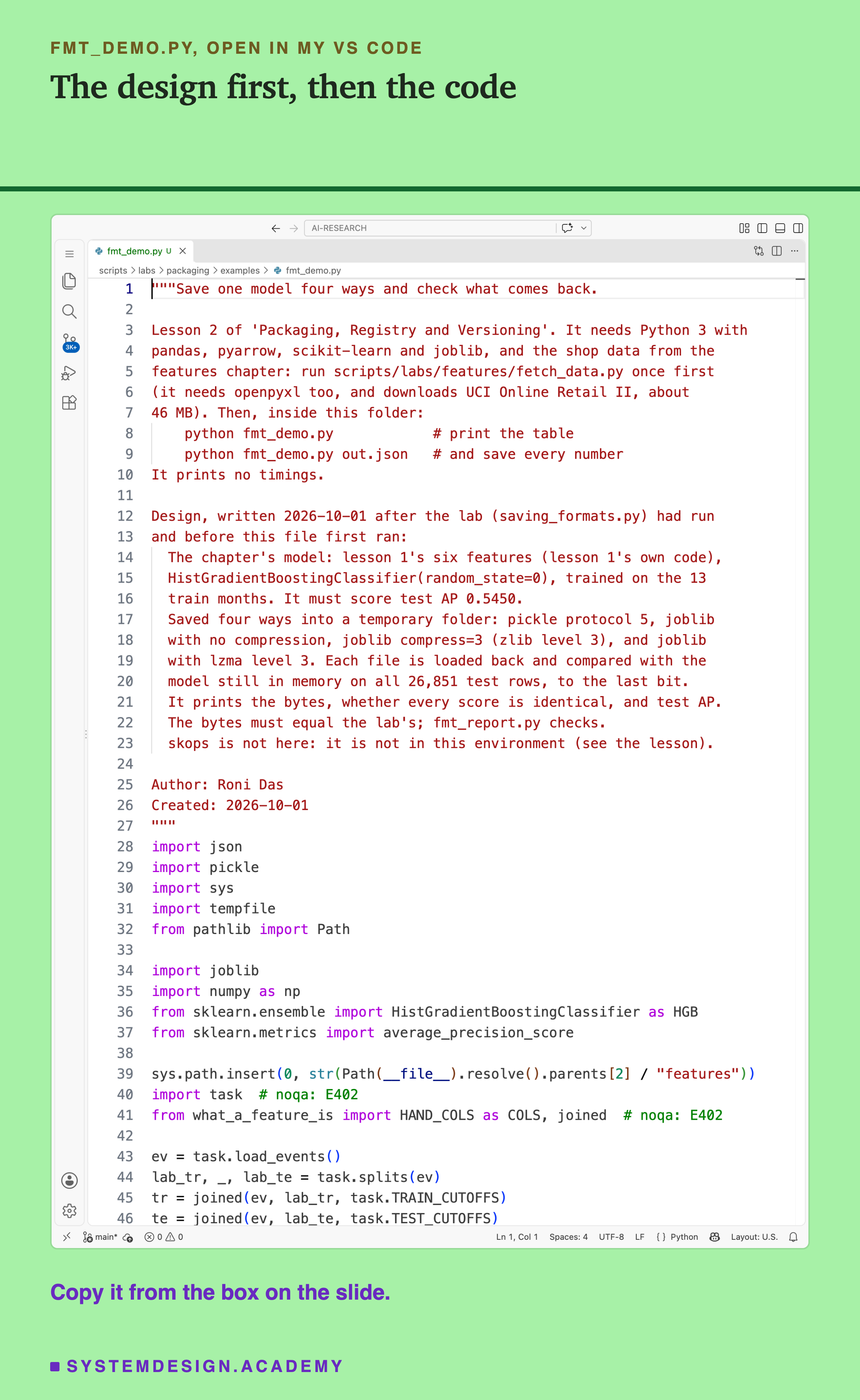
Before you run this lab. You need Python 3 with pandas, pyarrow, scikit-learn and joblib: pip install pandas pyarrow scikit-learn joblib openpyxl. First run python fetch_data.py from the scripts/labs/features folder. It downloads the shop data once, about 46 MB, and writes one cleaned file.
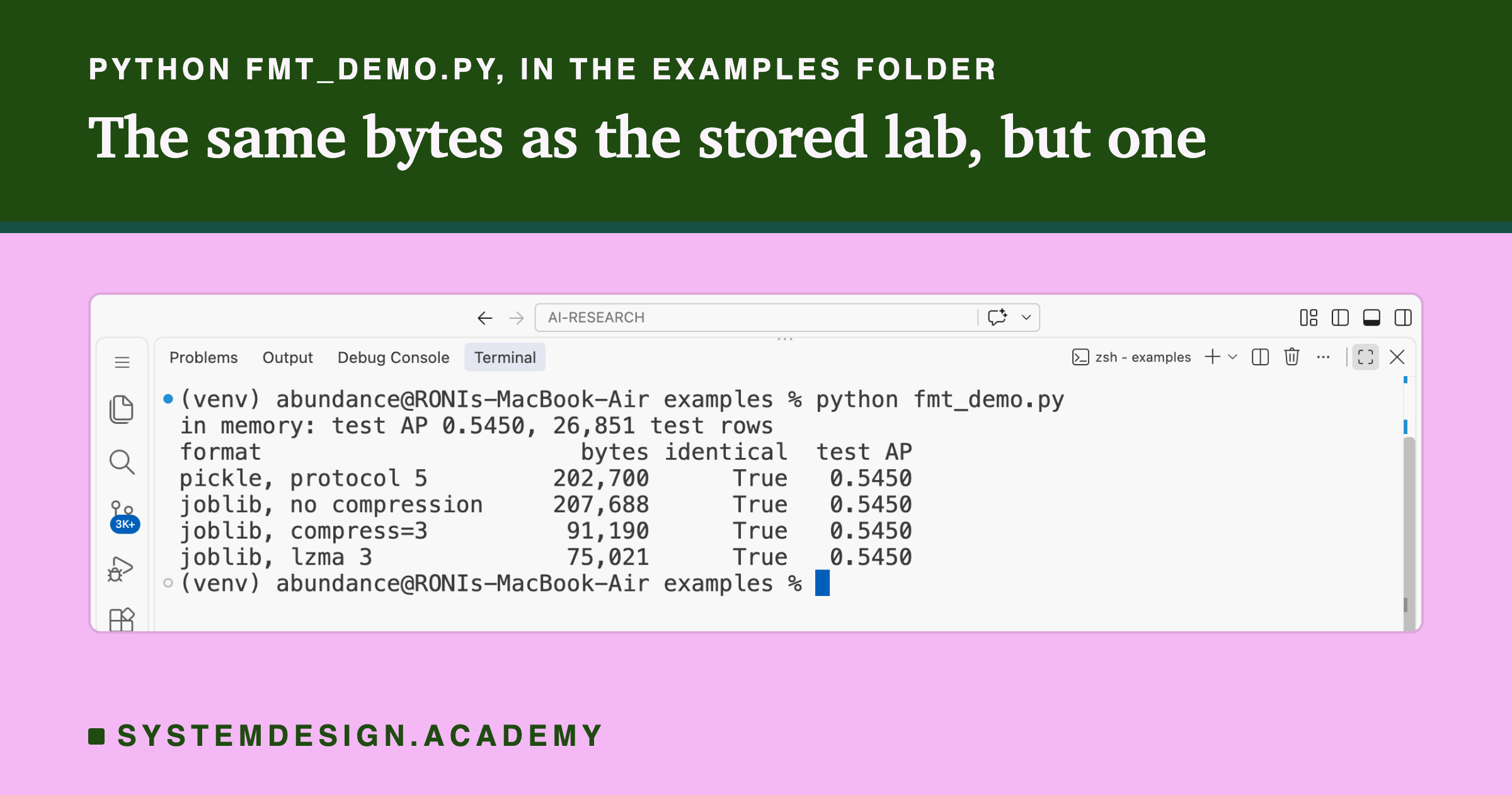
The demo imports the features chapter's task.py and lesson 1's what_a_feature_is.py from that folder. It needs no GPU. I ran it with scikit-learn 1.9.1 and Python 3.13 on a Mac. These libraries run on Windows and Linux too, but I have not checked the byte counts there, and they may differ slightly, as the one-byte slide shows. Give it a file name, python fmt_demo.py out.json, and it also saves every number. That is how was made.
Compare the Formats Yourself
This box holds the real byte counts of all 44 files from the lab, the test AP of each model, and the untrusted types skops listed. It needs nothing but Python, so it runs in your browser. It does not load any model.
Press Run. It prints the chapter model's eleven files from smallest to largest, each as a share of the pickle protocol 5 file, with a bar. Then set MODEL = "forest" or "logistic" and run again: the order changes. Set SOURCE = "outside" to see what skops would ask you to trust.
The report script writes this box from the lab's stored results. It runs the box for all four models and both sources, and checks every printed size and ratio against the lab. Please notice how differently the logistic model behaves. For a model this small, the fixed cost of a format matters more than the model.
The Lab's Code, Piece by Piece
The lab is one file, scripts/labs/packaging/saving_formats.py. It imports the features chapter's task and lesson 1's feature code instead of copying them. So the chapter model is exactly lesson 1's, and the lab stops if its test AP is not 0.5450.
build_models makes the four models: the chapter model through lesson 1's own helper, and the three extras. save and load write and read one file, with pickle at a chosen protocol or joblib at a chosen compression. compare takes the loaded model's predictions and the in-memory ones and returns three things: whether they are bit-identical, how many rows differ, and the largest difference.
model_facts counts what is inside each model: trees and nodes for the tree models, coefficients for the logistic one. timed repeats one save or load five times and keeps the middle time, and quiet reads the load average; timing only runs when quiet says yes.
side is the part that runs in the second environment. It loads every pickle and joblib file again and checks them. Then it saves each model with skops and lists its untrusted types. Last, it tries the loads that should fail and the one that should work. main runs everything in order and writes . and hold the one post-results question: where the skops bytes go.
How to Choose a Format, Step by Step
Here is how I would choose, using only what this lab measured.
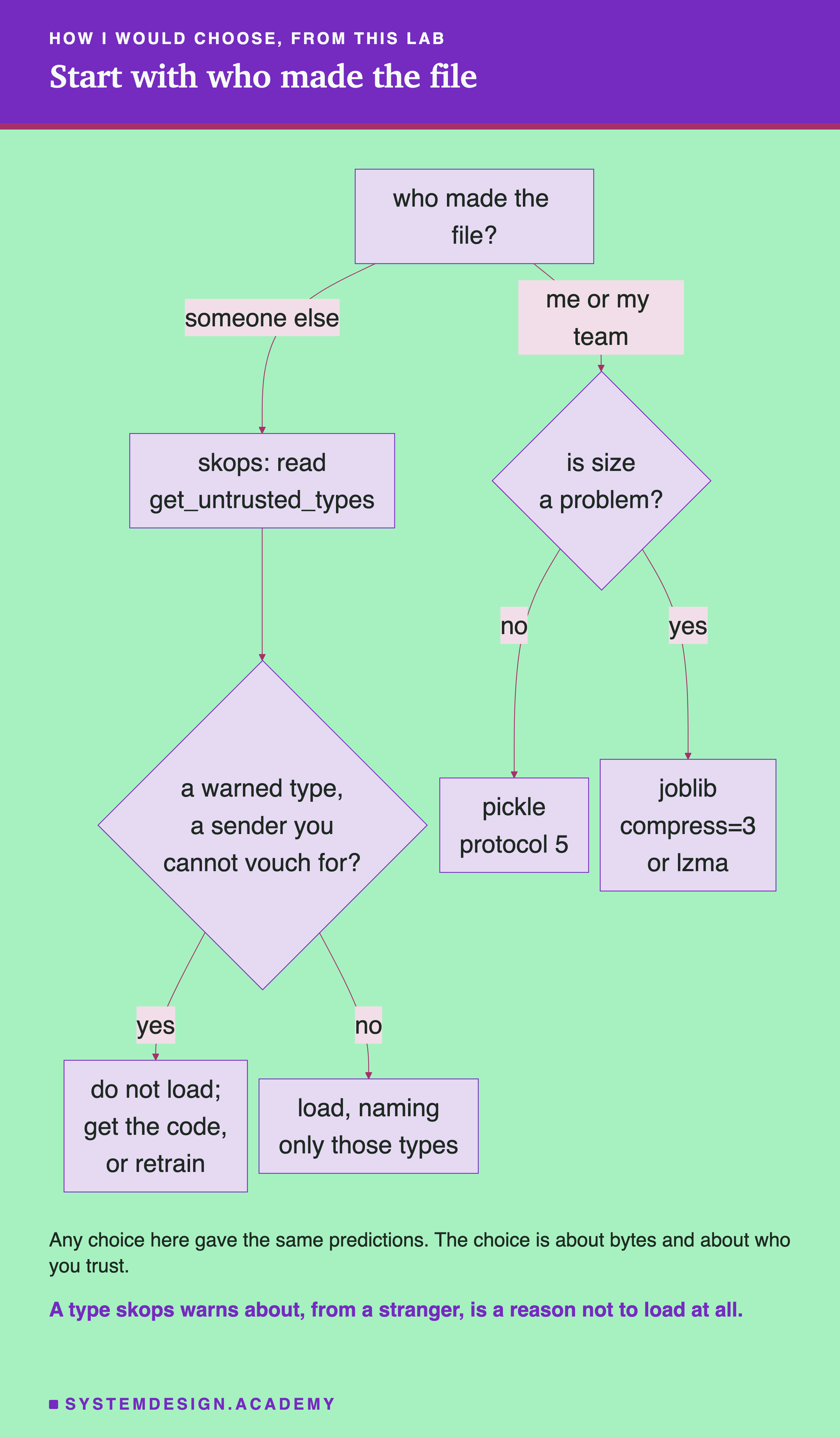
The chart starts with trust, not with size. A wrong answer on trust can run someone else's code on your machine. A wrong answer on size only costs disk space. Here are the same steps in words.
-
Ask who made the file. If it came from outside your team, from a website, a vendor or a user, do not load it with pickle or joblib. Use skops and read what
get_untrusted_typeslists. If a listed type is one skops warns about and you cannot vouch for the sender, do not load the file. Ask for the training code instead, or retrain the model yourself. skops's own refusal message says to "avoid passing everything reported by get_untrusted_types() just to make a file load". -
If you made it, ask whether size matters. For the chapter model the whole question is 75 KB against 200 KB, which rarely matters. For the forest it was 13 MB against 118 MB, which matters for storage, downloads and container images.
-
If size matters, compress with joblib.
compress=3was a good middle point here. lzma was the smallest. I could not measure the cost in time, so check it yourself on a quiet machine. -
Write the pickle protocol in your code.
protocol=5gives the same protocol on Python 3.13 and 3.14. I did not test whether the files are byte for byte the same.
When to Use Each Format, and When Not To
Use pickle for a model you made and will load yourself, in the same environment, when size does not matter. It is in every Python, it needs nothing installed, and here it was bit-identical every time. Write protocol=5.
Use joblib with compression when the file is big, you made it, and you trust where it is stored. Here it cut the forest from 118 MB to 21 MB at level 3. Joblib without compression gave no benefit here: it was never smaller than pickle.
Use skops when a model crosses a trust boundary: shared on a model hub, sent to a customer, or received from someone you do not control. For tree models like the three here, skops refuses to load the file until a person names the types it cannot check. The logistic model loaded with no list at all. Naming a type is a promise that you trust the sender, so for a file from a stranger the safer answer can be not to load it. On small models, store it with zip compression, because stored skops doubled the chapter model and made the logistic model 18.5 times bigger.
Do not use any of these to move a model to a different scikit-learn version. scikit-learn's and skops's documentation say so; joblib's warns about Python versions too. That is lesson 3's question.
Do not treat skops as a guarantee. Its own documentation says to load skops files only from sources you trust. It narrows the door. It does not remove it.
What This Lab Cannot Tell You
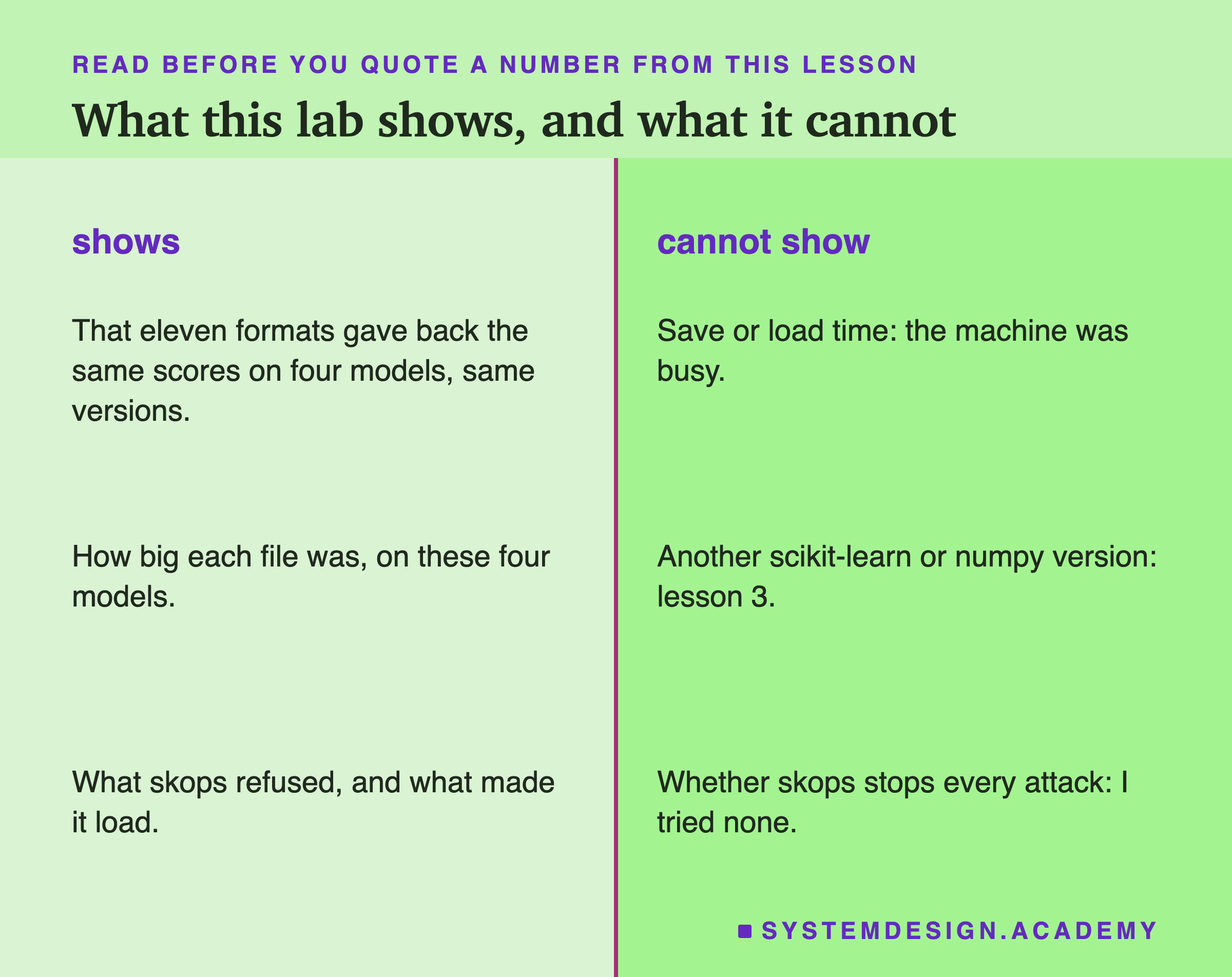
No timings. The machine's load average was 3.09, above my limit of 2, so I report no seconds. The speed claims in the tools' documentation are not checked here.
Same versions on both sides. Both environments had scikit-learn 1.9.1, numpy 2.5.3 and Python 3.13.15. I did not test loading across versions, or across operating systems.
Four models of two families. Three tree models and one straight-line model, all from scikit-learn. A neural network, or a model from another library, may compress differently and may need other trusted types in skops.
No attack. I did not build a harmful skops file, so I cannot say what skops stops. I only report what it refused and accepted on honest files.
Labelled additions. Two things were found after the results, and both are labelled in the lab, the report and here. The first is where the skops bytes go. The second is the one byte from the thread count, with the skops zip names that change per run. After an independent review I added two more, also labelled: the one-ULP control and the CVE record.
What to Do on Monday
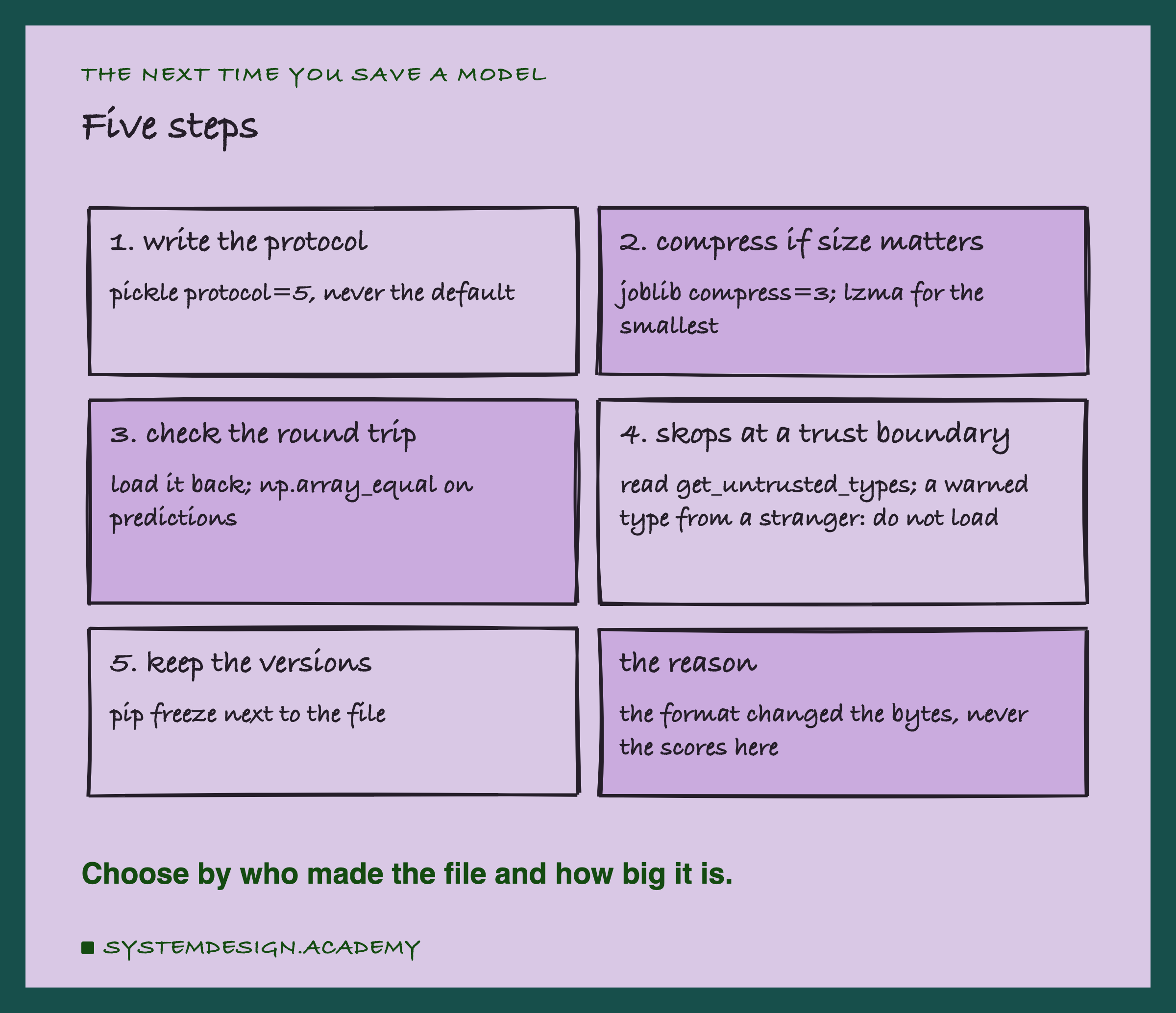
If you take one thing to work on Monday, find the line in your code that saves your model. Look at three things. Does it name a pickle protocol, or leave it to whatever Python runs it? Does anything load the file back and compare predictions before it ships? And does any model file ever arrive from outside your team, where pickle should not be the format at all?
Then add the cheapest check first. After saving, load the file and run np.array_equal on its predictions for a sample of rows. In this lab that check passed 44 times out of 44, and the control proved it could fail. It is the check that would catch the day a format or setting is not lossless.
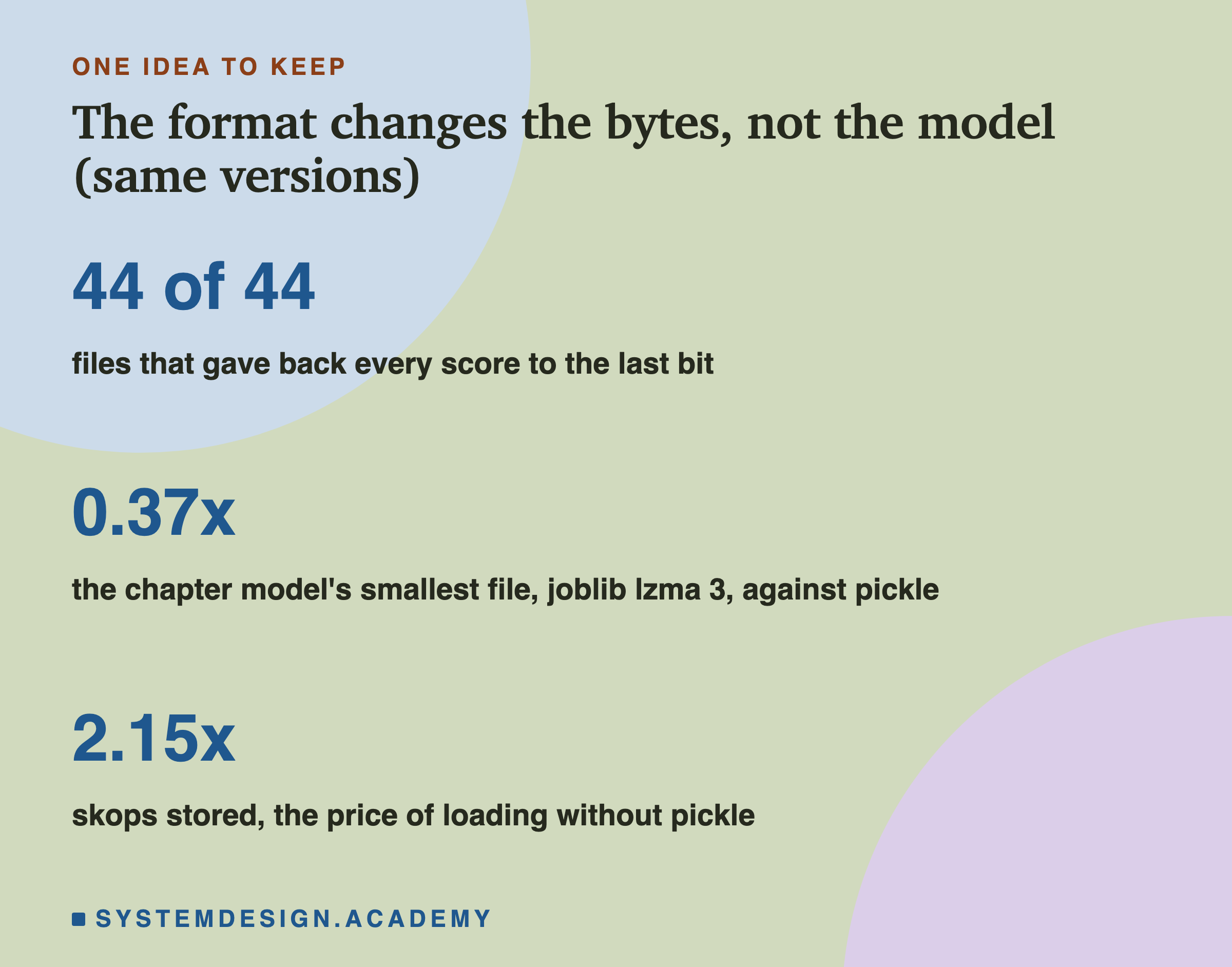
The one idea to keep: for the same library versions, the saving format did not change one prediction here. It changed the size, by up to a factor of almost six for the chapter model, and it changed what you have to trust when you load. Choose by who made the file and how big it is.
Knowledge Check
Knowledge Check
4 questions - Score 80% to pass
All 44 saved files in this lab gave back bit-identical predictions. Why was that expected?
Why was the chapter model's skops file 2.15 times the size of its pickle?
skops refused to load the chapter model with no trusted list. What did that refusal mean?
Why does this lesson report no save or load times?