Content Delivery
The process of distributing and serving content to users from locations geographically close to them for faster load times.
What is Content Delivery?
In short
Content delivery is the practice of serving a website's files, images, video, and API responses from servers placed physically close to each user instead of from one origin server, so the data travels a shorter distance and arrives faster. It is what makes a site loaded from London feel just as fast in Sydney, and it is delivered mostly through caching networks called CDNs.
What content delivery actually means
When you load a web page, your browser pulls down dozens of separate things: HTML, CSS, JavaScript bundles, fonts, images, maybe a video stream, and the data behind it all. Content delivery is the discipline of getting every one of those things to the user as quickly and reliably as possible, no matter where in the world they are sitting.
The core problem is distance. Data cannot travel faster than light through fiber, so a request from Sydney to a server in Virginia has to cross roughly 16,000 km each way. Even at ideal speed that is about 80 ms of pure travel before the server does any work, and real networks add much more. If every user hit one origin server, far-away users would always feel a lag.
The fix is to keep copies of the content in many places at once. Instead of one server in one city, you put hundreds of edge servers in cities around the world and serve each user from the closest one. A user in Sydney gets the file from a Sydney edge server in a few milliseconds rather than waiting for a round trip across the Pacific.
How it works under the hood
Most content delivery runs through a CDN (Content Delivery Network), a fleet of edge servers spread across hundreds of points of presence. Cloudflare, for example, runs in more than 300 cities. Each edge server is a caching proxy that sits in front of your origin.
The flow is simple. The first time a user in a region requests a file, the nearest edge server does not have it yet, so it fetches the file from the origin once, stores a copy, and returns it. This is a cache miss. Every later request from that region is served straight from the edge copy without touching the origin. This is a cache hit, and a good setup serves 90 percent or more of traffic this way.
Routing the user to the right edge server is usually done with anycast or DNS. With anycast, the same IP address is announced from every location and the internet's own routing naturally sends the user to the nearest one. Cache freshness is controlled with the Cache-Control header and a TTL (time to live); when the TTL expires the edge revalidates with the origin. Static assets like images and JS bundles cache for hours or days, while dynamic API responses cache for seconds or not at all.
When to use it and the trade-offs
Content delivery is worth it the moment you have users in more than one region or you serve large static files. It cuts latency, absorbs traffic spikes, reduces load on your origin servers, and provides a layer that blocks DDoS attacks before they reach you. For media-heavy products it is not optional; streaming a movie from a single origin to millions of viewers would melt the origin and saturate its uplink.
The main trade-off is staleness. Because the edge serves cached copies, a user can see an old version of a file after you have updated the origin. The standard fix is cache invalidation, either by setting short TTLs or by giving each file a unique versioned name like app.4f9c2.js so a new deploy is a brand new file that no edge has cached yet.
The other costs are money and complexity. CDNs bill per gigabyte transferred and per request, which adds up for high-traffic video. Caching dynamic or personalized content is also tricky, because a page that shows your name must not be served to someone else, so you cache the shared parts and leave the personal parts uncached or fetched separately.
A concrete real-world example
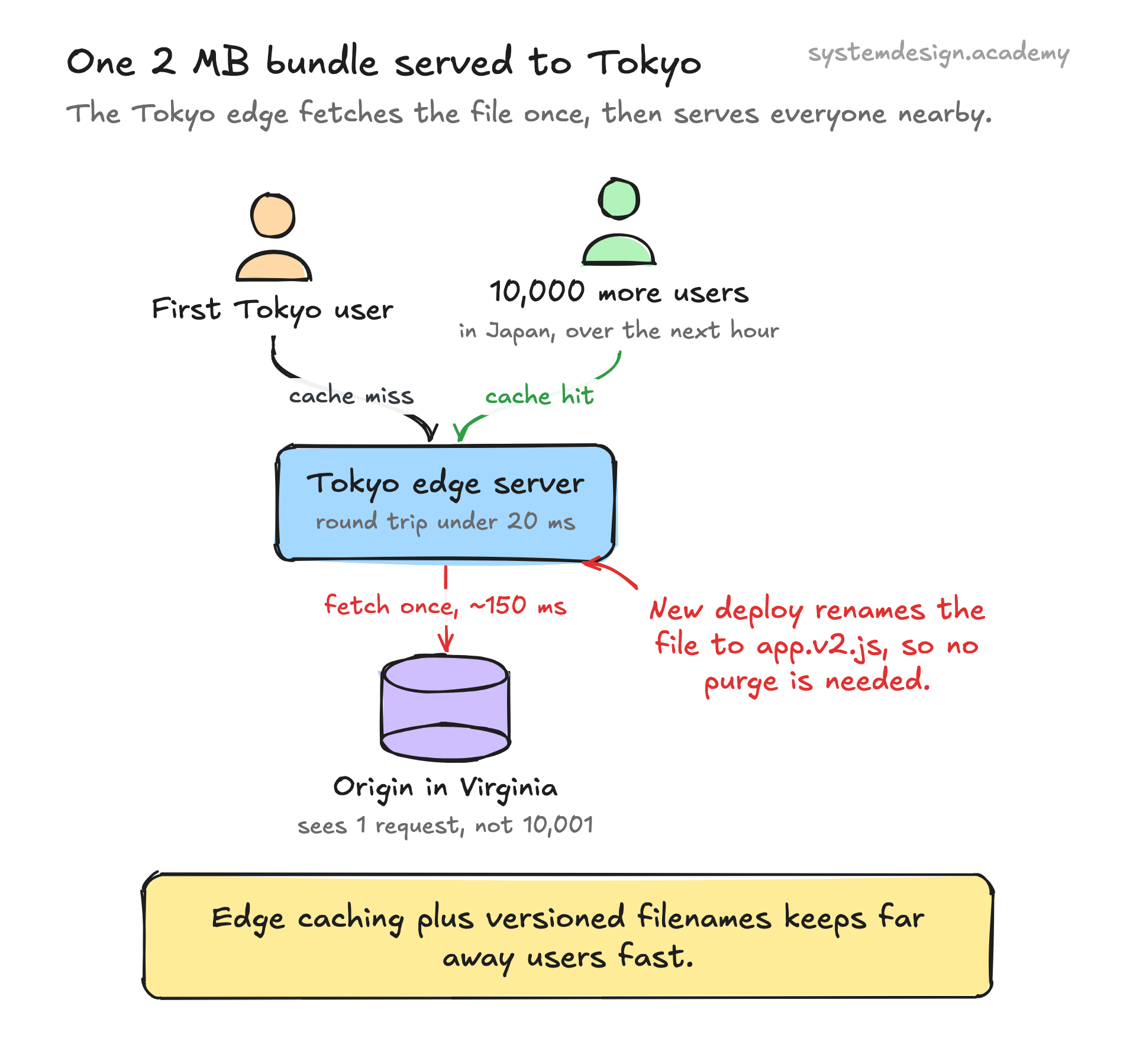
Picture a software company in Virginia whose origin server holds a 2 MB JavaScript bundle. A user opens the site in Tokyo. The Tokyo edge server has no copy yet, so it fetches the bundle once across the Pacific, a slow round trip of maybe 150 ms. It stores the file and serves it to the user.
Over the next hour, ten thousand more users in Japan load the same site. Every one of them gets the bundle from the Tokyo edge in under 20 ms, and the origin in Virginia never hears about any of them. The company's origin handled one request instead of ten thousand and one, and Japanese users got a fast site despite the origin being on the other side of the planet.
When the company ships a new version, it renames the bundle to app.v2.js. The old cached copies are now irrelevant and the edges fetch the new file on first request, so every user gets the update with no manual cache purge. That single pattern, edge caching plus versioned filenames, is the backbone of how the modern web stays fast.
Where it is used in production
Cloudflare
Runs edge servers in 300-plus cities and serves cached content plus DDoS protection in front of millions of websites.
Amazon CloudFront
AWS's CDN with 600-plus points of presence; pulls from S3 or any origin and is the default delivery layer for many AWS-hosted apps.
Netflix Open Connect
Places its own caching appliances directly inside ISP networks so popular shows stream from a box a few hops from the viewer.
Akamai
One of the oldest CDNs, with hundreds of thousands of edge servers delivering software updates, video, and web assets for large enterprises.
Frequently asked questions
- What is the difference between content delivery and a CDN?
- Content delivery is the goal: getting content to users fast and reliably. A CDN is the most common tool that achieves it, a network of edge servers that cache copies of your content close to users. You can do basic content delivery without a CDN, for example by running your own regional servers, but a CDN is the standard turnkey solution.
- Does a CDN store my dynamic or personalized content?
- By default it caches only what you tell it to via Cache-Control headers, and you usually mark personalized or per-user responses as no-cache so they are never shared. The common pattern is to cache the static, shared parts of a page heavily and fetch the personal parts separately, often through an uncached API call.
- How does the CDN know to serve a user from the nearest server?
- Most CDNs use anycast routing, where every edge location announces the same IP address and the internet's routing automatically sends traffic to the topologically closest one. Some use DNS-based routing instead, returning a different edge IP depending on where the DNS query came from.
- What happens when I update a file but the CDN is still serving the old one?
- That is a stale cache. You fix it either by setting a short TTL so the edge revalidates with your origin frequently, by issuing a cache purge or invalidation request to the CDN, or, best of all, by giving each new build a unique filename so an update is a brand new file no edge has cached yet.
- Is content delivery only for static files?
- No. Static assets like images, CSS, JS, and video are the easiest wins because they rarely change, but modern CDNs also cache API responses for short windows, run code at the edge for dynamic logic, and proxy and protect even fully dynamic traffic that they never cache.
Learn Content Delivery hands-on
This page explains the idea. The full lesson lets you step through the ring as servers join and leave, read the implementation, and check yourself with a quiz. It is one of 760+ lessons in the System Design Masterclass, from your first API call to distributed consensus. Eleven Foundation lessons are free, no signup. Lifetime access is ₹499 in India or $7.99 worldwide, one payment, no subscription.
Related lessons
Lessons that touch on Content Delivery as part of a larger topic.
Content Delivery Network (CDN)
Serve content from edge locations worldwide for sub-50ms response times using Cloudflare, CloudFront, and edge caching
foundation · load balancing proxies
Design a Content Delivery Network
Design a CDN from scratch - edge caching, origin shield, cache purging, anycast routing, TLS termination, and global distribution
capstone · capstone
Dynamic Content Delivery
Serving personalized, real-time, or user-specific content that cannot be pre-built or cached uniformly
intermediate · web content delivery
See also
Related glossary terms you might want to look up next.
CDN
A network of servers distributed globally that caches content close to users. Netflix uses CDNs to stream video from servers near you, not from one central location.
Caching
Storing frequently accessed data in a faster storage layer so you don't have to fetch it from the original (slower) source every time.
Latency
The time delay between sending a request and getting a response. Amazon found every 100ms of extra latency costs 1% in sales.
Edge Computing
Running computation at the network edge, close to the user, instead of in a central data center. Reduces latency for real-time applications like IoT and streaming.
HTTP Caching
Browser and proxy caching controlled by HTTP headers like Cache-Control, ETag, and Last-Modified. Eliminates redundant network requests for unchanged resources.
Static Site Generation (SSG)
Pre-rendering pages to static HTML at build time. The fastest possible page loads because there's no server-side computation on each request.