Pagination
Breaking large result sets into smaller pages. Offset-based (page=2&limit=20) is simple; cursor-based (after=abc123) handles real-time data without skipping or duplicating items.
What is Pagination?
In short
Pagination is the technique of splitting a large result set into smaller, fixed-size chunks called pages so a client fetches data a slice at a time instead of all at once. The two dominant styles are offset-based, where you ask for a page number and size such as page=2&limit=20, and cursor-based, where you pass a pointer to the last item you saw such as after=abc123 to get the next slice without skipping or duplicating rows.
What pagination actually is
When a query could return ten thousand orders or a million log lines, sending all of them in one response is slow for the server, expensive on the network, and unusable in a browser. Pagination breaks that result into pages, and the client requests them one at a time as the user scrolls or clicks next.
Every paginated API needs three things in the response, not just the rows: the slice of data itself, some way to ask for the following slice, and ideally a signal for whether more data exists. Without that last part the client has no clean way to know it has reached the end.
The shape of the request is what separates the two main families. Offset pagination identifies a page by position, like rows 41 through 60. Cursor pagination identifies a page by content, like everything after the order created at 2026-06-14T10:00 with id abc123. That difference in how a page is named drives every trade-off below.
How offset and cursor pagination work under the hood
Offset pagination maps directly to SQL: page=3 with limit=20 becomes LIMIT 20 OFFSET 40. The database still has to count and walk past the first 40 rows before it can return yours, so page 5000 of a large table forces the engine to scan and discard 100000 rows. Latency grows with the page number, which is why deep offset pagination gets slow.
Cursor pagination instead encodes a position in the sort order. The query becomes WHERE (created_at, id) < ('2026-06-14T10:00', 'abc123') ORDER BY created_at DESC, id DESC LIMIT 20. With an index on those columns the database jumps straight to the spot and reads forward, so page one and page five thousand cost roughly the same. The cursor is usually a base64 string holding the sort key values of the last row.
There is also keyset pagination, which is the SQL pattern cursor APIs are built on, and seek-method variants used by analytics engines. The common idea is the same: anchor on a value in the ordering rather than a count of rows you have to skip.
When to use which, and the trade-offs
Offset is the right default when the dataset is small and stable, when users genuinely need to jump to an arbitrary page number, or when you must show a total count and total pages. It is simple to build, easy to reason about, and fine for an admin table of a few thousand rows.
Offset breaks down on two fronts. It gets slow on deep pages because of the row skipping, and it produces drift on live data. If a new row is inserted at the top while a user pages through, every later page shifts down by one, so they see a duplicate at the boundary or miss a row entirely.
Cursor pagination fixes both problems. It stays fast at any depth and it does not skip or duplicate items when the underlying data changes, because the anchor is tied to a row, not a position. The cost is that you usually lose random page access and a reliable total count, and the sort key must be stable and unique, which is why most cursors combine a timestamp with a tie-breaking id.
A concrete example: an infinite feed
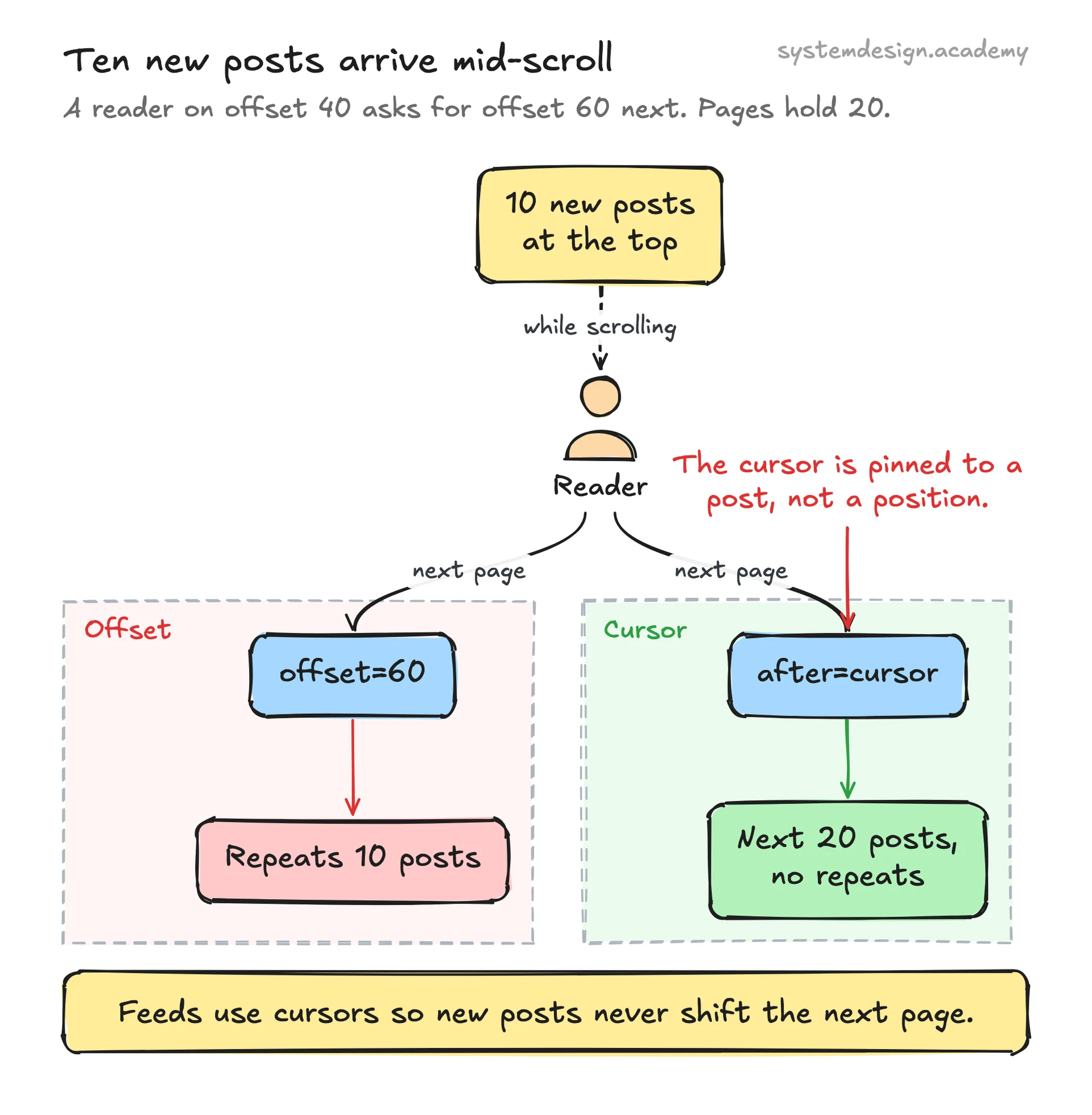
Think of a Twitter-style timeline. The first request returns 20 posts and a next cursor pointing at the oldest post returned. The client shows those, and when the reader nears the bottom it sends after=that_cursor to load the next 20. New posts arriving at the top never disrupt this, because the cursor is pinned to a specific post the reader has already passed.
Now imagine the same feed with offset pagination. The reader is on what is effectively offset 40 when ten new posts get published. Their next request for offset 60 now lands ten posts earlier than intended, so they re-see posts they already scrolled past. This is exactly the duplicate-at-the-boundary bug, and it is why every large social and messaging product uses cursors for feeds.
A practical pattern is to offer both: cursor pagination for endless scrolling feeds and APIs, and offset pagination only for bounded admin grids where a total count and a page jumper matter more than perfect consistency.
Where it is used in production
Stripe API
Uses cursor pagination on list endpoints with starting_after and ending_before parameters that take an object id, plus a has_more boolean.
GitHub REST and GraphQL API
REST uses page and per_page with Link headers for next and last; GraphQL uses Relay-style cursor connections with first, after, and pageInfo.endCursor.
Slack API
Conversation and message history endpoints return a next_cursor that you pass back in the cursor parameter to walk through channels safely as new messages arrive.
MongoDB
skip() and limit() give offset-style paging but degrade on deep pages, so production code paginates on an indexed field with a range query, which is the cursor approach.
Frequently asked questions
- What is the difference between offset and cursor pagination?
- Offset names a page by position (skip 40 rows, take 20), which is simple but slows down on deep pages and drifts when data changes. Cursor names a page by an anchor value from the last row you saw, which stays fast at any depth and never skips or duplicates rows, at the cost of random page access and easy total counts.
- Why does deep offset pagination get slow?
- LIMIT 20 OFFSET 100000 forces the database to read and throw away the first 100000 rows before returning yours. The work grows with the offset, so the deeper the page, the slower the query. Cursor pagination avoids this by using an indexed range condition that jumps straight to the right spot.
- What is a cursor and what should go inside it?
- A cursor is an opaque token, usually base64, that encodes the sort-key values of the last item on the current page. To be reliable it should hold a stable, unique ordering, which is normally a timestamp plus a tie-breaking primary key id so that two rows with the same timestamp still have a deterministic order.
- Can I still show a total page count with cursor pagination?
- Not cheaply. Cursor pagination does not know how many pages remain without a separate COUNT query, which can be expensive on large tables. If a total count and a page jumper are required, use offset pagination, or show an approximate count and a has_more flag instead of exact totals.
- Which one should I use by default for an API?
- Use cursor pagination for feeds, timelines, and any large or frequently changing list, which is what Stripe, Slack, and GitHub GraphQL do. Reserve offset pagination for small, stable datasets where users need to jump to a specific page number and you can afford an exact total count.
Learn Pagination hands-on
This page explains the idea. The full lesson lets you step through the ring as servers join and leave, read the implementation, and check yourself with a quiz. It is one of 760+ lessons in the System Design Masterclass, from your first API call to distributed consensus. Eleven Foundation lessons are free, no signup. Lifetime access is ₹499 in India or $7.99 worldwide, one payment, no subscription.
See also
Related glossary terms you might want to look up next.
REST API
An architectural style for building APIs using standard HTTP methods (GET, POST, PUT, DELETE). Resources are identified by URLs.
GraphQL
A query language for APIs where the client specifies exactly what data it needs. No over-fetching, no under-fetching. One endpoint to rule them all.
Database
An organized collection of data that can be easily accessed, managed, and updated. The backbone of almost every application.
WebSocket
A protocol for full-duplex communication over a single TCP connection. Unlike HTTP, the server can push data to the client without being asked.
SSE
Server-Sent Events: a one-way channel where the server pushes updates to the client over HTTP. Simpler than WebSockets when you only need server-to-client streaming.
Rate Limiting
Controlling how many requests a client can make in a given time window. Protects your API from abuse and ensures fair usage.