Request-Response
The most basic communication pattern: one party sends a request and waits for the other to send a response. HTTP, REST, and gRPC all follow this pattern.
What is Request-Response?
In short
Request-response is a communication pattern where one party (the client) sends a request and then waits for the other party (the server) to send back exactly one response before continuing. HTTP, REST, and gRPC unary calls all work this way: ask a question, block until you get the answer.
What It Is
Request-response is the simplest way two programs talk to each other over a network. A client opens a connection, sends a message describing what it wants, and then pauses. The server reads that message, does the work, and sends back a single reply. The client unblocks the moment the reply arrives. One request, one response, in that order.
This is the pattern behind almost everything you use on the web. When your browser loads a page, it sends an HTTP GET request and waits for the HTML to come back. When a mobile app fetches your profile, it makes a REST call and waits for the JSON. The defining trait is that the requester expects an answer and ties the answer to the specific request it sent.
Contrast this with one-way messaging (fire-and-forget) where you send a message and never wait, or publish-subscribe where you broadcast an event and many listeners react on their own schedule. Request-response is synchronous in spirit: the caller's next step depends on the callee's answer.
How It Works Under the Hood
Every request-response system needs a way to match a reply to its original request. Over a single TCP connection that is easy: the response comes back on the same socket. But once you add connection pooling, multiplexing, or async clients, you need correlation. HTTP/2 tags each request with a stream ID so many requests can share one connection and the right responses still get matched. gRPC, which runs on HTTP/2, does the same.
The caller almost always sets a timeout. If the server does not respond within, say, 30 seconds, the client gives up and treats it as a failure rather than waiting forever. This is critical because a network can drop a packet or a server can hang, and a client with no timeout will block one of its threads or connections indefinitely. Real clients pair timeouts with retries and sometimes a circuit breaker.
Status codes carry the outcome. HTTP uses numbers like 200 for success, 404 for not found, and 503 when the server is overloaded. gRPC has its own set such as OK, NOT_FOUND, and DEADLINE_EXCEEDED. The response also carries the payload, usually JSON, Protocol Buffers, or plain bytes, plus headers describing content type and caching rules.
When To Use It And The Trade-offs
Reach for request-response when the caller genuinely needs the answer before it can move on: reading a user record, validating a login, charging a card, fetching search results. The pattern is easy to reason about, easy to debug (you can replay a single curl command), and supported by every language and framework with zero extra infrastructure.
The cost is coupling in time. The client is blocked and holding resources while it waits, so a slow server directly slows down every caller. If service A calls B which calls C, the total latency is the sum, and any one failure breaks the whole chain. Under load this turns into thread or connection exhaustion, which is why teams add timeouts, bulkheads, and circuit breakers.
When the caller does not need an immediate answer, request-response is the wrong tool. Sending a welcome email, generating a report, or processing a video should go through a message queue or event stream instead, so the request returns instantly and the work happens in the background. A common mistake is making a user wait on an HTTP request while a 20-second job runs synchronously behind it.
A Concrete Example
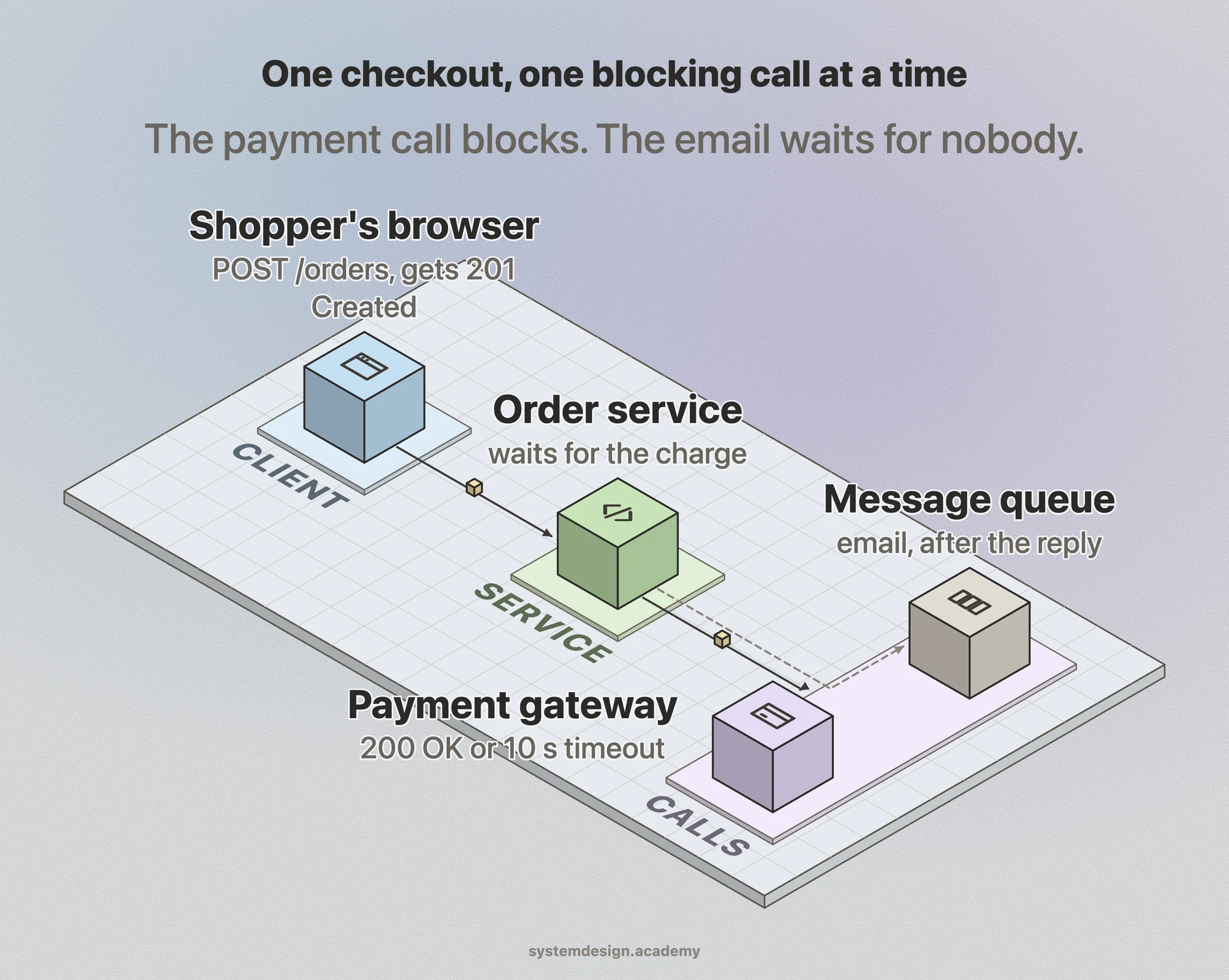
Think about checking out on an e-commerce site. Your browser sends POST /orders with the cart contents. The order service receives it, then itself makes request-response calls: one to the inventory service to confirm stock, one to the payment gateway to charge the card, one to the user service to load the shipping address. Each call blocks until it gets a reply.
If the payment gateway returns 200 OK with an approval, the order service writes the order and returns 201 Created to the browser, which then shows the confirmation page. If the gateway times out after 10 seconds, the order service catches it, may retry once, and if it still fails returns a 503 so the browser can show please try again rather than spinning forever.
Notice what stays synchronous and what does not. Confirming payment must block because you cannot show success until the money clears. But sending the confirmation email and updating analytics are fired off to a queue after the response is returned, so the shopper is not kept waiting on work they do not care about.
Where it is used in production
HTTP and REST APIs
Every web request your browser makes is request-response: GET a URL, wait for the response with a status code and body.
gRPC
Google's RPC framework runs unary calls over HTTP/2 with Protocol Buffers, used heavily for internal service-to-service calls.
Stripe
Charging a card is a blocking request-response call to the payments API that returns success or a decline before checkout completes.
PostgreSQL
A SQL query is request-response over a connection: send the query, block until the rows or an error come back.
Frequently asked questions
- Is request-response always synchronous?
- In spirit yes, because the caller expects exactly one answer tied to its request. But the client code can be written asynchronously so the thread is not literally blocked. With async HTTP clients you await the response instead of freezing a thread, yet it is still one request matched to one response.
- What is the difference between request-response and publish-subscribe?
- Request-response has one sender that waits for one specific reply from one receiver. Publish-subscribe broadcasts an event to many subscribers who react independently, and the publisher does not wait for or receive any reply. Use request-response when you need the answer now, pub-sub when you are notifying others of something that happened.
- Why do request-response calls need timeouts?
- Because networks drop packets and servers hang. Without a timeout the client waits forever, holding a thread or connection until it runs out and the whole service stalls. A timeout (commonly a few seconds to 30 seconds) lets the client give up, fail cleanly, and optionally retry.
- When should I avoid request-response?
- When the caller does not need the result immediately or the work takes a long time. Long jobs like sending emails, encoding video, or generating reports should be handed off to a message queue so the request returns instantly and the work runs in the background.
- Does request-response require HTTP?
- No. HTTP and REST are the most common implementations, but the pattern is older and broader. A database query, a gRPC call, a DNS lookup, and a classic RPC are all request-response. The pattern is just send one request, wait for one matching reply.
Learn Request-Response hands-on
This page explains the idea. The full lesson lets you step through the ring as servers join and leave, read the implementation, and check yourself with a quiz. It is one of 760+ lessons in the System Design Masterclass, from your first API call to distributed consensus. Eleven Foundation lessons are free, no signup. Lifetime access is ₹499 in India or $7.99 worldwide, one payment, no subscription.
Related lessons
Lessons that touch on Request-Response as part of a larger topic.
Request-Response Pattern
The most fundamental messaging pattern, send a request, wait for a reply
intermediate · messaging event systems
Synchronous Processing
Sequential request-response pattern where each operation waits for the previous one
foundation · core fundamentals
Request-Reply Pattern
Request-response over messaging, decouple the caller from the responder with queues
intermediate · messaging event systems
See also
Related glossary terms you might want to look up next.
HTTP
The protocol powering the web. A request-response model where clients ask for resources and servers respond. Stateless by design.
Synchronous
A communication model where the caller waits for the operation to complete before moving on. Simpler to reason about but blocks the thread.
Client-Server Model
The foundational architecture of the web: clients (browsers, apps) send requests and servers process them and return responses. Every web interaction follows this pattern.
Latency
The time delay between sending a request and getting a response. Amazon found every 100ms of extra latency costs 1% in sales.
Throughput
The number of operations a system can handle per unit of time. Think of it as how many cars a highway can move per hour.
Bandwidth
The maximum amount of data that can be transferred over a network in a given time. It's the width of the pipe, not how fast the water flows.