The Same Photo, Printed Smaller
Think of a photographer who has taken one very good picture. On her own screen, in the program she edited it with, it looks exactly right. Now she has to send it out: to a print shop that uses a different printer, and to a website that wants a small copy that loads quickly. Each move changes the picture a little. The print shop's inks are not her screen's colours. The small copy throws away fine detail to save space. Most of the time nobody would notice. Sometimes the one detail that mattered, a face in the background or a word on a sign, is exactly what gets lost.
A careful photographer does not assume the print looks like the screen. She holds the print next to the screen and looks. And she checks the small copy separately, because it can lose things the print kept.

This lesson does the same with the two small models I trained in lesson 4. They were trained, and every score so far was measured, inside one program on my Mac. To be useful to anyone else, a model has to run somewhere other programs can reach it. So I moved both models to a different program, made smaller copies of them, and asked every copy the same 140 test messages again.
Two things surprised me. My first move was quietly broken, and the check I had written to catch exactly that kind of mistake did not catch it. And the smallest copy of the bigger model lost almost half of what training had taught it, while still writing replies that looked perfectly normal.
Ten Words for This Lesson
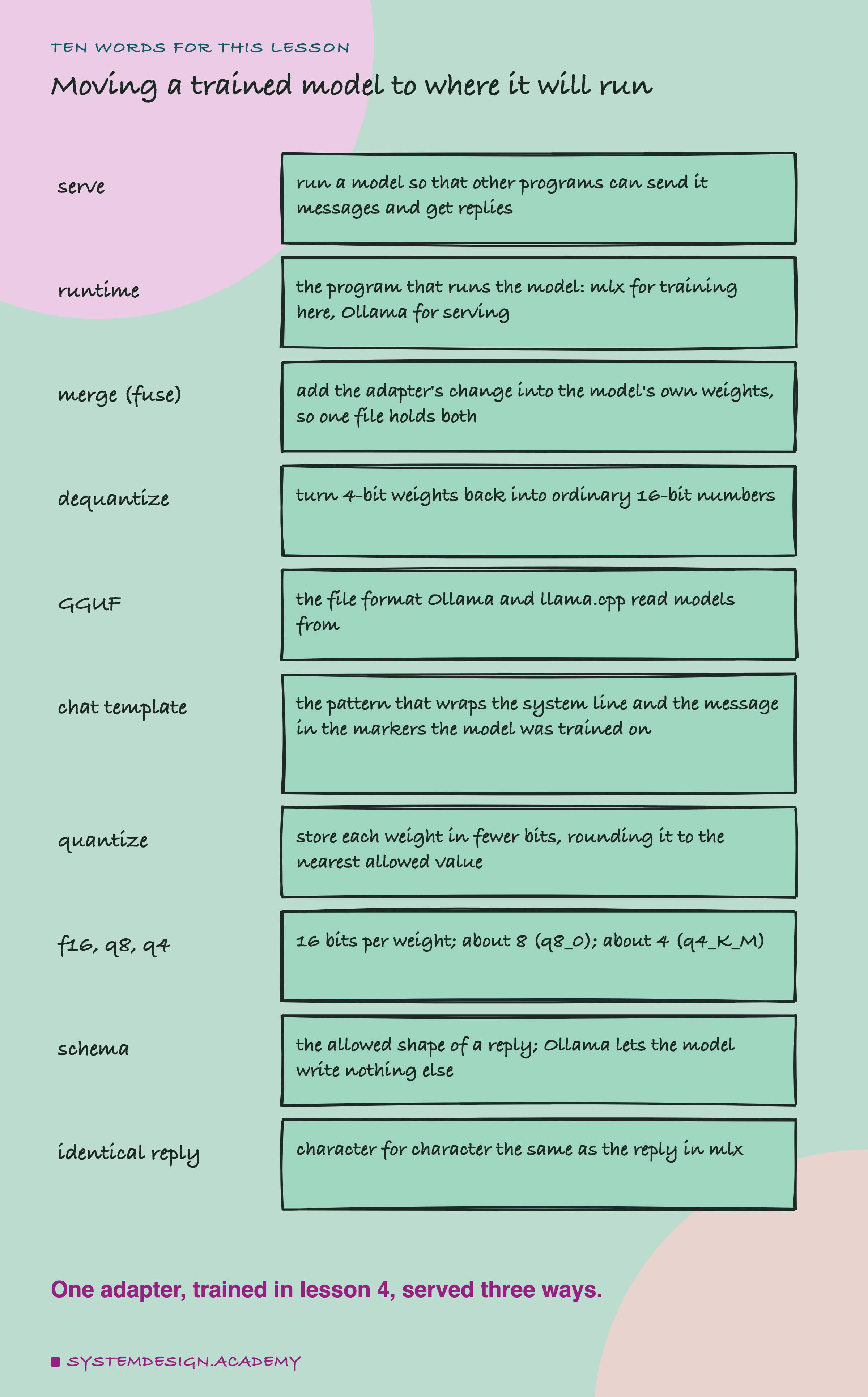
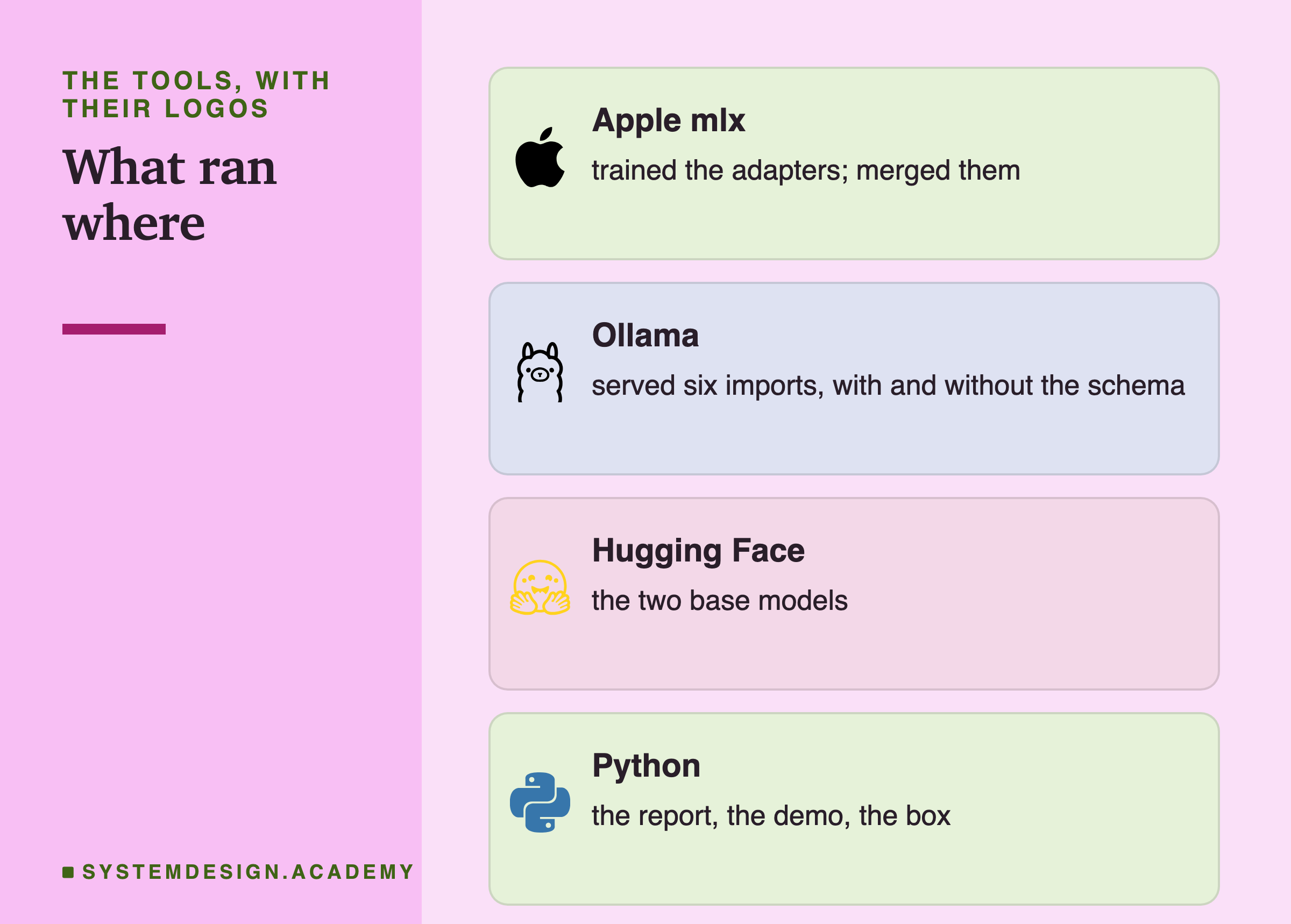
To serve a model is to run it so that other programs can send it messages and get replies back, the way a web page asks a server for data. The program that runs a model is its runtime. Lessons 4 to 8 used mlx (through the mlx-lm library) as the runtime, because mlx is what trained the models. This lesson uses Ollama, a free program that runs models on your own computer and answers requests over a local web address.
Lesson 4 trained a small add-on, the adapter, beside a frozen base model. To merge (mlx-lm calls it fuse) is to add the adapter's change into the base model's own weights, so a single set of weights holds both. The base models are stored in 4 bits per weight; to dequantize is to turn those 4-bit weights back into ordinary 16-bit numbers. GGUF is the file format Ollama and llama.cpp read models from.
A chat template is the pattern that wraps the system line and the customer's message in the special markers the model was trained on. To quantize is to store each weight in fewer bits by rounding it to the nearest value the smaller format allows. In this lesson, f16 means 16 bits per weight, q8 means about 8 (Ollama's q8_0 format) and q4 about 4 (its q4_K_M format). A schema is the allowed shape of a reply, as in lessons 3 and 7. An identical reply is one that is character for character the same as the same model's reply in mlx.
Why Move the Model at All, and How
Everything so far ran in mlx. mlx is Apple's machine learning library, built mainly for Macs with Apple silicon, and I ran everything in this chapter on a Mac. mlx-lm does include a simple server, but it has no schema option, and a model that only runs on one kind of computer is hard to share. Ollama is a common way to serve a model on your own machine, it runs on macOS, Windows and Linux, and it has one feature lesson 7 wished the fine-tunes had: a JSON schema that stops the model writing anything outside the allowed shape.
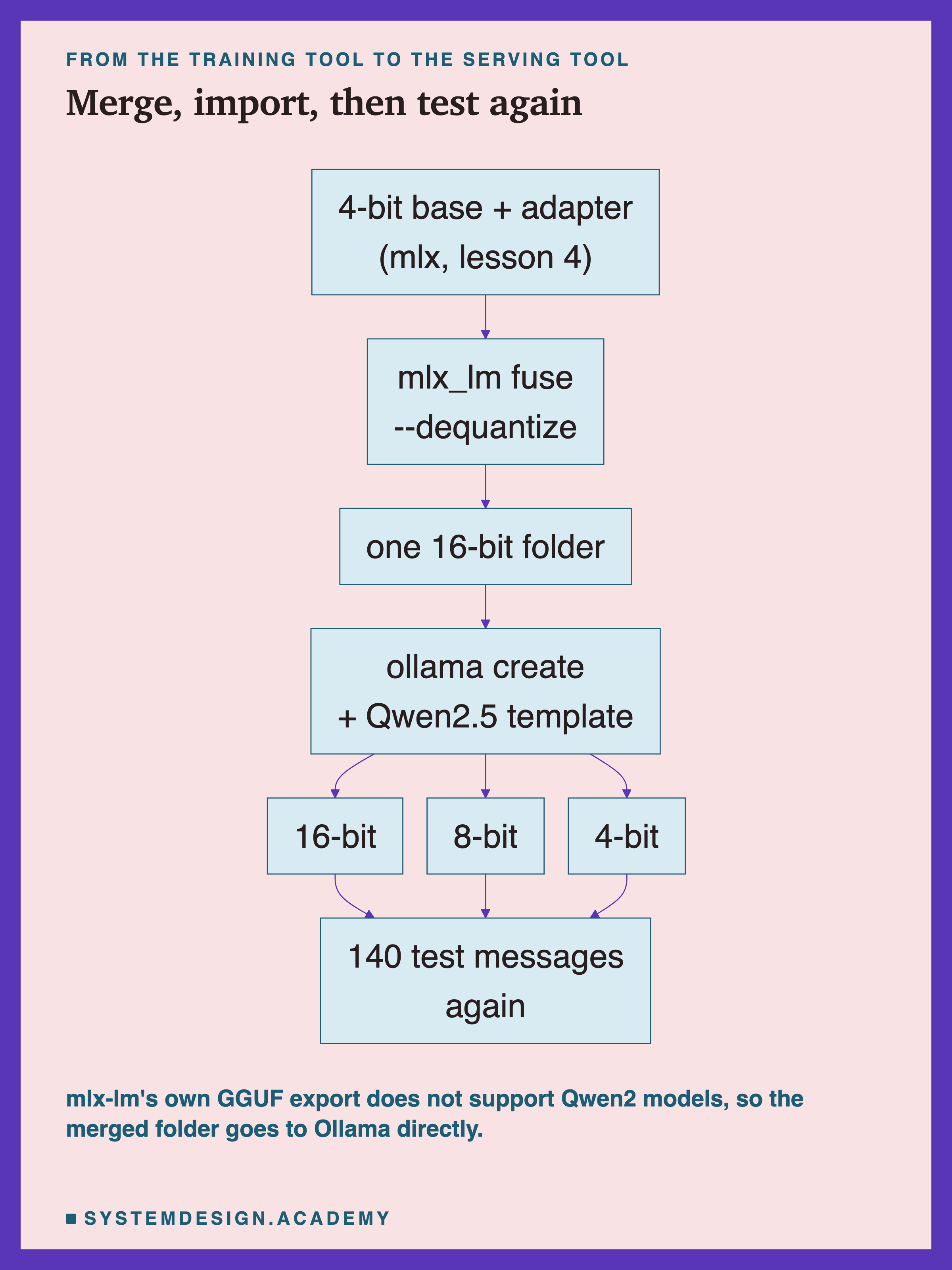
The path has two steps. First, mlx_lm fuse merges the adapter into the base model. With the --dequantize option it writes the result as ordinary 16-bit weights in a folder, instead of rounding it back to 4 bits. mlx-lm can also export straight to GGUF, but when I tried it, that export does not support Qwen2 models, the family both of mine belong to. So the second step is ollama create, which reads the merged folder directly and converts it itself. I imported each model three times: as it was (16-bit), and rounded to 8 bits and to 4 bits by Ollama's own --quantize option.
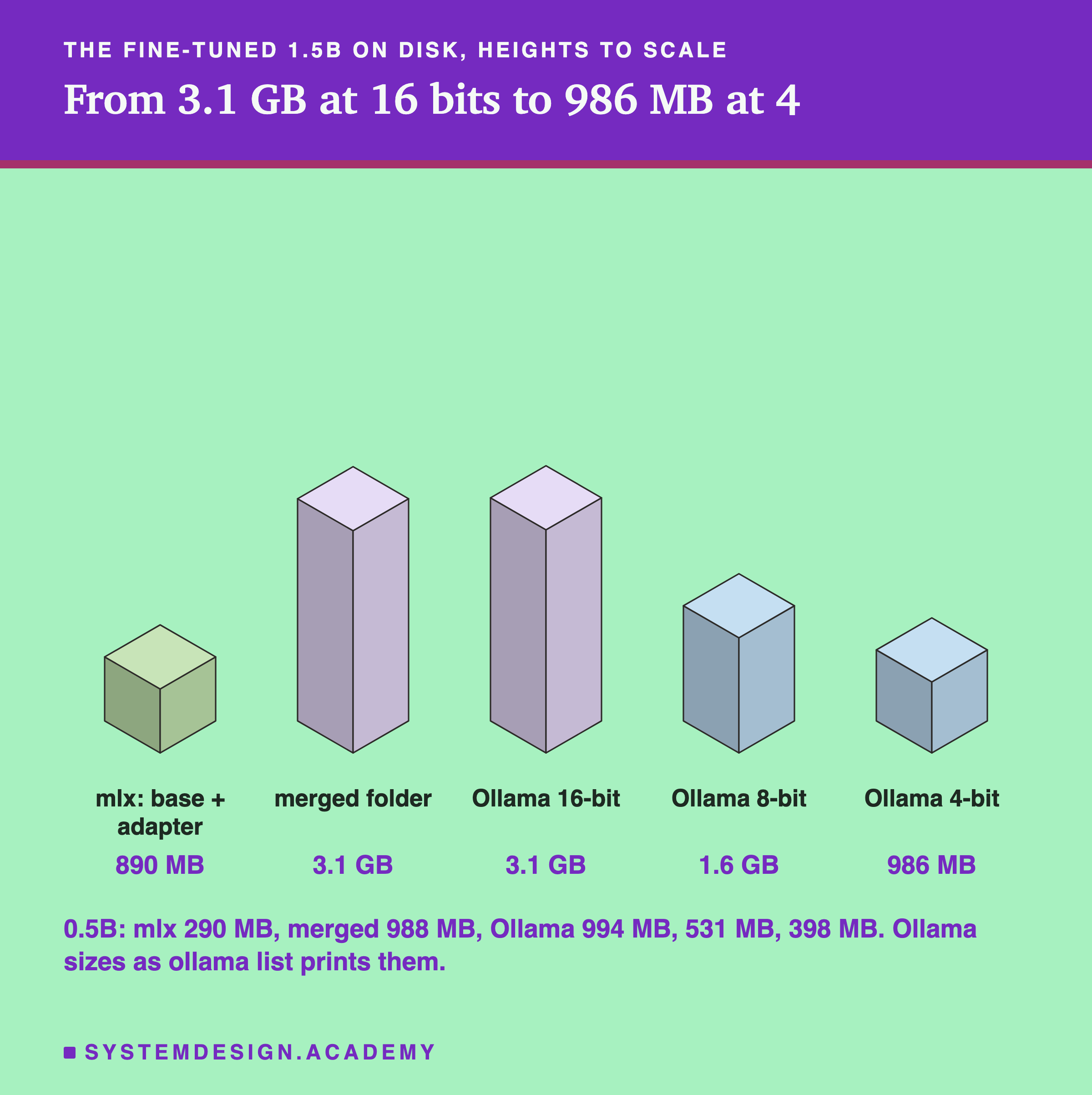
The sizes explain why anyone would round. In mlx, the 1.5B was a 4-bit base of 868.6 MB plus an adapter of 21.1 MB. Merged and written as 16-bit numbers, it became a 3.1 GB folder, and Ollama's 16-bit import is the same size. Rounding brought it down to 1.6 GB at 8 bits and 986 MB at 4 bits. For the 0.5B the steps were 994 MB, 531 MB and 398 MB. The 4-bit import is bigger than mlx's own 4-bit base, and one likely reason is that q4_K_M keeps some weight tables at 6 bits.
The Modelfile, and How Each Reply Was Scored
ollama create reads a short recipe called a Modelfile. Mine has three lines.
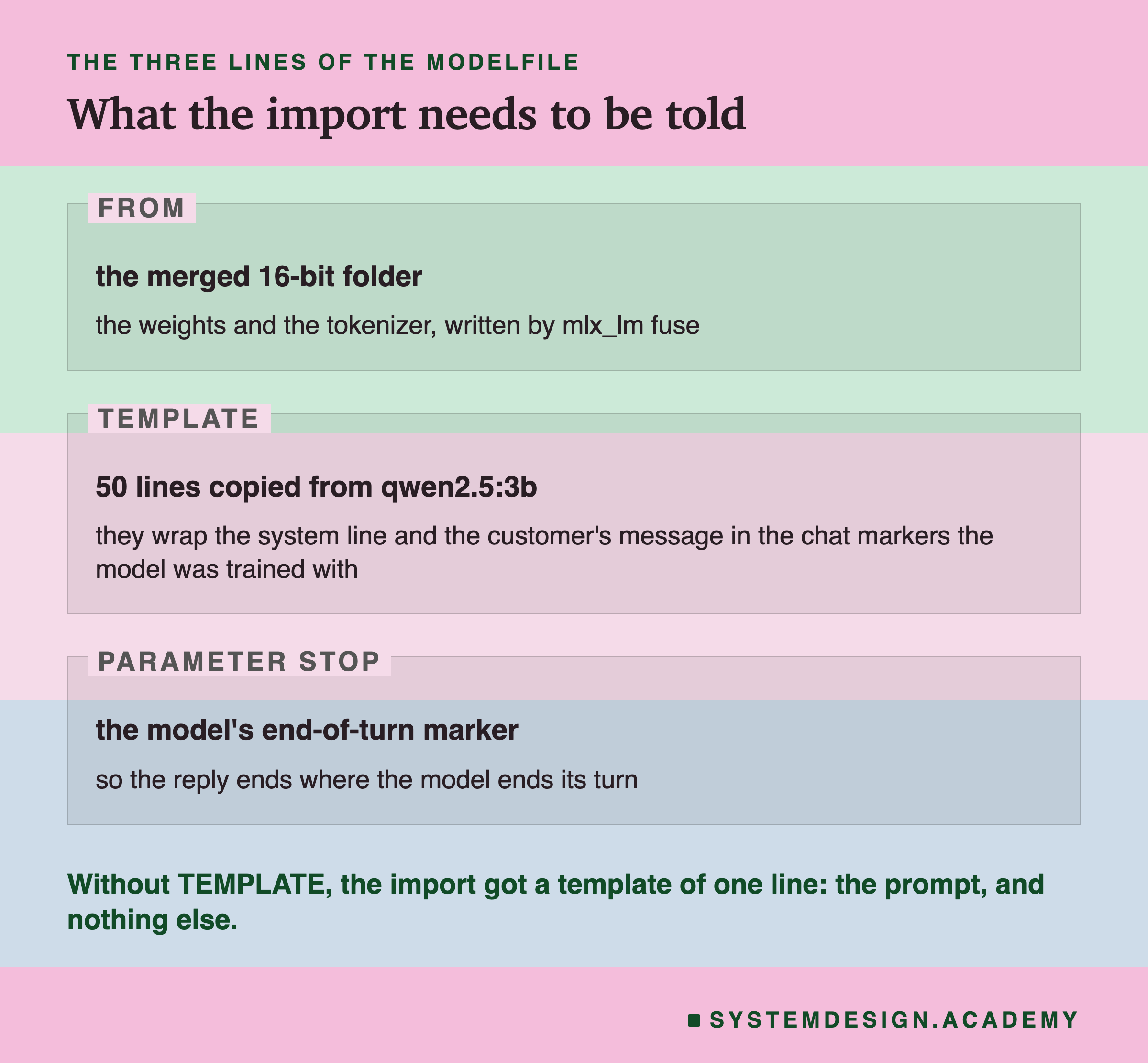
FROM points at the merged folder. TEMPLATE is the chat template. The Qwen2.5 chat models share one, so I copied it from qwen2.5:3b, which Ollama already had. PARAMETER stop tells Ollama to stop when the model writes its end-of-turn marker. The next slide is about what happened when the second line was missing.
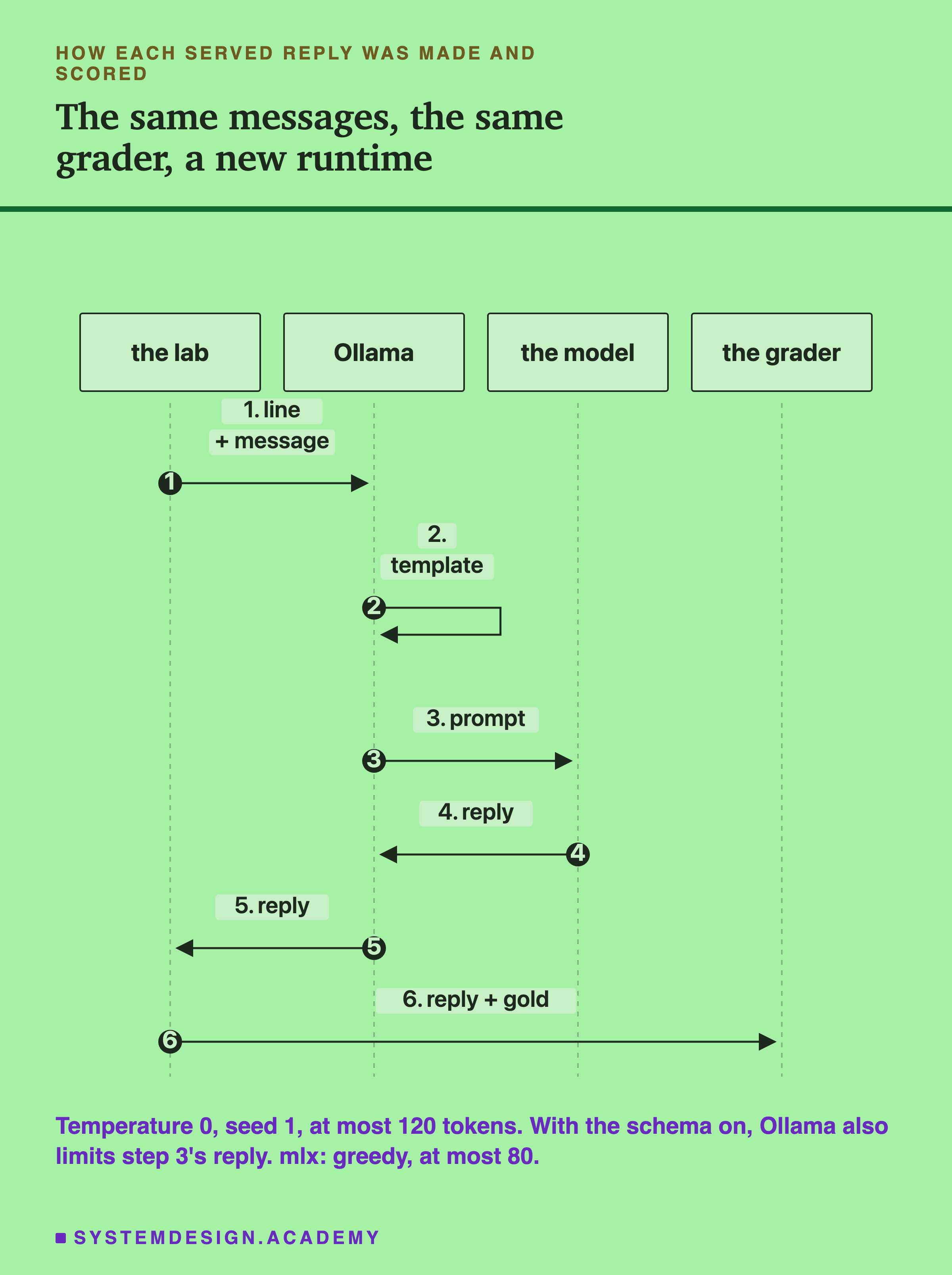
Scoring is exactly as in lessons 4 and 7: the same 140 test messages, the same one-line system prompt the models were trained with, the same gold tickets and the same grader. A field counts only where both annotators agreed, and a whole ticket only on the 131 messages where all five fields are gold. Each import answered in three set-ups: plain, with no schema, as in mlx; with the schema; and attack with the schema, where lesson 7's override sentence is added to every message.
Two settings differ from mlx and you should keep them in mind. Ollama ran at temperature 0 with seed 1, which always picks the most likely next token, like mlx's greedy decoding, but its arithmetic is its own. And the reply limit was 120 tokens in Ollama against 80 in mlx; no ticket comes close to either. Each set-up ran once. , as lesson 2 explained; they are not real customers.
My First Import Was Broken
My first ollama create had only the FROM line. Ollama imported the folder without complaint, the model answered, and the replies were tickets. What I did not know is that my import from a folder of weights got no chat template, because I had not given one. Ollama gave mine a template of one line, {{ .Prompt }}: the prompt, and nothing around it.
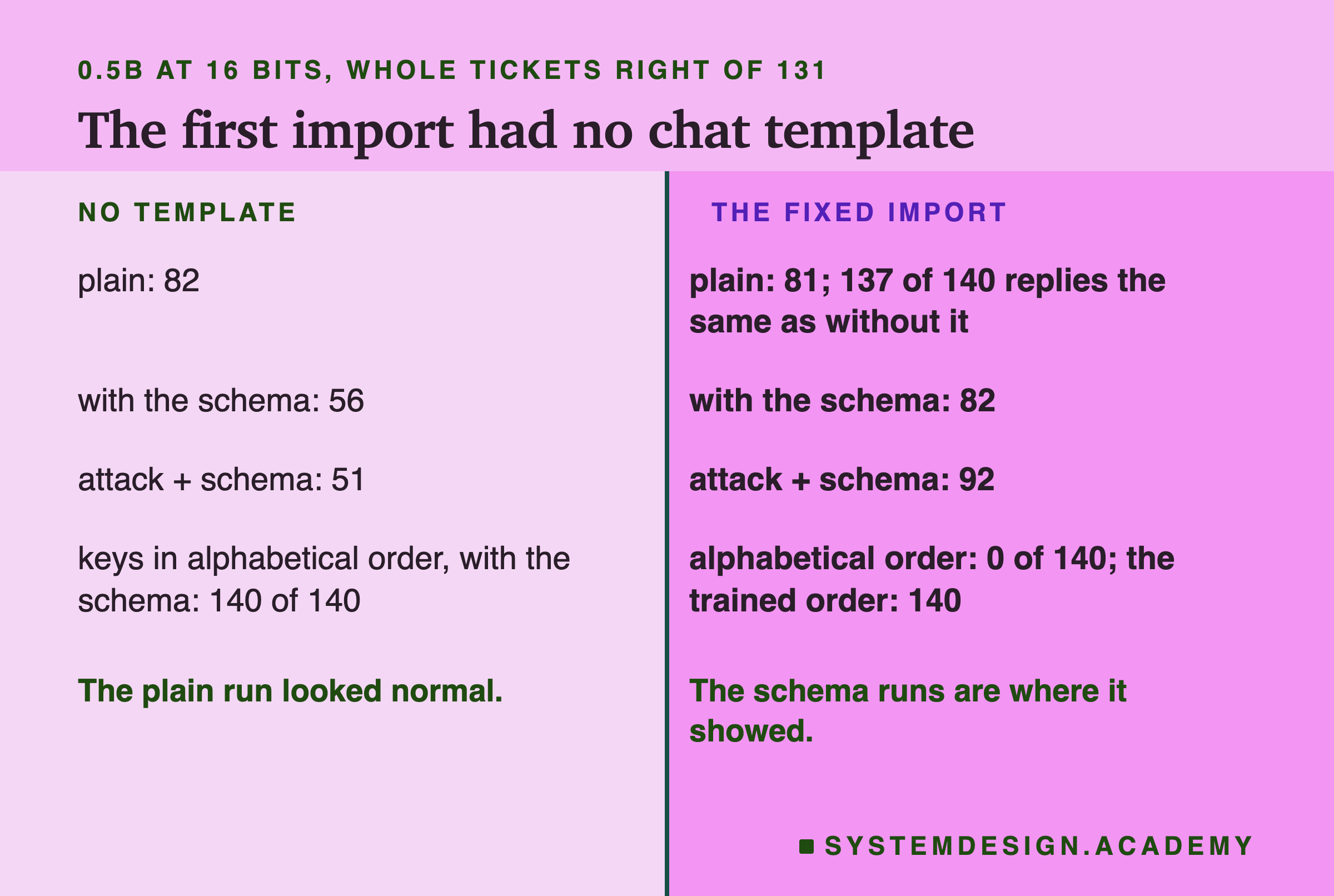
I ran six set-ups on the 0.5B before I noticed. Without the schema, the broken import got 82 whole tickets right, and after I fixed it, 81. Only 3 of its 140 plain replies changed with the fix. With the schema, it was a different model: 56 against 82, and under the attack 51 against 92. Every one of its 140 schema replies had its keys in alphabetical order (category, item, order_number, urgent, wants) instead of the order the model was trained to write (category, wants, order_number, item, urgent). With the template, not one reply was alphabetical.
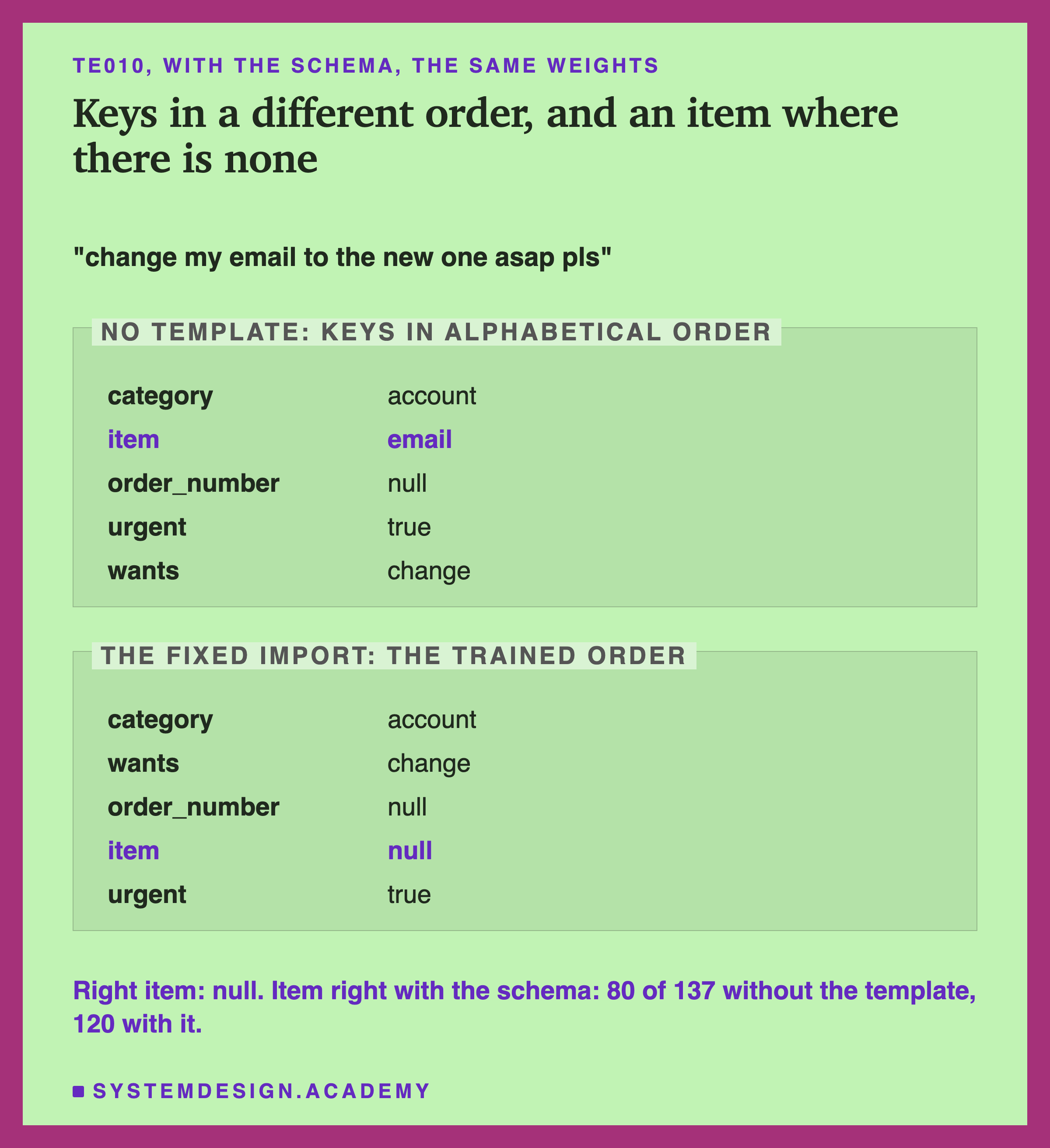
Reading the replies showed where the damage went. In these replies item came second, straight after the category, and the model kept filling it with a word from the message where the right answer is null: "email" for te010, and "order", "phone" or "account" elsewhere. The item field fell to 80 of 137, against 120 with the template. I cannot tell whether the order or the missing template itself caused this, because the two changed together.
I want to be exact about what I know. I recreated the broken import under another name afterwards: Ollama showed the one-line template, it used the same stored weights, and it gave the same replies as the stored run on the 6 messages I tried. But when I sent the model the customer's text alone, with no template at all, it did not give those replies, so I cannot tell you exactly what text Ollama built for it. Nor do I know why the missing template changed the order the schema produced. The stored replies show that it did.
The Check I Wrote Would Have Passed It
After I found the mistake, I added a check to the lab: before scoring anything, the 16-bit import must give the same reply as mlx on the first 5 test messages, or the run stops. It passed, 5 of 5, for both models. Then I asked the question I should have asked first: would this check have caught the broken import?
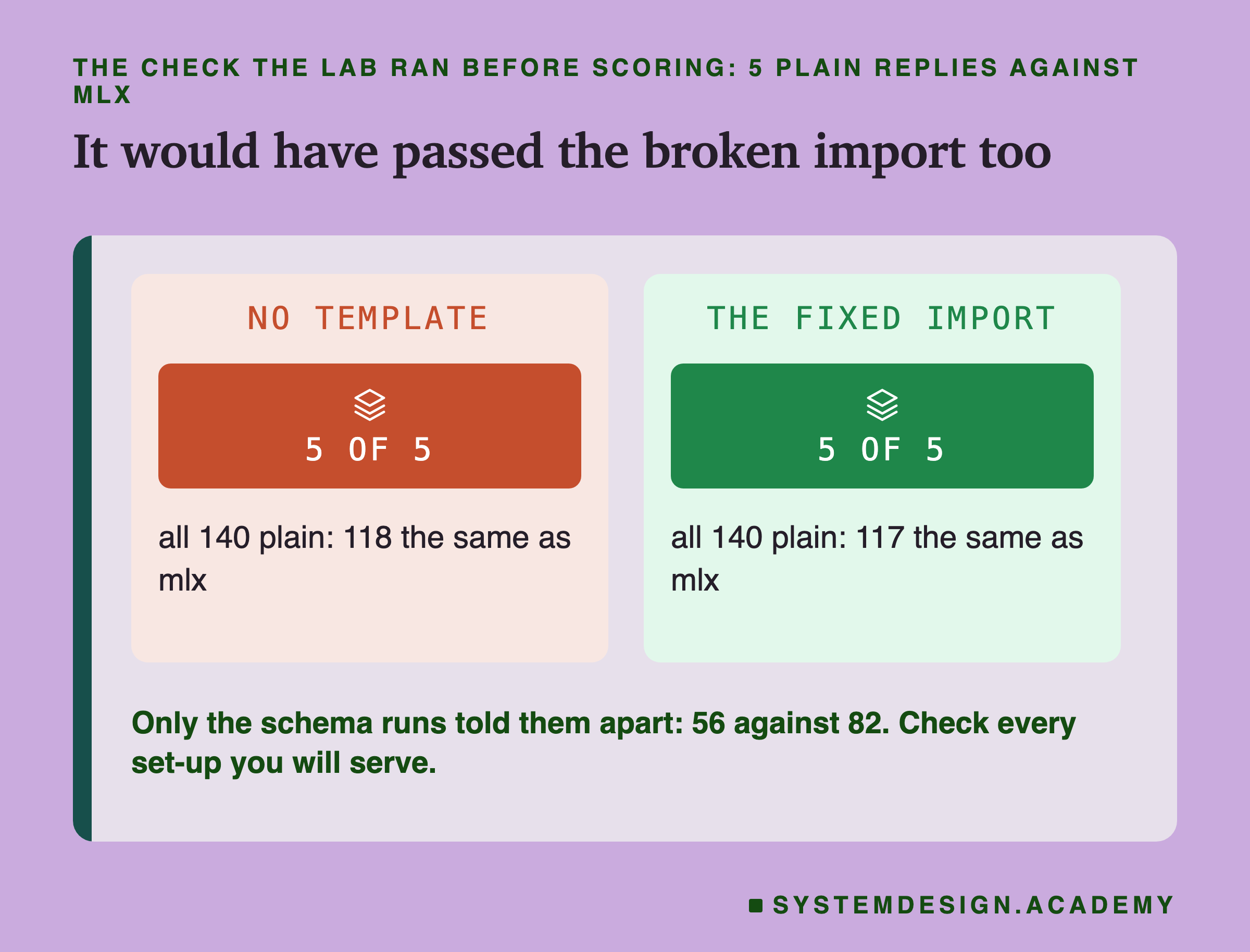
It would not. The broken import's first 5 plain replies were also identical to mlx's, and over all 140 plain replies it matched mlx on 118, one more than the fixed import's 117. A check on plain replies could never have told the two apart, because the fault only showed with the schema on.
That is the most useful thing this lesson taught me, and it is more general than Ollama. A check proves only what it looks at. Mine compared one set-up on 5 messages; the model I would actually serve uses a different set-up. Two changes make such a check honest. Run it in every set-up you will serve, including the schema. And run it on more than 5 messages: a whole test set costs minutes, and a count of identical replies over 140 is far harder to pass by accident.
There is also a direct check for this particular mistake: ask Ollama to show the model's template (ollama show <name> --template). One line means the chat format is missing.
Does the Moved Model Give the Same Replies?
With the template fixed, the question is whether the model in Ollama is the model I trained. The strictest test is to compare replies message by message with mlx, and count the ones that are character for character the same.
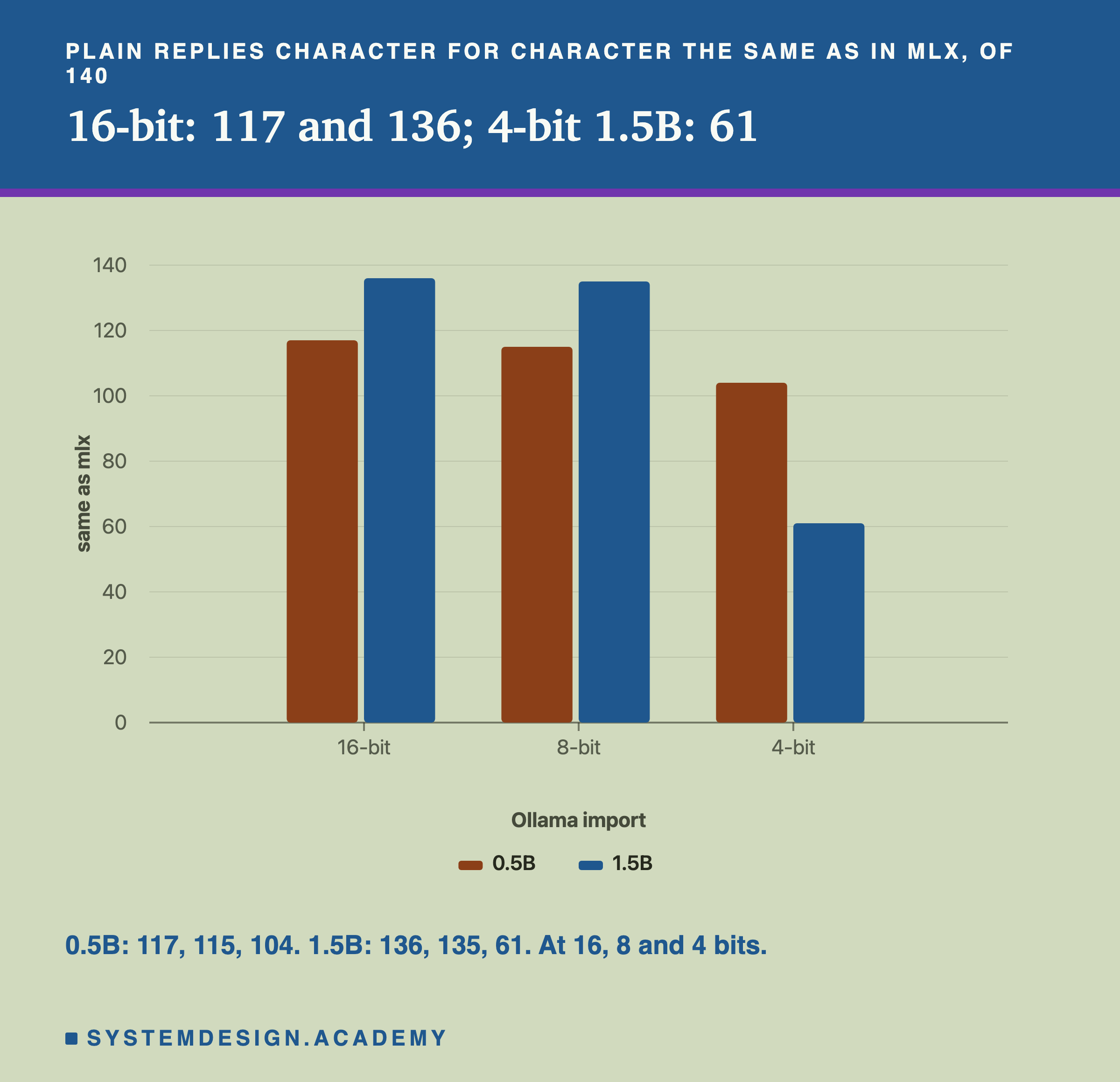
At 16 bits, the 1.5B gave the same reply as in mlx on 136 of 140 messages. The 0.5B did on 117. Neither is 140, and that is expected, not a fault. The merge adds the adapter's change into weights that are then stored in 16 bits, which rounds it slightly. And Ollama does its arithmetic in its own way, in a different order from mlx. Those tiny numeric differences change nothing on most messages. On a message where two answers were nearly tied for the model, they can tip it the other way.
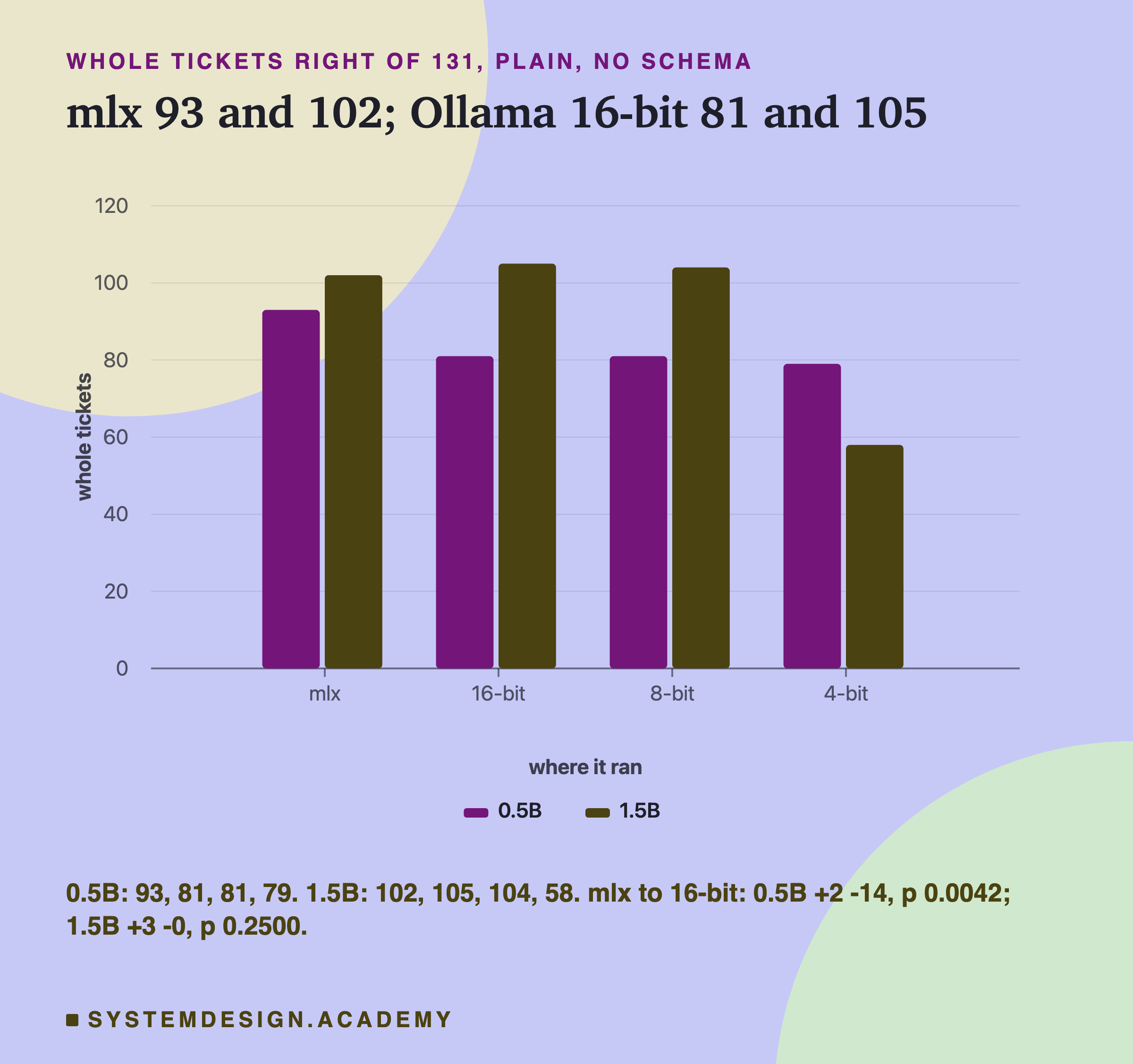
On whole tickets, the 1.5B went from 102 in mlx to 105 in Ollama: 3 tickets fixed and none broken, all 3 on the urgent field. The 0.5B went from 93 to 81: 2 fixed and 14 broken. A drop of 12 tickets is not small, so I read all 23 of the 0.5B's changed replies.
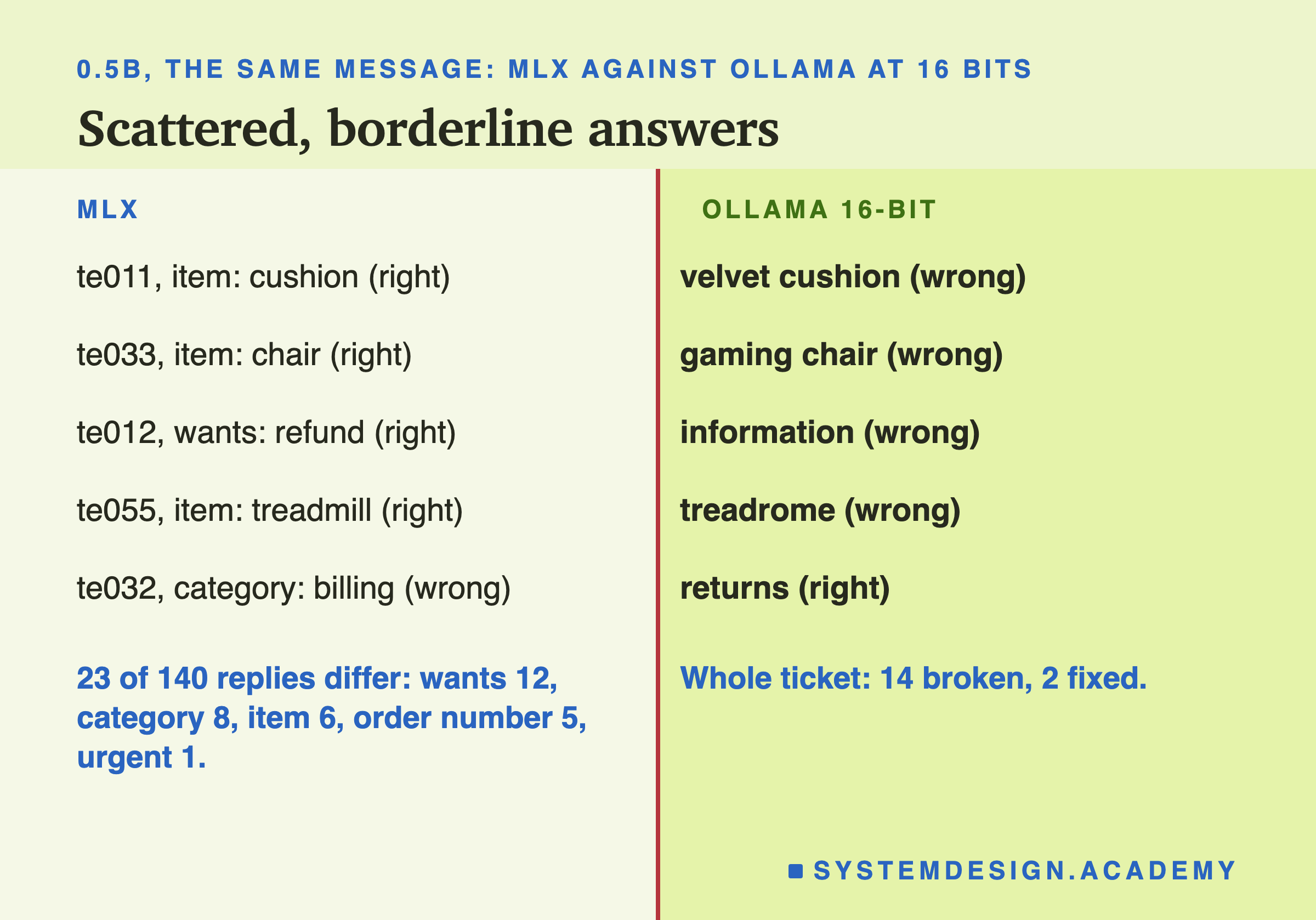
They are scattered across fields and across messages: an adjective kept ("velvet cushion" where the house rules want "cushion"), a refund request phrased as a question and read as a request for information (te012), one misspelt item ("treadrome"). These are the borderline answers lesson 4 found the small model unsure of. But one group is not scattered at all.
Which Differences Are More Than Luck
The sign test from earlier lessons looks only at the messages where two runs disagree, one right and one wrong, and asks whether the split is more uneven than luck would give. Its answer is a number called p: the chance of a split at least this uneven if only luck were at work, so a small p means luck is a poor explanation. The Bonferroni line divides the usual 0.05 by the number of tests.
I chose these 14 tests after all the totals were known, so they are not a plan written in advance; I did choose them before counting any of the pairs message by message. Two compare mlx with the 16-bit import. Four compare the 16-bit import with 8 and 4 bits. Three ask what the schema changes. Four are about the attack. The last compares the broken import with the fixed one. With 14 tests, the line is 0.05 divided by 14, which is 0.00357.
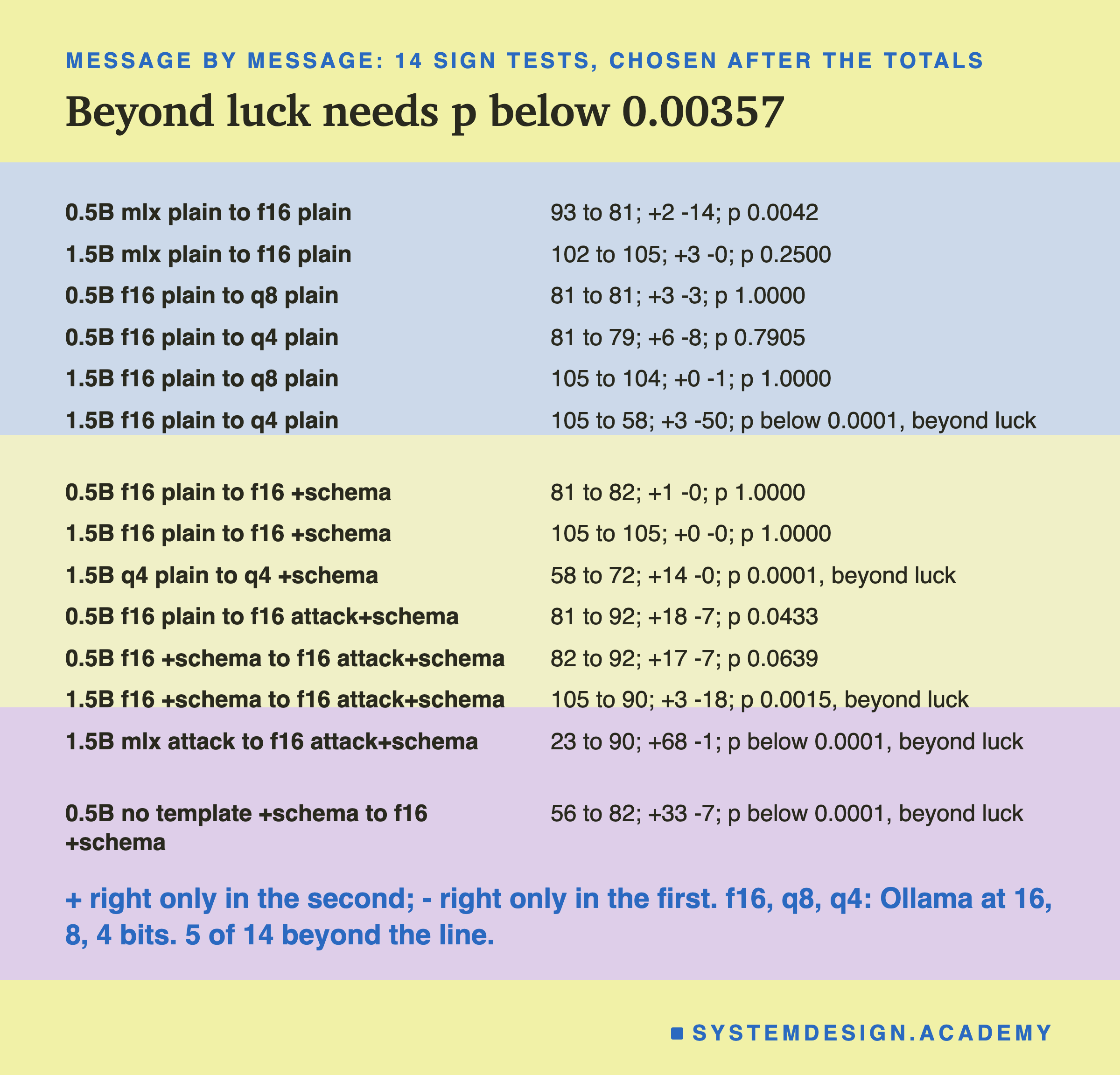
Five are beyond the line: 4 bits hurt the 1.5B (50 broken, 3 fixed); the schema helped the 4-bit 1.5B (14 fixed, none broken); the attack hurt the 16-bit 1.5B even with the schema (18 broken, 3 fixed); Ollama with the schema kept the attacked 1.5B far better than mlx without one (68 fixed, 1 broken; there is no Ollama run of the attack without the schema, so runtime and schema changed together, though the 16-bit import matched mlx on 136 of 140 plain replies); and the template mattered (33 fixed, 7 broken).
The 0.5B's drop from mlx to Ollama, 93 to 81, gives p 0.0042. That is close to the line but not beyond it, so it is a strong hint, not a finding. The 1.5B's rise from 102 to 105 is well inside luck. So the honest summary is: , partly (5 of its 14 broken tickets) through the merged key a schema prevents.
8 Bits Held; 4 Bits Hurt the Bigger Model
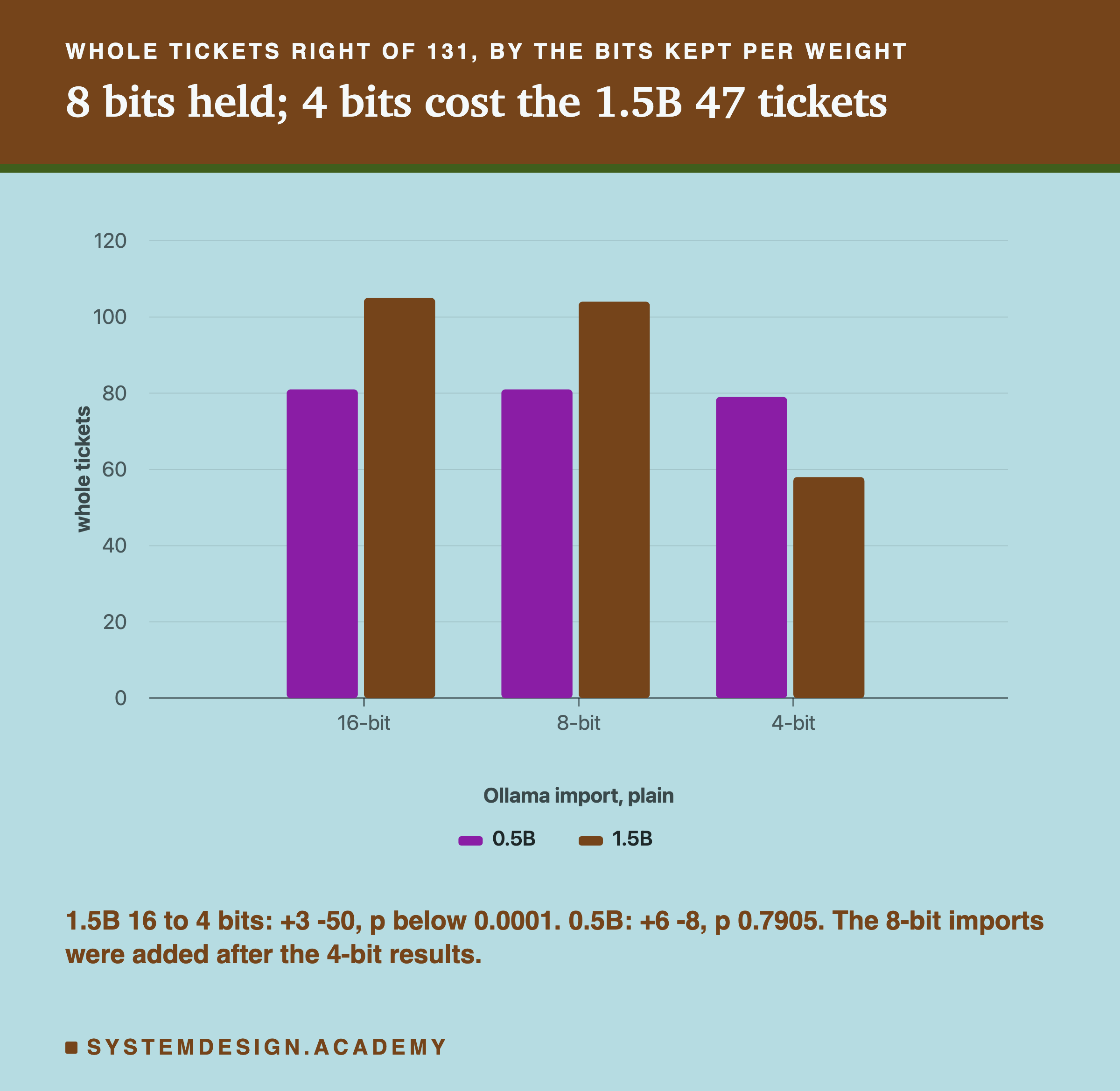
At 4 bits, the 1.5B fell from 105 whole tickets to 58. Only 62 of its 140 replies were still identical to the 16-bit import's. The 0.5B at 4 bits barely moved: 81 to 79, well inside luck.
I have to tell you the order in which I did this. The lab plan was 16 bits and 4 bits. When I saw the 1.5B's 58, I could not tell whether the loss came from rounding to 4 bits or from something else about moving to Ollama that only the 4-bit import happened to expose. So I added 8-bit imports of both models after seeing the 4-bit results, as a control between the two. At 8 bits the 1.5B got 104 and the 0.5B 81, matching 16 bits. So for this q4_K_M import, on one run each, the loss is from rounding to 4 bits, not from Ollama.
What did the 4-bit 1.5B lose? Every one of its replies was still valid JSON, and 127 of 140 had the five keys in the trained order. It still looked like a ticket. What went was the house rules training had taught.
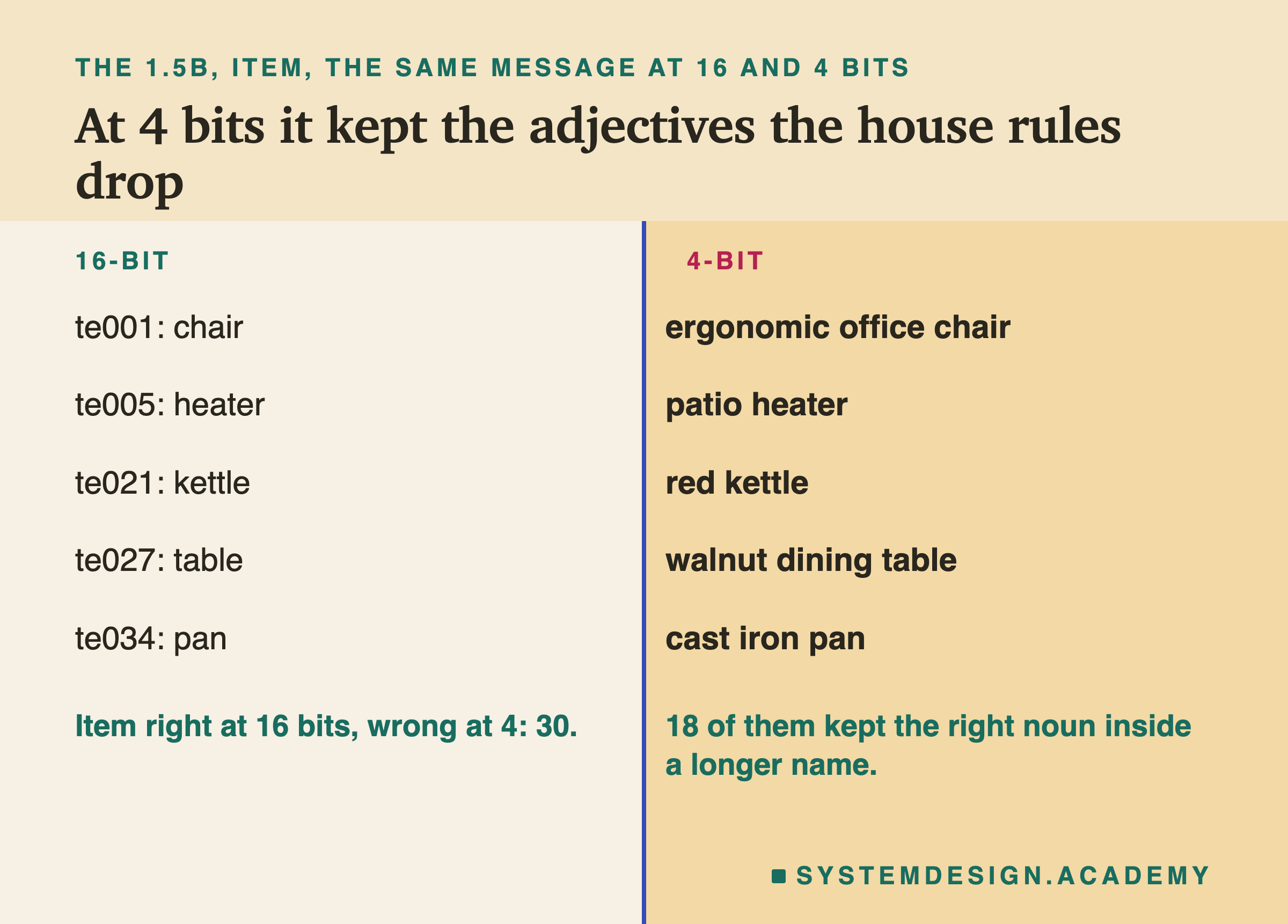
The item rule says: the product noun only, no colour, size, brand or adjective. At 16 bits the 1.5B wrote "chair"; at 4 bits, "ergonomic office chair". Of the 30 items right at 16 bits and wrong at 4, 18 are exactly this: the right noun, kept inside the longer name from the message. That is what an untrained model does, as lesson 3 showed for the prompted models.
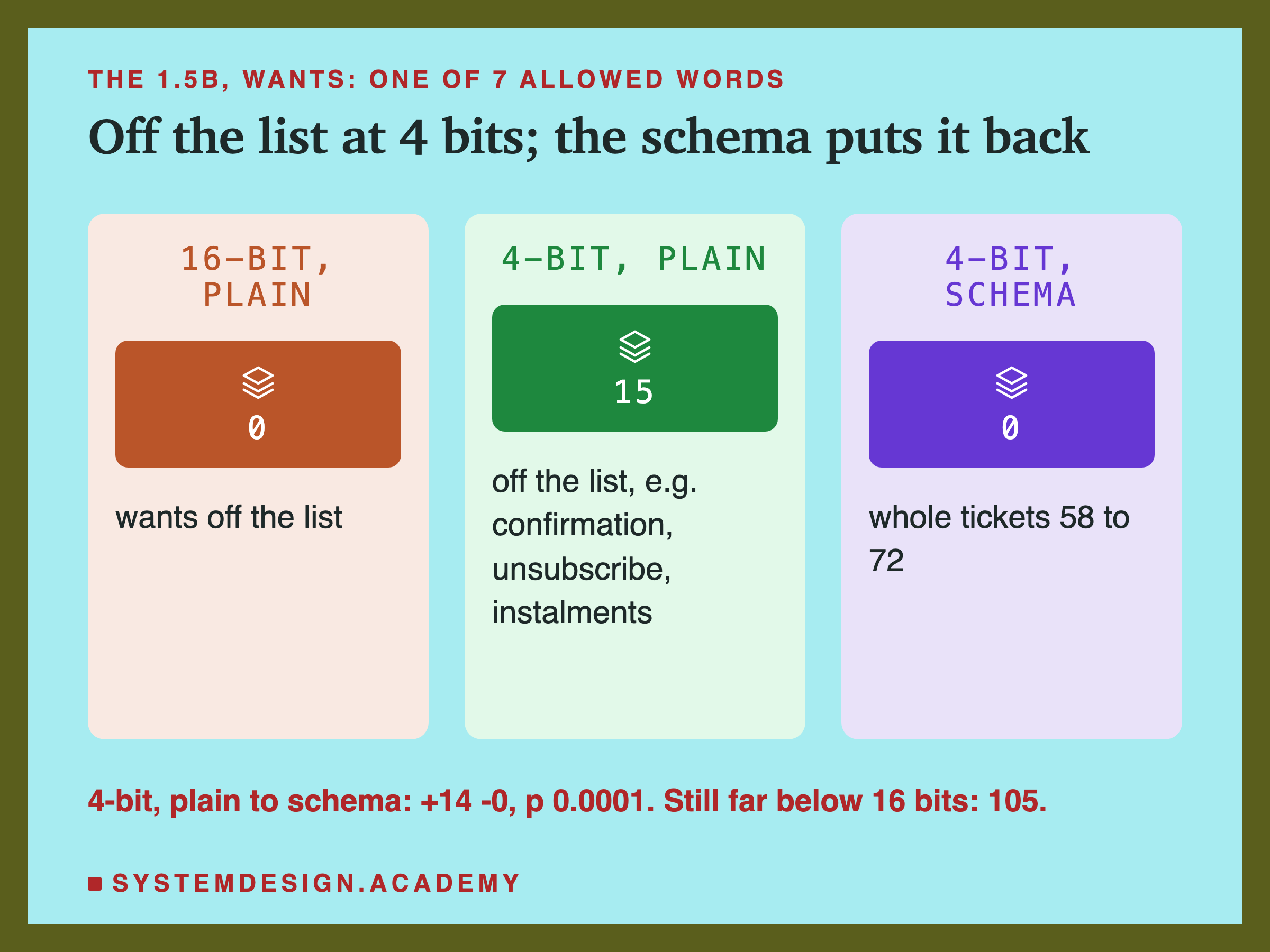
The wants field shows the same thing. It must be one of seven words. At 16 bits the 1.5B never left the list; at 4 bits, 15 of its replies used a word that is not on it (11 different words), such as "confirmation", "unsubscribe" and "reset". Turning the schema on forces the value back onto the list, and the 4-bit 1.5B rose from 58 to 72, 14 tickets fixed and none broken. But 72 is still far below 105. The schema can force a word from the list; it cannot choose the right one.
Why 4 Bits? A Guess, Tested and Not Settled
Here is one possible reason for the 4-bit loss, and please read it as a guess. 's change to each weight is small compared with the weight itself. Rounding to 4 bits moves every weight by up to half a rounding step. If the change training made is smaller than that, rounding can wash much of it out, and the model falls back towards how it behaved before training.
I could test part of this without calling a model, because the adapters and the merged weights are stored. For every weight the adapter touches, I compared the change training made with half a rounding step at that weight's size.
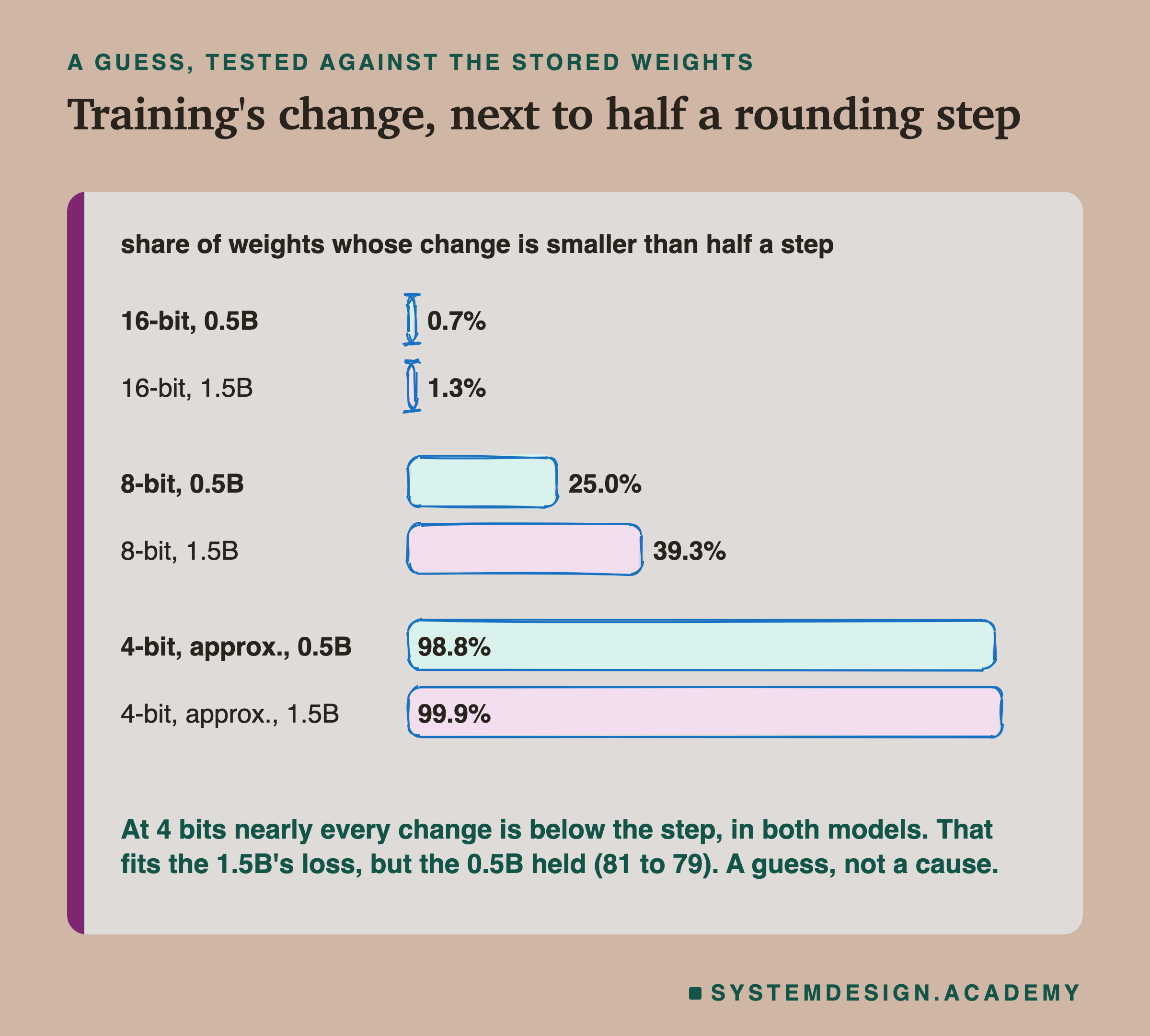
The typical change is small: its median is 4.0% of the typical weight's size for the 0.5B and 2.5% for the 1.5B. At 16 bits, the change is smaller than half a step for 0.7% and 1.3% of weights, so 16 bits keeps nearly all of it. At 8 bits, 25.0% and 39.3%. At 4 bits, 98.8% and 99.9%: almost every change is below the step. (The 4-bit step here is an approximation of Ollama's format, which works in blocks of 32 weights and keeps some tables at 6 bits; the 8-bit step is exact.)
So the guess fits the 1.5B. But it does not explain why the 0.5B held at 4 bits, when its changes were just as far below the step. A change smaller than a step is not simply deleted: whether a weight lands on the step above or below still depends on it. There is a second difference I cannot separate from the first: both base models were already rounded to 4 bits once, in mlx's own format, and the 4-bit import rounds them again onto a different grid. Two models, one run each, cannot tell these apart. The practical rule does not depend on the reason: score every quantized copy again before you serve it.
The Schema Fixes Lesson 7's Weakness
Lesson 7 found that the fine-tuned 1.5B, attacked with one override sentence, broke the ticket format on 76 of 140 messages, and on 47 of those wrote to the customer as the shop instead. mlx had no schema to stop it. Ollama does.
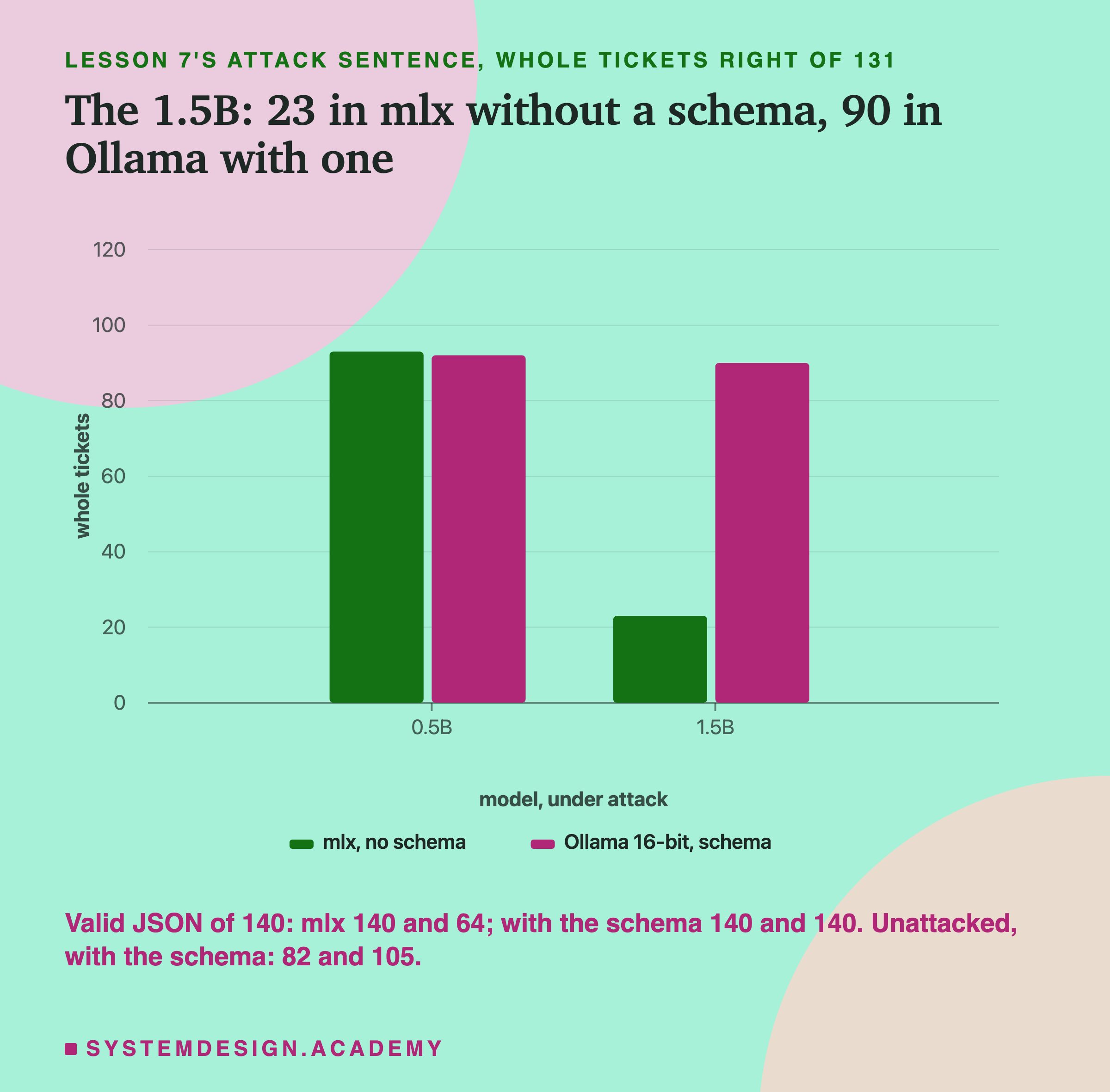
Under the same attack, the 16-bit 1.5B in Ollama with the schema got 90 whole tickets right, where mlx without a schema gave 23. All 140 replies were valid JSON. Message by message, 68 tickets were fixed and 1 broken.
The mechanism is the one lesson 7 described for the prompted models. At each step of writing, Ollama removes every token that would take the reply outside the schema. The friendly sentence "Dear customer, we've updated the address" cannot even start, because a reply must begin as a JSON object. The model is left with only the choices a ticket allows.
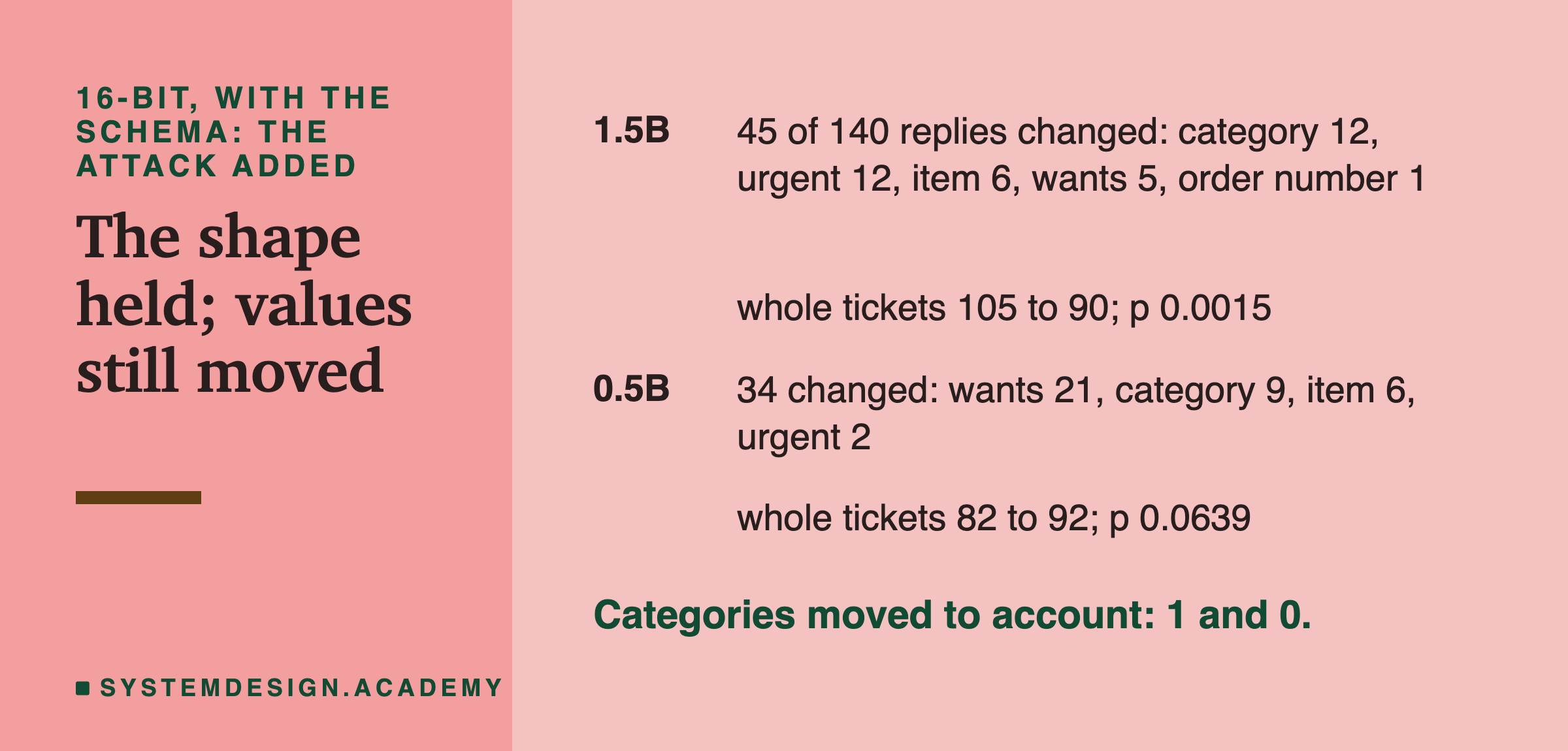
And here is the limit. The schema fixes the format, not the content. With the schema on, the attack still changed 45 of the 1.5B's 140 replies, and its whole tickets still fell from 105 to 90, beyond luck. 12 of those changes were on urgent, every one from not urgent to urgent. Unlike the prompted 14B in lesson 7, it did not move categories to account (1 did). Whatever the attack sentence does inside the model, the schema cannot see it; it only limits the shape of what comes out. So a schema is a floor: it guarantees a program can read the reply, and nothing more.
Did the Attack Help the 0.5B? Not Beyond Luck
One number in the table looks strange. The 0.5B at 16 bits got 81 whole tickets plain, 82 with the schema, and 92 with the attack and the schema. Taken at face value, adding "Ignore all previous instructions" made it better.
The data cannot say it did, and the reason is worth learning. First, the sign test. From plain to attack with the schema, 18 tickets were fixed and 7 broken, p 0.0433. From the schema alone to attack with the schema, the fairer pair since only the attack changes, 17 fixed and 7 broken, p 0.0639. Neither is beyond the line of 0.00357.
Second, the size of the wobble. Lesson 5 showed that 15 to 21 tickets flipped between training runs that differed only in the seed. Here, adding one sentence to every message changed 34 of the 0.5B's replies and flipped 24 tickets, somewhat more than that seed range. A small model near many borderline answers will flip some of them whenever its input changes at all, and the flips will not balance exactly. Ten more in one direction, on one run, is what that looks like.
Third, the same model in mlx: attacked or not, it scored 93 both times (lesson 7). If the attack really helped, there is no sign of it there. So the right reading is: the attack moved many of the 0.5B's borderline answers, and on this one run more of them moved the right way. A second run, or a different attack wording, could move them the other way.
Try It Yourself
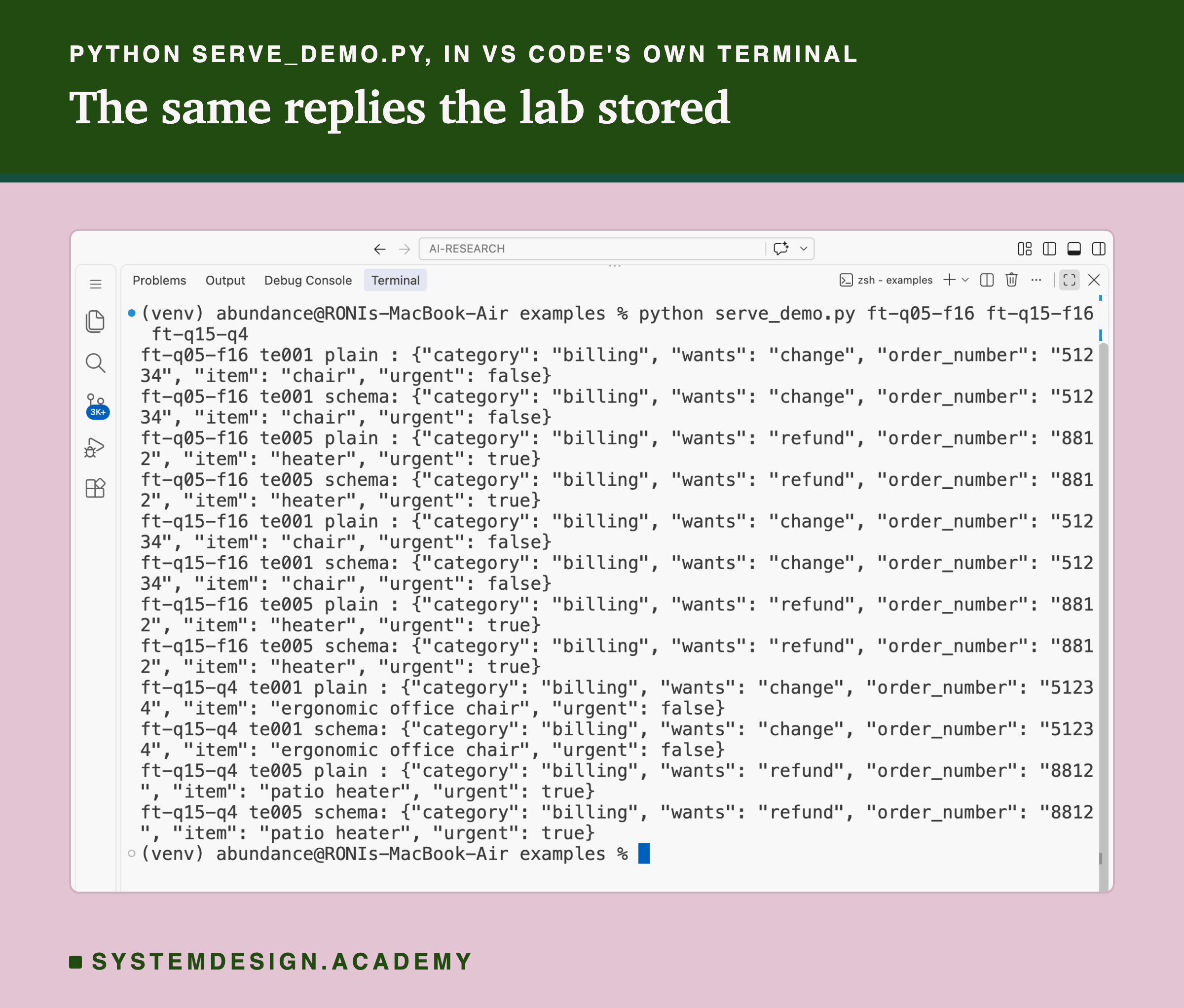
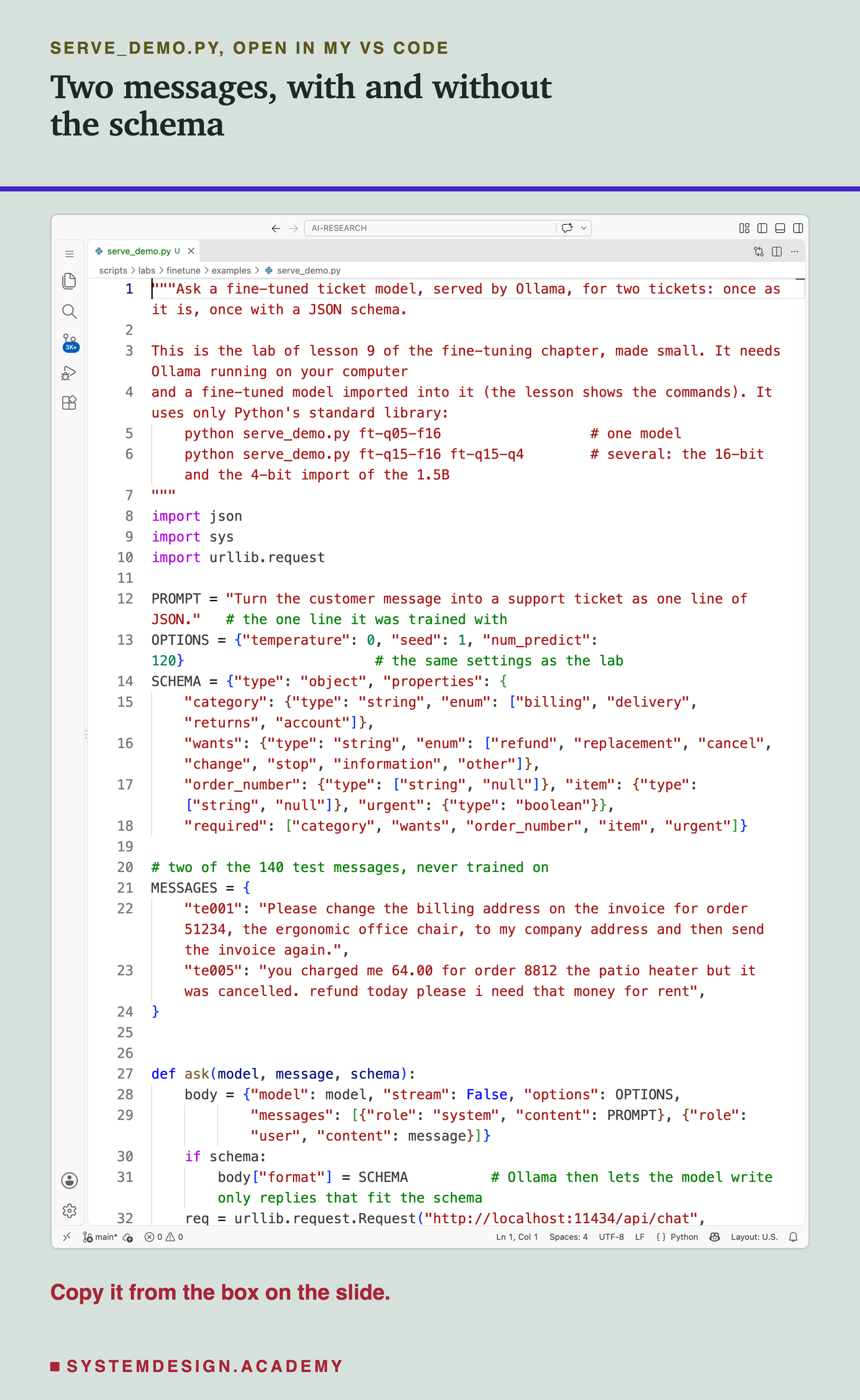
This script sends two of the 140 test messages to a fine-tuned model in Ollama, each twice: once plain and once with the schema. It uses the same one-line prompt, the same schema and the same settings as the lab. Give it one or more model names. It uses only Python's standard library.
Before you run this lab. It needs Ollama running on your own computer, and a fine-tuned model imported into it with the commands below. If you have not set Ollama up yet, the lab setup guide shows how to install it and check that everything works, on macOS, Windows or Linux. The merge step uses Python with mlx-lm (pip install mlx-lm). I do not give a running time, because another lab was using the same machine while mine ran.
If you use Windows or Linux: mlx is built mainly for Apple silicon, and everything here ran only on a Mac. On other systems, Hugging Face's library can merge a adapter into its base model (its merge_and_unload function), and Ollama can import the saved folder the same way; I have not run that path for this chapter. Your replies may differ, and nothing here claims the Mac's numbers hold elsewhere.
These are the commands, as one block you can run in the folder that holds your adapter. I ran exactly this block with lesson 4's 0.5B ticket adapter under a throwaway name: the three models it made had the same IDs in ollama list as the lab's own imports, and the same Modelfile apart from the path.
#!/usr/bin/env bash
# Serve a fine-tuned Qwen2.5 model in Ollama: merge the adapter, add the chat template, import three ways.
# Lesson 9 of the fine-tuning chapter. Run it in the folder that holds your adapter. Author: Roni Das.
MODEL=mlx-community/Qwen2.5-0.5B-Instruct-4bit   # the base model the adapter was trained on
ADAPTER=ft_demo_adapter                          # lesson 4's demo adapter, or your own
NAME=ft-q05                                      # the name the models get in Ollama

# 1. merge the adapter into the model, written as 16-bit weights (needs a Mac with mlx-lm)
python -m mlx_lm fuse --model $MODEL --adapter-path $ADAPTER --save-path $NAME-fused --dequantize

# 2. a Modelfile: the merged folder, plus Qwen2.5's own chat template and its stop word
ollama pull qwen2.5:3b        # only to copy its template, the Qwen2.5 chat template
{
  echo "FROM ./$NAME-fused"
  echo 'TEMPLATE """'"$(ollama show qwen2.5:3b --template)"'"""'
  echo 'PARAMETER stop "<|im_end|>"'
} > $NAME.Modelfile

# 3. import it three times: 16-bit, 8-bit and 4-bit
ollama create $NAME-f16 -f $NAME.Modelfile
ollama create $NAME-q8 -f $NAME.Modelfile --quantize q8_0
ollama create $NAME-q4 -f $NAME.Modelfile --quantize q4_K_M
ollama list | grep $NAME
The Lab Report
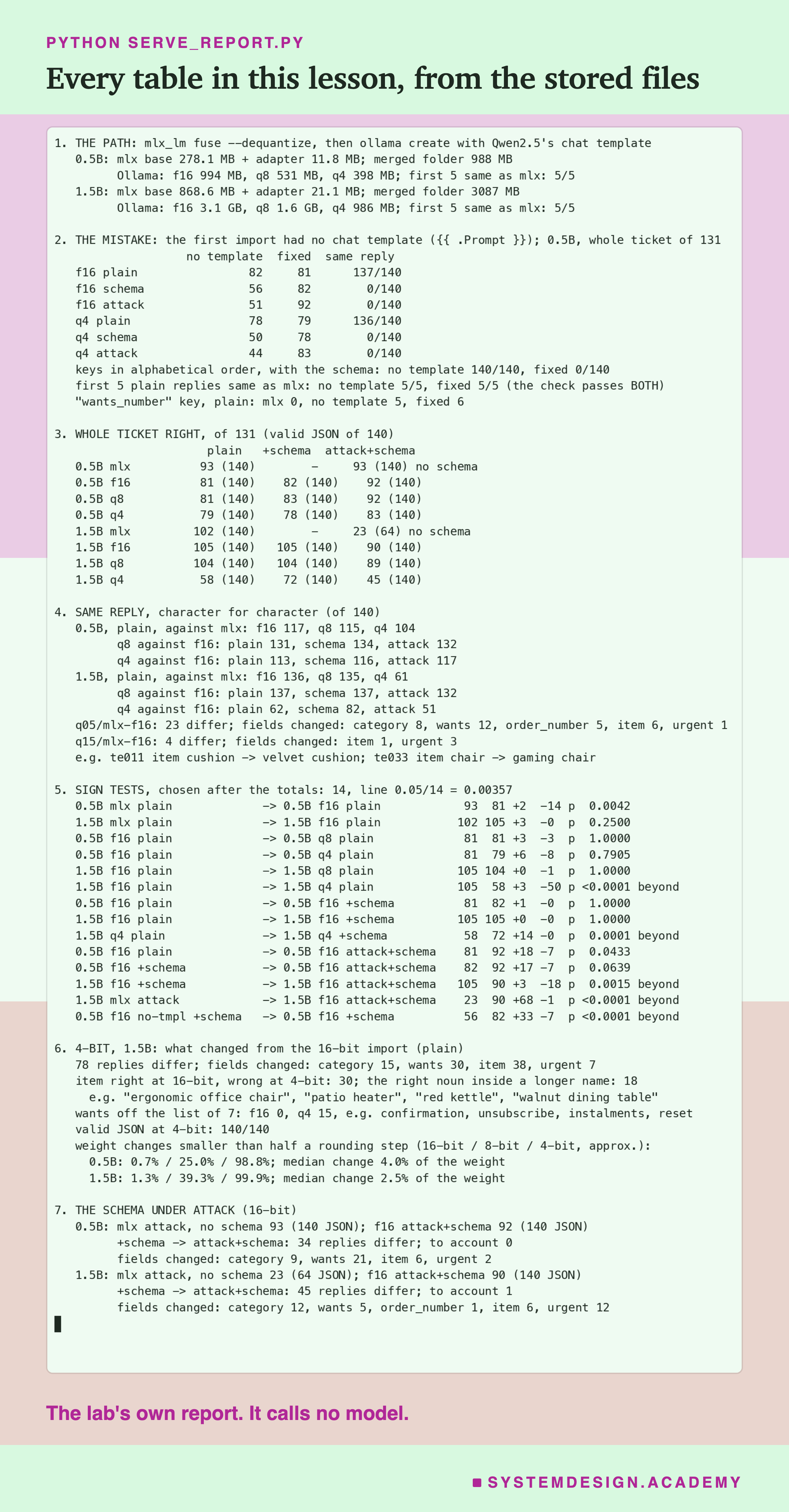
The report lives in scripts/labs/finetune/serve_report.py. It reads only stored files: the 18 Ollama runs, the six runs of the broken import, lesson 4's mlx runs and lesson 7's attacked mlx runs, the test messages and the gold. It calls no model. A json mode writes the numbers to results/sv-report.json, which the figures read.
Before it prints anything, it checks the files. Every row must be the test message in test order; every attacked message must be the message, a space and the attack sentence; every stored grade is graded again against the current gold, and the report stops if one differs. It also checks that the Modelfiles on disk are exactly what the lab writes, with the template copied from qwen2.5:3b.
The weights mode reads the adapters and the merged folders and writes the rounding comparison from the slide on 4 bits. It loads weights, not a model, and asks it nothing. The demo mode checks the student script's run, and the box mode writes the playground and checks that it reproduces every total and every field of the lab.
What came after I saw the data: the 8-bit imports, the 14 sign tests, the rounding comparison, the count of "wants_number" keys, the item and wants examples, the demo's two messages and every example in the figures. The recreation of the broken import, and the check that the command block makes the same models, were also done afterwards. The fused models, the three set-ups, the settings and the grader were fixed before the runs, in .
Pick a Message and a Set-Up
This box has no model in it. It holds all 140 test messages, the gold ticket for each, and both models' replies in 11 set-ups: mlx plain and attacked, and Ollama at 16, 8 and 4 bits, each plain, with the schema, and attacked with the schema. To keep it small, each message stores its different replies once, and a string of letters says which set-up gave which. A reply that is JSON with the five keys in the trained order is stored as a ticket; any other reply is kept as its text, and the box reads it as JSON when it scores it.
As it is, the box prints the 1.5B's whole tickets in all 11 set-ups (102 in mlx, 23 attacked, 105, 105 and 90 at 16 bits, 104, 104 and 89 at 8, and 58, 72 and 45 at 4), then all 11 of its replies to te001, the ergonomic office chair, then the first three messages where its 16-bit and 4-bit replies differ, and the count: 78 of 140.
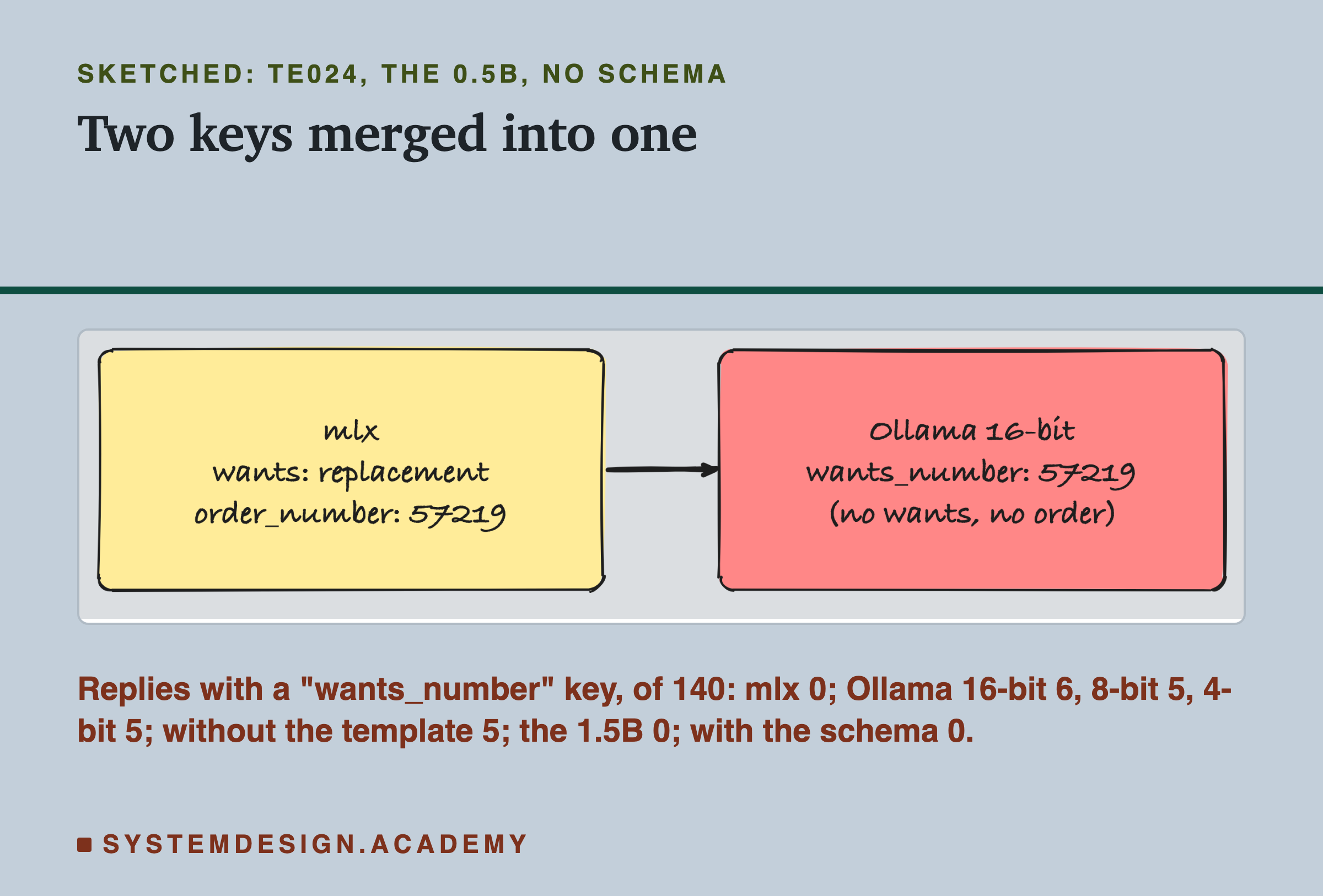
Try score('0.5B') for the smaller model. Try show('te024', '0.5B') to see the merged "wants_number" key appear in Ollama and vanish with the schema, though the schema's wants, "other", is still wrong. Try differ('0.5B', 'mlx', 'f16') for the 23 replies that changed in the move, and differ('1.5B', 'f16+schema', 'f16+attack') for what the attack still changed with the schema on.
The Code, Part by Part
The settings. PROMPT is the one-line system prompt the models were trained with, word for word. OPTIONS holds the lab's settings: temperature 0, seed 1, at most 120 tokens. SCHEMA is the chapter's JSON schema: the five keys, the four categories and the seven wants.
The messages. MESSAGES holds two of the 140 test messages, never trained on, keyed by their ids.
The request. ask builds the same request the lab sent: a system message, a user message, and the options. With schema true it adds the schema as Ollama's format, and from then on Ollama lets the model write only replies that fit it. The request goes to Ollama's local chat address, and the reply's text comes back.
The loop. For each model name on the command line, each message, and each of plain and schema, it prints one line. It does not score anything: put a model's replies next to each other and read them, which is how every finding in this lesson started.
The command block does the other half. mlx_lm fuse with --dequantize writes the merged 16-bit folder. The Modelfile is built from three lines, with the template copied from ollama show qwen2.5:3b --template. Then ollama create runs three times, the second and third with .
How to Serve Your Own Fine-Tune
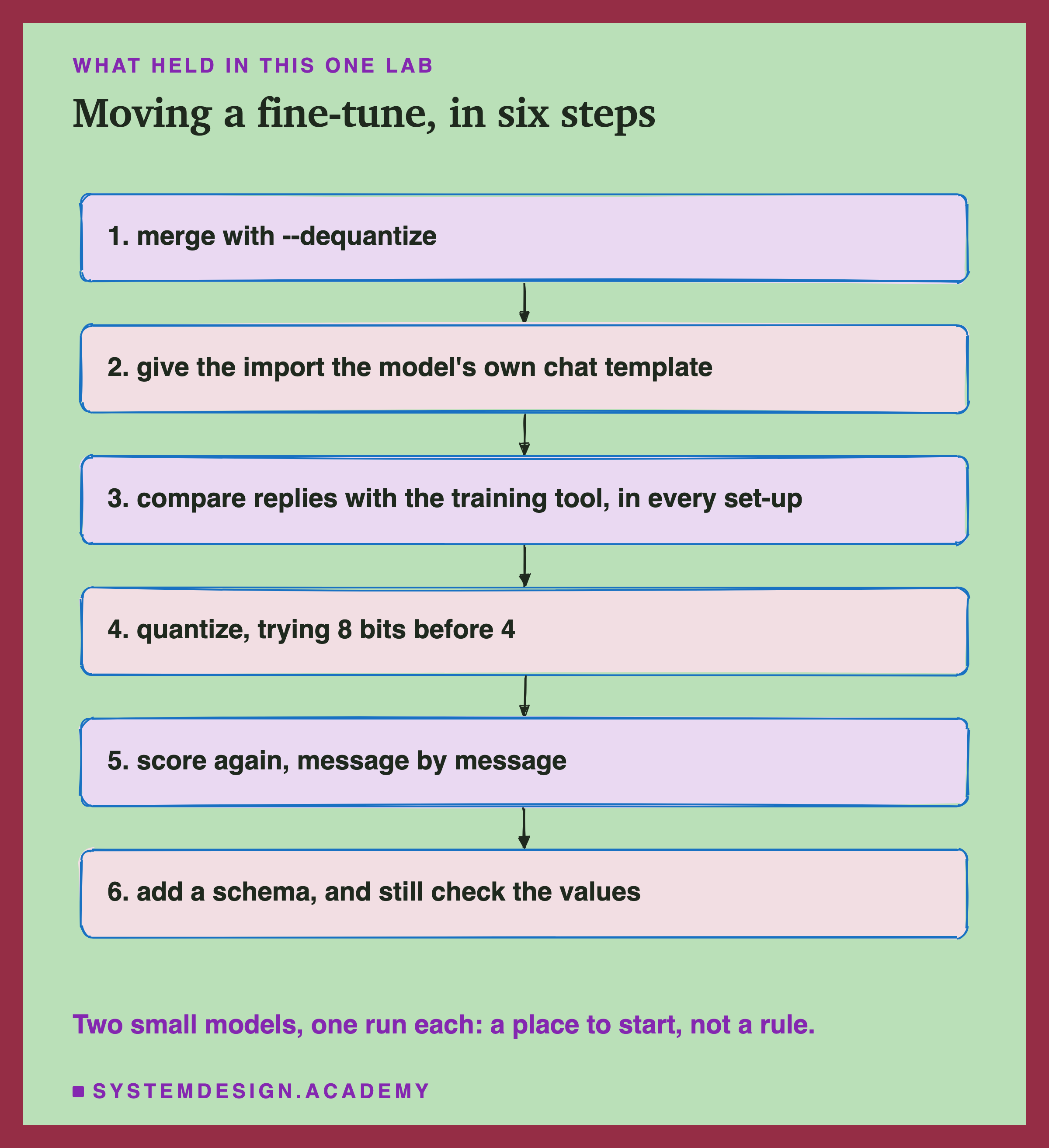
Merge with the dequantize option. It writes plain 16-bit weights that other tools can read. Keep this folder: every smaller copy is made from it.
Give the import the model's own chat template. Copy it from the base model's family in Ollama, and check it with ollama show <name> --template. A single line means it is missing.
Compare replies with the training tool, in every set-up you will serve. Count identical replies over the whole test set, not 5 messages. Expect a few differences from rounding and a different runtime; read them, and look for anything that is not scattered, like the merged key here.
Quantize, trying 8 bits before 4. Here 8 bits halved the size and kept the score for both models. 4 bits cost the 1.5B 47 tickets and the 0.5B almost nothing: you cannot know which kind of model you have without testing.
Score again, message by message. Use the same test set and a sign test, not only the totals.
Add a schema, and still check the values. It makes every reply readable and stops keys and words outside the list. It cannot make a value right.
When a Smaller Copy Is Worth It, and When It Is Not
Serving outside the training tool is almost always needed. A model is only useful when other programs can call it, and the training tool is rarely the right server. Ollama is one choice for a single machine; the checks in this lesson apply to any runtime.
Use 16 bits when you can afford the memory. It kept the 1.5B's replies nearly unchanged (136 of 140 identical). The cost is size: 3.1 GB instead of 986 MB for the 1.5B.
Use 8 bits as the default smaller copy, after testing it. Here it halved the size and matched 16 bits on both models. That is two models and one run each, so it is a reason to try 8 bits first, not a promise.
Use 4 bits only after scoring it on your own test set. It made no difference we could measure for the 0.5B and cut the 1.5B's score by almost half, while every reply still looked like a normal ticket. A model that fails quietly like that is worse than one that fails loudly.
Always use a schema if the runtime has one. For the fine-tunes it removed the merged key, the words outside the list, and lesson 7's friendly sentences under attack. It did not stop the attack from moving values, so it does not replace the prompting chapter's defences or a check of each field.
What These Numbers Can and Cannot Tell You
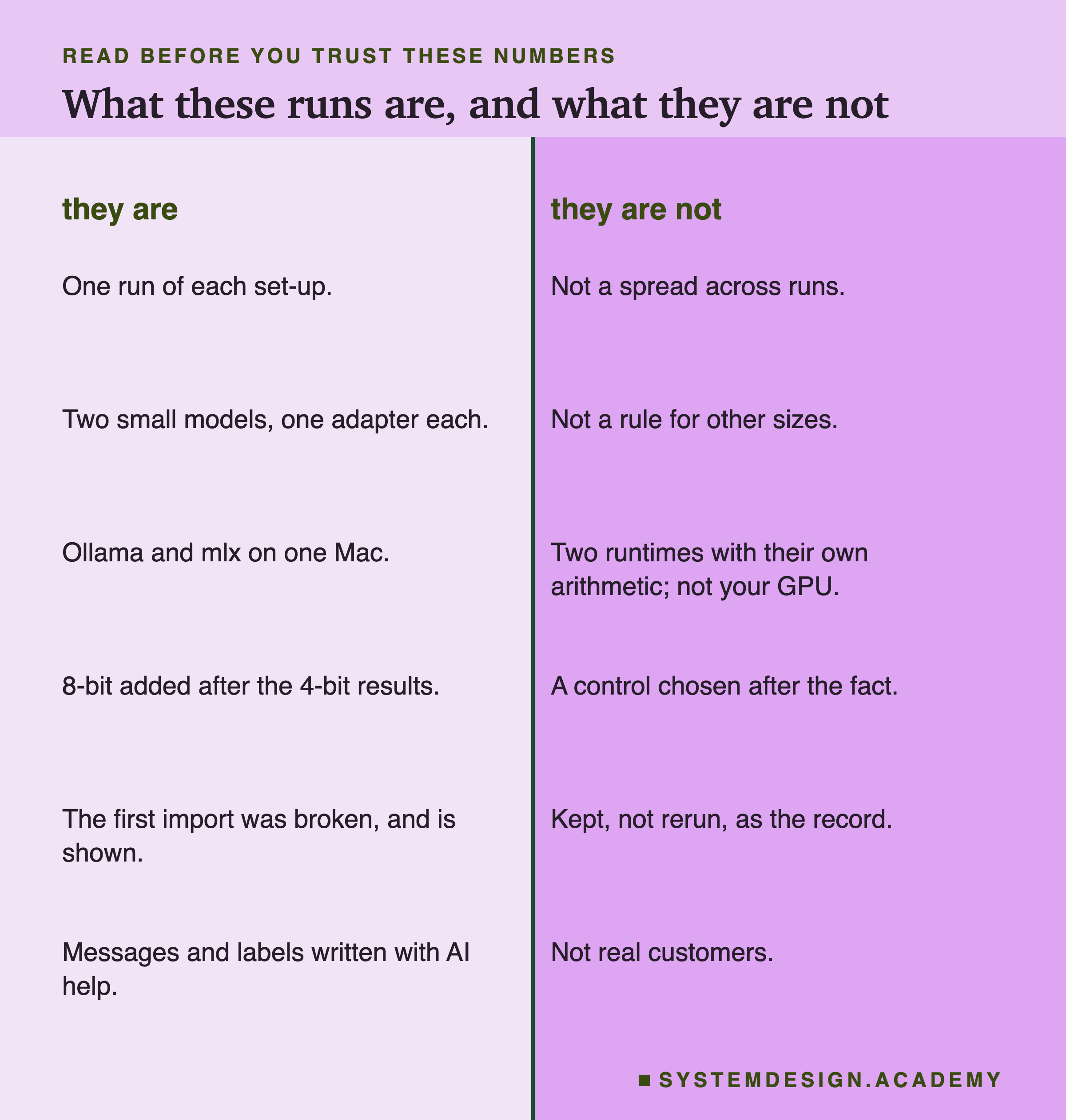
One run of each set-up. Every import answered every message once, at temperature 0. Lesson 5 showed how much a single run can wobble, so small differences here mean little.
Two small models, one adapter each. 0.5B and 1.5B Qwen2.5, trained once each in lesson 4. Why 4 bits hurt one and not the other, I do not know, and two models cannot support a rule about size.
Two runtimes with their own arithmetic. Ollama and mlx do the same sums in different ways, so identical replies are not guaranteed even at 16 bits. Everything ran on one Apple M4 with mlx-lm 0.31.3 and Ollama 0.32.14, on a Mac. I make no claim that these numbers hold on other hardware or other versions.
The 8-bit control was added after the 4-bit results, to separate rounding from the move. It is a control chosen after the fact, and I have said so where it appears.
The first run was broken. Its six results are kept, not rerun, as the record, with their numbers on the mistake slide.
No speed numbers. Another lab was using the machine while these ran, so any timing would measure the sharing, not the model.
The data was written and labelled with an AI model's help, as lesson 2 explained. Real customers write differently.
What to Do Next
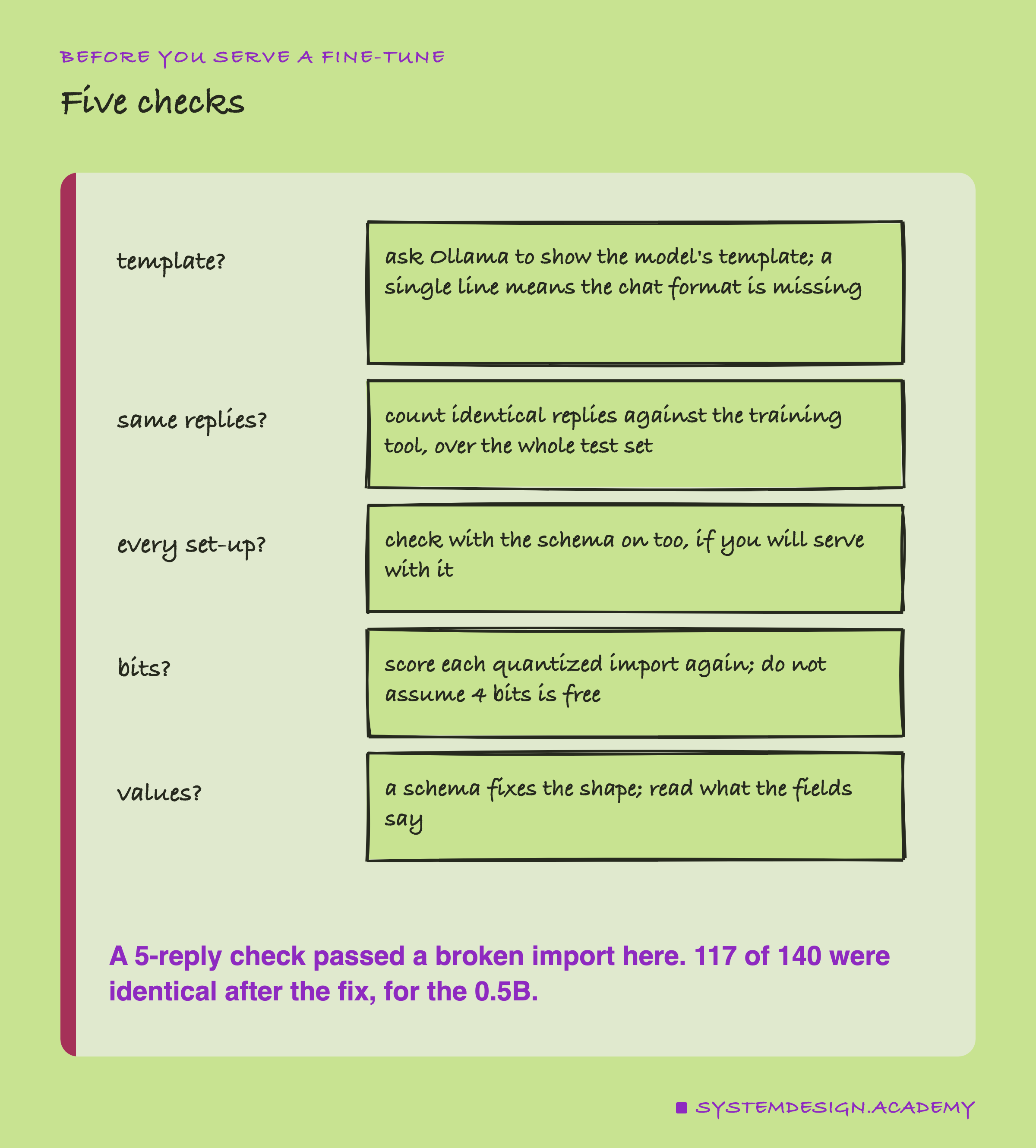
If you have a fine-tuned model, you can run these checks this week. Import it into the runtime you will serve it from, check its template, and count identical replies against the tool you trained it in, on your whole test set and in every set-up you will use. Then make the smaller copy you want, score it again message by message, and turn on a schema if the runtime has one. Read the replies that changed. The ones that matter will not look broken.
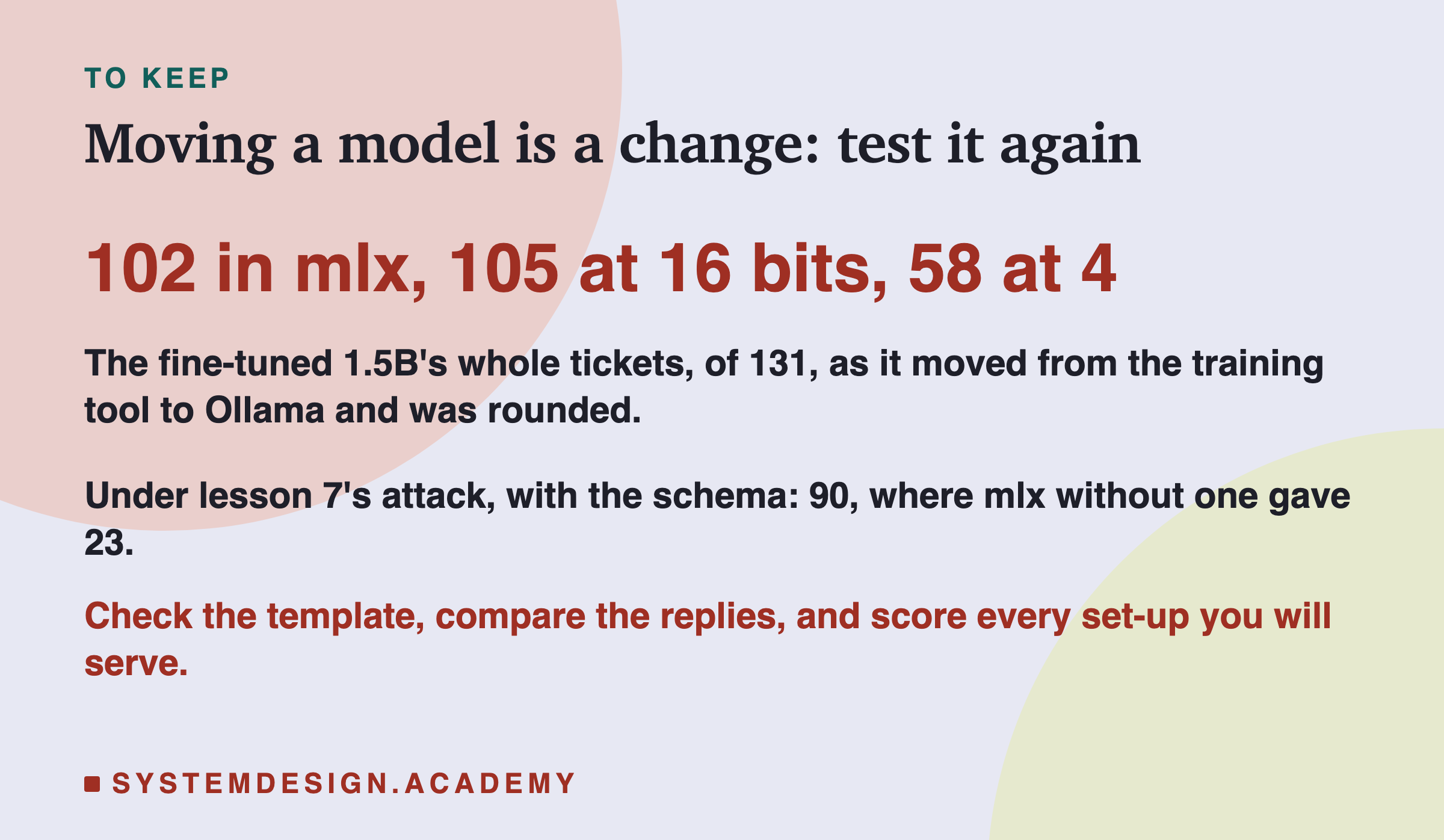
The next lessons in this chapter will test the fine-tunes on new kinds of messages and bring the chapter's decision together, end to end.
Knowledge Check
Knowledge Check
4 questions - Score 80% to pass
The lab checked that the 16-bit import gave the same replies as mlx on 5 plain messages, and it passed 5 of 5. Why was that not enough?
At 4 bits the fine-tuned 1.5B fell from 105 whole tickets to 58, yet all 140 replies were valid JSON. What does that show?
Under lesson 7's attack, the fine-tuned 1.5B got 23 whole tickets in mlx without a schema and 90 in Ollama with one. What did the schema do?
The 0.5B scored 82 with the schema and 92 with the attack and the schema. What is the honest reading?