A Long Printout and a Short Question
Imagine a colleague walks over with a very long printout. Somewhere on it is a short note: "Which department should this customer letter go to?" If the note is clipped to the very top, you read it first and then skim the rest. If it is buried halfway down, you might read two thousand words before you find out what you are meant to do. If it is at the very bottom, you read everything, and the question is the last thing on your mind when you answer.
A person copes with all three, because a person can go back and look again. A language model reads the whole printout once, in order, and then writes its answer straight after the last word it read. So it is fair to ask whether the place you put your instructions, relative to a long document, changes the answer.
This lesson measures it. I took the sorting prompt from lesson 1, pasted a long piece of text into it in four different places, and sent it with the same 40 customer messages to two small models. Then, because the answer turned out to be "not much, in this test", I show the case where placement matters a great deal: a document too long for the window.
Five Words for This Lesson
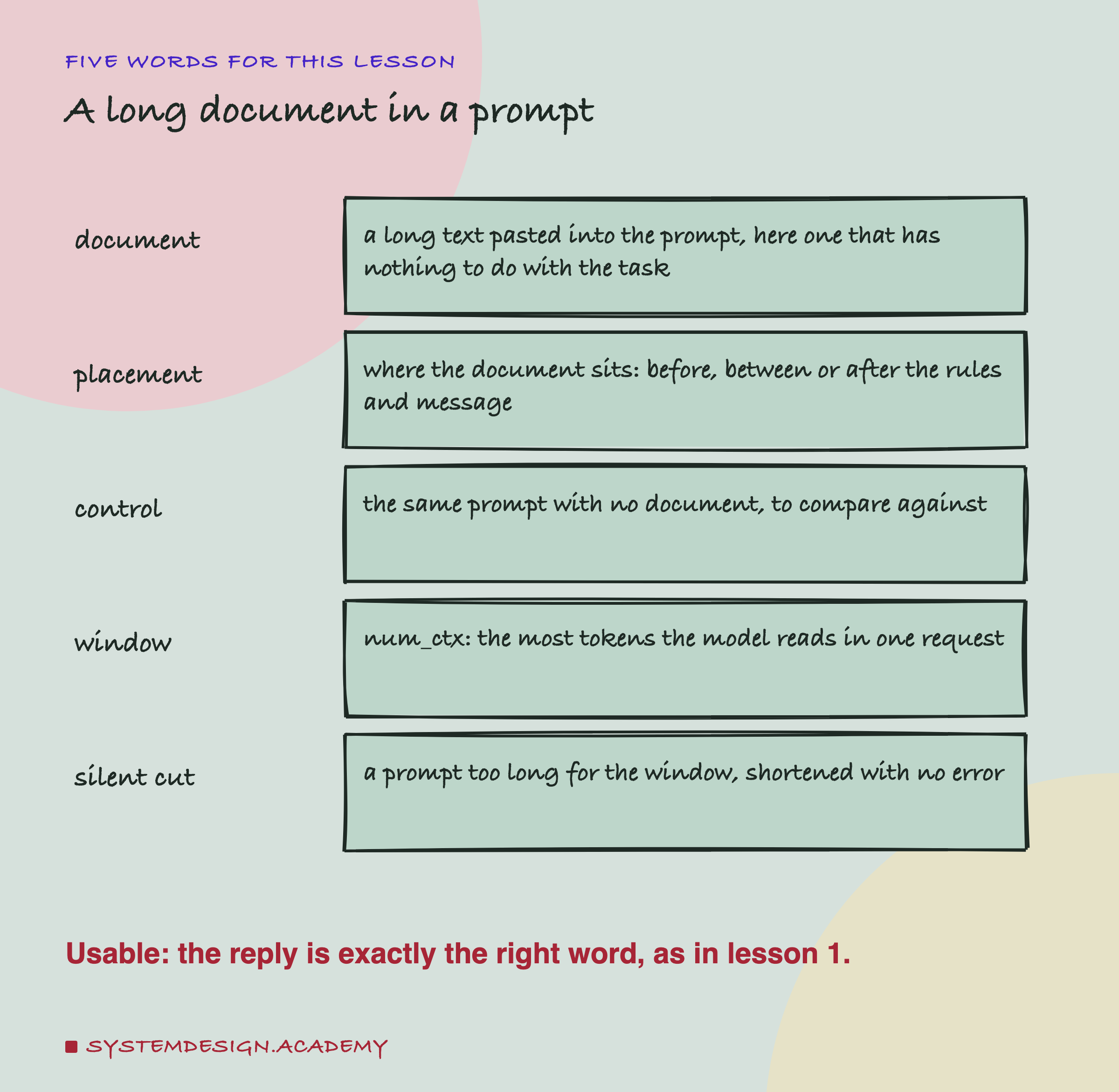
Document. A long text pasted into a prompt. In real apps it is often a help article, a contract or a web page that the model should use. In this lab it is on purpose a text that has nothing to do with the task, so that any change in the answers comes from its length and position, not from what it says.
Placement. Where the document sits in the prompt. There are three parts that stay the same (the rules, the message, and the word "Category:" that asks for the answer) and the document moves around them.
Control. The same prompt with no document. Every placement is compared with it, message by message.
Window. The most tokens a model reads in one request, prompt and reply together. Ollama calls it num_ctx. The previous chapter's lesson 7 measured it.
Silent cut. When a prompt is longer than the window, Ollama shortens it and still returns a normal reply, with no error. The same lesson 7 showed which part it keeps.
As in lesson 1, a reply is usable when the whole reply, in lower case and without spaces at either end, is exactly the correct category word.
The Lab: One Document, Four Places
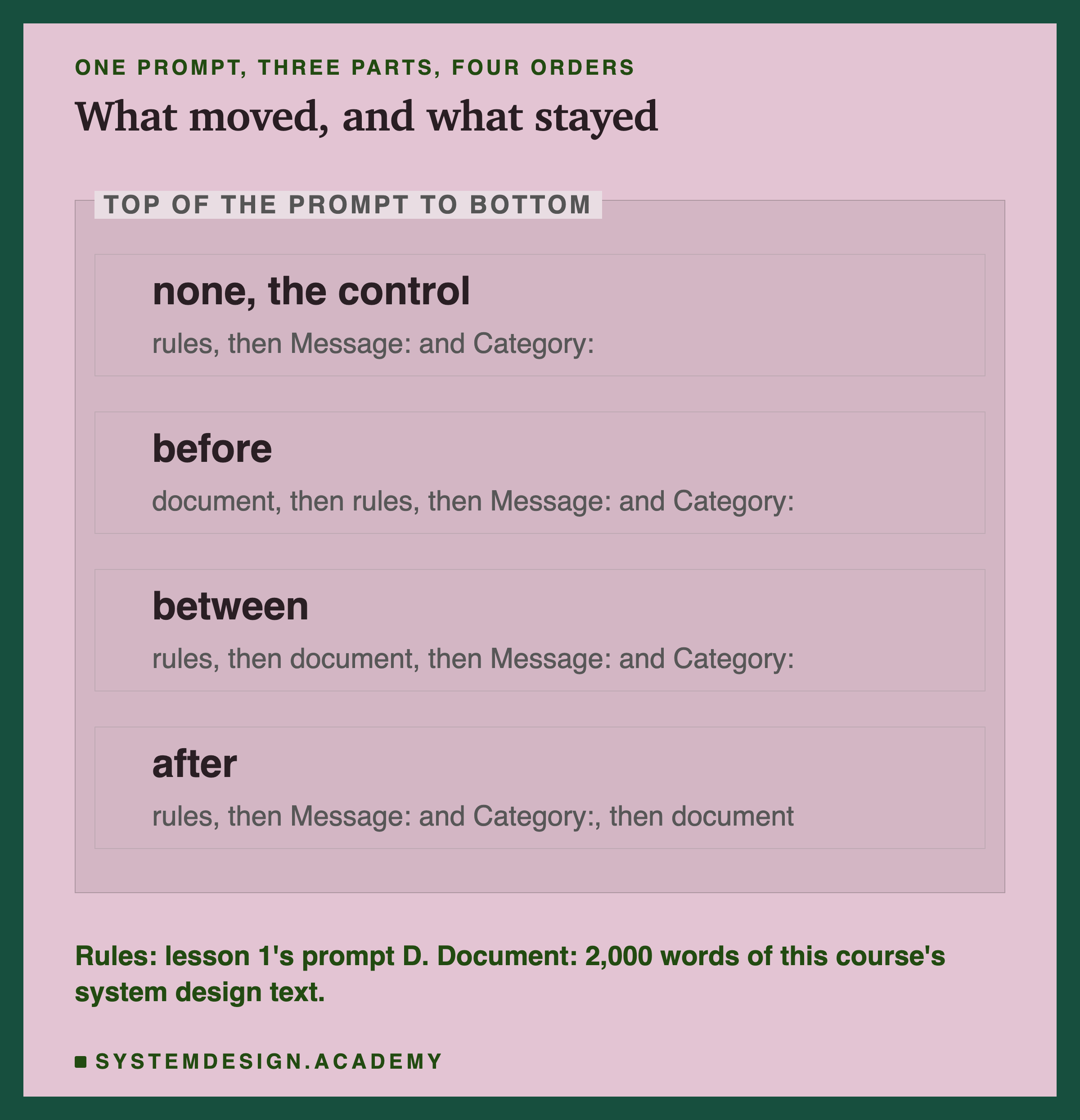
The rules are lesson 1's prompt D: the instruction that names the four categories, the format rule that asks for the category word only, and the four context lines that say what belongs in each category. I chose prompt D because it is the strongest prompt in the chapter so far. On qwen it scored 40 of 40 in lesson 1, so any loss would show.
The document is 2,000 words of this course's own text, taken in order from 17 short sections on system design: CQRS, , consensus, health checks, fault tolerance, several kinds of backup, and so on (you do not need to know what these are; that is the point). It is introduced with one line, "Here is a document from our knowledge base:". It says nothing about bills, parcels, returns or passwords. The lab simply stops at the 2,000th word, so the document ends in the middle of a sentence, "roughly 60,000".
There are four prompts:
- none, the control: the rules, then "Message:" with the customer's text and "Category:" on the next line.
- before: the document first, then the rules, then the message.
- between: the rules, then the document, then the message.
- after: the rules, then the message and "Category:", then the document.
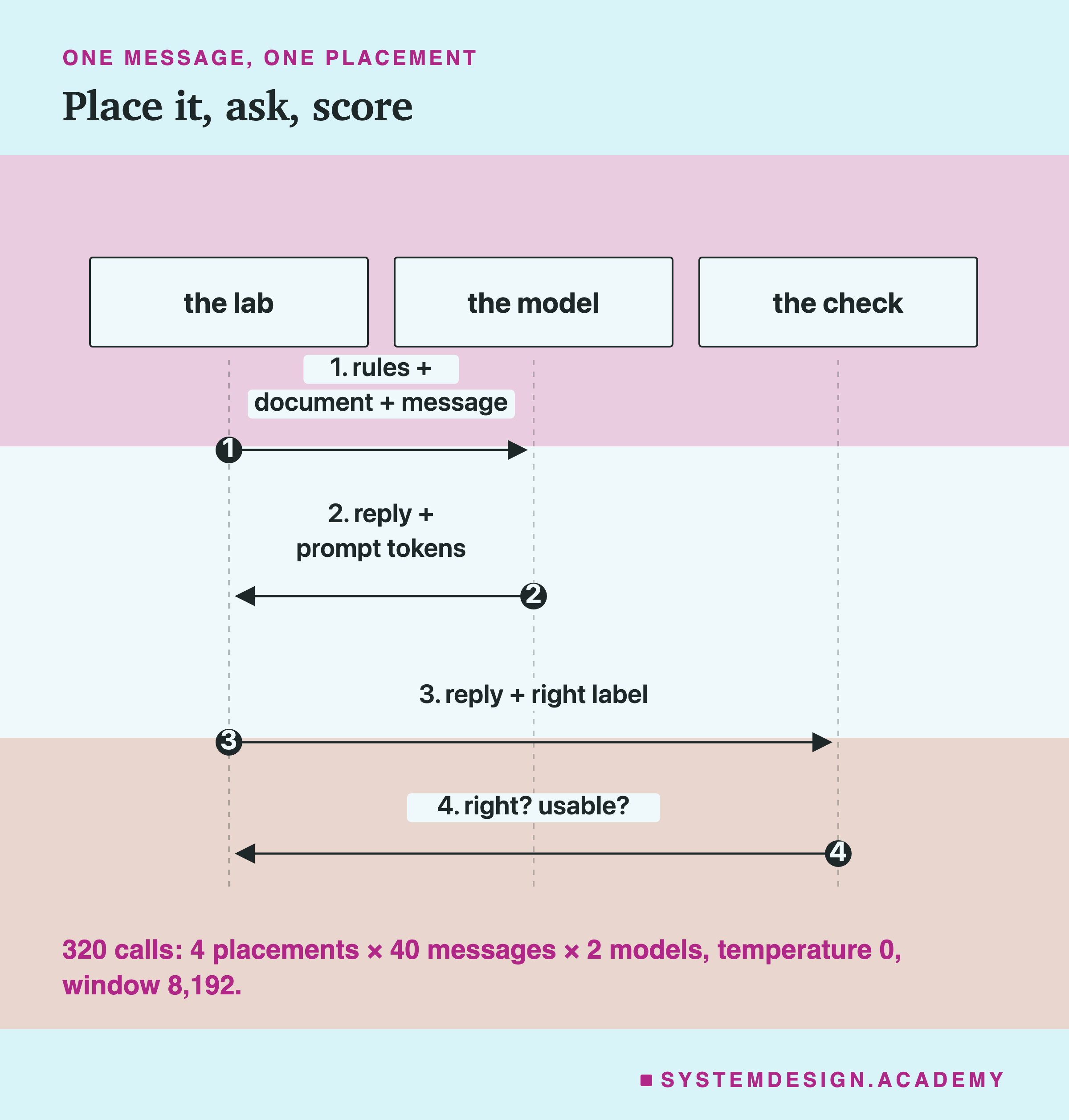
Each prompt went with each of lesson 1's 40 messages to qwen2.5:3b and llama3.2:3b through Ollama's chat endpoint (the /api/chat address used in every lesson here), at temperature 0 (the model always takes its most likely token), with room for 30 written tokens and a window of 8,192 tokens. Four prompts, 40 messages and two models make 320 calls. The design, including the window size, is written in the lab file's own description, dated before the run. Scoring is lesson 1's, unchanged.
The Scores: Small Moves, Both Ways
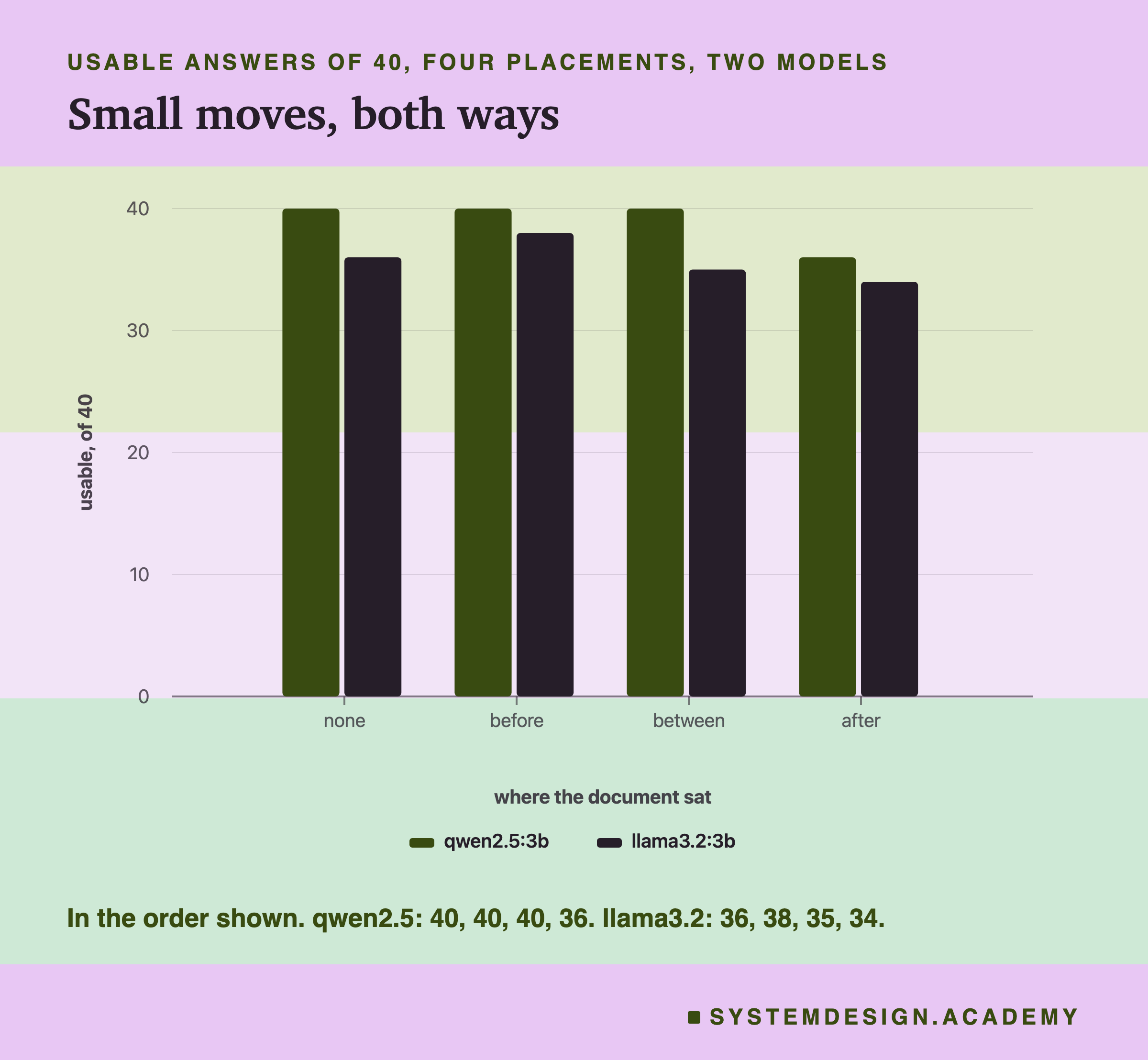
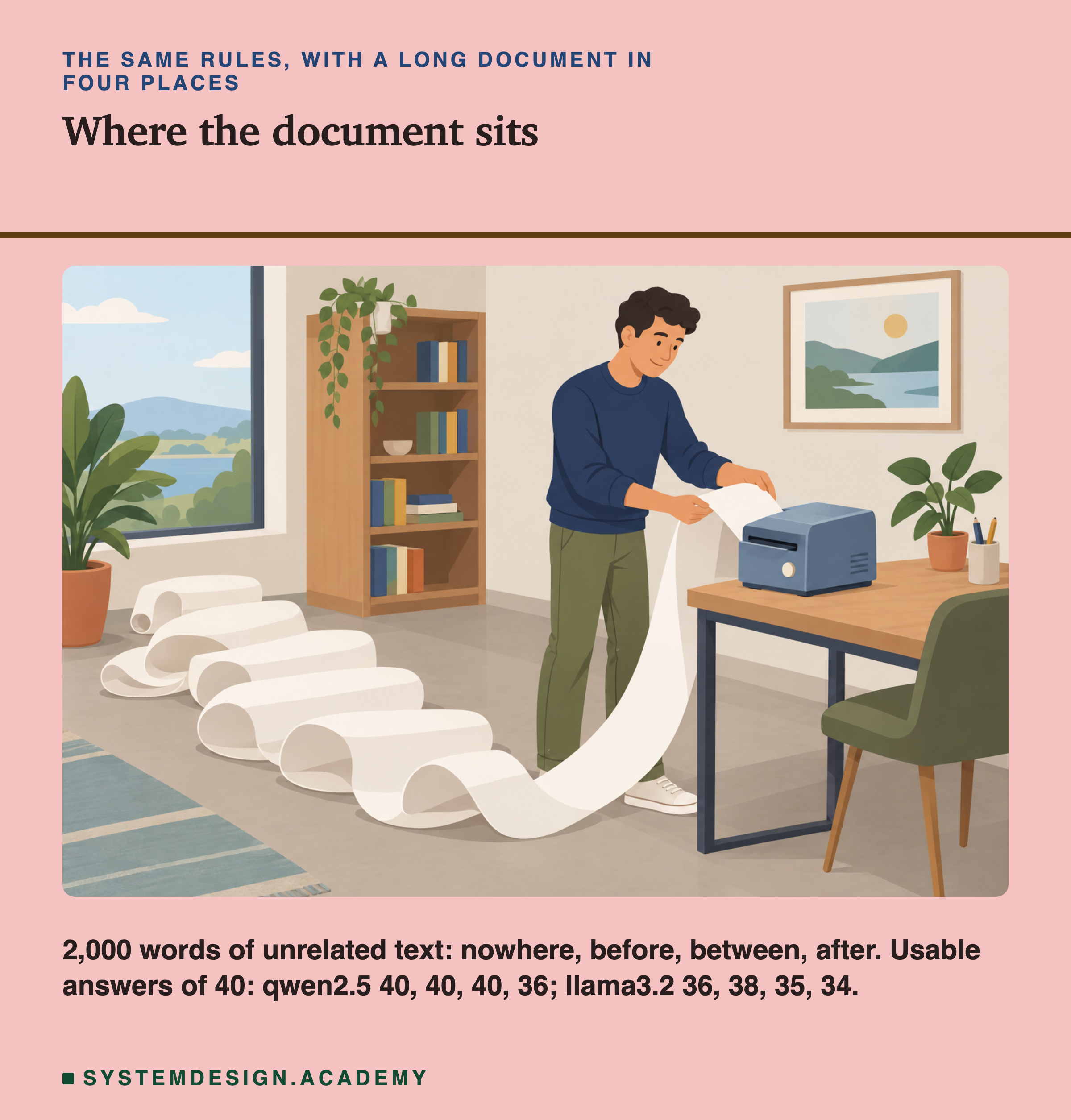
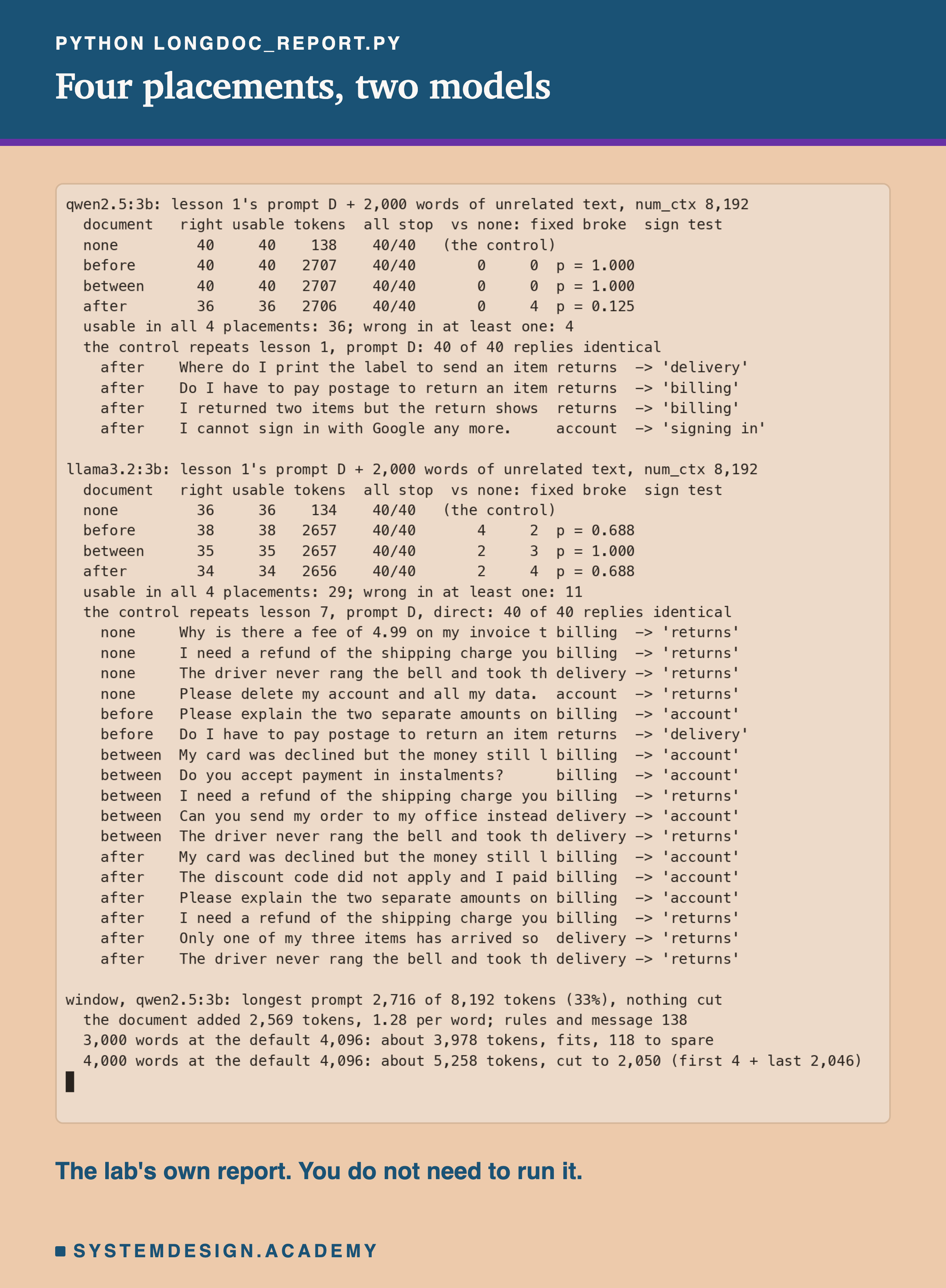
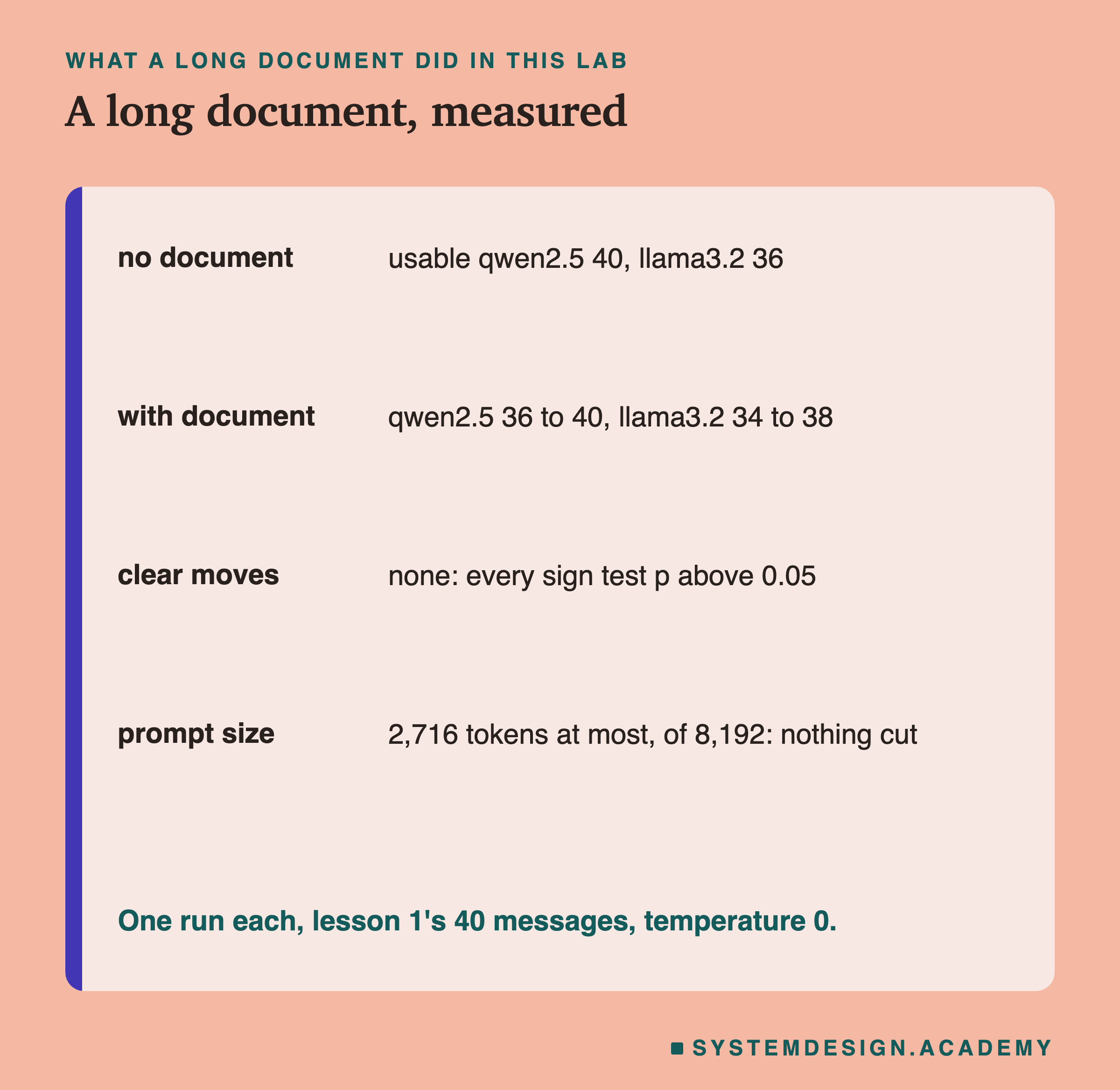
On qwen2.5:3b, the control scored 40 of 40, as it did in lesson 1. With the document before the rules, 40. With the document between the rules and the message, 40. With the document after the message, 36. So on qwen, 2,000 words of unrelated text changed nothing with the document before or between; with it last, 4 answers were lost (the next slides ask whether that is more than luck).
On llama3.2:3b, the control scored 36. With the document before, 38; between, 35; after, 34. Read that list carefully. The highest score, 38, came with a document, and the control sits in the middle of the range. If the document were simply a distraction that makes the model worse, the control would be the best score. It is not.
So the first honest summary is that, in this test, the placement of a long unrelated document moved the score by a few answers, and not always in the same direction. The next slides look at which answers moved, and ask whether any of these moves is bigger than luck.
One thing makes the comparison fair: the control repeats earlier runs exactly. Qwen's 40 control replies are exactly the same as prompt D's replies in lesson 1, and llama's 40 are identical to its direct answers with prompt D in lesson 7, although both earlier runs used a smaller window. So the changes below come from the document, not from a different machine state.
Qwen: The Four Answers Lost With the Document Last
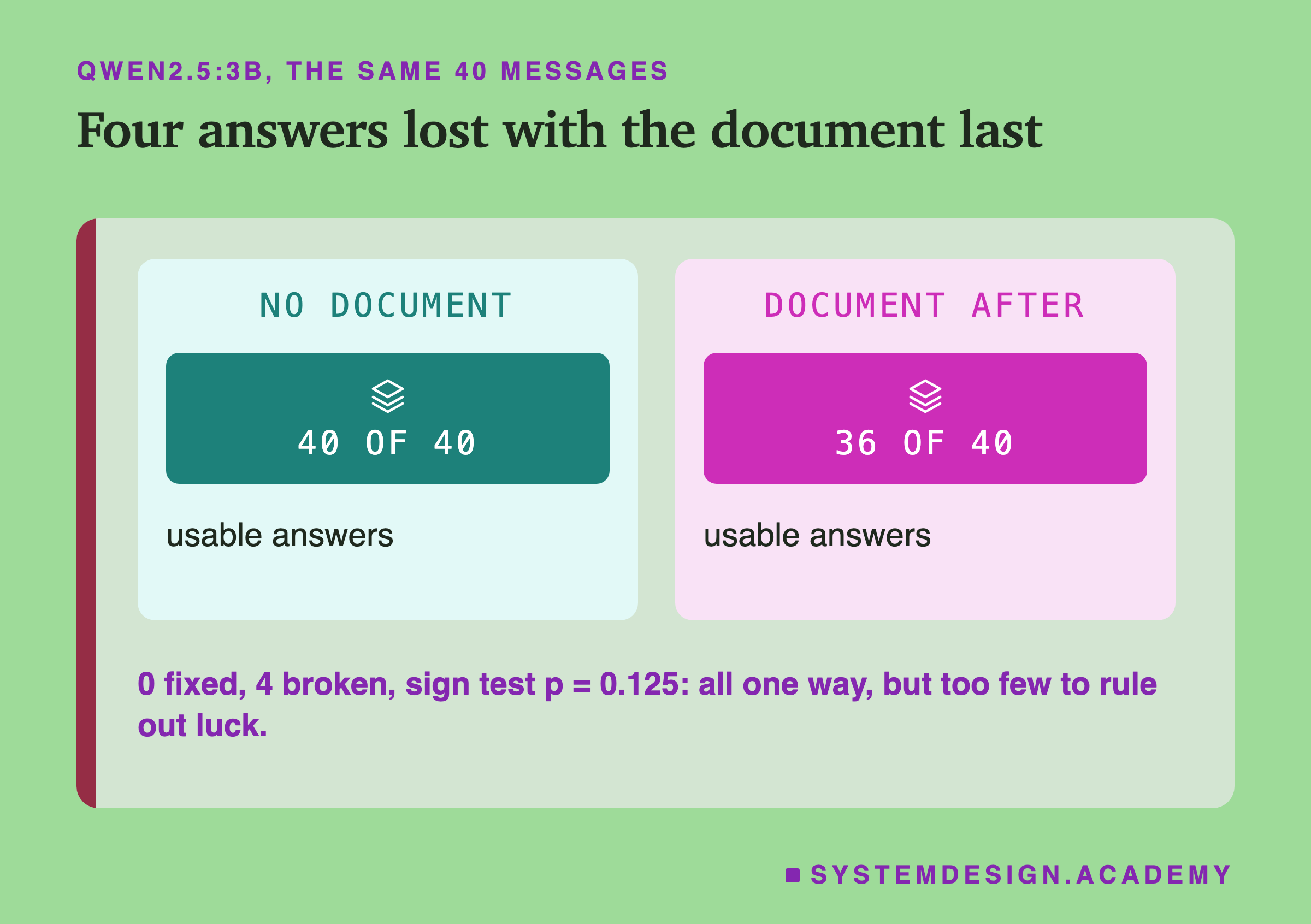
Qwen's four lost answers are worth reading one by one, because a score of 36 hides what kind of mistake was made.
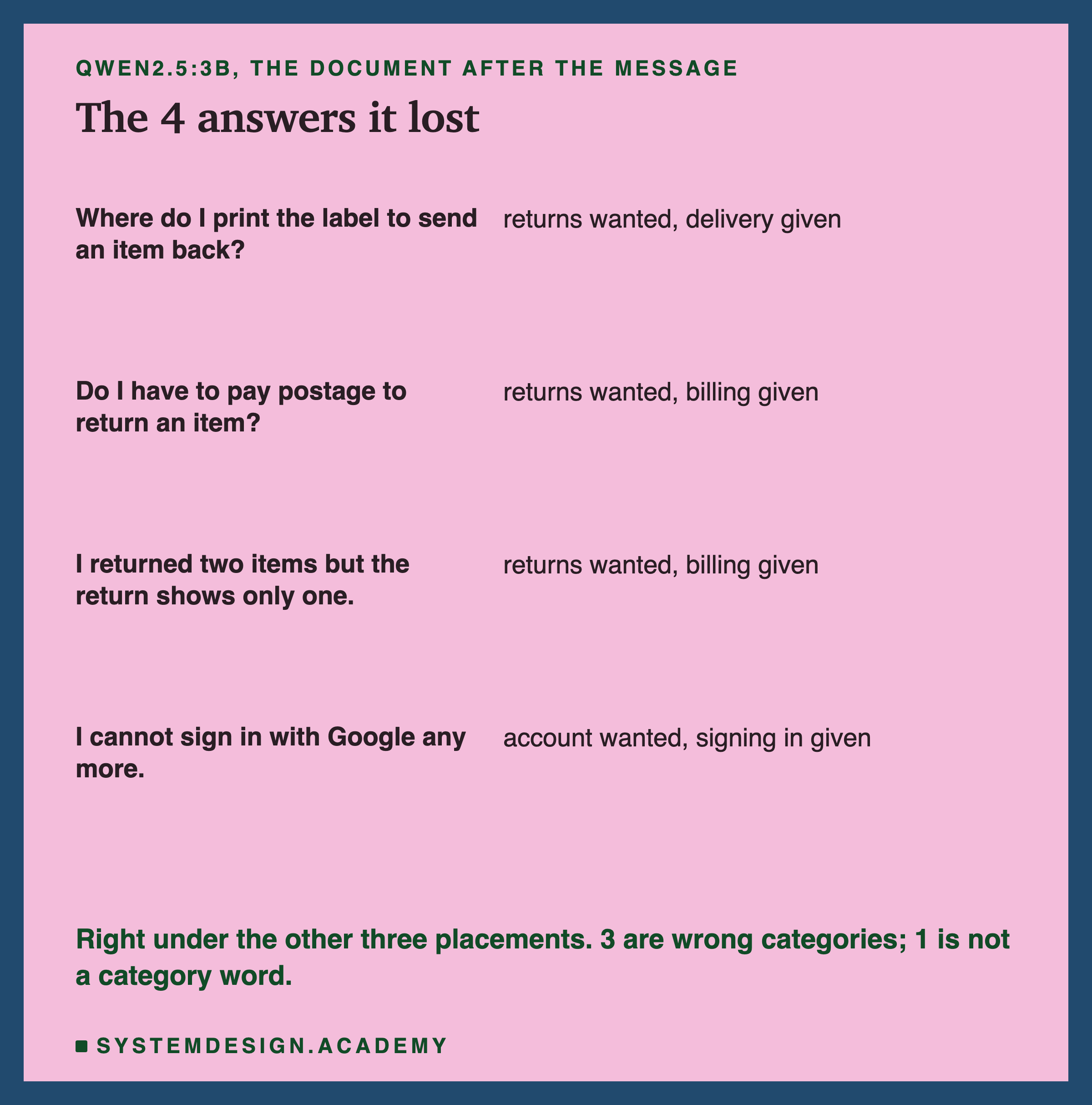
Three of the four are returns messages that came back as another category. The postage question came back as billing, which a person can understand: postage is money. The label to print came back as delivery, and a label is also something you see on parcels. The two items that were returned but show as one came back as billing. None of these three is a strange answer. Each is a message that could belong to either of two categories, and here it went to the other one.
All four messages were right in the control and right with the document before or between. With the document after, qwen fixed nothing and broke 4. That looks one-sided, and it is. But the sign test from lesson 7 asks how often luck alone would give a split this lopsided. Four changes all going one way happens by chance with a probability of 2 × 1/16 = 0.125, about one time in eight (the p value is that chance; the 2 is there because all four could also have gone the other way). That is not rare enough to call it a real effect. With 40 messages and a model that was already perfect, four is simply too few changes for this test to decide.
An Answer Copied From the Rules
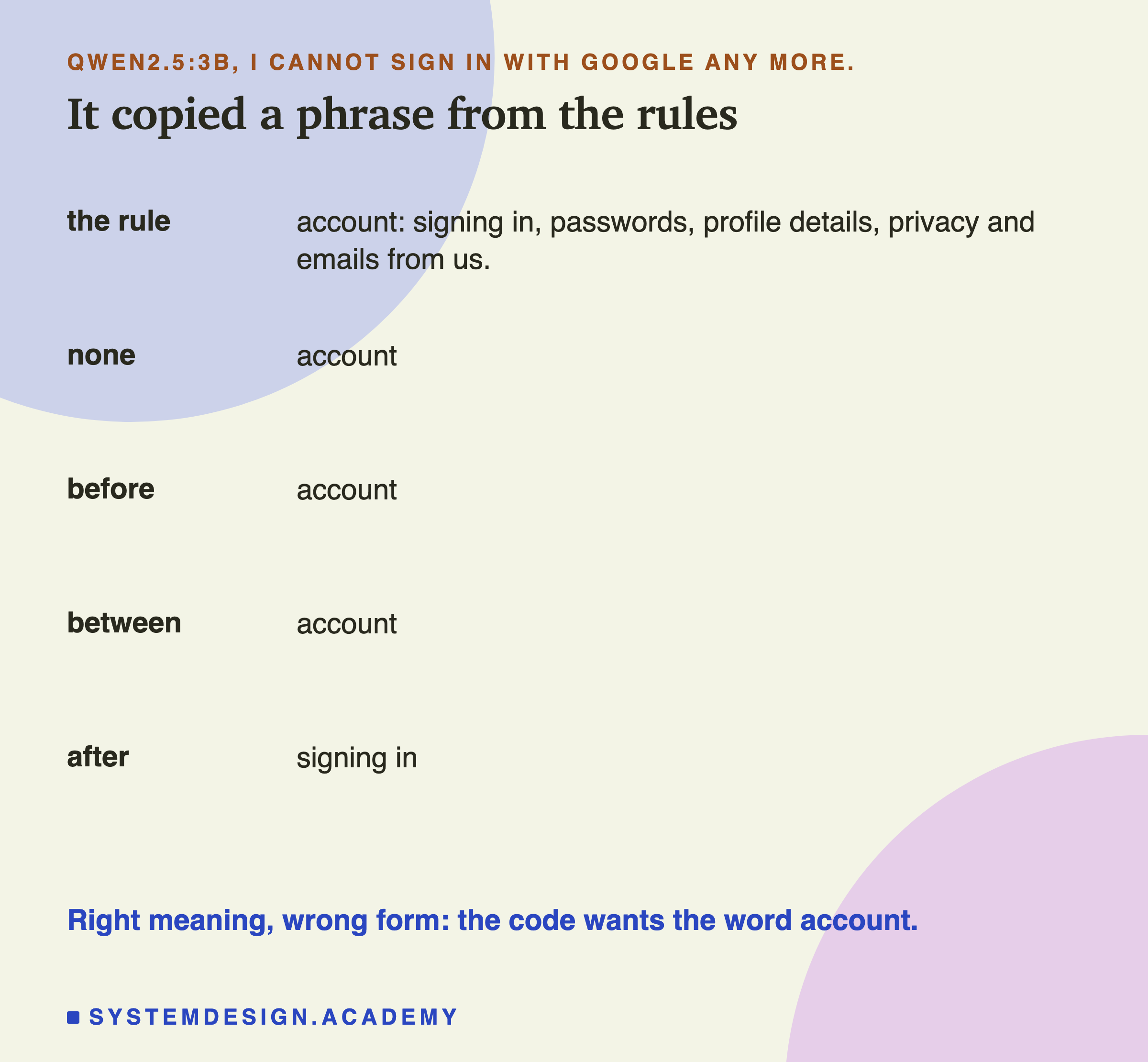
The fourth lost answer is a different kind of mistake. For "I cannot sign in with Google any more.", qwen replied "signing in". That is not one of the four categories. It is a phrase copied from the context line for account: "account: signing in, passwords, profile details, privacy and emails from us."
In a way the model understood the message: signing in is exactly what the customer is talking about, and the rule that mentions signing in is the account rule. But it gave the rule's words instead of the rule's name. For a person reading the answer, "signing in" is clear. For the code that checks whether the reply is one of four exact words, it is a failure, just like a wrong category.
The other three placements gave "account" for the same message. So the document placed after the message did not make qwen misread this customer. It changed the form of the answer. Lesson 1 showed how much the format rule matters for exactly this reason: adding it took qwen from 19 to 36 usable answers, because a reply that means the right thing but has the wrong shape is still unusable. With the document last, the format rule is about 2,000 words before the point where the model writes its answer. That distance might matter. That is a guess, and the next slides say why I cannot test it with this data.
Llama: The Mistakes Moved Around
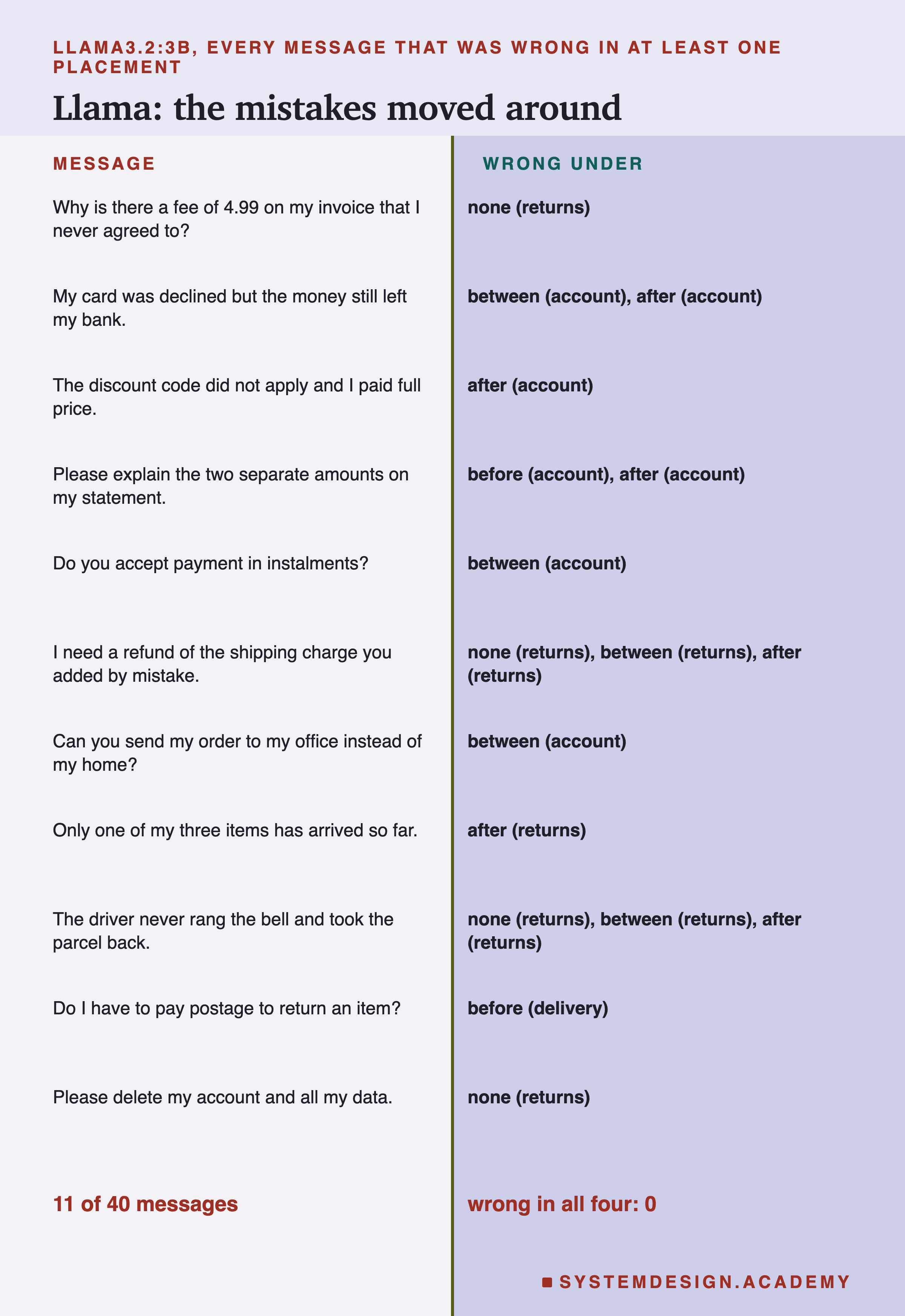
On llama the picture is noisier. Across the four prompts, 11 of the 40 messages were wrong at least once, and 29 were usable every time. Not one message was wrong in all four. The mistakes moved around.
Without a document, llama's 4 mistakes were all the answer "returns": the fee on the invoice, the refund of the shipping charge, the driver who took the parcel back, and deleting an account. Lessons 4, 7 and 8 met a much stronger form of this with prompt C (about 30 "returns" answers); with the context lines here, only 4 remain, leaning the same way.
With the document in place, a different mistake appeared. Seven wrong answers across the three placements were "account" given to a billing or delivery message: the declined card, the discount code, the two amounts on a statement, payment in instalments, and sending an order to an office. The control never gave "account" wrongly. Meanwhile, with the document before the rules, llama fixed all four of its "returns" mistakes, which is why that placement scored 38.
I noticed this swap between "returns" and "account" only after reading the replies, and one run cannot tell why it happened. What the data does show is that the document changed which messages llama got wrong, more than how many.
Is Any of This More Than Luck?
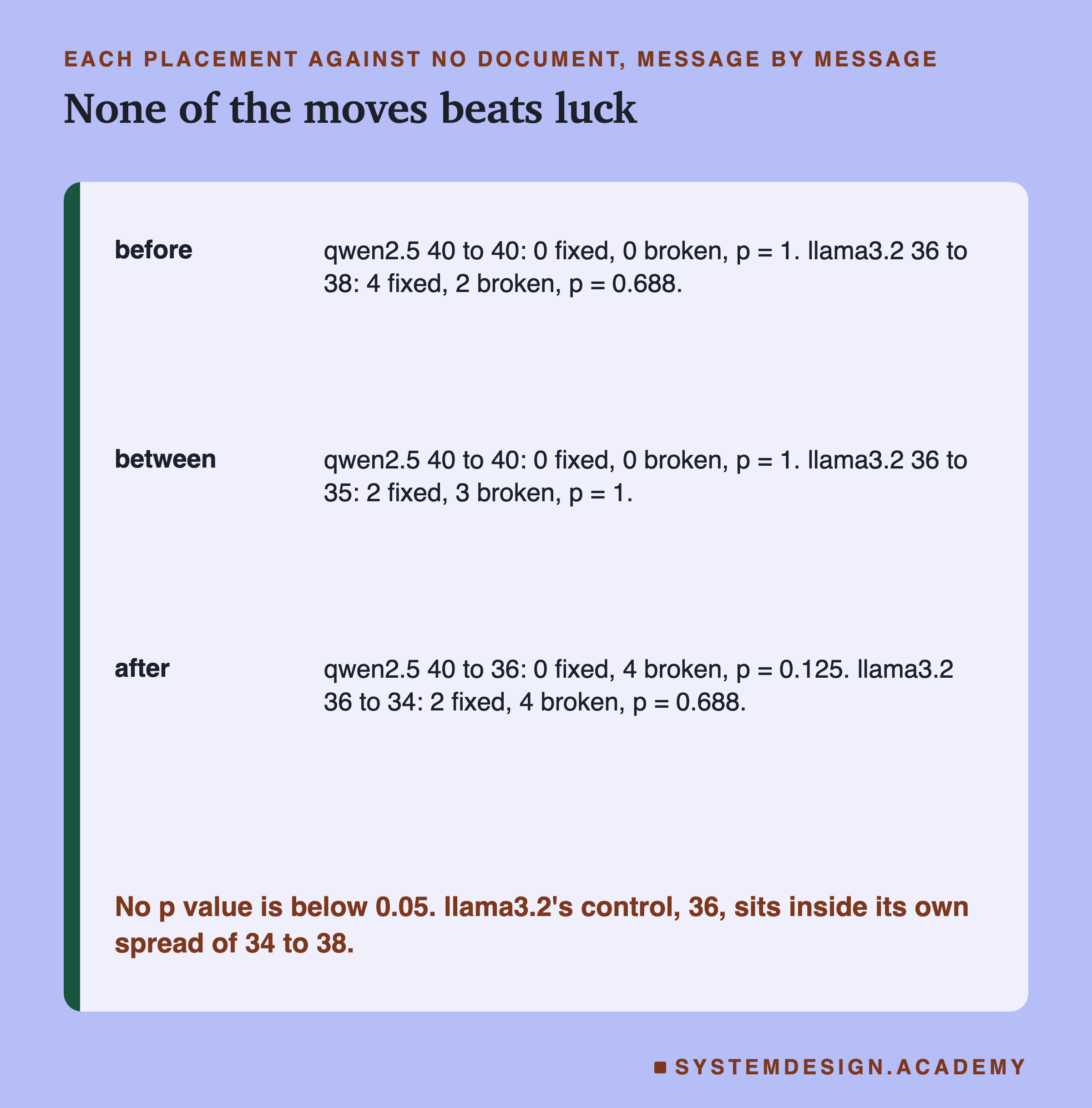
Lesson 8 showed that a single score is one sample from a spread, and that the fair way to compare two prompts is message by message: count the messages each one fixed and broke, and run the sign test. Here every placement is compared with the control.
For llama, the document before the rules fixed 4 messages and broke 2 (p = 0.688). Between, it fixed 2 and broke 3 (p = 1). After, it fixed 2 and broke 4 (p = 0.688). A p value near 0.7 or 1 means that luck alone would give a split like this more often than not. Llama's control score, 36, sits inside the range of the three document scores, 34 to 38. That is exactly what you would expect if the document made no real difference and the rest is noise.
For qwen, before and between changed nothing at all. After broke 4 and fixed none, p = 0.125, the closest any result came, and still not below the usual line of 0.05.
So the careful conclusion is this. On these 40 messages and these two models, I cannot tell any placement of this document apart from no document at all. The one hint worth remembering is that the only placement that cost qwen anything was the one that put the document last. It is a hint, not a finding. To turn it into a finding you would need many more messages, or more runs of different documents, and this lab has neither.
Why Placement Could Matter
It is still worth thinking about why the order could matter, as long as I label these as possible reasons and not as what the lab showed.
The last text before the answer. A model writes its answer one token at a time, straight after the last token of the prompt. In the control, and with the document before or between, the last thing in the prompt is "Category:", which says: the next word is a category. With the document after, the last thing is the end of the document, in the middle of a sentence ("...roughly 60,000") in a section about hot backups. "Category:" is still there, but two thousand words further back. One possible reason for qwen's four losses is that the model had to reach much further back to know what kind of word to write.
The reminder in lesson 6. Lesson 6 found something similar with a customer's text that tried to take over the prompt. Putting the task and the format rule again after the customer's text, a reminder, took qwen from 0 to 40 usable answers under the attack. That lesson could not separate "being last" from "being said twice", and neither can this one. But both results point the same way: the words closest to the answer seem to carry the most weight.
Distance from the rules. With the document between, the rules are 2,000 words above the message. Qwen did not mind at all here, and llama's changes were within luck. So this lab gives no support to the idea that distance alone hurts, at this length.
None of these reasons was tested directly. The lab changed where the document sat, and the only placement with even a hint of harm is the one that moved "Category:" away from the end.
Every Prompt Fitted, on Purpose
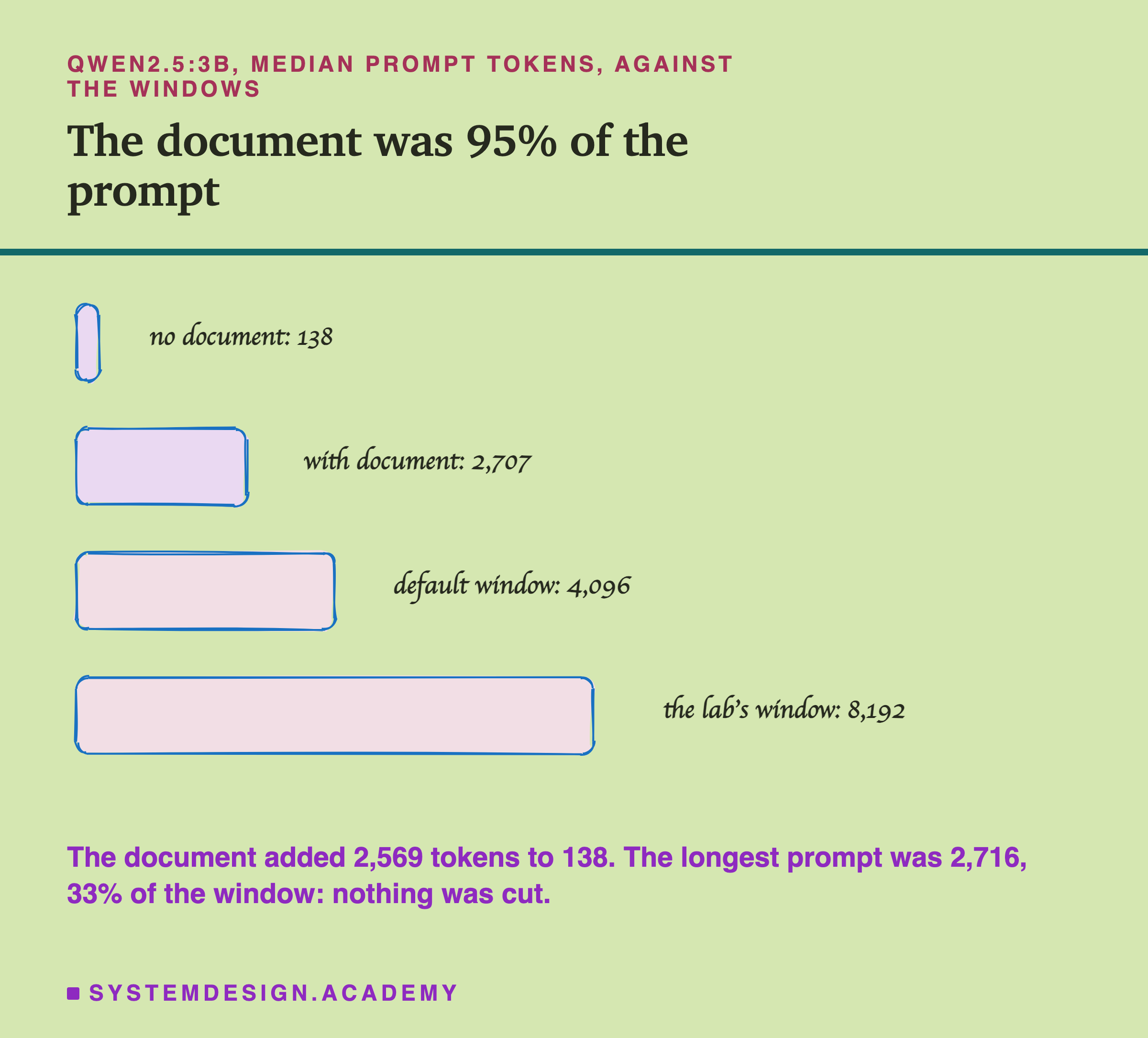
The lab set the window to 8,192 tokens for one reason: to make sure the whole prompt was read, so that the test measured placement and not a cut. The lab stored prompt_eval_count, the number of prompt tokens the model actually read, for every call, so this can be checked instead of assumed.
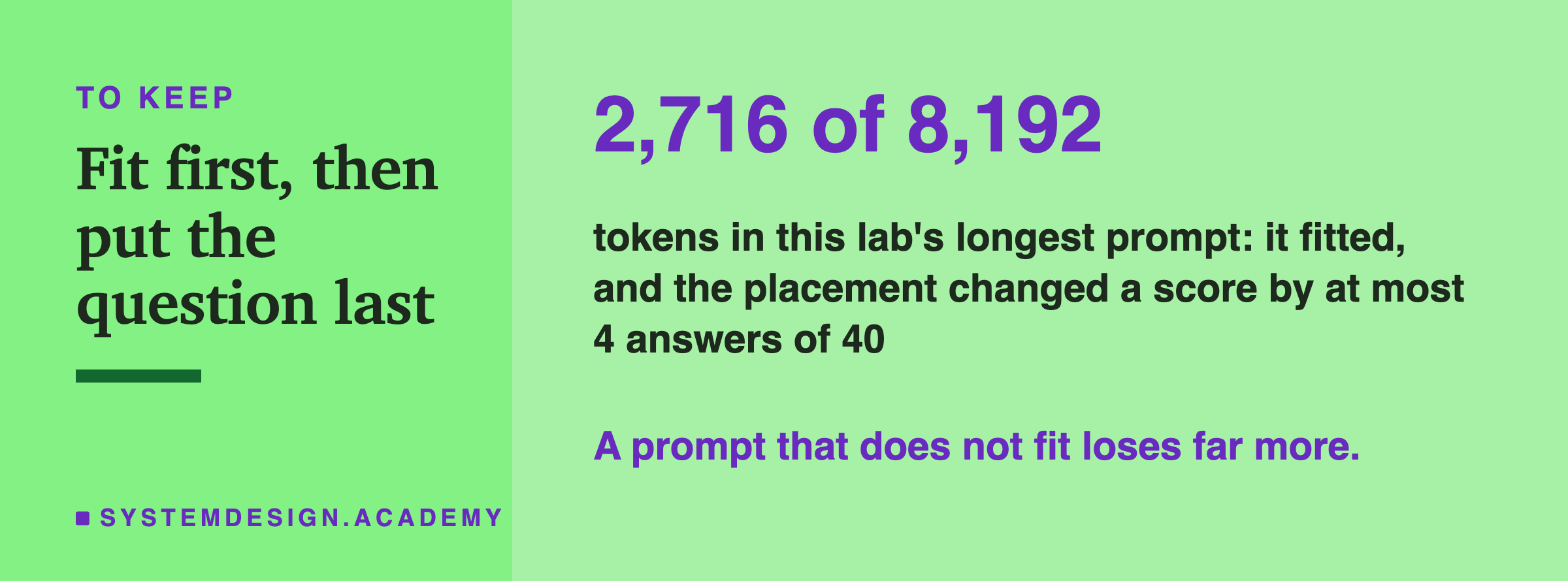
On qwen, the control prompt had a median of 138 tokens (the median is the middle value of the 40 calls). With the document, it had 2,707. The document added 2,569 tokens with the document before or between, and 2,568 after (one token fewer, where the two parts join), for every message, which is what you expect if nothing was cut: a cut would have removed a different amount from prompts of different lengths. The longest prompt of all was 2,716 tokens, 33% of the window. Llama's counts were a little smaller, 134 and 2,657, because its tokenizer (the part that splits text into tokens) splits text differently.
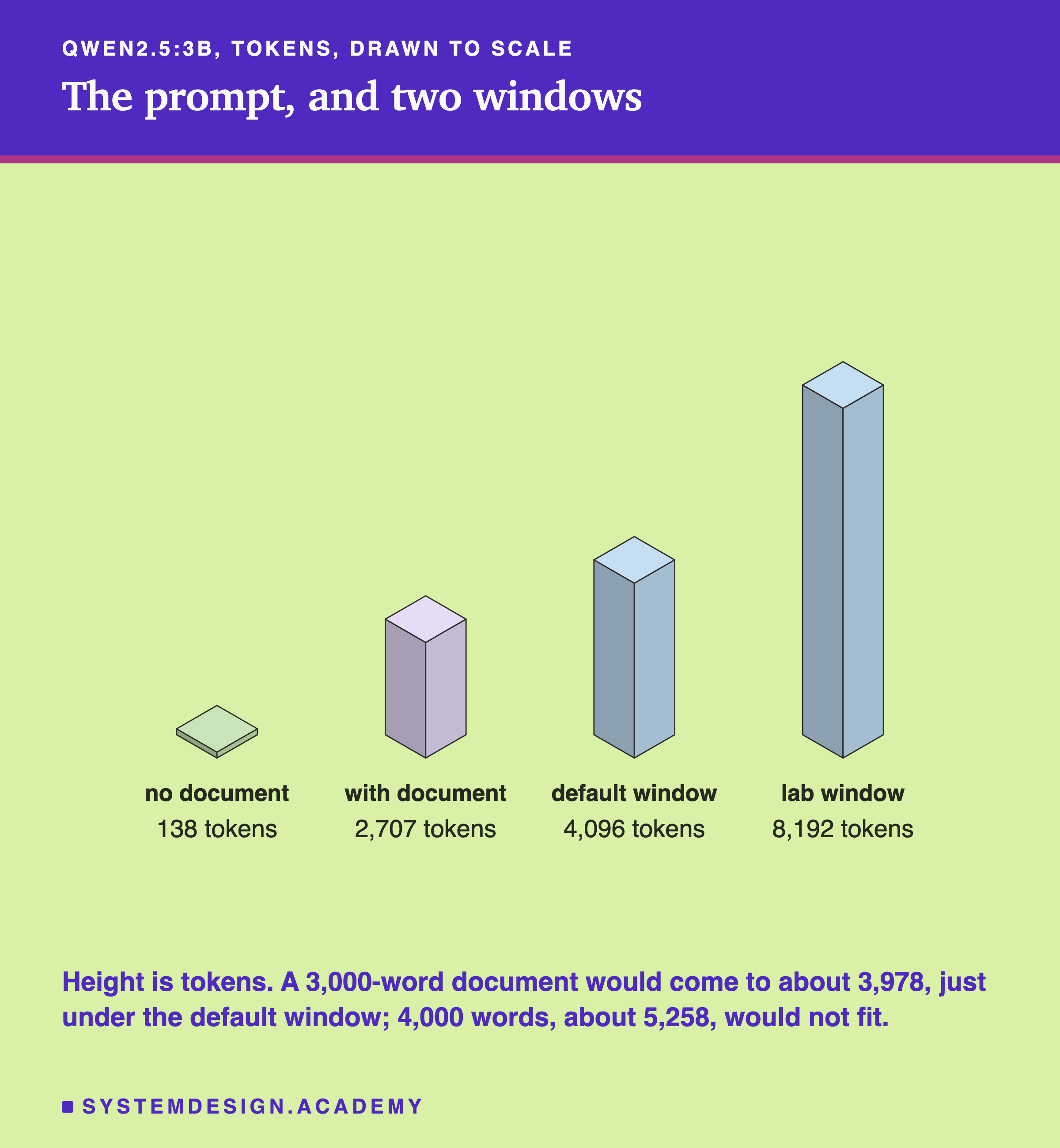
Notice how the document dominates. 2,569 of 2,707 tokens, about 95% of the prompt, is text that has nothing to do with the task. The rules and the message, the parts that decide the answer, are the other 5%. In a real app the document is usually the part you do not control, and it is usually the part that grows.
The Real Danger: A Document That Does Not Fit
The previous chapter's lesson 7 measured what Ollama does when a prompt does not fit: it returns a normal reply, with no error, after cutting the prompt to half the window plus 2 tokens, keeping the first 4 tokens and the end. On my laptop, a request that does not set num_ctx gets a window of 4,096. That lesson also found that the chat endpoint, with one long message as here, cuts the same way.
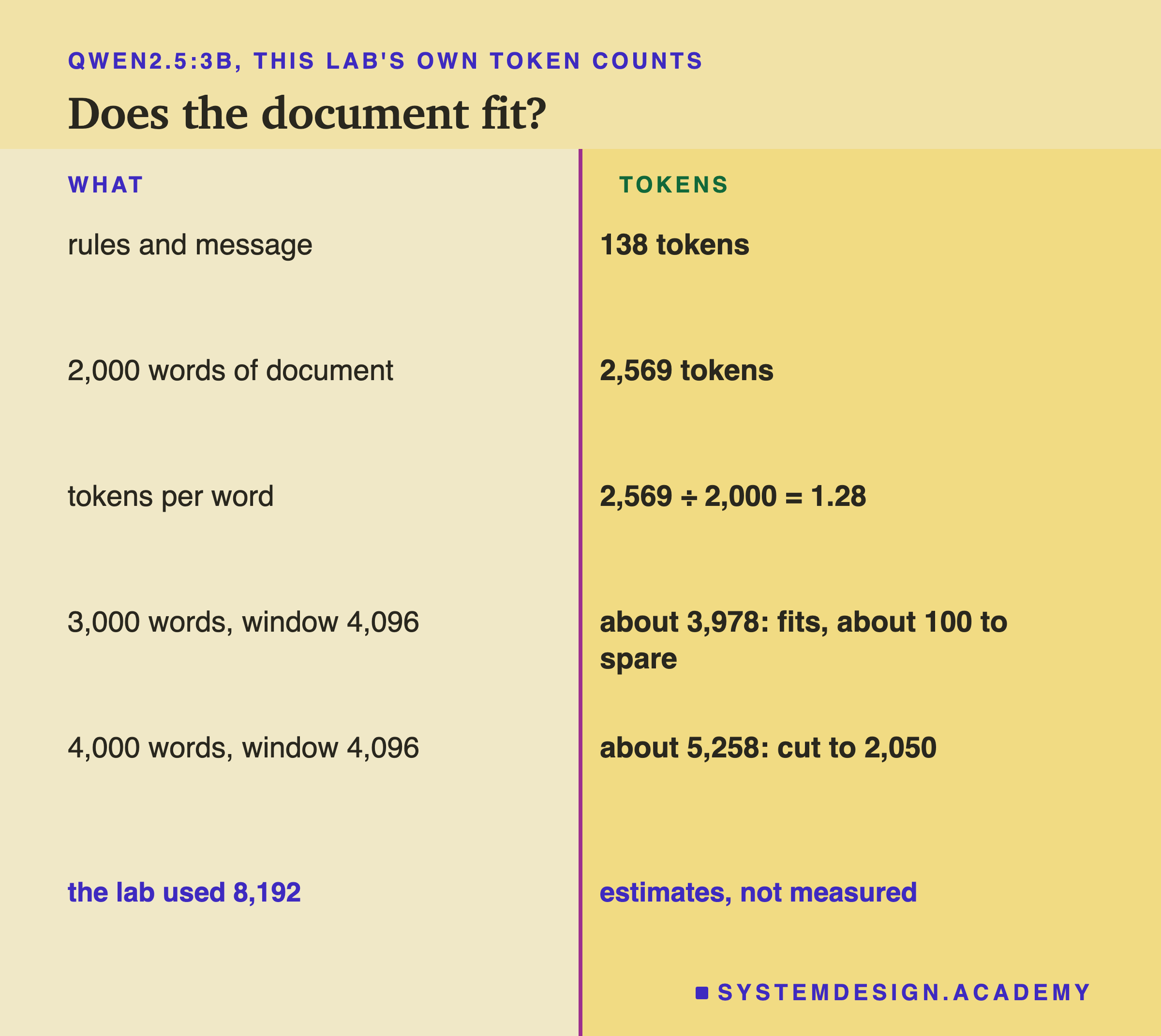
Here is the arithmetic with this lab's own counts. The document came to 2,569 tokens for 2,000 words, which is 2,569 ÷ 2,000 = 1.28 tokens per word, counting the one-line introduction. The rules and a message took 138.
- A 3,000-word document at the default 4,096 window. About 138 + 1.28 × 3,000 ≈ 3,978 tokens. That fits, with about 100 tokens to spare (fewer for the longest messages), and the reply needs up to 30 of them. It is right at the edge: roughly 70 more words of document and it would not fit, and lesson 7 did not measure exactly where the line between "fits" and "cut" sits.
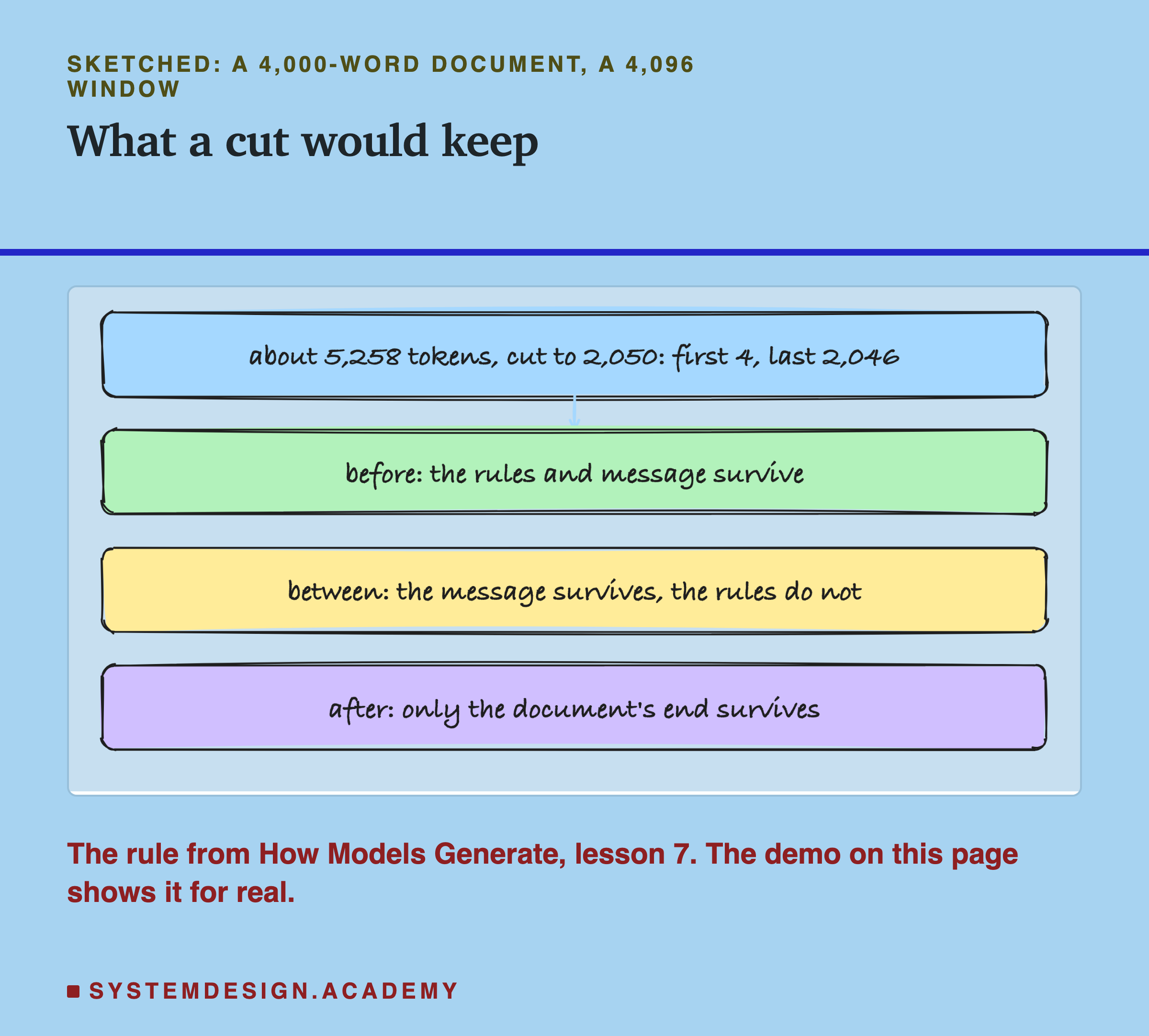
- A 4,000-word document at the default window. About 138 + 1.28 × 4,000 ≈ 5,258 tokens. That does not fit. By lesson 7's rule, Ollama would keep 4,096 ÷ 2 + 2 = 2,050 tokens: the first 4, then the last 2,046.
These two lines are estimates from this lab's counts, not measurements; your text will have its own tokens per word.
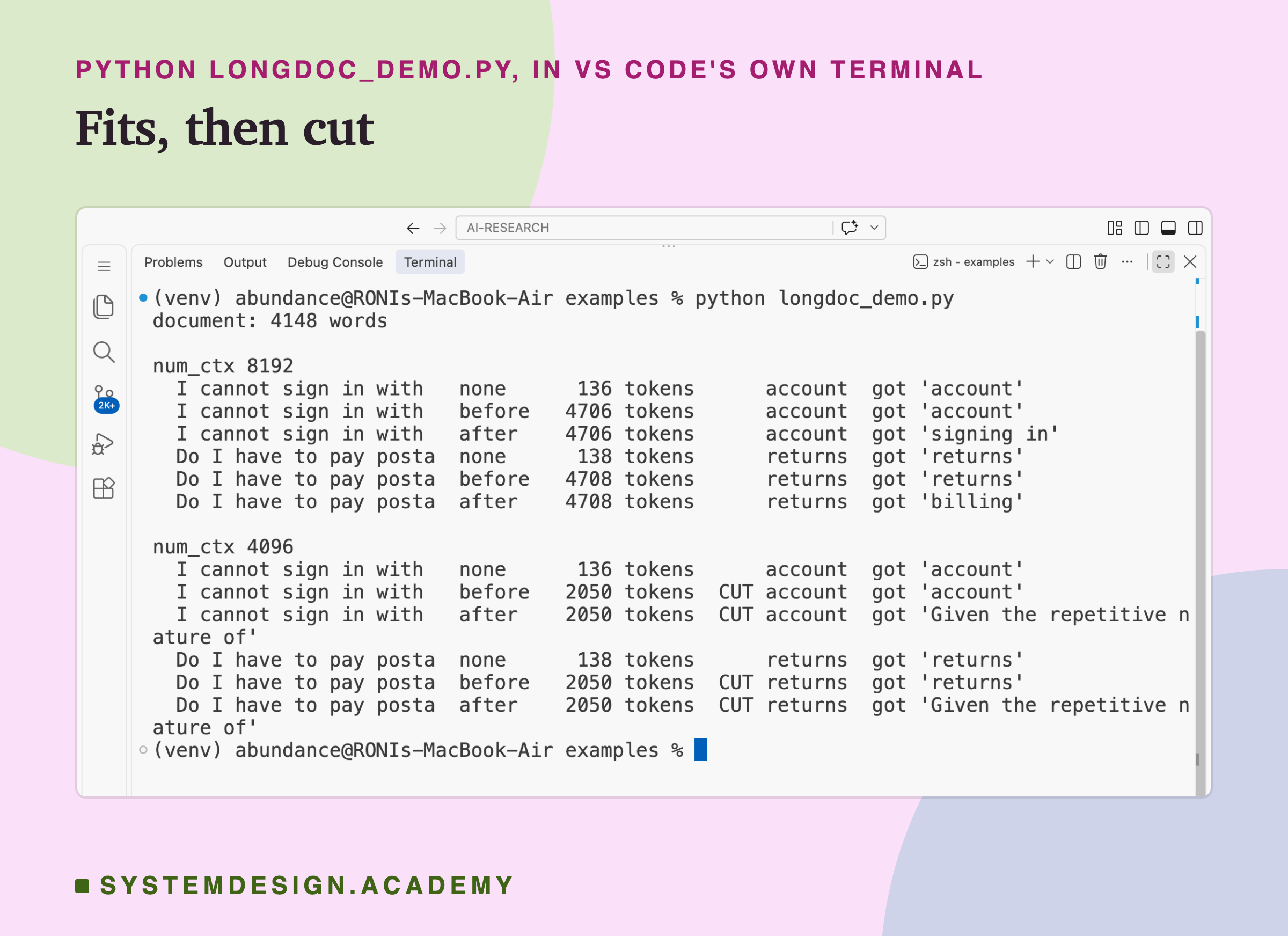
Now the order matters enormously. With the document before the rules, the last 2,046 tokens are the end of the document, then the rules and the message, so the rules and the question survive. With the document between, the message survives but the rules are gone. With the document after, the last 2,046 tokens are all document: the rules and the customer's message are both gone. The model is left answering a question it was never shown. The demo on the next slide shows exactly this.
Try It Yourself
This script sends two of lesson 1's messages to qwen2.5:3b with lesson 1's rules. Each message goes three ways: with no document, with a long document before the rules, and with the document after the message. It does this twice, once with a window of 8,192 tokens, where everything fits, and once with 4,096, where the document does not.
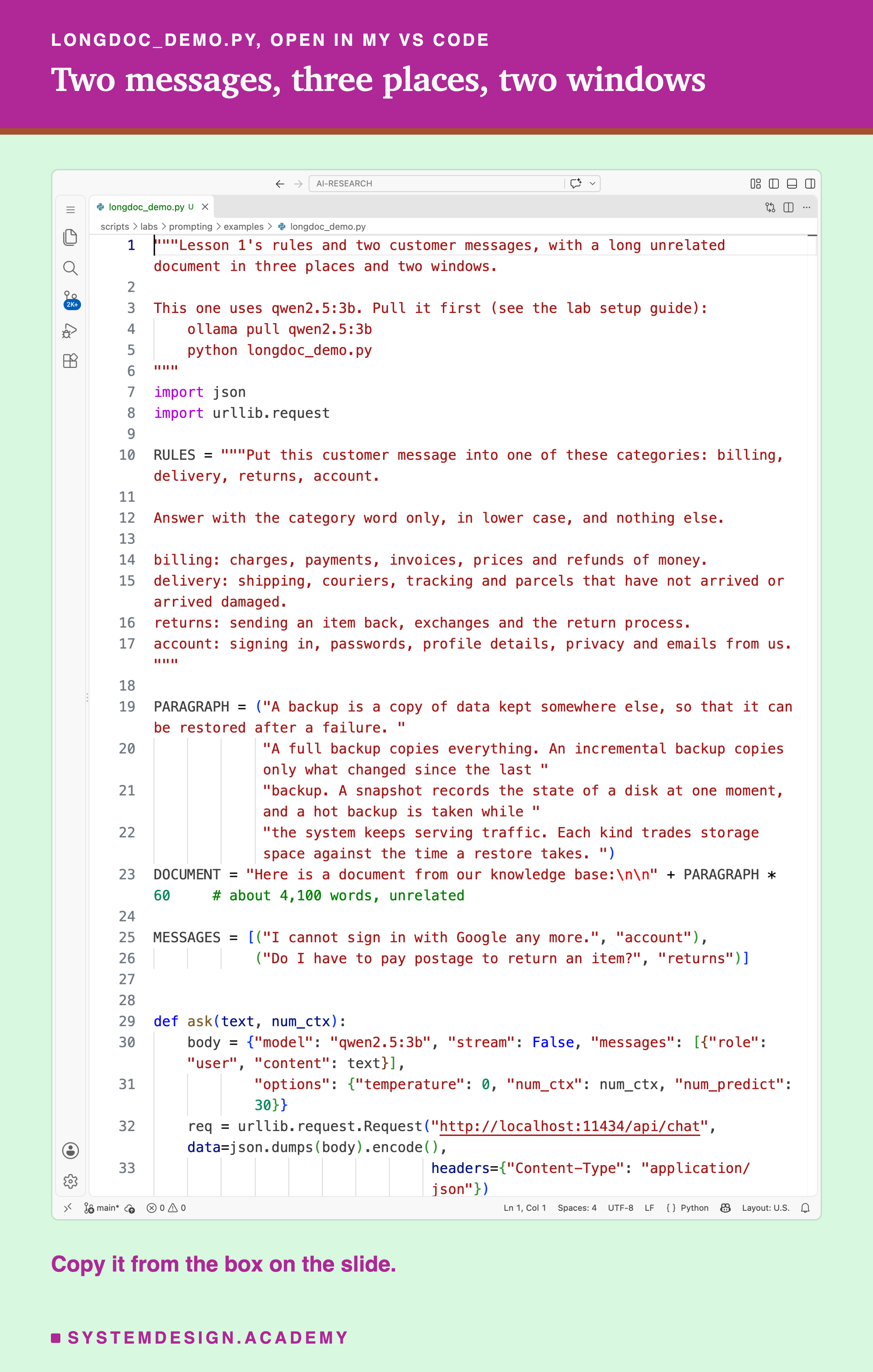
Before you run this lab. It uses qwen2.5:3b, running in Ollama on your own computer. If you have not set that up yet, the lab setup guide shows how to install Ollama, download the model and check that everything works, on macOS, Windows or Linux. You can use a different model instead: the guide shows the one line to change, and your numbers will differ from the ones in this lesson.
"""Lesson 1's rules and two customer messages, with a long unrelated document in three places and two windows.

This one uses qwen2.5:3b. Pull it first (see the lab setup guide):
    ollama pull qwen2.5:3b
    python longdoc_demo.py
"""
import json
import urllib.request

RULES = """Put this customer message into one of these categories: billing, delivery, returns, account.

Answer with the category word only, in lower case, and nothing else.

billing: charges, payments, invoices, prices and refunds of money.
delivery: shipping, couriers, tracking and parcels that have not arrived or arrived damaged.
returns: sending an item back, exchanges and the return process.
account: signing in, passwords, profile details, privacy and emails from us."""

PARAGRAPH = ("A backup is a copy of data kept somewhere else, so that it can be restored after a failure. "
             "A full backup copies everything. An incremental backup copies only what changed since the last "
             "backup. A snapshot records the state of a disk at one moment, and a hot backup is taken while "
             "the system keeps serving traffic. Each kind trades storage space against the time a restore takes. ")
DOCUMENT = "Here is a document from our knowledge base:\n\n" + PARAGRAPH * 60     # about 4,100 words, unrelated

MESSAGES = [("I cannot sign in with Google any more.", "account"),
            ("Do I have to pay postage to return an item?", "returns")]


def ask(text, num_ctx):
    body = {"model": "qwen2.5:3b", "stream": False, "messages": [{"role": "user", "content": text}],
            "options": {"temperature": 0, "num_ctx": num_ctx, "num_predict": 30}}
    req = urllib.request.Request("http://localhost:11434/api/chat", data=json.dumps(body).encode(),
                                 headers={"Content-Type": "application/json"})
    d = json.loads(urllib.request.urlopen(req).read())
    return d["prompt_eval_count"], d["message"]["content"].strip()


def build(place, msg):
    ask_part = f"Message: {msg}\nCategory:"
    parts = {"none": [RULES, ask_part], "before": [DOCUMENT, RULES, ask_part], "after": [RULES, ask_part, DOCUMENT]}
    return "\n\n".join(parts[place])


print(f"document: {len(DOCUMENT.split())} words")
for num_ctx in (8192, 4096):
    print(f"\nnum_ctx {num_ctx}")
    for msg, gold in MESSAGES:
        for place in ("none", "before", "after"):
            kept, reply = ask(build(place, msg), num_ctx)
            cut = "  CUT" if kept == num_ctx // 2 + 2 else ""
            print(f"  {msg[:22]:<23} {place:<7} {kept:>5} tokens{cut:<5} {gold:<8} got {reply.splitlines()[0][:30]!r}")
The Lab Report
The measurement is scripts/labs/prompting/chapter_batch.py, mode longdoc. It is one of three labs for this chapter that I designed together and wrote down, in the file's own description, before any of them ran. It imports lesson 1's rules, messages and scoring, takes the first 2,000 words of the course text, builds the four prompts, and stores every reply and its prompt token count in one results file per model. It never reports a time, because other labs were sharing Ollama while it ran.
The report is a separate file, scripts/labs/prompting/longdoc_report.py. It reads the two results files and never calls a model. For each model it prints each placement's right and usable scores, the median prompt tokens, how many replies stopped on their own, and the fixed and broken counts and sign test against the control. Then it prints how many messages were usable everywhere, the check that the control repeats the earlier lessons, every wrong reply, and the window arithmetic.
I want you to know which parts came after I saw the data. The four placements, the document, the window, the messages and the scoring were all fixed before the run. The report was written afterwards, and so were its choices: the sign tests against the control, the list of wrong replies, the repeat check, and the window arithmetic. The swap between "returns" and "account" on llama was found by reading the replies. The demo script, with its repeated paragraph and its 4,096 window, was also written after the run, to show the cut that the lab avoided on purpose.
Compare Placements in Your Browser
This box has no model. It holds the lab's real answers for all four placements on both models, one letter per message, with "?" for a reply that is not one of the four words. It prints each placement's usable score and its fixed, broken and sign test against the control. Then it applies lesson 7's cut rule to a document length and window that you choose, using this lab's own token counts.
It prints the same numbers as the lab: qwen 40, 40, 40 and 36 with p = 0.125 for the document after, and llama 36, 38, 35 and 34 with no p value below 0.05. At the bottom, with a 4,000-word document and a 4,096 window, it estimates about 5,258 tokens, 2,050 kept, and says which parts survive for each placement. Try DOC_WORDS = 3000, which just fits, or set NUM_CTX = 8192 and watch the cut disappear. Or change one "?" in qwen's "after" row to the right letter and see how far the p value moves.
The Code, Part by Part
The rules. RULES is lesson 1's prompt D, word for word: the instruction, the format rule and the four context lines, separated by blank lines as in the lab. Keeping it identical is what lets the demo's control replies be compared with the lab's stored rows.
The document. PARAGRAPH is a short paragraph about backups, unrelated to customer support. DOCUMENT puts the lab's one-line introduction in front of it and repeats it 60 times, about 4,100 words. Repeating one paragraph keeps the script short enough to read. It is a different text from the lab's document, and the lesson says so wherever the two are compared.
The call. ask sends one prompt to qwen2.5:3b through Ollama's chat endpoint at temperature 0, with room for 30 tokens and the window you pass in. It returns two things: prompt_eval_count, the number of prompt tokens the model actually read, and the reply.
The placement. build puts the parts in order: the document nowhere, before the rules, or after the message. The message part always ends with "Category:".
The cut check. If the tokens read equal num_ctx // 2 + 2, the script prints "CUT". That is the same check lesson 7 recommended for your own code, and it is the only sign in the reply that anything was lost.
How to Put a Long Document in a Prompt
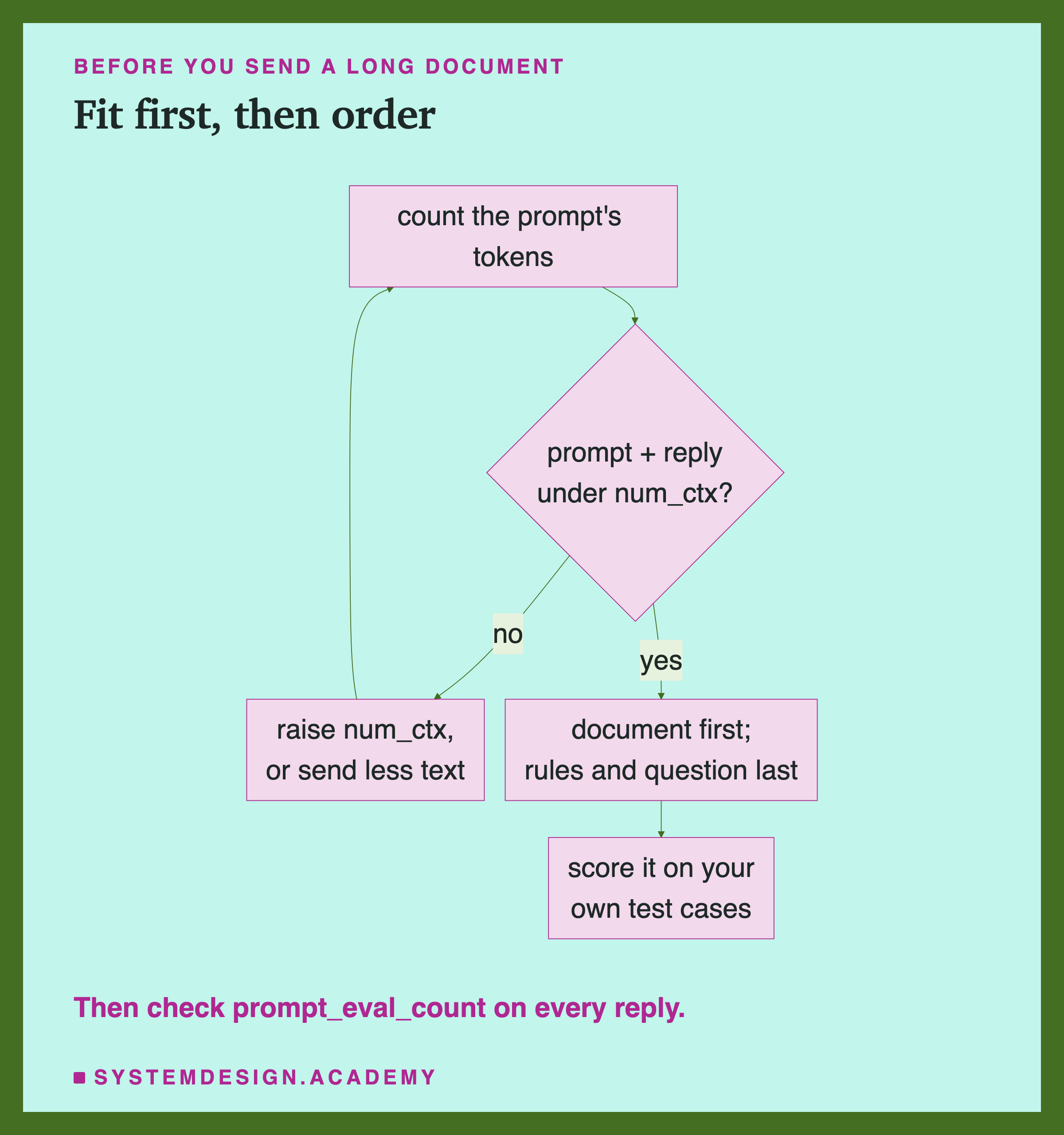
Make it fit first. Count the tokens of your longest real prompt, document included, with the model's own tokenizer (the Tokens and chapter shows how), and set num_ctx above it with room for the reply. This matters far more than anything else on this page: in this lab, placement moved at most a few answers, while a cut in the demo removed the question itself.
Check what was read. After every call, look at prompt_eval_count. If it equals num_ctx // 2 + 2, or is far below what you expected, the prompt was cut and the reply cannot be trusted. (It will never exactly equal a count of your own text, because it includes the chat template's markers.)
Put the document first, and the rules and the question after it. If the prompt ever does get cut, the end survives, so put what matters most at the end. When it fits, this order also leaves "Category:", or whatever asks for the answer, as the last thing the model reads. In this lab that made no difference I could tell from luck; the reason to prefer it is the cut.
Or repeat the instructions after the document. If your rules must come first, for example in a system message (the separate instructions message from lesson 3), say the task and the format rule again after the document, as lesson 6's reminder did. It costs a few dozen tokens.
Measure on your own task. Score the prompt with and without the document on the same cases, count fixed and broken, and use the sign test before you decide anything.
When This Matters, and When It Does Not
It matters most when the prompt might not fit. A chat that grows, a document that users upload, a search step (a step that looks up pages and pastes them into the prompt) that sometimes returns ten long pages instead of three: each can push a prompt past the window without warning. Then the order decides whether the model loses some of the document, the rules, or the question.
It matters when the reply must have an exact form. Qwen's "signing in" was the right idea in the wrong shape. If your code needs one exact word or a strict format, consider repeating the format rule after the document, as lesson 6's reminder did (this lab did not test it), and check every reply in code.
It matters less for a short document that fits, on a clear task. With lesson 1's full rules, 2,000 unrelated words before or between made no difference to qwen at all, and llama's changes were within luck. If your prompt is like this one, reordering will not help much; write test cases instead.
It may matter more with a document that is related to the task. This lab used unrelated text on purpose. A real help article about refunds and passwords could pull answers towards its own words much more strongly, and this lab says nothing about that. Measure it.
Do not trust an order because it worked for someone else. Two small models here already disagreed on which messages went wrong. A different model, a longer document or a different task can change the picture.
What This Lab Can and Cannot Tell You
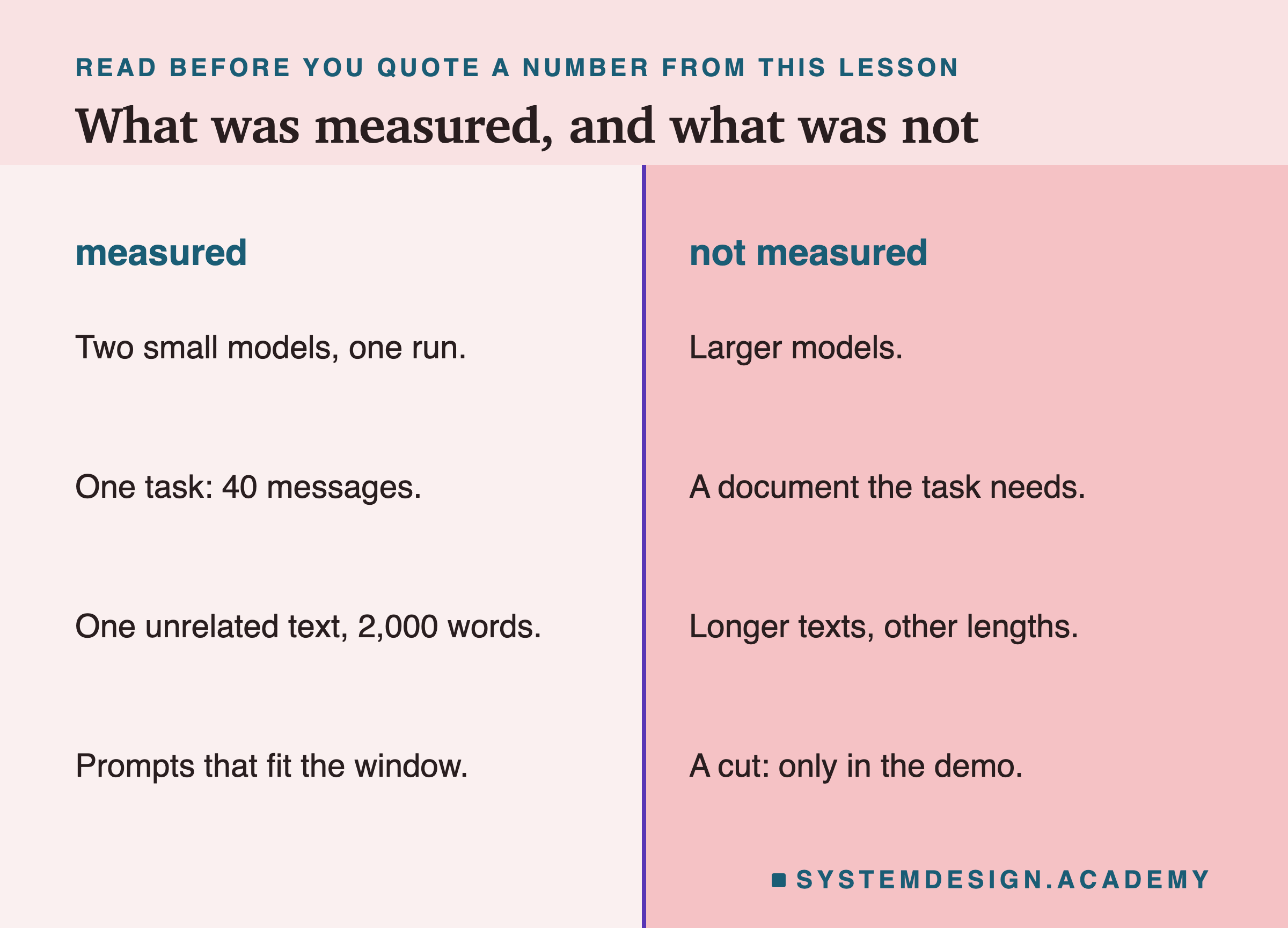
This lab ran two small models, once each, at temperature 0, on one task of 40 short messages that I wrote. It used one document of one length, unrelated to the task, and one wording of the rules. With 40 messages and a control that was already near the top, the sign test can only see large differences, so "cannot tell from luck" here means "too small for 40 messages to show", not "no difference". A real effect of two or three answers in forty could be there and this lab would miss it.
The lab did not test a document that the task needs, which is the usual case in real apps, or documents much longer than 2,000 words that still fit, or larger models. It never cut a prompt; the only cut in this lesson is in the demo, with two messages. The arithmetic for 3,000 and 4,000 words is an estimate from this lab's own tokens per word and lesson 7's rule, not a measurement. What carries over is the method: make the prompt fit and check that it did, compare each change with a control on the same cases, and read the wrong replies before you explain them.
What to Do Next
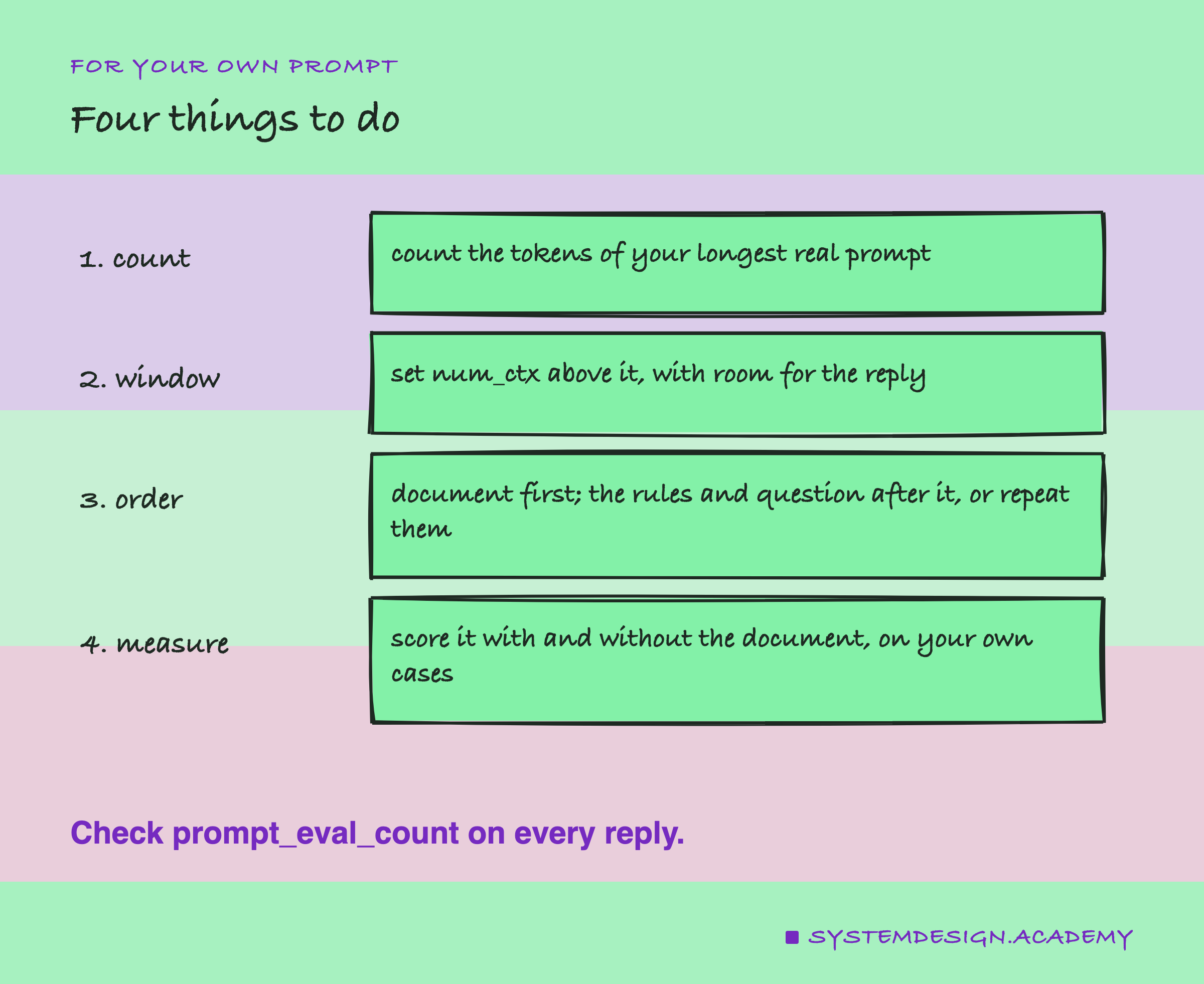
Find the prompt in your own work that carries the longest text: a pasted document, search results, or a long chat history. Count its tokens on the longest real input you have seen, not a typical one, and check that num_ctx is set above that count with room for the reply. Add one line of code that logs a warning when prompt_eval_count equals num_ctx // 2 + 2 or is far below what you expected. Then look at the order. If the document sits after your question, move it before, or repeat the question and the format rule after it. Finally, score the prompt on 20 to 40 of your own cases with the document and without it, count fixed and broken, and see whether the difference is bigger than luck before you change anything else.
Knowledge Check
Knowledge Check
4 questions - Score 80% to pass
On llama3.2:3b, the four placements scored 36 (no document), 38, 35 and 34. What is the fairest reading?
With the document after the message, qwen2.5:3b answered 'signing in' for 'I cannot sign in with Google any more.' Why does this count as a failure?
A 4,000-word document at Ollama's default 4,096 window, by this lab's counts, is about 5,258 tokens. If the document is placed after the message, what does the model see?
Which advice does this lesson put first for a prompt with a long document?