Tokens And Embeddings

Shorter Embeddings: Keep the First Numbers, Measure What You Lose

0 of 14 complete

0%

Contents

Back|Tokens And EmbeddingsShorter Embeddings: Keep the First Numbers, Measure What You Lose
1/14
37 min left
Prerequisites
Cosine, Dot Product or Distance: Which One Compares Embeddings?required
Related Topics
Chunking: The First Lever on Retrieval QualityRetrieval and RAG in ProductionIs There Really a Best Chunk Size? Measured on This Course's Own LessonsRetrieval and RAG in ProductionThe RAG Scale Cliff: What Breaks Between 100 and 5 Million DocumentsRetrieval and RAG in ProductionHybrid Retrieval: When Keyword Search Beats Your EmbeddingsRetrieval and RAG in ProductionThe RAG Retrieval Cliff: Engineering Recall Back at ScaleRetrieval and RAG in Production
1 of 14

The Smallest Doll Is Still a Doll

Open a set of nesting dolls and line them up. The smallest one is tiny, but it is still a whole doll, with a face and a painted dress. Nothing important was left off to make it small.

A flat illustration of an engineer at a desk with a row of painted nesting dolls from largest to smallest, holding up the smallest one, which is still a complete doll, beside an open laptop. A line says some embeddings are built the same way: the first part on its own is still a usable embedding.

An from nomic-embed-text is a list of 768 numbers. Every one of them takes 4 bytes to store, for every document you keep. For a million documents that is about 3 GB, just for the embeddings.

So a fair question is: do you need all 768? Could you keep only the first 256, a third of the size, and still find the right documents? Some models lose very little. Others lose more. This lesson measures two of them.

The Words You Need First
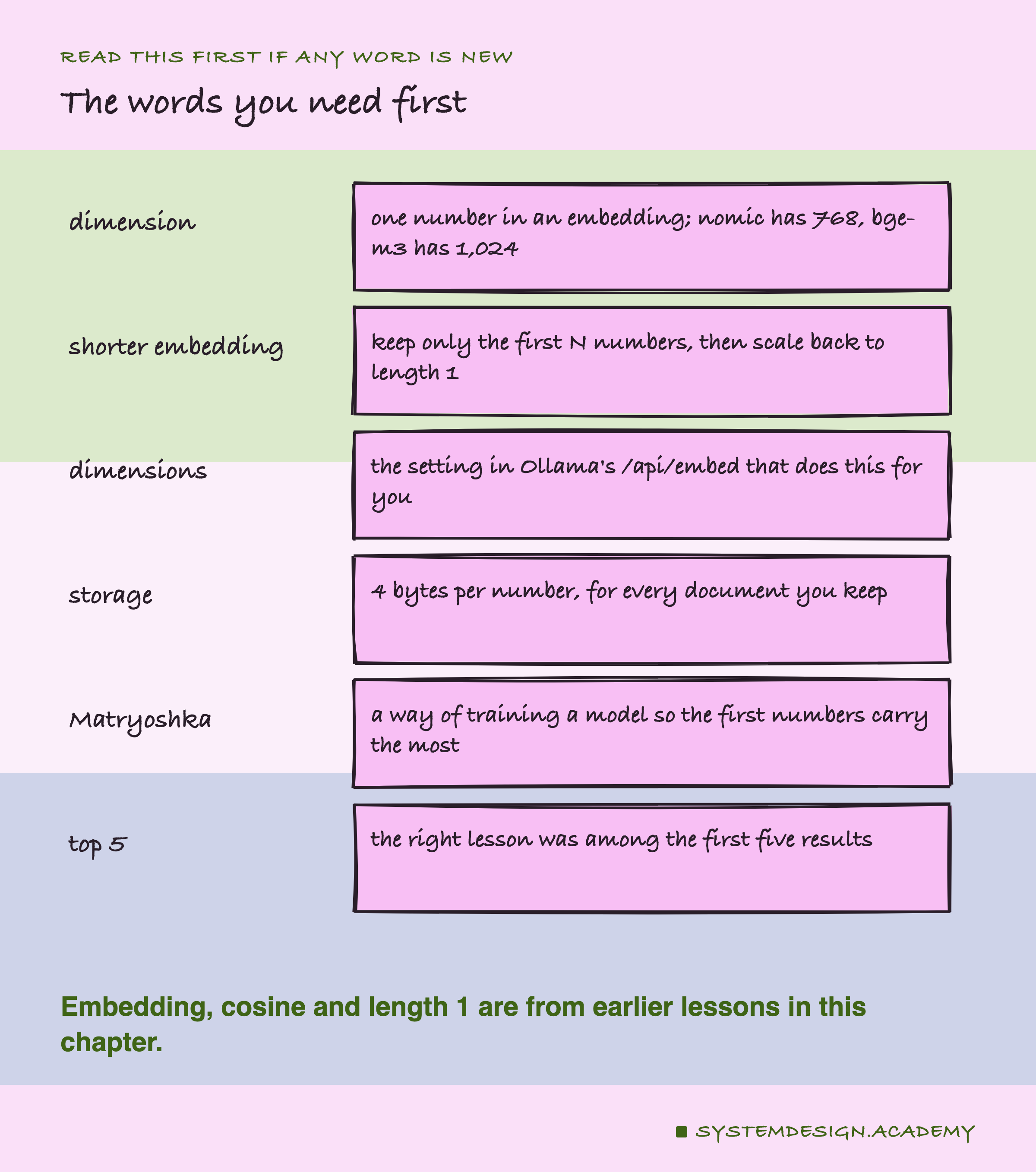
A hand-drawn word list. Dimension: one number in an embedding; nomic has 768, bge-m3 has 1,024. Shorter embedding: keep only the first N numbers, then scale back to length 1. Dimensions: the setting in Ollama's /api/embed that does this for you. Storage: 4 bytes per number, for every document you keep. Matryoshka: a way of training a model so the first numbers carry the most. Top 5: the right lesson was among the first five results. A note says embedding, cosine and length 1 are from earlier lessons in this chapter.

Dimension. One number in an . nomic-embed-text gives 768 of them, bge-m3 gives 1,024.

Shorter embedding. Keep only the first N numbers of the list, then scale them so the length is 1 again. Lesson 7 showed why length 1 matters: then cosine, dot product and distance all agree.

dimensions. A setting you can send to Ollama's /api/embed, which does the cutting for you.

Matryoshka. The Russian name for nesting dolls. It is also the name of a way of training an embedding model so that the first numbers carry the most meaning, and the later ones add detail.

Model card. The page a model's makers publish with it, saying what it is for and how to use it. For many models it lives on Hugging Face, a website that hosts models.

Top 5. The right lesson was among the first five results.

Noise. Small differences that happen by chance. They go away, or flip, if you run the test again with other questions.

Try It: Ask for Fewer Numbers

This file asks Ollama for the same at four sizes, 16, 64, 256 and all 768 numbers, and checks which of five short texts best matches one question. Here it is, open in my VS Code.
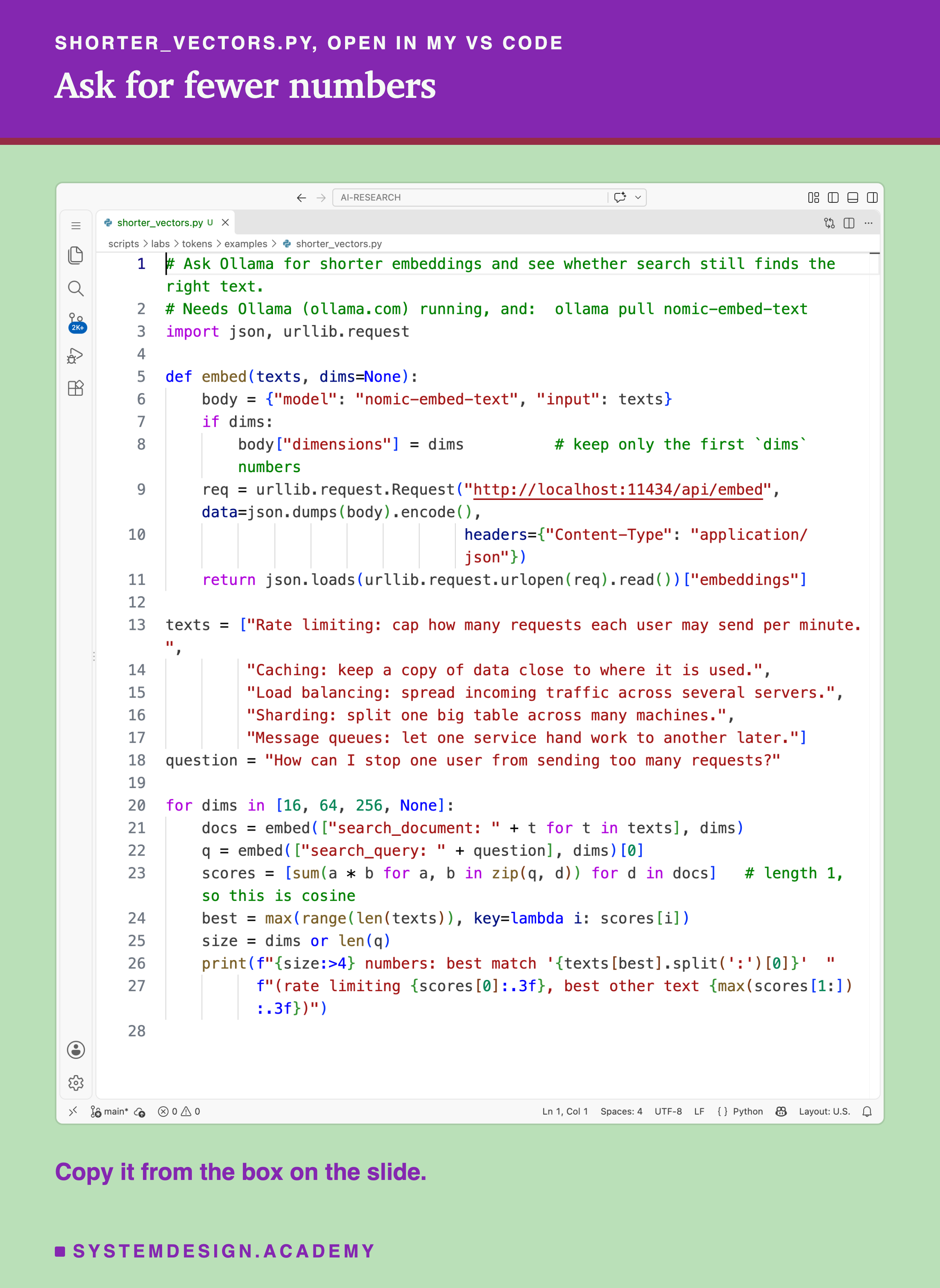
A real screenshot of shorter_vectors.py open in VS Code, 28 lines: an embed function that posts to Ollama's /api/embed with nomic-embed-text and adds a dimensions setting when one is given, five short texts about rate limiting, caching, load balancing, sharding and message queues, a question about stopping one user from sending too many requests, and a loop over 16, 64, 256 and full size that prints the best match and two scores.

And this is what it printed:

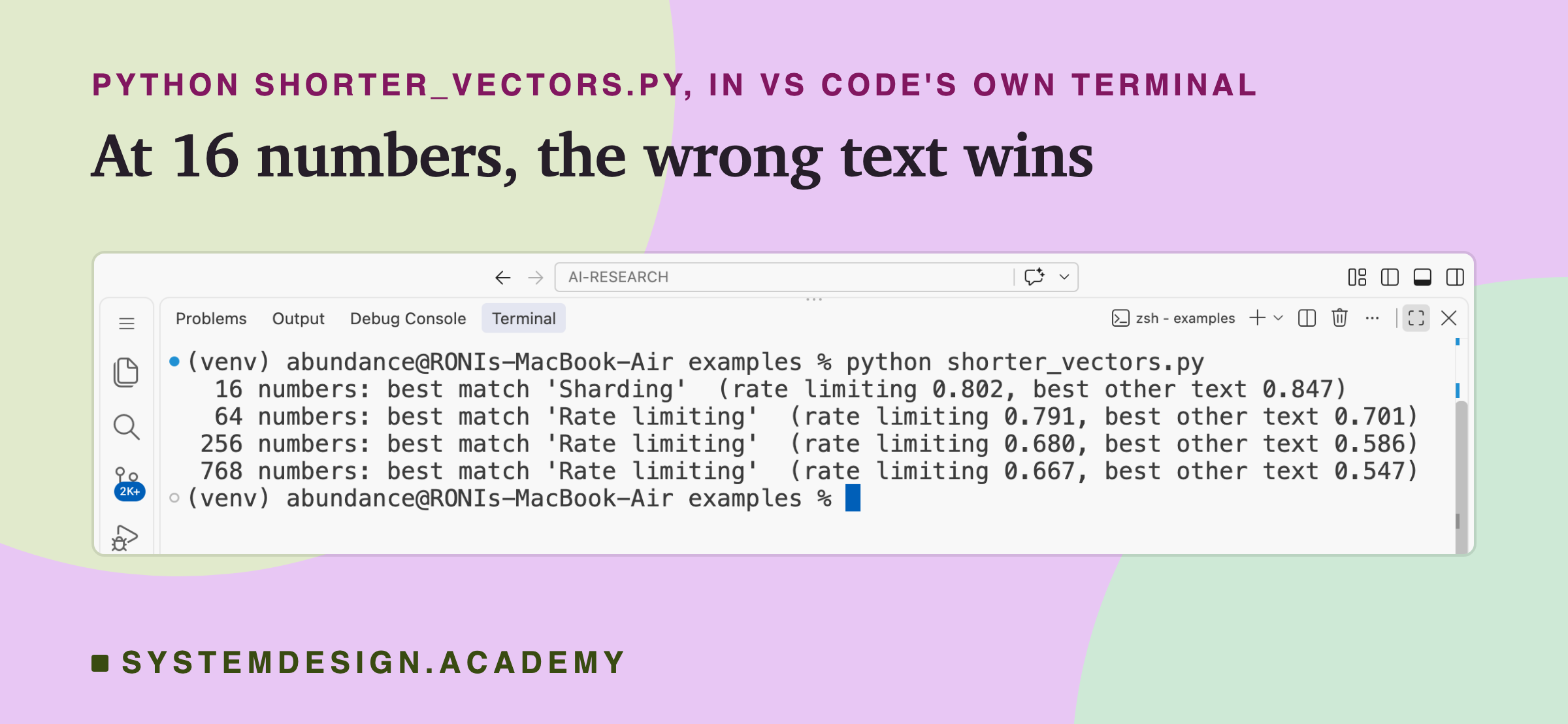
A real screenshot of VS Code's terminal after running python shorter_vectors.py. 16 numbers: best match Sharding, rate limiting 0.802, best other text 0.847. 64 numbers: best match Rate limiting, 0.791 against 0.701. 256 numbers: Rate limiting, 0.680 against 0.586. 768 numbers: Rate limiting, 0.667 against 0.547.

At 16 numbers, the search picked the text about sharding, 0.847 against 0.802 for . Sixteen numbers were too few to tell the topics apart. At 64, 256 and 768 numbers, rate limiting won.

Notice that the scores are higher with fewer numbers: 0.802 at 16, 0.667 at 768. With only a few numbers, every text looks a bit alike, so all the scores bunch up near the top. What matters is not the size of a score but which text scores highest, and by how much.
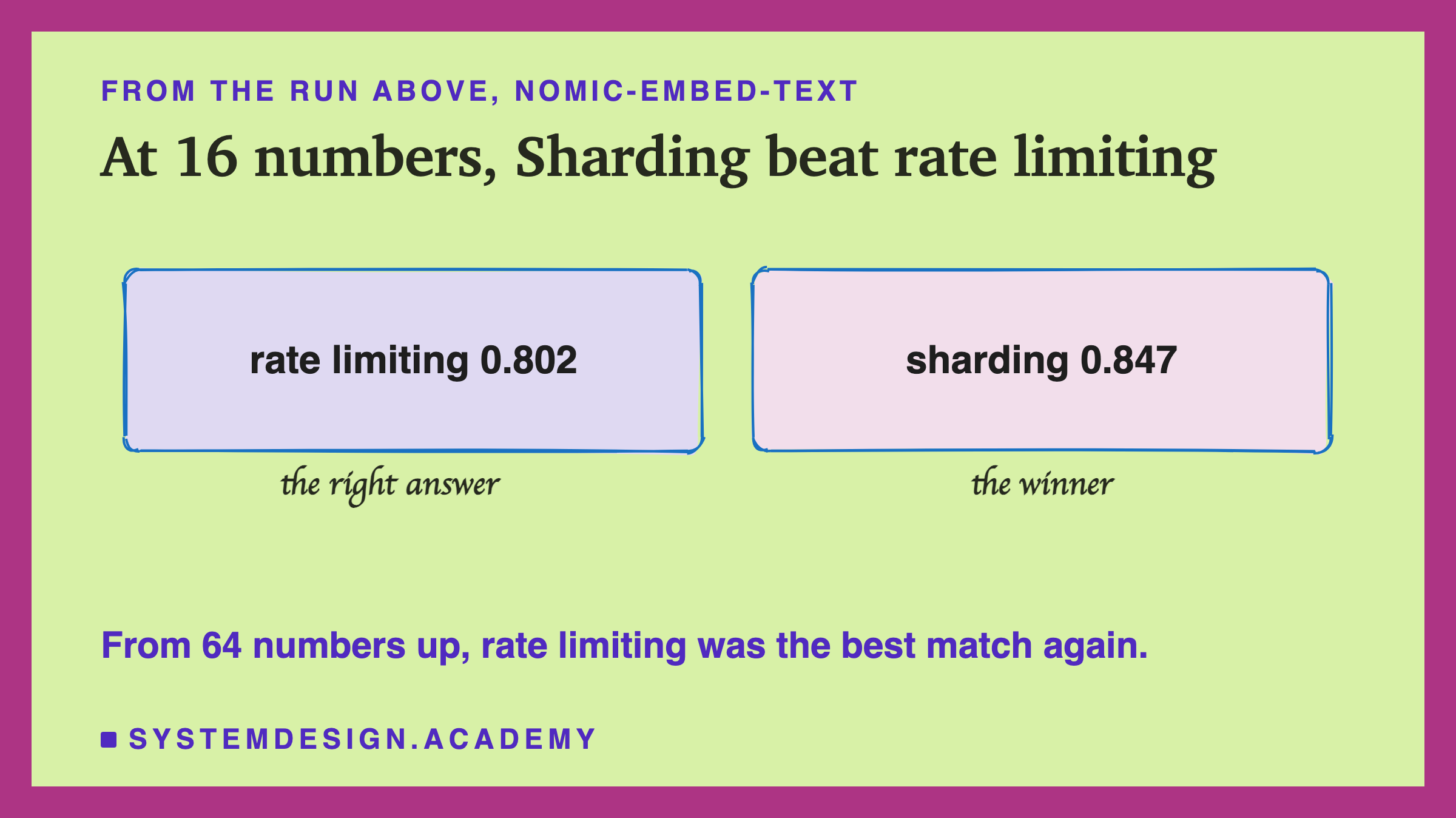
A hand-drawn pair of boxes: rate limiting 0.802, the right answer, and sharding 0.847, the winner, under the title at 16 numbers, Sharding beat rate limiting. A note says from 64 numbers up, rate limiting was the best match again.

The search_document: and search_query: labels at the start of each text are what nomic-embed-text expects, as lesson 3 showed.

To run it: install Ollama from ollama.com, open it and leave it running. Run ollama pull nomic-embed-text in a terminal, save the file below as , and run (on Windows: ). You need only Python 3. If you see "Connection refused", open the Ollama app first.

What the Setting Actually Does

Before trusting the setting, I checked what it does. I asked Ollama for all the numbers, cut them myself, and compared that with what Ollama returned for "dimensions": 256.
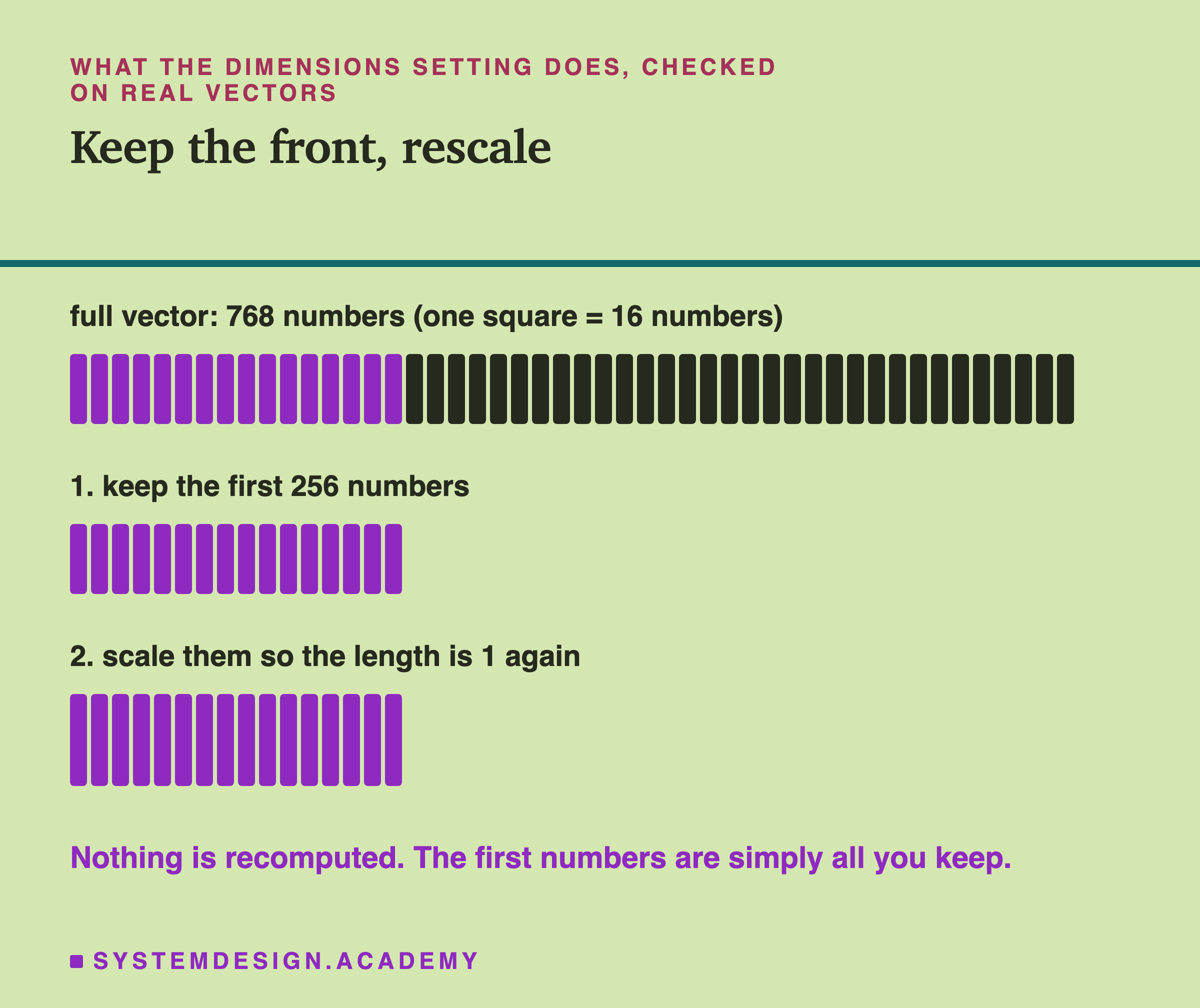
Under the heading what the dimensions setting does, checked on real vectors: a row of 48 squares standing for a full vector of 768 numbers, one square for 16 numbers, the first 16 squares highlighted. Step 1: keep the first 256 numbers. Step 2: scale them so the length is 1 again. A note says nothing is recomputed; the first numbers are simply all you keep.

They matched to within about one ten-millionth, for both models, on the 50 documents I checked. So the setting does two simple things: it keeps the first 256 numbers and throws the rest away, then it scales what is left back to length 1.
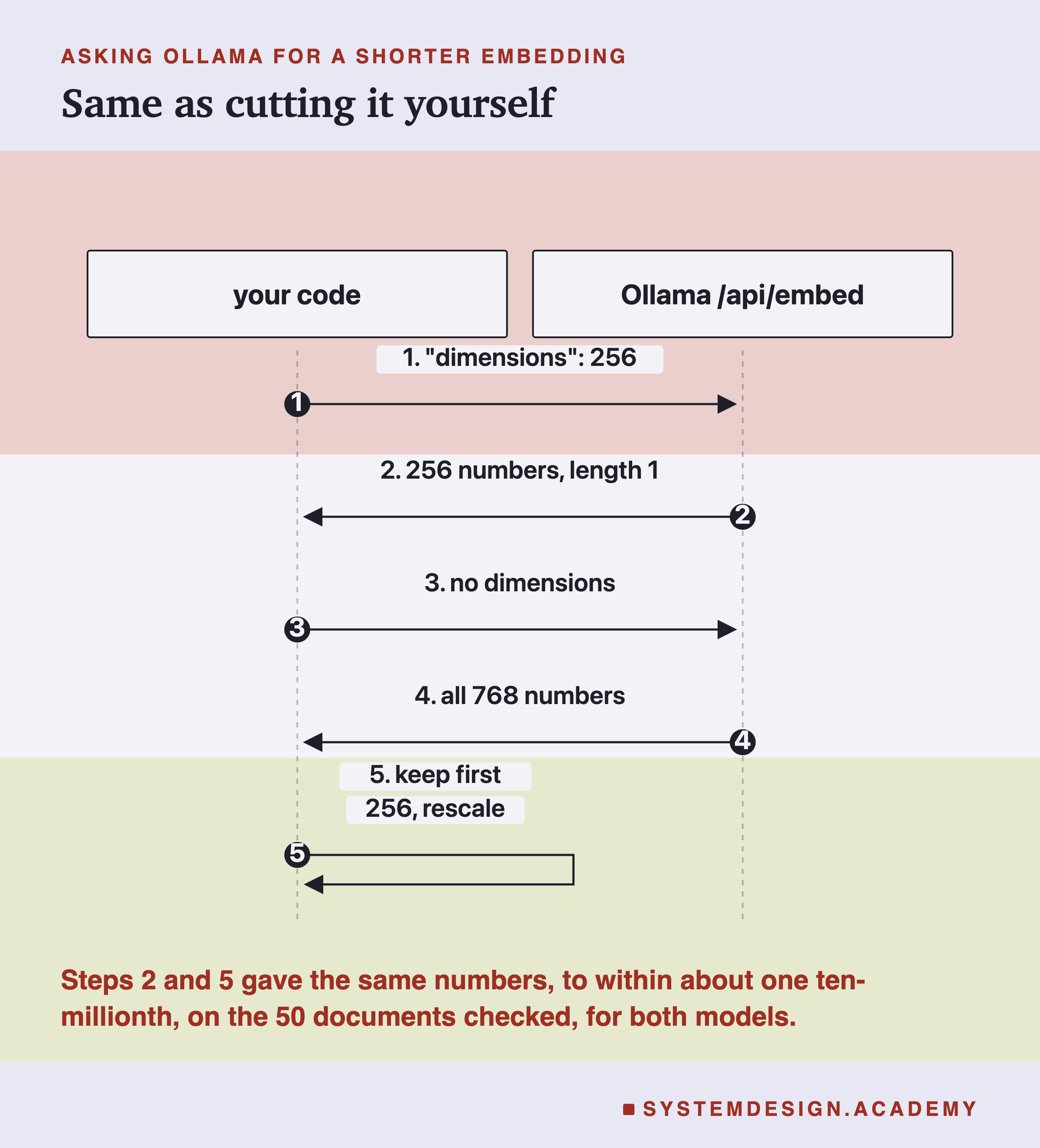
A sequence diagram between your code and Ollama's /api/embed. Step 1: send dimensions 256. Step 2: 256 numbers come back, at length 1. Step 3: send without dimensions. Step 4: all 768 numbers come back. Step 5: your code keeps the first 256 and rescales. A note says steps 2 and 5 gave the same numbers, to within about one ten-millionth, on the 50 documents checked, for both models.

The setting works on any model, including one never trained for it. That means the question "is a shorter good enough?" is really "how much of the meaning is left in the first numbers?"

The Real Test
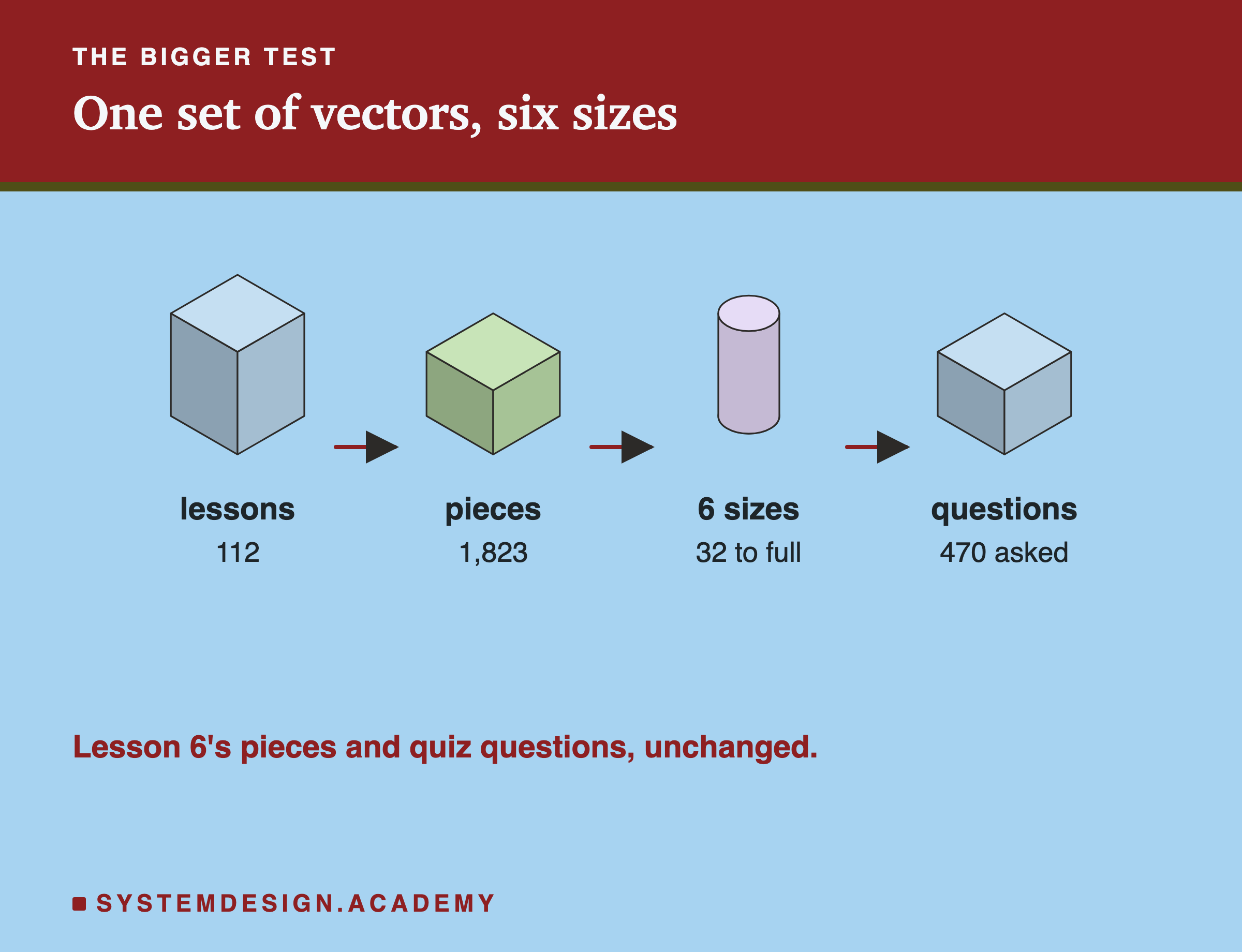
An isometric row of four blocks joined by arrows: 112 lessons, 1,823 pieces, six sizes from 32 numbers to full size, and 470 questions asked. A note says these are lesson 6's pieces and quiz questions, unchanged.

This uses exactly the setup from lesson 6 (splitting text into pieces):

  • Documents: 112 lessons of this AI course, cut into 1,823 pieces of 200 words.
  • Questions: the 470 quiz questions inside those lessons. The right answer is the lesson a question came from. Each lesson gets the score of its best-matching piece.
  • Sizes: each vector cut to its first 32, 64, 128, 256 or 512 numbers, or kept at full size. Every size comes from the same full vectors.
  • Two models: nomic-embed-text and bge-m3.

As a check, bge-m3 at full size should repeat lesson 6's result, and it did: 356 ranked first and 439 in the top 5.

Here is the lab's report, from the terminal. It also includes a small second test, lesson 4's 60 searches in six languages.
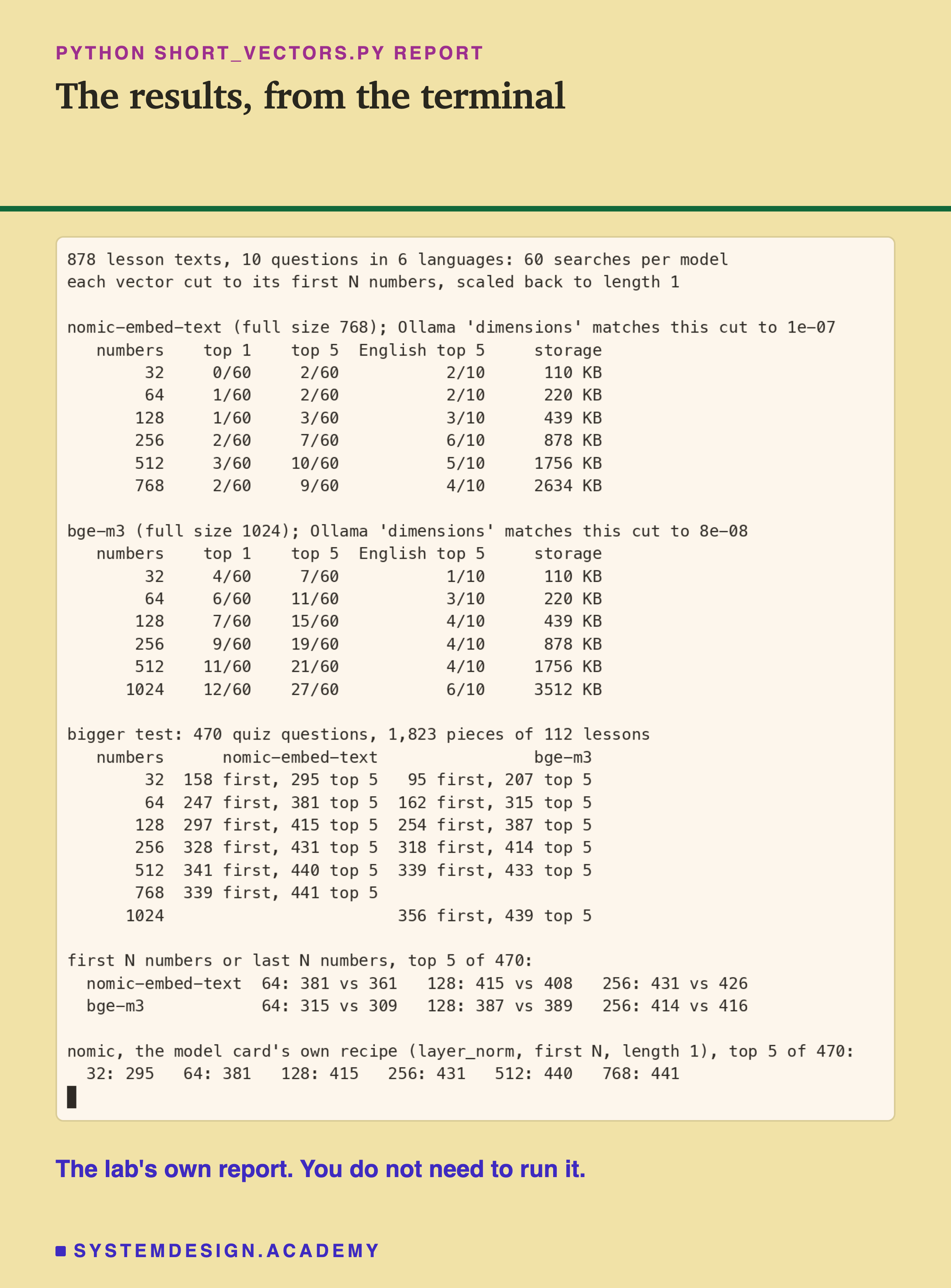
A real terminal recording of short_vectors.py's report. The first two tables are lesson 4's 60 searches: for nomic-embed-text, top 5 went 2, 2, 3, 7, 10 and 9 of 60 at 32, 64, 128, 256, 512 and 768 numbers; for bge-m3, 7, 11, 15, 19, 21 and 27 of 60 at 32 up to 1,024, with storage from 110 KB to 3,512 KB. The next table is the bigger test on 470 quiz questions and 1,823 pieces of 112 lessons: nomic-embed-text 158 first and 295 top 5 at 32 numbers, 247 and 381 at 64, 297 and 415 at 128, 328 and 431 at 256, 341 and 440 at 512, 339 and 441 at 768; bge-m3 95 and 207 at 32, 162 and 315 at 64, 254 and 387 at 128, 318 and 414 at 256, 339 and 433 at 512, 356 and 439 at 1,024. Then first N against last N numbers, top 5: nomic 381 against 361 at 64, 415 against 408 at 128, 431 against 426 at 256; bge-m3 315 against 309, 387 against 389, 414 against 416. Last, nomic with its model card's own recipe: 295, 381, 415, 431, 440 and 441, the same as above.

nomic Loses Little, bge-m3 Loses More
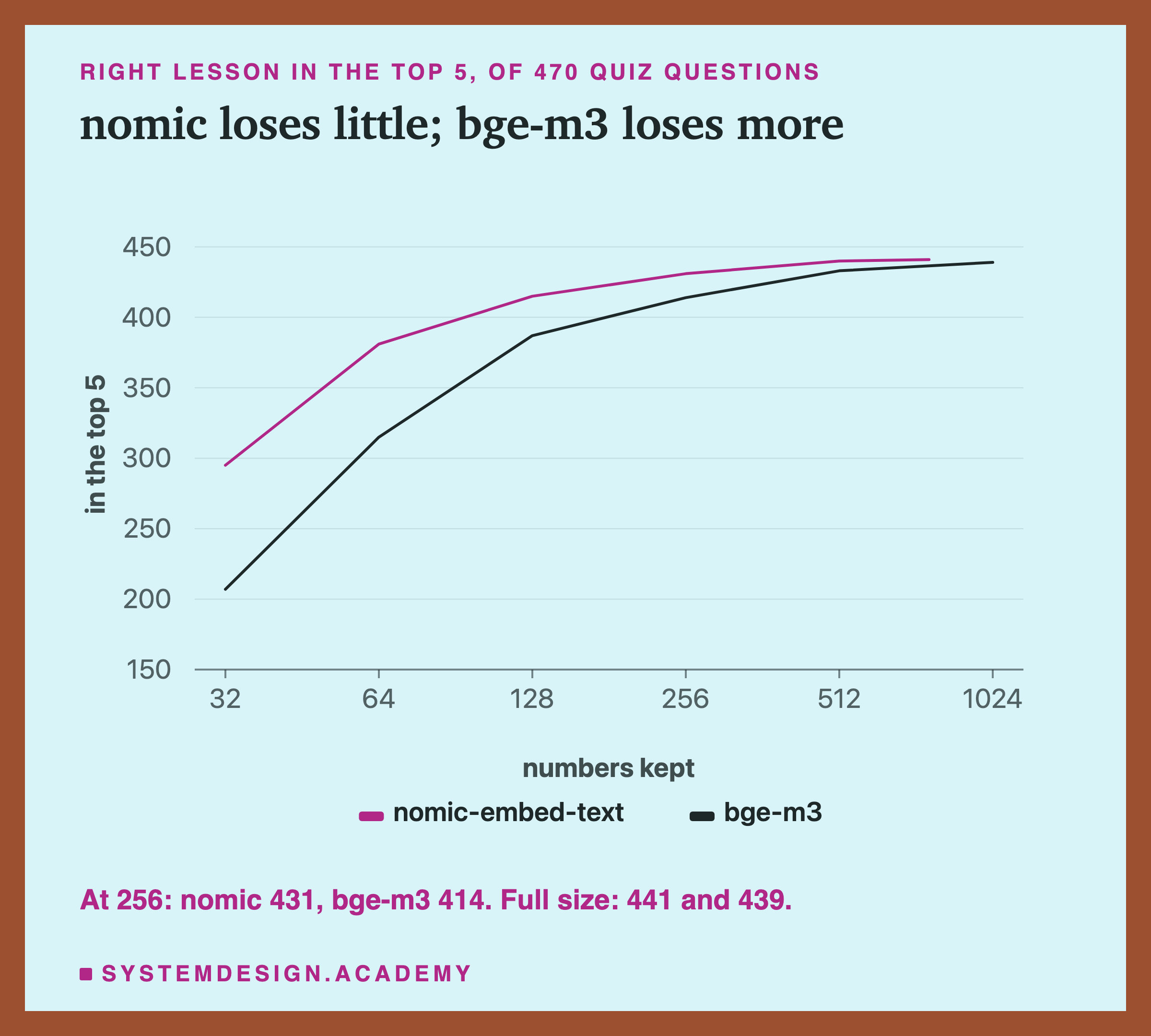
A line chart of the right lesson in the top 5, out of 470 quiz questions, against the numbers kept, from 32 to 1,024. Titled nomic loses little, bge-m3 loses more. The nomic-embed-text line starts at 295 at 32 numbers, rises to 415 at 128 and 431 at 256, and reaches 441 at its full 768. The bge-m3 line starts lower, at 207, reaches 387 at 128 and 414 at 256, and ends at 439 at 1,024. A note repeats: at 256, nomic 431 and bge-m3 414; full size 441 and 439.

  • nomic-embed-text at 256 numbers, a third of its size, found the right lesson in the top 5 for 431 questions. At full size: 441. That is 10 fewer.
  • bge-m3 at 256 numbers, a quarter of its size: 414. At full size: 439. That is 25 fewer.

These are totals. Question by question, nomic at 256 missed 13 that full size found and found 3 that full size missed. bge-m3 missed 29 and gained 4.
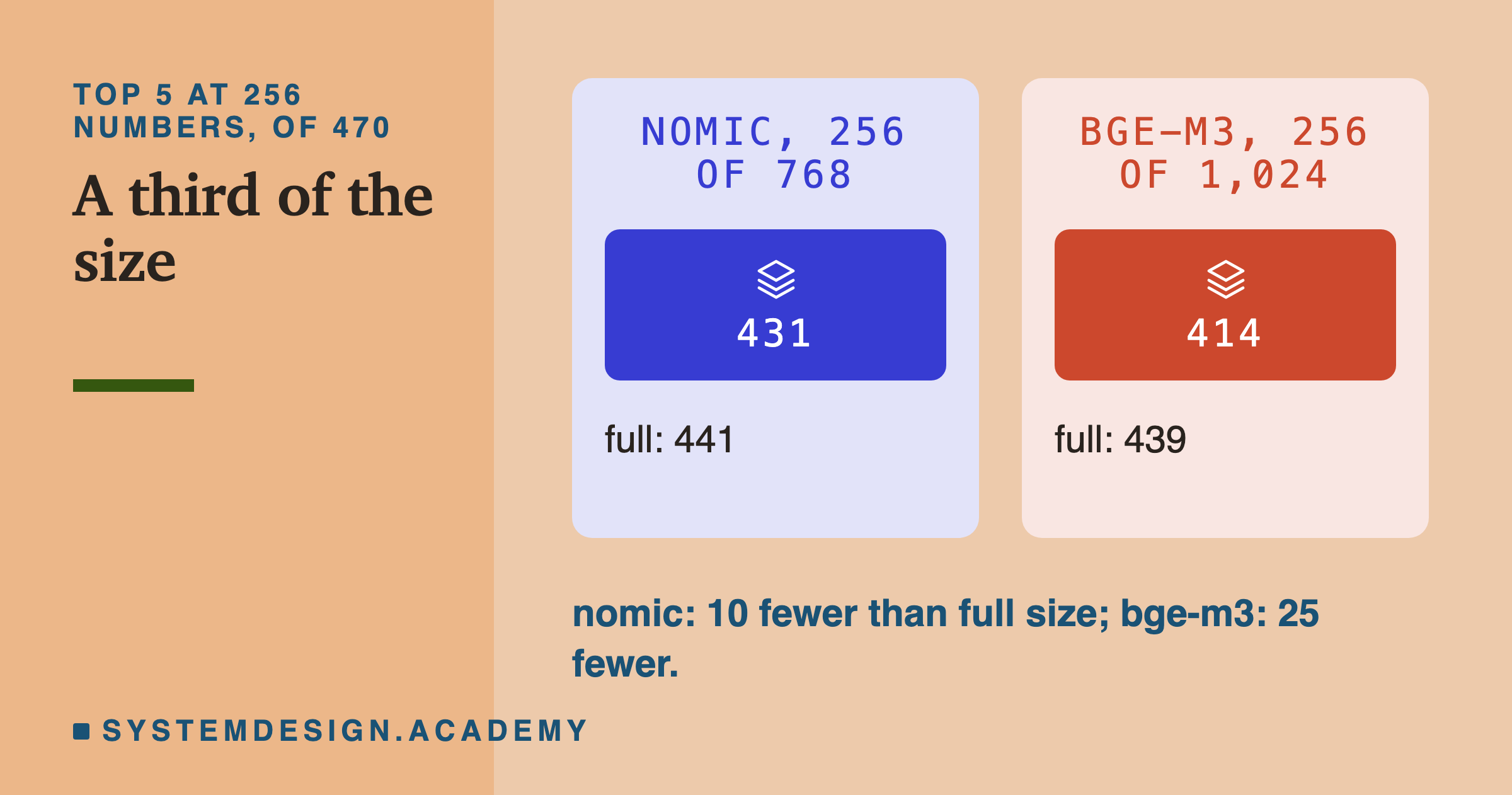
Two panels, top 5 at 256 numbers, of 470. nomic at 256 of 768: 431, full 441. bge-m3 at 256 of 1,024: 414, full 439. A note says nomic had 10 fewer than full size and bge-m3 25 fewer.

Below 256, the gap grows. At 64 numbers, nomic still found 381 and bge-m3 315. At 32, it was 295 against 207.
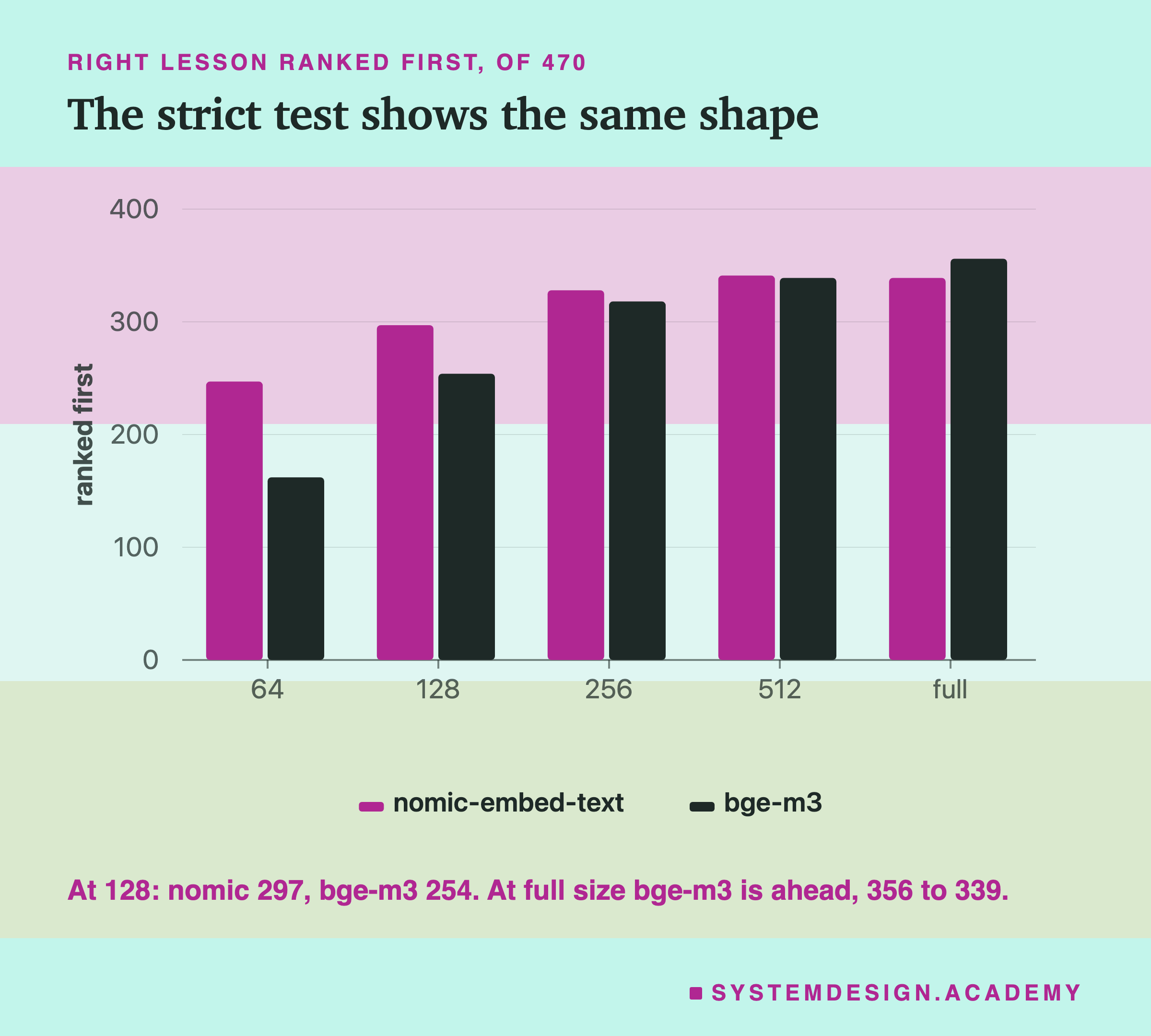
A bar chart of the right lesson ranked first, of 470, at 64, 128, 256, 512 numbers and full size, for both models. nomic is ahead at every cut size; at full size bge-m3 is ahead. A note says at 128, nomic 297 and bge-m3 254; at full size bge-m3 leads, 356 to 339.

The stricter test, ranked first, shows the same shape. And it adds something worth noticing: at full size, bge-m3 is the better model here, 356 to 339. Cut both to 128 numbers and nomic is well ahead, 297 to 254. Which model is "better" depends on how short you need the vectors to be.

Tiny differences, like nomic's 341 at 512 against 339 at full size, are noise. Neither model got better by being cut.

One fairness point. At the same number of numbers, 256, nomic keeps a third of itself and bge-m3 only a quarter. Compared by the share kept, the two are closer: bge-m3 at half its size (512) had 6 fewer than full, nomic at a third (256) had 10 fewer. For storage, though, what you pay for is the number of numbers, so the equal-number comparison is the one that matters for cost.

Is the Meaning at the Front?

The model card for nomic-embed-text v1.5 says, in its title, that it was trained to be cut:

A real capture of the Hugging Face model card for nomic-embed-text-v1.5, showing the title: nomic-embed-text-v1.5, Resizable Production Embeddings with Matryoshka Representation Learning, and links to the blog, technical report, AWS SageMaker and Nomic Platform. A note says the model card was captured as it is.

"Resizable" and "Matryoshka" mean it was trained so that the first numbers work on their own, like the smallest doll. bge-m3's model card says nothing about being cut. That does not prove how it was trained, only that its makers do not advertise it.

But is the model I tested really v1.5? The name nomic-embed-text does not tell you which version you have. In Ollama, a tag is the part after the colon, like :v1.5, and every model has an ID made from its contents. So I pulled the v1.5 tag and compared the IDs:
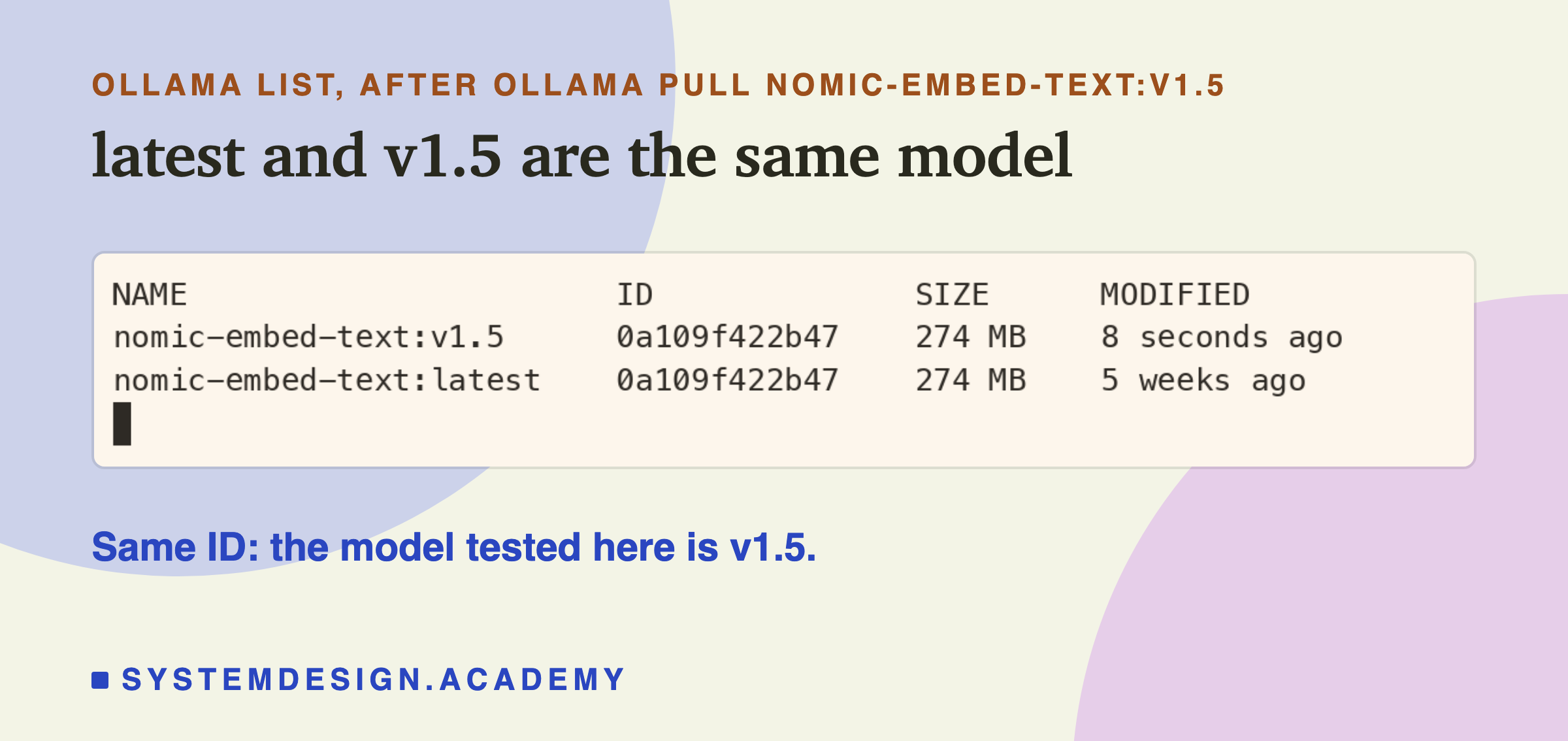
A real terminal recording of ollama list: nomic-embed-text:v1.5 with ID 0a109f422b47 and size 274 MB, and nomic-embed-text:latest with the same ID 0a109f422b47 and size 274 MB. A note says same ID: the model tested here is v1.5.

Same ID, 0a109f422b47. They are the same model.
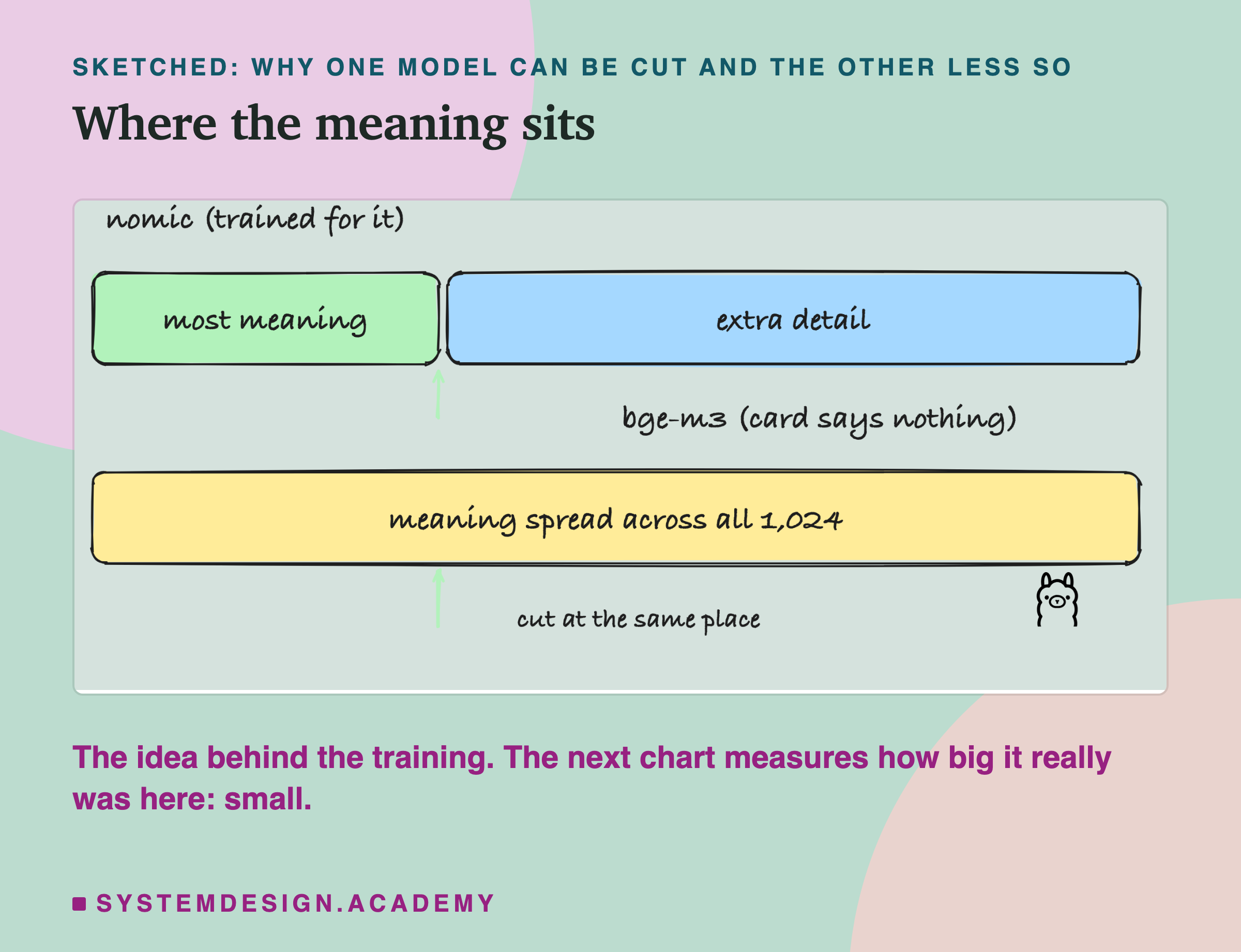
A hand-drawn sketch of where the meaning sits. nomic, trained for it: a short box, most meaning, then a long box, extra detail. bge-m3, whose card says nothing: one long box, meaning spread across all 1,024. Two arrows mark a cut at the same place on both. The Ollama logo sits below. A note says this is the idea behind the training, and the next chart measures how big it really was here: small.

That is the idea. To see whether it is true here, I ran the same 470-question test keeping the last N numbers instead of the first. If the meaning is packed at the front, the first numbers should win clearly.
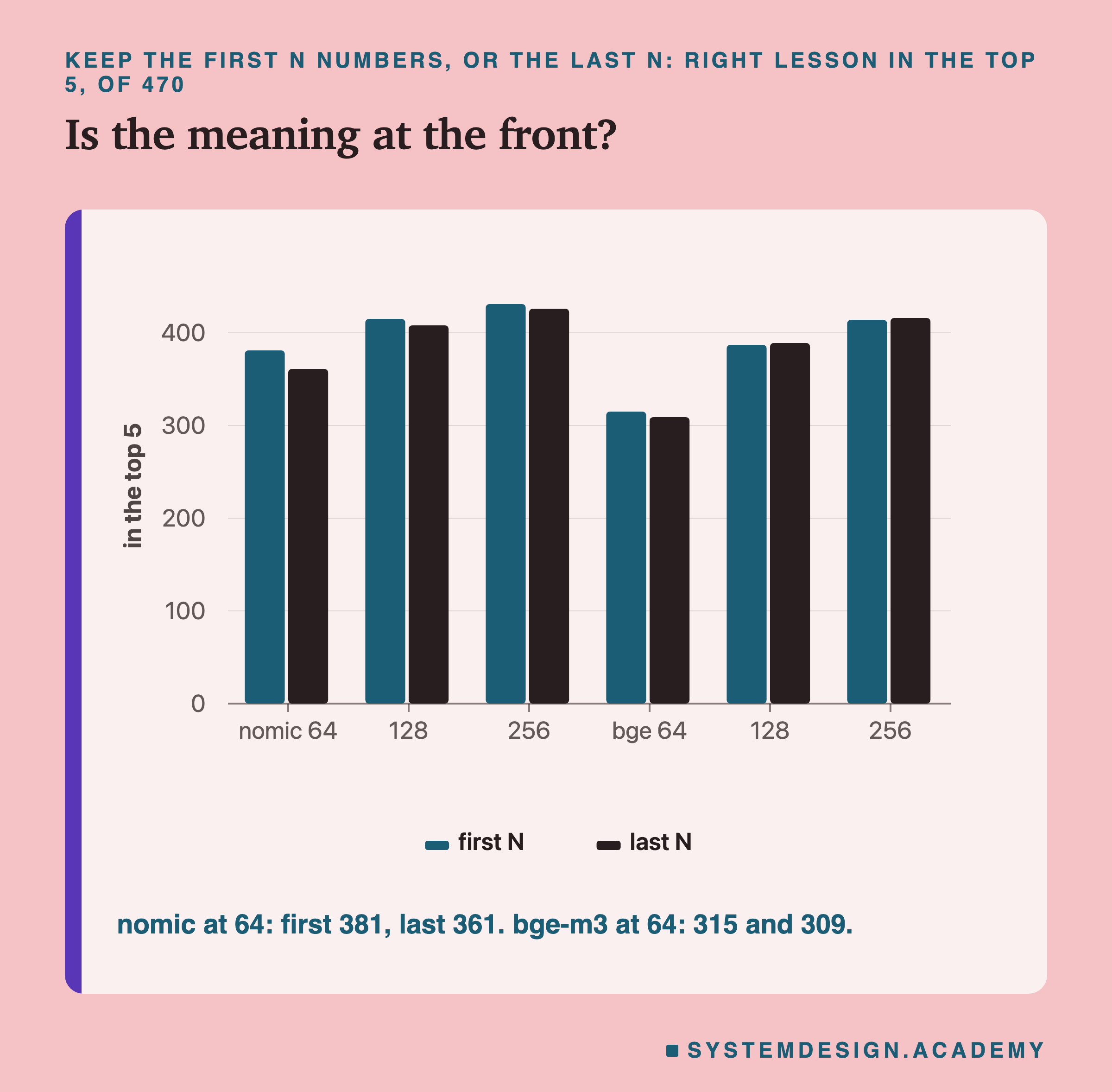
A bar chart, keep the first N numbers or the last N, right lesson in the top 5 of 470, axis from zero. nomic at 64: first 381, last 361; at 128: 415 and 408; at 256: 431 and 426. bge-m3 at 64: 315 and 309; at 128: 387 and 389; at 256: 414 and 416. The bars in each pair are close to the same height.

The Small Test Agreed, but Jumps Around

Lesson 4's 60 searches in six languages ran too, with the same cuts.
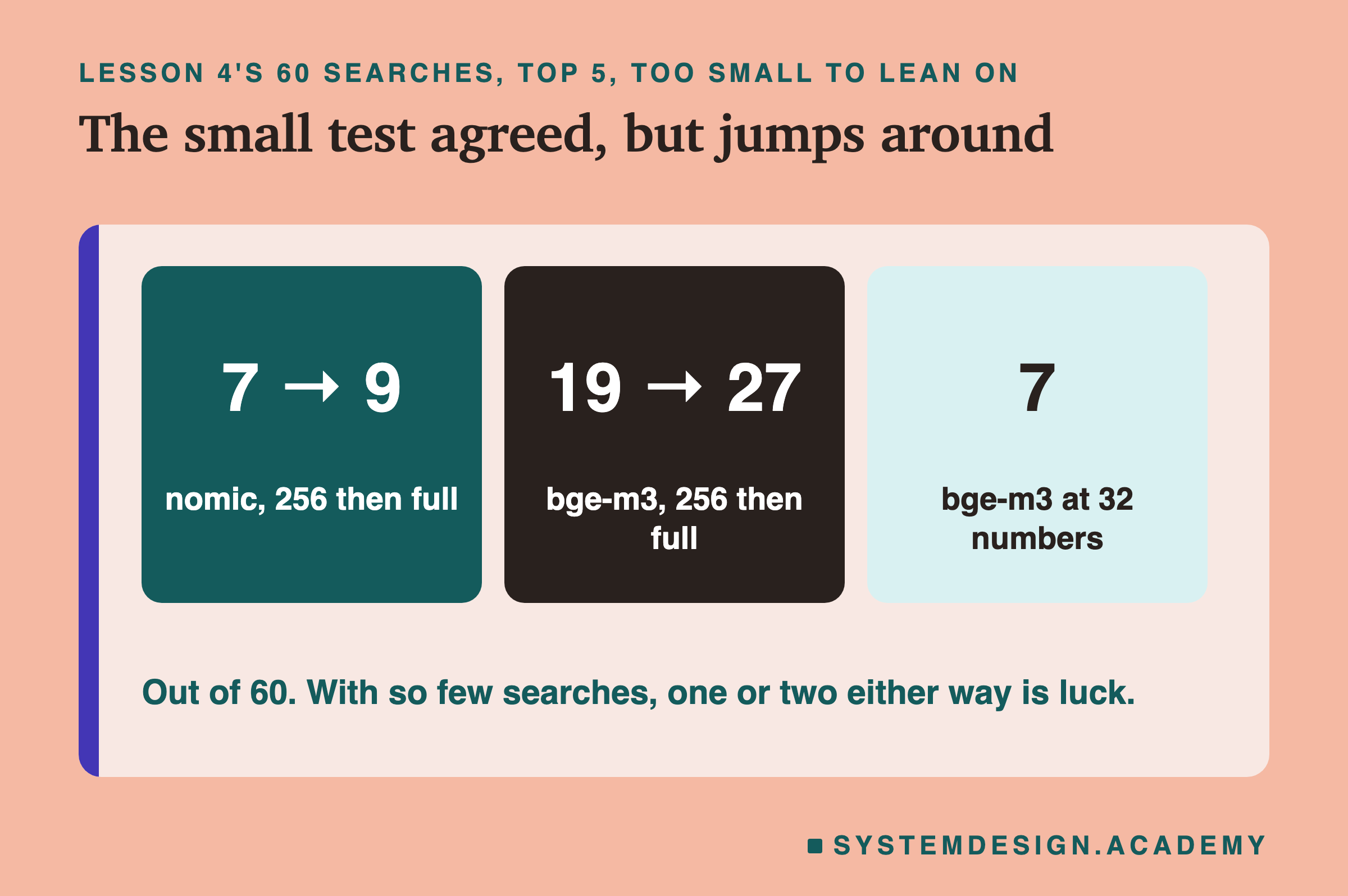
Titled the small test agreed, but jumps around. Three boxes from lesson 4's 60 searches, top 5. nomic, 256 then full: 7 then 9. bge-m3, 256 then full: 19 then 27. bge-m3 at 32 numbers: 7. A note says out of 60, and with so few searches, one or two either way is luck.

The direction was the same: bge-m3 fell from 27 to 19 at 256 numbers, and to 7 at 32. But with only 60 searches, and only 10 in English, the numbers jump around. For example, nomic's English searches found 6 of 10 at 256 numbers and 4 of 10 at full size. That is luck, not an improvement. This is why the lesson leans on the 470-question test.

What You Save
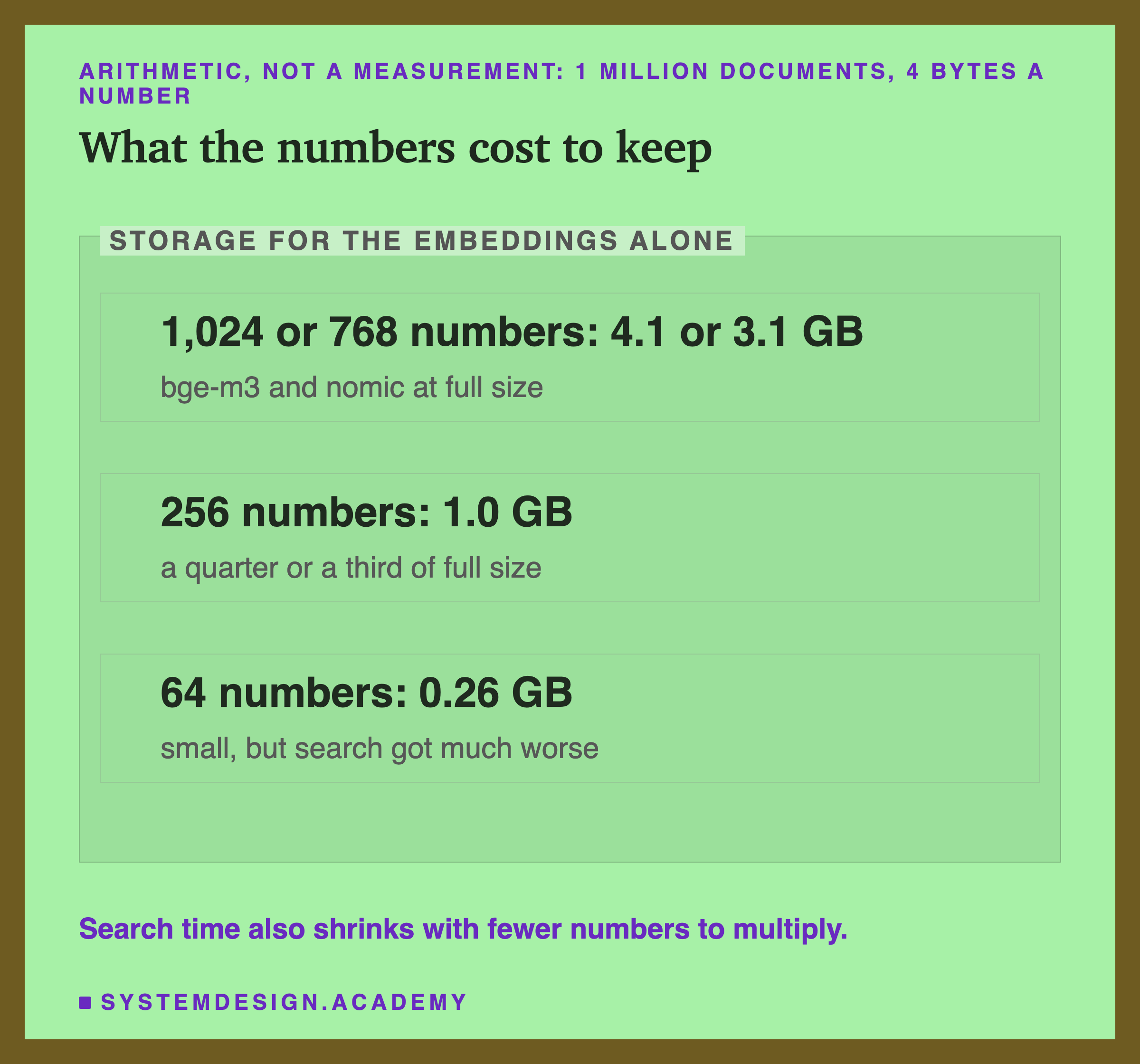
Storage for the embeddings alone, 1 million documents at 4 bytes a number, marked as arithmetic and not a measurement. 1,024 or 768 numbers: 4.1 or 3.1 GB, bge-m3 and nomic at full size. 256 numbers: 1.0 GB, a quarter or a third of full size. 64 numbers: 0.26 GB, small, but search got much worse. A note says search time also shrinks with fewer numbers to multiply.

This is simple arithmetic, not a measurement: 1 million documents times the number of numbers times 4 bytes.

  • Full size: 3.1 GB for nomic (768 numbers), 4.1 GB for bge-m3 (1,024).
  • 256 numbers: 1.0 GB.

Comparing a question with each document also means multiplying fewer numbers. How much faster that makes a real database, this lesson did not measure.

Count It Yourself

This box holds the real ranks from the test: for each of the 470 questions, where the right lesson came, at 64 numbers, 256 numbers and full size, for both models. Press Run. Then change SIZE to "64" or "full", and TOP to 1.

When to Use Shorter Embeddings
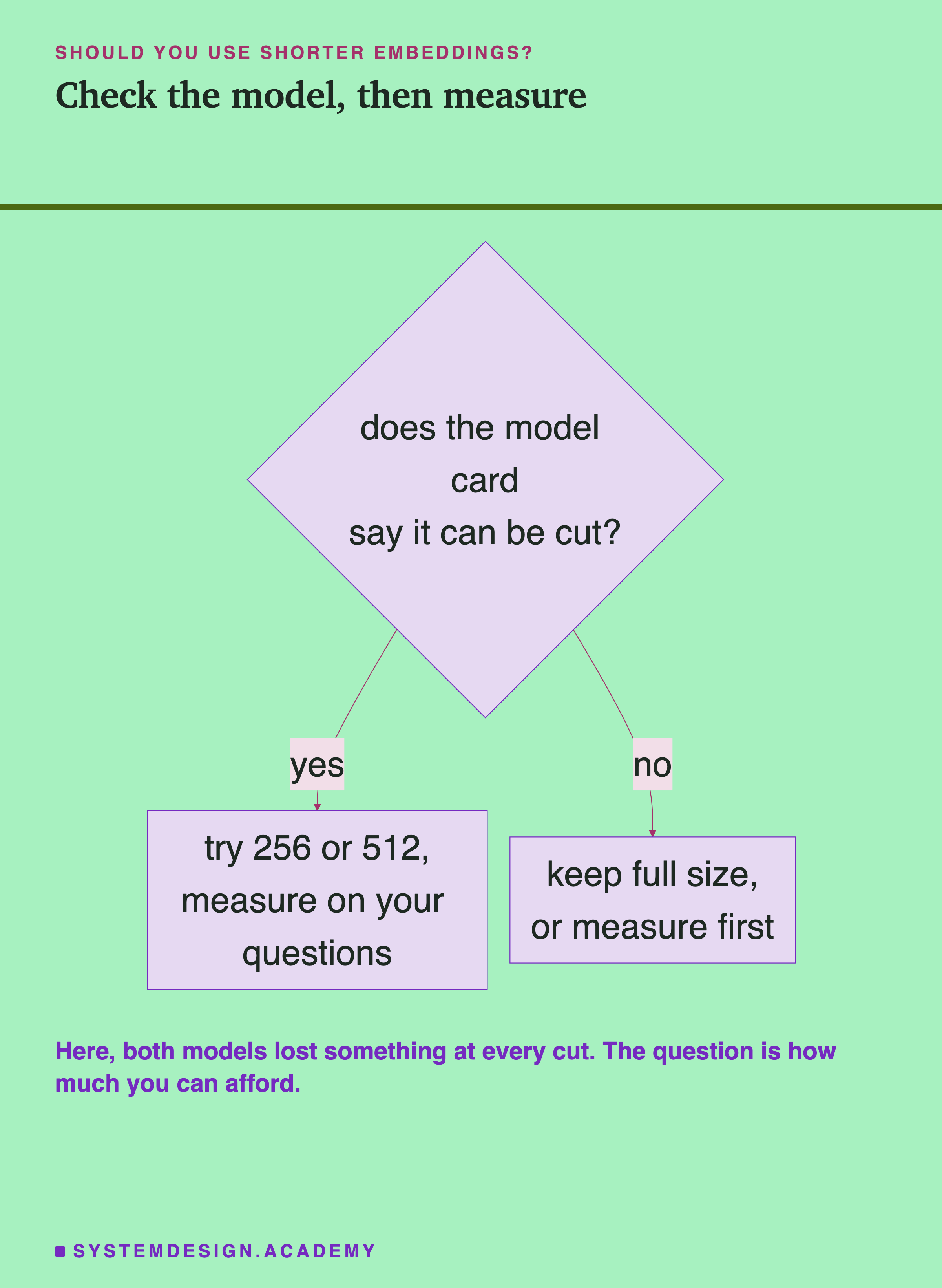
A flowchart: does the model card say it can be cut? If yes: try 256 or 512 and measure on your questions. If no: keep full size, or measure first. A note says here both models lost something at every cut; the question is how much you can afford.

  1. Read the model card. Look for words like Matryoshka or resizable, and for the exact recipe it recommends. If the card says nothing, do not assume the first numbers matter most.
  2. Measure on your own questions. You need a set of questions where you already know the right document, like the quiz questions here. Compare full size against 256 and 512, as this lesson did. Every cut cost something here. You decide how much you can afford.
  3. Cut documents and questions the same way. A 256-number question cannot be compared with a 768-number document.
  4. Store the full vectors if you can. You can always cut later. But once you delete numbers, you must embed every document again to get them back.
Two cards with logos: Ollama running nomic and bge-m3, and NumPy cutting, rescaling and ranking. A note says it is free and local.

What This Lesson Measured, and What It Did Not
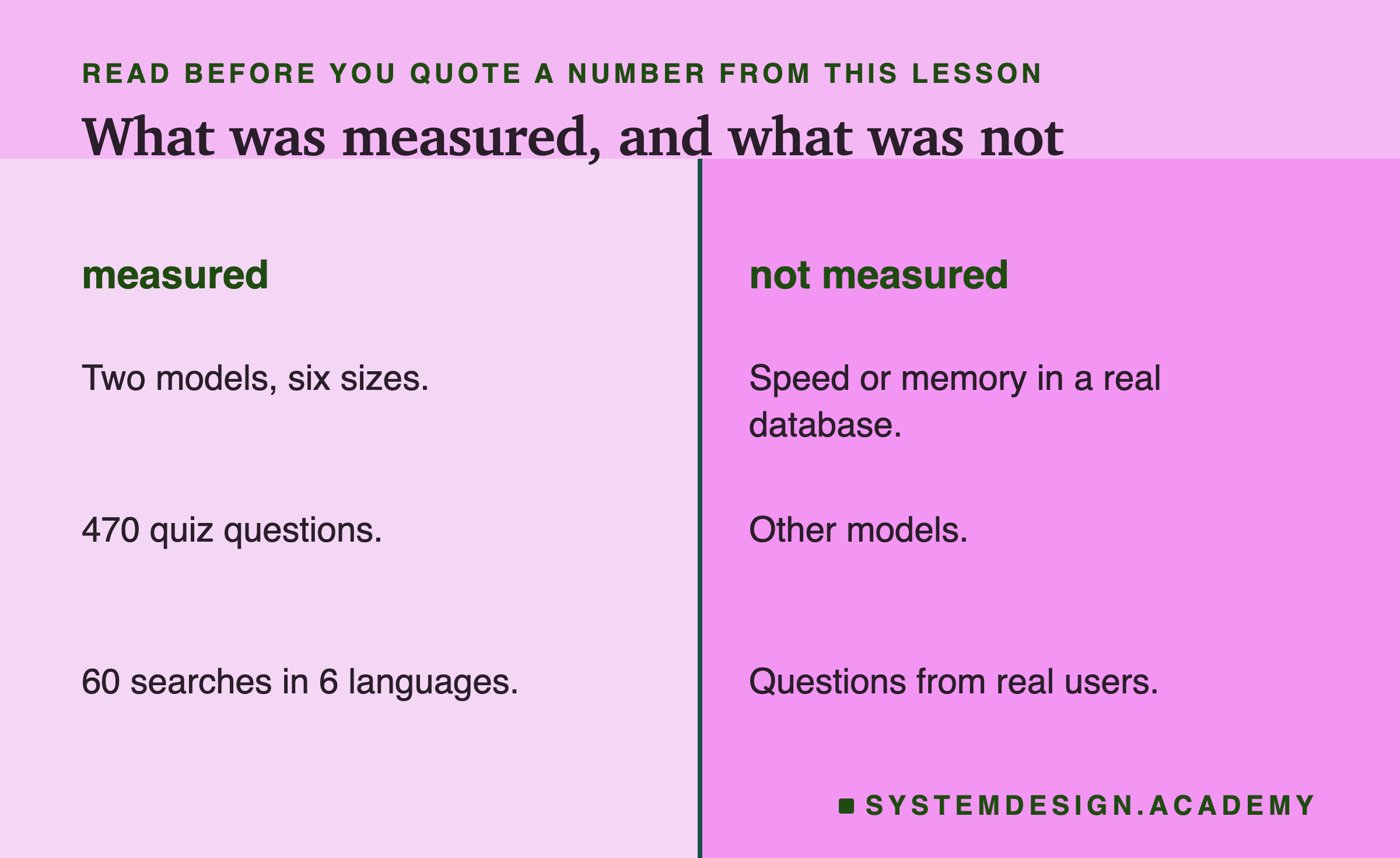
Two columns. Measured: two models and six sizes, 470 quiz questions, 60 searches in 6 languages. Not measured: speed or memory in a real database, other models, questions from real users.

Measured: two models, six sizes, 470 quiz questions over 1,823 pieces, and 60 short searches in six languages.

Not measured: speed and memory inside a real (a database built to store embeddings and search them), other models, and questions written by real users. The quiz questions were written by the same author as the lessons, which probably makes them easier to match than real questions.

What to Do Next
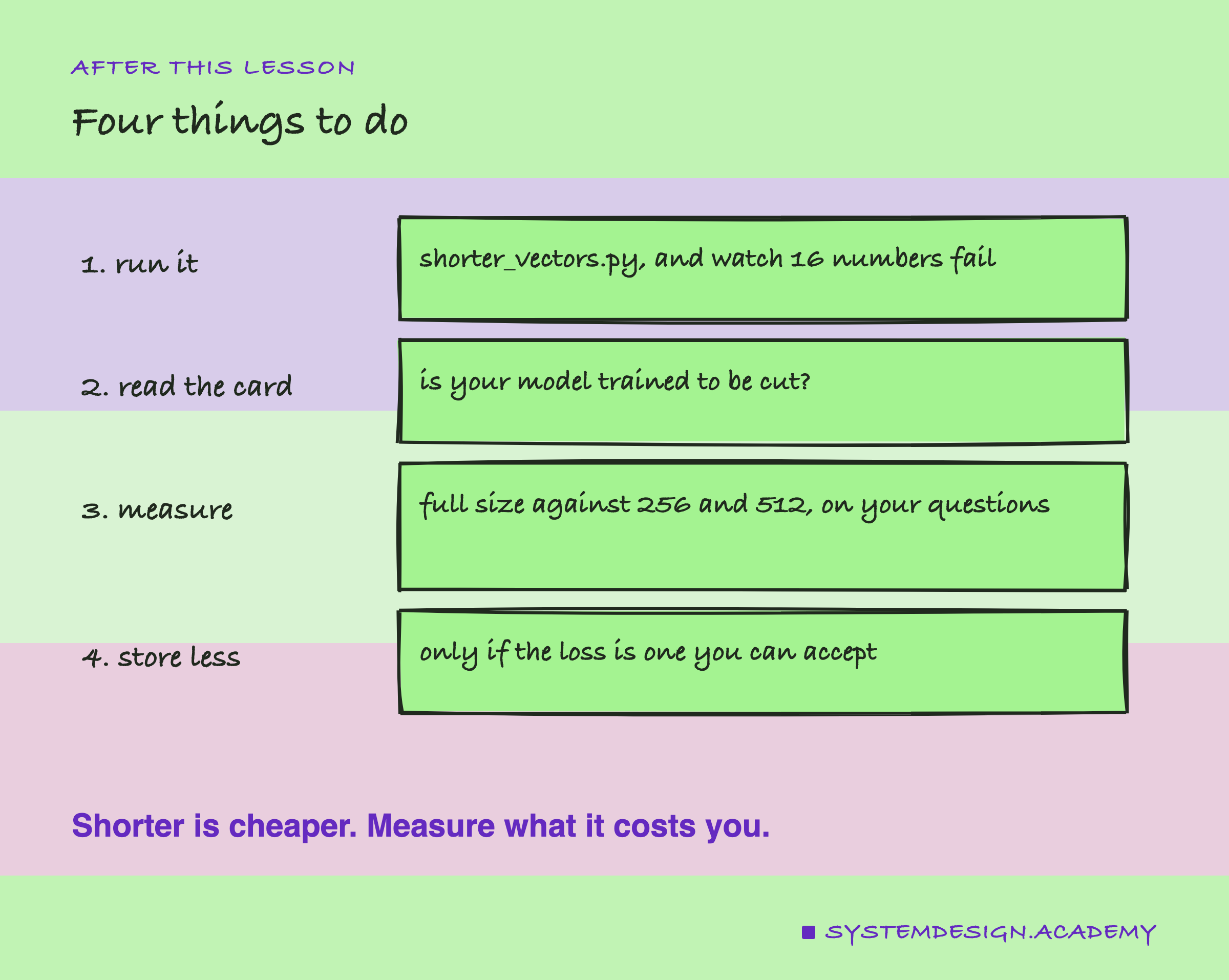
A hand-drawn list of four things to do: run shorter_vectors.py and watch 16 numbers fail; read the model card to see whether it was trained to be cut; measure full size against 256 and 512 on your questions; and store less only if the loss is one you can accept. A note says shorter is cheaper, so measure what it costs you.

  1. Run shorter_vectors.py and watch 16 numbers pick the wrong text.
  2. Read the model card of the model you use.
  3. Measure full size against 256 and 512 on your own questions.
  4. Store less only when the loss is one you can accept.
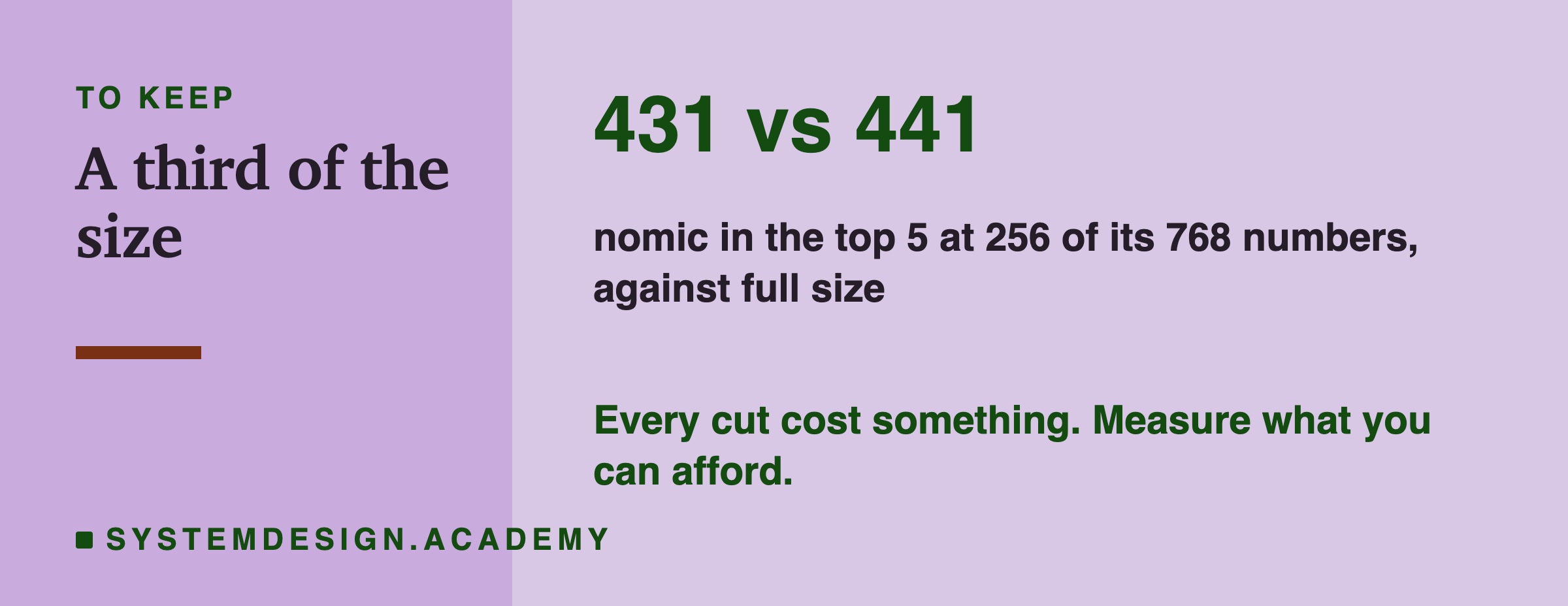
The number to keep: 431 against 441, nomic in the top 5 at 256 of its 768 numbers against full size. A note says every cut cost something; measure what you can afford.

Knowledge Check

Knowledge Check

5 questions - Score 80% to pass

Q1

What does Ollama's "dimensions": 256 setting do to an embedding?

Q2

Keeping the first 64 numbers instead of the last 64 gave nomic 381 against 361 in the top 5, and bge-m3 315 against 309. What does that show?

Q3

At full size bge-m3 ranked the right lesson first 356 times and nomic 339 times. At 128 numbers it was 254 against 297. What does that tell you?

Q4

In the small example, 16 numbers picked the sharding text for a question about too many requests. What is the lesson from that?

Q5

You store 256-number embeddings for your documents. What must you do with each question?

shorter_vectors.py
python3 shorter_vectors.py
python shorter_vectors.py
# Ask Ollama for shorter embeddings and see whether search still finds the right text.
# Needs Ollama (ollama.com) running, and:  ollama pull nomic-embed-text
import json, urllib.request

def embed(texts, dims=None):
    body = {"model": "nomic-embed-text", "input": texts}
    if dims:
        body["dimensions"] = dims          # keep only the first `dims` numbers
    req = urllib.request.Request("http://localhost:11434/api/embed", data=json.dumps(body).encode(),
                                 headers={"Content-Type": "application/json"})
    return json.loads(urllib.request.urlopen(req).read())["embeddings"]

texts = ["Rate limiting: cap how many requests each user may send per minute.",
         "Caching: keep a copy of data close to where it is used.",
         "Load balancing: spread incoming traffic across several servers.",
         "Sharding: split one big table across many machines.",
         "Message queues: let one service hand work to another later."]
question = "How can I stop one user from sending too many requests?"

for dims in [16, 64, 256, None]:
    docs = embed(["search_document: " + t for t in texts], dims)
    q = embed(["search_query: " + question], dims)[0]
    scores = [sum(a * b for a, b in zip(q, d)) for d in docs]   # length 1, so this is cosine
    best = max(range(len(texts)), key=lambda i: scores[i])
    size = dims or len(q)
    print(f"{size:>4} numbers: best match '{texts[best].split(':')[0]}'  "
          f"(rate limiting {scores[0]:.3f}, best other text {max(scores[1:]):.3f})")

Five texts and one question prove nothing on their own. They only show the idea. The real test comes next.

  • nomic: the first numbers did better, by 20 at 64 numbers and by 5 to 7 at 128 and 256. The training does what it says, but the effect here is small.
  • bge-m3: first and last made no difference. Its meaning is not packed at the front.
  • The surprise: nomic's last 64 numbers (361) still beat bge-m3's first 64 (315). So most of nomic's lead at small sizes is not about the front at all. Its numbers each seem to carry more of the whole meaning, and 64 is also a bigger share of 768 than of 1,024.

I also tried the exact recipe on nomic's model card, which adds a step called layer normalisation before cutting. It gave the same results at every size. The vectors I checked already averaged almost exactly zero, so that step barely changed them. Ollama's simpler cut is enough.