Cutting a Book Into Index Cards
Let me start with a picture.
You have a thick book and a stack of index cards. You copy the book onto the cards so you can find things fast. How much text goes on each card?
Put one sentence on each card and you get thousands of cards. Each card is sharp, but it has lost what comes before and after it. Put a whole chapter on each card and you get a few cards, each one a blur of many topics.

Search systems for AI apps face exactly this choice. Before they can search your documents, they cut them into pieces called chunks. Lesson 02 of this chapter drew search quality against chunk size as a hill. It was bad when chunks were tiny, best in the middle, and bad again when they were huge. It said the numbers were only illustrative, and it measured chunk size in tokens. This lab cuts by words, which are easier to count and check.
This lesson measures the real shape, on this course's own lessons, with the course's own quiz questions as the searches.
The Words You Need First
Please read this slide slowly if any word is new. Every slide after it uses these words.
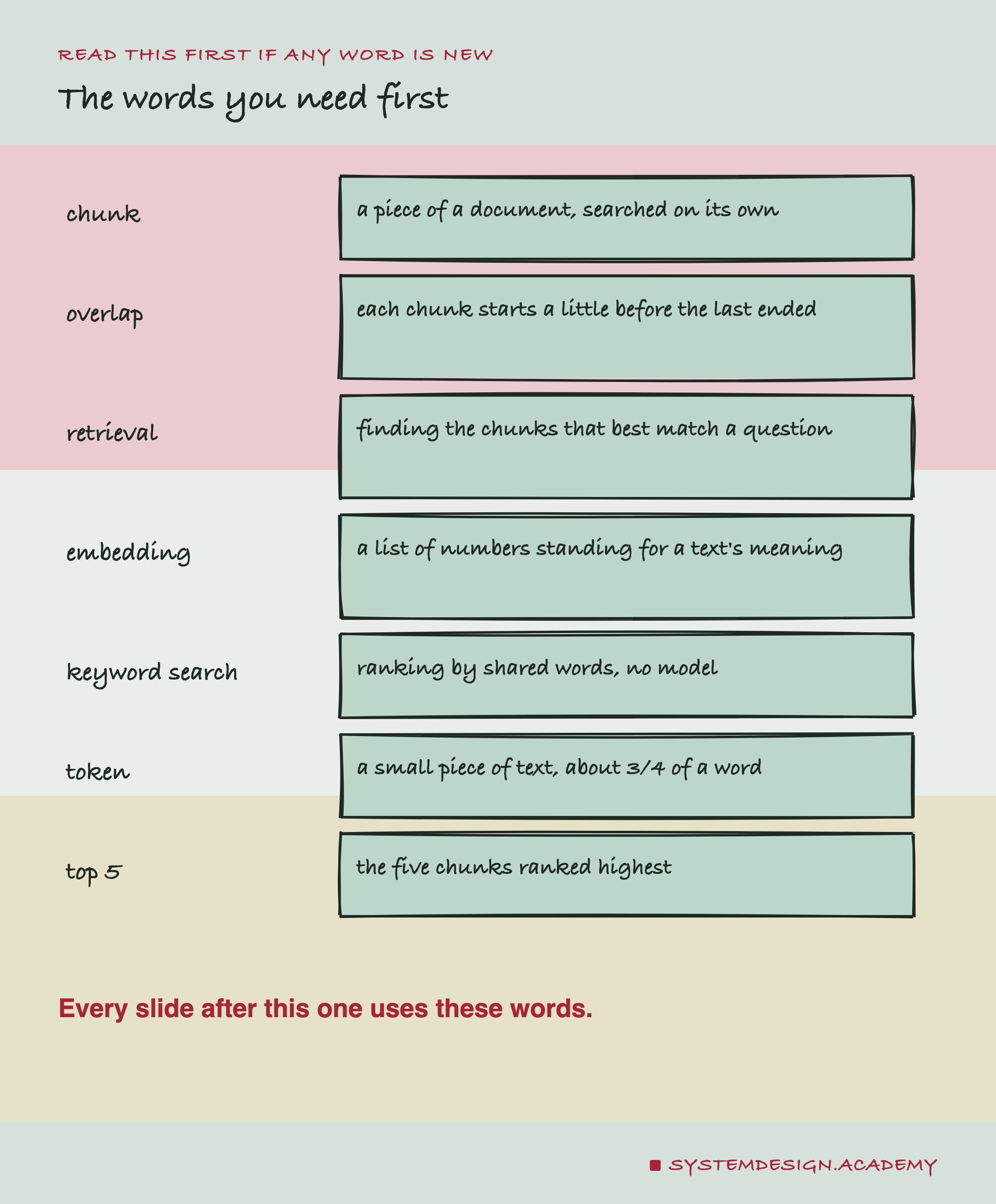
Chunk. A piece of a document, cut out so it can be searched on its own. Here, chunk size is counted in words.
Overlap. Letting each chunk start a little before the last one ended. Then a sentence cut in two at the edge still appears whole in one chunk.
Retrieval. Finding the chunks that best match a question. It is the "R" in RAG, : find the right text first, then let a model answer from it.
. A list of numbers that stands for the meaning of a piece of text. Texts with close meanings get close lists. An embedding model makes them; this lesson uses nomic-embed-text, a free model that runs on a laptop.
Keyword search. Ranking chunks by the words they share with the question, with no model at all. The version used here is called BM25, a standard recipe that gives more weight to rare words.
Model. A program that has learned a skill from a lot of example data. Here, the skill is turning text into an embedding.
Ollama. A free tool that runs models on your own computer. The lab sends it text, and it sends back embeddings.
Vector. Another name for one embedding, the list of numbers. A search system stores one vector for every chunk.
Cosine ranking. Comparing the question's vector with every chunk's vector. The chunks are ranked by how similar the two lists of numbers are. More similar lists mean closer meanings.
Token. A small piece of text a model reads. In plain English, a word is about 1.3 tokens, so a token is roughly three quarters of a word. Code and formatting use more tokens for each word.
Top 5 and top 1. The top 5 are the five chunks a search ranks highest. A search "hits" when at least one of them comes from the right lesson. The top 1 is stricter: only the single highest chunk counts.
Score. The share of questions that hit. A score of 0.905 means 90.5% of the questions found the right lesson.
Baseline. The simplest method you could use instead. A new method is only worth its cost if it beats the baseline.
By luck. When two methods are compared question by question, some questions go one way and some the other. The lab asks how often a split this uneven would happen if both methods were equally good. It is like counting heads in coin tosses. This is called a sign test. A result that luck gives only once in hundreds of tries is hard to explain by luck.
How the Lab Was Built
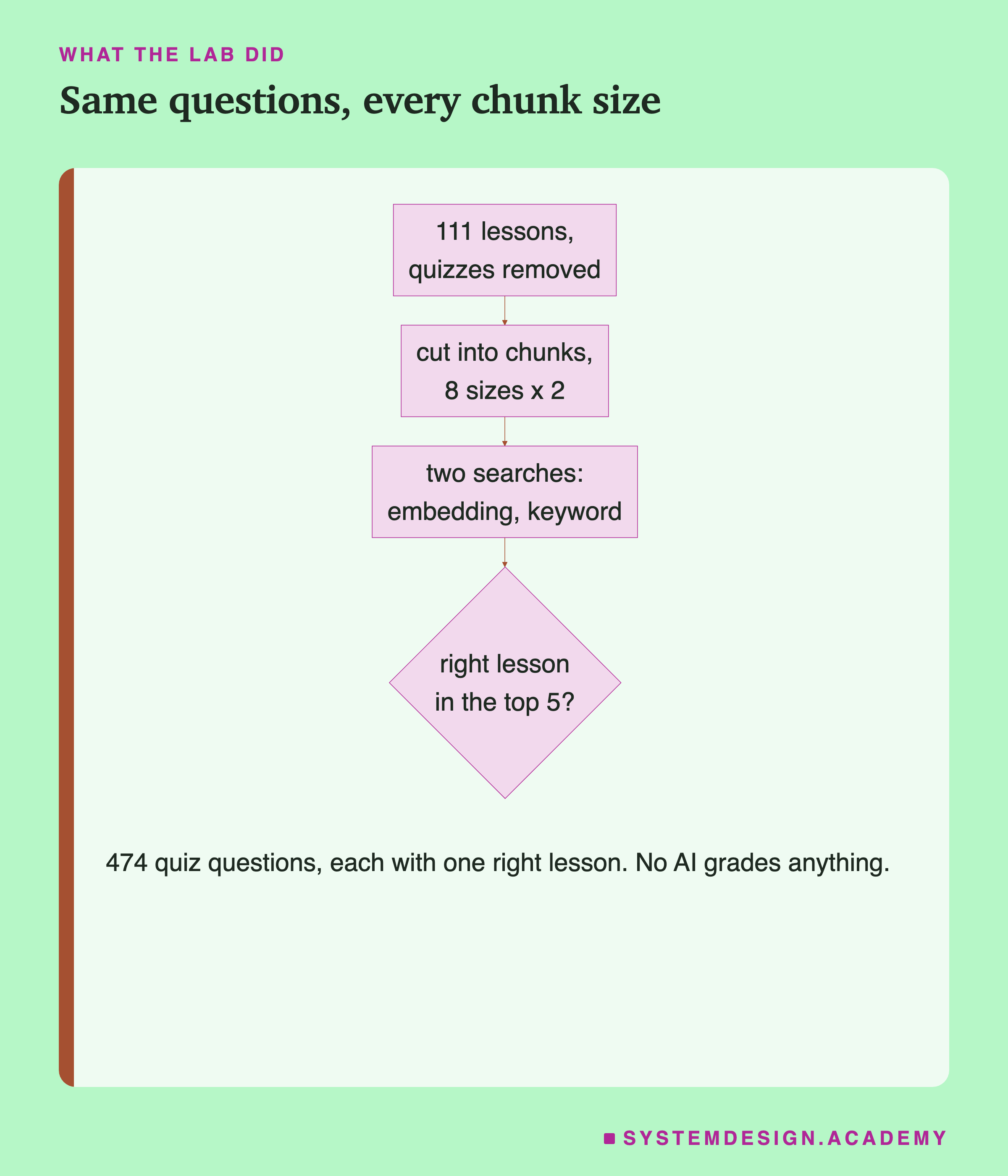
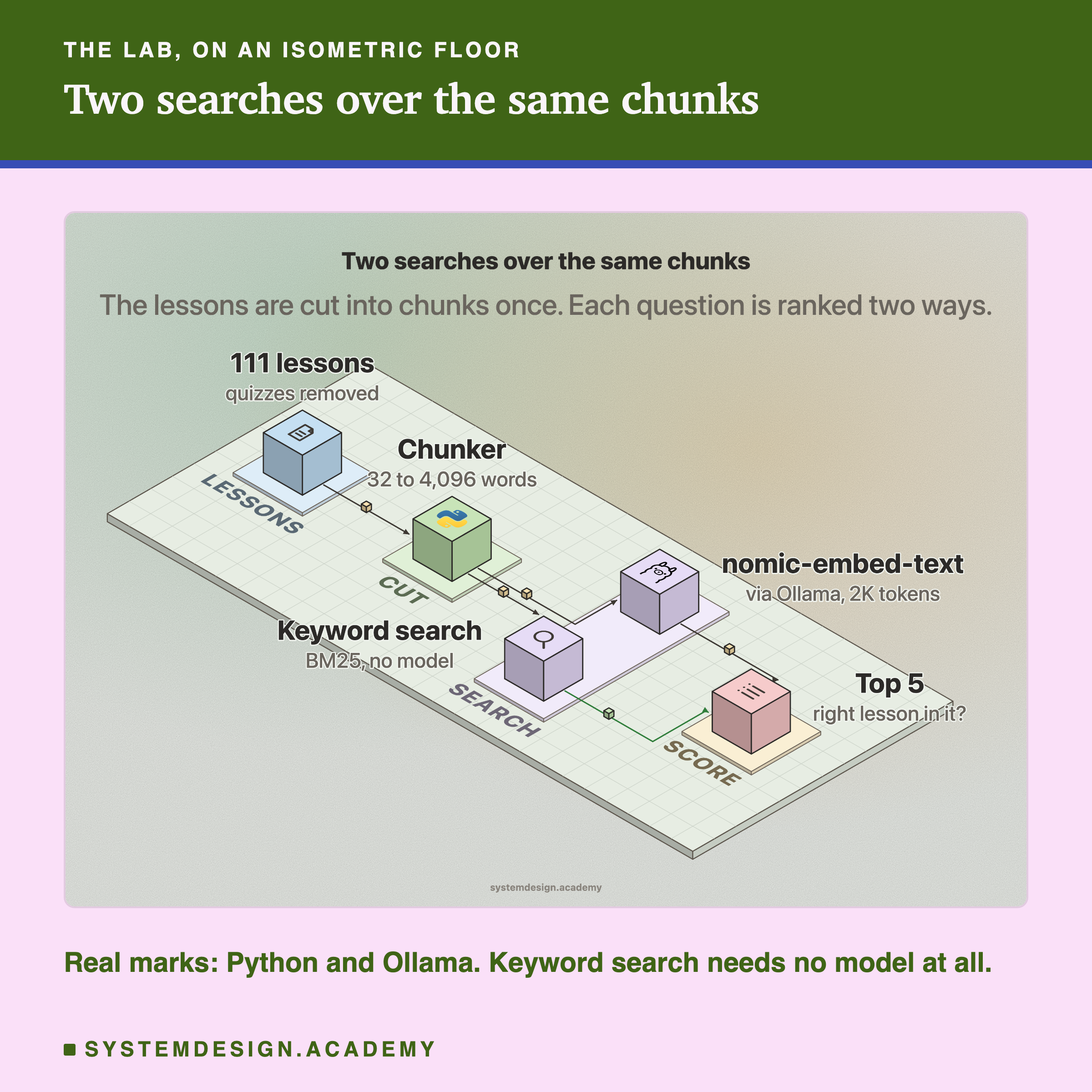
The flowchart shows the plan. Here is each step.
-
The documents. The 111 lessons of this AI course, 353,513 words in all. First, every quiz, Python playground, figure description and page header is removed. So a question can never find its own copy. Code shown in the text stays in.
-
The questions. Every quiz question in those lessons, 474 of them, as plain text with no answer options. Each one came from exactly one lesson, so the right answer is known without anyone judging it.
-
The cuts. Every lesson is cut into chunks of 32, 64, 128, 256, 512, 1,024, 2,048 and 4,096 words. Each size is cut twice. Once with no overlap, and once with each chunk starting 15% before the last one ended. A chunk never runs from one lesson into the next.
-
Two searches. For every question, both searches rank all the chunks. One uses from nomic-embed-text. The other is keyword search, which needs no model at all.
-
The mark. A search hits when one of its top 5 chunks comes from the question's own lesson. The lab also records the top 1.
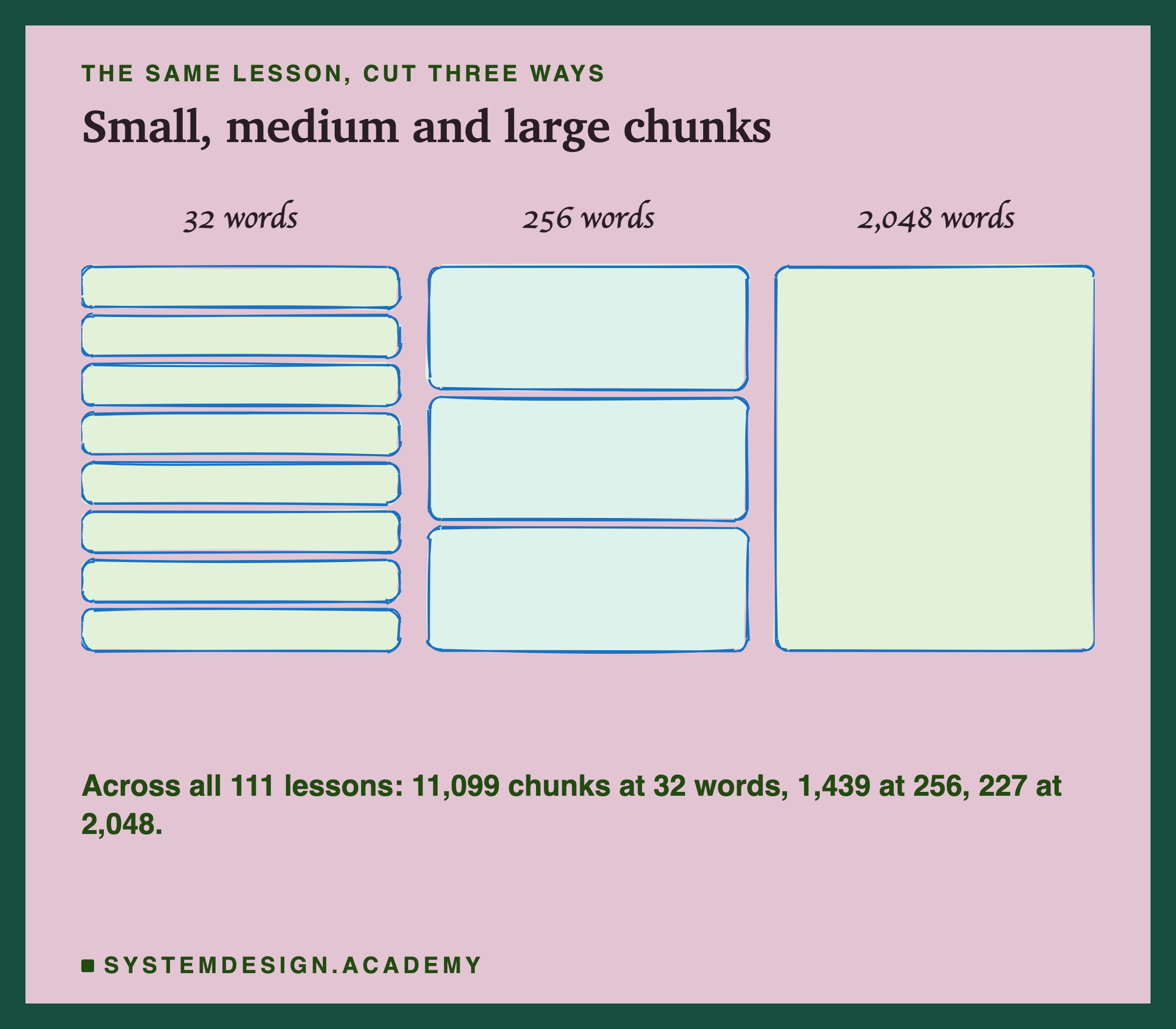
The same lesson becomes many small chunks or a few big ones. Every chunk is searched on its own.
The Lab, Running
This is a real recording of the lab's report, printed on the laptop where the lab ran. "embed" is the search and "bm25" is keyword search. "cut at wall" counts chunks the embedding model silently cut short.
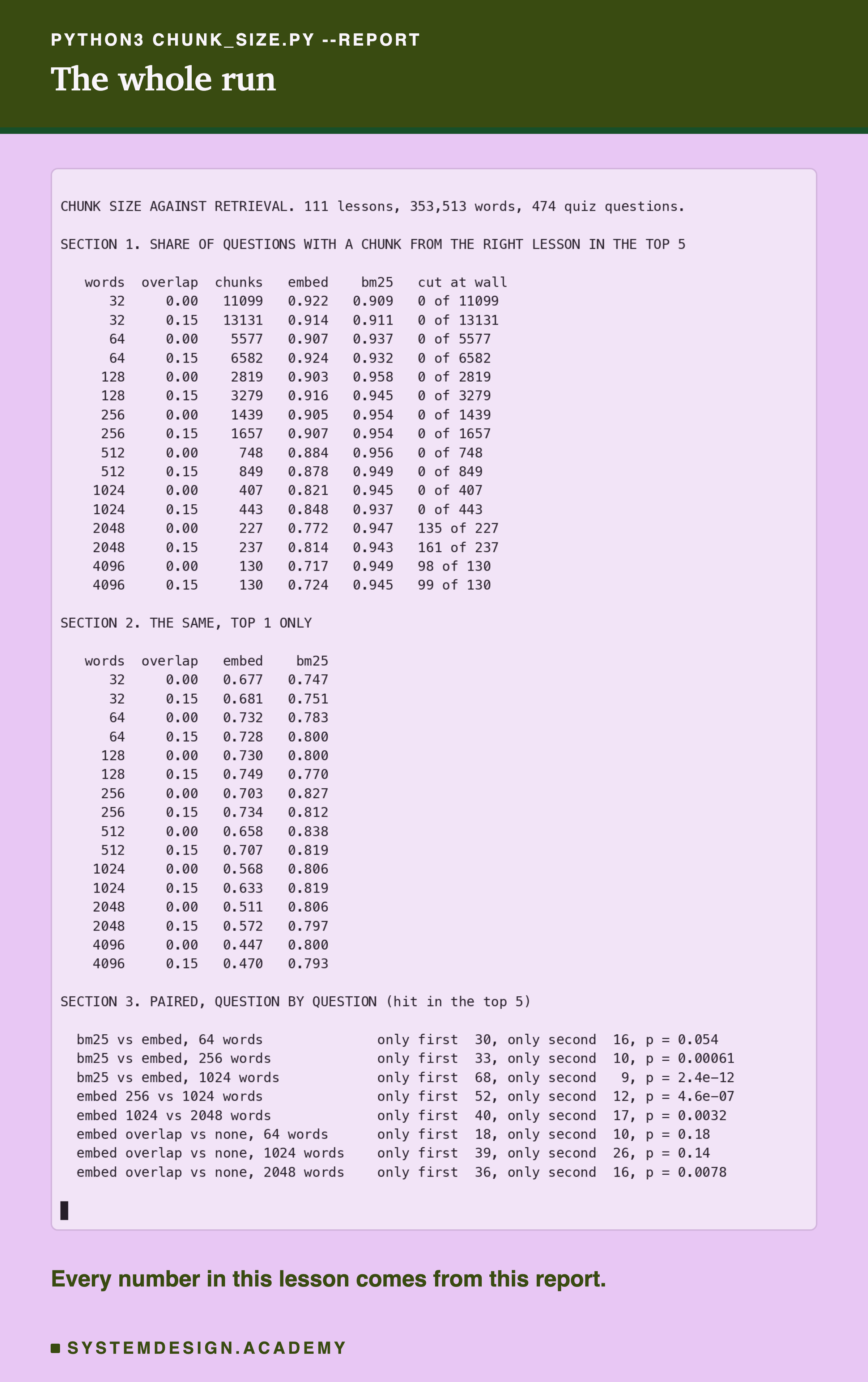
The recording shows the numbers every figure in this lesson is drawn from. Read the embed column top to bottom: it falls as chunks grow. The cut-at-wall column turns non-zero at 2,048 words.
No Hill: Flat, Then Down
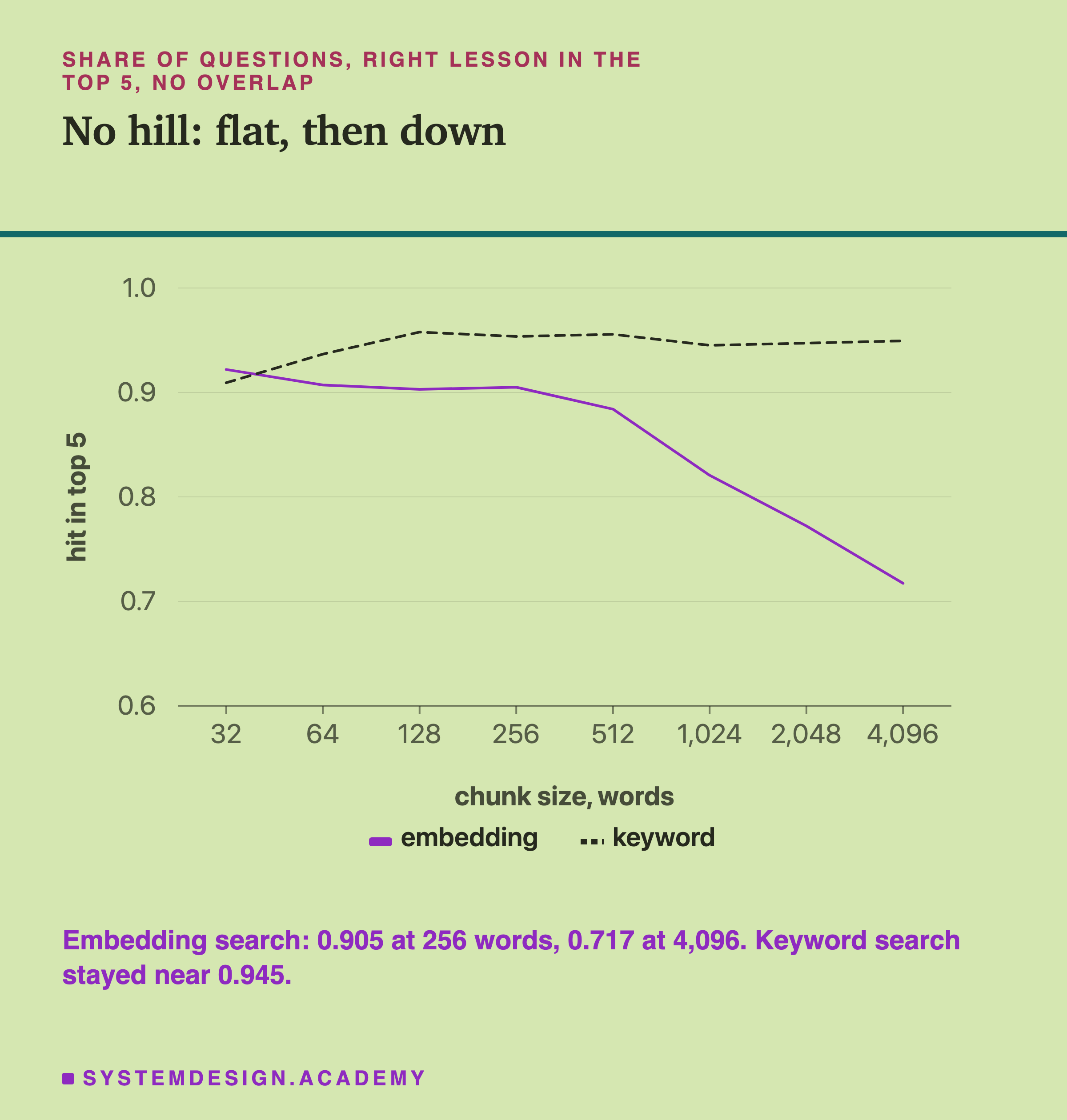
For search there was no hill. Take the case with no overlap. The top 5 scored 0.922 at 32 words, 0.903 at 128 and 0.905 at 256. After that it fell: 0.884 at 512, 0.821 at 1,024, 0.772 at 2,048 and 0.717 at 4,096.
In the top 5, tiny chunks did not do badly. The first half of the hill never appeared. Chunks of 32 words did about as well as chunks of 256. The right side did show up: the score fell steadily from 512 words on, before and after the wall. Comparing question by question, 256 words beat 1,024 on 52 questions and lost on 12. A split like that happens by luck less than once in a million tries.
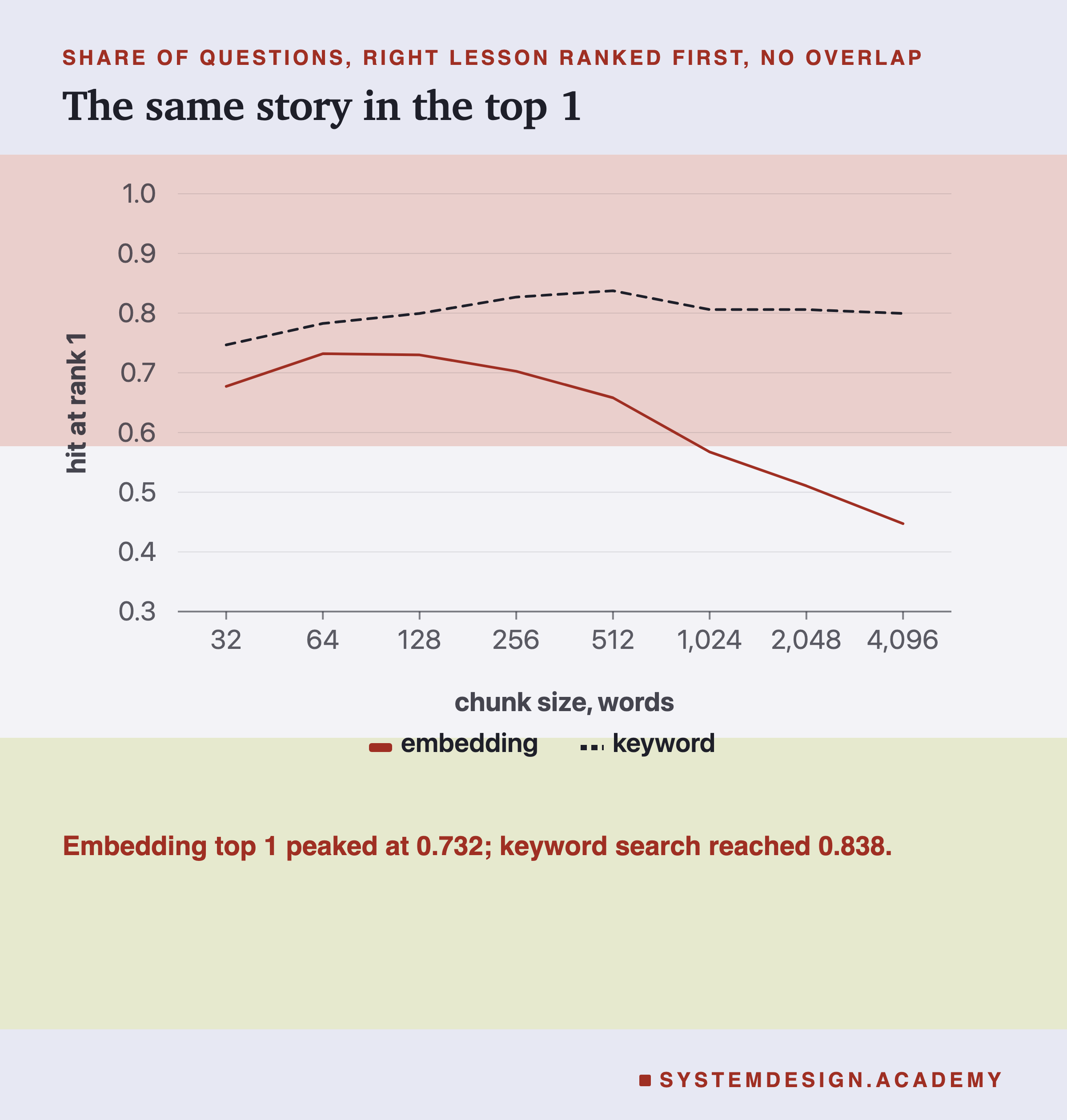
The top 1 is a stricter test, and here a small left side does appear. Chunks of 32 words scored 0.677, against 0.732 at 64 words. Embedding search did best with chunks of 64 to 128 words and fell steadily after that.
The Wall You Cannot See
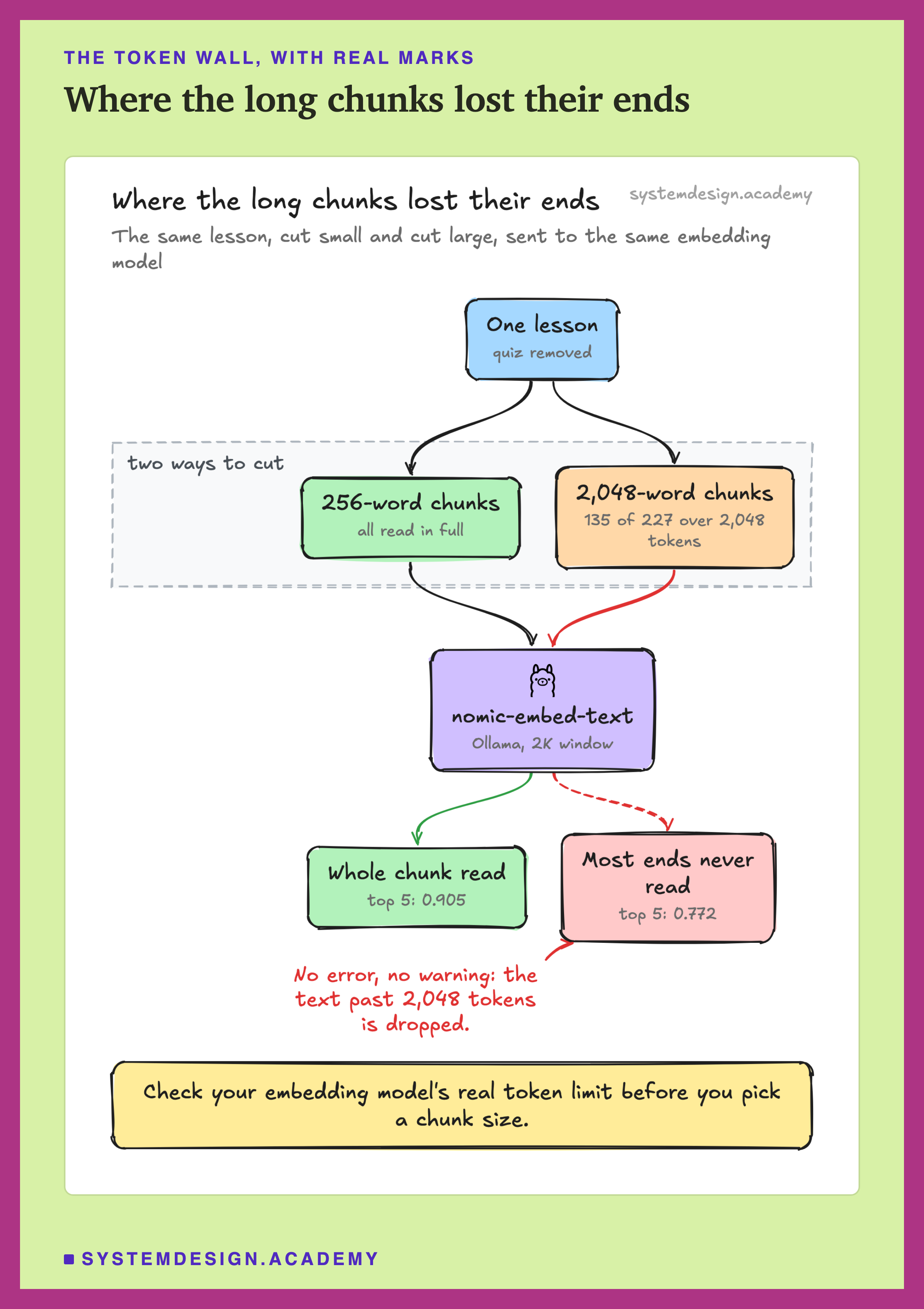
Part of the fall has a hidden cause. An model reads only so many tokens at once. That limit is called its window. The version of nomic-embed-text that Ollama serves reads 2,048 tokens, and it does not warn you. The lab asked for a window of 8,192 tokens. Every chunk past the wall still came back with exactly 2,048 tokens read. The model simply stops reading.
The lab sent every chunk over 1,000 words on its own and read back its token count. At 1,024 words, 299 chunks were checked and none was cut: the longest was 1,878 tokens, close to the limit. At 2,048 words, 135 of the 227 chunks were cut. Why not all of them? Only 116 are full 2,048-word chunks. The other 111 are each lesson's shorter last piece, and many of those fit under the wall. At 4,096 words, 98 of 130. Everything past the cut was invisible to the search, and nothing in the output said so. Each cut chunk was still read up to the wall. The search lost the end of the chunk, not all of it.
But the fall began before the wall. Between 256 and 1,024 words no chunk was cut, and the score still dropped from 0.905 to 0.821. So size alone lowered the score before any chunk was cut. Past the wall, part of each long chunk is also thrown away. This lab cannot separate how much of the later drop comes from each.
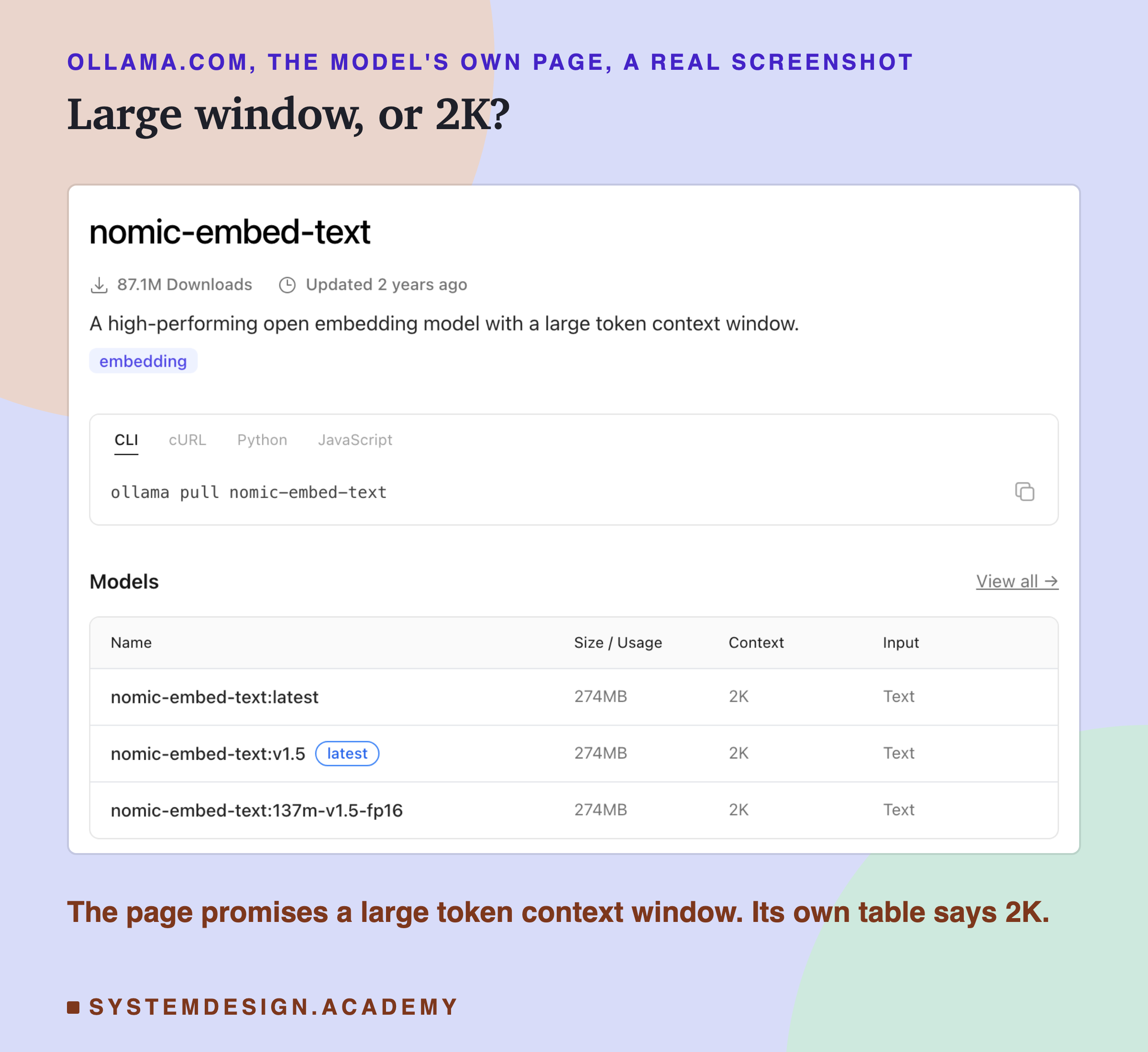
The limit is published, if you look. The model's own page on Ollama calls its window large, and its table says 2K.
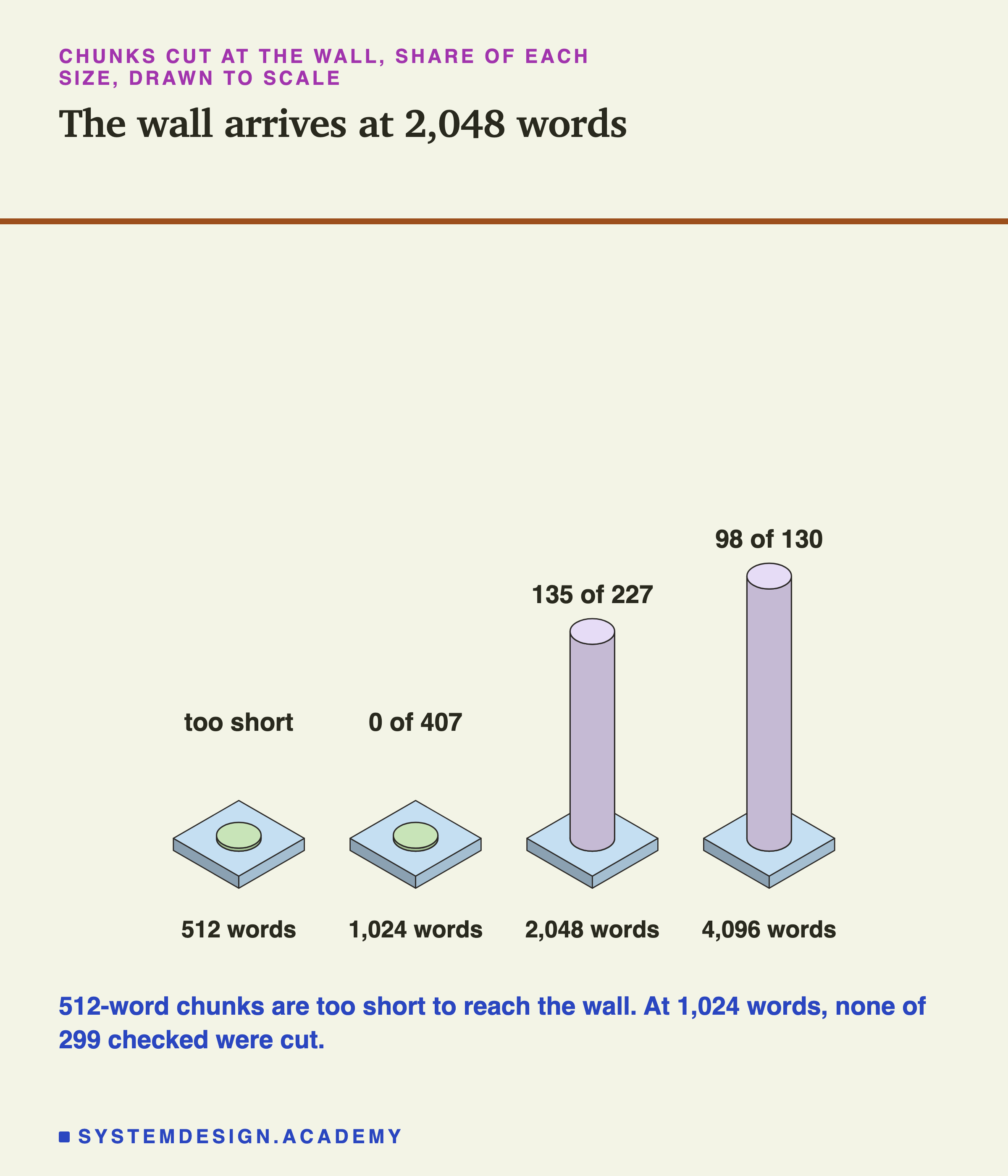
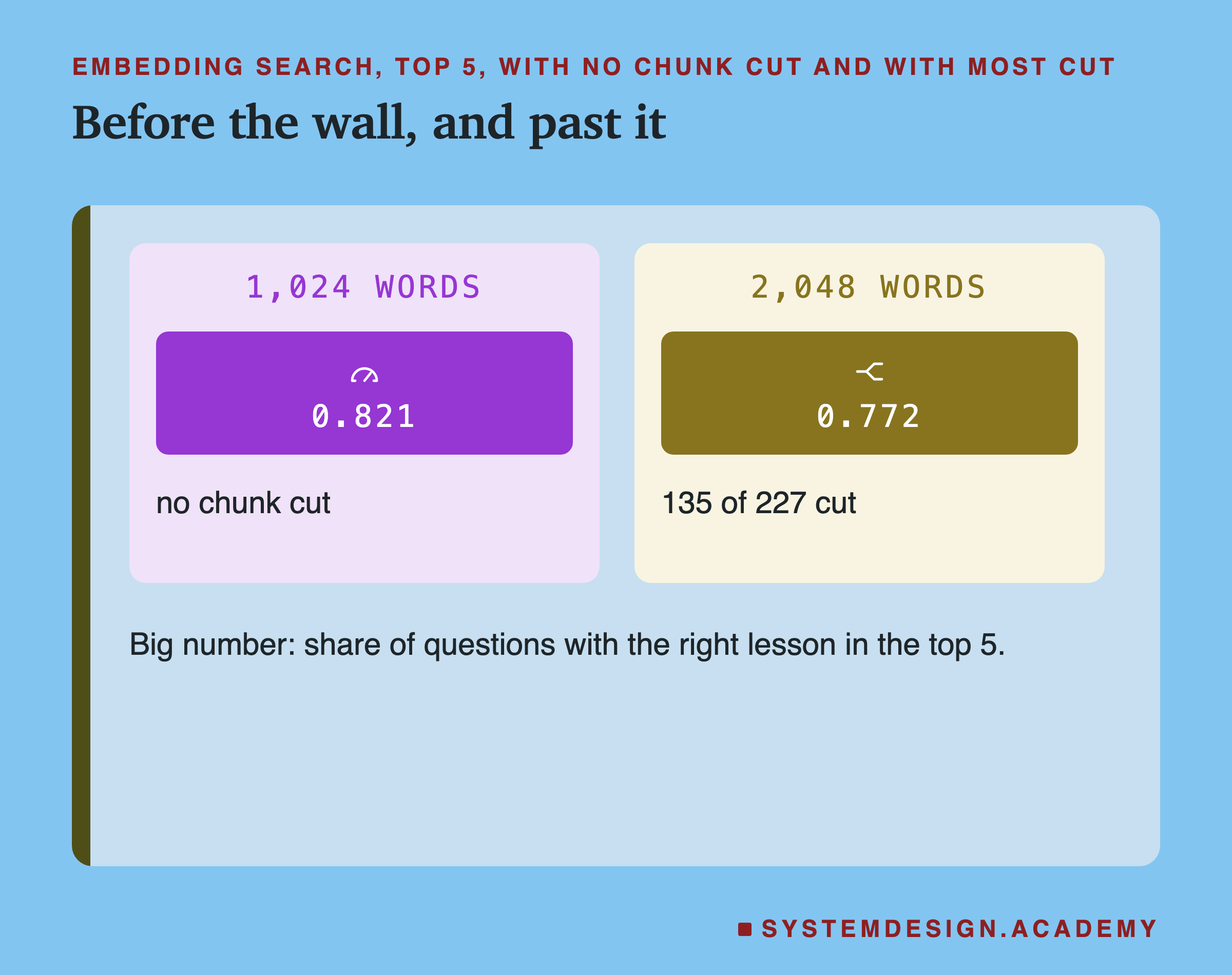
Side by side: one step past the wall, the score dropped again. Comparing question by question, 1,024 words beat 2,048 on 40 questions and lost on 17. Luck gives that about once in 312 tries.
Keyword Search Won
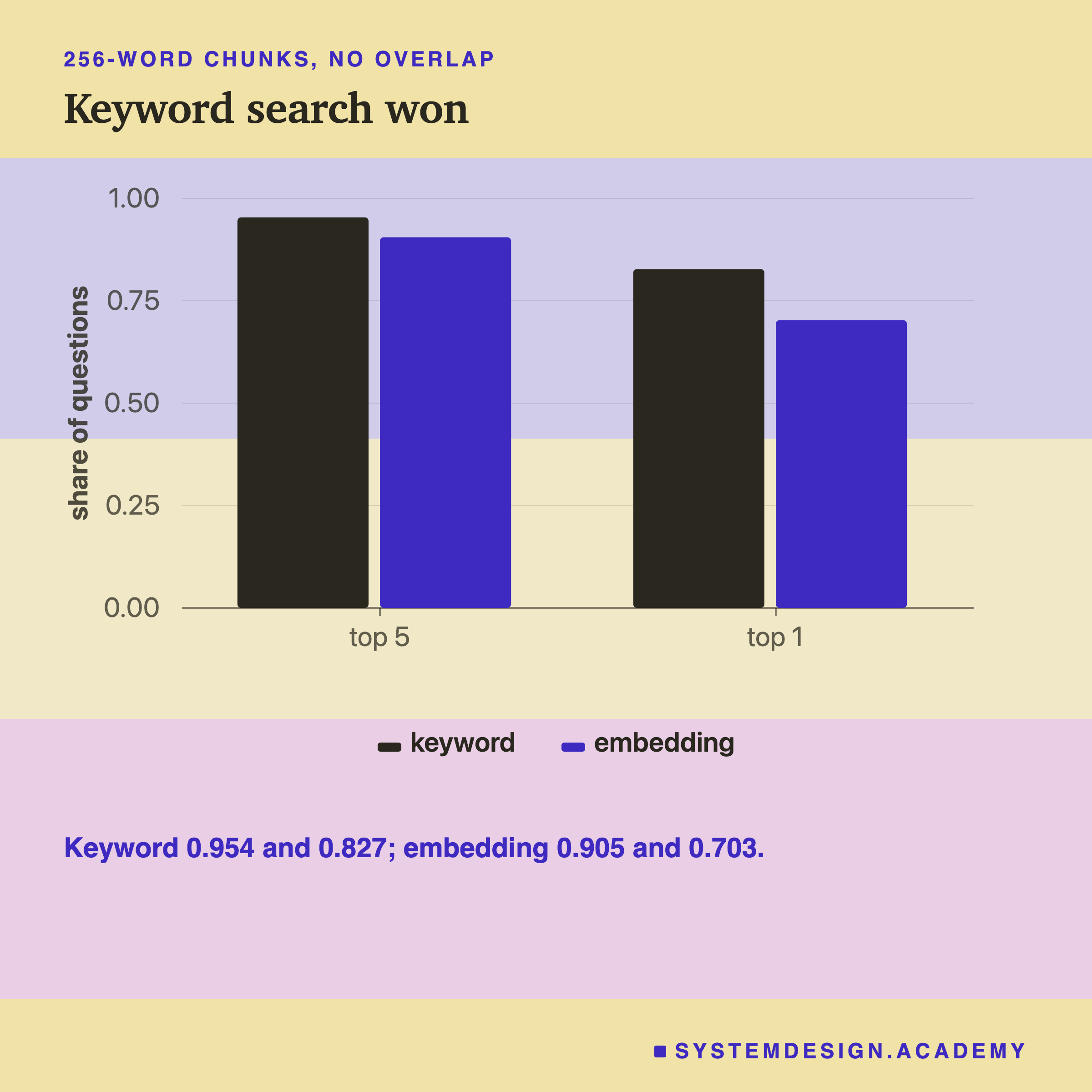
The simplest search, with no model at all, scored higher at most sizes. At 256 words, keyword search scored 0.954 in the top 5, against 0.905 for . In the top 1, it was 0.827 against 0.703.
Now compare question by question at 256 words. Keyword search hit where embeddings missed on 33 questions, and the reverse on 10. That split happens by luck about once in 1,650 tries. At 1,024 words the gap was wider: 68 to 9. Keyword search also stayed flat as chunks grew, near 0.95 from 128 words up. It uses no embedding model, so the token wall never touched it.
There is a strong reason to be careful here, and the limits slide comes back to it. These questions were written by the lessons' own author, in the lessons' own words. That is exactly what keyword search is good at.
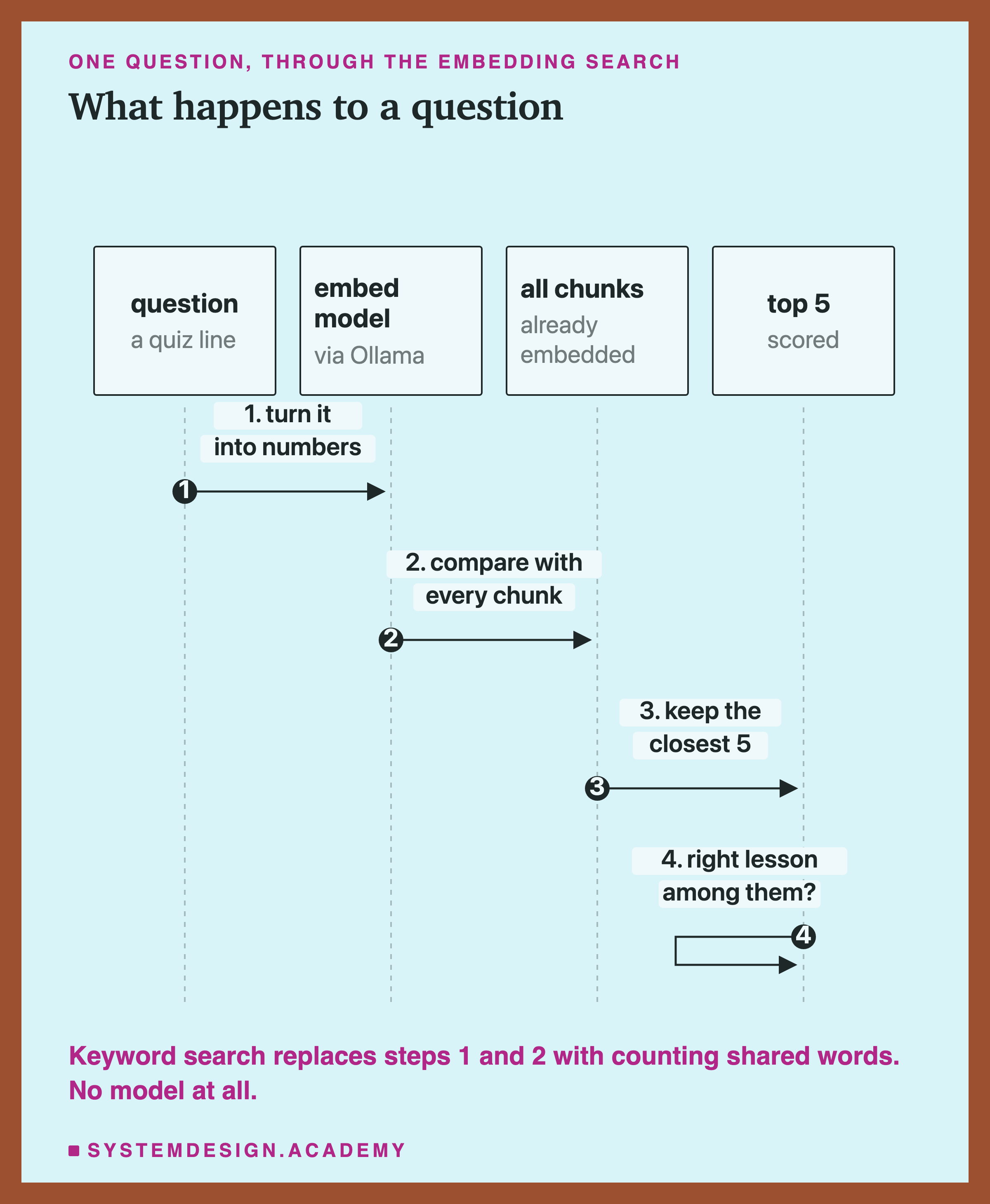
This is what embedding search does with each question. Keyword search skips the model entirely and counts shared words instead.
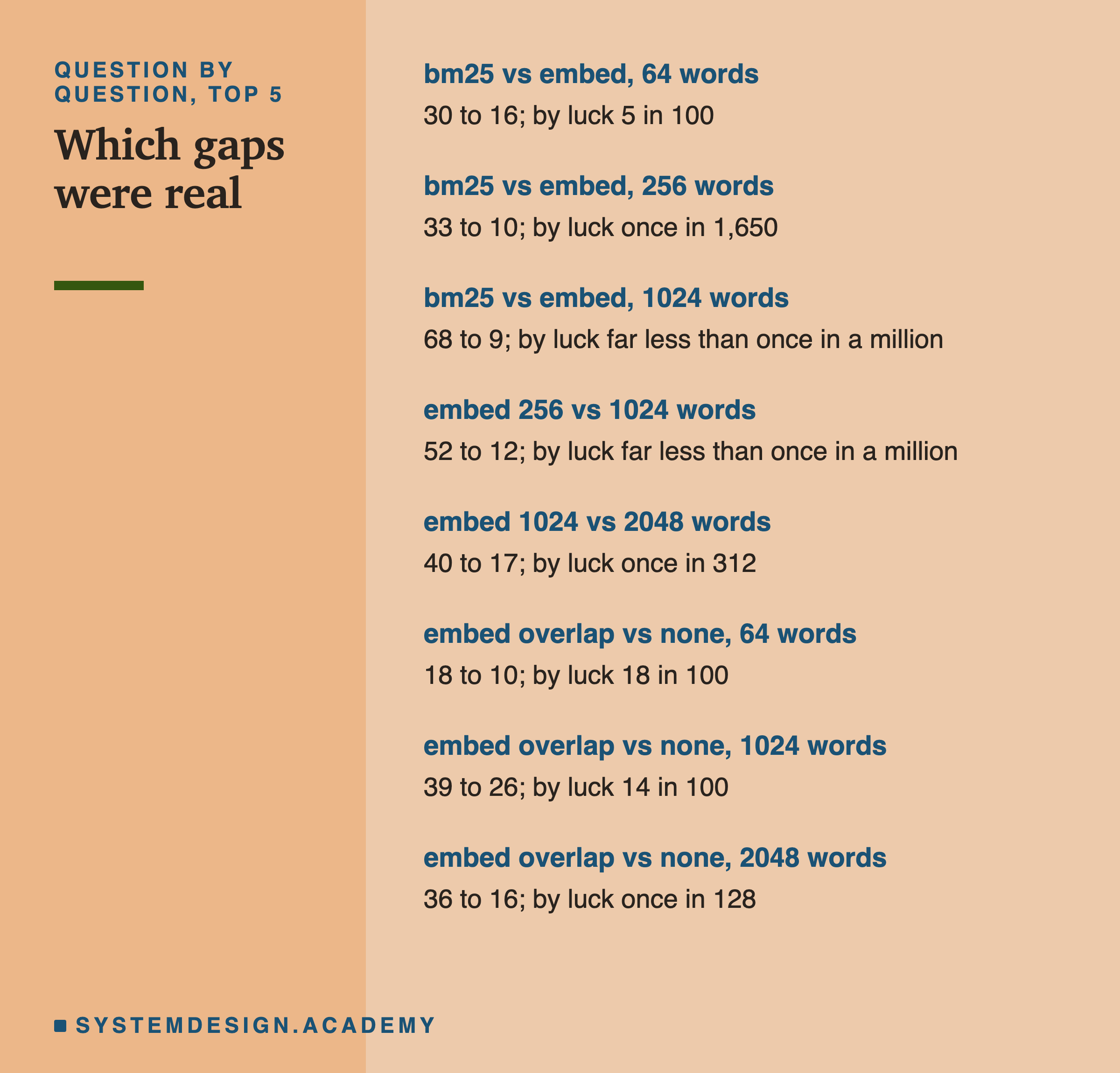
All eight comparisons in one place. The clear ones: keyword search over embeddings at 256 and 1,024 words, and smaller chunks over larger ones for embeddings.
Overlap Barely Mattered, With One Hint at the Wall
Lesson 02 recommends overlap to stop a fact falling in the gap between two chunks. Here it made little difference for most sizes. At 64 words, overlap won on 18 questions and lost on 10. That happens by luck about 18 times in 100. At 1,024 words it was 39 to 26, by luck about 14 times in 100.
The exception was 2,048 words, past the wall: 36 to 16. Luck gives that only about once in 128 tries. But this was one of eight comparisons in the lab. Across eight tests, one strong result can appear by luck. So treat it as a hint, not proof. One possible reason, which the lab did not test: with overlap, each chunk starts a little earlier. So text cut off the end of one chunk may be read at the start of the next.
Overlap also costs space. At 64 words it turned 5,577 chunks into 6,582.
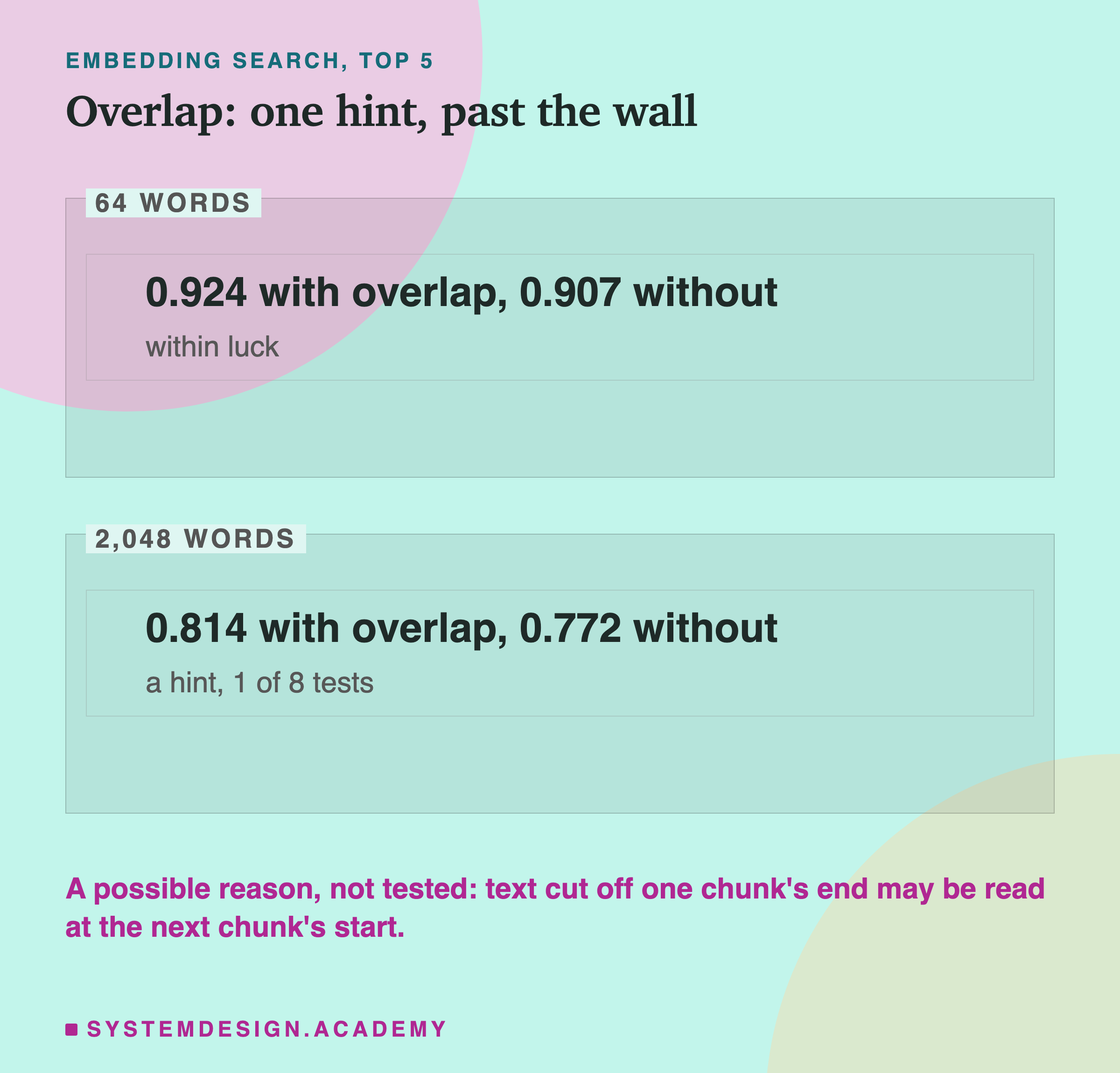
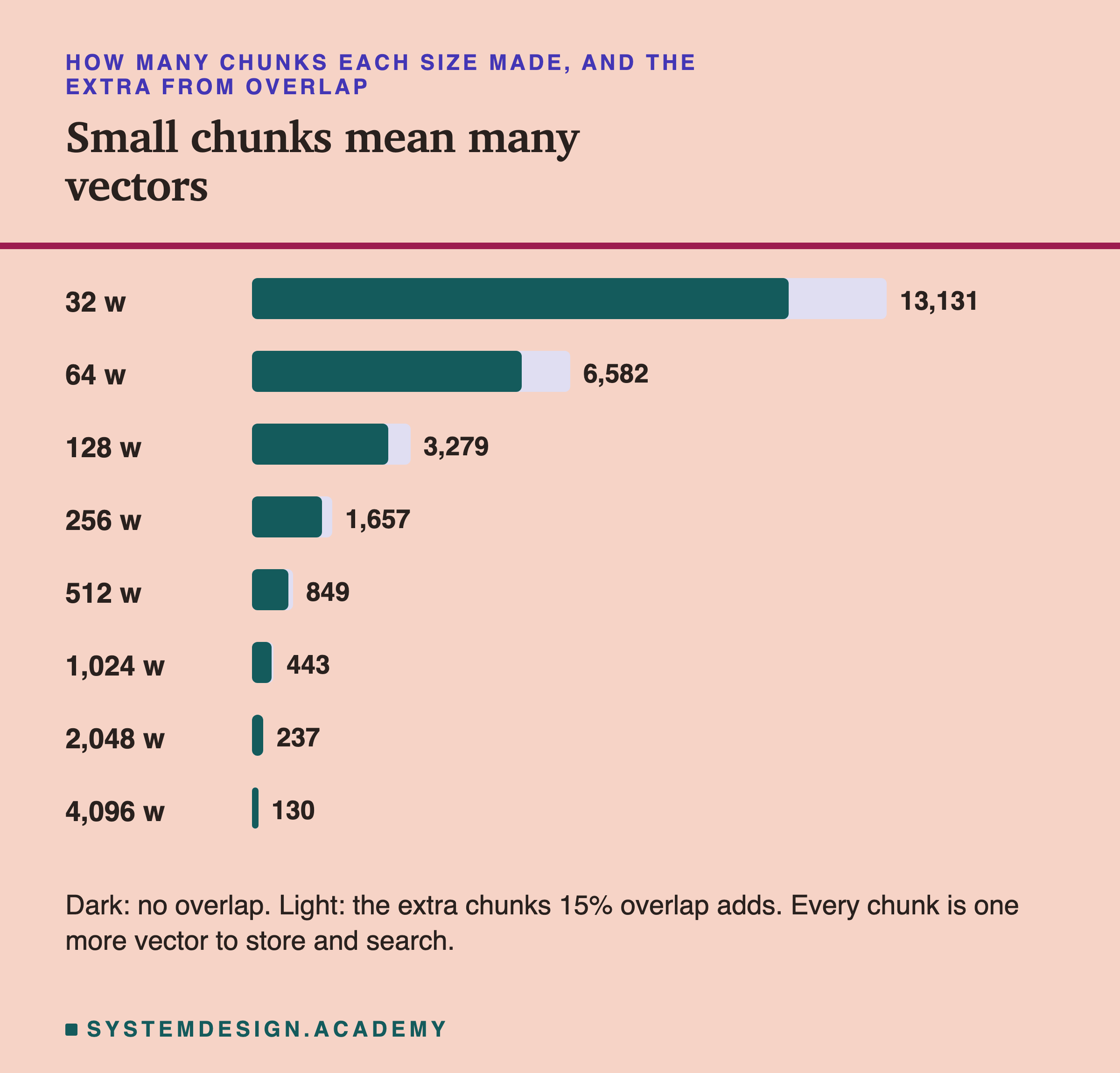
Small chunks, and overlap, both mean more vectors to store and search. Below the wall, overlap bought no gain we could tell from luck, at 64 and 1,024 words.
Rank It Yourself
This box holds the lab's real result for every question. For each one, it holds the rank of the first chunk from the right lesson. It covers both searches, at two chunk sizes. Press Run to count the hits in the top 5.
Then find the line that starts with TOP =, near the top. Change it to 1 to count only the very first result, and press Run again.
What This Lab Cannot Tell You
The questions were written in the lessons' own words. The quiz questions and the lessons have the same author. Real users often ask in other words, and that is exactly where search is supposed to help. This lab cannot say how the two would compare on real users' questions.
Finding the right lesson, not the right sentence. A hit means any chunk from that lesson reached the top 5. A search that finds the right lesson but the wrong part of it still counts. For answering questions, the part matters.
One embedding model, served one way. Other models have other token limits, and some servers cut longer or warn you. Check yours.
Words, not tokens. Chunks were cut by words. The longest 1,024-word chunk came to 1,878 tokens, about 1.8 tokens a word. Plain English is about 1.3 tokens a word; code and formatting push it higher. So a chunk of 1,024 words can already sit near the 2,048-token wall.
One set of documents. 111 lessons of one course. Other documents may favour other sizes.
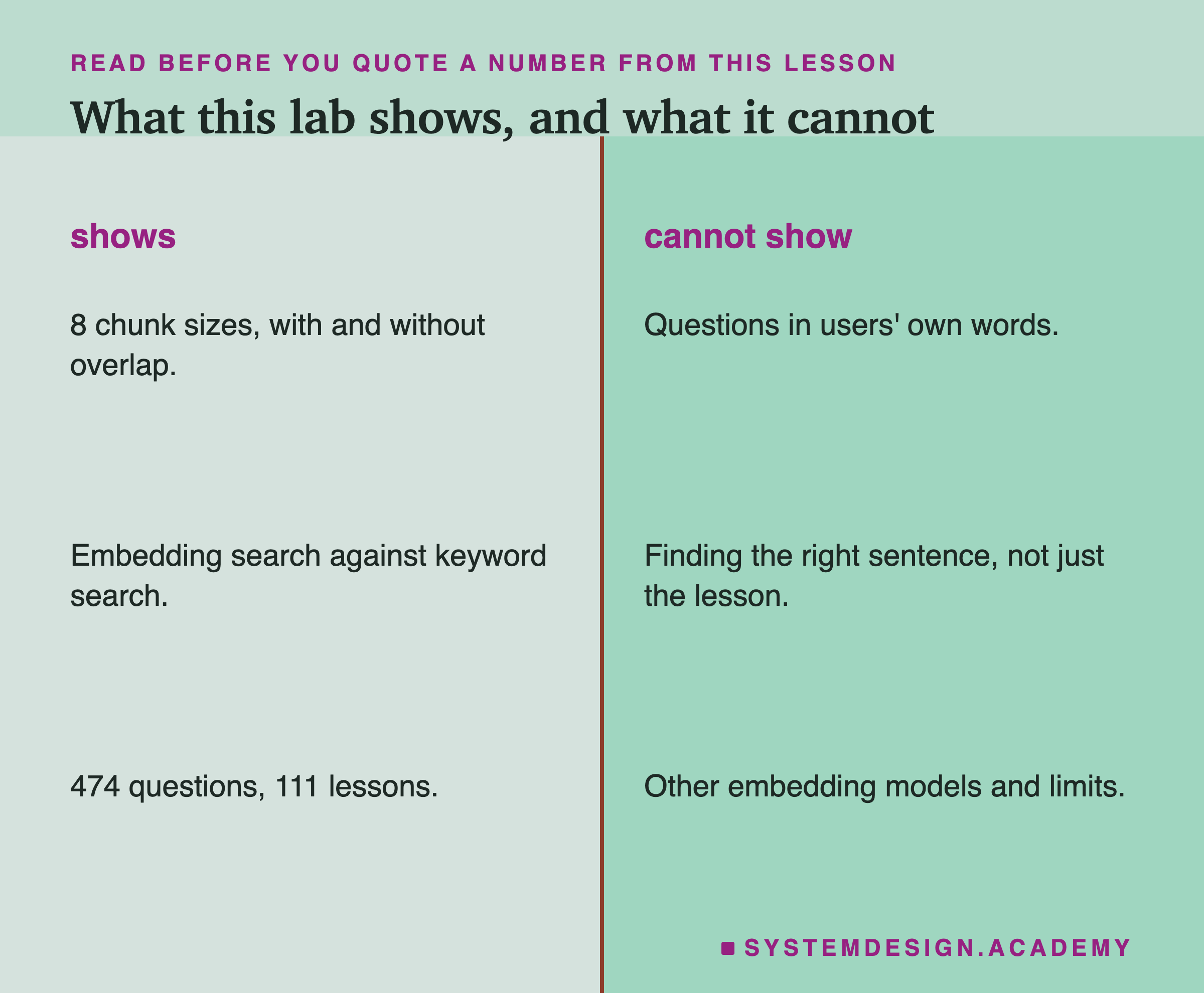
So treat the numbers as a test on this course. They are not a best chunk size for every system. Run the same test on your own documents and questions.
What to Do on Monday
-
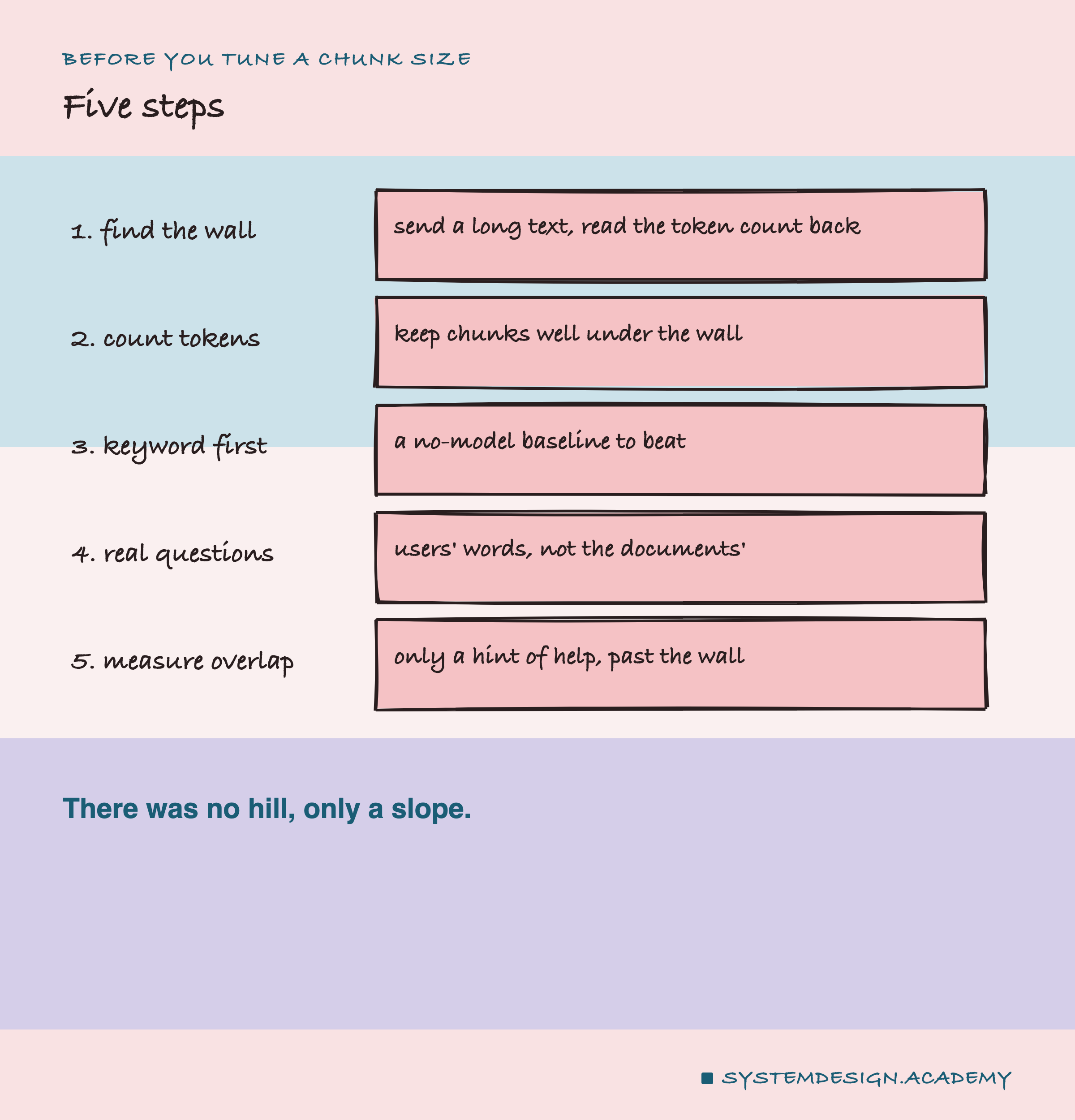
Find your model's real limit. Send it a text you know is very long. Ollama's /api/embed, the part that makes embeddings, replies with prompt_eval_count. That is the number of tokens it read. If that number stops at a round figure, like 2,048, you have found a wall. It may not warn you.
-
Keep chunks well under that limit, in tokens. Count tokens, not words. Use the model's own word splitter, its tokenizer, or send the chunk and read prompt_eval_count. Here, 256 words did about as well as anything.
-
Run a keyword search first. It needs no model and takes minutes. Your embedding search should beat it on your own questions before you trust it.
-
Test with your real users' questions, not questions written from the documents. That is the only way to see whether embeddings earn their place.
-
Measure overlap before you pay for it. Here it showed only a hint of help, past the wall.
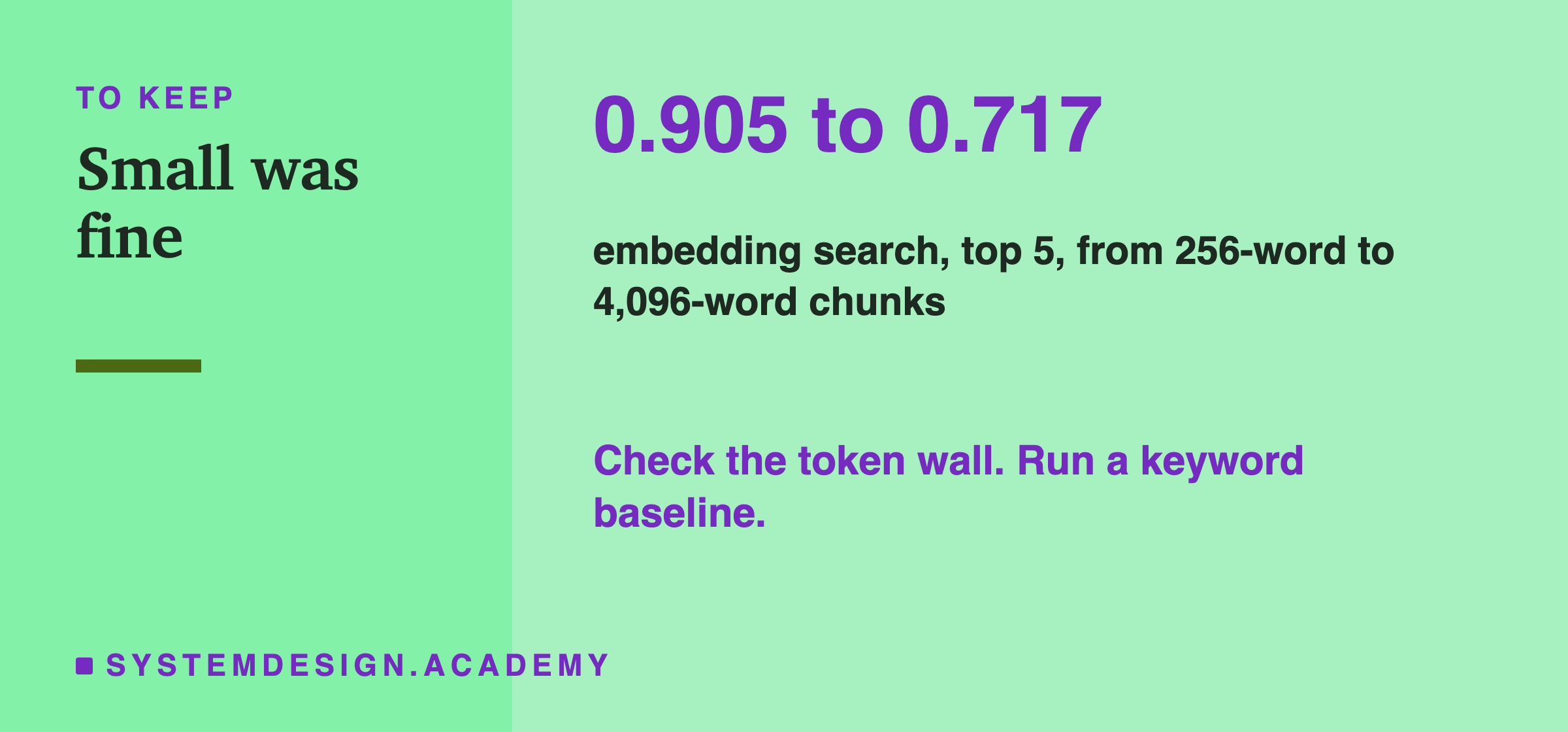
The one idea to keep: there was no hill here, only a slope. Small chunks were fine and big chunks got worse. Past the token wall, the model silently read only part of each chunk. At most sizes, a keyword search with no model scored higher on these questions.
Knowledge Check
Knowledge Check
4 questions - Score 80% to pass
Lesson 02 drew search quality against chunk size as a hill. What did this lab measure for embedding search?
What happened to chunks of 2,048 words or more inside the embedding model?
On these questions, keyword search beat embedding search. Why should you not conclude that keyword search is always better?
What is the cheapest first step before tuning chunk size?