A Shopping List and a Card
Let me start with baking, because everyone has done some version of it.
Imagine I bake a cake that my friends love. I write down what I used on a small list: flour, sugar, butter, eggs. Six months later I want the same cake, so I give the list to someone and send them to the shop. They come back with flour, sugar, butter and eggs. But the shop now sells a new flour under the same name, and the butter has a new recipe. The list was followed exactly, and the cake is still different. Sometimes it is a little different. Sometimes the oven setting I wrote down no longer works at all.

Now imagine a better card. It names the exact pack of flour, the exact butter, and for each pack it also gives a short code printed on the seal. Whoever goes to the shop must check the code. If the shop hands over a pack with a different code, they do not take it.
That card is what this lesson builds for a machine learning model. The short list is the usual requirements.txt. The card is a lock file.
Where This Lesson Starts
This lesson is the cure for the problem in the last one. Library version skew saved the chapter's model with one version of scikit-learn and loaded it with another. Of 30 loads across different setups, 22 failed. I will not repeat how those loads broke. Here I only use lesson 3's stored results. And I ask the question that comes before it. How does a team end up with a different scikit-learn, when nobody chose to upgrade?
The model is still the one from the features chapter, built in what a feature is. It is a gradient boosted tree model from scikit-learn. It predicts whether a customer of an online shop buys again in the next 30 days. Its test score, called AP, was 0.5450. My lab trained it again in its main environment and got 0.5450 again. Everything below uses the same data, features and settings, though the library versions change, which is the point of the lesson.
The lifecycle chapter's lineage and rollback lesson said it did not measure library versions. Lesson 3 measured what versions do to a saved model. This lesson measures where the versions come from.
The Words You Need First
Please read this slide slowly if any word is new. Every slide after it uses these words.
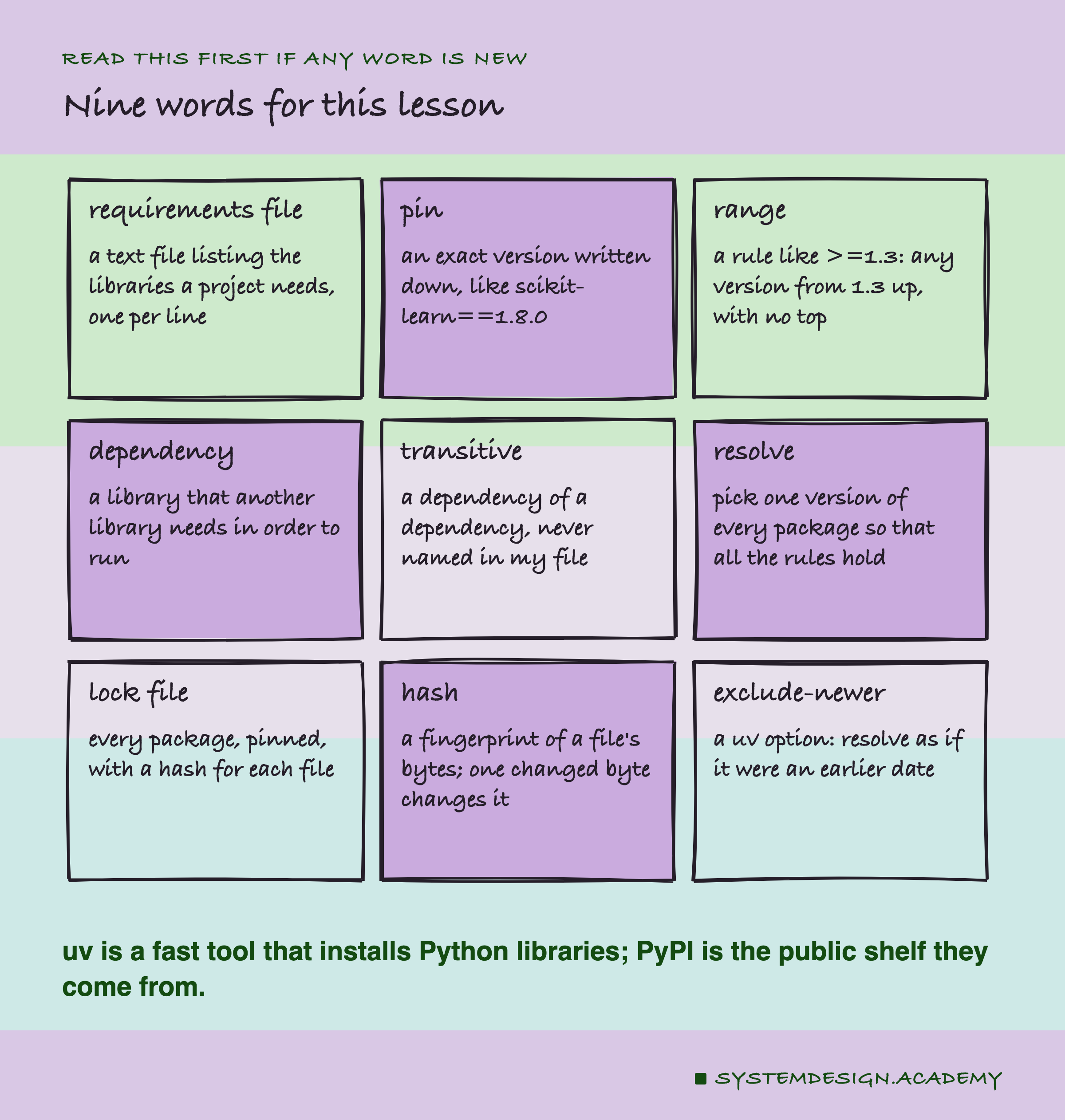
A library is code other people wrote that my code uses, and a package is a library as it is shipped, ready to install. Python packages live on PyPI, the Python Package Index, a public website that works like one big shelf. A requirements file is a plain text file, usually called requirements.txt, that lists the packages a project needs. pip install -r requirements.txt reads it and installs them. uv is a newer tool that does the same job, faster.
A pin is an exact version written into that file, like scikit-learn==1.8.0. A range is a looser rule, like scikit-learn>=1.3, which means "1.3 or anything newer". A line with no version at all, like pandas, means "whatever is newest today".
A dependency is a package that another package needs. scikit-learn needs numpy, so numpy is a dependency of scikit-learn. A transitive dependency is a dependency of a dependency: something my file never names, but which gets installed anyway.
Five Names, Eleven Packages
My requirements file has five lines. Here it is, exactly as the lab stored it in pin_files/requirements.txt:
scikit-learn>=1.3
pandas
numpy
pyarrow
joblib
It is the kind of file I have written many times. scikit-learn trains the model, pandas and pyarrow read the shop's data file, numpy holds the numbers, and joblib saves the model. The one range, >=1.3, is the kind of line people add after a bug, to say "not older than this". It has a floor and no ceiling.
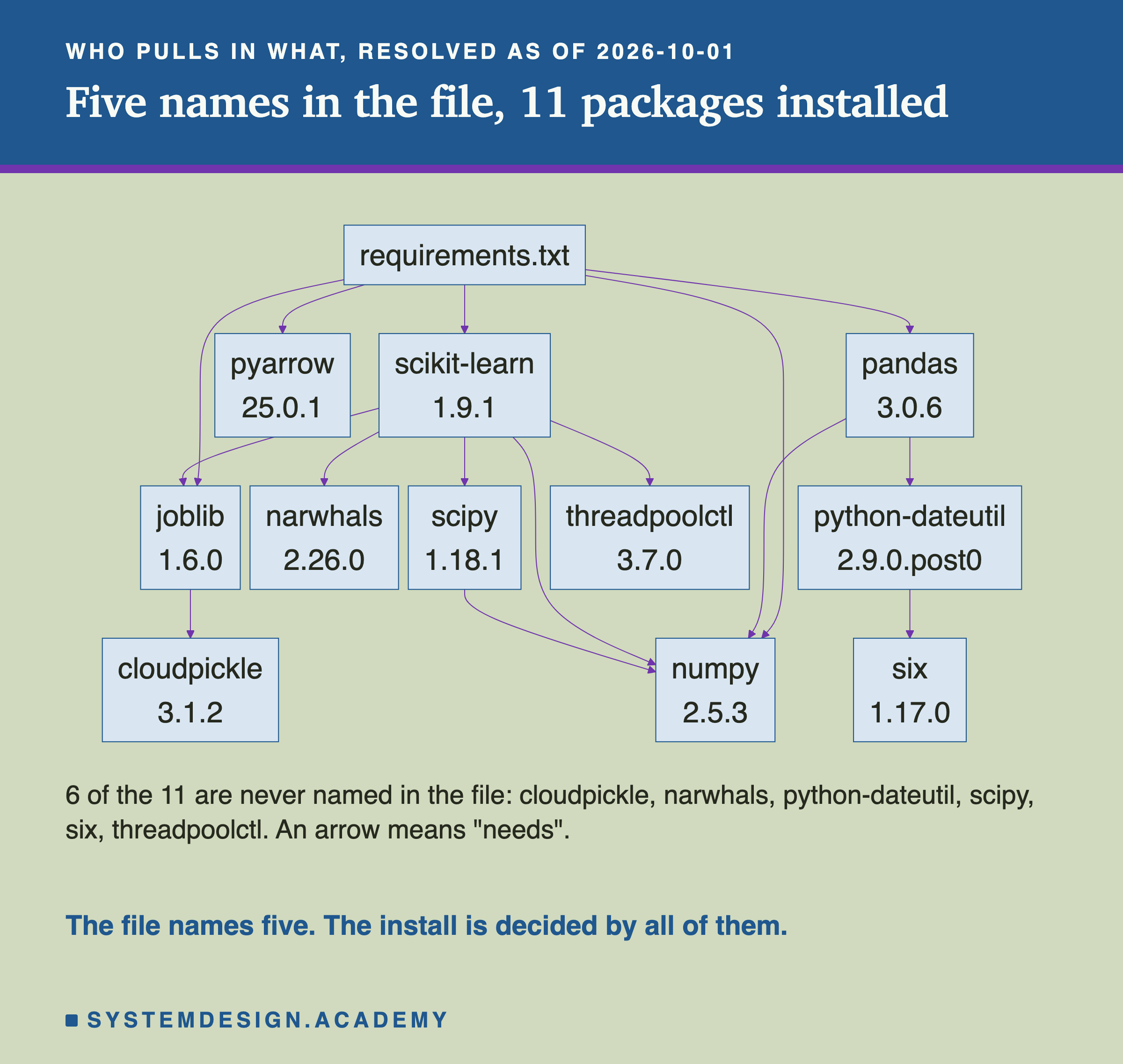
When I asked uv what this file installs today, the answer was 11 packages, not 5. The extra six come from the arrows: scikit-learn needs scipy, threadpoolctl and narwhals; pandas needs python-dateutil, which needs six; joblib needs cloudpickle. uv writes these reasons into its output as comments starting with # via, and the lab read them from there.
So my five-line file does not decide what gets installed. It only sets the rules. Every one of those 11 packages has its own release dates, and every one of them can change under me.
What uv and pip Say
Before running anything, I read what the tools themselves promise. Every quote below was found word for word in uv's own help text (uv 0.12.5), uv's documentation, or pip's documentation, on the day the lab ran. All of them are in results/pin-factcheck.json.
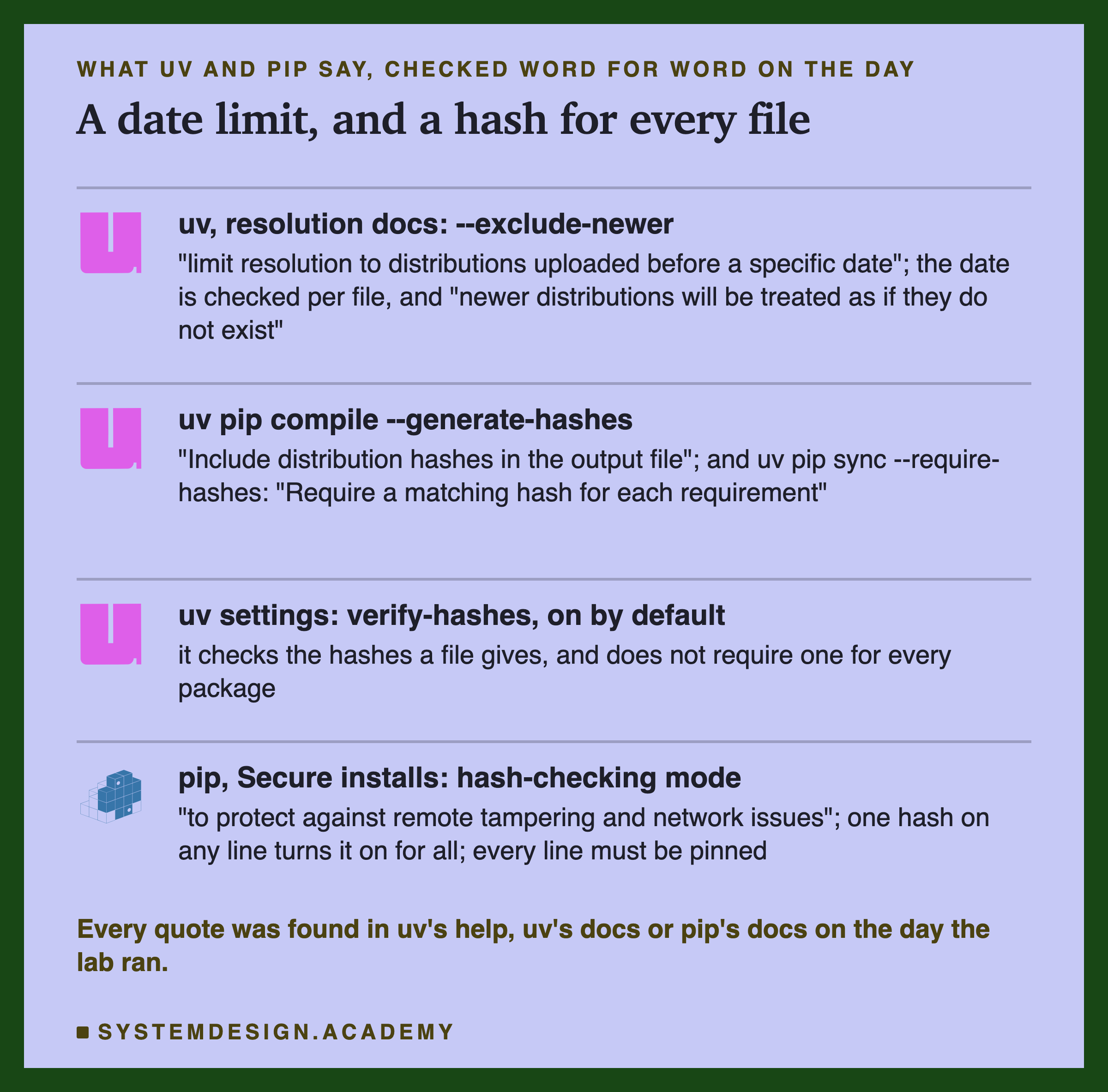
The most useful one for this lesson is --exclude-newer. uv's docs say it can "limit resolution to distributions uploaded before a specific date". They also say "The date is compared against the upload time of each individual distribution artifact". So uv looks at when each file was uploaded, not each release. With it I can ask a real question about the past: on 1 April 2026, what would this file have installed? uv answers from PyPI's own records, and "newer distributions will be treated as if they do not exist".
For locking, uv pip compile --generate-hashes will "Include distribution hashes in the output file", and uv pip sync --require-hashes will "Require a matching hash for each requirement". uv's settings page says hash checking is on by default for any hash a file gives.
pip's page on secure installs calls this hash-checking mode. It says the mode exists "to protect against remote tampering and network issues". A hash "against any requirement will activate this mode globally". And "Requirements must be pinned". The same page recommends a second step, refusing source files, which I come back to on the how-to slide. I wanted to see each of these promises happen, so the lab tests them.
How the Lab Was Built
I wrote the design into the docstring of scripts/labs/packaging/pinning.py before it first ran. I had read the documents above. I had never resolved this file at any date, and I did not know how many packages would move.
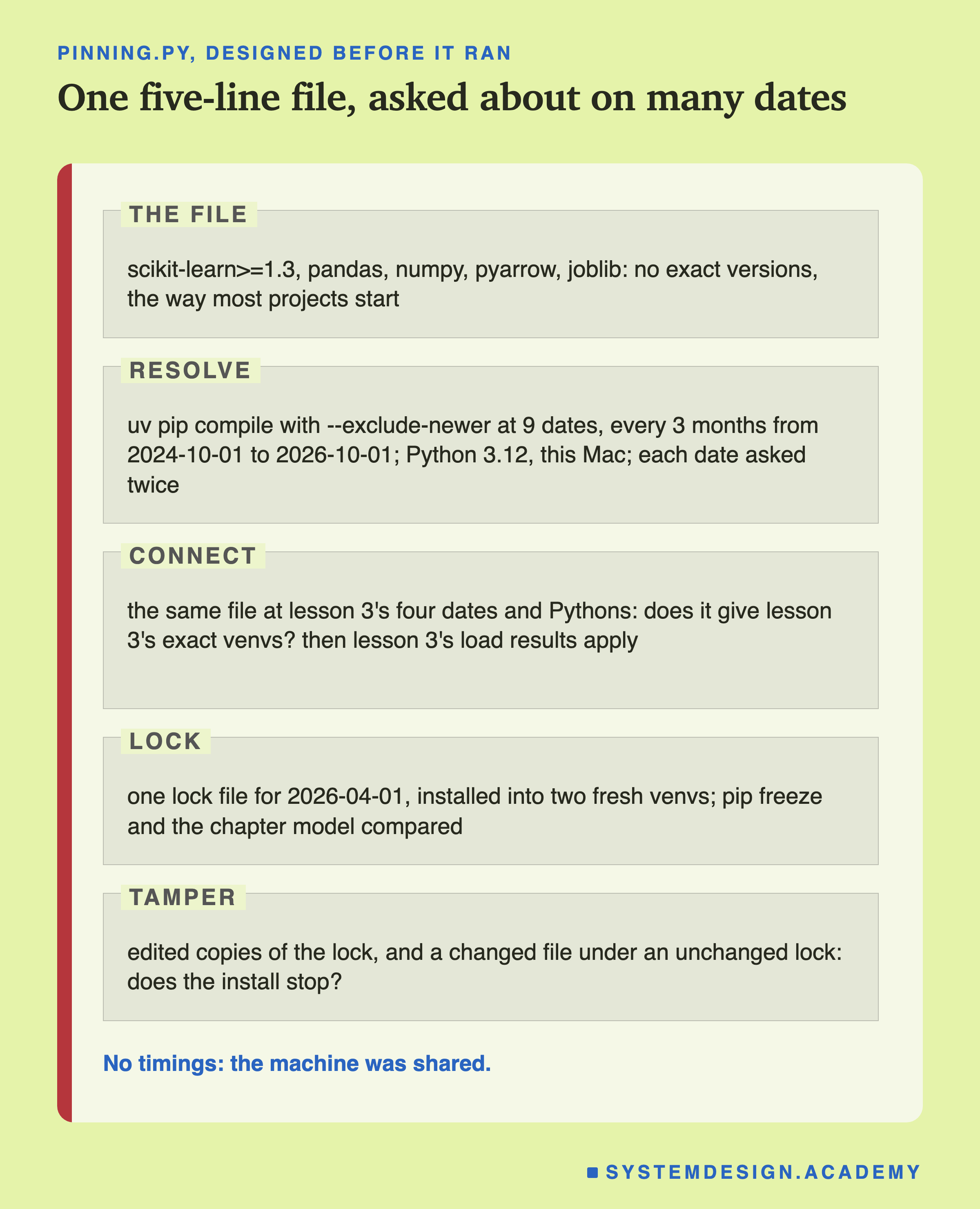
Resolve, no install. uv pip compile asks PyPI which versions an install would choose, without installing anything. I ran it at nine dates, every three months from 1 October 2024 to 1 October 2026. The Python version (3.12) and the machine type (an Apple silicon Mac) were fixed, so the only thing that changed was the date. Each date was asked twice, the second time with uv's --refresh, which ignores uv's saved copies and asks PyPI again.
Connect to lesson 3. Lesson 3 made its environments at four fixed dates. I resolved my file at exactly those dates and compared the result with lesson 3's stored package lists.
Lock and install. I made one lock file as of 1 April 2026, six months before the lab ran, and installed it twice into new, empty environments. Then I trained the chapter model in both and compared the predictions bit for bit.
Tamper. I changed copies of the lock, and separately changed one downloaded file while keeping the real lock, to see when the install stops. I measured no times: the laptop was busy with other work.
The Lab's Report, Running
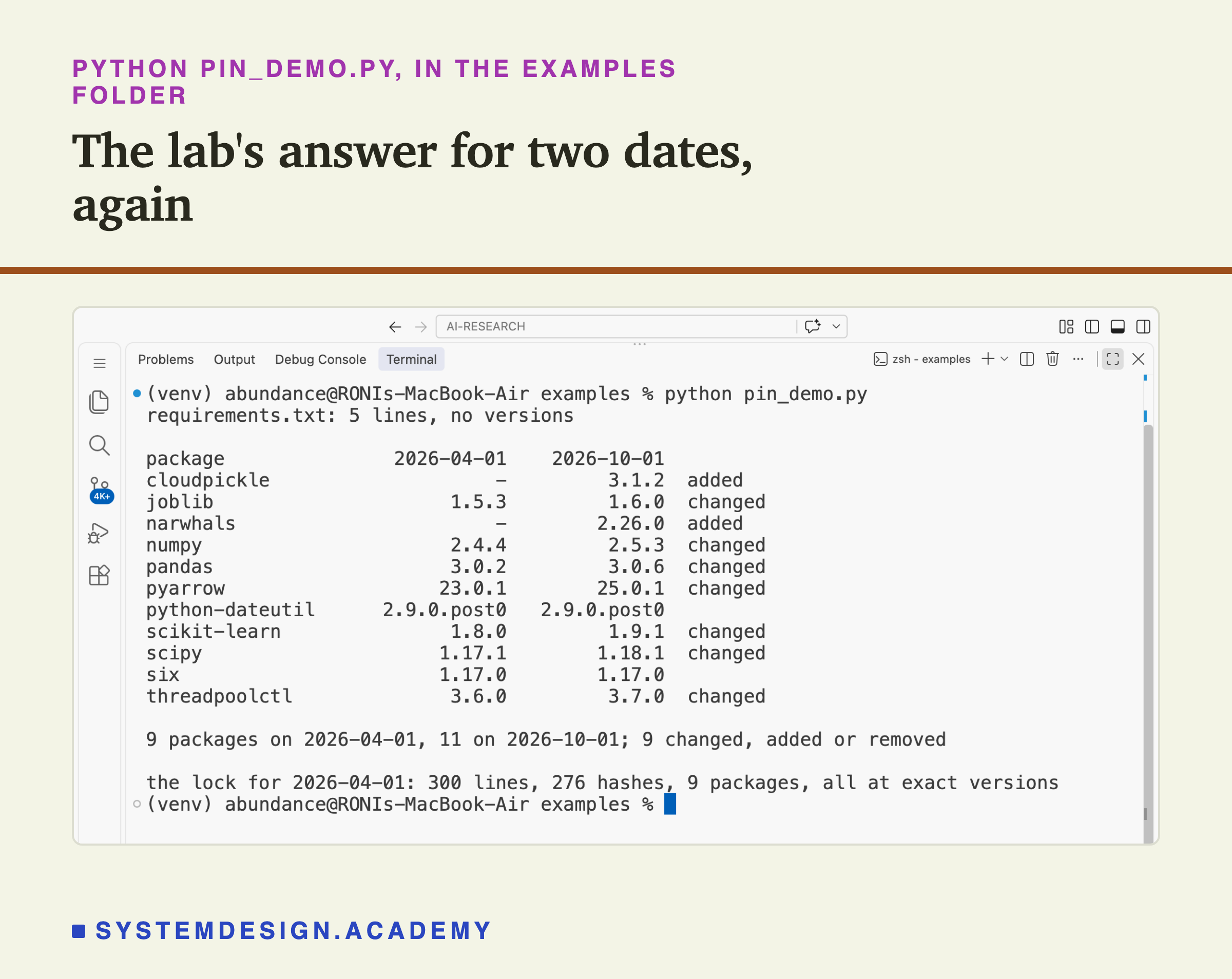
This is a real recording of the report script, pin_report.py, on the laptop where the lab ran.
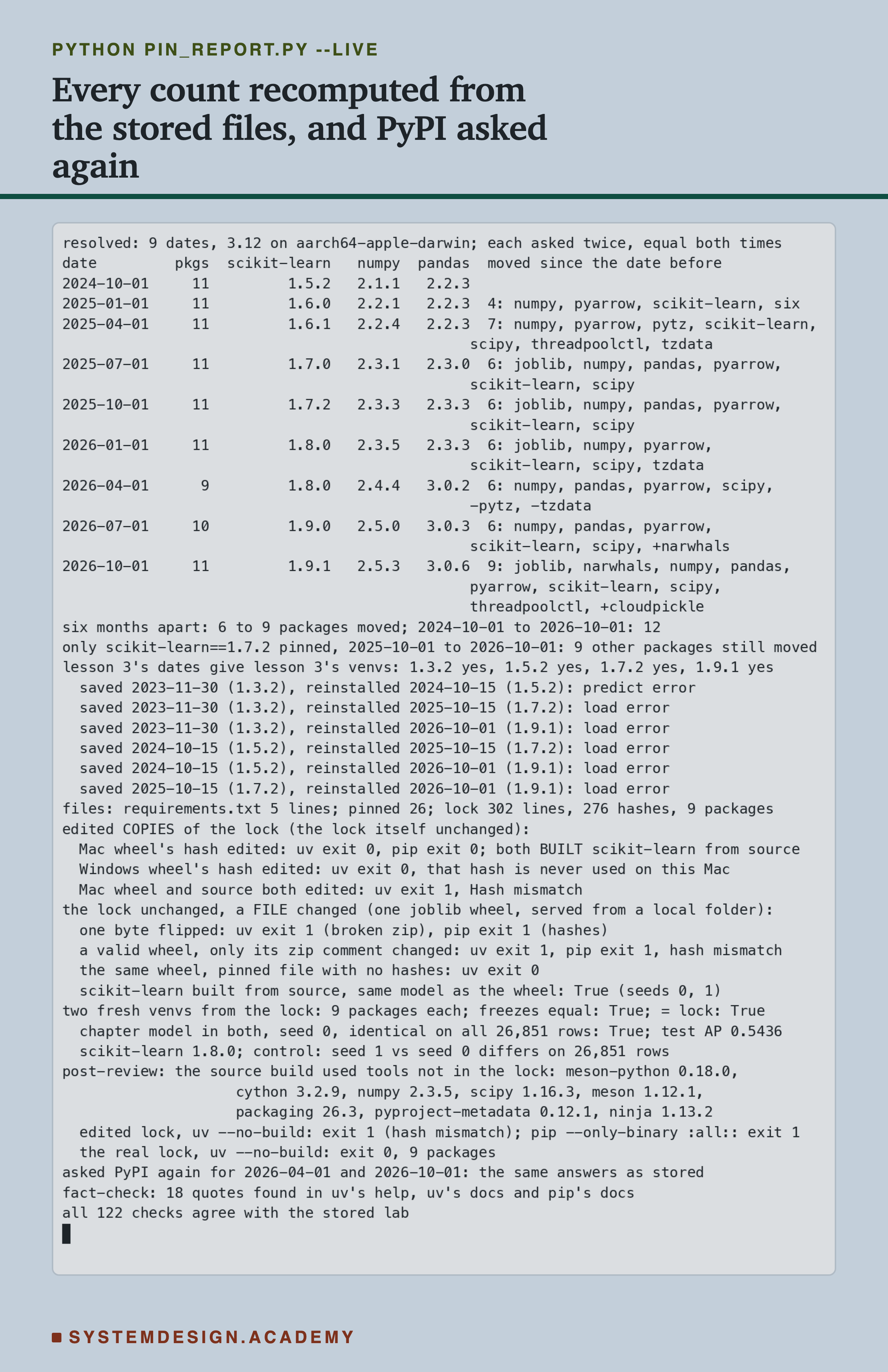
The report does not trust the lab's summary. It rereads every file the lab wrote, checks each one's fingerprint, and counts the changes again with its own code. It reruns uv pip freeze on the two installed environments and compares the lists. It reloads the stored predictions and compares them bit for bit, and recomputes the test score. It rebuilds the lesson 3 connection from lesson 3's own results file.
With --live, it also asks PyPI again, today, what the file would have installed on 1 April 2026 and on 1 October 2026. Both answers matched the stored ones. This matters: it means a date in the past gives a stable answer, so --exclude-newer is a fair way to look back in time. All 122 checks agreed.
One honest note. The lab's tamper part did not go as I guessed, and I added two parts after seeing its results, and one more after an independent review. They are labelled in the docstring, in the report, and on the tamper slides here.
The Headline: The Same File, a Different Install
Here is the main result. The same five-line file, resolved as of nine dates.
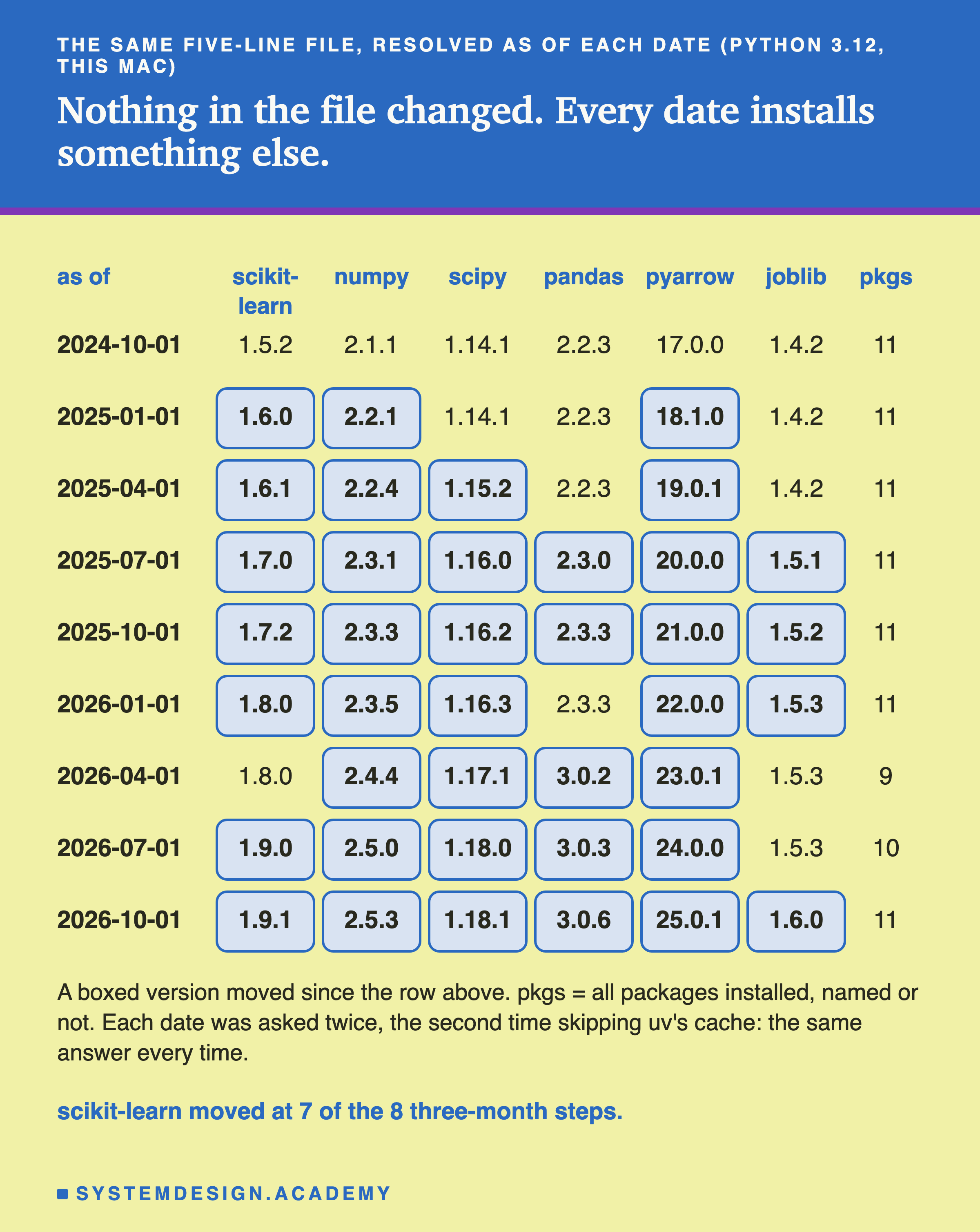
Nothing in the file changed, and every date installs something different. scikit-learn was 1.5.2 in October 2024 and 1.9.1 in October 2026. numpy went from 2.1.1 to 2.5.3. pandas went from 2.2.3 to 3.0.6, which crosses a major version: the first number changed, which usually means the library allows itself to break old code. pyarrow went from 17.0.0 to 25.0.1.
scikit-learn moved at 7 of the 8 three-month steps. The one quiet step was from January to April 2026, when 1.8.0 was still the newest. My range, >=1.3, did nothing to stop any of this. It only says "not older than 1.3", and every one of these versions is newer.
The answers were stable. Each date gave the same answer twice, the second time with uv's saved copies ignored. And the report asked again later and got the same answers. So these rows are what an install on those days would really have chosen, on this kind of machine, for Python 3.12.
How Many Packages Moved Each Time
Now I count. For each step of three months, how many of the installed packages changed version, appeared, or disappeared?
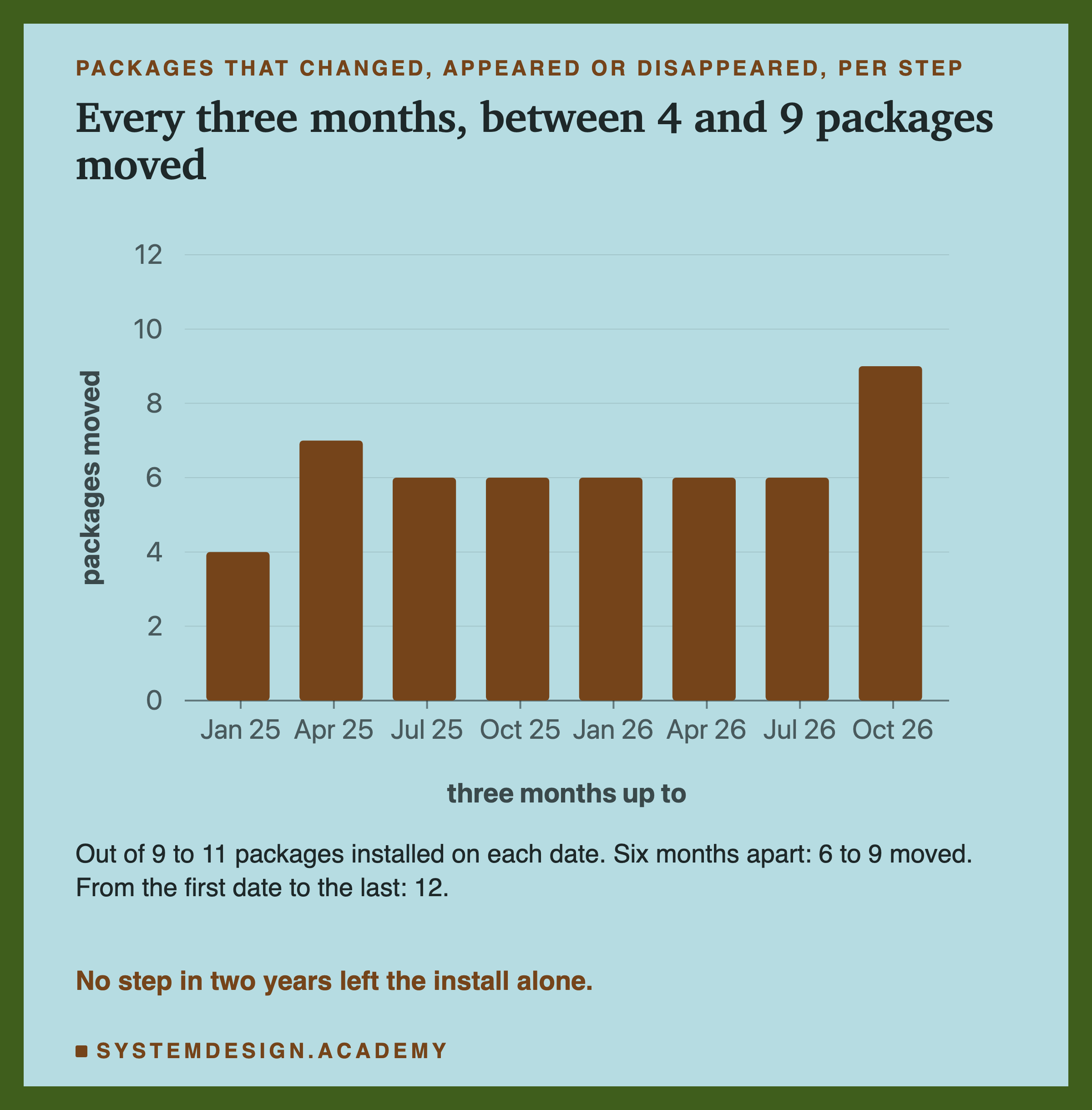
Every three months, between 4 and 9 packages moved. The smallest step, October 2024 to January 2025, still moved 4: numpy, pyarrow, scikit-learn and six. The biggest step was the last one, July to October 2026, with 9.
To put that against the size of the install: on each date the file installed between 9 and 11 packages in all. So in a typical three months, more than half of the install changed.
I call a package moved if it has a new version, if it is new to the list, or if it left the list. The next slide shows why the last two kinds matter.
Six Months Later
The question in this lesson's title was six months. Here is the same count for every pair of dates six months apart, and for the whole two years.
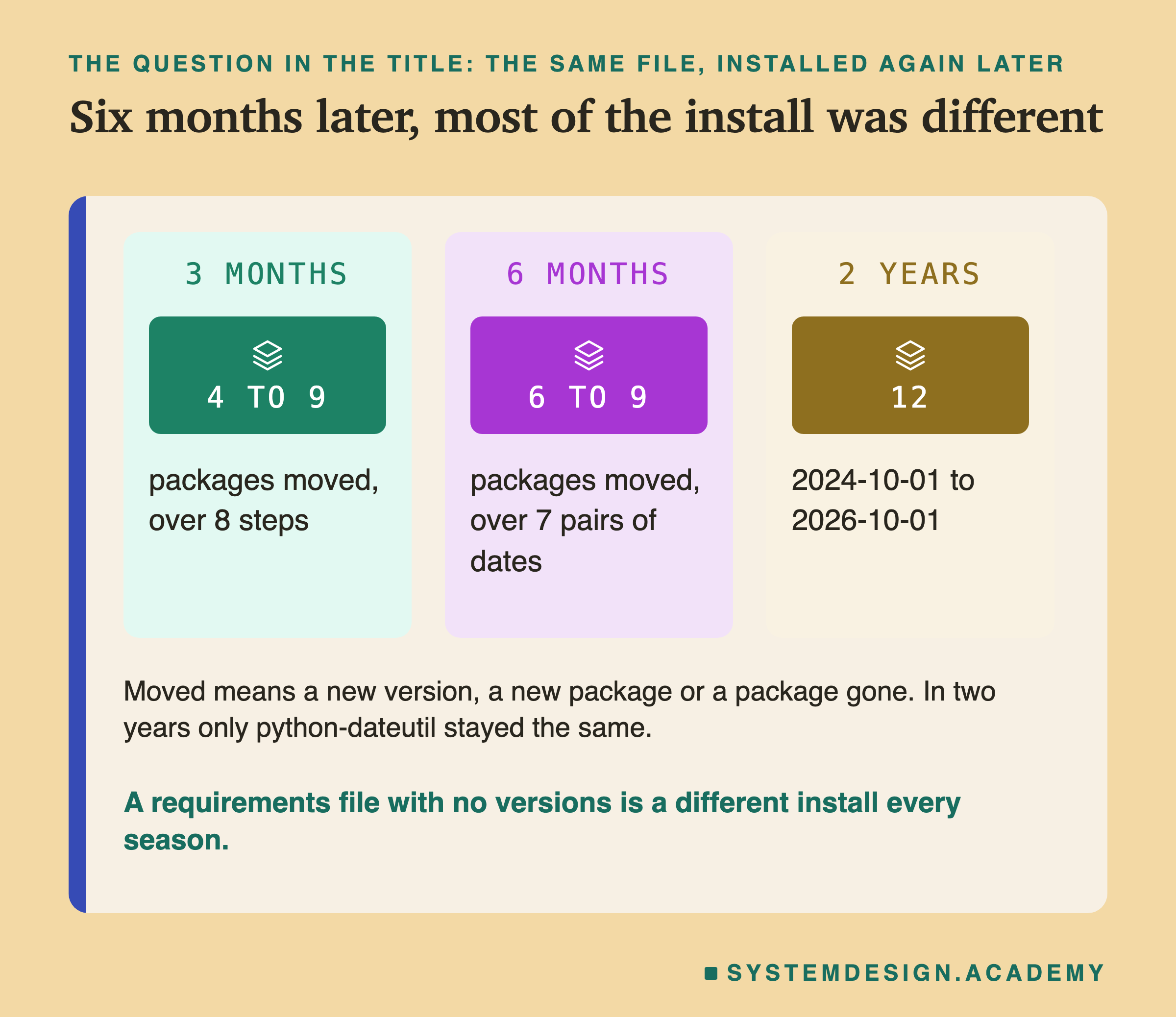
Six months apart, 6 to 9 packages moved, in all 7 pairs of dates. The most recent six months, from 1 April to 1 October 2026, moved 9 of the 11 packages. scikit-learn was among them, from 1.8.0 to 1.9.1.
Over two years, 12 moved, and only one package stayed exactly the same: python-dateutil, at 2.9.0.post0. Every package I named in my file changed.
So the answer to the title question is plain. Someone who installs this file six months after me does not get my environment. They get most of a new one, and nobody chose it. Lesson 3 already showed what that can do to a saved model. The connection is two slides on.
Packages Nobody Named, Arriving and Leaving
Versions are not the only thing that changed. The list of packages changed shape too.
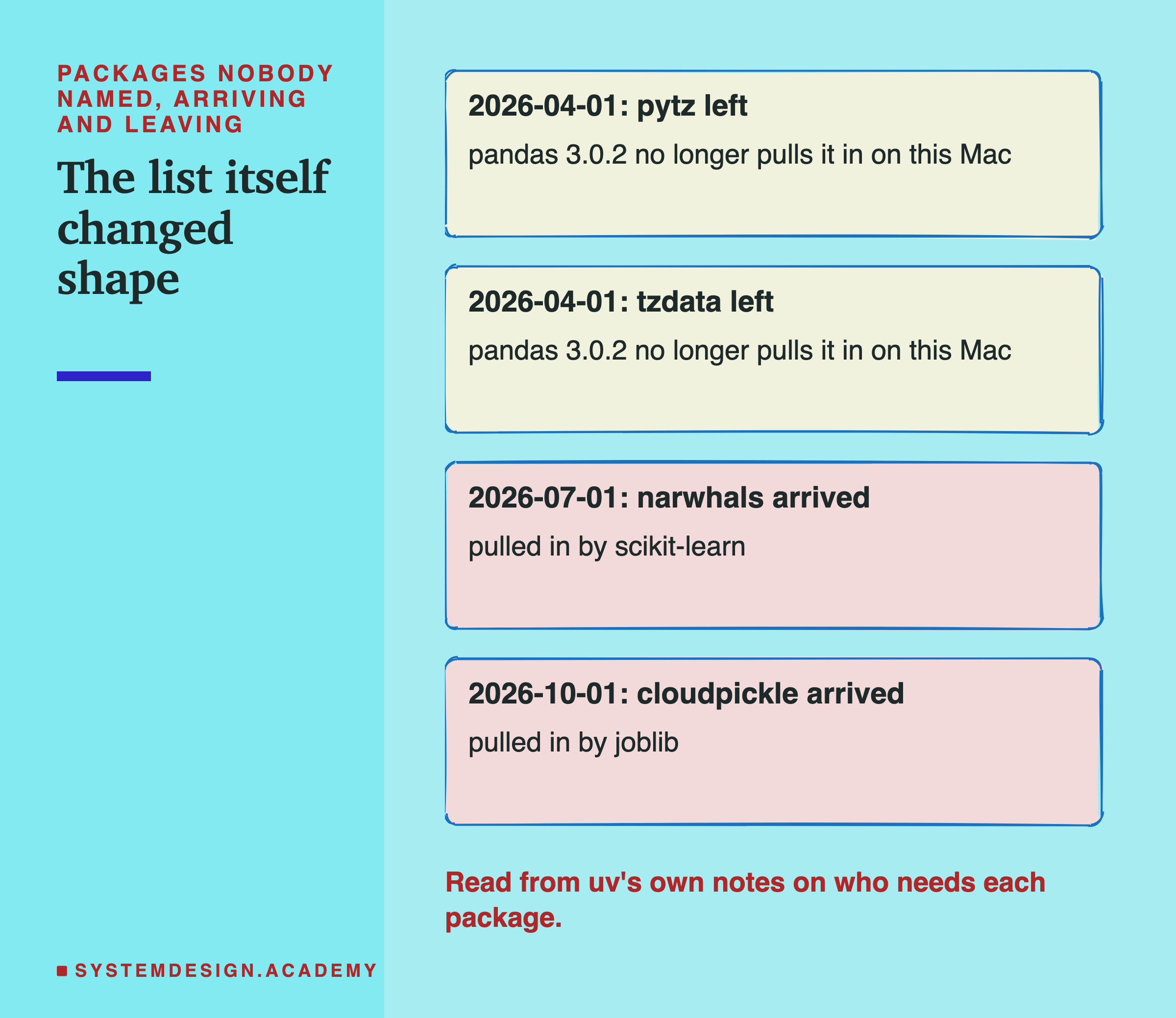
I added this check after the first results, when I saw the package count go from 11 to 9 to 10 to 11. To find out why, the lab asked uv again for every date, this time keeping its # via notes, which say which package needs which. This part is labelled in the lab as added after the results.
Two packages left in April 2026, pytz and tzdata. Both had been pulled in by pandas, and pandas 3.0.2 no longer pulled them in on this Mac. One arrived in July 2026, narwhals, pulled in by scikit-learn 1.9.0. And one arrived in October 2026, cloudpickle, pulled in by joblib 1.6.0.
None of these four names is in my file. Each one changed what my environment contained. A package that arrives brings its own code and its own future updates. A package that leaves can break any of my code that used it without saying so in the file.
Pinning Only scikit-learn
A common half-measure is to pin only the library you think about. Lesson 3 was about scikit-learn, so the obvious fix is scikit-learn==1.7.2 and nothing else. I tested that file too, from 1 October 2025, three weeks after 1.7.2 came out, to 1 October 2026.
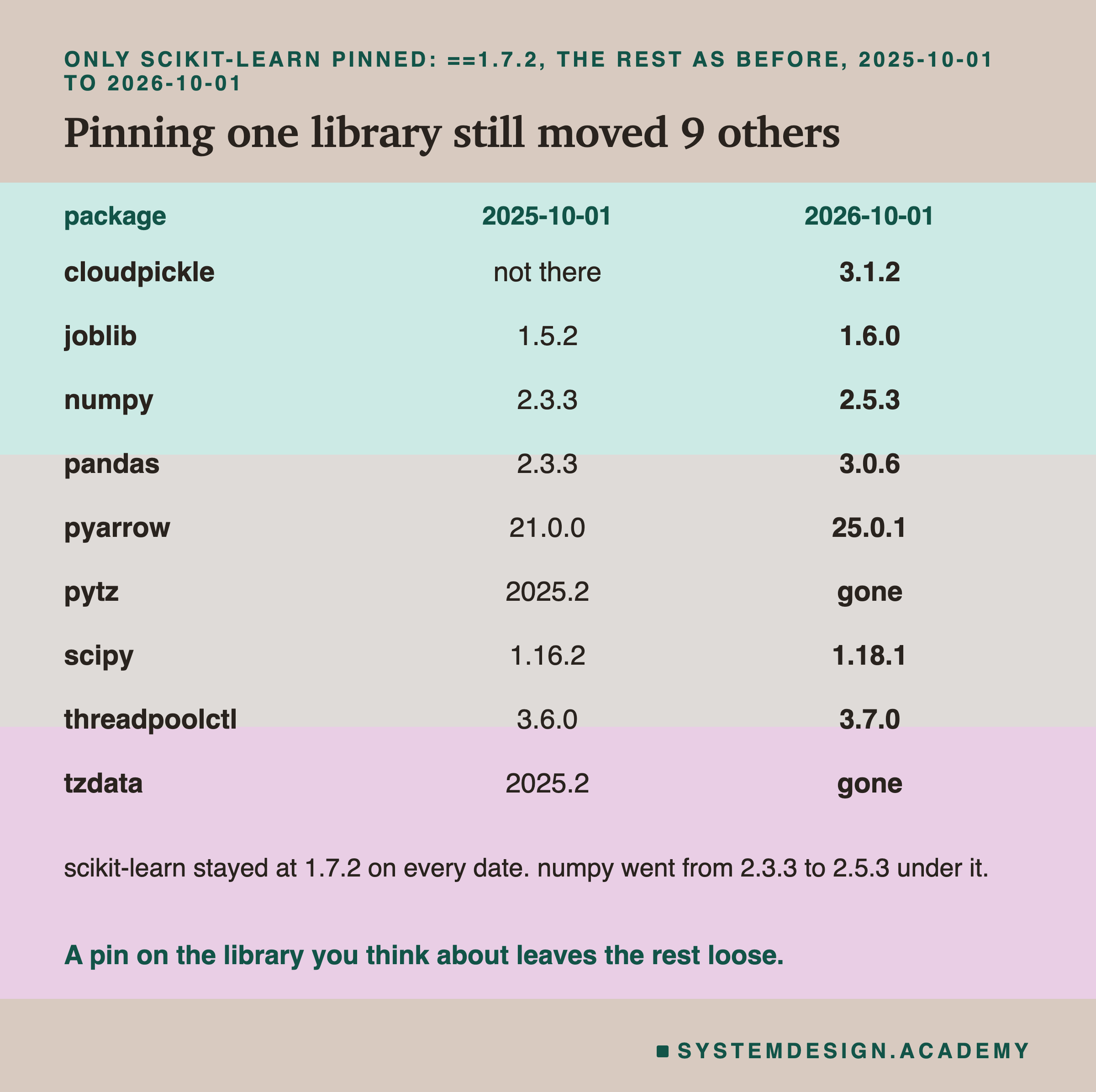
scikit-learn stayed at 1.7.2 on every date, and 9 other packages still moved. Six changed version: numpy, scipy, pandas, pyarrow, joblib and threadpoolctl. cloudpickle arrived, and pytz and tzdata left.
Is that a problem? Lesson 3 had one control for exactly this: scikit-learn 1.7.2 with its own numpy 2.3, against 1.7.2 with numpy 2.5. Those loads worked both ways with identical scores. So in that one case, numpy moving under a fixed scikit-learn did no harm. But lesson 3 also found that a file saved with numpy 2 did not load at all with numpy 1. A pin on one library protects you from that library only.
There was one detail I liked: with scikit-learn held at 1.7.2, narwhals never arrived. It came with scikit-learn 1.9.0, not with time.
Lesson 3's Failures, Read as Two Installs
Now the connection to lesson 3. Its four main environments were made with uv at fixed dates. They held scikit-learn 1.3.2 as of 30 November 2023, 1.5.2 as of 15 October 2024, and 1.7.2 as of 15 October 2025. The fourth held 1.9.1, today's versions.
I resolved my five-line file at exactly those four dates, with the same Python versions lesson 3 used. Each time, scikit-learn, numpy, scipy, joblib and threadpoolctl came out equal to lesson 3's stored lists, all four out of four. So lesson 3's environments are exactly what this requirements file would have installed on those days. Its load results answer a real question: a team installs this file, trains and saves a model, then later installs the same file again and loads the model.
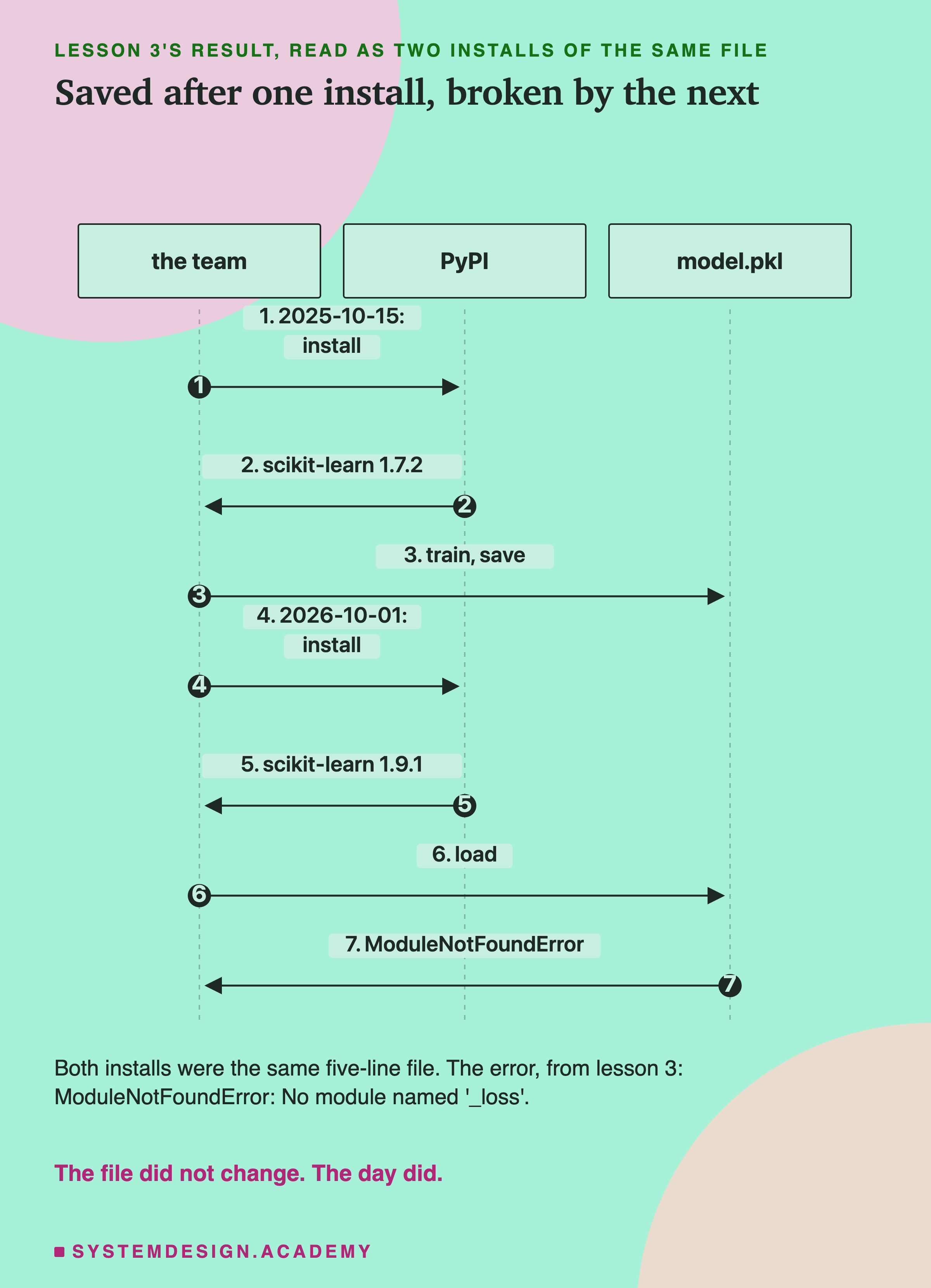
This picture is one of those pairs. The team installs on 15 October 2025 and gets scikit-learn 1.7.2. They train and save. A year later, on a new server, they run the same install and get 1.9.1. Loading the saved model fails with No module named '_loss', an error that does not mention versions at all.
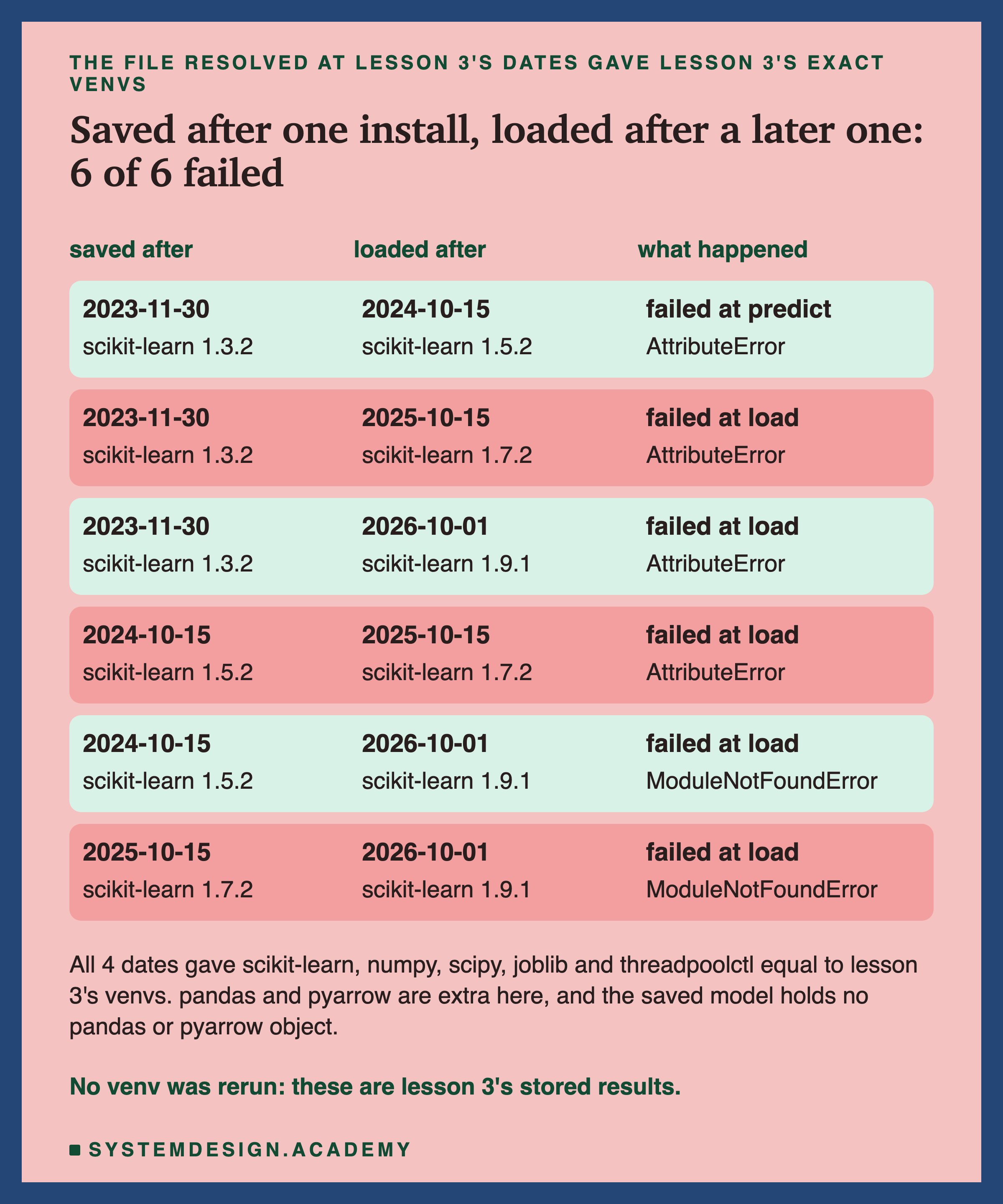
All 6 such pairs failed. Five failed while loading, and one loaded and then failed at the first prediction. My file also installs pandas and pyarrow, which lesson 3's environments did not have. That does not change the result: lesson 3's model was trained on plain numpy arrays, so the saved file holds no pandas or pyarrow object.
What a Lock File Looks Like
So the cure is to write down the whole install, not just the wishes. That is what uv pip compile does when you give it -o and a file name. I made two files from my five-line file, both as of 1 April 2026: one with exact versions only, and one with --generate-hashes as well.
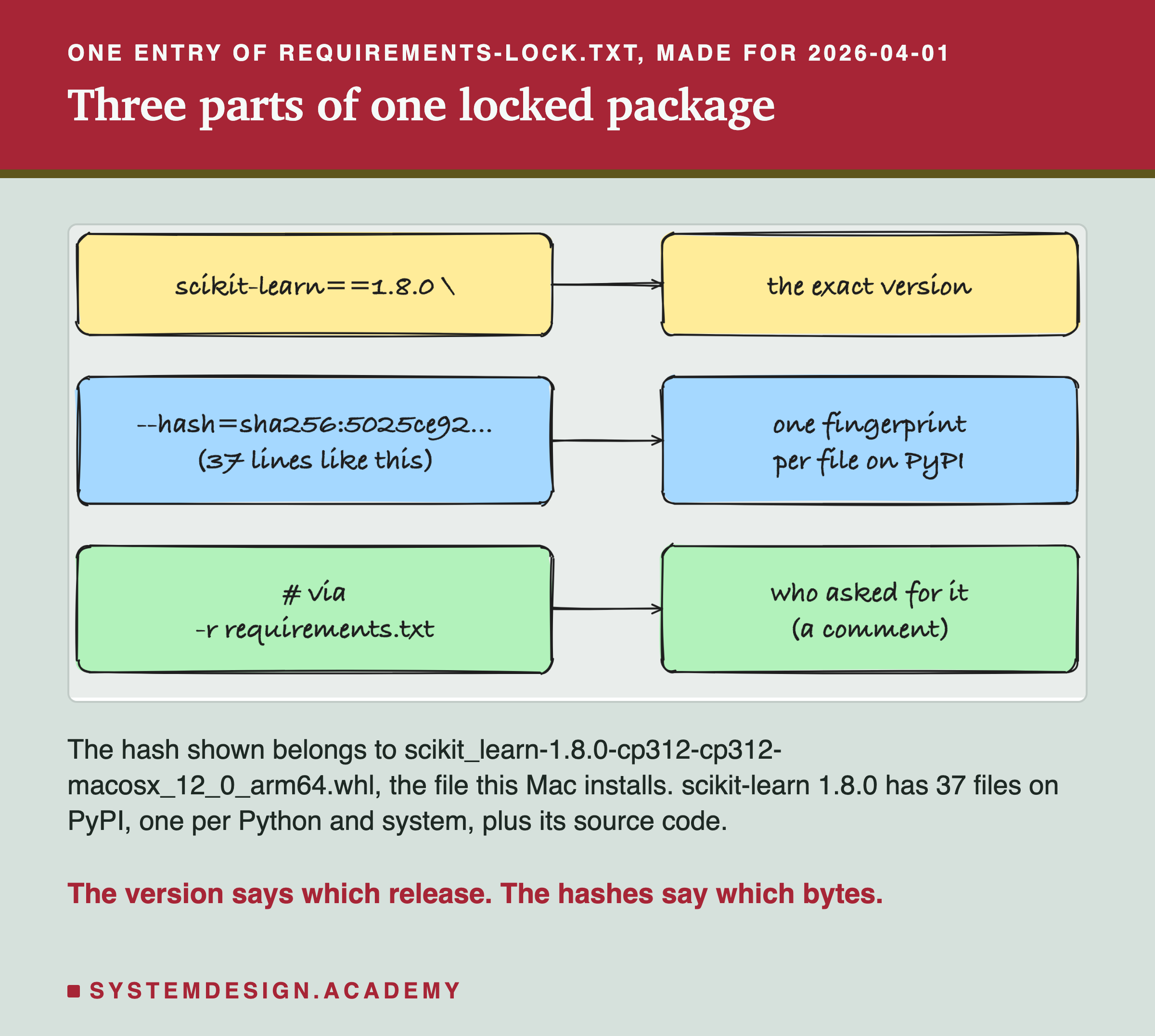
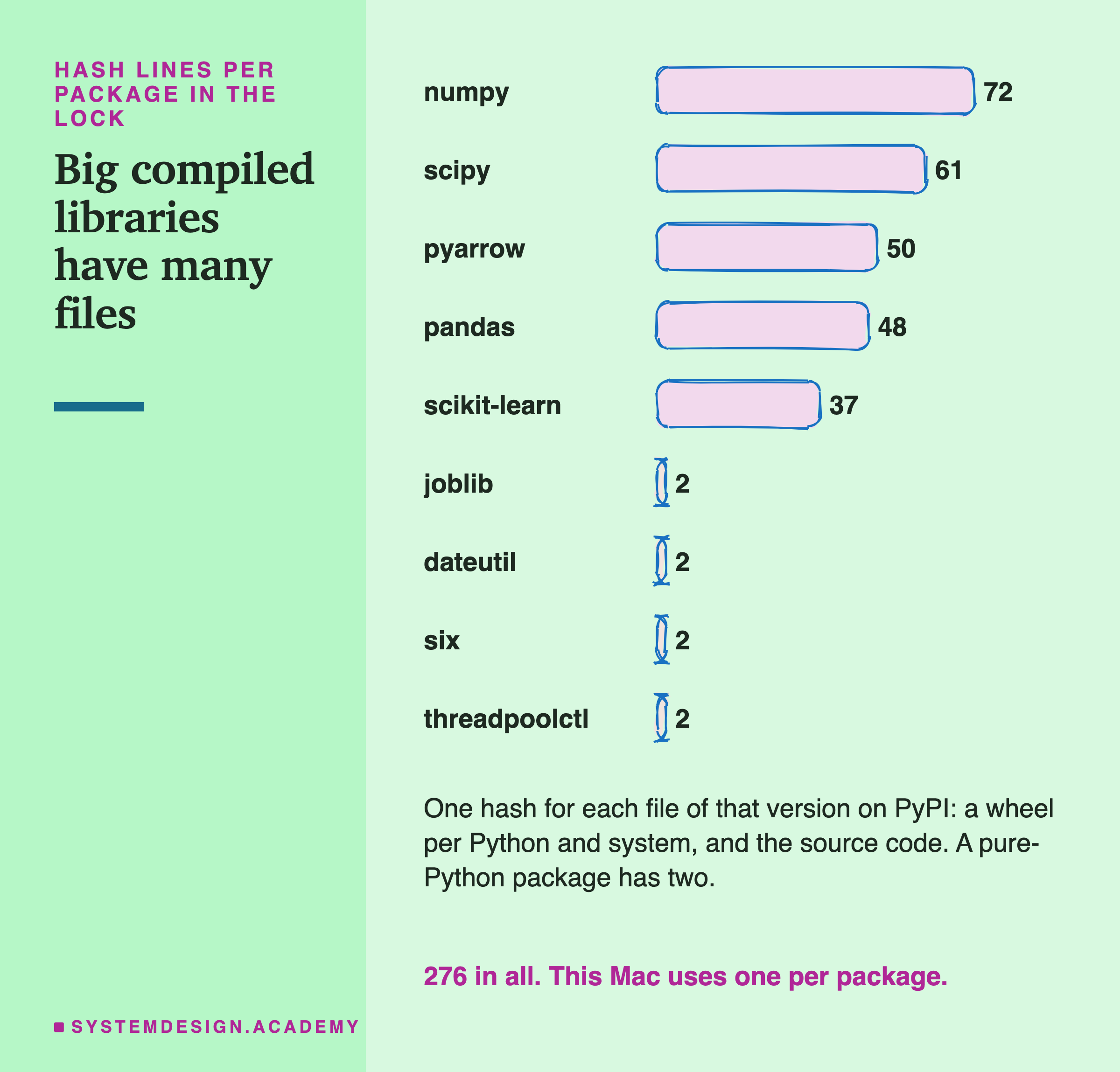
Each package in the lock has three parts. First, the exact version, such as scikit-learn==1.8.0. Second, a list of hashes, one for every file PyPI holds for that version. A wheel is a ready-built file for one Python version and one kind of computer, so a big library has many wheels. It also has one source file, the code before it is built. scikit-learn 1.8.0 has 37 hashes. Third, a comment saying which package asked for it.
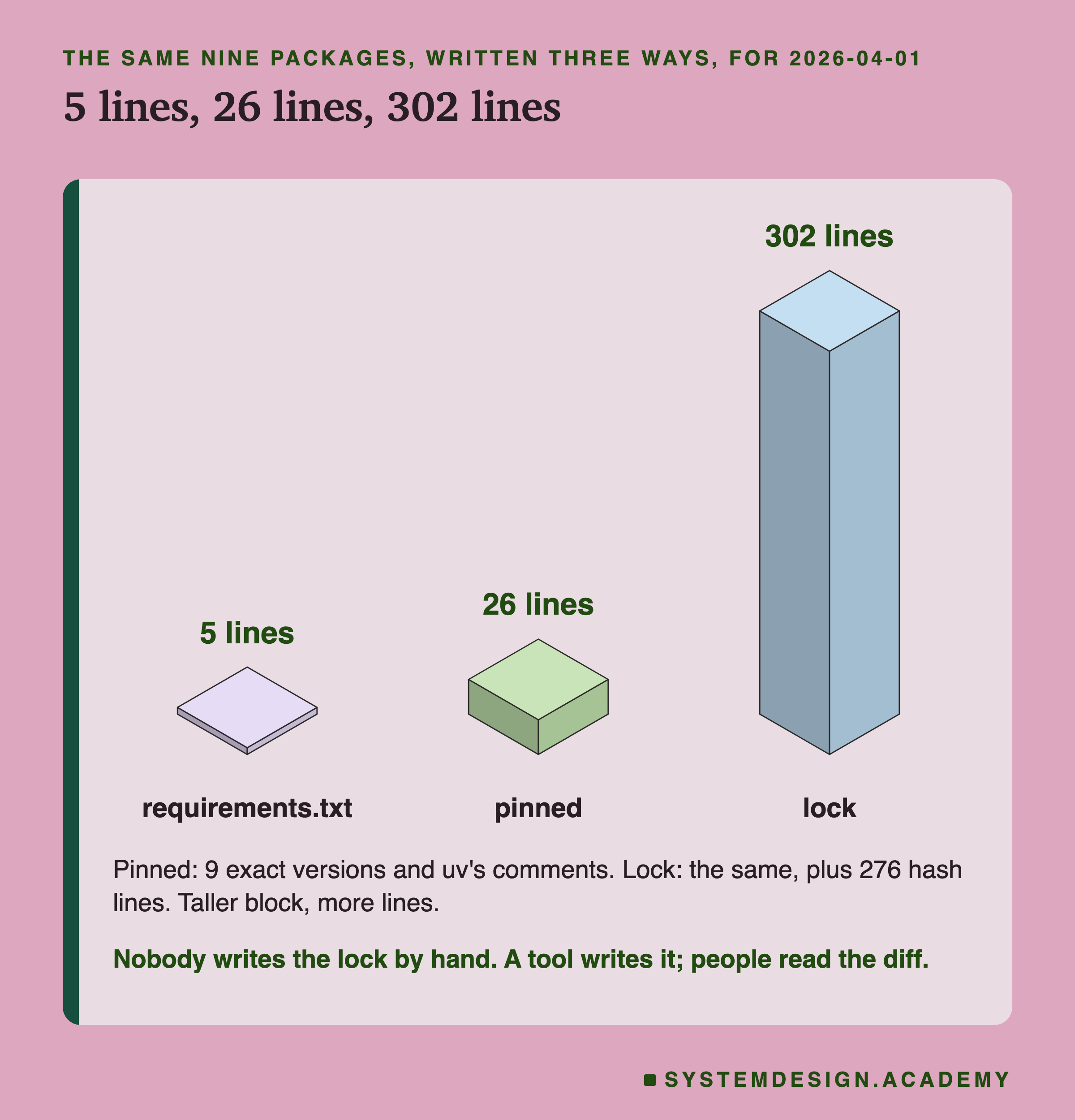
The sizes surprised me a little. My requirements file is 5 lines. The pinned file is 26 lines: 9 exact versions plus uv's comments. The lock is 302 lines, of which 276 are hashes. Nobody should write or edit this file by hand. A tool writes it, it goes into version control next to the code, and when it changes, people read the difference.
Two Fresh Installs From One Lock
A lock is only worth having if it gives the same install every time. So the lab made two new, empty environments and installed the lock into each with uv pip sync --require-hashes. sync makes the environment match the file exactly, removing anything not listed.
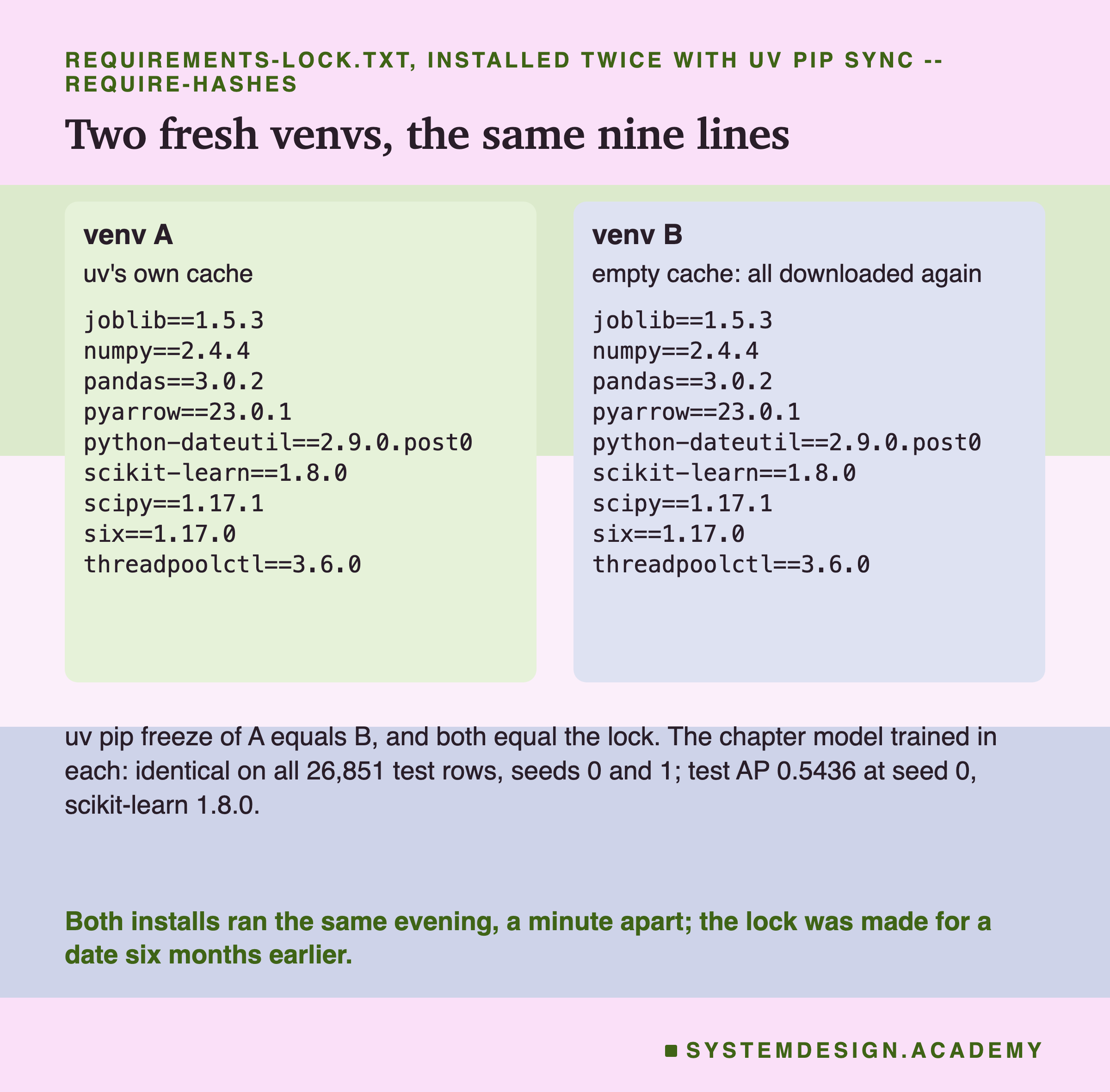
Environment A used uv's normal store of downloaded files, called its cache. Environment B was given a new, empty cache, so it downloaded every file from PyPI again, the way a new server would. Both lists of installed packages, from uv pip freeze, were the same nine lines, and both equalled the lock.
Then each environment trained the chapter model, with seeds 0 and 1. A seed is the number that fixes the random choices inside training. The predictions were identical on all 26,851 test rows, to the last bit, for both seeds. As a control that the check can fail, seed 1 against seed 0 differed on all 26,851 rows. The test AP at seed 0 was 0.5436, under scikit-learn 1.8.0.
Why 0.5436 and not the chapter's 0.5450? The lock holds the scikit-learn of April 2026, 1.8.0. My main environment has 1.9.1, and the model from the lock environments differed from the main one on all 26,851 rows. So the lock reproduced its own model exactly, and that model is the April 2026 one, not today's. Lesson 3 found the same kind of change between 1.7.2 and 1.9.1.
I have to be honest about the time. Both installs ran the same evening, one minute apart. I could not wait six months. But the lock does not depend on the day. It was made for a date six months back, and it still installed those exact six-month-old versions. The plain file, resolved as of the day the installs ran, moved 9 of its packages.
When Did the Install Stop?
Now the hashes. I wanted to see an install refuse a file. My first plan was simple: in a copy of the lock, change one character of the hash for the scikit-learn wheel this Mac downloads, and install. I guessed it would stop with a hash error.
It did not stop. uv installed everything with exit code 0. pip 26.2.1 did the same. Reading their output, I saw why: neither used the wheel. Both took scikit-learn's source file, whose hash was still in the lock, and built scikit-learn from source on this Mac. uv printed "Building scikit-learn==1.8.0". With uv's existing cache it did the same. Changing the hash of a Windows wheel did nothing either, because this Mac never downloads that file.
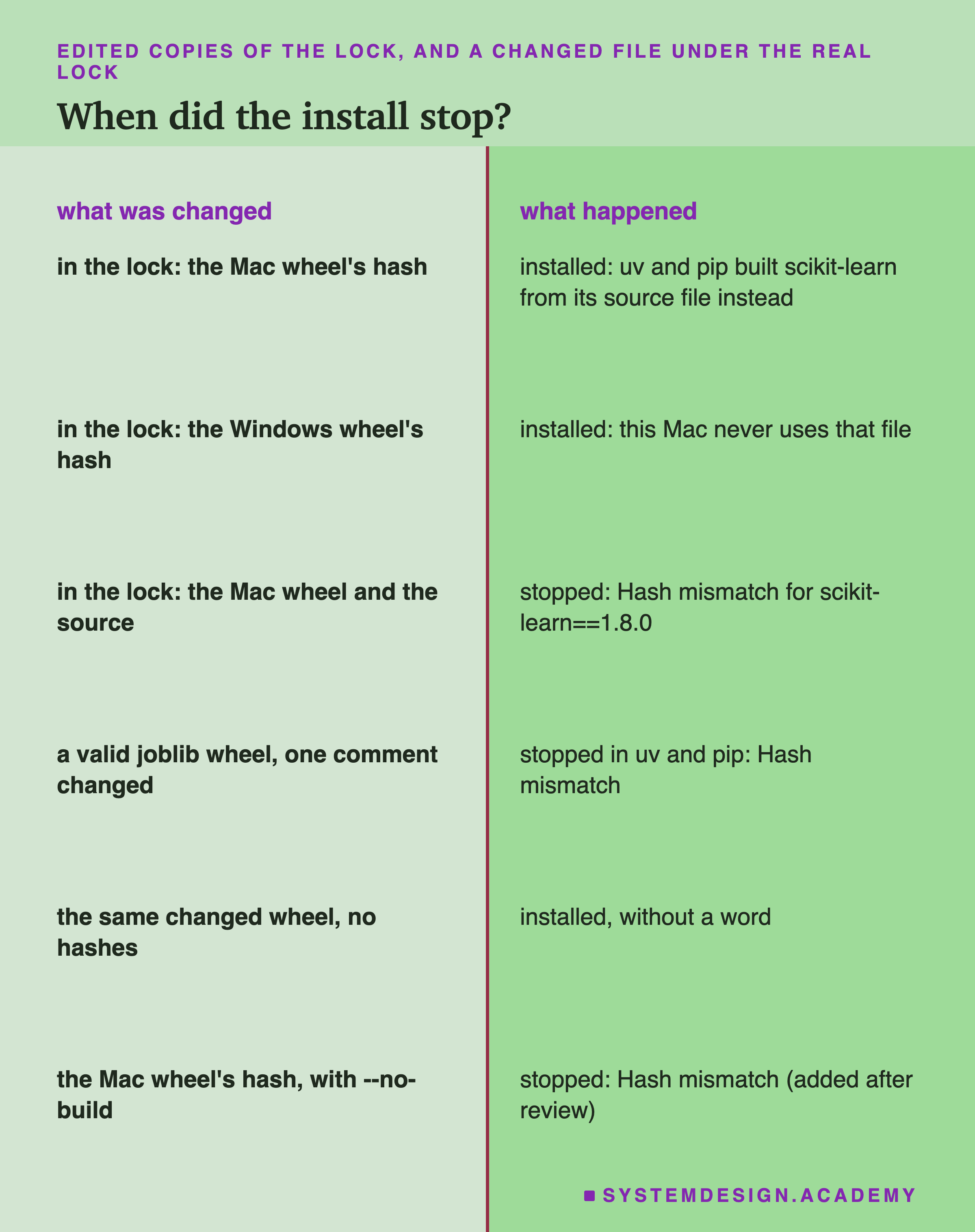
So editing the lock does not test what a hash is for. I wrote two more tests into the lab before running them, and they are labelled there as added after the results.
The Mac wheel and the source file both edited. Now no file of scikit-learn 1.8.0 was allowed. uv stopped: "Hash mismatch for scikit-learn==1.8.0", listing the expected hashes and the one it computed.
The lock untouched, a file changed. This is the case a hash exists for. The file is different from the one the lock was made from, because a mirror, a cache or something on the network changed it. The lab downloaded this Mac's 9 wheels into a folder and installed from there. With the folder unchanged, the install worked. Then I flipped one byte in the middle of the joblib wheel. pip stopped with "THESE PACKAGES DO NOT MATCH THE HASHES". uv stopped too, but its message was about a broken zip file, because the flipped byte broke the wheel's packed data.
A valid file, changed. So I made a harder case. The new joblib wheel was still a perfectly valid file, and every file inside it was identical. Only the zip file's comment was changed. uv and pip both stopped, with "Hash mismatch". And the same changed wheel, installed from the pinned file with no hashes, went in without a word.
The Hash Edit That Built a Different File
The first test left me with a question I had not planned. When the installer built scikit-learn from source instead of using the wheel, did it build the same thing?
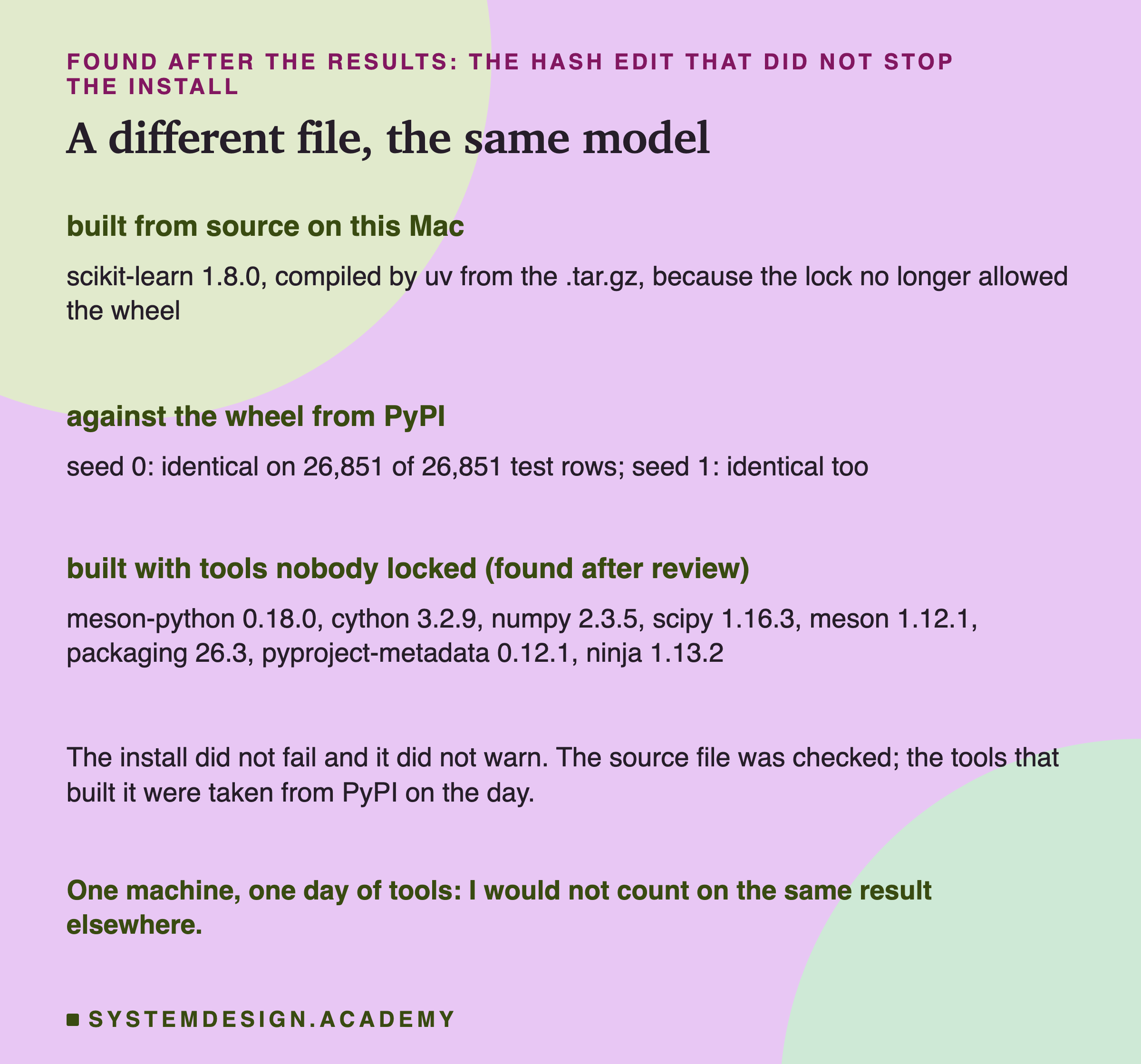
I asked this after the results, and it is labelled in the lab. The lab installed the edited lock again, kept that environment, and trained the chapter model there with seeds 0 and 1. The predictions were identical to the wheel's on all 26,851 test rows, for both seeds.
An independent review of this lesson then found something I had missed, and I checked it myself with uv's -v option, which prints every step. To build a source file, uv makes a separate build environment and installs the build tools that the source file asks for.
It picked 8 of them from PyPI as of the install day. They were meson-python 0.18.0, cython 3.2.9, numpy 2.3.5, scipy 1.16.3, meson 1.12.1, packaging 26.3, pyproject-metadata 0.12.1 and ninja 1.13.2. Not one of them is in my lock at that version; numpy and scipy are there, but at 2.4.4 and 1.17.1. None of them was hash-checked against my lock, and --exclude-newer did not apply to them. The source file itself was checked. The tools that turned it into a library were not. This is labelled as post-review in the lab, and the report checks it.
So here, the slower path ended at the same model. But think about what happened.
The install did not fail and did not warn. It quietly chose a different file and ran a compiler on this Mac. On a server without a compiler it would have failed in a confusing way. On another machine, with another compiler, it could build something slightly different. I measured one machine.
The lesson I take is about the build tools. Once an install falls back to a source file, part of what ends up on the machine was chosen on the day, outside the lock. A hash edited by mistake, for example in a merge, is not caught; it just sends the install down that path. The how-to slide shows the option that closes it.
What a Hash Protects, and What It Does Not
Putting the tests together, here is what the hashes did and did not do in this lab.
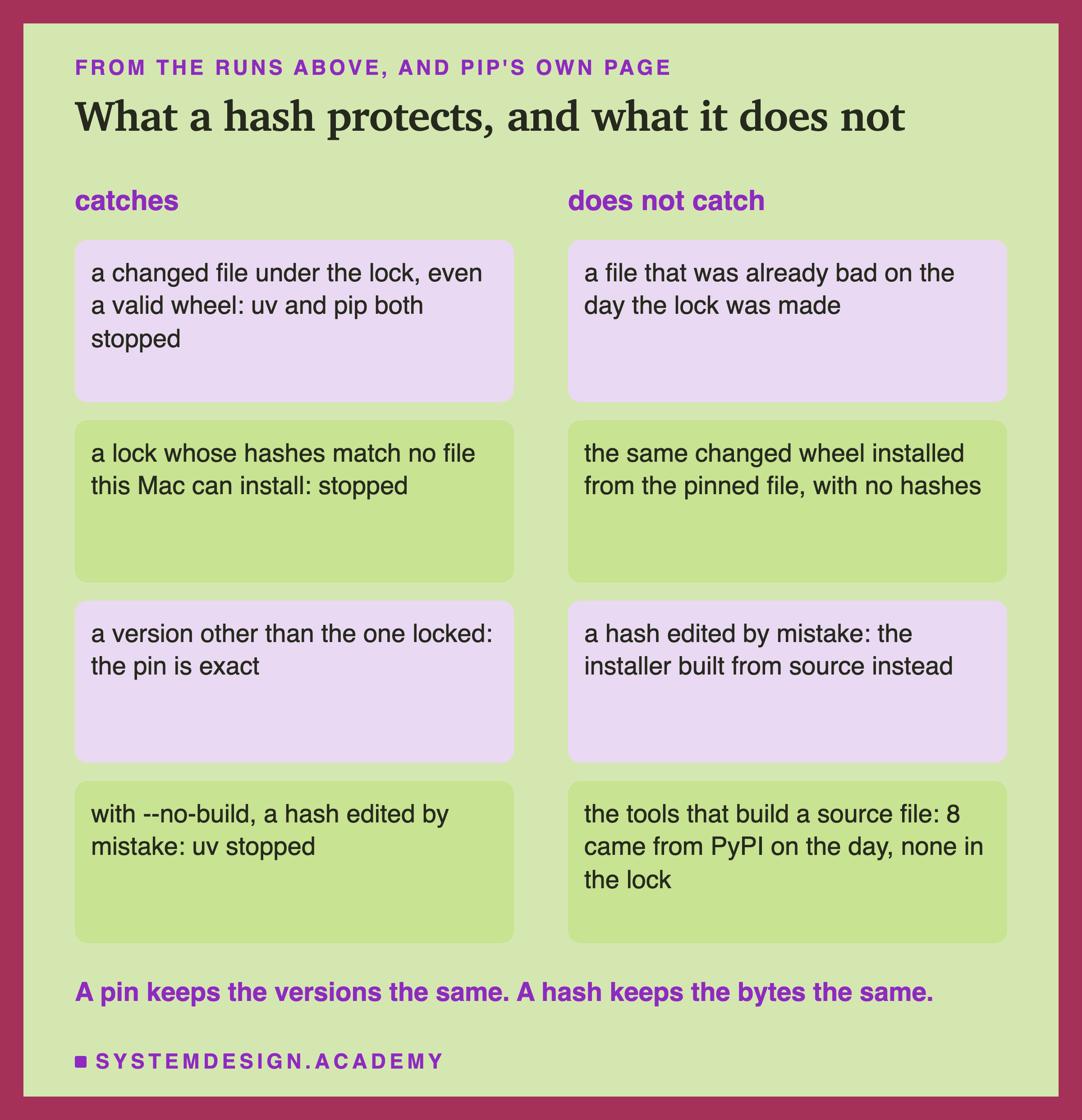
What a hash catches. A file that is different from the one recorded, even by a single byte in a place that changes nothing inside it. Both uv and pip stopped on it, and pip's message says exactly what to think: "someone may have tampered with them". A lock entry whose hashes match no file this machine can install also stops it.
What a hash does not catch. A hash records what was there on the day the lock was made. If a bad file was already on PyPI that day, the lock faithfully records the bad file. A hash also only works when the install uses it: the same changed wheel went straight in from the pinned file without hashes. A hash edited by mistake in the lock is not an error; the installer just takes another file it is allowed to take. And when that file is source code, the tools that build it come from PyPI on the day, with no lock and no hash.
So a pin protects you from time: the versions do not drift. A hash protects you from a changed file: the bytes do not drift. Neither tells you the code was good in the first place. That question belongs to the last lesson of this chapter.
My Guesses Before the Run, Checked
I wrote eight guesses into the lab before it ran. Here they are against the results.
-
"every 3-month step changes at least one package; scikit-learn's own version changes at 6 or more of the 8." Right: every step moved 4 to 9, and scikit-learn changed at 7.
-
"the five names resolve to about 11 packages: the rest are transitive." Right on most dates: 11, but 9 on 1 April 2026 and 10 on 1 July 2026.
-
"a date resolved twice (the second time with --refresh) gives byte-identical output, every date." Right, on all 18 resolutions.
-
"at lesson 3's dates and Pythons, the anchors match lesson 3's 1.3.2, 1.5.2 and 1.7.2 venvs exactly, and 2026-10-01 at 3.13 matches 1.9.1." Right: 4 of 4.
-
"with only scikit-learn pinned, numpy still changes between 2025-10-01 and 2026-10-01." Right: 2.3.3 to 2.5.3, and 8 other packages moved with it, 9 in all.
-
"the lock is more than 10 times as many lines as requirements.txt." Right: 302 against 5.
-
"the two lock installs give identical freezes equal to the lock, and bit-identical models." Right.
-
"T1 fails with a hash mismatch error; T2 installs (an unused hash is never checked); T3 fails in pip; T4 fails too." Wrong, except for T2. With the Mac wheel's hash edited, uv and pip both built scikit-learn from source and succeeded. This is the guess that sent me to the two extra tests on the tamper slide, and they are labelled as added after the results.
Try It Yourself
The full lab installs several environments. I wrote a small demo that shows the main result with nothing installed at all. It asks uv what my file would install as of two dates, and writes the lock for the first one.
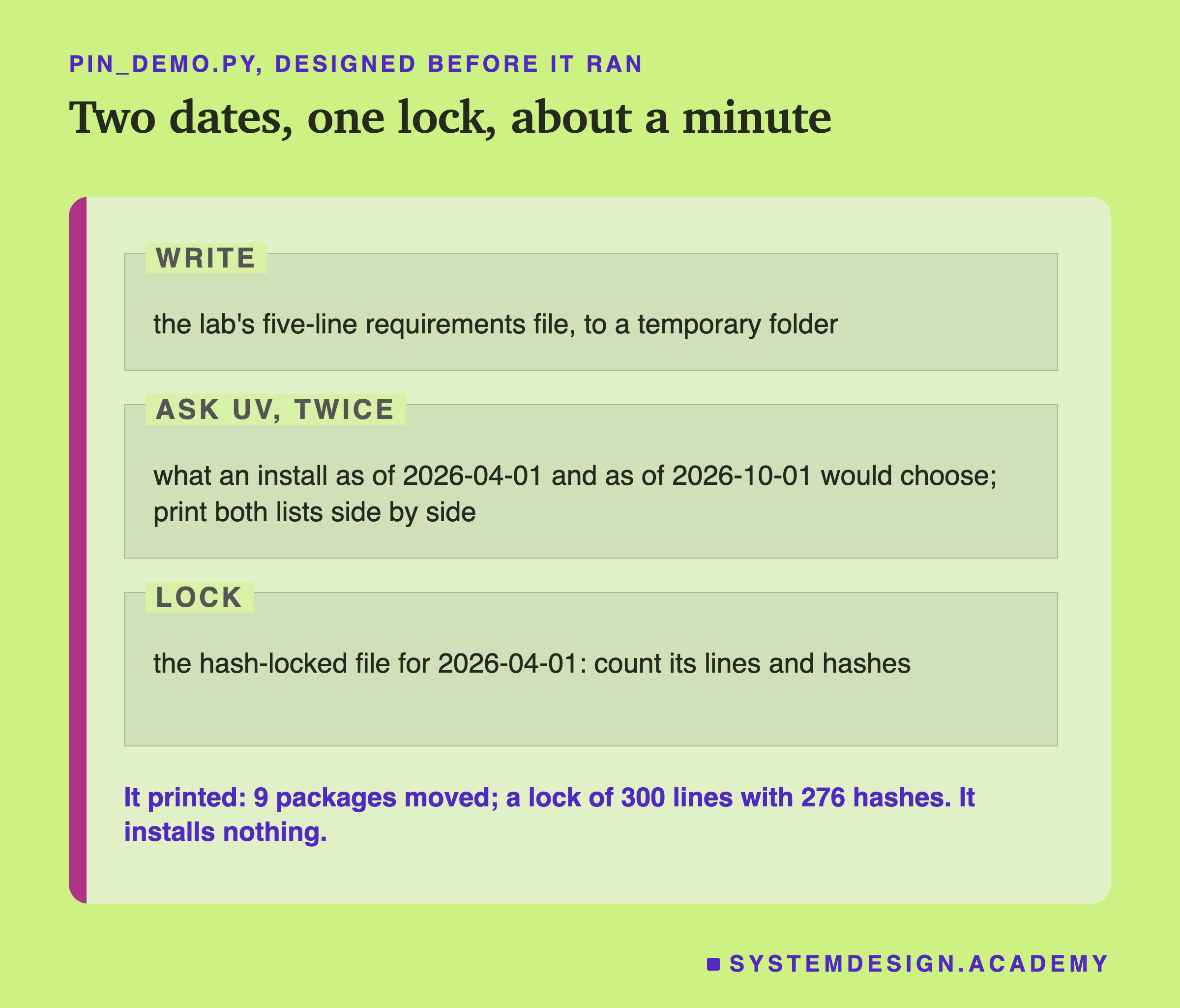
I wrote the demo's design into its docstring after the lab had run and before the demo first ran. It uses only Python's own library and the uv command. Its lock has 300 lines, not the lab's 302, because the demo leaves out uv's two-line header.
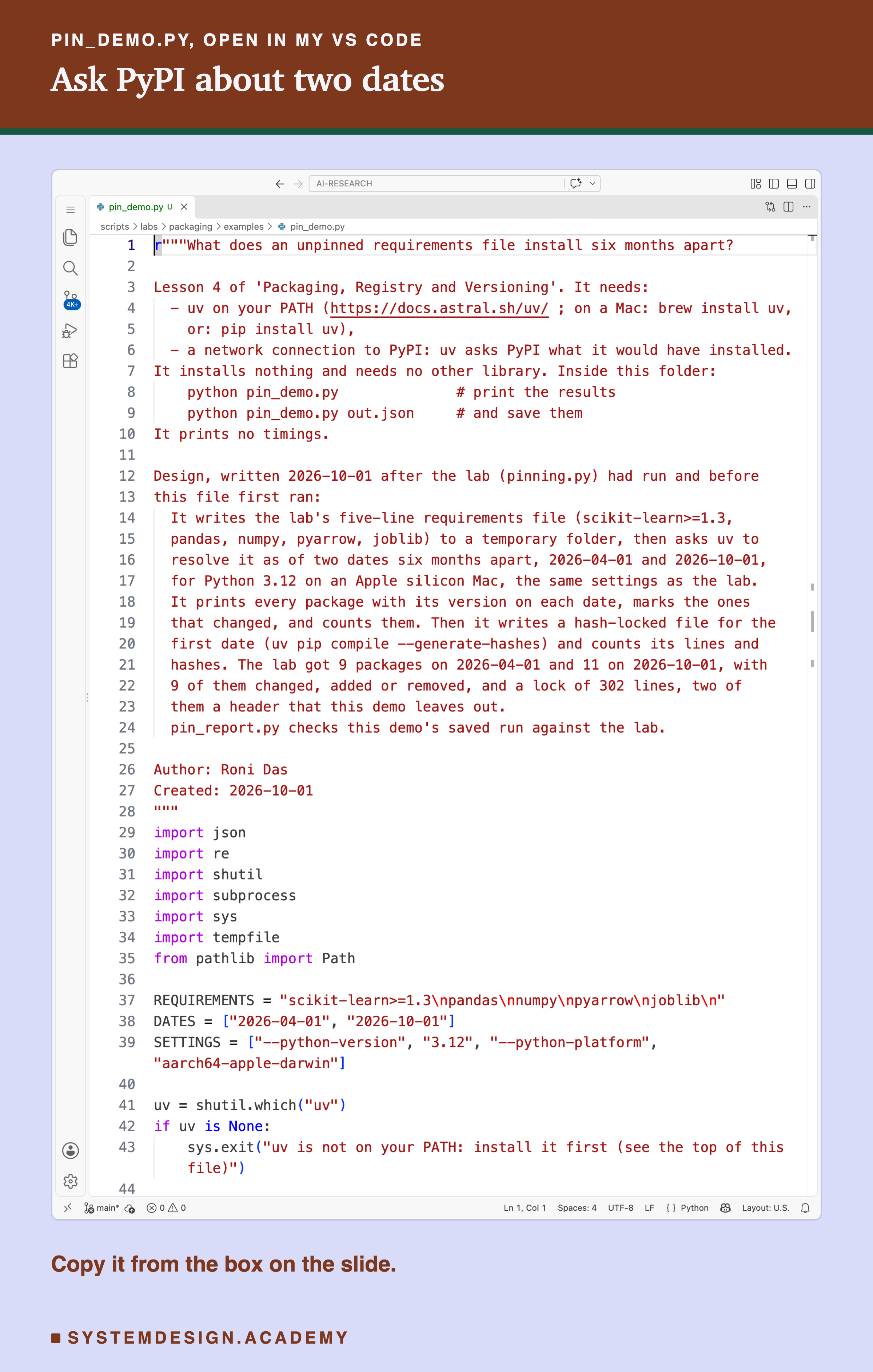
Before you run this lab. You need Python 3 and uv. On a Mac, brew install uv; anywhere, pip install uv works. The demo needs a network connection to PyPI, because uv asks PyPI what it would have installed on each date. It installs nothing and needs no other library. Inside the examples folder, run python pin_demo.py.
The demo resolves for Python 3.12 on an Apple silicon Mac, like the lab, even on Windows or Linux. So your output should match mine. Your own installs on another system would pick other files, and I have not checked those.
r"""What does an unpinned requirements file install six months apart?

Lesson 4 of 'Packaging, Registry and Versioning'. It needs:
  - uv on your PATH (https://docs.astral.sh/uv/ ; on a Mac: brew install uv,
    or: pip install uv),
  - a network connection to PyPI: uv asks PyPI what it would have installed.
It installs nothing and needs no other library. Inside this folder:
    python pin_demo.py              # print the results
    python pin_demo.py out.json     # and save them
It prints no timings.

Design, written 2026-10-01 after the lab (pinning.py) had run and before
this file first ran:
  It writes the lab's five-line requirements file (scikit-learn>=1.3,
  pandas, numpy, pyarrow, joblib) to a temporary folder, then asks uv to
  resolve it as of two dates six months apart, 2026-04-01 and 2026-10-01,
  for Python 3.12 on an Apple silicon Mac, the same settings as the lab.
  It prints every package with its version on each date, marks the ones
  that changed, and counts them. Then it writes a hash-locked file for the
  first date (uv pip compile --generate-hashes) and counts its lines and
  hashes. The lab got 9 packages on 2026-04-01 and 11 on 2026-10-01, with
  9 of them changed, added or removed, and a lock of 302 lines, two of
  them a header that this demo leaves out.
  pin_report.py checks this demo's saved run against the lab.

Author: Roni Das
Created: 2026-10-01
"""
import json
import re
import shutil
import subprocess
import sys
import tempfile
from pathlib import Path

REQUIREMENTS = "scikit-learn>=1.3\npandas\nnumpy\npyarrow\njoblib\n"
DATES = ["2026-04-01", "2026-10-01"]
SETTINGS = ["--python-version", "3.12", "--python-platform", "aarch64-apple-darwin"]

uv = shutil.which("uv")
if uv is None:
    sys.exit("uv is not on your PATH: install it first (see the top of this file)")


def compile_at(req, date, *extra):
    """Ask uv what an install on this date would have chosen; return its output."""
    r = subprocess.run([uv, "pip", "compile", str(req), "--exclude-newer", date,
                        *SETTINGS, "--no-header", *extra],
                       capture_output=True, text=True)
    if r.returncode != 0:
        sys.exit(f"uv failed for {date}:\n{r.stderr}")
    return r.stdout


def pins(text):
    """The name==version lines of a requirements file."""
    return dict(re.findall(r"^([A-Za-z0-9_.\-]+)==(\S+)", text, re.M))


with tempfile.TemporaryDirectory() as tmp:
    req = Path(tmp) / "requirements.txt"
    req.write_text(REQUIREMENTS)
    got = {d: pins(compile_at(req, d, "--no-annotate")) for d in DATES}
    lock = compile_at(req, DATES[0], "--generate-hashes")

a, b = (got[d] for d in DATES)
print(f"requirements.txt: {len(REQUIREMENTS.splitlines())} lines, no versions")
print(f"\n{'package':18s}{DATES[0]:>14s}{DATES[1]:>14s}")
moved = 0
for name in sorted(set(a) | set(b)):
    va, vb = a.get(name, "-"), b.get(name, "-")
    mark = "" if va == vb else "  changed" if name in a and name in b else \
        "  added" if name not in a else "  removed"
    moved += va != vb
    print(f"{name:18s}{va:>14s}{vb:>14s}{mark}")
print(f"\n{len(a)} packages on {DATES[0]}, {len(b)} on {DATES[1]}; "
      f"{moved} changed, added or removed")

lines = lock.splitlines()
hashes = sum("--hash=sha256:" in x for x in lines)
print(f"\nthe lock for {DATES[0]}: {len(lines)} lines, {hashes} hashes, "
      f"{len(pins(lock))} packages, all at exact versions")
if len(sys.argv) > 1:
    json.dump({"dates": DATES, "pins": got, "moved": moved, "lock_lines": len(lines),
               "lock_hashes": hashes}, open(sys.argv[1], "w"), indent=1)
Compare Any Two Dates Yourself
This box holds the real resolutions from the lab for all nine dates, and lesson 3's six "saved then, installed again" results. It needs nothing but Python, so it runs in your browser. It does not call uv or PyPI.
Press Run. It compares the install of 1 April 2026 with the install of 1 October 2026. Change INSTALLED_ON and INSTALLED_AGAIN to any two of the nine dates and run again.
The report script writes this box from the lab's stored results, runs it for all 81 pairs of dates, and checks every printed count against the lab. Try INSTALLED_ON = "2024-10-01" with INSTALLED_AGAIN = "2026-10-01": 12 of 13 packages moved over two years.
The Lab's Code, Piece by Piece
The lab is one file, scripts/labs/packaging/pinning.py. Each part is a command line option, so each can be run and checked on its own.
resolve writes the requirements file, then calls uv pip compile once per date with --exclude-newer, --python-version 3.12 and --python-platform aarch64-apple-darwin, and again with --refresh. It stores every answer under pin_files/resolved/ and counts what moved with diff_pins. via, added after the first results, asks again with uv's # via notes and stores who pulls in each package.
connect compares the anchor dates with lesson 3's stored package lists and reads lesson 3's load outcome for every earlier and later pair. lock writes the pinned file and the hash-locked file, counts their lines, and looks up which hash belongs to which scikit-learn file in PyPI's own records.
install makes the two environments, installs the lock with , stores both freezes, and starts each environment's Python to train the model through . Back in the main environment, it compares the predictions and checks the chapter's 0.5450.
How to Pin a Project
Here is how I would set up a project now, using only what this lab measured.
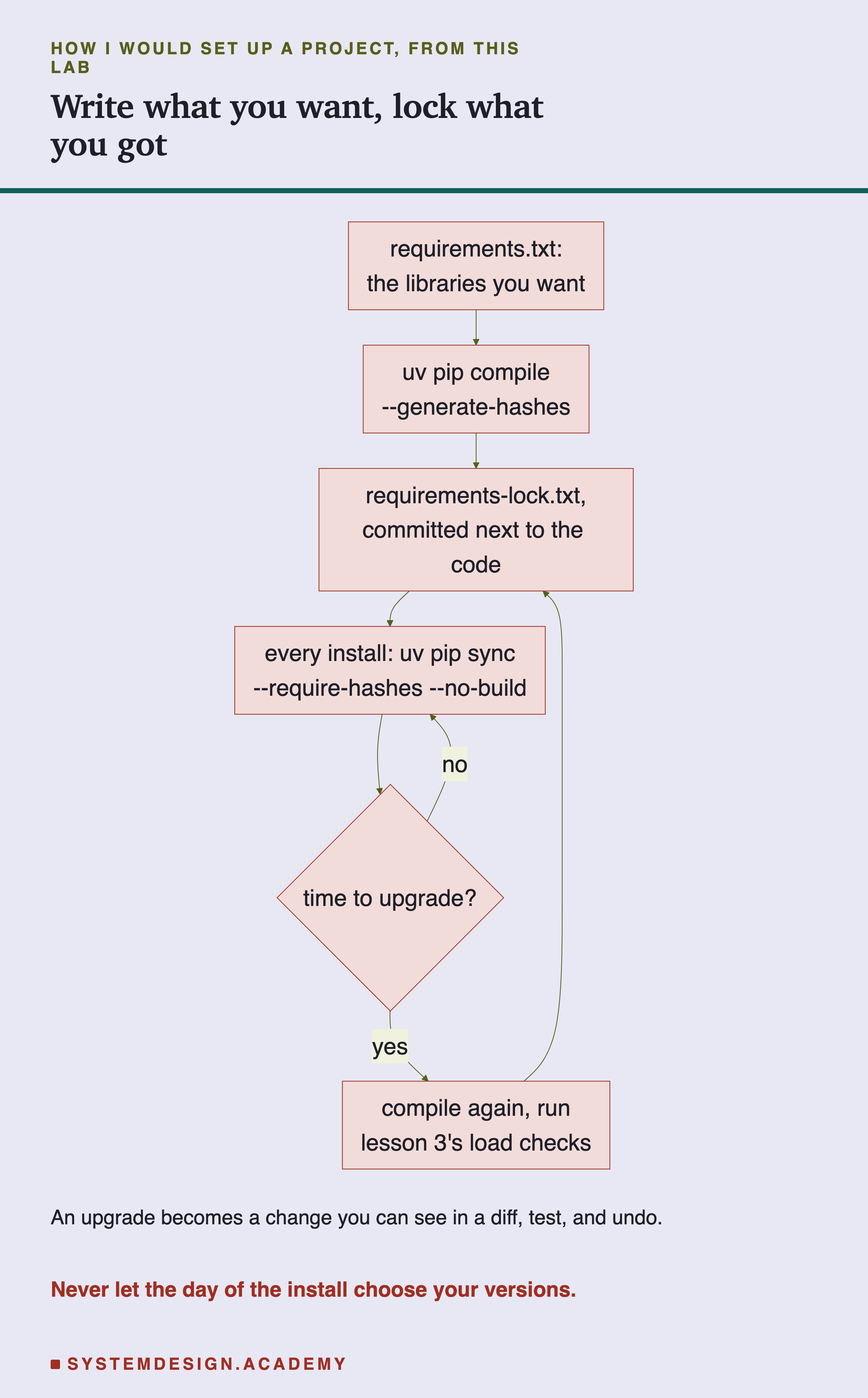
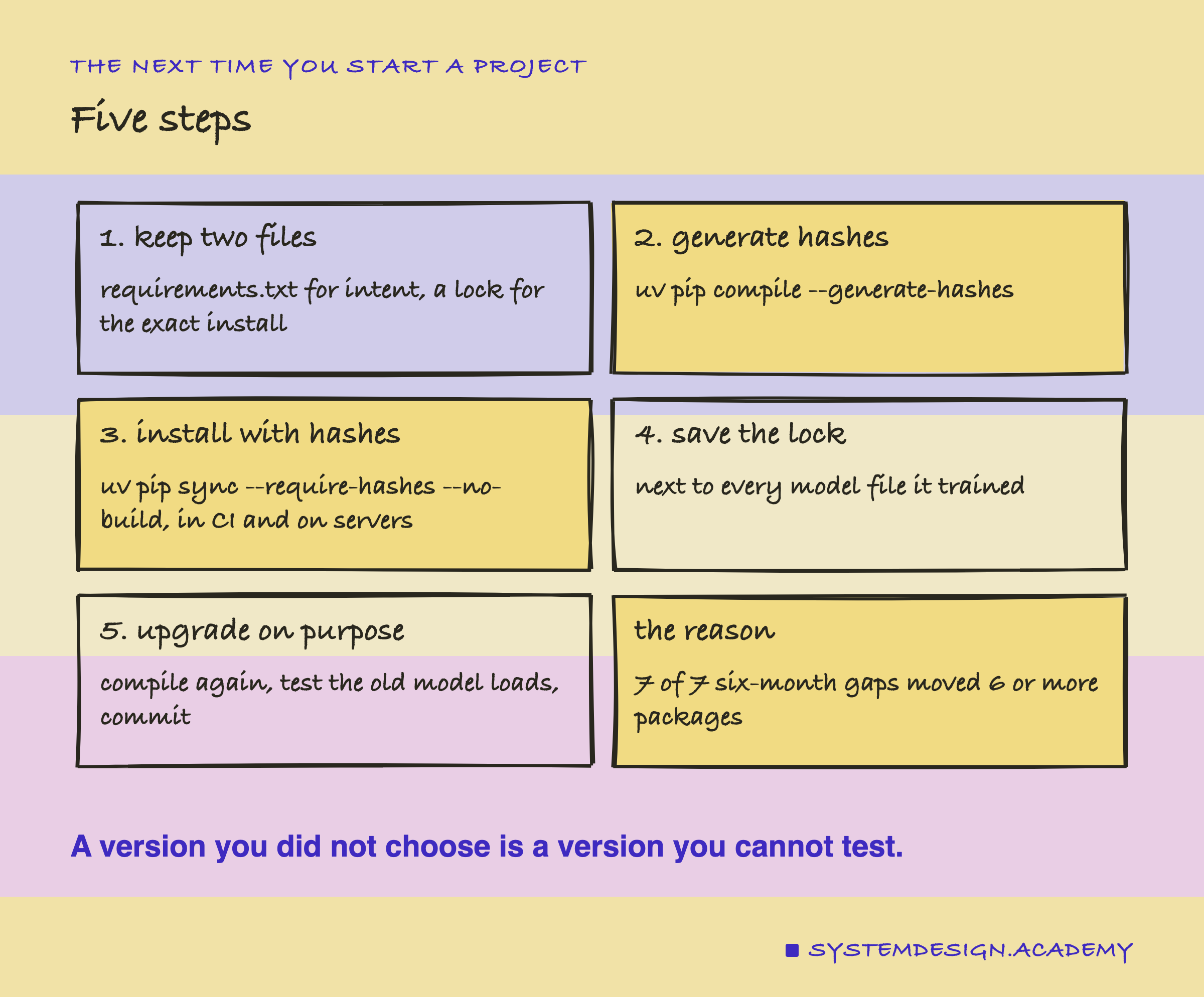
The chart starts with the file people edit and ends with the file a tool writes, so every upgrade passes through a test. Here are the same steps in words, with the commands.
-
Keep two files.
requirements.txtsays what you want, in a few loose lines. The lock says exactly what you got. People edit the first; a tool writes the second. -
Generate the lock with hashes.
uv pip compile requirements.txt --generate-hashes -o requirements-lock.txt. If your servers run another system, add--python-platformfor that system, or--universalfor one file that works everywhere, and check the result on that system. -
Install only from the lock, with hashes required and source files refused.
uv pip sync --require-hashes --no-build requirements-lock.txt, in CI and on every server. With pip, the same idea ispip install --require-hashes --only-binary :all: -r requirements-lock.txt. pip's own page recommends both: "Enable Hash-checking Mode, by passing --require-hashes" and "Disallow source distributions, by passing --only-binary :all:". The reason is plain: a source file is built with tools the lock does not cover.
When to Lock, and When Not To
Lock anything that trains or serves a model. Here, six months of plain installs moved 6 to 9 packages every time. And every model saved after one install and loaded after a later one failed. A lock costs one command and one file.
Lock even when you pin your main library. Pinning only scikit-learn still let 9 other packages move in a year. numpy was one of them, and lesson 3 showed numpy can break a load on its own.
Do not use a range as protection. >=1.3 stopped nothing. It allows every newer version, and newer versions are exactly what arrive.
Do not edit hashes by hand. A hash edited by mistake did not stop the install here. It made uv and pip build from source instead, with build tools from outside the lock. With --no-build, the same mistake becomes a loud failure: uv stopped with "Hash mismatch". If a lock looks wrong, generate it again.
A loose file is fine for a library that other people install. If you publish a package, its own requirements should stay loose. Then it can live next to other packages. The lock belongs to the application or the training job that uses it.
Do not read a lock as a safety check on the code. It keeps versions and bytes the same. It cannot tell you whether a version was good. Scanning and signing are the subject of the chapter's last lesson.
What This Lab Cannot Tell You
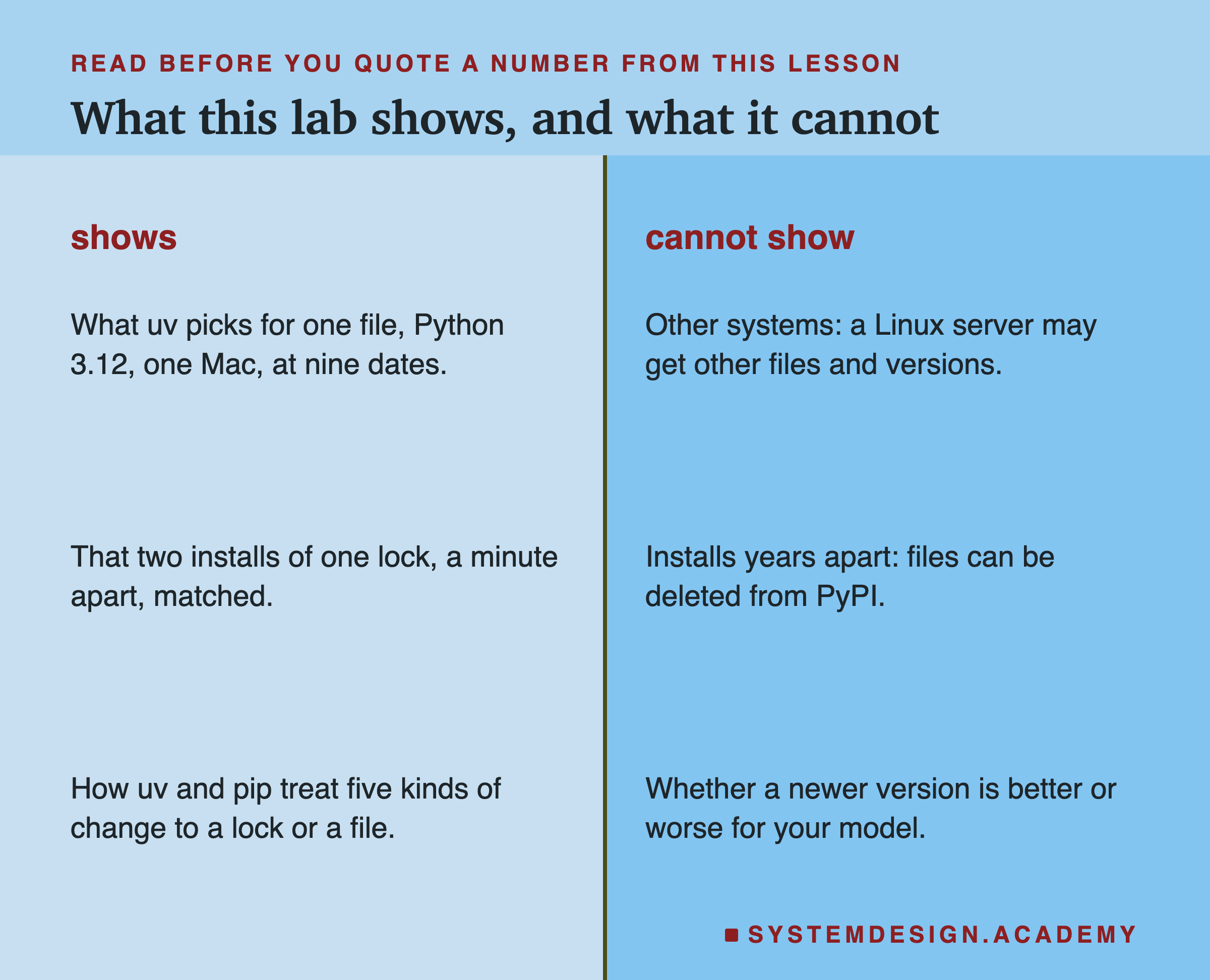
One machine type, one Python. Every resolution here is for Python 3.12 on an Apple silicon Mac. A Linux server can get other files, and in a few cases other versions, because some packages publish different files or rules for different systems. The pytz and tzdata change is one example where I only checked this Mac.
Past dates, asked today. --exclude-newer shows what PyPI would have offered on a date, using files that are still on PyPI. A file deleted since then would not appear, and a release yanked since then, which means withdrawn by its authors, can change what it returns. I would not know either way.
Two installs, one evening. The two lock installs were a minute apart. The lock was made for a date six months earlier, which is the part that tests time. A lock cannot help if a locked file is later deleted from PyPI.
Two tools, a handful of changes. I tested uv 0.12.5 and pip 26.2.1 on five kinds of change. Other tools, and other kinds of tampering, were not tested.
No timings. The laptop was busy, so I measured counts and equality only.
Labelled additions. Three things were added after results: the # via check, the source-built model and the two extra tamper tests. One more was added after an independent review: the build tools of the source fallback, and the --no-build and --only-binary :all: tests. All are labelled in the lab, the report and here.
What to Do on Monday
If you take one thing to work on Monday, open the requirements file of a project that trains a model. Count its lines with no == in them. Each of those lines is a version that someone's next install will choose for you. Then run uv pip compile with --generate-hashes on it, commit the result, and change the install step to read the lock with --require-hashes --no-build.
The first time you do this, look at the lock. You will see packages you never named, maybe for the first time. Those are part of your model too.
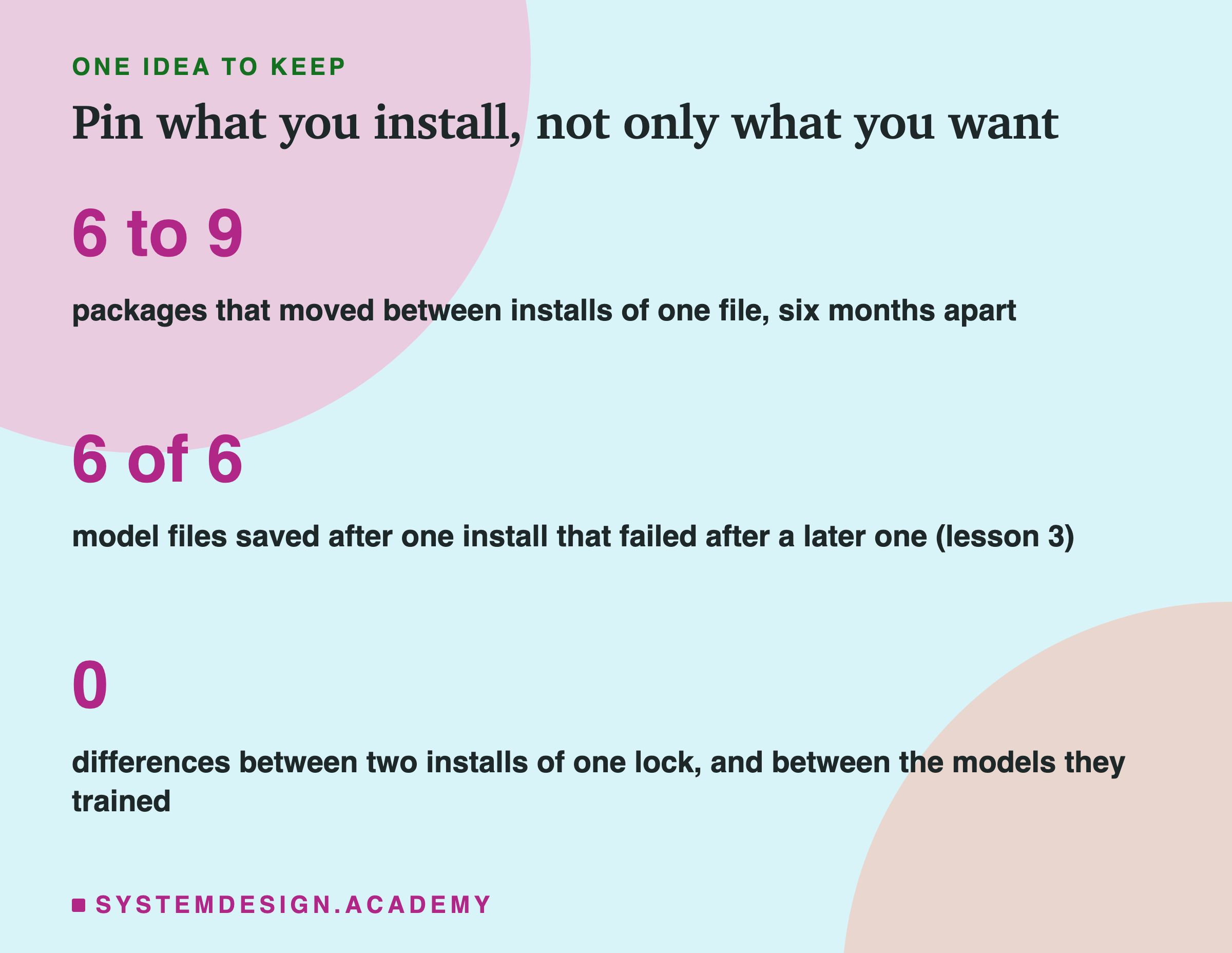
The one idea to keep: a requirements file with no versions is a promise about names, not about code. Six months later, 6 to 9 of my 11 packages were different every time, and lesson 3's models broke across exactly those installs. A lock with hashes, installed from wheels only, turned the same install into the same nine packages, the same bytes, and the same model. Let it fall back to a source file, and part of the install is chosen on the day again.
Knowledge Check
Knowledge Check
4 questions - Score 80% to pass
The same five-line file was resolved as of 2026-04-01 and as of 2026-10-01. How many of its packages moved?
In a copy of the lock, the hash of this Mac's scikit-learn wheel was edited. What happened?
Only scikit-learn==1.7.2 was pinned, from 2025-10-01 to 2026-10-01. What happened to the rest?
A valid joblib wheel, with only its zip comment changed, was installed under the real lock. What did the hashes do?