The Bread Everyone Liked
Imagine a small bakery. Last month the baker made a new kind of bread, and the customers loved it. This month she tried to improve it, and people started to complain. So she decides to go back: she will bake last month's bread again, exactly as it was, until she understands what went wrong.
She opens her notebook. It says: flour, water, salt, starter, bake at 230 degrees. It does not say which bag of flour she used, and the mill has since changed its wheat. It does not say how long the dough rested, because that day she simply waited until it looked right. She bakes the bread from the notebook, and it is close. It is not the same. And she cannot tell which missing note made the difference.
There were two ways she could have made this easy. She could have written down everything, including the small things that seemed not to matter. Or she could have frozen one loaf from last month, so that she could taste the real thing whenever she wanted.
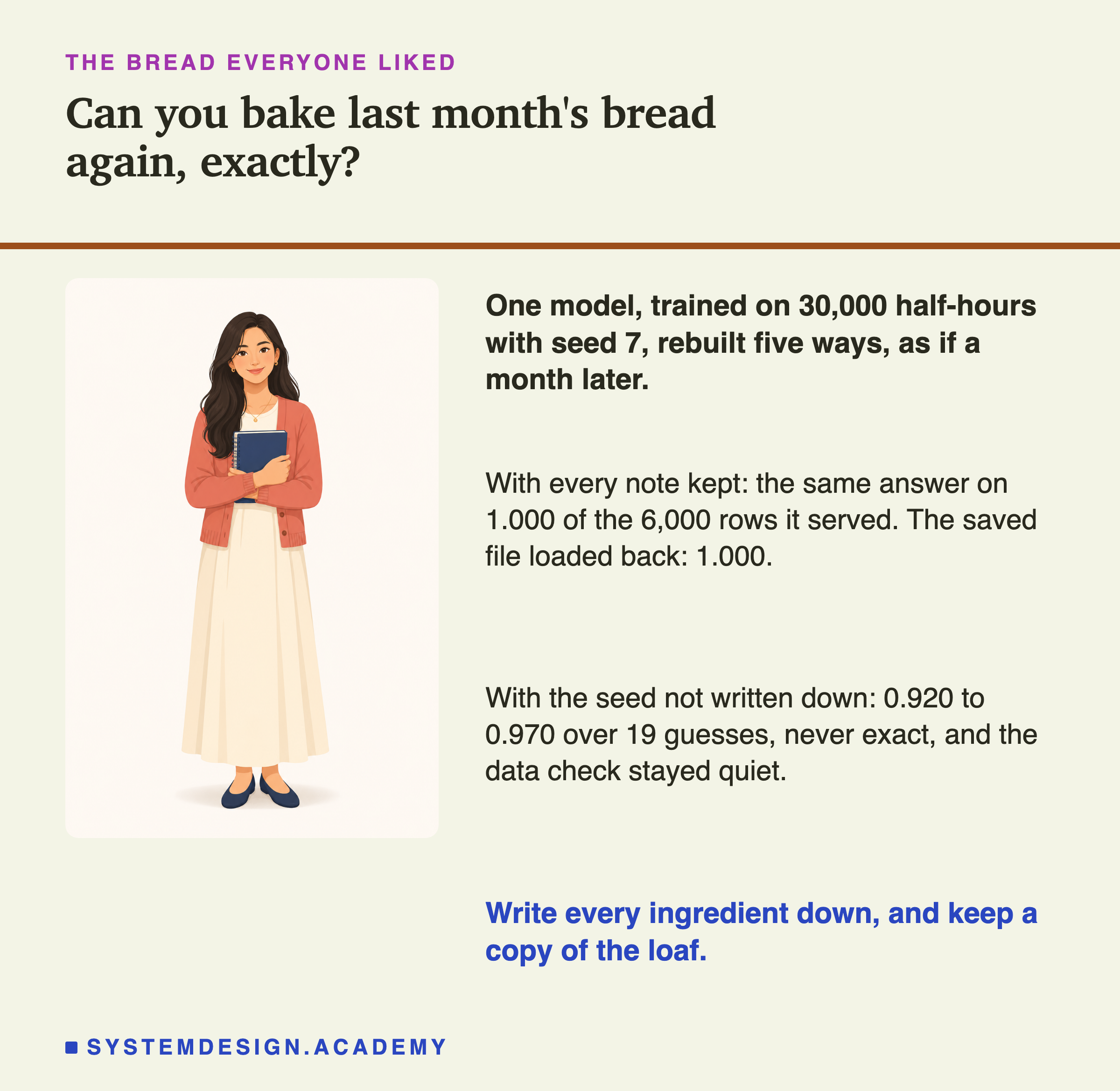
This lesson is about the same problem in a program that learns from examples. I trained a model, wrote down how I made it, and then tried to get it back in five different ways, as if a month had passed. Some ways gave back the real thing. One gave back something that looked almost the same, and nothing in my notes warned me that it was not.
Where This Lesson Starts
This chapter follows one model through its life, on the same electricity data. Start with the dumbest model set the baselines. Same code, different model showed that two training runs with the same code can give different models. The lessons after it judged new models, put them live, retrained them, and, in stale pieces in a pipeline, looked at old parts left inside a working system.
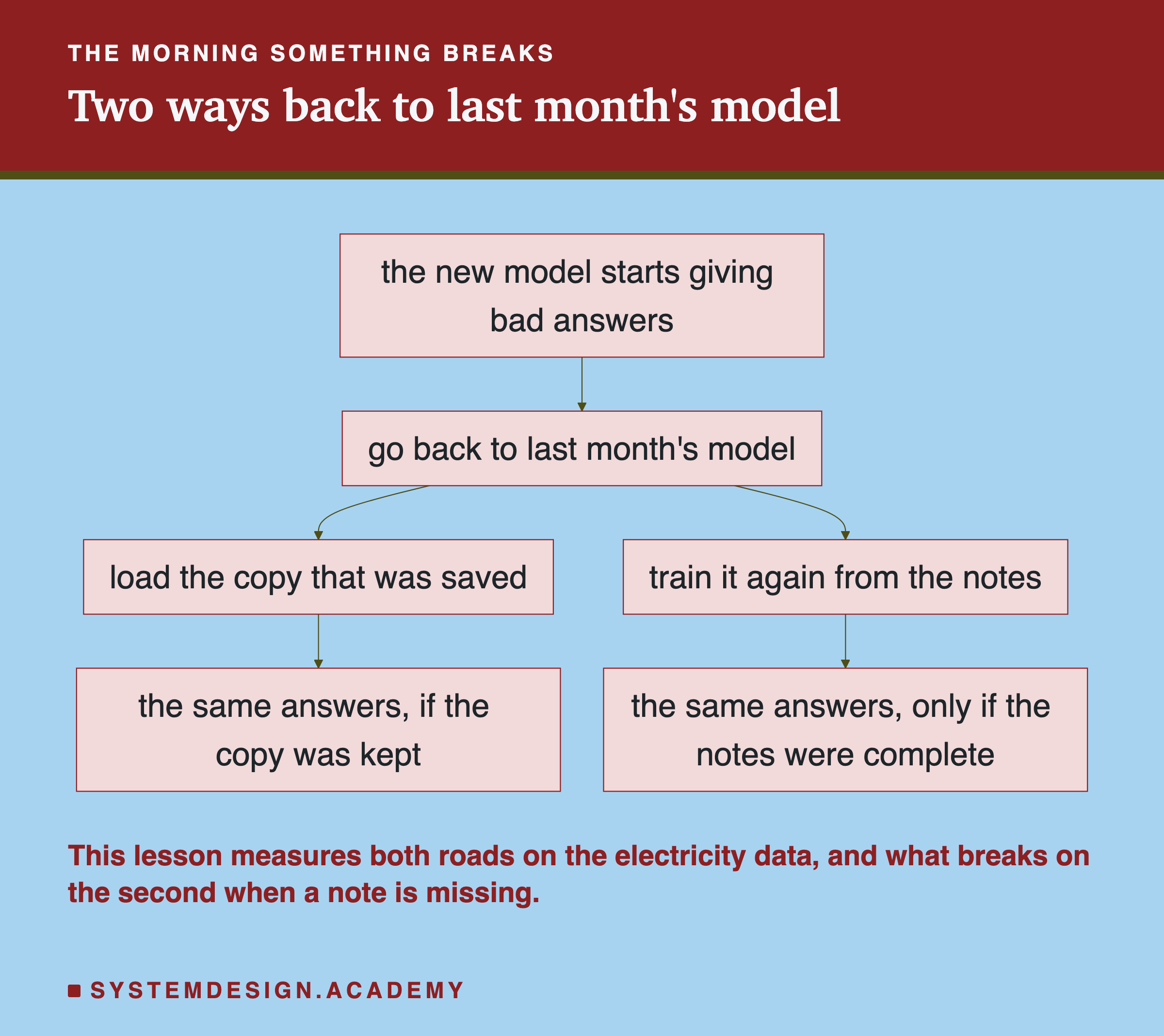
This lesson starts on a bad morning. A new model is live and something is wrong with it. The safe move is to go back to the model that worked before, and then look for the cause calmly. There are two roads back. The first is to load a saved copy of the old model. The second is to train the old model again from the notes that were kept about it.
The first road needs a copy. The second needs complete notes. Most teams think they have one or the other. The lab in this lesson checks both, and then takes notes away one at a time to see what happens.
The course's lesson on training pipelines and orchestration explains in words why a pipeline should record what it did. I will not repeat that. This lesson measures what the record buys you on the day you need it.
Ten Words for This Lesson
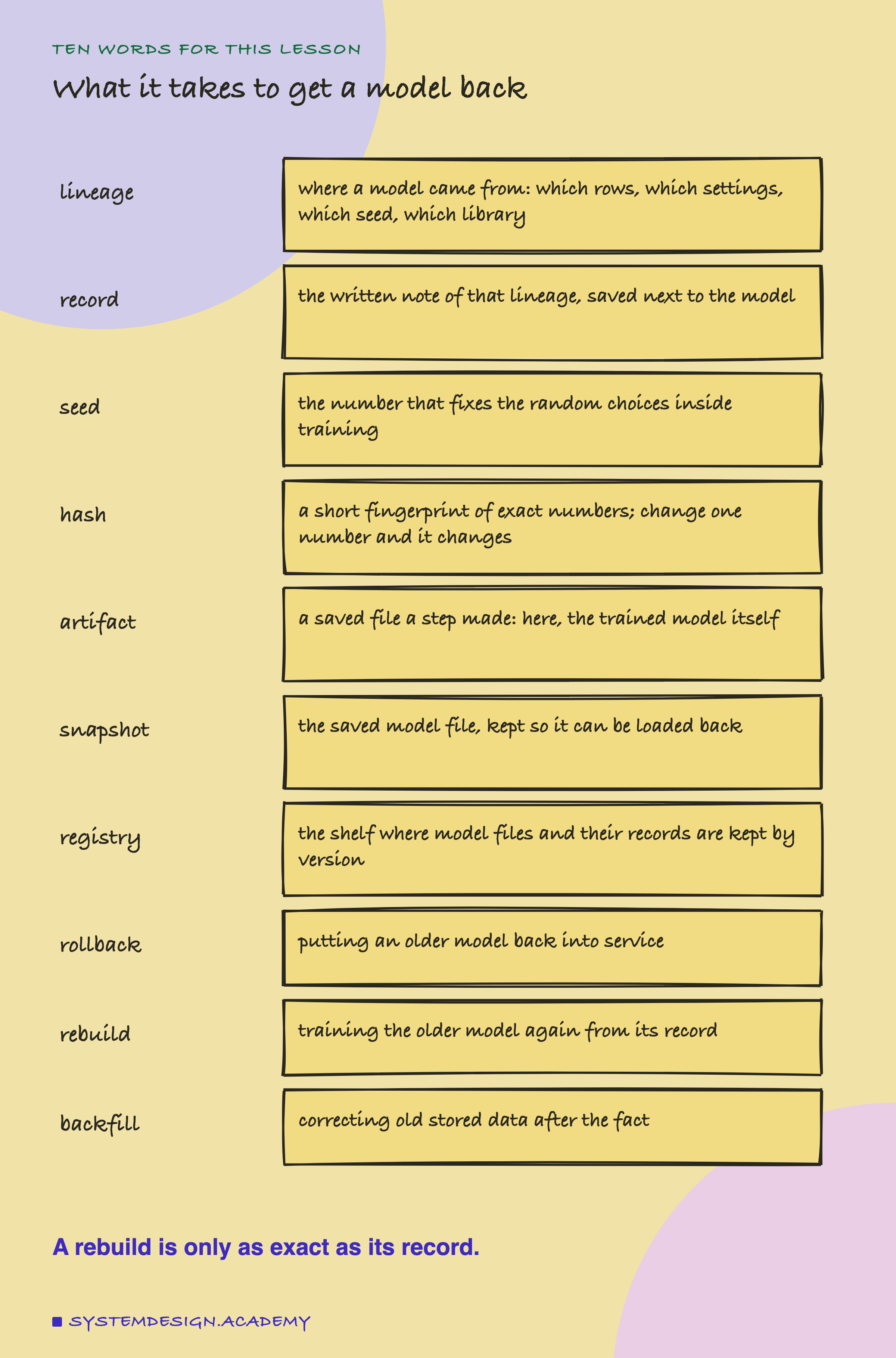
A model's lineage is where it came from: which rows of data it learned from, which settings, which seed, and which versions of the software. The written note of that lineage, saved next to the model, is its lineage record, or just the record.
Training a model involves random choices, such as which rows to hold back for checking. A computer makes those choices from a fixed list of numbers that starts from one number, the seed. The same seed gives the same choices every time. A different seed gives different choices, and often a slightly different model. Lesson 2 of this chapter measured how different.
A hash is a short fingerprint of some exact numbers. The one used here, SHA-256, turns any amount of data into 64 letters and digits. If even one number in the data changes, the fingerprint changes completely. So if you store the fingerprint of your training data today, you can check later whether the data is still exactly the same, without keeping a second copy of it.
An artifact is a file that a step of a pipeline saved. The trained model is one. A saved copy of the trained model, kept so it can be loaded back later, is a snapshot. A is the place where a team keeps these files and their records, by version. Rollback means putting an older model back into service. Rebuild means training the older model again from its record. Backfill means correcting old data after it was stored, for example when late information shows that some old labels were wrong.
Two words from earlier lessons: a is the right answer for a row, here whether the electricity price went UP or DOWN against its average over the last 24 hours, and is the share of rows a model got right. One new measure: is the share of rows on which two models give the same answer. It needs no right answers at all.
What a Lineage Record Holds
Before the lab could test a rebuild, it needed a model to rebuild and a record of how it was made. I wrote both into the design before the run. Here is the record, with the real values the lab stored.
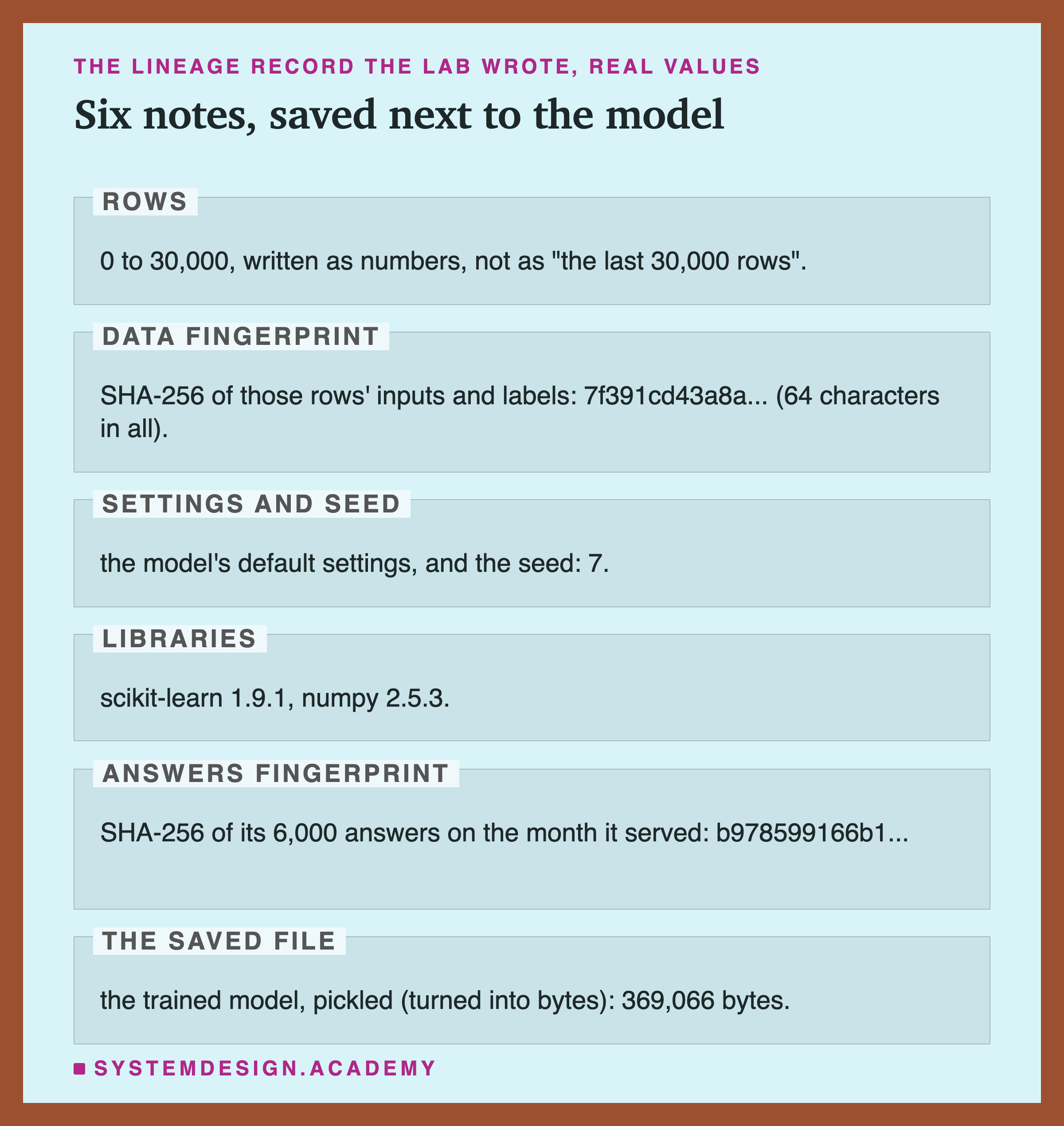
Rows. The record says which rows the model learned from, as plain numbers: rows 0 to 30,000 of the data. This seems too obvious to write down, and the lab shows later why it is not.
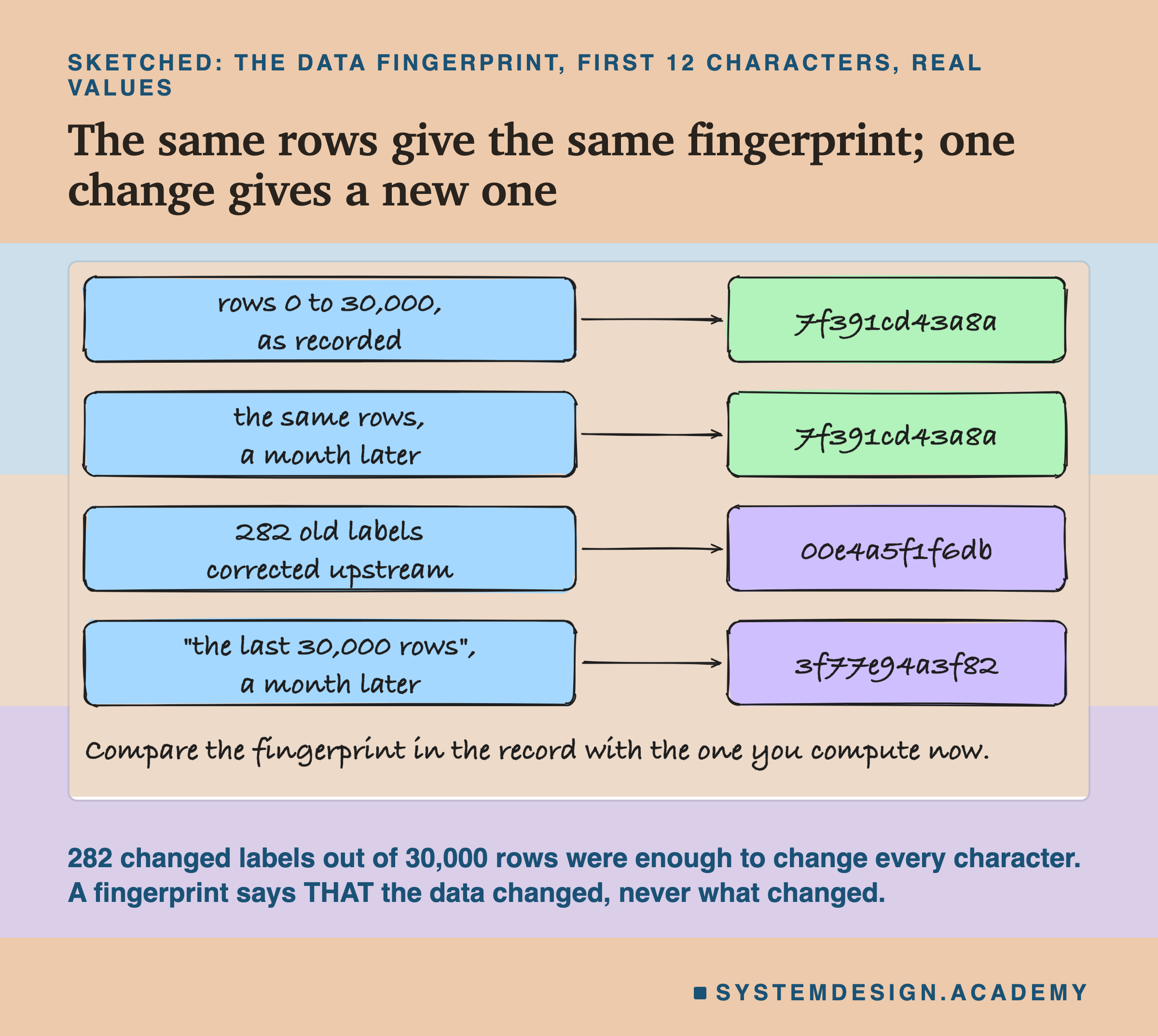
Data fingerprint. A SHA-256 hash of the inputs and labels of exactly those rows. The row numbers say which rows; the fingerprint says what was in them.
Settings and seed. The model uses scikit-learn's default settings, plus one written value: the seed, 7. The lab's record stored only the seed; the defaults were implied by the library version. A real record should write them out, because a default can change.
Libraries. The versions of scikit-learn and numpy that trained it. A model trained with one version of a library may train differently with another, so the version is part of the lineage.
Answers fingerprint. After training, the model answered the next 6,000 rows, the period it "served" in this story. The record stores a hash of all 6,000 answers. This field is not in every team's records, and it turns out to matter most.
The saved file. The trained model itself, saved with Python's pickle, which turns an object in memory into a file of bytes; a model saved this way is called pickled. Here the file was 369,066 bytes, about a third of a megabyte. One warning that belongs next to every pickle: loading a pickle file can run code hidden inside it, so load model files only from a registry you control and never from an untrusted source. scikit-learn's documentation points to the skops format, which avoids pickle, and to ONNX as safer choices.
What the Lab Ran
I wrote the lab's design at the top of its file, lineage_lab.py, before it ran. The dated entry is in the chapter plan (2026-09-29, "LINEAGE LAB (batch 8) designed before running").
The data is Elec2 again: 45,312 half-hours of the New South Wales electricity market, May 1996 to December 1998, in time order. The model is the boosted trees from lesson 1, many small trees of yes-or-no questions built one after another, with scikit-learn's default settings and seed 7. It learned from rows 0 to 30,000 and then "served" rows 30,000 to 36,000: the lab stored its answers on those rows as the reference that every rebuild is compared with.
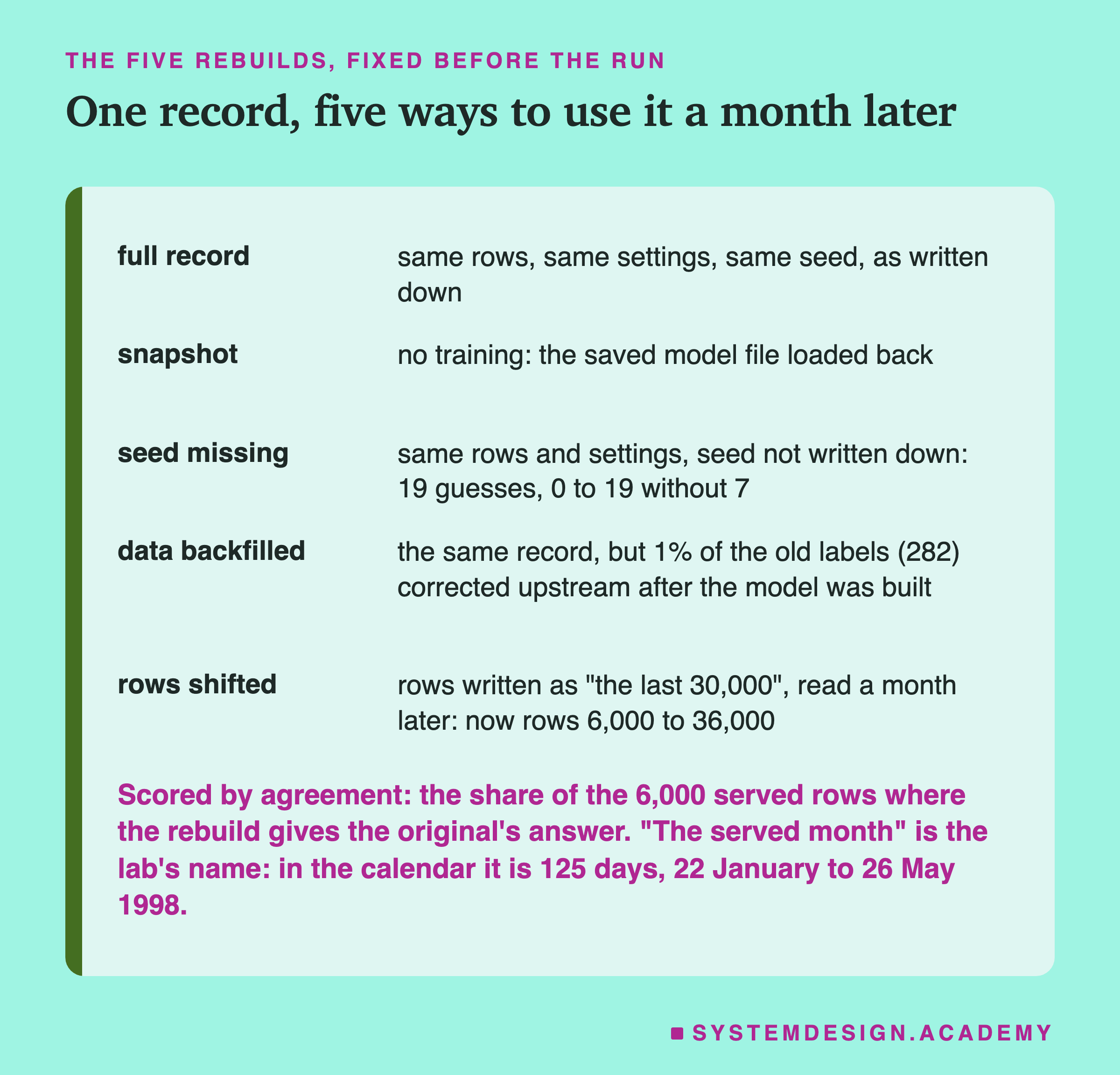
A note on a word before going on. The lab's design calls these 6,000 rows "the month it served", and I keep that name because it is short. But 6,000 half-hours is 125 days in the calendar, from 22 January to 26 May 1998, so the "month" is really about four months. Nothing in the results depends on the length; it is only a name.
The five rebuilds were fixed in the design. Full record trains again with everything the record says. Snapshot trains nothing: it loads the saved file back. Seed missing pretends the seed was never written down, so it tries the other nineteen seeds from 0 to 19, one at a time (the design said 20; excluding the original's seed leaves 19). Data backfilled uses the full record, but the stored history has changed underneath it: 1% of the labels in rows 0 to 30,000 were flipped, as a late correction from upstream, the team or system that supplies the data, would do. Rows shifted pretends the rows were written down as "the last 30,000 rows as of that day" instead of as numbers, and the rebuild happens 6,000 rows later, so the same words now mean rows 6,000 to 36,000.
Five Rebuilds of One Model
Here is what the lab stored in results/lineage.json.
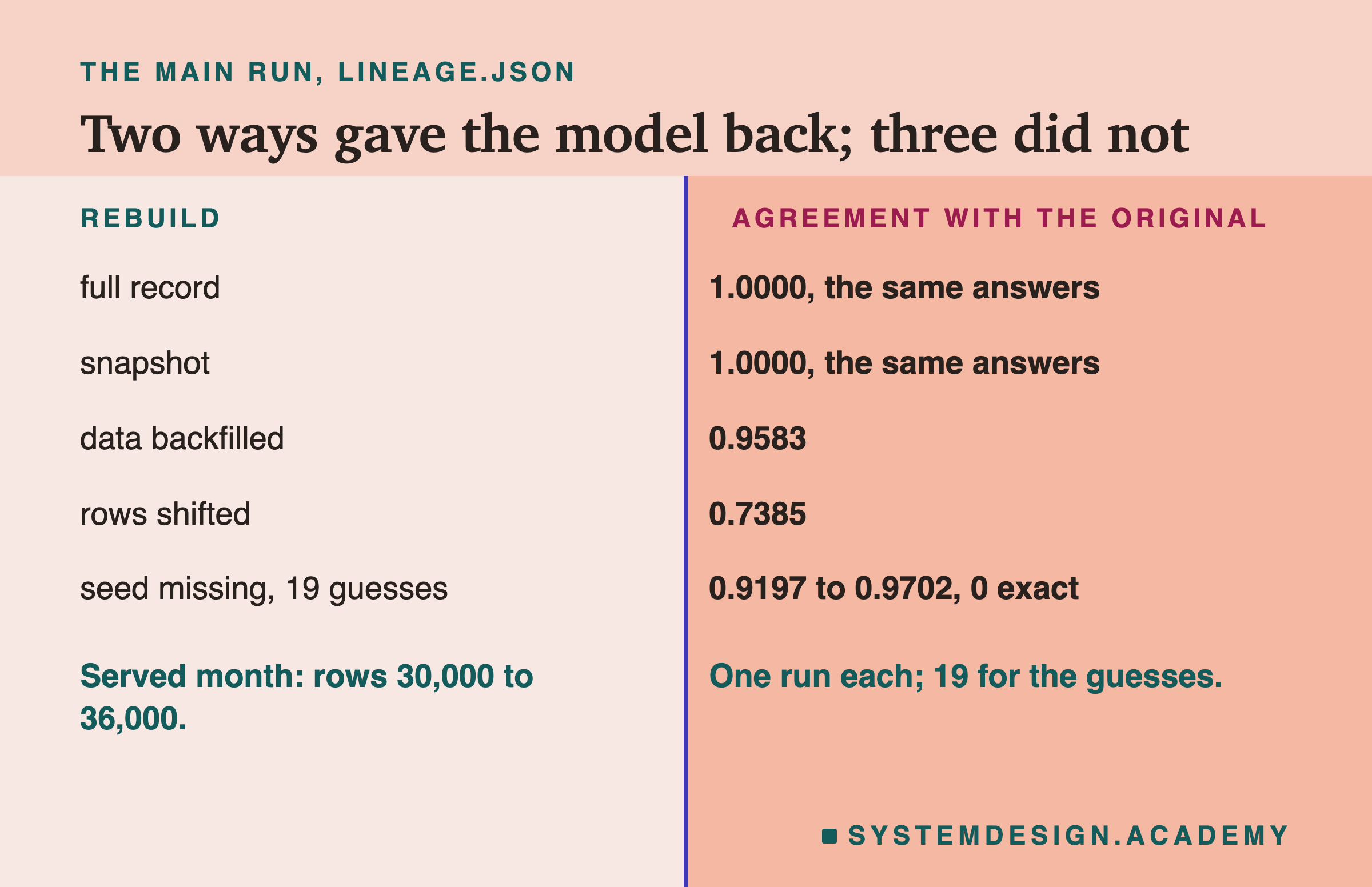
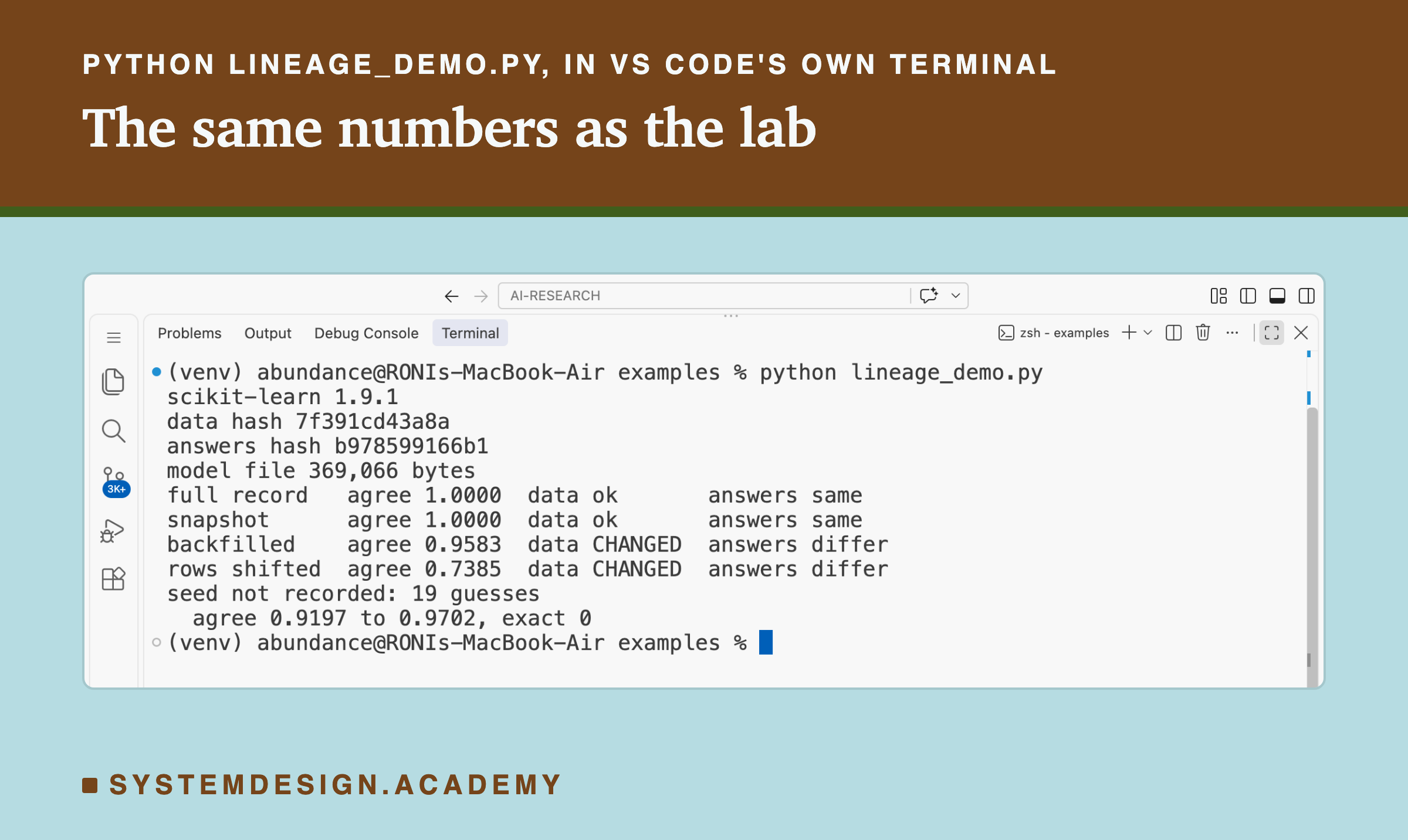
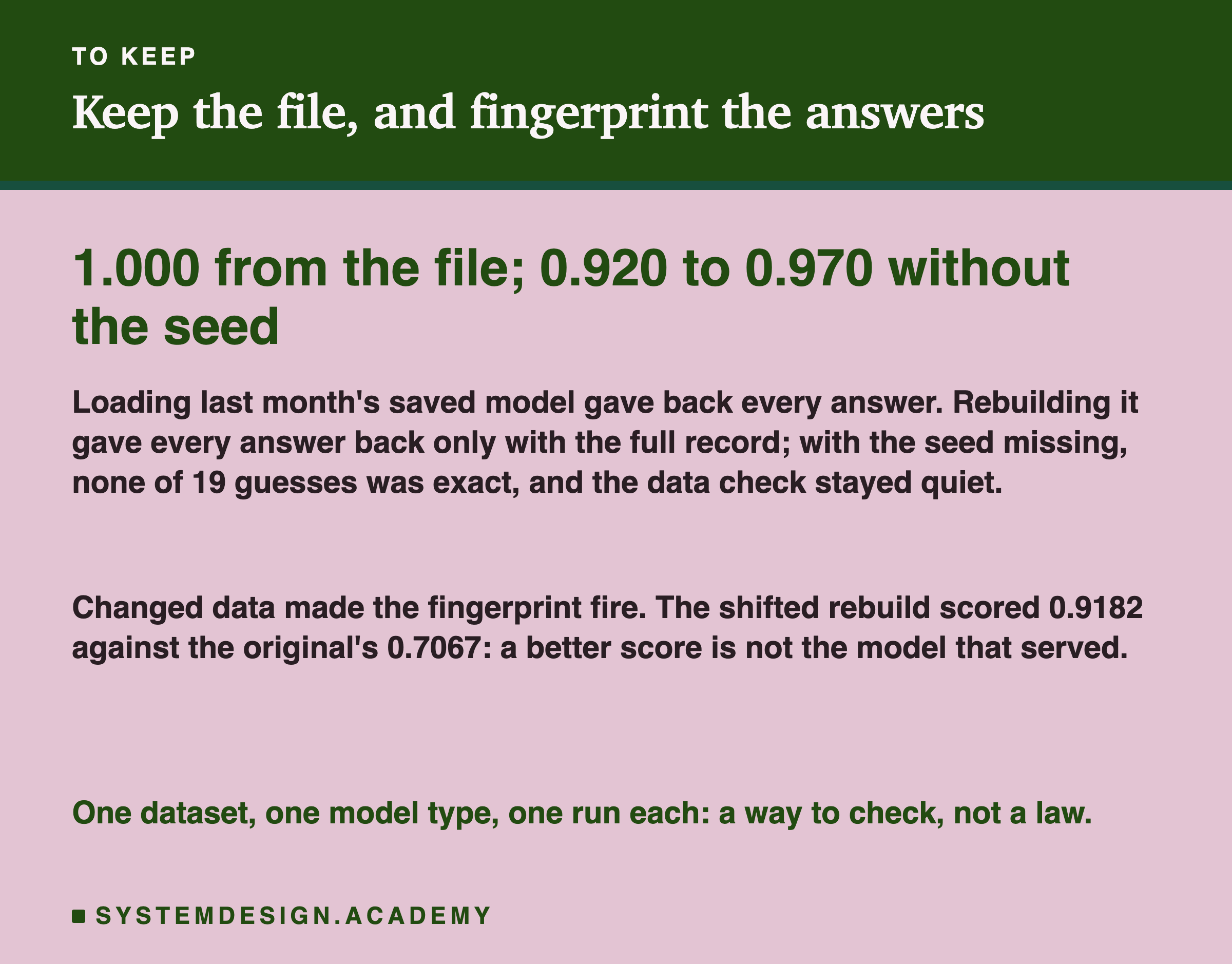
The full record worked. Trained again with the same rows, settings and seed, the model gave the same answer on all 6,000 served rows, and the hash of its answers matched the stored hash exactly. After the results, I also pickled the rebuilt model and compared the pickled bytes with the original's, in memory: they were identical, 369,066 bytes each. On the same machine, with the same library versions, the record was enough to get the exact model back.
The snapshot worked too, as it must: loading the saved file gives back the same object, and it gave the same 6,000 answers.
The other three did not. With the labels corrected upstream, the rebuild agreed on 0.9583 of the rows. With the rows shifted by a month, only 0.7385: the rebuild disagreed with the original on more than a quarter of the rows it was meant to reproduce. And with the seed missing, not one of the 19 guesses gave the original model. They agreed on 0.9197 to 0.9702 of rows, with a middle value of 0.9568.
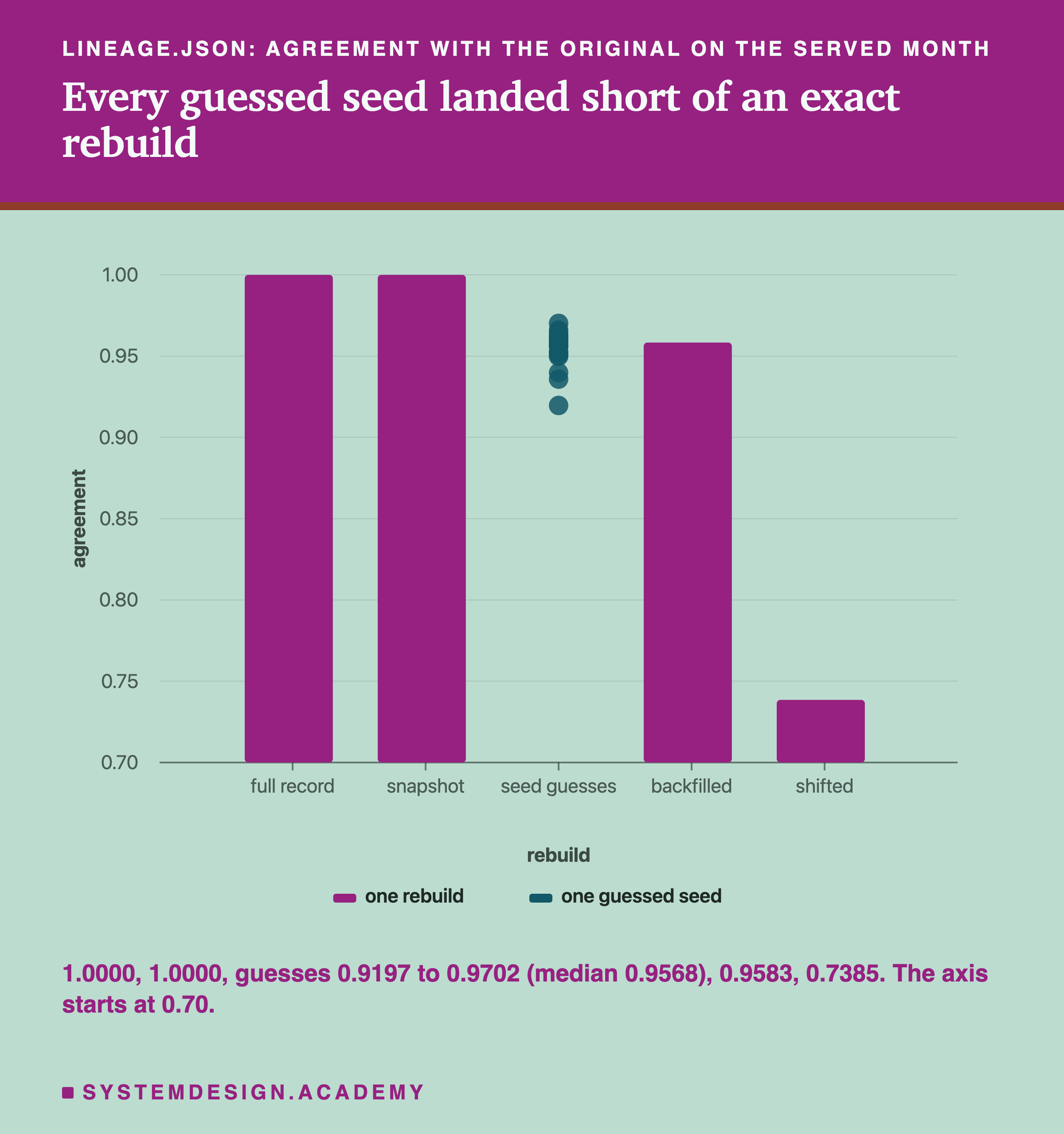
Look at where the seed guesses sit on the chart. They are close to the top, closer than the backfilled rebuild in some cases. A model that agrees with the original on 97% of rows looks like a success. It is not the original model, and on a day when you are trying to understand what the original did, even the closest guess gave a different answer on 179 of the 6,000 rows: 179 rows of wrong evidence.
The Seed Nobody Wrote Down
Which of the three failures would you notice? The lab asked whether the record would warn, and here the seed is different from the other two.
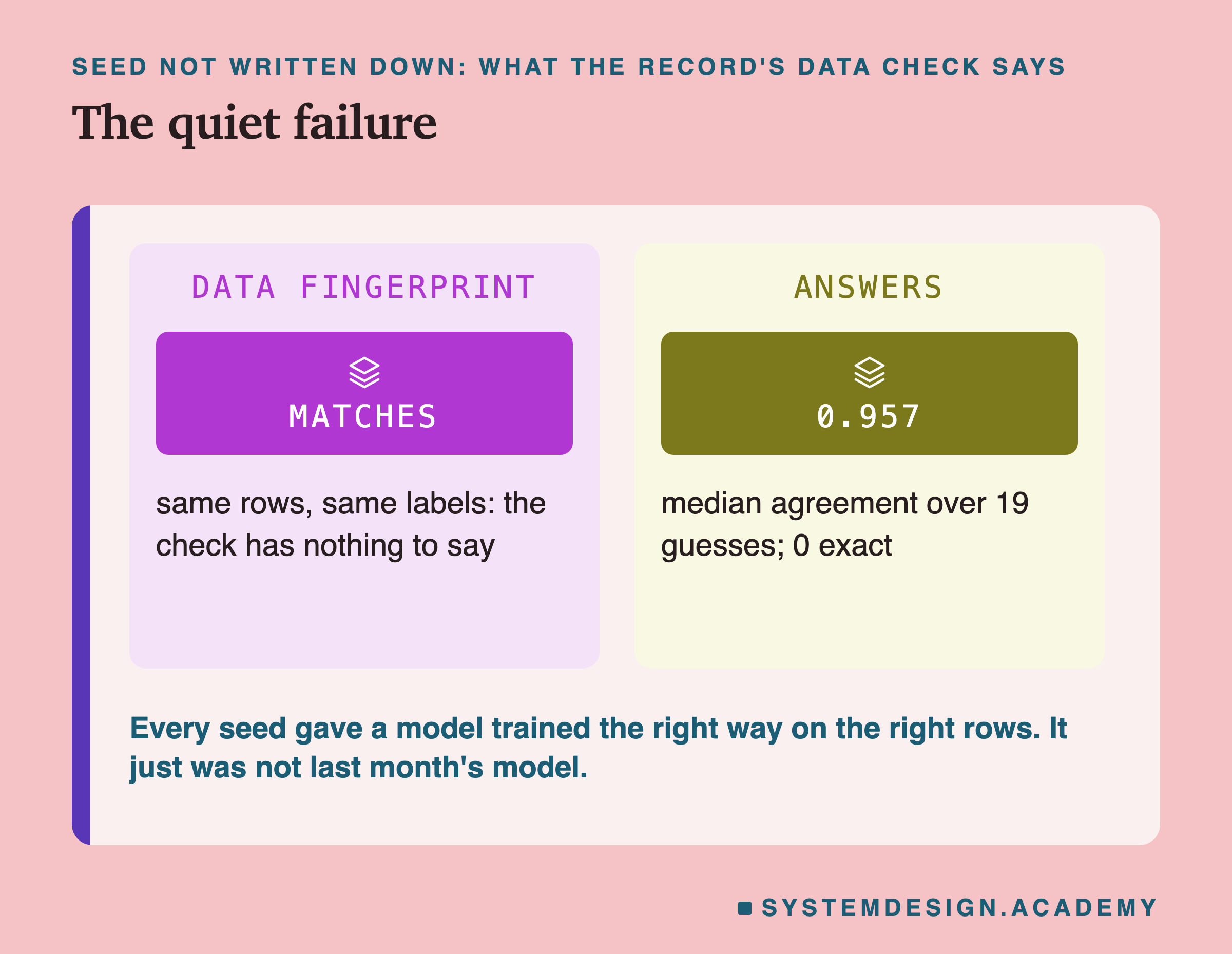
For the backfilled and shifted rebuilds, the data fingerprint fired: the data being fed to the rebuild was not the data in the record, and the record said so. For the seed guesses, the data fingerprint matched. The rows were the right rows. The settings were the right settings. Everything the team could check about the inputs to training was correct, and the model that came out was still a different model. From the inputs side, this failure is completely quiet.
After the results, I laid out which field of the record would fire for each rebuild.
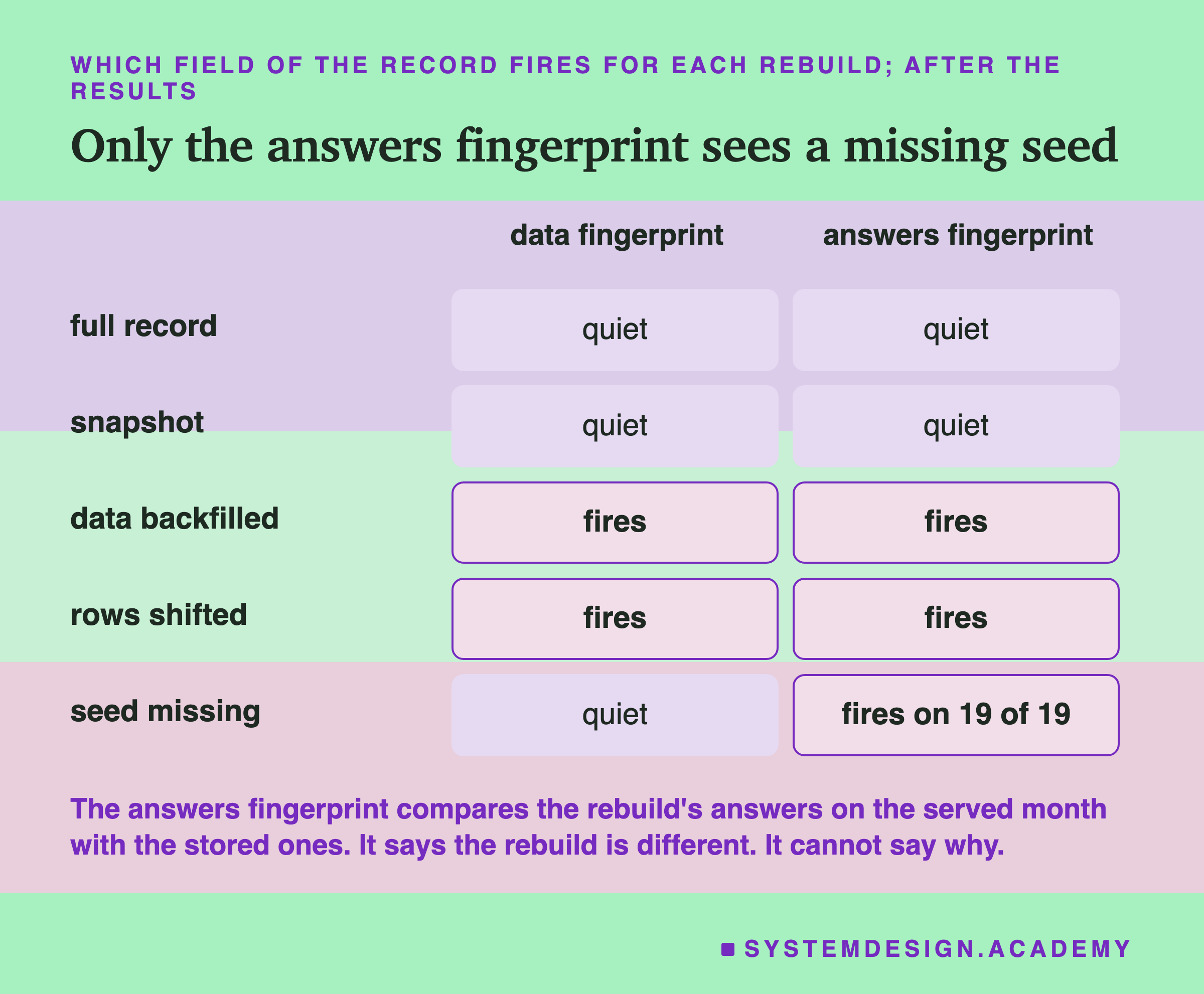
The one field that caught every guessed seed was the answers fingerprint: run the rebuilt model on the stored month, hash its answers, and compare with the hash in the record. All 19 guesses failed that check. So I need to correct the simple version of this lesson's headline. A missing seed is silent to a record that only describes the inputs. It is not silent to a record that also stores the model's answers on a fixed set of rows. What that check cannot do is tell you what is missing. It says "this is not the model", and then you are back to the baker with her notebook, wondering which note was lost.
Why does the seed matter at all here? Lesson 2 measured the answer for this model and data: by default, scikit-learn's boosted trees set aside a random 10% of the training rows to decide when to stop, and the seed decides which 10%. With that setting switched off, every seed in lesson 2 gave the same model. I did not repeat that test in this lab, so for these 30,000 rows it is the likely reason rather than a measurement.
Close in Accuracy, Not the Same Model
Agreement measures whether a rebuild is the same model. Accuracy measures whether it is a good one. They answer different questions, and after the main results I designed a follow-up to measure accuracy too. I wrote its design into the lab file's followup mode before it ran, and its results are in results/lineage_followup.json. It scored every rebuild against the real labels, on the served month and on the next 6,000 rows, 36,000 to 42,000, which no rebuild had trained on. Like the served "month", this next one is really 125 days, up to 28 September 1998.
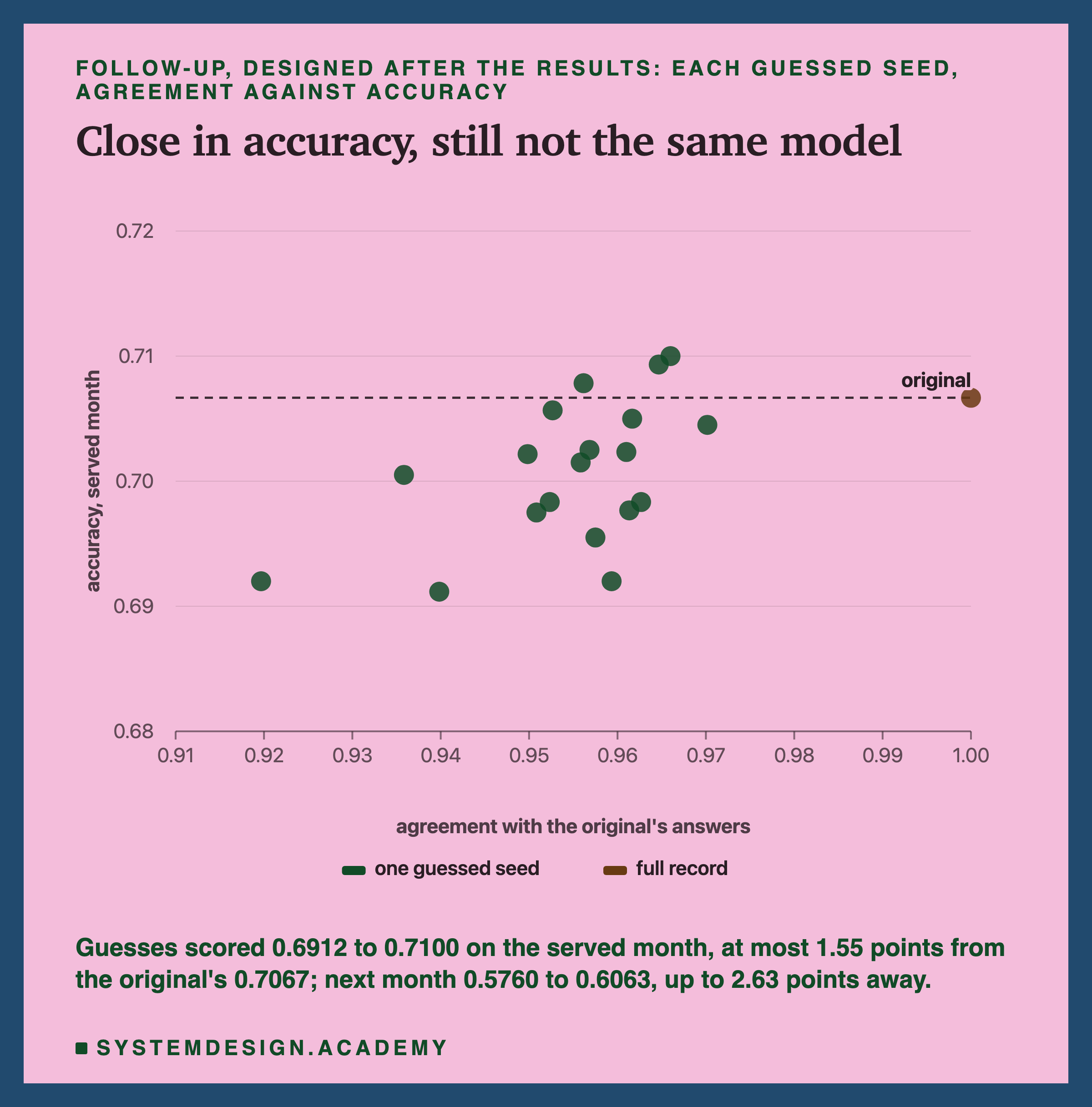
The original scored 0.7067 on the served month. The seed guesses scored from 0.6912 to 0.7100, so the furthest was 1.55 points away, where a point is one hundredth of accuracy. On the next month the original scored 0.6023 and the guesses 0.5760 to 0.6063, up to 2.63 points away. Three guesses were more accurate than the original on the served month, and two on the next month.
So in accuracy the guesses were close, and in some cases better. If all you need is "a model about as good as last month's", a guessed seed would do. But a rollback in an incident usually needs more than that. You want the answers customers actually received, so you can compare them with the new model's answers, find which rows changed, and explain what happened. For that, a model that differs on 3 to 8% of the rows is the wrong evidence. And there is no dot on this chart that tells you which of the guesses is closest, because without the stored answers you would not know where the original sits.
Where the Guesses Disagree
If the guesses disagree with the original on 3 to 8% of rows, which rows are those? I measured this after the results, using the original model's own confidence: for every served row, its estimated probability of UP, a number from 0 to 1 that the model turns into an answer by saying UP above 0.5.
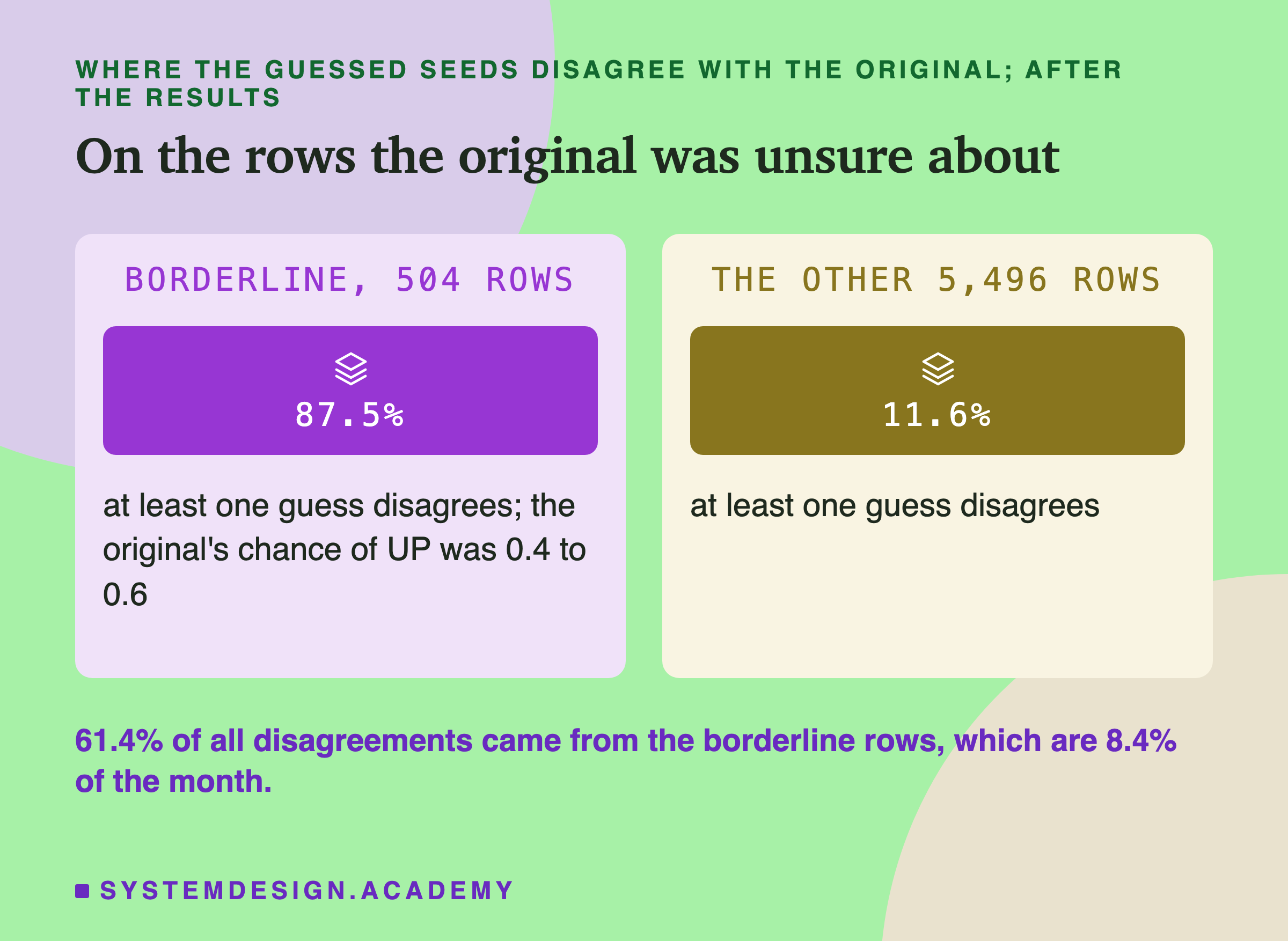
I called a row borderline when the original's probability of UP was between 0.4 and 0.6, a line I chose after seeing the results. 504 of the 6,000 served rows, 8.4%, were borderline. On 87.5% of them, at least one of the 19 guesses gave a different answer. On the other 5,496 rows, only 11.6% had any disagreement. Of all the single disagreements, one guess on one row, 61.4% came from the borderline rows.
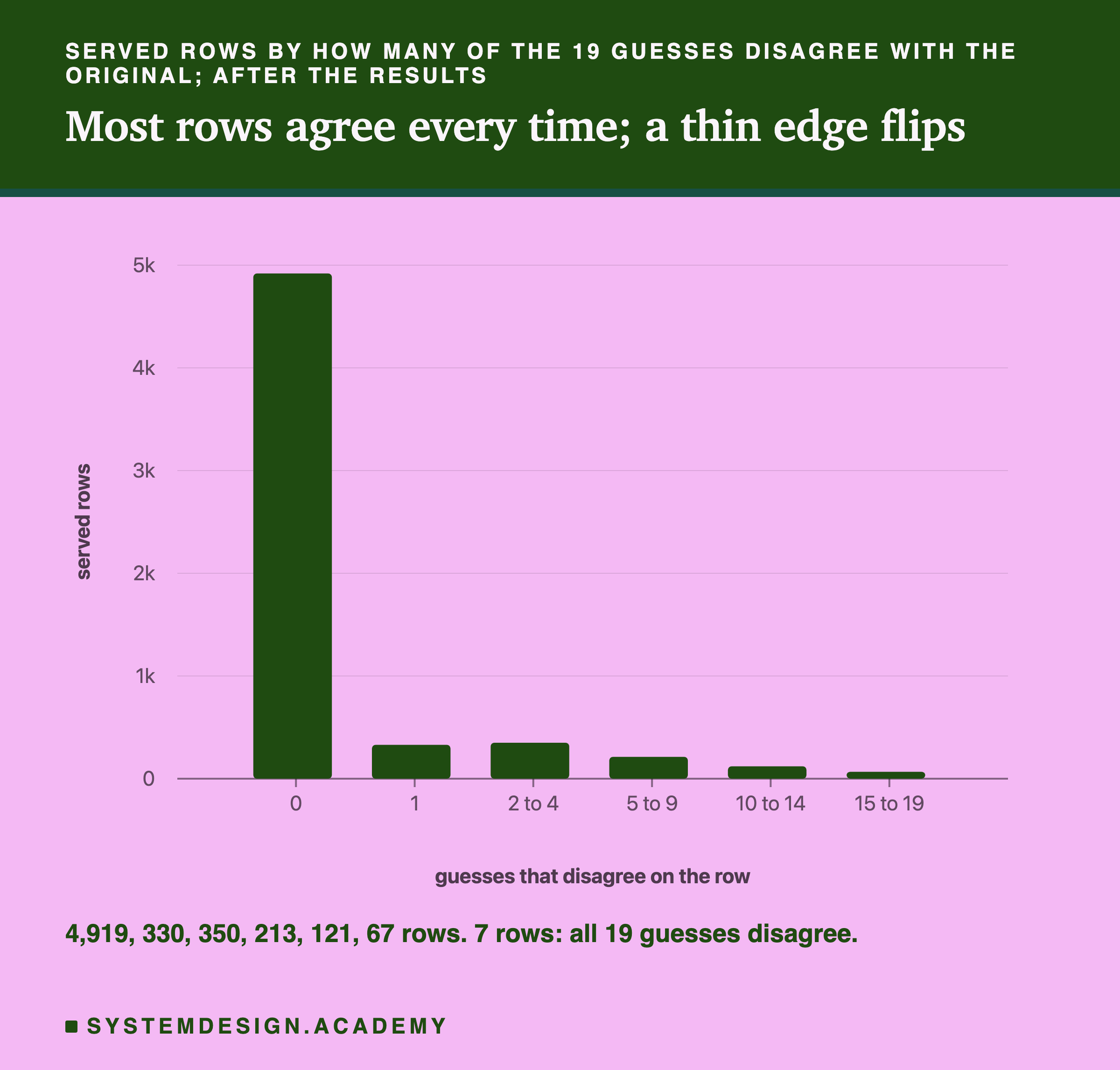
On 4,919 rows, every guess gave the original's answer. On 1,081 rows at least one guess did not, and on 7 rows all 19 disagreed. The picture is of a model with a firm middle and a thin, soft edge. Change the seed and the edge moves; the middle stays.
This matters for an incident. The rows that change from seed to seed are the rows where the model was least sure. Counted one guess at a time and averaged over the 19, a single guessed seed changed about one borderline answer in three (3,192 of 504 x 19 = 9,576) against about one in fifty elsewhere (2,003 of 5,496 x 19 = 104,424). So a rebuild with a guessed seed gets the firm rows right and changes a third of the unsure ones. In my opinion, not something I measured, the unsure rows are often the ones an investigation most needs.
When the Data Moved Underneath
The two other failures come from the data, not from the record's settings. Both are common in real systems.
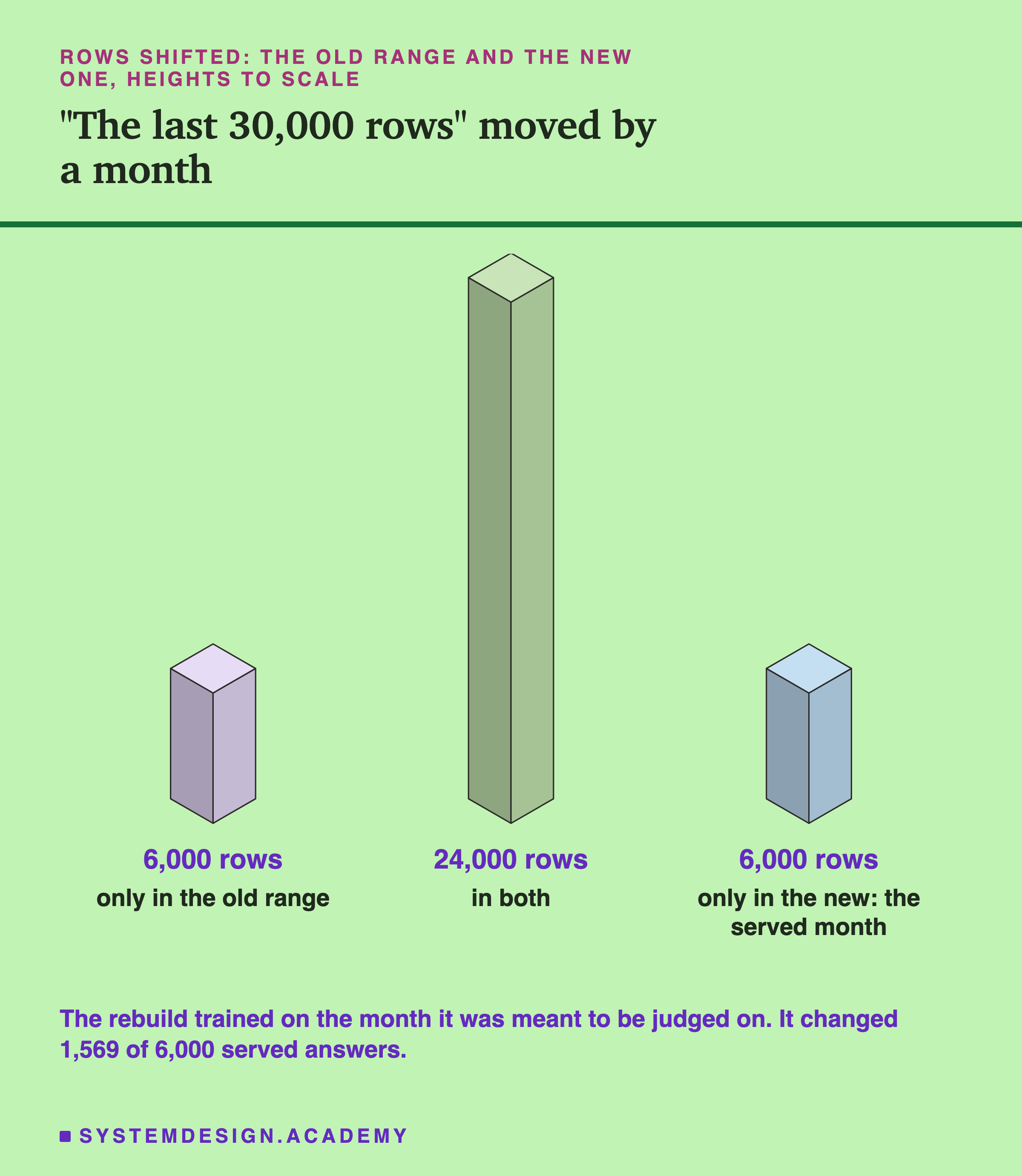
Rows shifted. Many pipelines describe their training data with a rule instead of a list: "the last 30,000 rows", "the last 90 days". The rule is convenient, because the same pipeline keeps working as new data arrives. But the rule is not a record. Read a month later, it points at different rows. Here the new range shared 24,000 rows with the old one, dropped the oldest 6,000, and added 6,000 new ones, and the new ones were the served month itself. The rebuild changed 1,569 of the 6,000 served answers. The data fingerprint fired, as it should, because the rows were different.
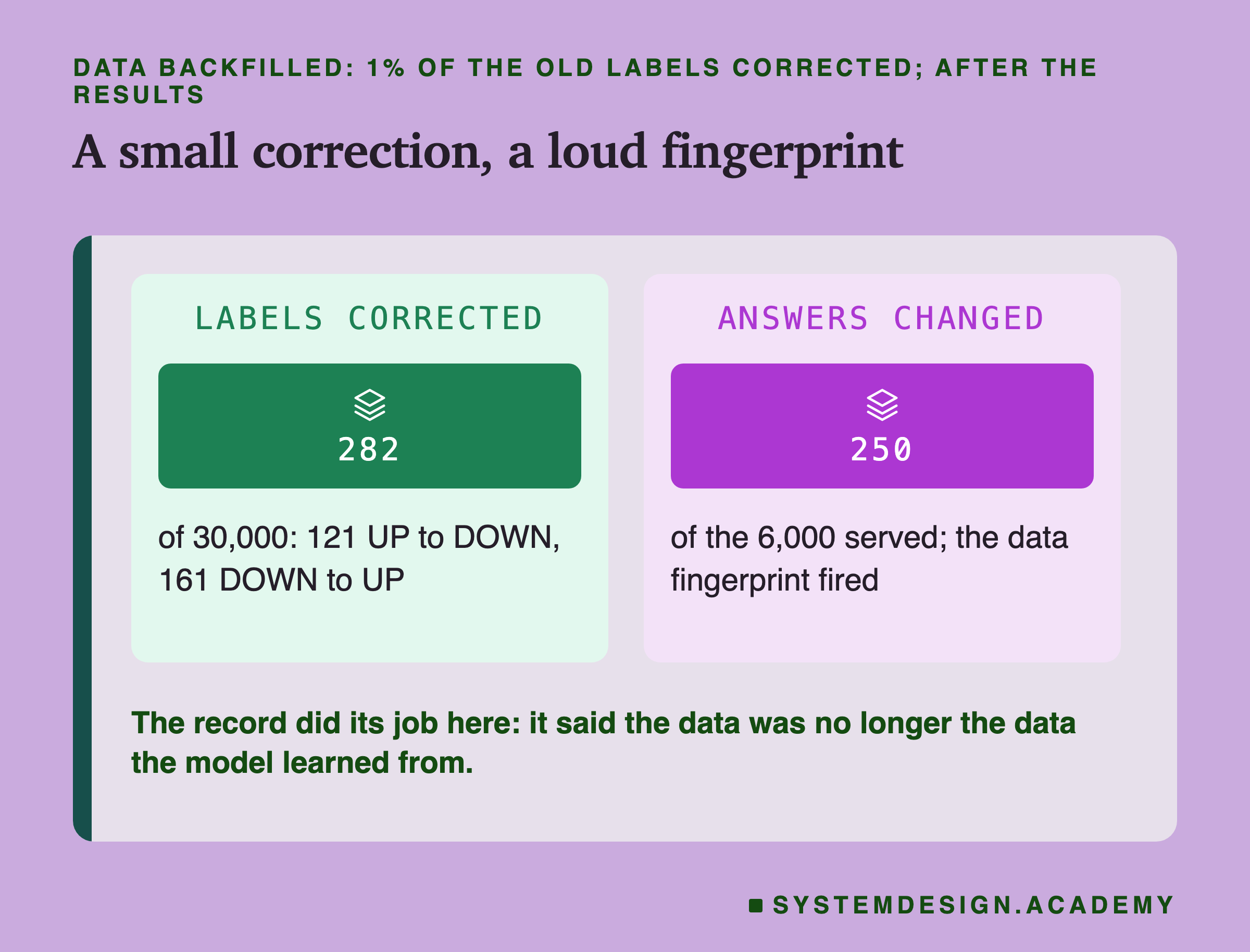
Data backfilled. Stored data is not always frozen. An upstream team finds that some old records were wrong and corrects them in place. Here 282 labels changed, 121 from UP to DOWN and 161 from DOWN to UP, under 1% of 30,000. The rebuild changed 250 of the 6,000 served answers, and the data fingerprint fired.
In both cases the record did its job. It could not stop the data from changing, but it said, clearly, that the data was not the data the model had learned from. That turns a mysterious difference into a known one. The fix is also clear: keep a copy of the exact training rows, or keep a stored version of the data that nobody edits in place, so that the rows named in the record can still be read as they were.
A Wrong Rebuild Can Look Better
The follow-up's accuracy numbers had one more surprise, and I think it is the most useful result in this lesson.
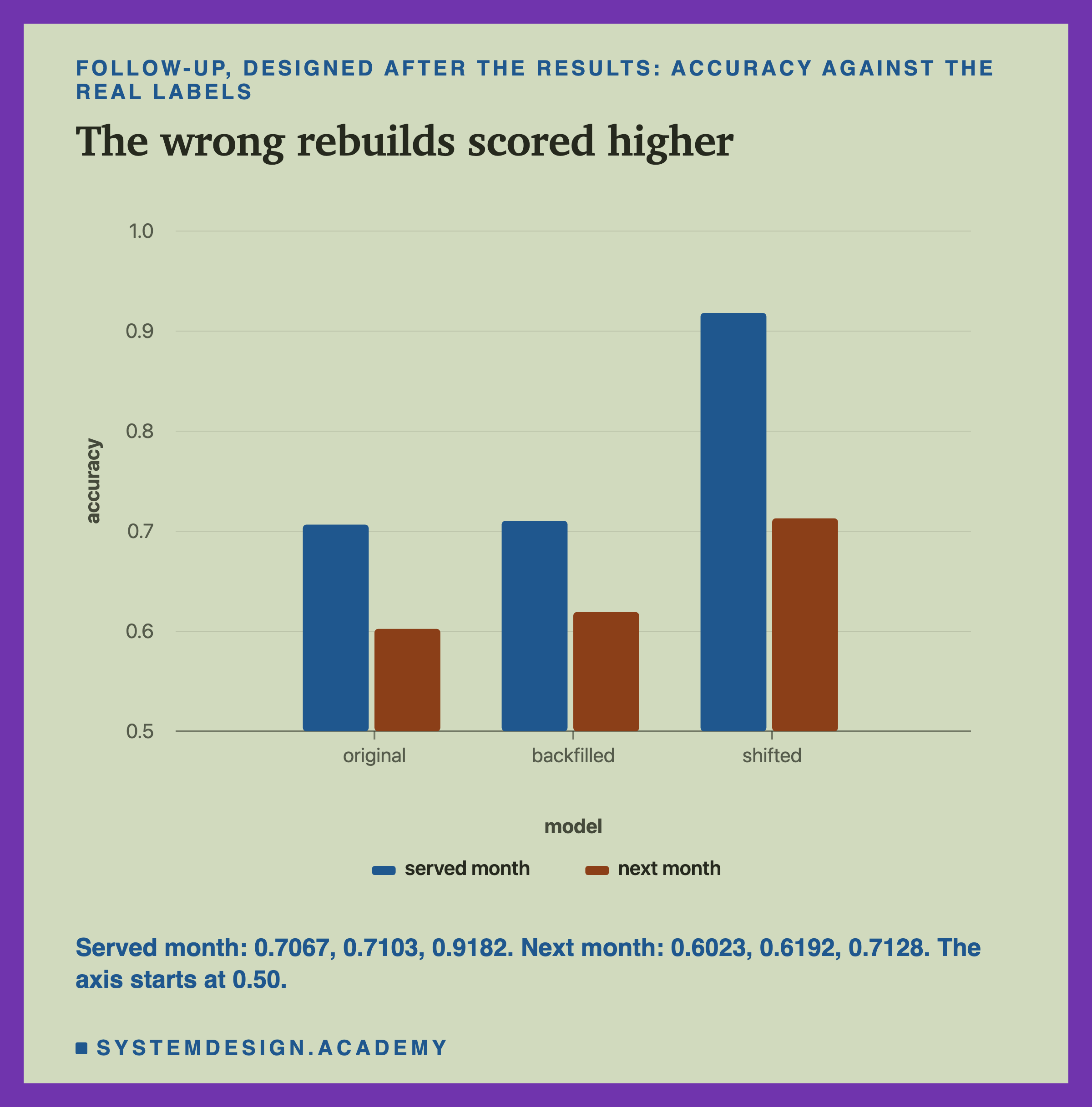
The rows-shifted rebuild scored 0.9182 on the served month, where the original scored 0.7067. That is not because it is a better model. It trained on those very rows, so it had seen the answers. On the next month, which neither had seen, it scored 0.7128 against the original's 0.6023. That gap is more believable: the shifted model learned from data 6,000 rows closer to the next month, which is consistent with lesson 6, where retraining on newer rows helped, largely through the date input; I did not test that here. The backfilled rebuild also scored a little higher than the original, 0.7103 and 0.6192. I did not study why, and one run cannot tell it apart from chance.
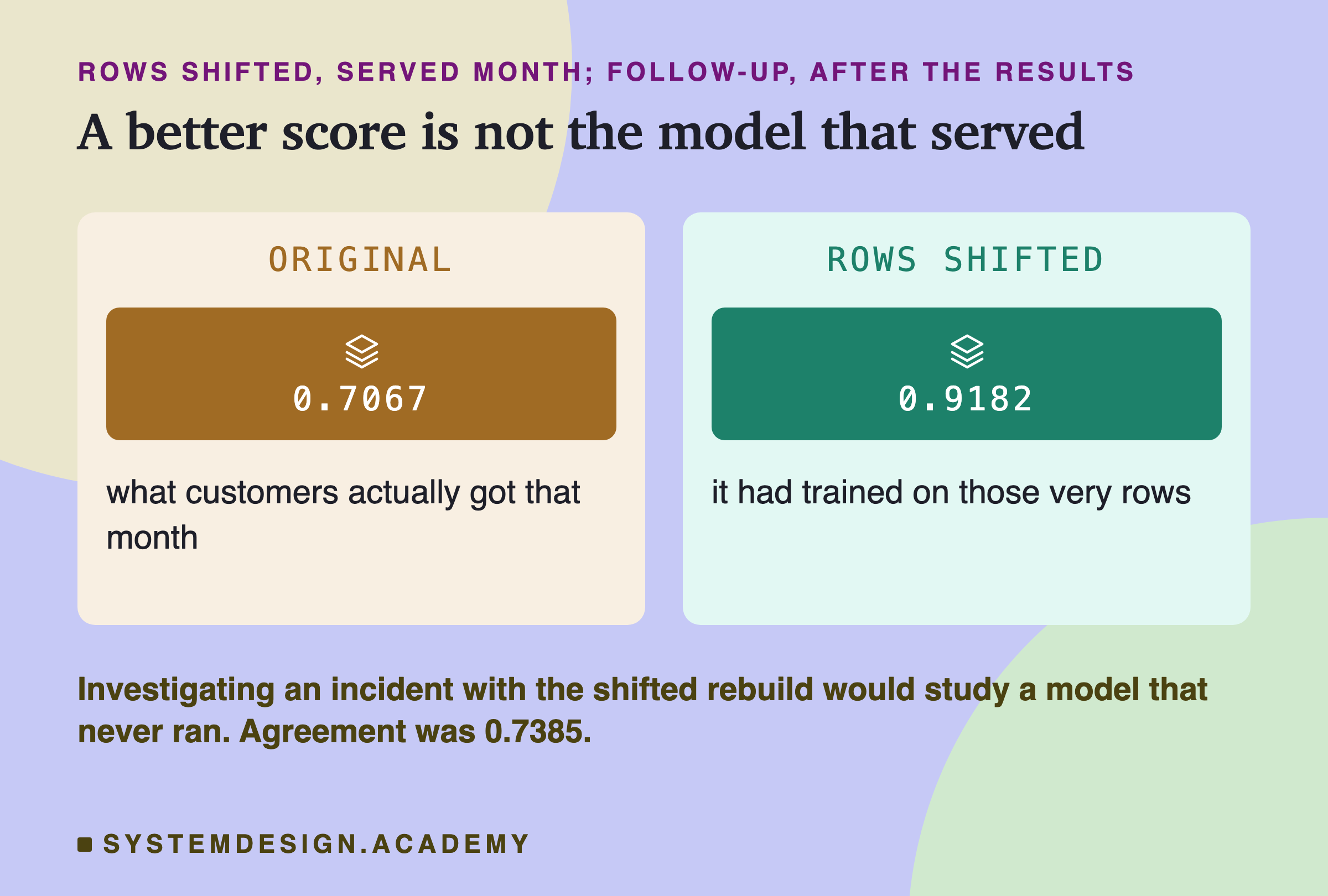
Here is why this matters. Imagine the team rebuilds last month's model with the "last 30,000 rows" rule, checks its accuracy on last month's rows, and sees 0.92. It looks excellent. Someone concludes that last month's model was very good and the new model broke something serious. But the model that really served last month scored 0.71 on those rows. The whole investigation would start from a false picture, and every number on the rebuilt model would look better than the truth.
The lesson I take from this: never judge a rebuild by its accuracy. Judge it by whether it is the same model, and the only direct test of that is agreement with the answers the original actually gave.
Rolling Back: Load the File
If rebuilding is fragile, the obvious alternative is not to rebuild at all. Keep the model file, and on the bad morning, load it.
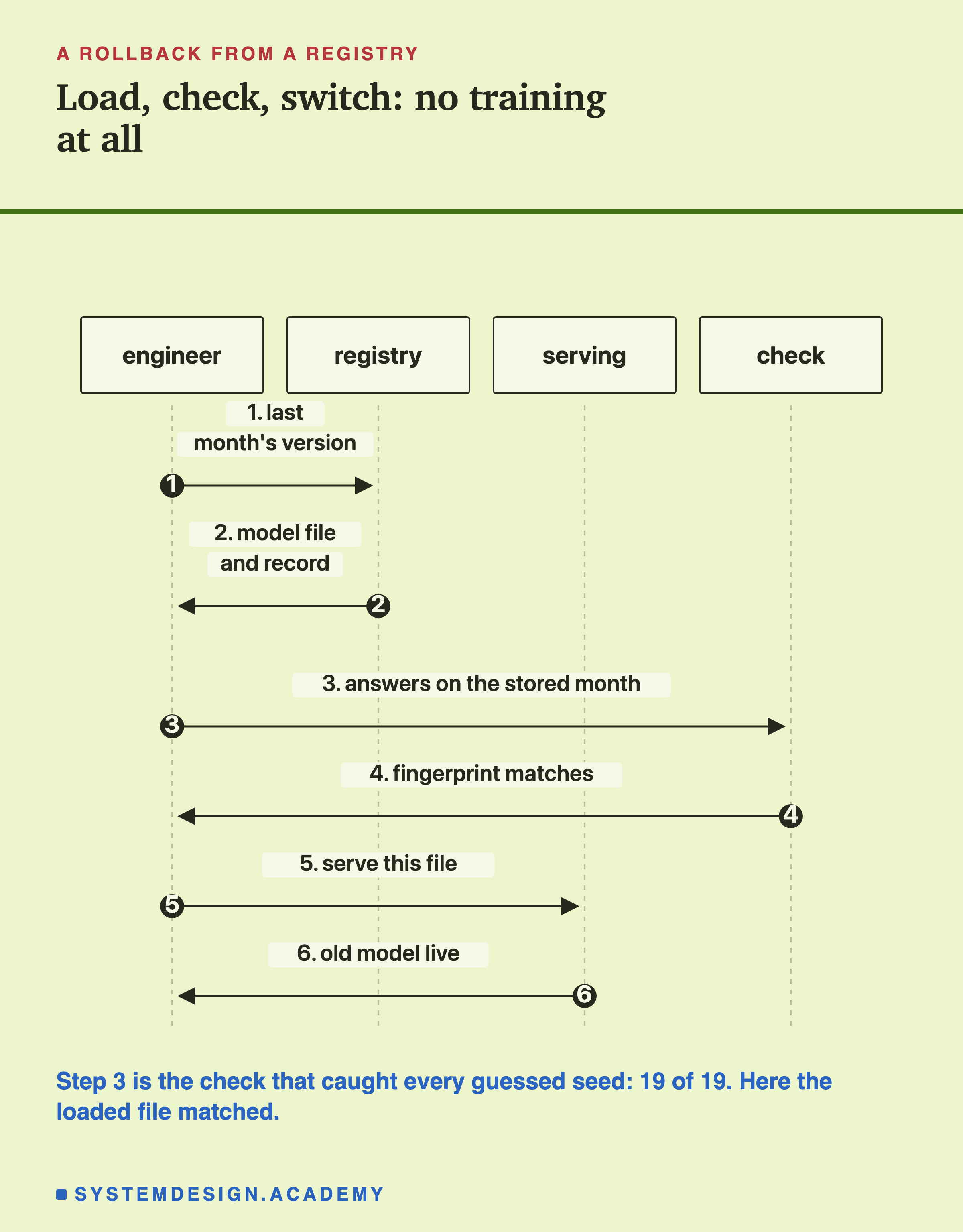
A rollback from a registry has three moves. Fetch last month's file and its record by version. Load the file, run it on the stored month, and compare the hash of its answers with the one in the record. If they match, serve it. No training happens at all, so nothing random can change, and no data needs to be read except the stored month for the check. Because loading a pickle can run code, the registry must be one you control: never load a model file from an untrusted source.
The follow-up measured two things about this road, both designed after the main results and written down before they ran.
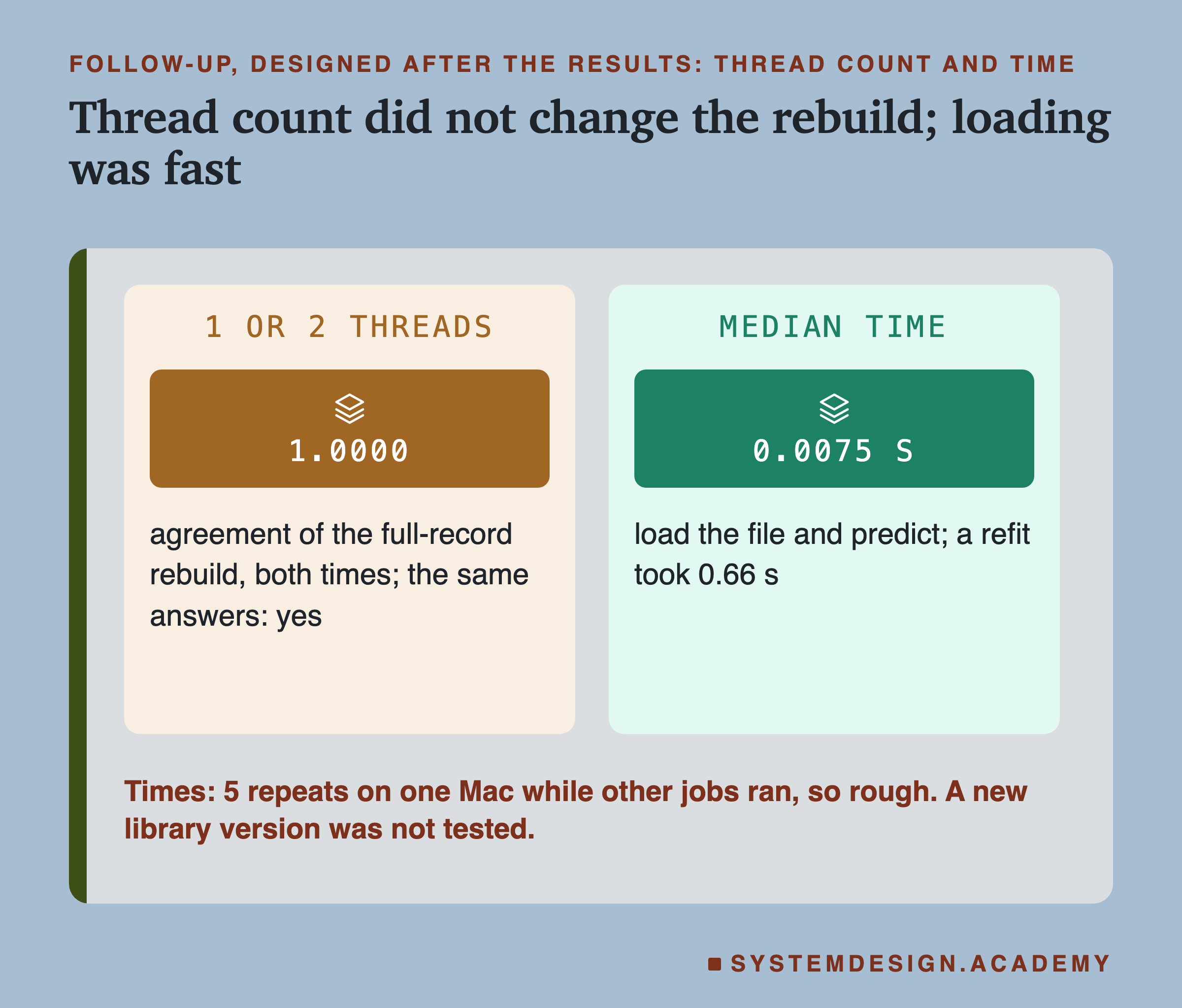
A different number of threads. A thread is one of several lines of work a program can run at once on different processor cores. A different machine often has a different number of cores, so I ran the full-record rebuild in a fresh process limited to 1 thread, and again to 2, where the main run used all 10 cores of this Mac. Both gave the same 6,000 answers, with the answer hash matching. For this model on this machine, the thread count did not change the result. That is one honest piece of "a different machine"; it is not the whole of it.
Time. Loading the file and answering the 6,000 rows took a median of 0.0075 seconds over 5 repeats. Training again and answering took a median of 0.66 seconds. Other jobs were running on the same Mac at the time, with a load average of 5.8 on 10 cores (the number of jobs using or waiting for a processor core, averaged over the last minute), so these times are rough. The size of the gap is the point, not the decimals: loading was about 88 times faster here, and for a large model that trains for days, the difference is days.
What I Did Not Measure: Library Versions
The record stores the versions of scikit-learn and numpy for a reason. A new version of a library can change the default value of a setting, the order of an internal calculation, or the way a saved file is read. Any of these can change a rebuilt model, or stop an old model file from loading at all. scikit-learn's own documentation says there is no supported way to load a model trained with a different version: it might load, but that is "entirely unsupported and inadvisable". A file that loads with only a warning can still behave differently, and it can also simply be the wrong file, which is why the answers check matters on the loading road too.
I did not test this. Testing it honestly would mean installing a second version of scikit-learn next to the first, and the Python environment on this machine is shared with other work, so I left it alone. Everything in this lesson was measured with scikit-learn 1.9.1 and numpy 2.5.3, and I cannot tell you how large the effect of a version change would be on this model. It could be nothing, or it could be a model that no longer loads.
What I can say from the design is this. A version change is exactly the kind of difference the data fingerprint cannot see, because the data has not changed. Like the missing seed, it would pass every check on the inputs. The answers fingerprint would still catch it, if the rebuilt or reloaded model answered the stored month differently. That is one more reason to store the answers, and one more reason to keep the exact environment that trained a model, for example as a list of pinned library versions, next to its file.
Try It Yourself
This script is the lab made small. It downloads the same data, trains last month's model with seed 7, writes a lineage record with a data fingerprint and an answers fingerprint, and saves the model to bytes. Then it tries the five ways back: the full record, the saved file, backfilled labels, shifted rows, and the 19 guessed seeds. For each it prints the agreement, whether the data fingerprint still matches, and whether the answers are the same. It does not need a GPU.
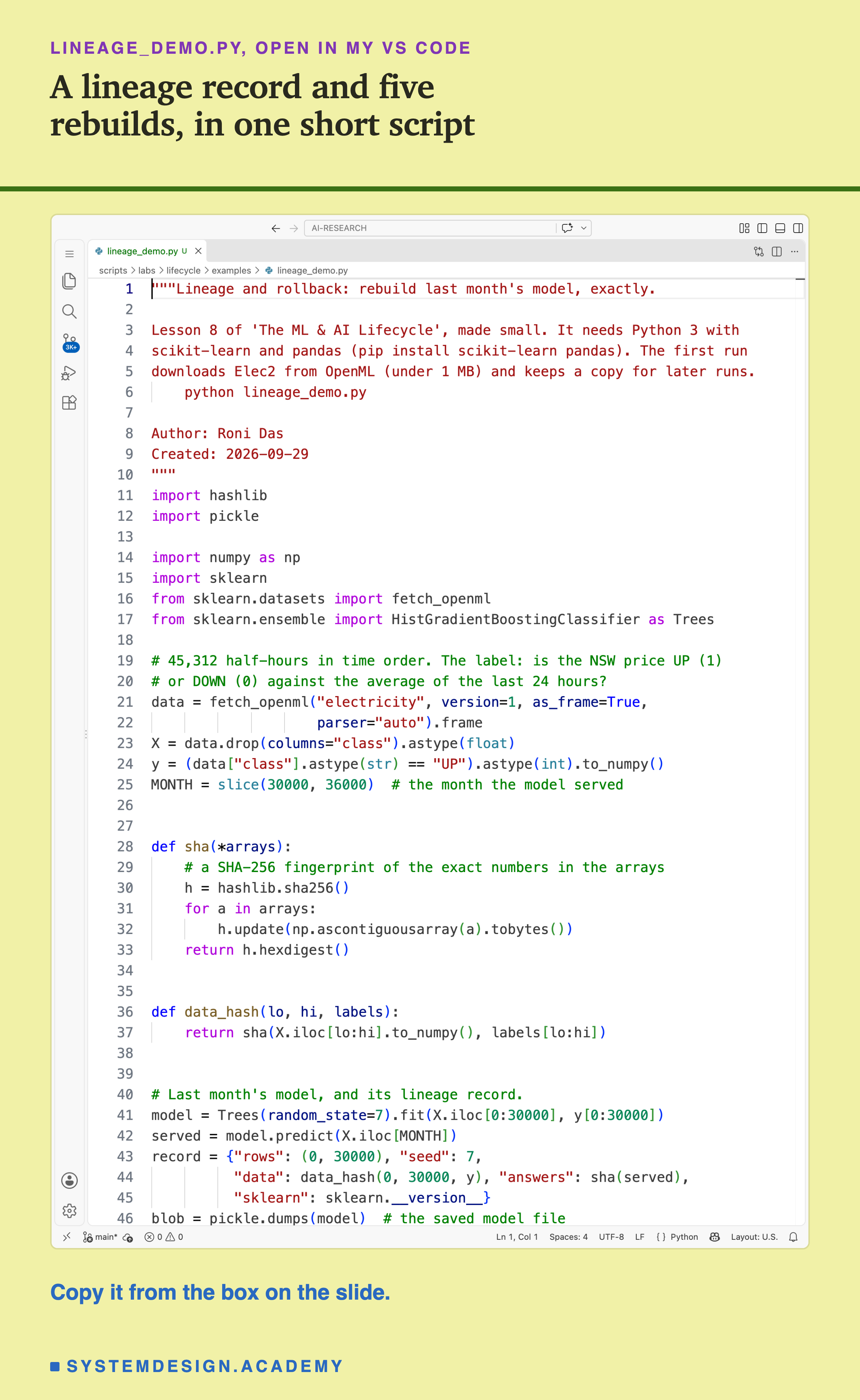
Before you run this lab. You need Python 3 and two libraries: pip install scikit-learn pandas. scikit-learn holds the model and the download, and brings NumPy with it; pandas holds the table; hashlib and pickle come with Python. The first run downloads Elec2 from OpenML, a free public website of datasets for machine learning (under 1 MB compressed), so it needs an internet connection once; scikit-learn keeps a copy in a folder in your home directory (scikit_learn_data) for later runs. It trains 23 small models, so it is quick; I did not time it carefully. I ran it with scikit-learn 1.9.1. scikit-learn runs the same way on Windows and Linux, but I have not checked the numbers there, and another version of scikit-learn may give different models, which is this lesson's point; that is why the first line printed is the version.
"""Lineage and rollback: rebuild last month's model, exactly.

Lesson 8 of 'The ML & AI Lifecycle', made small. It needs Python 3 with
scikit-learn and pandas (pip install scikit-learn pandas). The first run
downloads Elec2 from OpenML (under 1 MB) and keeps a copy for later runs.
    python lineage_demo.py

Author: Roni Das
Created: 2026-09-29
"""
import hashlib
import pickle

import numpy as np
import sklearn
from sklearn.datasets import fetch_openml
from sklearn.ensemble import HistGradientBoostingClassifier as Trees

# 45,312 half-hours in time order. The label: is the NSW price UP (1)
# or DOWN (0) against the average of the last 24 hours?
data = fetch_openml("electricity", version=1, as_frame=True,
                    parser="auto").frame
X = data.drop(columns="class").astype(float)
y = (data["class"].astype(str) == "UP").astype(int).to_numpy()
MONTH = slice(30000, 36000)  # the month the model served


def sha(*arrays):
    # a SHA-256 fingerprint of the exact numbers in the arrays
    h = hashlib.sha256()
    for a in arrays:
        h.update(np.ascontiguousarray(a).tobytes())
    return h.hexdigest()


def data_hash(lo, hi, labels):
    return sha(X.iloc[lo:hi].to_numpy(), labels[lo:hi])


# Last month's model, and its lineage record.
model = Trees(random_state=7).fit(X.iloc[0:30000], y[0:30000])
served = model.predict(X.iloc[MONTH])
record = {"rows": (0, 30000), "seed": 7,
          "data": data_hash(0, 30000, y), "answers": sha(served),
          "sklearn": sklearn.__version__}
blob = pickle.dumps(model)  # the saved model file
print(f"scikit-learn {record['sklearn']}")
print(f"data hash {record['data'][:12]}")
print(f"answers hash {record['answers'][:12]}")
print(f"model file {len(blob):,} bytes")


def rebuild(name, lo, hi, labels, seed):
    m = Trees(random_state=seed).fit(X.iloc[lo:hi], labels[lo:hi])
    show(name, m.predict(X.iloc[MONTH]), data_hash(lo, hi, labels))


def show(name, answers, dhash):
    agree = (answers == served).mean()
    data = "ok" if dhash == record["data"] else "CHANGED"
    same = "same" if sha(answers) == record["answers"] else "differ"
    print(f"{name:<13} agree {agree:.4f}  data {data:<7}"
          f"  answers {same}")


# 1. Everything in the record, used as written.
rebuild("full record", 0, 30000, y, seed=7)

# 2. No rebuild: load the saved file back.
show("snapshot", pickle.loads(blob).predict(X.iloc[MONTH]),
     record["data"])

# 3. Upstream corrected 1% of the old labels after the model was built.
flip = np.random.default_rng(8).random(30000) < 0.01
y_new = y.copy()
y_new[:30000][flip] = 1 - y_new[:30000][flip]
rebuild("backfilled", 0, 30000, y_new, seed=7)

# 4. The rows were written down as "the last 30,000", a month later.
rebuild("rows shifted", 6000, 36000, y, seed=7)

# 5. The seed was never written down: try the other 19 seeds 0 to 19.
agree = []
for seed in [s for s in range(20) if s != 7]:
    m = Trees(random_state=seed).fit(X.iloc[0:30000], y[0:30000])
    agree.append((m.predict(X.iloc[MONTH]) == served).mean())
exact = sum(a == 1.0 for a in agree)
print("seed not recorded: 19 guesses")
print(f"  agree {min(agree):.4f} to {max(agree):.4f}, exact {exact}")
The Lab Report
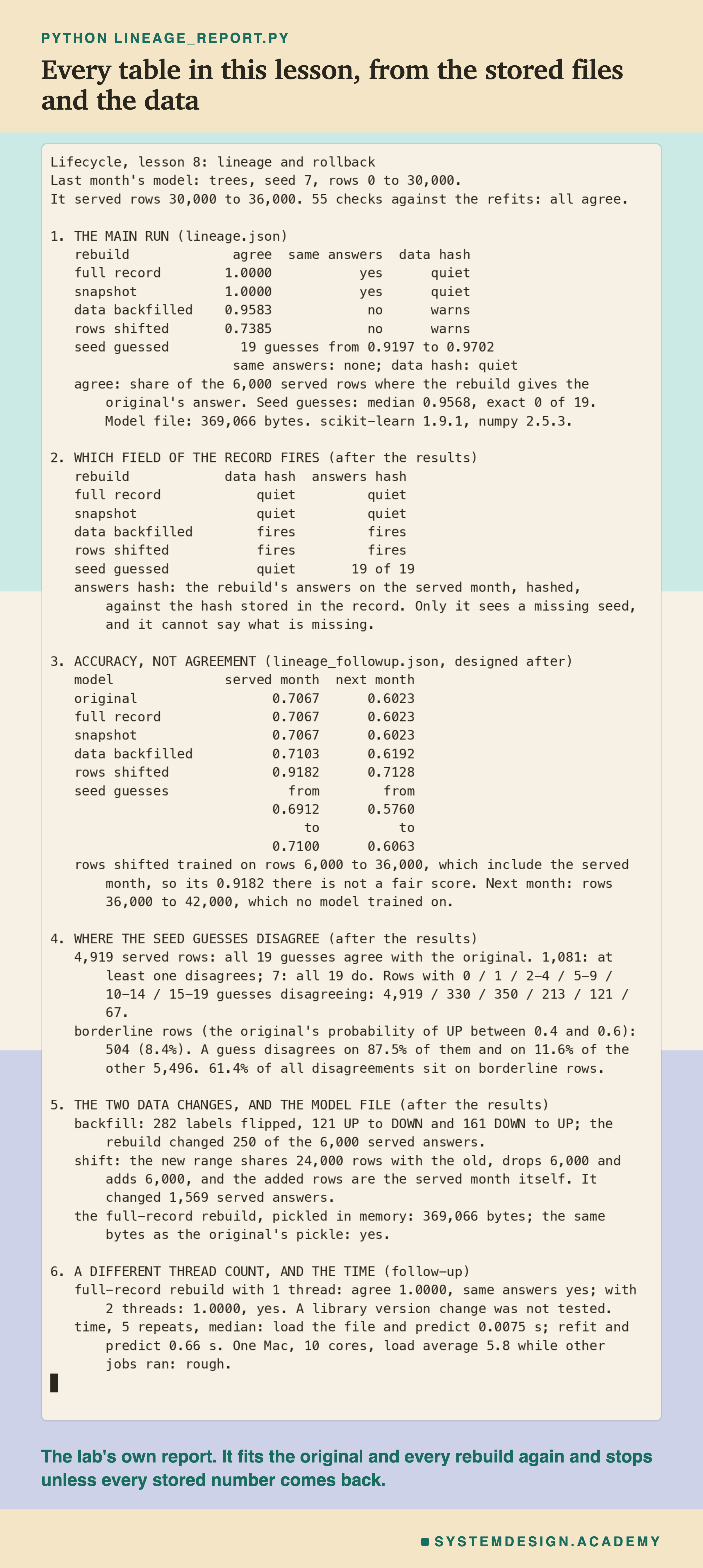
The report lives in scripts/labs/lifecycle/lineage_report.py. It reads the lab's stored files, results/lineage.json and results/lineage_followup.json, and the Elec2 data from scikit-learn's local copy. The lab stored agreements and fingerprints, not each answer, so the report trains the original model and every rebuild again with the same rows, labels, settings and seeds, and stops unless every stored number and fingerprint comes back exactly: the record's two fingerprints, the file size, each rebuild's agreement and warnings, the seed guesses' range, middle value and exact count, and every accuracy in the follow-up. It makes 55 checks in all, and they all agree. It changes nothing in the lab's files.
Its json mode writes every number to results/rv-report.json, which the figures read. The demo mode checks the student script's stored run, and the box mode writes the playground below and checks that it gives the lab's numbers.
What came before the run, in lineage_lab.py: the model, the record's fields, the five rebuilds and what to report. What came after I saw the main results: the follow-up's accuracy on two months, the thread counts and the times, designed after the results and written down before it ran. What came after all the results, in the report: which record field fires, where the seed guesses disagree and the borderline line at 0.4 and 0.6, the flipped labels by class, the shared rows, the pickled bytes, and the calendar dates.
Check a Rebuild Yourself
This box has no model in it. It holds, for every one of the 6,000 served rows, the original model's answer, the answers of the 19 guessed seeds and of the backfilled and shifted rebuilds, the real label, and whether the row was borderline, as six hexadecimal digits per row (counting in sixteens, with the digits 0 to 9 and a to f). It also holds the answers fingerprint from the lab's record. The report checked that every agreement, accuracy and fingerprint it gives matches the lab's files. It runs in your browser.
As it is, the box checks that the original's answers hash to the fingerprint stored in the record, which prints True, and then prints the backfilled rebuild, the shifted rebuild and the first three guessed seeds with their agreement, accuracy and whether their answers match the record. None of them does.
Then try agreement(s) and accuracy(s) for every seed in GUESSED_SEEDS, and look for the one closest to the original. Try disagree_on_border(3) to see how much of one guess's disagreement sits on borderline rows. And change one answer by hand, for example ORIGINAL[0] = 1 - ORIGINAL[0], then run answers_hash('original') again: one changed answer out of 6,000 gives a completely different fingerprint.
The Code, Part by Part
Loading. fetch_openml("electricity", version=1) downloads Elec2 once and reads the local copy after that. The label column holds the words UP and DOWN, turned into 1 and 0. MONTH is the slice of rows 30,000 to 36,000, the period the model served.
sha and data_hash. sha feeds the exact bytes of one or more arrays into SHA-256 and returns the 64-character fingerprint. np.ascontiguousarray makes sure the numbers are laid out in memory in one fixed order before hashing, so the same table always gives the same bytes. data_hash fingerprints the inputs and labels of a range of rows.
The record. The model is trained on rows 0 to 30,000 with random_state=7, which is scikit-learn's name for the seed. Its answers on the served rows are kept in served. The record is a plain dictionary: the rows, the seed, the data fingerprint, the answers fingerprint and the scikit-learn version. pickle.dumps(model) turns the trained model into bytes, the same bytes a model file would hold.
rebuild and show. rebuild trains a new model on a range of rows with a given set of labels and seed, and passes its answers to . prints the agreement with , whether the data fingerprint still matches the record, and whether the answers fingerprint does.
How to Make a Model You Can Get Back
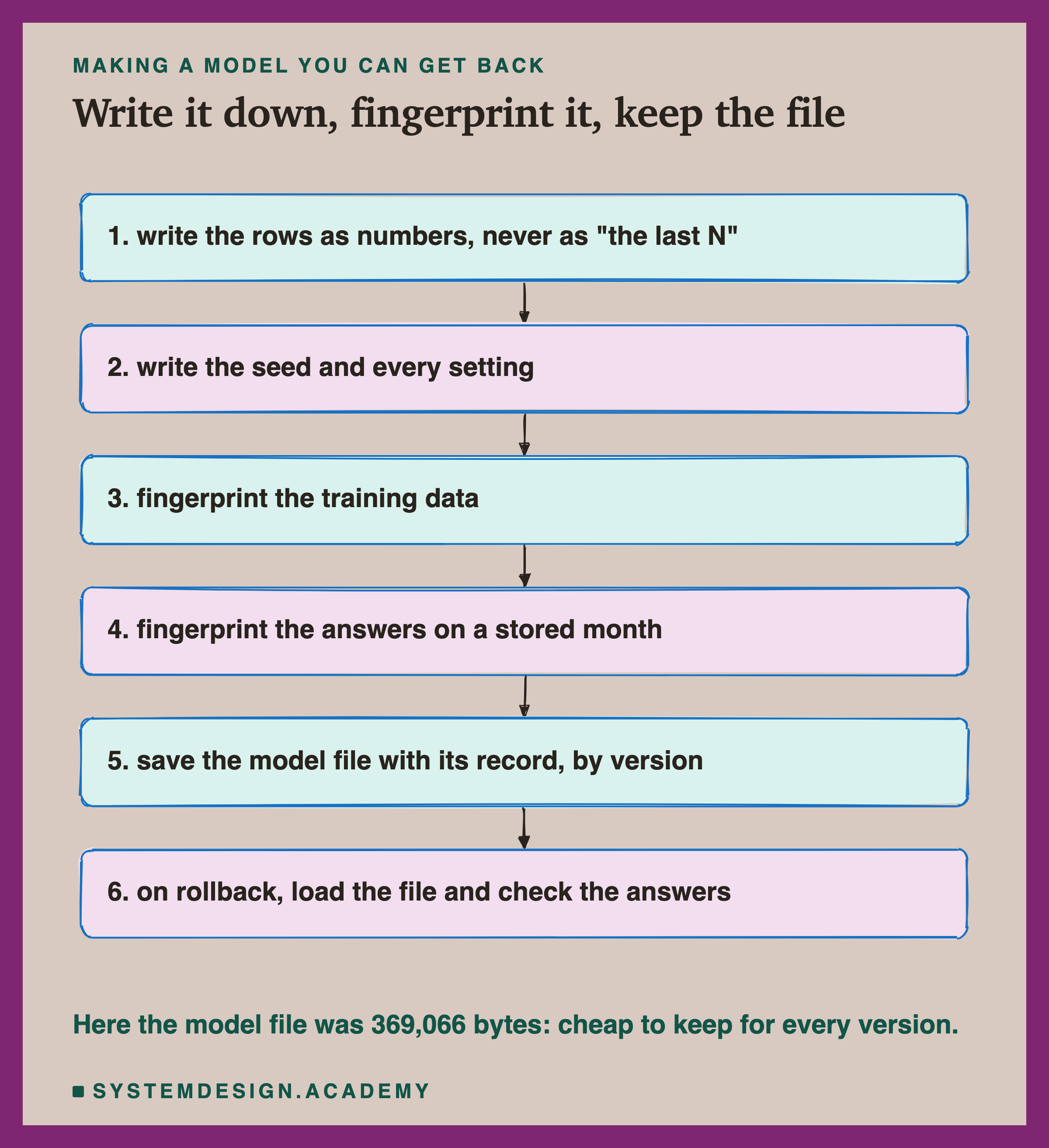
Write the rows as numbers. Record the exact row numbers, dates or file versions a model learned from, never a rule like "the last 30,000 rows" or "the last 90 days". A rule is fine for choosing the data; the record must hold what the rule chose.
Write the seed and every setting. Set the seed yourself, write it down, and write down every setting, including the ones left at their defaults, together with the library versions. A default can change between versions. The lab's record stored only the seed; the defaults were implied by the library version. Write them out.
Fingerprint the training data. Store a hash of the exact rows. It costs 64 characters and tells you at once whether the data under a rebuild is still the data the model learned from.
Fingerprint the answers on a stored month. Keep a fixed set of rows, run the model on them, and store the hash of its answers. This is the only check in this lab that saw every kind of failure, including the missing seed.
Save the model file with its record, by version. Here the file was about a third of a megabyte. Keeping every version that ever served is almost always cheaper than one bad day without it.
On rollback, load the file and check the answers. Load it only from a registry you control, since loading a pickle can run code; run it on the stored month, compare the answers fingerprint, and only then serve it.
Load the Saved File, or Rebuild It?
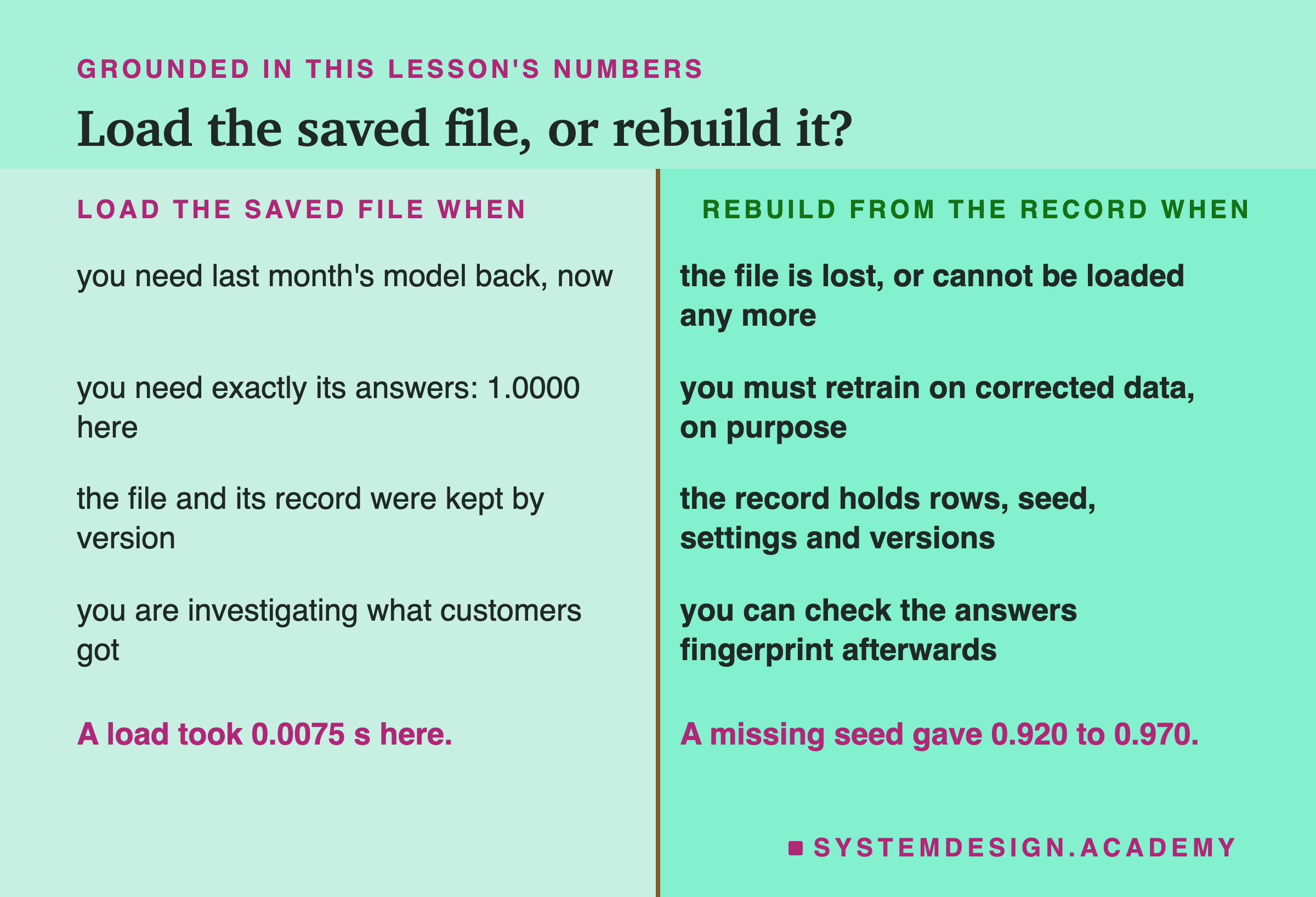
Load the saved file when you need last month's model back quickly. It is the fastest road and, here, an exact one.
Load the saved file when you need exactly the answers customers got. An investigation compares old answers with new ones. Only the real model gives the real old answers.
Load it when the file and its record were kept together by version. Then the record can confirm, with the answers fingerprint, that the file is the right one.
Rebuild when the file is lost, or will not load any more. A library upgrade can make an old file unreadable. Then the record is the only road back, and it must be complete.
Rebuild when you mean to change something. If upstream corrected the labels, training again on the corrected data is the right thing to do on purpose. Just do not call the result last month's model. The data fingerprint will tell you it is not.
Do not rebuild from a record that has no seed or no row numbers, and expect the old model. Here the missing seed gave 0.920 to 0.970 agreement, and the missing row numbers gave 0.739.
Do not judge any rebuild by its accuracy alone. The shifted rebuild scored 0.9182 on rows where the real model scored 0.7067.
What These Numbers Can and Cannot Tell You
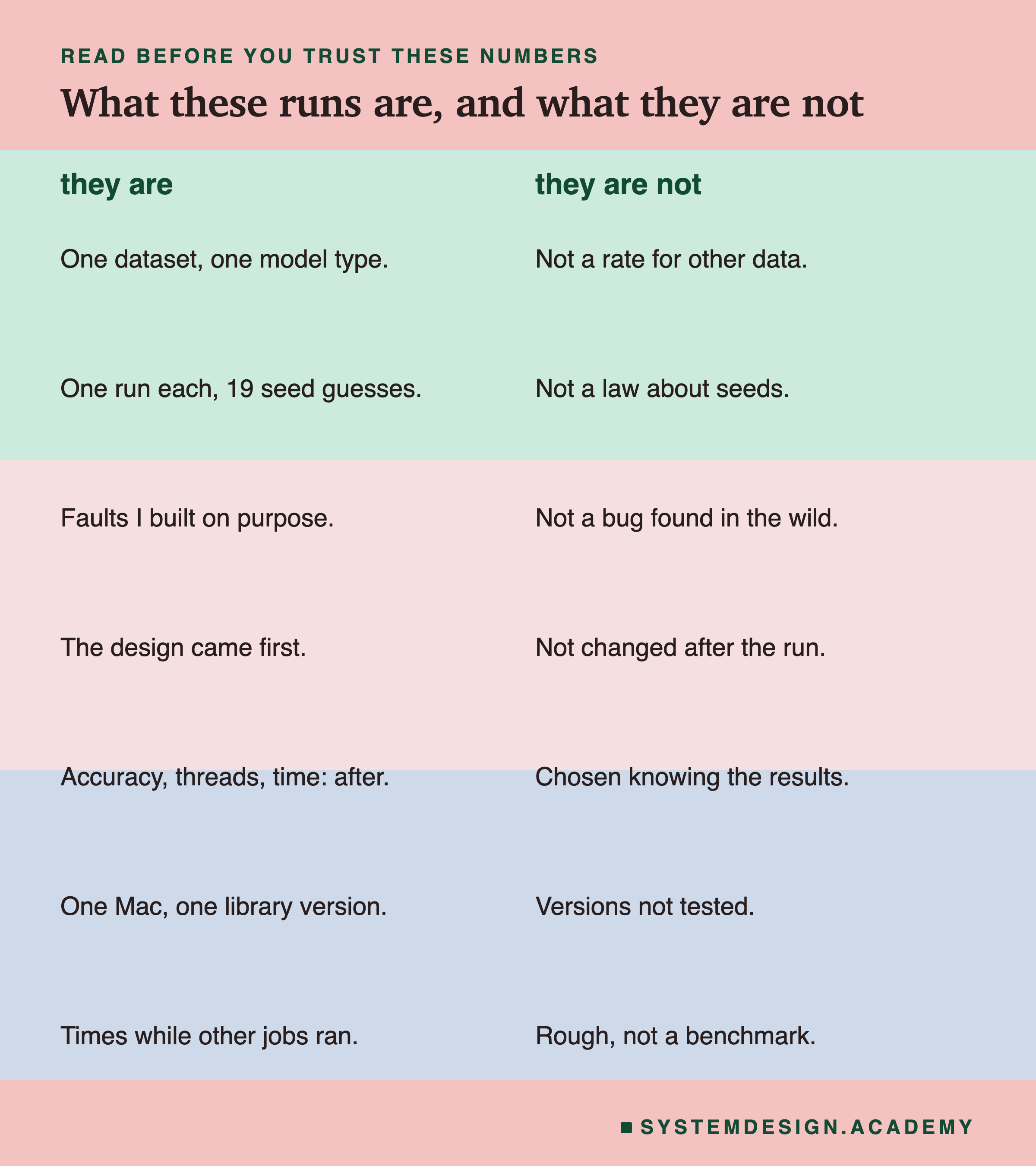
One dataset, one model type, one run each. Everything here is one electricity market and one kind of model, boosted trees with default settings. How far a missing seed moves a model depends on how much randomness the training uses. For a model with no randomness in its training, such as the logistic regression that lesson 2 trained 20 times into one single model, a missing seed would change nothing. For a large neural network, it can change a great deal. The numbers here are for this model.
Faults I built on purpose. The missing seed, the backfill and the shifted rows are faults I made in order to measure them. They are the kind of thing that happens in real systems, but a real backfill might change many more rows, or only a few.
The follow-up and the extra measures came after. Accuracy on two months, the thread counts and the times were designed after I saw the main results and written down before they ran. Which record field fires, the borderline line at 0.4 and 0.6, and the pickled bytes were measured after all the results, with rules I chose knowing them.
One machine, one library version. The thread test is one small piece of "a different machine". The library version was not tested at all. The times were measured while other jobs ran, so they are rough; only the size of the gap between loading and training should be read from them.
What to Do Next
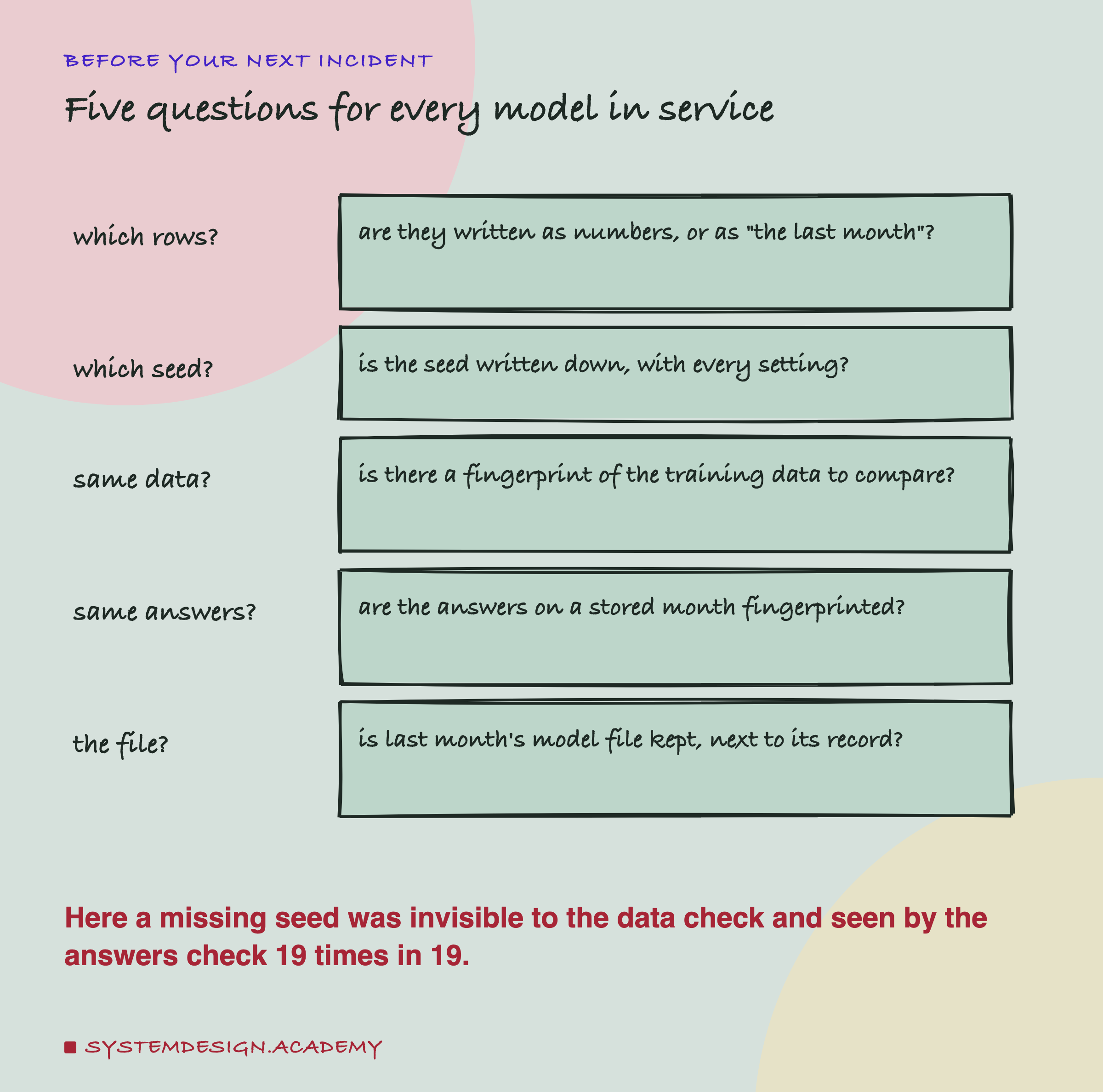
Pick one model your team has in service, and ask the five questions on the card. The first three are about the record; the last two are about what lets you check it. If you can only fix one thing this week, fix the last: find last month's model file and make sure it is kept, with its record, where someone on call can find it. Then add the answers fingerprint. It is a few lines of code, like the sha(served) line in the demo, and it is the one check that caught every failure in this lab.
Then try a rehearsal. Before any incident, take last month's model and do a rollback on purpose: load the file, check the answers fingerprint, and time it. A rollback that has never been practised usually fails on the day it is needed, for a reason nobody expected.
The chapter plan's next lessons measure what happens when the right answers arrive late, and then put the whole lifecycle together as one loop.
Knowledge Check
Knowledge Check
4 questions - Score 80% to pass
A rebuild with the seed not written down agreed with the original on 0.920 to 0.970 of served rows. Which part of the record noticed that it was a different model?
Why was loading the saved model file the safer road back to last month's model here?
The rows-shifted rebuild scored 0.9182 on the served month, against the original's 0.7067. Why is it the wrong model to study an incident with?
On which served rows did the guessed seeds disagree with the original most often?