A List of Steps That Names Every Part
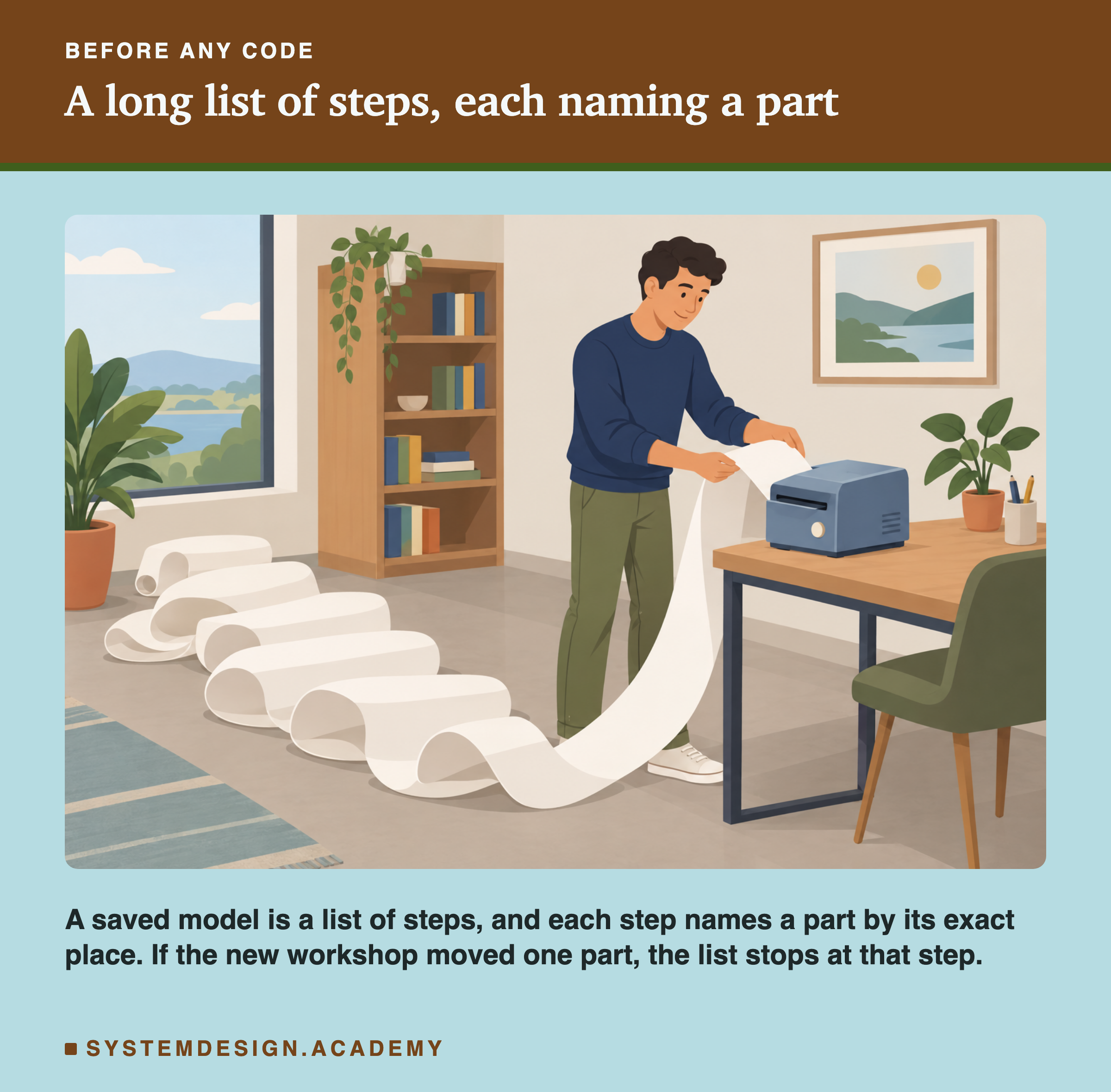
Let me start with a long printed list of steps, like the one in the picture.
Imagine a workshop where a machine prints instructions for building something. Each step says exactly where to find a part: "take the small spring from drawer 14, shelf B". Another workshop, built the same way, can follow the list and build the same thing. But what if the second workshop is newer, and someone moved the small spring to drawer 15? The list still says drawer 14. The worker stops at that step, because the part is not where the list says.
Now imagine the opposite case. The list was printed in the new workshop, and an older workshop follows it. If every part it names is also in the old workshop, in the same place, the old one builds the same thing. Nobody would guess which direction is safer without trying both.
A saved machine learning model is a list like this. In this lesson I try both directions, for real, across four releases of one library over three years.
Where This Lesson Starts
This lesson uses the model from the features chapter. If it is new to you, please read what a feature is first. That lesson built six features for each customer of a real online shop. It asked one question: at the start of a month, will this customer buy something in the next 30 days? The model is a gradient boosted tree model from scikit-learn, and it scored a test AP of 0.5450.
Three other lessons sit close to this one. The first lesson of this chapter opens a pickle file and shows what is inside. Here I only use one fact from it: a pickle file holds names of Python things, and loading it looks those names up. Saving formats compared saved the model eleven ways and loaded every file back, always with the same library versions on both sides. It ended by saying the cross-version question belongs to this lesson.
And lineage and rollback, in the lifecycle chapter, has a slide called "What I Did Not Measure: Library Versions". This lesson measures exactly that.
The Words You Need First
Please read this slide slowly if any word is new. Every slide after it uses these words.
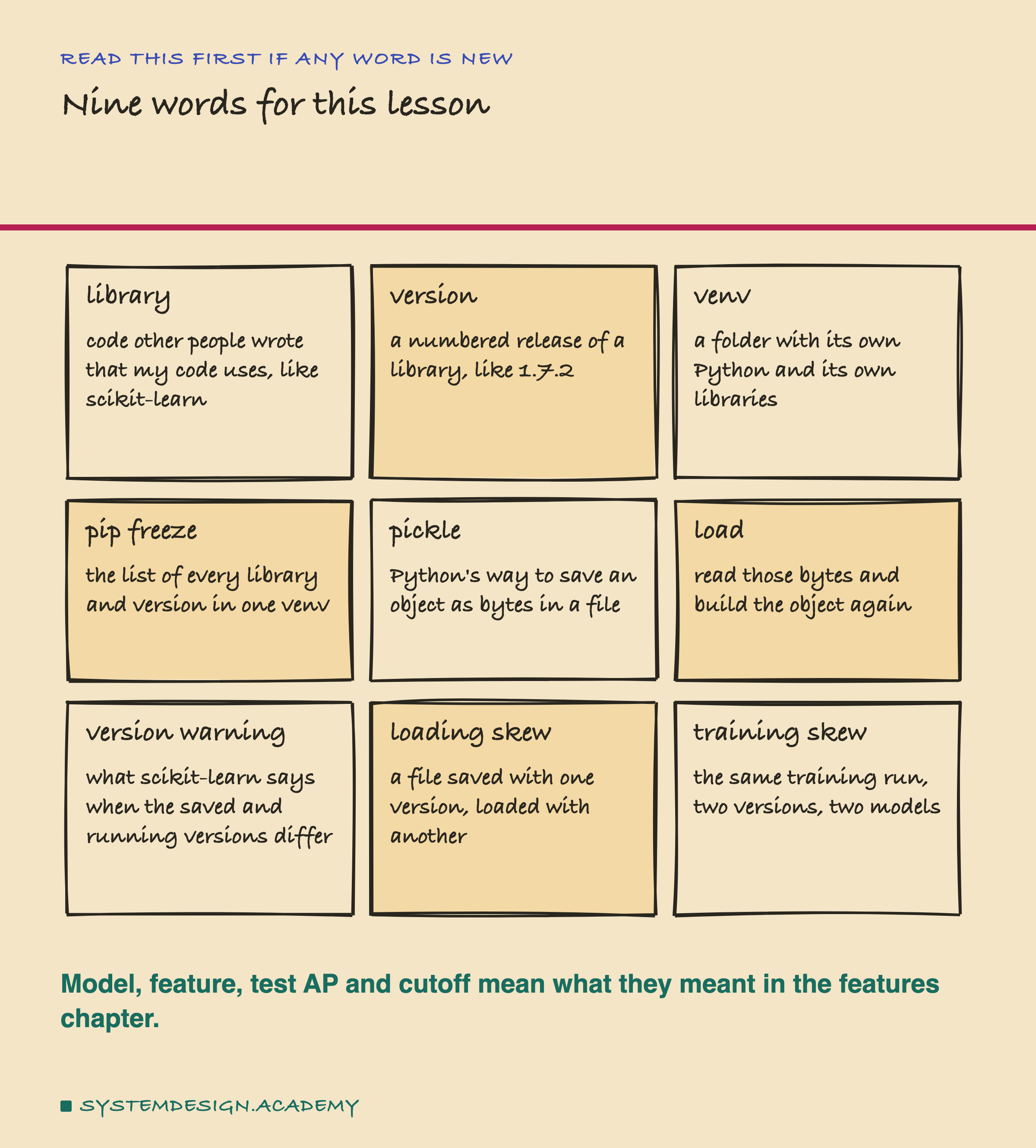
A library is code that other people wrote and that my code uses. scikit-learn is a library for machine learning; numpy is a library for arrays of numbers that scikit-learn uses underneath. A version is a numbered release of a library, such as 1.7.2. A bigger number is a newer release.
A virtual environment, or venv, is a folder that holds its own copy of Python and its own libraries. Two venvs on one laptop can hold two different versions of scikit-learn, and they never mix. pip freeze prints the exact list of libraries and versions inside one venv.
To pickle a model is to save it as bytes in a file with Python's built-in tool. To load it is to read the file and build the model again in memory.
Skew means two things that should match but do not. In this lesson, loading skew means a file saved with one version and loaded with another. Training skew means the same training code run under two versions gives two different models. They are separate problems, and I measure them separately.
Six Venvs, Four Releases, Two Controls
To test versions, I need several versions installed at once. So the lab made six separate venvs with uv, a fast tool for making venvs and installing libraries.
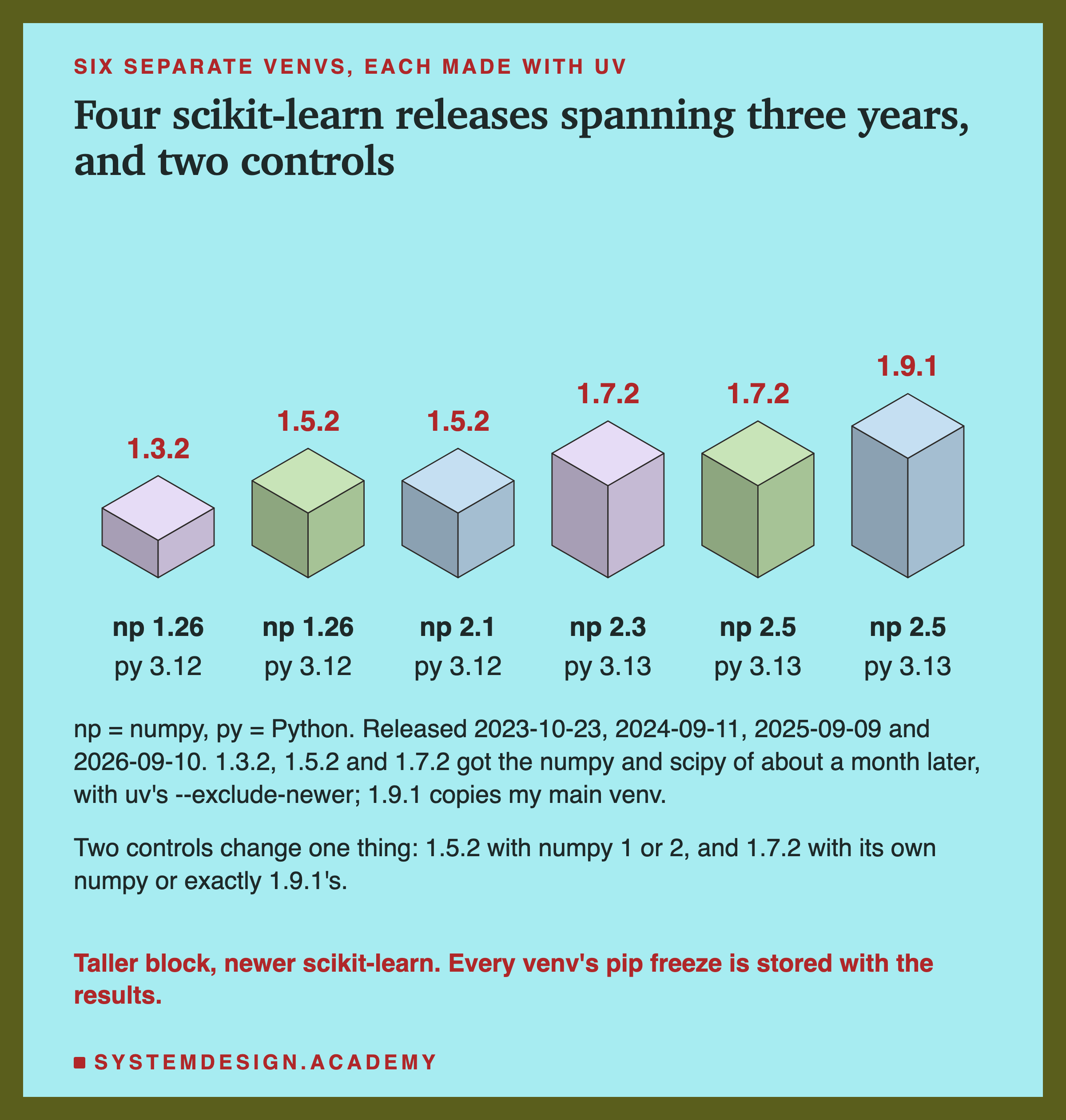
The four main venvs hold scikit-learn 1.3.2, 1.5.2, 1.7.2 and 1.9.1. Those four were released on 23 October 2023, 11 September 2024, 9 September 2025 and 10 September 2026, so they span almost three years. 1.9.1 is the version in my main venv, where the whole features chapter ran.
A real team that installed scikit-learn 1.3.2 in late 2023 got the numpy of late 2023 with it. To copy that, I used uv's --exclude-newer option. Its own help text says it will "Limit candidate packages to those that were uploaded prior to the given date". So the 1.3.2 venv got numpy 1.26.2, the 1.5.2 venv got numpy 2.1.2, and the 1.7.2 venv got numpy 2.3.4, each from about a month after its release.
But then two things change at once: scikit-learn and numpy. So I added two control venvs, each changing only one thing. "1.5.2 with numpy 1" is the 1.5.2 venv with numpy held below 2, so the pair differs only in numpy. "1.7.2 with numpy 2.5" has numpy, scipy and the other helpers at exactly the versions in my 1.9.1 venv, so that pair differs only in scikit-learn. The lab stored every venv's full pip freeze. Together the six venvs use about 950 MB of disk.
What the Documentation Promises
Before running anything, I read what the libraries themselves say. Every quote here was found word for word in the source file at a fixed version, and all of them are in results/skew-factcheck.json.
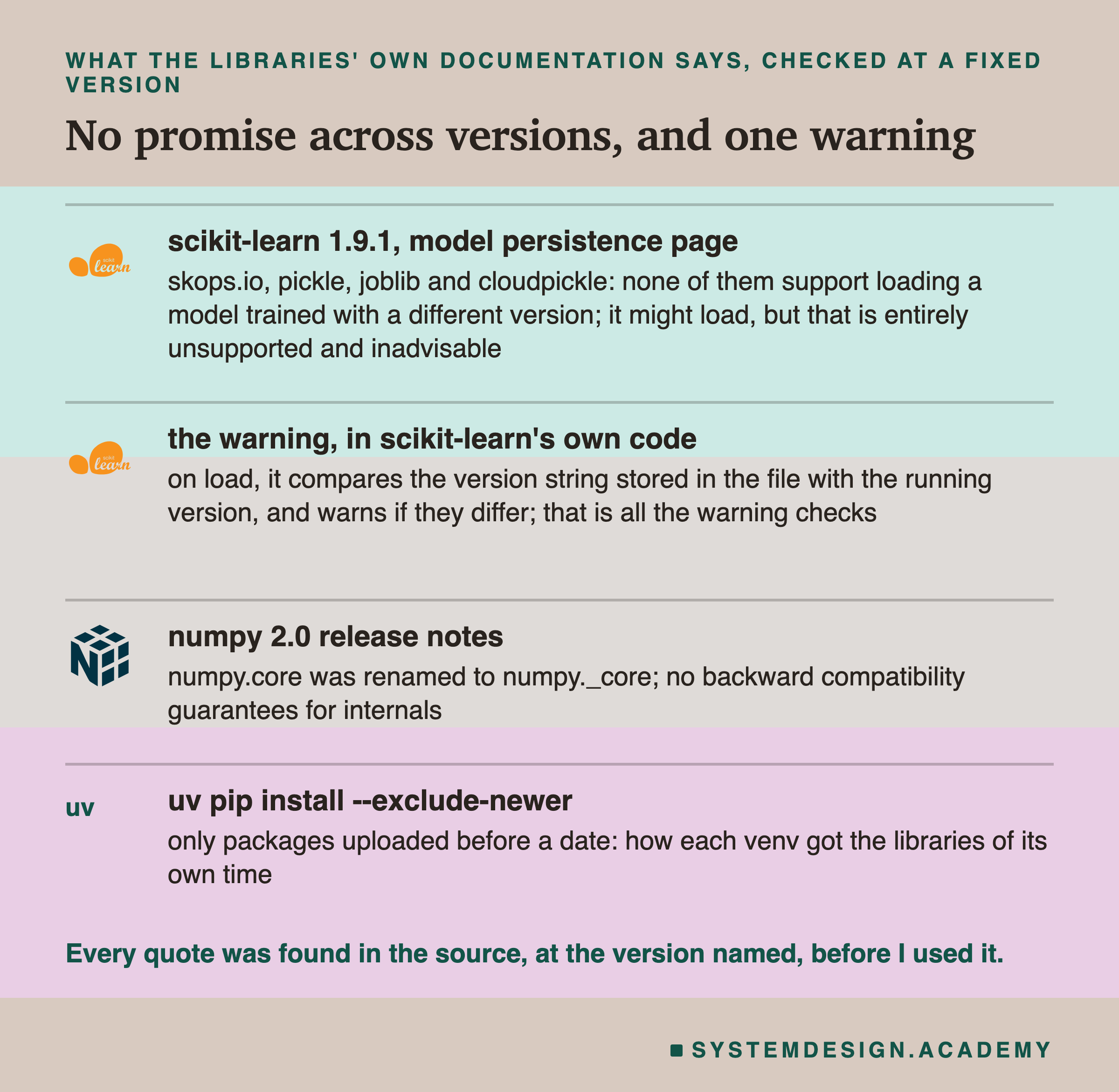
scikit-learn's page on saving models is direct. It lists four ways to save a model with Python: skops.io, pickle, joblib and cloudpickle. Of those four it says: "Note that none of these methods support loading a model trained with a different version of scikit-learn, and possibly different versions of other dependencies such as numpy and scipy." It goes further: models "might load in other versions, however, this is entirely unsupported and inadvisable." And it warns that results "could give different and unexpected results, or even crash your Python process."
It also names the harder direction. "It is not always possible to load a model trained with older versions of the scikit-learn library and its dependencies in an updated software environment. Instead, you might need to retrain the model with the new versions of all the libraries."
Then I read the code that gives the warning. When scikit-learn saves a model, it adds one extra field, the version string, such as "1.7.2". When it loads one, it reads that field and runs one line: if pickle_version != __version__:. If the two strings differ, it raises an InconsistentVersionWarning, whose message says this "might lead to breaking code or invalid results. Use at your own risk." The check ends there. The warning does not look at the model at all. Keep this in mind for the results.
How the Lab Was Built
I wrote the design into the docstring of scripts/labs/packaging/version_skew.py before it first ran. I had read the documentation and the warning's code. I had never trained this model under any scikit-learn other than 1.9.1, and I did not know whether any load would fail.
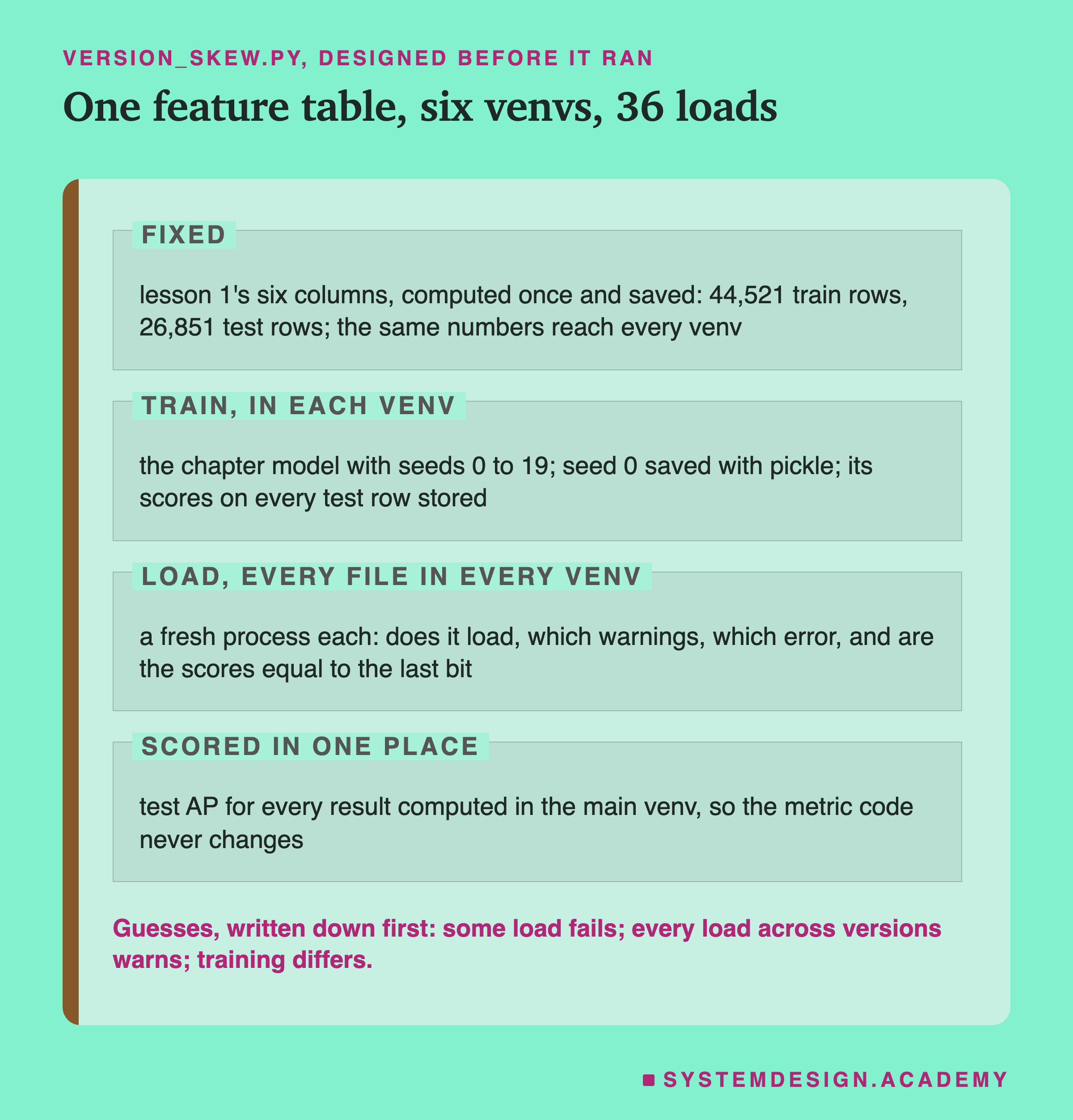
The feature code is not a variable. The main venv computed lesson 1's six columns once, using lesson 1's own code, and wrote them to one file of plain numbers. Every venv trains on exactly those numbers. So pandas, which builds the features, never runs inside the old venvs, and it cannot be the reason for any difference.
Train, in each venv. Each venv trains the chapter model, the gradient boosted model with all its default settings, with seeds 0 to 19. A seed is the number that fixes the random choices inside training. The seed-0 model is saved with pickle, and its predicted chance of buying for all 26,851 test rows is stored.
Load, every file in every venv. Six files, six venvs: 36 loads. Each one runs in its own new process, so a crash would end only that one job. For each load the lab records whether it loaded, every warning, and the exact error if there is one. Then it checks whether the predictions equal the original ones to the last bit, with np.array_equal.
Scored in one place. Test AP, the score from the features chapter, is computed for every result back in the main venv. So the scoring code is the same for all of them.
A control for the check. The same model with seed 1 must come back NOT identical to seed 0. It did: all 26,851 rows differed, by up to 0.2729. So when the check says "identical", it means it.
What pickle.load Does With a Model File
Before the results, here is what happens inside a load, in the order it happens.
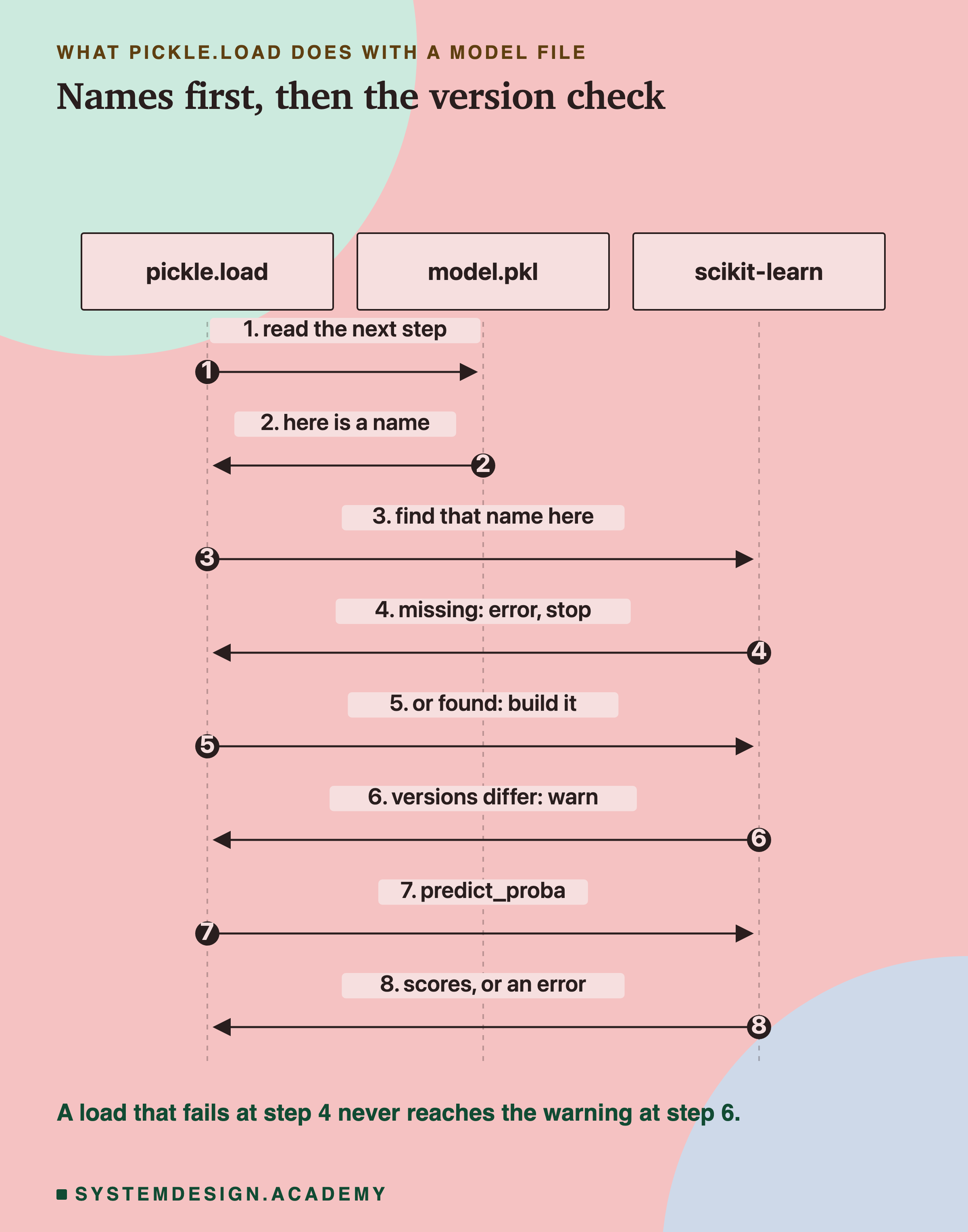
A pickle file does not contain scikit-learn's code. It contains names, like sklearn.ensemble._hist_gradient_boosting.gradient_boosting.HistGradientBoostingClassifier, and the numbers that go inside each object. Loading reads one step at a time. When a step names a thing, Python imports that name from the libraries in the current venv.
If the name is not there, because the library renamed or moved it, the load stops with an error. If the name is there, Python builds the object. Only at that moment does scikit-learn's own code run, compare the two version strings, and warn.
So the order matters. A load that breaks on a missing name never reaches the warning. This is the drawer from the first slide: the worker stops at the missing part, before anyone checks which workshop printed the list.
The Lab's Report, Running
This is a real recording of the report script, skew_report.py, on the laptop where the lab ran.
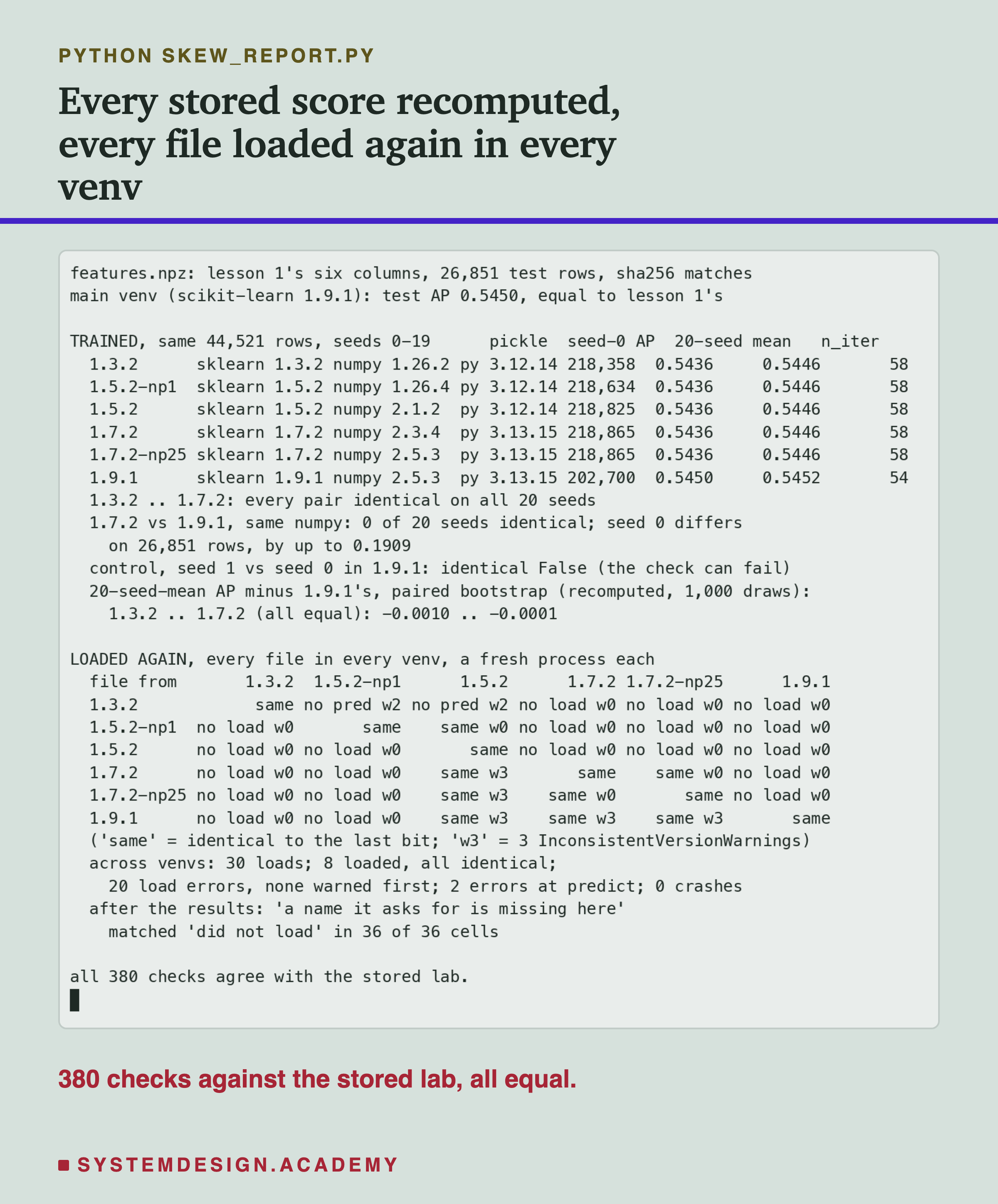
The report does not trust the lab's summary. It checks the fingerprint, or sha256, of every saved file. It recomputes every AP with its own loop, every "identical" with its own numpy calls, and the bootstrap from the stored predictions. Then it loads every file in every venv again, each in a new process. Each load must give the same outcome as the lab: the same error and message, the same warnings, and the same predictions. All 380 checks agreed.
One honest note about the lab's history. The first run named its output files in a way that let some files overwrite others on disk. Each result had already been read before that happened, so the results were right, but the report could not reread them. I fixed the names and ran the whole lab again. The new results file was equal to the first one, key for key. The docstring says so.
The Headline: Most Loads Across Versions Failed
Here is the main result: every saved file, loaded in every venv.
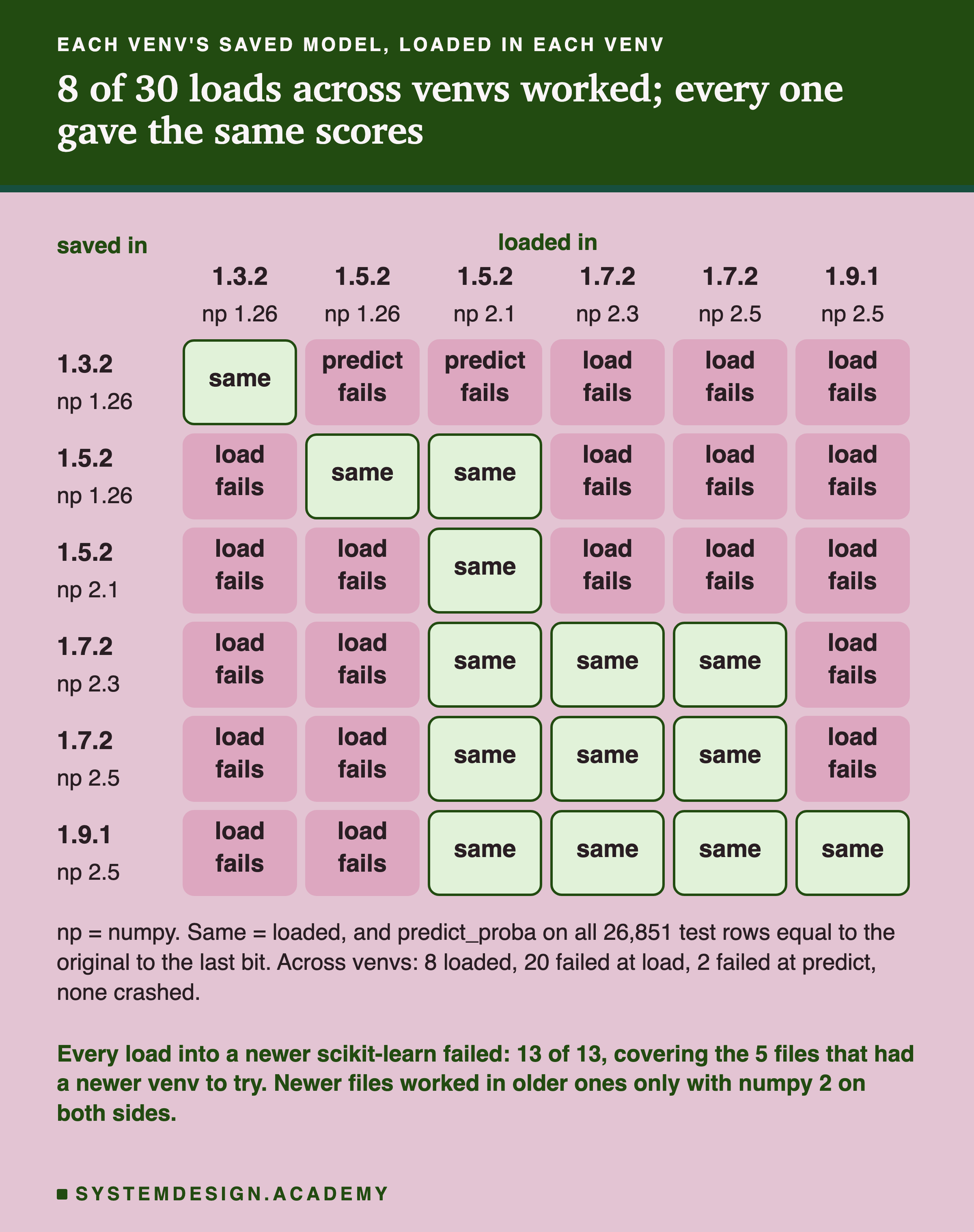
Of the 30 loads across different venvs, 22 failed. 20 failed while loading, and 2 loaded but then failed at the first prediction. None of them crashed the process.
Every load into a newer scikit-learn failed: 13 of 13, covering the five files that had a newer venv to try. A file saved with 1.7.2 did not load in 1.9.1. A file saved with 1.5.2 did not load in 1.7.2 or 1.9.1. A file saved with 1.3.2 did not load in 1.7.2 or 1.9.1, and in 1.5.2 it loaded but could not predict. This is the common real situation: a team upgrades the server's libraries, and last month's model file stops working.
The other direction worked more often. The 1.9.1 file loaded in the 1.5.2 and 1.7.2 venvs. The 1.7.2 file loaded in 1.5.2. But every file saved with numpy 2 failed in a venv with numpy 1. So here, a newer file worked in an older scikit-learn only when both sides had numpy 2. I would have guessed the opposite, and this is why I tried both directions.
When a load worked, the predictions were identical. All 8 loads across venvs that worked gave back exactly the original predictions on all 26,851 test rows, to the last bit. The 6 loads on the diagonal, each file in the venv that made it, were identical too. I did not see one case where a model loaded, predicted, and gave quietly different numbers. I tested one model type, so I cannot say that never happens.
What the Errors Said
Here are four of the errors, as Python printed them.
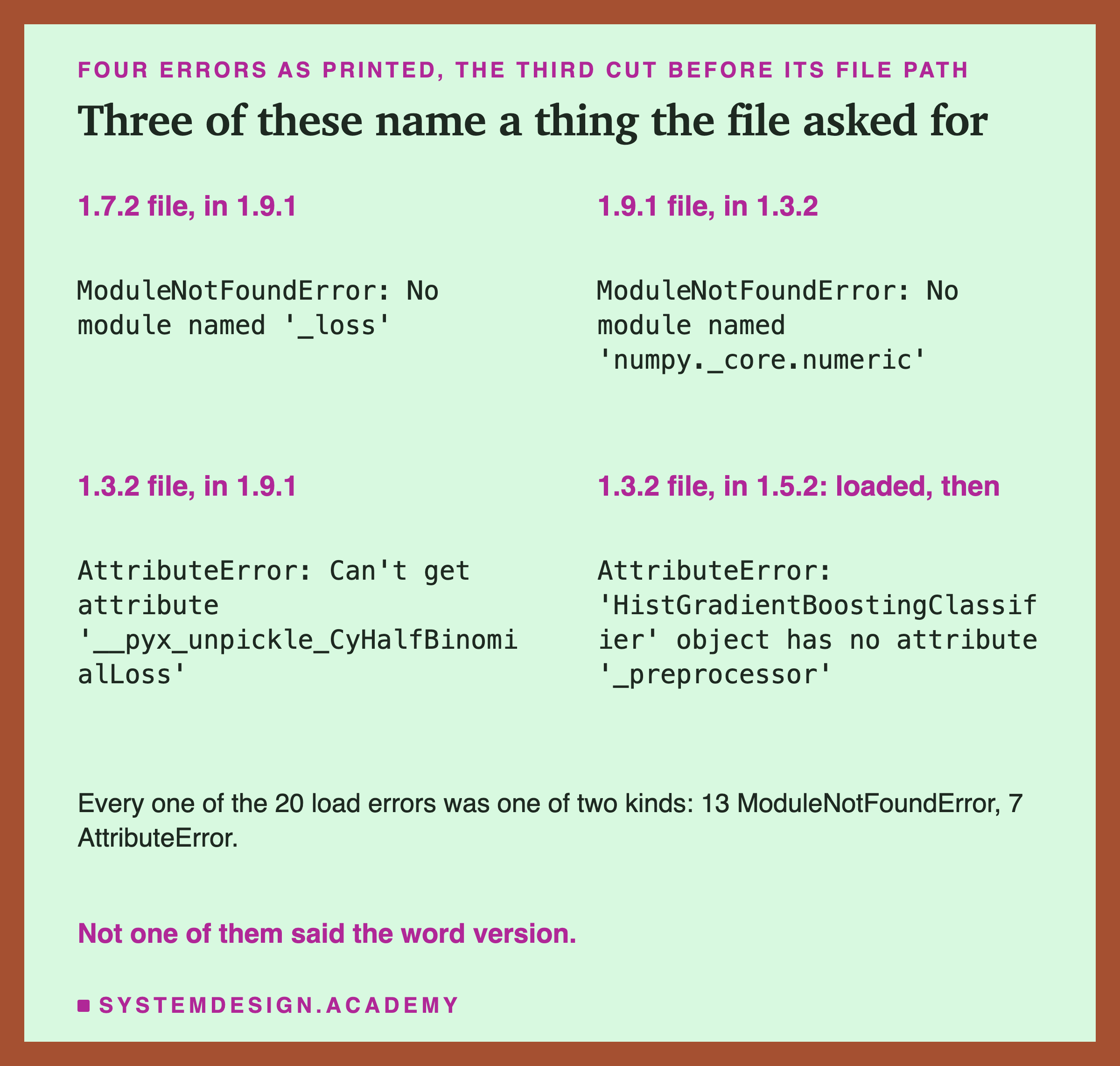
A ModuleNotFoundError means Python looked for a module, a file of Python code, by name, and there was none with that name. An AttributeError means it found the module or object, but not the thing inside it that was asked for. All 20 load errors were one of these two: 13 ModuleNotFoundError and 7 AttributeError.
Read the messages again. None of them says "this file was made by another version". No module named '_loss' sounds like a broken install, not an upgrade. If you saw only this message on a server at night, you could spend an hour checking the install before thinking about versions.
The fourth error is different. That file loaded with no error. It failed only when it was asked to predict, because the newer code expected a part, _preprocessor, that the older model never had. A health check that only loads the file would have passed it.
What the Warning Did and Did Not Catch
Now back to scikit-learn's own warning, InconsistentVersionWarning. The lab counted it on every load.
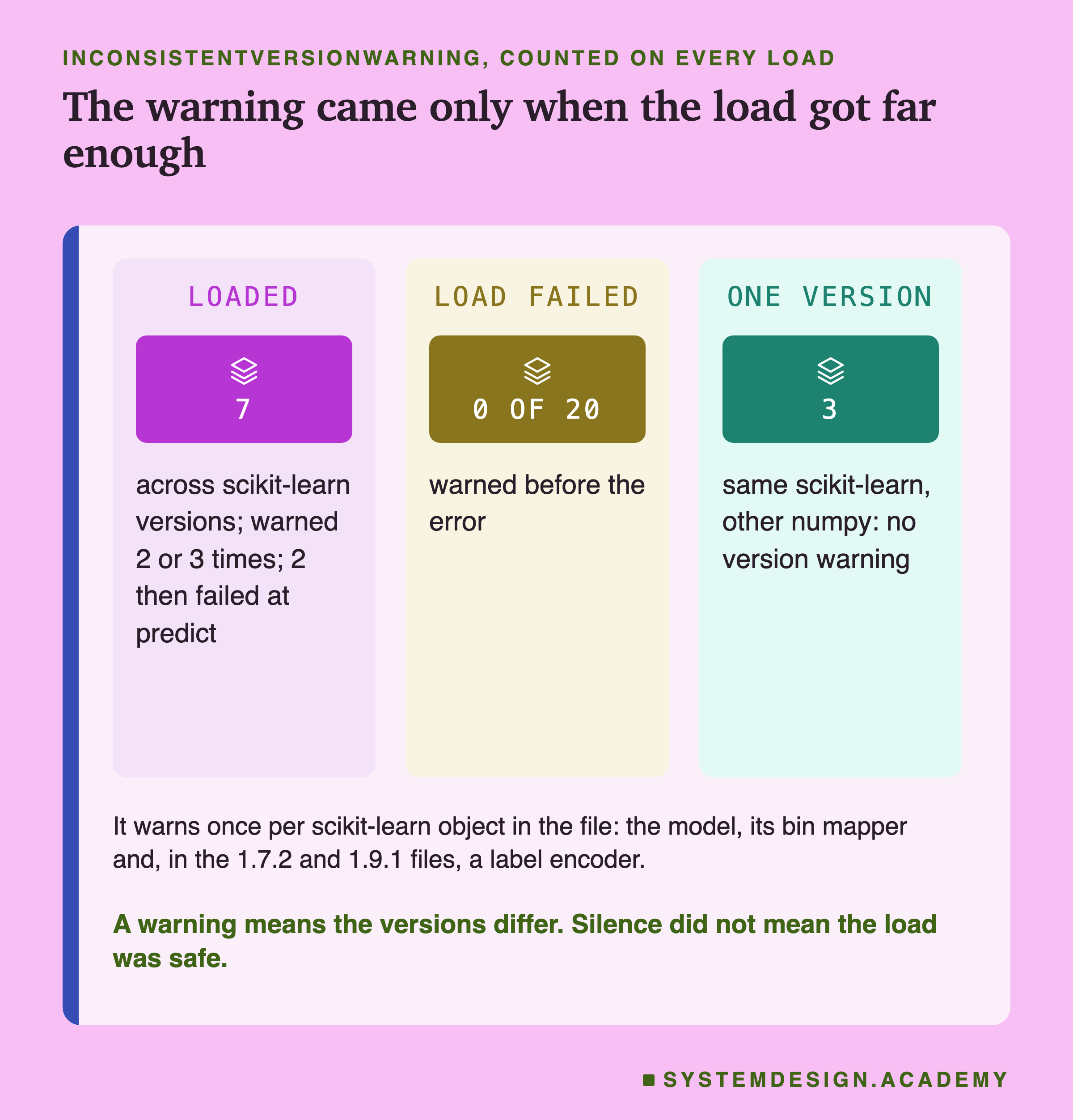
The warning came on all 7 loads that crossed a scikit-learn version and got far enough to build the model. It came 3 times for the 1.7.2 and 1.9.1 files, once for each scikit-learn object inside. Those are the model itself, its bin mapper (the part that sorts each feature's values into buckets), and a label encoder (the part that remembers the class names). It came twice for the 1.3.2 file, which has no label encoder inside.
It never came on the 20 loads that failed at load time. Those stopped at a missing name, before scikit-learn's code ran, exactly as the sequence slide showed.
And it did not come on the loads between venvs with the same scikit-learn and a different numpy. There were 4 such loads, and the 3 of those 4 that loaded gave no version warning. That is correct: the warning only compares scikit-learn's version string. But it means silence tells you nothing about numpy.
So the warning is useful in one way: if you see it, the versions differ. scikit-learn's documentation shows how to turn it into an error so you cannot miss it. But in this lab, a quiet load was never a sign that all was well.
The Load That Passed and the Prediction That Did Not
Two of the 22 failures were quieter than the rest. Here is one of them, step by step.
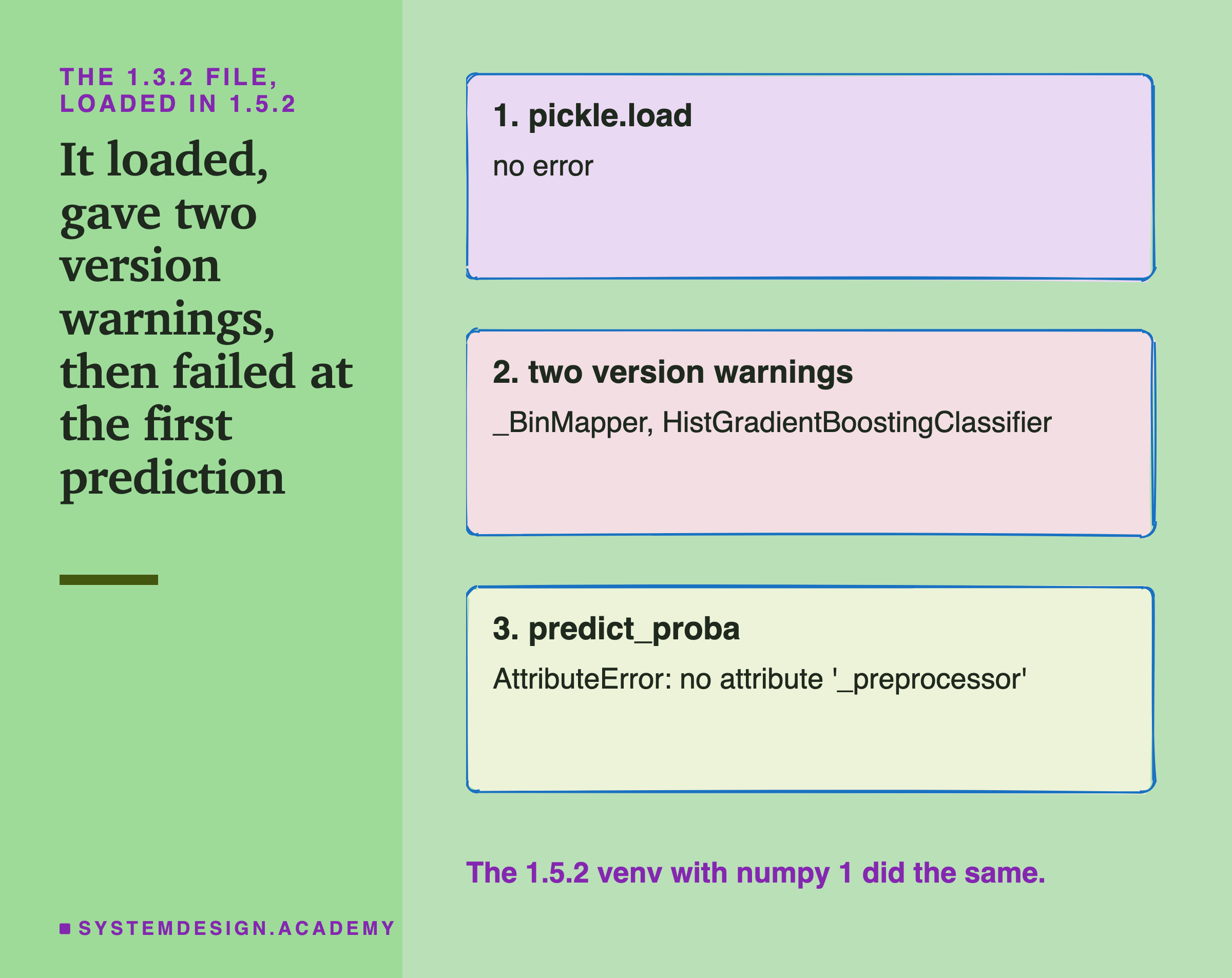
The file saved with scikit-learn 1.3.2 loaded in 1.5.2 with no error at all. It gave two version warnings, one for the bin mapper and one for the model. In the venv with numpy 2 it also gave a numpy warning, which I explain two slides on. Then, on the first call to predict_proba, it failed: the 1.5.2 code looked for a part called _preprocessor, which the 1.3.2 model did not have.
Here is one possible reason, which I did not trace in scikit-learn's history. 1.5.2's prediction code expects every model to have that part, and has no fallback for models saved before it existed. The documentation never promised one.
Here is the practical point. A check that loads the model and stops would have said "fine". A check that loads it and predicts on a few stored rows would have caught it at once. And a check that compares those predictions with stored ones would catch even a model that predicts without an error but gives different numbers.
Why the Loads Failed: Names That Moved
I asked this question after seeing the results, and the lab labels it as an addition. Did each failure really come from a missing name?
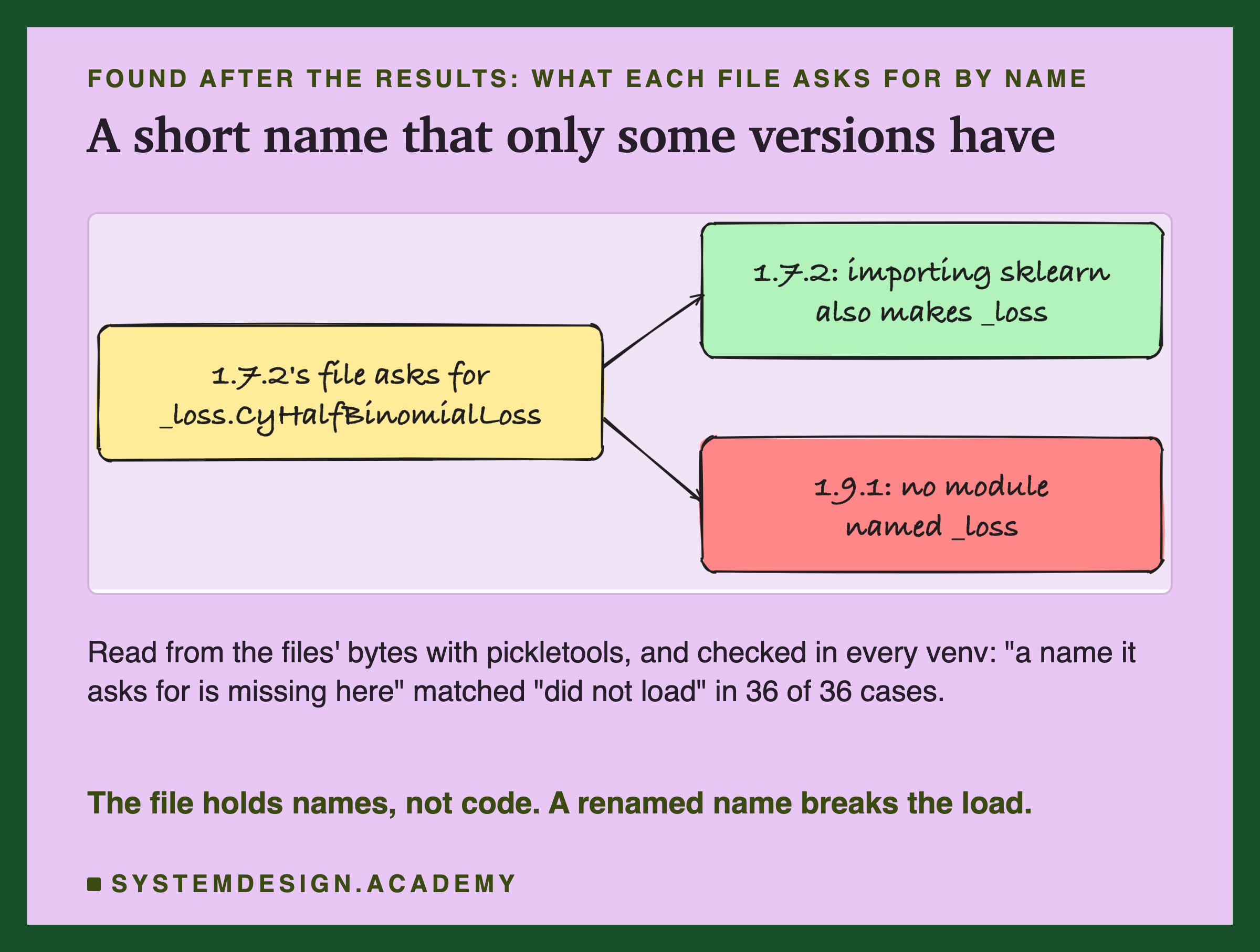
The lab read every file's list of names straight from its bytes with pickletools, a module in Python's standard library that reads a pickle without loading it. Then, in each venv, it looked up every name the same way pickle does. "A name this file asks for is missing here" matched "this load failed" in all 36 cases.
One name tells the story well. scikit-learn keeps its loss functions, the code that measures how wrong each prediction is, in a compiled module whose full name is sklearn._loss._loss. In the 1.5.2 and 1.7.2 venvs, importing scikit-learn also registers that module under a short name, just _loss. So their files saved the short name. In 1.9.1 the short name does not exist, so those files fail with "No module named '_loss'". Nothing in my code changed. A detail of how the library was built changed.
I have to be honest about one thing here. The first version of this name check looked each name up without importing scikit-learn first. It said the 1.5.2 and 1.7.2 files were missing _loss even in their own venvs, where they load fine. That was a fault in my check, not a finding. pickle imports the model's class first, which imports scikit-learn, which creates the short name. I fixed the check to do the same, and the docstring records the fix.
The Control: numpy Alone
The control pair has scikit-learn 1.5.2 on both sides. Only numpy differs: 1.26.4 against 2.1.2.
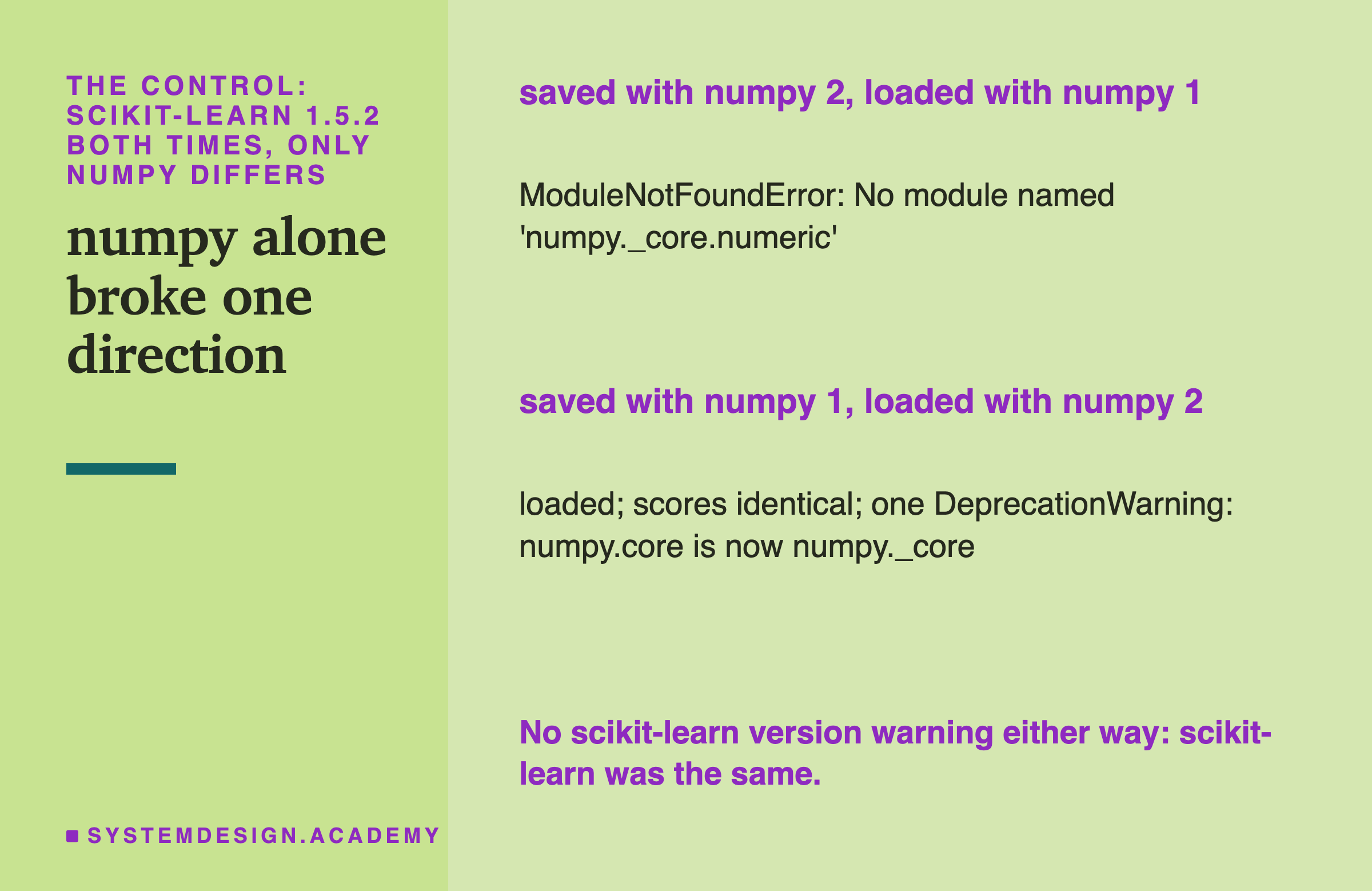
A file saved with numpy 2 did not load with numpy 1. The error was No module named 'numpy._core.numeric'. numpy's 2.0 release notes explain the name: they renamed numpy.core to numpy._core. A numpy 1 venv has no numpy._core, so it cannot find the name.
The other direction loaded, with identical scores and one DeprecationWarning, a warning that an old name still works but will go away. numpy 2 kept the old name numpy.core working, so it could still read the old file.
This matters for two reasons. First, scikit-learn's warning stayed silent both times, because scikit-learn's version did not change. Second, it explains a row of the headline grid: every file saved with numpy 2 failed in both numpy 1 venvs, whatever the scikit-learn version. The other control pair, 1.7.2 with numpy 2.3 against 1.7.2 with numpy 2.5, loaded both ways with identical scores and no warning at all.
Training Again: A Different Model
Now the second question. Suppose a team does not load the old file at all. It trains again under the new version, same data, same settings, same seed. Does it get the same model?
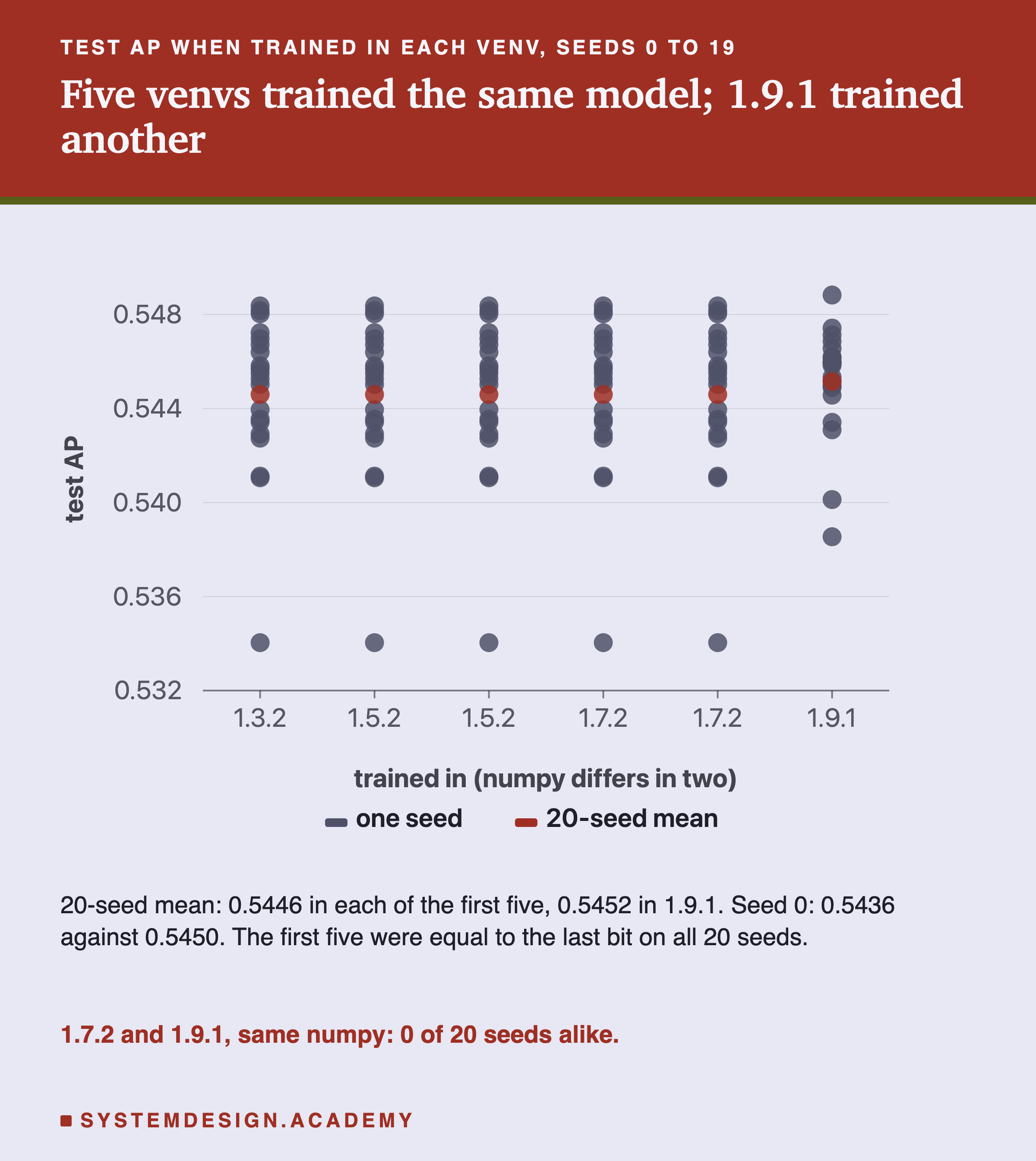
From 1.3.2 to 1.7.2, across almost two years and two numpy major versions, every venv trained exactly the same model. Every seed gave predictions equal to the last bit, in every pair of those five venvs. The model stopped after 58 trees at seed 0 in all of them.
Then 1.9.1 trained a different model. Not one of the 20 seeds matched. With seed 0 it stopped after 54 trees instead of 58, and its predictions differed on all 26,851 test rows, by up to 0.1909. The control pair proves this is scikit-learn and not numpy. 1.7.2 with numpy 2.5 and 1.9.1 have the same numpy, scipy and Python, and they still disagree on every seed.
The scores moved a little. At seed 0, test AP was 0.5436 in the older versions and 0.5450 in 1.9.1. Over 20 seeds the means were 0.5446 and 0.5452.
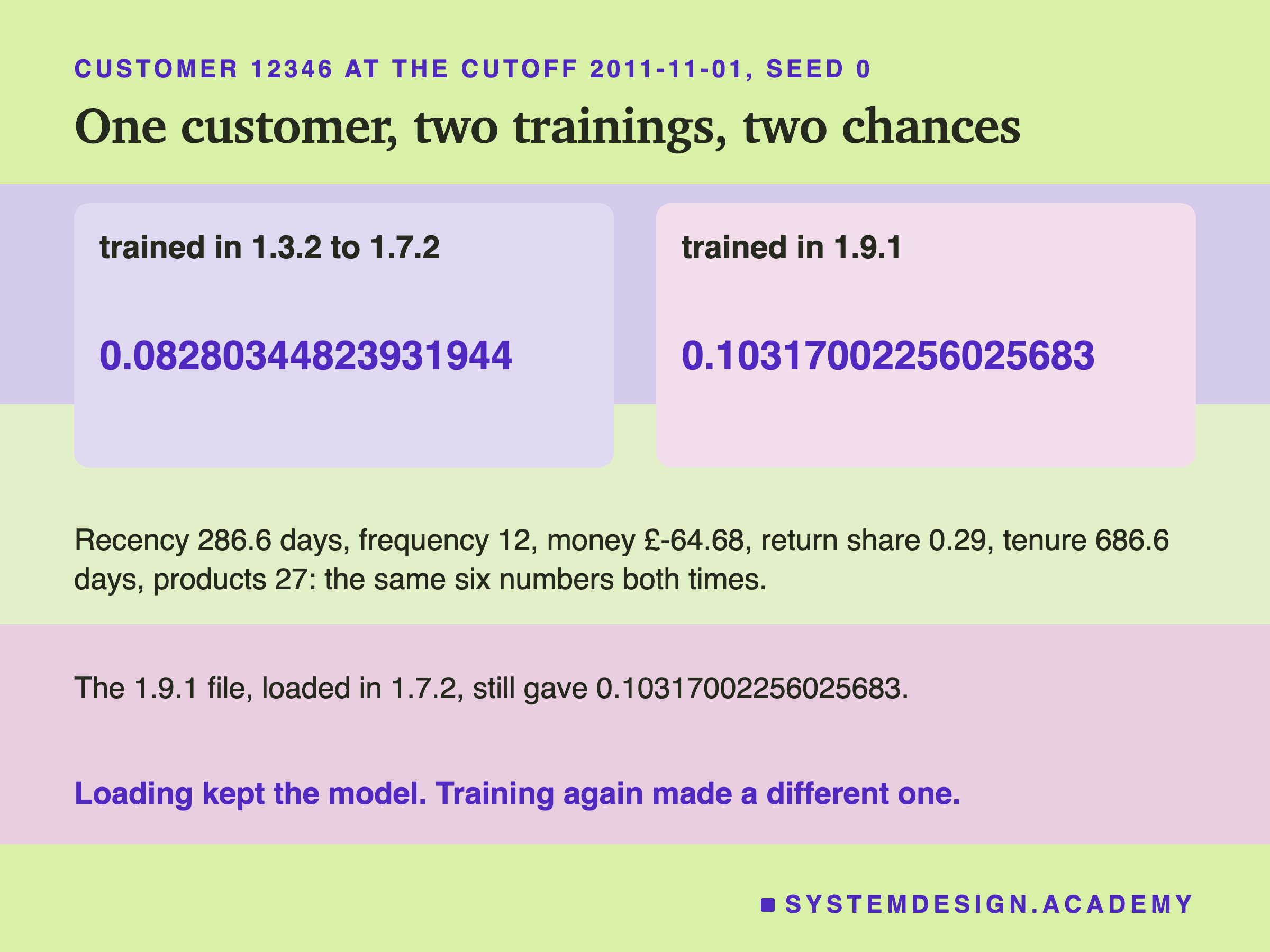
Here is one real customer, 12346, who appears in every lesson of the features chapter. On 1 November 2011, with exactly the same six numbers going in, the older versions gave a chance of buying of 0.08280344823931944 and 1.9.1 gave 0.10317002256025683. That second number is the one lesson 2 of this chapter found in all eleven of its files. And when the 1.9.1 file was loaded in the 1.7.2 venv, it still gave 0.10317002256025683. Loading kept the model. Training again made a new one.
Why 1.9.1 Trained a Different Model
I asked this after the results too, and it is labelled as an addition. What changed between 1.7.2 and 1.9.1?
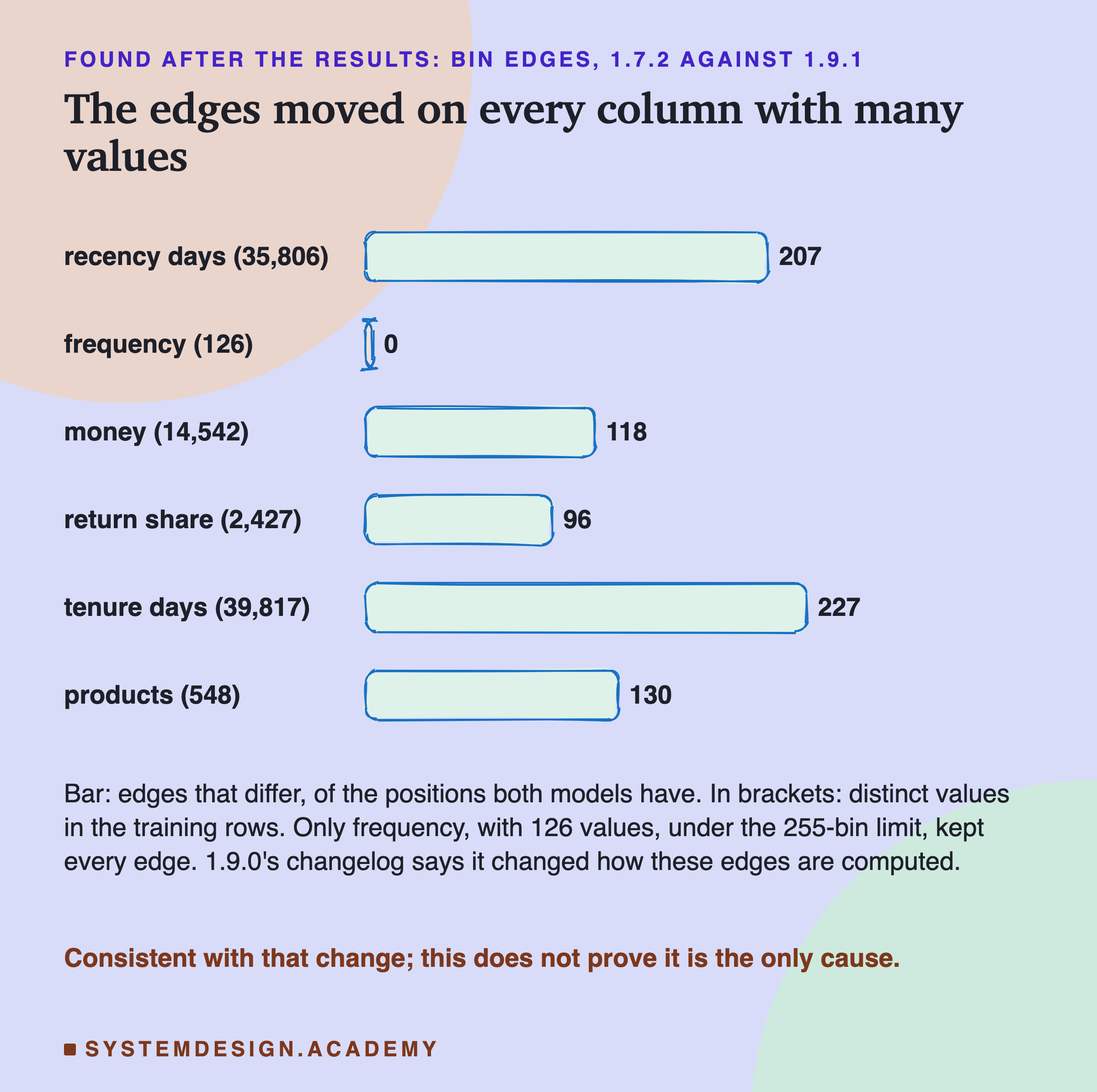
This model does not look at a feature's exact values. Before training, it sorts each feature into at most 255 buckets, called bins, and the boundaries between buckets are called bin edges. Then every tree asks questions like "is this customer's bin above 40?".
scikit-learn 1.9.0's list of changes says it "Fixed the way" this model computes "their bin edges", a fix "to properly and consistently handle" sample weights. Sample weights are optional numbers that make some training rows count more than others. The entry goes on: with no weights and fewer distinct values than the number of buckets, "the edges are still set to midpoints between consecutive feature values". Otherwise, the edges are now "weight-aware quantiles computed using the averaged inverted CDF method". In plain words: they changed the formula that places the edges, for features with more distinct values than there are buckets.
This model was trained without sample weights, so the first rule applies to any column with few values.
So, before running, I wrote a guess into the docstring: the edges differ only on columns with more than 255 distinct values. The 1.7.2 venv could load both its own file and the 1.9.1 file, so I compared their edges there. The guess held.
Frequency has 126 distinct values, and kept all 123 of its edges. The five other columns all have more than 255 values, and edges moved on every one of them. The count went from 96 for return share to 227 for tenure. For two columns, 1.9.1 even made fewer edges. Return share kept only 97 edges instead of 254, and 96 of those 97 moved. Products kept 131 instead of 254, and 130 of those moved. I compared only the positions both models have.
Different edges mean different buckets, so different trees, so a different stopping point. That fits the result. But matching a changelog is not proof that it is the only cause, and I did not test that.
Is the Score Difference Real?
The 20-seed means differed by about six ten-thousandths. Is that a real difference, or customer luck?
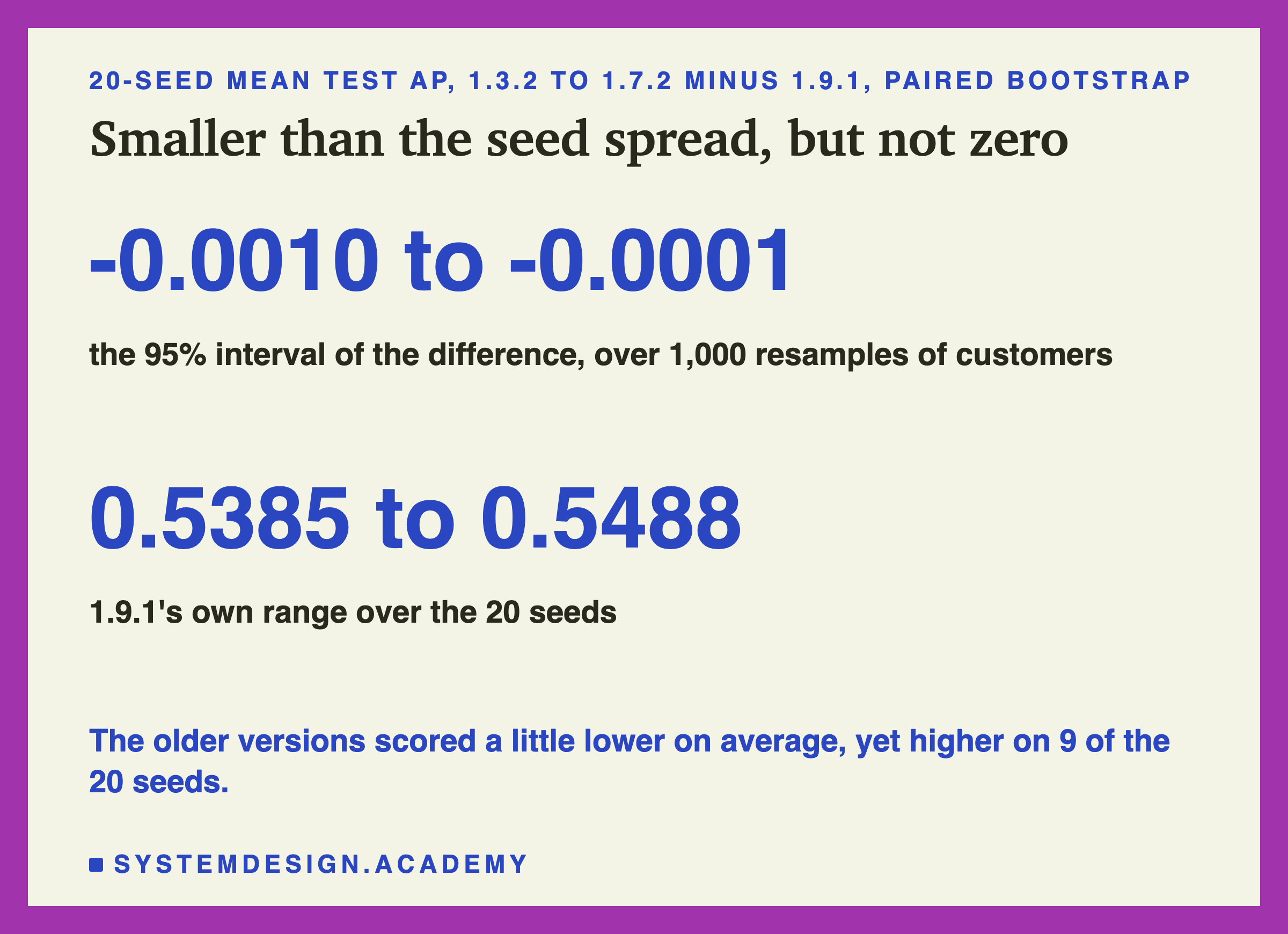
The features chapter set a rule for this question. A paired bootstrap draws the test customers again at random with replacement, 1,000 times, within each month, and recomputes both scores on each draw. Here each score is the mean over 20 seeds. The mean over 20 seeds damps training luck, and the resampling measures customer luck. The middle 95% of the differences is the interval.
The interval for the older versions minus 1.9.1 was minus 0.0010 to minus 0.0001. It does not cross zero, so by the chapter's rule the older versions scored measurably lower, on these customers, on average.
But look at the size. 1.9.1 alone ranged from 0.5385 to 0.5488 across its 20 seeds, a spread more than ten times bigger. Seed by seed, the older versions scored higher on 9 of the 20. So one training run, compared with one other run, can show either order.
The practical lesson is not "1.9.1 is better". It is this: a retrained model is a new model. Its score will move, maybe a little, maybe not in the direction you hope. Check it like any new model before it replaces the old one.
My Guesses Before the Run, Checked
I wrote six guesses into the lab before it ran. Here they are against the results.
-
"the diagonal is bit-identical in every venv (a same-version load gives back the same model)." Right: 6 of 6.
-
"every cross-version load emits at least one InconsistentVersionWarning; the numpy-only pair (1.5.2-np1 and 1.5.2, same scikit-learn) emits none." Wrong on the first part. 26 loads crossed a scikit-learn version; only 7 warned. The 19 others failed at load before any warning. Right on the second part: the numpy-only pair gave no scikit-learn warning.
-
"at least one cross-version pair fails with an exception, at load or at predict." Right, but far too modest: 22 of 30.
-
"a model saved under numpy 2 does not load under numpy 1.x (1.5.2 -> 1.5.2-np1 and newer -> 1.3.2)." Right. Every file saved with numpy 2 failed in both numpy 1 venvs.
-
"when a cross-version load succeeds and predicts, the predictions are bit-identical to the original." Right: 8 of 8.
-
"training under 1.3.2 and 1.9.1 with the same seed does NOT give bit-identical predictions, but their 20-seed mean test AP is within 0.005." Right on both parts: 0 of 20 seeds matched, and the means were 0.0006 apart. I did not guess that 1.3.2, 1.5.2 and 1.7.2 would all match each other exactly.
Try It Yourself
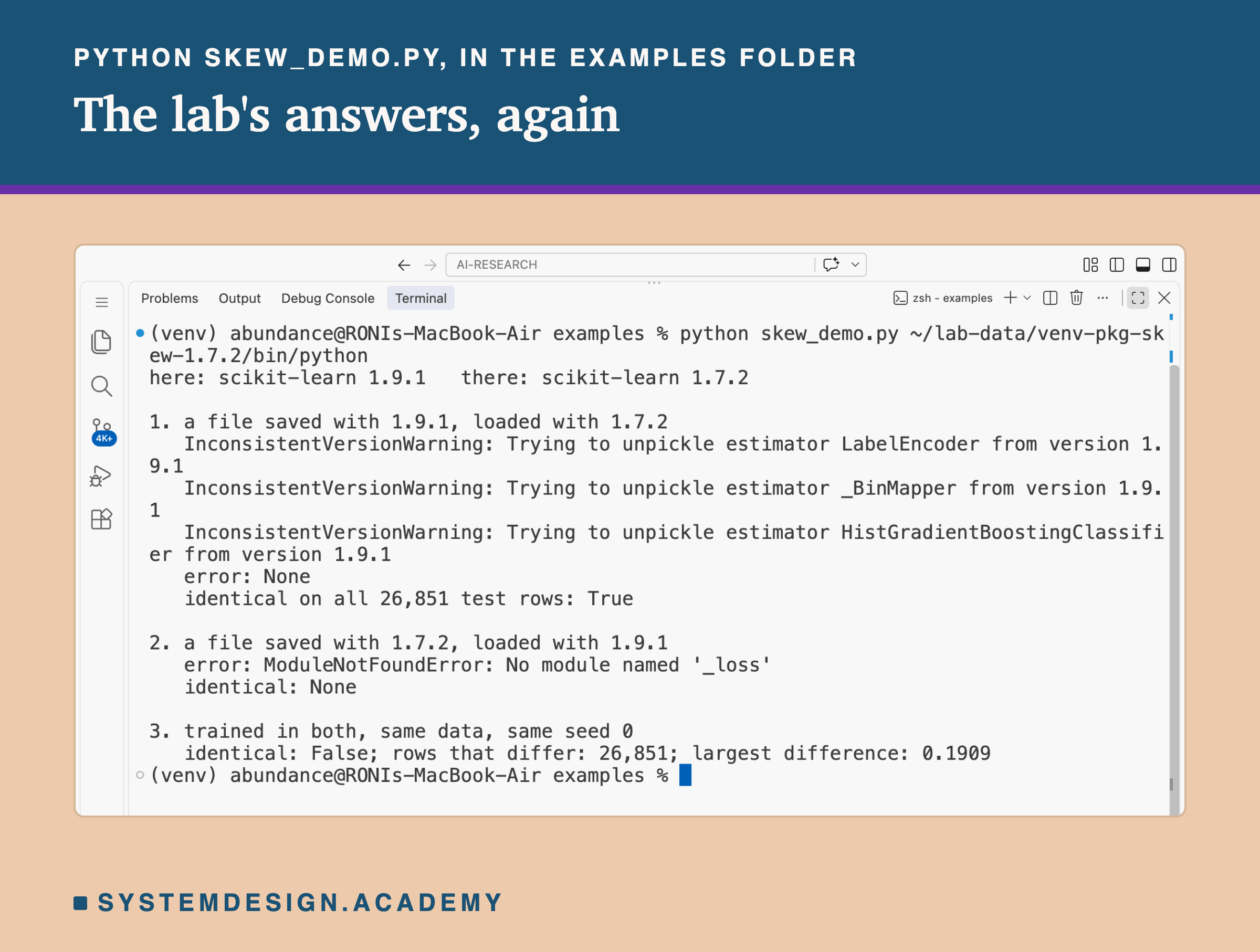
The full lab needs six venvs. I wrote a small demo that shows all three answers with just one extra venv: your normal Python, plus one venv with scikit-learn 1.7.2.
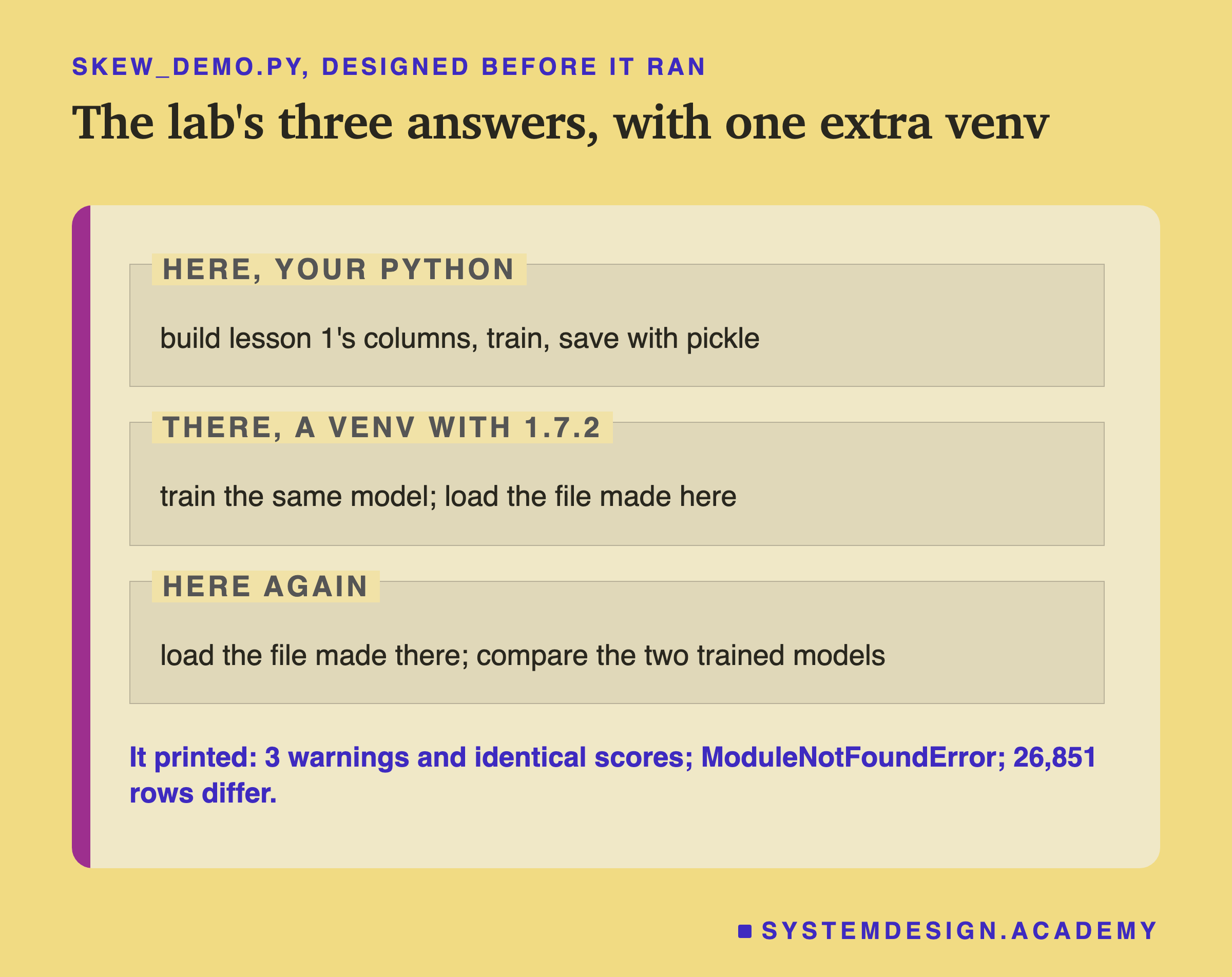
I wrote the demo's design into its docstring after the lab had run and before the demo first ran. Your normal Python builds the features, trains, and saves. Then the script starts the second Python itself, with the path you give it, and that Python trains the same model and loads your file. Last, your Python loads the second Python's file.
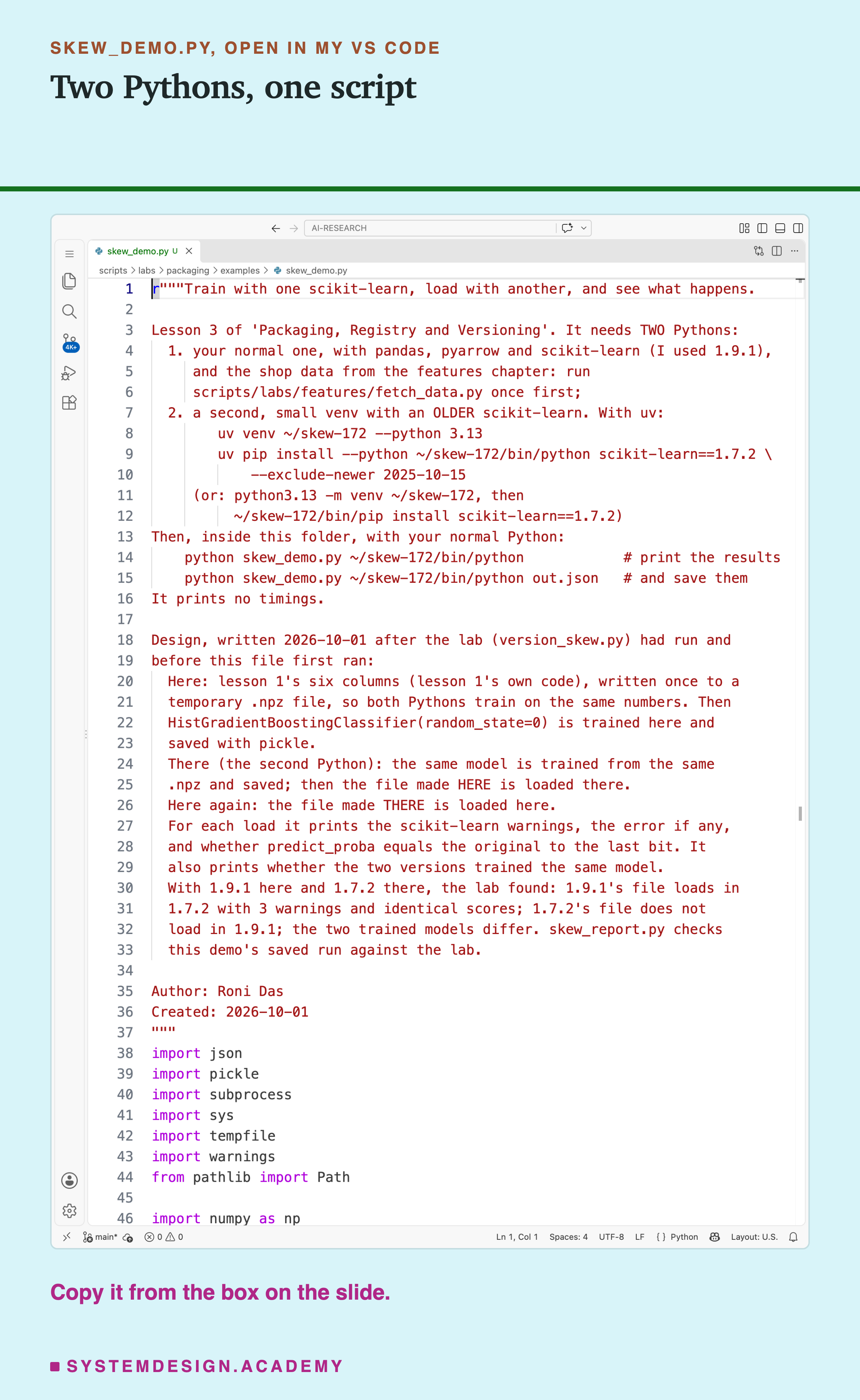
Before you run this lab. You need Python 3 with pandas, pyarrow and scikit-learn: pip install pandas pyarrow scikit-learn openpyxl. First run python fetch_data.py from the scripts/labs/features folder; it downloads the shop data once, about 46 MB. Then make the second venv. With uv: uv venv ~/skew-172 --python 3.13, then uv pip install --python ~/skew-172/bin/python scikit-learn==1.7.2 --exclude-newer 2025-10-15. Without uv, python3.13 -m venv ~/skew-172 and ~/skew-172/bin/pip install scikit-learn==1.7.2 work too, but may pick a newer numpy than mine.
Then, inside the examples folder, run . On Windows the second Python is at . I ran it on a Mac with scikit-learn 1.9.1 as "here", using the lab's own 1.7.2 venv, which was made with the same uv commands. These libraries run on Windows and Linux too, but I have not checked the results there. If your normal Python has a different scikit-learn than 1.9.1, your results can differ from mine; the lesson is about exactly this.
Look Up Any Pair Yourself
This box holds the real outcome of all 36 loads from the lab, and each venv's versions. It needs nothing but Python, so it runs in your browser. It loads no model.
Press Run. It shows what happened when the 1.7.2 file was loaded in 1.9.1, and then the whole grid. Change TRAINED_IN and LOADED_IN to any two of the six venv names and run again.
The report script writes this box from the lab's stored results, runs it for all 36 pairs, and checks every printed outcome against the lab. Try TRAINED_IN = "1.5.2" with LOADED_IN = "1.5.2-np1": the same scikit-learn, and still a failure, because of numpy alone.
The Lab's Code, Piece by Piece
The lab is one file, scripts/labs/packaging/version_skew.py. The same file runs in every venv, so its parts that run inside the old venvs use only numpy and scikit-learn, and nothing newer than Python 3.12.
setup makes the six venvs with uv and stores each pip freeze. build_features runs in the main venv only. It imports lesson 1's own feature code, writes the train and test numbers to one file, and stops if the chapter model's test AP is not 0.5450.
child_train runs inside one venv. It trains 20 seeds, saves the seed-0 model with pickle protocol 5, and stores every prediction. child_load also runs inside one venv. It loads one file while recording every warning, records the exact error if there is one, then predicts and stores the predictions.
main runs all of it: six trainings, then 36 loads, each in a new process. It compares every result with compare, which returns whether two arrays are bit-identical, how many rows differ, and the largest difference. bootstrap_mean20 does the paired bootstrap of the 20-seed mean.
after holds the two questions asked after the results. pickle_globals reads the names a file asks for with pickletools, without loading it, and looks those names up in each venv. compares the bin edges of the 1.7.2 and 1.9.1 models.
How to Upgrade Without Breaking a Model
Here is how I would handle a library upgrade, using only what this lab measured.
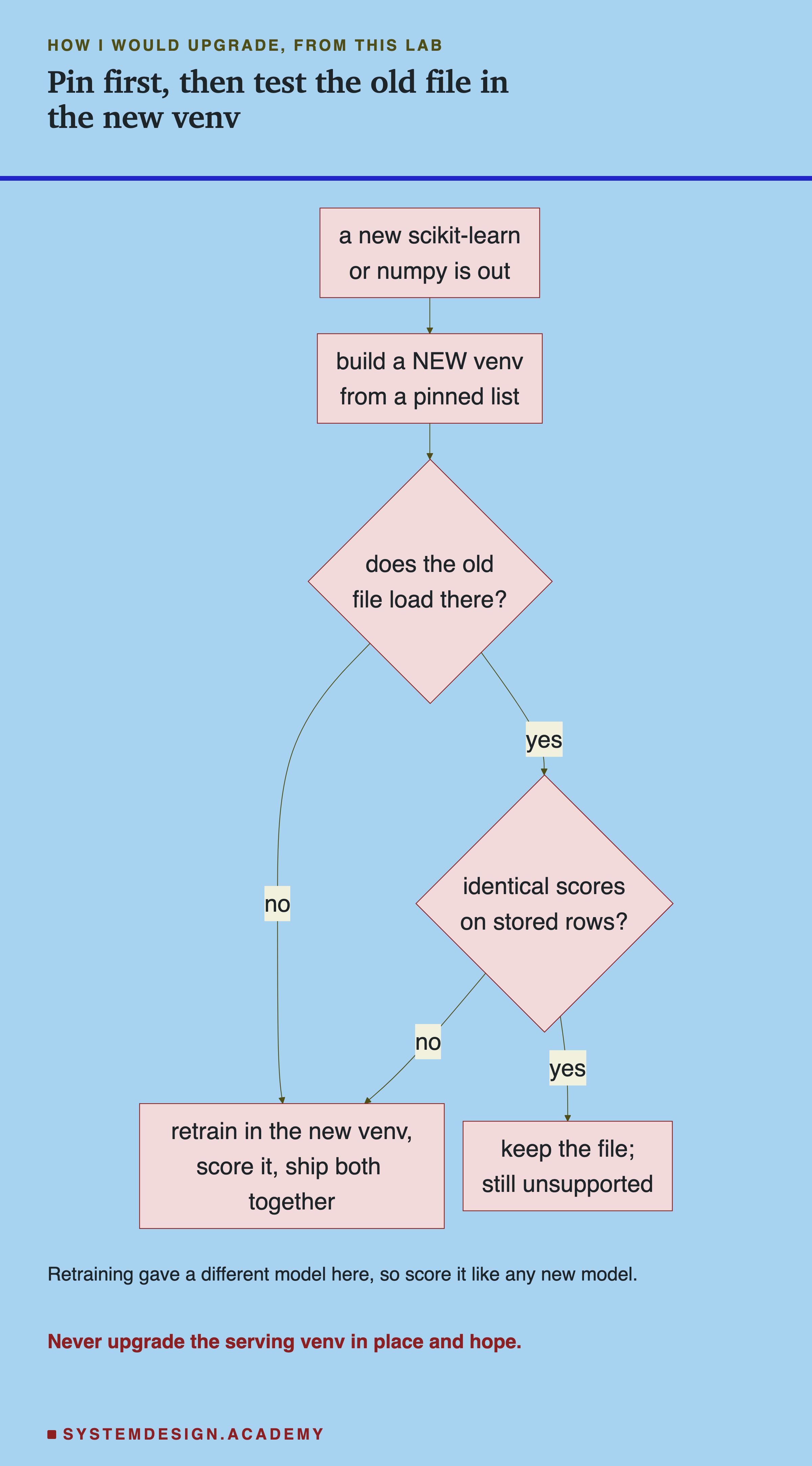
The chart starts by building a new venv, not changing the one that serves. Here are the same steps in words.
-
Pin every version. Save the exact version of every library, not only scikit-learn, next to the model file. numpy alone broke one direction here. Lesson 4 of this chapter is about doing this well.
-
Build the new environment beside the old one. Never upgrade the libraries under a running model. Make a new venv or a new container with the new versions.
-
Load last month's file there, and predict. Loading is not enough: two files here loaded and then failed at the first prediction.
-
Compare predictions on stored rows. Keep a few hundred input rows and the model's predictions on them, next to the file. In the new venv, compare with
np.array_equal. Every load here that predicted at all gave identical numbers, but one model type is not a promise. -
If anything fails, retrain in the new venv. Then treat the result as a new model: score it on the test months and compare it with the old one, because here it was a different model.
-
Ship the model and its environment together. The model file and the venv it was made in are one thing. Lesson 5 of this chapter puts both in one container image.
When to Load Across Versions, and When Not To
Load across versions only as a test, never as a plan. scikit-learn says it is "entirely unsupported and inadvisable", and here 22 of 30 such loads failed. Say an old file does load in a new venv and gives identical predictions on stored rows. You can keep it for a while, but you are relying on luck the library does not promise.
Do not trust the warning to protect you. InconsistentVersionWarning came on only 7 of the 26 loads that crossed a scikit-learn version. Turning it into an error, as scikit-learn's page shows, is still worth doing: it stops a mixed-version load early. But it cannot see numpy, and it cannot speak for a load that fails before it runs.
Do not expect retraining to give the same model. Across 1.3.2 to 1.7.2 it did here, to the last bit. From 1.7.2 to 1.9.1 it did not, on any seed. A changelog entry was enough to change every prediction.
Do keep the original training environment until the new model has been checked. If the new venv cannot load the old model and the new model is not ready, the old venv is your way back. The lifecycle chapter's rollback idea applies to libraries too.
Do not read these numbers as a rule for every model. I tested one model type. A random forest, a pipeline with a text step, or a model from another library may break in other places, or not at all.
What This Lab Cannot Tell You
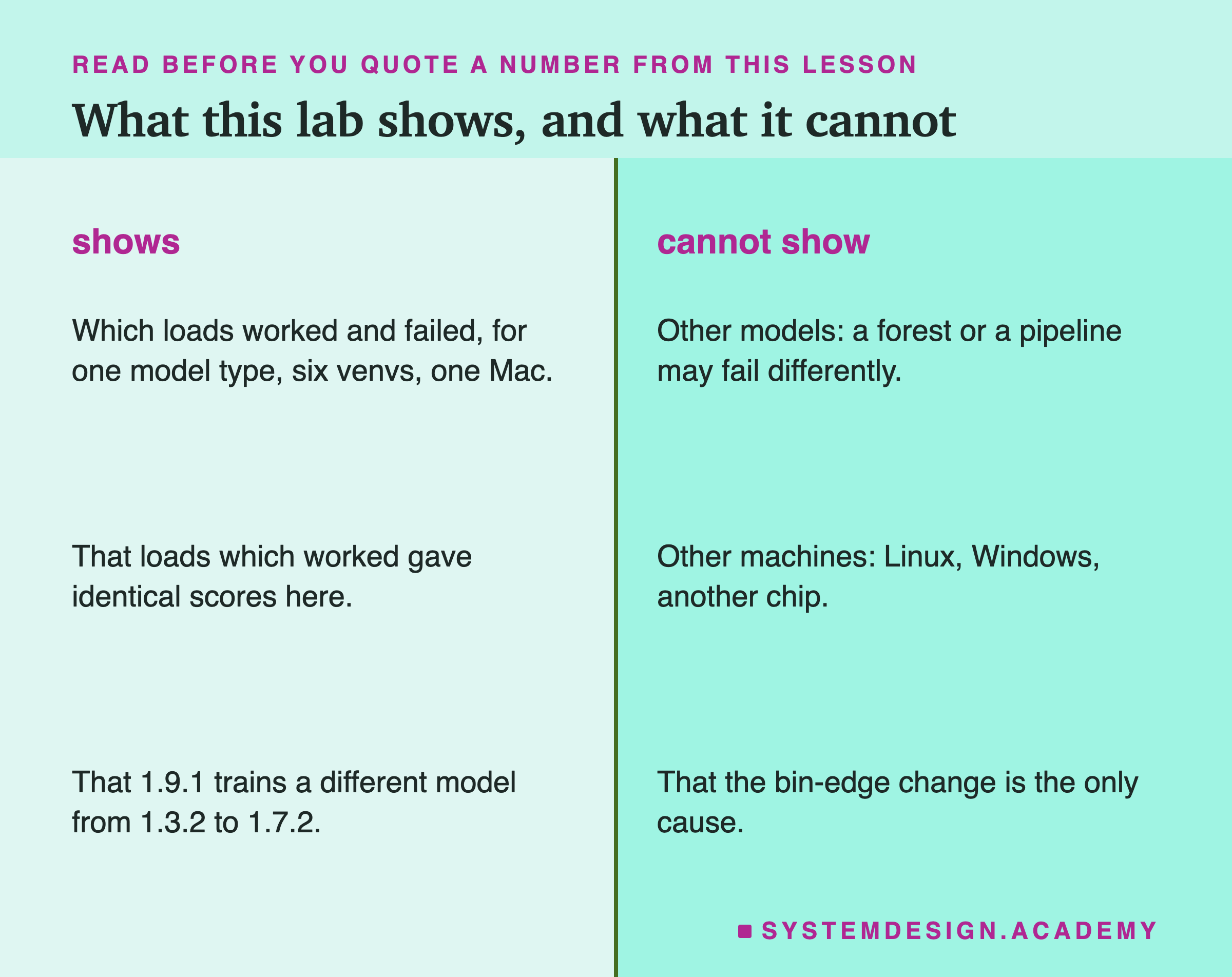
One model type. Every number here is for the chapter's gradient boosted model with default settings. Other models have other internal parts, and other names that can move.
Four releases, not every release. I tested 1.3.2, 1.5.2, 1.7.2 and 1.9.1. A pair I skipped, like 1.6 and 1.7, might behave differently. The two controls covered numpy, but not scipy or Python on their own.
One Mac. I did not try Linux, Windows or another processor. scikit-learn's page says: "Aside for a few exceptions, persisted models should be portable across operating systems and hardware architectures assuming the same versions of dependencies and Python are used". I did not test that.
No silent differences found does not mean none exist. All 8 working loads were bit-identical. A different model could load, predict and give slightly different numbers. That is exactly why the stored-rows check in the how-to is worth having.
No timings. This lab measured equality, not speed.
Labelled additions. Two questions were asked after the results: which names each file asks for, and where the 1.9.1 bin edges differ. Both are labelled in the lab, the report and here. The name check had a fault in its first run, which I fixed and described above.
What to Do on Monday
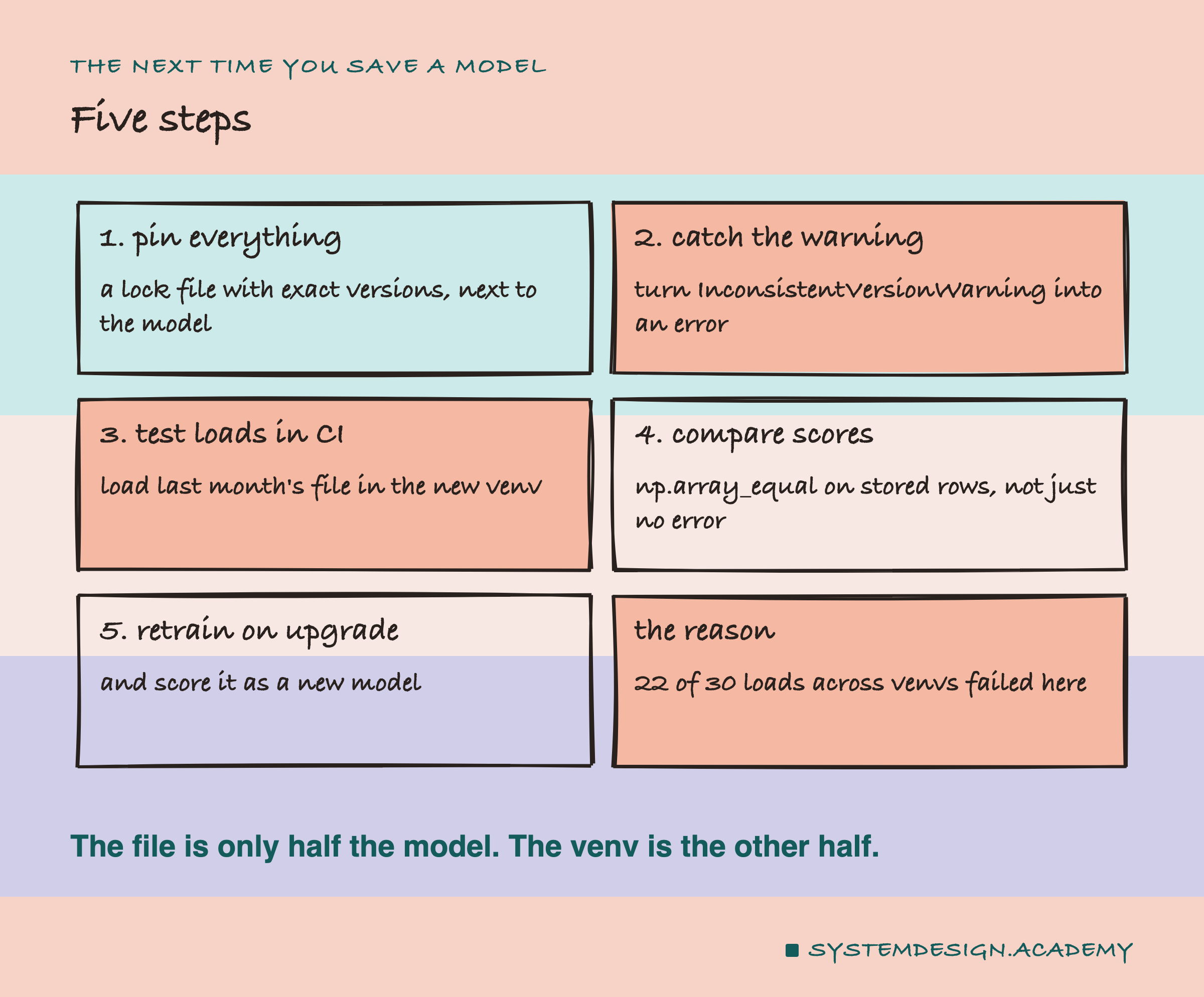
If you take one thing to work on Monday, find where your model file is saved, and look at what is saved next to it. Is there a list of exact library versions? Are there some stored input rows and the predictions the model gave on them? If the answer is no, the file alone cannot tell you whether the next server can use it.
Then add one test to your build, the automatic checks that run on every change, often called CI. It loads the current model file in the environment you are about to deploy, predicts on the stored rows, and compares with np.array_equal. In this lab, that one test would have caught all 22 failures: 20 at load and 2 at predict.
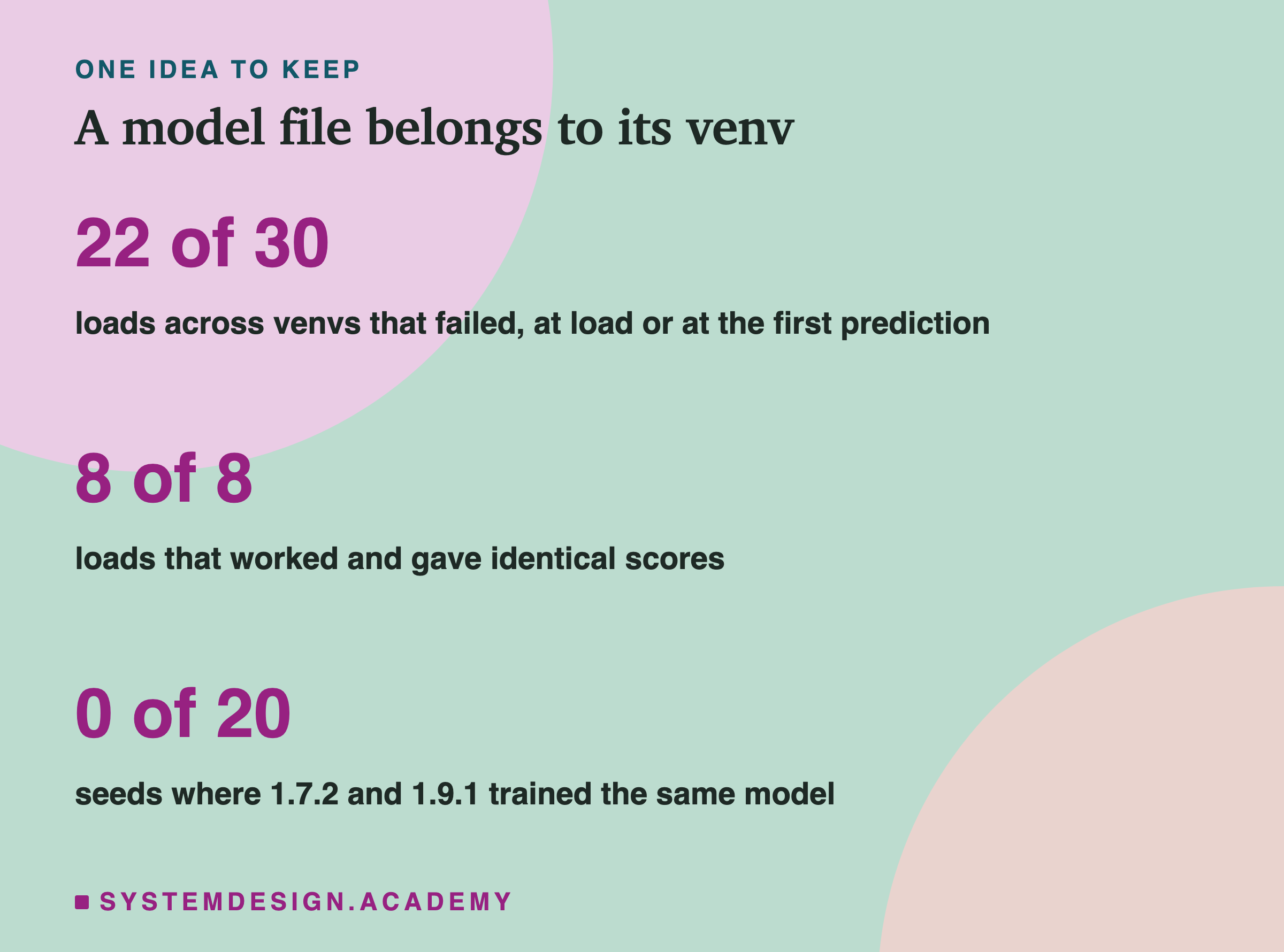
The one idea to keep: a saved model is not only its file. It is the file plus the exact libraries it was made with. Here, moving the file to newer libraries broke every one of those loads, and training again under the newest version made a different model. Save the versions, test the load and the predictions before every upgrade, and treat a retrained model as a new one.
Knowledge Check
Knowledge Check
4 questions - Score 80% to pass
Of the 20 loads that failed while loading, how many gave an InconsistentVersionWarning first, and why?
The file saved with scikit-learn 1.3.2 loaded in 1.5.2 with no error. What happened next?
Why do the venvs 1.7.2 with numpy 2.5 and 1.9.1 matter for the training result?
The 20-seed mean AP was 0.5446 for the older versions and 0.5452 for 1.9.1. What does the lesson conclude?