Dead Letter Queue
A queue that stores messages that couldn't be processed after multiple attempts. Prevents poison messages from blocking the main queue and lets you debug failures.
What is Dead Letter Queue?
In short
A dead letter queue (DLQ) is a separate queue where a messaging system parks messages that could not be delivered or processed successfully after a set number of retries. Instead of looping forever or silently dropping the message, the broker moves the failed message aside so the main queue keeps flowing and engineers can inspect, fix, and replay the failures later.
What a dead letter queue actually is
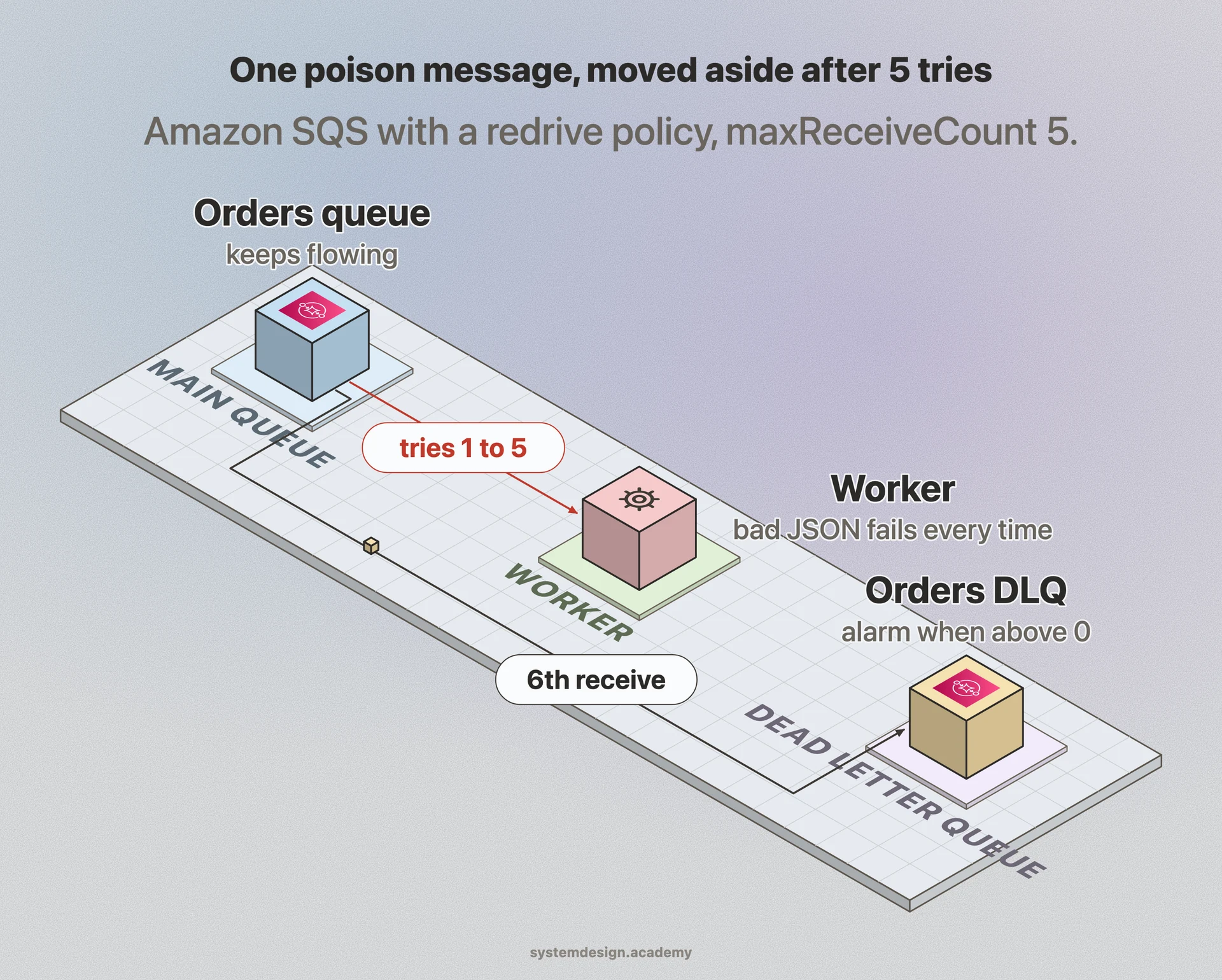
Picture a worker pulling jobs off a queue. Most jobs succeed. But one message has malformed JSON, points at a deleted record, or hits a bug that throws every single time. If the worker keeps retrying that message, it can get stuck on it forever and starve every other job behind it. People call this a poison message.
A dead letter queue is the escape hatch. After a message fails a configured number of times, the broker stops retrying it on the main queue and routes it to a second, dedicated queue: the DLQ. The main queue moves on. The bad message is not lost, it is quarantined where you can look at it on your own schedule.
The DLQ is just a normal queue. What makes it a DLQ is the policy attached to the source queue that says where to send messages once they exhaust their retry budget, and how many failures count as exhausted.
How it works under the hood
Most systems track a delivery or receive count per message. With Amazon SQS you set a redrive policy with a maxReceiveCount, for example 5. Each time a consumer receives the message but does not delete it before the visibility timeout expires, SQS increments the count. On the 6th receive it moves the message to the DLQ you named instead of handing it back.
RabbitMQ does it differently. A message becomes dead-lettered when it is rejected with requeue=false, when it expires past its TTL, or when the queue hits its length limit. The broker then republishes it to a dead-letter exchange you configured on that queue, which routes it to your DLQ. Kafka has no built-in DLQ, so frameworks like Kafka Connect and Spring Kafka implement it by producing the failed record to a separate dead-letter topic, usually carrying the original headers plus the exception and stack trace.
A good DLQ entry keeps context: the original payload, the source queue, the failure count, the last error, and a timestamp. Once you fix the cause, you redrive or replay the messages back to the source queue so they get processed normally. SQS even ships a one-click redrive feature for exactly this.
When to use it and the trade-offs
Use a DLQ for any queue where a single bad message could block or slow the rest, and where losing a message silently is unacceptable. Order processing, payment events, and webhook delivery are classic cases. The DLQ turns a silent failure into a visible, debuggable, replayable one.
The big trade-off is that a DLQ is only useful if someone watches it. A queue that fills with failed messages and never gets looked at is just a slow data loss. You need an alarm, for example a CloudWatch alarm on ApproximateNumberOfMessagesVisible greater than 0, so a human or pager knows messages are piling up.
Tune your retry count carefully. Too low and transient blips like a brief database timeout get dead-lettered and need manual replay. Too high and a genuinely poison message wastes compute and delays everything for a long time before it gives up. A common pattern is a few retries with backoff, then the DLQ. Also remember a DLQ has its own retention window, so messages there are not kept forever either.
Where it is used in production
Amazon SQS
Native DLQ via a redrive policy with maxReceiveCount, plus a built-in redrive button to send messages back to the source queue.
RabbitMQ
Dead-letters messages to a configured dead-letter exchange when they are rejected, expire by TTL, or overflow the queue length limit.
Apache Kafka
No built-in DLQ, but Kafka Connect and Spring Kafka write failed records to a separate dead-letter topic with the error attached.
Azure Service Bus
Every queue and subscription has an automatic dead-letter sub-queue for messages that exceed max delivery count or fail filter evaluation.
Frequently asked questions
- What is a poison message?
- A message that fails every time it is processed, usually because its content is malformed or it triggers a bug. Without a DLQ it gets retried endlessly and can block the rest of the queue. The DLQ exists to isolate exactly these messages.
- What is the difference between a DLQ and just retrying?
- Retrying handles transient failures like a brief network blip by attempting the same message again. A DLQ is what happens after retries are exhausted: the message is moved aside so it stops blocking work and can be inspected, instead of being retried forever or dropped.
- How many retries should I allow before dead-lettering?
- There is no universal number, but 3 to 5 with exponential backoff is a common starting point. Set it high enough that normal transient errors clear on their own, but low enough that a truly broken message gives up quickly instead of wasting compute.
- What do I do with messages in a dead letter queue?
- Inspect them to find the root cause, for example a deployment bug or a schema change. Fix the underlying problem, then redrive or replay the messages back to the source queue so they process normally. Always alert on a non-empty DLQ so failures do not sit unnoticed.
- Does Kafka have a dead letter queue?
- Not natively. Kafka has no per-message retry counter, so DLQ behavior is implemented at the framework level. Kafka Connect and Spring Kafka produce failed records to a separate dead-letter topic, typically including the original headers and the exception details.
Learn Dead Letter Queue hands-on
This page explains the idea. The full lesson lets you step through the ring as servers join and leave, read the implementation, and check yourself with a quiz. It is one of 760+ lessons in the System Design Masterclass, from your first API call to distributed consensus. Eleven Foundation lessons are free, no signup. Lifetime access is ₹499 in India or $7.99 worldwide, one payment, no subscription.
Related lessons
Lessons that touch on Dead Letter Queue as part of a larger topic.
See also
Related glossary terms you might want to look up next.
Message Queue
A buffer that stores messages between producers and consumers. Messages are processed one by one, in order. Think of it as a to-do list for your services.
Retry
Automatically re-attempting a failed operation, usually with exponential backoff. Essential for handling transient failures in distributed systems.
Pub/Sub
A messaging pattern where publishers send messages to topics, and subscribers receive messages from topics they care about. Publishers don't know who's listening.
Kafka
A distributed event streaming platform that handles millions of events per second. Used by LinkedIn, Netflix, and Uber for real-time data pipelines.
Webhook
An HTTP callback triggered by an event. Instead of polling for updates, the source system pushes a notification to your URL when something happens.
Kafka Topic
A named feed or category to which producers publish records. Topics are split into partitions for parallelism, and each partition is an ordered, immutable log.