Kafka Topic
A named feed or category to which producers publish records. Topics are split into partitions for parallelism, and each partition is an ordered, immutable log.
What is Kafka Topic?
In short
A Kafka topic is a named category that producers write records to and consumers read records from. Each topic is split into one or more partitions, and every partition is an ordered, append-only log where records keep the same position forever once written.
What a Kafka topic actually is
A topic is the unit of organization in Apache Kafka. You give it a name like orders, payments, or user-clicks, and from then on producers send messages to that name and consumers subscribe to it. Nothing else needs to coordinate. A producer does not know who is reading, and a consumer does not know who is writing. The topic is the shared channel between them.
The important detail is that a topic is not a queue. It is a commit log. When a producer sends a record, Kafka appends it to the end of a log file and assigns it a number called an offset. The record sits there, unchanged, until the topic's retention period expires. Reading a record does not delete it. Ten different consumer groups can read the same orders topic and each one tracks its own position independently.
Because the log is append-only and never edited in place, Kafka can write to it sequentially on disk. Sequential disk writes are close to memory speed, which is a big part of how a single broker handles hundreds of thousands of records per second.
Partitions, ordering, and keys
A topic is split into partitions, and each partition is itself an ordered log. Partitions are what give Kafka its scale. If a topic has 12 partitions, up to 12 consumers in one group can read from it in parallel, one per partition. Add partitions and you add throughput.
Ordering is guaranteed inside a single partition but not across the whole topic. Records in partition 0 are read in the exact order they were written, but there is no global order spanning partition 0, 1, and 2. This trade-off is the price of parallelism.
You control which partition a record lands in through its key. Kafka hashes the key and uses the result to pick a partition, so every record with the same key goes to the same partition. If you key by customer ID, all events for one customer stay in order. If you send records with no key, Kafka spreads them across partitions evenly and you give up per-key ordering.
One rule trips people up: you can increase a topic's partition count later, but you cannot decrease it, and adding partitions changes the key-to-partition mapping for new records. Pick a partition count with growth in mind.
When to use topics and the trade-offs
Use a separate topic per kind of event, not per consumer. One topic called payments that several services read is the normal pattern. Splitting by department or team usually creates churn. Splitting by event meaning, such as payment-authorized versus payment-refunded, holds up well as the system grows.
Retention is a per-topic setting and a real design choice. The default keeps records for 7 days, after which old log segments are deleted. You can set it to hours for high-volume telemetry, or to forever combined with log compaction when the topic represents the current state of something, like the latest profile per user ID.
The main trade-offs are partition count and replication factor. Too few partitions caps your parallelism. Too many adds open-file and metadata overhead on every broker and slows leader elections. A replication factor of 3 is standard in production so a topic survives losing a broker, but each replica multiplies the disk and network cost.
A concrete example
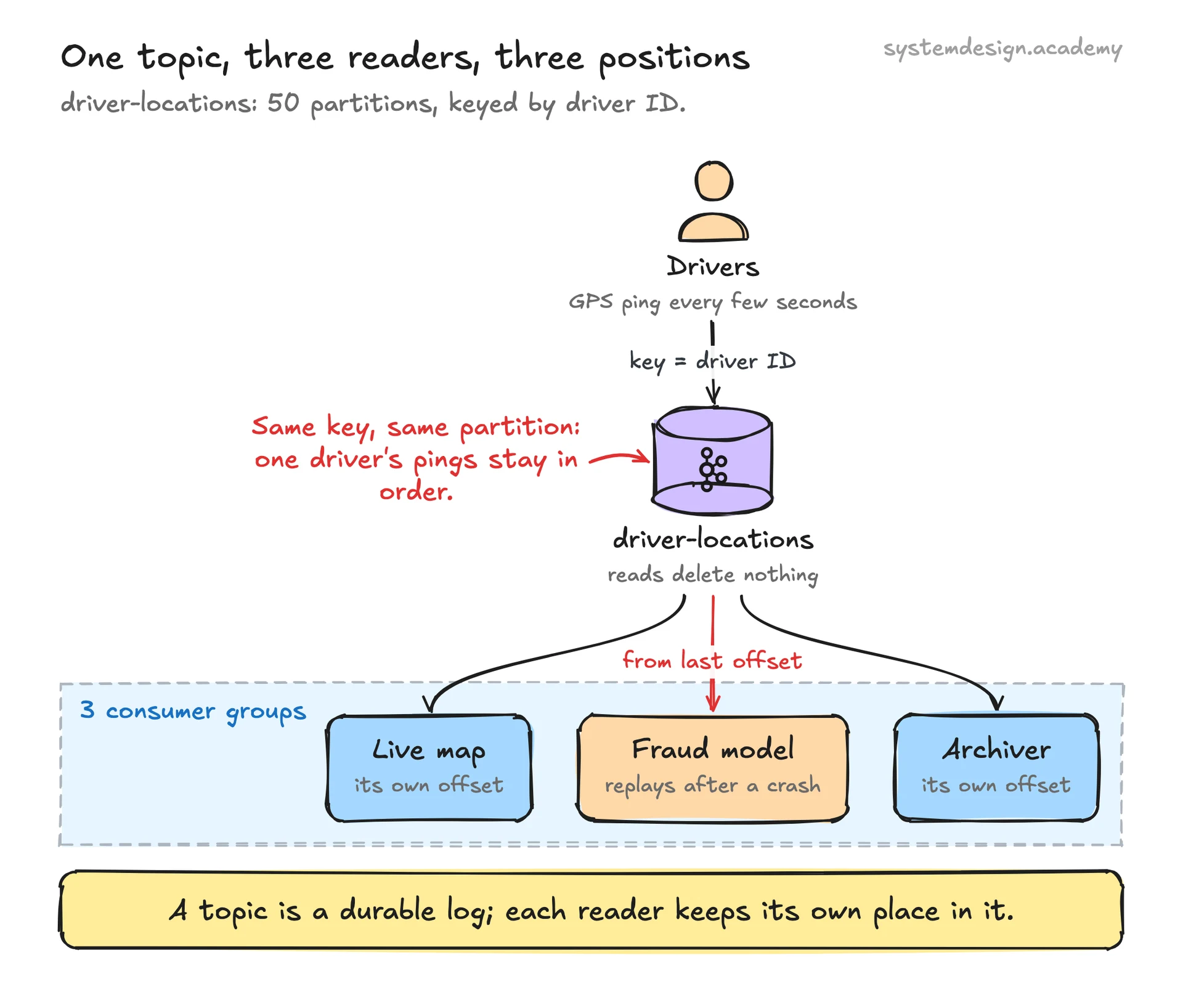
Picture a ride-hailing app. A topic named driver-locations receives a GPS ping from every active driver every few seconds. You key each record by driver ID, so all pings from one driver land in the same partition and arrive in order. The topic has 50 partitions, so 50 consumers can process location updates at once.
One consumer group powers the live map. A second consumer group, reading the exact same topic from its own offset, feeds a fraud detection model that flags impossible jumps in position. A third group archives everything to cold storage. None of these interfere with each other because each tracks its own offset, and the records themselves are never removed by a read.
If the fraud service crashes for an hour, it simply resumes from its last committed offset when it comes back and replays the missed records. The map service, sitting at a different offset, never noticed. That independence between writers, readers, and the durable log is what makes a topic more than just a message pipe.
Where it is used in production
Built Kafka and runs thousands of topics carrying activity events, metrics, and logs across trillions of messages a day.
Uber
Uses topics keyed by trip and driver ID to stream location and pricing events into real-time matching and surge pricing.
Netflix
Routes playback and operational events through Kafka topics feeding its real-time monitoring and recommendation pipelines.
Confluent Cloud
Sells managed Kafka where topic creation, partition count, and retention are the core knobs customers configure.
Frequently asked questions
- Is a Kafka topic the same as a queue?
- No. A queue typically removes a message once a consumer reads it, and one message goes to one consumer. A Kafka topic keeps every record for its retention period regardless of reads, and any number of consumer groups can read the same records independently. It is a durable log, not a pop-once queue.
- How many partitions should a topic have?
- Enough to meet your target throughput and your maximum parallel consumers, since one partition is read by at most one consumer per group. Many teams start around 6 to 12 for moderate load. Avoid going wildly high, because thousands of partitions per broker add metadata overhead and slow recovery. You can add partitions later but never remove them.
- Does a Kafka topic guarantee message ordering?
- Only within a single partition. Records in one partition are always read in the order they were written. There is no ordering guarantee across the whole topic. To keep related records ordered, give them the same key so Kafka routes them to the same partition.
- What happens to records after they are consumed?
- Nothing changes. Consuming a record does not delete it. Records stay in the topic until the retention period expires, by default 7 days, or until log compaction removes superseded keys. This is why a consumer can replay history or a new consumer group can read everything from the beginning.
- Can multiple services read from the same topic?
- Yes, and that is the normal design. Each service uses its own consumer group with its own offset, so they read the same records without competing. A live dashboard, an analytics job, and an archiver can all consume one topic at their own pace.
Learn Kafka Topic hands-on
This page explains the idea. The full lesson lets you step through the ring as servers join and leave, read the implementation, and check yourself with a quiz. It is one of 760+ lessons in the System Design Masterclass, from your first API call to distributed consensus. Eleven Foundation lessons are free, no signup. Lifetime access is ₹499 in India or $7.99 worldwide, one payment, no subscription.
See also
Related glossary terms you might want to look up next.
Kafka
A distributed event streaming platform that handles millions of events per second. Used by LinkedIn, Netflix, and Uber for real-time data pipelines.
Kafka Partition
A subset of a Kafka topic that provides ordering guarantees and parallel processing. Each partition lives on one broker and can be consumed by one consumer per group.
Kafka Consumer Group
A set of consumers that cooperatively read from topic partitions. Each partition is assigned to exactly one consumer in the group, enabling parallel processing.
Pub/Sub
A messaging pattern where publishers send messages to topics, and subscribers receive messages from topics they care about. Publishers don't know who's listening.
Message Queue
A buffer that stores messages between producers and consumers. Messages are processed one by one, in order. Think of it as a to-do list for your services.
Webhook
An HTTP callback triggered by an event. Instead of polling for updates, the source system pushes a notification to your URL when something happens.