Kafka Partition
A subset of a Kafka topic that provides ordering guarantees and parallel processing. Each partition lives on one broker and can be consumed by one consumer per group.
What is Kafka Partition?
In short
A Kafka partition is an ordered, append-only log that holds part of a topic's messages. Kafka splits each topic into one or more partitions so that writes and reads scale across brokers, and within a single partition messages keep a strict order and are consumed by exactly one consumer per consumer group.
What a partition actually is
A Kafka topic is a logical name like orders or page-views. The real storage lives in partitions. When you create a topic you pick a partition count, for example 12, and Kafka spreads those 12 partitions across the brokers in the cluster. Each partition is an independent log file on disk that only ever grows at the end.
Every message in a partition gets a monotonically increasing number called the offset, starting at 0. Offset 0, then 1, then 2, and so on. The offset is unique only within that one partition, not across the whole topic. A consumer tracks its position by remembering the offset it has read up to.
Ordering is the key property. Kafka guarantees order inside a single partition and nowhere else. If you publish messages A, B, C to the same partition, every consumer reads them as A, B, C. If A, B, C land on three different partitions, you get no ordering guarantee between them.
How writes and reads work under the hood
When a producer sends a message, it decides which partition to write to. If the message has a key, Kafka hashes the key and takes the result modulo the partition count, so all messages with the same key always go to the same partition. If there is no key, the producer spreads messages across partitions to balance load. This is why you key by something like user_id or order_id when you need per-entity ordering.
Each partition has one leader broker that handles all reads and writes, plus follower replicas on other brokers that copy the data. The replication factor, often 3, decides how many copies exist. If the leader broker dies, one of the in-sync followers is promoted to leader, so the partition stays available.
On the read side, consumers in the same group split the partitions between them. With 12 partitions and 4 consumers, each consumer owns 3 partitions. A single partition is never read by two consumers in the same group at once, which is what preserves order. That also means your maximum parallelism for one group equals the partition count: 12 partitions cap you at 12 active consumers.
When to use them and the trade-offs
More partitions means more parallelism and higher throughput, because work spreads across more brokers and more consumers. If one topic needs to handle 500,000 messages per second, you give it enough partitions that no single broker is overwhelmed.
But partitions are not free. Each one is open file handles, memory, and replication traffic on the brokers. A cluster with hundreds of thousands of partitions takes longer to recover after a broker failure and adds latency to leader elections. Confluent has long suggested keeping a rough ceiling in the low tens of thousands of partitions per broker as a planning guideline.
The hard rule that bites people: you can increase a topic's partition count later, but you cannot decrease it, and increasing it breaks key-based ordering for existing keys because the hash-to-partition mapping changes. So pick a count that fits your expected peak throughput from the start, and over-provision a little rather than guess too low.
A concrete example
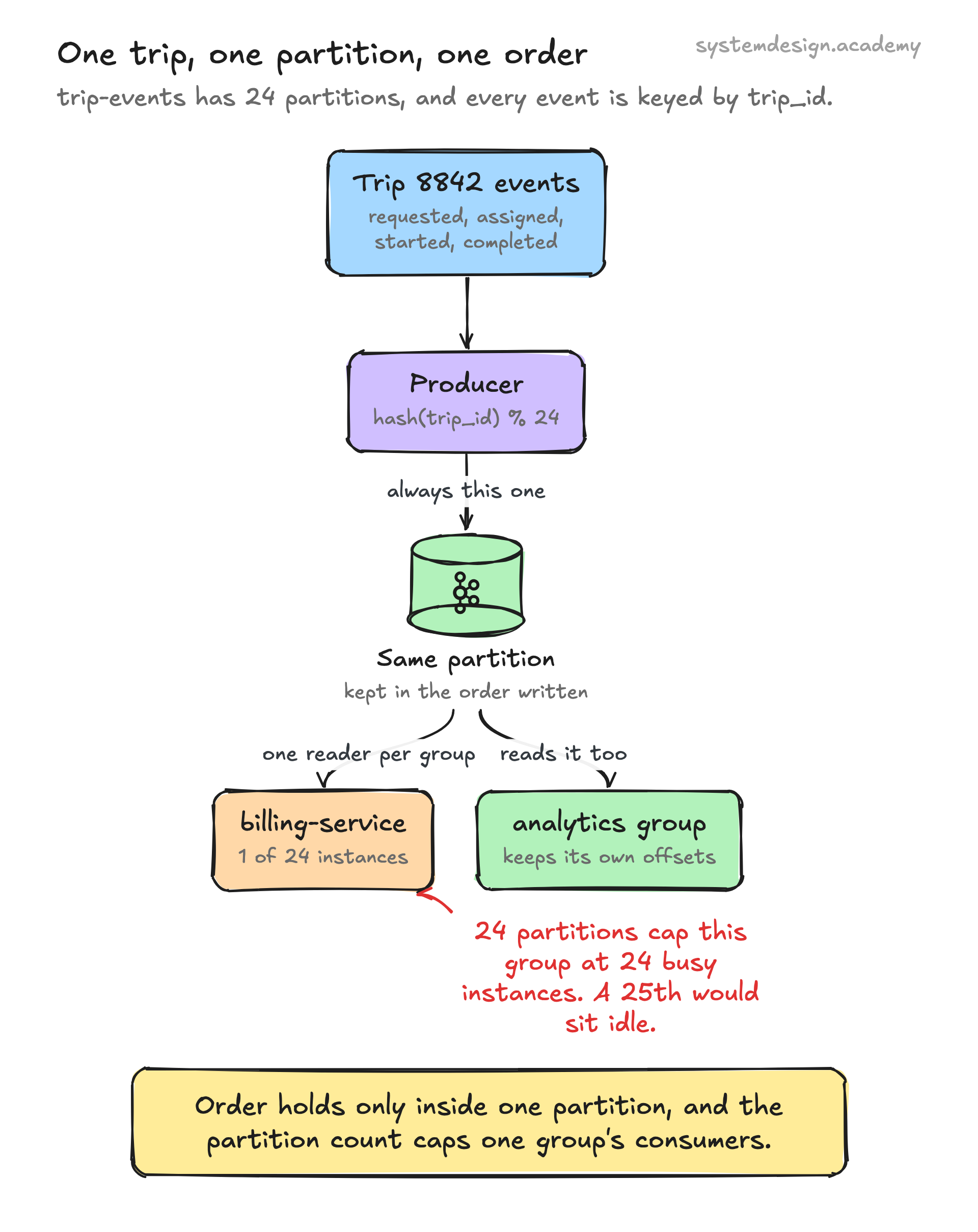
Picture a ride-hailing app with a topic called trip-events and 24 partitions. Each event is keyed by trip_id. Every event for trip 8842, requested, driver-assigned, started, completed, always lands on the same partition, so a consumer processing that trip sees the lifecycle in the correct order.
The consumer group billing-service has 24 instances, one per partition, so all 24 process trips in parallel. A separate group analytics reads the same 24 partitions independently with its own offsets, because each group tracks its own position. The two groups do not interfere.
If billing-service falls behind, you can scale it only up to 24 instances. Adding a 25th instance leaves it idle because there is no 25th partition to give it. That is the moment teams discover their partition count was the real throughput limit, not the number of servers.
Where it is used in production
Apache Kafka
Partitions are the core unit of parallelism and ordering in Kafka itself, the system that defined this model.
Built Kafka in-house and runs trillions of messages a day across topics partitioned by member and activity keys.
Uber
Keys trip and rider events by id so each entity's events stay ordered within one partition while millions process in parallel.
Confluent Cloud
Operates managed Kafka where customers tune partition counts per topic to dial in throughput and consumer parallelism.
Frequently asked questions
- Can two consumers read the same partition at the same time?
- Not within the same consumer group. A partition is assigned to exactly one consumer per group, which is what preserves ordering. Different consumer groups can each read the same partition independently with their own offsets.
- How many partitions should a topic have?
- Enough to hit your peak throughput and to allow at least as many consumers as you want running in parallel, since one group cannot have more active consumers than partitions. A common starting point is to estimate target throughput divided by the throughput a single partition can sustain, then round up. Over-provision slightly because you can add partitions later but never remove them.
- Does Kafka guarantee message order?
- Only within a single partition. Messages in one partition are read in the exact order they were written. Across partitions there is no ordering guarantee, so if you need order for a given entity you must route all its messages to the same partition by using a consistent key.
- What happens if I add partitions to an existing topic?
- New messages can use the new partitions immediately, but the key-to-partition mapping changes because partition count is part of the hash. Messages for a given key may now land on a different partition than before, breaking the per-key ordering guarantee for that key. Plan partition counts up front to avoid this.
- What is the difference between a partition offset and a topic?
- A topic is the logical stream name. A partition is one of the physical append-only logs that make up the topic. An offset is the position number of a message inside one partition, starting at 0 and unique only within that partition.
Learn Kafka Partition hands-on
This page explains the idea. The full lesson lets you step through the ring as servers join and leave, read the implementation, and check yourself with a quiz. It is one of 760+ lessons in the System Design Masterclass, from your first API call to distributed consensus. Eleven Foundation lessons are free, no signup. Lifetime access is ₹499 in India or $7.99 worldwide, one payment, no subscription.
See also
Related glossary terms you might want to look up next.
Kafka Topic
A named feed or category to which producers publish records. Topics are split into partitions for parallelism, and each partition is an ordered, immutable log.
Kafka
A distributed event streaming platform that handles millions of events per second. Used by LinkedIn, Netflix, and Uber for real-time data pipelines.
Kafka Consumer Group
A set of consumers that cooperatively read from topic partitions. Each partition is assigned to exactly one consumer in the group, enabling parallel processing.
Pub/Sub
A messaging pattern where publishers send messages to topics, and subscribers receive messages from topics they care about. Publishers don't know who's listening.
Message Queue
A buffer that stores messages between producers and consumers. Messages are processed one by one, in order. Think of it as a to-do list for your services.
Webhook
An HTTP callback triggered by an event. Instead of polling for updates, the source system pushes a notification to your URL when something happens.