Kafka Consumer Group
A set of consumers that cooperatively read from topic partitions. Each partition is assigned to exactly one consumer in the group, enabling parallel processing.
What is Kafka Consumer Group?
In short
A Kafka consumer group is a set of consumer instances that share a group ID and cooperatively read from the partitions of one or more topics, with each partition assigned to exactly one consumer in the group at a time. This lets you scale consumption horizontally and process messages in parallel while Kafka tracks how far each group has read.
What it actually is
A Kafka topic is split into partitions, and a partition is just an ordered, append-only log of messages. A consumer group is the unit Kafka uses to divide that work. Every consumer that starts up with the same group.id belongs to the same group, and Kafka guarantees that each partition is handed to exactly one consumer in that group at any moment.
If you have a topic with 12 partitions and you run 4 consumers in one group, each consumer gets 3 partitions. Add 4 more consumers and each ends up with 1 or 2. The total throughput goes up because the partitions are read in parallel. The hard ceiling is the partition count: with 12 partitions, a 13th consumer in the same group sits idle with nothing assigned.
Different groups are independent. If an analytics service and a billing service each have their own group.id reading the same topic, both receive every message. Within a single group the messages are split up; across groups they are broadcast. This is how Kafka supports the queue pattern and the publish/subscribe pattern with the same primitive.
How it works under the hood
Each broker partition has a designated group coordinator. When consumers join or leave, the coordinator triggers a rebalance: it recomputes which consumer owns which partition and tells everyone their new assignment. Older versions stopped all consumers during this, called a stop-the-world rebalance. Newer cooperative-sticky and incremental rebalancing protocols only move the partitions that need to move, so most consumers keep processing.
Kafka does not delete a message after a consumer reads it. Instead each group stores an offset, which is the position of the next message it wants, per partition. These offsets are written to an internal topic called __consumer_offsets. When a consumer commits offset 5000 for a partition, it is saying the group has processed everything before 5000. If that consumer crashes, whoever picks up the partition resumes from the last committed offset.
Liveness is tracked with heartbeats. A consumer sends heartbeats to the coordinator on a background thread; if none arrive within session.timeout.ms, the coordinator declares it dead and reassigns its partitions. A separate max.poll.interval.ms guards against a consumer that is alive but stuck not calling poll, which usually means its processing is too slow.
When to use it and the trade-offs
Use a consumer group whenever you want a pool of workers to share a stream and you want Kafka to handle failover for you. It is the right tool for processing a high-volume event stream, fanning work out to a fleet of pods, or running competing consumers behind a single logical service.
The main trade-off is ordering versus parallelism. Kafka only guarantees order within a partition, not across them. If you need all events for one user processed in order, you must route them to the same partition by key, which limits how much you can parallelize that key. More partitions give more parallelism but also more open file handles, more rebalance cost, and longer leader-election times.
Offset commit strategy is the other sharp edge. Auto-commit is easy but can drop or replay messages on a crash. Manual commit after processing gives at-least-once delivery, which means duplicates are possible, so your processing should be idempotent. Frequent rebalances, often caused by slow processing tripping max.poll.interval.ms, are the single most common cause of lag and duplicate work in production.
A concrete example
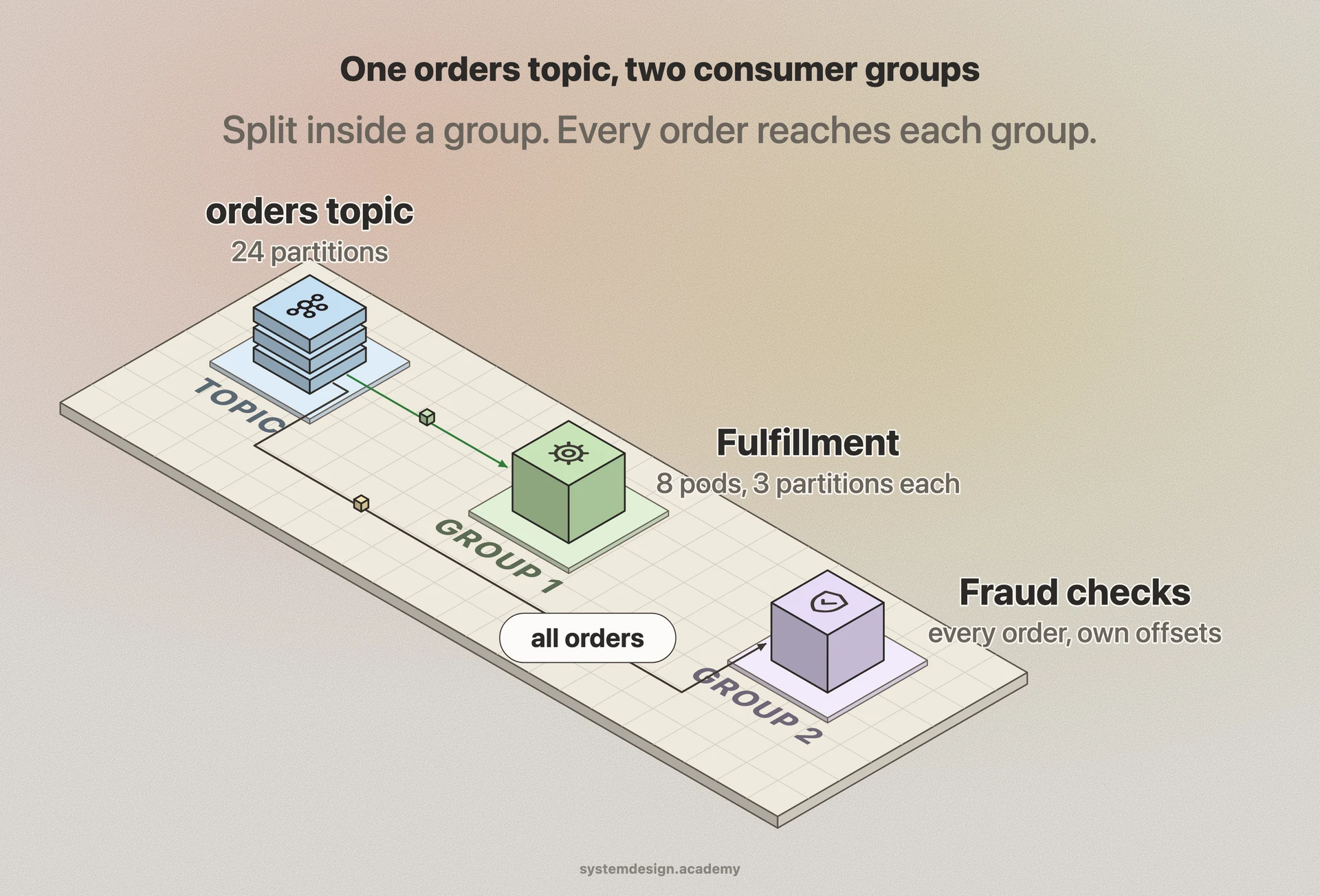
Picture an order pipeline at an e-commerce company. Orders are published to an orders topic with 24 partitions, keyed by customer ID so each customer's events stay ordered. A fulfillment service runs 8 pods, all in the group fulfillment-workers, so each pod handles 3 partitions and the load is even.
During a flash sale, traffic triples. The team scales the deployment to 24 pods. Kafka rebalances and now each pod owns exactly 1 partition, tripling consumer throughput without any code change. When the sale ends and pods scale back down, the surviving consumers pick up the freed partitions from the last committed offset, so no order is lost or processed twice as long as commits happen after the order is written.
Meanwhile a separate fraud-detection service reads the same orders topic under the group fraud-checks. Because it is a different group, it sees every order independently, with its own offsets and its own lag, completely isolated from the fulfillment workers.
Where it is used in production
Apache Kafka
Consumer groups are a native, core abstraction in Kafka itself, used by every Kafka consumer client.
Uber
Runs thousands of consumer groups across petabyte-scale Kafka clusters to feed trip events into matching, pricing, and analytics pipelines.
Built Kafka and uses consumer groups to scale ingestion of activity and metrics streams across large fleets of consumers.
Kafka Streams and ksqlDB
Stream-processing libraries from the Kafka project that build directly on consumer groups to parallelize and recover stateful processing tasks.
Frequently asked questions
- What happens if I have more consumers than partitions?
- The extra consumers stay idle because each partition can be owned by only one consumer in the group. With 4 partitions and 6 consumers, 2 consumers get nothing. To use them you must add partitions to the topic, which you can do but cannot undo.
- How is a consumer group different from just using multiple consumers?
- It is the group.id that matters. Consumers sharing a group.id split the partitions and each message is processed once by the group. Consumers with different group IDs each get a full independent copy of the stream. The group is what makes them cooperate instead of duplicating work.
- Where does Kafka store consumer offsets?
- In an internal compacted topic called __consumer_offsets, keyed by group, topic, and partition. When a consumer commits, it writes the next offset to read there, so any consumer that later owns the partition can resume from the right place after a crash or rebalance.
- Why does my consumer group keep rebalancing?
- The usual cause is processing that takes longer than max.poll.interval.ms, so the coordinator thinks the consumer is stuck and reassigns its partitions. Other causes are network blips that miss heartbeats within session.timeout.ms, and pods scaling up and down. Fix it by processing faster, raising the interval, or using cooperative rebalancing.
- Does a consumer group guarantee message ordering?
- Only within a single partition. Messages with the same key go to the same partition and are processed in order, but there is no ordering guarantee across partitions. If you need ordering for a given entity, key your messages by that entity ID.
Learn Kafka Consumer Group hands-on
This page explains the idea. The full lesson lets you step through the ring as servers join and leave, read the implementation, and check yourself with a quiz. It is one of 760+ lessons in the System Design Masterclass, from your first API call to distributed consensus. Eleven Foundation lessons are free, no signup. Lifetime access is ₹499 in India or $7.99 worldwide, one payment, no subscription.
See also
Related glossary terms you might want to look up next.
Kafka Topic
A named feed or category to which producers publish records. Topics are split into partitions for parallelism, and each partition is an ordered, immutable log.
Kafka Partition
A subset of a Kafka topic that provides ordering guarantees and parallel processing. Each partition lives on one broker and can be consumed by one consumer per group.
Kafka
A distributed event streaming platform that handles millions of events per second. Used by LinkedIn, Netflix, and Uber for real-time data pipelines.
Pub/Sub
A messaging pattern where publishers send messages to topics, and subscribers receive messages from topics they care about. Publishers don't know who's listening.
Message Queue
A buffer that stores messages between producers and consumers. Messages are processed one by one, in order. Think of it as a to-do list for your services.
Webhook
An HTTP callback triggered by an event. Instead of polling for updates, the source system pushes a notification to your URL when something happens.