Layer 4 Load Balancing
Load balancing at the transport layer (TCP/UDP) based on IP addresses and ports. Fast because it doesn't inspect packet contents.
What is Layer 4 Load Balancing?
In short
Layer 4 load balancing distributes incoming network connections across a pool of backend servers using only transport-layer information: source and destination IP addresses and TCP or UDP port numbers. It never reads the request body or URL, so it forwards packets fast and works for any protocol that runs over TCP or UDP, not just HTTP.
What it actually is
The name comes from the OSI model. Layer 4 is the transport layer, where TCP and UDP live. A Layer 4 load balancer makes its routing decision using the four or five values it can see in the packet headers: source IP, source port, destination IP, destination port, and the protocol. That set is often called the connection 5-tuple.
Because it works at this level, it has no idea whether the traffic is HTTP, gRPC, a MySQL query, an MQTT message, or a video stream. It treats every connection as an opaque flow of bytes. This is the key difference from Layer 7 load balancing, which terminates the connection, reads the full HTTP request, and can route based on the URL path, host header, or cookie.
A common way to picture it: a Layer 4 balancer is a smart switchboard that connects caller to agent based on the number dialed, without ever listening to the conversation.
How it works under the hood
There are two main modes. In NAT mode, the balancer rewrites the destination IP of each incoming packet to a chosen backend, forwards it, and rewrites the source IP on the way back so the client only ever sees the balancer's address. The balancer keeps a connection table mapping each 5-tuple to a backend so all packets in a flow land on the same server.
In Direct Server Return mode, the balancer only rewrites the destination MAC address and forwards the packet. The backend then replies straight to the client, bypassing the balancer entirely. This skips the return-path bottleneck and lets one balancer handle far more throughput, which is why high-volume CDNs and stream services prefer it.
Backend selection usually uses a consistent hash of the 5-tuple so the same client connection keeps hitting the same server, or simple round robin and least-connections for new flows. There is no TLS termination and no buffering, so a Layer 4 balancer can push millions of packets per second on commodity hardware while adding well under a millisecond of latency.
When to use it and the trade-offs
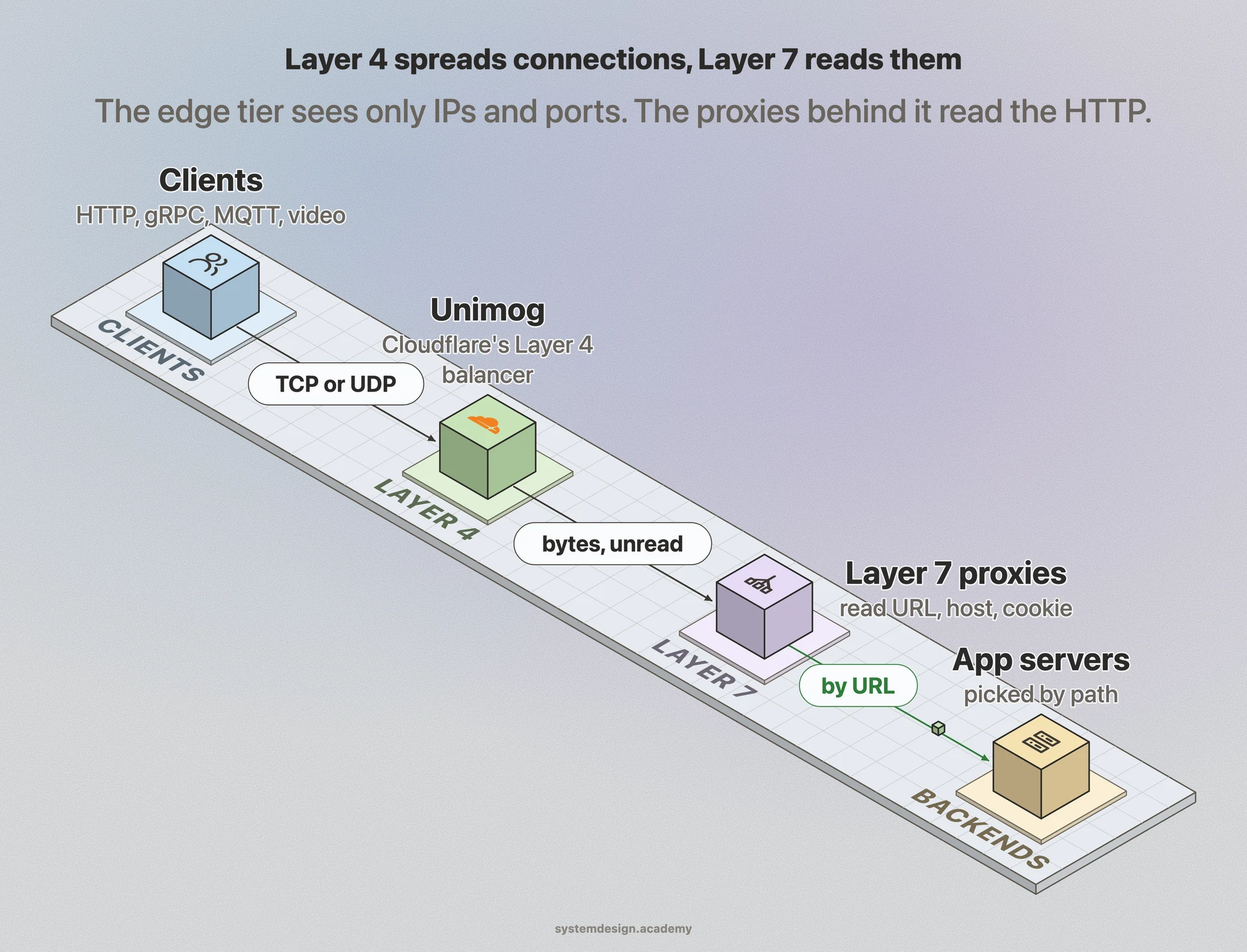
Reach for Layer 4 when you need raw speed and protocol independence: database connection pools, game servers over UDP, MQTT brokers, SMTP, or any non-HTTP TCP service. It also shines as the first tier in front of a fleet of Layer 7 proxies, absorbing huge connection volume cheaply before handing off the smart routing.
The cost of that speed is blindness. You cannot route by URL path, do host-based virtual hosting, rewrite headers, terminate TLS, or do content-aware health checks. A Layer 4 health check can confirm a TCP port is open, but it cannot tell you the app behind it is returning 500 errors.
Sticky sessions are coarser too. Stickiness is per source IP or per 5-tuple, so thousands of users behind one corporate NAT or mobile carrier gateway can all hash to the same backend, creating hot spots. If you need cookie-level affinity or path routing, you want Layer 7, often layered behind Layer 4.
A concrete example
AWS gives you both flavors as separate products, which makes the distinction obvious. The Network Load Balancer is a pure Layer 4 device that handles millions of requests per second at ultra-low latency and preserves the client source IP. The Application Load Balancer is Layer 7 and routes on paths and host headers but is heavier.
Many large architectures stack them. Cloudflare and Google both run Layer 4 software balancers (Google's Maglev, Cloudflare's Unimog) at the network edge to spread connections across many machines, and those machines then run Layer 7 proxies for the actual HTTP logic. The Layer 4 tier does the cheap, fast spreading; the Layer 7 tier does the smart routing.
Where it is used in production
AWS Network Load Balancer
Pure Layer 4 balancer that routes on TCP/UDP and preserves client source IP at millions of requests per second.
Google Maglev
Google's software Layer 4 balancer that spreads connections using consistent hashing of the packet 5-tuple before traffic reaches Layer 7 proxies.
Cloudflare Unimog
Layer 4 load balancer that distributes connections across edge servers in each data center for fast, protocol-agnostic forwarding.
HAProxy and NGINX
Both can run in Layer 4 (TCP/stream) mode to balance databases, message brokers, and other non-HTTP services.
Frequently asked questions
- What is the difference between Layer 4 and Layer 7 load balancing?
- Layer 4 routes using only IP addresses and TCP or UDP ports, never reading the request content, so it is fast and works for any protocol. Layer 7 terminates the connection and reads the full HTTP request, so it can route by URL path, host header, or cookie, but it is heavier and HTTP-specific.
- Can a Layer 4 load balancer terminate TLS or read the URL?
- No. It only sees transport-layer headers and treats the payload as opaque bytes, so it cannot decrypt TLS or inspect the HTTP path. If you need TLS termination or path-based routing, use a Layer 7 balancer, often placed behind a Layer 4 tier.
- Is Layer 4 load balancing faster than Layer 7?
- Yes, usually much faster. Because it forwards packets without buffering, parsing, or decrypting, a Layer 4 balancer adds well under a millisecond and can push millions of packets per second, while Layer 7 spends CPU terminating connections and parsing requests.
- How does Layer 4 keep a client on the same server?
- It hashes the connection 5-tuple (source IP, source port, destination IP, destination port, protocol) so every packet in a flow lands on the same backend. The downside is that many users behind one shared NAT IP can hash to the same server and create a hot spot.
- When should I choose Layer 4 over Layer 7?
- Choose Layer 4 for non-HTTP traffic like databases, game servers, MQTT, or SMTP, and as a high-throughput front tier before Layer 7 proxies. Choose Layer 7 when you need content-aware routing, header rewriting, or cookie-based session stickiness.
Learn Layer 4 Load Balancing hands-on
This page explains the idea. The full lesson lets you step through the ring as servers join and leave, read the implementation, and check yourself with a quiz. It is one of 760+ lessons in the System Design Masterclass, from your first API call to distributed consensus. Eleven Foundation lessons are free, no signup. Lifetime access is ₹499 in India or $7.99 worldwide, one payment, no subscription.
See also
Related glossary terms you might want to look up next.
Load Balancer
Distributes incoming traffic across multiple servers so no single server gets overwhelmed. Like a traffic cop directing cars to different lanes.
TCP
A reliable transport protocol that guarantees data arrives in order and without errors. It uses a three-way handshake to establish connections.
Layer 7 Load Balancing
Load balancing at the application layer (HTTP) that can route based on URL paths, headers, cookies, or request content. More flexible but more CPU-intensive.
DNS
The phonebook of the internet. Translates human-readable domain names (google.com) into IP addresses that computers understand.
Proxy
An intermediary server that sits between the client and the destination server. Forward proxies act on behalf of clients; reverse proxies act on behalf of servers.
Reverse Proxy
A server that sits in front of your backend servers and forwards client requests to them. Handles SSL termination, caching, and load balancing.