Load Balancer
Distributes incoming traffic across multiple servers so no single server gets overwhelmed. Like a traffic cop directing cars to different lanes.
What is Load Balancer?
In short
A load balancer sits in front of a pool of servers and spreads incoming requests across them, so no single server is overwhelmed and the service keeps working even if some servers fail. It is the piece that turns a group of ordinary machines into one scalable, highly available endpoint.
Why load balancers exist
A single server can only handle so many requests per second before it slows down or falls over. The way you grow past that is to run many servers, but then something has to decide which server each incoming request goes to. That something is the load balancer.
It gives you two things at once. The first is scale: traffic is spread across the pool, so ten servers can handle roughly ten times the load of one. The second, and often more important, is availability. The load balancer constantly checks whether each server is healthy, and if one dies it simply stops sending traffic there while the rest keep serving. Users never see the failure. A load balancer in front of a pool is what turns a set of fragile single machines into one resilient service behind a single address.
How it picks a server: the algorithms
The load balancer needs a rule for choosing a backend. Round-robin just goes down the list in order, server one, two, three, then back to one, which is simple and spreads evenly when all requests cost about the same. Least-connections sends each new request to whichever server currently has the fewest active connections, which is better when some requests are much heavier than others. Hash-based routing, for example hashing the client IP, always sends the same client to the same server, which matters when a server holds session state for that user, often called sticky sessions.
Weighted versions of these let a bigger server take a larger share. The right choice depends on whether your requests are uniform, whether your servers are equal, and whether any per-user state is pinned to a particular machine.
Round-robin load balancing
Incoming requests hit the load balancer, which spreads them evenly across the backend servers so no single one is overwhelmed.
Layer 4 vs layer 7
Load balancers operate at one of two levels of the network stack. A layer 4 load balancer works at the transport level, looking only at IP addresses and TCP or UDP ports. It does not read the actual request, so it is extremely fast and protocol-agnostic, but it cannot make decisions based on content.
A layer 7 load balancer works at the application level and can read the HTTP request itself: the path, the headers, the cookies. That lets it route smartly, sending /api requests to one pool and /images to another, terminating TLS, or doing path-based and host-based routing. It does more work per request, so it is a little slower, but the routing intelligence is usually worth it for web traffic. Most modern application load balancers, like AWS ALB, are layer 7.
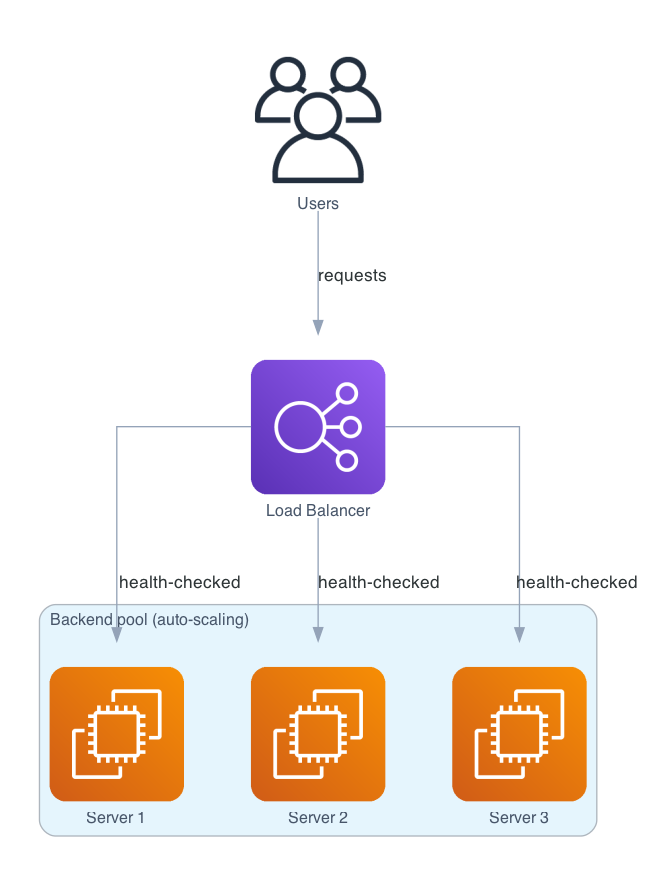
In a real system
Users hit one address, the load balancer. It health-checks the backend pool and forwards each request to a healthy server, so the pool can grow, shrink, or lose a node without users noticing.

Health checks and the single point of failure
The mechanism that makes a load balancer trustworthy is the health check. It periodically pings each backend, often hitting a /health endpoint, and only routes to servers that respond correctly. A server that fails is taken out of rotation automatically and added back when it recovers. This is what makes rolling deployments and surviving a crashed instance invisible to users.
One catch: the load balancer itself can become a single point of failure, since all traffic flows through it. Production setups solve this by running the load balancer redundantly, with a standby that takes over via a floating IP, or by using a managed, already-redundant service from a cloud provider. Often there is also DNS-level balancing in front, spreading traffic across multiple load balancers in different regions.
Where it is used in production
NGINX
Widely used as a software layer 7 load balancer and reverse proxy, with round-robin, least-connections, and hash-based methods built in.
AWS Elastic Load Balancing
Managed, already-redundant load balancers: ALB for layer 7 HTTP routing and NLB for high-throughput layer 4 traffic.
HAProxy
A fast, battle-tested open-source load balancer used in front of huge sites for both layer 4 and layer 7 balancing.
Cloudflare
Balances and health-checks traffic across servers and regions at the network edge, close to users.
Frequently asked questions
- What is a load balancer?
- A load balancer sits in front of a pool of servers and distributes incoming requests across them, so no single server is overwhelmed and the service stays up even if some servers fail. It presents one address to clients while spreading the work behind it.
- What load balancing algorithms are there?
- Common ones are round-robin (go down the list in order), least-connections (send to the server with the fewest active connections, good for uneven request costs), and hash-based or sticky sessions (always route a given client to the same server, needed when a server holds that user's session state). Weighted variants give bigger servers a larger share.
- What is the difference between a layer 4 and a layer 7 load balancer?
- A layer 4 load balancer routes on IP and TCP/UDP ports without reading the request, so it is very fast and protocol-agnostic. A layer 7 load balancer reads the HTTP request (path, headers, cookies) and can route on content, terminate TLS, and do path- or host-based routing, at a small performance cost. Most web application load balancers are layer 7.
- How does a load balancer handle a server failure?
- It runs periodic health checks against each backend and only routes to servers that respond correctly. When a server fails its check it is automatically taken out of rotation while the others keep serving, and it is added back when it recovers, so the failure is invisible to users.
- Isn't the load balancer itself a single point of failure?
- It can be, since all traffic flows through it. Production setups avoid that by running the load balancer redundantly with a standby that takes over via a floating IP, using a managed already-redundant cloud load balancer, and often adding DNS-level balancing across multiple load balancers in different regions.
Learn Load Balancer hands-on
This page explains the idea. The full lesson lets you step through the ring as servers join and leave, read the implementation, and check yourself with a quiz. It is one of 760+ lessons in the System Design Masterclass, from your first API call to distributed consensus. Eleven Foundation lessons are free, no signup. Lifetime access is ₹499 in India or $7.99 worldwide, one payment, no subscription.
Related lessons
Lessons that touch on Load Balancer as part of a larger topic.
Load Balancer Failover
Automatic traffic rerouting when backends fail, health check integration with load balancers
advanced · reliability resilience
Load Balancer Algorithms
How load balancers decide which server gets the next request. Round Robin, Weighted, Least Connections, IP Hash, and more
foundation · load balancing proxies
See also
Related glossary terms you might want to look up next.
Reverse Proxy
A server that sits in front of your backend servers and forwards client requests to them. Handles SSL termination, caching, and load balancing.
Horizontal Scaling
Adding more machines to handle increased load (scaling out). Like opening more checkout lanes instead of making one cashier faster.
API Gateway
A single entry point for all client requests that routes them to the appropriate microservice. Handles auth, rate limiting, and request transformation.
Latency
The time delay between sending a request and getting a response. Amazon found every 100ms of extra latency costs 1% in sales.
Throughput
The number of operations a system can handle per unit of time. Think of it as how many cars a highway can move per hour.
Bandwidth
The maximum amount of data that can be transferred over a network in a given time. It's the width of the pipe, not how fast the water flows.