DNS
The phonebook of the internet. Translates human-readable domain names (google.com) into IP addresses that computers understand.
What is DNS?
In short
DNS, the Domain Name System, is the internet's directory service that translates human-readable domain names like google.com into the numeric IP addresses, such as 142.250.80.46, that machines use to reach each other. It works as a distributed, hierarchical, cached lookup spread across millions of servers worldwide, so no single database has to hold every name on the internet.
What DNS is
Computers route traffic using IP addresses, but people remember names. DNS bridges that gap. When you type github.com, something has to turn that name into an address like 140.82.121.4 before any packet can be sent. DNS is the system that does the lookup, and it runs every time you open a page, send mail, or load an app.
DNS is not one giant table. It is a distributed database split into a tree of zones, where each part of the internet runs the servers responsible for its own names. Google runs the authoritative servers for google.com, your registrar or DNS provider runs yours, and a small set of root and top-level-domain servers tie the whole tree together.
DNS also stores more than addresses. A records hold IPv4 addresses, AAAA records hold IPv6 addresses, CNAME records point one name at another, MX records say which servers receive a domain's email, TXT records hold verification and SPF strings, and NS records say which name servers are authoritative for a zone. One domain often has dozens of records of different types.
How a lookup actually works
The work is done by a recursive resolver, usually run by your ISP or a public service like 1.1.1.1 or 8.8.8.8. Your machine asks the resolver for an address and the resolver does the legwork on your behalf.
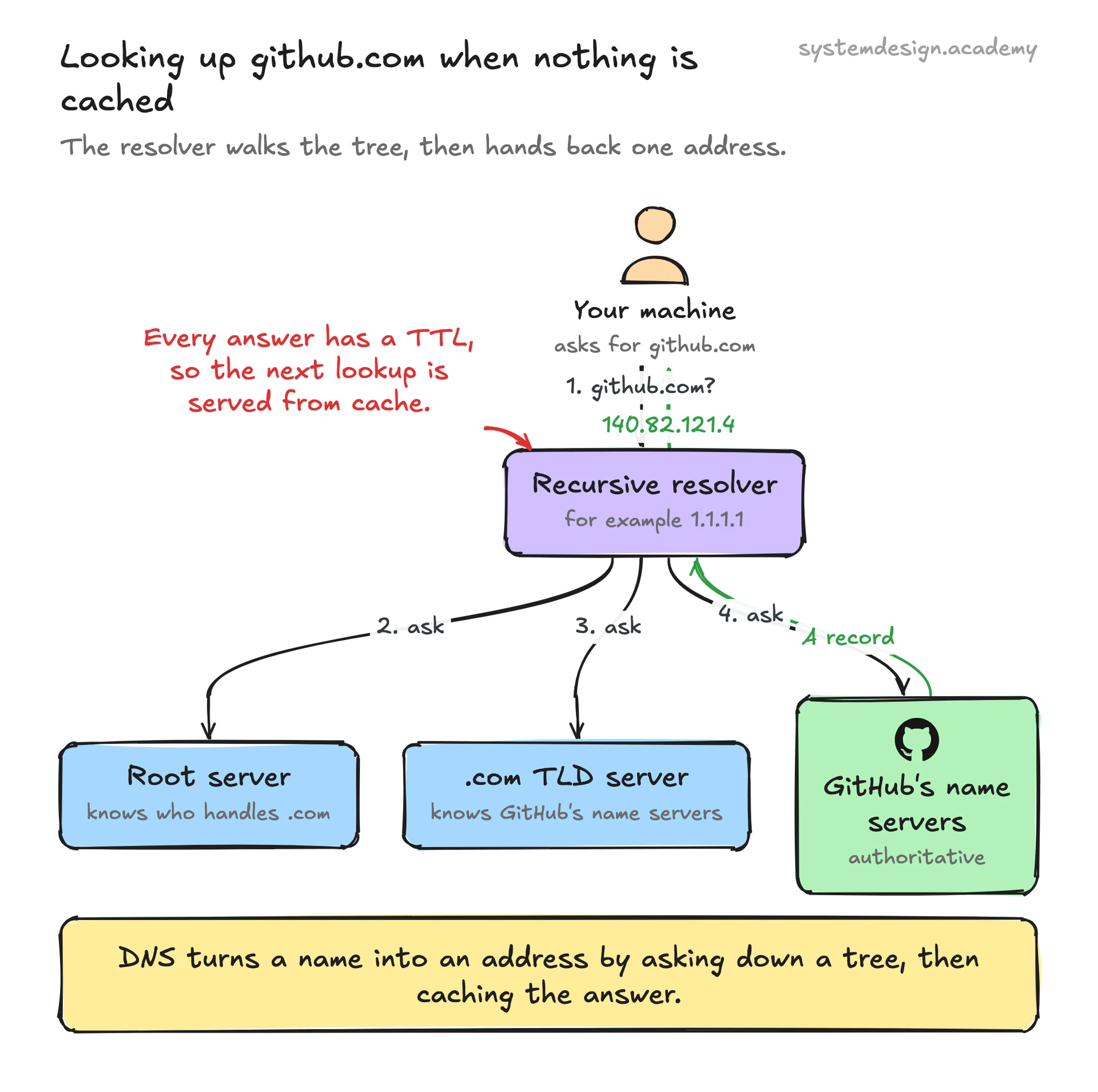
If the answer is not already cached, the resolver walks the hierarchy. It asks a root server, which does not know github.com but knows who handles the .com zone. It asks one of those TLD servers, which points it at GitHub's authoritative name servers. It asks those, which return the actual A record. The resolver hands the address back to your machine, which can finally open a connection.
That whole chain is why DNS leans hard on caching. Every answer carries a TTL, a time-to-live in seconds, that says how long it may be reused. Your operating system, your browser, your router, and the resolver all cache results, so the second and later lookups for a popular name are answered in under a millisecond instead of going back to the authoritative server. The cost of caching is that record changes take time to spread: lower the TTL before a migration and raise it afterward.
Trade-offs and where it bites
The hierarchy and caching make DNS fast and resilient, but the same caching makes changes slow to propagate. If you change a record while the old one still has a TTL of 86400 seconds, some users keep hitting the old address for up to a day. Teams plan migrations by dropping TTLs to 60 or 300 seconds in advance.
DNS is also a single point of failure that people forget is there. When the records for an entire domain vanish or the authoritative servers are unreachable, every service behind that name goes dark even though the servers themselves are fine. Facebook's six-hour outage in October 2021 took down Facebook, Instagram, and WhatsApp at once because a configuration change withdrew the routes to its DNS servers, and staff could not even badge into the building because the door system depended on the same internal DNS.
Plain DNS sends queries in clear text over UDP, which lets networks snoop on or spoof them. DNS over HTTPS and DNS over TLS encrypt the query, and DNSSEC adds signatures so a resolver can verify an answer was not tampered with. None of these are on by default everywhere, so security is a deliberate choice.
DNS as a routing tool
Because the resolver returns an address from a set of records, DNS is also a coarse load balancer and failover mechanism. Round-robin DNS hands out several A records in rotation so traffic spreads across servers. Latency-based or geo routing returns the address of the nearest data center, which is how a single name like netflix.com sends a viewer in Mumbai to a different IP than a viewer in London.
Managed services build on this. Amazon Route 53 supports health checks that stop handing out the address of a server that has failed, so DNS quietly steers users away from an outage within a TTL window. This is why content delivery networks like Cloudflare and Akamai put so much engineering into their authoritative DNS: the lookup is the first decision about where your request goes.
Where it is used in production
Cloudflare
Runs the public resolver 1.1.1.1 and authoritative DNS for millions of domains, advertising median resolution times in single-digit milliseconds.
Amazon Route 53
AWS managed DNS with health checks and latency, geo, and weighted routing policies used for failover and global traffic steering.
Google Public DNS
The 8.8.8.8 recursive resolver, one of the most-used resolvers on the internet, with broad support for DNS over HTTPS.
Akamai
Uses authoritative DNS to map each user to the nearest edge server, the routing layer behind much of its content delivery network.
Frequently asked questions
- What is the difference between a recursive resolver and an authoritative name server?
- A recursive resolver does the lookup work for you: it takes your query and chases down the answer by asking other servers. An authoritative name server holds the real records for a specific zone and gives the final answer for the names it owns. Your ISP or 8.8.8.8 is a resolver; GitHub's name servers are authoritative for github.com.
- Why do DNS changes take so long to take effect?
- Every record has a TTL that tells caches how long to keep reusing it. Resolvers, routers, and operating systems all cache answers, so after you change a record the old value can keep being served until its TTL expires. Lower the TTL to a minute or two a day before a planned change so the new value spreads quickly.
- What does TTL mean in DNS?
- TTL is time-to-live, a value in seconds attached to each record that says how long any cache may reuse it before checking again. A high TTL like 86400 means once a day; a low TTL like 60 means caches refresh every minute, which speeds up changes at the cost of more lookups.
- Is DNS encrypted?
- Plain DNS is not. Queries travel in clear text over UDP, so networks can read or forge them. DNS over HTTPS and DNS over TLS encrypt the query between you and the resolver, and DNSSEC adds cryptographic signatures so a resolver can confirm an answer was not altered. These have to be turned on; they are not universal defaults.
- Can DNS be used for load balancing?
- Yes. Round-robin DNS returns several addresses in rotation to spread traffic, and providers like Route 53 add health checks plus geo and latency routing so a name resolves to the nearest healthy server. It is coarse because of caching, so it is usually paired with a real load balancer behind the returned address.
Learn DNS hands-on
This page explains the idea. The full lesson lets you step through the ring as servers join and leave, read the implementation, and check yourself with a quiz. It is one of 760+ lessons in the System Design Masterclass, from your first API call to distributed consensus. Eleven Foundation lessons are free, no signup. Lifetime access is ₹499 in India or $7.99 worldwide, one payment, no subscription.
Related lessons
Lessons that touch on DNS as part of a larger topic.
DNS Load Balancing
Using DNS to distribute traffic across servers, the simplest form of global load balancing
foundation · load balancing proxies
Multi-Value Routing
Return multiple healthy endpoints in a single DNS response for client-side load distribution
foundation · load balancing proxies
Global Server Load Balancing (GSLB)
Distribute traffic across geographically dispersed data centers using DNS and health-aware routing
foundation · load balancing proxies
Anycast Routing
One-to-nearest communication, routing to the closest instance of a service
foundation · load balancing proxies
Geolocation Routing
Route requests to the nearest regional backend based on the client's geographic location
foundation · load balancing proxies
See also
Related glossary terms you might want to look up next.
CDN
A network of servers distributed globally that caches content close to users. Netflix uses CDNs to stream video from servers near you, not from one central location.
Load Balancer
Distributes incoming traffic across multiple servers so no single server gets overwhelmed. Like a traffic cop directing cars to different lanes.
Reverse Proxy
A server that sits in front of your backend servers and forwards client requests to them. Handles SSL termination, caching, and load balancing.
Proxy
An intermediary server that sits between the client and the destination server. Forward proxies act on behalf of clients; reverse proxies act on behalf of servers.
DNS Record Types
Different types of DNS records map domains to resources: A records point to IPs, CNAME aliases one domain to another, MX routes email, TXT stores verification data.
Forward Proxy
A proxy that sits in front of clients and forwards their requests to the internet. Used for anonymity, content filtering, and bypassing geo-restrictions.