Object Storage
A storage architecture that manages data as objects (file + metadata + ID) rather than blocks or files. S3 is the gold standard. Infinitely scalable, cheap, and durable.
What is Object Storage?
In short
Object storage is a way of keeping data as self-contained objects, where each object bundles the raw bytes, a set of metadata, and a unique ID, all sitting in a flat namespace you reach over HTTP. It trades the folder tree and in-place edits of a file system for near-unlimited scale, low cost per gigabyte, and very high durability, which is why services like Amazon S3 use it to store trillions of objects.
What object storage actually is
Most people first learn storage as either files or disks. A file system gives you folders, file names, and the ability to open a file and overwrite a few bytes in the middle. Block storage hands you raw fixed-size chunks (blocks) that a database or operating system stitches into something useful. Object storage is a third model. You hand it a blob of bytes and it gives back a unique key. Later you fetch the whole thing by that key.
Each object has three parts: the data itself (an image, a video, a backup, a log file), metadata describing it (content type, size, custom tags like owner or retention class), and a globally unique identifier. There are no nested directories under the hood. Objects live in a flat container called a bucket, and the slashes you see in a key like reports/2026/q2.pdf are just part of the name, not real folders.
You talk to it over an HTTP API, not a file path. The basic operations are PUT to write, GET to read, DELETE to remove, and HEAD to check metadata. There is no append and no partial overwrite. If you change one byte, you upload the whole object again as a new version. That single constraint is what unlocks the scale and durability everything else depends on.
How it works under the hood
When you PUT an object, the system does not write it to one disk. It splits the object into fragments and spreads copies or erasure-coded pieces across many drives, many servers, and often many data centers in a region. Amazon S3 advertises 99.999999999 percent durability (eleven nines), which it reaches by storing each object redundantly across at least three Availability Zones. Losing a disk, a server, or a whole building does not lose your data.
Erasure coding is the trick that makes this cheap. Instead of keeping three full copies (200 percent overhead), the system breaks an object into, say, 10 data fragments plus 4 parity fragments, scatters all 14 across separate failure domains, and can rebuild the original from any 10 of them. That tolerates multiple simultaneous failures while adding only about 40 percent overhead instead of 200 percent.
Lookups go through a key-to-location index, not a directory walk. Because the namespace is flat and every object is addressed by a single key, the index shards cleanly across thousands of machines, so adding capacity is just adding more nodes. There is no central file allocation table to become a bottleneck, which is how a single bucket can hold billions of objects without slowing down.
The cost of all this is consistency and latency semantics. Reads are eventually or, on modern S3, strongly consistent for the whole object, but you never lock a region of a file the way a database row lock works. First-byte latency is tens to low hundreds of milliseconds, much slower than a local SSD, so object storage is for throughput and capacity, not for transactional hot paths.
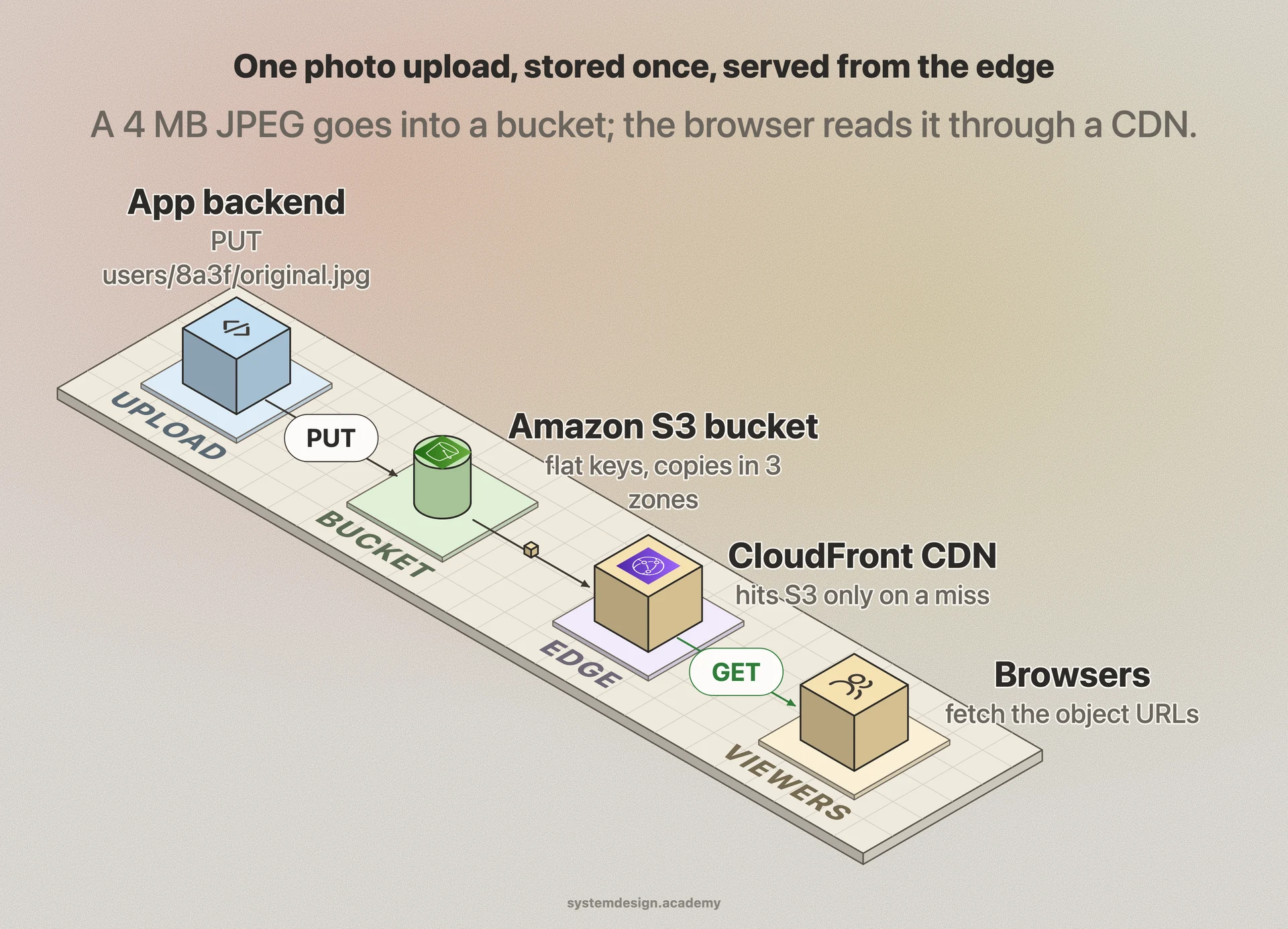
When to use it and the trade-offs
Reach for object storage when data is large, read more than written, and rarely edited in place: media files, user uploads, static website assets, data lake tables in Parquet, machine learning training sets, database backups, and log archives. It is the cheapest durable home for cold data, often a few cents per gigabyte per month, dropping below one cent for archive tiers like S3 Glacier.
Do not use it as a database or as a live file share. There is no rename, no partial write, no record locking, and listing a bucket with millions of keys is slow and paginated. If your app needs low-latency random reads and writes inside a file, a POSIX file system or block volume is the right tool. If you need transactions and queries, use a real database and keep only the large blobs in object storage.
The other practical trade-offs are request cost and small-object overhead. You pay per request as well as per gigabyte, so an app that does millions of tiny GETs can run up a surprising bill. Many objects also carry per-object metadata overhead, so storing billions of 1 KB files is inefficient. The common fix is to batch small records into larger objects and put a CDN in front of frequently read ones.
A concrete example
Picture a photo-sharing app. A user uploads a 4 MB JPEG. Your backend does a single PUT to a bucket with a key like users/8a3f/original.jpg, attaching metadata such as content-type image/jpeg and a tag tier=hot. The object is immediately redundant across three Availability Zones.
A background job reads that object, generates a 200 KB thumbnail, and PUTs it as users/8a3f/thumb.jpg. When the feed loads, your app does not stream bytes through its own servers. It returns the object URLs, and the browser fetches them directly, usually through a CDN like CloudFront caching the bucket so the actual object store is only hit on a cache miss.
Months later a lifecycle rule notices the original has not been read in 90 days and automatically transitions it to a cheaper infrequent-access or archive tier, cutting its storage cost by half or more with zero code changes. That whole pattern, durable origin plus CDN edge plus automatic tiering, is the standard way large products serve user content at scale.
Where it is used in production
Amazon S3
The defining object store, holding hundreds of trillions of objects and serving as the origin for data lakes, backups, and static sites with eleven nines of durability.
Cloudflare R2
S3-compatible object storage with no egress fees, often used to serve images and assets to a global CDN cheaply.
MinIO
Open-source, S3-compatible object server companies self-host on their own hardware for on-prem data lakes and AI training storage.
Netflix
Stores its encoded video files and pre-computed assets as objects in S3, then pushes them to its Open Connect edge appliances for streaming.
Frequently asked questions
- What is the difference between object storage and a file system?
- A file system has folders and lets you edit part of a file in place, addressed by a path. Object storage has a flat namespace, addresses each object by a unique key over HTTP, and treats every object as immutable, so a change means re-uploading the whole object. That immutability is what lets it scale to billions of objects.
- Is S3 object storage or block storage?
- S3 is object storage. It stores whole objects you read and write over an HTTP API with PUT and GET. Amazon EBS is the block storage product, giving you raw volumes you attach to an EC2 instance and format like a disk.
- Why can't I just use object storage as a database?
- It has no record-level locking, no partial updates, no transactions, and slow listing across many keys, plus first-byte latency in the tens to hundreds of milliseconds. Those make it wrong for transactional or low-latency random access. Keep the database for queries and put only the large blobs in object storage.
- How does object storage get such high durability?
- It never relies on one disk. Each object is split and spread across many drives, servers, and usually multiple data centers using replication or erasure coding. Erasure coding can rebuild an object from a subset of its fragments, so several simultaneous hardware failures still lose nothing, which is how S3 reaches eleven nines.
- What does the metadata in an object actually do?
- Metadata describes the object without you opening it: content type, size, creation time, and custom tags like owner, retention class, or environment. Systems use it to drive behavior such as lifecycle rules that move cold objects to cheaper tiers, access policies, and search or cataloging in data lakes.
Learn Object Storage hands-on
This page explains the idea. The full lesson lets you step through the ring as servers join and leave, read the implementation, and check yourself with a quiz. It is one of 760+ lessons in the System Design Masterclass, from your first API call to distributed consensus. Eleven Foundation lessons are free, no signup. Lifetime access is ₹499 in India or $7.99 worldwide, one payment, no subscription.
See also
Related glossary terms you might want to look up next.
CDN
A network of servers distributed globally that caches content close to users. Netflix uses CDNs to stream video from servers near you, not from one central location.
Database
An organized collection of data that can be easily accessed, managed, and updated. The backbone of almost every application.
Data Lake
A centralized repository that stores raw data at any scale in its native format. Unlike a data warehouse, data doesn't need to be structured or cleaned before loading.
Redis
An in-memory data store used as a cache, message broker, and database. Blazing fast because everything lives in RAM.
Memcached
A simple, high-performance distributed memory caching system. Stores key-value pairs in RAM. Simpler than Redis but less feature-rich.
Document Database
A NoSQL database that stores data as flexible JSON-like documents. MongoDB and CouchDB let each document have a different structure.