Service Worker
A script the browser runs in the background, separate from the web page. Enables offline caching, push notifications, and background sync for progressive web apps.
What is Service Worker?
In short
A service worker is a JavaScript file the browser runs in the background on its own thread, separate from the web page, acting as a programmable network proxy that sits between the page and the network. It lets a site intercept requests, serve cached responses for offline use, receive push notifications, and run background sync even when no tab is open.
What it is
A service worker is a script that the browser registers for a website and then runs separately from any page. It has no access to the DOM and cannot touch the page directly. Instead it listens for events: network fetches, push messages, sync triggers, and lifecycle events like install and activate.
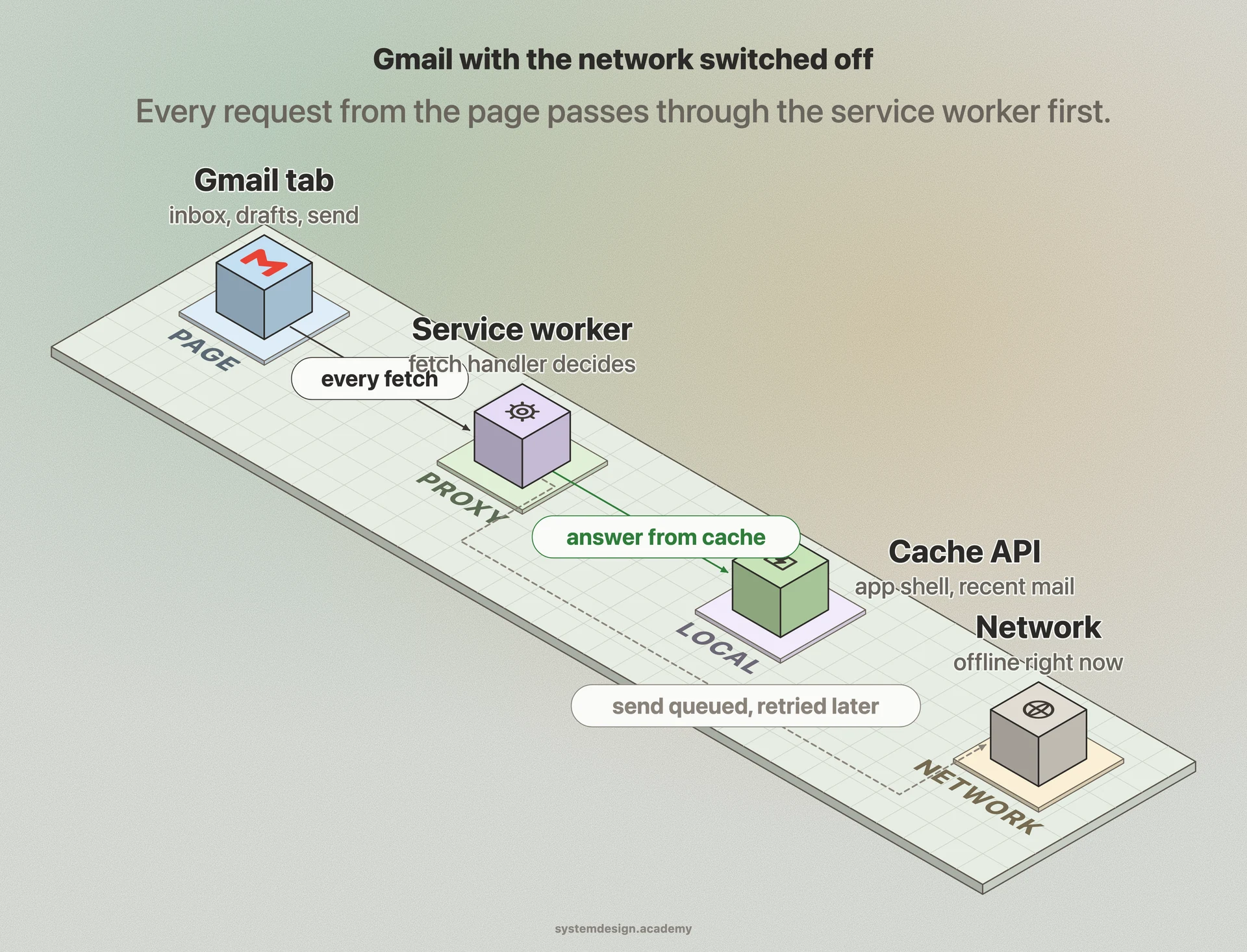
The defining feature is that it acts as a proxy for outgoing network requests from pages under its scope. Once registered and active, every fetch the page makes (HTML, CSS, images, API calls) passes through the service worker's fetch event handler first. The handler decides whether to answer from a cache, go to the network, or build a response on the fly.
Service workers only run over HTTPS (localhost is exempted for development). That requirement exists because a script that can rewrite every response on a site would be a serious attack vector over plain HTTP. They are the technical foundation of Progressive Web Apps, the thing that lets a website install to a home screen and work offline like a native app.
How it works under the hood
A service worker goes through a strict lifecycle. The page calls navigator.serviceWorker.register with the script URL. The browser downloads it and fires the install event, where you typically open a cache and store the core files the app needs to boot. After install it enters a waiting state until all tabs controlled by the old version close, then fires activate, where you clean up old caches. Only after activation does it start controlling pages.
The scope rule matters. A worker at /app/sw.js can only control pages under /app/. Most sites serve the worker from the root so it controls everything. A page that loaded before the worker activated is not controlled until the next navigation, unless the worker calls clients.claim.
Inside the fetch handler you implement a caching strategy. Common ones are cache-first (check the cache, fall back to network, good for static assets), network-first (try the network, fall back to cache, good for fresh API data), and stale-while-revalidate (serve the cache immediately and update it in the background). Storage uses the Cache API for responses and IndexedDB for structured data. The worker is event-driven and gets killed when idle, so it cannot hold long-lived in-memory state.
When to use it and the trade-offs
Reach for a service worker when offline support, instant repeat loads, push notifications, or background sync genuinely improve the product. News apps, email clients, maps, and document editors all benefit. If a site is a simple static page that loads fine from the CDN, a service worker adds complexity for little gain.
The biggest trap is caching the worker or its assets too aggressively and shipping a stale version that users cannot escape. A bad service worker can serve old broken code to returning visitors for as long as the cache lives. Always version your caches, clean up old ones on activate, and set the worker script itself to a short or no-cache HTTP header so updates are picked up.
Debugging is harder than normal page code because the worker runs in its own context and outlives the page. The waiting-and-activation lifecycle confuses people the first time. Use the Application panel in Chrome DevTools to inspect registration, caches, and force updates. Build tools like Workbox generate the routing and lifecycle boilerplate so you write strategies instead of raw event plumbing.
A concrete real-world example
Open Gmail in Chrome, load your inbox, then turn off your network. The interface still opens and you can read recent mail and draft replies. That is the service worker serving the app shell and cached messages from the Cache API and IndexedDB. When you hit send while offline, a background sync registration queues the request and the worker retries it once the connection returns.
Twitter built one of the first large PWAs on this model. Twitter Lite uses a service worker to cache the app shell so repeat visits render almost instantly even on slow 2G connections in markets with poor connectivity, and to deliver web push notifications without a native app installed.
The same pattern powers the push notification you get from a web app you never installed. The push event wakes the service worker, which calls registration.showNotification, and a click on it fires a notificationclick event that focuses or opens the right tab.
Where it is used in production
Gmail
Uses a service worker for offline inbox access, app-shell caching for fast loads, and background sync to queue actions taken while offline.
Twitter Lite
Pioneered the PWA model, caching the app shell with a service worker for near-instant repeat loads on slow networks and delivering web push notifications.
Google Workbox
Google's open-source library that generates service worker routing and caching strategies so teams skip the raw lifecycle boilerplate.
Cloudflare
Cloudflare Workers borrow the same service worker event model and API surface to run code at the edge instead of in the browser.
Frequently asked questions
- What is the difference between a service worker and a web worker?
- A web worker runs general background JavaScript off the main thread to keep the UI responsive, and it lives only as long as the page. A service worker is a specialized worker that acts as a network proxy, persists across page loads and even when no tab is open, and powers offline caching, push, and background sync. Every service worker is a kind of worker, but not every worker is a service worker.
- Why does my service worker need HTTPS?
- Because a service worker can intercept and rewrite every network response for a site, running one over plain HTTP would let a network attacker hijack the whole origin. Browsers require HTTPS so the script cannot be tampered with in transit. The one exception is localhost, which is allowed without TLS so you can develop locally.
- Why are users seeing an old version of my site after I deploy?
- A new service worker installs but stays in a waiting state until every tab controlled by the old one closes, so returning visitors keep getting the cached old version. Fix it by versioning your caches and deleting old ones in the activate event, serving the sw.js file with a no-cache or short cache header, and calling skipWaiting and clients.claim when you want the new worker to take over immediately.
- Can a service worker access the DOM?
- No. It runs on a separate thread with no reference to window or document. To change the page, the worker communicates with controlled pages through postMessage or the Clients API, and the page-side code makes the DOM updates.
- What are the main caching strategies in a service worker?
- The common ones are cache-first (serve from cache, fall back to network) for static assets, network-first (try network, fall back to cache) for fresh data, and stale-while-revalidate (serve cache instantly while fetching an update in the background) for content that can be slightly stale. You pick per request type inside the fetch event handler.
Learn Service Worker hands-on
This page explains the idea. The full lesson lets you step through the ring as servers join and leave, read the implementation, and check yourself with a quiz. It is one of 760+ lessons in the System Design Masterclass, from your first API call to distributed consensus. Eleven Foundation lessons are free, no signup. Lifetime access is ₹499 in India or $7.99 worldwide, one payment, no subscription.
Related lessons
Lessons that touch on Service Worker as part of a larger topic.
See also
Related glossary terms you might want to look up next.
Caching
Storing frequently accessed data in a faster storage layer so you don't have to fetch it from the original (slower) source every time.
HTTP Caching
Browser and proxy caching controlled by HTTP headers like Cache-Control, ETag, and Last-Modified. Eliminates redundant network requests for unchanged resources.
CDN
A network of servers distributed globally that caches content close to users. Netflix uses CDNs to stream video from servers near you, not from one central location.
Content Delivery
The process of distributing and serving content to users from locations geographically close to them for faster load times.
Edge Computing
Running computation at the network edge, close to the user, instead of in a central data center. Reduces latency for real-time applications like IoT and streaming.
Static Site Generation (SSG)
Pre-rendering pages to static HTML at build time. The fastest possible page loads because there's no server-side computation on each request.