TTL
Time To Live: how long a cached entry, DNS record, or packet is valid before it expires and must be refreshed or discarded.
What is TTL?
In short
TTL (Time To Live) is a value that says how long a piece of data stays valid before it must be discarded or refreshed. It shows up on cache entries, DNS records, and network packets, and once the clock runs out the data is treated as stale and is either deleted, re-fetched, or dropped.
What TTL Actually Is
TTL stands for Time To Live. It is a number attached to a piece of data that answers one question: how much longer is this allowed to exist or be trusted? When the timer hits zero, the system stops treating the data as fresh.
The same idea shows up in three very different places. On a cache entry it means how long you can serve the cached copy before you have to go back to the source. On a DNS record it means how long a resolver may remember an IP address before asking the authoritative server again. On an IP packet it is a hop counter that drops by one at every router so a lost packet cannot loop forever.
What matters is that TTL is a promise about freshness, not a guarantee about correctness. A 300 second TTL on a cache says the data could be up to 300 seconds out of date. You are trading a window of staleness for fewer reads against the slow, authoritative source.
How It Works Under the Hood
In a cache like Redis or Memcached, you set TTL when you write a key, for example SET session:abc value EX 3600 stores it for 3600 seconds. Each key gets an expiry timestamp. Redis uses lazy expiration plus a background sampler: a key is removed when you try to read it after expiry, and a periodic job also samples random keys to clean them up so memory does not fill with dead entries.
In DNS the TTL is part of the record itself and travels with the answer. If example.com returns an A record with a TTL of 3600, every resolver and operating system along the path may cache that IP for one hour. Lowering the TTL to 60 before a planned IP change makes the switch propagate in about a minute instead of an hour, which is why teams drop DNS TTL ahead of a migration.
In an IP packet the field is different. IPv4 calls it TTL and IPv6 calls it Hop Limit. It starts at a value like 64 and every router that forwards the packet subtracts one. When it reaches zero the router drops the packet and sends back an ICMP Time Exceeded message. The traceroute tool exploits this by sending packets with TTL 1, 2, 3 and reading the error from each hop to map the route.
When To Use It and the Trade-offs
Pick a short TTL when data changes often and stale answers hurt, like inventory counts or live prices. Pick a long TTL when data rarely changes and you want to spare the origin, like a product description or a logo image. A TTL of zero or none means cache forever, which is fine for immutable content with a version in the URL.
The core trade-off is freshness against load. Short TTLs keep data accurate but push more traffic at the backend on every expiry, and a thundering herd can hit when many entries expire at once. Long TTLs cut backend load and latency but let users see old data for longer, and they make invalidation slower because you cannot un-cache something that is already on a remote resolver or browser.
A common pattern is to combine TTL with explicit invalidation. Set a generous TTL as a safety net, then actively purge or update the entry when you know the source changed. Many teams also add a small random jitter to TTLs so a batch of keys does not all expire on the same second.
A Concrete Example
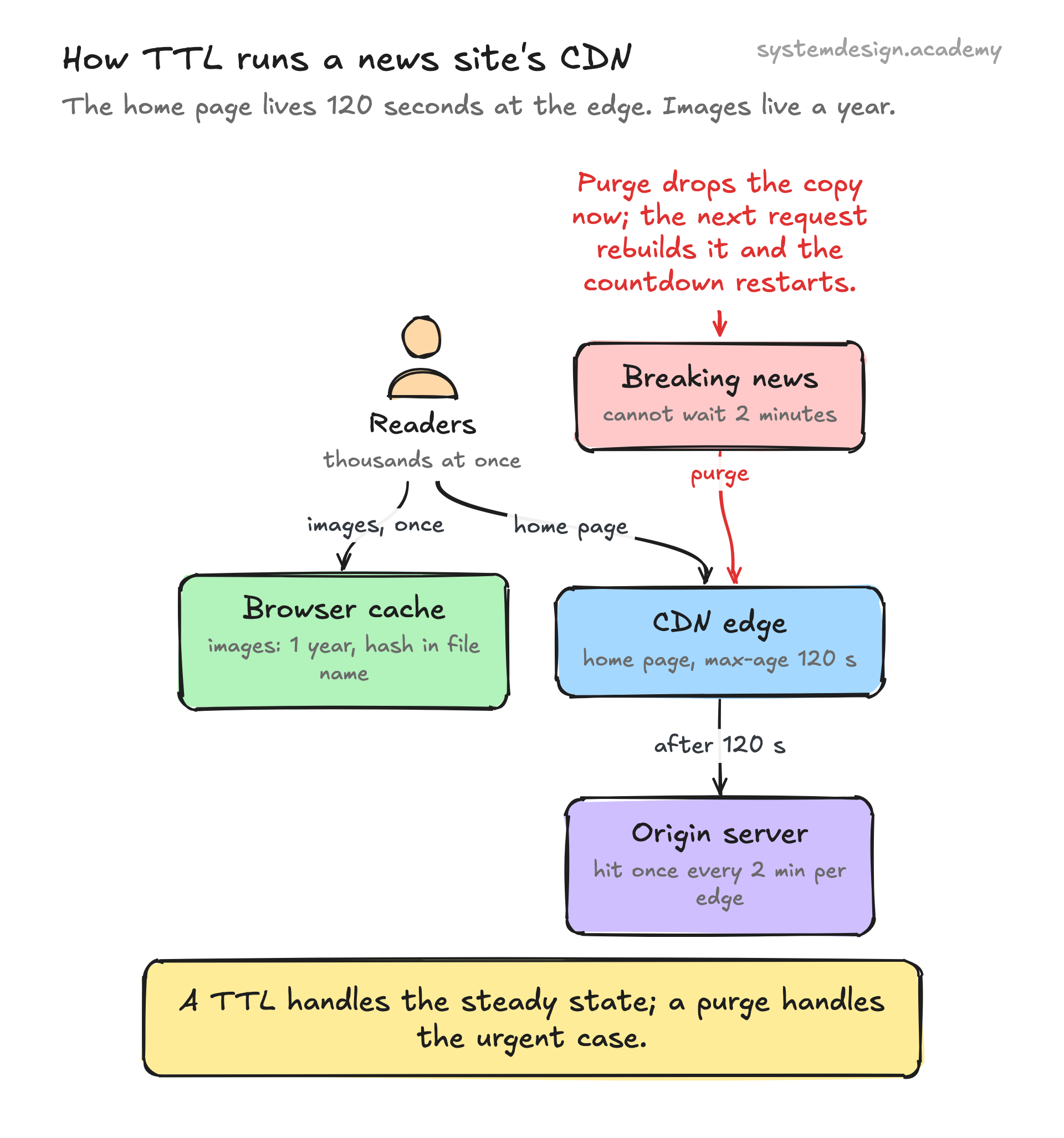
Say you run a news site behind a CDN. The home page changes every few minutes, so you set a Cache-Control max-age of 120 seconds. The CDN serves the cached page to thousands of readers and only hits your origin server once every two minutes per edge location, which is the entire reason the site survives a traffic spike.
Article images never change once published, so you give them a max-age of 31536000 (one year) and put a content hash in the filename. A reader downloads each image once and the browser reuses it for a year with no further requests.
When you publish breaking news you do not want to wait two minutes, so you send a purge request to the CDN for the home page. That removes the cached copy immediately, the next request rebuilds it from origin, and the TTL countdown starts fresh. TTL handles the steady state and manual invalidation handles the urgent case.
Where it is used in production
Redis
Per-key expiry via EX, PX, or EXPIRE; lazy plus sampled background eviction removes keys once their TTL passes.
Cloudflare
Edge caches honor origin Cache-Control TTLs and expose Edge Cache TTL rules, with one-click purge for early invalidation.
AWS DynamoDB
A TTL attribute on an item lets DynamoDB auto-delete expired rows in the background at no extra cost, common for sessions and events.
AWS Route 53
DNS records carry a TTL that controls how long resolvers cache the answer; operators lower it before IP or failover changes.
Frequently asked questions
- What happens when a TTL reaches zero?
- The data is treated as stale. A cache entry gets deleted or re-fetched from the source, a DNS resolver asks the authoritative server again, and an IP packet is dropped by the router that decremented it to zero.
- What is a good TTL value for DNS?
- It depends on how often the record changes. A stable record can use 3600 seconds (one hour) or more to reduce lookups. Before a planned IP change, drop it to 60 to 300 seconds so the change propagates quickly, then raise it again afterward.
- Does a longer TTL improve performance?
- Usually yes, because more requests are served from cache and the origin sees less load. The cost is that users may see data that is out of date for longer, and invalidating something already cached far away becomes slower.
- Is TTL the same in caching and in networking?
- The concept of an expiry is the same, but the mechanism differs. In caching and DNS it is a time duration in seconds. In an IP packet it is a hop counter that each router decrements by one, not a clock.
- How do I set a TTL in Redis?
- Set it at write time with SET key value EX 3600 for 3600 seconds, or add it later with EXPIRE key 3600. Use PERSIST to remove the expiry and keep the key forever, and TTL key to check the remaining time.
Learn TTL hands-on
This page explains the idea. The full lesson lets you step through the ring as servers join and leave, read the implementation, and check yourself with a quiz. It is one of 760+ lessons in the System Design Masterclass, from your first API call to distributed consensus. Eleven Foundation lessons are free, no signup. Lifetime access is ₹499 in India or $7.99 worldwide, one payment, no subscription.
Related lessons
Lessons that touch on TTL as part of a larger topic.
Time-to-Live (TTL)
The expiration timer that keeps cached data from going stale forever
foundation · caching strategies
Message Expiration
Messages that self-destruct, setting time limits on message relevance
intermediate · messaging event systems
Bottleneck Identification
Find the constraint limiting system performance, profiling, tracing, and load testing
advanced · reliability resilience
Throttling
Slow down instead of shut down, degrade gracefully when your system is under pressure
intermediate · api design protocols
Rate Limiting
Protect your API from abuse and overload by controlling how many requests each consumer can make
intermediate · api design protocols
See also
Related glossary terms you might want to look up next.
Caching
Storing frequently accessed data in a faster storage layer so you don't have to fetch it from the original (slower) source every time.
CDN
A network of servers distributed globally that caches content close to users. Netflix uses CDNs to stream video from servers near you, not from one central location.
DNS
The phonebook of the internet. Translates human-readable domain names (google.com) into IP addresses that computers understand.
Cache Eviction
The process of removing entries from a cache when it's full. Common policies: LRU (least recently used), LFU (least frequently used), FIFO (first in, first out).
Cache-Aside
A caching pattern where the application checks the cache first; on a miss, it fetches from the database and populates the cache. Also called lazy loading.
Write-Through Cache
A caching pattern where every write goes to both the cache and the database simultaneously. Ensures consistency but adds write latency.