UDP
User Datagram Protocol: a connectionless transport protocol that trades reliability for speed. No handshake, no ordering, no retransmission. Used for video streaming and gaming.
What is UDP?
In short
UDP (User Datagram Protocol) is a connectionless transport protocol that sends data as independent packets called datagrams with no handshake, no acknowledgments, no ordering, and no retransmission. It trades reliability for low latency and is used for DNS, video streaming, voice calls, and online gaming.
What UDP Is
UDP is one of the two main transport protocols on the internet, sitting alongside TCP on top of IP. It was defined in 1980 in RFC 768 and has barely changed since. Its job is to carry application data from one machine to another, and it does the absolute minimum needed to do that.
A unit of UDP data is called a datagram. Each datagram is self-contained: it carries a source port, a destination port, a length, and a checksum, and then the payload. That header is only 8 bytes. TCP's header, by comparison, is 20 bytes or more. There is no concept of a connection. The sender fires a datagram at an address and port and moves on without waiting for anything back.
Because there is no connection state, UDP gives you no guarantees. Datagrams can arrive out of order, arrive twice, or never arrive at all. The protocol will not notice and will not fix it. If your application cares about any of that, your application code has to handle it.
How It Works Under the Hood
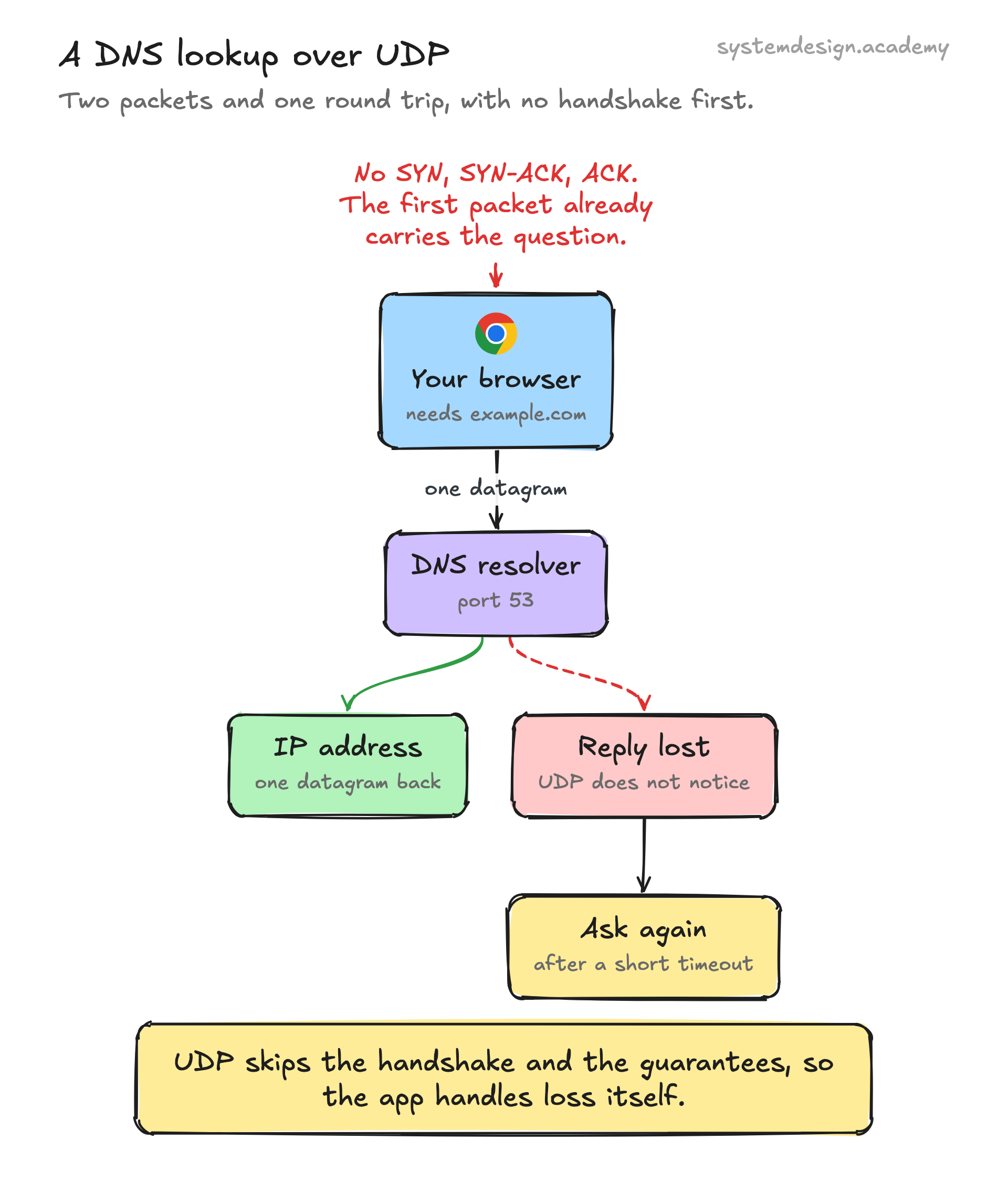
When an application calls send on a UDP socket, the operating system wraps the data in an 8-byte UDP header, hands it to the IP layer, and the packet goes out on the wire. There is no SYN/SYN-ACK/ACK handshake like TCP does before sending data, so the very first packet already carries real payload. This is why a DNS lookup over UDP can complete in a single round trip.
The receiver's OS looks at the destination port to figure out which socket should get the datagram, verifies the checksum, and delivers the payload to whatever process is listening. If the checksum fails, the datagram is silently dropped. There is no signal sent back to the sender about loss, duplication, or reordering.
UDP also does not do flow control or congestion control. TCP slows down when the network is congested or when the receiver is overwhelmed. UDP just keeps sending at whatever rate the application chooses, which is great for predictable real-time media but can flood a network if used carelessly. Modern protocols built on UDP, like QUIC, add their own congestion control on top.
One practical limit: a single UDP datagram larger than the network path's MTU (typically around 1500 bytes on Ethernet) gets fragmented at the IP layer, and if any fragment is lost the whole datagram is lost. Most designs keep datagrams under roughly 1400 bytes to avoid fragmentation.
When To Use It And The Trade-offs
Reach for UDP when low latency matters more than perfect delivery, and when your data is naturally broken into small independent messages. Live video, voice over IP, multiplayer game state, telemetry, and DNS queries all fit this shape. In a video call, a packet that arrives 300ms late is useless anyway, so retransmitting it the way TCP would only adds delay and jitter. Dropping it and moving on gives a smoother experience.
The trade-off is that you inherit all the hard problems TCP solves for you. If you need ordering, deduplication, or guaranteed delivery, you have to build it in your application or use a higher-level protocol. Many real systems use a hybrid: send the bulk media over UDP for speed, but send a small reliable control channel that re-requests only the packets that actually matter.
Avoid UDP for things like file transfers, database queries, web pages, and API calls, where a single missing byte corrupts the result. Those are exactly what TCP is built for. A useful rule of thumb: if losing a message is acceptable or even preferable to delaying everything behind it, UDP fits.
A Concrete Real-World Example
DNS is the classic case. When your browser needs the IP address for example.com, it sends a small UDP datagram to a DNS resolver on port 53 and waits for one datagram back. The whole exchange is two packets and one round trip, with no handshake overhead. If the reply never comes, the resolver simply retries after a short timeout. DNS only falls back to TCP for responses too large to fit in a single datagram, such as large zone transfers.
Video conferencing shows the trade-off in action. Zoom, Google Meet, and Microsoft Teams send audio and video as RTP over UDP. When the network drops a packet, the codec conceals the gap by repeating the last frame or interpolating, and the call keeps flowing. Forcing that traffic through TCP would cause the dreaded freeze-then-fast-forward effect because every lost packet would stall the entire stream until it was retransmitted.
Where it is used in production
DNS
Resolvers serve queries over UDP on port 53 in a single round trip, falling back to TCP only for oversized responses.
Zoom and Google Meet
Send real-time audio and video as RTP over UDP so a dropped packet is concealed instead of stalling the whole call.
QUIC and HTTP/3
Google's QUIC runs entirely over UDP and adds its own reliability and congestion control, powering HTTP/3 in Chrome and on Cloudflare.
Online games (Valve Source, Fortnite)
Stream frequent position and state updates over UDP because the newest update matters more than redelivering a stale one.
Frequently asked questions
- What is the main difference between UDP and TCP?
- TCP is connection-oriented and reliable: it does a handshake, guarantees ordered delivery, retransmits lost data, and controls congestion. UDP is connectionless and does none of that. UDP is faster and lower latency, TCP is correct and orderly. Use TCP for files and web pages, UDP for real-time media and DNS.
- Is UDP faster than TCP?
- Yes, in latency terms. UDP skips the handshake so the first packet carries real data, and it never waits to retransmit lost packets or slow down for congestion. That makes it lower latency and lower overhead, but it does not guarantee the data arrives, so the speed comes from doing less work.
- Does UDP guarantee delivery or order?
- No. UDP datagrams can be lost, duplicated, or arrive out of order, and the protocol will not detect or fix any of it. If your application needs reliability or ordering, you must build it yourself or use a protocol like QUIC that layers those features on top of UDP.
- Why does DNS use UDP?
- A DNS query and its reply are small and fit in a single datagram, so UDP completes the lookup in one round trip with no handshake. If a reply is lost, the resolver just retries. DNS only switches to TCP when a response is too large to fit in one datagram.
- What port does UDP use?
- UDP itself does not have one port; it carries a 16-bit source and destination port in every datagram, so values range from 0 to 65535. Specific services pick well-known ports, such as 53 for DNS, 123 for NTP, and 443 for QUIC and HTTP/3.
Learn UDP hands-on
This page explains the idea. The full lesson lets you step through the ring as servers join and leave, read the implementation, and check yourself with a quiz. It is one of 760+ lessons in the System Design Masterclass, from your first API call to distributed consensus. Eleven Foundation lessons are free, no signup. Lifetime access is ₹499 in India or $7.99 worldwide, one payment, no subscription.
Related lessons
Lessons that touch on UDP as part of a larger topic.
UDP
The 'fire and forget' transport protocol that prioritizes speed over reliability
intermediate · cloud infrastructure
HTTP/3 QUIC
The next generation of HTTP, built on UDP with QUIC for zero round-trip connections and true multiplexing
intermediate · api design protocols
StatsD
The simplest metrics protocol, fire-and-forget UDP packets for lightweight application instrumentation
intermediate · observability monitoring
QUIC
The protocol replacing TCP for the modern web, built on UDP with encryption, multiplexing, and zero-RTT built in
intermediate · cloud infrastructure
See also
Related glossary terms you might want to look up next.
TCP
A reliable transport protocol that guarantees data arrives in order and without errors. It uses a three-way handshake to establish connections.
HTTP
The protocol powering the web. A request-response model where clients ask for resources and servers respond. Stateless by design.
Latency
The time delay between sending a request and getting a response. Amazon found every 100ms of extra latency costs 1% in sales.
Throughput
The number of operations a system can handle per unit of time. Think of it as how many cars a highway can move per hour.
Bandwidth
The maximum amount of data that can be transferred over a network in a given time. It's the width of the pipe, not how fast the water flows.
REST API
An architectural style for building APIs using standard HTTP methods (GET, POST, PUT, DELETE). Resources are identified by URLs.