Ten Lines From One Crash
Below is a screen from my laptop. It comes from an active-passive PostgreSQL setup: one main database server, and a second server that keeps a live copy of it. I ran both as real PostgreSQL 17.10 servers in , a tool that runs each program in its own sealed box, called a container. One is called ap-primary and the other ap-standby. A small program kept saving rows into the first one. A row is one record in a table, like one line in a spreadsheet, and the program added each one with INSERT, the command in (the language you use to talk to the database) that adds a row. Then I killed that server on purpose, with no warning, the way a power cut would. Every line after the kill carries two clocks: the time of day, and the seconds since I sent the kill.
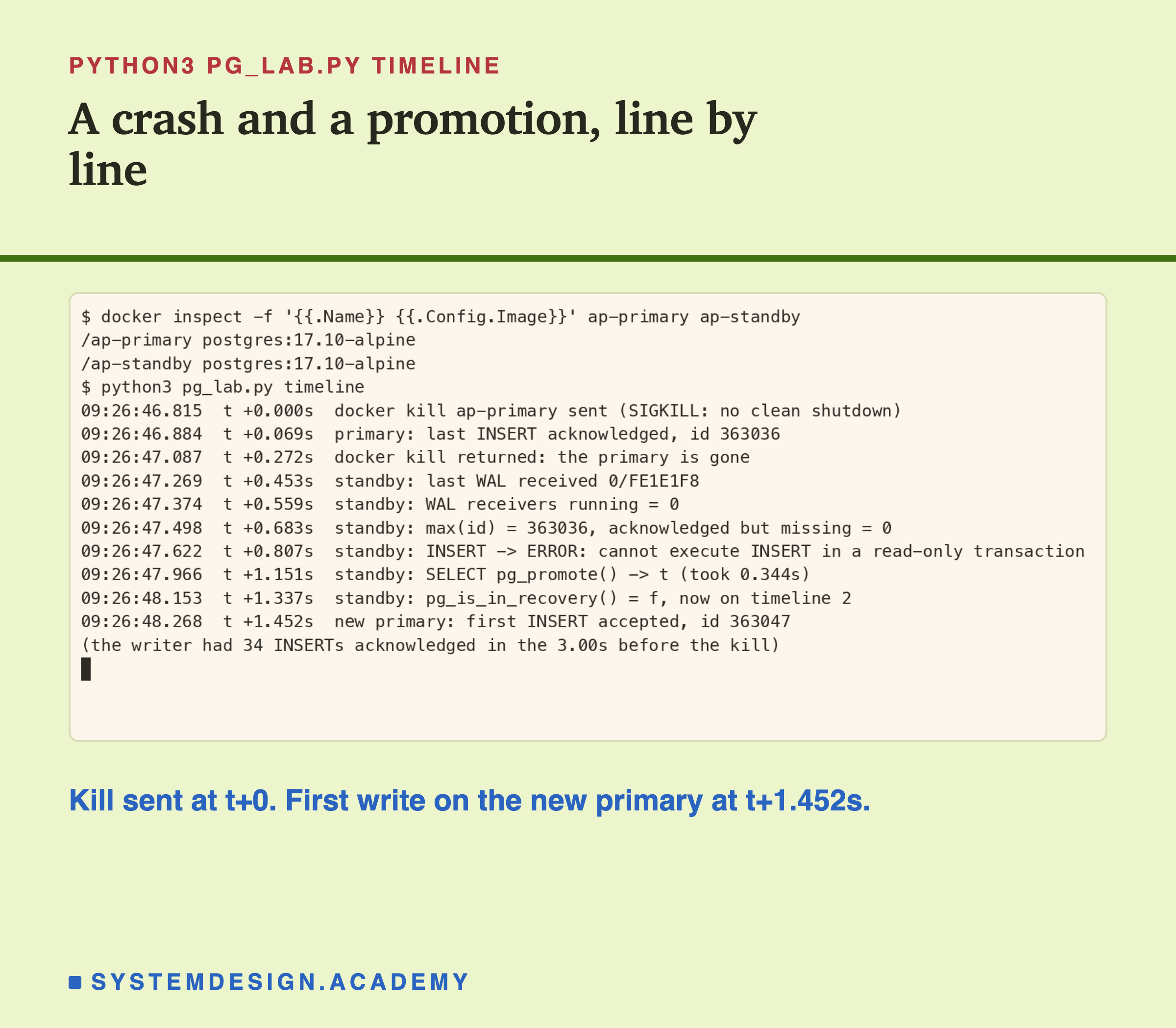
This is not a drawing of a terminal. It is the real recording of the run, and every number I use in this lesson comes from runs like this one.
Two ideas make these lines readable. First, PostgreSQL writes every change into a log before it does anything else, like a shop owner who writes each sale in a notebook before touching the till. That log is called the write-ahead log, or WAL. Second, the second server copies that log as it is written and repeats every change on its own copy of the data. While a server is doing that copying, it is said to be in recovery, and a server in recovery is not allowed to change anything by itself. I come back to both ideas in detail in the next slide.
Now let me read the screen with you, line by line.
t+0.000s, the kill. docker kill sends the signal SIGKILL, which stops a program at once. The database gets no chance to tidy up. This is as close as I can get to someone pulling the power cable.
t+0.069s, the last saved row. My program had one more save confirmed by the server, row number 363036, in the short moment before the kill landed. Remember that number.
t+0.272s, the server is gone. Docker reports the container as stopped. From here on, only the second server is alive.
t+0.453s, the last piece of log the second server received. 0/FE1E1F8 is a position in the WAL. I will explain these positions properly later. For now, read it as "the second server had the log up to this point".
t+0.559s, nothing is feeding it any more. The part of the second server that pulls the log, the WAL receiver, has stopped, because the server it pulled from is gone.
t+0.683s, nothing was lost. The second server's highest row number is 363036, the same as the last row the first server confirmed. Zero confirmed rows are missing. Keep this line in mind, because in a later run the answer is not zero.
t+0.807s, it refuses to save. I asked the second server to insert a row, and it said cannot execute INSERT in a read-only transaction. A transaction is one unit of work that the database either finishes completely or not at all, and read-only means it may look but not change. The second server had all the data, but it would not change any of it, because it was still in recovery.
t+1.151s, promotion. I called SELECT pg_promote() (SELECT is the SQL word for asking a question, and here it runs a function), the PostgreSQL function that tells a copying server to stop copying and become the main server. Engineers call that step promotion. It returned t, which means true, and the call itself took 0.344 seconds.
t+1.337s, a new life. The server now says it is no longer in recovery (f, false), so it may change data. It also says it is on timeline 2, a word I explain in the promotion slide.
t+1.452s, the first new save. The promoted server accepted a write. It gave the row number 363047, not 363037. Ten numbers were skipped, and that is normal, as you will see.
So, in under a second and a half, one server died and the other one took over its job. That arrangement has a name. One server, the active one, takes every write. A second server, the passive one, keeps a full copy and waits, ready to take over. This is an active-passive setup. In PostgreSQL the active server is called the primary and the passive one is called the standby, and I will use those two words from now on.
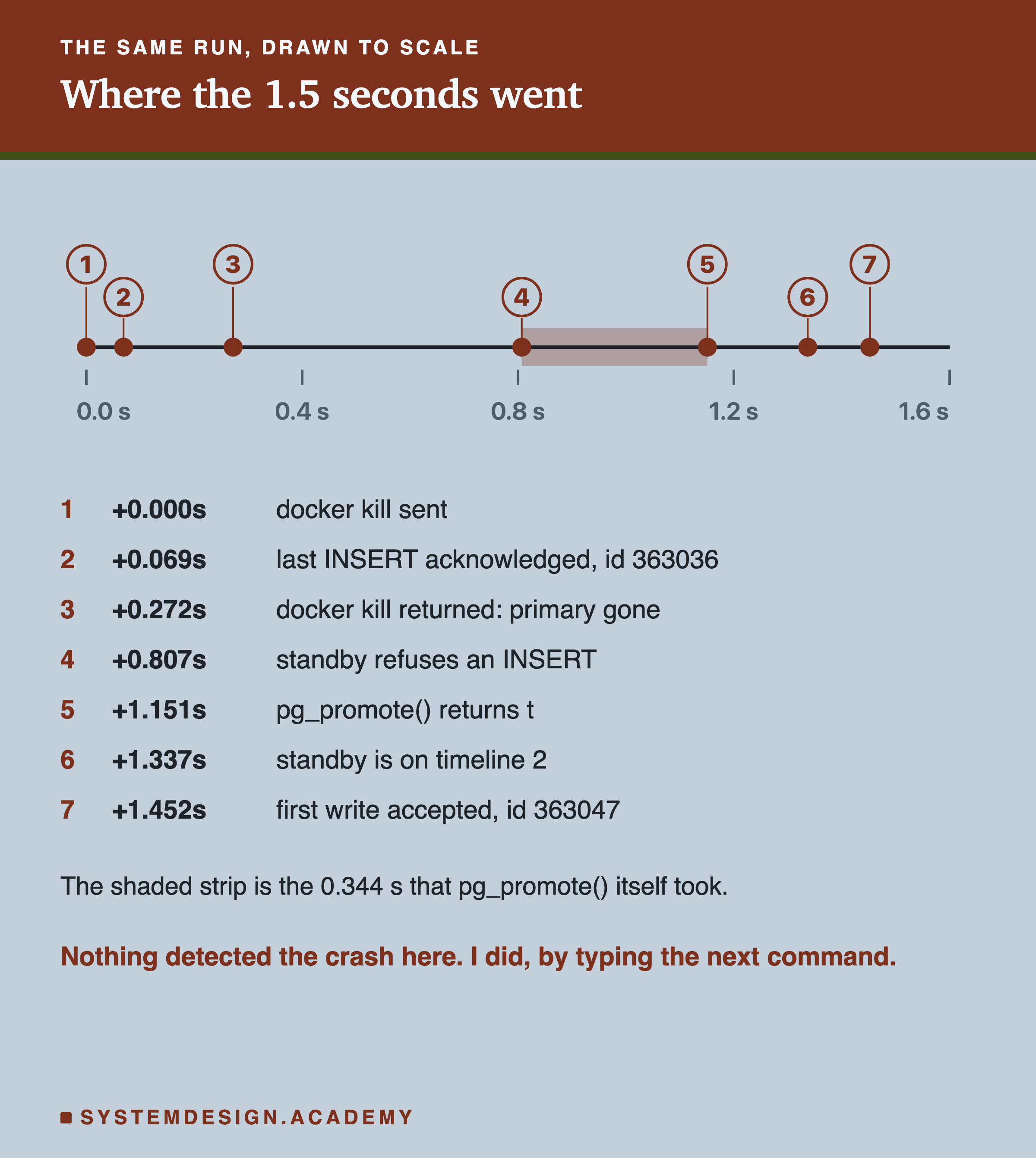
Most of the gap between dots 3 and 5 is my own script asking questions. In a real system, the time to notice the crash is usually much longer than the promotion itself.
One honest warning about this timeline. Nothing in it noticed the crash. My script killed the server and then simply ran the next command. In real life, something has to notice that the primary is dead before anyone calls pg_promote(), and that noticing usually takes far longer than 1.5 seconds. Noticing the failure, switching over to the standby (a step called failover) and moving traffic are the subject of my lesson on active-passive failover. This lesson is about the part before that: how the pair is configured so that a promotion like this one is safe, fast and loses nothing you care about.