The Logo That Was a 500KB JPEG
A company logo, three flat colors and text, was saved as a JPEG at maximum quality. The result: 500KB, visible compression artifacts around the text edges, blurry on Retina displays. Converting it to SVG: 4KB, razor sharp at any size, any resolution, any display. A 125x reduction in file size with better visual quality.
This happens constantly in production. A screenshot saved as JPEG (artifacts on sharp text). A photo saved as PNG (3x the file size for zero visual benefit). Icons as individual PNGs instead of SVG sprites (50 requests instead of 1).
Every image format encodes visual information differently. Matching the format to the content type is one of the easiest wins in web performance, and getting it wrong costs real and real money.
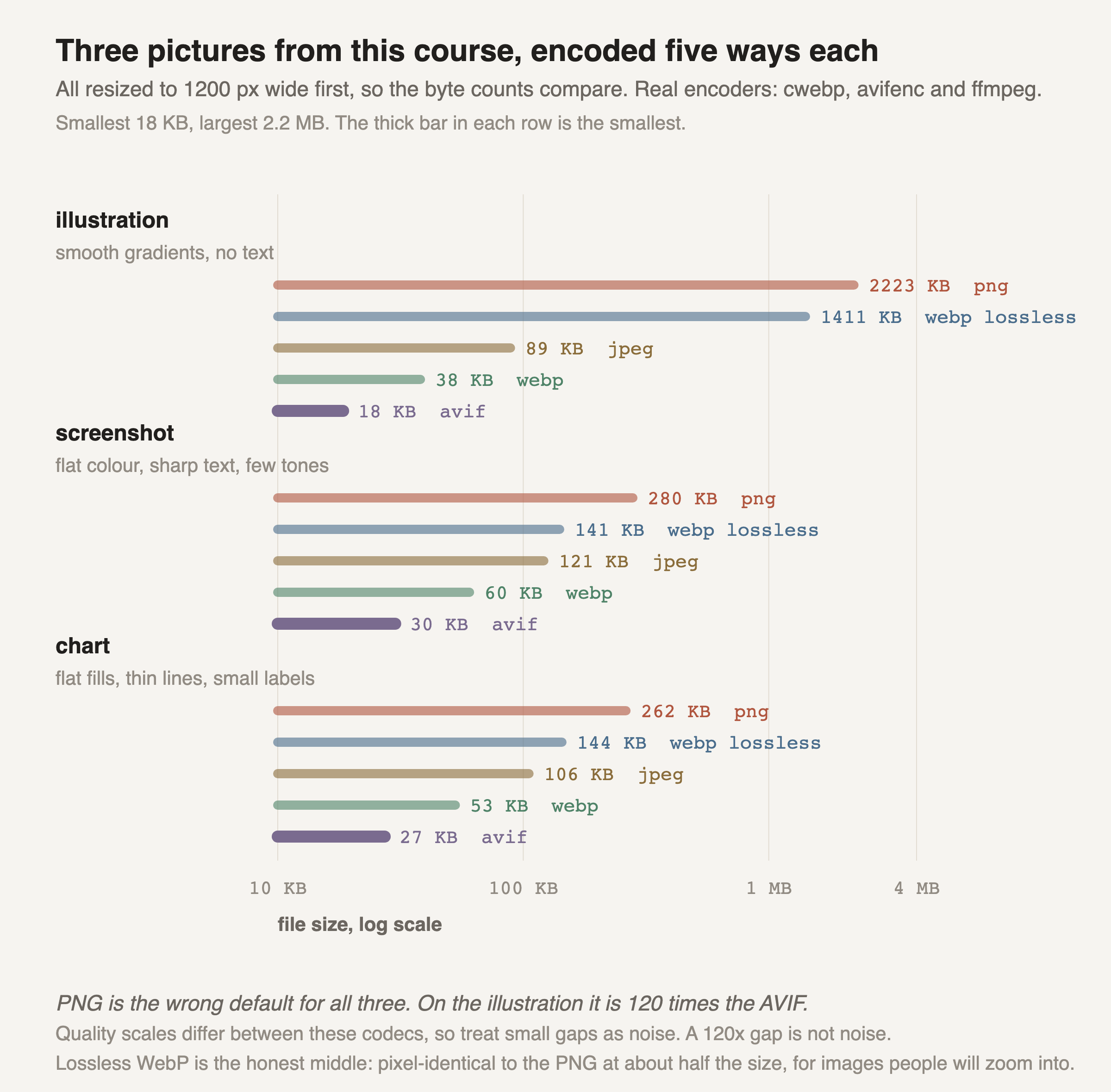
The logo story above is the extreme case. These are three ordinary images out of this course, encoded five ways each, and weighed.
PNG loses every row and it loses badly. On the illustration it is 2.2 MB against AVIF's 18 KB, which is 120 times bigger for a picture nobody would look at twice. PNG is still what screenshot tools, design exports and most build pipelines hand you by default.
I expected the ranking to flip on the two text-heavy images, and it did not. AVIF came out smallest on the terminal capture and the chart too. I decoded the AVIF back and looked at the glyph edges next to the original, and at normal viewing size I could not tell them apart. So the usual rule of thumb, "lossy formats wreck text, keep screenshots as PNG", did not survive being checked here.
Lossless WebP is the answer when a pixel really must not change: something a reader will zoom into, a screenshot going into a legal record, a diagram that will be re-cropped later. It is pixel-identical to the PNG and about half the size, so there is no reason to ship the PNG instead.
Treat small gaps in this chart as noise. The quality scale of JPEG is not the quality scale of WebP and neither is AVIF's, so a 20 percent difference between two lossy formats means little. A 120 times difference is not a scale artefact, and it is the one worth acting on.
None of this covers SVG, which is a different kind of thing entirely. A logo is instructions for drawing shapes, not a grid of pixels, so it stays sharp at any size and its size depends on the number of shapes instead of the number of pixels. If the source is vector, keep it vector, and no raster comparison applies.