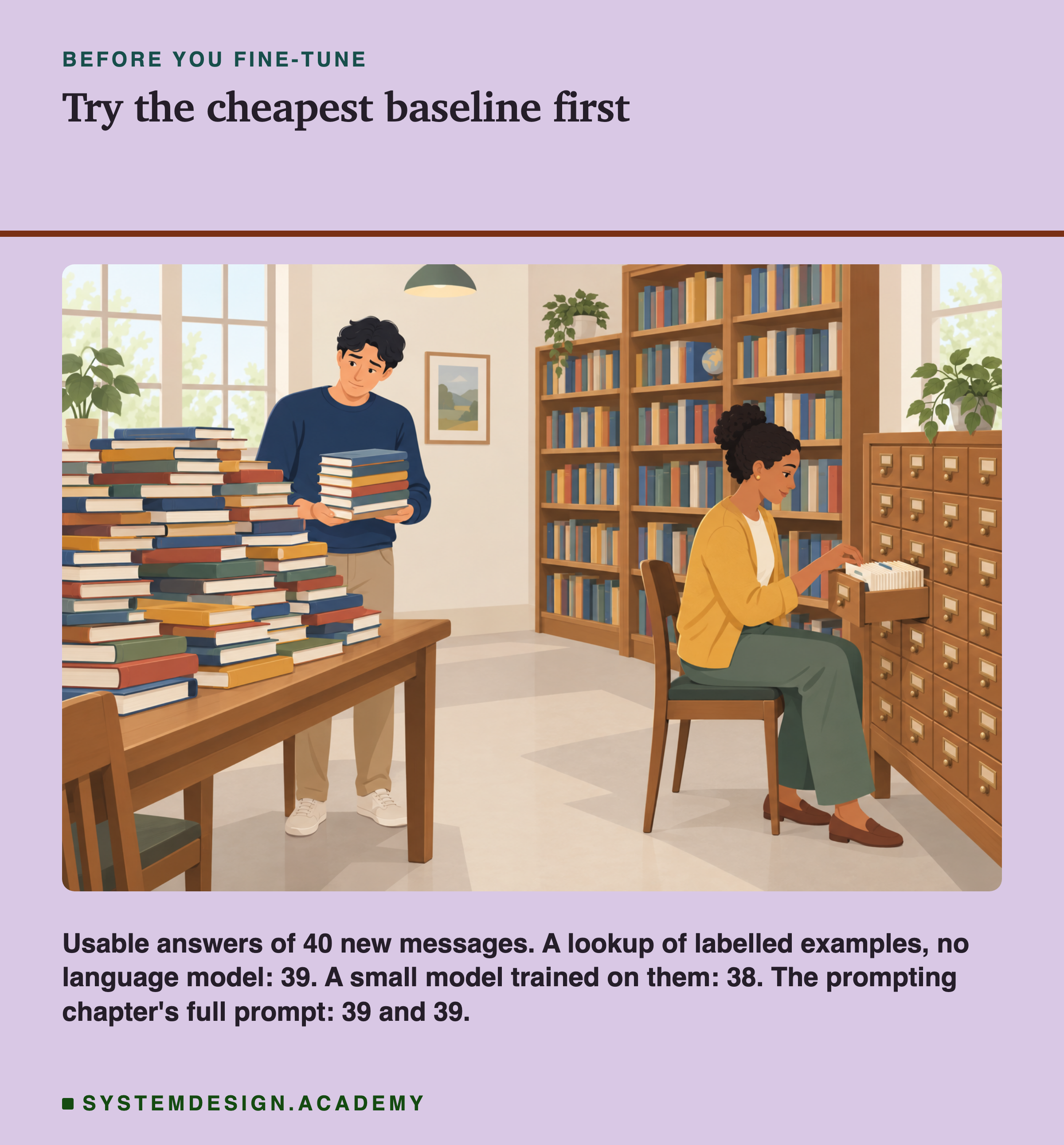
Imagine you start a new job answering letters from customers. Each letter has to go into one of four trays. On your first morning, your manager offers you two ways to learn the job. The first is a training course: two weeks of study, after which you should be able to sort any letter on your own. The second is much simpler. Next to your desk there is a drawer full of cards. Each card holds an old letter and the tray it went into. When a new letter arrives, you find the card with the most similar old letter and put the new letter in the same tray.
The training course sounds more serious. It costs time and money, and at the end you have learned something. The card drawer sounds almost like cheating. But before paying for the course, a sensible manager would ask one question: how well does the drawer already work? If the drawer gets nearly every letter right, the course has very little left to improve. If the drawer fails often, the course has a real job to do.
This chapter is about the training course. In machine learning it is called , and it is often the first thing people reach for when a model does not do what they want. This first lesson does something less exciting on purpose. I trained a small model on labelled examples, and then I tried the card drawer too, on exactly the same test. The drawer did as well as the course. The rest of this lesson shows how I measured that, what it means, and why it changes which task the rest of the chapter uses.
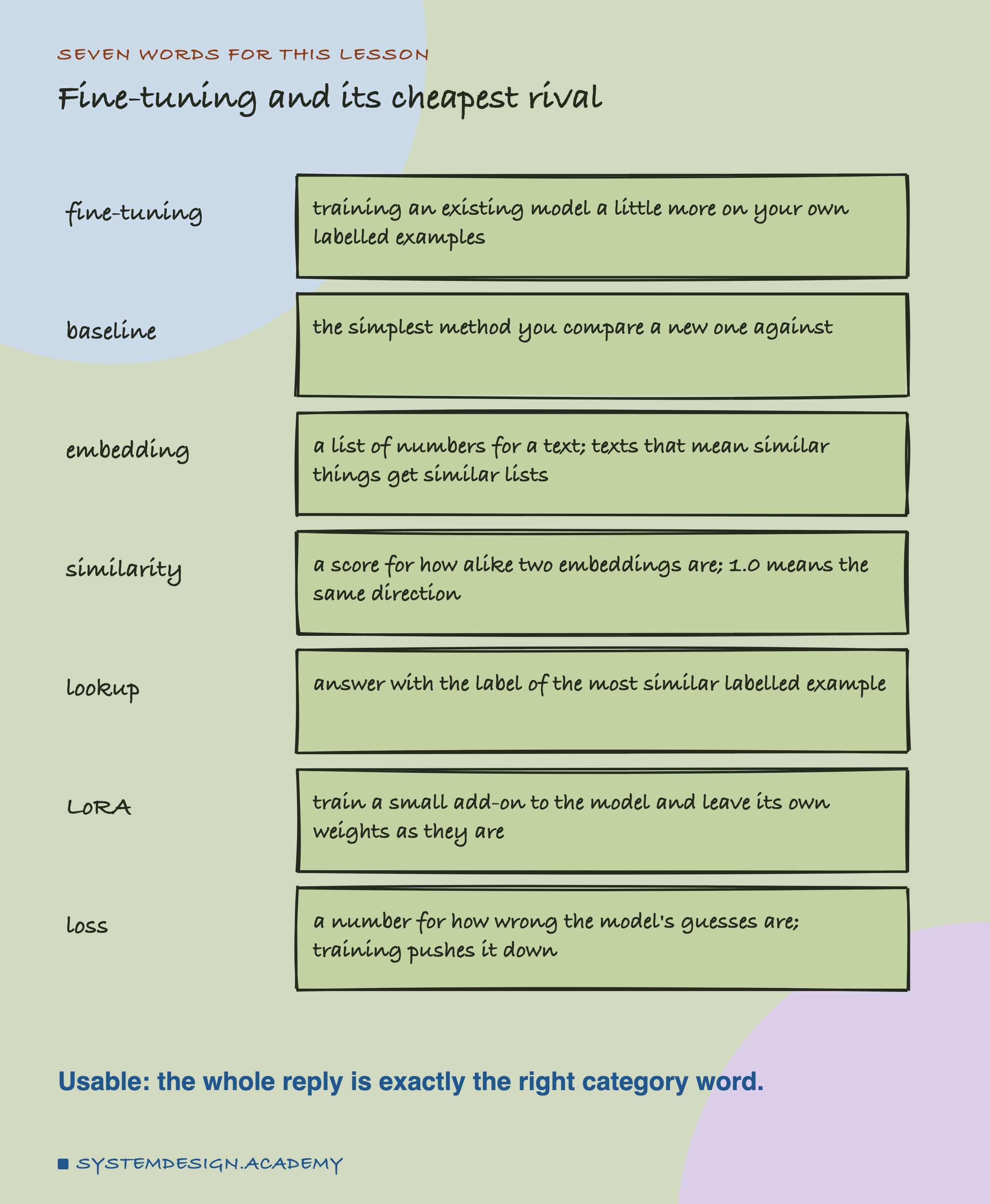
Seven Words for This Lesson
. A language model has already been trained once, by the people who made it, on a huge amount of text. Fine-tuning means training it a little more, on your own examples, so that it gets better at your job. The examples are labelled: each one comes with the answer you want, here the right category.
Baseline. The simplest method you compare a new one against. A new method is only worth its cost if it beats the baseline.
. A list of numbers that an embedding model makes from a piece of text. You met these in the tokens and embeddings chapter. Texts that mean similar things get similar lists of numbers, even when they use different words.
Similarity. A score for how alike two embeddings are. This lesson uses : 1.0 means the two lists point in exactly the same direction, and lower numbers mean the texts are less alike.
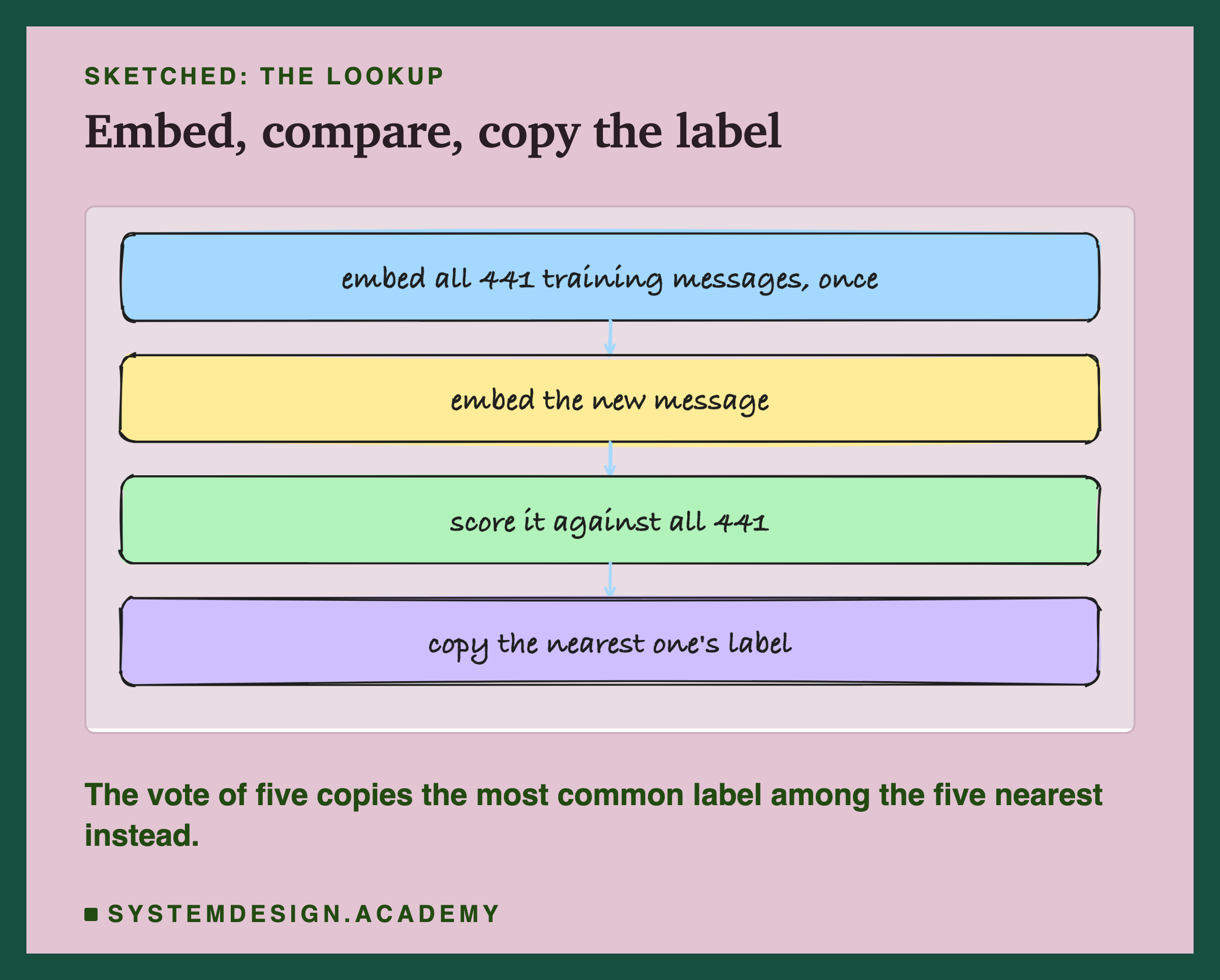
Lookup. The card drawer from the first slide. To answer a new message, find the labelled message with the highest similarity to it and copy its label. People who build models call this a nearest-neighbour method. A variant looks at the five nearest messages and takes a vote: the label that appears most often wins.
. Short for low-rank adaptation. Instead of changing all of the model's own numbers (its weights), LoRA trains a small add-on that sits beside them. A later lesson looks at it closely; here it is just the way I trained.
Loss. A number that says how wrong the model's guesses are on the training examples. Training changes the add-on a little at a time to push the loss down.
As in the prompting chapter, an answer is usable when the whole reply is exactly the right category word, and right when the first word of the reply is the right category. For the prompted 3B models, whose full prompt made them reply in JSON through a schema, usable means the JSON's category is the right word. The 0.5B model had no schema: its reply had to be the bare word.
Where the Prompting Chapter Ended
The task is the one the whole prompting chapter used: sort a short customer message into one of four categories, billing, delivery, returns or account. Two fixed test sets go with it. The old set is the 40 messages from lesson 1 of the prompting chapter, and the new set is the 40 messages written for lesson 11, before any prompt was scored on them. Both sets have 10 messages per category. Nothing in this chapter is ever trained on them.
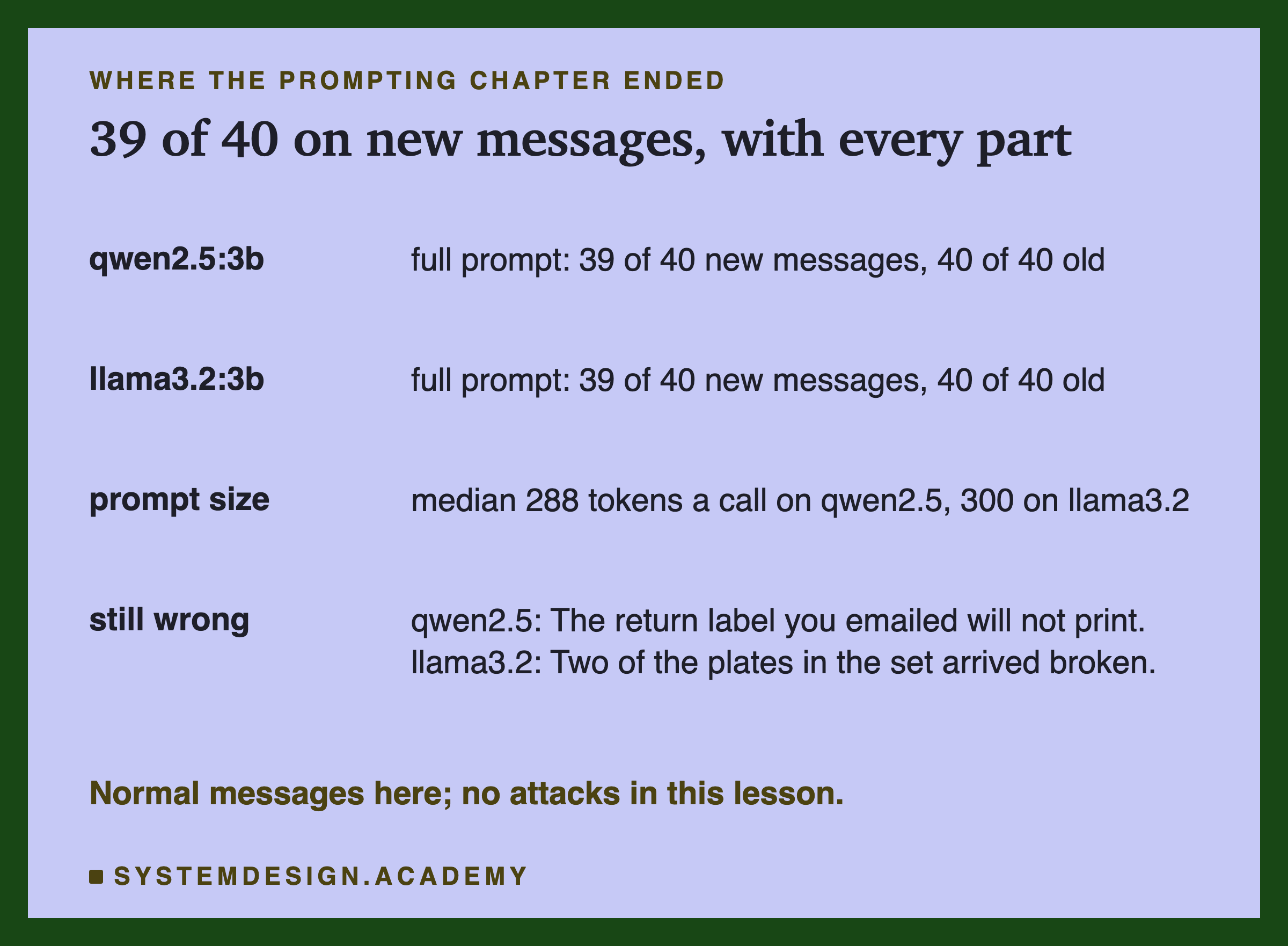
The prompting chapter ended with a full prompt: context lines for each category, examples, tags around the customer's text, a reminder and a schema for the reply. On normal messages, with no attack added, it gave 39 usable answers of 40 on the new set, on both qwen2.5:3b and llama3.2:3b, and 40 of 40 on the old set on both. The price was length: the median prompt length (the middle value when all 40 are put in order), counted by Ollama, was 288 tokens on qwen and 300 on llama, for every single message.
So the starting point is already very high. Qwen missed one new message, "The return label you emailed will not print", and llama missed one, "Two of the plates in the set arrived broken". Whatever does here, it can gain at most one answer on the new set over the prompt. That is worth keeping in mind before any training result looks impressive.
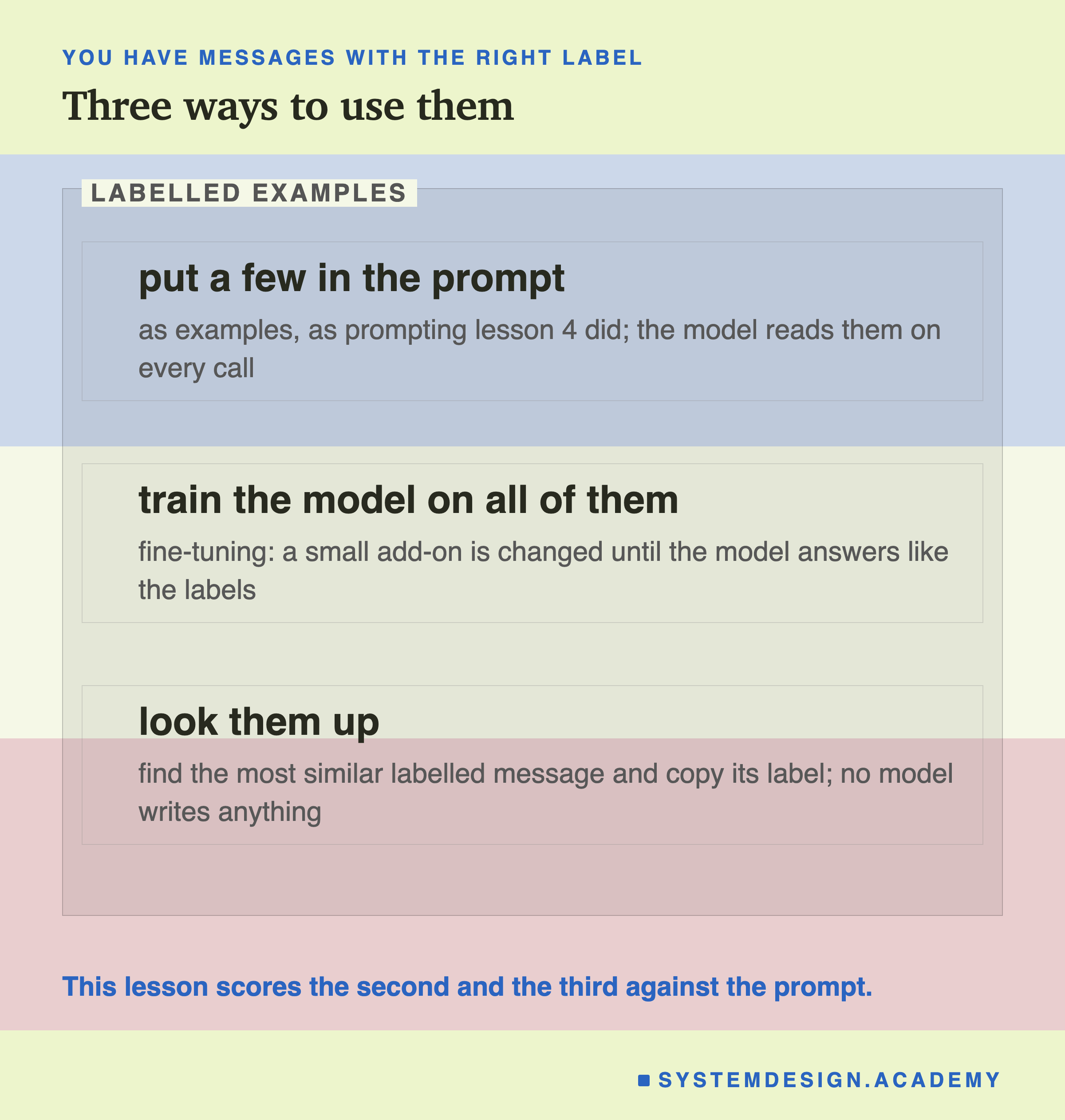
Once you have a pile of labelled messages, there are three ways to use them. You can put a few of them in the prompt as examples, which prompting lesson 4 did. You can train a model on all of them, which is fine-tuning. Or you can skip the language model entirely and look them up. This lesson measures the second and the third on the same test sets, and compares both with the prompt.
The Training Messages, and Who Wrote Them
Both and the lookup need labelled messages, and many more than the 80 in the test sets. I needed a training set.
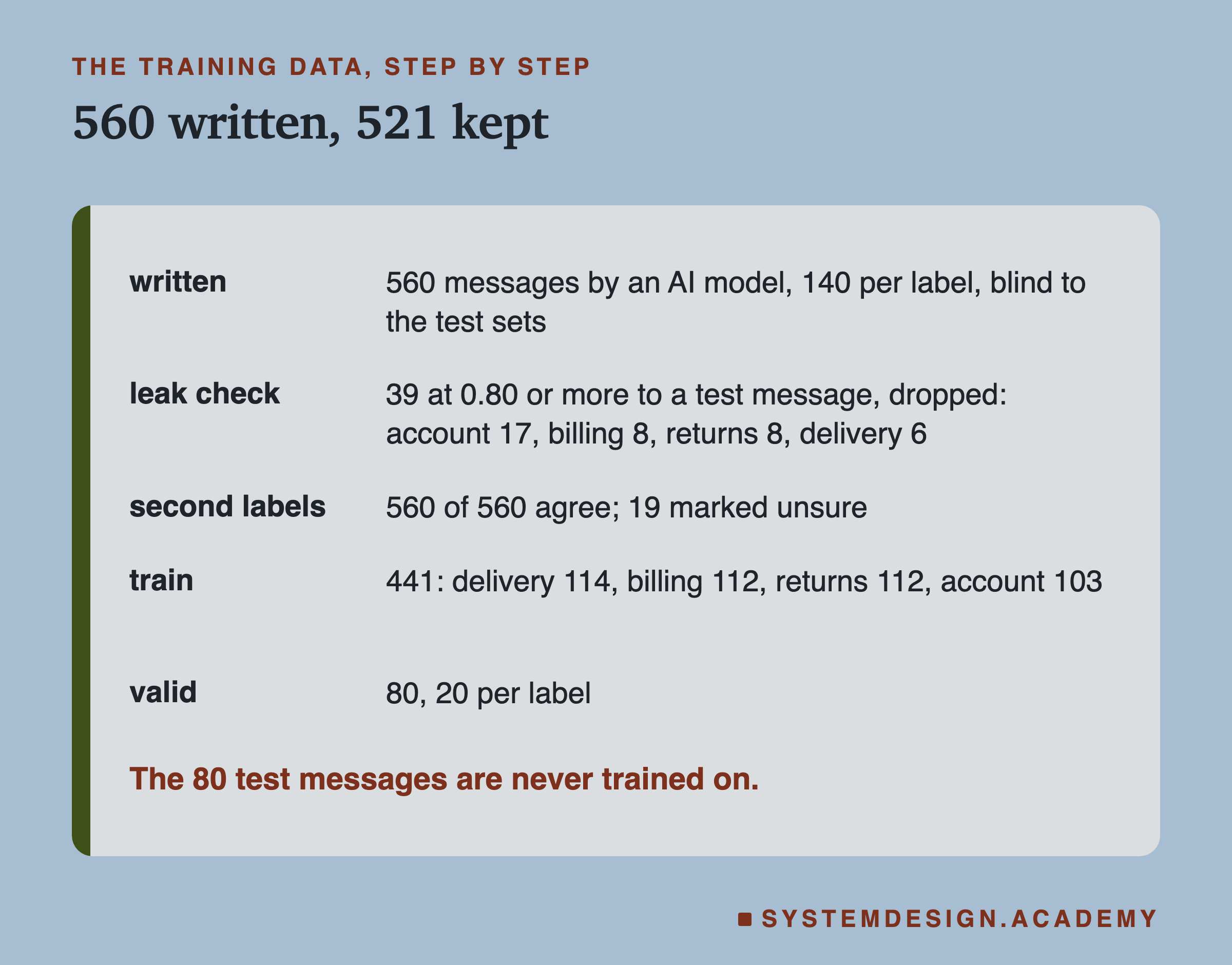
There are public sets of customer support messages. The best known one did not fit: it has no returns category, many of its messages are filled-in templates with placeholders in curly brackets, and its licence adds conditions to anything published from it. So I made our own set, and you should know exactly how. The 560 training messages were written by an AI model, for this course. It wrote 140 messages per category, 28 of them marked as hard cases, meant to vary in length, tone and wording, and it never saw the 80 test messages. Each message was given its label as it was written.
A real team would collect real messages from its own customers, or have people write them. Messages written by one model may sound more alike than real customers do, and they may be easier to sort. Keep that in mind for every number in this lesson: the training messages are cleaner than real life, and that helps both the fine-tune and the lookup.
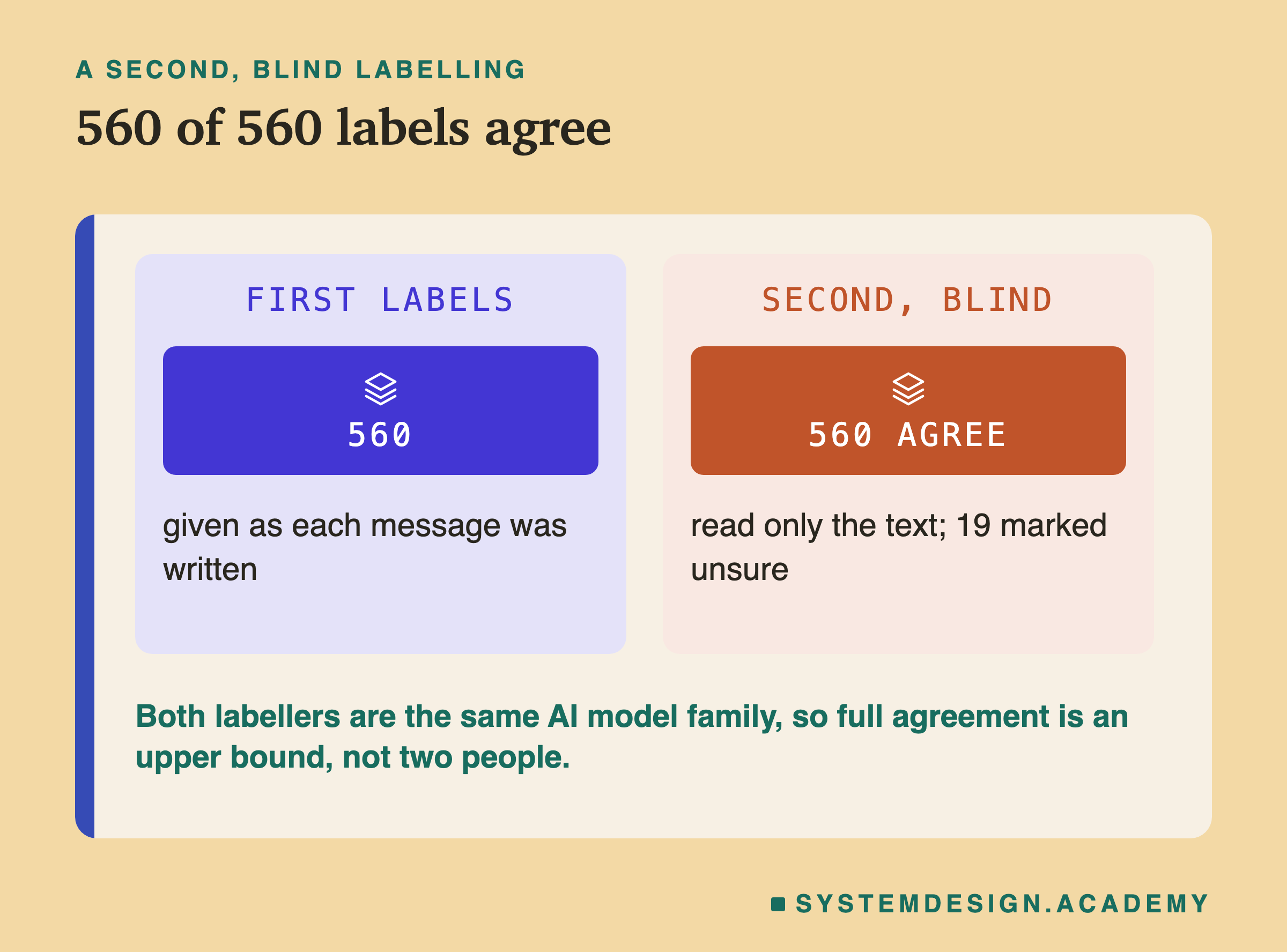
Then the messages were labelled a second time, blind: a second labeller saw only the text of the 560 messages, never the first labels, and gave each one a category. The two labels agreed on all 560. The second labeller marked 19 as unsure but still chose the same label as the first. That sounds perfect, and it needs a warning. Both labellers were AI models from the same family. Two copies of the same way of thinking will agree more often than two different people would. So 560 of 560 is an upper bound on agreement, not evidence that the labels are beyond argument. With people, you would expect some disagreements, and the usual rule is to drop the messages they disagree on.
After the leak check on the next slide removed 39 messages, 521 were left. I split them with a fixed random seed (a starting number for the random shuffle, so the same seed always gives the same split) into 441 training rows, which the model learns from, and 80 validation rows, 20 per category, which it never learns from but which training reports a loss on, so you can see whether the model is learning something general. The training rows are not perfectly balanced, because the leak check removed more account messages than others: 114 delivery, 112 billing, 112 returns and 103 account.
Keeping the Test Set Clean
A test only measures something if the test messages are new to the thing being tested. If a training message says "Please delete my account and all my data" and so does a test message, a model that memorised the training set gets that test message right without understanding anything. The same goes for the lookup: it would find a perfect match. This problem is called leakage: part of the test leaks into the training data.
The model that wrote the messages never saw the test sets, but it wrote about the same four topics in plain English, so some overlap is almost certain. To find it, I embedded all 560 training messages and all 80 test messages with nomic-embed-text, the same model as the tokens and embeddings chapter, and for each training message stored its highest similarity to any test message.
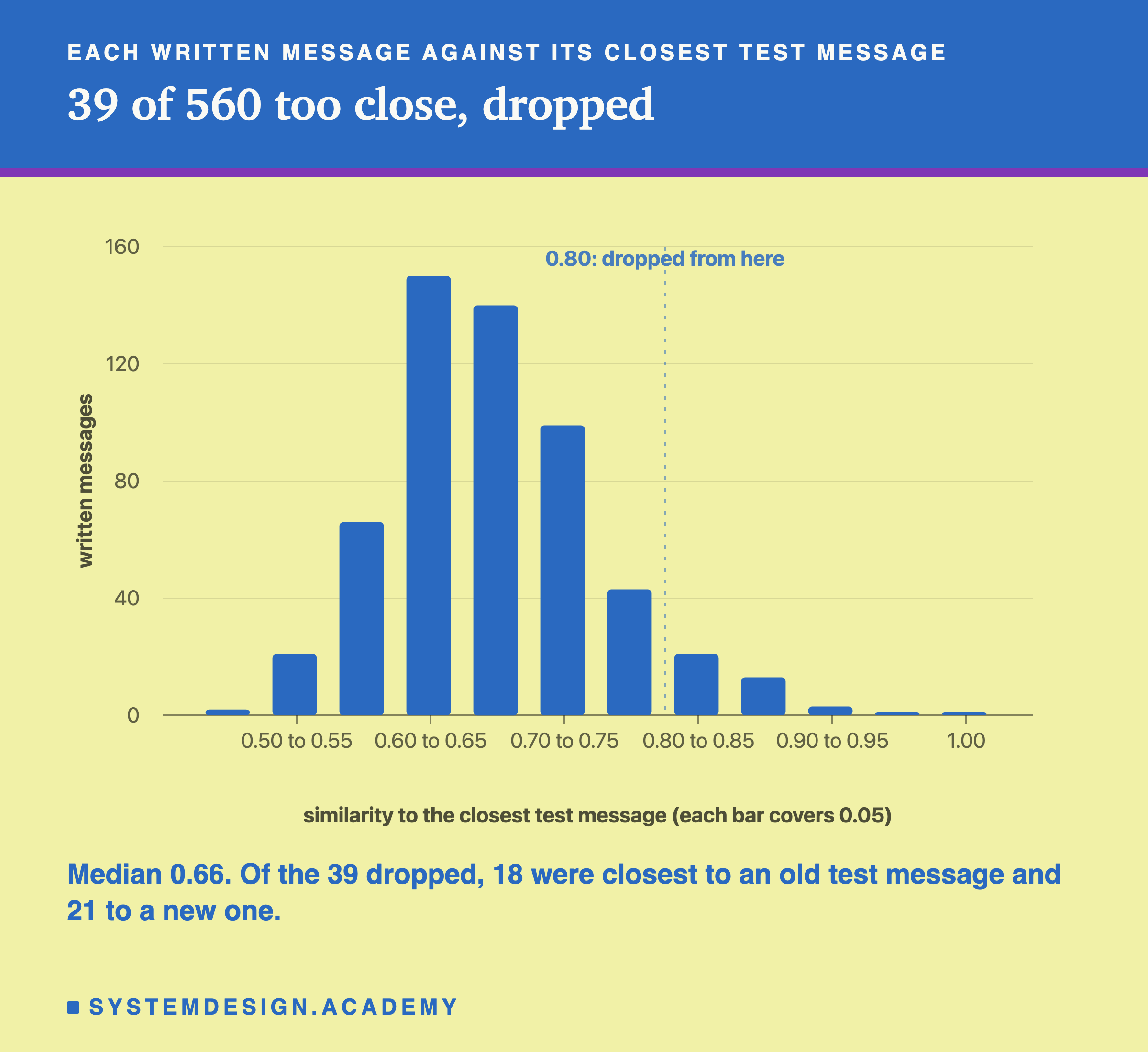
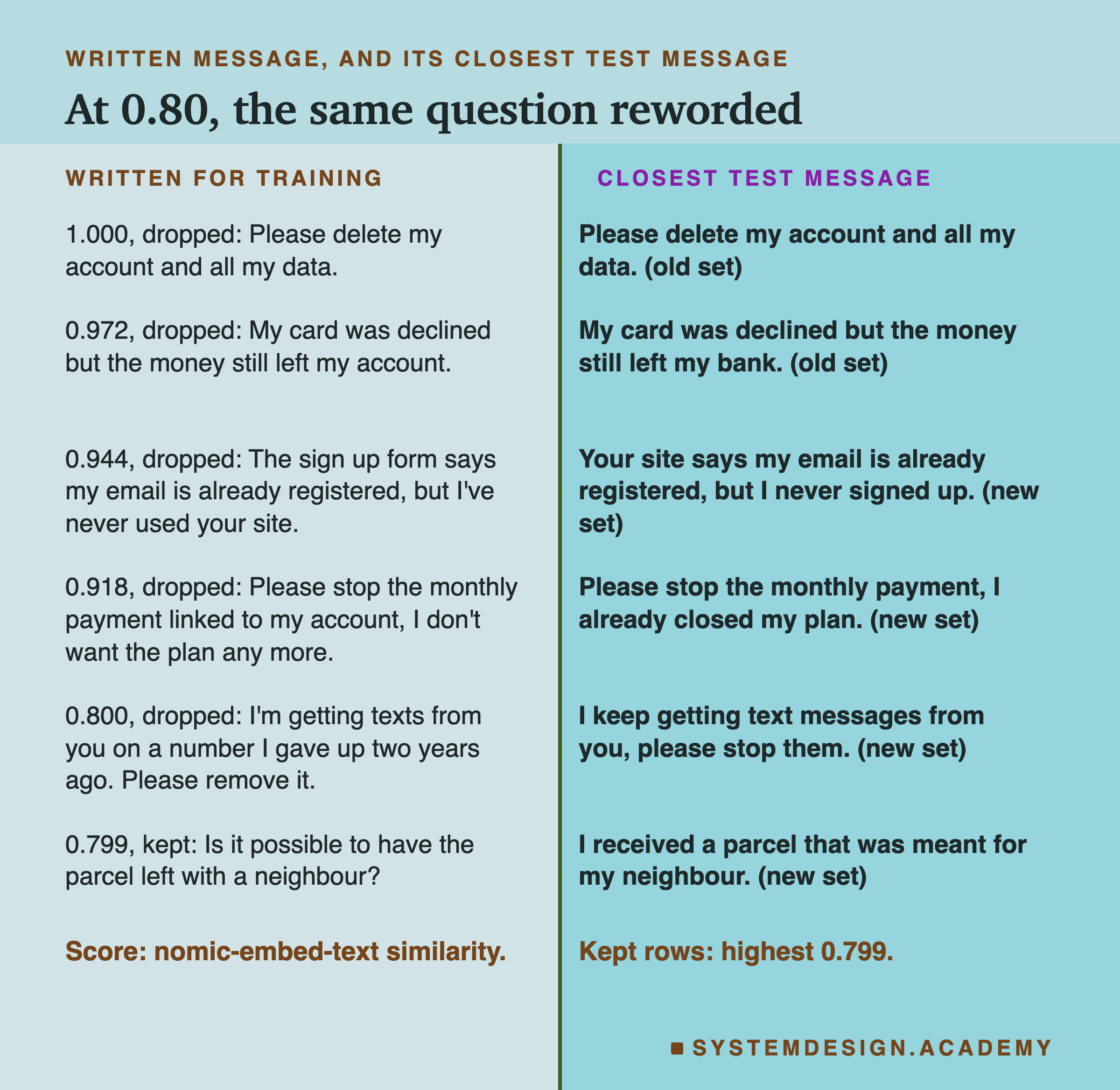
Most messages were not close to any test message: the middle value was 0.66. But the top of the list was a clear problem. One training message was an exact copy of an old test message, "Please delete my account and all my data", with a similarity of 1.000. Others were the same question in slightly different words, such as "My card was declined but the money still left my account" against the test message ending "left my bank".
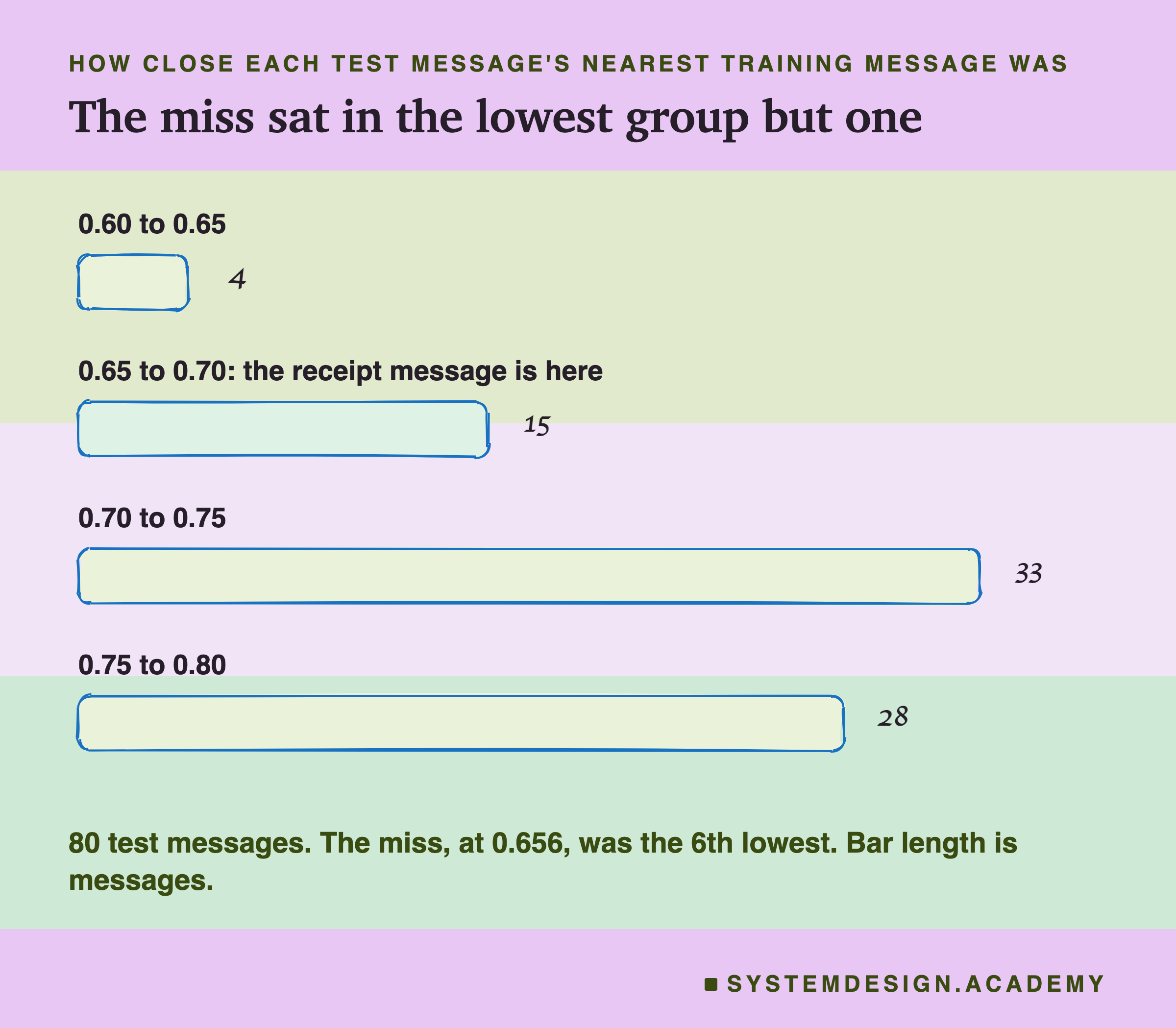
I read the closest pairs and set a rule before any model was trained or scored on this data: drop every training message with a similarity of 0.80 or more to any test message. The pairs from about 0.80 to 0.86 read as the same question reworded. The figure shows the rule's edge: a message about unwanted texts at exactly 0.800 was dropped, and a message asking to leave a parcel with a neighbour, at 0.799, was kept only because 0.799 is below the line; nobody judged its meaning. Just below the line, some kept messages are still the same question reworded: "Your site keeps logging me out every few minutes." (0.799 to the test message "The app logs me out every few minutes.") and "Can you send it to my work address instead?" (0.797 to "Can you send my order to my office instead of my home?"). For 28 of the 80 test messages, the nearest kept training message is between 0.75 and 0.80. A line is a line: it removes copies, not every close cousin, and that closeness helps the lookup and the fine-tune alike. Dropping a message by mistake only costs a little training data; keeping a copy of a test message spoils the test.
The rule dropped 39 messages: 17 account, 8 billing, 8 returns and 6 delivery. Account lost the most; my guess is that account questions have fewer ways to be worded, but I did not test that. One correction you should know about: when I first counted, I found 38 at 0.80 or more. The difference is rounding. The message about unwanted texts scores 0.79996, the file stores scores to four decimal places, so it is stored as 0.8000, and the rule was applied to the stored value. The split uses the stored scores, which put 39 over the line. After the drop, the highest similarity of any kept message to any test message is 0.799.
The Small Model Before Training
The model I trained is Qwen2.5-0.5B-Instruct, a model with about half a billion weights, six times smaller than the 3B models of the prompting chapter, stored in 4-bit form (each weight squeezed into 4 bits to save memory). I ran it with Apple's mlx library, which trains and runs models on the chip of an Apple silicon Mac. Before training it, I scored it untrained, with the same greedy settings as every run here: it always takes its most likely next token, and it may write at most 12 tokens.
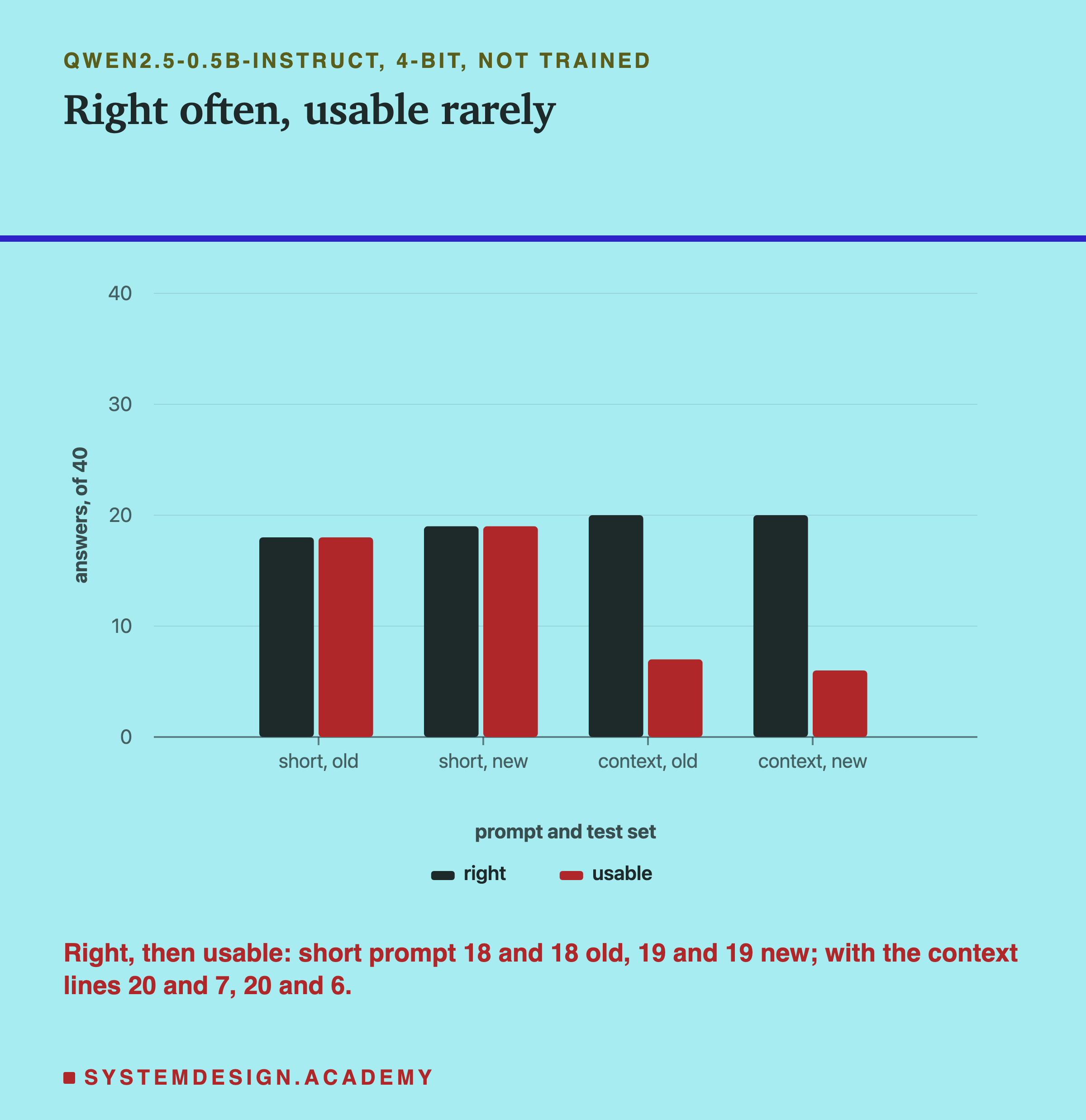
With the short prompt, lesson 1's instruction and format rule and nothing else, the untrained model gave 18 usable answers on the old set and 19 on the new set. Its replies were always a single word, but only two different words: on the new set it said "account" 29 times and "returns" 11 times. It never said billing or delivery once. That is not sorting; it is a model with a habit.
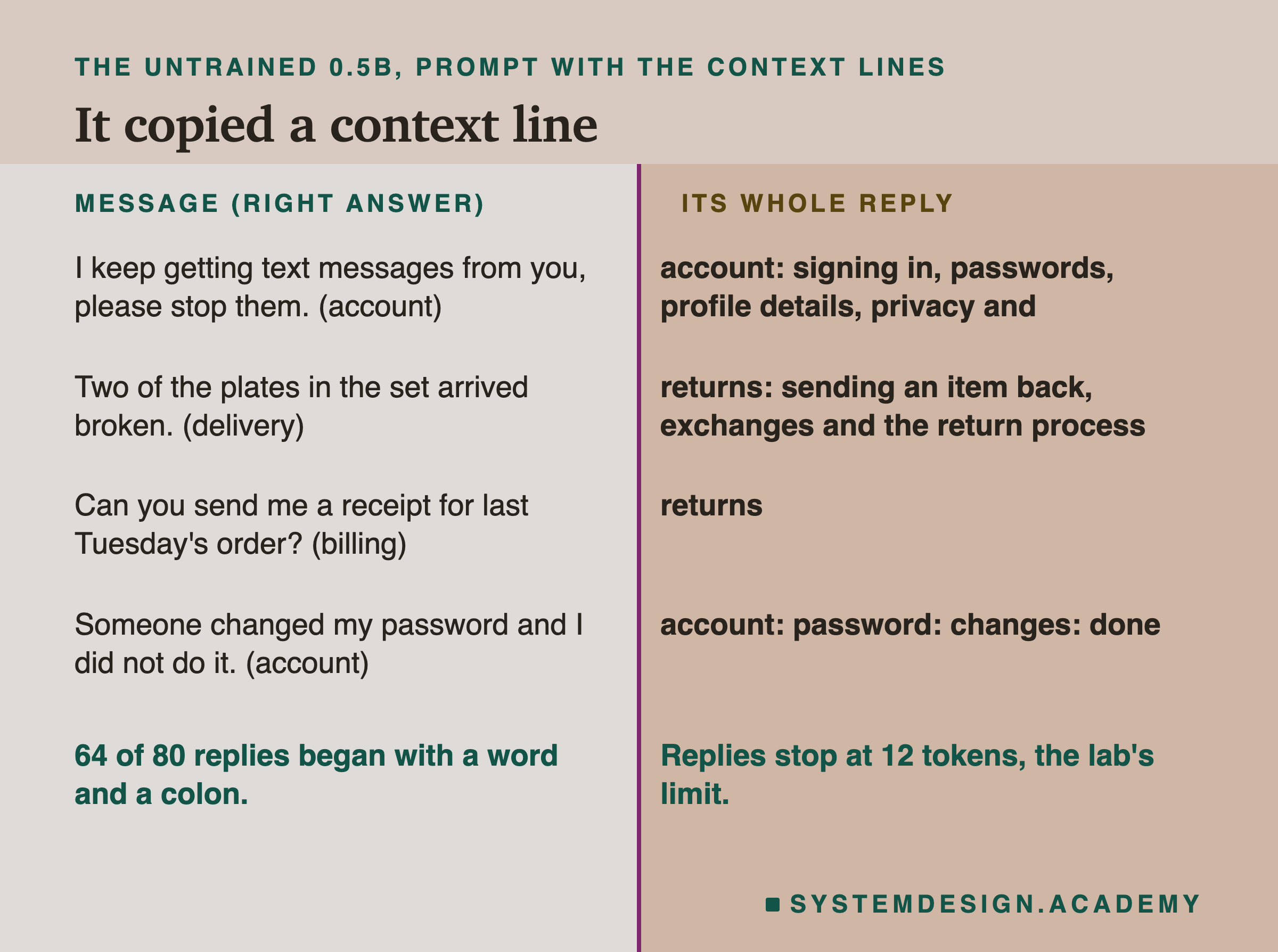
With lesson 1's context lines added, one line per category saying what belongs in it, it did something different. It named the right category first 20 times on each set, but only 7 old and 6 new replies were usable, because it copied the context line itself instead of giving one word.
I read all 80 replies. 64 of them began with a word and a colon, like "account: signing in, passwords, profile details, privacy and", which is the start of the account context line, cut off by the 12-token limit. The right category was often in there, but a program expecting one word would reject almost all of them. So the untrained small model is weak at this task in both forms of the prompt, and that is the gap is supposed to close.
Training the Small Model
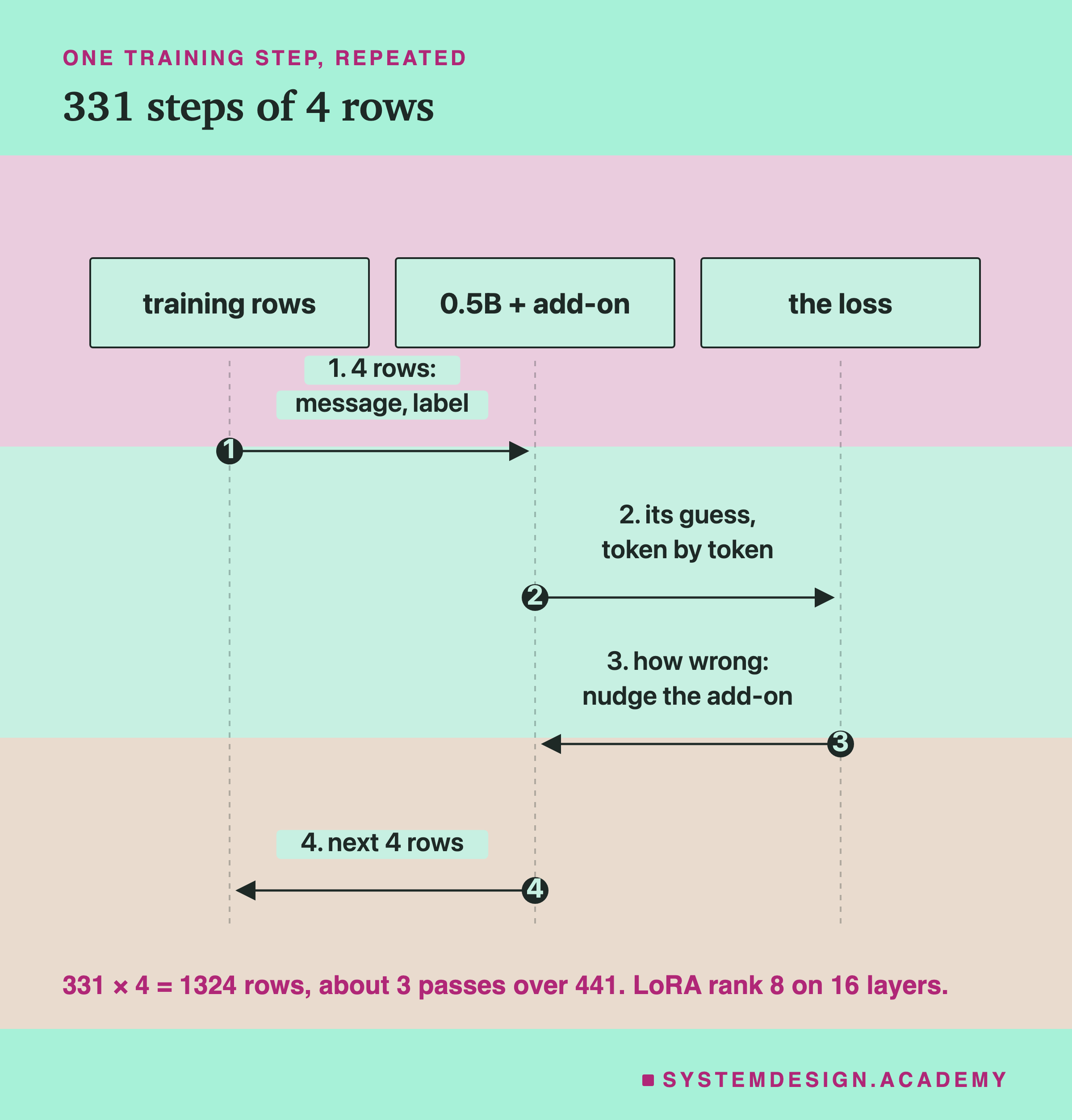
Each training row is one short conversation: the system message holds the short prompt, the user message holds a customer message, and the reply is its one-word label. Training works in steps. In each step the model reads 4 rows (a batch), guesses each next token of each row, and the loss measures how far those guesses were from the real text. Then the add-on is nudged in the direction that would have made the loss smaller. The model's own weights never change; only the add-on does. It had rank 8 on 16 layers of the model, settings a later lesson explains.
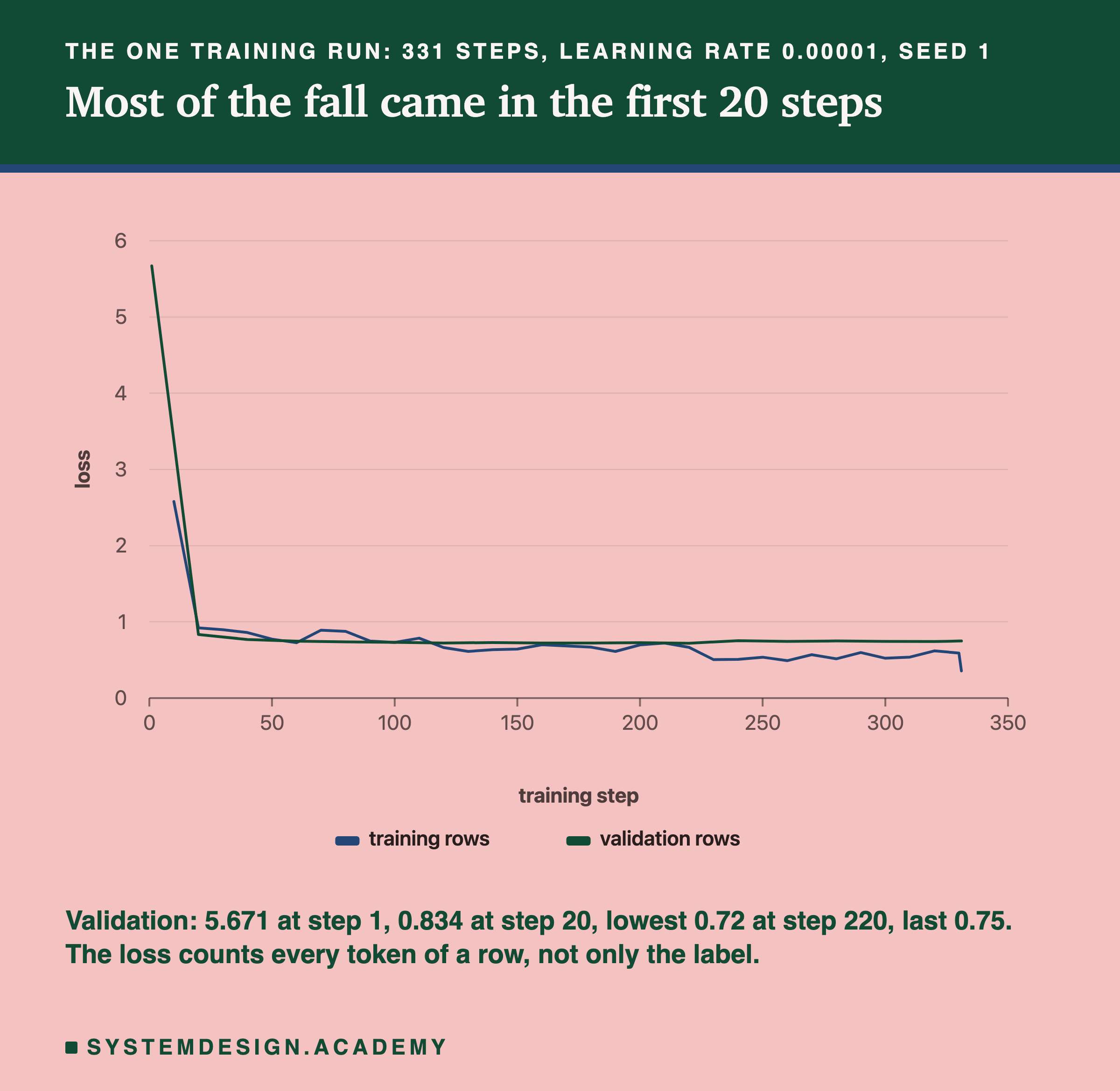
I ran 331 steps of 4 rows: 1,324 rows, which is about three passes over the 441 training rows. The learning rate, which sets how big each nudge is, was 0.00001, and the random seed was 1. There was one training run with one seed. A second run with another seed would shuffle the rows differently and could end one or two answers higher or lower. I do not report how long the run took. Other work may have been sharing this Mac, and one time from one run is not a benchmark.
The loss chart shows what happened. The validation loss was 5.671 at the start and 0.834 by step 20, so almost all of the change came in the first 20 steps. It was lowest, 0.72, at step 220, and ended at 0.75. Why does it stay near 0.7 and not fall to zero? Because in this run the loss counts every token of a row, including the customer's message itself, and no model can predict a stranger's exact words. The system prompt is the same in every row, so it becomes easy to predict; the customer's words never do. The label is only a token or two of each row, so most of what the loss measures is not the task at all. A later lesson trains on the answer only and shows the difference. From about step 120 the training loss is mostly a little below the validation loss, and from step 230 on it sits clearly below it, around 0.5 against about 0.75, with a last dip to 0.356. One possible reading is that the model starts to fit the training rows themselves rather than the task; a later lesson is about exactly that.
If you use Windows or Linux: this lab used mlx on a Mac, and that is the only setup tested here. mlx is built mainly for Apple silicon. The same kind of training is commonly done with Hugging Face's library on a GPU, for example a free Google Colab one; I have not run it for this chapter. Your numbers will differ, and nothing in this lesson claims the Mac's numbers hold on other hardware. You do not need to train anything to follow this lesson: its runnable part is the lookup, which works on any computer.
Trained, Looked Up, Prompted
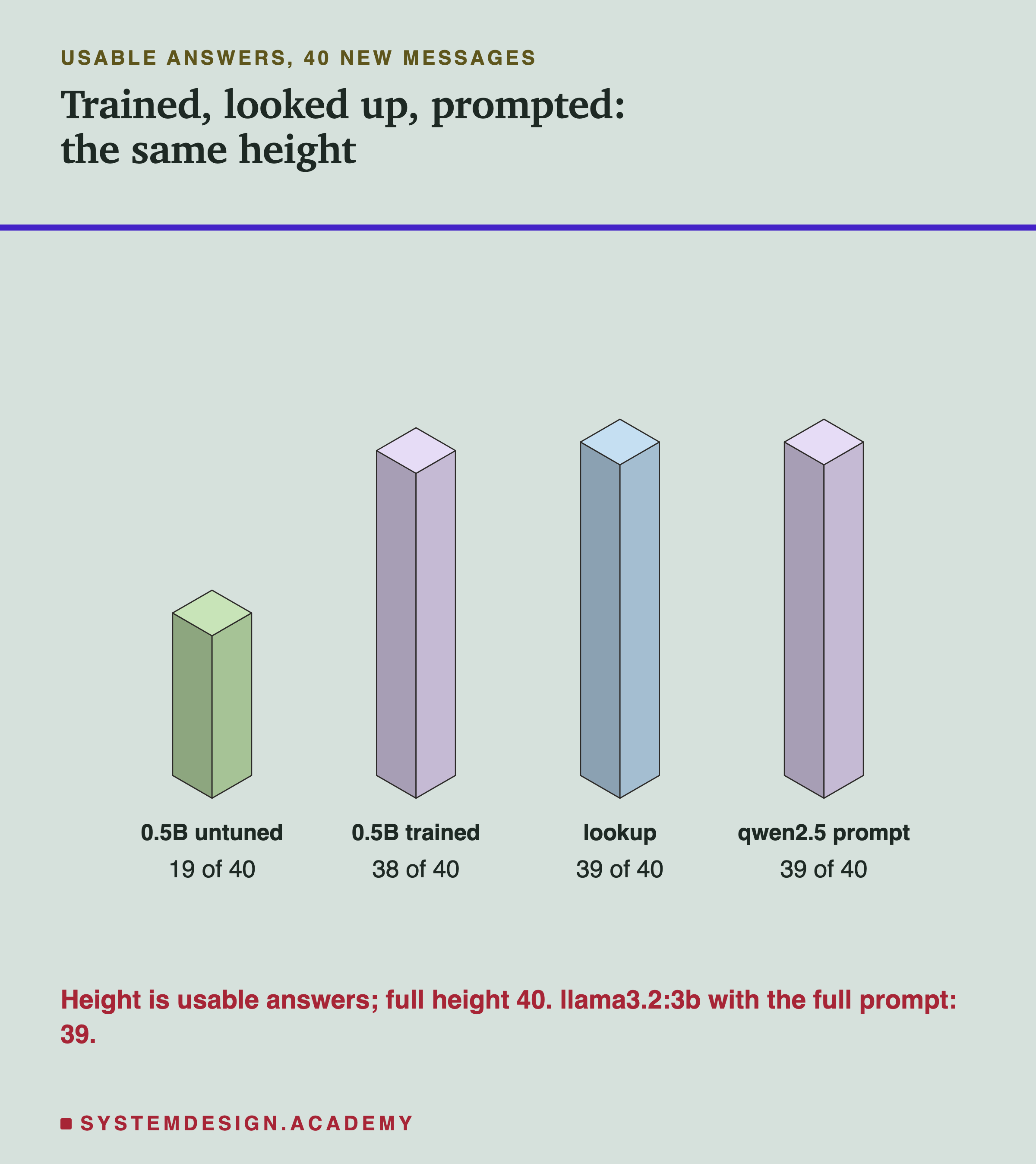
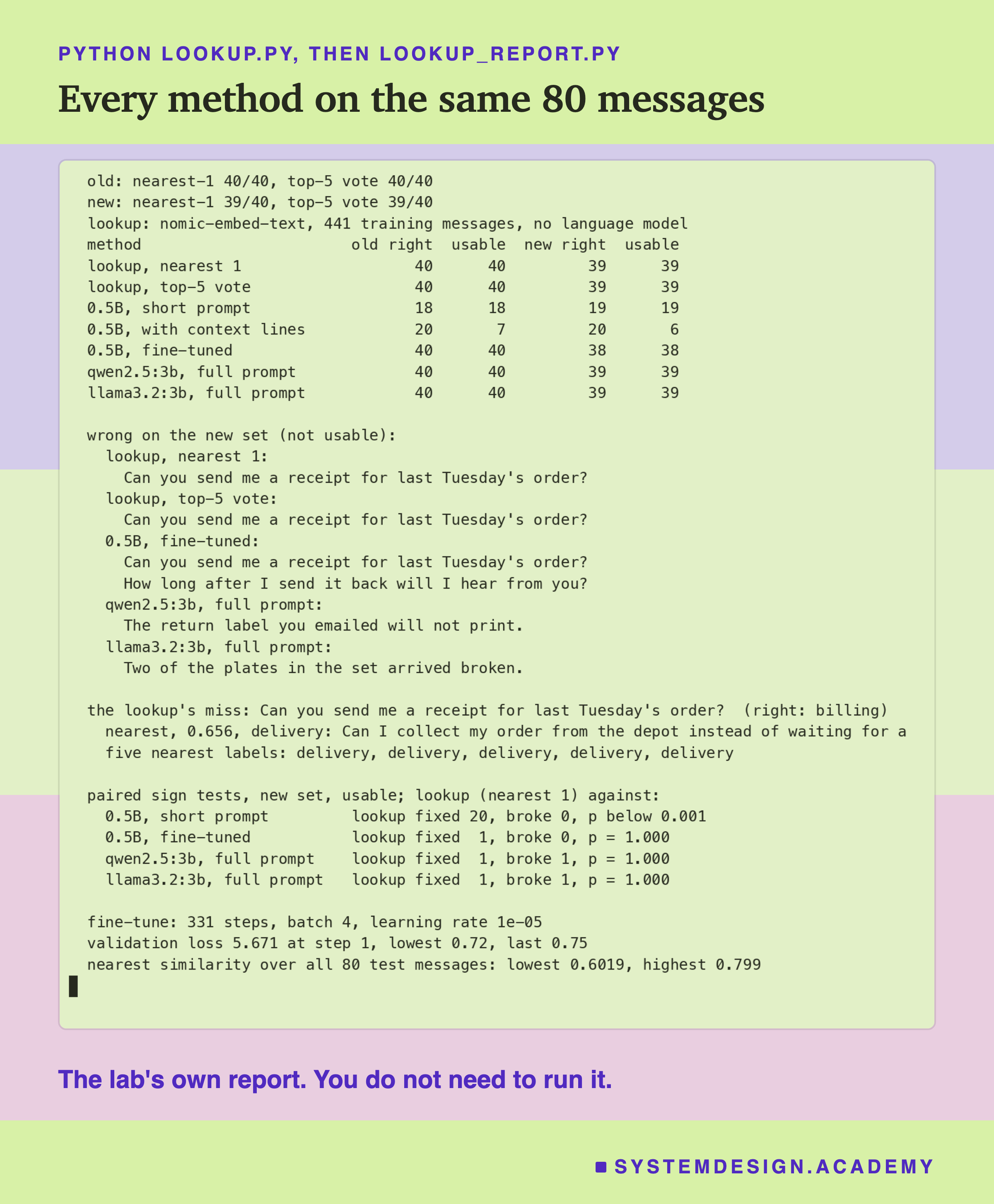
After training, I scored the fine-tuned model with the same short prompt it was trained with. It gave 40 of 40 on the old set and 38 of 40 on the new set, and every one of its 80 replies was a single category word. That is a big change from the untrained model's 19 usable new answers, and it came from 441 labelled messages and one training run.
Then I tried the card drawer. The lookup embeds the 441 training messages once with nomic-embed-text. For each test message, it embeds the message, computes its similarity to all 441, and copies the label of the nearest one. The vote variant copies the most common label among the five nearest, and when two labels tie, the nearer one wins. No language model writes anything; the only model involved is the model, the same one the leak check used.
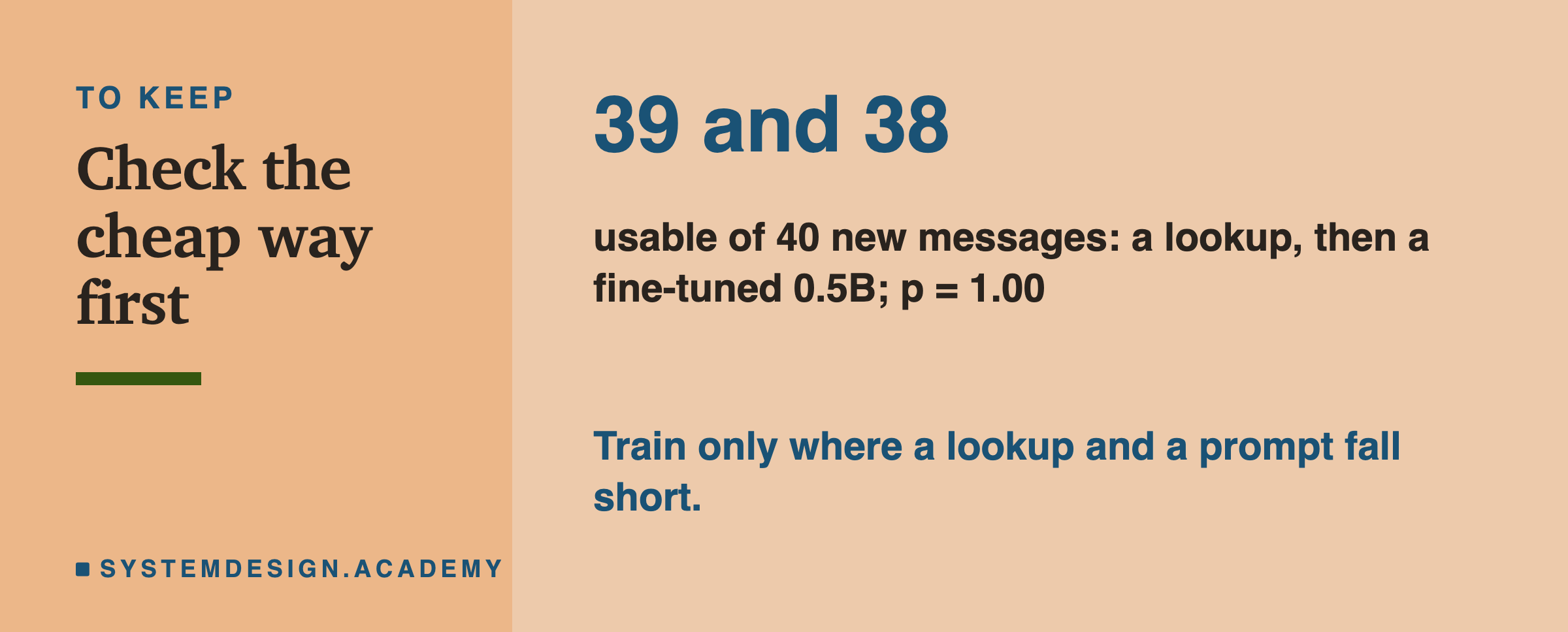
The lookup gave 40 of 40 on the old set and 39 of 40 on the new set, both with the nearest message alone and with the vote of five. That is one more than the fine-tune on the new set, the same as the full prompt on both 3B models, and it needed no training and no prompt at all.
Put side by side, three of the four blocks are the same height. The untrained small model is far below; the fine-tuned model, the lookup and the prompted 3B model all land at 38 or 39 of 40. When I saw this I first checked the inputs, because a result this clean for something this simple deserves suspicion. The lookup did not see the test messages: they are not among the 441 training rows, and after the leak check no kept training message has a similarity of 0.80 or more to any test message, although, as the data slide showed, some just below the line are close rewordings. The labels it copies are the training labels. It is that, with enough labelled examples of a four-way task, the nearest example is usually in the right category.
The One Message Both Got Wrong
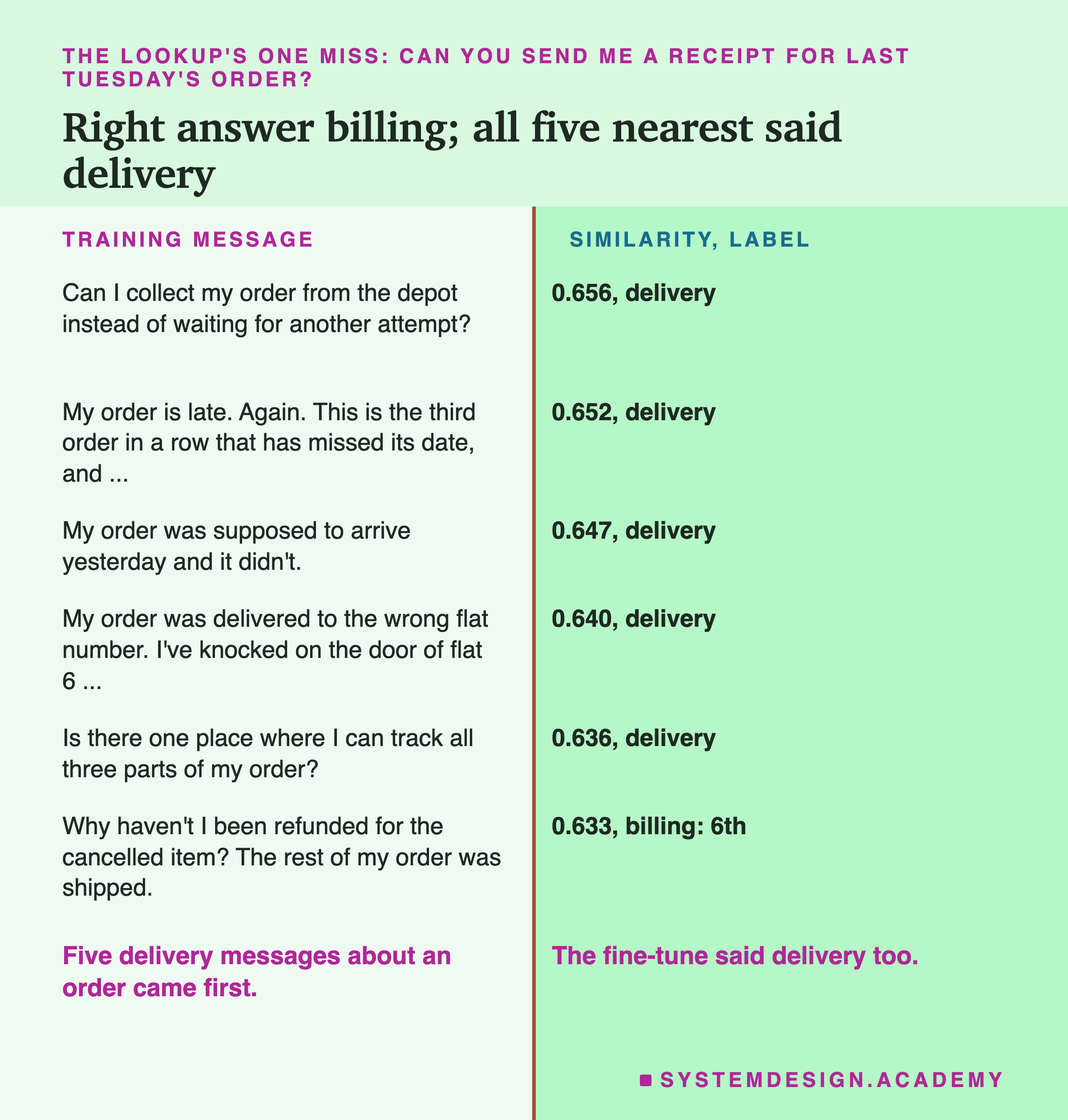
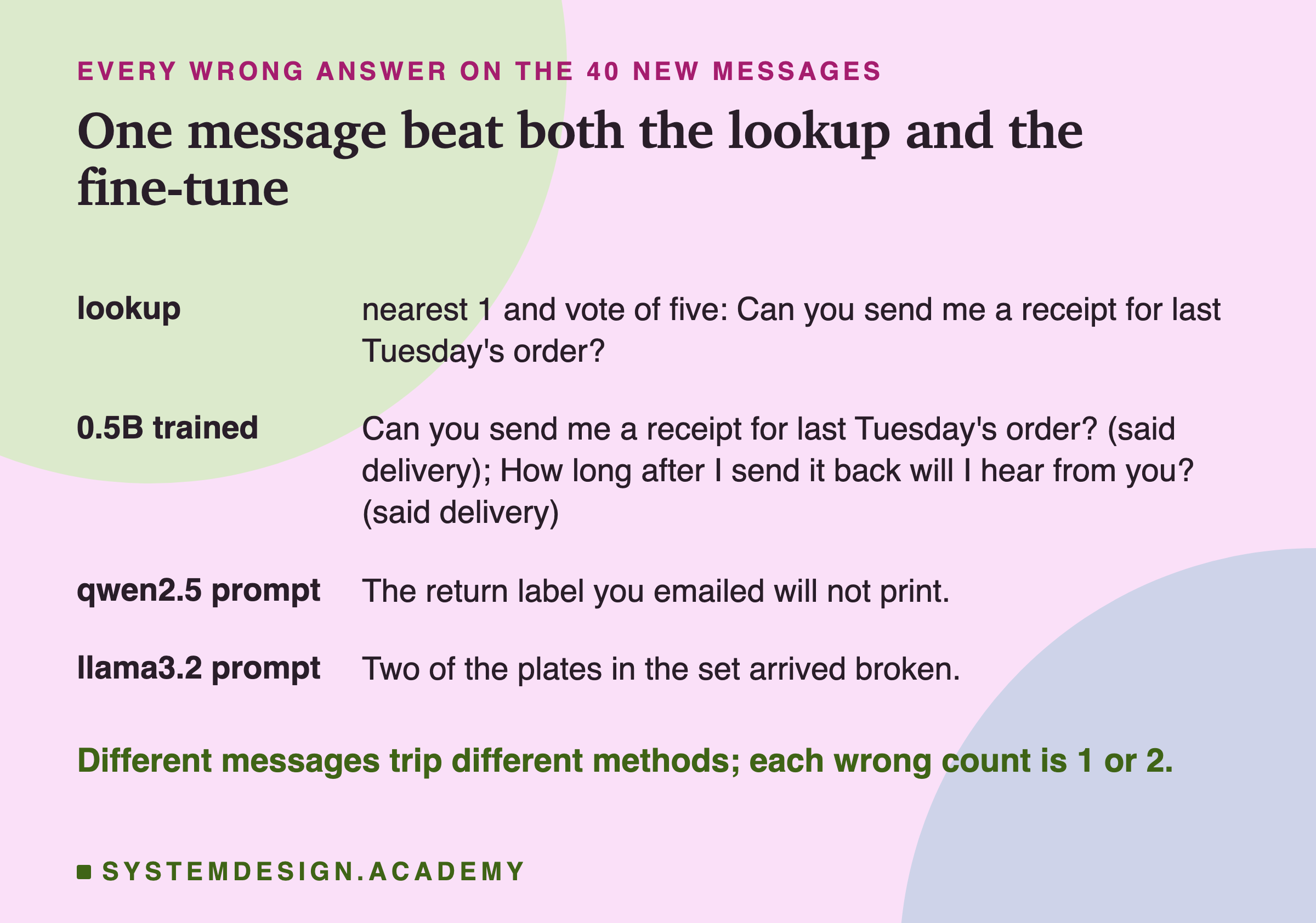
The lookup missed one new message: "Can you send me a receipt for last Tuesday's order?" The right answer is billing, because a receipt is a money document. The lookup said delivery. That is also the first of the fine-tuned model's two wrong answers: it said delivery too.
Look at the five nearest training messages. Every one is a delivery message about "my order": collecting it from a depot, it being late, it not arriving, tracking it. The model found the phrase about an order more alike than the word receipt. The closest billing message came sixth, at 0.633, only 0.023 below the nearest. The training set does hold billing messages about receipts, such as "I need a receipt with my business name on it for expenses", but they scored lower than these five. With the vote of five, all five voters said delivery, so the vote could not rescue it.
It is interesting that the fine-tune made the same mistake, but I cannot tell you why from this data. One possible reason is that the same training messages taught both methods that "order" goes with delivery; another is chance. One message is one data point.
The miss also had a weak nearest match. Its nearest similarity, 0.656, was the 6th lowest of all 80 test messages. That suggests a cheap safety check for a real lookup: when the nearest example is not very similar, do not trust the copied label, and send the message to a person or to a model instead. With one miss, I cannot say where such a line should sit; five other messages had even weaker nearest matches and were still right.
The fine-tune's second wrong answer was "How long after I send it back will I hear from you?", a returns message, which it called delivery. The lookup got that one right: its nearest training message was "How long does it take you to process a return once it reaches you?" at 0.744.
Can These Be Told Apart From Luck?
On the new set, the four serious methods made between one and two mistakes each, and not always on the same messages. The prompted qwen missed the return label, the prompted llama missed the broken plates, and the lookup and the fine-tune missed the receipt. With only 40 messages, is 39 really better than 38?
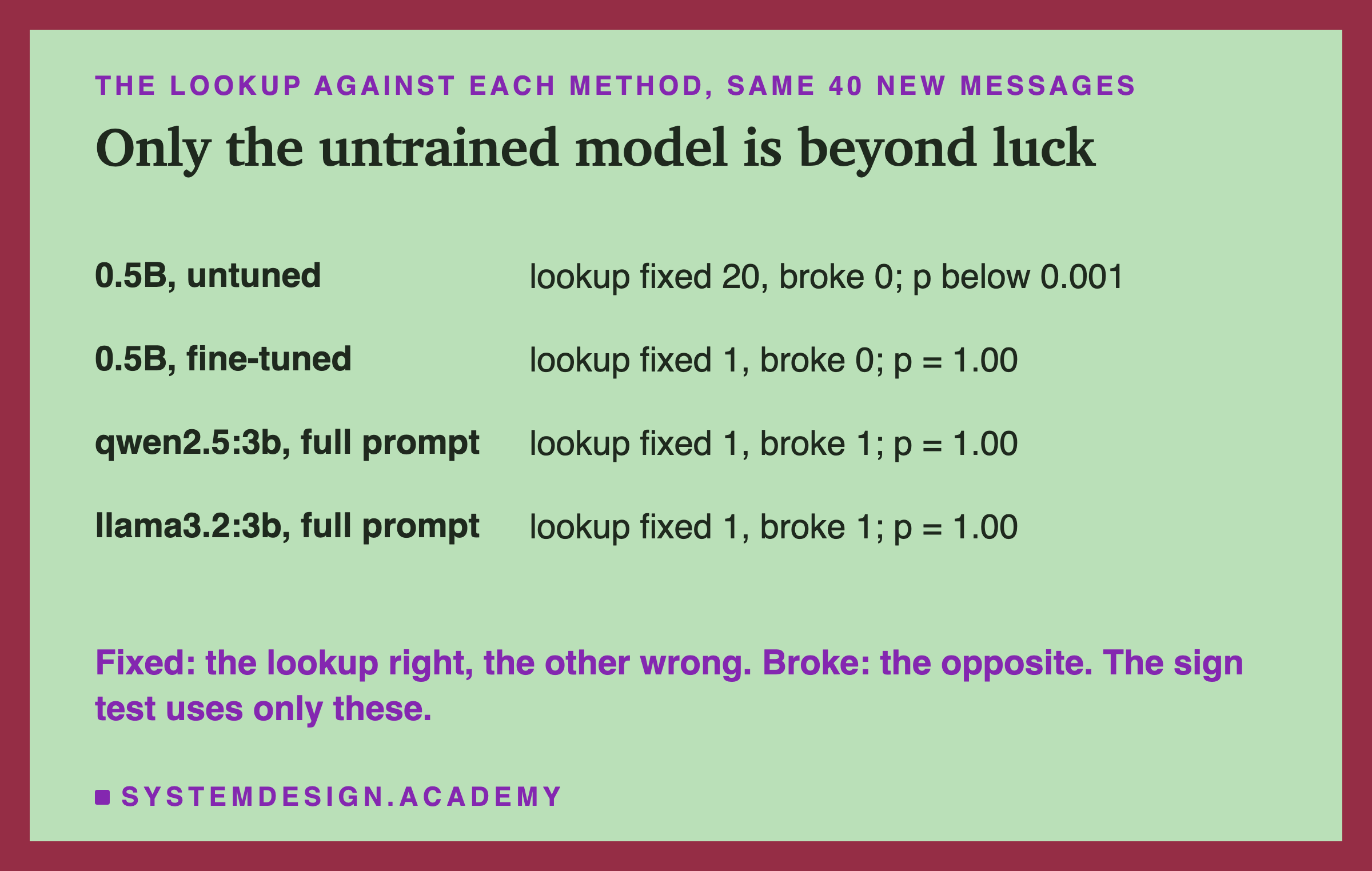
Every method answered the same 40 messages, so I compared the lookup with each one message by message, with the sign test from prompting lesson 7. It counts the messages the lookup got right and the other got wrong ("fixed"), and the opposite ("broke"), and asks how likely a split that uneven would be if the two methods were really equally good. The answer is a p value; below 0.05 is the usual line for "probably not luck".
Against the untrained 0.5B, the lookup fixed 20 messages and broke none: p below 0.001, far beyond luck. Against the fine-tuned model, it fixed 1 and broke 0, and p = 1.00: a difference of one message cannot be told apart from luck. Against the full prompt on each 3B model, it fixed 1 and broke 1, again p = 1.00. So the honest statement is not "the lookup beat the fine-tune". It is: on this task, with these test sets, a lookup, a fine-tuned 0.5B model and a full prompt on a 3B model cannot be told apart, and the lookup is far better than the untrained 0.5B model. (The fine-tune and the prompts are clearly better than it too, but I only ran that test for the lookup.)
That is exactly the situation where the cheapest method should win. The lookup needs an model that is small next to any of these language models, no training run, and no prompt, and each of its answers comes with a reason you can check: the training message it copied. The fine-tune needed a training run and gave an answer you cannot inspect in the same way.
Try It Yourself
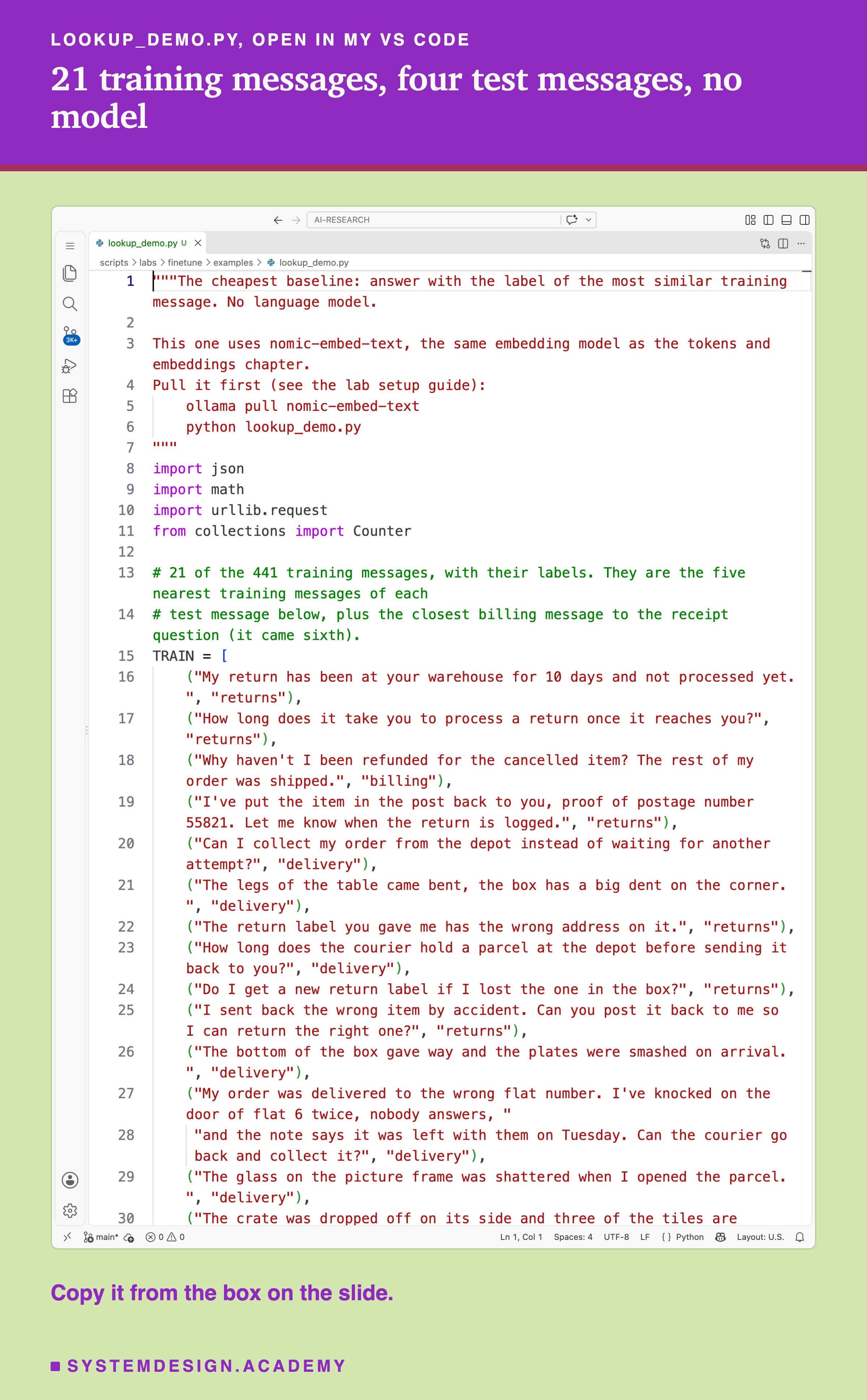
This script is a small version of the lookup. It carries 21 of the 441 training messages with their labels, embeds them and four of the new test messages with nomic-embed-text through Ollama, and prints, for each test message, its nearest training message, the similarity, the label it copies and the vote of five. The is written out in plain Python, a few lines, so you can see there is nothing hidden in it.
Before you run this lab. It uses nomic-embed-text, running in Ollama on your own computer. If you have not set that up yet, the lab setup guide shows how to install Ollama, download a model and check that everything works, on macOS, Windows or Linux. This lab needs only the model: ollama pull nomic-embed-text. It does not need a GPU, and it does not train anything.
"""The cheapest baseline: answer with the label of the most similar training message. No language model.

This one uses nomic-embed-text, the same embedding model as the tokens and embeddings chapter.
Pull it first (see the lab setup guide):
    ollama pull nomic-embed-text
    python lookup_demo.py
"""
import json
import math
import urllib.request
from collections import Counter

# 21 of the 441 training messages, with their labels. They are the five nearest training messages of each
# test message below, plus the closest billing message to the receipt question (it came sixth).
TRAIN = [
    ("My return has been at your warehouse for 10 days and not processed yet.", "returns"),
    ("How long does it take you to process a return once it reaches you?", "returns"),
    ("Why haven't I been refunded for the cancelled item? The rest of my order was shipped.", "billing"),
    ("I've put the item in the post back to you, proof of postage number 55821. Let me know when the return is logged.", "returns"),
    ("Can I collect my order from the depot instead of waiting for another attempt?", "delivery"),
    ("The legs of the table came bent, the box has a big dent on the corner.", "delivery"),
    ("The return label you gave me has the wrong address on it.", "returns"),
    ("How long does the courier hold a parcel at the depot before sending it back to you?", "delivery"),
    ("Do I get a new return label if I lost the one in the box?", "returns"),
    ("I sent back the wrong item by accident. Can you post it back to me so I can return the right one?", "returns"),
    ("The bottom of the box gave way and the plates were smashed on arrival.", "delivery"),
    ("My order was delivered to the wrong flat number. I've knocked on the door of flat 6 twice, nobody answers, "
     "and the note says it was left with them on Tuesday. Can the courier go back and collect it?", "delivery"),
    ("The glass on the picture frame was shattered when I opened the parcel.", "delivery"),
    ("The crate was dropped off on its side and three of the tiles are chipped.", "delivery"),
    ("The return label expired before I could use it.", "returns"),
    ("Is there one place where I can track all three parts of my order?", "delivery"),
    ("My order is late. Again. This is the third order in a row that has missed its date, and each time I've had "
     "to chase it. I only order from you because the delivery used to be reliable.", "delivery"),
    ("My order was supposed to arrive yesterday and it didn't.", "delivery"),
    ("Arrived today with the box upside down despite the arrows, and the fish tank is cracked.", "delivery"),
    ("can i return without a label", "returns"),
    ("I printed the return label but the barcode won't scan at the drop off point.", "returns"),
]
TESTS = [("Can you send me a receipt for last Tuesday's order?", "billing"),   # four of the 40 new test messages
         ("How long after I send it back will I hear from you?", "returns"),
         ("Two of the plates in the set arrived broken.", "delivery"),
         ("The return label you emailed will not print.", "returns")]


def embed(texts):
    """One list of numbers per text, from Ollama's embedding endpoint."""
    body = json.dumps({"model": "nomic-embed-text", "input": texts}).encode()
    req = urllib.request.Request("http://localhost:11434/api/embed", data=body,
                                 headers={"Content-Type": "application/json"})
    return json.loads(urllib.request.urlopen(req).read())["embeddings"]


def cosine(a, b):
    """1.0 means the two texts point the same way; the lower, the less alike."""
    dot = sum(x * y for x, y in zip(a, b))
    return dot / (math.sqrt(sum(x * x for x in a)) * math.sqrt(sum(y * y for y in b)))


train_vectors = embed([text for text, _ in TRAIN])
for message, right in TESTS:
    vector = embed([message])[0]
    ranked = sorted(((cosine(vector, v), label, text) for v, (text, label) in zip(train_vectors, TRAIN)), reverse=True)
    sim, label, text = ranked[0]
    five = [lab for _, lab, _ in ranked[:5]]
    counts = Counter(five)
    vote = next(lab for lab in five if counts[lab] == max(counts.values()))   # a tie goes to the nearest
    print(f"{message}\n  right answer {right}; nearest {label} ({sim:.3f}); vote of five {vote}"
          f"  {'right' if label == right else 'WRONG'}\n  nearest: {text[:70]}\n")
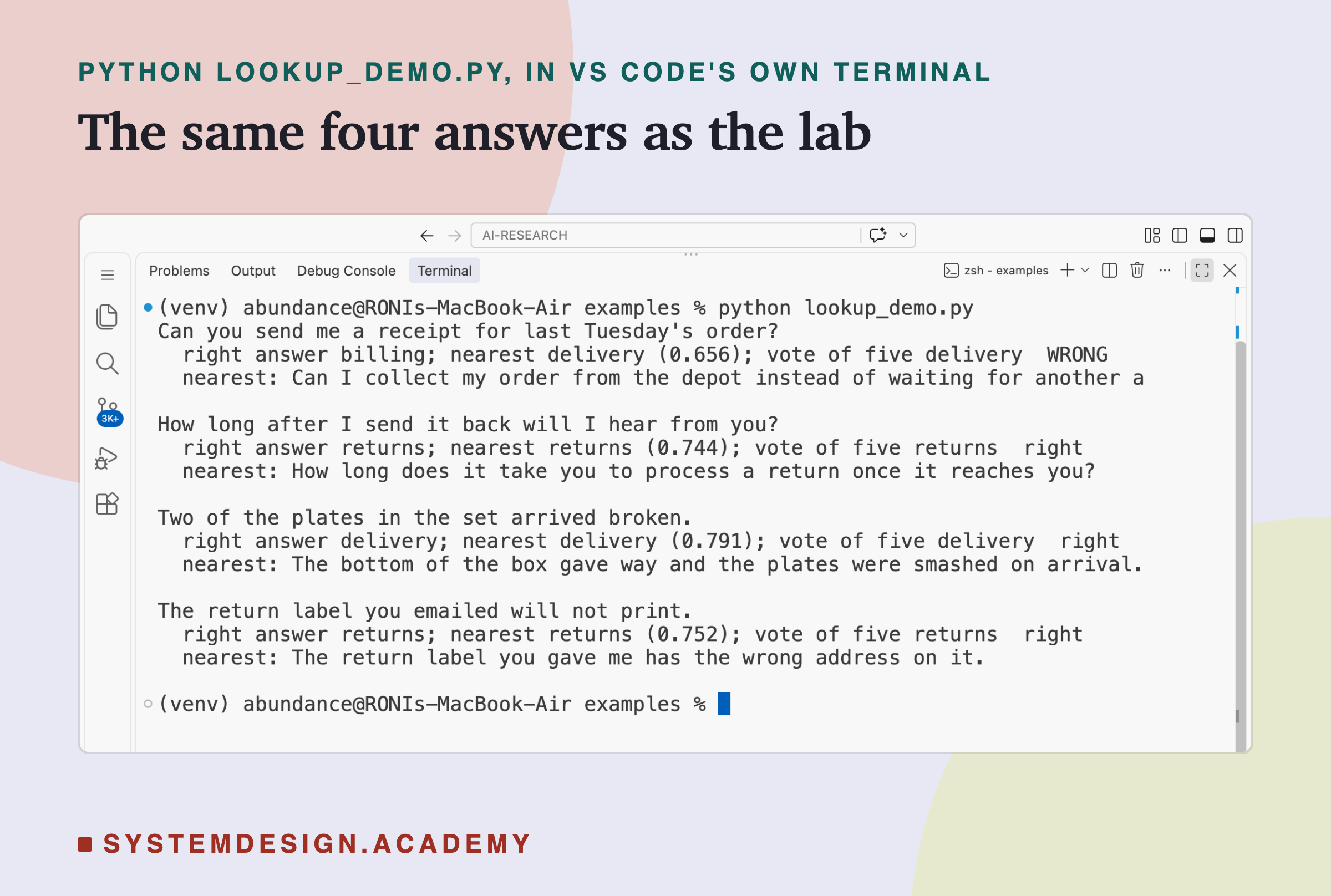
This is a real run in VS Code's terminal.
The 21 training messages are not a random sample. For each of the four test messages, they hold its five nearest messages from the full 441, plus the closest billing message to the receipt question, which came sixth. Because the five nearest from the whole set are all in the small set, the small script finds the same nearest message and the same vote as the full lab. The receipt message comes out wrong, at 0.656, as delivery; the other three are right: the return question at 0.744, the broken plates at 0.791 and the return label at 0.752.
I checked the script's output against the lab's stored results in code, not by eye: for all four messages the right answer, the nearest label, the similarity to three decimals, the vote of five and the start of the nearest message all matched. On your computer a different Ollama version or chip may move a similarity in the third decimal place; the labels should not change.
The Lab Report
The measurements live in scripts/labs/finetune/. lookup.py is the lookup: it embeds the 441 training rows from data/split.json and the two test sets, and stores every answer in results/lookup.json, with the nearest training message and its similarity, so any answer can be checked by eye. ftlab.py trained and scored the small model with mlx; its results are results/q05-base-short.json, results/q05-base-full.json and results/q05-full-e3.json, which also holds the loss curve and the exact training command. The prompted 3B numbers are read from the prompting chapter's stored results, not run again.
A second file, lookup_report.py, reads all of those and never trains anything. It prints the table above, the wrong answers, the lookup's miss and the sign tests. Its neighbours mode embeds everything again to store the five nearest training messages for each test message (the lookup's own file stores only their labels): all 80 nearest messages and all 80 sets of five labels matched lookup.json, and no similarity moved in the fourth decimal place. Its pairs mode found which test message each written message was closest to, for the leak figure, and every score matched the stored one. Its box mode writes the playground on the next slide.
The recording ran lookup.py again before the report. That second run wrote a results file identical, byte for byte, to the first one, so every number in this lesson is the same in both.
What came after I saw the data: the 0.80 leak rule was set after reading the similarity scores but before any training or scoring. The comparison with the lookup was not planned; I added it after the fine-tune's result, as a check on how hard the task still was. The report file, its sign tests, and the choice of which misses to show were all written after the results.
Pick a Test Message and See Its Neighbours
This box has no model. It holds, for all 80 test messages, the five most similar training messages as nomic-embed-text scored them in the lab, with their labels. Call look_up with any test message to see its five neighbours, what the nearest one says, what the vote of five says, and whether that is right. score counts the right answers for the old or the new set.
As it is, the box shows the receipt message, where all five neighbours are delivery messages about an order, and the returns question the fine-tune got wrong, whose nearest neighbour is a returns message at 0.744. It then prints 40 of 40 on the old set and 39 of 40 on the new set, both ways, the same counts as lookup.json. Try look_up('Two of the plates in the set arrived broken.'), which llama3.2:3b got wrong with the full prompt: its nearest training message is about plates smashed on arrival, labelled delivery. The data in the box was written by lookup_report.py from the stored neighbours, after checking that they give back the lab's own answers.
The Code, Part by Part
The data.TRAIN is a list of pairs: a training message and its label, copied from the lab's training rows. TESTS is four of the new test messages with their right answers. Nothing in the script ever tells the lookup the right answer; it is only used to print right or wrong at the end.
The call.embed sends a list of texts to Ollama's /api/embed endpoint with the model name nomic-embed-text, and gets back one list of numbers per text. It uses only urllib from Python's standard library, so there is nothing to install besides Ollama and the model.
The similarity.cosine multiplies the two lists number by number and adds up the results (the dot product), then divides by the size of each list (its length as an arrow: the square root of the sum of its squared numbers, not how many numbers it holds). The result is 1.0 when the two lists point the same way and lower when they point apart. nomic-embed-text already returns lists of size 1, so in the lab the dot product alone is the cosine, but writing the division out makes the script correct for any embedding model.
The lookup. For each test message, the script embeds it, scores it against every training message, and sorts the scores from highest to lowest. The first one gives the nearest label and its similarity. The first five give the vote: Counter counts each label, and the vote is the first label, in order of nearness, whose count is the highest. That is how a tie goes to the nearer label, the same rule as the lab.
The output. For each test message it prints the right answer, the nearest label with its similarity, the vote, right or WRONG, and the first 70 characters of the nearest training message, so you can read why the lookup chose what it chose.
To use it on your own task, replace TRAIN with your labelled examples and TESTS with cases you did not use to build anything. For more than a few hundred examples, embed the training set once, save the numbers to a file, and only embed new messages as they arrive.
How to Try the Cheapest Baseline on Your Own Task
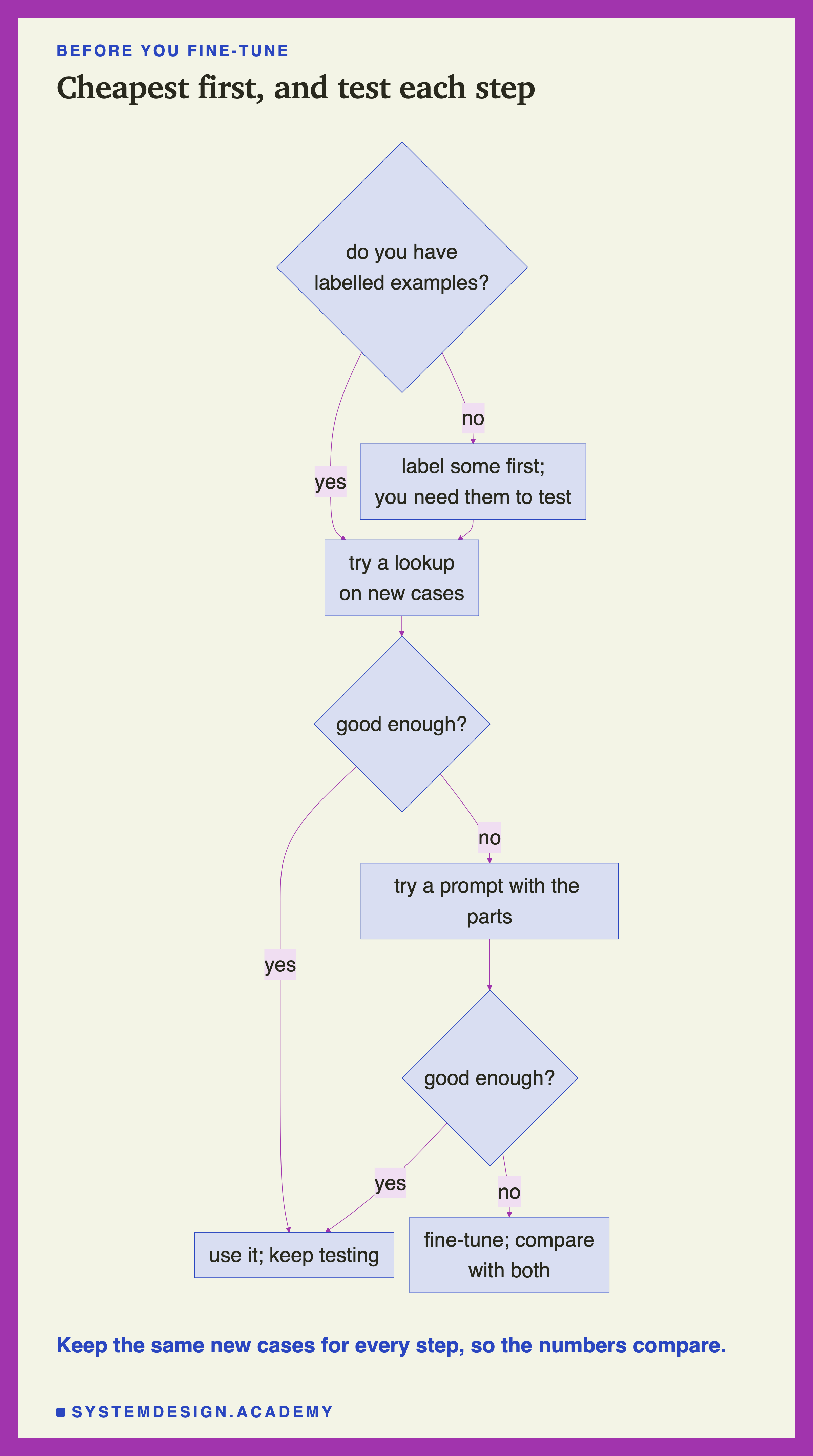
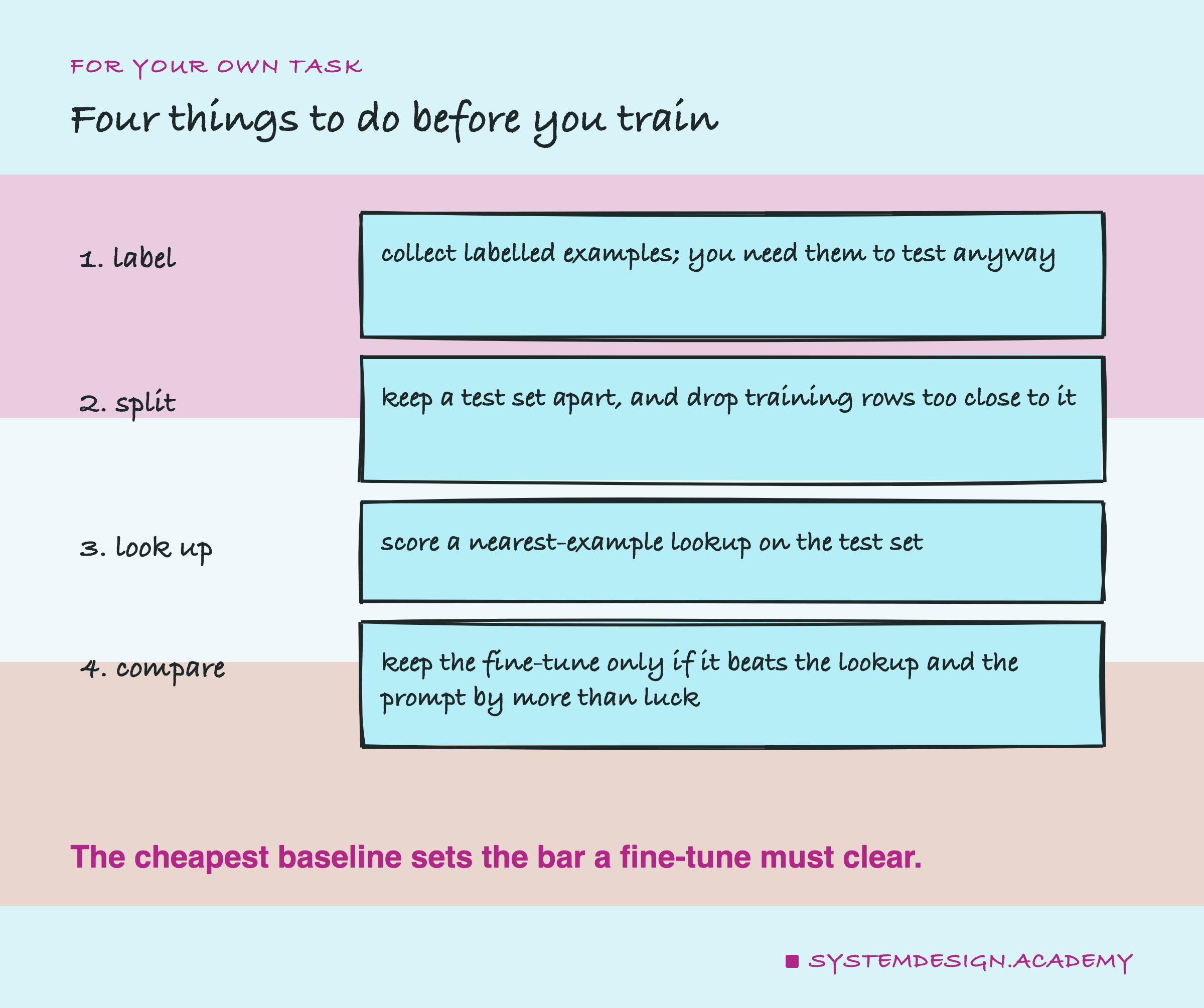
Get labelled examples first. Every method in this lesson needs them. Even if you only plan to write a prompt, you need labelled cases to test it on, so collecting them is never wasted. If you use a model to help write or label them, as I did, say so, and have at least some of them checked by people.
Keep a test set apart, and check it for leaks. Before you build anything, set aside cases you will never train on or copy from. Embed your training examples and your test cases, and drop every training example that is almost the same as a test case. Read the closest pairs yourself to choose the line; here 0.80 worked, but the right line depends on your data and your model.
Score a lookup. Embed the training examples, and for each test case copy the label of the nearest one. Try the vote of five as well. This takes minutes and costs almost nothing, and the number it gives you is the bar every other method must clear.
Then decide. If the lookup is good enough, you may be done. If it is not, read its mistakes: are they cases with no similar example, or cases where similar wording hides a different meaning? A prompt with context lines may fix the second kind; I have not tested that here. Fine-tune only if the lookup and a prompt both fall short, and compare the fine-tune with both on the same test cases, message by message, with the sign test.
When a Lookup Is Enough, and When It Is Not
A lookup is enough when the answer is a label you already have. Sorting, routing, tagging: whenever the output is one of a fixed set of labels and you have labelled examples that cover the kinds of input you get, the nearest example is a strong answer. Here it matched a fine-tune and a full prompt on a four-way task.
It is also good when you need to explain an answer. Every lookup answer points at the training message it copied. When it is wrong, you can see why, as with the receipt message, and you fix it by adding or correcting examples, not by retraining.
It is not enough when the answer must be made from the input. A lookup can only return something that is already in its examples. If the answer is an order number copied from the message, a product name, a short summary or a reply in your house style, there is no training message to copy it from. That is where a model that writes, prompted or fine-tuned, is needed.
It is weak when your examples do not cover your inputs. A lookup knows nothing beyond its examples. A new kind of message, far from all of them, gets the label of whatever happens to be least far away. A low nearest similarity is a warning, as the receipt message showed; a real system should pass such cases on.
is not the first step for a task like this one. On this four-way task, one training run moved the small model from 19 to 38 usable new answers, but the lookup reached 39 with no training at all. Fine-tuning earns its place where a lookup and a prompt fall short, and that is where the rest of this chapter goes.
Where the Chapter Goes Next
This result changes the plan for the chapter. If the four-way sorting task is already solved by a lookup, then experiments on it would mostly land at 38 to 40 of 40, and a change in the number of examples or the learning rate would be unlikely to show a difference that 80 messages can measure. A chapter needs a task that a lookup and a prompt find hard.
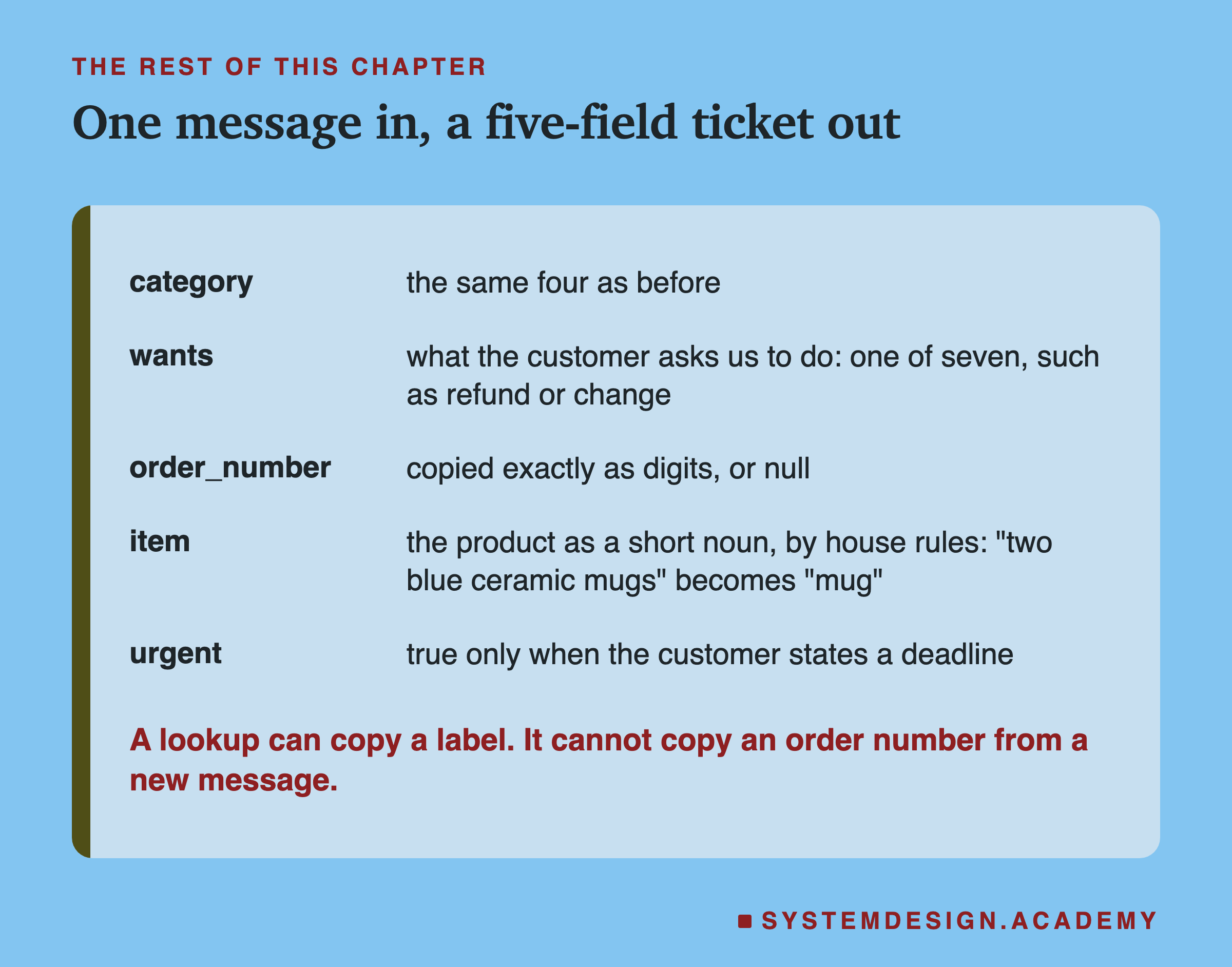
So from the next lessons on, the task is ticket extraction. The model reads one customer message and writes one small JSON object with five fields: the category, as before; what the customer wants, one of seven actions such as a refund, a replacement or a change of details; the order number, copied exactly as digits, or null when there is none; the item, the product named as a short common noun by fixed house rules, so "two blue ceramic mugs" becomes "mug"; and whether the message is urgent, which is true only when the customer states a deadline or time limit, or says urgent, asap, today, tonight, right now or immediately.
A lookup cannot do this: no training message holds the order number of a message it has never seen. A small prompted model has to hold many house rules at once, and my expectation, still to be tested, is that this is where prompts start to slip. That narrow, rule-heavy output skill is the kind of job fine-tuning is for. The next lessons build that data with the same care, two blind annotators and a leak check, and measure prompted and fine-tuned models on it. I have not shown any results from it here, because this lesson is about the decision that comes first.
What This Lesson Did Not Test
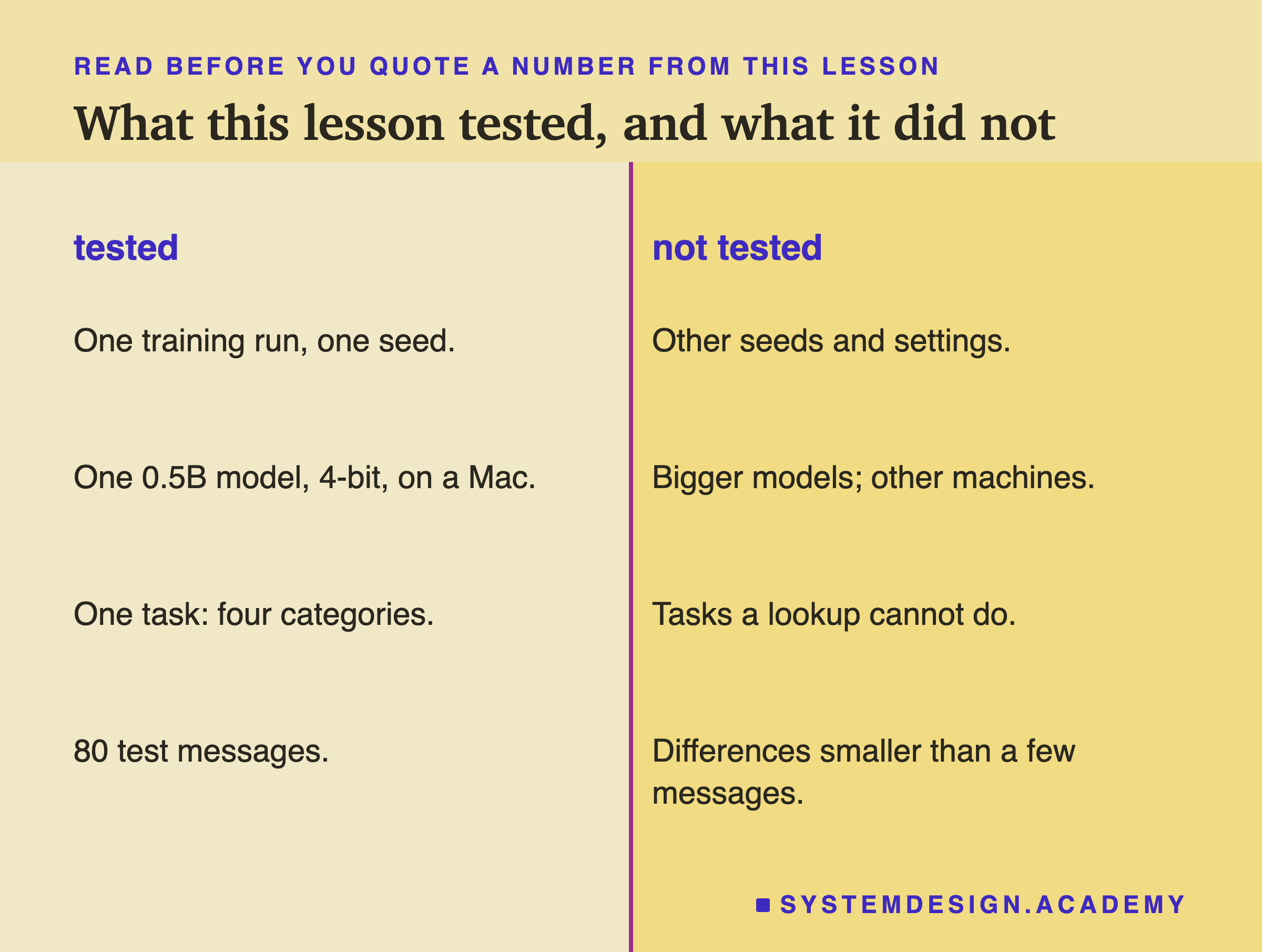
One training run, one seed. The fine-tune's 38 is one data point. Another seed, a different learning rate or a different number of steps could give 37 or 40. Later lessons vary those settings; this one did not.
One small model, on one Mac. The fine-tuned model was a 0.5B model in 4-bit form, trained with mlx on an Apple M4. A bigger model, full-precision weights or on a Colab GPU could behave differently, and I make no claim that the numbers carry over.
80 test messages. With 40 new messages, only large differences can be told apart from luck. The lookup, the fine-tune and the prompts differ by one message at most, and with only one or two messages differing, the sign test cannot tell them apart at all: it has no power at this size. A much larger test set might separate them; this one cannot.
Messages written and labelled with an AI model's help. The 560 training messages were written by an AI model, and both labellings came from the same model family. Real customer messages are messier, and real labels come with real disagreements. Both would probably make every method here score lower, and I cannot say by how much.
One task. Four categories, short English messages. The conclusion is about this kind of task, where the answer is a label you already have. It says nothing about tasks where the answer must be written, which is why the chapter moves on.
What to Do Next
Think of a model task in your own work where someone has suggested . Before anything is trained, ask what the output is. If it is one label from a fixed list, collect a few hundred labelled examples and a separate set of test cases, check the two sets for near-copies, and run the lookup from this lesson on them. It takes an afternoon. If it scores as well as you need, you have a system that is cheap, fast and explains every answer. If it does not, you have a baseline and a list of its mistakes, and those mistakes tell you whether a prompt or a fine-tune is the better next step.
The next lesson starts the ticket task: it looks inside a training run, what a weight is, what the loss measures, and what actually changes in the model, on the new ticket data.
Knowledge Check
Knowledge Check
4 questions - Score 80% to pass
Q1
On the 40 new messages, the lookup gave 39 usable answers and the fine-tuned 0.5B model gave 38. The lookup fixed 1 message and broke 0 against the fine-tune, and the sign test gives p = 1.00. What is the best reading?
Q2
Why were 39 training messages dropped before any training?
Q3
The second, blind labelling agreed with the first on all 560 messages. Why is that described as an upper bound?
Q4
Why does the rest of the chapter move from four-way sorting to ticket extraction?