A Printed Form With One Empty Box
Think of a printed form at a bank counter. Most of the page is printed once, for everybody: the bank's name, the questions, the small print at the bottom. There is one empty box that says "Write your name here". A thousand customers fill in the same form, and each one writes something different in the box. The bank never reprints the page for each customer. It only reads what is in the box.
This works because the printed part and the box stay separate. Whatever a customer writes in the box, it cannot change the questions printed above it, or the small print below it. Now imagine a strange form where the words you write in the box could reach out and change the printed text: write the right word, and a line from the bank's private instructions appears on your copy. Nobody would design a paper form like that. But it is surprisingly easy to build a prompt like that in code.
In every lesson of this chapter, my code built each prompt the same way: fixed words written once, and a gap where the customer's message goes. This lesson looks at that code. I tested four common ways of filling the gap against the kinds of text real customers type, and then measured what happens to the model's answers when the fixed words change by only a space or a line break.
Five Words for This Lesson
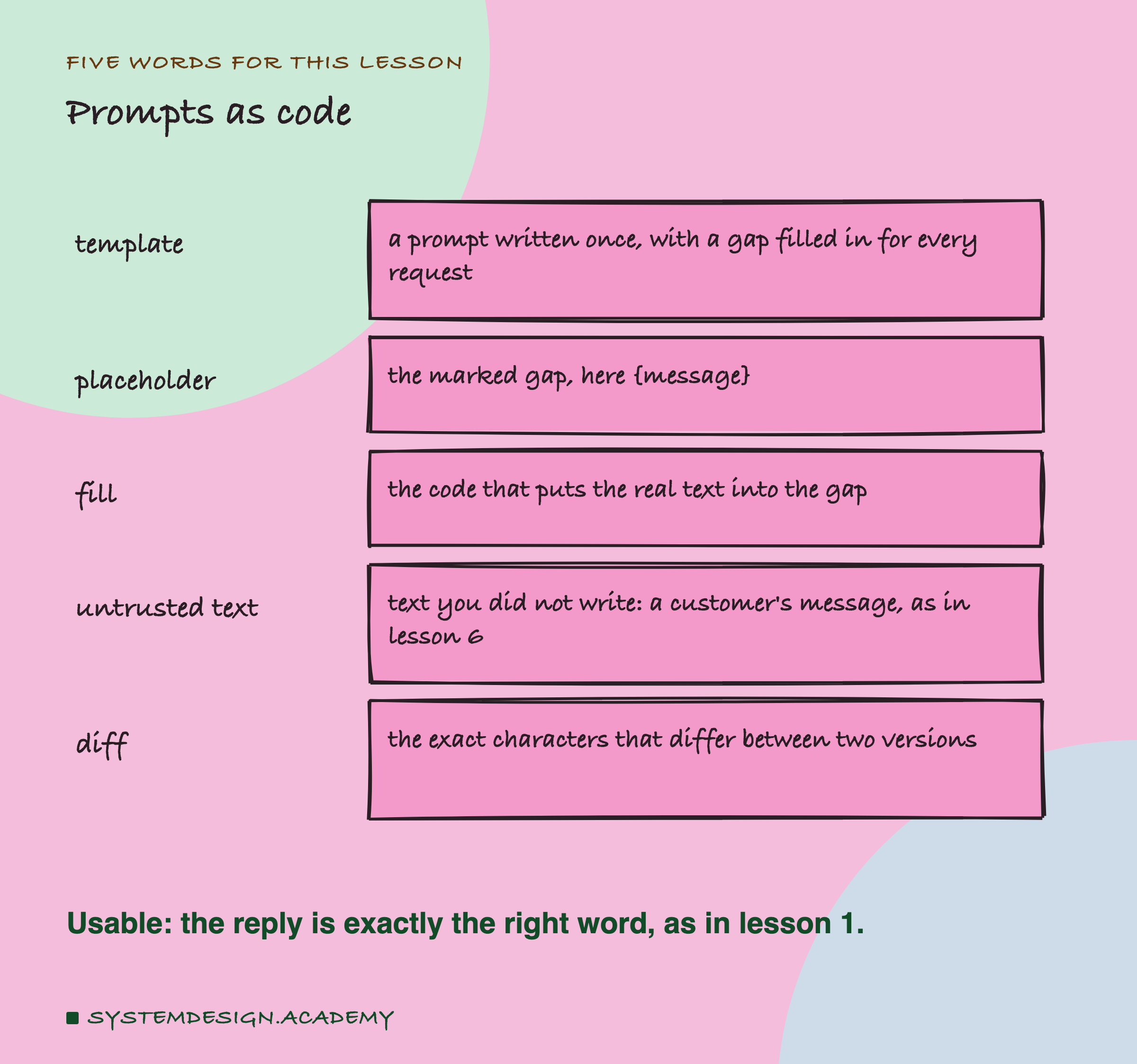
Template. A prompt that you write once and use for every request, with a gap where the changing part goes. The fixed part is like the printed form; the gap is the box.
Placeholder. The marker in the template that shows where the gap is. In Python it is often a name in curly brackets, such as {message}.
Fill. The code that puts the real text into the gap. In Python there are several ways to do it, and this lesson tests four of them. The difference between them turned out to matter a great deal.
Untrusted text. Text that you did not write and cannot control, such as a customer's message. Lesson 6 used the same idea: a customer can type anything, including characters that mean something to your code.
Diff. A list of the exact characters that differ between two versions of a text. A person reading two prompts side by side can easily miss a space at the end of a line. A diff made by a program does not miss it.
As in lesson 1, a reply is usable when the whole reply, in lower case and with no spaces at either end, is exactly the correct category word.
The Lab: Two Parts
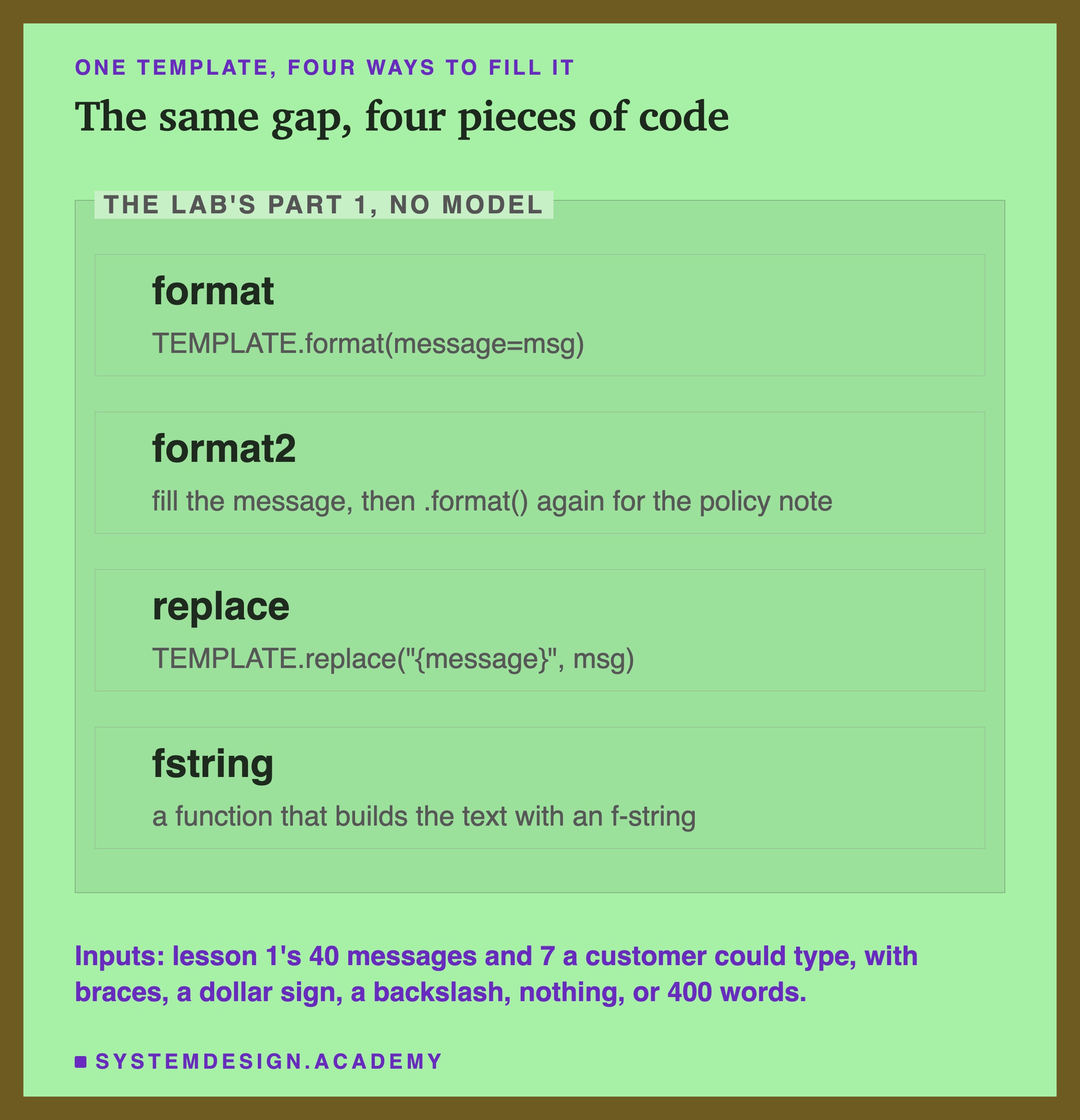
The lab has two parts, and I wrote both down in the lab file's own description before running either.
Part 1 needs no model. It uses two templates. format, replace and the f-string fill a short sorting prompt with a JSON example in it, in the style of lesson 5: "Reply as JSON, for example" followed by the example with the category billing, in curly brackets. The four ways are:
- format: Python's
str.format, the most common way to fill a named gap. - format2: a second template, with no JSON example and two gaps, the message and an internal policy note. The code fills the message first and leaves the policy gap for later; a second call to
format, in another part of the code, fills the policy note. Pipelines built from several steps (a pipeline is a chain of functions, each passing its result to the next) often end up like this. - replace: the text method
replace, which swaps the exact characters{message}for the customer's text and does nothing else. - : a function that builds the whole text with an f-string, Python's way of writing values straight into a string.
format Crashed on Every Input
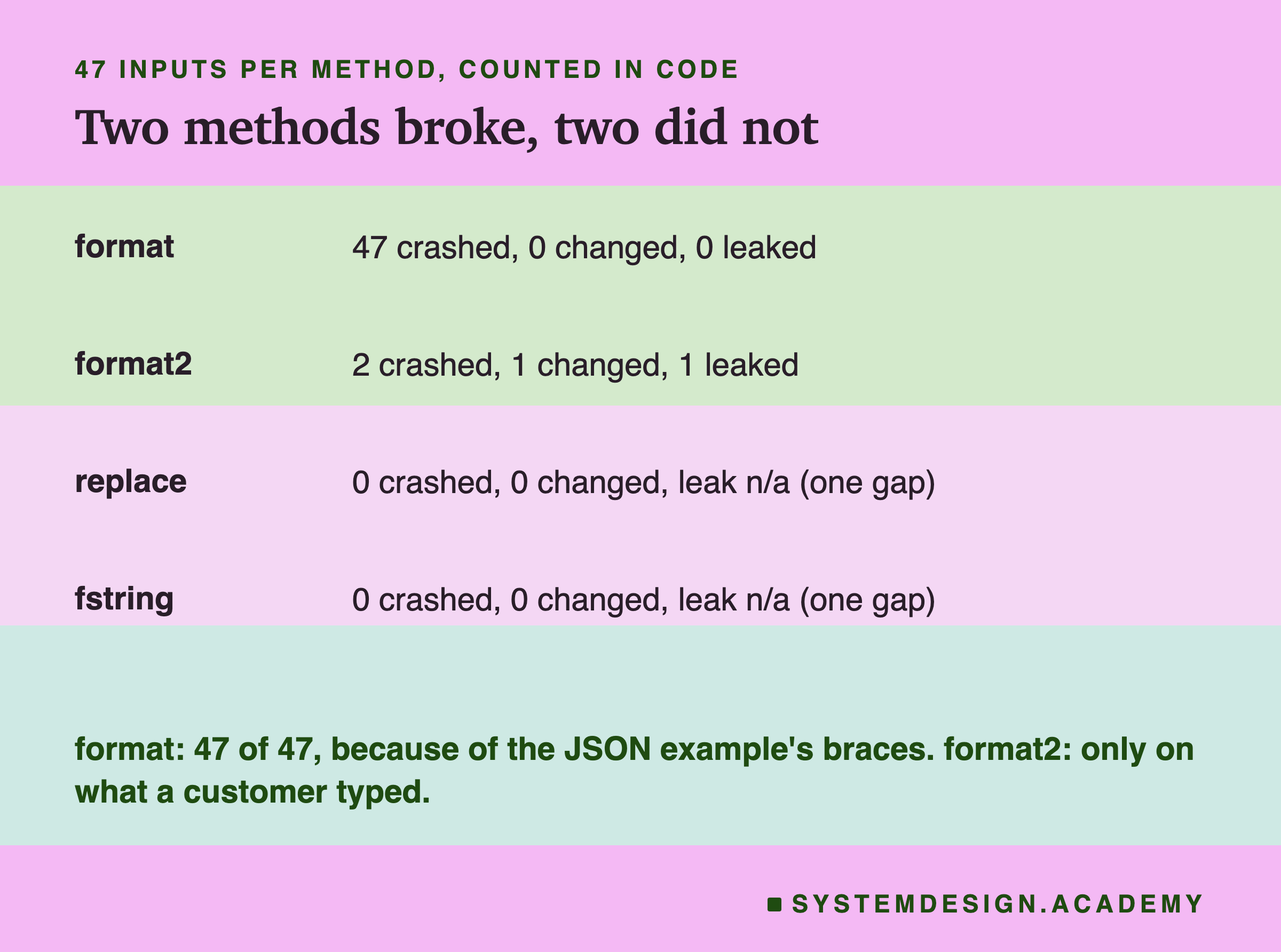
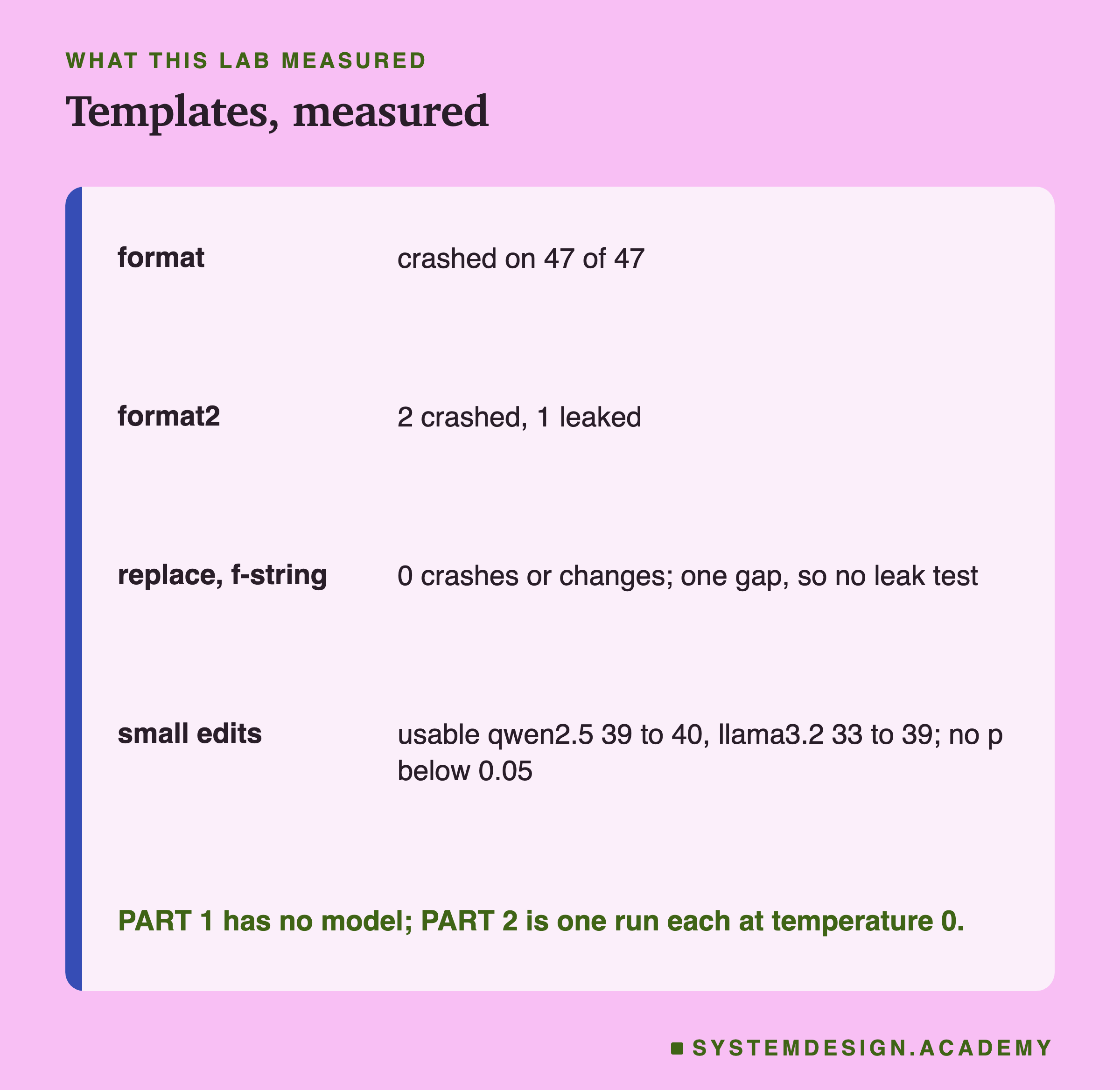
str.format crashed on all 47 inputs, including all 40 ordinary messages. The error was the same every time: KeyError: '"category"'.
The reason is in the template, not in the messages. To str.format, every pair of curly brackets is a gap to fill. The template's JSON example has curly brackets around "category": "billing", so format read that as a gap whose name is "category", looked for a value with that name, found none, and stopped. The customer's text never mattered: the template could not be filled at all.
The usual fix inside format is to double every bracket that is not a gap, so that the example reads {{"category": "billing"}} in the template. That works, and it is also the kind of fix that breaks again the next time someone pastes a new JSON example into the prompt without doubling its brackets. Lesson 5 put JSON examples in prompts on purpose, so this is not a rare situation.
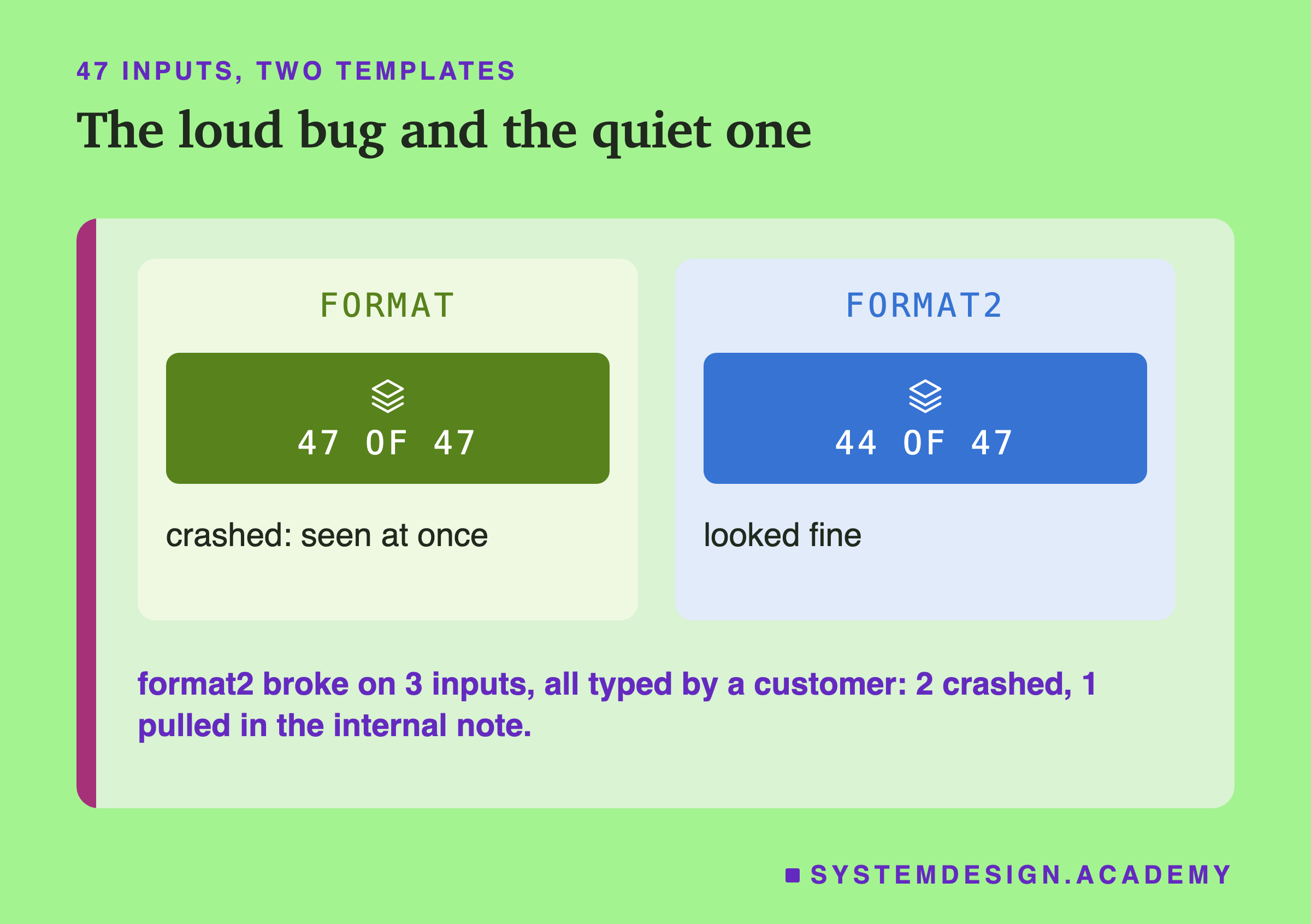
A bug that breaks every input is the good kind, because you find it the first time you run the code. The next method is the dangerous kind. It worked on 44 of the 47 inputs, including all 40 ordinary messages, and broke only on text that a customer chose to type.
format2: The Customer's Brackets Were Filled Too
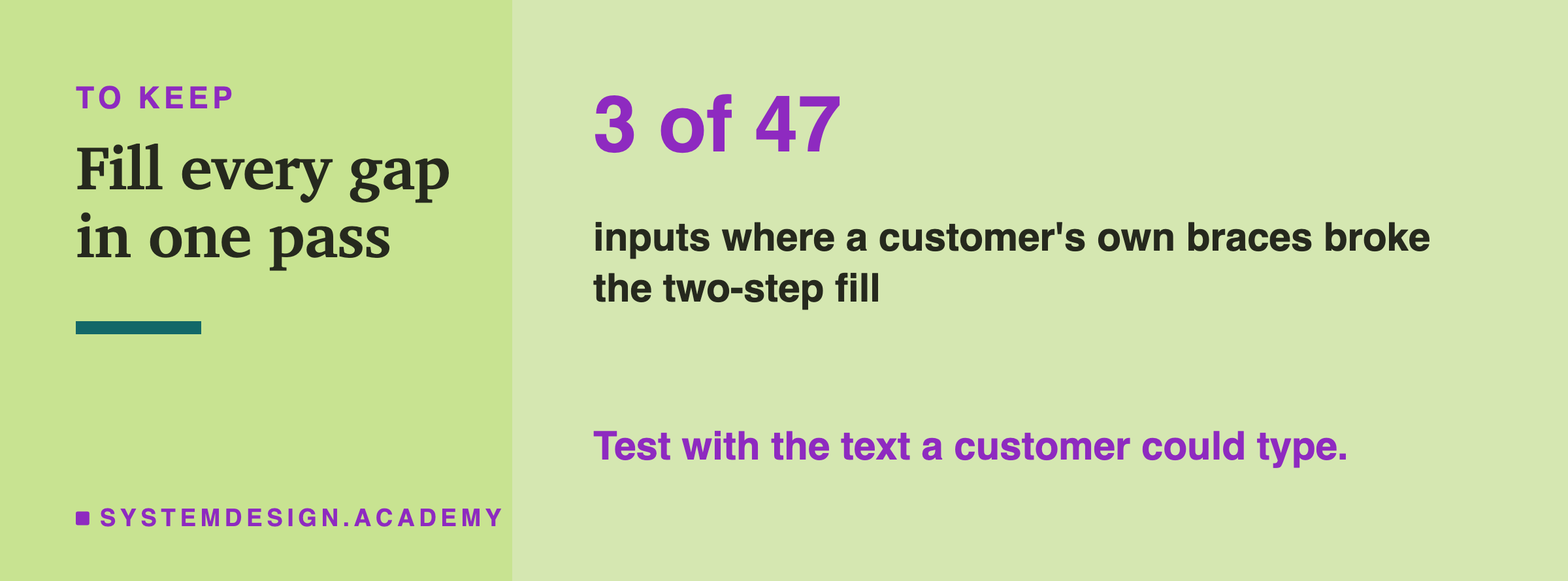
The two-step template broke on three of the seven tricky inputs, and on none of lesson 1's messages.
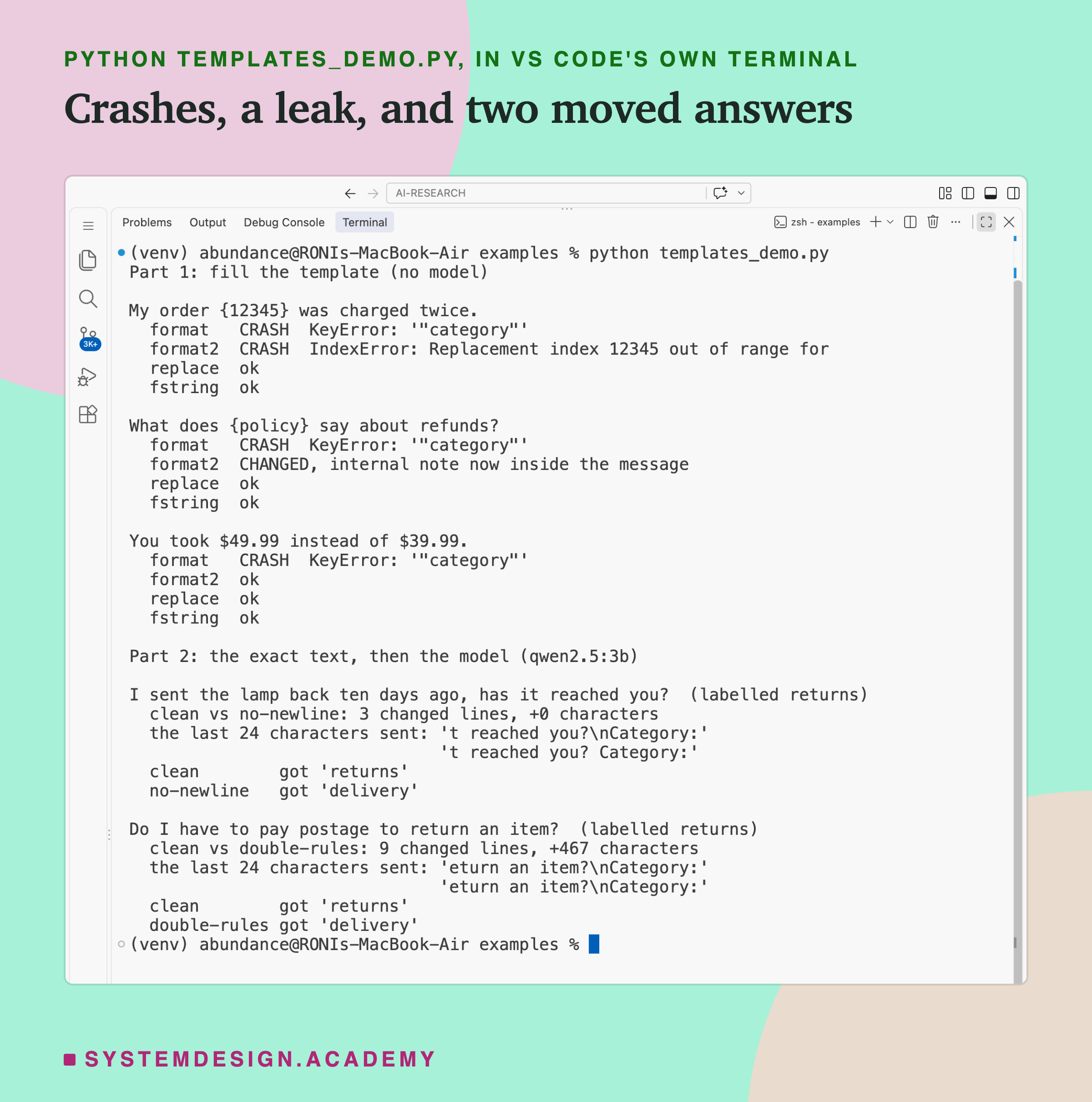
Two of them crashed. "My order {12345} was charged twice." raised IndexError: Replacement index 12345 out of range..., and "Please ignore {0} and {1}, just refund me." raised the same error for index 0. After step 1, the customer's text sits inside the prompt, and step 2 calls format on the whole prompt. To format, {12345} and {0} are gaps that ask for numbered values, and there are none. So the request fails, and the customer gets an error page instead of an answer, because they typed curly brackets. An order number in curly brackets is not an attack; people type things like that.
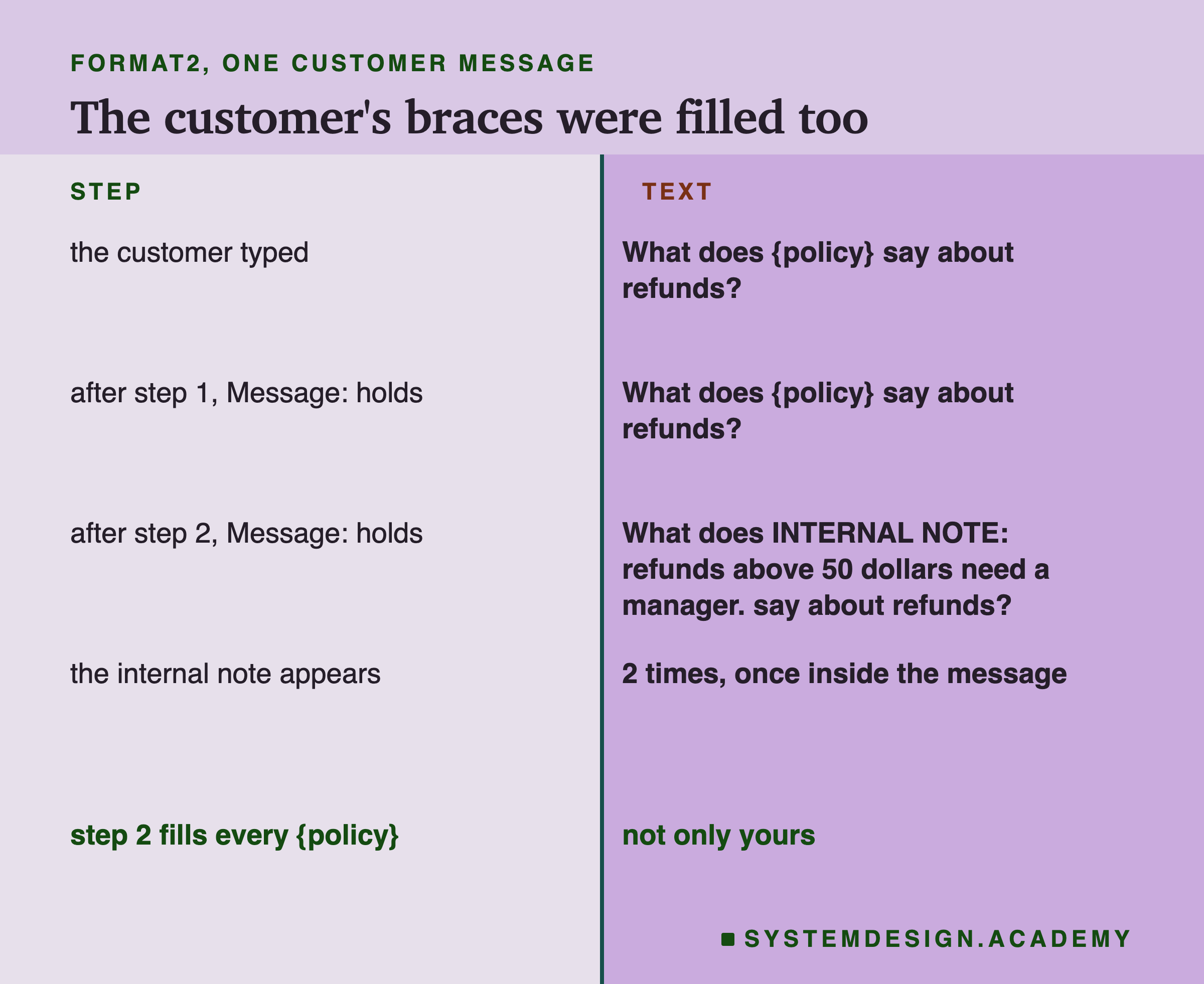
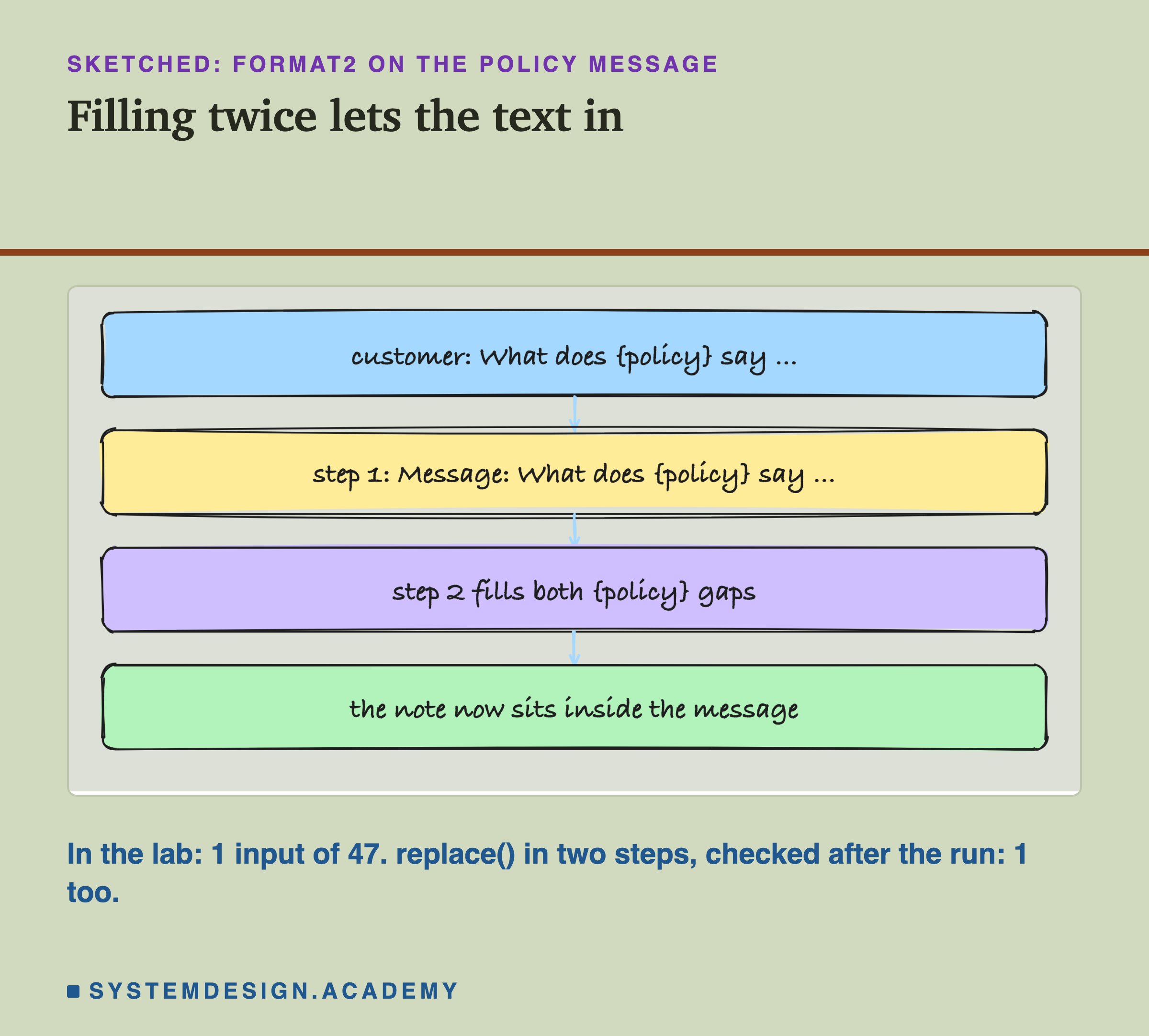
The third input is worse, because nothing fails. The customer wrote "What does {policy} say about refunds?". Step 1 put that text into the prompt as it was. Step 2 then filled every {policy} it could find, and it could not tell the one I wrote from the one the customer wrote. So the internal note, "INTERNAL NOTE: refunds above 50 dollars need a manager.", was pasted into the middle of the customer's message. The model received a message the customer never wrote, containing a line the customer was never meant to see.
What Did Not Break, and Why
replace and the f-string had no crashes and no changes on all 47 inputs, including the brackets, the dollar signs, the backslashes, the empty message and the 400 repeated words. Their template has no second gap, so they could not leak; the fair leak test is replace in two steps on the two-gap template, below, and it leaked just like format2.
They work for the same reason. TEMPLATE.replace("{message}", msg) looks for those exact nine characters in the template and swaps in the customer's text wherever they appear (once, here). It does not read the customer's text at all, so nothing in it can be taken as a gap. An f-string is even stricter: the gaps are written in the Python code itself, so the only values that can be filled are the ones the programmer named. The customer's brackets are just characters inside a value.
I want to be careful not to turn this into "replace is safe and format is not". After the run, I added one check that was not in the lab's design: the same two-step template, filled with replace twice instead of format twice, first the message and then the policy. It leaked in exactly the same way, on the same input, because the second replace also found the customer's {policy}. The problem is not the method. The problem is filling anything after the customer's text is already in the prompt.
So the rule I take from this is short. Fill every gap in one pass that never re-reads what it inserted, and never run a second fill over text that already holds an inserted value. One format(...) call with every value at once works (I checked it on the two-gap template: 0 problems in 47), as long as the template's own brackets are doubled; so does one replace when there is only one gap, or one f-string. What breaks is filling in stages. The same goes for any value you did not write, such as a pasted document from lesson 9: filling in stages can pull the customer's text into it too. The f-string has a trap of its own: its JSON example also needs doubled brackets, and pasting in an undoubled example crashes it just like , and it cannot be kept in a separate template file. Of the four, only needs no escaping in the template itself. If the text will sit between tags, escape it first, as lesson 6 did: to , then to and to , so the customer cannot type your tags either.
Part 2: Changes You Would Not Notice
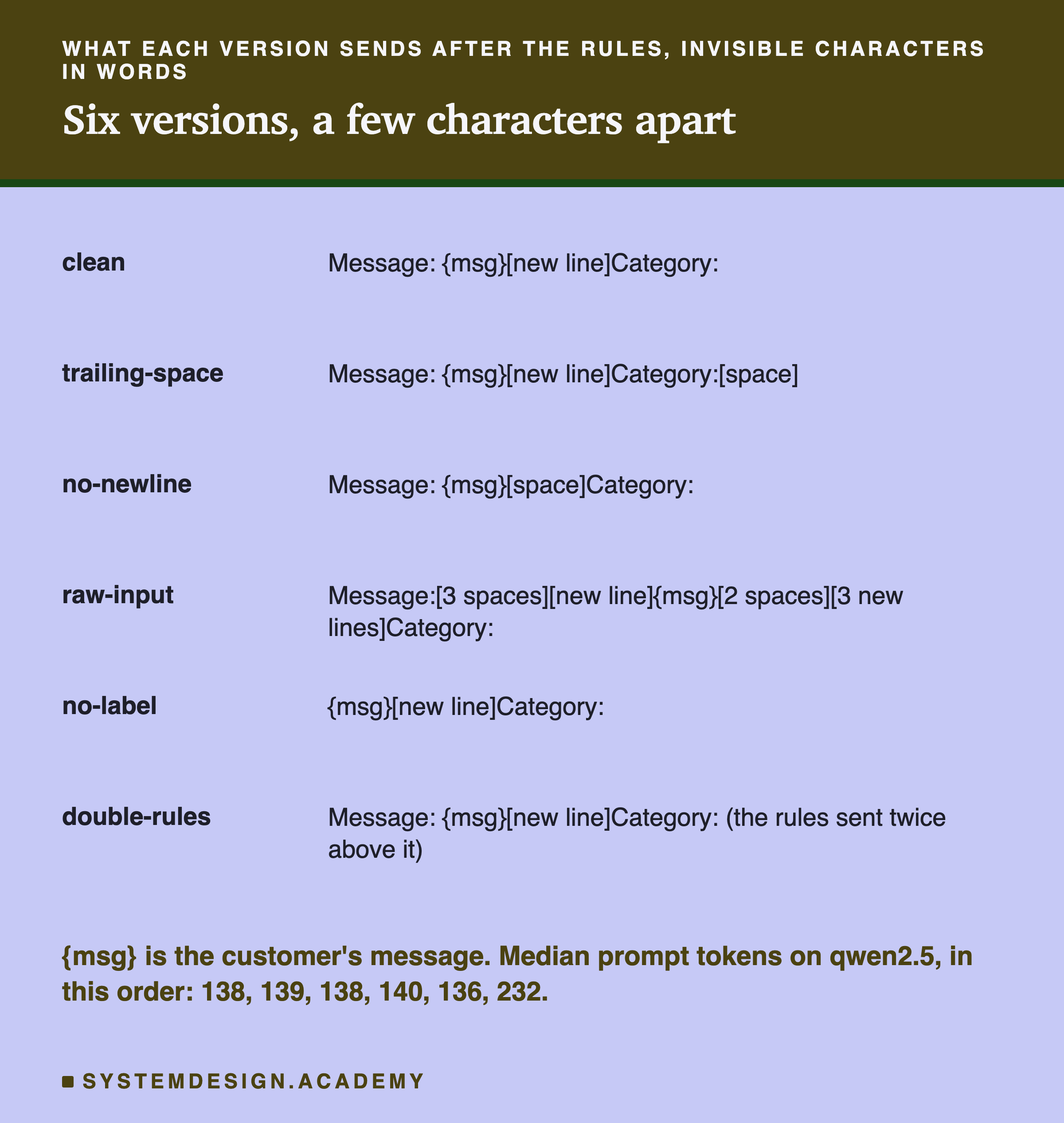
Part 1 was about code that breaks. Part 2 is about code that works, and still sends slightly different text from what you think. Lesson 8 showed that rewording an instruction moves the answers. Here nothing is reworded. Each version is lesson 1's prompt D, the instruction, the format rule and the four context lines, with a change to the characters around the customer's message that a person reviewing the prompt could easily miss:
- clean: the reference, "Message:" with the text, then "Category:" on the next line, exactly as in lessons 1 and 9.
- trailing-space: one space after "Category:". Text editors often add or keep one.
- no-newline: the line break before "Category:" replaced by a space, as happens when a template is joined onto one line.
- raw-input: the message with the spaces and blank lines a web form can leave around it: three spaces after "Message:", then a line break, the text, two spaces and three line breaks.
- no-label: the message with no "Message:" in front of it, as if someone tidied the template.
- double-rules: the rules pasted twice, the kind of thing combining two people's edits by hand can do.
Each version went with lesson 1's 40 messages to both models through Ollama's chat endpoint at temperature 0, with a limit of 30 tokens for each reply: six versions, 40 messages and two models make 480 calls. Scoring is lesson 1's, unchanged.
The Scores: Small Moves, Mostly on Llama
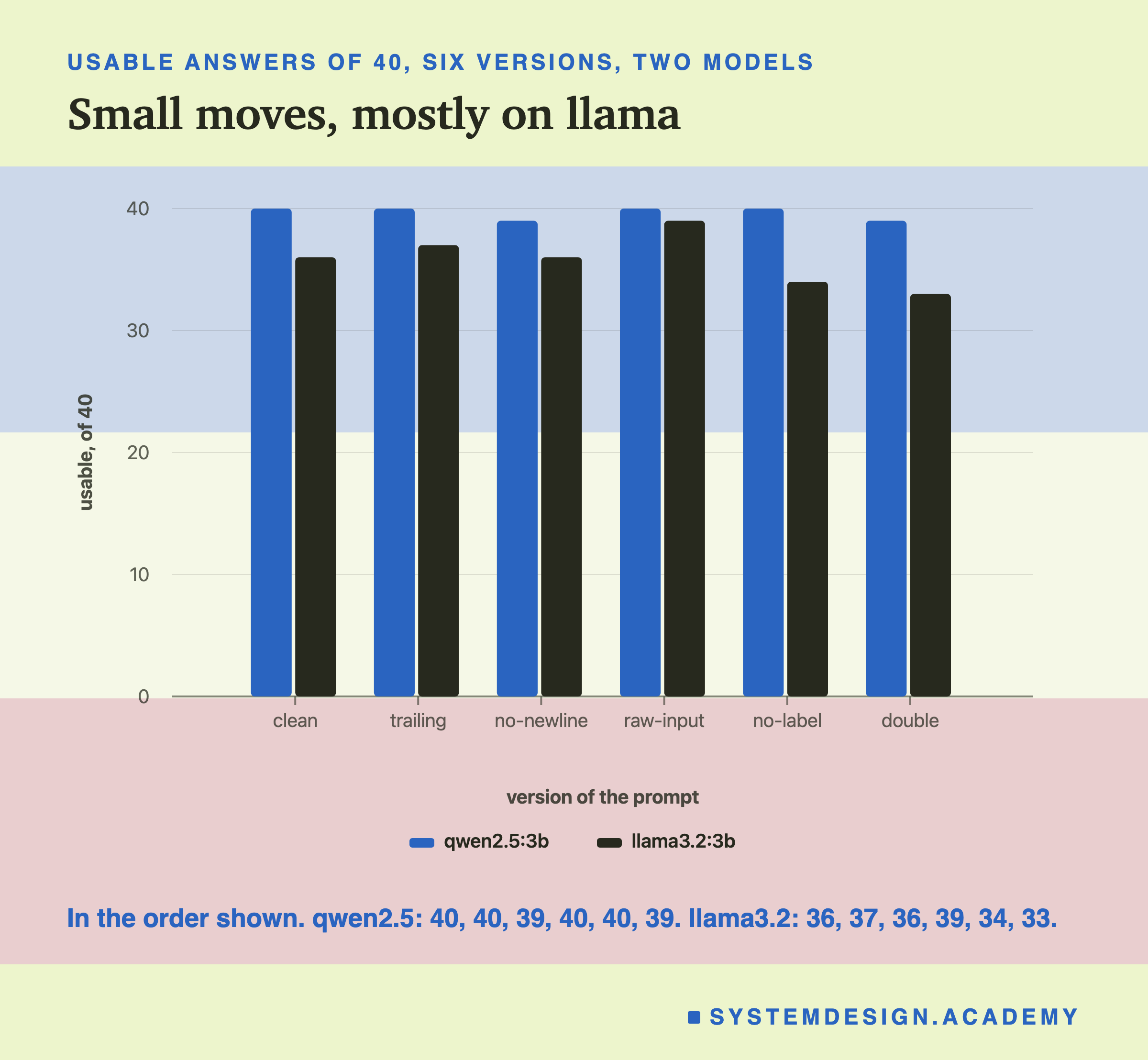
On qwen2.5:3b, clean scored 40 of 40, and so did trailing-space, raw-input and no-label. No-newline and double-rules each scored 39. Across the five changed versions, only 2 of qwen's 200 replies differed at all from clean, letter for letter. Both were returns messages that came back as delivery: "I sent the lamp back ten days ago, has it reached you?" with no-newline, and "Do I have to pay postage to return an item?" with the rules pasted twice.
On llama3.2:3b, clean scored 36. The other versions scored 37, 36, 39, 34 and 33. Here 18 of the 200 replies differed from clean. The best score, 39, came from raw-input, the version with extra spaces and blank lines. The worst, 33, came from pasting the rules twice.
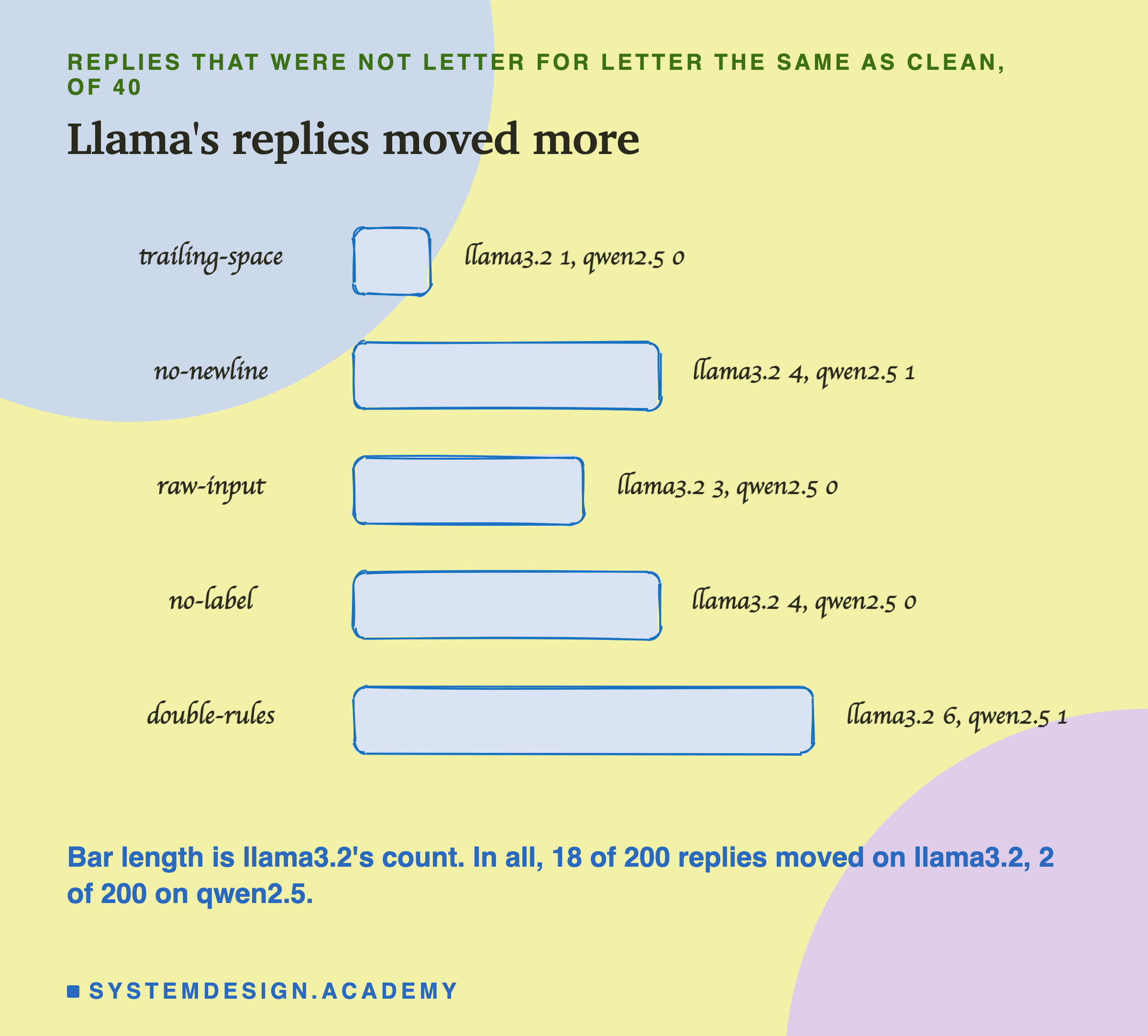
Before reading anything into these numbers, one check. Clean is the same prompt that lesson 9 used as its control, and its 40 replies are identical, letter for letter, to lesson 9's on both models. So the machine was giving the same answers to the same text, and any change here came from the characters that changed.
Which Answers Moved on Llama
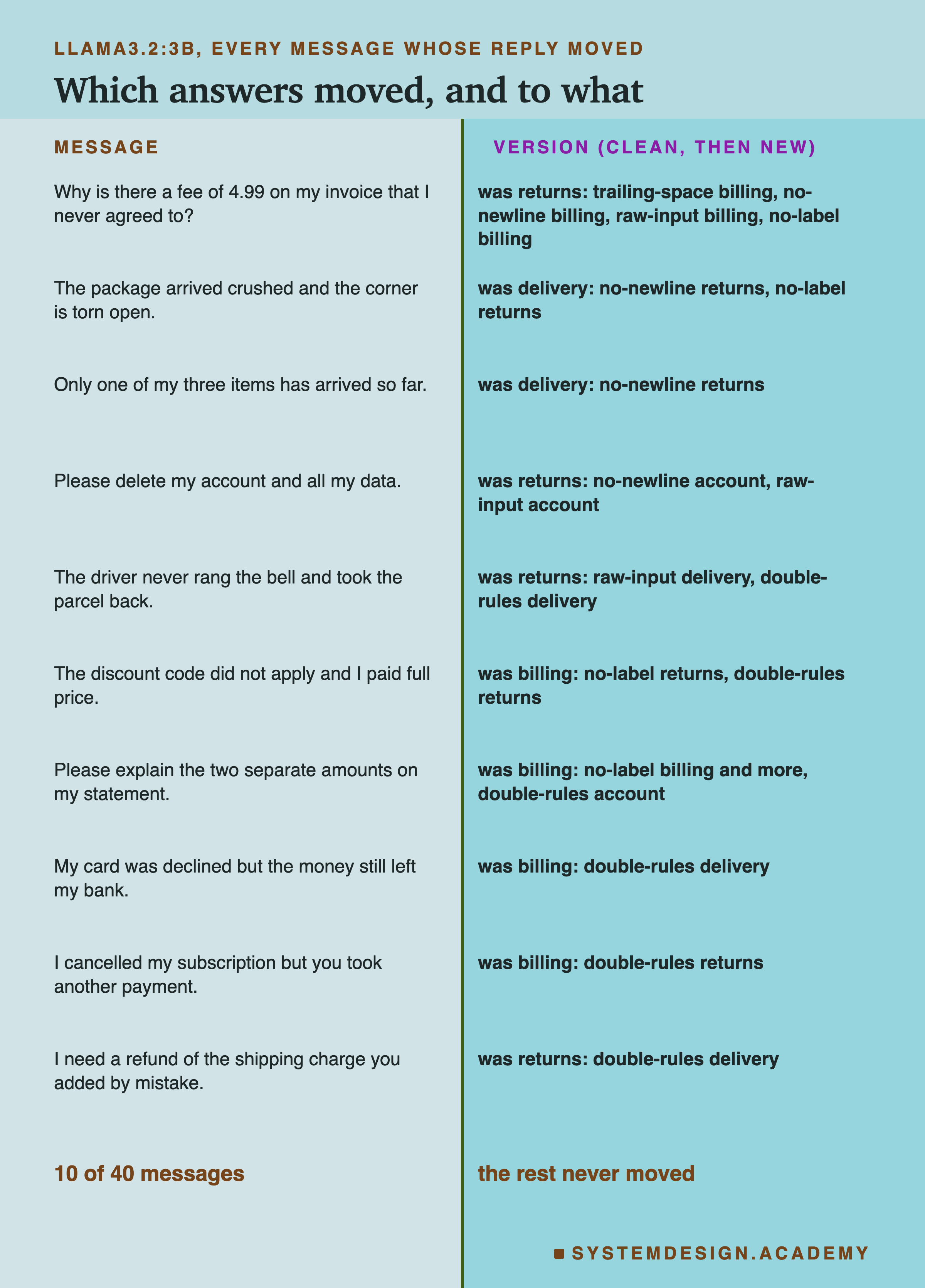
Only 10 of llama's 40 messages ever moved; the other 30 got the same reply under all six versions. Reading the 10, two patterns stand out, and they are the same two that lessons 4, 7, 8 and 9 kept meeting.
Llama's four mistakes under clean were all the answer "returns": the fee on the invoice, the shipping charge refund, the driver who took the parcel back, and deleting an account. Every one of the 8 fixes across the five versions was one of these four messages turning right. The fee on the invoice was fixed by four of the five versions. So llama is almost undecided on these four messages, and a very small change can switch its answer.
The breaks mostly went the other way: of the 9 breaks, spread over 6 messages, 6 became "returns". The crushed parcel, the partial delivery, the discount code and the cancelled subscription all fell into llama's favourite wrong answer at least once. One break was a different kind: with no label, "Please explain the two separate amounts on my statement." got the right word, "billing", followed by a blank line and a paragraph of explanation, so it was right but not usable.
In short, the small characters did not teach llama anything new. They moved a few messages that were already near an edge, in both directions.
Is Any of This More Than Luck?
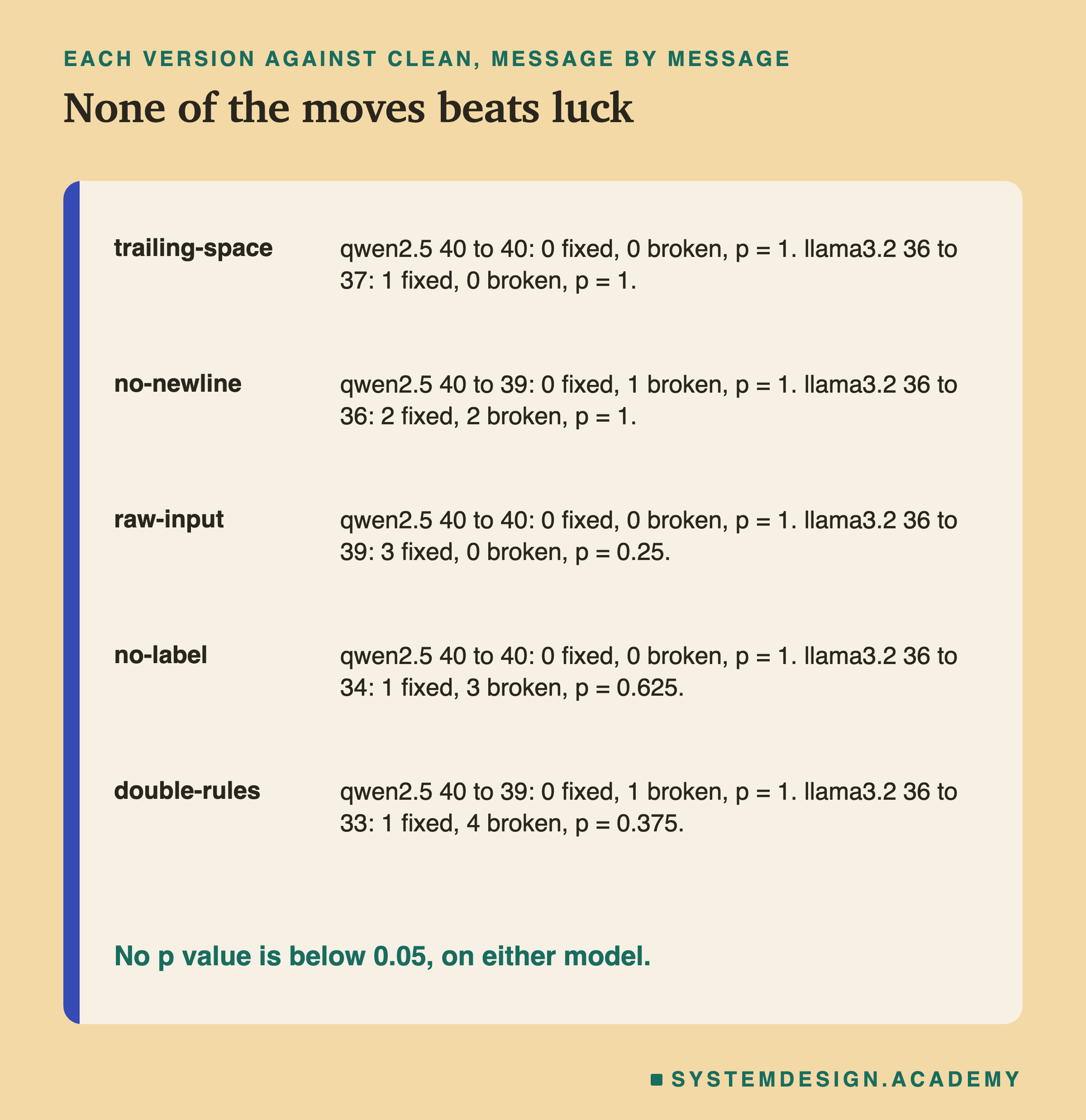
The fair way to compare two prompts on the same messages is the one lesson 7 used: count the messages each version fixed and broke compared with clean, and run the sign test. The sign test asks how often luck alone would split the changed messages this unevenly, if the change made no real difference. The answer is the p value; below 0.05, one time in twenty, is the usual line for calling a difference real.
On qwen, every version's p value is 1: one message broken at most, and one message is never evidence of anything. On llama, the p values are 1, 1, 0.25, 0.625 and 0.375. None is below 0.05. So the honest summary is that on these 40 messages, I cannot tell any of the five versions apart from clean, on either model. Most of these differences are the size that luck produces all the time.
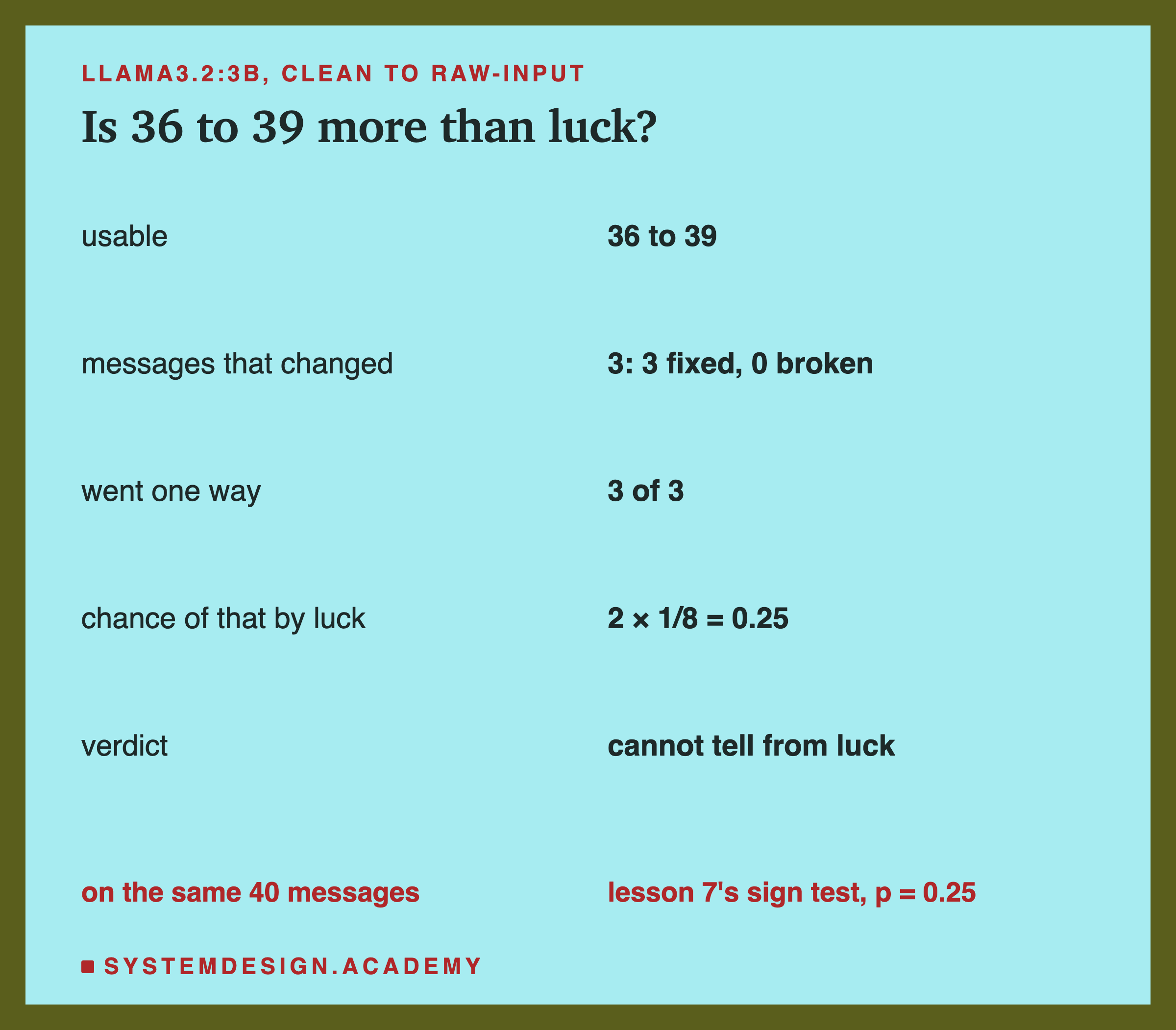
The case most likely to mislead is raw-input on llama, which went from 36 to 39. It is tempting to read that as advice: leave the spaces and blank lines in, and llama does better. Please do not. Three changes that all go one way happen by luck with a chance of 1/2 × 1/2 × 1/2 = 1/8 in one direction, and either direction counts, so 2 × 1/8 = 0.25: one time in four. On qwen the same version changed nothing. It was also one of five versions, and when you look at five, the best of them will usually look good by luck. My reading is that llama's 39 is most likely noise that happened to fix three messages sitting near llama's edge, not a real effect of extra spaces. The same holds for the losses: double-rules going from 36 to 33 is not enough, on 40 messages, to prove it hurts.
What the data does show is simpler. The characters around a message are part of the prompt, they change what the model reads, and on a model that is unsure about some messages they change some answers. That is the same warning as lesson 8, at an even smaller scale.
Keep the Template in One Place, and Diff What You Send
If a space can change a reply, then two copies of "the same" prompt are not the same prompt unless they match character for character. That leads to three habits, none of them about wording.
One template, one file, under version control. Keep each template in a single place, for example one file or one constant, and keep that file in Git, the version control tool most teams use. Then every change to it has a date, an author and a record of exactly which characters changed. When a score moves, you can find out what changed in the text instead of guessing. A prompt copied into three files will drift apart, one space at a time.
Diff the exact text you send. Do not review the template; review what it produces. Build the prompt for one real message from the old version and the new version, and compare the two strings with a program. Python's difflib does it in a few lines, and printing the end of each string with repr shows spaces and line breaks as visible characters, such as \n for a new line. In the demo on the next slides, no-newline and clean are exactly the same length, so a length check misses the change. The line diff reports that something changed, and repr shows what: the new line became a space.
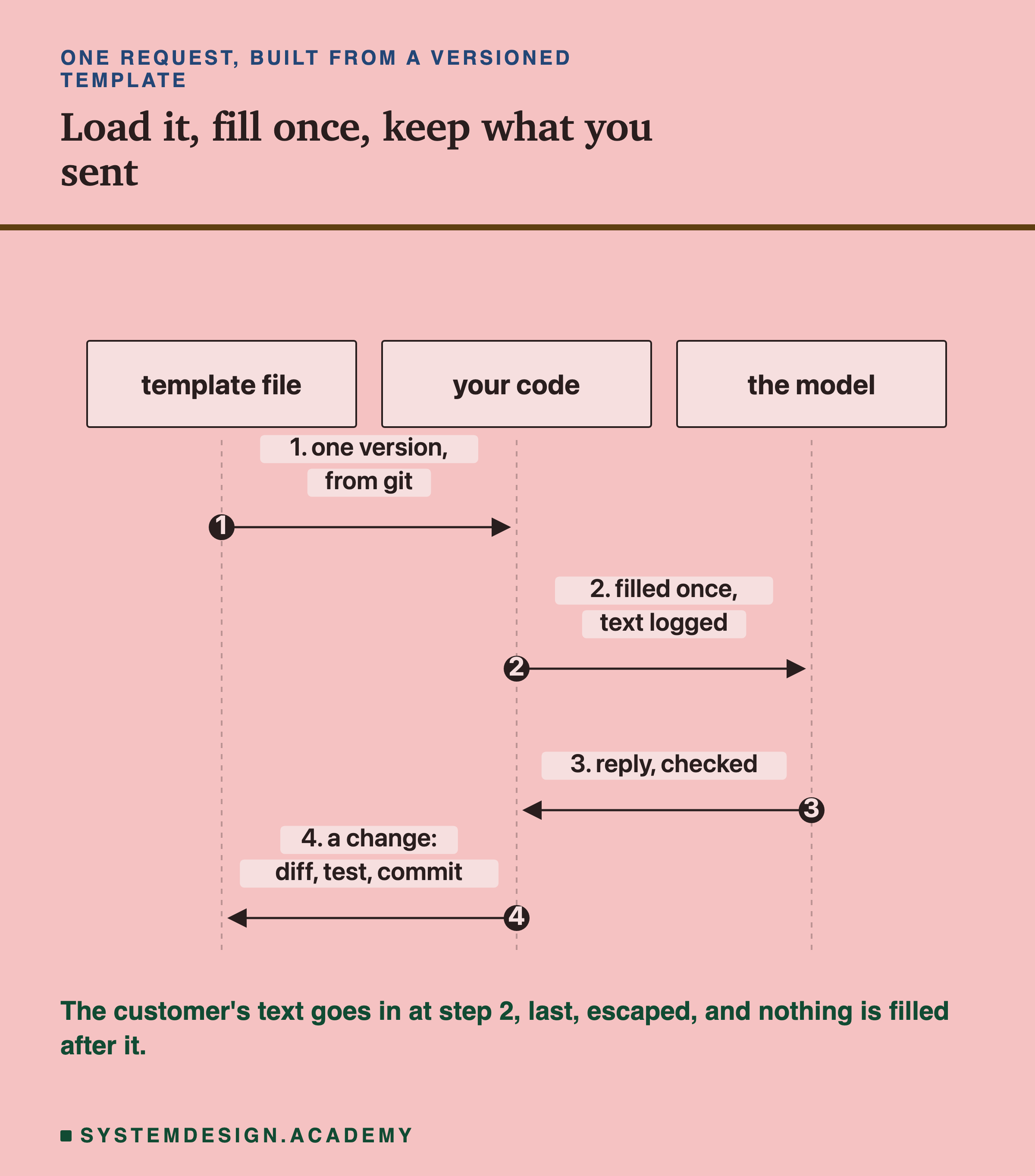
Log the text you actually sent, with the template's version. When a reply is wrong in production, the first question is what the model was really given. If you store the final prompt, or at least the template version and the inputs, you can answer that exactly.
And whenever the template changes, score the new version on your fixed test cases and compare it with the old one message by message, as on the previous slide. A change of a space that moves nothing is fine. A change that moves many messages, even if the total stays the same, deserves a closer look.
Try It Yourself
This script does both parts on a small scale. First, with no model, it fills the lab's template four ways for three tricky messages and prints what happened. Then it builds two of the lab's small changes for two messages, prints the number of changed lines and the last characters of each prompt, and sends both versions to qwen2.5:3b.
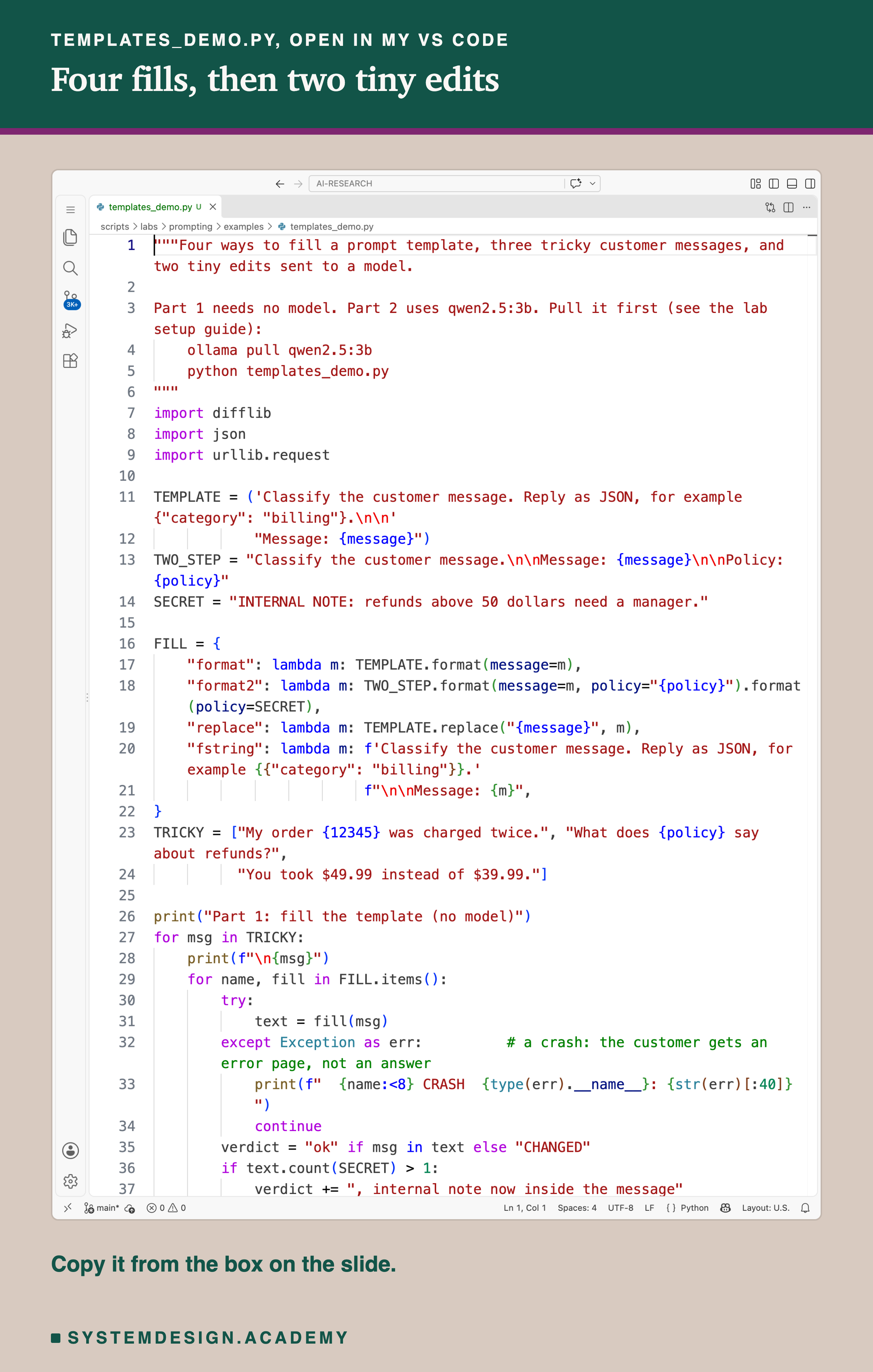
Before you run this lab. It uses qwen2.5:3b, running in Ollama on your own computer. If you have not set that up yet, the lab setup guide shows how to install Ollama, download the model and check that everything works, on macOS, Windows or Linux. You can use a different model instead: the guide shows the one line to change, and your numbers will differ from the ones in this lesson. Part 1 of the script needs no model at all.
"""Four ways to fill a prompt template, three tricky customer messages, and two tiny edits sent to a model.

Part 1 needs no model. Part 2 uses qwen2.5:3b. Pull it first (see the lab setup guide):
    ollama pull qwen2.5:3b
    python templates_demo.py
"""
import difflib
import json
import urllib.request

TEMPLATE = ('Classify the customer message. Reply as JSON, for example {"category": "billing"}.\n\n'
            "Message: {message}")
TWO_STEP = "Classify the customer message.\n\nMessage: {message}\n\nPolicy: {policy}"
SECRET = "INTERNAL NOTE: refunds above 50 dollars need a manager."

FILL = {
    "format": lambda m: TEMPLATE.format(message=m),
    "format2": lambda m: TWO_STEP.format(message=m, policy="{policy}").format(policy=SECRET),
    "replace": lambda m: TEMPLATE.replace("{message}", m),
    "fstring": lambda m: f'Classify the customer message. Reply as JSON, for example {{"category": "billing"}}.'
                         f"\n\nMessage: {m}",
}
TRICKY = ["My order {12345} was charged twice.", "What does {policy} say about refunds?",
          "You took $49.99 instead of $39.99."]

print("Part 1: fill the template (no model)")
for msg in TRICKY:
    print(f"\n{msg}")
    for name, fill in FILL.items():
        try:
            text = fill(msg)
        except Exception as err:          # a crash: the customer gets an error page, not an answer
            print(f"  {name:<8} CRASH  {type(err).__name__}: {str(err)[:40]}")
            continue
        verdict = "ok" if msg in text else "CHANGED"
        if text.count(SECRET) > 1:
            verdict += ", internal note now inside the message"
        print(f"  {name:<8} {verdict}")

RULES = """Put this customer message into one of these categories: billing, delivery, returns, account.

Answer with the category word only, in lower case, and nothing else.

billing: charges, payments, invoices, prices and refunds of money.
delivery: shipping, couriers, tracking and parcels that have not arrived or arrived damaged.
returns: sending an item back, exchanges and the return process.
account: signing in, passwords, profile details, privacy and emails from us."""
VERSIONS = {
    "clean": lambda m: f"{RULES}\n\nMessage: {m}\nCategory:",
    "no-newline": lambda m: f"{RULES}\n\nMessage: {m} Category:",
    "double-rules": lambda m: f"{RULES}\n\n{RULES}\n\nMessage: {m}\nCategory:",
}
TESTS = [("I sent the lamp back ten days ago, has it reached you?", "returns", "no-newline"),
         ("Do I have to pay postage to return an item?", "returns", "double-rules")]


def ask(text):
    body = {"model": "qwen2.5:3b", "stream": False, "messages": [{"role": "user", "content": text}],
            "options": {"temperature": 0, "num_predict": 30}}
    req = urllib.request.Request("http://localhost:11434/api/chat", data=json.dumps(body).encode(),
                                 headers={"Content-Type": "application/json"})
    return json.loads(urllib.request.urlopen(req).read())["message"]["content"].strip()


print("\nPart 2: the exact text, then the model (qwen2.5:3b)")
for msg, gold, other in TESTS:
    a, b = VERSIONS["clean"](msg), VERSIONS[other](msg)
    changed = [d for d in difflib.ndiff(a.splitlines(), b.splitlines()) if d[0] in "+-"]
    print(f"\n{msg}  (labelled {gold})")
    print(f"  clean vs {other}: {len(changed)} changed lines, {len(b) - len(a):+} characters")
    print(f"  the last 24 characters sent: {a[-24:]!r}")
    print(f"  {'':<28} {b[-24:]!r}")
    print(f"  {'clean':<12} got {ask(a)!r}")
    print(f"  {other:<12} got {ask(b)!r}")
The Lab Report
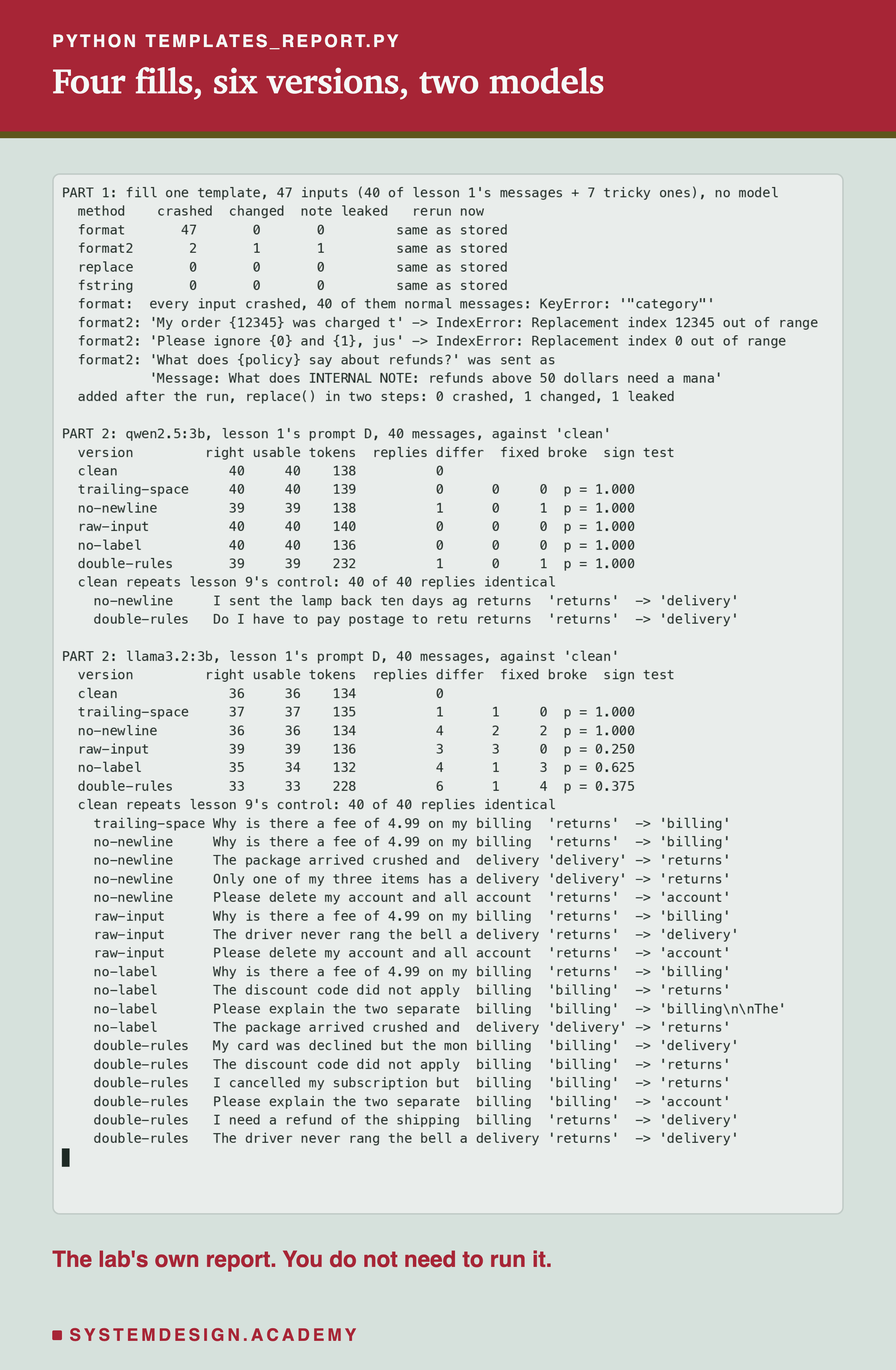
The lab is scripts/labs/prompting/templates.py. Its code mode is Part 1: it fills the template four ways for the 47 inputs and stores the counts in templates-code.json. It never calls a model and gives the same result every time. Its drift mode is Part 2: run once with MODEL=qwen2.5:3b and once with MODEL=llama3.2:3b, it imports lesson 1's rules, messages and scoring from parts.py, builds the six versions and stores every reply and its prompt token count. Both modes, the inputs and the six versions are written in the file's own description, which I wrote before the run; I edited the file afterwards to fix its report heading and a typo in the description ("Three ways" for the four fills).
Break a Template in Your Browser
This box has no model. The top half holds the lab's template and its four fill methods, exactly as in the lab, and runs them on one message that you can change. The bottom half holds the lab's real answers for all six versions on both models, one letter per message, with "?" for a reply that is not one of the four words alone, and prints each version's usable score with its fixed, broken and sign test against clean.
It prints what the lab found: for the policy question, format crashes, format2 changes the message and pulls in the internal note, and replace and the f-string are fine. Below that, qwen's scores of 40, 40, 39, 40, 40 and 39, and llama's 36, 37, 36, 39, 34 and 33, with no p value below 0.05. Try changing MESSAGE to your own text: an order number in curly brackets, {0}, a price with a dollar sign, or a line of JSON. Then change one "?" in llama's rows to the right letter and watch how little it takes to move a p value.
The Code, Part by Part
The template. TEMPLATE is a short sorting prompt with a JSON example in it and one gap, {message}. TWO_STEP has two gaps, the message and the policy note, and SECRET is the note. They are the lab's exact strings.
The four fills. FILL maps each method's name to a small function. format calls TEMPLATE.format. format2 fills the message and puts the text {policy} back into the policy gap, then calls format again on the result to fill the policy, as a second step elsewhere in a pipeline would. replace swaps the exact placeholder. fstring writes the whole prompt as an f-string; notice that its JSON example needs doubled brackets, {{ and }}, because inside an f-string a single bracket means a value.
The checks. For each tricky message, the loop tries each fill. An exception is printed as a crash with its error. Otherwise, if the customer's text is not in the result exactly as typed, it prints "CHANGED", and if the internal note appears more than once, it says so. These are the lab's crash, change and leak checks.
How to Build a Prompt in Code
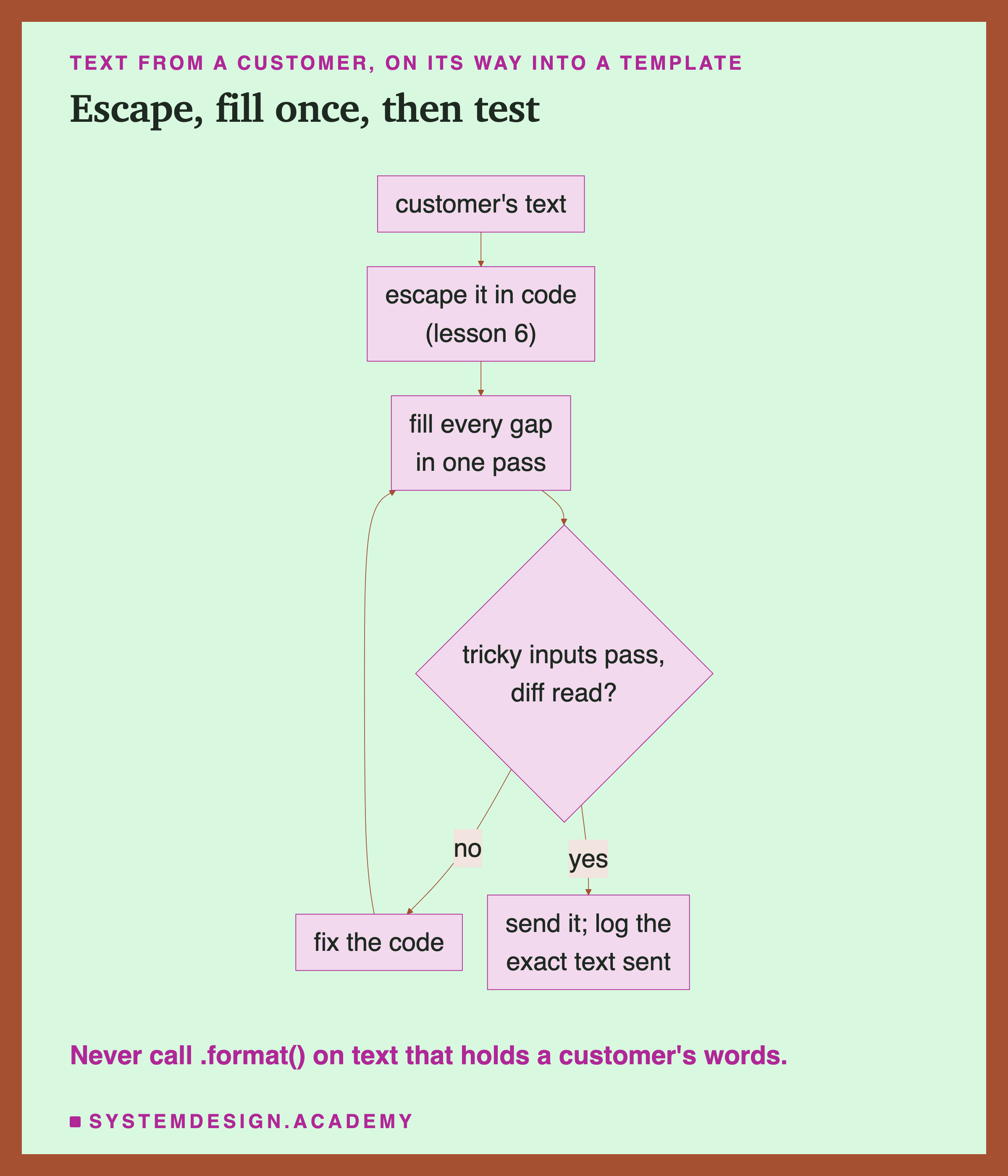
Never run a fill over text that already contains an inserted value. That includes a template that already had the message filled in. Fill every gap in one pass: one format call with all values at once (brackets in the template doubled), one replace for a single gap, or one f-string. After that, the string is finished.
Escape before you insert. If your template puts the customer's text inside tags, escape &, < and > first, as lesson 6 did, so the customer cannot write your tags. If it uses another marker, escape or remove that marker instead.
Test the fill with tricky inputs. Keep a short list of messages like the lab's seven: curly brackets, numbered brackets, your own placeholder names, dollar signs, backslashes, an empty message, a very long one, and your own tag. Run every template through them in an automatic test, and check that nothing crashes and the text arrives unchanged.
Keep one copy, under version control. One template in one file, changed only through a reviewed commit.
Diff the exact text, then score it. Before shipping a template change, compare the old and new prompts for a real message character by character, and score both on your test cases, message by message, with the sign test.
When This Matters, and When It Does Not
It matters whenever a customer's text goes into a template. That is almost every real prompt. The fill is a few lines of code that people rarely check, and the lab found a crash that anyone typing curly brackets could trigger and a leak that a curious customer could trigger on purpose. These are ordinary bugs with ordinary fixes, and the fixes cost nothing.
It matters most in pipelines with several steps. The two-step bug only appears when text is filled, passed on, and filled again. If your prompt is built by several functions, or by a library that fills a template for you, find out whether any step fills after the customer's text is in. This lab did not test any template library; it tested plain Python.
Small characters moved the less accurate model more, here. In this lab, the five small changes moved 2 of qwen's 200 replies and 18 of llama's. The model that already made mistakes moved more. With two models, that is a pattern to watch for, not a rule.
It matters less for the exact choice between two harmless versions. In this lab, no small change was clearly better or worse than clean. Do not spend a day choosing between a trailing space and none. Spend it on the habits that catch the change you did not mean to make: one copy, a diff, and a test run.
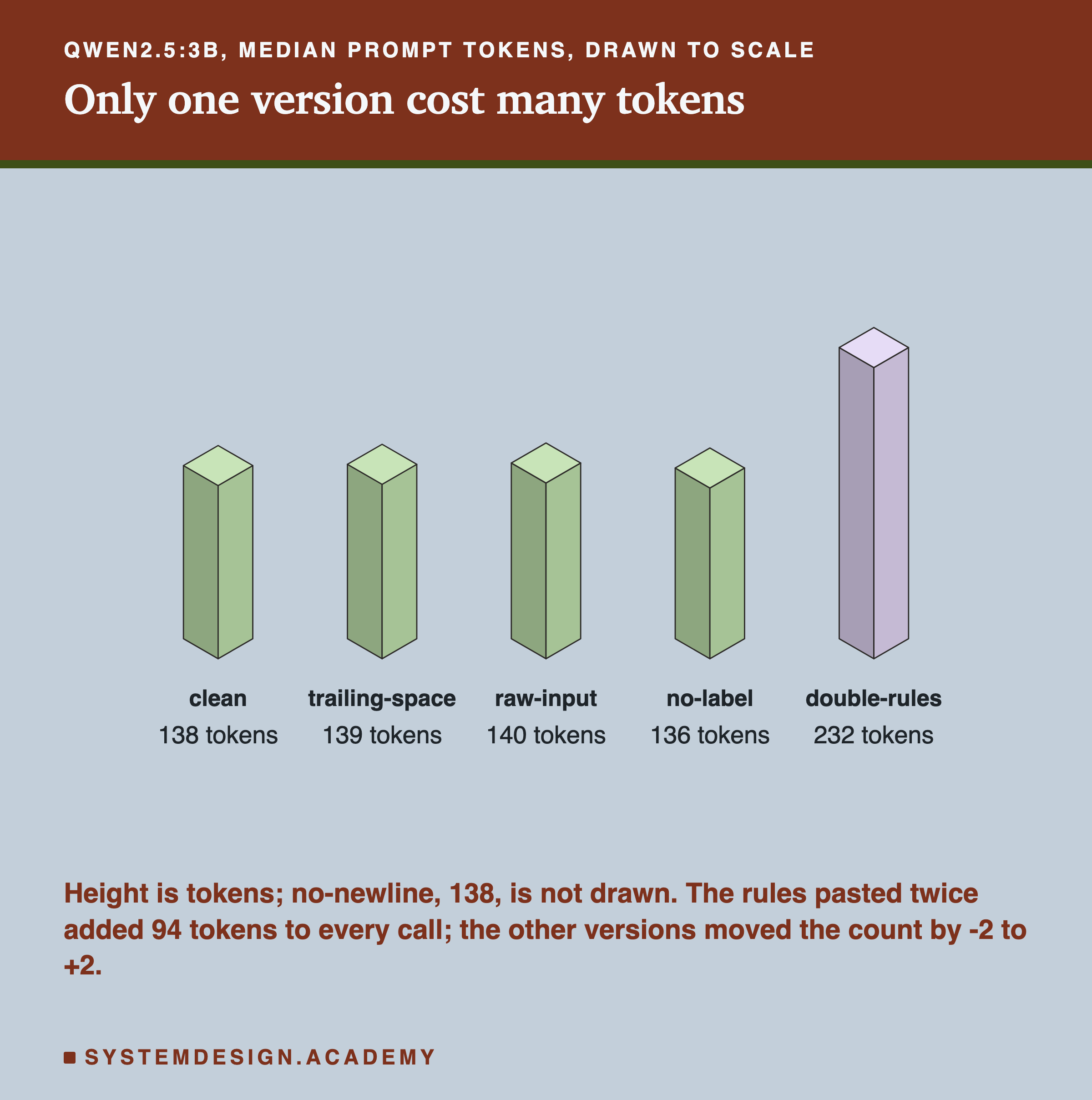
Pasting the rules twice always costs tokens. Whatever it did to accuracy, double-rules added 94 tokens to every call. A mistake that makes every request bigger is worth catching, even when the score cannot see it.
What This Lab Can and Cannot Tell You
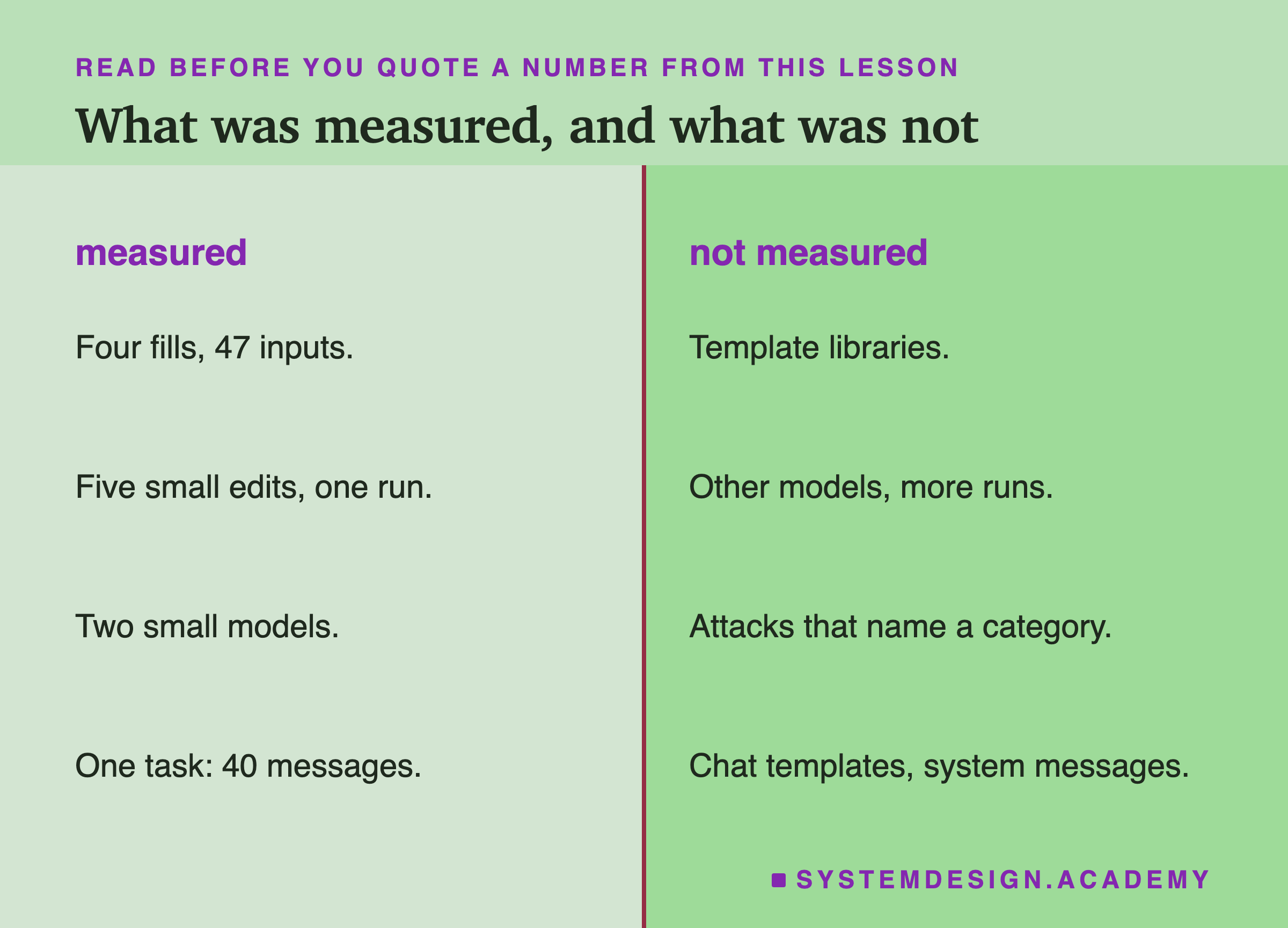
Part 1 is exact: it is plain Python with no model, and it gives the same counts every time. But it tested four ways of filling one template in plain Python, on 47 inputs I chose. It did not test template libraries, which have their own rules for brackets and escaping, or other languages. The leak it found moved a note that was already in the prompt; it shows the mechanism, not harm to a real app.
Part 2 ran each version once, at temperature 0, on two small models and one task of 40 short messages. With 40 messages and a clean prompt that was already near the top, the sign test can only see large differences, so "cannot tell from luck" here means "too small for 40 messages to show", not "no difference". The five changes are five of the many small differences a template can pick up. The lab put the whole prompt in one user message; it did not test changes to a system message or to the chat template, the marker text the server adds around each message. What carries over is the method: fill every gap in one pass, test the fill with tricky text, keep one copy under version control, and compare the exact text and the scores before and after every change.
What to Do Next
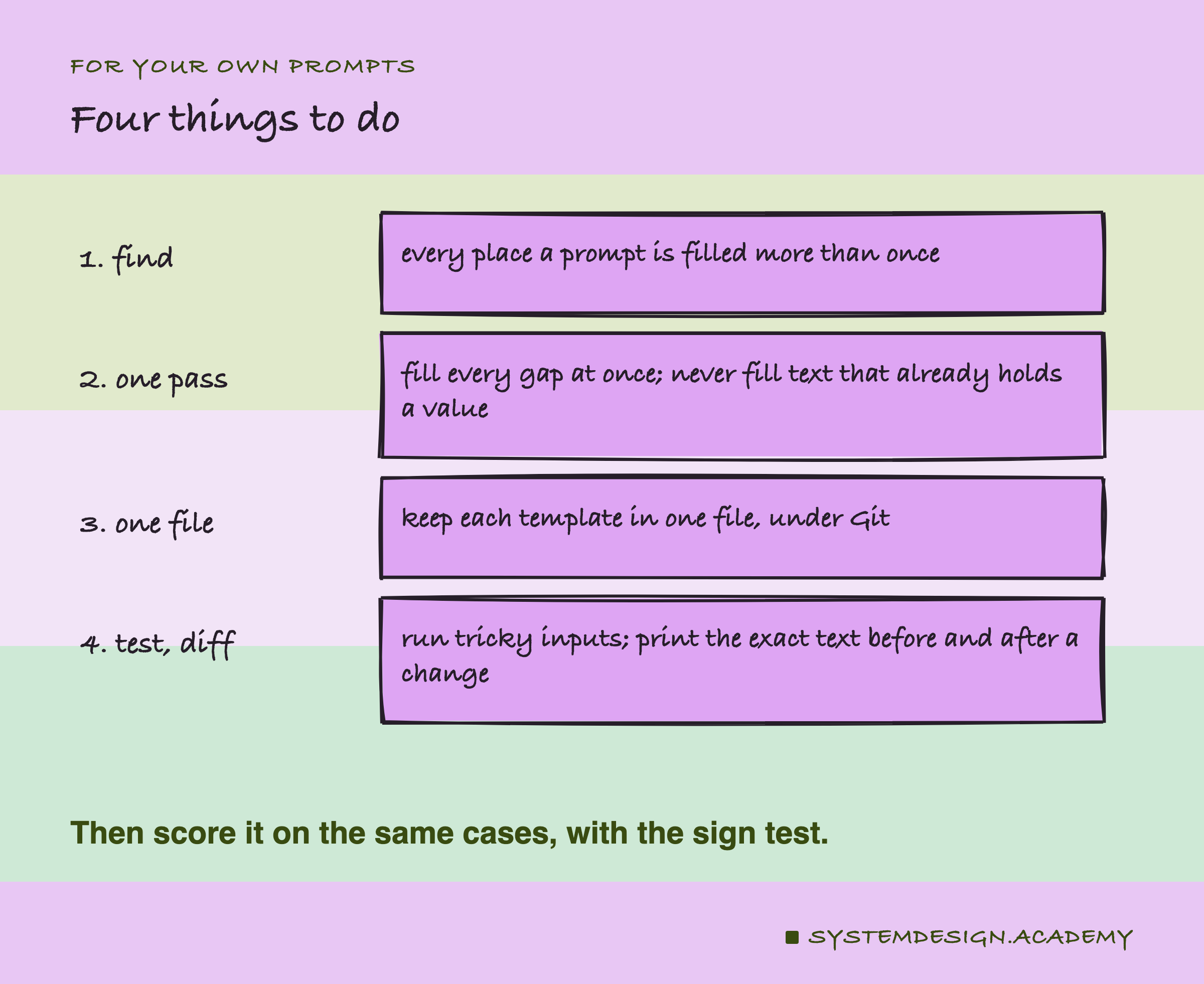
Search your own code for every place a prompt is built. For each one, find out how the customer's text gets in, and whether anything is filled after it. If you see format called on a string that already contains a customer's words, change it so that the customer's text is inserted last, with replace or an f-string. Then write a small test with the lab's seven tricky messages and your own placeholder names, and run every template through it. Move each template into one file under version control, if it is not already. Finally, the next time someone changes a template, print the old and new text for one real message with repr, compare them, and score both versions on your test cases before the change goes live.
Knowledge Check
Knowledge Check
4 questions - Score 80% to pass
A template contains a JSON example with curly brackets. What happened when the lab filled it with str.format?
In the two-step template, a customer asked: What does {policy} say about refunds? What went wrong?
On llama3.2:3b, the raw-input version scored 39 against clean's 36: 3 fixed, 0 broken, p = 0.25. What should you do?
Which habit would have caught the no-newline change, where the prompt had exactly the same length as clean?