Two Copies of the Same Book
Let me start with two copies of the same book.
A friend and I each buy the same novel. We read it, and the story is the same, word for word. Are the two books the same? For reading, yes. But if you look closely, one copy may have a small printing mark on the last page, or a different date of printing. The story is the same; the copies are not quite the same.

Now imagine your job is to check that the two copies are exactly the same, down to the last mark of ink. You could compare them page by page with a magnifying glass, like the woman in the picture. Or you could find a faster way: something like a fingerprint for a whole book, which changes if even one mark changes.
A trained model saved to a file has the same two questions. When I train the same model twice, I know from earlier lessons that the predictions can come out the same. But is the file the same, every byte? In this lesson I find out, and when the answer is no, I find the exact mark that differs.
Where This Lesson Starts
This lesson uses the model from the features chapter. If it is new to you, please read what a feature is first. That lesson built six features for each customer of a real online shop. It asked one question: at the start of a month, will this customer buy something in the next 30 days? The model is a gradient boosted tree model from scikit-learn, and it scored a test AP of 0.5450. AP, average precision, is a score from 0 to 1 for how well the model ranks the buyers above the others.
Two lessons from the ML lifecycle chapter sit close to this one, and I will not repeat them. Same code, different model measured how much the scores move when only the random seed changes. Lineage and rollback rebuilt last month's model from its written record and checked that its answers came back. Both ask about the model's behaviour.
This lesson asks about the file. In saving formats compared, lesson 2 of this chapter, one saved file came out one byte longer than another. The reason was a thread count stored inside the model. Here I follow that thread to the end.
The Words You Need First
Please read this slide slowly if any word is new. Every slide after it uses these words.
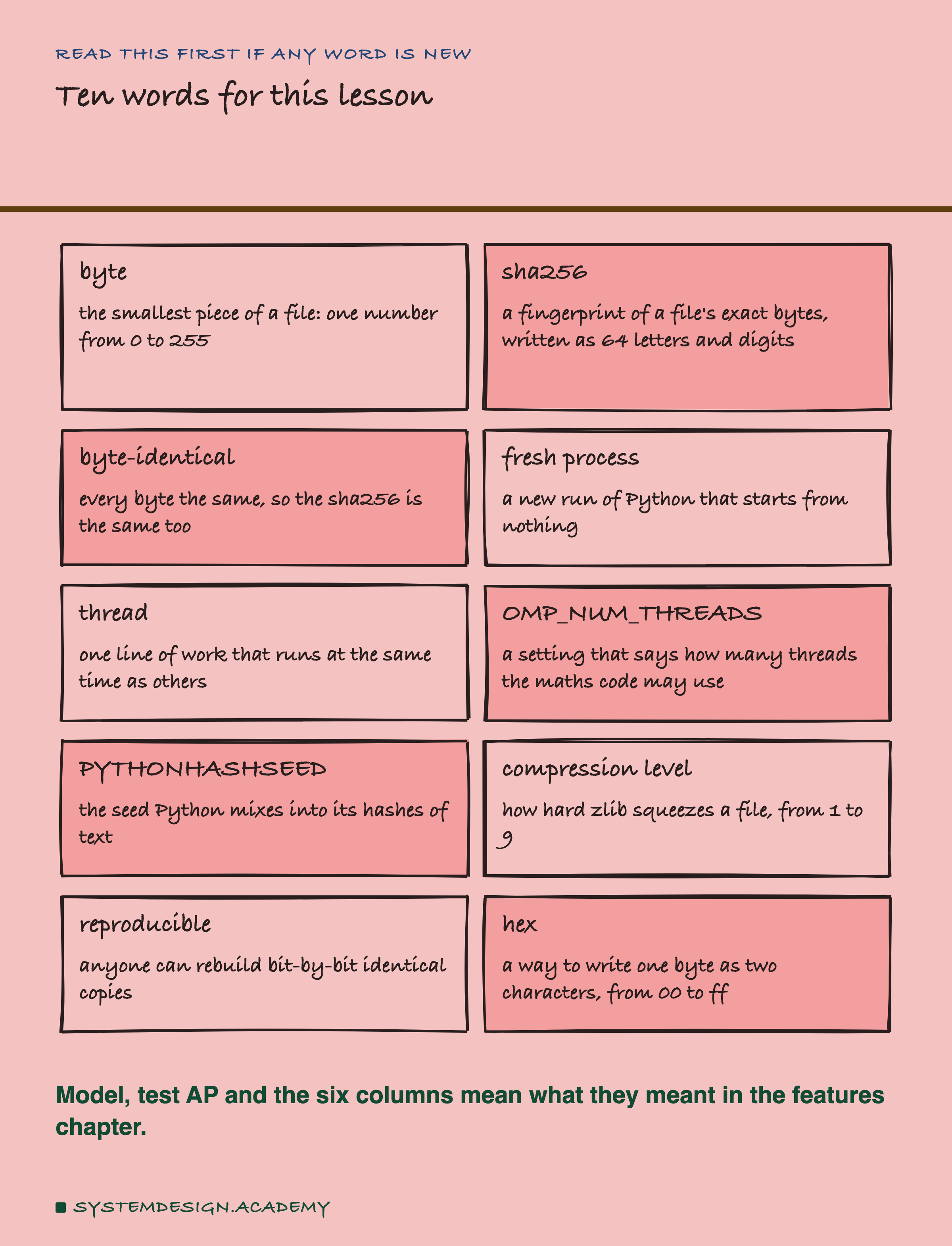
A file is a long row of bytes. A byte is a small number from 0 to 255, and every file, a photo, a song or a model, is only a row of them. Two files are byte-identical when they have the same length and every byte in the same place is equal.
Comparing two big files byte by byte is slow if you have to keep both. So people use a hash. A hash function reads every byte of a file and gives back a short code. The one used here, sha256, gives 64 letters and digits. If even one byte changes, the code changes completely. That is why people call it a fingerprint: you can compare two fingerprints instead of two files.
A process is one running copy of a program. A fresh process is a new run of Python that starts from nothing, with nothing left over in memory from the run before. A thread is one line of work inside a process; a program can run several threads at once, one on each core of the processor. OMP_NUM_THREADS is a setting that tells the maths code how many threads it may use. PYTHONHASHSEED is a setting that controls a random number Python mixes into its hashes of text.
Finally, hex is a short way to write a byte as two characters: 00 is 0, 0a is 10, ff is 255.
What the Sources Say
Before measuring, I read what the primary sources say. I downloaded each source file at a fixed version and found every quote in it word for word. They are all in results/repro-factcheck.json.
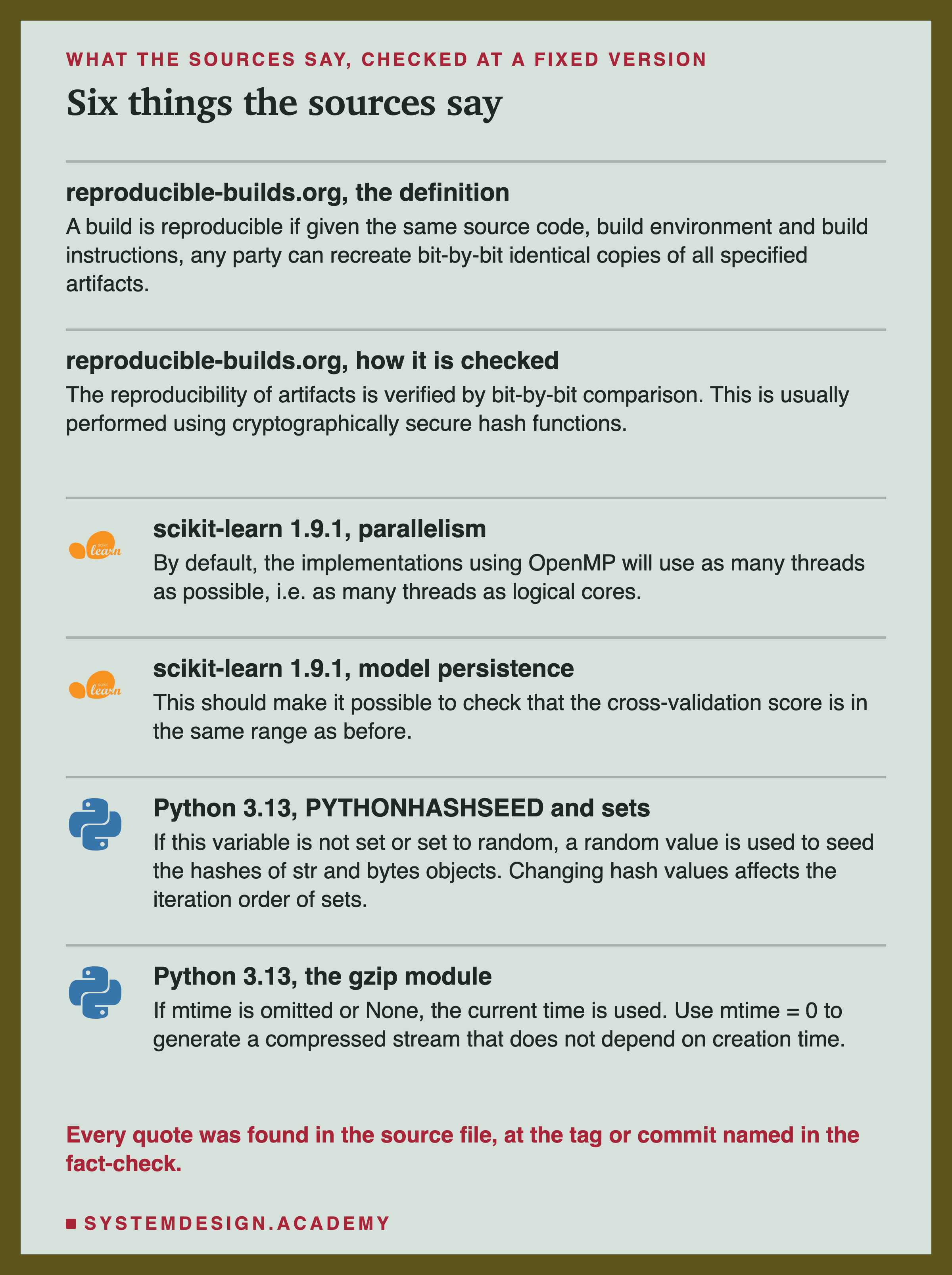
Reproducible builds. The Reproducible Builds project works on this question for software. I use its definition. "A build is reproducible if given the same source code, build environment and build instructions, any party can recreate bit-by-bit identical copies of all specified artifacts." An artifact is a file a build produces; here, the saved model. It also says how to check it: "The reproducibility of artifacts is verified by bit-by-bit comparison. This is usually performed using cryptographically secure hash functions." In short, it says, reproducible builds "provide certainty that software is genuine and has not been tampered with."
scikit-learn sets a softer goal for models. Its page on saving models asks you to keep notes. Then, it says, "This should make it possible to check that the cross-validation score is in the same range as before." So scikit-learn promises a similar model with a similar score, not the same file.
Its page on parallel work adds a fact that matters here: "By default, the implementations using OpenMP will use as many threads as possible, i.e. as many threads as logical cores." is the tool scikit-learn uses to run its C code on many threads. One detail: the 1.9.1 code itself counts physical cores by default, not logical ones. On this Mac both are 10.
How the Lab Was Built
I wrote the lab's design into the docstring of scripts/labs/packaging/reproducible_artifacts.py before it first ran. Before writing it, I knew one fact from lesson 2: the model stores a thread count. I had also listed the attribute names of a toy model, to see whether it held a set. I had not saved or hashed any file of the chapter model for this lesson.
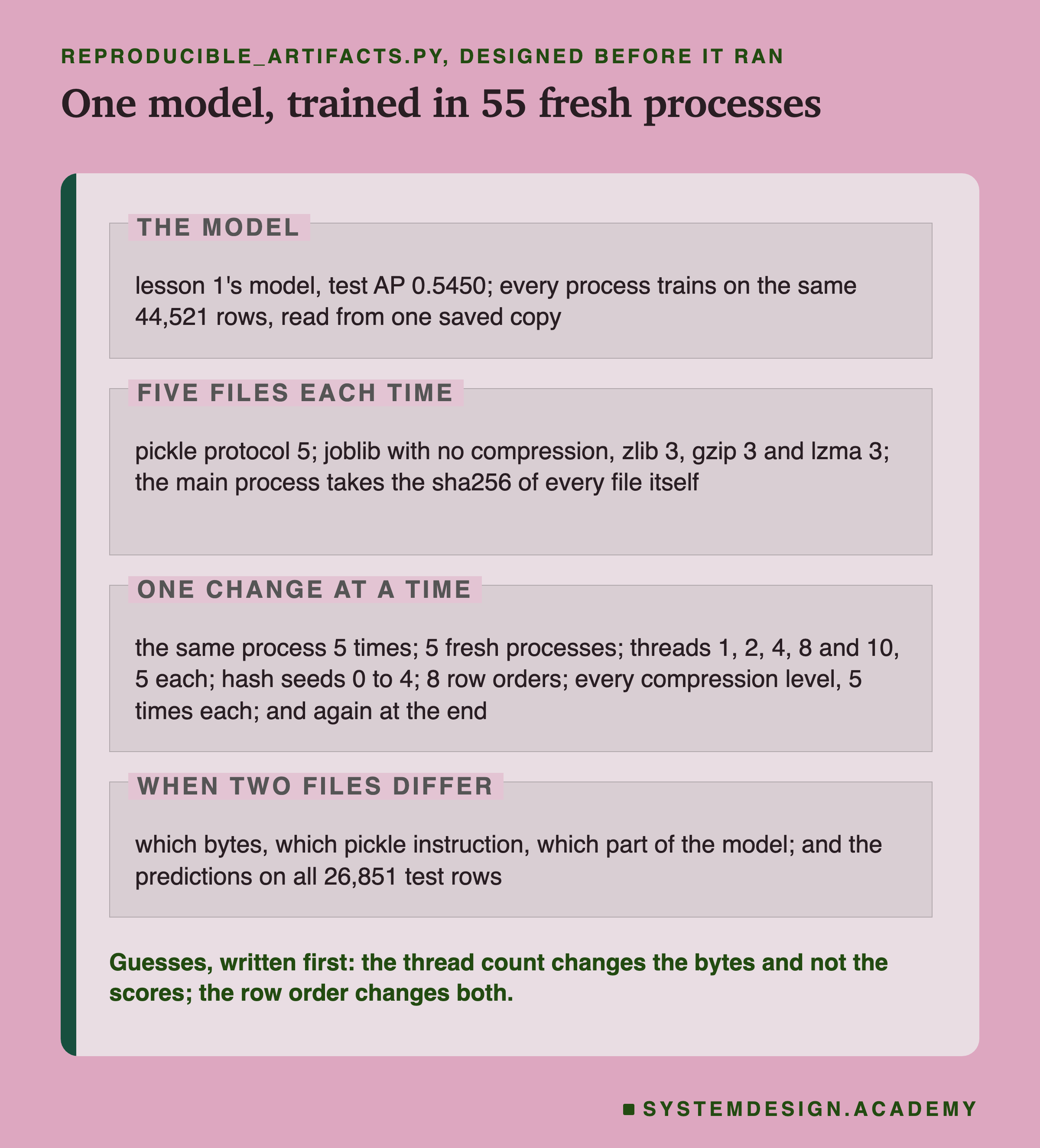
One model, many trainings. The main program first trains lesson 1's model once and stops unless its test AP is exactly 0.5450. Then it saves the 44,521 training rows to one file. Every fresh process reads that same file and trains HistGradientBoostingClassifier(random_state=0) on it, so the data can never be the thing that differs.
Five files each time. Each trained model is saved five ways. One is pickle protocol 5. The other four are joblib: with no compression, and with zlib, gzip or lzma at level 3. These are the formats lesson 2 compared. The main program reads every file back and computes its sha256 itself. It does not trust the number the child process reports.
One change at a time. The default is a fresh process with nothing set: no thread limit and a random hash seed. Against it, I changed one thing at a time. The thread count went to 1, 2, 4, 8 and 10, five processes each. The hash seed went to 0, 1, 2, 3 and 4. The training rows came in 8 orders. The joblib compression ran at every level, five saves each. And the default ran again at the very end of the run. In all, that is 55 fresh processes.
When two files differ, find out where. The lab compares the two files byte by byte. It reads both as pickle instructions. And it loads both models and compares them part by part. It also asks both models for their predictions on all 26,851 test rows. That way a difference in the file can be told apart from a difference in the model.
How a Fingerprint Behaves
Before the results, here is what a sha256 fingerprint does with a small change. These are two real files from the lab.
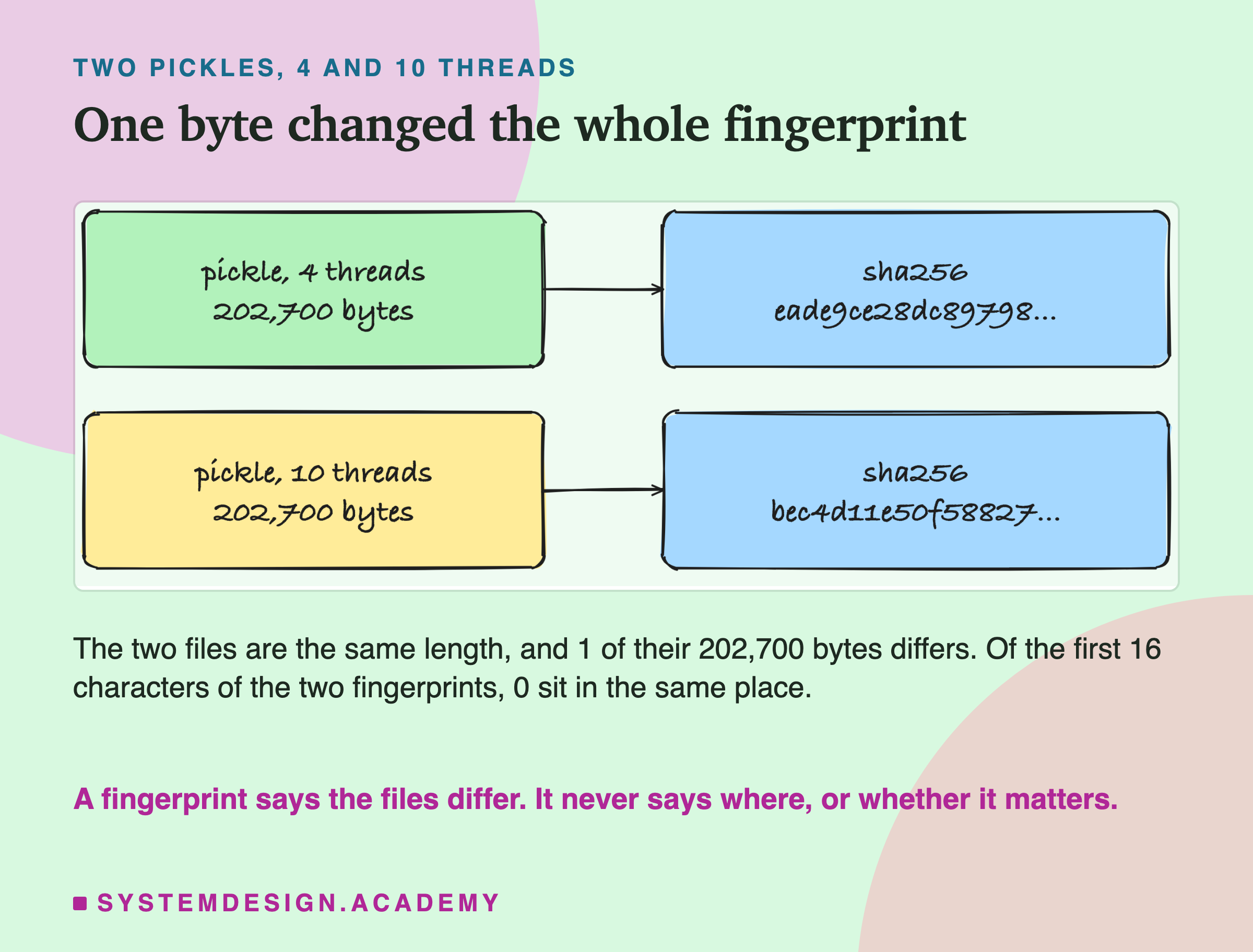
Both files are pickles of the same model, 202,700 bytes each. They differ in exactly one byte. Yet their fingerprints share nothing: the first 16 characters do not match in a single place.
This is what makes a hash useful and also what makes it blunt. It is very good at saying "these two files are not the same". One changed byte out of 202,700 is enough. But it cannot tell you which byte changed, or whether the change matters. For that, you have to open the files. Most of this lesson is about opening them.
The Lab's Report, Running
This is a real recording of the report script, repro_report.py, on the laptop where the lab ran.
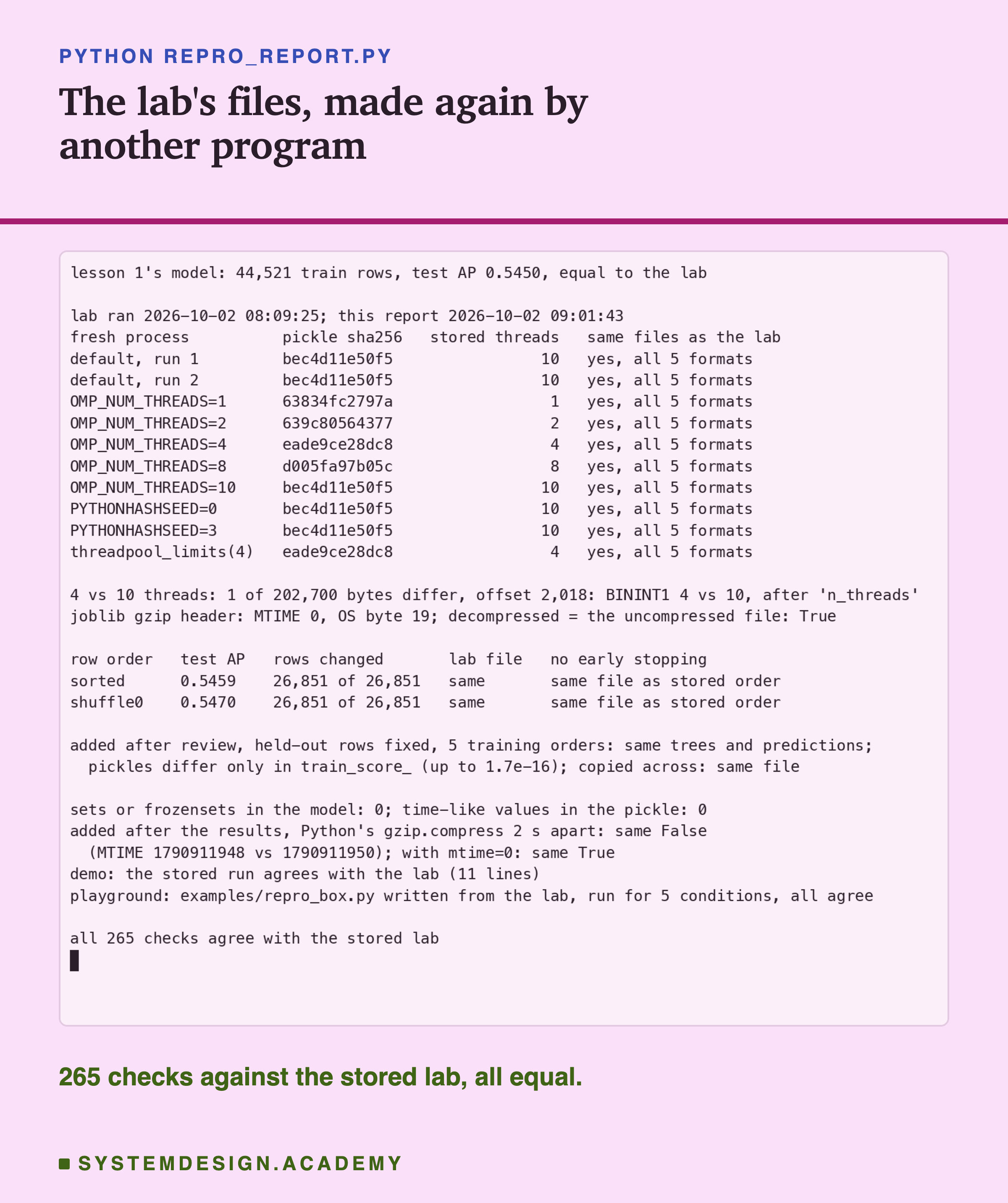
The report does not trust the lab. It never imports the lab's code. It builds lesson 1's training rows with the features chapter's own code, and it starts its own fresh processes from a small script it writes itself. In each process it trains the model again under one setting, and saves all five files with its own calls. Then every file's sha256 must equal the one the lab stored. They all did.
So the report is also a second test of the main result. A different program, started at a different time, made the same files, byte for byte. It also locates the one differing byte with its own loop, and checks the student demo's saved run against the lab.
The Headline: One File per Setting
Here is the main result, for every setting in one table.
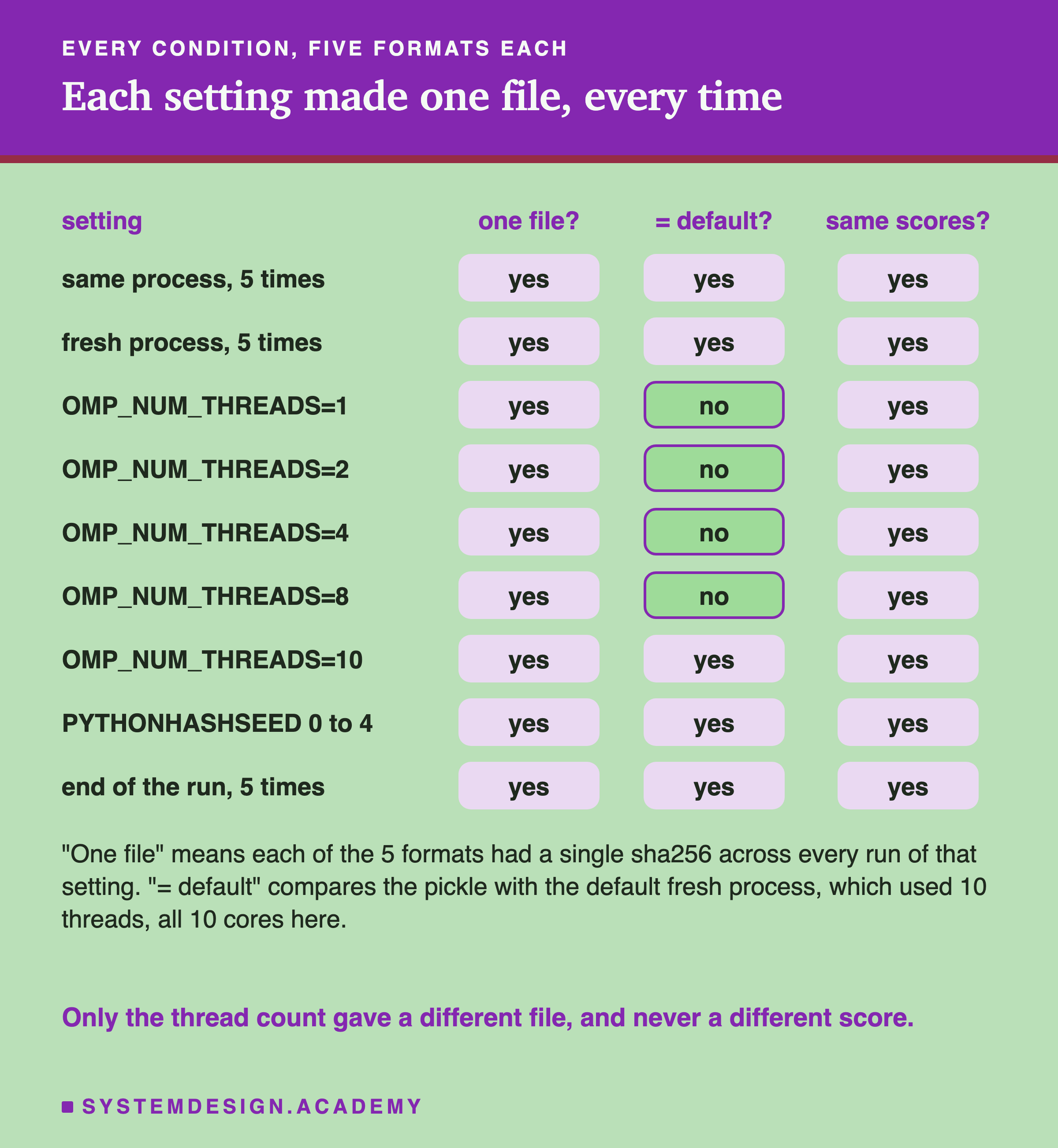
Inside one setting, the file never changed. Five trainings in one process gave five identical files, in all five formats. Five fresh processes did too, and they matched the first five. So did five more fresh processes at the very end of the run.
The hash seed did not matter. With PYTHONHASHSEED set to 0, 1, 2, 3 and 4, every file was the default's file.
The thread count did. With 1, 2, 4 or 8 threads, each setting made its own file, the same every time, but a different file from the default. With 10 threads it was the default's file again. That makes sense on this Mac. It has 10 cores, and with nothing set, scikit-learn uses all 10.
And not one prediction moved. For every setting, the model loaded from the file gave predictions equal to the last bit on all 26,851 test rows. Test AP was 0.5450 every time.
My first run of the lab crashed after all the training was done, in a later step that compares row orders. I fixed one line and ran everything again. Before deleting the first run's files, I kept the sha256 of 25 of them. All 25 matched the second run, which started about two minutes later. That check was added after the crash, and the lab says so.
The One Byte, Found
So which byte is it? Here are the pickle bytes of the 4-thread and the 10-thread files, around the place where they differ.
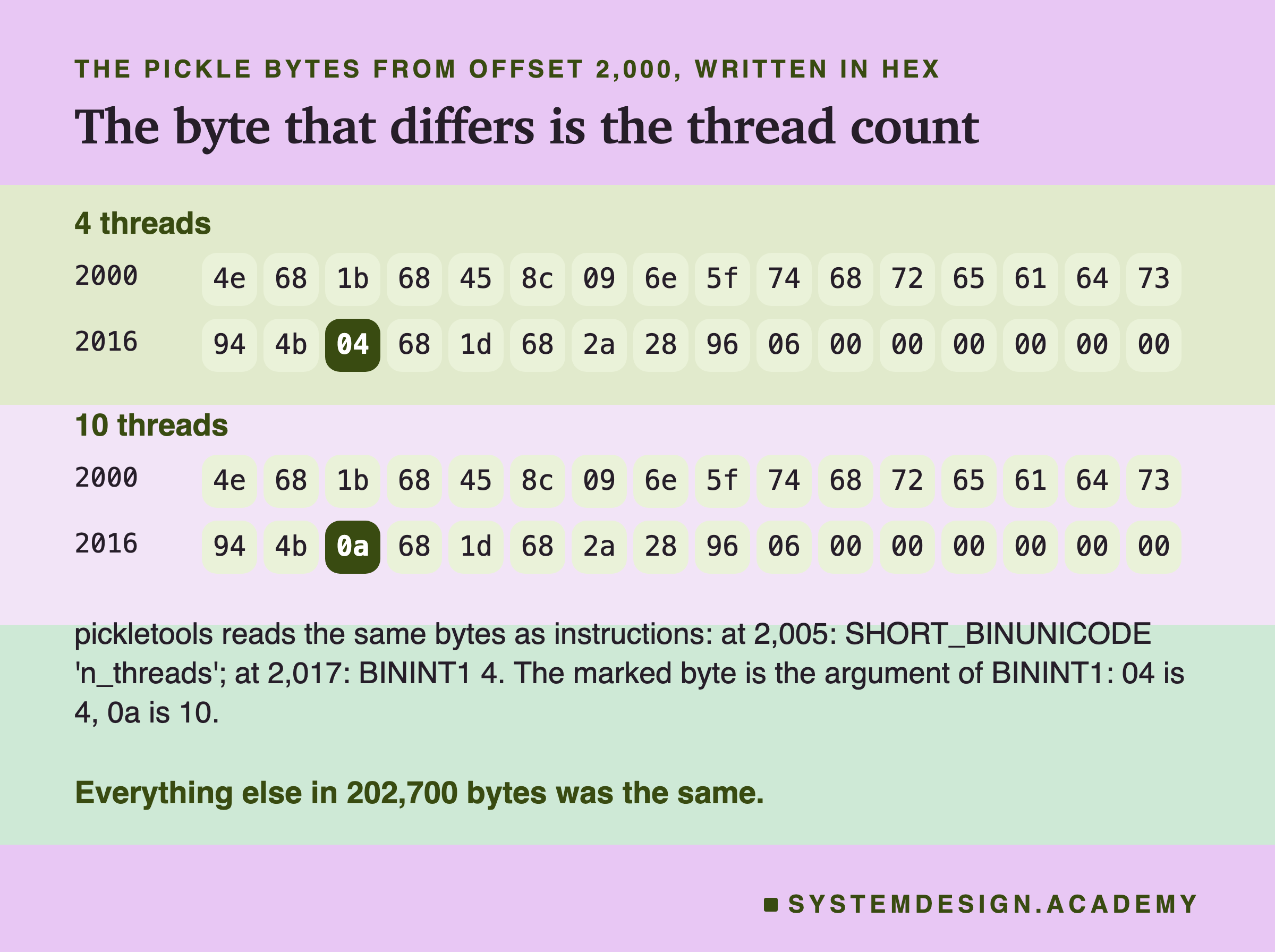
The two files differ at byte 2,018, counting from 0. In the 4-thread file that byte is 04. In the 10-thread file it is 0a, which is 10 in hex.
To see what that byte means, the lab read both files with pickletools, a tool in Python's standard library. It turns a pickle into the list of instructions that loading would follow, the same tool lesson 1 used. Just before the byte there is the text n_threads, the name of a field. Then comes an instruction called BININT1, which means "here is a small whole number", and the differing byte is that number.
Then the lab loaded both models and compared every part of them, one by one. The only difference was model._bin_mapper.n_threads: 10 in one, 4 in the other. The same was true for 1, 2 and 8 threads: one byte, at the same place, holding the thread count.
This is the field lesson 2 found by accident. The bin mapper is the part of the model that sorts each column into buckets before training. It keeps a note of how many threads it was given.
How the Thread Count Gets Into the File
Why does a model remember the number of threads it was trained with? Here is the path, step by step.
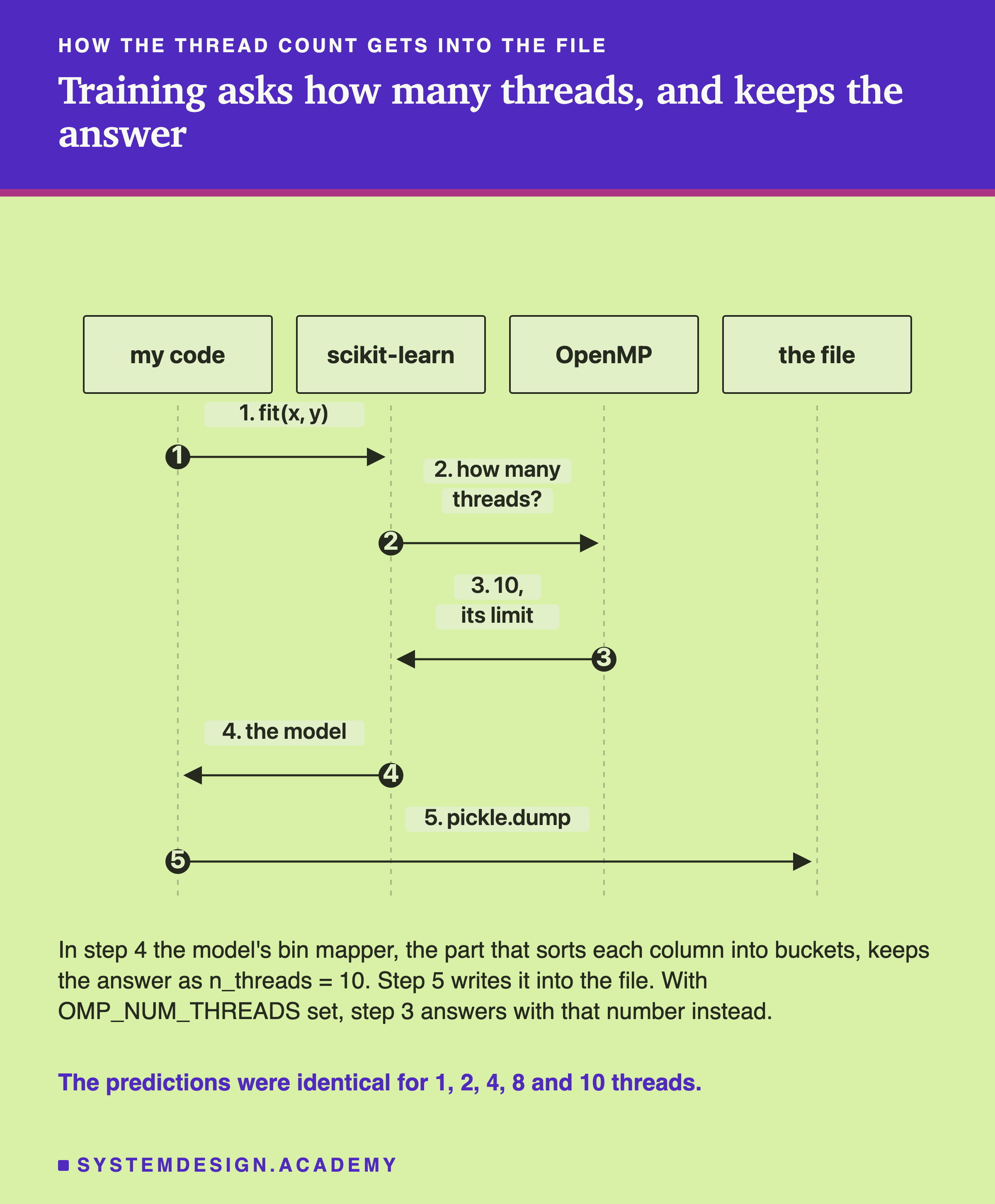
When fit starts, scikit-learn asks how many threads it may use. If OMP_NUM_THREADS is set, the answer is that number. If not, it is the smaller of OpenMP's own limit and the number of physical cores. scikit-learn's source code says so, and adds that it takes "cgroups quotas into account", the limits a tool like sets on a container. The bin mapper is created with that number and keeps it as one of its own fields. When pickle saves the model, it saves every field, so it saves this one too.
The number changes how the work is split, not what is computed. For this model, 1, 2, 4, 8 and 10 threads gave predictions equal to the last bit on all 26,851 test rows. And the lab checked this in a second way, after training. It took the default model, trained with 10 threads, and changed only that one field to 4. Saved again, it gave exactly the 4-thread file, in all five formats. So the stored number is the only difference between those files.
That was a check, not a fix. Do not do this to make your files match: it edits a private field, one whose name starts with an underscore, which scikit-learn may change without warning. Here it was harmless, because the bin mapper is used only during training, but the fixes on a later slide set the thread count the proper way.
That is a fact about this model and this version of scikit-learn, 1.9.1. A model whose sums depend on how the rows are split between threads could also differ in its numbers. This one did not.
What One Byte Does to a Compressed File
The pickle was 202,700 bytes for every thread count. Compressed, the sizes moved a little.
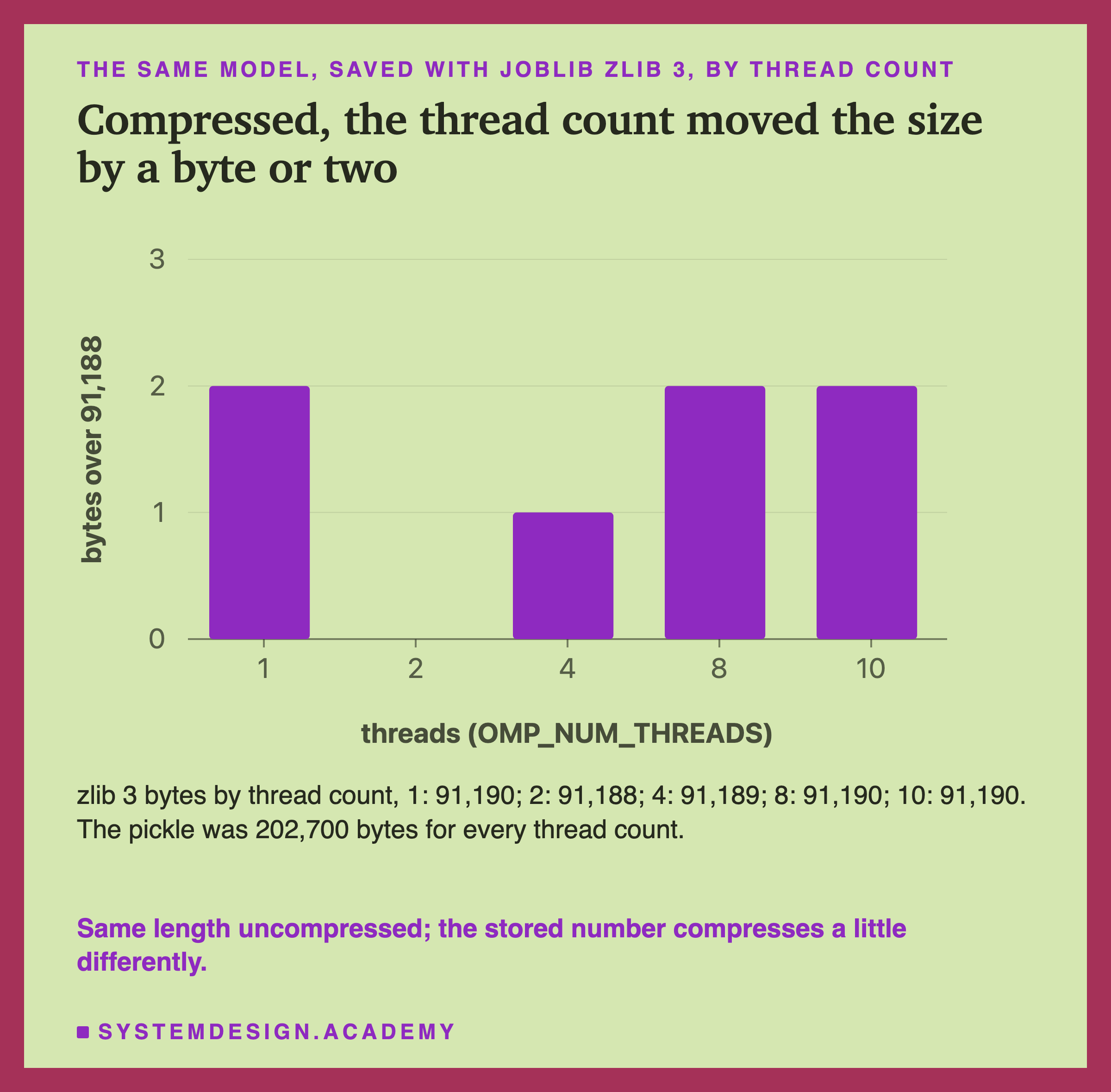
With zlib level 3, the file was 91,188 bytes for 2 threads, 91,189 for 4, and 91,190 for 1, 8 and 10. This is the one-byte difference lesson 2 saw: its lab ran with 4 threads and its demo with 10. Here is one possible reason, which I did not test. The compressor finds repeated patterns, and a 1 or an 8 may happen to match nearby bytes a little differently than a 2 does.
The bigger surprise was what one changed byte does to the rest of a compressed file.
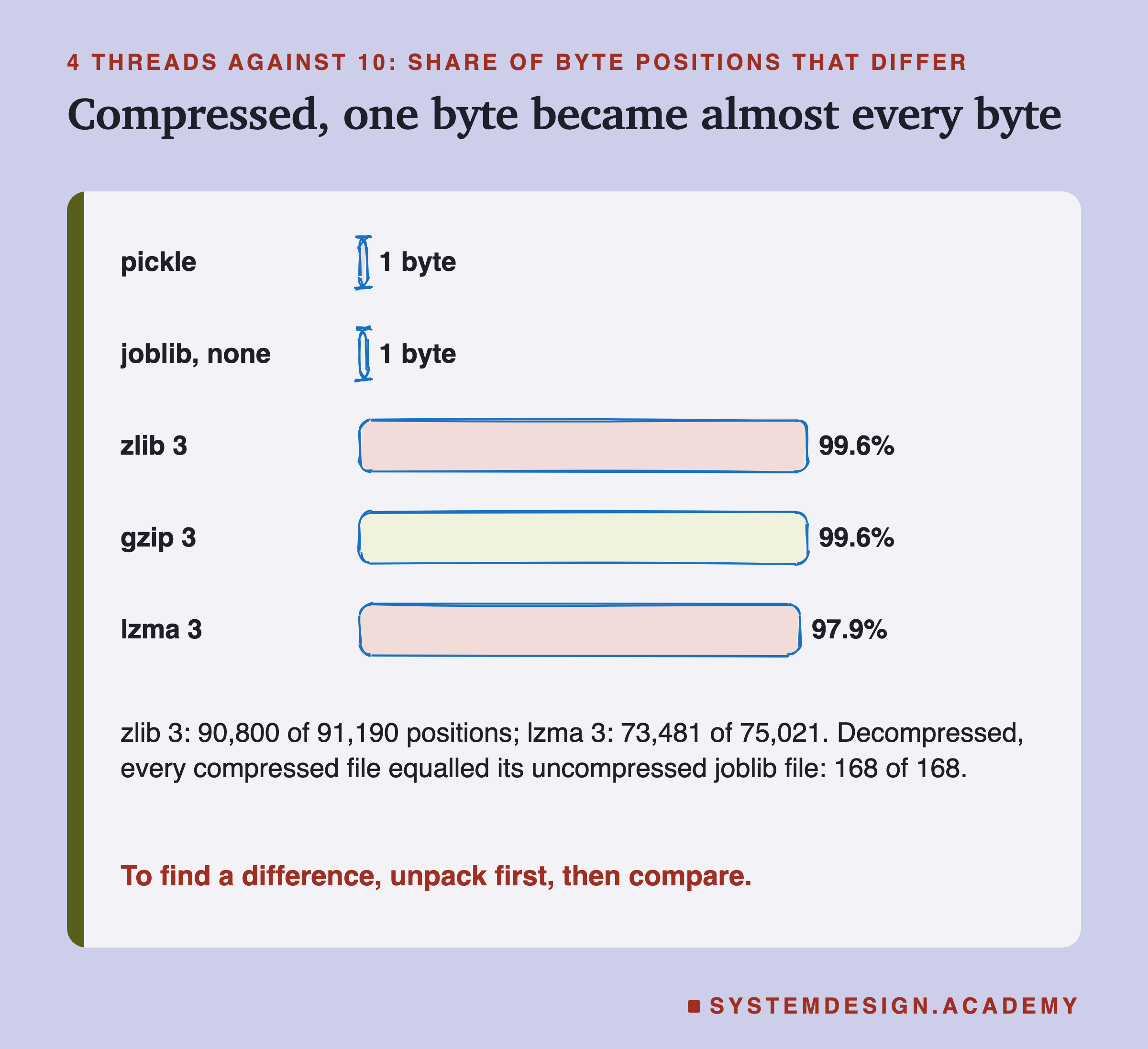
Uncompressed, the 4-thread and 10-thread files differ in 1 byte. Compressed with zlib, they differ in 90,800 of 91,190 byte positions. A compressor writes each part of its output based on what came before, so a change near the start shifts everything after it. Part of that count is also because the zlib files are not the same length, so every byte after the change sits one place later.
So if you ever compare two compressed model files and find them "completely different", do not believe it yet. Unpack both first. The lab did that for every compressed file it wrote: unpacked, each one equalled its own uncompressed joblib file, 168 of 168.
The Hash Seed Changed Nothing, and Why
PYTHONHASHSEED changes the order in which a set keeps its items. If the model held a set, its file could change from run to run. So I tested it, with a control.
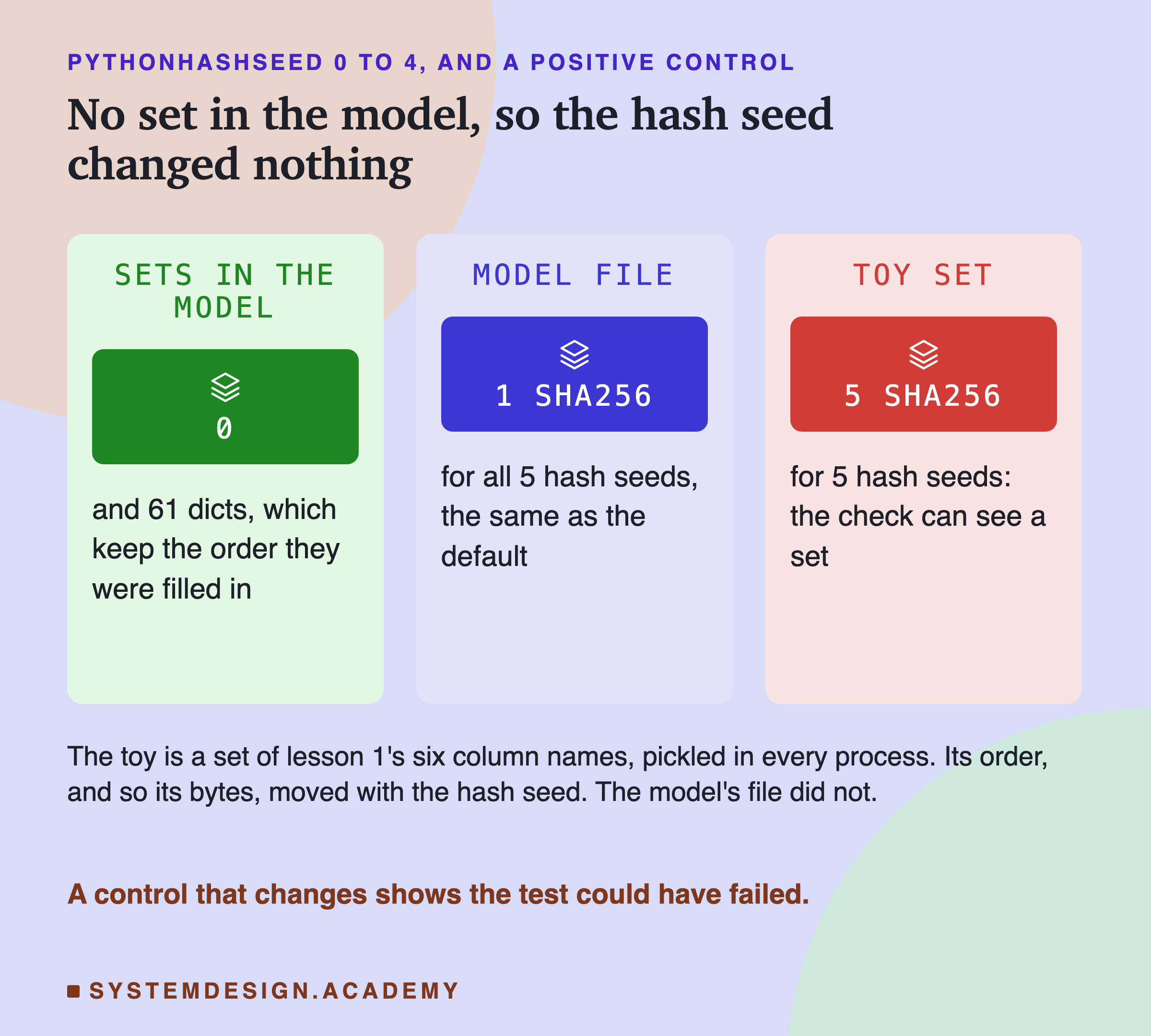
The lab walked through the whole trained model, every part inside every part. It found 0 sets and 61 dicts, Python's collections of named values. Since Python 3.7, a dict keeps its items in the order they were put in, so its order does not depend on the hash seed. Then the five hash seeds gave five identical model files, the same as the default's.
A result of "no change" is only worth something if the test could have shown a change. So every process also pickled a small toy: a set holding lesson 1's six column names. Its sha256 was different for each of the five seeds. Here are two of them.
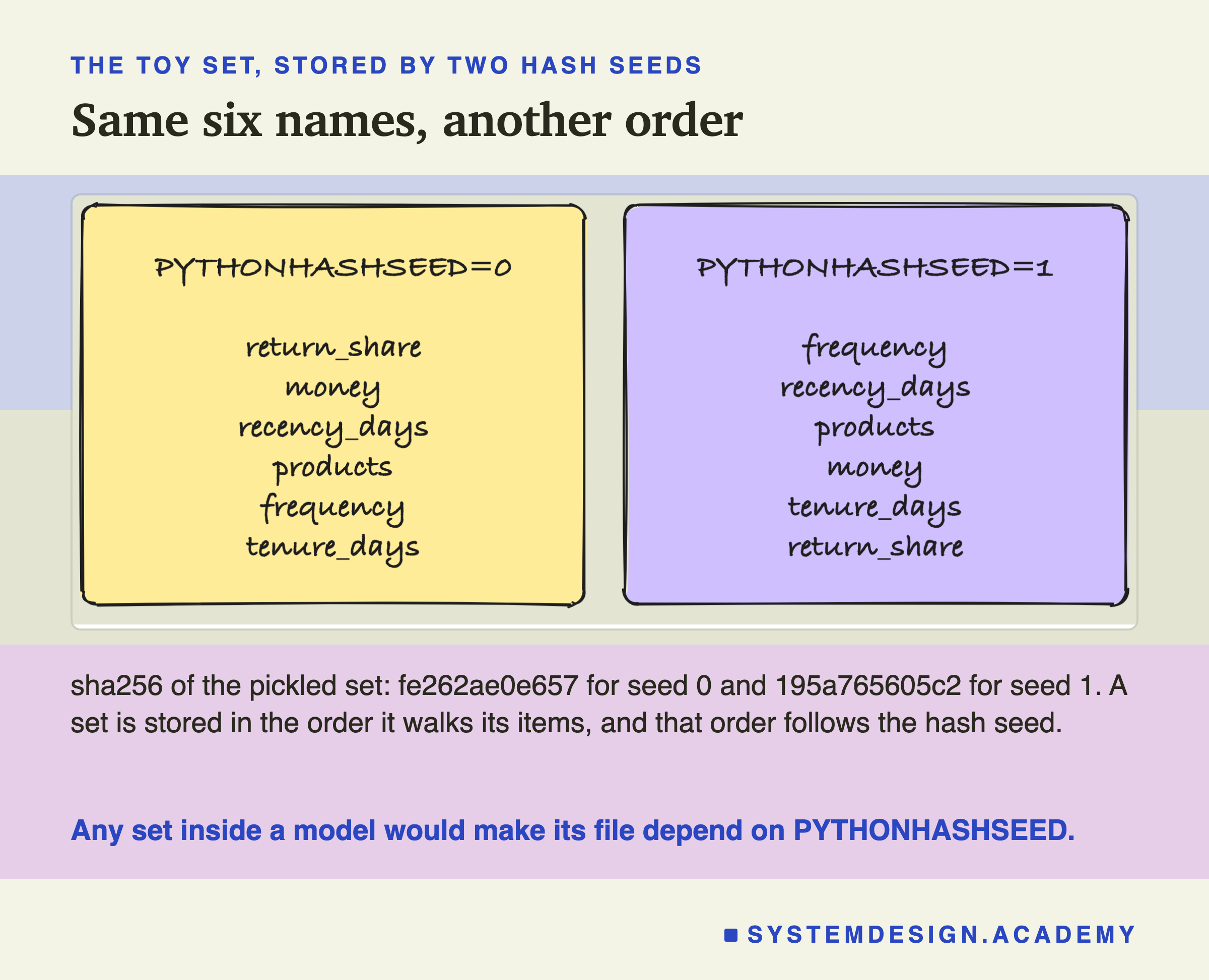
The six names are the same, but the order is different, so the bytes are different. If a future version of a library put a set of strings inside a model, its file would start to depend on the hash seed. This model has none.
The Row Order Changed the Model Itself
The thread count changed a note inside the file. The row order did something much bigger: it changed the model.
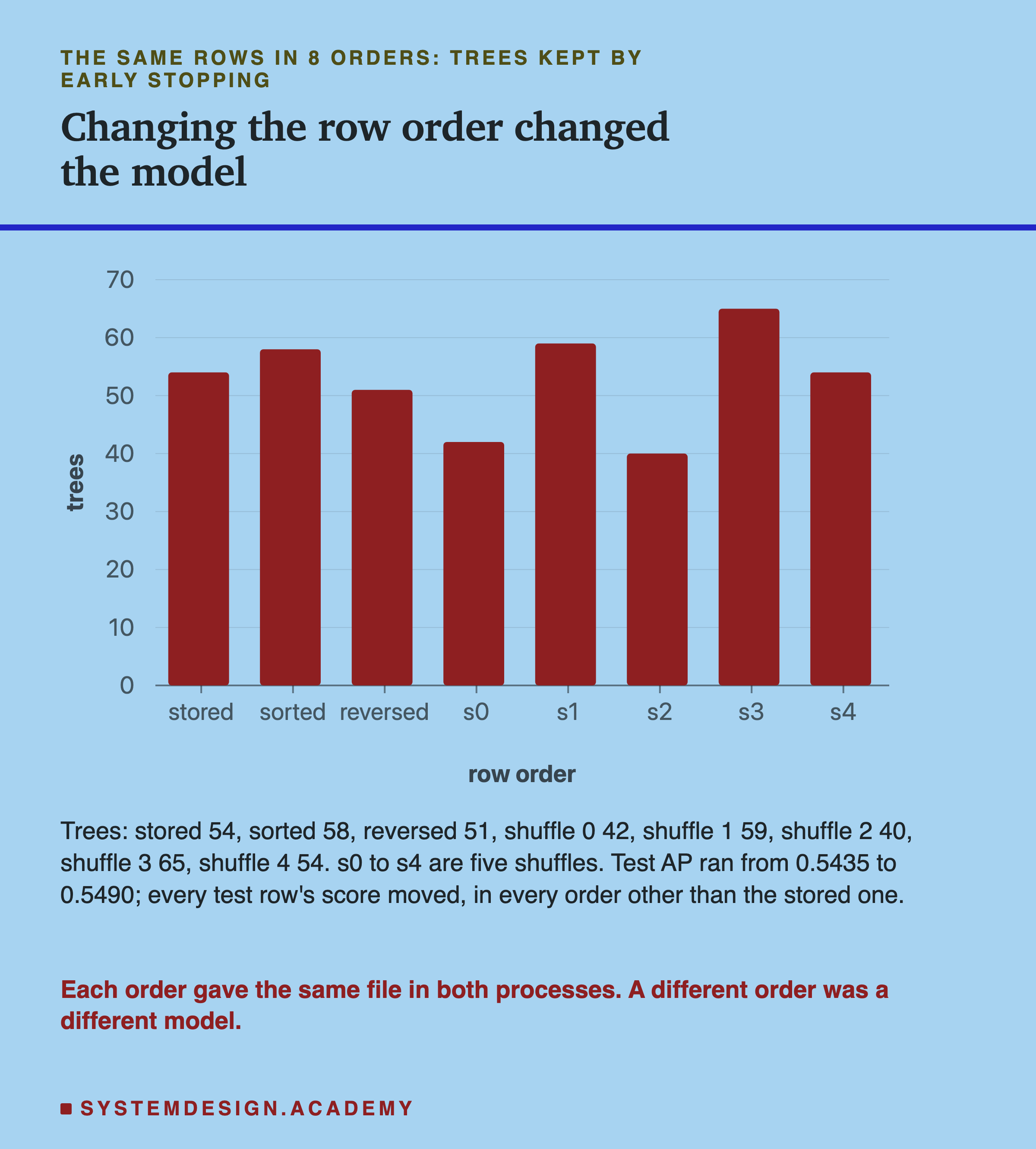
The lab trained on the same 44,521 rows in 8 orders. One was the stored order, sorted by month. One was sorted by customer, then month. One was reversed. And five were random shuffles. It ran all 8 in two separate fresh processes. Each order gave the same file in both processes, so each order is repeatable.
But each order gave a different model. The number of trees ran from 40 to 65, and every one of the 26,851 test scores moved, by up to 0.3272. Test AP ran from 0.5435 to 0.5490. I make no claim that any order is better. Each order is one draw, like a seed, and lesson 2 of the lifecycle chapter shows how much one draw can move.
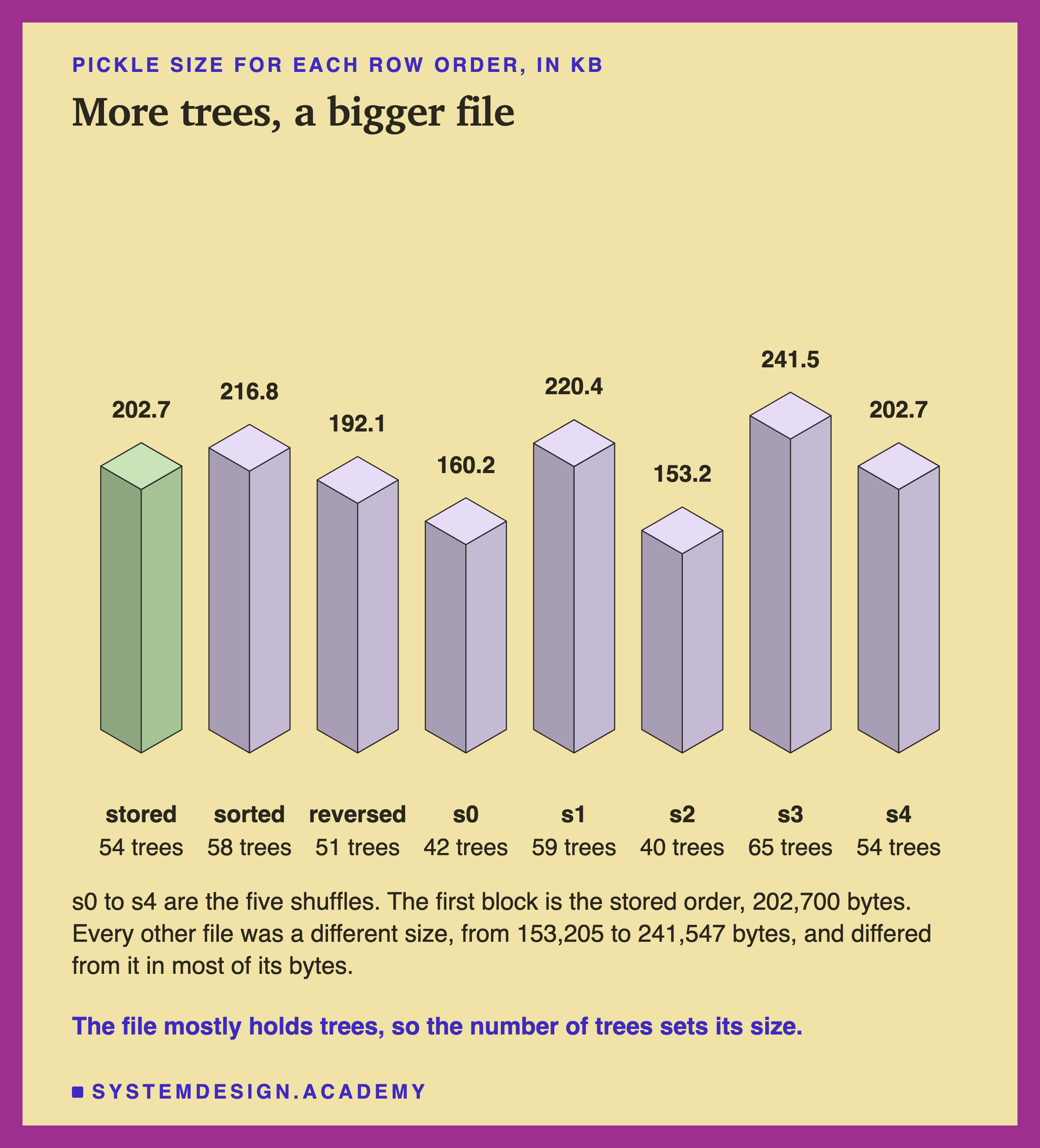
The file sizes follow the trees. Lesson 1 of this chapter found the pickle is mostly the arrays of tree nodes, so more trees make a bigger file. The 65-tree model was 241,547 bytes and the 40-tree model was 153,205.
The Trees Changed Only Through the Held-Out Rows
Why would the order of the rows change the model at all? The design named two possible reasons before the run. Either the order changes which rows are held back for early stopping, or it changes the order in which numbers are added up. So the lab trained every order a second time with early stopping turned off. That second model is a check, not the chapter's model.
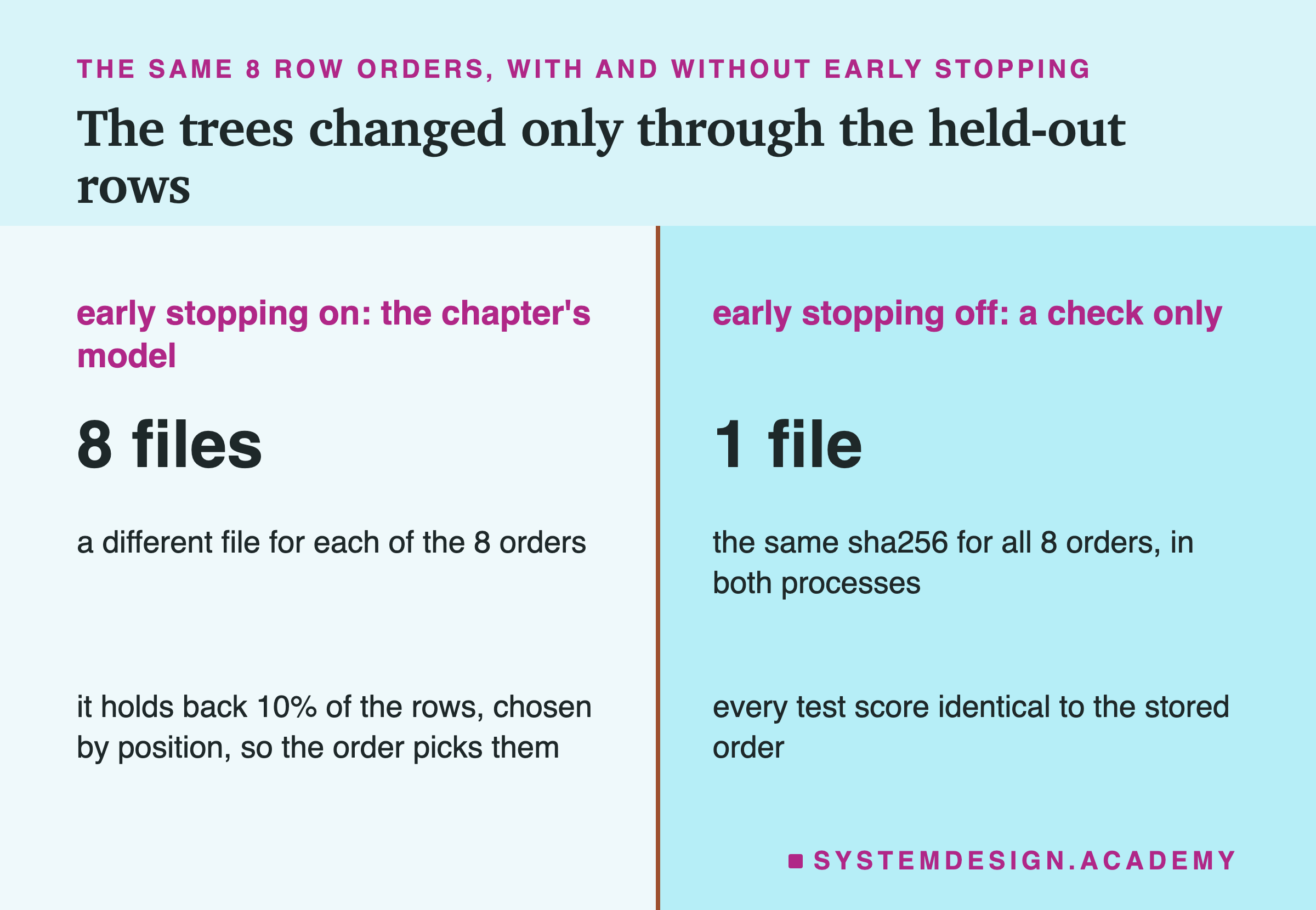
Early stopping means the model holds back some training rows, trains tree after tree, and stops when the held-back rows stop improving. With default settings and more than 10,000 rows, this model holds back 10%. It picks them with a fixed random seed, and it keeps the share of buyers the same in both parts. But the seed picks positions: row 17, row 3,402, and so on. Put the rows in a different order, and the same positions hold different customers.
With early stopping off, all 8 orders gave exactly the same file, and every test score was identical. So, for this model, the trees changed only through the choice of held-back rows.
That check could not see everything, though. An independent review pointed out that with early stopping off the model keeps no training scores, so an order effect there would be invisible. I added a test after the review, and the lab labels it.
I kept the held-back rows fixed, 4,453 rows, the same ones the model would pick from the stored order. Then I put only the other 40,068 rows in 5 random orders. All 5 models kept 54 trees, with the same bins, the same tree nodes and identical predictions. But all 5 files differed from the stored-order file.
The only differing part was train_score_, the score on the training rows that the model records after each tree. It comes from an average of the loss over all the training rows, added up in row order. 12 to 18 of its 55 values moved in the last digits, by at most 1.7e-16. Copying the stored-order train_score_ into each model made the files identical. So the order of the rows can change the file even when it changes nothing about the model's predictions.
The Compression Level Is Part of the Recipe
Lesson 2 already showed that each compression setting makes a different size. Here the question is narrower: is each setting repeatable?
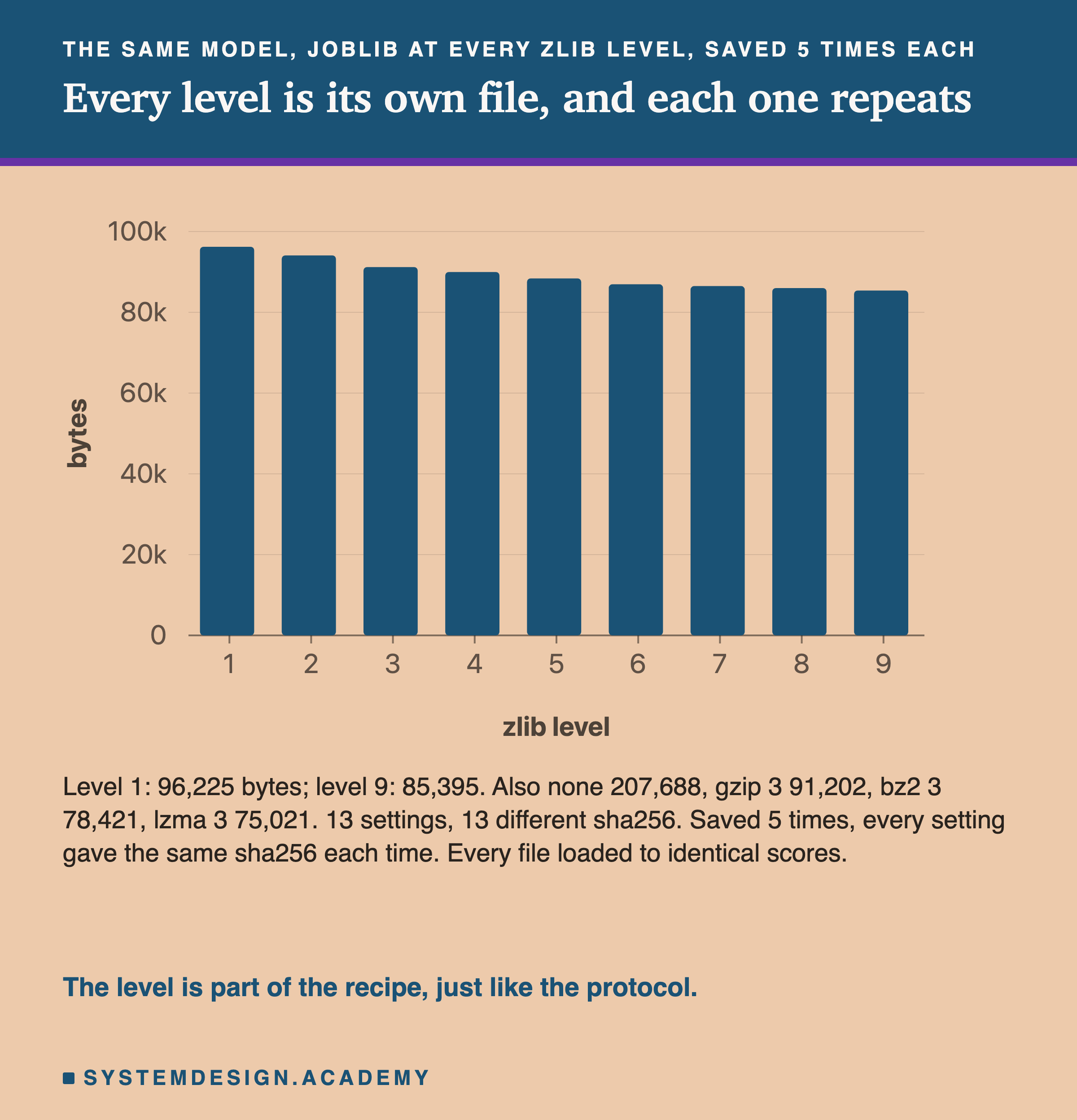
The lab saved one trained model 5 times at each of 13 settings: zlib levels 1 to 9, no compression, gzip 3, bz2 3 and lzma 3. Each setting gave the same sha256 all 5 times. The 13 settings gave 13 different fingerprints. And every file loaded back to identical predictions.
So the compressors here are deterministic: the same input and the same setting always give the same output. But the setting itself is part of the recipe. If one machine saves with compress=3 and another with compress=("lzma", 3), they will never agree on a hash, even though both hold the same model. A team that compares hashes must fix the format, the protocol and the level in code, not leave them to defaults.
Does Anything Record the Time?
Many file formats write the date and time inside the file. If a model file did that, two saves a second apart would never match.
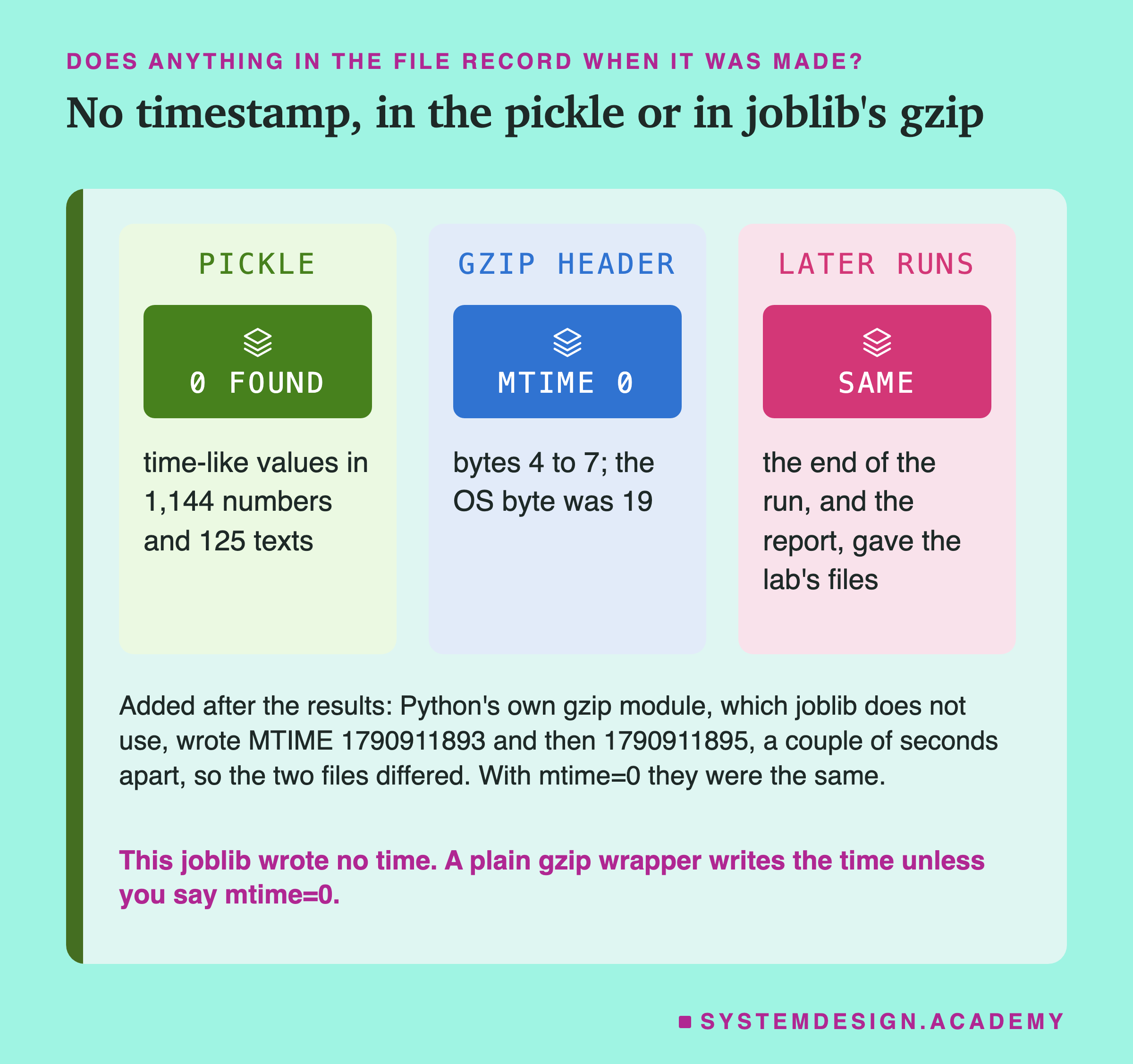
The pickle holds no time. The lab read every number and every piece of text in the pickle, 1,144 numbers and 125 texts. It looked for anything that could be a time. That means a number that reads as a date between 2001 and 2033, in seconds, milliseconds or nanoseconds. It also means text shaped like a date. It found none.
Joblib's gzip writes no time. A gzip file has a field called MTIME in bytes 4 to 7 of its header. The gzip standard, RFC 1952, says "MTIME = 0 means no time stamp is available." Every gzip file joblib wrote had MTIME 0. The default ran at the start and at the end of the run, and the report ran later again; every time, the files were the lab's.
The header has one more field, the OS byte, which says what kind of system wrote the file. Here it was 19. zlib's own source code, in version 1.2.12, which this Python uses, writes 19 on Apple systems and 3 on other Unix systems such as Linux. So I expect a joblib gzip file written on Linux to differ from this Mac's in that byte. I did not measure that; it is what the source says.
Python's own gzip module is different. I checked this after the results, and it is labelled as an addition. I compressed the same pickle twice with gzip.compress, a couple of seconds apart. The two files had different MTIME values and different fingerprints. With mtime=0, they were the same. Joblib does not use this module. But if you wrap a pickle in gzip yourself, pass mtime=0.
Making the File Repeatable, Proved
So on one machine, one thing changed the file: the thread count. Here are two fixes, both tested in fresh processes.
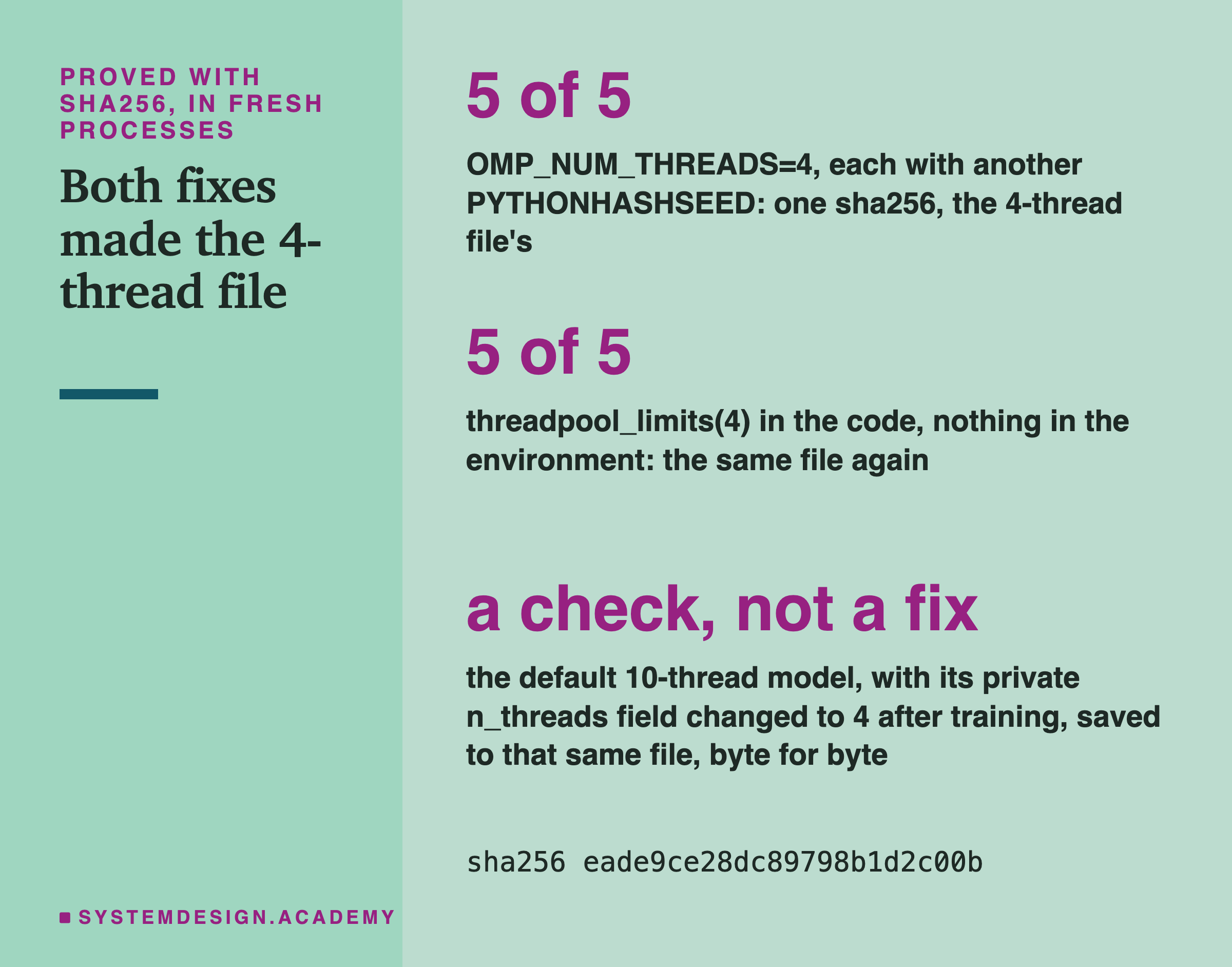
Fix 1: set the threads in the environment. Five fresh processes ran with OMP_NUM_THREADS=4. To make the test harder, each also had a different hash seed, from 0 to 4. All five made one file, the same as the 4-thread file, in all five formats.
Fix 2: set the threads in the code. Five fresh processes ran with nothing set. But the training line was wrapped in threadpool_limits(limits=4, user_api="openmp") from the threadpoolctl library, which scikit-learn already installs. All five made that same file again. I prefer this fix. It lives in the training code, so nobody has to remember to set a variable before running it.
Both fixes make the file repeatable by giving every machine the same number to store. They do not make a model trained with 4 threads the same file as one trained with 10. They make everyone use 4.
There is one catch, which I found in scikit-learn's source and did not test. With the environment variable set, scikit-learn uses that number even if the machine has fewer cores. Its source calls this "making it possible" to go past the number of cpus. With threadpool_limits and nothing in the environment, it still takes the smaller of the limit and the number of physical cores. So on a machine with 2 physical cores, the code fix would store 2, and the file would differ. Pick a number that every machine you train on has.
My Guesses Before the Run, Checked
I wrote eight guesses into the lab before it ran. Here they are against the results.
-
"same: the five files in one process are byte-identical, every format." Right.
-
"base_t0: the five fresh processes give byte-identical files, every format, and equal to same." Right.
-
"omp_N: files differ between thread counts (n_threads is stored); omp_10 equals the baseline (10 cores here). Predictions identical for every thread count. Within one thread count, the K=5 files are identical." Right on all four parts. The first run had already shown me this table before the second run, as the lab's log says.
-
"hash_S: byte-identical to the baseline (no set in the model). The toy set's sha256 differs between seeds." Right. All 5 toy fingerprints differed.
-
"order: sorted, reversed and shuffled rows each give a different model: different bytes in many places, and different predictions; each order is identical to itself across the two processes." Right. The reason, held-back rows, came from the check with early stopping off.
-
"level: each level gives different bytes; one level gives the same bytes all 5 times; every file loads to identical predictions. Decompressed, every compressed file equals the j0 file." Right.
-
"time: no timestamp in the pickle; gzip MTIME is 0; base_t1 equals base_t0." Right.
-
"fix_env and fix_code each give one sha256 across their 5 processes, equal to omp_4's." Right.
Eight right out of eight sounds good, but it mostly means the questions were easy to guess once lesson 2 had found the stored thread count. The useful parts are the exact places: which byte, which field, and that the row order works through early stopping.
Try It Yourself
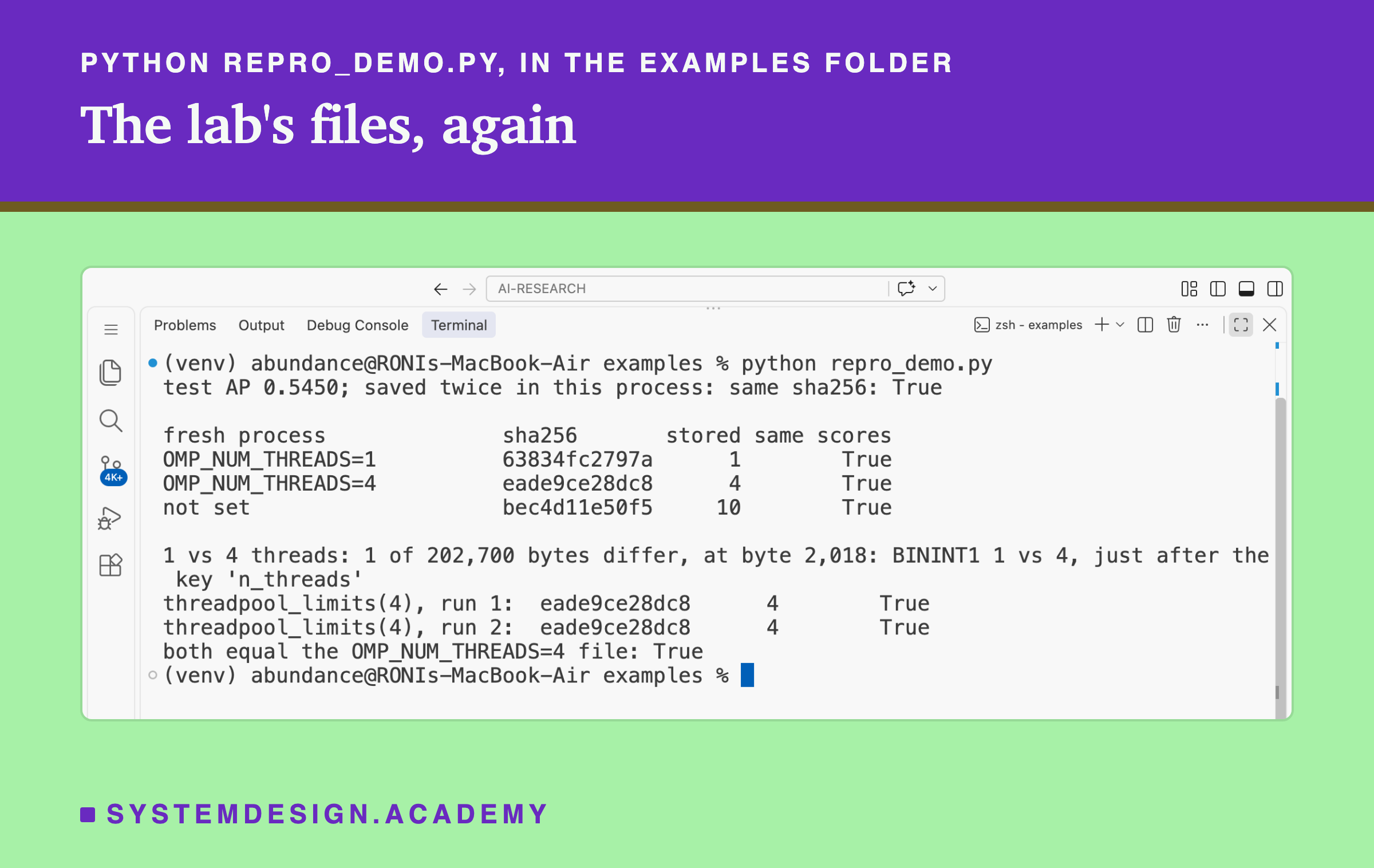
The full lab starts 55 fresh processes. I wrote a small demo that does the core of it in five trainings.
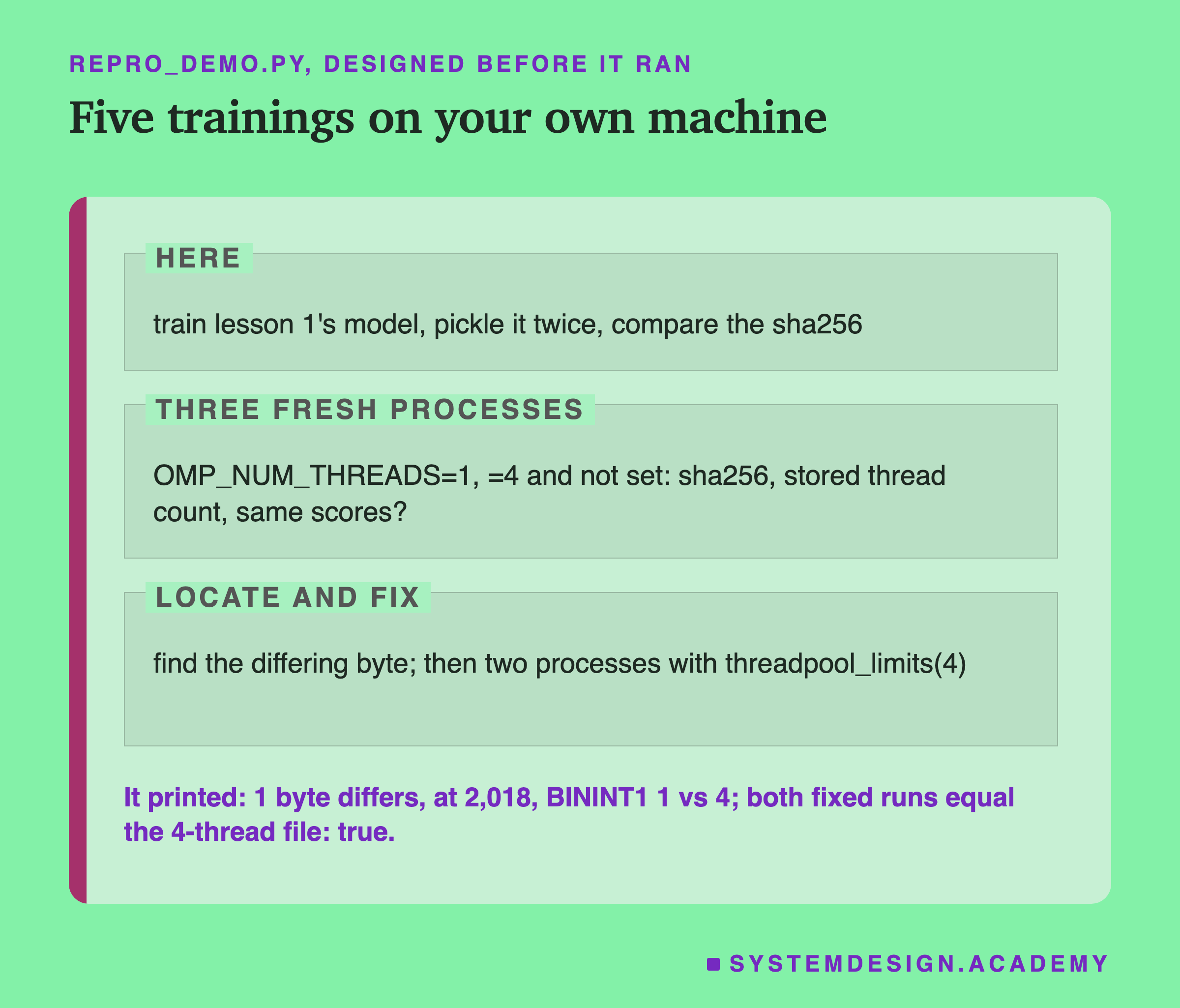
I wrote the demo's design into its docstring after the lab had run and before the demo first ran. It trains the model once in its own process and pickles it twice. Then it starts three fresh copies of itself, with 1 thread, 4 threads and nothing set, and compares their files. It finds the differing byte. Last, it tries the code fix twice.
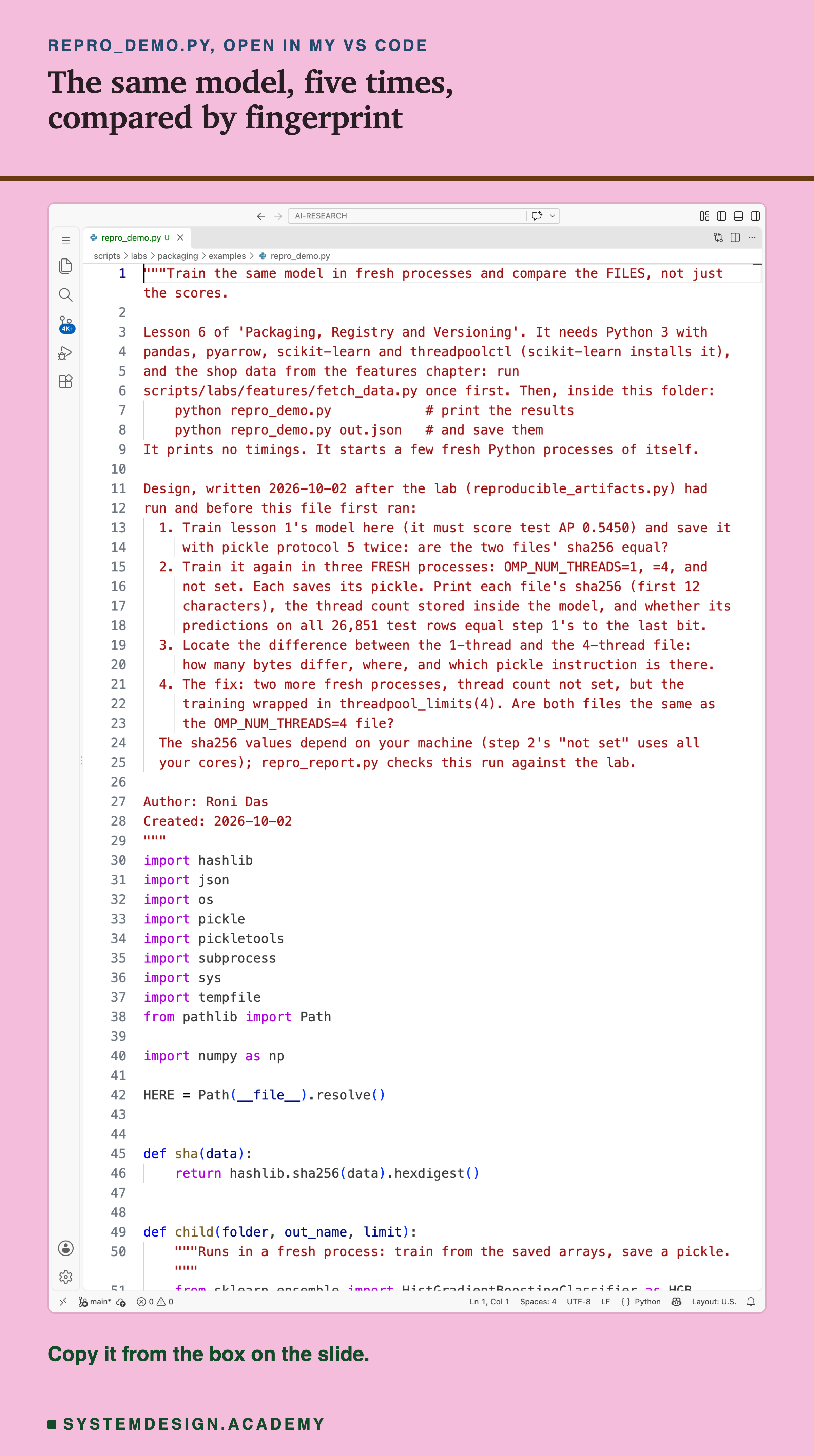
Before you run this lab. You need Python 3 with pandas, pyarrow and scikit-learn: pip install pandas pyarrow scikit-learn openpyxl. scikit-learn installs threadpoolctl too. First run python fetch_data.py from the scripts/labs/features folder. It downloads the shop data once, about 46 MB, and writes one cleaned file.
Then, inside the examples folder, run python repro_demo.py. It needs no GPU. I ran it with scikit-learn 1.9.1 and Python 3.13 on a Mac with 10 cores. On your computer the fingerprints will almost surely differ from mine. Your "not set" line will store your own number of cores, and other library builds can change other bytes. What should hold is the pattern: the same fingerprint for the same thread count, and the same scores for all of them. Give it a file name, python repro_demo.py out.json, and it also saves every number. That is how was made.
Look Up a Setting, and Make Your Own Byte
This box holds the lab's real fingerprints and results. It needs nothing but Python, so it runs in your browser. It loads no model.
Press Run. Part 1 shows the 4-thread file: its fingerprint, whether it equals the default, the stored thread count and the test AP. Change CONDITION to "omp1", "hash_seed" or "shuffle0" and run again. Part 2 runs here and now. It pickles a tiny stand-in object that stores a thread count, twice, and finds the byte that differs. Then it shows gzip writing the time into a file. Change THREADS to (4, 4) and the two pickles become one.
The report script writes this box from the lab's stored results, runs it for five settings, and checks what it prints against the lab. In part 2, notice that the stand-in's differing byte sits right after the BININT1 instruction, exactly as in the real model.
The Lab's Code, Piece by Piece
The lab is one file, scripts/labs/packaging/reproducible_artifacts.py. It imports the features chapter's task and lesson 1's feature code instead of copying them, and it stops if the test AP is not 0.5450.
main builds the data once and saves the training rows. Then it calls run_child for every setting. That function starts a fresh Python process with the right environment and waits for it. When it returns, the main program reads every file the child wrote and computes the sha256 itself.
child is what runs inside each fresh process. It trains the model, once or five times. It may train inside threadpool_limits, or reorder the rows, or set the stored thread count by hand, as the setting says. Then it saves the five files. It also pickles the toy set, the positive control.
byte_diff, op_diff and obj_diff do the locating. The first compares two files byte by byte. The second reads both with pickletools and compares instruction by instruction. The third loads both models and walks through them part by part. containers counts the dicts and sets. timestamp_scan looks for anything time-like, and reads MTIME and the OS byte.
Why the Same Bytes Matter, and When They Do Not
All of this would be a curiosity if nothing used the bytes. But several common tools do.
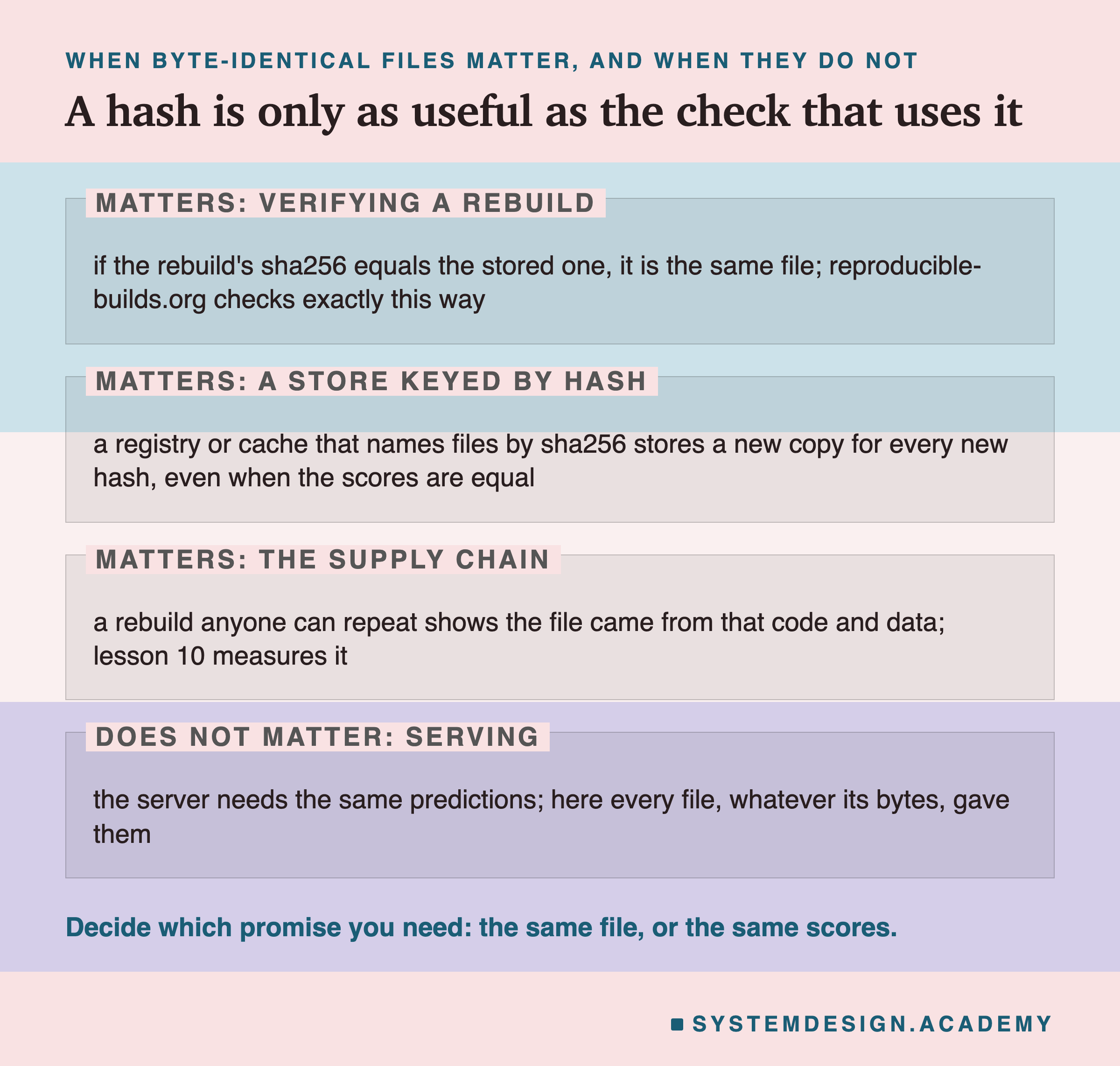
Checking a rebuild. Say your team keeps the sha256 of every model it ships. Months later, someone rebuilds the model from the same code and data to check it. If the files match, the check takes one line. If the thread count differs between the two machines, the check fails, and someone loses an afternoon. In this lab, that afternoon ends at one byte.
Storage that uses the hash as a name. Some stores name each file by its content's fingerprint. That way, the same file is stored only once. A retrain on a machine with another core count gives a new fingerprint, so the store keeps a second copy of what is really the same model. A cache that asks "have I built this already?" by hash will answer no.
The supply chain. Say anyone can rebuild your model and get your exact file. Then someone you do not have to trust can check the file you ship against your code and data. The Reproducible Builds project gives this as its reason: reproducible builds "provide certainty that software is genuine and has not been tampered with." Lesson 10 of this chapter asks the related question: how do you know the file you load is the file you trained?
When it does not matter. A server that answers questions needs the same predictions, not the same bytes. Every file in this lab gave identical predictions, whatever its bytes. If all you ever compare is scores, the thread count is harmless.
How to Make a Model File Repeatable
Here is how I would make a model file repeatable, using only what this lab measured.
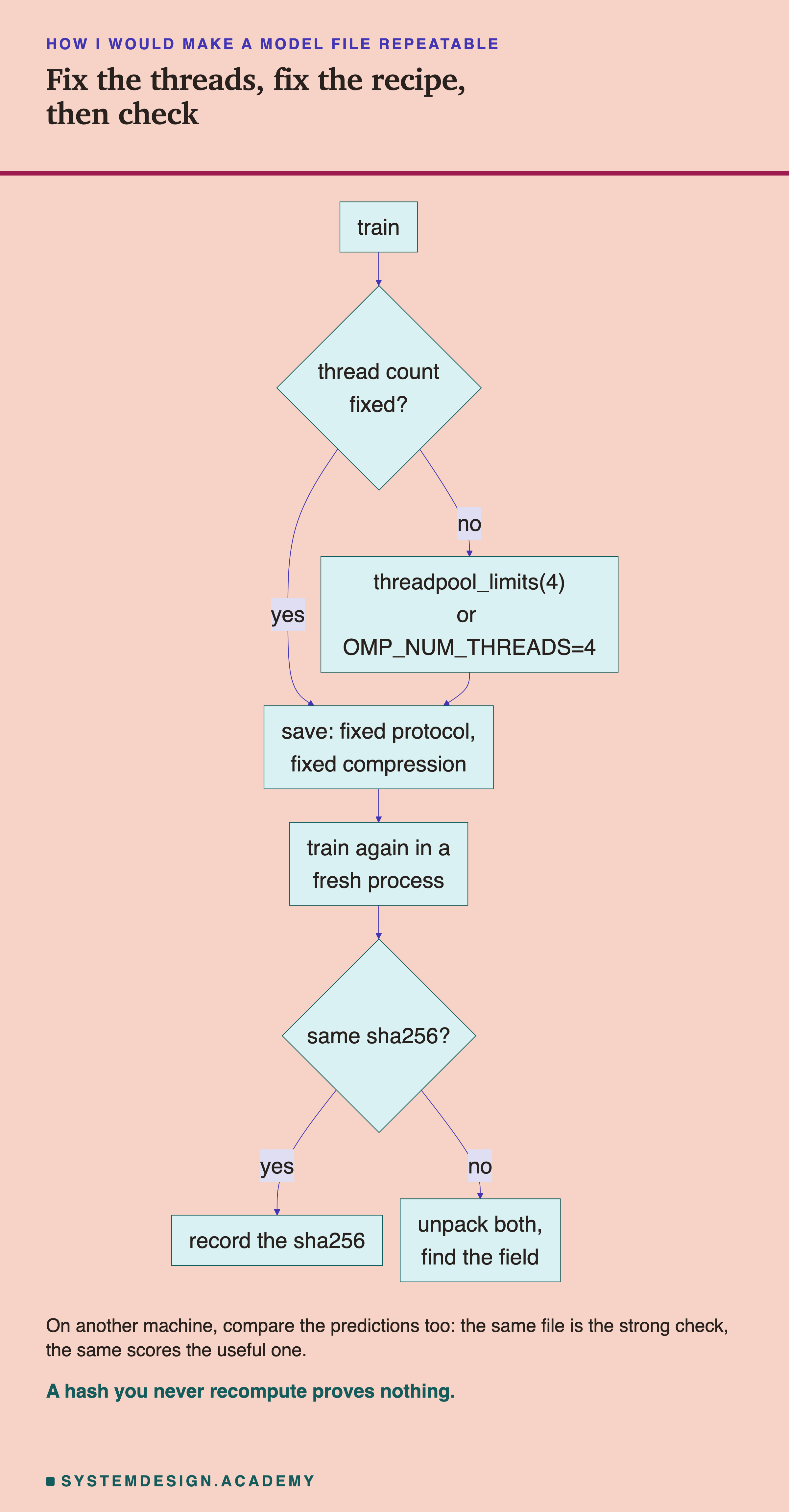
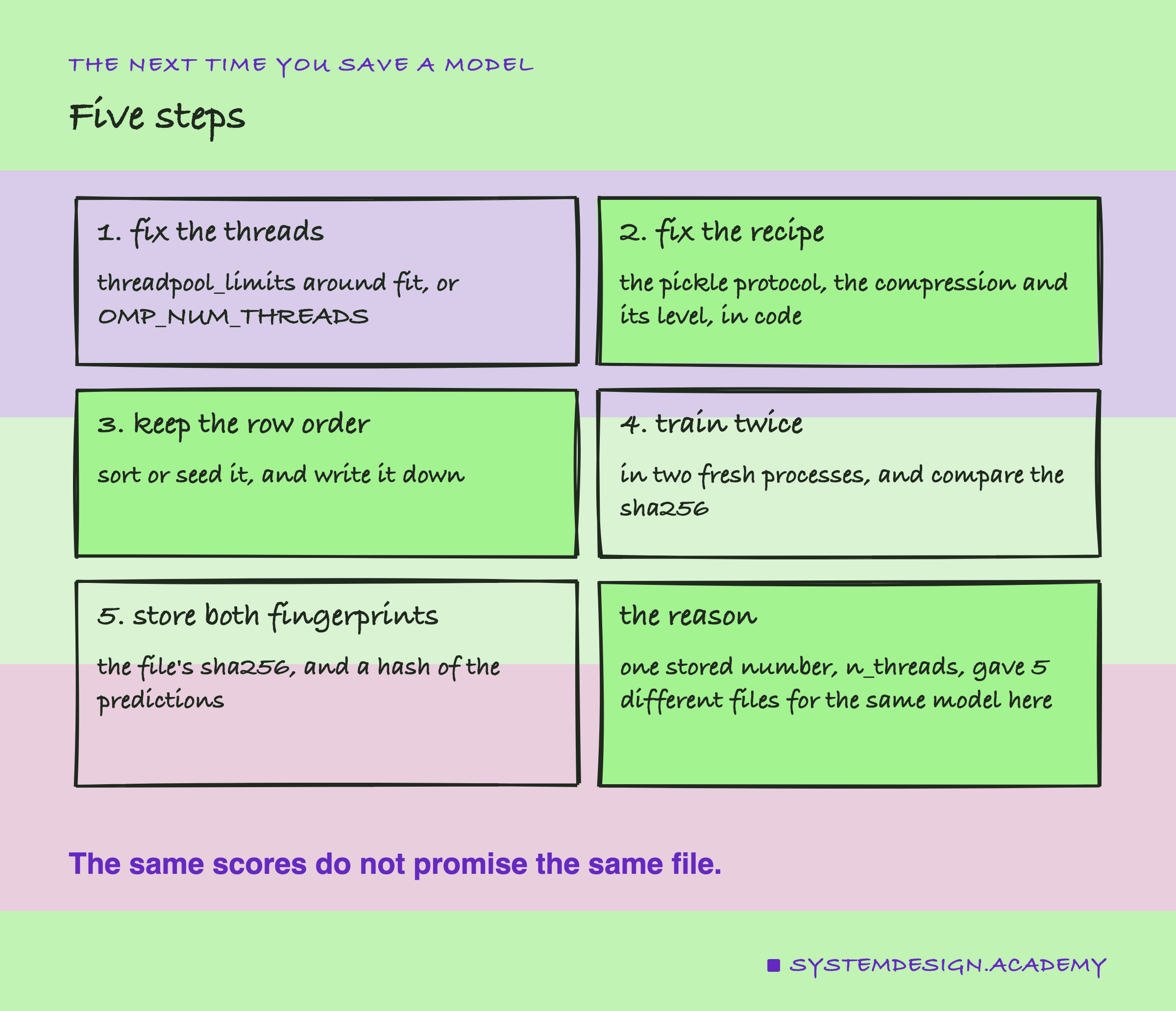
The chart is a loop. Fix what you can, train again in a fresh process, and compare fingerprints. If they differ, unpack both files and find the field, the way this lab found n_threads. Here are the steps in words.
-
Fix the threads in the training code. Wrap
fitinthreadpool_limits(limits=4, user_api="openmp"), or setOMP_NUM_THREADS. Pick a thread count that every machine you train on has as cores, because the code fix stores fewer threads on a smaller machine. -
Fix the recipe in code. Write the pickle protocol, the compression and its level. Lesson 2 showed that the default protocol is 4 on Python 3.13 and 5 from Python 3.14. Here, every compression setting made its own file.
-
Fix the data and its order. Read the training rows in a fixed order. In this lab the order changed the model itself, through early stopping. And even with the held-out rows fixed, it changed the file, through the training scores the model records, without changing the model.
-
Train twice, in two fresh processes, and compare the sha256. This is the test. If they differ, unpack both files and compare them part by part, as the lab's does. The difference will name itself.
When to Chase the Same Bytes, and When Not To
Chase byte-identical files when something compares hashes. One example is a registry or a cache that names files by their fingerprint. Others are an audit that rebuilds your model to check it, or a supply chain where others must verify your file. Here, fixing the thread count was enough on one machine, and it cost one line of code.
Do not chase them when all you need is the same predictions. Every file here, whatever its bytes, gave identical scores. Spending a day on one stored byte helps nobody if nothing compares the bytes.
Do not expect the same file across machines without testing. This lab ran on one Mac. Another operating system writes a different gzip OS byte, by zlib's own source. Other library builds may change other bytes. Lesson 5 found Linux and macOS differed in the last digit of 33 predictions. Compare predictions with a tolerance, and treat a matching file hash as a bonus.
Do not trust a compressed-file diff. Unpack first. One changed byte became 90,800 different positions after zlib.
Do not leave the row order to chance if your model uses early stopping or any random split by position. Here a different order was a different model, with up to 0.3272 difference in one customer's score.
What This Lab Cannot Tell You
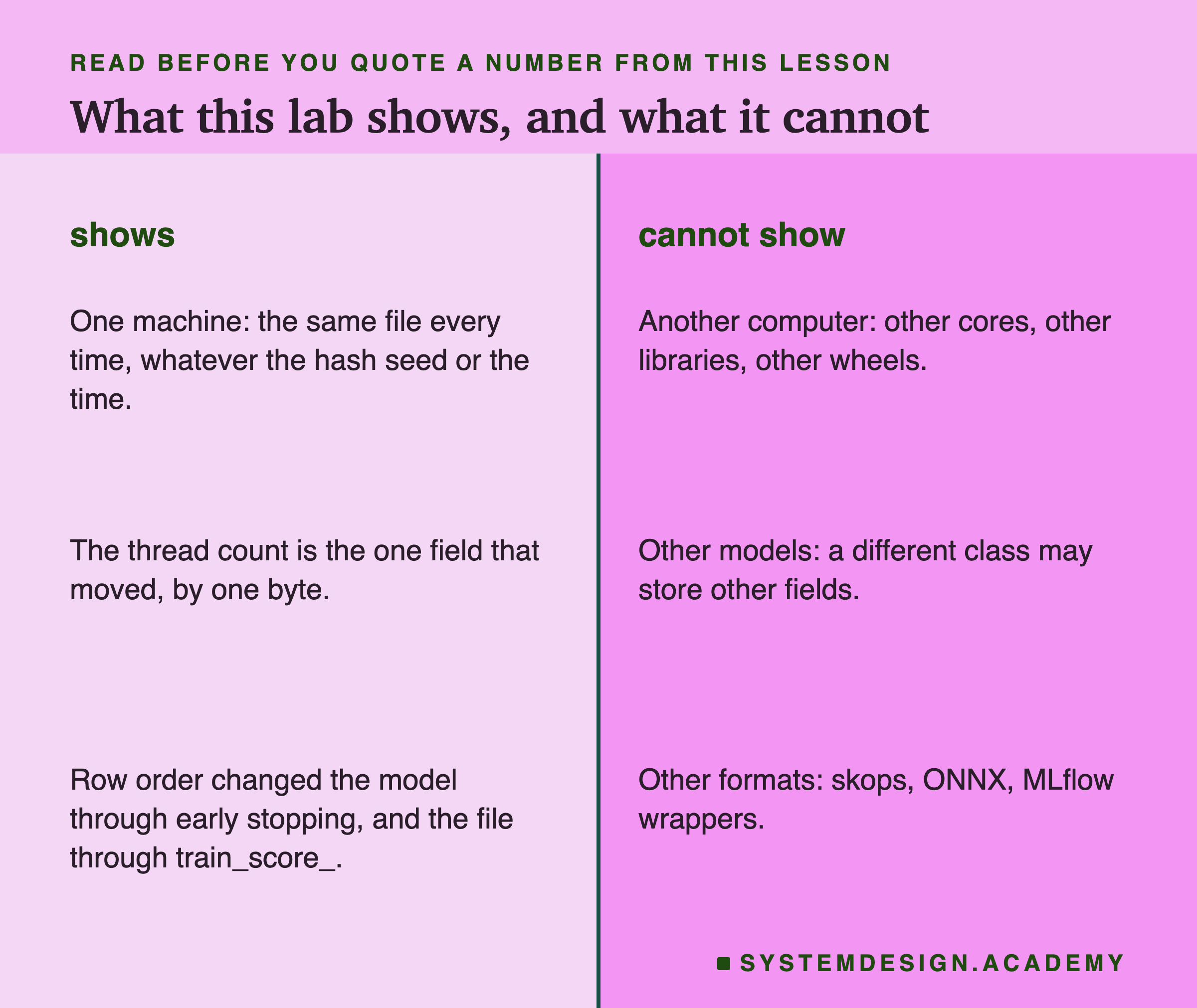
One machine. Every run was on one Mac with 10 cores, scikit-learn 1.9.1, numpy 2.5.3, joblib 1.6.0 and Python 3.13.15. I did not build the same file on Linux or Windows. The gzip OS byte is a difference I expect from zlib's source, not one I measured.
One model. HistGradientBoostingClassifier stores its thread count. Other scikit-learn models, or models from other libraries, may store other things that change between runs, or nothing at all. The method carries over: train twice, compare, and unpack to find the field.
One morning. The first run started at 08:07 and the recorded report ran at 09:01, all on 2 October 2026. The scan found no time-like value in the file, which is stronger evidence than the gap. But I did not save a file on one day and again a year later.
Five formats. Pickle and joblib only. Lesson 2 found that zipped skops files moved by tens to a few hundred bytes from run to run. I did not repeat that here, and I did not test MLflow's or ONNX's files.
Labelled additions. Two things were added after the results, and both are labelled in the lab, the report and here. One is the check against the first, crashed run's 25 files. The other is Python's gzip module with and without mtime=0. After an independent review I added a third: the held-back rows fixed and only the training rows reordered, which found the train_score_ difference.
What to Do on Monday
If you take one thing to work on Monday, run your training script twice, in two fresh terminals, and compare the sha256 of the two model files. On a Mac, shasum -a 256 model.pkl prints it. On any computer with Python, this line does the same: python -c "import hashlib,sys;print(hashlib.sha256(open(sys.argv[1],'rb').read()).hexdigest())" model.pkl. I ran both on one of the lab's files and they printed the same 64 characters. If the two match, write the fingerprint down next to the model. If they do not, load both files and compare them part by part until the difference names itself.
Then look for anything in your pipeline that compares model files by hash: a registry, a cache, a deployment check. That is where a stored thread count can quietly cost you.
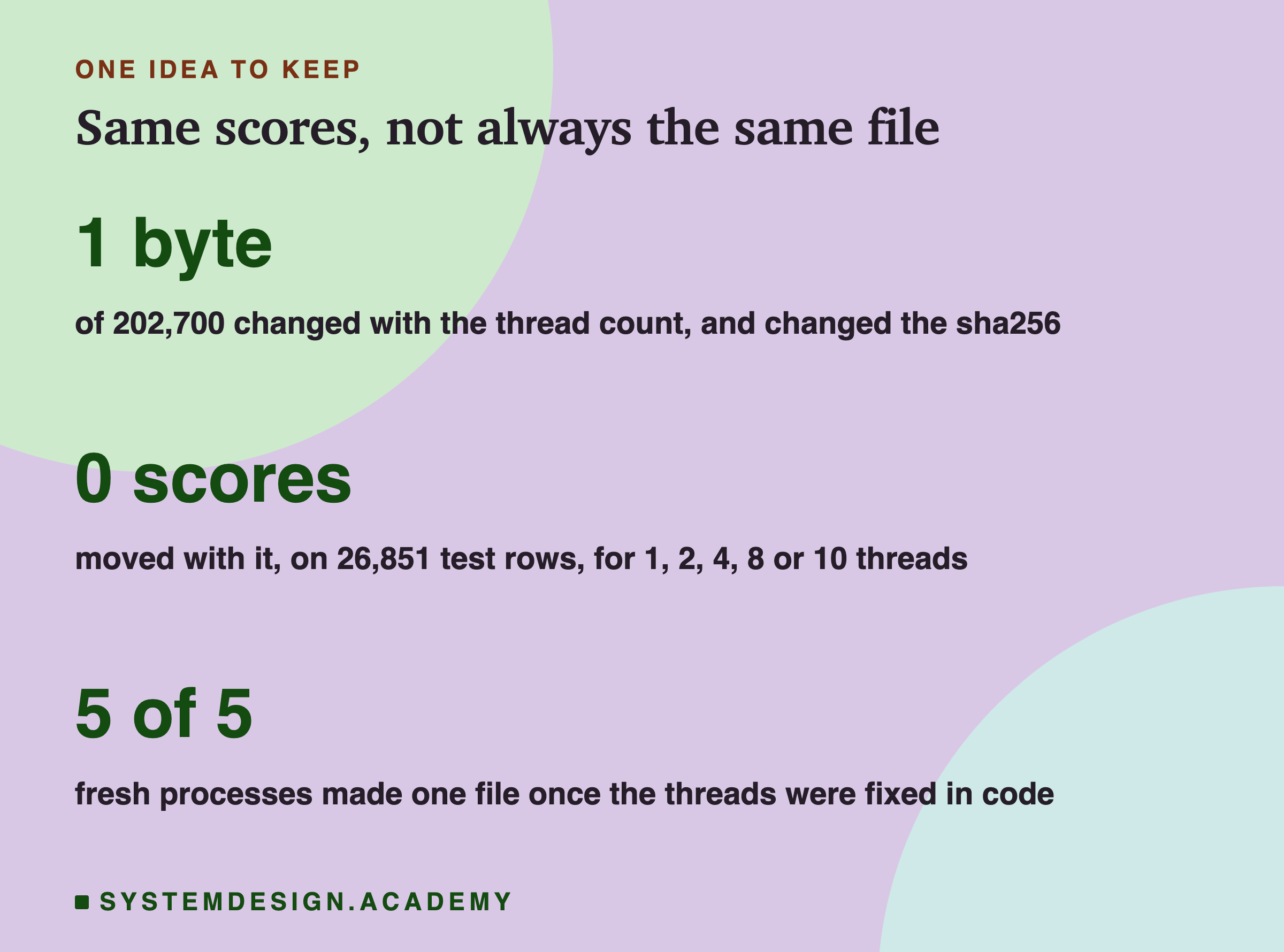
The one idea to keep: the same scores do not promise the same file. Here, on one machine, the file depended on exactly one thing, the thread count the model stored. That changed one byte and never a score. The row order went further and changed the model itself. Fix the threads in code, fix the recipe, train twice, and let the sha256 tell you whether you did it.
Knowledge Check
Knowledge Check
4 questions - Score 80% to pass
The 4-thread and 10-thread pickles of the same model had different sha256 values. What did the lab find was different?
Changing PYTHONHASHSEED from 0 to 4 did not change the model file. Why could the lab trust that result?
Training on the same rows in a shuffled order gave a different model. What did the check with early stopping off show?
Which change made five fresh processes, with nothing set in the environment, save the same file as the OMP_NUM_THREADS=4 processes?