Connection Draining
Gracefully finishing in-flight requests before removing a server from a load balancer's pool. Prevents dropping active connections during deployments or scale-ins.
What is Connection Draining?
In short
Connection draining is the practice of letting a server finish its in-flight requests before a load balancer stops sending it new traffic and removes it from the pool. It prevents dropped requests and broken responses when you deploy, scale in, or take a server out of rotation.
What connection draining actually means
When you remove a server from a load balancer, you have two problems happening at the same time. The load balancer needs to stop sending new requests to that server, and the server still has requests it is in the middle of handling. If you yank the server immediately, every one of those in-flight requests gets killed, and the user sees a 502 or a connection reset.
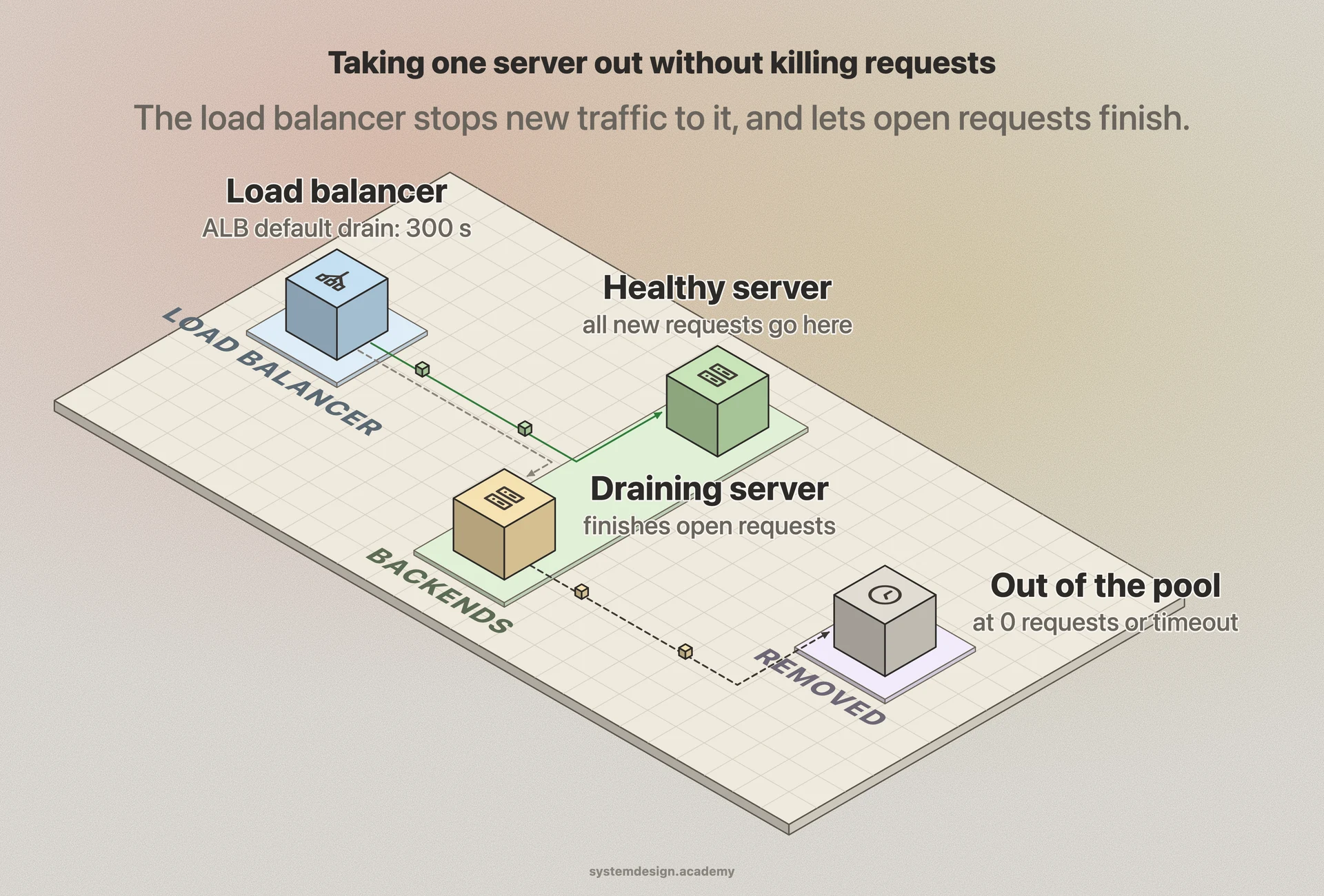
Connection draining solves the second problem. Instead of cutting the server off instantly, the load balancer marks it as draining, stops routing new requests to it, but keeps existing connections alive until they finish or a timeout expires. Once the server has no active requests left, or the timeout is hit, the load balancer removes it cleanly.
The setting is almost always controlled by a single value: a drain timeout, often called the deregistration delay. AWS Application Load Balancer defaults this to 300 seconds. NGINX and HAProxy call the equivalent state a server going into drain or maintenance mode.
How it works under the hood
A load balancer keeps a health and routing state for every backend. Connection draining adds a transitional state between healthy and removed. When you trigger a deregistration, the backend moves to draining. The load balancer stops adding it to the pool of candidates for new connections, but its connection table still tracks the open sockets it already has.
For each open connection, the load balancer waits for the response to be sent and the keep-alive connection to either close or go idle. If the application uses HTTP keep-alive, the draining logic usually sends a Connection: close header on the next response so the client does not reuse that socket. Once the connection count for that backend hits zero, removal is immediate.
The timeout is the safety valve. If a request is genuinely stuck, say a slow database query that never returns, the load balancer will not wait forever. After the drain timeout, it forcibly closes whatever is left. So picking the timeout is a balance: long enough to cover your real p99 request duration, short enough that a deploy or scale-in does not stall.
When to use it and the trade-offs
Use connection draining anywhere a backend leaves rotation while it might still be doing work: rolling deployments, autoscaling scale-in events, blue-green cutovers, draining a node before a Kubernetes pod eviction, or pulling an unhealthy instance for investigation. Without it, every deploy becomes a small outage for whoever happened to have a request in flight.
The main cost is time. A 300 second drain timeout means a scale-in or a rolling deploy can take that long per instance in the worst case, which slows down how fast you can ship or shrink a fleet. Teams usually tune it down to something like 30 to 60 seconds for normal web traffic, and only go higher for long-lived requests such as large file uploads or streaming responses.
Draining does not help with truly long-lived connections like WebSockets or gRPC streams that stay open for minutes or hours. For those you need application-level cooperation: the server has to notice it is shutting down and proactively ask clients to reconnect, often paired with a SIGTERM handler that stops accepting new streams and closes idle ones.
Where it is used in production
AWS Elastic Load Balancing
Calls it deregistration delay on target groups, default 300 seconds, used during Auto Scaling scale-in and ECS deployments.
NGINX
Marks an upstream server as drain so it serves only existing keep-alive and bound sessions while new requests skip it.
HAProxy
Supports a DRAIN state via the runtime API or stats socket, stopping new sessions while letting active ones finish.
Kubernetes
Sends SIGTERM and waits terminationGracePeriodSeconds while readiness probes pull the pod from Service endpoints, draining in-flight traffic before the container is killed.
Frequently asked questions
- What is the difference between connection draining and a graceful shutdown?
- Connection draining is the load balancer side: it stops sending new traffic to a backend and waits for existing requests to finish. Graceful shutdown is the server side: the process catches SIGTERM, stops accepting new work, finishes what it has, and exits. They work together, and you usually need both for a clean removal.
- What should I set the drain timeout to?
- Set it slightly above your real p99 request duration. For typical web APIs that finish in under a second, 30 to 60 seconds is plenty. The AWS default of 300 seconds is conservative and often slows deploys unnecessarily. Only go higher if you have long uploads, batch endpoints, or streaming responses.
- Does connection draining work with WebSockets?
- Not well on its own. Draining waits for connections to close, but a WebSocket can stay open indefinitely, so it will just hit the timeout and get force-closed. For WebSockets you need the application to detect shutdown and tell clients to reconnect to another server.
- What happens to requests still running when the drain timeout expires?
- They are forcibly terminated. The load balancer closes the remaining connections, and any client mid-request gets an error or reset. That is why the timeout should cover your slowest realistic request, so this almost never happens in practice.
- Is connection draining the same as health checks?
- No. Health checks decide whether a backend is healthy enough to receive traffic. Connection draining decides how to remove a backend cleanly once you have already chosen to take it out. A failing health check can trigger removal, and draining controls how that removal happens.
Learn Connection Draining hands-on
This page explains the idea. The full lesson lets you step through the ring as servers join and leave, read the implementation, and check yourself with a quiz. It is one of 760+ lessons in the System Design Masterclass, from your first API call to distributed consensus. Eleven Foundation lessons are free, no signup. Lifetime access is ₹499 in India or $7.99 worldwide, one payment, no subscription.
Related lessons
Lessons that touch on Connection Draining as part of a larger topic.
See also
Related glossary terms you might want to look up next.
Load Balancer
Distributes incoming traffic across multiple servers so no single server gets overwhelmed. Like a traffic cop directing cars to different lanes.
Rolling Deployment
Gradually replacing old instances with new ones, a few at a time. No downtime, but both versions run simultaneously during the rollout.
Health Check
An endpoint or mechanism that reports whether a service is running and healthy. Load balancers use health checks to route traffic away from unhealthy instances.
Microservices
An architecture where an application is split into small, independent services that communicate over the network. Each service owns its own data and can be deployed separately.
Monolith
A single, unified application where all features share the same codebase and deployment. Simpler to start with but harder to scale individual parts.
Service Discovery
The mechanism by which microservices find and communicate with each other. Services register themselves and others can look them up by name.