Rolling Deployment
Gradually replacing old instances with new ones, a few at a time. No downtime, but both versions run simultaneously during the rollout.
What is Rolling Deployment?
In short
A rolling deployment updates an application by replacing old instances with new ones a few at a time, instead of all at once. Each batch of servers is upgraded and health-checked before the next batch starts, so the service stays available throughout with no downtime, though both the old and new versions run side by side during the rollout.
What a rolling deployment actually is
When you ship a new version of an app, you have to get the new code onto the servers that are serving live traffic. The blunt way is to take everything down, swap the code, and bring it back up. That causes downtime. A rolling deployment avoids that by updating the fleet in small steps.
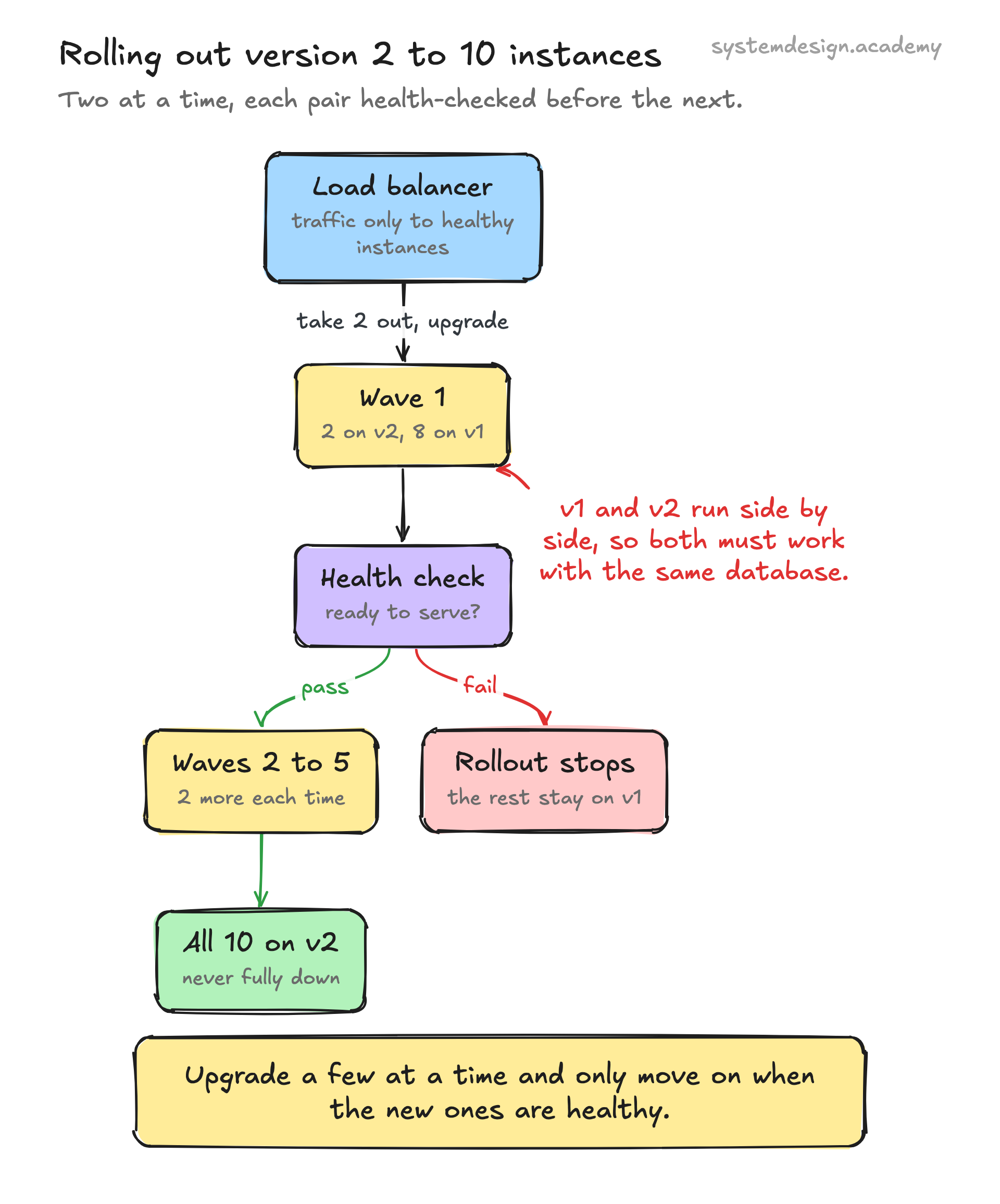
Say you run 10 identical instances behind a load balancer. A rolling deployment might take 2 instances out of rotation, replace them with the new version, wait for them to pass health checks, put them back, then move on to the next 2. After five waves, all 10 are running the new version and the service never went fully dark.
The batch size is the key knob. It is often expressed as maxSurge (how many extra instances you are allowed to spin up above the desired count) and maxUnavailable (how many you are allowed to take down at once). These two numbers control how fast the rollout moves and how much capacity you keep online while it happens.
How it works under the hood
The orchestrator keeps a count of how many instances should be running and which version they should be. To roll out a change, it brings up new-version instances, waits for each to report healthy, then terminates an equal number of old-version instances. It repeats until the whole set matches the new version.
Health checks are what make this safe. A new instance does not receive traffic until a readiness probe confirms it is actually serving requests, not just started. If a batch fails its checks, a good system halts the rollout and leaves the rest of the fleet on the old version, so a bad build degrades capacity instead of taking the site down.
Because old and new run at the same time, both versions must speak to the same database and the same clients. This is why backward-compatible changes matter. If version 2 renames a database column that version 1 still reads, you break the instances that have not been upgraded yet. The usual fix is to deploy schema changes in expand-then-contract steps so both versions stay happy during the overlap.
When to use it and the trade-offs
Rolling deployments are the default in most container platforms because they need no extra infrastructure. You upgrade in place using the capacity you already have, which makes them cheaper than blue-green deployment, where you stand up a full second copy of the fleet.
The cost is that rollback is slow. If version 2 turns out to be broken, you cannot flip a switch back to version 1 the way blue-green lets you. You have to run the whole process again in reverse, batch by batch, which can take minutes. During that window some users hit the bad version. Canary deployments address this by sending a tiny slice of traffic to the new version first, but a plain rolling update does not give you that fine-grained control.
Use rolling deployments for stateless services where any instance can handle any request and the new version is backward compatible. Avoid them, or pair them with stronger safeguards, when a release contains breaking changes, when you cannot tolerate two versions running together, or when you need instant rollback for a high-risk change.
A concrete example with Kubernetes
Kubernetes uses rolling updates by default for Deployments. If you change the container image in a Deployment running 10 replicas, the controller creates a new ReplicaSet for the new image and scales it up while scaling the old one down, respecting maxSurge and maxUnavailable. With the defaults of 25 percent each, it adds up to 3 new pods and removes up to 3 old pods at a time.
Each new pod must pass its readiness probe before Kubernetes counts it as available and routes Service traffic to it. If pods crash-loop or never become ready, the rollout stalls and you can run kubectl rollout undo to revert to the previous ReplicaSet, which itself happens as another rolling operation.
The same pattern shows up outside Kubernetes. AWS rolling deployments in Elastic Beanstalk and CodeDeploy upgrade EC2 instances in configurable batches, and Auto Scaling group instance refresh replaces instances a percentage at a time while keeping a minimum healthy count online.
Where it is used in production
Kubernetes
Rolling update is the default strategy for Deployments, controlled by maxSurge and maxUnavailable with readiness-probe gating between batches.
AWS Elastic Beanstalk and CodeDeploy
Both offer rolling and rolling-with-additional-batch deployment policies that upgrade EC2 instances in configurable batches.
Nginx and HAProxy fleets
Operators drain connections from one node at a time, upgrade it, and return it to the pool behind the load balancer for zero-downtime releases.
HashiCorp Nomad
Job updates use a rolling update stanza with max_parallel and health checks to replace task allocations incrementally.
Frequently asked questions
- What is the difference between rolling deployment and blue-green deployment?
- A rolling deployment upgrades your existing instances in place, a few at a time, so you only ever run one fleet. Blue-green stands up a complete second fleet on the new version and switches all traffic at once when it is ready. Rolling is cheaper and needs no extra capacity, but rollback is slow. Blue-green doubles your infrastructure briefly but gives near-instant rollback by flipping traffic back.
- Does a rolling deployment cause downtime?
- No, that is the point of it. Because only a small batch of instances is offline at any moment and the rest keep serving traffic behind a load balancer, users do not see an outage. The catch is that two versions run at the same time during the rollout, so the new version must be backward compatible with the old one and with the shared database.
- How do I roll back a failed rolling deployment?
- You run the deployment process again targeting the previous version, which replaces the new instances batch by batch. In Kubernetes this is kubectl rollout undo, which redeploys the prior ReplicaSet. Because rollback is itself a rolling operation it takes time, which is the main downside compared to blue-green. Good readiness probes help by halting the rollout before a bad version reaches the whole fleet.
- What are maxSurge and maxUnavailable?
- They control how aggressive the rollout is. maxSurge is how many extra instances you may run above the desired count during the update, which lets you add new instances before removing old ones. maxUnavailable is how many instances are allowed to be down at once. Setting maxUnavailable to 0 and maxSurge above 0 keeps full capacity throughout but uses more resources during the rollout.
- Why do database changes need special care during a rolling deployment?
- Because old and new code run against the same database at the same time, a schema change that one version expects but the other cannot handle will break the instances on the wrong version. The safe approach is expand-then-contract: first add new columns or tables that both versions tolerate, deploy the new code, then remove the old schema in a later release once no instance depends on it.
Learn Rolling Deployment hands-on
This page explains the idea. The full lesson lets you step through the ring as servers join and leave, read the implementation, and check yourself with a quiz. It is one of 760+ lessons in the System Design Masterclass, from your first API call to distributed consensus. Eleven Foundation lessons are free, no signup. Lifetime access is ₹499 in India or $7.99 worldwide, one payment, no subscription.
Related lessons
Lessons that touch on Rolling Deployment as part of a larger topic.
See also
Related glossary terms you might want to look up next.
Blue-Green Deployment
A deployment strategy using two identical environments. Traffic switches from blue (current) to green (new) instantly, with easy rollback.
Canary Deployment
Rolling out a new version to a small percentage of users first, then gradually increasing. Like sending a canary into a coal mine to test for danger.
Kubernetes Deployment
A K8s resource that manages rolling updates and rollbacks for a set of pods. You declare the desired state and K8s converges to it.
CI/CD
Continuous Integration and Continuous Deployment: automating the process of testing and deploying code. Push code, tests run, and it ships to production automatically.
GitOps
Using Git as the single source of truth for infrastructure and application configuration. Changes are made via pull requests and automatically reconciled by tools like ArgoCD or Flux.
Immutable Infrastructure
Servers are never modified after deployment. To update, you build a new image and replace the old instance entirely. Eliminates configuration drift.