Cookie
A small piece of data the server sends to the browser, which the browser stores and sends back with every subsequent request. Powers sessions, tracking, and preferences.
What is Cookie?
In short
A cookie is a small piece of data, usually under 4 KB, that a web server sends to a browser, which the browser stores and then attaches to every later request to the same site. Cookies let an otherwise stateless HTTP server remember who you are across requests, which is how login sessions, shopping carts, and preferences work.
What a cookie actually is
HTTP is stateless. Each request the browser sends arrives at the server with no memory of the request before it. Without help, the server cannot tell that the person loading the checkout page is the same person who logged in two clicks earlier. A cookie is the standard fix for that gap.
A cookie is just a name and a value, like session_id=8f3c2a, plus some attributes that control how the browser treats it. The total size is capped at roughly 4 KB per cookie, and browsers store around 50 cookies per domain. Anything bigger or more permanent belongs in a database, not a cookie.
The browser stores cookies per site. A cookie set by example.com is sent only back to example.com, never to a different domain. That scoping is what keeps your bank session from leaking to an unrelated page in another tab.
How it works request by request
The server sets a cookie by adding a Set-Cookie header to its HTTP response, for example Set-Cookie: session_id=8f3c2a; Path=/; HttpOnly; Secure; SameSite=Lax. The browser reads that header and saves the cookie.
On every following request to that site, the browser automatically adds a Cookie header carrying the values back: Cookie: session_id=8f3c2a. The application does not have to ask for it; the browser sends it on its own. The server reads the value and looks up who that session belongs to.
Attributes decide the rules. Expires or Max-Age sets a lifetime; without one the cookie is deleted when the browser closes (a session cookie). HttpOnly hides the cookie from JavaScript so a cross-site scripting bug cannot read it. Secure means send only over HTTPS. SameSite controls whether the cookie rides along on requests started by other sites, which is the main defense against CSRF attacks.
A common pattern is the session cookie. The server stores the real user data server-side and the cookie holds only a random opaque session id. The alternative is a signed token, such as a JWT, stored in the cookie, where the data lives in the cookie itself and the server verifies a signature instead of doing a lookup.
When to use cookies and the trade-offs
Use cookies when the server needs the value on every request and the browser should attach it automatically. Authentication sessions are the textbook case, because the server must know who you are on each page load. Cookies are also good for small preferences like a language choice or a dismissed banner.
Do not put large or sensitive raw data in a cookie. It travels on every request, so a fat cookie slows down every single call, and a value the user can read or tamper with should never be trusted without a signature. For client-only state that the server never reads, localStorage is a better fit because it is not sent over the wire.
The big trade-off today is privacy and third-party cookies. A cookie set by a domain different from the page you are visiting, used for cross-site ad tracking, is being blocked by default in Safari and Firefox and was the target of Chrome's long phase-out effort. First-party cookies, set by the site you are actually on, remain the normal way to run a session and are not going away.
A concrete example
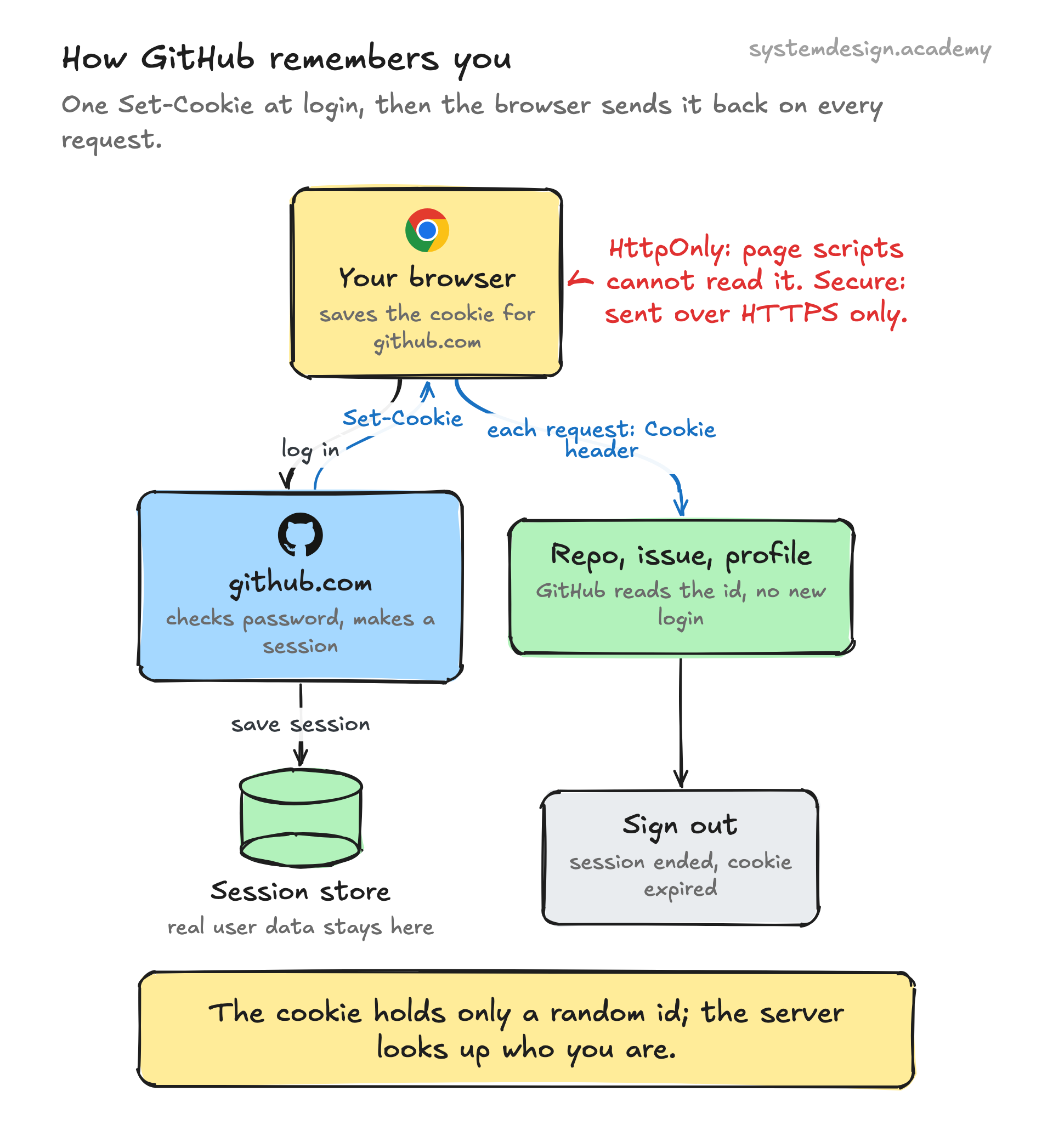
You log into github.com. GitHub checks your password, creates a server-side session, and responds with Set-Cookie carrying an opaque session id marked HttpOnly, Secure, and SameSite. Your browser saves it.
Now you click into a repository, open an issue, and edit your profile. Each of those is a separate HTTP request, and on each one your browser quietly attaches the session cookie. GitHub reads it, recognizes you, and serves your private data without asking you to log in again.
When you click Sign out, the server invalidates that session and sends a Set-Cookie that expires the value immediately, so the next request arrives with no valid cookie and you are back to being anonymous.
Where it is used in production
GitHub
Uses an HttpOnly, Secure session cookie to keep you logged in across every page and API call within the site.
Cloudflare
Sets the __cf_bm and cf_clearance cookies to track bot scores and remember that a browser already passed a challenge.
Stores auth and preference cookies like SID and NID so a single sign-in carries across Gmail, Search, and YouTube.
Express and other web frameworks
Ship cookie-based session middleware (express-session, Django sessions, Rails) that set a signed session id cookie out of the box.
Frequently asked questions
- What is the difference between a cookie and a session?
- A session is the server's record of who you are and what you are doing. A cookie is the small token in your browser that points back to that session. The cookie usually holds only a random session id; the actual session data lives on the server.
- What is the difference between cookies and localStorage?
- Cookies are sent to the server automatically on every request and can be read by the server, with a 4 KB limit. localStorage stays in the browser, is never sent over the network, holds several MB, and is only readable by JavaScript on that origin. Use cookies for things the server needs, localStorage for client-only state.
- Are third-party cookies being removed?
- Third-party cookies, used mainly for cross-site tracking, are blocked by default in Safari and Firefox and have been the subject of a long phase-out in Chrome. First-party cookies set by the site you are actually visiting are not affected and still run normal login sessions.
- What does HttpOnly do?
- HttpOnly tells the browser not to expose the cookie to JavaScript through document.cookie. This means that even if an attacker injects a script through a cross-site scripting flaw, that script cannot read the session cookie and steal the session.
- How big can a cookie be?
- Each cookie is capped at about 4 KB, and browsers keep roughly 50 cookies per domain. Anything larger should be stored server-side and referenced by a small id in the cookie.
Learn Cookie hands-on
This page explains the idea. The full lesson lets you step through the ring as servers join and leave, read the implementation, and check yourself with a quiz. It is one of 760+ lessons in the System Design Masterclass, from your first API call to distributed consensus. Eleven Foundation lessons are free, no signup. Lifetime access is ₹499 in India or $7.99 worldwide, one payment, no subscription.
Related lessons
Lessons that touch on Cookie as part of a larger topic.
Cookie-Based Sessions
Using HTTP cookies to maintain user state across requests, the traditional session model
intermediate · security architecture
Browser Storage
Understanding the different ways browsers persist data on the client side, cookies, localStorage, sessionStorage, and IndexedDB
intermediate · web content delivery
Session Management
How servers remember who you are between requests in a stateless protocol
foundation · core fundamentals
CSRF
Cross-Site Request Forgery, tricking a user's browser into making authenticated requests to a target site
intermediate · security architecture
See also
Related glossary terms you might want to look up next.
Session
A way to maintain state across multiple HTTP requests. The server stores data about a user and gives them a session ID (usually in a cookie).
JWT
JSON Web Token: a compact, self-contained token for transmitting claims between parties. The server can verify it without a database lookup.
Stateful
A system that remembers previous interactions. The server keeps track of client state between requests, making it harder to scale but sometimes necessary.
Latency
The time delay between sending a request and getting a response. Amazon found every 100ms of extra latency costs 1% in sales.
Throughput
The number of operations a system can handle per unit of time. Think of it as how many cars a highway can move per hour.
Bandwidth
The maximum amount of data that can be transferred over a network in a given time. It's the width of the pipe, not how fast the water flows.