DNS Record Types
Different types of DNS records map domains to resources: A records point to IPs, CNAME aliases one domain to another, MX routes email, TXT stores verification data.
What is DNS Record Types?
In short
DNS record types are the different categories of entries in a domain's DNS zone, each mapping a name to a specific kind of resource. The common ones are A (name to IPv4 address), AAAA (name to IPv6 address), CNAME (alias one name to another), MX (where email for the domain is delivered), TXT (arbitrary text, used for SPF and domain verification), NS (which name servers are authoritative), and SOA (administrative metadata for the zone).
What a DNS record actually is
A DNS record is one line in a domain's zone file. Every record has four parts: a name (like www.example.com), a type (like A or MX), a TTL in seconds that tells resolvers how long to cache it, and the data the record points to. When your browser needs to reach example.com, it asks a resolver, the resolver walks down from the root to the authoritative name server, and the answer it gets back is one or more of these records.
The type field is what decides how the data is interpreted. The same name can hold several record types at once. example.com might have an A record for its web server, an MX record for its mail server, and a TXT record proving you own the domain, all living under the same name. They do not conflict because the resolver always asks for a specific type.
There are dozens of record types defined across RFCs, but in practice you work with about eight of them day to day. The rest like SRV, CAA, and PTR show up for specific jobs such as service discovery, certificate authority control, and reverse lookups.
The records you will actually use
A and AAAA are the core. An A record maps a name to a 32-bit IPv4 address like 93.184.216.34. AAAA does the same for a 128-bit IPv6 address. These are the records that ultimately let a packet find a machine.
CNAME is an alias. It says one name is really just another name, so blog.example.com pointing by CNAME to example-blog.netlify.app means resolvers chase the target and use whatever A or AAAA records they find there. The big rule: a name with a CNAME cannot have any other records, which is why you cannot put a CNAME on a bare apex domain like example.com that also needs MX and NS records. Providers work around this with ALIAS or ANAME records that resolve the target server-side and return a plain A record.
MX routes mail. It points to a mail server hostname and carries a priority number, where lower means tried first, so 10 mail1 and 20 mail2 gives you a primary and a backup. NS records list the authoritative name servers for the zone, and SOA holds the zone's serial number and refresh timers used in replication between primary and secondary servers.
TXT is the catch-all. It stores free-form text and has become the standard place to put machine-readable policy: SPF lists which servers may send mail for you, DKIM holds a public key for signing mail, DMARC sets a policy for handling spoofed mail, and verification strings prove domain ownership to Google, Microsoft, and others.
TTLs, trade-offs, and gotchas
Every record carries a TTL, and choosing it is a real trade-off. A long TTL like 86400 seconds (24 hours) means resolvers cache the answer, so you serve fewer queries and respond faster, but a change can take a full day to fully propagate because old answers stay cached until they expire. A short TTL like 60 seconds lets you fail over or migrate quickly but pushes far more query load onto your authoritative servers.
A common operational pattern is to drop a record's TTL to 60 seconds a day before a planned migration, make the cutover, watch traffic move, then raise the TTL back up once things are stable. Forgetting to lower it ahead of time is the classic reason a migration drags on for hours.
The other frequent trap is the CNAME-at-apex problem. Because the apex needs SOA and NS records, you legally cannot put a CNAME there, so pointing a naked domain at a platform like Heroku or a CDN requires either an A record to a fixed IP, or a provider-specific ALIAS or flattened CNAME. Many outages and broken email setups trace back to someone trying to CNAME the apex anyway.
How this plays out in a real setup
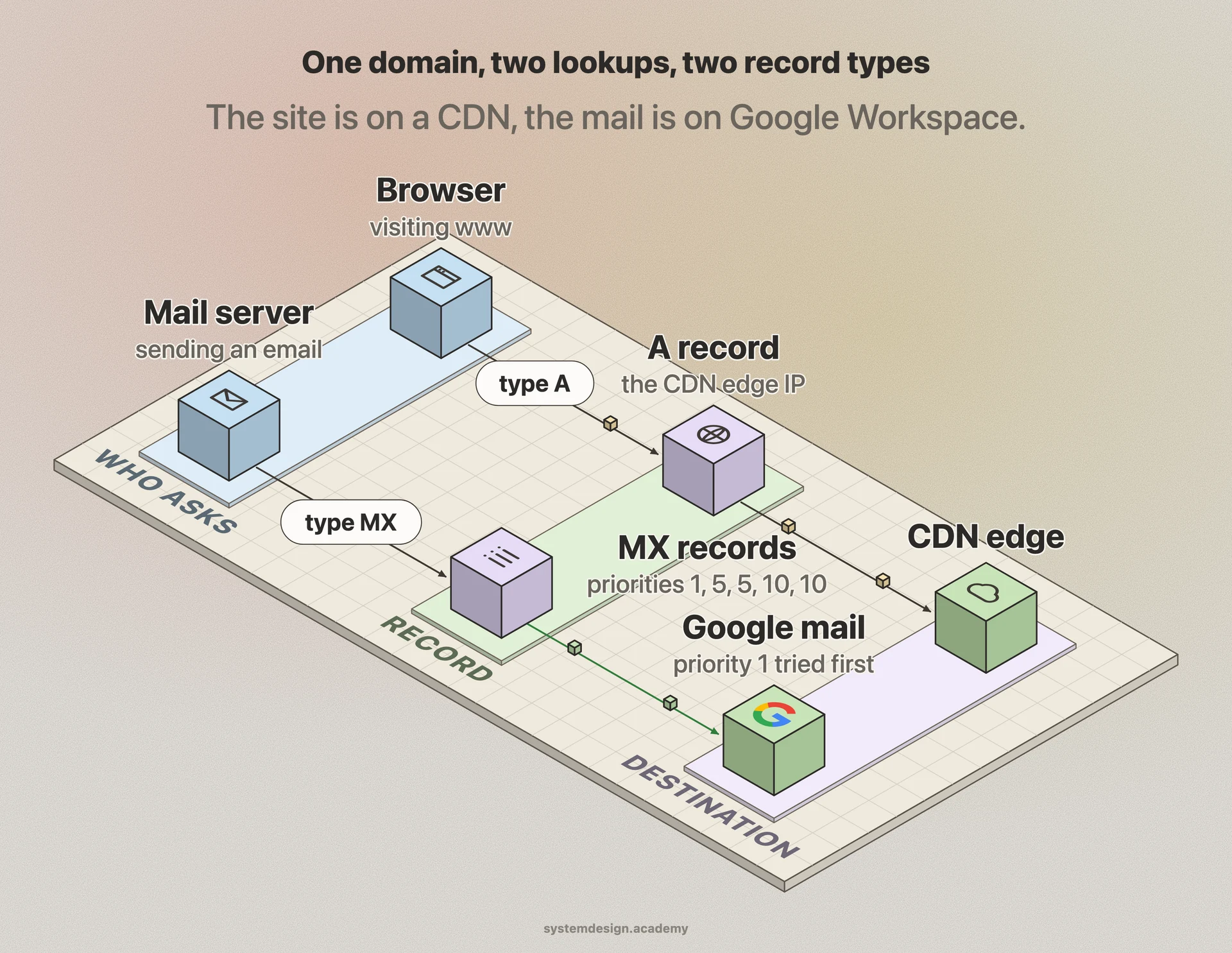
Take a small company running its site on a CDN and its mail through Google Workspace. The zone holds an A record for www pointing at the CDN edge IP, an ALIAS at the apex pointing to the same CDN, five MX records pointing at Google's mail servers like aspmx.l.google.com with priorities 1, 5, 5, 10, and 10, a TXT record with an SPF policy that authorizes Google to send, another TXT for DKIM, a TXT for DMARC, and a one-off TXT string Google asked them to add to verify ownership.
When someone visits the site, resolvers fetch the A or ALIAS record and reach the CDN. When someone emails them, the sender's mail server looks up the MX records, picks the lowest priority, and delivers there while the receiving side checks SPF and DKIM TXT records to decide if the message is legitimate. None of these interfere because each lookup specifies its type. That separation by type is the whole point of the system.
Where it is used in production
Cloudflare
Hosts authoritative DNS for millions of zones and offers CNAME flattening so customers can effectively put an alias on the apex domain.
AWS Route 53
Provides standard record types plus ALIAS records that point apex domains at ELB, CloudFront, and S3 without a fixed IP.
Google Workspace
Relies on MX records for mail delivery and TXT records for SPF, DKIM, DMARC, and domain ownership verification.
Let's Encrypt
Uses CAA records to check which certificate authorities are allowed and DNS-01 TXT challenges to prove domain control before issuing a certificate.
Frequently asked questions
- What is the difference between an A record and a CNAME?
- An A record maps a name directly to an IPv4 address. A CNAME maps a name to another name, and the resolver then looks up the A or AAAA records of that target. Use an A record when you have a fixed IP, and a CNAME when you want to point at a hostname that may change behind the scenes, like a CDN or platform endpoint.
- Why can't I put a CNAME on my root domain?
- The DNS spec says a name with a CNAME cannot have any other records, but the root (apex) of a zone must carry SOA and NS records. Since those have to coexist, a CNAME there is illegal. Providers solve this with ALIAS, ANAME, or CNAME flattening, which resolve the target server-side and hand back a plain A record.
- What is a TTL and how should I set it?
- TTL is how many seconds resolvers may cache a record. Higher values like 3600 or 86400 reduce query load and improve speed but slow down changes. Lower values like 60 or 300 let you change records or fail over fast at the cost of more lookups. A good practice is to lower the TTL a day before a planned change, then raise it back afterward.
- What are MX record priorities?
- An MX record includes a number, and sending mail servers try the lowest number first. So a priority 10 server is tried before a priority 20 server. Equal numbers are treated as load-balanced. This lets you define a primary mail server and one or more backups in a single zone.
- Why do email setups use TXT records?
- TXT records store machine-readable text, which made them the standard home for email authentication. SPF lists which servers may send mail for your domain, DKIM publishes a public key used to verify message signatures, and DMARC tells receivers what to do with mail that fails those checks. Together they cut down on spoofing and improve deliverability.
Learn DNS Record Types hands-on
This page explains the idea. The full lesson lets you step through the ring as servers join and leave, read the implementation, and check yourself with a quiz. It is one of 760+ lessons in the System Design Masterclass, from your first API call to distributed consensus. Eleven Foundation lessons are free, no signup. Lifetime access is ₹499 in India or $7.99 worldwide, one payment, no subscription.
See also
Related glossary terms you might want to look up next.
DNS
The phonebook of the internet. Translates human-readable domain names (google.com) into IP addresses that computers understand.
CDN
A network of servers distributed globally that caches content close to users. Netflix uses CDNs to stream video from servers near you, not from one central location.
Load Balancer
Distributes incoming traffic across multiple servers so no single server gets overwhelmed. Like a traffic cop directing cars to different lanes.
Proxy
An intermediary server that sits between the client and the destination server. Forward proxies act on behalf of clients; reverse proxies act on behalf of servers.
Reverse Proxy
A server that sits in front of your backend servers and forwards client requests to them. Handles SSL termination, caching, and load balancing.
Forward Proxy
A proxy that sits in front of clients and forwards their requests to the internet. Used for anonymity, content filtering, and bypassing geo-restrictions.