IP
Internet Protocol: the addressing scheme that routes packets across the internet. Every device gets an IP address (IPv4 or IPv6) so packets know where to go.
What is IP?
In short
IP (Internet Protocol) is the addressing and routing system that delivers data across the internet by splitting it into packets and stamping each packet with a source and destination IP address, so routers along the way know where to forward it. Every device that talks to the internet has at least one IP address, written as an IPv4 number like 192.0.2.10 or an IPv6 number like 2001:db8::1.
What IP actually is
IP is one layer of the network stack. Its single job is addressing and forwarding: given a chunk of data, get it from one machine to another machine identified by an IP address, possibly across dozens of networks in between. It does not promise the data arrives, arrives in order, or arrives only once. That reliability work is left to TCP, which runs on top of IP.
An IP address identifies an interface on a network, not a person and not even strictly a device. Your laptop on WiFi has one address; plug in ethernet and that interface gets another. There are two versions in use. IPv4 uses 32 bits, written as four numbers 0 to 255 separated by dots, which gives about 4.3 billion addresses. That ran out, so IPv6 uses 128 bits, written as eight groups of hex, which gives a number so large it is effectively unlimited.
Addresses are split into a network part and a host part. A subnet mask or CIDR suffix like /24 says how many leading bits are the network. So 192.0.2.0/24 means the first 24 bits identify the network and the last 8 bits (256 values) identify hosts inside it. Routers care almost entirely about the network part.
How a packet gets across the internet
When your machine sends data, IP wraps it in a packet with a header. The header carries the source address, the destination address, a TTL (time to live) counter, and a few other fields. The data is the payload. If the payload is too big for a link, IP can fragment it into smaller packets, though modern stacks try to avoid that by discovering the largest size a path allows.
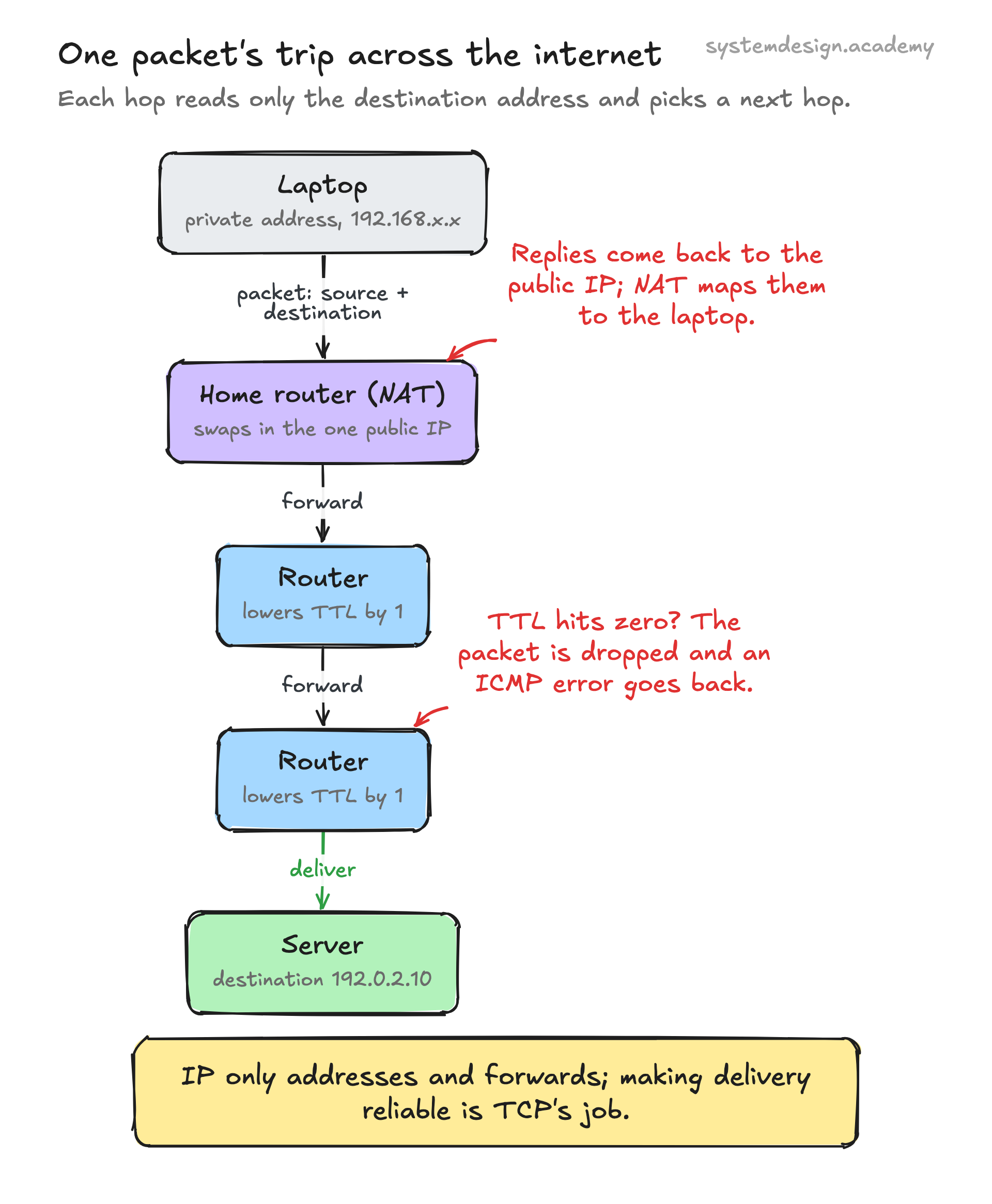
The packet hops from router to router. Each router looks only at the destination address, consults its routing table, picks the best next hop, and forwards the packet. It does not know or care about the full path. Every hop decrements the TTL by one; when TTL hits zero the packet is dropped and an ICMP error is sent back. That is exactly the mechanism traceroute exploits to map a route, and it stops packets from looping forever.
Routing tables get filled in by protocols. Inside one company or data center, OSPF or IS-IS spread route information. Between the large networks that make up the internet, BGP (Border Gateway Protocol) advertises which address ranges each network can reach. A BGP misconfiguration is how, in 2008, Pakistan Telecom accidentally took YouTube offline worldwide for a couple of hours by announcing it owned YouTube's address block.
Public, private, and NAT
Because IPv4 addresses are scarce, most devices use private addresses (ranges like 10.0.0.0/8 and 192.168.0.0/16) that are not routable on the public internet. Your home router has one public IP from your ISP and hands out private addresses to every device behind it.
Network Address Translation (NAT) rewrites the source address and port on outgoing packets so they appear to come from the single public IP, then reverses the mapping for replies. This is why dozens of devices in a house, or thousands of containers in a cluster, can share a handful of public addresses. It also means an inbound connection cannot reach a device behind NAT unless you set up port forwarding.
The trade-off is real. NAT broke the original end-to-end design of the internet and complicates anything peer to peer, like video calls or game hosting, which is why STUN and TURN servers exist. IPv6 was meant to make NAT unnecessary by giving everything a real address, and adoption is now past 40 percent of Google's traffic, but IPv4 plus NAT is not going away soon.
When you reach for IP details and what to watch
As an application developer you rarely write raw IP code, but you constantly make decisions that depend on it. Choosing a subnet size for a VPC, deciding whether a service is reachable, debugging why two pods cannot talk, reading a firewall rule, or geo-routing users to the nearest region all come down to IP addressing.
A few sharp edges bite people repeatedly. IP addresses are not stable identity, so do not use a client IP for authentication or rate limiting without thought, because NAT means many users can share one and mobile users change IPs constantly. Addresses can be spoofed, since nothing in IP itself verifies the source field, which is the basis of reflection DDoS attacks. And in cloud setups the address you see may be a private one behind a load balancer, so the real client IP arrives in an X-Forwarded-For header instead.
If you are designing systems, plan address space before you need it. Kubernetes clusters routinely exhaust their pod CIDR because someone picked a /24 and then scaled past 254 pods. Pick ranges with room to grow and avoid overlap between VPCs you may one day peer.
Where it is used in production
Cloudflare
Runs anycast: the same IP address is announced from data centers worldwide so users hit the nearest one, which is how 1.1.1.1 resolves fast globally.
Amazon Web Services
VPC networking is pure IP design: you carve a CIDR block, assign private addresses to instances, and attach public IPs or NAT gateways for internet access.
Kubernetes
Gives every pod its own routable IP inside the cluster network, and the CNI plugin manages the address ranges and routing between nodes.
Reports IPv6 adoption stats and serves a large share of its traffic over IPv6, pushing the industry off scarce IPv4.
Frequently asked questions
- What is the difference between IPv4 and IPv6?
- IPv4 uses 32-bit addresses (like 192.0.2.10) giving about 4.3 billion of them, which the internet outgrew. IPv6 uses 128-bit addresses (like 2001:db8::1) giving a practically unlimited supply, plus a simpler header and no need for NAT. They are not directly compatible, so devices often run both during the transition.
- Is IP the same as TCP?
- No. IP handles addressing and forwarding packets but makes no guarantee they arrive or arrive in order. TCP runs on top of IP and adds reliability: ordering, retransmission of lost packets, and flow control. UDP also runs on IP but skips those guarantees for speed. People say TCP/IP because the two are almost always used together.
- What is the difference between a public and a private IP address?
- A public IP is reachable from anywhere on the internet and is globally unique. A private IP (ranges like 10.x.x.x or 192.168.x.x) is only valid inside a local network and is reused everywhere. Devices with private IPs reach the internet through NAT, which translates their address to the network's shared public IP.
- Can I trust a client's IP address for security or rate limiting?
- Only with caution. Many users share one public IP behind NAT, mobile users change IPs often, and the source field can be spoofed since IP does not verify it. Behind a load balancer or proxy the address you see is the proxy's, and the real client IP arrives in the X-Forwarded-For header. Use IP as one weak signal, never as identity.
- How does a packet know which route to take?
- It does not know the full route. Each router looks only at the destination IP, checks its routing table, and forwards to the best next hop. Routing tables are built by protocols like OSPF inside a network and BGP between networks. A TTL counter in the packet is decremented at each hop and the packet is dropped at zero to prevent loops.
Learn IP hands-on
This page explains the idea. The full lesson lets you step through the ring as servers join and leave, read the implementation, and check yourself with a quiz. It is one of 760+ lessons in the System Design Masterclass, from your first API call to distributed consensus. Eleven Foundation lessons are free, no signup. Lifetime access is ₹499 in India or $7.99 worldwide, one payment, no subscription.
Related lessons
Lessons that touch on IP as part of a larger topic.
Static IP
A permanent address for your server that never changes, the foundation of reliable networking
intermediate · cloud infrastructure
Dynamic IP
Automatically assigned addresses that change, how most devices get online
intermediate · cloud infrastructure
Gossip Protocol
How nodes spread information like rumors, epidemic algorithms for membership, failure detection, and data dissemination
advanced · distributed systems core
ETL Pipeline
Orchestrating multi-step data transformations. Airflow, dbt, and pipeline design patterns
advanced · stream batch processing
HTTP/2 Multiplexing
Multiple requests over one connection, how HTTP/2 eliminated head-of-line blocking at the application layer
intermediate · api design protocols
See also
Related glossary terms you might want to look up next.
TCP
A reliable transport protocol that guarantees data arrives in order and without errors. It uses a three-way handshake to establish connections.
UDP
User Datagram Protocol: a connectionless transport protocol that trades reliability for speed. No handshake, no ordering, no retransmission. Used for video streaming and gaming.
DNS
The phonebook of the internet. Translates human-readable domain names (google.com) into IP addresses that computers understand.
Latency
The time delay between sending a request and getting a response. Amazon found every 100ms of extra latency costs 1% in sales.
Throughput
The number of operations a system can handle per unit of time. Think of it as how many cars a highway can move per hour.
Bandwidth
The maximum amount of data that can be transferred over a network in a given time. It's the width of the pipe, not how fast the water flows.