JSON
JavaScript Object Notation: a lightweight text format for data interchange using key-value pairs and arrays. The lingua franca of web APIs.
What is JSON?
In short
JSON (JavaScript Object Notation) is a lightweight, text-based format for representing structured data using key-value pairs, arrays, strings, numbers, booleans, and null. It is the most common format for sending data between web servers and clients, and almost every programming language can read and write it.
What JSON actually is
JSON is a way to write down data as plain text so that one program can hand it to another. It came out of JavaScript in the early 2000s, but it stopped being a JavaScript thing a long time ago. Today a Python service, a Java service, and a Rust service can all exchange JSON without sharing a single line of code.
The format has exactly six data types: strings (text in double quotes), numbers, booleans (true or false), null, arrays (an ordered list in square brackets), and objects (an unordered set of key-value pairs in curly braces). Keys in an object are always strings. That is the entire specification. There are no dates, no comments, no integers separate from floats, and no trailing commas allowed.
A small example: {"id": 42, "name": "Ada", "active": true, "roles": ["admin", "editor"], "manager": null}. A beginner can read that at a glance, which is a large part of why JSON won over older formats like XML.
How it works under the hood
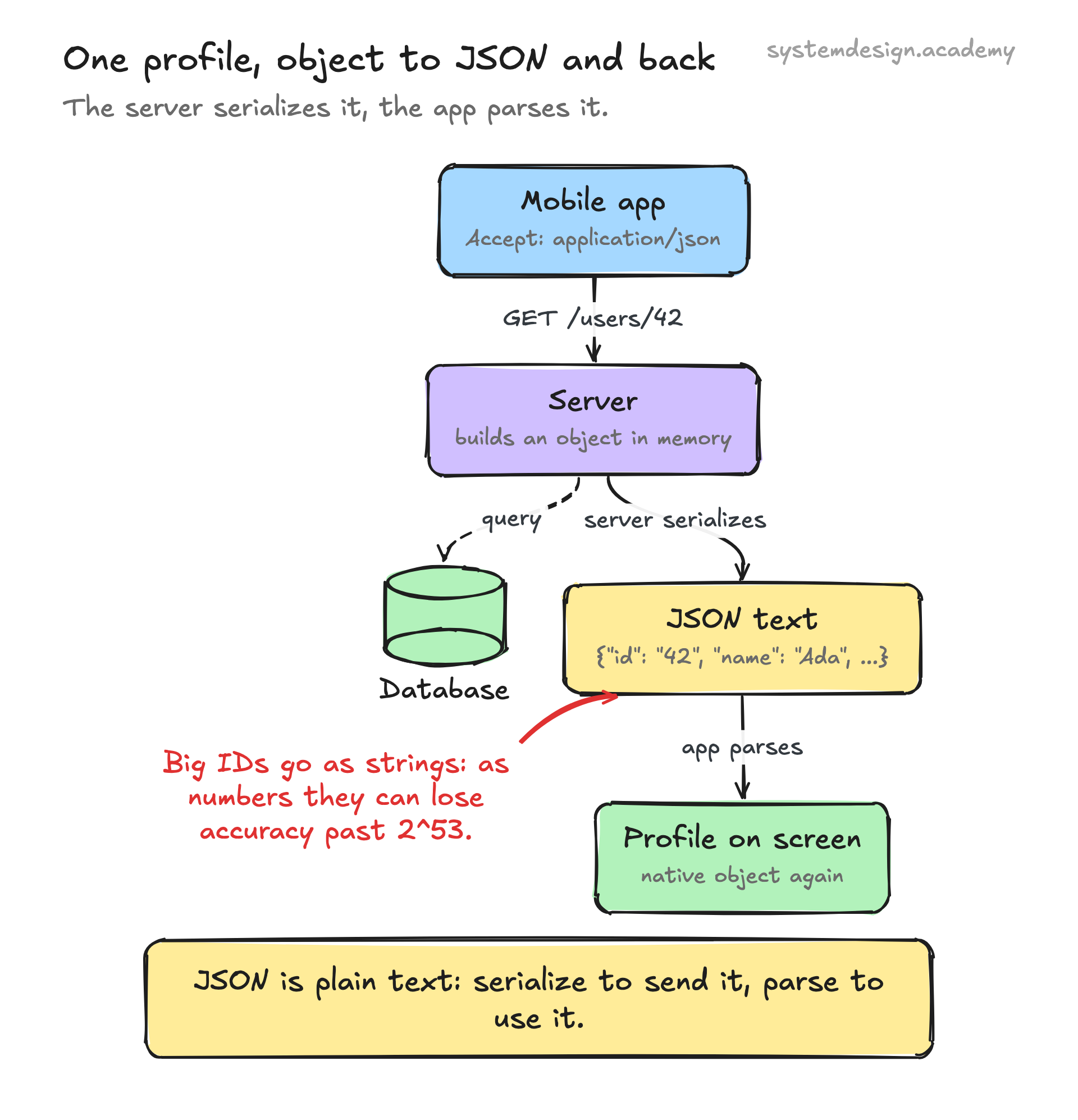
JSON is just a string of characters that follows a strict grammar. To use it, a program runs a parser that walks through the text character by character and turns it into native data structures, an object becomes a hash map or dictionary, an array becomes a list. Going the other way is called serialization: you take an in-memory object and write it out as a JSON string. In JavaScript these are JSON.parse and JSON.stringify; in Python they are json.loads and json.dumps.
Because JSON is text, it travels well. It goes inside HTTP request and response bodies, gets stored in log lines, and sits in database columns. The standard MIME type is application/json, and it is almost always sent as UTF-8.
The trade-off for being human-readable is size and speed. Numbers and keys are spelled out as text, so a JSON payload is larger than a tightly packed binary format, and parsing text is slower than reading fixed-width bytes. For most web traffic this does not matter once you turn on gzip or Brotli compression, which shrinks repetitive JSON dramatically.
When to use it and what to watch for
Reach for JSON when humans need to read the data, when you are building or calling a web API, or when you need something every language understands with zero setup. Config files, REST and GraphQL responses, webhook payloads, and document databases all lean on it.
Avoid it, or wrap it, when you need maximum throughput or strict typing. High-volume internal services often prefer Protocol Buffers or Avro, which are binary, smaller, and carry a schema. JSON itself has no schema, so a field can silently change type between requests unless you validate it with something like JSON Schema.
Two sharp edges bite people repeatedly. First, JSON has no native date type, so dates travel as strings, usually ISO 8601 like 2026-06-14T10:00:00Z, and both sides have to agree on the format. Second, JSON numbers have no defined precision, and JavaScript parses every number as a 64-bit float, so a large 64-bit integer ID can lose accuracy past 2^53. The common fix is to send big IDs as strings.
A concrete real-world example
Say a mobile app asks a server for a user profile. It sends an HTTP GET to /users/42 with the header Accept: application/json. The server queries its database, builds an object in memory, serializes it to a JSON string, and returns it with Content-Type: application/json.
The response body might be {"id": "42", "name": "Ada", "email": "ada@example.com", "createdAt": "2026-06-14T09:30:00Z"}. The app parses that string back into a native object and binds the fields to the screen.
This same pattern runs billions of times a day. The Stripe payments API, the GitHub API, and nearly every public API you can name speak JSON for both requests and responses, which is why learning to read and write it is one of the first practical skills in backend and frontend work.
Where it is used in production
REST and GraphQL APIs
Nearly all public web APIs (Stripe, GitHub, Twilio) send and receive JSON over HTTP as the default format.
MongoDB
Stores documents in BSON, a binary form of JSON, and exposes a JSON-style query and document model to developers.
PostgreSQL
Has native json and jsonb column types so you can store and index JSON documents inside a relational database.
Kubernetes
Accepts resource definitions in YAML or JSON and internally converts everything to JSON for its API server.
Frequently asked questions
- What is the difference between JSON and XML?
- Both carry structured data as text, but JSON is shorter, easier to read, and maps directly onto objects and arrays in code. XML is more verbose, supports attributes and namespaces, and was the dominant format before JSON took over web APIs around 2010.
- Is JSON only for JavaScript?
- No. It originated in JavaScript and uses JavaScript-like syntax, but every major language has a JSON parser. Python, Java, Go, Rust, and C# all read and write JSON natively, so it works as a neutral exchange format between completely different stacks.
- Can JSON store dates or comments?
- Not directly. JSON has no date type, so dates are sent as strings, usually in ISO 8601 format. It also forbids comments and trailing commas. Formats like JSON5 or JSONC add comments, but they are not standard JSON.
- Why do large IDs sometimes break in JSON?
- JSON does not define number precision, and JavaScript parses every number as a 64-bit float. Integers larger than 2^53 lose accuracy. The usual fix is to send big IDs, like 64-bit database keys, as strings instead of numbers.
- What is the difference between JSON and a JavaScript object?
- A JavaScript object lives in memory and can hold functions, undefined, and unquoted keys. JSON is a text string with strict rules: keys must be quoted, only six value types are allowed, and no functions. You convert between them with JSON.parse and JSON.stringify.
Learn JSON hands-on
This page explains the idea. The full lesson lets you step through the ring as servers join and leave, read the implementation, and check yourself with a quiz. It is one of 760+ lessons in the System Design Masterclass, from your first API call to distributed consensus. Eleven Foundation lessons are free, no signup. Lifetime access is ₹499 in India or $7.99 worldwide, one payment, no subscription.
Related lessons
Lessons that touch on JSON as part of a larger topic.
Document Stores
Databases that think in JSON, flexible schemas for modern applications
intermediate · database types storage
Structured Logging
Logs as data, not text, making every log line queryable and machine-parseable
intermediate · observability monitoring
JSON Schema
Data structure validation format for JSON documents
foundation · core fundamentals
MessagePack
JSON but binary, a compact serialization format that is schema-less and fast
intermediate · api design protocols
Schema Validation
Define the expected shape of your data with schemas, and reject anything that does not conform
intermediate · data governance compliance
See also
Related glossary terms you might want to look up next.
REST API
An architectural style for building APIs using standard HTTP methods (GET, POST, PUT, DELETE). Resources are identified by URLs.
XML
Extensible Markup Language: a verbose, tag-based format for structured data. Still used in enterprise systems, SOAP, and configuration files.
HTTP
The protocol powering the web. A request-response model where clients ask for resources and servers respond. Stateless by design.
Latency
The time delay between sending a request and getting a response. Amazon found every 100ms of extra latency costs 1% in sales.
Throughput
The number of operations a system can handle per unit of time. Think of it as how many cars a highway can move per hour.
Bandwidth
The maximum amount of data that can be transferred over a network in a given time. It's the width of the pipe, not how fast the water flows.