The Front Desk of a Big Office
Let me start with a big office building and its front desk.
Hundreds of people work in the building. Each one sits in a room on some floor. A visitor does not walk the corridors opening doors. She goes to the front desk and asks for a person by name. The desk looks the name up in its book, says which room, and checks whether she is allowed to go up.
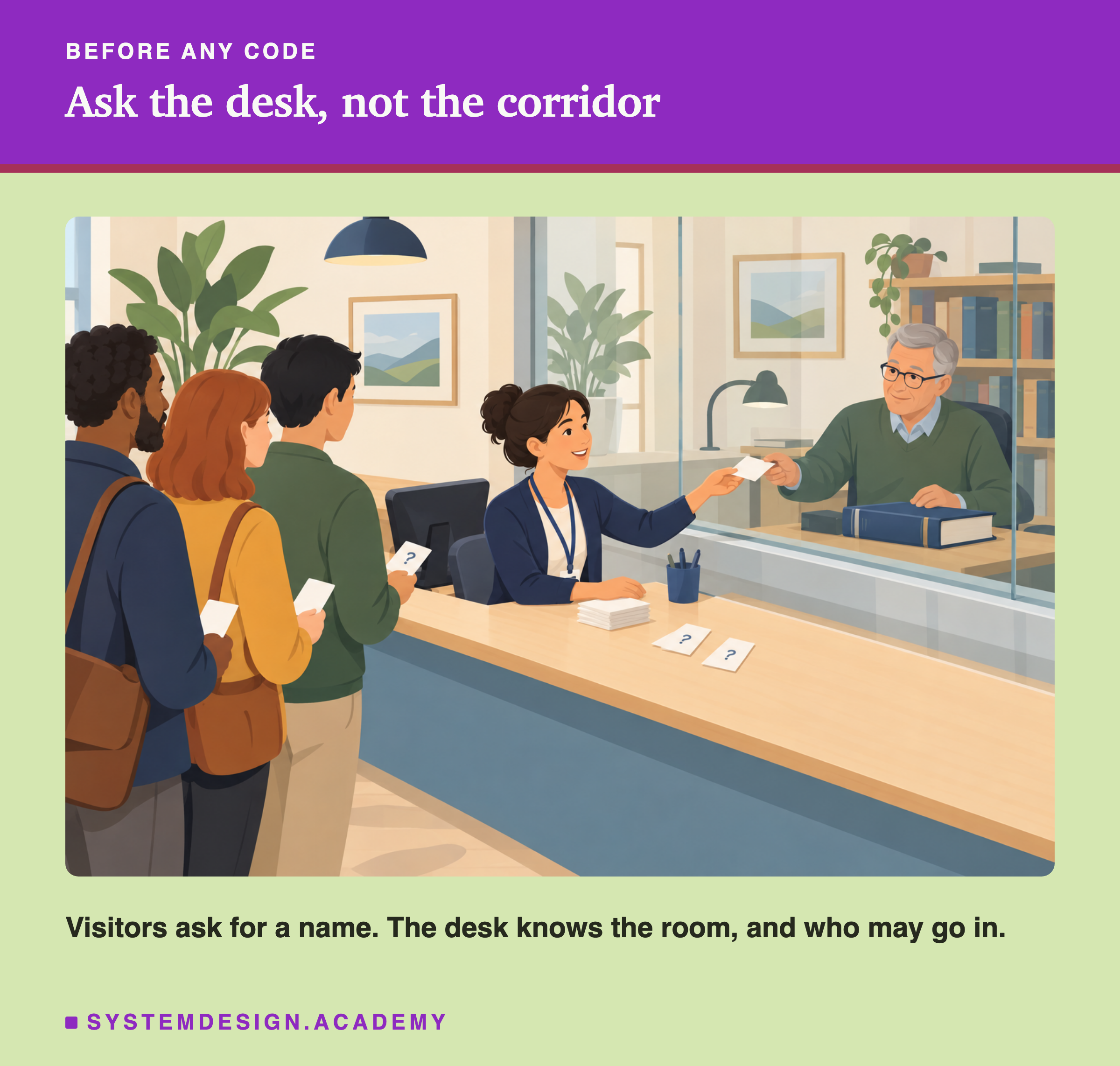
The desk gives the building three powers that its corridors do not have. When someone changes their name, the desk changes one line in its book, and nobody has to move rooms. When someone leaves, the desk crosses out the name, and the room can stay as it is until someone clears it. And the desk can say no to a visitor, even though the room itself has a door anyone could open.
In this lesson, each person is a table, and each room is a folder of data files. The front desk is a catalog. I will show you, with real numbers, what a catalog does that a folder cannot. I will also show three ways things go wrong when people skip the desk.
Where This Lesson Starts
This is lesson 4 of the data engineering chapter. Lesson 1, lakehouse architecture, showed why a table needs a list of its files, kept in a log. Lesson 2, open table formats, opened that metadata for Delta Lake, Apache Iceberg and Apache Hudi. It also met a catalog for the first time, as one row in a SQLite file that names an Iceberg table's newest metadata file. Lesson 3, ACID on a lakehouse, put two writers on one table.
In all three lessons, my code found each table by its folder path. Real teams do not work that way. They ask for a table by name, from many tools, with rules about who may see what. This lesson asks one question and measures it. What does a catalog like Unity Catalog do that a folder cannot?
The data catalog lesson covers the search side: finding data, owners and descriptions. This lesson is the engine side: names, commits, renames, drops and permissions, and what breaks without them.
So what exactly is a catalog, in the sense this lesson uses?
Two Words: Catalog and Namespace
Think of a small book with one line per table. Each line has the table's name and where its newest metadata lives, so a program can go from a name to the right files. A service that keeps that book is called a catalog, a lookup from table names to table locations. Some catalogs keep more on each line, such as who may read the table, and I will measure that later.
Names in a catalog come in levels, like folders inside folders. My table is called taxi.trips: the table trips inside the group taxi. A group that holds tables, so two teams can both have a table called trips, is called a namespace, a named group of tables. Unity Catalog uses three levels, catalog, schema and table, so its name for my table is nyc.taxi.trips. Here a schema is just the middle group, like a namespace, not the list of columns.
Here is how the front desk maps onto this. The desk's book is the catalog. A floor of the building is a namespace. A person's name is the table name. The room is the folder of files.
A folder has none of this. It has a path, and the path is both its name and its address. Change one and you change the other. So what did I actually run to test the difference?
The Test: Three Catalogs, Four Engines
I used the same real data as lessons 1 to 3: New York City yellow taxi trips from the city's Taxi and Limousine Commission. The table is January 2025, 3,475,226 trips. New rows come from February 2025, one day at a time: the 1st has 148,649 trips, the 2nd has 123,646, and the 14th has 158,575.
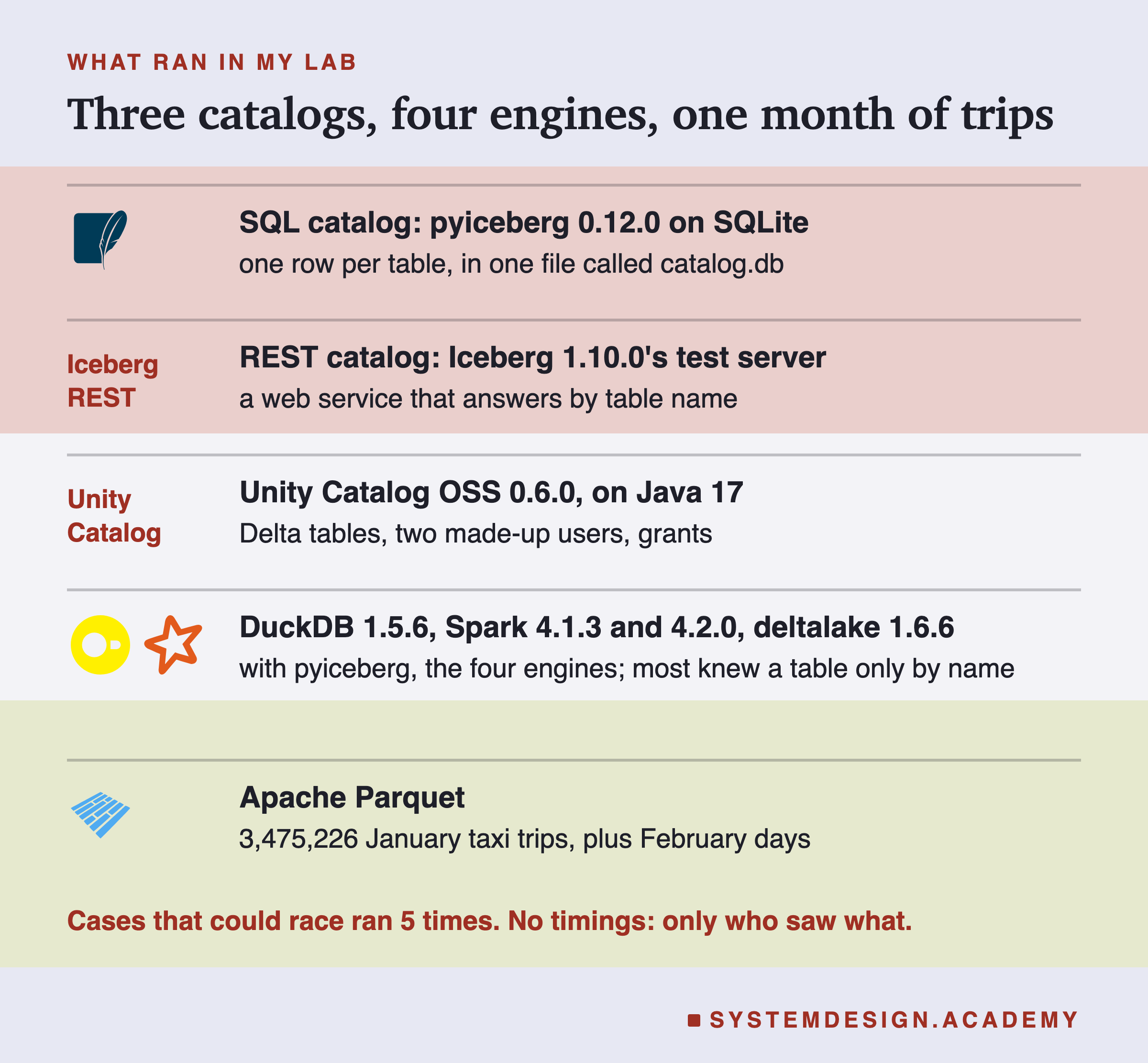
I ran three catalogs, each on my laptop. The first is the catalog from pyiceberg, the Python library for Apache Iceberg, which stores its book as a table in a SQLite file. The second is a REST catalog, a catalog you talk to over HTTP, like a website. I ran the small REST server from Apache Iceberg 1.10.0's test files, which keeps its own book in a SQLite file. It is meant for testing, not for production. The third is Unity Catalog OSS 0.6.0, the open-source Unity Catalog, its newest release when I ran the lab.
Each test has a short label, such as S4 for the fourth test on the SQL catalog. R is the REST catalog, U is Unity Catalog, and F is a plain folder with no catalog. Tests where timing could change the outcome ran 5 times. The others ran once, because nothing in them could race. I report no timings at all: the laptop was busy, with a load average near 12 when the lab started, which means about 12 programs were running or waiting for the processor.
Let me start with the smallest catalog. What does it actually store?
The Whole Catalog Entry Is One Row
I created the table taxi.trips in the catalog and appended January. Then I opened the SQLite file and read the catalog's own table, iceberg_tables.
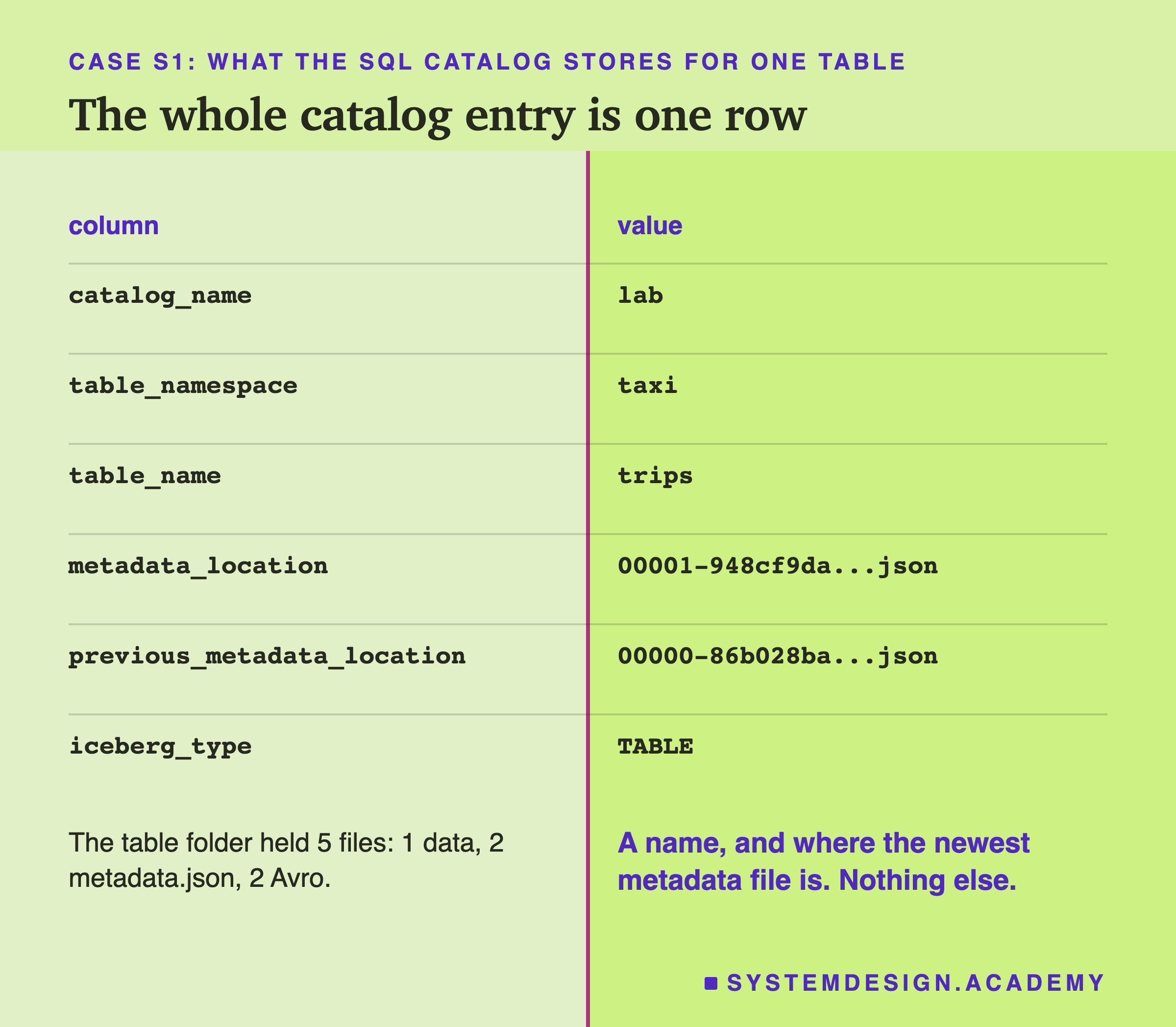
The whole entry for my table was one row with 6 columns. Three of them are the name: the catalog, the namespace and the table. One is metadata_location, the full path of the newest metadata.json file. Lesson 2 explained that file: it describes the whole table at one version. One more column keeps the previous path, and the last says it is a table.
That is all. The row holds no data, no list of files and no row count. The table folder held 5 files. There was 1 data file and 2 metadata.json files, one for the empty table and one after the append. There were also 2 small Avro files that list the data files. Avro is a compact binary file format.
So the catalog stores two things: a name, and one pointer to the newest version. The row is tiny. Why does such a small thing matter so much? Watch what happens to it when the table changes.
A Commit Is One UPDATE With a Condition
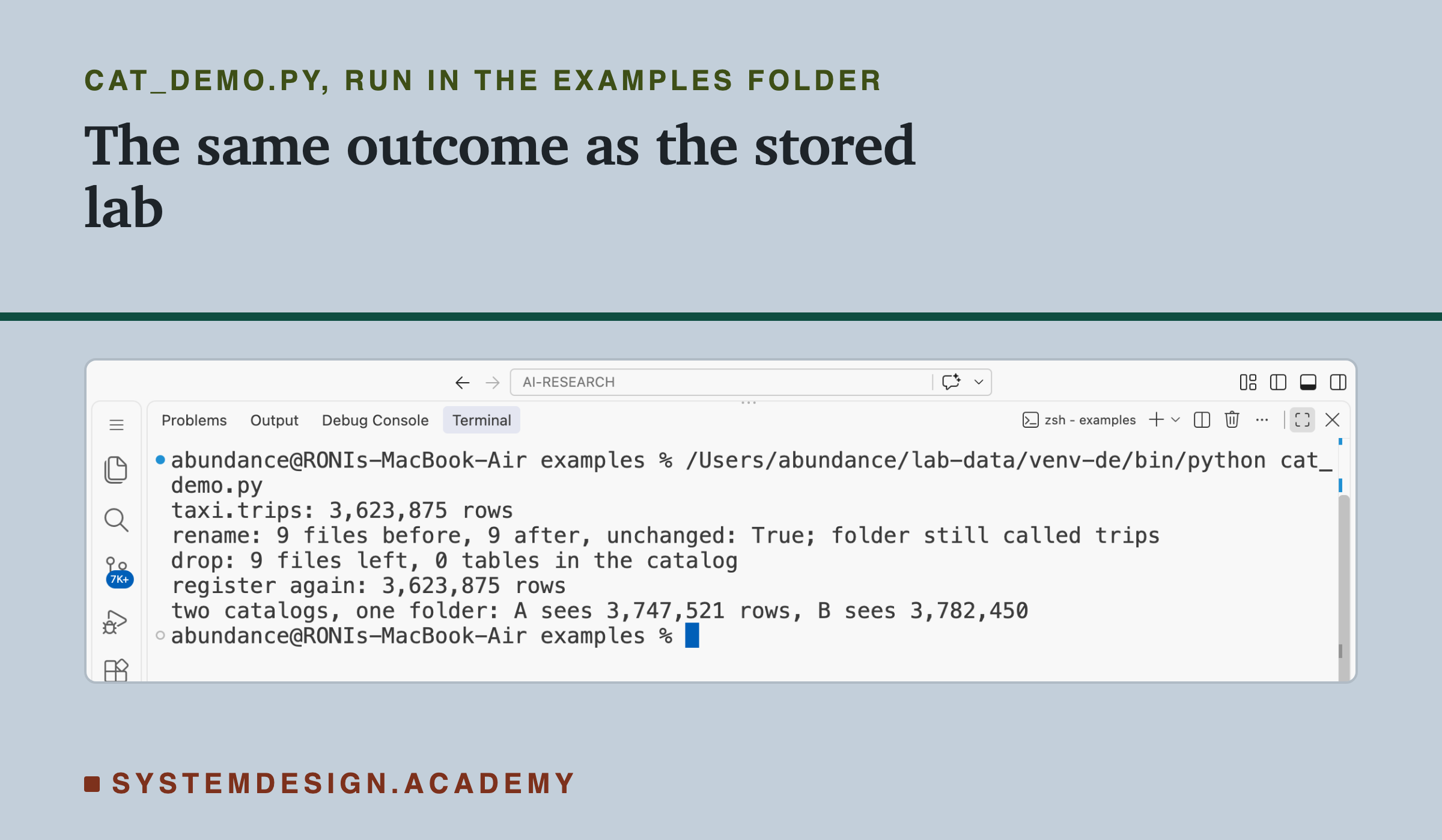
Next I appended 1 February, 148,649 trips. I recorded every statement pyiceberg sent to the SQLite file. To show it once on screen, I wrote a short script, cat_peek.py, that does the same steps and prints what happened. Here is that run, recorded in a real terminal.
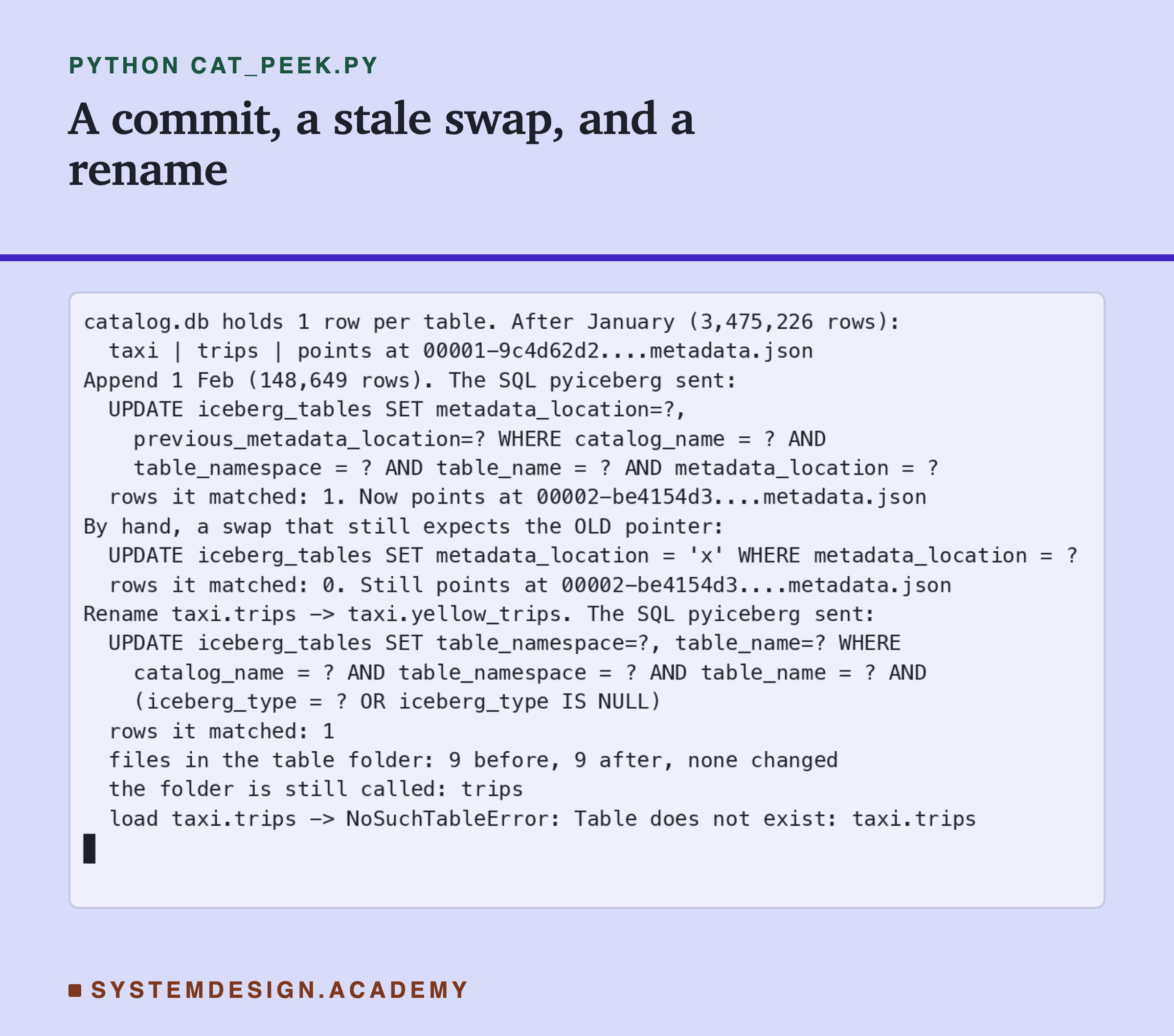
Look at the last part of the first UPDATE: AND metadata_location = ?. The library wrote the new metadata file first. Then it asked SQLite to change the pointer, but only if the pointer still held the old path it had read. The UPDATE matched 1 row, so the pointer moved to the new file, version 2.
A write that only happens if a value is still what you expect is called a check-and-put, compare first, then write in one step. The database runs the compare and the write together, so nothing can sneak in between them. pyiceberg's source code has exactly that condition, IcebergTables.metadata_location == current_table.metadata_location. If the UPDATE matches no row, the library raises an error that says "Table has been updated by another process".
After the append, the table held 3,475,226 + 148,649 = 3,623,875 trips.
So far: the catalog keeps one row per table, a name and a pointer, and a commit moves the pointer with a check-and-put. What happens if a second writer still holds the old pointer?
A Stale Swap Matches Nothing
To see the check work, I ran the swap by hand, with the old pointer as its condition, as a slow writer would. It matched 0 rows, and the pointer did not move.
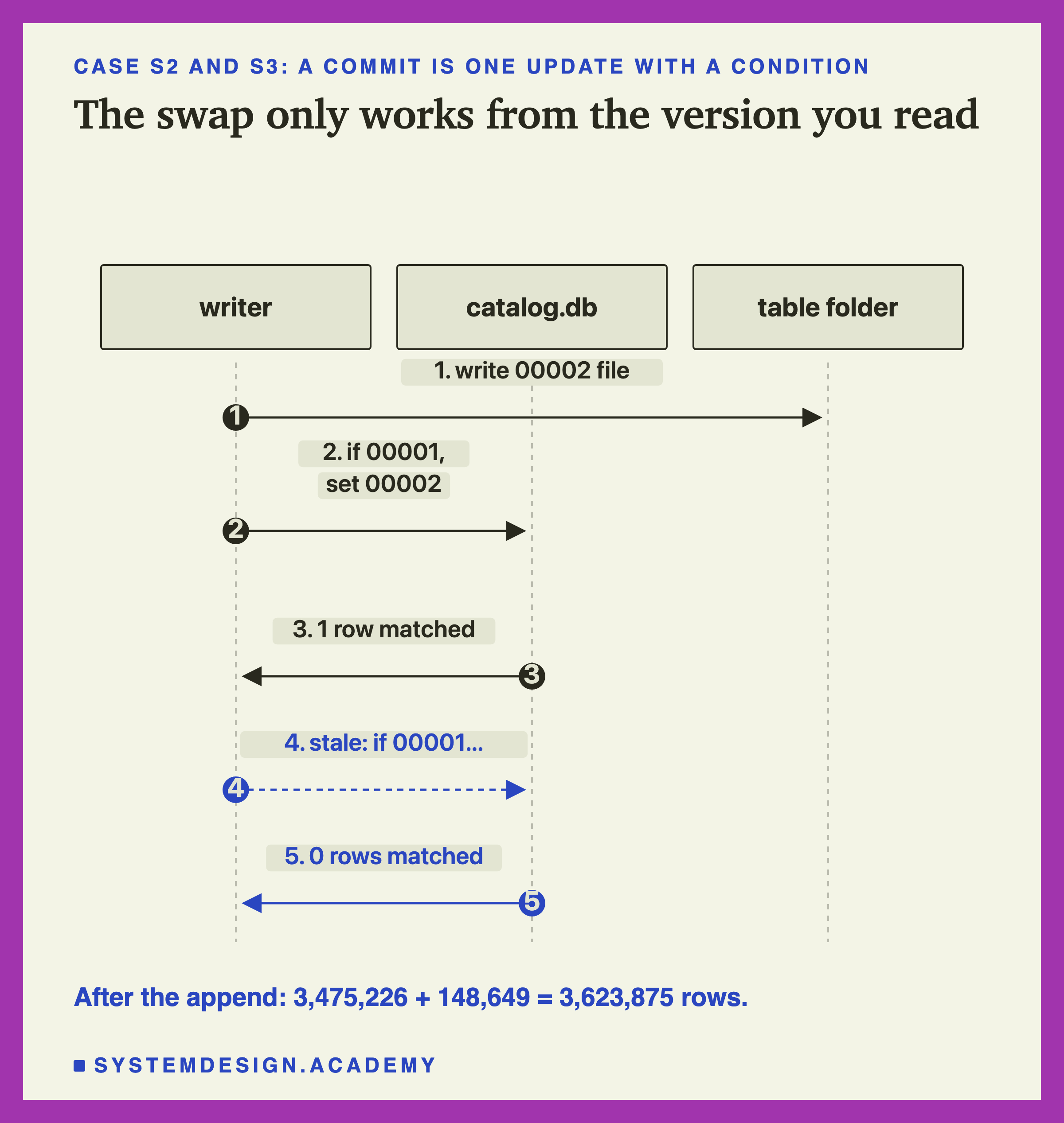
This is the rule lesson 3 showed for Delta, now living in a catalog. Delta's commit is "create log file number N only if it does not exist yet". Iceberg's commit is "move the pointer only if it still points where I read it". Both are one step that either happens completely or not at all.
The Iceberg spec says it directly. "The atomic swap needed to commit new versions of table metadata can be implemented by storing a pointer in a metastore or database that is updated with a check-and-put operation". A metastore is an older word for a catalog service. And: "The check-and-put validates that the version of the table that a write is based on is still current and then makes the new metadata from the write the current version."
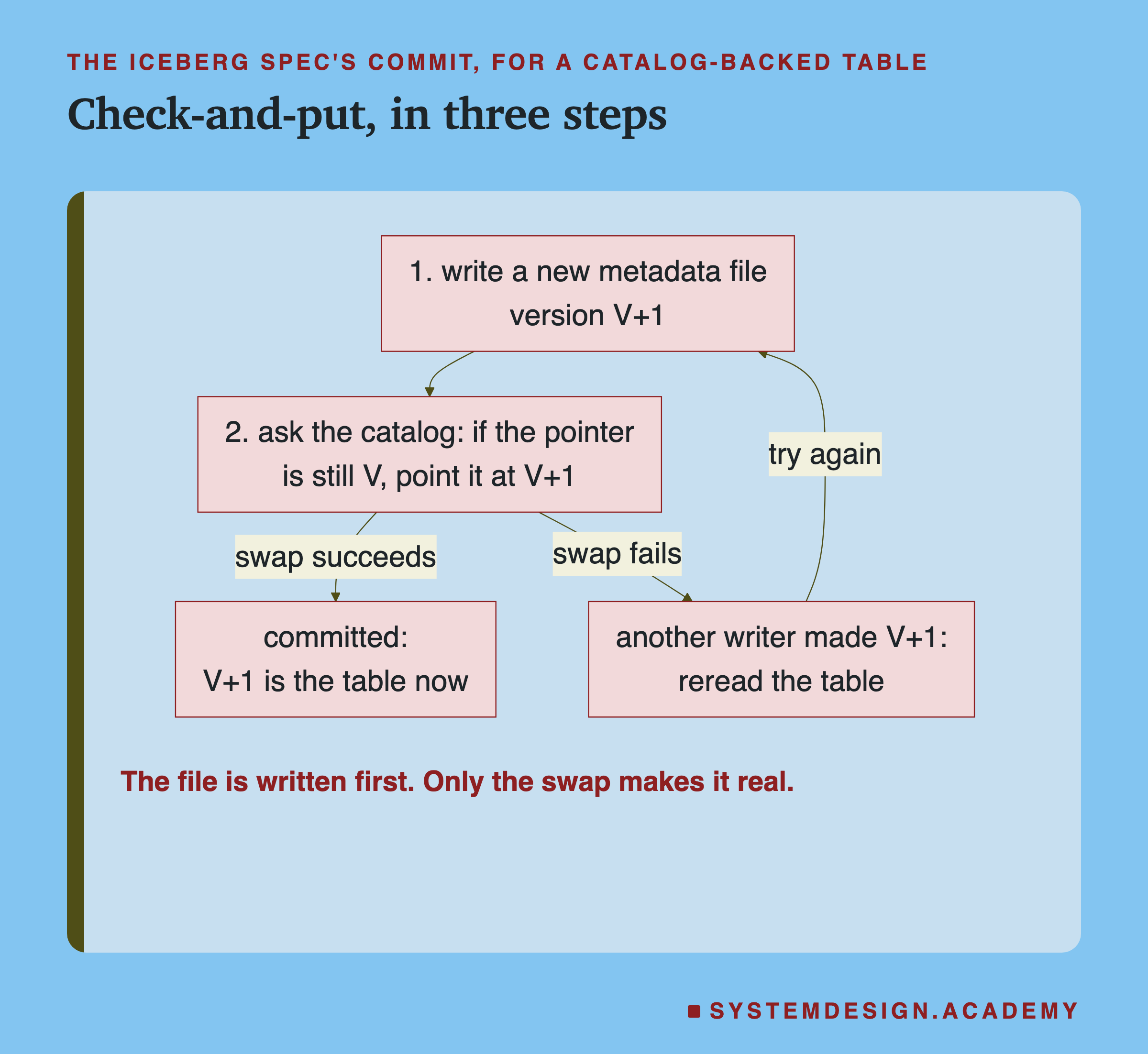
The order is the point. The new metadata file exists in the folder before the swap. Until the swap, it is just a file, and no reader should treat it as the table. But a reader with no catalog sees only files. What does such a reader see?
The Newest File Is Not the Table
So far: the catalog keeps one row per table, a name and a pointer. A commit writes a new metadata file, then moves the pointer with a check-and-put. A stale swap matches nothing.
A writer can stop at the worst moment, after it wrote its files and before its swap. Machines crash and jobs get killed. I made that happen on purpose. A writer appended 2 February, 123,646 trips, and its process exited the instant its new metadata.json file was written, before it could touch the catalog. I ran this 5 times, each on a fresh copy of the table.
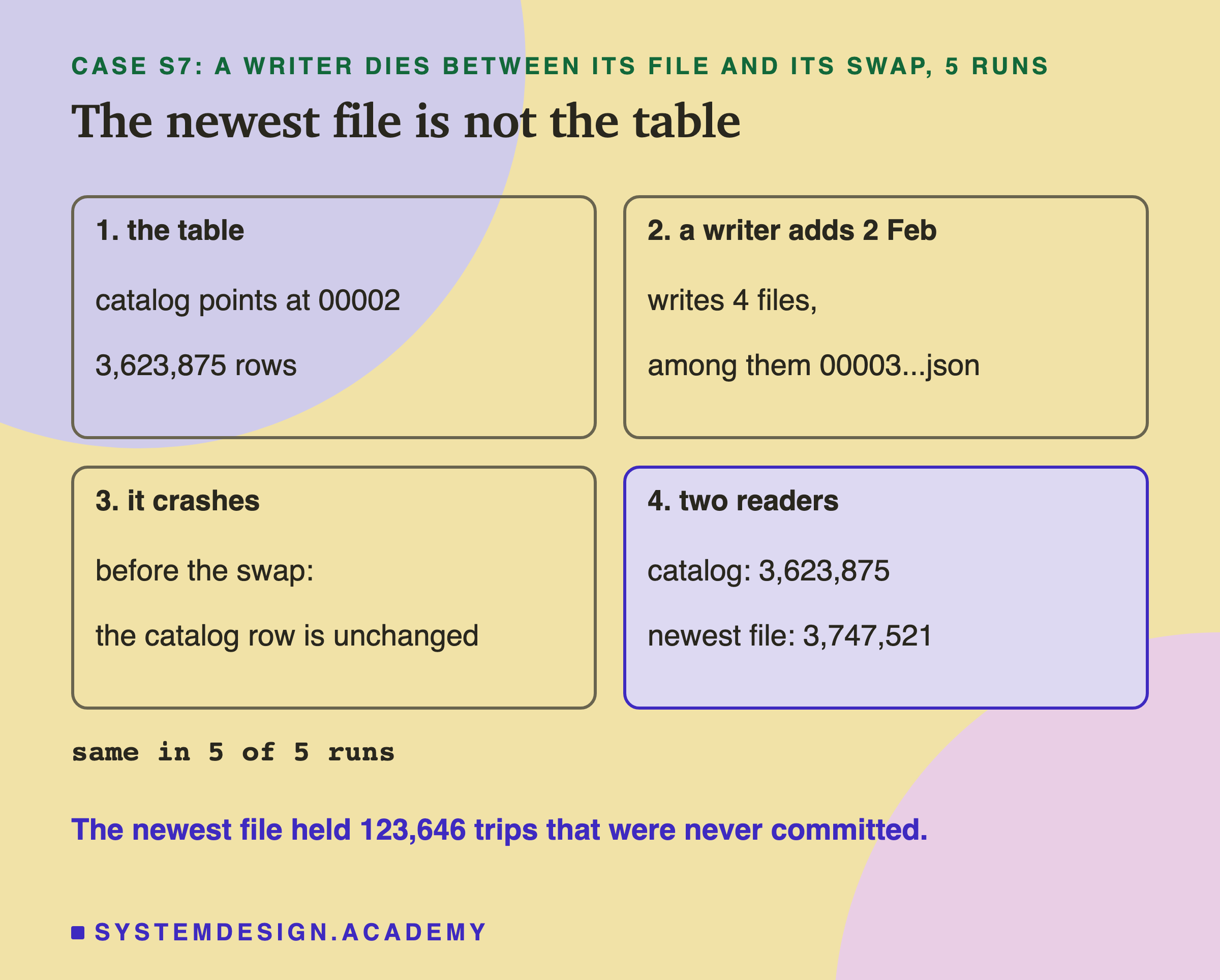
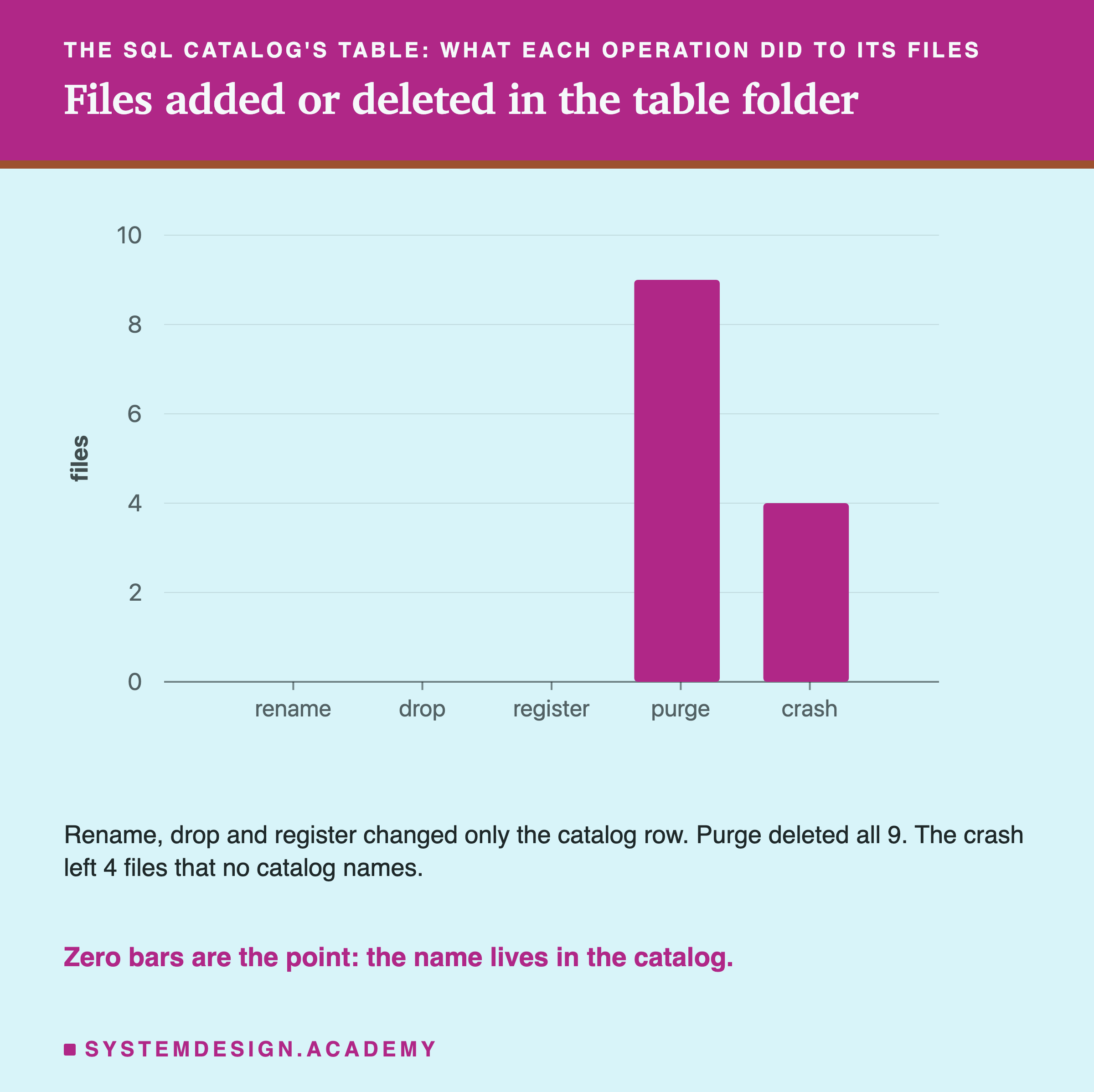
The crashed writer left 4 new files: 1 data file, 2 Avro files and 1 metadata.json with version number 3. The catalog still pointed at version 2. A reader that asked the catalog saw 3,623,875 trips, the true table.
Then I wrote a second reader with no catalog. It did what a person would do with only a folder: list the metadata files and open the one with the highest version number. It saw 3,623,875 + 123,646 = 3,747,521 trips. That is the same in all 5 runs. It read 123,646 trips from a commit that never happened.
The Iceberg spec has a section on tables kept with no catalog at all, which find their newest version by file names. Its note says: "This file system based scheme to commit a metadata file is deprecated and will be removed in version 4 of this spec. The scheme is unsafe in object stores and local file systems." So the newest file is not the table. What else can a catalog do that the folder cannot?
Rename: One Row Changes, No File Moves
Next I renamed taxi.trips to taxi.yellow_trips in the catalog. The terminal recording above shows the SQL it sent: one UPDATE that changed the namespace and table name in the row, and nothing else.
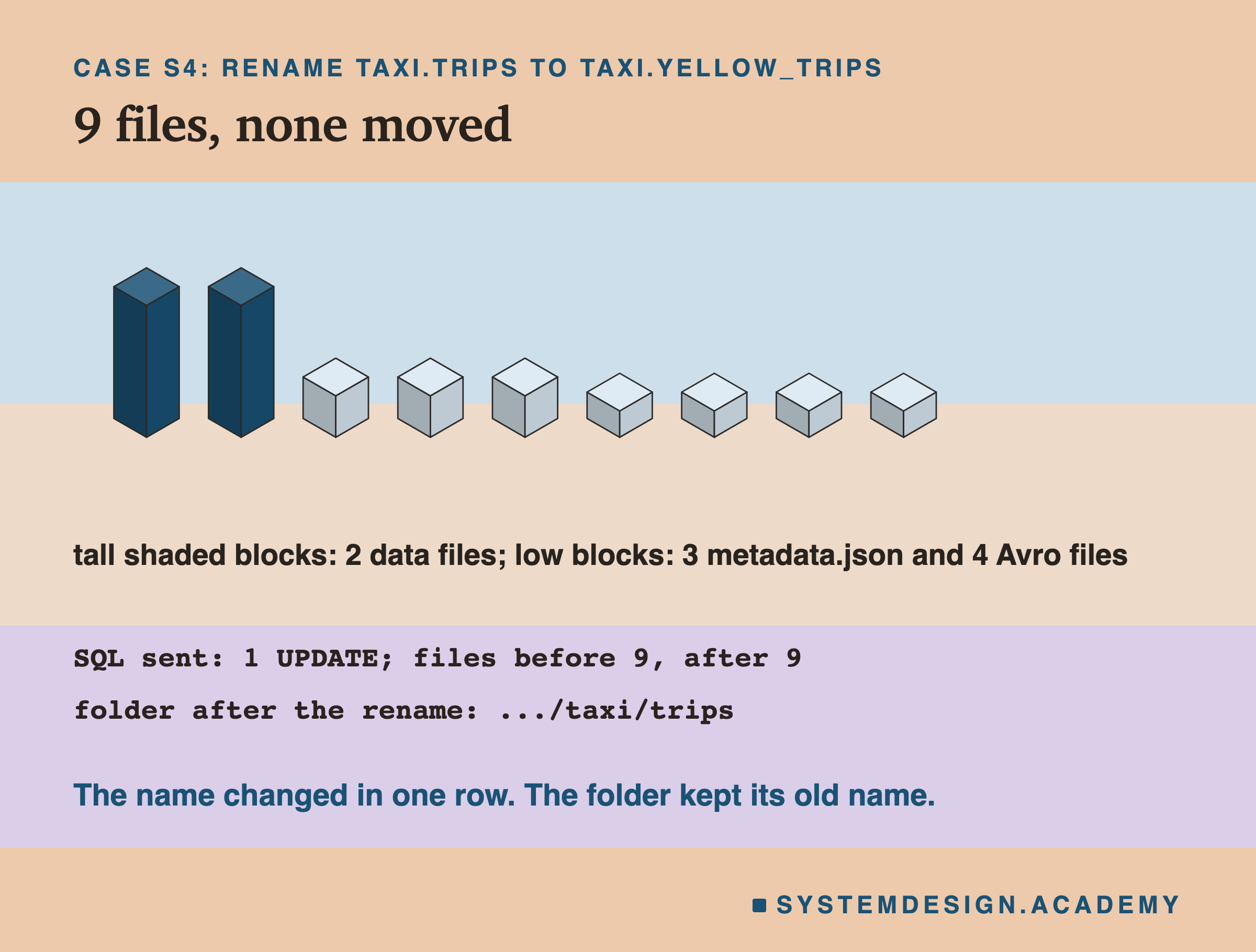
Before the rename, the table folder held 9 files: 2 data files, 3 metadata.json files and 4 Avro files. After it, the same 9 files had the same sizes and the same modification times, down to the nanosecond. Not one byte moved.
The folder is still called trips. The catalog says the table is yellow_trips, and it is right, because the name lives in the catalog, not on the disk. Loading the old name gave NoSuchTableError: Table does not exist: taxi.trips.
This is the first thing a folder cannot do. In a folder, the name is the path. To rename a table you must rename the folder, and on cloud storage that is far from free.
Amazon's S3 documentation says: "Amazon S3 general purpose buckets have a flat structure instead of a hierarchy like you would see in a file system." And about folders: "Folders can be created, deleted, and made public, but they can't be renamed." S3 does have a rename call, but only for "a directory bucket that uses the S3 Express One Zone storage class". So what happens to someone who is reading the table at the moment its name changes?
A Reader in Flight, During a Rename
I started a reader in a separate process. It loaded the table, read the first batch of rows, and then paused. While it paused, the catalog renamed the table. Then the reader carried on. I ran this 5 times.
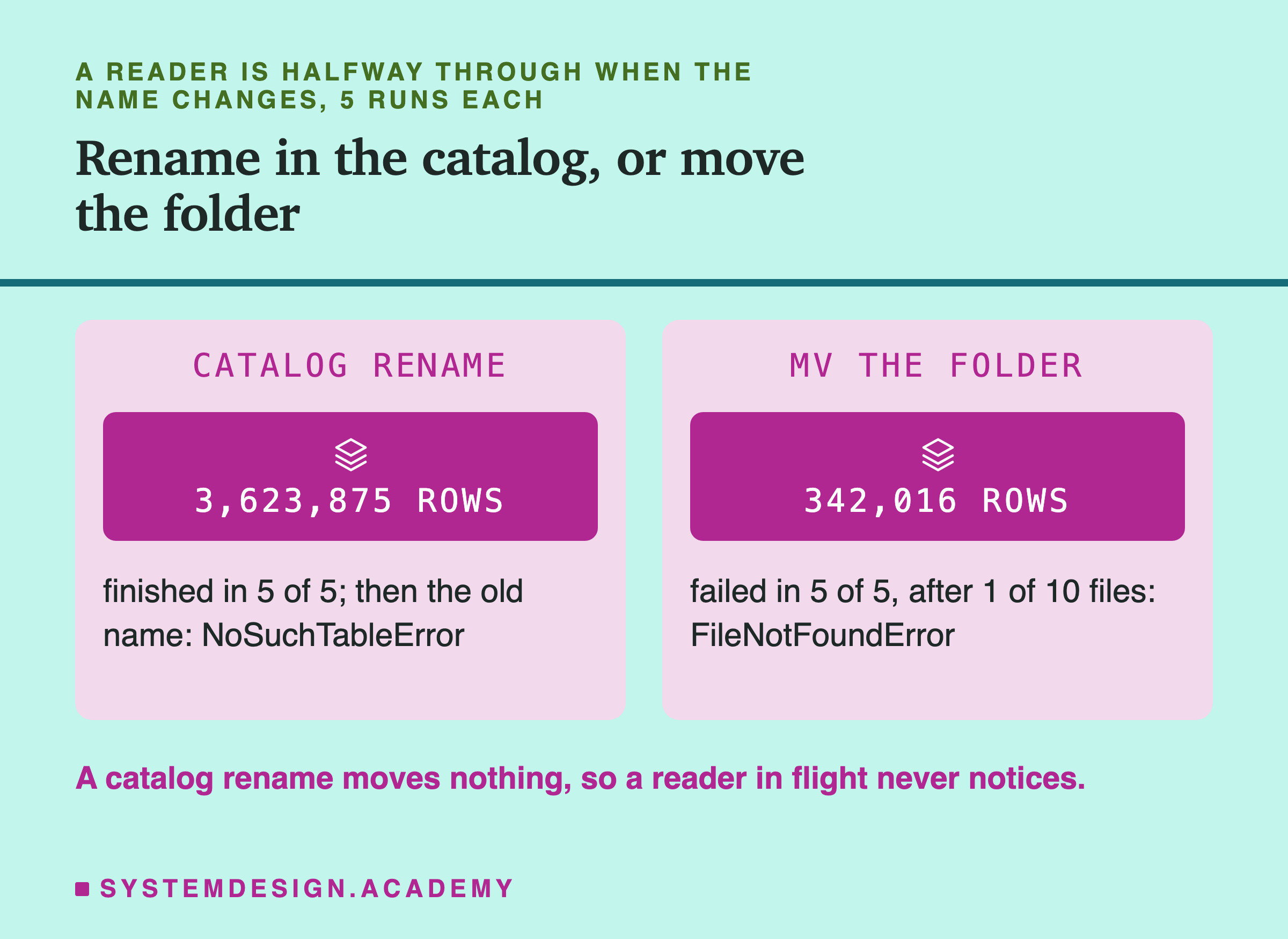
The reader finished every time with all 3,623,875 trips. It had already loaded the table's metadata, which names its files by full path, and none of those files moved. Once it finished, a new load by the old name failed, and a load by the new name found 3,623,875 trips.
Then I tried the same thing with no catalog, test F1. I wrote January as a Delta table with 10 data files. A reader got the list of files from the Delta log and read them one by one. After the first file, I renamed the folder with os.rename, which is what mv does on one disk. The reader failed on the second file with FileNotFoundError in all 5 runs, after only 342,016 trips.
This compares two ways to rename, not Delta against Iceberg. Renaming a name in a catalog moves nothing. Renaming a folder moves the ground under every reader. What if you move the folder on purpose, with nobody reading?
Moving a Folder: Full Paths Against Short Ones
In test F2, I moved each table's whole folder to a new place, with no reader running, and then tried to open it.
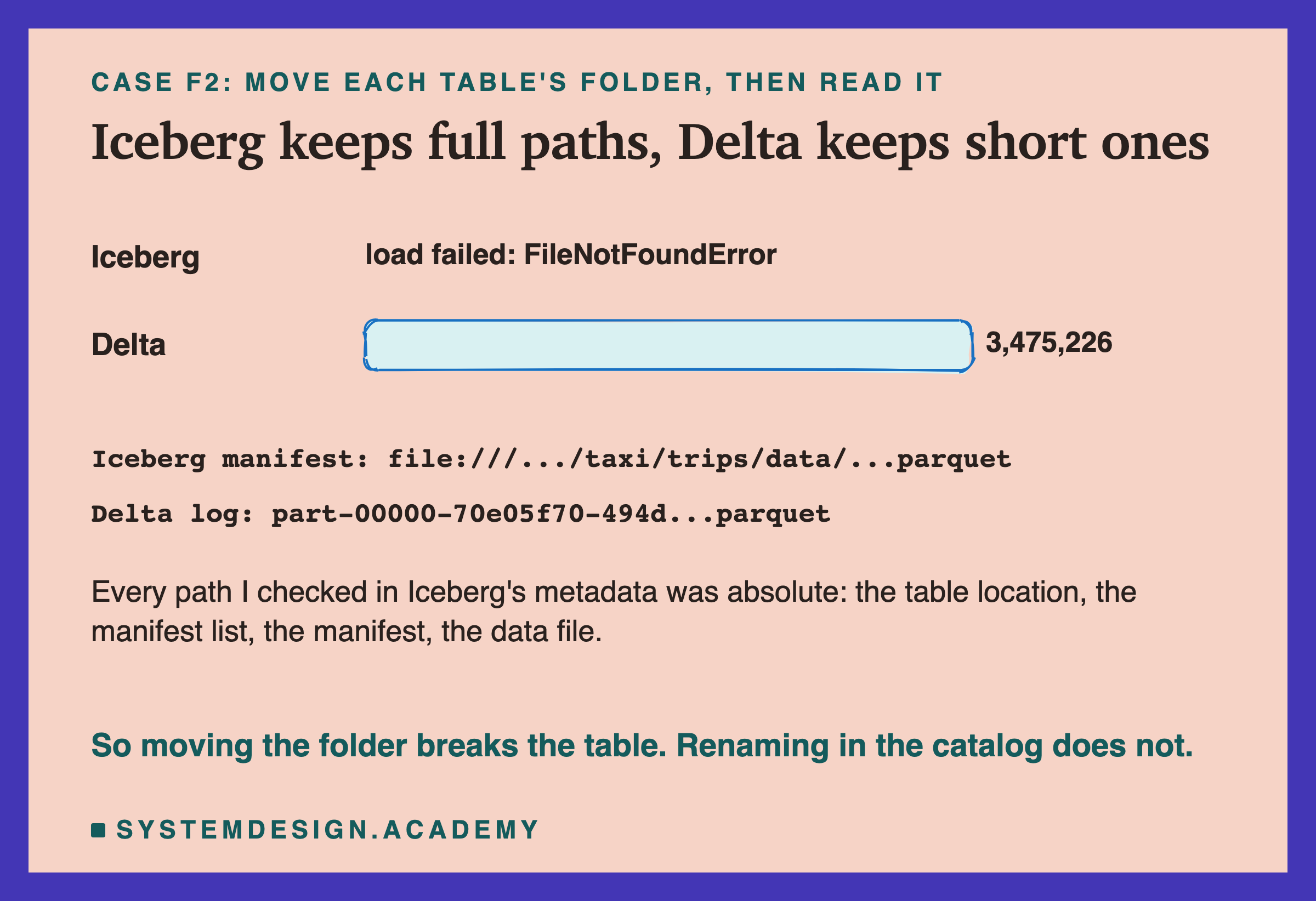
The Iceberg table broke. Through the catalog, the pointer still named the old path, so the load failed with FileNotFoundError. Even when I opened the moved metadata.json file directly, it failed, because inside it the next file was named by its old full path. A path that starts from the very top of the disk, like file:///Users/..., is called an absolute path. Every path I checked inside Iceberg's metadata was absolute: the table location, the manifest list, the manifest and the data file.
The Delta table opened fine after the move and counted 3,475,226 trips. Its log names each data file relative to the table folder, like part-00000-...parquet, so the folder can move as one piece.
That is a real difference between the formats, but it does not change the lesson. On cloud storage you would not move either folder, because a move is a copy of every file. You change the name in the catalog instead. Now, the opposite of creating a table: what does dropping one do?
Drop Is Not Delete
I dropped taxi.trips from the catalog with drop_table. It sent one write to catalog.db, a DELETE of the table's row. All 9 files stayed exactly as they were. Loading the name now failed with NoSuchTableError.
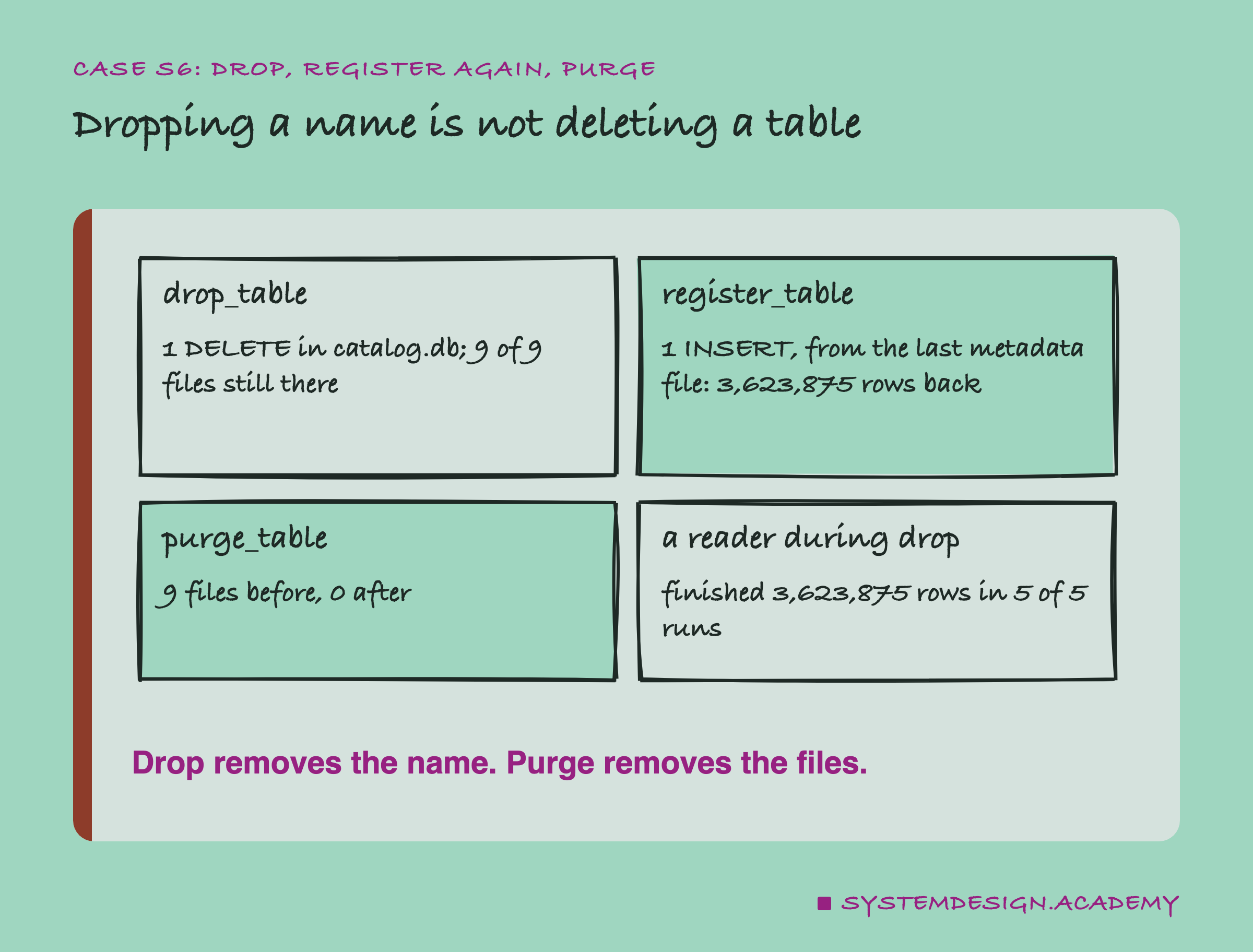
Because the files were all still there, I could bring the table back. pyiceberg's register_table takes a name and the path of a metadata.json file and inserts a new row. I gave it the last metadata file, and the table came back with all 3,623,875 trips. Registering is how you hand an existing folder of Iceberg files to a catalog.
Deleting the files too is a separate call. Removing a table and all its files is called a purge, a drop that deletes the data as well. pyiceberg's purge_table says it will "Drop a table and purge all data and metadata files." On a fresh copy of the same table, it took the folder from 9 files to 0.
I also dropped the table while a reader was halfway through. The reader finished all 3,623,875 trips in all 5 runs, for the same reason as the rename: its files were untouched.
The REST catalog spec makes the same split. Its drop call has a flag, described as "Whether the user requested to purge the underlying table's data and metadata", and it is false unless you ask.
Two Catalogs, One Folder, Two Answers
This is the failure I most wanted to measure. In test S8, catalog A created the table and appended January. Then a second SQLite catalog, B, registered the very same metadata.json file under the same name, taxi.trips. Both catalogs now pointed at the same folder and the same version.
Writer A appended 2 February through catalog A. Writer B appended 14 February through catalog B. I ran this 5 times, each on a fresh table.
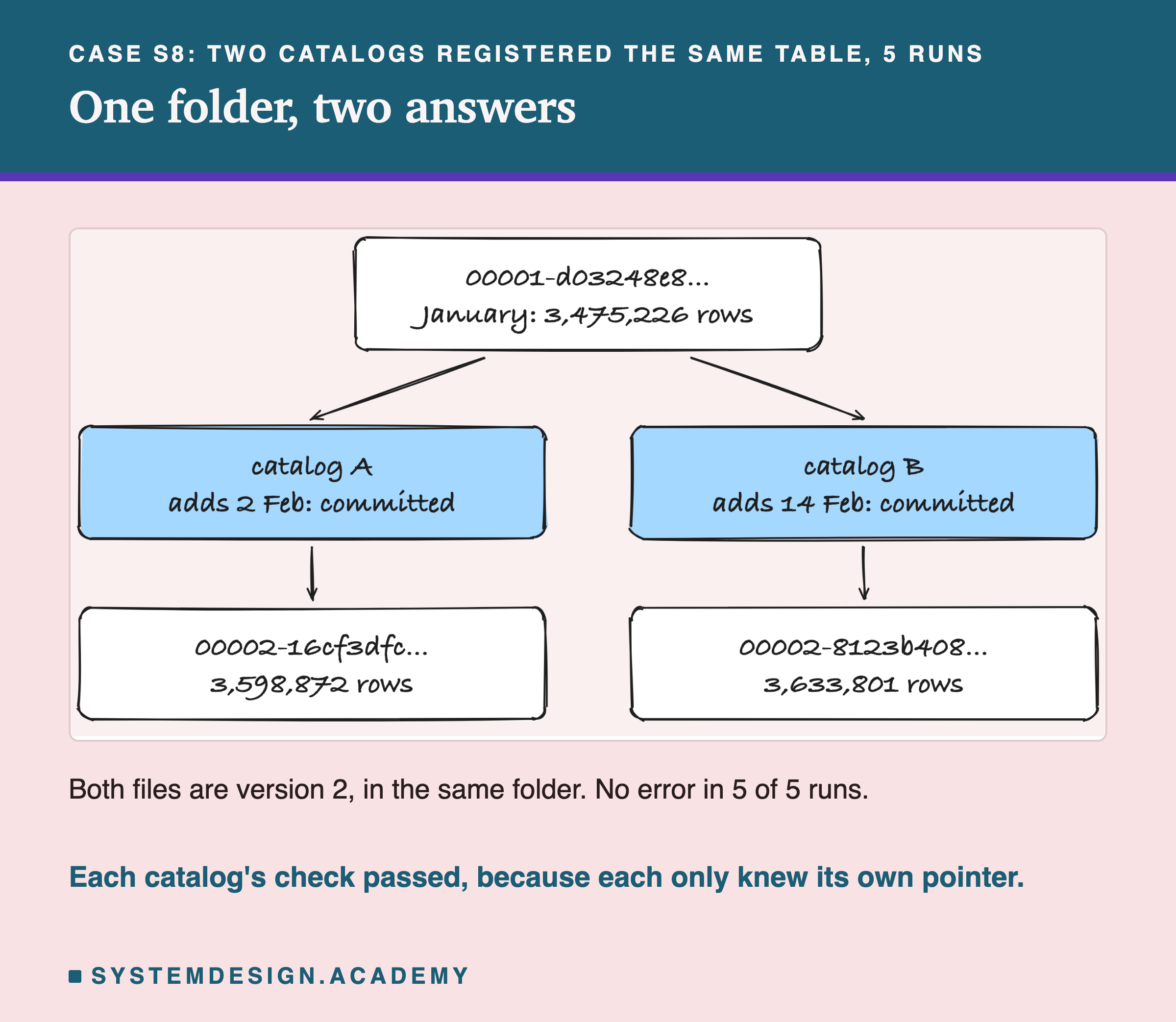
Both writes committed, in all 5 runs, with no error and no warning. Catalog A said the table held 3,475,226 + 123,646 = 3,598,872 trips. Catalog B said 3,475,226 + 158,575 = 3,633,801. The folder now held two different metadata.json files that both had version number 2.
Each check-and-put did its job. Writer B's swap asked catalog B "is the pointer still version 1?", and in catalog B it was. Catalog B had no way to know that catalog A had moved on. The check is only as good as the one place it runs. Two catalogs means two places, and the table has quietly split into two tables.
There is no single right answer to "how many trips are in the table" any more. A reader with no catalog, picking the newest file, got whichever version 2 file was written last. A table split like this is called a fork, two histories growing from one point. The rule I take from it: one table, one catalog, always.
One Catalog, Three Engines, One Answer
So far: a catalog keeps the name and the pointer. Rename and drop change only the catalog. A crash before the swap leaves a newest file that is not the table, and two catalogs on one folder split it in two. Now the good side: what a single shared catalog lets many tools do.
The REST catalog is the same idea as the catalog, but behind a web address, so any program on any machine can use it. The Iceberg project publishes how it works, so any engine can build a client for it. I created taxi.trips through it with pyiceberg and appended January. Then two other engines found the table by name alone. DuckDB attached the catalog by its URL. Spark 4.1.3, with Iceberg's Spark library, connected to the same URL. None of them was told a folder path.
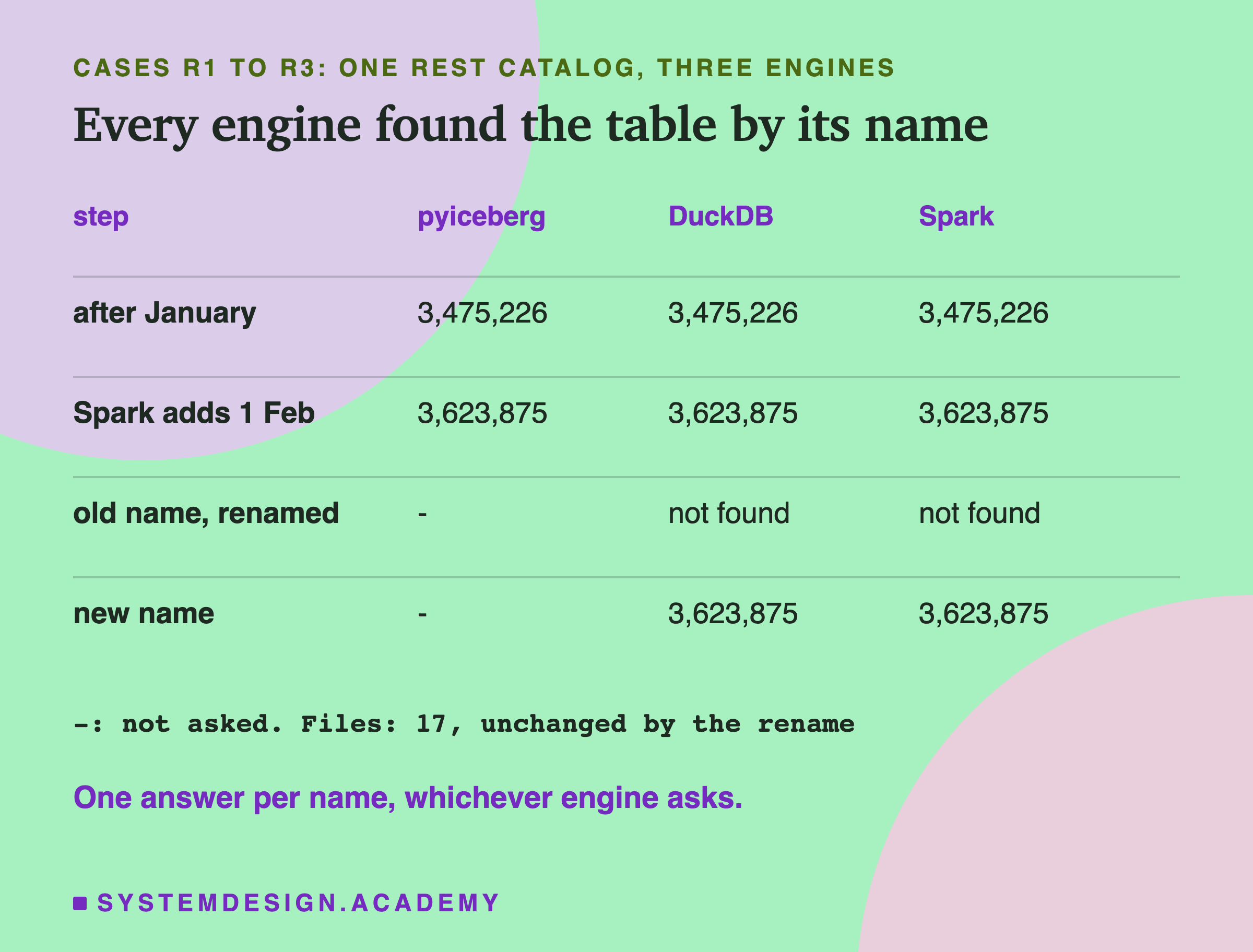
All three counted 3,475,226 trips. Then Spark itself wrote: it inserted the trips of 1 February. pyiceberg counted 3,623,875 afterwards, and so did DuckDB, in the session it already had open and in a new one. Each version keeps a summary, a short note about the change. Spark's version says engine-name: spark; pyiceberg's first version has no such field.
Then pyiceberg renamed the table to taxi.yellow_trips. DuckDB, even in the session that had used the old name a moment before, now said Table with name trips does not exist!. Spark gave TABLE_OR_VIEW_NOT_FOUND. By the new name, both counted 3,623,875. The 17 files in the warehouse were unchanged, and the folder was still called trips.
So three different programs, written in three languages, agreed on what the table is and what it is called, because they all asked the same catalog. Which brings us to the catalog this lesson is named after. What is Unity Catalog?
Unity Catalog: Two Products With One Name
The name means two things, and it is worth keeping them apart.
Databricks, the company, sells a data platform with a catalog built in. Its documentation says: "Unity Catalog is the unified governance layer for data and AI built into Databricks." The same page adds: "Unity Catalog is also available as an open-source implementation." In the open project's own words, "Unity Catalog is currently a sandbox project with LF AI and Data Foundation (part of the Linux Foundation)." I ran the open-source one, version 0.6.0. Databricks' own service may behave differently, and I could not test it.
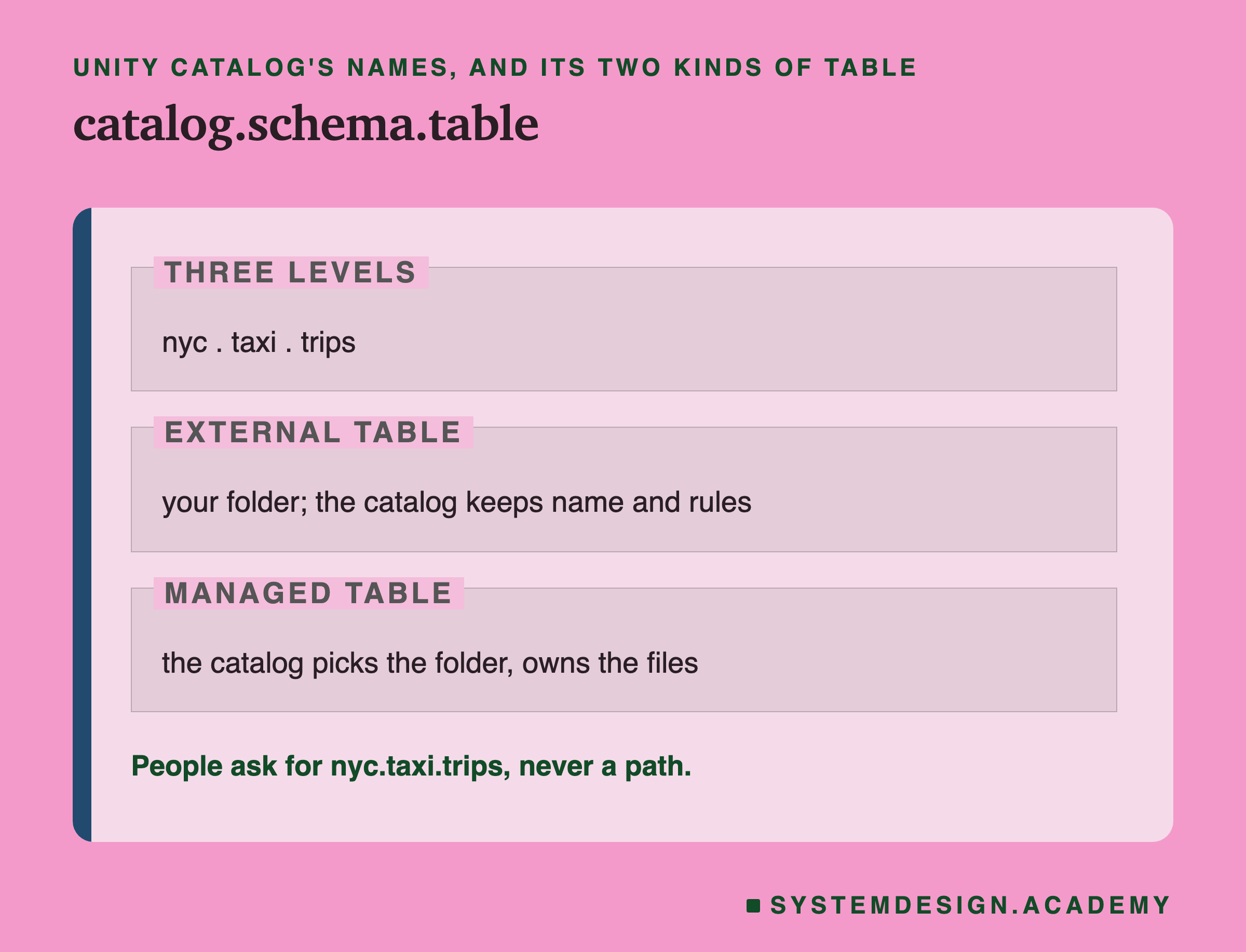
Unity Catalog names things with three levels. Databricks' documentation says data assets "follow a three-level namespace ( catalog.schema.object )." My table became nyc.taxi.trips: catalog nyc, schema taxi, table trips.
It also has two kinds of table. The same page says tables "can be managed, where Unity Catalog handles both governance and the underlying file storage lifecycle, or external, where Unity Catalog handles governance only." Governance here means the rules: who may do what. A table whose folder you chose and still own is called an external table, a table whose files the catalog does not own.
So with Unity Catalog, what changes for a table I already have?
Registering a Delta Table in Unity Catalog
I wrote January as a Delta table with deltalake, the Python library from lessons 1 to 3. Then I registered that folder in Unity Catalog as an external table, nyc.taxi.trips, through its . I gave it a comment and three properties: an owner team, a source and a refresh plan.
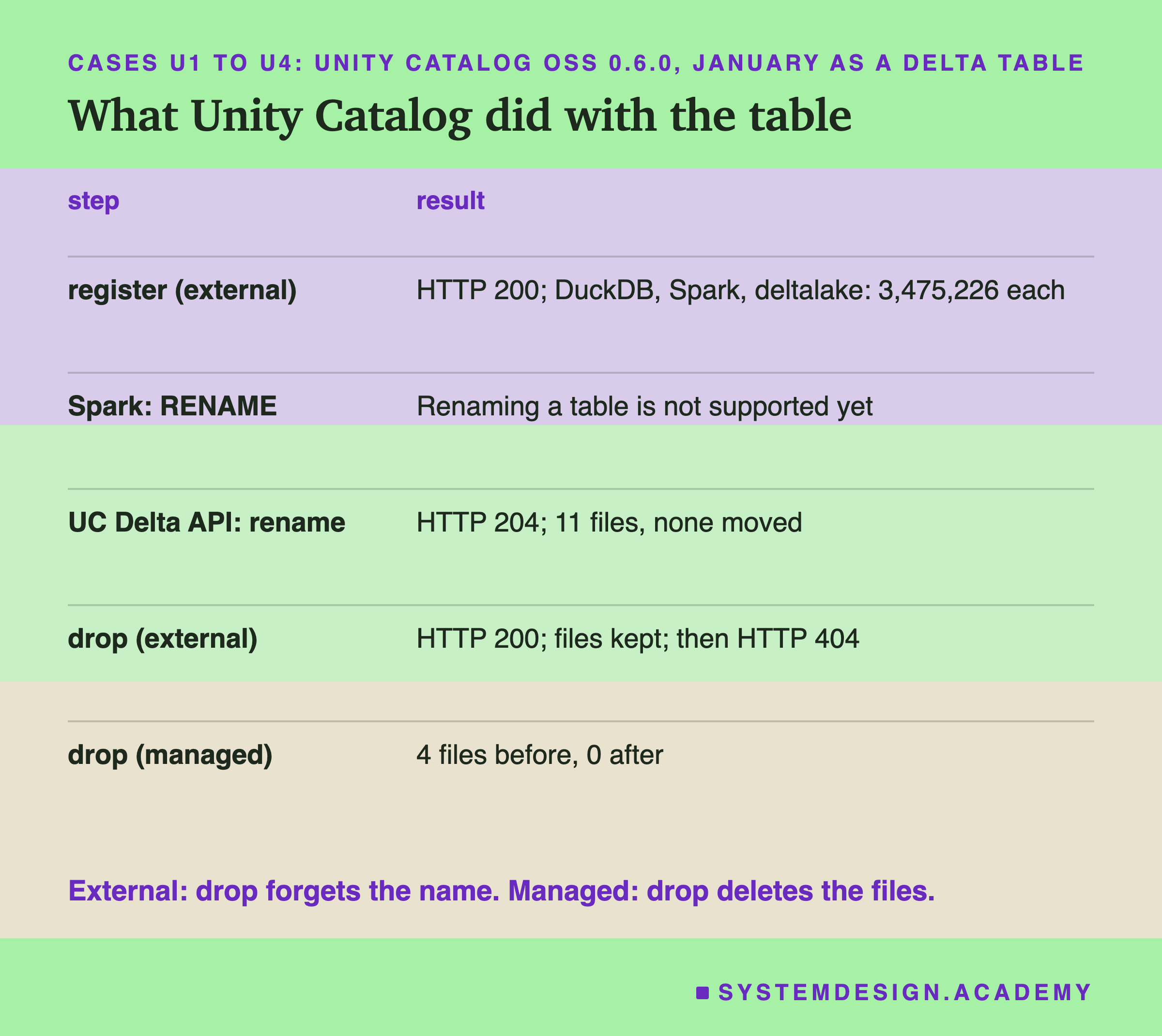
Unity Catalog answered 200, the web's code for success. Then three engines read the table by name. DuckDB used its uc_catalog extension. Spark 4.2.0 used the Unity Catalog connector 0.6.0 with Delta 4.4.0. With deltalake, I opened the storage_location that Unity Catalog returned. All three counted 3,475,226 trips.
Unity Catalog's answer to the register call had 17 fields. Among them were my comment, my three properties, the 20 columns with their types, the format, DELTA, and the folder path. That is the catalog's second job, after names and pointers: it is the place people and tools look up what a table is.
Note one difference from Iceberg. For this external Delta table, the commit still happens in the Delta log inside the folder, as in lesson 1. Unity Catalog holds the name, the path and the rules. So what happened when I tried to rename it?
Renaming in Unity Catalog: One Door Shut, One Open
First I asked Spark: ALTER TABLE nyc.taxi.trips RENAME TO nyc.taxi.yellow_trips. The Unity Catalog connector refused, with UnsupportedOperationException: Renaming a table is not supported yet. Unity Catalog's main has only two calls on a table's address, GET and DELETE. A PATCH, a request to change part of the table, got HTTP 405, which means that method is not allowed there.
Then, reading the API files that ship with 0.6.0, I found a second door, made for catalog-managed tables (tables whose commits go through the catalog; the next slide shows one). The project's docs say "Version 0.5.0 added the UC Delta API for catalog-managed Delta tables". That API's own page says it "lets Delta clients create, load, list, alter, rename, and delete catalog-managed Delta tables through a single REST surface." Its rename call is described as "Rename a table within the same catalog and schema." I added that call to the lab after its second run had stopped early, and I say so in the lab file.
It worked on my external table too. The call answered 204, which means done, with nothing to send back. The 11 files of the Delta folder were unchanged. The old name now gave HTTP 404, not found. The new name gave HTTP 200 and the same folder path as before. DuckDB counted 3,475,226 trips under the new name, and Spark did too, while both said the old name did not exist. Then I renamed it back.
So rename works the same way here as in Iceberg's catalogs: the name changes in the catalog and no file moves. Which tool you use decides whether you can reach it. Now the other half of the lifecycle. What does dropping a table do in Unity Catalog?
Dropping: External Keeps the Files, Managed Does Not
So far: one shared catalog let pyiceberg, DuckDB and Spark agree on a table by name, through every write and rename. Unity Catalog did the same for a Delta table, with a three-level name, a description and properties.
I deleted the external table through the . It answered HTTP 200. Then GET by name gave HTTP 404 with TABLE_NOT_FOUND. The 11 files in the folder had the same sizes and times as before. I registered the folder again and DuckDB counted 3,475,226 trips. Databricks documents the same rule: "When you drop an external table, Unity Catalog removes the table metadata but does not delete the underlying data files."
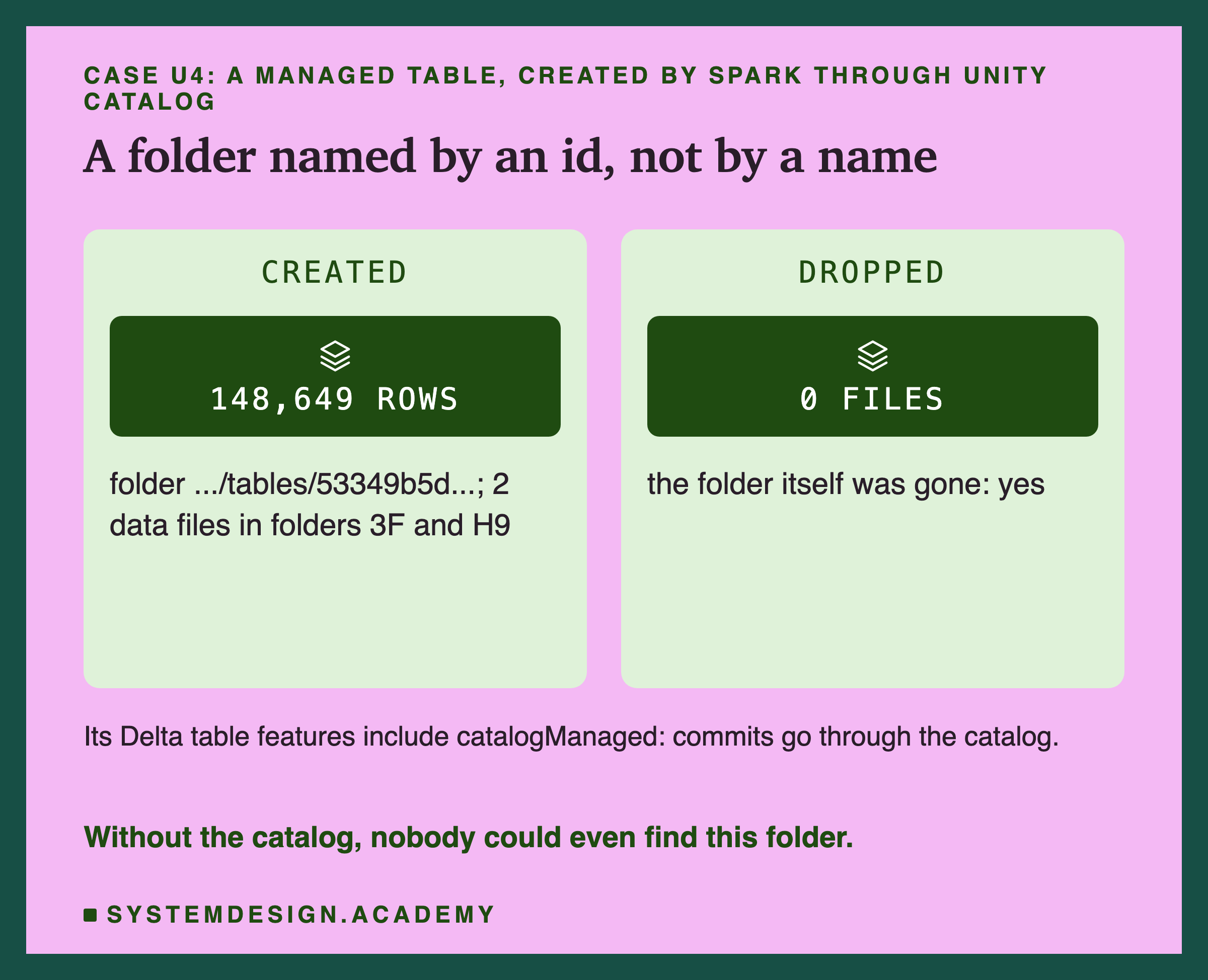
Then a managed table. I gave a second catalog, nyc_managed, a storage root, a folder where Unity Catalog may put tables. Spark created nyc_managed.taxi.feb_first from the 148,649 trips of 1 February. Unity Catalog chose the folder itself. Its name was not feb_first but a long id, under __unitystorage/catalogs/.../tables/, and the 2 data files sat in sub-folders with two-character names, 3F and H9. Without the catalog, nobody could even find this table.
The Delta table also listed a feature called catalogManaged. Delta's protocol says that with it, "the catalog that manages the table becomes the source of truth for whether a given commit attempt succeeded." It also says: "Filesystem-based access to catalog-managed tables is not supported." So here the catalog took over the commit too, as in Iceberg.
Who May Do What: Grants
A catalog can hold rules about people as well as tables. Permission given to one person for one action on one thing is called a grant, like "Asha may read nyc.taxi.trips". The role-based access control lesson explains the general idea.
To test grants, I started a second Unity Catalog server with server.authorization=enable. Now every request must carry a token, a signed pass that says who you are. Unity Catalog does not check passwords itself. Its documentation says it uses "an external identity provider for authentication while the local Unity Catalog database for authorization". An identity provider is a login service that vouches for who you are. A real one is Google or Okta, and needs a browser login. So I wrote a tiny stand-in, cat_idp.py, that signs tokens for made-up addresses on my laptop only. Unity Catalog checked each token's signature against it in the normal way.
I added two made-up users, an analyst and an intern. A request with no token got 401, which means no valid pass. A third address that was never added got "User not allowed: stranger@lab.test".
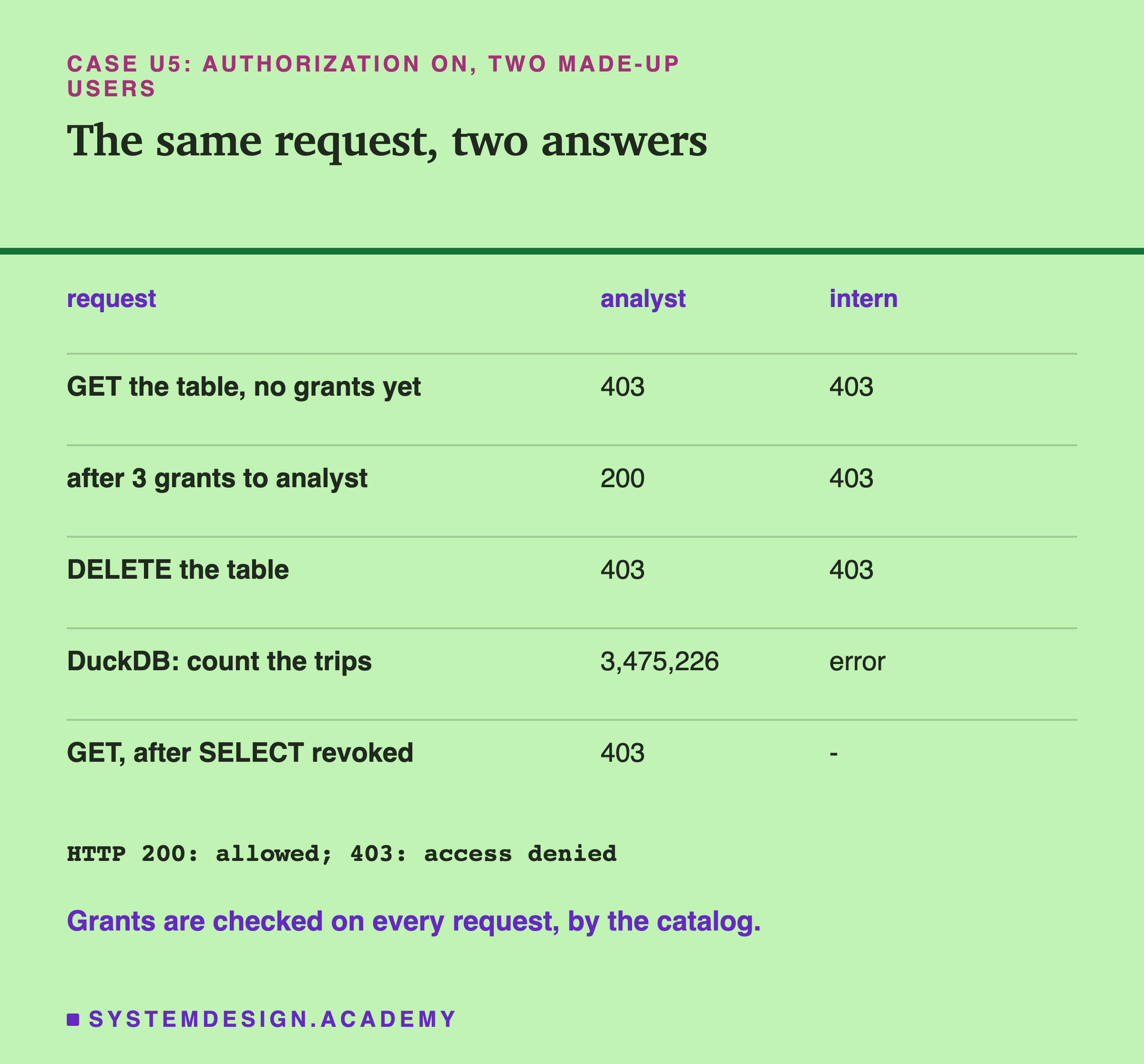
At first, both users got HTTP 403, access denied, even to look at the table. Then, as the admin, I gave the analyst three grants: USE CATALOG on nyc, USE SCHEMA on nyc.taxi and SELECT on the table. Now the analyst got 200 and the intern still 403. Neither could DELETE the table: 403 for both, because reading is not owning. Through DuckDB, the analyst counted 3,475,226 trips. The intern's DuckDB could not even see the schema. When I took the analyst's back, the next request got 403 again.
The Catalog Guards the Name, Not the Disk
The intern could not get the table through Unity Catalog. Then I read the same folder with a plain DuckDB that never talks to Unity Catalog, as anyone who can open the folder could. It read the Parquet files straight from the disk and counted all 3,475,226 trips.
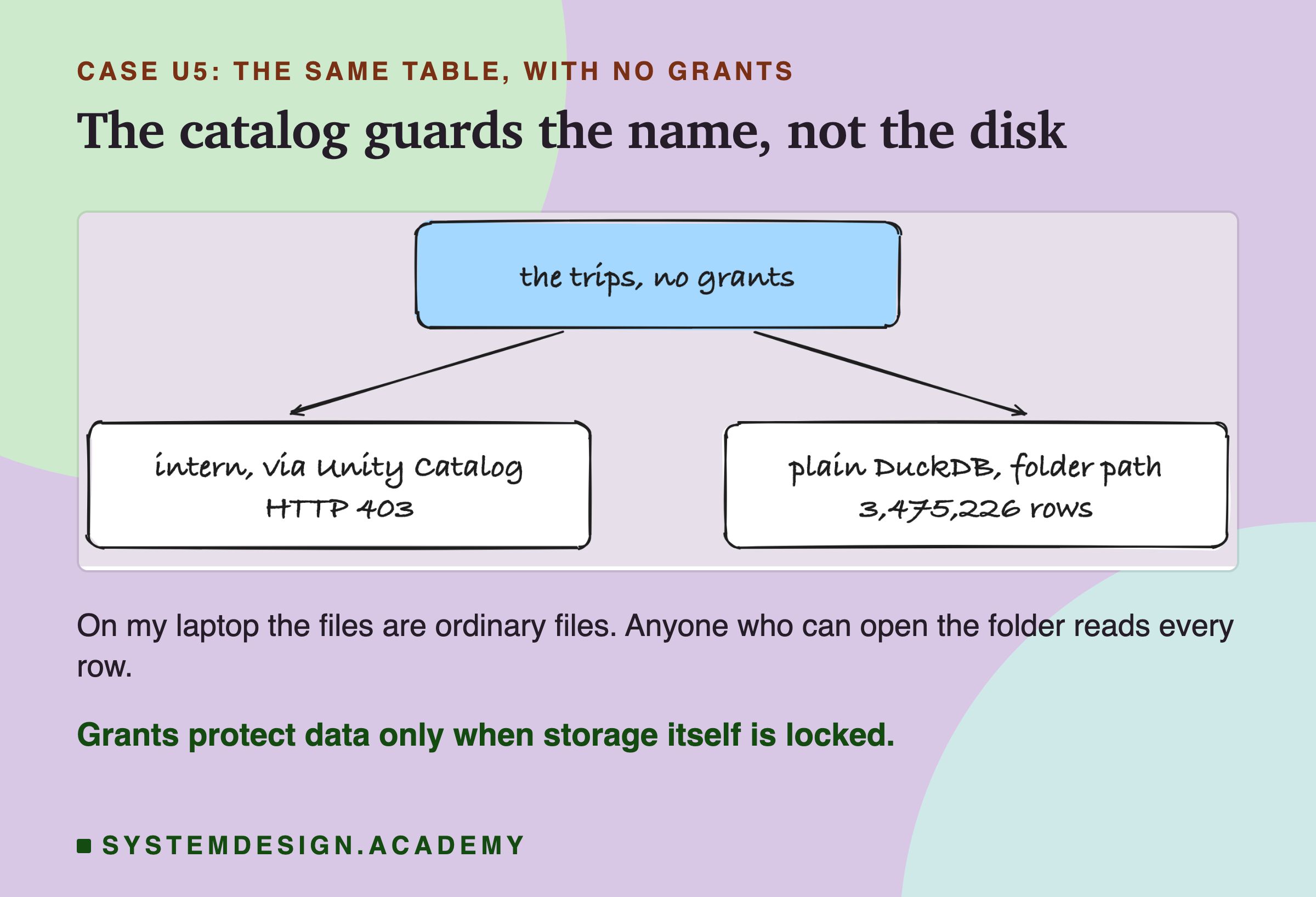
This is not a bug in Unity Catalog. A catalog can only refuse requests that come to it. On my laptop, the files are ordinary files, and anyone who can open the folder can read them.
On real cloud storage, the fix is to lock the storage so that no person can read it directly, and let only the catalog hold the keys. When an allowed user asks for a table, the catalog hands out a short-lived key for that one table. Handing out keys like that is called credential vending, giving each request a temporary key. The project's Spark page puts it this way: "credential vending - no more need to configure a single set of s3/azure/gcs creds for all your tables in your spark app. UC will automatically provide creds for each table in each query." Creds are credentials, the keys.
I asked my server for read credentials. For the analyst it answered 200, with the folder path and empty fields for AWS, Azure and Google keys, and no expiry time. A local folder has no keys to hand out. The intern got 403, and so did the analyst when asking to write. So the shape of the protection is there, but it only protects data when the storage is locked. Is there anything a catalog keeps that I have not covered?
Discovery and Lineage: What I Could and Could Not Check
A record of which tables and jobs a table's data came from, and which use it, is called lineage, a family tree for data. The data lineage lesson explains it in general.
Databricks' documentation says its Unity Catalog "captures lineage automatically for queries run on Databricks, down to the column level, and aggregates it across all workspaces attached to the metastore." I could not test that, because it runs on Databricks.
The open-source version is different. I searched its description for version 0.6.0, the file api/all.yaml, which lists 26 paths. The word lineage appears in it 0 times. The project's roadmap, in the same release, lists Lineage with a question mark in its newest column. One page of its documentation, about Spark, does list "automated data lineage tracking" among the benefits. I found no way to get lineage from the 0.6.0 server I ran, so I treat that line as a goal, not a feature I saw.
What I could check was discovery: the comment, the properties, the columns and the format that Unity Catalog returned for my table, 17 fields in all. Search, owners and data quality belong to the data catalog lesson.
So far: Unity Catalog checked every request against grants, and could not stop a reader who went to the folder directly. How do I know all these numbers are right?
How the Lab Was Built, and the Report
The lab is one file, scripts/labs/de-sd/cat_catalogs.py. I wrote its design, every test and my guesses, into its docstring, the note at the top of the file, before it first ran. Short probes earlier the same day only checked that each server started and each engine connected, on throwaway tables. No number in this lesson comes from them.
Several things changed after the first runs, and each is written into the docstring. The first run stopped early: pyiceberg 0.12 put the table folder at taxi/trips, not where I had assumed, so every file count came out 0. I fixed the path and ran everything again. The second run stopped at the managed table, because Spark refused to create it without USING DELTA. I added that, and also the Delta API rename, after I found it in the API files. The third run is the one in this lesson.
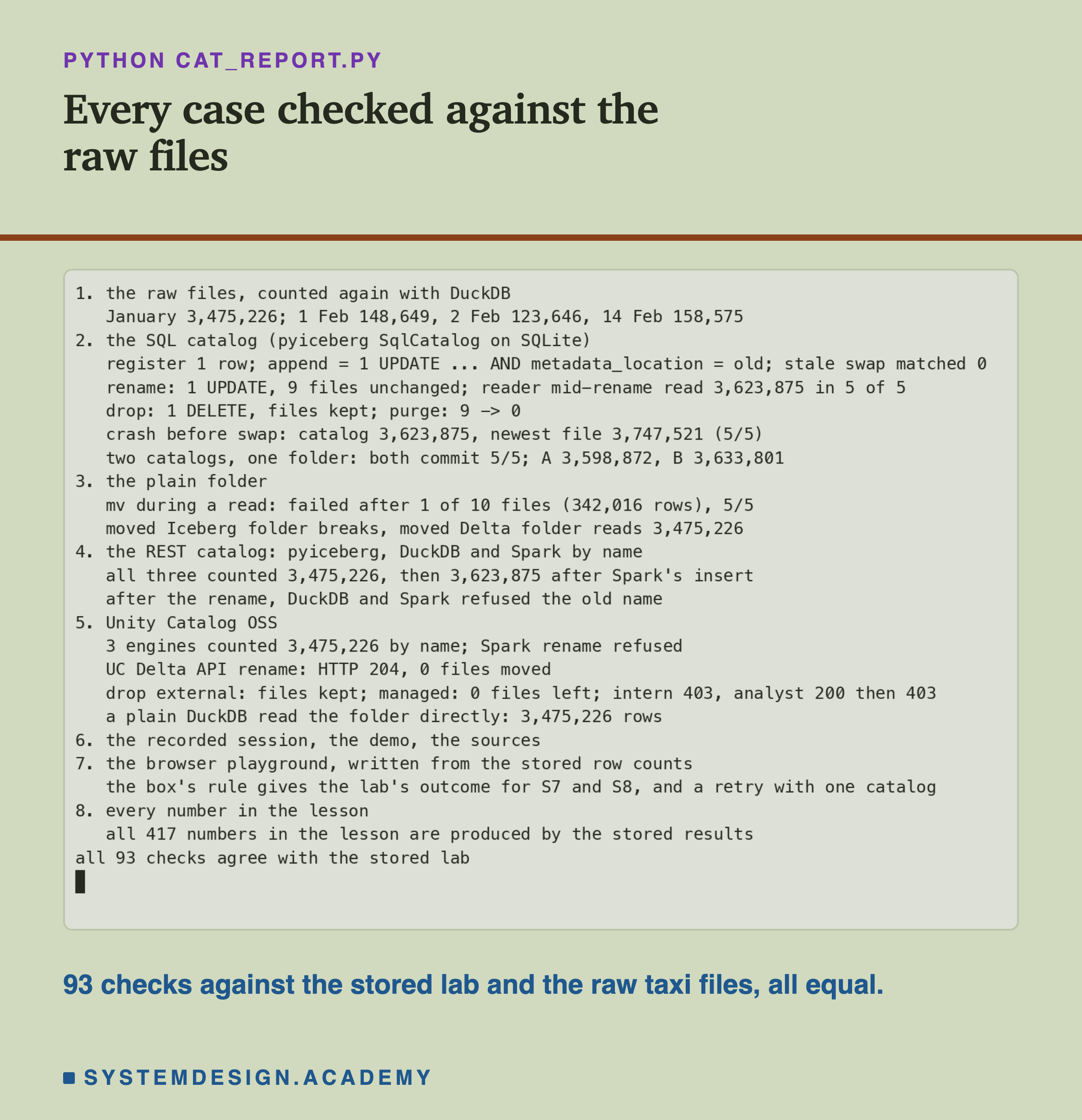
The report script, cat_report.py, does not reuse the lab's code. It counts the raw taxi files again with DuckDB. Then it checks every stored test against its own arithmetic: rows each catalog and engine saw, the each operation sent, files before and after, every error and every HTTP code. Last, it reads this lesson's text and checks that every number in it is one the stored results produce. I planted one wrong number in the stored results to see it fail. It stopped with a mismatch and exit code 1, saved as .
My Guesses Before the Run, Checked
Before the first run, I wrote these guesses into the lab. They use the lab's labels.
-
"S3 matches 0 rows. S4 sends 1 UPDATE and moves 0 files; the folder is still called trips." Right.
-
"S5 reads every row in 5/5, then the old name fails." Right.
-
"S6 drop leaves every file, register brings back 3,623,875 rows (January + 1 Feb), purge deletes every file; a reader during purge fails." Right on drop, register and purge. Wrong on the reader during purge: it finished all 3,623,875 trips in 5 of 5 runs, although the purge left 0 files. I did not find out why, so I make no claim from it.
-
"S7: catalog 3,623,875, folder guess 3,747,521 in 5/5. S8 both commit with no error in 5/5, A and B disagree." Right on both.
-
"F1 fails in 5/5. F2 Iceberg breaks, Delta loads." Right.
-
"R1-R3 all three engines agree; I do not know whether DuckDB's same session keeps the old name." They agreed, and DuckDB's open session dropped the old name at once.
-
"U3 leaves files; U4 deletes them. U5 intern 403, analyst 200 then 403 after revoke; the intern still reads the folder directly." Right on all of it. Two things I already knew from the probes, so I did not count them as guesses: Spark refuses the rename, and a user with no grants gets 403.
-
"U2b: it renames, moves no file, and both engines find the new name." I wrote this after the second run, before the Delta API rename first ran. Right.
Eight guesses, seven fully right. The one surprise is a reader that should have failed and did not, which I leave open. Now you can see the main result on your own machine.
Try It Yourself
The full lab needs Java, three servers and two versions of Spark. I wrote a small demo that needs only Python and the catalog, and shows the core of the lesson: rename, drop, register again, and two catalogs on one folder.
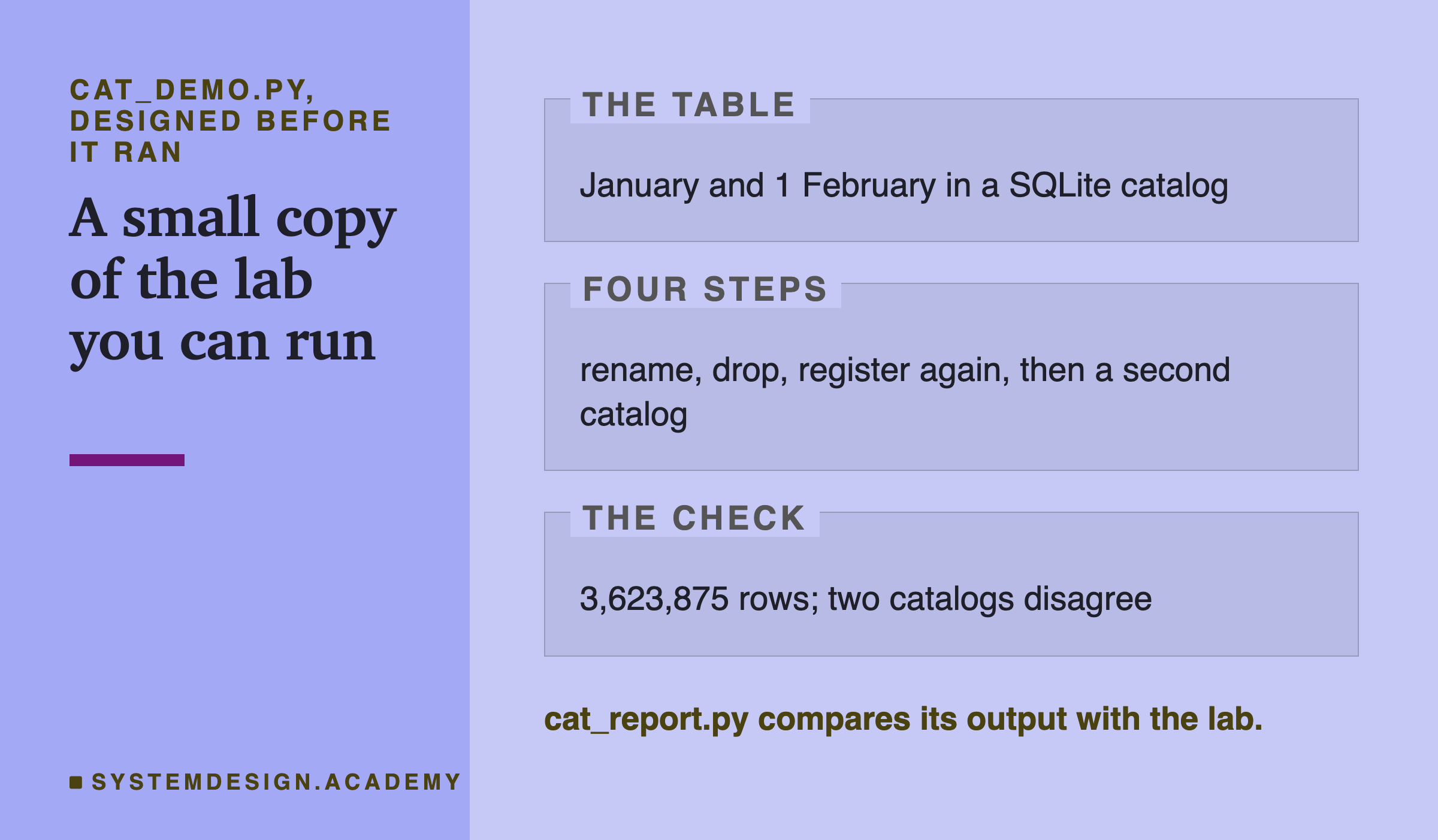
I wrote the demo's design into its docstring after the lab had run and before the demo first ran. Its two-catalog step starts from January and 1 February, not from January alone as in the lab, so its row counts are a little higher. cat_report.py checks them with its own arithmetic.
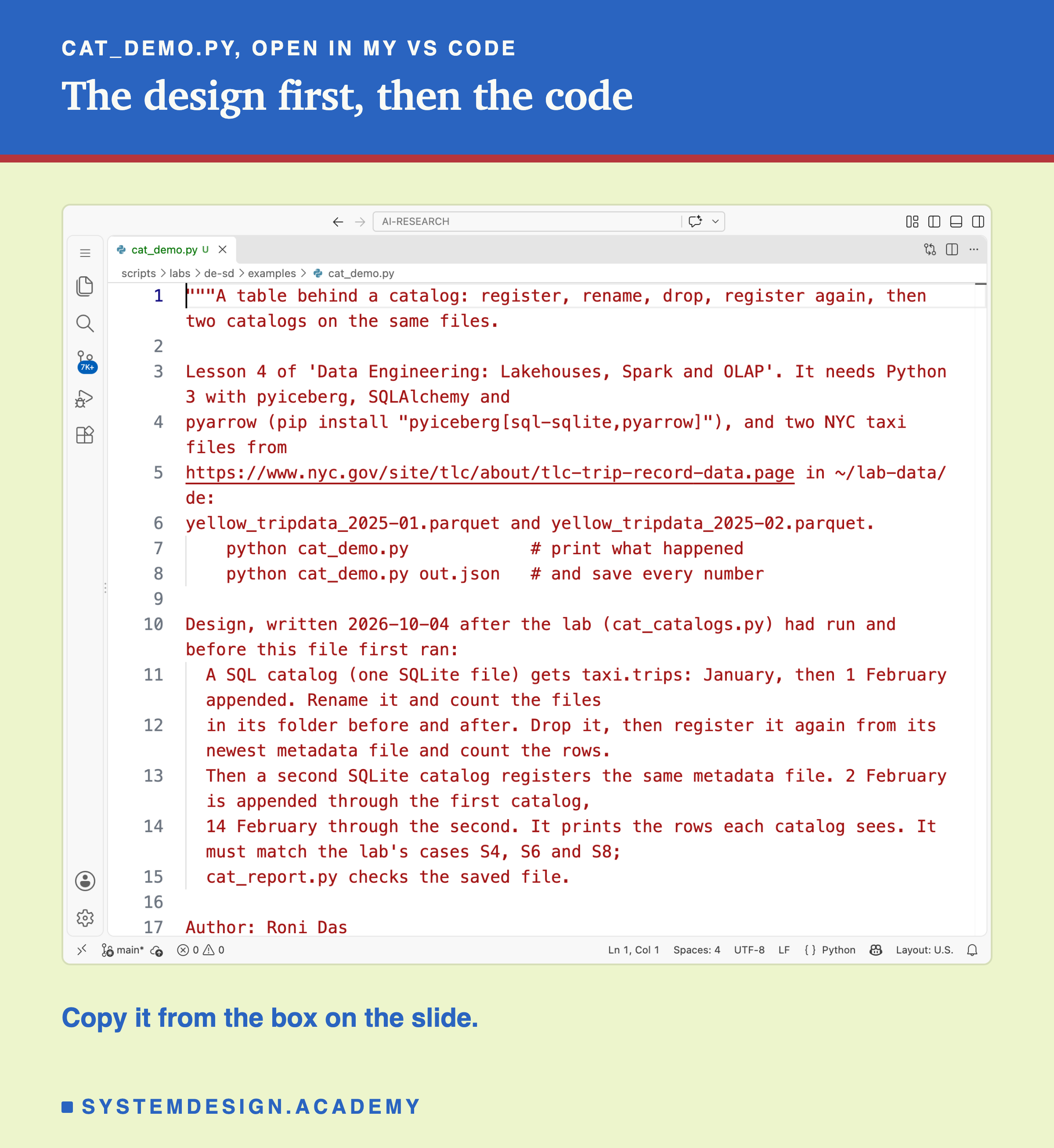
Before you run this lab. You need Python 3 with pyiceberg, SQLAlchemy and pyarrow: pip install "pyiceberg[sql-sqlite,pyarrow]". Download two monthly files of Yellow Taxi trip records, January and February 2025, from the NYC TLC trip record page. Put them in a folder called lab-data/de in your home folder. Together they are about 120 MB. The demo needs no Java, no server and no GPU. I ran it on a Mac with the versions above. These libraries run on Windows and Linux too, but I have not checked the results there.
"""A table behind a catalog: register, rename, drop, register again, then two catalogs on the same files.

Lesson 4 of 'Data Engineering: Lakehouses, Spark and OLAP'. It needs Python 3 with pyiceberg, SQLAlchemy and
pyarrow (pip install "pyiceberg[sql-sqlite,pyarrow]"), and two NYC taxi files from
https://www.nyc.gov/site/tlc/about/tlc-trip-record-data.page in ~/lab-data/de:
yellow_tripdata_2025-01.parquet and yellow_tripdata_2025-02.parquet.
    python cat_demo.py            # print what happened
    python cat_demo.py out.json   # and save every number

Design, written 2026-10-04 after the lab (cat_catalogs.py) had run and before this file first ran:
  A SQL catalog (one SQLite file) gets taxi.trips: January, then 1 February appended. Rename it and count the files
  in its folder before and after. Drop it, then register it again from its newest metadata file and count the rows.
  Then a second SQLite catalog registers the same metadata file. 2 February is appended through the first catalog,
  14 February through the second. It prints the rows each catalog sees. It must match the lab's cases S4, S6 and S8;
  cat_report.py checks the saved file.

Author: Roni Das
Created: 2026-10-04
"""
import json
import shutil
import sys
from pathlib import Path

import pyarrow.compute as pc
import pyarrow.parquet as pq
from pyiceberg.catalog.sql import SqlCatalog

DATA = Path.home() / "lab-data/de"
WORK = DATA / "demo-cat"


def feb_day(day):
    t = pq.read_table(DATA / "yellow_tripdata_2025-02.parquet")
    return t.filter(pc.equal(pc.strftime(t["tpep_pickup_datetime"], format="%Y-%m-%d"), day))


def rows(table):          # rows in the current version, from the record counts in its manifests
    return sum(task.file.record_count for task in table.scan().plan_files())


def files(folder):
    return sorted((str(p), p.stat().st_size) for p in folder.rglob("*") if p.is_file())


def catalog(name):
    return SqlCatalog("demo", uri=f"sqlite:///{WORK}/{name}.db", warehouse=f"file://{WORK}/warehouse")


if __name__ == "__main__":
    shutil.rmtree(WORK, ignore_errors=True)
    WORK.mkdir(parents=True)
    a = catalog("a")
    a.create_namespace("taxi")
    jan = pq.read_table(DATA / "yellow_tripdata_2025-01.parquet")
    a.create_table("taxi.trips", schema=jan.schema).append(jan)
    a.load_table("taxi.trips").append(feb_day("2025-02-01"))
    t = a.load_table("taxi.trips")
    folder = Path(t.metadata.location.replace("file://", ""))
    out = {"rows": rows(t)}

    before = files(folder)                       # rename: one row changes in a.db, no file moves
    a.rename_table("taxi.trips", "taxi.yellow_trips")
    out["rename"] = {"files_before": len(before), "files_after": len(files(folder)),
                     "unchanged": before == files(folder), "folder": folder.name}

    newest = a.load_table("taxi.yellow_trips").metadata_location
    a.drop_table("taxi.yellow_trips")            # drop: the row goes, the files stay
    out["drop"] = {"files_left": len(files(folder)), "tables_left": len(a.list_tables("taxi"))}
    out["register"] = {"rows": rows(a.register_table("taxi.trips", newest))}

    b = catalog("b")                             # a second catalog, pointed at the same metadata file
    b.create_namespace("taxi")
    b.register_table("taxi.trips", newest)
    a.load_table("taxi.trips").append(feb_day("2025-02-02"))
    b.load_table("taxi.trips").append(feb_day("2025-02-14"))
    out["two_catalogs"] = {"rows_a": rows(a.load_table("taxi.trips")), "rows_b": rows(b.load_table("taxi.trips"))}
    shutil.rmtree(WORK)

    print(f"taxi.trips: {out['rows']:,} rows")
    r = out["rename"]
    print(f"rename: {r['files_before']} files before, {r['files_after']} after, unchanged: {r['unchanged']};"
          f" folder still called {r['folder']}")
    print(f"drop: {out['drop']['files_left']} files left, {out['drop']['tables_left']} tables in the catalog")
    print(f"register again: {out['register']['rows']:,} rows")
    print(f"two catalogs, one folder: A sees {out['two_catalogs']['rows_a']:,} rows,"
          f" B sees {out['two_catalogs']['rows_b']:,}")
    if len(sys.argv) > 1:
        Path(sys.argv[1]).write_text(json.dumps(out))
Run the Catalog Yourself
This box is a tiny model of a catalog. It needs nothing but Python, so it runs in your browser. It does not read any real files. It holds the real row counts from the lab. A table starts as January. Writer A adds 2 February, then writer B adds 14 February. Each commit writes a new metadata file first, then asks its catalog for a check-and-put swap.
Press Run. With both settings False, both writers use one catalog: B's first swap is refused, B reads the new version and tries again, and both days land. Now set SECOND_CATALOG = True. Both swaps succeed, and the two catalogs disagree, as in test S8. Then set SECOND_CATALOG = False and B_CRASHES = True: the catalog keeps the old version, and the newest file holds trips nobody committed. Here B adds 14 February on top of A's version, so the counts differ from test S7's 3,623,875 and 3,747,521, but the outcome is the same. The one-catalog retry is the model's rule, not a test from this lesson's lab; lesson 3 measured it with pyiceberg.
The report script writes this box from the stored lab results, and checks that it gives the lab's outcome for tests S7 and S8.
The Lab's Code, Piece by Piece
The lab is one file, scripts/labs/de-sd/cat_catalogs.py, with a small helper for Spark, cat_spark.py, and the stand-in identity provider, cat_idp.py. Here is what each part does.
sql_catalog makes a pyiceberg catalog on a SQLite file and, when asked, records every SQL statement it sends. catalog_rows reads the catalog's own table straight from SQLite. inventory lists every file in a table folder with its size and modification time, so "unchanged" means byte for byte.
run_sql_cases runs tests S1 to S8. reader_proc is a reader in its own process that pauses after its first batch, so a rename or a drop can happen while it is halfway through. crash_writer wraps the library's step that writes the metadata file, and ends the process right after it, before the swap. newest_metadata_guess is the reader with no catalog: it picks the highest version number in the folder.
run_folder_cases runs F1 and F2 on plain folders. run_rest_cases starts the Iceberg REST server, then runs pyiceberg, DuckDB and Spark against it by name. starts Unity Catalog twice, once open and once with authorization on, registers the Delta table, tries both renames, drops both kinds of table, and runs the grant tests with two tokens. records the load average and the library versions with , and saves .
How to Put Your Tables Behind a Catalog
So far: a catalog turns a table into a name with one pointer and a set of rules. Renames and drops change the catalog, not the files. Without it, readers guess, folders break when moved, and two catalogs split one table. These are the steps I would take on a real data platform, in order.
-
Pick one catalog per table, and write it down. Two catalogs on one table forked it in every run of my test, with no error. If two tools need the table, point both at the same catalog.
-
Make every job ask for names. A job that reads
nyc.taxi.tripssurvives a rename and a move. A job that reads a path breaks. -
Never read the newest metadata file as the table. Only the catalog's pointer is the table. A crashed writer can leave a newer file behind.
-
Know which tables are managed. Dropping an external table keeps the files. Dropping a managed table deletes them, at once in Unity Catalog OSS on my laptop, and after 7 days by default on Databricks.
-
Lock the storage. Give people grants in the catalog, and give nobody but the catalog direct access to the folders.
-
Clean up after crashes. Files that no version names, like the 4 my crashed writer left, cost space until something removes them.
When You Need a Catalog, and Which Kind
A plain path is enough for one person and one tool: a notebook reading one Delta folder, a test, a demo. Delta keeps its own commits in its folder, as lessons 1 to 3 showed.
A catalog fits a small team that uses Iceberg from Python, or from Java with the same database. It is one table in a database you already run. It does not give you users or grants.
A REST catalog fits when several engines must share Iceberg tables: Spark for big jobs, DuckDB for quick questions, Python for small fixes. In my test, all three agreed on every count and every rename.
Unity Catalog fits when you need names, Delta tables, and rules about people in one place. Its docs say it also serves Iceberg through UniForm; I did not test that. The open-source server gave me grants and a three-level namespace. Databricks' own version adds lineage and more, which I could not test.
No catalog fixes open storage. If people can read the bucket directly, the catalog's grants do not stop them.
What This Lab Cannot Tell You
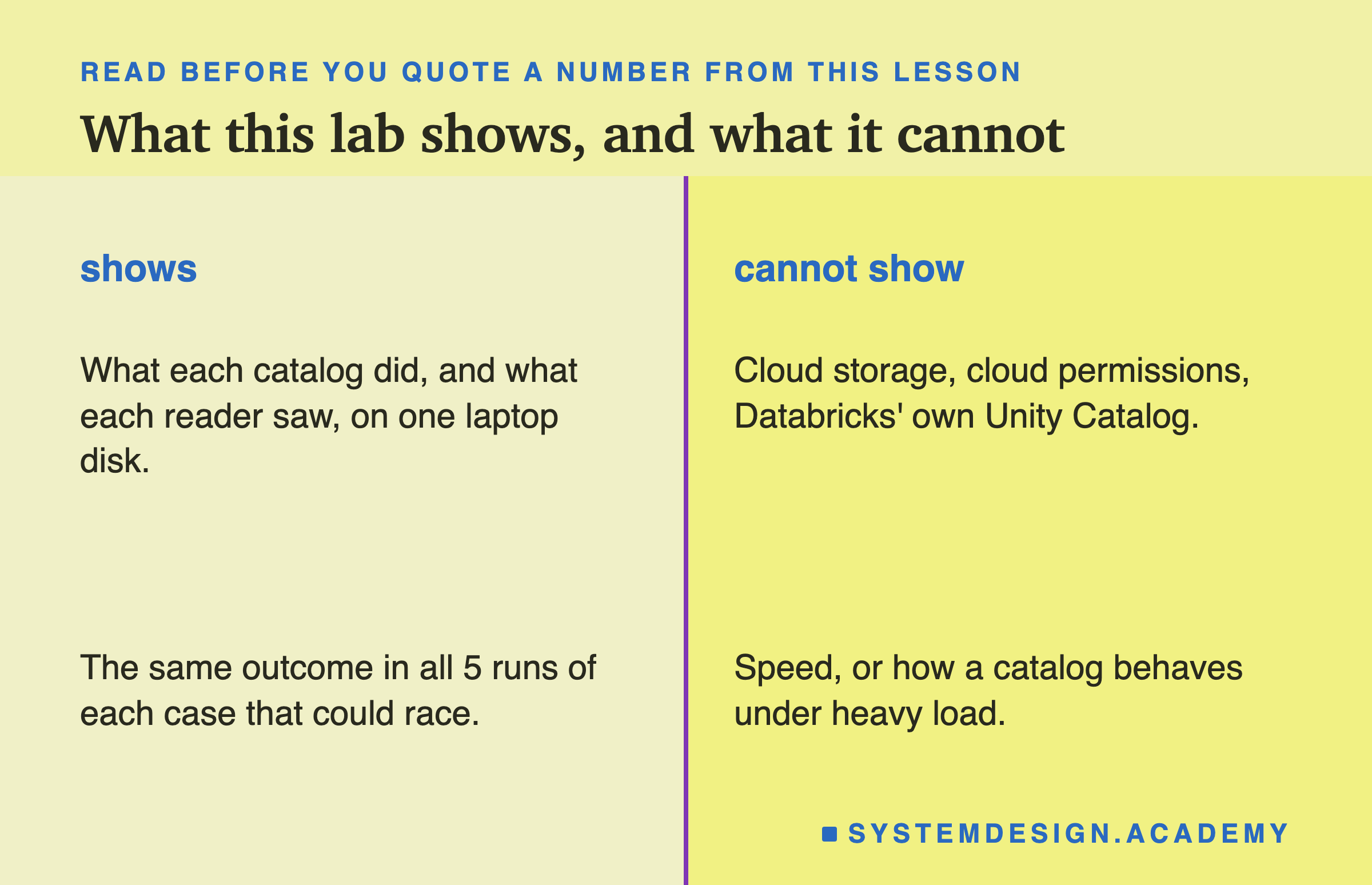
One laptop, one disk. Every test ran on my laptop's own disk. Credential vending and locked storage only mean something in the cloud, and I did not test them there.
Not Databricks. Everything about Unity Catalog here is the open-source server, version 0.6.0. Databricks' service shares the name and the ideas, but I quote its documentation, not my lab.
A stand-in login. My identity provider was a small script that signs tokens on my laptop. The rules Unity Catalog applied were its own, but a real setup would use Google, Okta or similar.
A crash I caused. The crashed writer was my own code ending the process at one exact point. Real crashes happen at other points too.
One result I cannot explain. A reader that was halfway through when I purged the table still finished all 3,623,875 trips in 5 of 5 runs. I make no claim from it.
Five runs. Read "5 of 5" as "every time I ran it", not as a rate.
What to Do on Monday
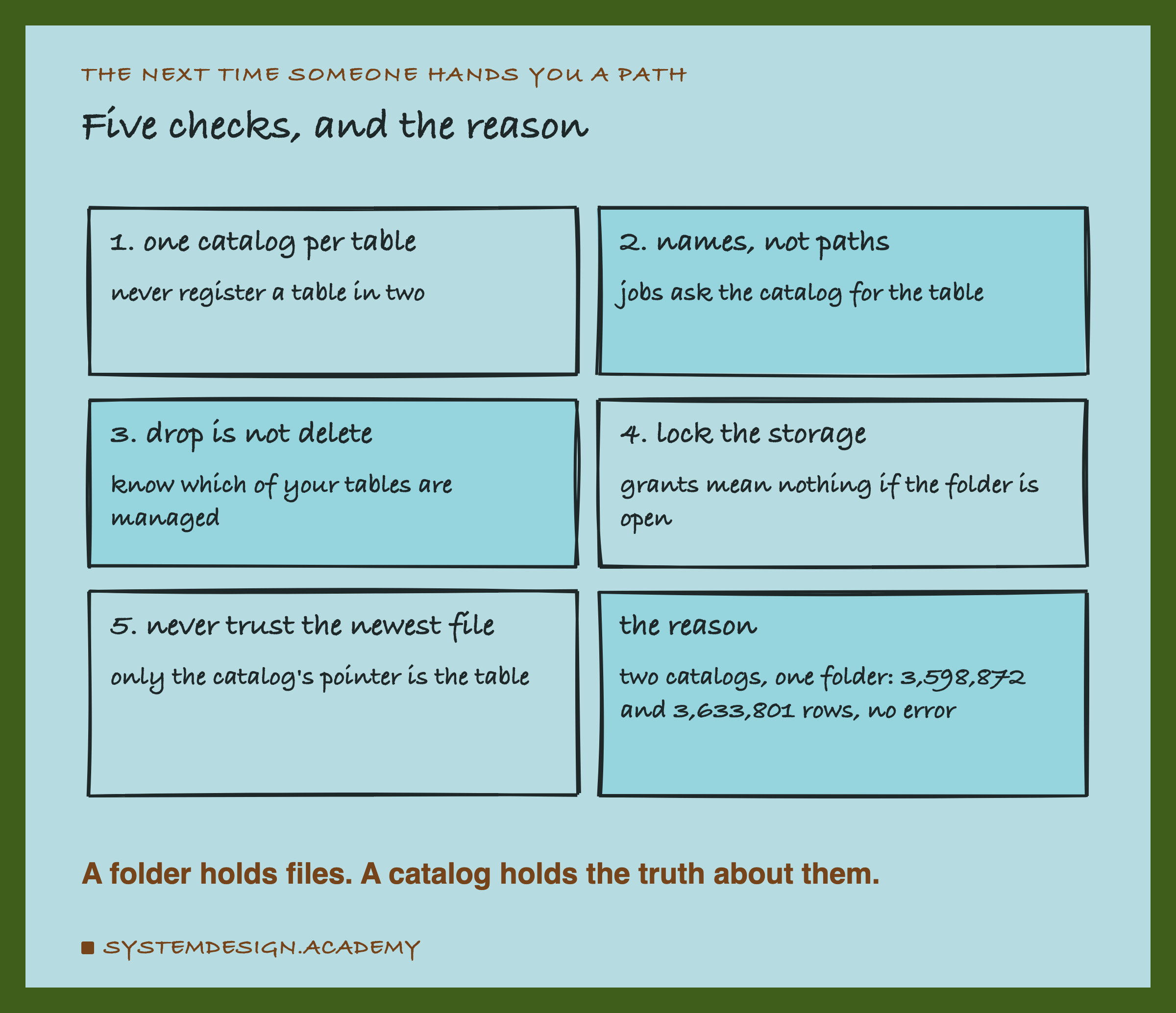
If you take one thing to work on Monday, make it this. List every place your tables are registered. For each table, ask two questions. Is it in exactly one catalog? And can anyone read its folder without going through that catalog?
A table in two catalogs can split with no error, and the split shows up weeks later as two reports that disagree. If anyone can read the folder, the grants in the catalog do not protect it. Both are found by looking at configuration, before they cost anything.
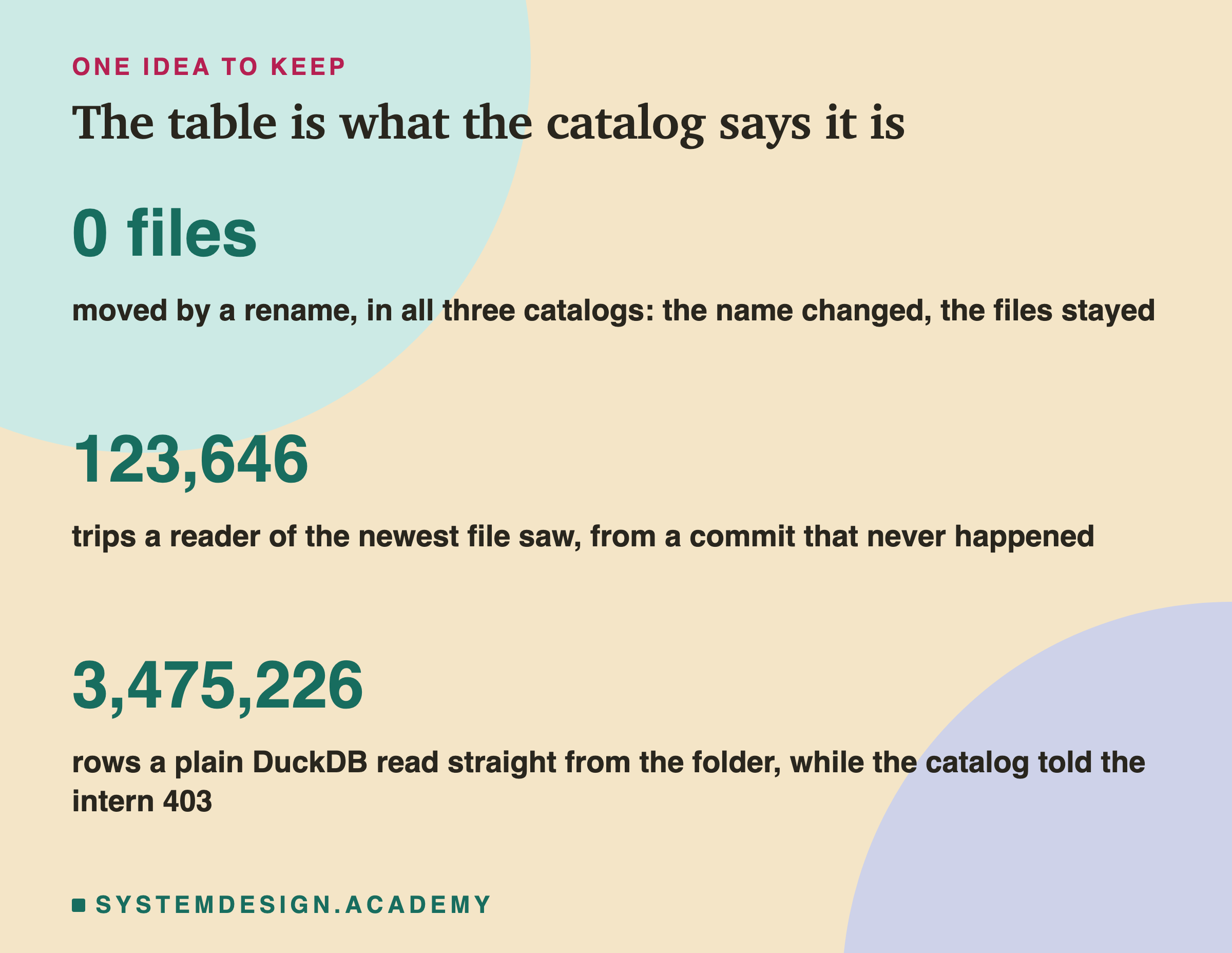
The one idea to keep: a folder holds files, and a catalog holds the truth about them: the name, the current version and the rules. Ask the desk, not the corridor.
Knowledge Check
Knowledge Check
4 questions - Score 80% to pass
I renamed taxi.trips to taxi.yellow_trips in the SQL catalog. What changed on disk?
A writer crashed after writing its new metadata file and before its swap. What did a reader that picked the newest metadata file see?
Two SQL catalogs registered the same Iceberg table. Writer A appended through A, writer B through B. What happened?
In Unity Catalog, the intern had no grants and got HTTP 403. How could every row still be read?