The Token That Conquered Web Authentication
A JWT looks like this: eyJhbGciOiJSUzI1NiJ9.eyJzdWIiOiI0MiIsInJvbGUiOiJhZG1pbiJ9.Sfl...
Three parts separated by dots. Header, payload, signature. That is it. This compact string has become the default token format for modern web authentication, powering 2.0, OpenID Connect, Firebase Auth, Auth0, Supabase, and virtually every SPA and mobile app built in the last decade.
Why did JWT win? Because it solves a specific problem cleanly: how do you verify a user's identity across multiple services without every service calling a central authentication server?
With an opaque token (a random string like tok_a7f3b2), every service that receives the token must call the auth server to learn who the user is. That is a network round-trip on every request, multiplied by every service in your architecture. With a JWT, the user's identity is embedded in the token itself, signed by the auth server's private key. Any service with the corresponding public key can verify the token locally. No network call. No shared database. Verification takes 10 microseconds of CPU time.
Auth0 processes over 4.5 billion logins per year using JWT. Firebase issues JWTs for every authenticated user. Okta, Cognito, and Keycloak all speak JWT natively.
What Is Inside a JWT
A JWT has three base64url-encoded segments:
eyJhbGciOiJSUzI1NiIsInR5cCI6IkpXVCJ9    <-- Header
.
eyJzdWIiOiI0MiIsInJvbGUiOiJhZG1pbiIsImV4cCI6MTcxMjM0NTY3OH0    <-- Payload
.
Kx7vQm2rT9nZbLpH4wYc8gJd1sVfA6uE0iRkNoXtBqM    <-- Signature
Header: {"alg": "RS256", "typ": "JWT", "kid": "key-2024-03"}
algdeclares the signing algorithmkid(key ID) tells the verifier which key to use when the issuer rotates keys
Payload: {"sub": "42", "role": "admin", "exp": 1712345678, "iss": "auth.myapp.com"}
| Claim | Full Name | Purpose |
|---|---|---|
| sub | Subject | User identifier (always a string) |
| exp | Expiration | Unix timestamp when the token dies |
| iat | Issued At | When the token was created |
| iss | Issuer | Who signed this token |
| aud | Audience | Intended recipient (your API) |
| jti | JWT ID | Unique identifier for this specific token |
You can add custom claims: role, permissions, tenant_id, org_id. But every byte increases the token size, and that token travels with every request.
Signature: RS256(base64url(header) + "." + base64url(payload), privateKey)
The signature covers both the header and the payload. Change a single character in either section and the signature becomes invalid.
The critical point that trips up beginners: The payload is NOT encrypted. Base64url is an encoding, not encryption. Anyone with the token can paste it into jwt.io and read every claim in plain text. The signature only prevents tampering. It does not prevent reading. Never put passwords, credit card numbers, or sensitive PII in a JWT payload.
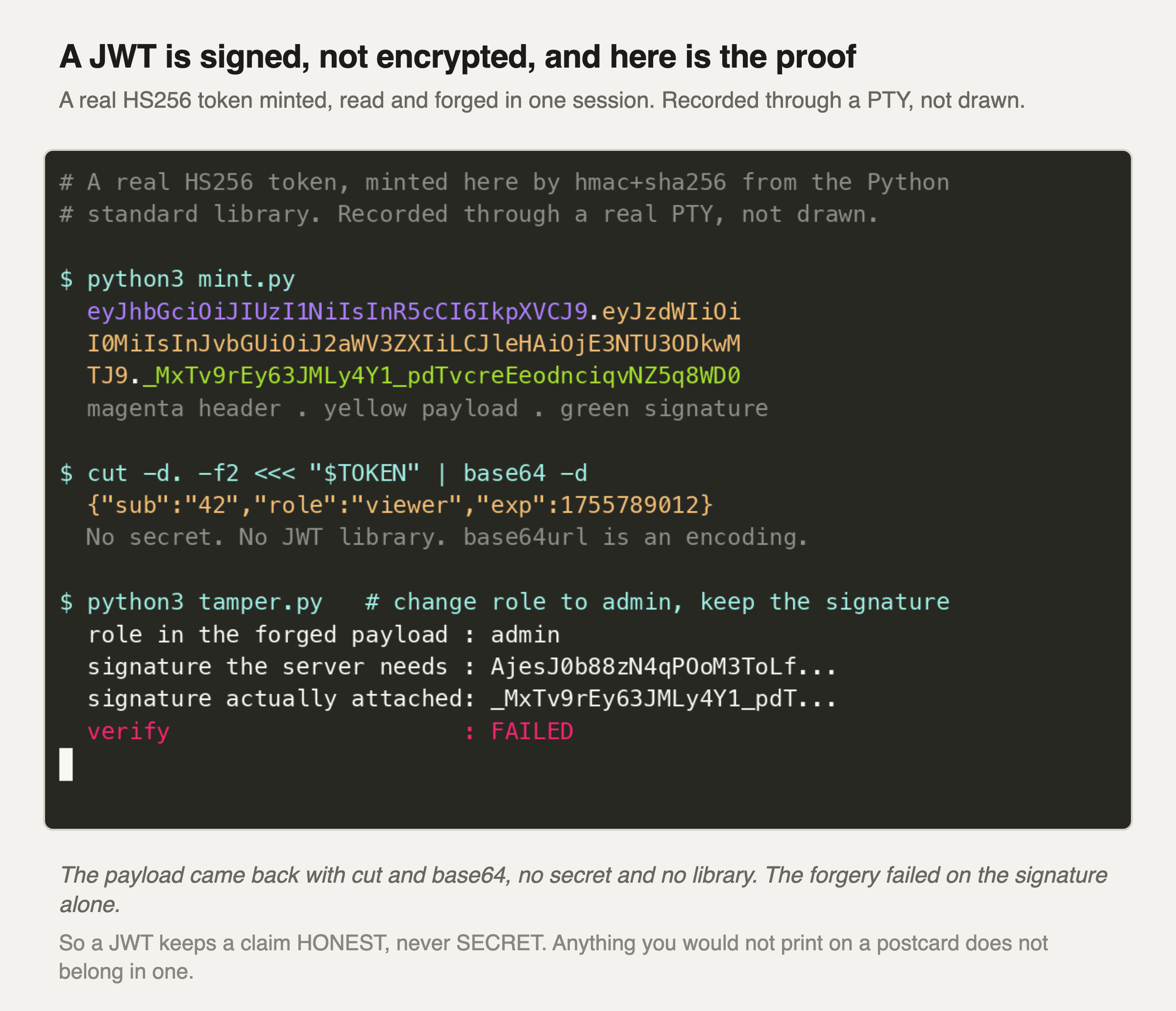
Three things happen in that terminal, and none of them needs a library.
First the token gets made. An HS256 JWT is two base64url blobs joined by a dot, plus a keyed hash over the pair. That is all it is. The colours show where each part starts and stops inside the one long string.
Then the payload comes straight back out with cut and base64 -d. No key. No verification. Nothing you need permission for. If a token ends up in your logs, in a browser extension or in a , everything inside it has ended up there too.
The last step changes role to admin. Any server will parse that payload happily. What it cannot do is produce a matching signature, because that needs the secret. Both signatures print one under the other and the check fails.
So the lesson is not "encrypt your tokens". Put nothing in a JWT you would mind seeing published. A signature tells you who wrote the token. It has never told you who can read it.