System design interview guide
Design an Authentication System: Passwords, Sessions, JWT, Refresh Tokens and MFA
Short answer
An authentication system proves who a user is. Passwords are stored only as slow, salted hashes (Argon2id), checked by a separate hashing pool behind rate limits. After login, the server issues a short-lived signed access token (about 15 minutes). Every service checks it with a public key and no database call. It also issues a refresh token that is stored as a hash, works only once and can be revoked. A second factor (an authenticator app code, an SMS code or a passkey) protects against stolen passwords, and password reset uses single-use, expiring tokens and the same message for every email.
Two courses by the author of this page:
770 lessons · 18 free to read
₹1,777 in India · $49 elsewhere, once
Get System DesignYou own this course
210 lessons · 10 free to read
₹2,777 in India · $49 elsewhere, once
Get AI EngineeringYou own this course
Save your progress and get the interview checklist PDF
Every app you use starts with the same question: are you really who you say you are? The part of the system that answers it is the authentication system. It looks small, a login form and a password check, but it guards every other part of the product. If it is slow, nobody can get in. If it is weak, someone else gets in as you. Take an interview-sized app with 100 million accounts and 20 million people active each day. At its busiest it must check about 463 typed passwords a second and refresh about 5,600 tokens a second. It must also let about 46,000 API calls a second prove who is calling, without asking the database each time. It must do all this while attackers try leaked passwords from other websites against it all day long.
An authentication system proves who a user is. It is different from authorization, which decides what that user is allowed to do. First, some terms. A credential is the proof a user shows: a password, a code from a phone, or a passkey. A password hash is the result of running the password through a slow one-way function, so the database never stores the password itself. A salt is a random value stored with each hash, so two users with the same password get different hashes. After the user proves who they are, the server gives them something to show on later requests, so they do not type the password every time. That can be a session: a long random id kept in a cookie, with the details stored on the server. Or it can be a token: a signed piece of data, such as a JWT (JSON Web Token), that any service can check with a public key without asking the database. Most apps use a short-lived access token (about 15 minutes) plus a long-lived refresh token that can get a new access token. Multi-factor authentication (MFA) asks for a second proof, such as a 6-digit one-time password (OTP) from an app or an SMS. The design must also slow down attackers who guess passwords, give a safe way to reset a forgotten password, and let a user log out of a lost phone.

Where it shows up
Asked as 'design an authentication system', 'design a login system', 'design an auth service', 'design user authentication with JWT' or 'design OTP login'. Product companies, fintech and payment companies, and any team that builds identity, ask it for backend and full-stack roles. It also comes up inside bigger questions, when the interviewer asks 'and how do users log in?'.
Spec sheetan authentication system
- 01Password logins
- about 46 a second on average, 463 at peak
- 02CPU for password hashing
- about 44 CPU cores at peak
- 03Memory for password hashing
- about 840 MB at peak
- 04Token refreshes
- about 1,850 a second on average, 5,600 at peak
worked through below, with the maths
Why this question is asked
It tests whether you know the difference between a system that works and a system that is safe. A weak answer stores passwords with a fast hash, puts a JWT that never expires in local storage, and has no plan for a stolen phone. A strong answer explains why password hashing must be slow on purpose. It picks sessions or tokens for a reason, keeps access tokens short and rotates refresh tokens. And it can say exactly what happens when a token is stolen. It also tests numbers: a slow hash costs real CPU, so you must size it. And it tests the parts people forget: password reset, account enumeration, rate limits, and logging out everywhere.
This page is the free part.
The course goes deeper on the authentication system design
₹1,777 in India$49 everywhere elseonce, for the whole course
The System Design course covers the authentication system design across a run of lessons, not one page. These 4 alone are about 83 minutes of step-by-step reading, every one with a quiz.
- Authentication
Verifying who someone is, the foundation of every security system.
- JSON Web Tokens (JWT)
The most popular token format: compact, self-contained, and cryptographically signed.
- JWT Sessions
Using JWTs as session tokens: the trade-offs, pitfalls, and best practices.
- Cookie-Based Sessions
Using HTTP cookies to maintain user state across requests, the traditional session model.
all part of
System Design Masterclass
770 lessons · about 283 hours · 18 free to read
₹1,777in India, by UPI
$49everywhere else, by PayPal
It is really nice and good Please join the course
You own this course
Continue with Authenticationpay once,
yours for life
Live from the course bench
Before you design Authentication System, try the questions it rests on.
Real interview questions, live diagrams and measured lab results, pulled at random from the lessons. A new set every time you come back.

Requirements
Always clarify these in the first 5 minutes of the interview. Do not start drawing boxes until both lists are agreed.
Functional requirements
- Sign up with email or phone and a password, and verify the email or phone
- Log in with a password, then optionally a second factor (a code from an authenticator app, an SMS code, or a passkey)
- Keep the user logged in across visits without asking for the password each time
- Let every backend service check who is calling on every request
- Log out of one device, or of every device at once
- Reset a forgotten password safely
- Optionally log in with Google or another identity provider (social login)
Non-functional requirements
- Security first: a database leak must not reveal passwords, and a stolen token must stop working soon
- Low latency for checking a request: no database call on every API request
- High availability: if login is down, the whole product is down
- Resist guessing: slow down password guessing and leaked-password attacks without locking real users out
- Privacy: never reveal whether an email address has an account
- Auditability: record every login, failure, reset and new device
Back-of-envelope scale estimates
Show your math. Pulling numbers from thin air signals you have not thought about the load.
Password logins
about 46 a second on average, 463 at peak
Interview assumptions: 20 million daily active users, and only 1 in 5 of them types a password on a given day, because most visits reuse a session. 20,000,000 x 0.2 = 4 million logins a day. 4,000,000 / 86,400 seconds = 46.3 a second. Assume the busiest second is 10 times the average: 463 a second. Say these assumptions out loud first.
CPU for password hashing
about 44 CPU cores at peak
OWASP's minimum setting for Argon2id is 19 MiB of memory, 2 passes and 1 lane. Measured for this page over 21 runs, one such hash took a median of 95 ms on one laptop core. 463 logins a second x 0.095 seconds = 44 cores busy only with hashing. That is the price of a slow hash, and it is why hashing runs in its own pool of servers that can grow.
Memory for password hashing
about 840 MB at peak
About 44 hashes run at the same moment (from the line above), and each one uses 19 MiB of memory on purpose. 44 x 19 MiB = 836 MiB. The memory cost is what makes Argon2id hard to attack with cheap graphics cards, so do not lower it to save memory.
Token refreshes
about 1,850 a second on average, 5,600 at peak
Interview assumptions: an access token lives 15 minutes and an active user's app is open about 2 hours a day. 2 x 60 / 15 = 8 refreshes per user a day. 20,000,000 x 8 = 160 million a day = 1,852 a second. Assume peak is 3 times that: 5,556 a second. Each refresh is one read and one write in the token store, so it must be fast.
Access token checks
about 46,000 a second
Interview assumption: 200 API calls per active user a day. 20,000,000 x 200 = 4 billion a day = 46,296 a second. If each check asked the database, the database would need to answer 46,000 extra reads a second. A signed token is checked with a public key in memory, so these checks cost no database read at all.
Refresh token store
about 6 GB
Interview assumptions: 1.5 signed-in devices per active user and 200 bytes per stored token row (the token's hash, user, device, family id and expiry). 20,000,000 x 1.5 = 30 million rows x 200 bytes = 6 GB. That fits in memory on one cache server, with a database behind it as the source of truth.
Guessing a 6-digit code
1 in 200,000 with 5 tries
A 6-digit code has 1,000,000 possible values. If you allow 5 wrong tries before the code is thrown away, an attacker's chance is 5 / 1,000,000 = 1 in 200,000. With 100 tries it would be 1 in 10,000. That is why every code needs its own small try limit, separate from the password limit.
High-level architecture
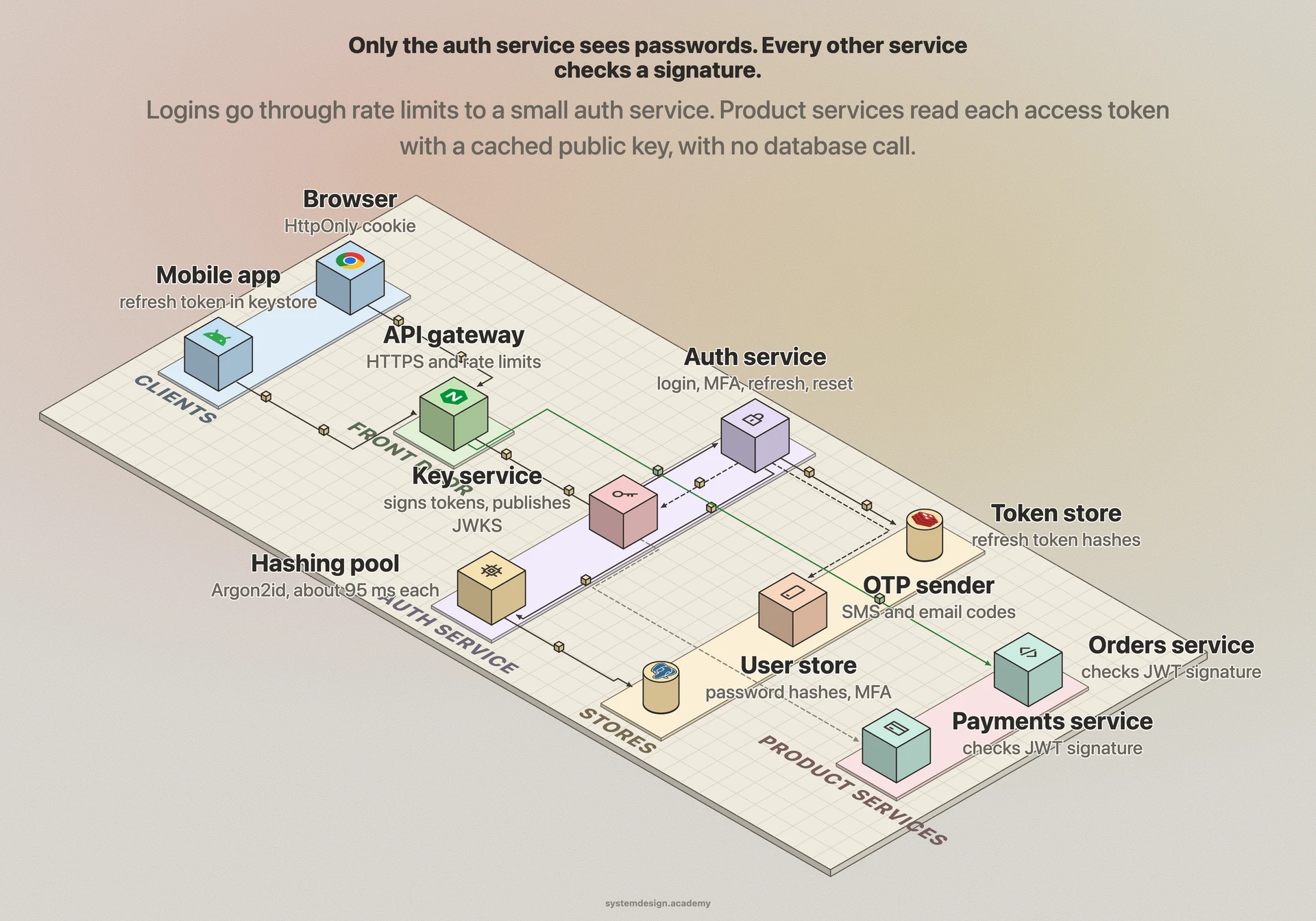
Draw the client on the left: a browser or a mobile app. Every request goes first to an API gateway, the single front door that terminates HTTPS and applies rate limits. Behind it, draw the auth service, which owns login, sign-up, MFA, refresh, logout and password reset. It has four helpers. The user store is a database table of users with their password hashes, MFA settings and status. The hashing pool is a set of workers that run the slow password hash, so a login burst does not starve the rest of the auth service. The token store is a fast key-value store (for example Redis, with a database behind it) that holds refresh tokens and sessions, so they can be found, rotated and revoked. The OTP sender sends codes by SMS or email through an outside provider. A key service holds the private signing key for access tokens; only the auth service can sign, and it publishes the matching public keys at a well-known address. On the right, draw the product services, such as orders or payments. They never see a password. They read the access token on each request, check its signature with the cached public key, check that it has not expired, and read the user id from inside it. An event log records every login, failure, reset and new device. It feeds a risk engine that can ask for MFA when something looks unusual, such as a login from a new country.
In a real interview, sketch this on the whiteboard before diving into any single box.
One login, from password to tokens
Asha opens the app on a new phone and logs in with her email, her password and the code from her authenticator app. This is a good example to walk through in an interview.
- 1
Front door
The request reaches the API gateway over HTTPS. The gateway counts requests from this IP address and for this email address, and lets it through because both are under their limits.
- 2
Find the user
The auth service looks up Asha's row by email. If no row existed, it would still run a dummy hash and return the same error, so the timing and the message do not reveal which emails have accounts.
- 3
Check the password
A hashing worker runs Argon2id on the typed password with Asha's stored salt and settings, and compares the result with the stored hash using a constant-time compare. It matches.
- 4
Second factor
Asha has MFA turned on, so the service asks for a code. Her app shows a 6-digit code for the current 30-second window. The service accepts it and marks that code as used, so it cannot be replayed.
- 5
Issue tokens
The service signs a 15-minute access token with her user id and a key id. It also creates a refresh token of 256 random bits. Only a hash of it is stored, with this phone's device id and a new family id.
- 6
Use the app
Each API call carries the access token. The orders service checks the signature with the cached public key and the expiry time, then reads Asha's user id. No database call is needed.
- 7
Refresh and record
After 15 minutes the app sends the refresh token. The service marks it used, issues a new pair, and writes a 'new device login' event, which also sends Asha an email so she would notice a login that was not hers.
Core components
Walk through each service. The interviewer wants to hear what each one owns, not just the names.
API gateway
Terminates HTTPS and applies rate limits per IP address, per account and per device before a request reaches the auth service. It is the first defence against password guessing at scale.
Auth service
Owns sign-up, login, MFA, refresh, logout and password reset. It is the only service that sees passwords or signs tokens. Keep it small and separate from product code, so fewer people and fewer bugs can touch it.
Hashing pool
Workers that run the slow password hash (Argon2id, or bcrypt for older systems). Sized from the peak login rate, and scaled on its own, so a login burst cannot slow down token refreshes.
User store
The users table: id, email, password hash with its salt and settings, MFA settings, status (active, locked, deleted). A relational database works well, because this data is small, important and changes rarely.
Token store
Holds refresh tokens and server sessions by the hash of their value, with user, device, family and expiry. A fast key-value store answers each refresh in about a millisecond; a database behind it keeps the truth.
Key service
Keeps the private key that signs access tokens and publishes the public keys (a JWKS, a JSON list of keys with ids). Keys are rotated on a schedule: a new key signs new tokens, and the old public key stays published until its last token expires.
OTP sender and risk engine
The OTP sender delivers one-time codes by SMS or email through outside providers, with limits per phone number. The risk engine reads the event log and asks for a second factor when a login looks unusual.
Data model
Pick the right store per table. Justify each choice with the access pattern, not by reflex.
usersuser_idemail (unique, stored lower case)password_hash (includes algorithm, settings and salt)email_verified_atstatuscreated_atModern hash formats keep the algorithm, its settings and the salt inside the stored string, so you can raise the settings later and re-hash each user at their next successful login.
mfa_factorsfactor_iduser_idtype: totp, sms, passkeysecret (encrypted) or public keylast_used_stepcreated_atA TOTP secret must be encrypted at rest, because anyone who reads it can make valid codes. last_used_step stops the same code being used twice. A passkey row stores only a public key, so a leak of this table cannot be used to log in.
refresh_tokenstoken_hashuser_iddevice_idfamily_idusedexpires_atStore only a hash of the token, like a password, so a leak of this table does not hand out working tokens. family_id ties together every token that came from one login, so reuse of an old one can revoke the whole family.
sessions (if you use server sessions)session_id_hashuser_iddevicecreated_atlast_seen_atidle_expires_atUsed instead of, or as well as, refresh tokens for browser apps. The cookie holds a random id of at least 64 bits of entropy; the details live here, so logout is one delete.
auth_eventsevent_iduser_id (if known)type: login_ok, login_fail, mfa_fail, reset, new_deviceipdevicetimeAppend-only. Feeds rate limits, the risk engine, the 'new login' email, and the 'where am I logged in' page.
password_reset_tokenstoken_hashuser_idexpires_atused_atRandom, single use and short lived. Store only the hash. Using one ends the user's other sessions, or asks the user whether to end them.
Deep dives
These are the conversations the interviewer is steering you toward. Practice each one until you can talk through it without notes.
Storing passwords: slow on purpose
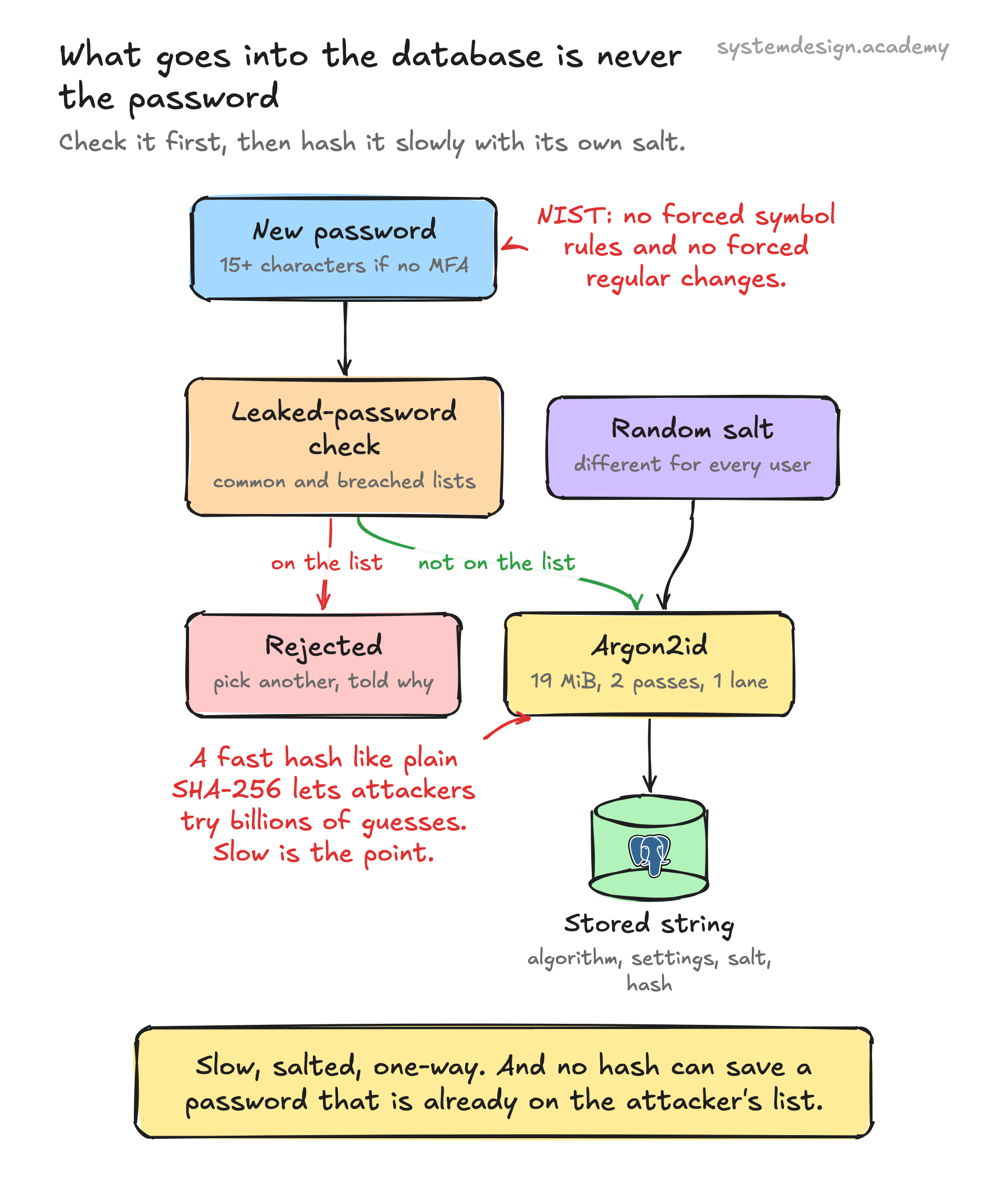
The first rule: never store the password. Store a hash, the output of a one-way function, so that a stolen database does not show anyone's password. The second rule surprises people: the hash must be slow. A normal hash such as SHA-256 is designed to be fast. That is good for checking files and bad here. An attacker with a stolen table can try billions of guesses a second on graphics cards. A password hash is built to be slow and to need memory, so each guess costs real work. OWASP's Password Storage Cheat Sheet recommends Argon2id with at least 19 MiB of memory, 2 iterations and 1 degree of parallelism. For older systems it accepts bcrypt with a work factor of 10 or more, and notes that most bcrypt versions read only the first 72 bytes of the password. If you must use PBKDF2, it asks for 600,000 iterations with HMAC-SHA256. Each user gets a random salt, stored with the hash, so two users with the same password get different hashes and an attacker cannot crack everyone at once. Modern hash formats store the algorithm, the settings and the salt inside one string, so you can raise the cost later. When a user logs in successfully, you have their real password for a moment. Re-hash it with the new settings and save it. Now the cost. We measured one Argon2id hash at the OWASP minimum at a median of 95 ms on one laptop core. At 463 logins a second that is 44 busy cores, so put hashing in its own pool that can grow, and rate limit login before the hash, not after it. Finally, check new passwords before you store them. NIST SP 800-63B (its 2025 revision) gives clear rules. A password needs at least 15 characters when it is the only factor, and at least 8 when it is part of MFA. Do not force mixes of character types, and do not force regular password changes. Reject passwords found on a list of common or leaked ones. A slow hash cannot save a password that is already on the attacker's list.
Sessions or tokens: how the server remembers you
After login, the client needs something to show on each request. There are two main choices. A server session: the server creates a long random id, stores the details (user, device, expiry) in a session store, and sends the id in a cookie. Each request looks up the id. OWASP's Session Management Cheat Sheet asks for at least 64 bits of entropy in the id. The cookie needs three flags. Secure means it is sent only over HTTPS. HttpOnly means page scripts cannot read it. SameSite limits when other sites can cause it to be sent. The server also gives a new session id right after login, so an attacker cannot plant an id before the user logs in. Logout is one delete, and it works at once. The cost is a store lookup on every request. A signed token, usually a JWT: the server puts the user id, an expiry time and a key id into a small JSON document and signs it with a private key. Any service can check the signature with the public key, in memory, with no lookup. That is why it scales well across many services: in our example it saves 46,000 store reads a second. The cost is that you cannot take a token back once it is issued; it stays valid until it expires. So the common design mixes both. Short-lived access tokens (about 15 minutes) that services check by signature, plus a refresh token that lives in the token store and can be revoked. For a browser-only app with one backend, plain server sessions in an HttpOnly cookie are often the simpler and safer choice. Say which one you pick and why.
Access tokens, refresh tokens and rotation
The access token is short-lived because it travels everywhere and cannot be recalled. The refresh token lives longer, days or weeks, but it is only ever sent to the auth service. When the access token expires, the app sends the refresh token and gets a new access token. Here is the problem: if a refresh token is stolen, for example from a phone backup or a log file, the thief can make new access tokens for weeks. The OAuth 2.0 security best practice, RFC 9700 (January 2025), has a rule for this. Public clients are apps that cannot keep a secret, such as mobile and browser apps. Their refresh tokens must be either bound to the client's own key (sender-constrained) or rotated. Rotation means each refresh token works once. Every refresh returns a new refresh token and marks the old one used, but the server remembers the link between them. If an old, used token ever comes back, either the real app or a thief is replaying it. The server cannot tell which, so RFC 9700 says it revokes the active refresh token, and the real user has to log in again. In practice, give every token from one login a family id, and revoke the whole family. Store only a hash of each token, the same way you store passwords, so a leak of the token table does not hand out working tokens. One more detail: mobile apps on bad networks sometimes send the same refresh twice. Many teams allow a grace period of a few seconds in which the just-replaced token still returns the same new pair, so a flaky network does not log people out. The listing below shows rotation and reuse detection in a few lines.
import hashlib, secrets

store = {}  # sha256(token) -> {"user", "family", "used"}; only hashes are kept

def h(token):
    return hashlib.sha256(token.encode()).hexdigest()

def issue(user, family=None):
    token = secrets.token_urlsafe(32)          # 256 random bits
    family = family or secrets.token_hex(4)    # one family per login on one device
    store[h(token)] = {"user": user, "family": family, "used": False}
    return token

def refresh(token):
    row = store.get(h(token))
    if row is None:
        return "rejected: unknown token"
    if row["used"]:                            # an old token came back: someone copied it
        for r in store.values():
            if r["family"] == row["family"]:
                r["used"] = True               # kill the whole family, every device copy
        return "REUSE DETECTED: family revoked, user must log in again"
    row["used"] = True                         # rotation: each token works once
    return issue(row["user"], row["family"])

t1 = issue("asha")
t2 = refresh(t1)                    # the app refreshes: t1 is now spent
print("app refresh ok:", t2 != t1)
print("thief replays t1:", refresh(t1))
print("app tries t2:", refresh(t2))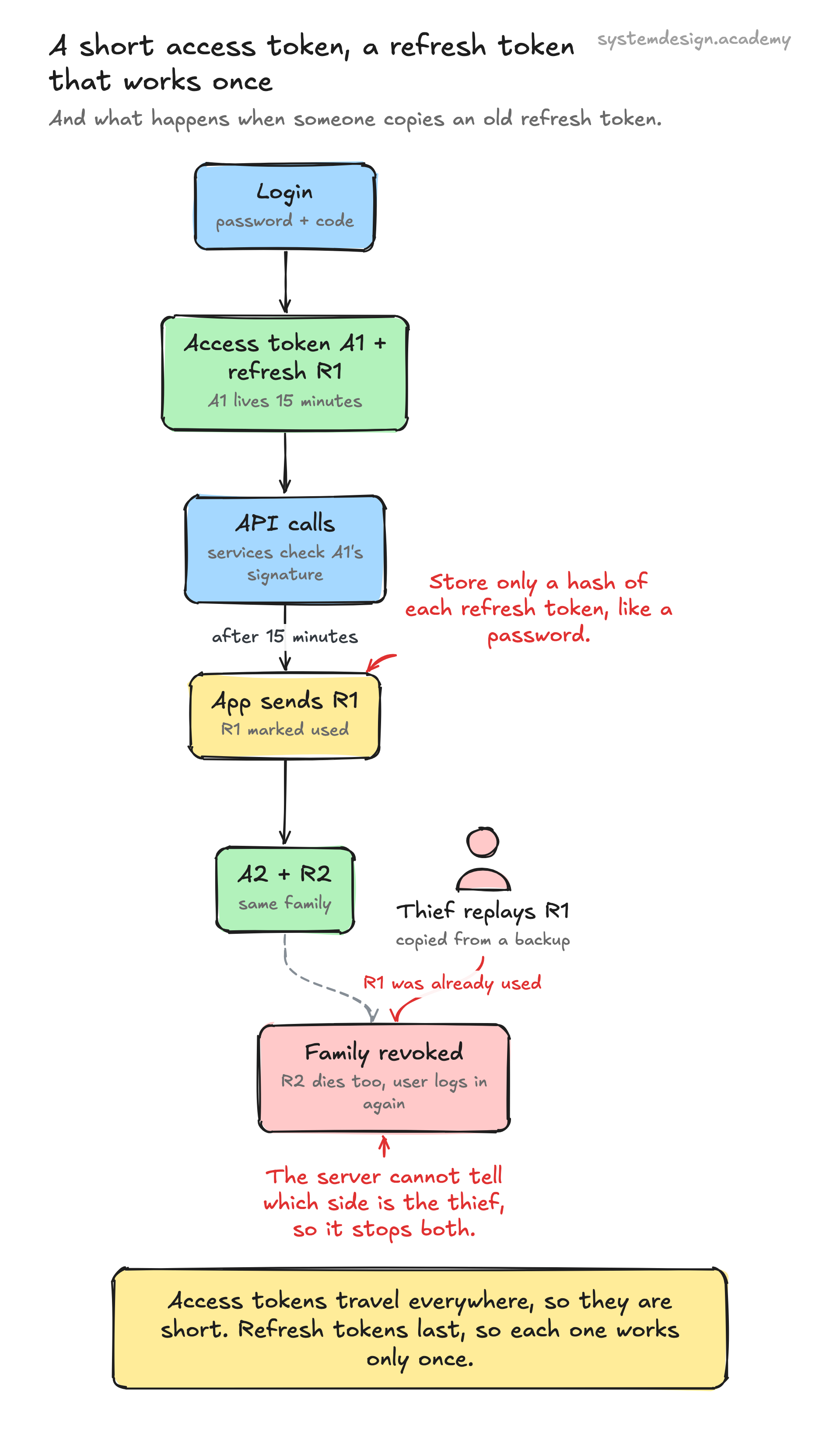
Multi-factor authentication: codes, SMS and passkeys
A password can be guessed, reused from another site or typed into a fake page. A second factor means a stolen password alone is not enough. There are three common kinds. An authenticator app uses TOTP (time-based one-time password, RFC 6238). At setup, the server and the app share a secret, usually through a QR code. Every 30 seconds, both sides compute a 6-digit code from the secret and the current time, so the app works with no network. RFC 6238 recommends a 30-second step and allowing at most one step of network delay, so the server accepts the current code and the one before it. Remember the last step that was used, so one code cannot be used twice, and encrypt the shared secret at rest, because anyone who reads it can make codes. An SMS or email code is a random 6-digit code the server generates, stores as a hash with a short expiry, and sends through a provider. It is easy for users, but SMS can be intercepted or moved to an attacker's SIM card, and it costs money per message, so limit codes per phone number and per hour. In both cases, limit wrong tries per code: with 5 tries the attacker's chance is 1 in 200,000; with 100 it would be 1 in 10,000. A passkey (WebAuthn) is the strongest. The device creates a key pair for your site; the private key never leaves the device and the server stores only the public key. At login the server sends a random challenge, the device signs it after a fingerprint or PIN, and the server checks the signature. The browser binds the key to your site's real domain, so a fake look-alike site cannot use it, which is why passkeys resist phishing. Offer recovery codes too, because people lose phones.
Stopping guessing and leaked-password attacks
Two attacks hit every login page. Brute force guesses many passwords for one account. Credential stuffing tries email and password pairs leaked from other websites, one try per account across millions of accounts, so a per-account limit alone does not see it. Use several layers. Rate limit at the gateway per IP address, per account and per device, with a token bucket in a fast shared store. Slow down repeated failures on one account with growing delays instead of a hard lock, because a hard lock lets anyone lock out any user just by typing wrong passwords. NIST SP 800-63B sets an upper bound of 100 consecutive failed attempts on one account before that authenticator is disabled, and says a lower limit is allowed. Watch the whole system for stuffing: a sudden rise in failed logins across many accounts, many accounts tried from one IP range, or many logins with known breached passwords. When the risk engine sees it, ask for a second factor or a challenge instead of blocking everyone. Return the same message and take about the same time for 'wrong password' and 'no such account', so attackers cannot use the login form to find which emails have accounts. And rate limit before the hash: the slow hash costs you about 95 ms of CPU each time, so an attacker who can make you hash without limits can take your login down.
Password reset and logging out everywhere
Password reset is a second login path, so it must be as strong as the first. OWASP's Forgot Password Cheat Sheet gives the rules. Show the same message whether or not the email has an account ('if this address is registered, we have sent a link'), and keep the response time the same. Make the reset token random from a secure generator and long enough that it cannot be guessed, store only its hash, make it work once, and let it expire after a short time. After the reset, end the user's other sessions or ask the user whether to end them. In our design, that means revoking every refresh token family for the user and deleting their server sessions. Access tokens that are already out will still work until they expire, which is the honest cost of stateless tokens: with a 15-minute lifetime, the window is at most 15 minutes. If that is too long for a bank or a payment app, make access tokens shorter. Or keep a small deny list of revoked token ids that services check, or a per-user 'tokens issued before this time are invalid' value. The same tools power the 'log out of all devices' button and the response to a reported account takeover.
Log in with Google: OAuth 2.0 and OpenID Connect
Many users would rather not make another password. Social login lets an identity provider such as Google prove who they are. The protocol is OpenID Connect (OIDC), a login layer on top of OAuth 2.0. Your app sends the user to the provider's login page. After the user agrees, the provider sends back a short code. Your server exchanges the code for an ID token: a signed JWT that says who the user is and which provider vouched for it. Your server checks the signature with the provider's public keys, and checks that the token is for your app and has not expired. Then it finds or creates the local user linked to that provider account. RFC 9700 says public clients, such as mobile and single-page apps, must use PKCE (Proof Key for Code Exchange). The app makes a random secret and sends only its hash at the start. It shows the secret when it exchanges the code, so a stolen code is useless to anyone else. It also says not to use the old implicit flow that returned tokens in the browser address bar. After social login, issue your own access and refresh tokens as usual; do not pass the provider's tokens around your own services. Be careful when linking accounts: only link a Google account to an existing local account by email if the provider says the email is verified, or an attacker could claim someone else's account.
Trade-offs to discuss
Every senior interviewer expects you to surface at least 3 of these. Pick the decisions, state the alternatives, and justify your choice.
Server sessions vs signed tokens (JWT)
Sessions can be revoked at once and keep data off the client, but every request needs a store lookup. Signed tokens are checked in memory by any service, which saves 46,000 lookups a second here, but cannot be recalled before they expire. Most systems use short access tokens plus revocable refresh tokens or sessions.
Short vs long access token lifetime
A longer lifetime means fewer refreshes and less load on the token store. A shorter lifetime means a stolen token, or a token of a user who just logged out, works for less time. About 15 minutes is a common middle; payment apps go shorter or add a deny list.
Hard account lock vs growing delays
A hard lock after a few failures stops guessing, but lets anyone lock out any user by typing wrong passwords. Growing delays, rate limits per IP and per device, and asking for MFA when risk is high stop attackers while real users still get in.
SMS codes vs authenticator apps vs passkeys
SMS works for everyone with a phone, but can be intercepted or moved to another SIM and costs money. Authenticator apps are free and work offline, but take setup. Passkeys resist phishing and store no secret on the server, but need recovery for lost devices. Offer the stronger ones and let SMS be a fallback.
Hash cost vs login capacity
A higher Argon2id cost makes stolen hashes harder to crack and makes every login more expensive: at 95 ms a hash, 463 logins a second need 44 cores. Keep the cost at or above the OWASP minimum, size the hashing pool from the peak, and rate limit before hashing.
Free PDF · 18 pages
Get the free System Design Interview Cheat Sheet
The interview in seven stages, the numbers worth knowing by heart, and twelve classic systems on one page each, every line linked to the lesson it comes from.
Follow-up questions to expect
After the main design, the interviewer usually picks one part and asks more. Here is what to say.
A user says they logged out, but an old API call with their token still worked a few minutes later. Is that a bug?
Not if access tokens are stateless. Logout revoked the refresh token, but an access token stays valid until it expires, at most its lifetime, 15 minutes here. If that is not acceptable, shorten the lifetime or keep a small deny list of revoked token ids that services check.
Your database of password hashes leaks. What do you do?
Slow hashes buy time but not safety. Force a password reset for all users at their next login, revoke all refresh tokens and sessions, tell users, and check that the hash settings were at least the OWASP minimum. Then raise the settings if they were lower.
Failed logins jump tenfold, spread across millions of accounts, one try each. What is happening and how do you respond?
Credential stuffing: passwords leaked from another site, tried once per account. Per-account limits do not see it. Watch failure rates across the whole system and per IP range, ask for MFA or a challenge on risky logins, and check logins against breached-password lists.
How do product services check tokens if you rotate the signing key?
Each token carries a key id. The auth service publishes all current public keys, and services cache them. Start signing with the new key, keep publishing the old public key until the last token it signed has expired, then remove it.
A mobile app on a bad network sends the same refresh token twice and the user gets logged out. How do you fix it?
Allow a short grace period: for a few seconds after a refresh token is replaced, the same old token returns the same new pair instead of being treated as reuse. Outside that window, reuse still revokes the whole family.
How an authentication system actually does it
The rules on this page come from the documents security teams actually follow. OWASP's cheat sheets set the password hash settings: Argon2id at 19 MiB, 2 passes and 1 lane, or bcrypt at work factor 10 or more. They set the session cookie rules: 64 bits of entropy, the Secure, HttpOnly and SameSite flags, and a new id after login. They also set the password reset rules: the same message for every email, and single-use expiring tokens. NIST SP 800-63B, in its 2025 revision, sets password length, bans forced complexity and forced regular changes, asks for a check against leaked passwords and caps failed attempts at 100. RFC 6238 defines the 30-second codes in authenticator apps. RFC 9700, the OAuth 2.0 security best practice published in January 2025, requires PKCE for public clients and rotation or binding for their refresh tokens. The hash time and every capacity number on this page are our own arithmetic and measurement, shown in full, not figures from any company.
Lessons to study before this interview
If any of these topics are fuzzy, the interviewer will catch it. Each lesson is 15 to 60 minutes with diagrams, code, and a quiz.
Authentication
intermediate / security architecture
JSON Web Tokens (JWT)
intermediate / security architecture
JWT Sessions
intermediate / security architecture
Cookie-Based Sessions
intermediate / security architecture
Multi-Factor Authentication (MFA)
intermediate / security architecture
OAuth 2.0
intermediate / security architecture
OpenID Connect
intermediate / security architecture
Distributed Session Management
intermediate / security architecture
API Rate Limiting
intermediate / api design protocols
Secrets Management
intermediate / security architecture
Security Audit Logging
intermediate / security architecture
Frequently asked questions
Go deeper
This guide is built on these 6 lessons. Each one teaches one piece of the authentication system design above, step by step.
- AuthenticationSystem Design · security architecture · 18 min
- JSON Web Tokens (JWT)System Design · security architecture · 25 min
- JWT SessionsSystem Design · security architecture · 22 min
- Cookie-Based SessionsSystem Design · security architecture · 18 min
- Multi-Factor Authentication (MFA)System Design · security architecture · 10 min
- OAuth 2.0System Design · security architecture · 17 min
Practice with 770 system design lessons
Lifetime access for ₹1,777 in India or $49 elsewhere. Interactive diagrams, quizzes, and 20 capstone projects to practise on.

This one question is not enough for the interview.
Get all 200 questions in the System Design and Distributed Systems pack
Each question has why it is asked, a full answer, what the interviewer listens for, the follow-ups, the common mistakes and a diagram (268 diagrams in all). A PDF you keep, junior to staff level.
India: UPI, cards or netbanking through Razorpay. Elsewhere: card or PayPal. Download at once from My packs.
NEWSystem Design Hands-On
Included in the System Design course: real systems, built live
Postgres Sharding: Complete Hands-On (PgBouncer + Citus). 2 h 36 min and 20 chapters: one PostgreSQL loaded until it breaks, then four shards behind a router you write, PgBouncer and Citus, with the 139-page slide deck. The first 15 minutes are free to watch.