Ten Books From a Pile of Forty-Seven
Let me start with a picture.
Imagine a library. You ask two people the same question: "bring me every book that mentions Google."
The first person walks to a big pile of books, picks up the ten that look most likely, and brings them back. That is all they can carry. They never check the rest of the pile.
The second person goes to the card index. Long ago, someone read every book once and wrote a card for each name inside it. So the second person opens the drawer marked "Google" and reads the full list.
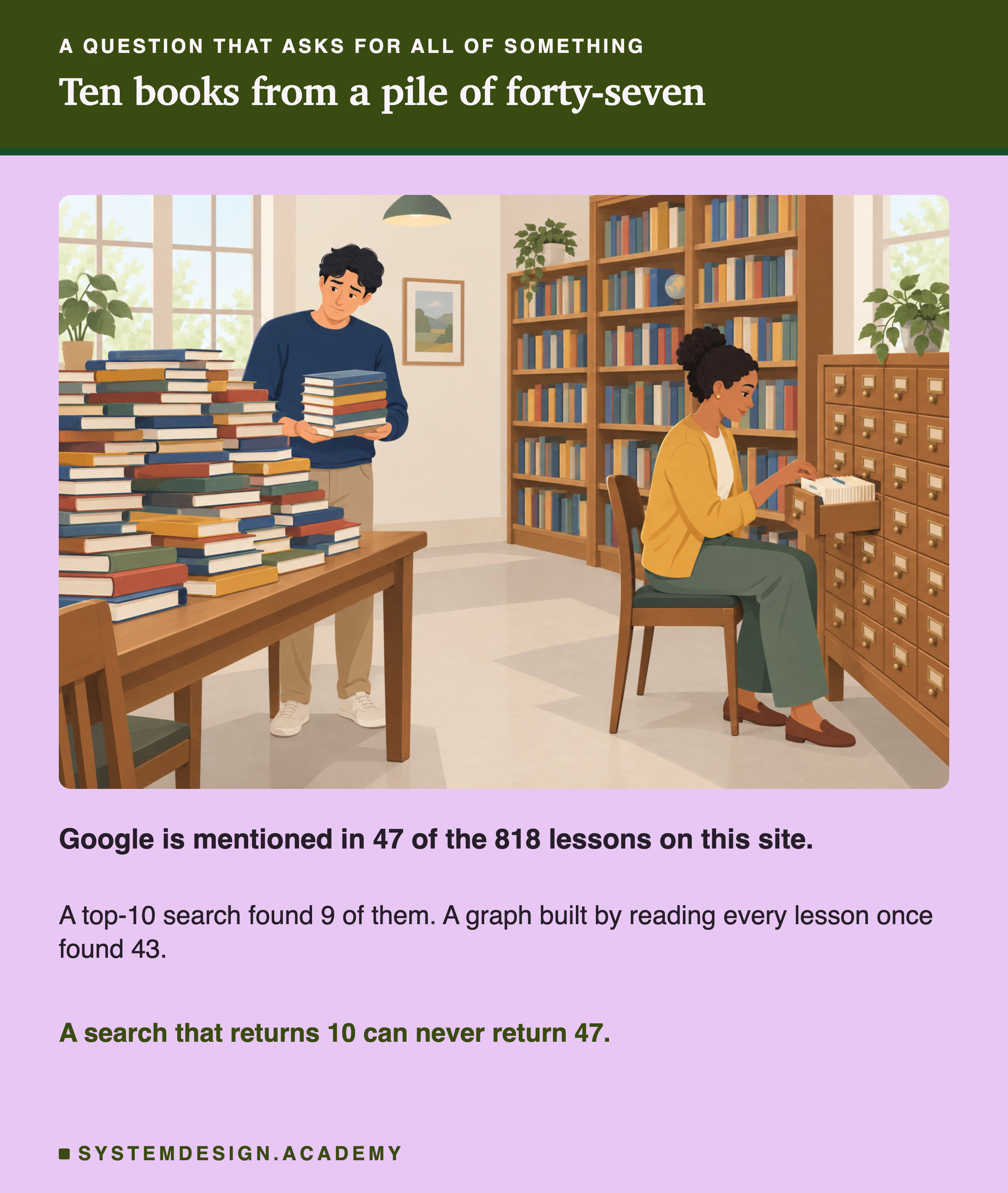
Most search in AI apps works like the first person. It returns the top 10 results, and stops.
On this site, Google is mentioned in 47 of our 818 lessons. A top-10 search can bring back at most 10 of them. In the lab below, it found 9.
Today we look at questions that ask for all of something, and why normal search cannot answer them. Then we compare two ways that have no top-10 limit: an index built by a model, and a plain text filter. The first is the starting idea of a method called GraphRAG. The second turns out to be very hard to beat.
The Words You Need First
Please read this slide slowly if any word is new. Every slide after it uses these words.
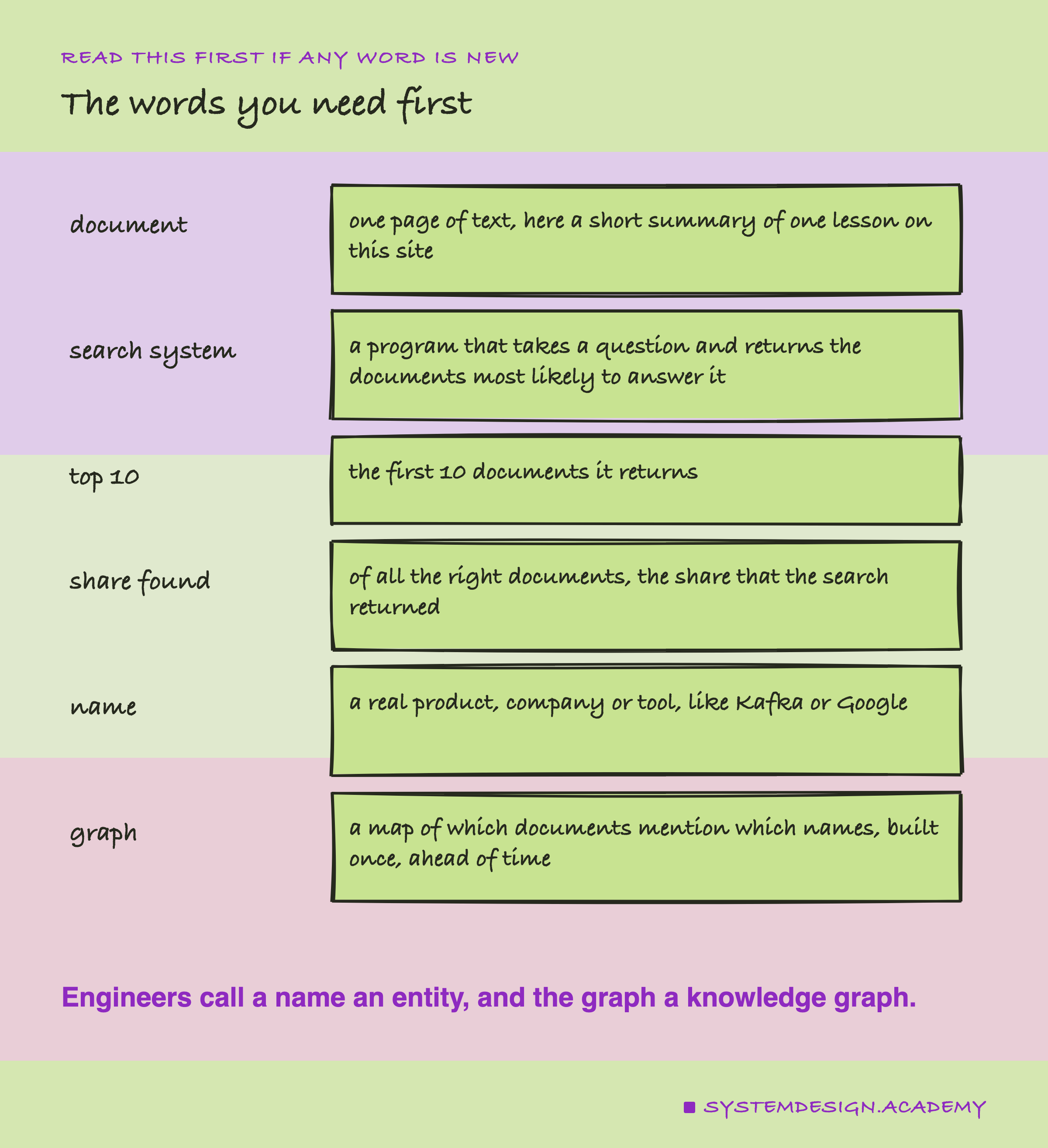
Document. One page of text. Here, a document is a short summary of one lesson on this site, about 750 characters long. There are 818 of them.
Search system. A program that takes a question and returns the documents most likely to answer it. In a RAG system, search is the first step. RAG stands for . A RAG app first searches your documents. Then it gives the best ones to a language model. A language model is the kind of AI that writes text, like the one behind ChatGPT. The model then writes the answer.
Top 10. The first 10 documents a search system returns. Almost every RAG system returns a fixed number like this. Engineers call that number k, so "top k" means "the first k results".
Share found. For a question with many right documents, the share of them that the search returned. If 20 documents are right and the search returns 5 of them, the share found is 5 out of 20, which is 25 percent.
Name. Here, the name of a real product, company or tool, like Kafka, or Google. Engineers call these entities.
Graph. A map that says which documents mention which names. You build it once, ahead of time, by reading every document. A full knowledge graph also stores how names relate to each other. Using a graph like this to answer questions is called GraphRAG.
Prompt and call. A prompt is the text you send to a language model. A call is one request to the model: one prompt in, one reply out.
Two Kinds of Question
Most questions people ask a app have one right document.
"How does store messages?" One lesson explains it. Search finds that lesson, puts it near the top, and the app writes an answer. Top 10 is plenty.
Other questions ask for all of something.
"Which lessons mention Kafka?" "How many of our contracts name this supplier?" "Which support tickets are about the login page?"
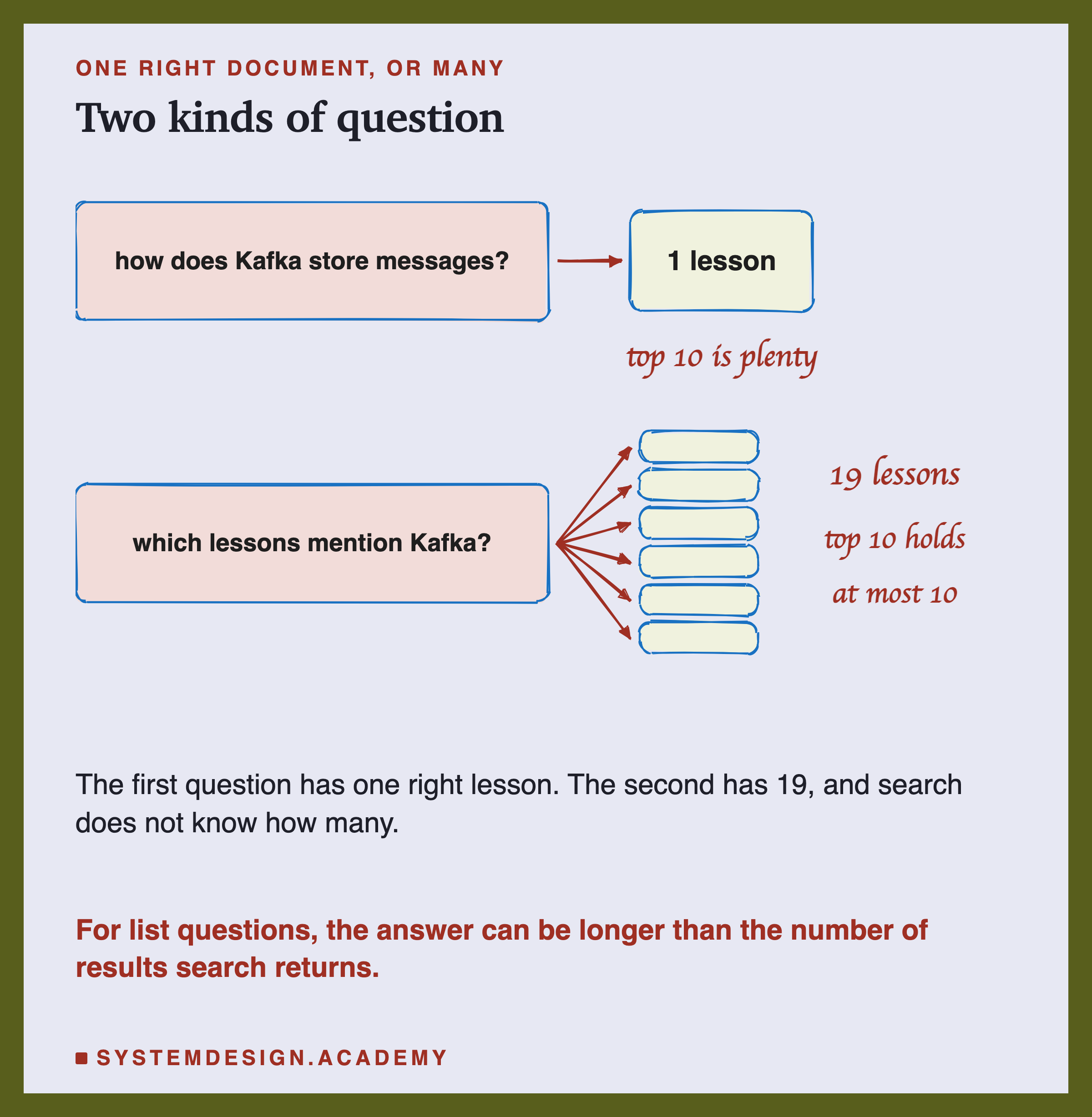
For these questions, the answer is a list. The list can be longer than 10. Search does not know how long it is, and it has only 10 places to put results.
Now let me show you what happens when you ask search these questions anyway.
The Ceiling You Cannot Search Past
Here is the simple arithmetic first.
If a name is in 47 documents and your search returns 10, the best possible result is 10 out of 47. That is about 21 percent. No search system can do better, however clever it is. It has only 10 places.
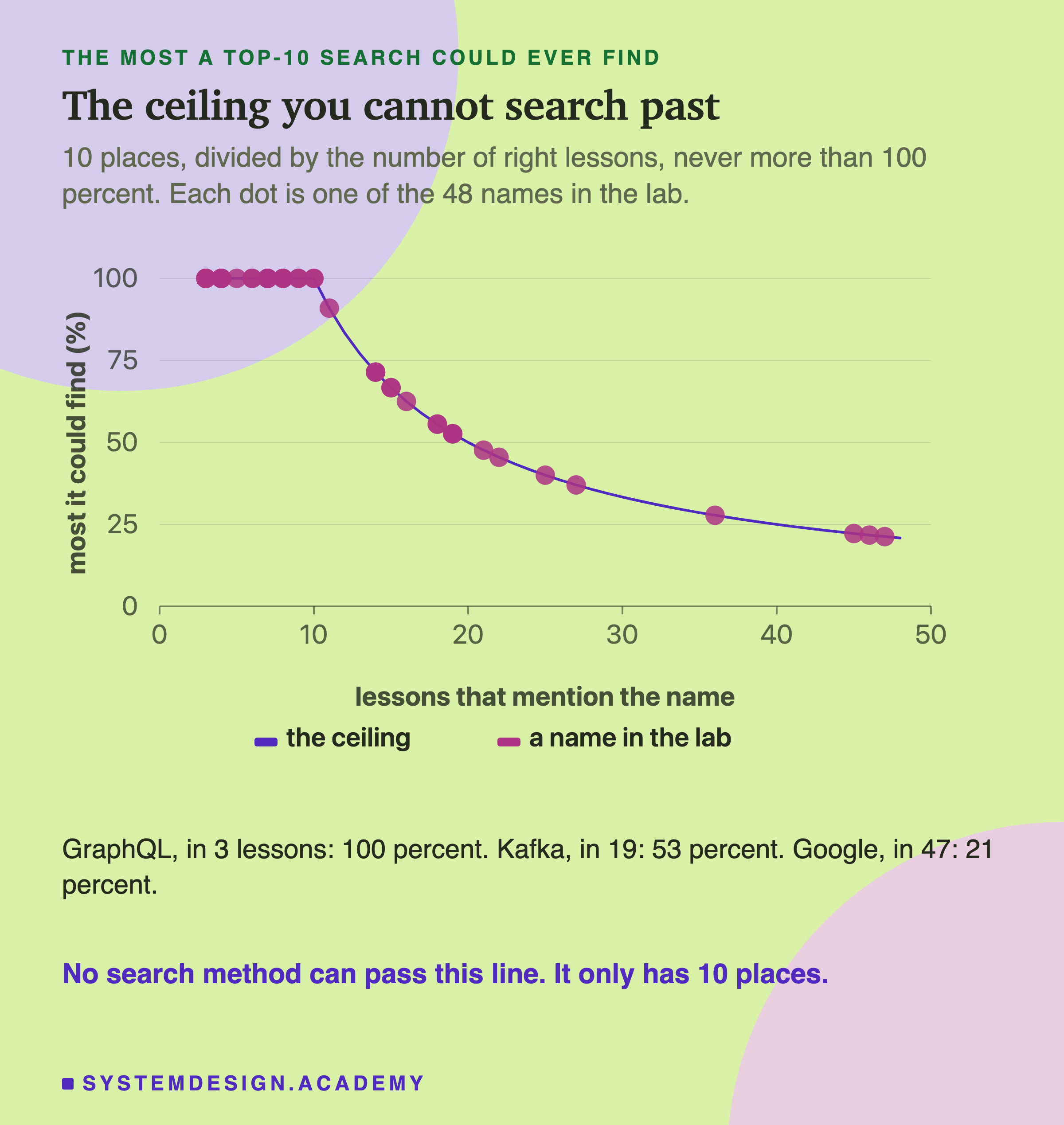
I will call this the ceiling. It is 10 divided by the number of right documents, and never more than 100 percent.
For a name in 5 documents, the ceiling is 100 percent: all 5 fit in 10 places. For a name in 20 documents, it is 50 percent. The more documents mention a name, the lower the ceiling.
A bigger k, like 20 or 50, raises the ceiling. But every extra document is more text sent to the language model. That costs money and time. And search still does not know how many right documents there are, so it cannot tell you when to stop.
How a Name Index Answers It
The card index in the library did its reading ahead of time. We can do the same with a model.
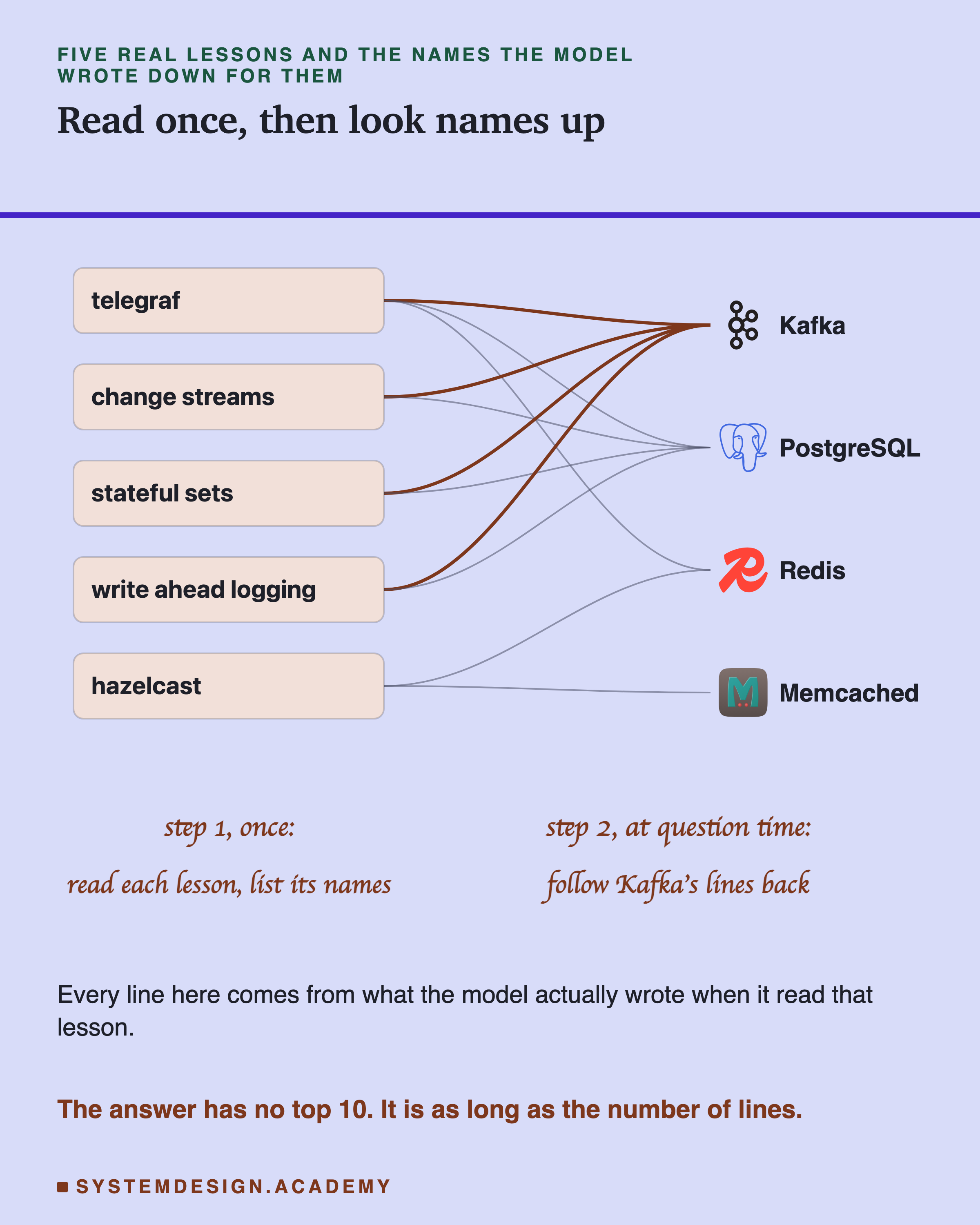
Step 1, once, ahead of time. A language model reads every document. For each one, it writes down the names it sees. For example, in the lab, the model read the lesson on Hazelcast and wrote down "Hazelcast", "", "Memcached" and "Java". This step is called extraction.
Step 2, at question time. Someone asks "which lessons mention ?". The app does not search. It looks up "Kafka" in the lists the model wrote, and returns every document that has it. There is no top 10. The list is as long as it needs to be, so its length is also a count, as good as the model's reading.
I will call this a name index. In the charts it is labelled "graph". It is the first step of GraphRAG, and only the first step. A full GraphRAG system, like the one Microsoft published, does more. It writes down how names relate, like "Uber uses Kafka". It merges different spellings of the same name. It groups related names together and writes a summary of each group. This lab tests none of that. It tests only the name index.
The weak point is step 1. The index is only as good as the model's reading. If the model misses a name, the index misses that document, and nothing tells you. We will see this happen.
How the Lab Was Built
Here is exactly what the lab did.
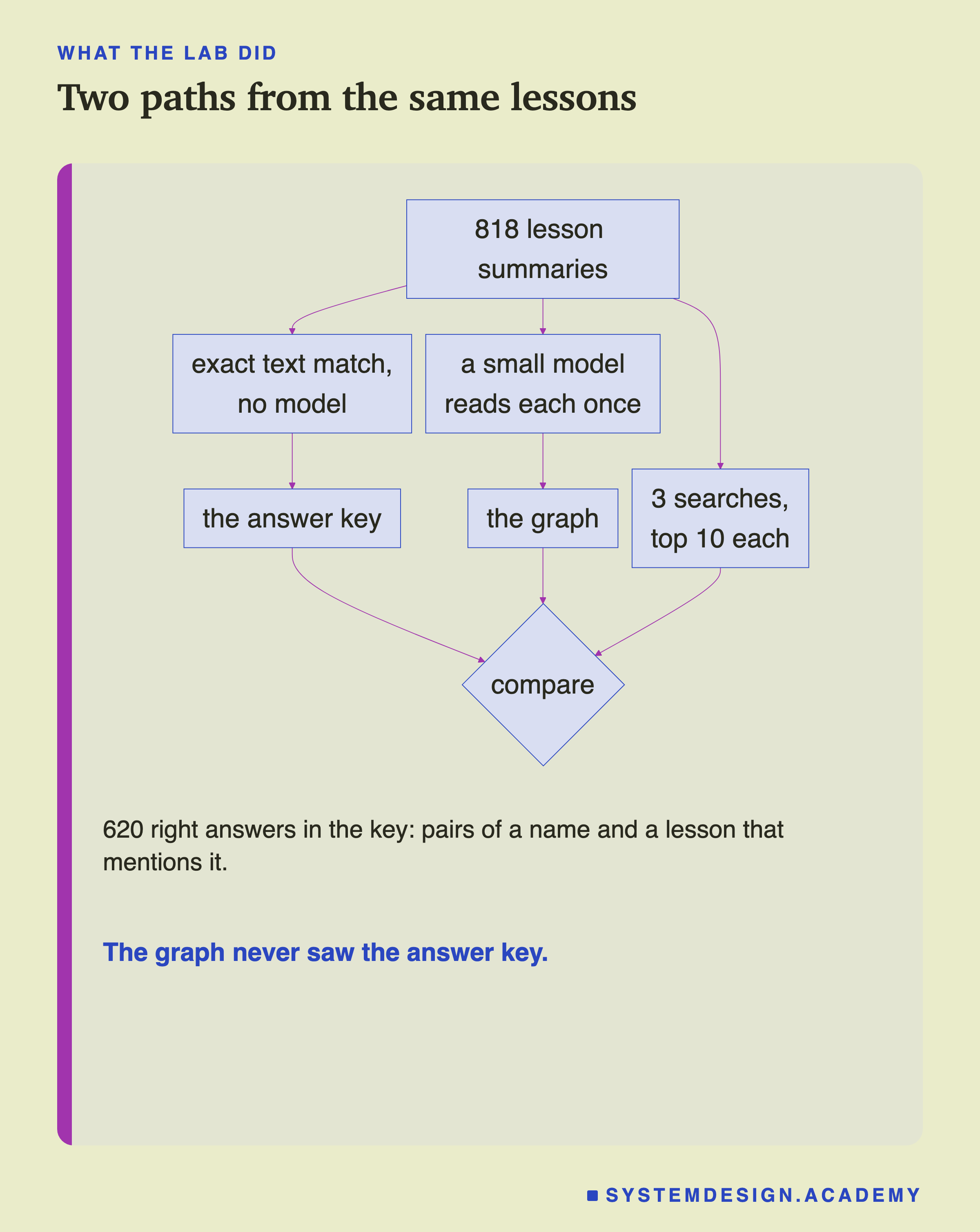
The three paths never mix until the last step. The answer key and the graph are made separately, and search runs without either of them.
-
The answer key. An answer key is the list of right answers you mark against. Here, for 48 real names, it is every lesson whose title or text contains the name as a whole word, with the same capital letters. "Whole word" means "Spark" counts, but "Sparkle" does not. So "Slack" the product counts, and "slack" the ordinary word does not. A few names also count a second spelling, like "Postgres" for PostgreSQL. No model is involved in this step. In total there are 620 right answers, each one a pair of a name and a lesson that mentions it.
-
The names. They come from a fixed list of well-known products and companies, written before the run. Every name on that list that appears in at least 3 lessons was used. That gave 48 names, from Google (47 lessons) down to names like Discord and (3 lessons).
-
Search. Each name became a question: "Which lessons mention ?". Three search systems answered it:
- Keyword search (also called BM25) scores each document by the exact words it shares with the question.
- Meaning search (also called dense search) turns each text into a list of numbers, called an . Texts with a similar meaning get similar numbers, so it finds documents close in meaning.
The Checks Before Any Score
Two things could make this lab lie. So the lab checks both.
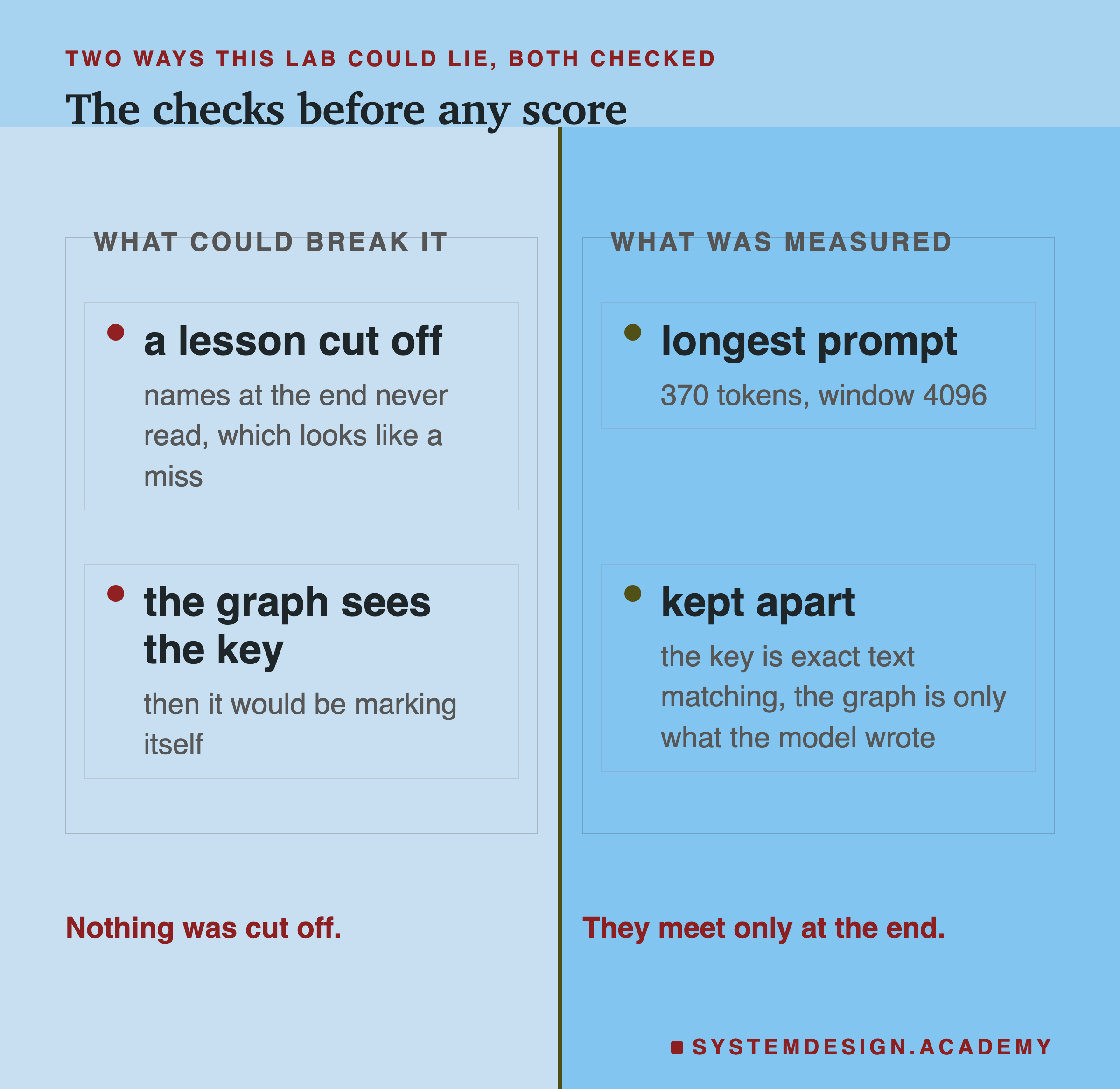
Was any lesson cut off? A language model reads text in small pieces called tokens. A token is roughly three quarters of a word. The model can only read up to a fixed number of tokens at once, called the window. If a prompt is longer than the window, the end is cut off without warning, and names at the end are never read. That would look exactly like the model missing names. So the lab recorded the size of every prompt. The longest was 370 tokens. The window was 4,096 tokens. Nothing was cut off.
Did the index see the answers? No. The answer key comes from exact text matching. The index comes only from the names the model wrote. They meet only when the lab compares them at the end.
The Lab, Running
This is the real output of the lab's report.
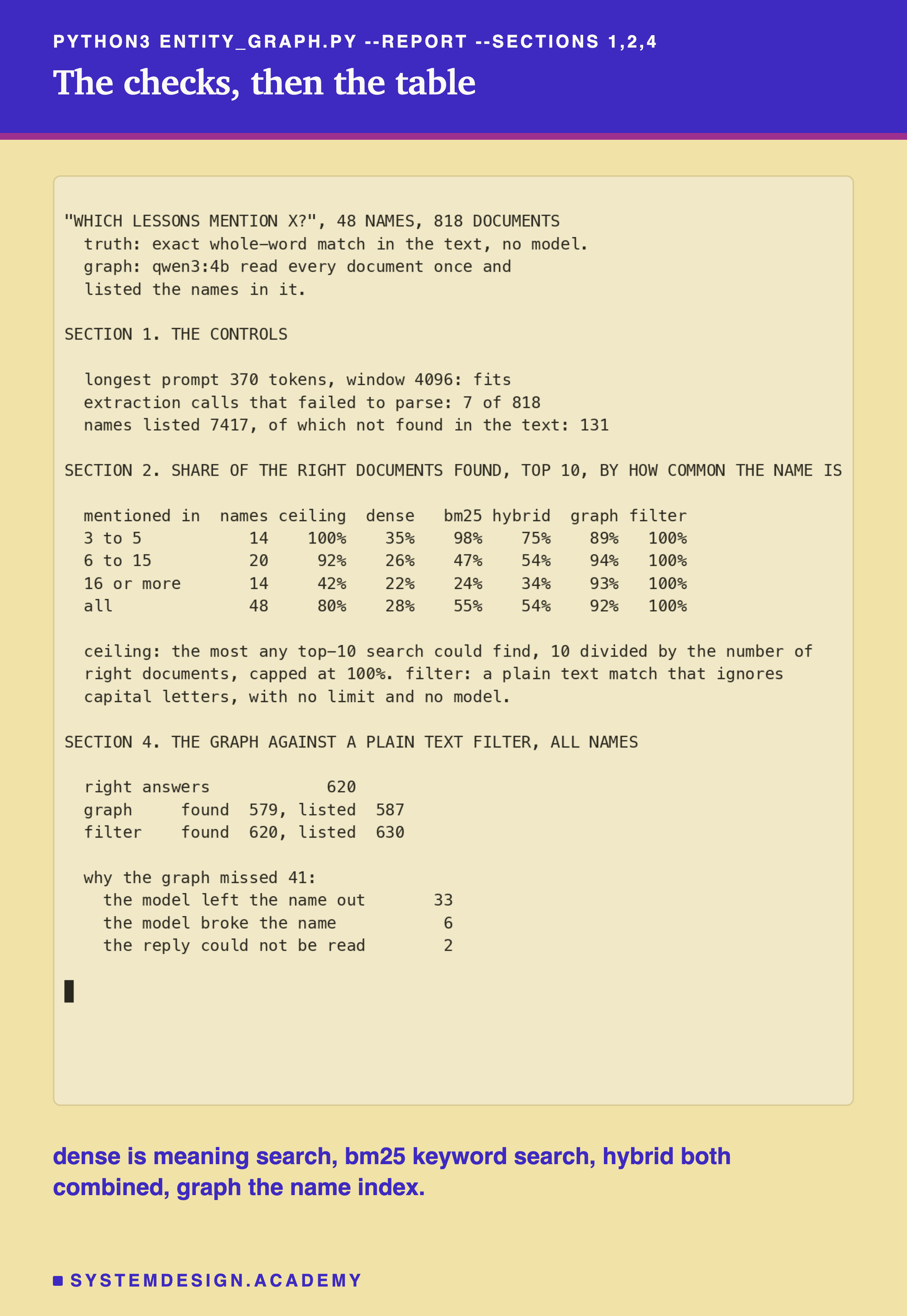
In this recording, dense means meaning search, bm25 means keyword search, hybrid means both combined, graph means the name index, and filter means the plain text filter. The next slides explain each part.
What Each Method Found
Here is the share of the right lessons each method found. The names are grouped by how many lessons mention them.
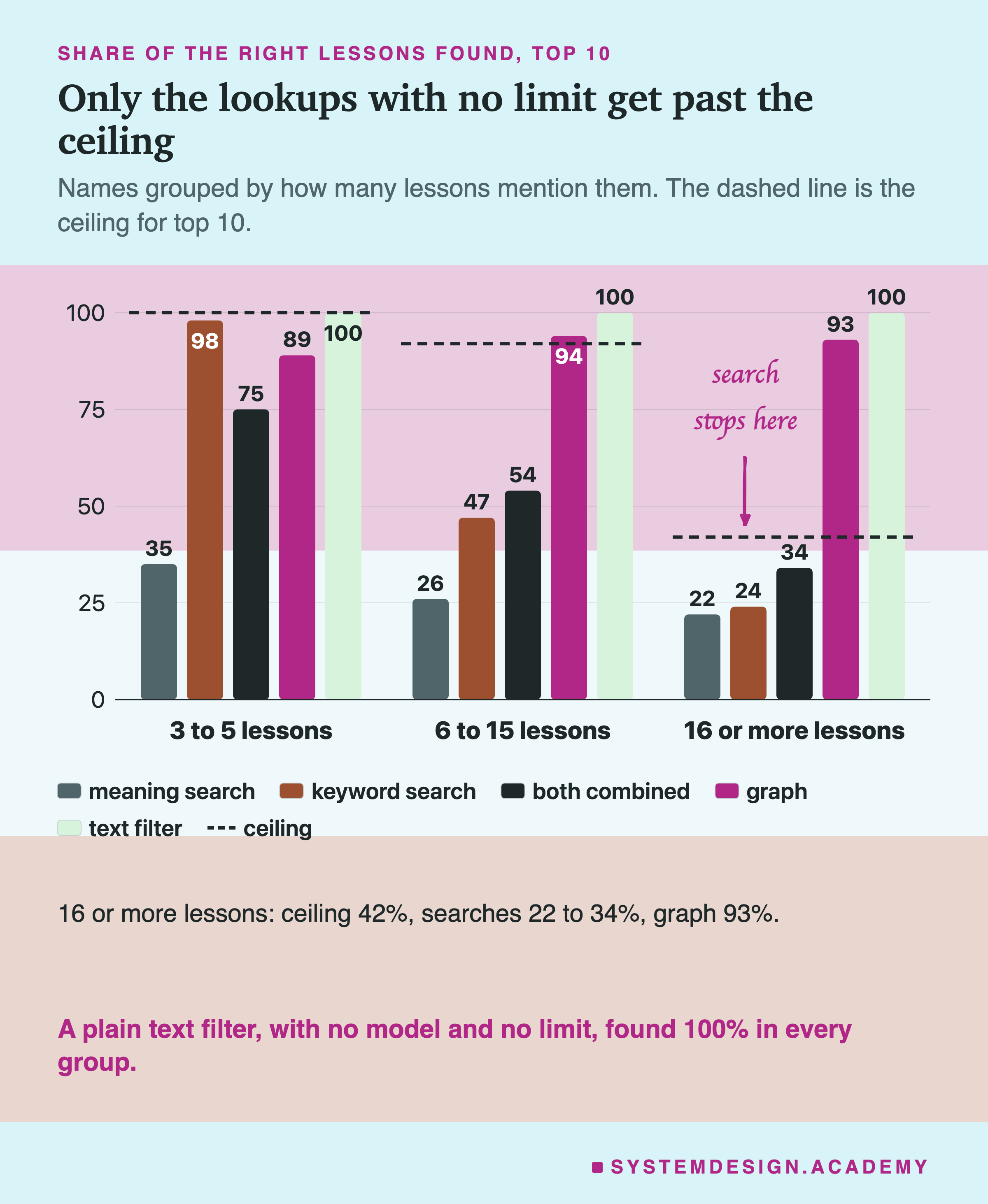
| how many lessons mention the name | ceiling for top 10 | meaning search | keyword search | both combined | name index | text filter |
|---|---|---|---|---|---|---|
| 3 to 5 (14 names) | 100% | 35% | 98% | 75% | 89% | 100% |
| 6 to 15 (20 names) | 92% | 26% | 47% | 54% | 94% | 100% |
Is the Index's Lead Over Search Just Luck?
We can compare the name index and search name by name, because both answered the same 48 questions.
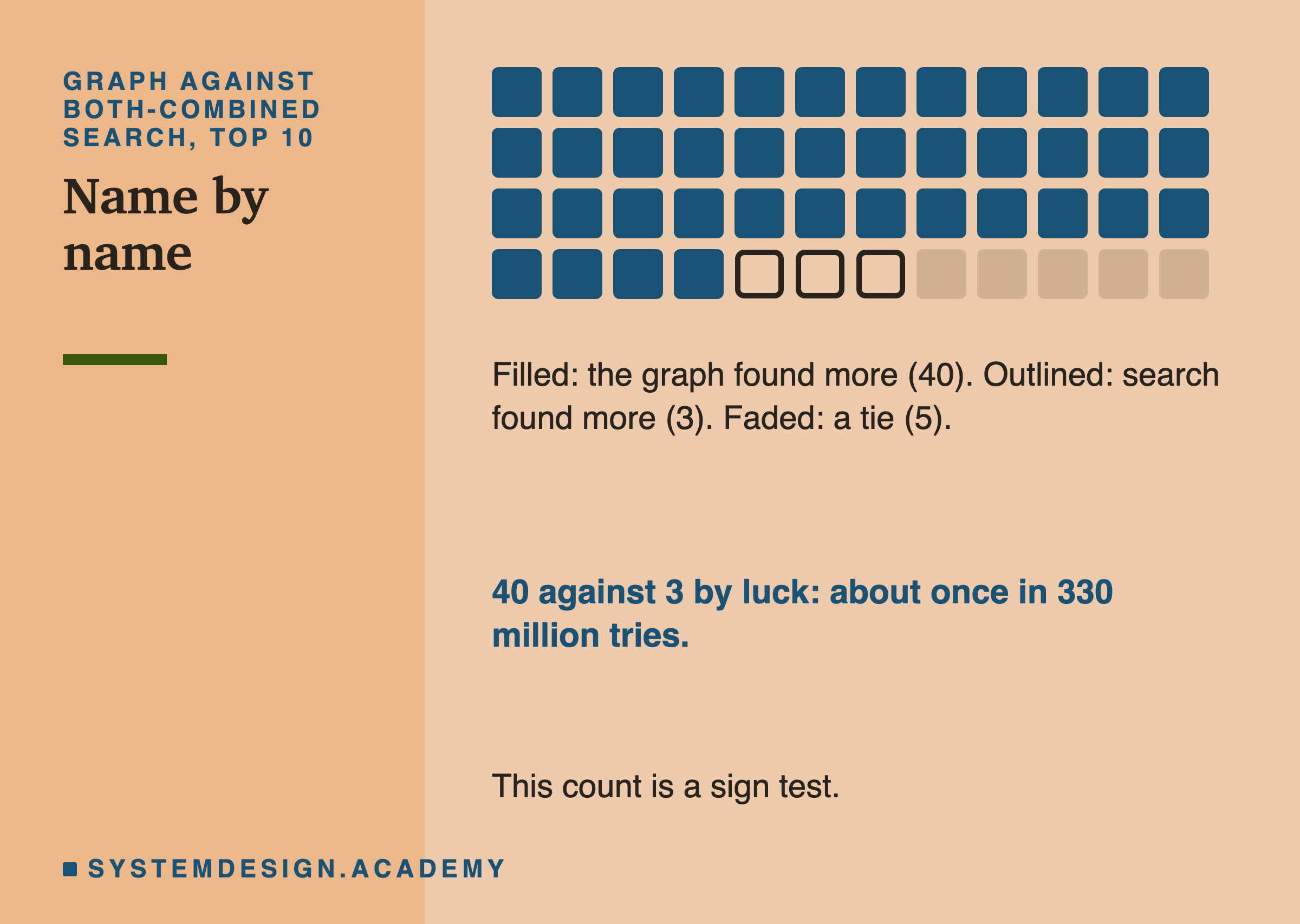
For 40 of the 48 names, the index found more right lessons than both-combined search did at top 10. For 3 names, search found more. For 5, they tied, so we set those aside.
Think of each of the other 43 names as a coin flip. If the index and search were equally good, each side would win about half the time. Winning 40 and losing 3 by luck happens about once in 330 million tries. This way of counting is called a sign test.
One honest note. Some names share lessons, so the 48 names are not fully separate coin flips. Treat "once in 330 million" as "very, very unlikely", not as an exact number.
Now look only at the rare names, the ones in 3 to 5 lessons. There, against keyword search, the index found more for 1 name and fewer for 4. That is too few names to call a real difference. For rare names, keyword search at top 10 found 49 of the 50 right lessons, and the index found 45.
A Surprise: Meaning Search Is Weak at Names
In lesson 101, "Who Wrote Your Test Questions?", meaning search was the best of the three for questions in everyday words. Here it is the worst. For rare names it found 35 percent. Keyword search found 98 percent.
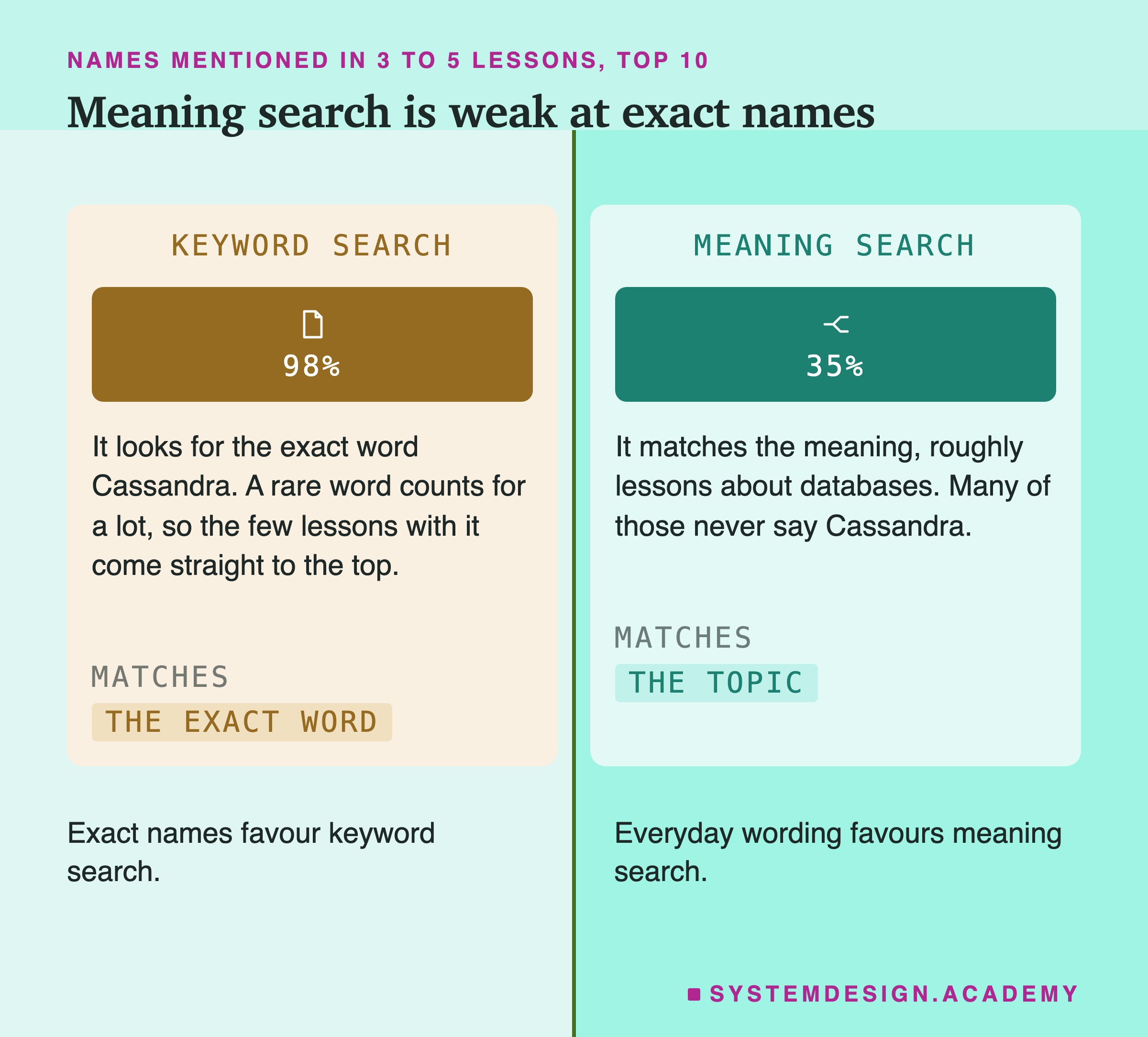
Keyword search gives a word more weight when few documents contain it. "Cassandra" is in only 5 lessons, so it is a heavy word, and those 5 lessons rise to the top.
Meaning search turns the whole question into numbers that capture its meaning. The most likely reason it did badly: "Which lessons mention Cassandra?" means something close to "lessons about databases", so it returns database lessons in general, and many never say "Cassandra". This lab did not test that reason directly. Also, this model can take a short label before each text, saying if it is a question or a document. This lab did not use that label. That may have made meaning search a little weaker.
Name by name, keyword search found more than meaning search for 36 names, and fewer for 8. By luck, that would happen about once in 39,000 tries, though, as before, treat that as "very unlikely", not as an exact number.
So the right search depends on the question. Everyday wording favours meaning search. Exact names favour keyword search. This is one reason many teams run both.
Where the Name Index Went Wrong
The index found 579 of the 620 right answers. It missed 41. The lab sorted every miss into one of three reasons.
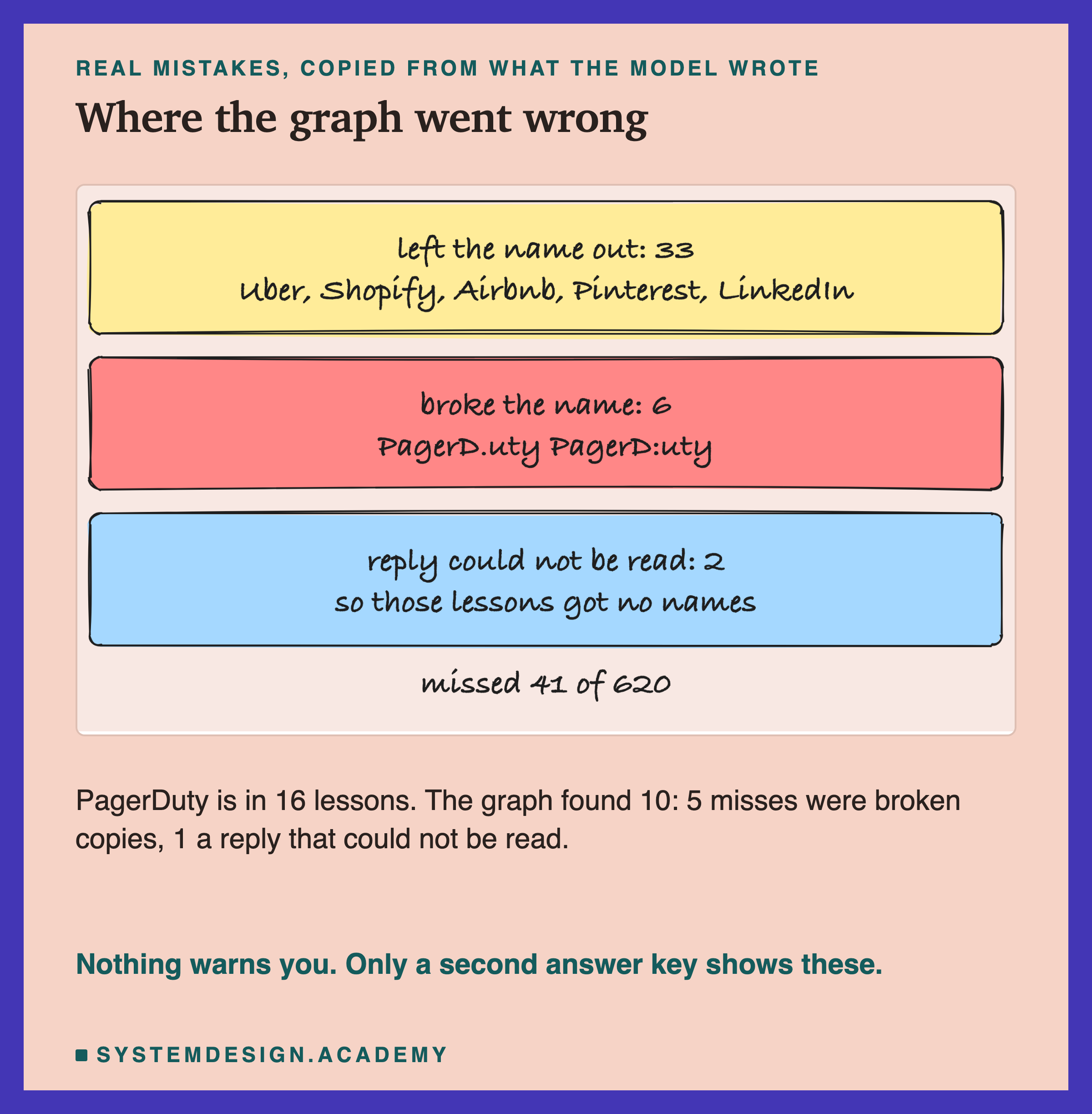
1. It left the name out: 33 misses. This is the main reason. One lesson says "Uber, Shopify, Airbnb, Pinterest, LinkedIn, they all run massive MySQL deployments." The model wrote "MySQL", "binlog", "Debezium" and "", but none of the five company names. That one lesson caused 6 of the 41 misses, because the model also skipped Facebook, which the same lesson names a few words earlier.
2. It broke the name while copying it: 6 misses. The model wrote "PagerD.uty" and "PagerD:uty" instead of "PagerDuty". A broken name matches nothing. PagerDuty is in 16 lessons, and the index found 10. Of the 6 it missed, 5 were broken copies like these, and 1 was a lesson whose reply could not be read. The model broke other names too, like "ChatG:PT" and "PyT.orch", but those names were not among the 48, so they did not count here.
3. The reply could not be read: 2 misses. For 7 of the 818 lessons, the model's reply could not be read as a list, so those lessons got no names at all. Two of them held right answers.
The index also listed 8 lessons that the answer key does not count. Seven of them contain the name only inside a web address, like "google.com". One has "" in small letters. The answer key needs the exact capital letters, and the index does not.
None of these mistakes came with a warning. The only way to find them is what this lab did: check the index against an answer key made a different way.
Every Name, Running
This is the second part of the real report: every one of the 48 names, from most common to least.
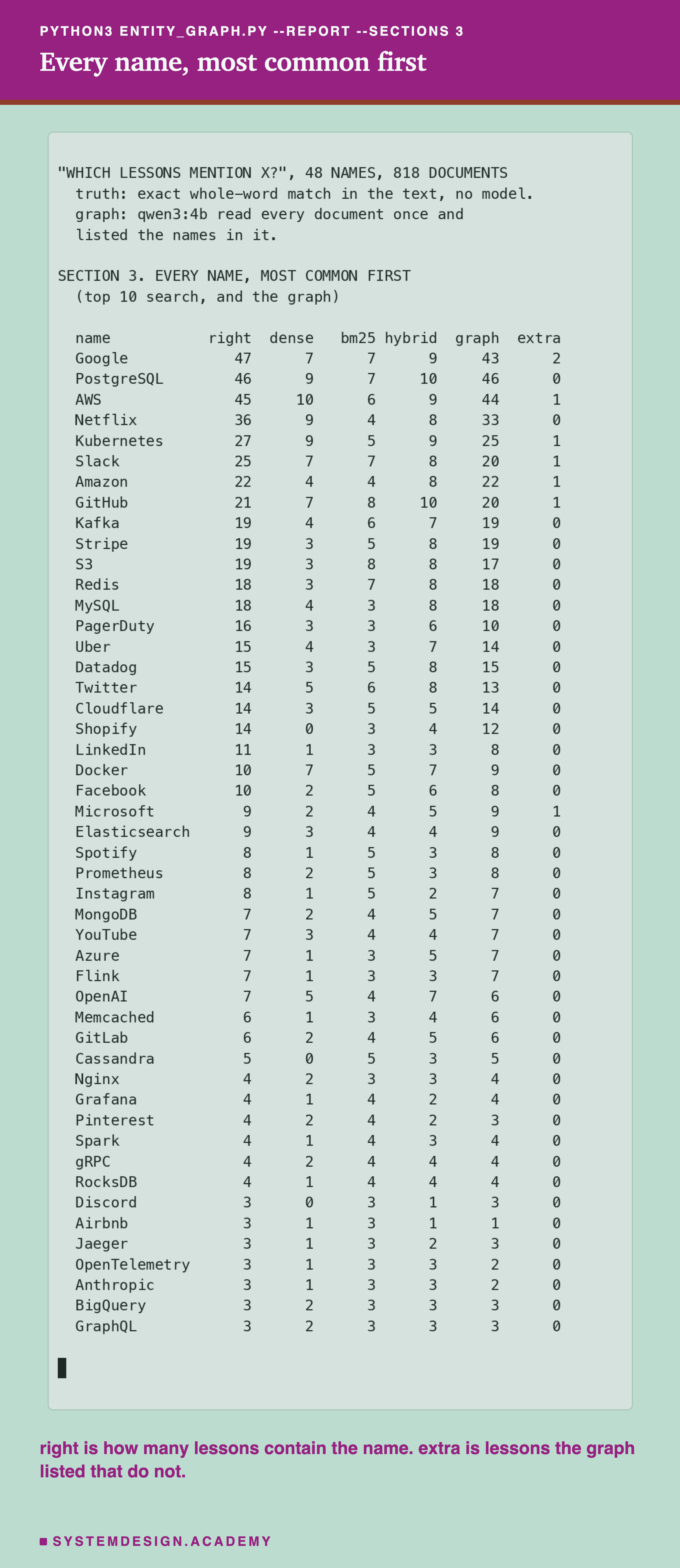
Find PagerDuty in the list. The searches found 3, 3 and 6 of its 16 lessons. The index found 10. Better, but not the 16 it should have: 5 broken copies and 1 reply that could not be read.
Why Not Just Return More Results?
A fair question: why not ask search for 20 results instead of 10?
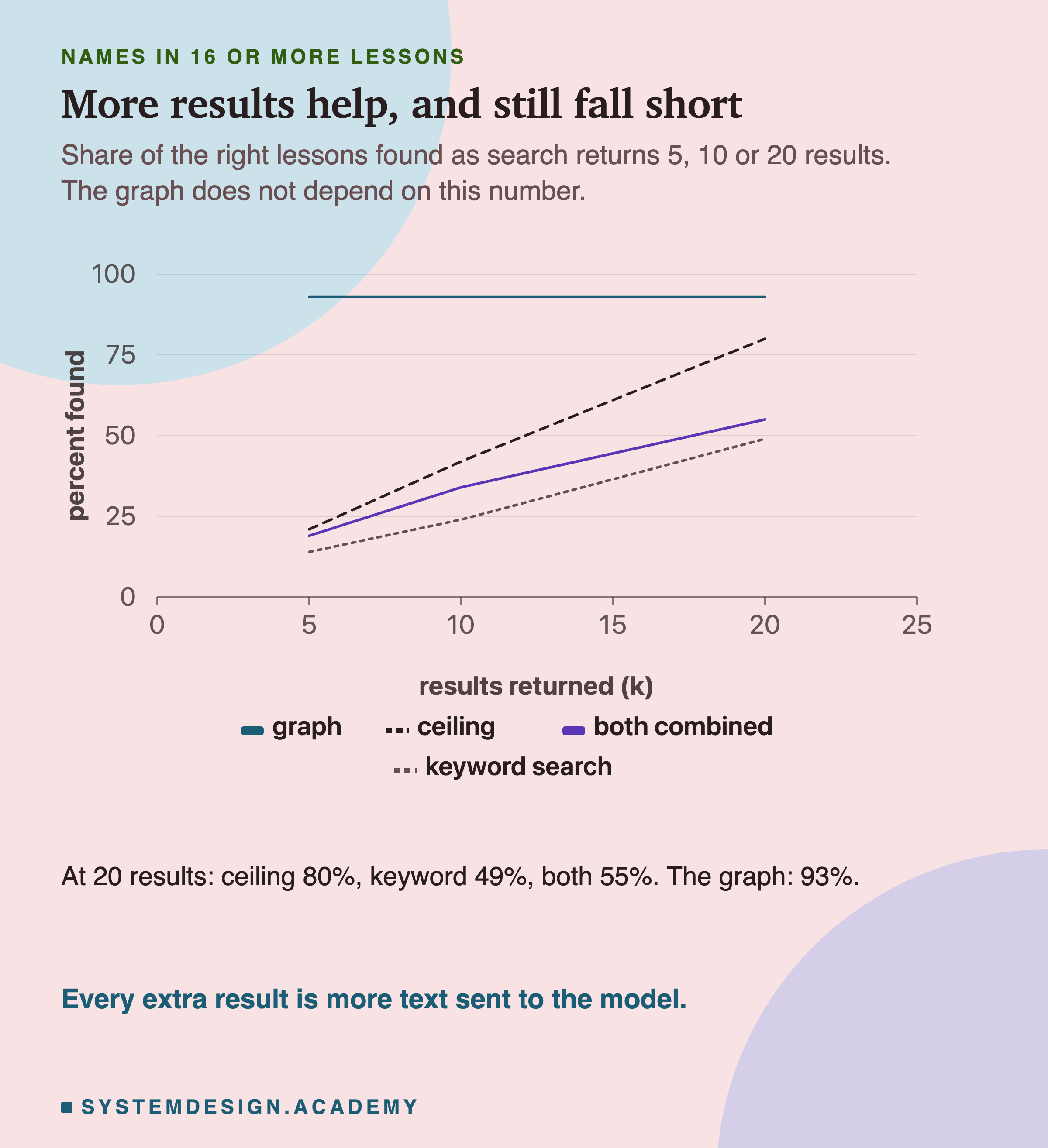
It helps. With 20 results, keyword search found 95 percent for names in 6 to 15 lessons, because 20 places are enough to hold them all. For rare names it found all 50 right lessons.
But for common names, 20 is still not enough. At 20 results, the ceiling for names in 16 or more lessons is 80 percent, and keyword search found 49 percent.
And more results have a cost. In a app, every result is sent to the language model as text, and more text costs more money and more time. More results also means more wrong ones. For a name in only 3 lessons, a top-10 search must return at least 7 wrong lessons, because only 3 right ones exist.
The Simplest Answer: A Plain Text Filter
Let me be honest about what the last column means.
For a question like "which lessons mention Kafka?", where Kafka is written the same way everywhere, you do not need a model or a graph. You need a text filter with no limit: "give me every document whose text contains the word Kafka". Almost every database can do this. In , the language most databases use, it is a WHERE condition that keeps only rows containing the word. Search tools like Elasticsearch, and the text search built into the Postgres database, can return all matches and count them.
In this lab, that filter found all 620 right answers and listed 10 extra, all of them the name in small letters or inside a web address. It needed no model calls, and it cannot break a name while copying it.
So when does a model-built index earn its cost? When the thing people ask about is not written the same way everywhere:
- Different spellings. "Postgres", "PostgreSQL" and "PG" are one database. A text filter needs a list of every spelling.
- Mentions without the name. "Our payment provider went down" may be about Stripe without saying "Stripe".
- Questions about links between names. "Which companies use both and Cassandra?" needs the names stored, and ideally how they relate.
This lab tested none of those three. It tested exact names only, where the plain filter wins. That is a real result, and it is the one to remember: try the simple filter first.
Run the Numbers Yourself
This box holds the real per-name results from the lab. Press Run. It prints the share found for each method, grouped by how common the name is.
Then change K to 5 or 20 and run it again. Watch the ceiling and the search numbers move, while the graph stays the same.
When to Use Each One, and When Not To
Use top-k search when a question has one right document, or a few, like "how does store messages?". That is what it is built for.
Do not use top-k search when the question asks for all of something, or how many, and the answer may be longer than k. It cannot see past its last place.
Use a plain text filter first when people ask about exact names: "which contracts name Acme Ltd?", "how many tickets mention the refund page?". It returns every match, with no model and no limit. In this lab it found all 620 right answers.
Use a model-built name index when the same thing is written in different ways, or mentioned without its name, or people ask how names connect. Those are the cases a text filter cannot handle alone.
Whatever you build, check it against an answer key made another way. This lab found 41 silent misses only because it had one.
What This Lab Cannot Tell You
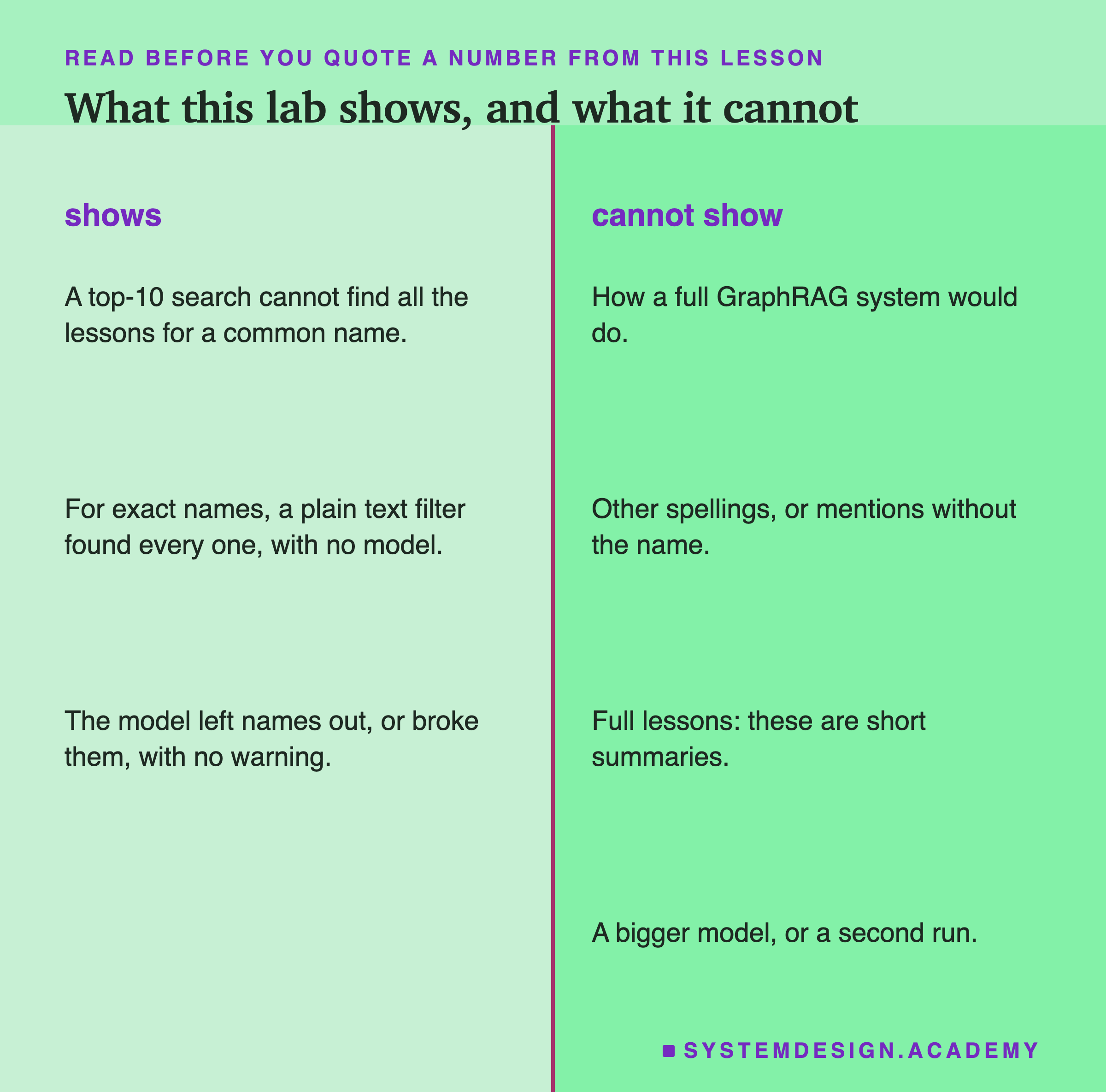
The answer key favours the text filter. The key is an exact text match, and the filter is almost the same match. So the filter's 100 percent is partly by design. A lab about different spellings or mentions without a name would mark the methods very differently.
"Mentions" means the exact name appears. A lesson about that never writes the word "Kafka" does not count. That keeps the answer key fixed and checkable, but it is narrower than "about".
Short summaries, not full lessons. Each document is a summary of about 750 characters. On longer text, a model may miss more names.
One small model, one run. qwen3:4b is small. A bigger model would probably miss fewer names, and would cost more per call. A second run could also give slightly different results.
Only the first step of GraphRAG. No relations, no merged spellings, no groups or summaries. This lab says nothing about those parts.
48 well-known names. The model may find famous names more easily than the names of your own products.
Six Steps for Your Own App
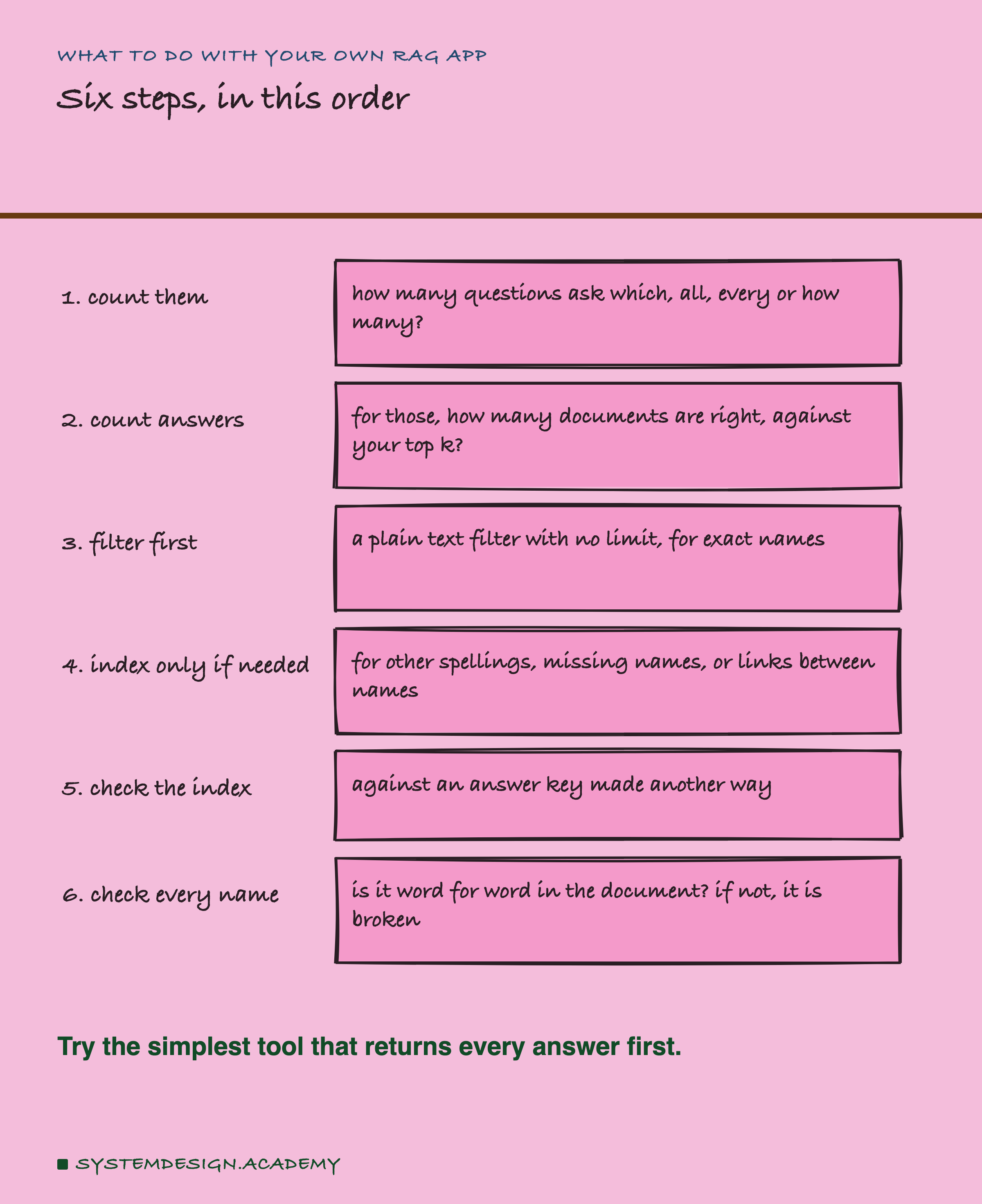
1. Count the "all of" questions. Your logs are the records your app keeps of what users typed. Look through them. How many questions ask "which", "all", "every" or "how many"? If almost none do, you may not need anything new.
2. For those questions, count the right documents. Pick a few names people ask about. How many documents contain each one? If it is more than your top k, search cannot answer those questions, however good it is.
3. Try a plain text filter first. Send "all of" questions about exact names to a text filter with no limit, not to top-k search. It is cheap, and it never misses a name that is spelled the same way.
4. Build a model index only where the filter fails. That means different spellings, mentions without the name, or questions about how names connect. Keep a list of spellings for each name, like "Postgres" and "PostgreSQL", and use it for the questions too.
5. Check the index against an answer key made another way. For a sample of names, compare it with a text filter. That is how this lab found its 41 silent misses.
6. Check every name the model wrote. Does it appear, word for word, in the document? If not, it is broken or made up. In this lab, 131 of the 7,417 names the model wrote were not in the text. Also read each document again when it changes, and remove the names of documents you delete.
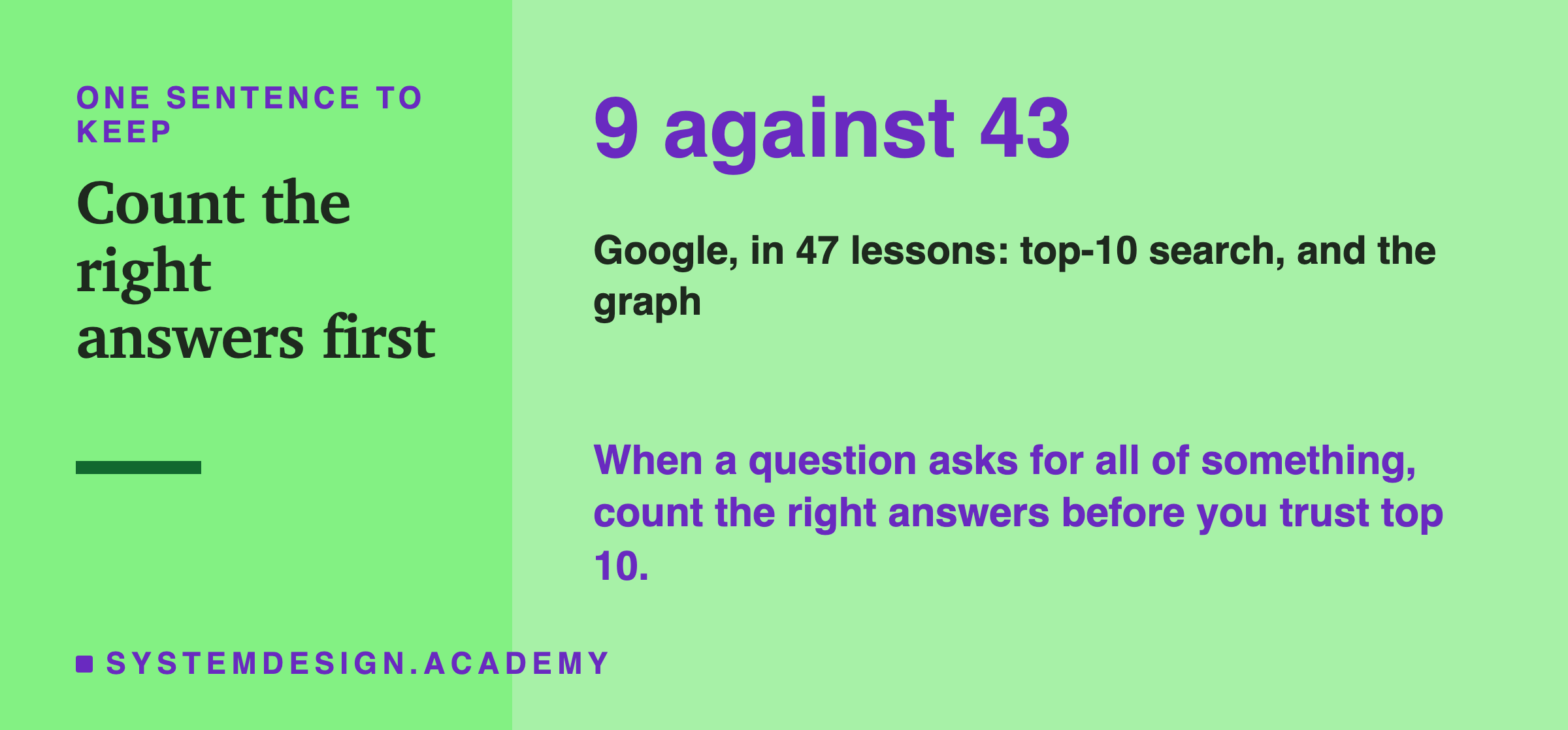
This is the whole lesson in one line. When a question asks for all of something, count how many right answers there are before you trust a top-10 search. Then try the simplest tool that returns them all.
Knowledge Check
Knowledge Check
5 questions - Score 80% to pass
A name appears in 40 of your documents. Your RAG search returns the top 10. What is the most it can ever find?
What is the most likely reason meaning search did badly on questions like 'Which lessons mention Cassandra?'
The name index missed 6 of the 16 lessons that mention PagerDuty. What was the main reason?
Your users ask 'which contracts mention supplier X?', and each supplier name is always written the same way. What should you try first?
How did the lab find the name index's 41 silent misses?