Ansible
An agentless automation tool for configuration management, application deployment, and orchestration. Uses YAML playbooks and connects over SSH.
What is Ansible?
In short
Ansible is an open-source automation tool that configures servers, deploys applications, and orchestrates infrastructure by running tasks described in YAML files called playbooks. It is agentless, meaning it connects to target machines over plain SSH and needs no software installed on them beforehand.
What Ansible Is
Ansible is a tool for automating the work of setting up and managing servers. Instead of logging into 50 machines by hand to install Nginx, edit a config file, and restart a service, you write down those steps once in a file and Ansible carries them out on all 50 machines for you.
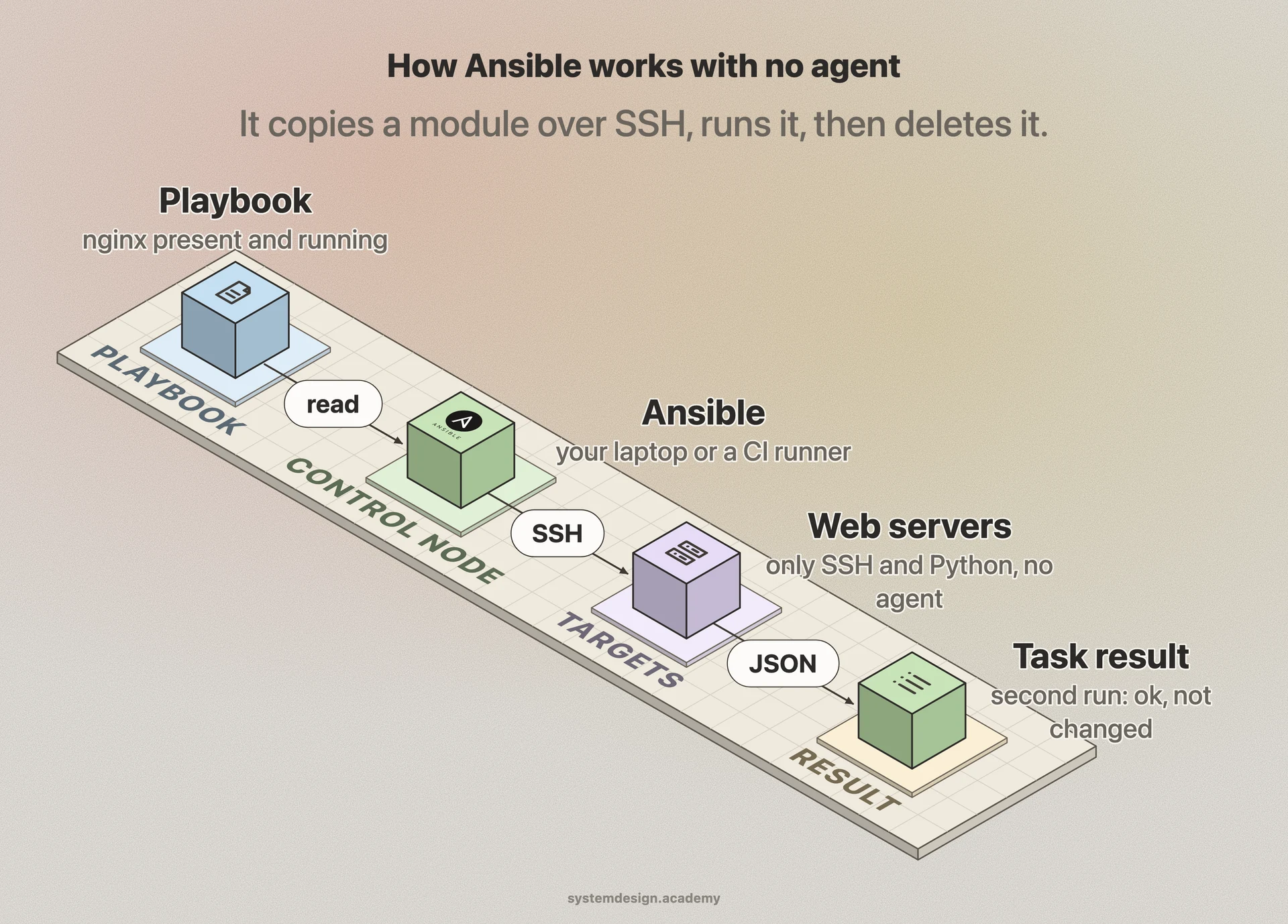
It was created by Michael DeHaan in 2012 and acquired by Red Hat in 2015. Its biggest distinguishing feature is that it is agentless. Tools like Puppet and Chef require a running daemon installed on every managed machine. Ansible needs nothing on the target except an SSH server and Python, both of which almost every Linux box already has. The control node, your laptop or a CI runner, pushes instructions out over SSH.
You describe the desired end state in YAML, not the steps to get there. You say the package nginx should be present and the service nginx should be running. Ansible figures out whether it needs to act. This property is called idempotency: running the same playbook five times produces the same result as running it once, and tasks that are already in the right state are reported as ok rather than changed.
How It Works Under the Hood
The three core pieces are the inventory, modules, and playbooks. The inventory is a list of the hosts Ansible manages, grouped into named sets like webservers or databases. It can be a static INI or YAML file, or generated dynamically by querying AWS, GCP, or Azure for the live list of machines.
Modules are the small programs that do the actual work, one per task type. The apt module installs Debian packages, the copy module pushes files, the service module starts and stops daemons, the user module manages accounts. There are thousands of them. When a play runs, Ansible copies the relevant module to the target over SSH, executes it there, captures the JSON result, and deletes the module file. Nothing is left behind.
A playbook ties it together. It is a YAML file containing one or more plays, and each play maps a group of hosts to an ordered list of tasks. Reusable bundles of tasks, files, and variables are packaged as roles, and the public Ansible Galaxy registry hosts thousands of community roles you can pull in. Ansible runs tasks across many hosts in parallel, five at a time by default, controlled by the forks setting.
When To Use It And The Trade-offs
Reach for Ansible when you need configuration management (keeping a fleet of servers in a known state), application deployment (rolling new code out across tiers in order), or one-off orchestration (run a database migration, then restart the app servers, then clear the cache). It shines for managing existing servers and network gear, and for gluing together steps across many machines.
The trade-offs are real. Because it pushes over SSH and copies Python to each host, Ansible is slower than agent-based tools on very large fleets of thousands of nodes, though strategies like free mode and mitogen help. There is no constantly running agent enforcing state, so drift between runs is not auto-corrected; you have to re-run the playbook on a schedule or via a controller like AWX or Red Hat Ansible Automation Platform.
It is also worth knowing where Ansible stops and Terraform begins. Terraform provisions infrastructure (it creates the VMs, networks, and load balancers and tracks them in state). Ansible configures what runs inside those machines. Many teams use Terraform to build the servers and Ansible to set them up, and the two are complementary rather than competing.
A Concrete Example
Say you run three web servers behind a load balancer and need to deploy a new release with zero downtime. You write a playbook with a play targeting the webservers group. The serial keyword set to 1 tells Ansible to handle one server at a time instead of all three at once.
For each server, the tasks remove it from the load balancer pool, pull the new code with the git module, run any database-safe migrations, restart the app service using the systemd module, wait for a health check URL to return 200 with the uri module, then add the server back to the pool. Ansible moves to the next server only after the current one is healthy.
If the health check fails on server two, the play aborts and servers one and three are untouched, so you never take the whole fleet down. Run the same playbook a second time on already-updated servers and the package, file, and service tasks report ok with no changes, because the desired state already matches.
Where it is used in production
Red Hat
Owns and develops Ansible, and sells the enterprise Ansible Automation Platform with the AWX controller, RBAC, scheduling, and a visual job dashboard.
NASA
Used Ansible to consolidate dozens of applications onto AWS, cutting patching and provisioning that took hours down to minutes across its cloud estate.
Cisco
Ships Ansible network modules for IOS, NX-OS, and IOS-XE so operators can configure switches and routers as code rather than CLI by hand.
Atlassian
Used Ansible to manage its server fleet and standardize configuration across the infrastructure behind products like Jira and Bitbucket.
Frequently asked questions
- What does agentless mean for Ansible?
- It means you do not install any Ansible software on the machines you manage. The control node connects to each target over standard SSH and uses the Python interpreter that is already there. This removes the work of deploying, securing, and upgrading an agent on every host, which is a major operational cost in agent-based tools like Puppet and Chef.
- Ansible vs Terraform, which should I use?
- Use Terraform to provision infrastructure: create VMs, networks, and load balancers and track their state. Use Ansible to configure what runs inside those machines: install packages, write config files, and deploy code. They are complementary. A common setup is Terraform to build the servers and Ansible to set them up afterward.
- Does Ansible need a database or central server?
- No. Plain Ansible runs from any machine with the ansible package and your playbooks, with no central server or database required. If you want a web UI, scheduling, role-based access, and audit logs, you add a controller like the open-source AWX or Red Hat Ansible Automation Platform, but that layer is optional.
- What is idempotency in Ansible?
- Idempotency means running a playbook many times yields the same end state as running it once. Tasks describe the desired state, like a package being present, so if the state already matches Ansible reports ok and changes nothing. This makes it safe to re-run playbooks to enforce configuration without side effects.
- What language are Ansible playbooks written in?
- Playbooks are written in YAML, a plain-text format that is easy to read without programming experience. Variable substitution and conditionals use Jinja2 templating. The modules that do the actual work are mostly written in Python and run on the target hosts.
Learn Ansible hands-on
This page explains the idea. The full lesson lets you step through the ring as servers join and leave, read the implementation, and check yourself with a quiz. It is one of 760+ lessons in the System Design Masterclass, from your first API call to distributed consensus. Eleven Foundation lessons are free, no signup. Lifetime access is ₹499 in India or $7.99 worldwide, one payment, no subscription.
Related lessons
Lessons that touch on Ansible as part of a larger topic.
See also
Related glossary terms you might want to look up next.
Terraform
An open-source IaC tool by HashiCorp that provisions infrastructure across any cloud provider using declarative HCL configuration. Plan, apply, destroy.
Infrastructure as Code
Managing servers, networks, and cloud resources through declarative configuration files instead of manual setup. Terraform, Pulumi, and CloudFormation are IaC tools.
CI/CD
Continuous Integration and Continuous Deployment: automating the process of testing and deploying code. Push code, tests run, and it ships to production automatically.
Virtual Machine
A software emulation of a physical computer running its own OS on shared hardware. Heavier than containers but provides stronger isolation.
Hypervisor
Software that creates and manages virtual machines by abstracting physical hardware. Type 1 (bare-metal) runs directly on hardware; Type 2 runs on an OS.
Cloud Region
A geographic area containing one or more data centers (availability zones). Choosing the right region reduces latency and satisfies data residency requirements.