CI/CD
Continuous Integration and Continuous Deployment: automating the process of testing and deploying code. Push code, tests run, and it ships to production automatically.
What is CI/CD?
In short
CI/CD stands for Continuous Integration and Continuous Delivery (or Deployment). Continuous Integration means every code change is automatically built and tested the moment it merges, so bugs surface in minutes instead of weeks. Continuous Delivery/Deployment means that once those tests pass, the same change is automatically packaged and shipped toward production, either at the click of a button (delivery) or with no human at all (deployment).
What CI/CD actually means
The two halves solve two different problems. Continuous Integration (CI) is about catching breakage early. Instead of letting developers work on private branches for weeks and then fighting a painful merge, everyone pushes small changes to a shared branch many times a day. Each push triggers an automated build and test run. If your change breaks the build, you find out in 5 to 15 minutes, while the change is still fresh in your head.
Continuous Delivery and Continuous Deployment cover what happens after the tests pass. Continuous Delivery means the build is automatically turned into a deployable artifact and pushed all the way to a staging environment, ready to release with one manual approval. Continuous Deployment goes one step further: there is no manual approval at all. A green build on the main branch goes straight to production on its own.
People write both as CD, which causes endless confusion. The practical difference is one human click. A bank running Continuous Delivery wants a person to sign off before money-moving code ships. A company like Amazon, which deploys to production thousands of times a day, leans on full Continuous Deployment for most services.
How a pipeline runs under the hood
A CI/CD pipeline is a sequence of stages defined in a config file that lives in your repo, like .github/workflows/ci.yml for GitHub Actions or .gitlab-ci.yml for GitLab. When you push a commit or open a pull request, the platform spins up a fresh, isolated runner (a container or VM), checks out your code, and walks through the stages in order.
A typical stage order is: install dependencies, run linters, compile or build, run unit tests, build a container image, run integration tests against that image, then deploy. If any stage exits with a non-zero code, the pipeline stops and the commit is marked as failed. Nothing downstream runs.
Two ideas make this reliable. First, every run starts from a clean machine, so there is no leftover state from the last build (this is why a pipeline catches the classic it works on my machine bug). Second, the build produces an immutable artifact, usually a Docker image tagged with the commit SHA. The exact same artifact that passed tests in staging is the one promoted to production, so you never accidentally ship something that was never tested.
When to use it and the trade-offs
Almost any project with more than one engineer benefits from at least CI. The moment two people share a codebase, automated tests on every merge pay for themselves by stopping one person from silently breaking another person's work. Full Continuous Deployment is a stronger commitment: it only works if your test suite is genuinely trustworthy, because a weak suite means you are now shipping bugs to users automatically and fast.
The cost is real. You need to write and maintain tests, keep the pipeline fast (a 40 minute pipeline kills the fast-feedback benefit, so teams aim for under 10 minutes), and pay for compute on the runners. Flaky tests that fail randomly are especially poisonous because people start ignoring red builds, which defeats the whole point.
The trade-off most teams land on is CI everywhere plus Continuous Delivery for risky systems and full Continuous Deployment for low-risk, well-tested services. Safety nets like feature flags, canary releases, and automated rollback on error-rate spikes make aggressive deployment far less scary.
A concrete example
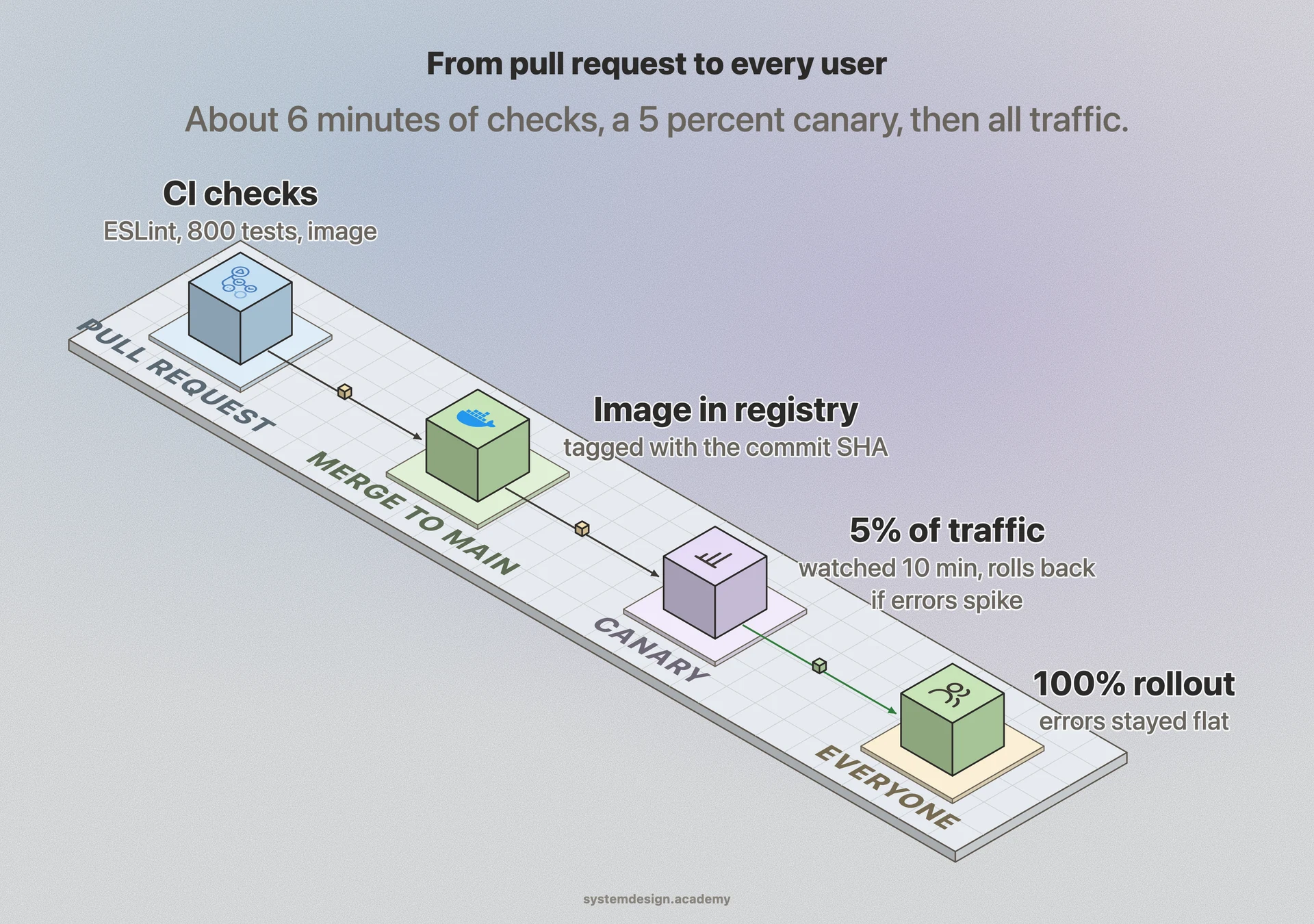
Say you fix a bug in a checkout service and open a pull request on GitHub. GitHub Actions immediately runs your pipeline: it installs Node dependencies, runs ESLint, runs 800 unit tests, and builds a Docker image. All of that finishes in about 6 minutes and posts a green check on your PR. A teammate reviews and merges.
On merge to main, a second pipeline runs. It rebuilds the image, runs integration tests against a throwaway Postgres container, pushes the image to a registry tagged with the commit SHA, and deploys it to a canary that serves 5 percent of production traffic. A monitor watches error rates for 10 minutes. If errors stay flat, the deployment rolls out to 100 percent automatically. If errors spike, it rolls back to the previous image with no human involved. Your bug fix reached every user within roughly 20 minutes of merging, and nobody had to manually copy files to a server.
Where it is used in production
GitHub Actions
Runs CI/CD pipelines defined in YAML directly inside GitHub repos; triggers on push and pull request events using ephemeral runners.
Amazon
Pioneered extreme Continuous Deployment, reportedly deploying to production on the order of thousands of times a day across its services.
Jenkins
The long-running open-source automation server that popularized self-hosted CI/CD pipelines and a huge plugin ecosystem.
GitLab CI
Ships CI/CD built into the GitLab platform via .gitlab-ci.yml, covering build, test, and deploy in one tool.
Frequently asked questions
- What is the difference between Continuous Delivery and Continuous Deployment?
- Both are abbreviated CD and both automatically push tested code toward production. The difference is the last step. Continuous Delivery stops at a ready-to-release state and waits for a human to click deploy. Continuous Deployment removes that click entirely, so a passing build on main goes live with no human approval.
- Is CI/CD the same as DevOps?
- No. DevOps is a broad culture and set of practices for how development and operations teams work together. CI/CD is one specific, concrete practice within DevOps: the automated pipeline that builds, tests, and ships code. You can do CI/CD without fully adopting DevOps, but CI/CD is usually the first thing teams automate on a DevOps journey.
- Do I need CI/CD for a solo personal project?
- You do not strictly need it, but even solo it is cheap to add and catches mistakes. A simple CI step that runs your tests on every push stops you from deploying a broken build, and free tiers on GitHub Actions or GitLab CI cover small projects at no cost. Full automated deployment matters more once real users depend on your project.
- Why should a CI/CD pipeline be fast?
- The whole value of CI is fast feedback. If the pipeline takes 40 minutes, developers context-switch away and stop paying attention to results, which reverses the benefit. Teams aim for pipelines under 10 minutes by running tests in parallel, caching dependencies, and splitting slow integration tests into a separate stage.
- What happens when a pipeline stage fails?
- The pipeline stops at the failing stage and marks the commit or pull request as failed, usually with a red status check. Nothing downstream runs, so a failed build never gets deployed. The developer sees logs from the failing stage, fixes the issue, and pushes again to re-trigger the pipeline.
Learn CI/CD hands-on
This page explains the idea. The full lesson lets you step through the ring as servers join and leave, read the implementation, and check yourself with a quiz. It is one of 760+ lessons in the System Design Masterclass, from your first API call to distributed consensus. Eleven Foundation lessons are free, no signup. Lifetime access is ₹499 in India or $7.99 worldwide, one payment, no subscription.
Related lessons
Lessons that touch on CI/CD as part of a larger topic.
See also
Related glossary terms you might want to look up next.
Docker
A platform for packaging applications into lightweight, portable containers. 'Works on my machine' becomes 'works everywhere.'
Kubernetes
An orchestration platform that automates deploying, scaling, and managing containerized applications. K8s is the operating system for your cloud.
Blue-Green Deployment
A deployment strategy using two identical environments. Traffic switches from blue (current) to green (new) instantly, with easy rollback.
Canary Deployment
Rolling out a new version to a small percentage of users first, then gradually increasing. Like sending a canary into a coal mine to test for danger.
Rolling Deployment
Gradually replacing old instances with new ones, a few at a time. No downtime, but both versions run simultaneously during the rollout.
GitOps
Using Git as the single source of truth for infrastructure and application configuration. Changes are made via pull requests and automatically reconciled by tools like ArgoCD or Flux.